http://dx.doi.org/10.4236/ait.2014.43003
Developing Online Course Based on
Interactive Technology Tools
Jamal Raiyn
Computer Science Department, Al-Qasemi, Academic College of Education, Baqa Al Qarbiah, Israel Email: [email protected]
Received 14 April 2014; revised 14 May 2014; accepted 16 June 2014
Copyright © 2014 by author and Scientific Research Publishing Inc.
This work is licensed under the Creative Commons Attribution International License (CC BY). http://creativecommons.org/licenses/by/4.0/
Abstract
Many people still believe that good teachers are born and not made. Others believe that good teachers figure out how to teach in their own classrooms. We believe that good teachers can be born again in the digital world. The digital world gives teachers powerful, new ideas, strong con-tent, plentiful pedagogy, and connection to virtual schools in real-time. Furthermore the new kind of e-learning environment gives the teacher a new mission. The new kind of e-learning contributes to producing students who are strong thinkers and novel problem solvers. This paper introduces new learning tools based on cloud computing technologies. Furthermore we present innovative learning tools based on interactive e-learning environment.
Keywords
E-Teaching, Cloud Services, Interactive Learning Environment
1. Introduction
This section will introduce e-learning tools that are used in Al Qasemi Academic College.
1.1. Interactive Boards
1.2. Interactive Learning
Traditionally, students sit and absorb knowledge from teacher lecture and notes on the board. Interactive learn-ing means that students are active participants in the learnlearn-ing process. In a learnlearn-ing environment that integrates the interactive board, students are focused on stimulus presented by the teacher on the interactive board and the student, either verbally or physically, interacts with the interactive board [1].
1.3. Interactive Teaching
Interactive teaching begins with a philosophy about teaching with technology and results in a new process of in-teractive teaching and learning. A combination of constructivism, inin-teractive boards, and Web 2.0 tools is a model for thinking about new ways of teaching. In this framework, both students and teachers are central to process. Teachers are responsible for planning, teaching, and facilitating sequences integrated with technology. Students are responsible for constructing and demonstrating knowledge as well as collaborating with peers to create knowledge. In the planning phase, teachers reflect on what tools will enhance cognitive expansion for students such as the implementation of Web 2.0 tools that aid students in accessing and processing information. In the interactive teaching phase, teachers model use of technology to construct knowledge and demonstrate concepts through dynamic interactions. In comparison to traditional teaching with 21st century’s teaching and learning, the changes are based on interactive components of technology enhanced teaching and learning. Tradi-tional teaching presents a more static version of teaching [2].
2. Educational Technology Tools in Al Qasemi Academic College
2.1. Traditional Technology Tools
Researchers have found that interactive boards are not necessarily used interactively [3]. Traditional teaching pedagogy is not based on an interactive model; therefore, it is possible that teachers will use technological tools to support traditional pedagogy rather than an interactive pedagogy. A problem is that teachers are not trained to think about teaching and learning as an interactive process that encourages the use of technology to create inte-ractivity in the classroom.
Traditional models of teaching require a teacher-centered approach; however, with new technology, there is support to transform the teacher centered approach to a student-centered approach. In the student-centered ap-proach, interactive teaching and learning are supported by tools that actively engage both teachers and students. The emergence of new technology and research about how people think is changing the classroom. New genera-tions of educational technology are moving towards modelsand theories that are expected to provide the in-sights necessary to advance educational technology research in promising new directions [4]. New tools are thought to empower educators to change the way teaching and learning occurs. As current social trends require citizens to be more analytical thinkers and to synthesize information, current teaching practices must develop these higher order thinking skills. This should start with a teacher’s philosophy and pedagogy development dur-ing preparation for the profession. If the goal of teachdur-ing with technology is to transform the teachdur-ing and learning process, this must be a foundation in teacher preparation programs. Teachers need time and guidance when using technology in general; however, when the interactive board is integrated, teachers need to develop a particular philosophy about how to use the interactive board, who will use the interactive board, and when it will be used [5]. The interactive board is both a powerful teaching tool as well as a platform to integrate other tech-nology to support instruction such as Web 2.0 tools. Getting to the level of students using techtech-nology in this manner is not easy but it can be accomplished by preparing future teachers to think interactively and to teach in-teractively. Creating an interactive learning environment is paramount as learners are changing and as informa-tion is becoming more accessible to all.
2.2. E-Learning Environment
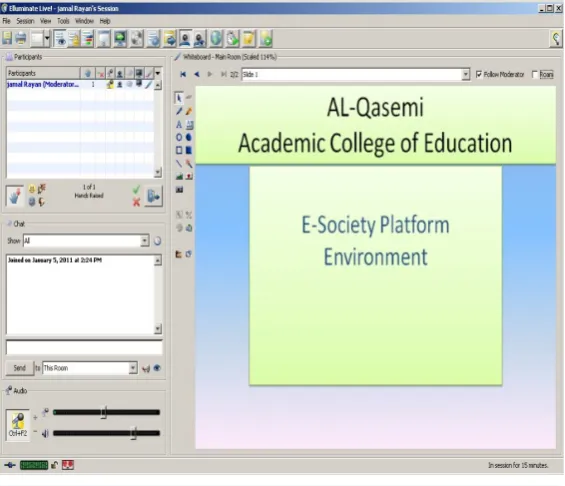
in-ternet or an intranet, or through a mobile device likes a palm pilot. There are two types of e-learning, asyn-chronous or synasyn-chronous e-learning. Synasyn-chronous, which means, the interaction between the teacher and the students happened at the same time. However, in asynchronous e-learning, the interaction between teachers and students do not need to schedule their time around predetermined plan of teacher. The interactivity is one of the major challenge which facing providers of e-learning. The meaningful interactive courseware that is responsive to learners, allowing them to activity participates in the learning process. Nowadays we use the module platform in Al Qasemi Academic College to teach some courses based on distance learning. There are two kinds of dis-tance learning, Synchrone and Asynchrone. The e-learning environment supports various e-learning technology tools. Some tools are used for synchrone distance learning. The synchrone distance learning tools enable com-munications between teacher and learners. Other distance learning tools are asynchronous. Elluminate: Ellu-miante is one of the synchrone distance leanring tool. Figure 1 illustrates the elluminate e-learning environment tool. This technological tool is used for real-time e-learning. The teacher communicates with the students at the same time however in different geographic places. The elluminate supports many functions for teachers also for students. The functions are expressed in browsing internet pages, sending files, running interactive multimedia tools, and shared computer program [8].
2.3. Multimedia Learning System
Multimedia learning is based on the use of multimedia resources like video, audio, graphic, and animation as il-lustrates Figure 2.
2.4. Mobile Learning
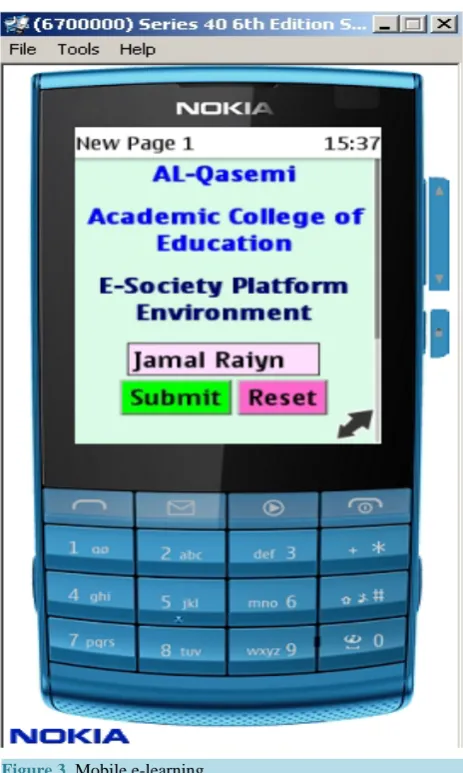
Mobile learning as illustrates Figure 3, also called m-Learning, is the use of mobile, portable, and handheld Computing devices in learning applications and environment. Traxler [9] defined mobile learning from the perspective of the technology: “any educational provision where the sole or dominant technologies are handheld or palmtop devices,” but further added that the learner may also need to be centered in a definition (p. 175). Students may use mobile to access a variety of multimedia resources, such as e-book, Web pages, audio files, presentations, and video segments,
2.5. Interactive Teaching and Learning Strategies
[image:3.595.173.456.467.710.2]Interactive learning in the classroom supports the role of the teacher and the teacher gives his or her knowledge
Figure 2. Assistive technology tool.
[image:4.595.198.430.331.718.2]and experience totally for the teaching session. The main goal of interactive learning is to make learning process more effective and the problem solving quicker—by giving immediate help instead of showing the way to the digital library or Internet [10]. The learning session is very intensive and sometimes stressing but the results are amazing. Interactive learning in the classroom suits specially to subjects in which the knowledge and experience of the teacher is relevant and for example material search is difficult. We have used it until this in teaching “ar-tificial intelligence” and it seems to be very good method there. Interactive learning is very demanding also for the teacher because he or she must be all the time ready to solve minor problems, help with Mathematics and English as well as terminology. Sometimes the teacher has to do the reporting because the task was too difficult for the students.
2.6. E-Book
An electronic book (variously: e-book, eBook, e-Book, ebook, or digital book) is a book-length publication in digital form, consisting of text, images, or both, readable on computers or other electronic devices. One can find various definitions of e-books. Some definitions focus on the actual technology of delivering and using the writ-ten material, and others on words themselves, while most combine all of these elements under on overarching concept.
E-books, like many other forms of computer technology, have two basic components: hardware and software. The hardware for an e-book is any type of technology that displays the “book” on a screen or presents it audibly with a speaker. The software being run on the hardware makes it possible to view or listen to all of the “book” material: text, pictures, sound, and whatever else the author includes. Under this definition, even a DVD dis-playing closed-captioning qualifies as an e-book.
3. Concept and Objective
The major goal of the concept is to set up e-learning platform which is based on modern technology tools for the purpose of interactive e-teaching and e-learning in real-time. The platform supports the wireless technology in particular the interactive technology tools are enable to cooperate with others. The goal is to define a platform that fulfills the requirements of flexible interactive e-learning. The vision of the developed platform is to create system that can overcome the restrictions of the state-of-the-art e-learning system that is bounded to traditional technology tools. The proposed concept is shown in Figure 1 along with the problems to be tackled in the pro-posal. The concept will establish an infrastructure, which is relying on a modern interactive technology. Besides the usage of existing know-how, research on open issues of this standard will be a side-effect result of the pro-posed project. Target outcome of the project will establish an infrastructure interactive e-learning platform, which enables to inter-working between different platforms without restrictions. Nevertheless since not all areas are required at all tasks, the consortium as a whole will cover the following research areas:
1) Interactive E-book;
2) Educational cloud services; 3) Apps for education;
4) Adaptive web;
5) Collaborative agent for learning process management; 6) Agent goal oriented evaluation.
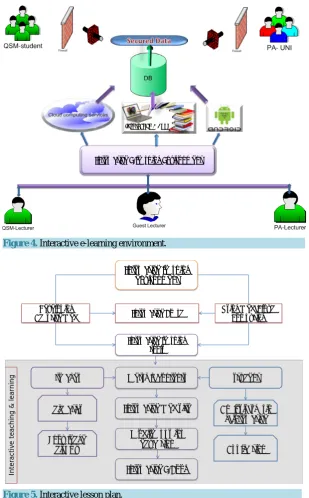
The interactive e-learning environment infrastructure consists of three layers, interactive learning tools, ap-plication domain adaptor and apap-plication course as illustrates Figure 4.
Interactive E-learning in Practice
Figure 5illustrates lesson plan by applying interactive technology tools that will be used in the online course.
Figure 4. Interactive e-learning environment.
Figure 5. Interactive lesson plan.
results. The lecturer is there available, to give instructions and clarification. This short working period in often quite intensive and students really try to solve the assignment, because they are expected to give the presentation. The third part of the lecture is for the presentations. Each group of students select a representative to present their solution to the assignment. If they did not solve the assignment, the lecturer will be ready to present it. The fourth part carrying out computerized test.
4. Conclusion
In this paper we have given an overview about the technology tools that have been used in the education at Al Qasemi Academic College. Furthermore we have introduced a new interactive e-learning approach. The goal of the interactive e-learning approach is to improve the role of teachers and students in e-learning environment.
Interactive E-learning Environment
Interactive E-Book
Interactive learning environment
Developing
Adaptive Web Interactive Board Using Web\Cloud Computing
Interactive learning tools
Metrial\ contents
Interactive Web site
References
[1] Kalyuga, S. (2007) Enhancing Instructional Efficiency of Interactive E-Learning Environments: A Cognitive Load Perspective. Educational Psychology Review, 19, 387-399. http://dx.doi.org/10.1007/s10648-007-9051-6
[2] Sessoms, D. (2008) Interactive Instruction: Creating Interactive Learning Environments through Tomorrow’s Teachers. International Journal of Technology in Teaching and Learning, 4,86-96.
[3] Kennewell, S. (2001) Interactive Whiteboards-Yet Another Solution Looking for a Problem to Solve? Information Technology in Teacher Education, 39, 2-6.
[4] Samaras, H., Giouvanakis, T., Bousionu, D. and Tarabanis, K. (2006) Towards a New Generation of Multimedia Learning Research. AACE Journal, 14, 3-30.
[5] Horton, W. and Horton, K. (2003) E-Learning Tools and Technologies: A Consumer’s Guide for Trainers, Teachers, Educators, and Instructional Designers. Wiley Publishing, Indianapolis.
[6] Moor, L.J., Dickson-Deane, C. and Galyen, K. (2011) E-Learning, Online, and Distance Learning Environment: Are They Same? Internet and Higher Education, 14, 129-135.
[7] Al-Zoube, M. (2009) E-Learning on the Cloud. International Arab Journal of E-Technology, 1, 58-64.
[8] Zhang, D. (2005) Interactive Multimedia-Based E-Learning: A Study of Effectiveness. The American Journal of Dis-tance Education, 19, 149-162. http://dx.doi.org/10.1207/s15389286ajde1903_3
[9] Kukulska-Hulme, A. and Traxler, J. (2005) M-Learning—A Handbook for Educators and Trainers. Taylor and Francis, London.
[10] Saracevic, T. and Dalbello, M. (2001) A Survey of Digital Library Education. American Society for Information Sci- ence and Technology (ASIST 2001), 209-223.
currently publishing more than 200 open access, online, peer-reviewed journals covering a wide range of academic disciplines. SCIRP serves the worldwide academic communities and contributes to the progress and application of science with its publication.