CRAY IOS-V Commands
Reference Manual
SR-2170 8.0.3.2
Copyright © 1995 Cray Research, Inc. All Rights Reserved. This manual or parts thereof may not be reproduced in any form unless permitted by contract or by written permission ofCray Research, Inc.
Portions of this product may still be in development. The existence of those portions still in development is not a commitment of actual release or support by Cray Research, Inc. Cray Research, Inc. assumes no liability for any damages resulting from attempts to use any functionality or documentation not officially released and supported. Ifit is released, the final form and the time of official release and start of support is at the discretion of Cray Research, Inc.
Autotasking, CF77, CRAY, Cray Ada, CRAYY-MP, CRAY-l, HSX, SSD, UniChem, UNICOS, and X-MP EA are federally registered trademarks and CCI, CF90, CFT, CFT2, CFT77, COS, Cray Animation Theater, CRAY C90, CRAY C90D, Cray C++ Compiling System, CrayDoc, CRAY EL, CRAY J90, Cray NQS, CraylREELlibrarian, CraySoft, CRAY T90, CRAY T3D, CrayTutor, CRAY X-MP, CRAY XMS, CRAY-2, CRInform, CRIIThrboKiva, CSIM, CVT,
Delivering the power ... , DGauss, Docview, EMDS, HEXAR, lOS, LibSci, MPP Apprentice, ND Series Network Disk Array, Network Queuing Environment, Network Queuing Tools, OLNET, RQS, SEGLDR, SMARTE, SUPERCLUSTER, SUPERLINK, Trusted UNICOS, and UNICOS MAX are trademarks ofCray Research, Inc.
Alpha, AXP, and DEC are trademarks of Digital Equipment Corporation. CRAY APP, CRAY S-MP, CS6400, and CRAY SUPERSERVER 6400 are trademarks of Cray Research Superservers, Inc. GL, OpenGL, IRIX, and SGI are trademarks of Silicon Graphics, Inc. PostScript is a trademark of Adobe Systems, Inc. Sabre is a trademark of Seagate Technology. Sun and Sun Workstation are trademarks of Sun Microsystems, Inc. UNIX is a registered trademark in the United States and other countries, licensed exclusively through XlOpen Company Limited. X Window System is a trademark of the X Consortium, Inc.
The UNICOS operating system is derived from UNIX® System V The UNICOS operating system is also based in part on the Fourth Berkeley Software Distribution (BSD) under license from The Regents of the University of California.
Requests for copies of Cray Research, Inc. publications should be sent to the following address: Cray Research, Inc.
Distribution Center 2360 Pilot Knob Road Mendota Heights, MN 55120 USA
r--i
Cray Research Software Documentation Map . ; - - - . .
The illustration on the following pages highlights the major body of documentation available for Cray Research (CRI) customers. The illustration is organized into categories by audience designation: Audience End users Application and system programmers System administrators System analysts Operators Description
Those who use the UNICOS operating system, products, applications, or networking software
Those who write or modify system or application code on a CRI
system for the purpose of solving computer system, scientific, or engineering problems
Those who perform system administration tasks, such as installation, configuration, and basic troubleshooting
Those who perform advanced troubleshooting, tuning, and customization
Those who perform operational functions, such as performing system dumps, and those who administer an operator workstation
To use the map, find the audience designation closest to your specific needs or role as a CRI
system user. Note that manuals under other audiences may also be of interest to you; manuals are listed only once, underneath the audience to which they most directly apply. Some manual titles are abbreviated. The date in the map's footer tells you when the information was last revised.
For more information
In addition to the illustration, you can use the following publications to find documentation specific to your needs:
• Software Documentation Ready Reference, publication S0-2122, serves as a general index to the CRI documentation set. The booklet lists documents and man pages according to topiC.
• Software Overview for Users, publication SG-2052, introduces the UNICOS operating system, its features, and its related products. It directs you to documentation containing user-level information.
• User Publications Catalog, publication CP-0099, briefly describes all CRI manuals available to you, including some not shown on the map, such as training workbooks and other
supplementary documentation.
Ordering
To obtain CRI publications, order them by publication number from the Distribution Center:
Cray Research, Inc. Distribution Center 2360 Pilot Knob Road Mendota Heights, MN 55120
USA
Order desk Fax number
Introductory
· Software Overview for Users (SG-2052)-* User's Guide to Online
Information (SG-2143)-*
General
• Software Documentation · Ready Reference
(S0-2122,* User Commands
Reference (SR-2011) ... User Commands Ready
Reference (S0-2056) ...
RQS User's Guide (SG-240S)
UNICOS Environment Variables Ready Reference (S0-2117) UNICOS Index for Man
Pages (SR-2049) Visual Interfaces Guide
(SG-3094)-* Tape Subsystem Guide
(SG-20S1)-* Security (MLS) Guide
(SG-2111). MPP Software Guide (SG-2S0S)-*
UNIX Link
NQE User's Guide (SG-214S). NQE Ready Reference
(S0-2149) Introducing NQE
(IN-2153).
• Available online with CrayDoc
*
Available online with Docview~ Man pages available with the man command
CRL User's Guide (SG-2126,*
Networking
NQS Guide (SG-2105)-* TCPIIP and OSI Network
Guide (SG-2009)-* FTA Guide (SG-2144)-*
RQS User's Guide (SV-31S1)
Text Editors Primer (SG-20S0)
vi Reference Card (S0-2054) ed Reference Card
(S0-20S5)
APPLICATION AND SYSTEM PROGRAMMERS
Cray Ada Reference (SR-3014l* Cray Ada Programming
Guide (SR-3082)*
Cray Standard C
Reference (SR-2074)~ Cray Standard C Ready
Reference (S0-2076) Cray Standard C for
MPP (SR-2506)~
System Libraries (SR-2080) ...
System Libraries Ready Ref. (S0-2147). Scientific Libraries
(SR-2081) ...
Math Library (SR-2138) ... Application Programmer's
tlO Guide (SG-2168) ... Application Programmer
Library Ref. Manual (SG-2165) ... Introducing CrayLibs
(1N-2167). PVM and HeNCE Ref.
(SR-2501)~ OWS-ElIOS-E Reference (SR-3077) ... OWS-ElIOS-E Ready Reference (S0-3080) OWS-ElIOS-E Operator's Guide (SG-3078) OWS-ElIOS-E Administrator's Guide (SG-3079)
Reference (SR-31 08)-Symbolic Machine
Instructions (SR-31 09) Ready Reference
(S0-3110) UNICOS Macros and
Opdefs (SR-2403) ... Cray Assembler
for MPP CAM Reference (SR-2510)~ Loaders Loader Reference (SR-0066)~ SEGLDR Ready Reference (S0-0303) Loader for MPP
Cray MPP Loader Guide
(SG-2514)-Networking RPC Reference (SR-2089)~ Kerberos User's Guide
(SG-2409)-*
• Available online with CrayDoc
*
. CF77 Ready Reference CF90 Commands and (S0-3770) Directives (SR-3901)~ CF77 Commands and CF90 Fortran Language
Directives (SG-3771)~ Reference (SR-3902)~ CF77 Fortran Reference CF90 Ready Reference
(SR-3772)~ (S0-3900)
CF77 Optimization Introducing CF90 SPARC Guide (SG-3773l* Prog. Env. (IN-2155)-CF77 Message Manual Introducing OPE
(SR-3774) (IN-2163)-Cray MPP Fortran
Reference (SR-2504)~
Programming Tools UNICOS Message
System Programmer's Introducing Cray TotalView Guide (SG-2121)~ Debugger (IN-2502)-Compiler Information Simulators
File (CIF) Reference
Cray MPP Simulator Guide (SR-2401)~
(SG-2503)-CDBX Debugger
Source Control Reference (SR-2091)~
CDBX Debugger User's USM User's Guide Guide (SG-2094)~ (SG-2097)~ COBX Reference Card System Calls
(S0-2110) System Calls (SR-2012) ... Program Browser X Window System
(xbrowse)
(IN-2140)-Reference (SR-21 01 )_* Tuning Guide to Parallel
Ready Reference Vector Applications
(SG-2182). (S0-2123)
SYSTEM ADMINISTRATORS AND ANALYSTS
UNICOS Installation Guide (SG-2112) Installation Ref. Card
(S0-2411)
UNICOS Installation Tool Menus and Help Files (SG-2412)
UNICOS System Administration (SG-2113)-*
Administrator Commands Reference (SR-2022)~
CRL Administrator's Guide (SG-2127)*
DMF
DMF Administrator's Guide (SG-2135>* Security and LicensingUNICOS System Security Overview (SG-2141)* FLEXlm Guide
(SG-2181)-* Administrator Commands UNICOS under
Ready Ref. (S0-2413)~ UNICOS
Ras Administrator's Guide (SG-2406)
VAXNMS Link
Ras Administrator's Guide (SV-3152) UuU Administrator's Guide (SG-2156)-* Ras Administrator's Guide (SG-2120) NaE Administration (SG-2150). NaE Installation (SG-5236).
• Available online with CrayDoc
*
Available online with Docview... Man pages available with the man command
lOS Commands
Reference (SR-2408)~ lOS Commands Ready
Ref. (S0-2162) UNICOS Basic Administration Guide
(SG-2416)-*
UNICOS Installation Guide for CRAY Y-MP EL Systems (SG-5201) lOS Messages (S0-2402)
Analysts
Networking fy Driver Administrator's
Guide (SG-2132)
MPP
CRAY T3D Administrator's Guide (SG-2507).
File Formats and Special Front-end Protocol Files Reference Internals (SM-0042)*
(SR-2014)~ USCP Optimization
Data Migration MSP (SN-21 03) Writer's Guide
(SN-2098)* UNICOS Tuning Guide
(SR-2099). UNICOS nmake Card
(S0-2146) Installation and
Configuration Tool Reference (SR-3090)
Record of Revision
The date of printing or software version number is indicated in the footer. Changes in rewrites
are noted by revision bars along the margin of the page.
Version
8.0.3.2
Description
Related
publications
Preface
This publication is for system administrators and operators of
the CRAY J90 series systems.
It
contains lOS administrator
commands that are specific to the CRAY J90 series 10S-V
version 1.3 and UNICOS version 8.0.3.2. It is a helpful reference
after the Cray Research UNICOS operating system and the
10S-V software are installed on your system.
The following list includes Cray Research publications that are
related to the CRAY J90 series, and they are available in the
Distribution Center in Mendota Heights, Minnesota:
• UNICOS Basic Administration Guide for GRAY J90 and
GRAY EL Series, publication SG-2416, contains an appendix
that documents the differences between the EL lOS release
11.3.1 and the IOS-V release 1.3.
• GRAY IOS-V Messages, publication SQ-2172, contains
information on conducting lOS and UNICOS dumps,
recovering from a
root
(j)file system crash, and definitions of
panic and warning messages.
• UNICOS Installation Guide for the GRAY J90 Series,
publication SG-5271, contains information on how to install
the UNJCOS operating system and the most current release of
the Cray Research J90 I/O subsystem (JOS-V) diagnostics, how
to customize your configuration, and how to recover from a
root (/)
file system crash.
• UNIGOS Administrator Commands Reference Manual,
Preface
Conventions
CRAY lOS· V Commands Reference Manual
• Software Overview for Users, publication SG-2052, contains a
brief introduction to Cray Research system hardware and an
overview of the following topics: UNICOS, operating system
features, networking and connectivity, program generation
utilities and products, programming features, and
applications.
The User Publications Catalog, publication CP-0099, describes
the availability and content of all Cray Research hardware and
software manuals that are available to customers.
To
order a manual, either call the Distribution Center in
Mendota Heights, Minnesota, at (612) 683-5907 or send a
facsimile of your request to fax number (612) 452-0141. Cray
Research employees may send electronic mail to
orderdsk
(UNIX system users),
The following conventions are used throughout this manual:
Convention
command
manpage(x)
Meaning
This fixed-space font denotes literal
items such as commands, files, routines,
path names, signals, messages, and
programming language structures.
Man page section identifiers appear in
parentheses after man page names. The
following list describes the identifiers:
1
User commands
1B User commands ported from BSD
2
System calls
3
Library routines, macros, and
opdefs
4
Devices (special files)
4P Protocols
5
File formats
7
Miscellaneous topics
7D DWB-related information
CRAY 10S-V Commands Reference Manual
Preface
Convention
routineO
variable
user input
[
]
<KEY>
Meaning
Routine names followed by an empty set
of parentheses designate a library or
kernel routine; for example, ddcntlO.
Kernel routines do not have man pages
associated with them.
Italic typeface denotes variable entries
and words or concepts being defined.
This bold fixed-space font denotes literal
items that the user enters in interactive
sessions. Output is shown in nonbold,
fixed-space font.
Brackets enclose optional portions of a
command line.
Ellipses indicate that a preceding
command-line element can be repeated.
On man pages, this convention indicates
a key on the keyboard.
The following machine naming conventions may be used
throughout this manual:
Term
Cray PVP systems
Definition
All configurations of Cray parallel
vector processing (PVP) systems, including
the following:
CRAY C90 series (CRAY C9I6,
CRAY C92A, CRAY C94, CRAY C94A,
and CRAY C98 systems)
CRAY C90D series (CRAY C92AD,
CRAY C94D, and CRAY C98D systems)
CRAY EL series (CRAY Y-MP EL,
CRAY EL92, CRAY EL94, and CRAY EL98
systems)
CRAY J90 series (CRAY J9I6 system)
CRAY T90 series (CRAY T94, CRAY T9I6,
and CRAY T932 systems)
CRAYY-MP series (CRAYY-MP2,
Preface
Man page sections
Term
Cray MPP systems
All Cray Research
systems
SPARC systems,
including those from
CRS
CRAY 108-V Commands Reference Manual
Definition
CRAY Y-MP E series (CRAY Y-MP 2E,
CRAYY-MP4E, CRAYY-MP8E, and
CRAY Y-MP 81 systems)
CRAYY-MP M90 series (CRAYY-MP M92,
CRAY Y-MP M94, and CRAY Y-MP M98
systems)
All configurations of Cray massively
parallel processing (MPP) systems,
including the CRAY T3D series
(CRAY T3D MC, CRAY T3D MCA, and
CRAY T3D SC systems)
All configurations of Cray PVP and
Cray MPP systems that support this
release, except Cray Research
Superservers, Inc. (CRS) systems
All SPARC platforms, including systems
offered by Cray Research Superservers,
Inc., that run the Solaris operating system
version 2.3 or later
It
is the objective of Cray Research to become compliant with
IEEE
Std 1003.1-1990 (POSIX.l) and
IEEE
Std 1003.2-1992
(POSIX.2). This manual reflects those ongoing efforts.
POSIX.2 uses utility to refer to executable programs that Cray
Research documentation usually refers to as
commands. Both
terms appear in this document.
In this publication,
Gray Research, Gray, and GRI refer to Cray
Research, Inc. and/or its products.
The entries in this manual are based on a common format. The
following list shows the order of sections in an entry and
CRAY 10S-V Commands Reference Manual
Preface
Section heading
NAME
SYNOPSIS
Description
Specifies the name of the entry and
briefly states its function.
Presents the syntax of the entry.
IMPLEMENTATION Identifies the Cray Research systems to
which the entry applies.
STANDARDS
DESCRIPTION
NOTES
CAUTIONS
WARNINGS
Provides information about the
portability of a utility or routine.
Discusses the entry
in
detail.
Presents items of particular importance.
Describes actions that can destroy data
or produce undesired results.
Describes actions that can harm people,
equipment, or system software.
ENVIRONMENT VARIABLES
RETURN VALUES
EXIT STATUS
MESSAGES
Describes predefined shell variables
that determine some characteristics of
the shell or that affect the behavior of
some programs, commands, or utilities.
Describes possible return values that
indicate a library or system call
executed successfully, or identifies the
error condition under which it failed.
Describes possible exit status values
that indicate whether the command or
utility executed successfully.
Describes informational, diagnostic, and
error messages that may appear.
Self-explanatory messages are not
listed.
FORTRAN EXTENSIONS
BUGS
Describes how to call a system call from
Fortran. Applies only to system calls.
Preface
Online
information
Section heading
EXAMPLES
FILES
SEE ALSO
CRAY 108-V Commands Reference Manual
Description
Shows examples of usage.
Lists files that are either part of the
entry or are related to it.
Lists entries and publications that
contain related information.
The following types of online information products are available
to Cray Research customers:
• CrayDoc online documentation reader, which lets you see the
text and graphics of a manual online. The CrayDoc reader is
available on workstations.
To start the CrayDoc reader at
your workstation, use the cdoc(l) command.
• Docview text-viewer system, which lets you see the text of a
manual online. The Docview system is available on the Cray
Research mainframe.
To start the Docview system, use the
docview(1) command.
• Man pages, which describe a particular element of the UNICOS
operating system or a compatible product.
To see a detailed
description of a particular command or routine, use the man(1)
command.
• UNICOS message system, which provides explanations of
error messages.
To see an explanation of a message, use the
explain(1) command.
• Cray Research online glossary, which explains the terms used
in a manual. To get a definition, use the define(l) command.
• xhelp help facility. This online help system is available
within tools such as the Program Browser (xbrowse) and the
MPP Apprentice tool.
CRAY 10S-V Commands Reference Manual
Preface
Reader comments
If you have comments about the technical accuracy, content, or
organization of this manual, please tell us. You can contact us in
any of the following ways:
• Send us electronic mail from a UNICOS or UNIX system,
using the following UUCP address:
uunet!cray!publications
• Send us electronic mail from any system connected to Internet,
using the following Internet addresses:
[email protected](comments on this
manual)
[email protected]. com (general comments)
• Contact your Cray Research representative and ask that a
Software Problem Report (SPR) be filed. Use
PUBLICATIONSfor the group name,
PUBSfor the command, and
NO-LICENSEfor the release name.
• Call our Software Information Services department in Eagan,
Minnesota, through the Technical Support Center, using either
of the following numbers:
(800) 950-2729
(toll free from the United States and
Canada)
(612)683-5600
• Send a facsimile of your comments to the attention of
"Software Information Services" in Eagan, Minnesota, at fax
number
(612)683-5599.
• Use the postage-paid Reader's Comment Form at the back of
the printed manual.
CONTENTS
am ... .. Alters memory ... ... ... 1
bbltest ... . Executes diagnostic test for I/O buffer board ... 2
bb2test ... .. Executes a disk I/O to and from I/O buffer board test .... ... 3
bg ... .. Puts a suspended lOS command into the background ... 4
bootstruct ... . Displays the boot environment of the lOS ... 5
cat ... . Displays file .... ... ... ... 6
ccltest Executes diagnostic test for I/O buffer board and I/O channel control chip ... ... ... ... ... 7
cc2test Executes a data transfer test from central memory to I/O buffer board to central memory and verifies data ... ... ... 8
cd ... . Changes current directory ... ... ... ... 9
clearlog ... . Clears the statistical log data on an STK 4280 tape drive ... 10
cIs ... . Clears the screen display... ... ... ... ... 11
cmp ... . Performs a byte-by-byte comparison of two files ... 12
conswitch ... .. Toggles console from lOS to UNICOS system console ... 13
count ... . Counts the number of passes that a loop executes ... 14
cp ... .. Copies a file ... 15
crash ... . Interprets lOS system dumps ... 16
dd5itest ... . Executes a confidence test for DD-51 disk drives and controller ... 19
dd5stest ... .. Executes a controller comprehensive test and disk confidence test on any CRA Y J90 supported SCSI disk(s) ... 20
debug ... . Reports and sets the debug level on the lOS ... 21
dflawr ... . Reads Disk Flaw table ... ... ... 22
dflaww ... . Reads Disk Flaw table from lOS disk and writes it to disk ... 25
dformat ... . Formats disk ... ... 27
dIn ... .. Displays central memory ... ... 30
ds ... . Loads and deadstarts a diagnostic test ... ... ... 32
dslip ... . Slips one sector .... ... ... ... .... ... 33
dstat ... .. Outputs activity information about the disk subsystem .... ... 35
dsurf ... .. Performs disk surface analysis .... ... ... ... ... ... 36
echo ... . Displays a message.. ... ... ... ... 39
ed ... . Edits a text file ... ... ... ... ... ... 40
enstat ... Displays Ethernet controller status and statistics ... 47
errpt ... Processes the error report generated by lOS kernel ... 50
fg ... Brings to the foreground an lOS command that is suspended or running in the background ... ... ... ... 51
fro .. ... ... ... ... ... ... .... ... Fills central memory ... ... ... ... ... 52
goto ... Transfers control to a command file ... 53
head ... ... ... ... Displays the first few lines of a specified file ... 54
help ... Displays commands and their syntax ... 55
if... ... ... ... ... ... Allows conditional transfer of control... ... 56
iosdurnp ... Dumps the I/O processor and I/O buffer board memories to file on the NFS mounted file system ... 57
iostart ... Initiates communication between the lOS and UNICOS ... 58
j 90 install ... Maintains and installs software on J90 console, IOS-V, and mainframe ... ... 59
j bs .. ... ... ... ... Performs boundary scan interconnect test on CRA Y J90 series systems ... 60
j con ... ... ... Performs a remote login onto a CRA Y J90 series mainframe ... 62
j config ... CRA Y J90 series configuration file builder and editor ... 63
jobs ... ... ... Displays user commands that are running ... 68
kill ... Kills a user command task ... 69
ld ... ... ... ... ... Loads a file into central memory ... 70
lro ... Loads central memory ... 71
load ... Loads and boots an lOS binary image into the lOP ... 73
Is ... Lists a directory ... 74
1 u ... ... Loads UNICOS ... 75
roc ... ... ... ... Stops all CPU activity... .... ... ... ... 77
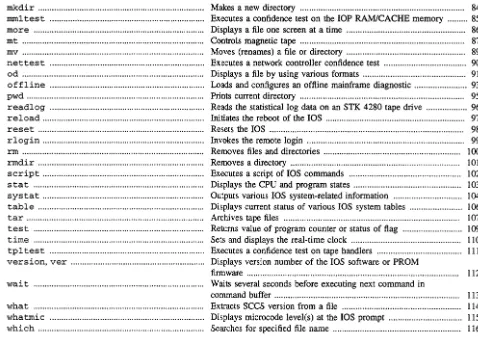
mkdir ... Makes a new directory ... 84
mm! tes t ... Executes a confidence test on the lOP RAMlCACHE memory ... 85
more ... ... Displays a file one screen at a time .... ... ... ... 86
mt ... Controls magnetic tape ... 87
mv ... Moves (renames) a file or directory ... 89
nettest ... Executes a network controller confidence test ... 90
od ... Displays a file by using various formats ... 91
offline ... Loads and configures an offline mainframe diagnostic ... 93
pwd . ... ... ... ... ... ... ... ... Prints current directory .... ... .... ... ... ... .... 95
readlog ... Reads the statistical log data on an STK 4280 tape drive ... 96
reload ... Initiates the reboot of the lOS ... 97
reset ... Resets the lOS ... 98
rlogin ... Invokes the remote login ... 99
rm ... Removes files and directories ... 100
rmdir ... Removes a directory ... 101
script ... Executes a script of lOS commands ... 102
stat ... Displays the CPU and program states ... 103
[image:18.617.72.550.61.398.2]systat ... Outputs various lOS system-related information ... 104
table ... Displays current status of various lOS system tables ... 106
tar ... ... ... ... ... ... ... ... ... ... Archives tape files ... ... ... ... ... ... ... 107
test ... Returns value of program counter or status of flag ... 109
time ... Sets and displays the real-time clock ... 110
tp! tes t ... Executes a confidence test on tape handlers ... 111
version, ver ... Displays version number of the lOS software or PROM firmware ... 112
wai t ... Waits several seconds before executing next command in command buffer ... ... ... ... ... ... 113
what ... Extracts SCCS version from a file ... 114
whatmic ... Displays microcode level(s) at the lOS prompt ... 115
AM(8) AM(8)
NAME
am - Alters memory SYNOPSIS
am address [parceIA] [parceIB] [parcelC] [parcelD]
IMPLEMENTATION
CRA Y J90 series IOS-V DESCRIPTION
NOTES
The am command alters the contents of a 64-bit word in central memory by using the 110 channel. It
accepts the following arguments:
address parcelA parcelB parcelC parcelD
Relative memory address that will be altered.
Value of parcel to alter memory (most significant); default is no change. Value of parcel to alter memory; default is no change.
Value of parcel to alter memory; default is no change.
Value of parcel to alter memory (least significant); default is no change.
This command accesses central memory through the data channels; therefore, the CPU clock must be on. MESSAGES
Expected central memory address
The first argument specified is not a valid central memory address. Invalid parcel parcel#
The parcel value to alter memory to is not valid. Open of memory failed
The open of mainframe central memory fails. Unable to read memory
The read of mainframe central memory fails. Write to memory failed
Writing the parcel values to memory fails. EXAMPLES
The following command writes the value 1111 2222 3333 4444 to central memory word 1000 hexadecimal:
am 1000 1111 2222 3333 4444 SEE ALSO
dm(8) to display central memory fm(8) to fill memory
BBITEST(8) BBITEST(8)
NAME
bbl tes t - Executes diagnostic test for I/O buffer board
SYNOPSIS
bbltest
IMPLEMENTATION
CRA Y J90 series IOS-V
DESCRIPTION
The bbl tes t command lets users run and control an offline I/O buffer board (IOBB) diagnostic.
To test the IOBB thoroughly, you should run this test before running the bb2test command.
WARNINGS
The bbl test command has the following limitations:
• When the operating system is running, you cannot use bbl test because a UNICOS system panic
will occur, which can corrupt data.
• The bbltest command runs only on CRAY J90 series systems.
• The bbl test command does not run from the background.
SEE ALSO
bb2test(8) to execute an IOBB<-> disk test
UNICOS Administrator Commands Reference Manual, publication SR-2022, for additional UNICOS diagnostic commands
BB2TEST(8)
NAME
bb2test - Executes a disk YO to and from YO buffer board test SYNOPSIS
bb2test IMPLEMENTATION
CRA Y J90 series IOS-V DESCRIPl10N
NOTES
The bb2test command lets users run and control an offline YO buffer board (lOBB) test. To test the IOBB thoroughly, you should run the bbltest command.
When running the bb2test command, observe the the following limitations: • When the operating system is active, the bb2test command does not run. • The bb2test command does not run from the boot prompt.
• The bb2test command does not run from the background. SEE ALSO
bbltest(8) to execute a diagnostic test for IOBB
BB2TEST(8)
BG(8)
NAME
bg - Puts a suspended lOS command into the background SYNOPSIS
bg
IMPLEMENTATION
CRA Y J90 series 10S-V DESCRIPTION
BG(8)
The bg command starts a suspended lOS command and allows the interactive shell to run parallel with it.
EXAMPLES
If the dformat command was started in the foreground (for example, the & character was not placed at the end of the command line), and then the user entered <CONTROL-Z> to suspend it, the dformat command can resume execution in the background by entering the following command:
BOOTSTRUCf(8) BOOTSTRUCT(8)
NAME
bootstruct - Displays the boot environment of the lOS
SYNOPSIS
bootstruct
IMPLEMENTATION
CRA Y J90 series 10S-V DESCRIPTION
CAT(8) CAT(8)
NAME
ca t - Displays file SYNOPSIS
cat [-n] filename
IMPLEMENTA nON
CRA Y J90 series IOS-V DESCRIPTION
The cat command displays the contents of a file on the system console disk, which is NFS mounted to the lOS. It accepts the following options:
-n Displays a line number with each line and first byte of that line's byte count.
filename Specifies input file. MESSAGES
Can't find <filename>
CCITEST(8) CCITEST(8)
NAME
ccltest - Executes diagnostic test for I/O buffer board and I/O channel control chip SYNOPSIS
ccltest IMPLEMENTATION
CRA Y 190 series IOS-V DESCRIPTION
NOTES
The celtest command lets users run and control an offline I/O buffer board and I/O channel control chip (IOBB and CC chip) diagnostic.
To thoroughly test the IOBB, you should run this test after the bbltest and bb2test commands.
The eel test command does not run from the background. WARNINGS
When the operating system is running, you cannot use the eel test command because a UNICOS system panic will occur, which can corrupt data.
SEE ALSO
UN/COS Administrator Commands Reference Manual, publication SR- 2022, for additional UNICOS
diagnostic commands
CRAY 190 Series lOS Based Tests, publication HDM-099-0 (This manual is Cray Research Proprietary;
CC2TEST(8) CC2TEST(8)
NAME
cc2test - Executes a data transfer test from central memory to I/O buffer board to central memory and verifies data
SYNOPSIS
cc2test
IMPLEMENTATION
CRA Y J90 series IOS-V
DESCRIPTION
NOTES
The cc2test command executes a data transfer test from central memory to the I/O buffer board (lOBB) and back to central memory. Test initialization includes loading and deadstarting the CPU binary file. Section initialization verifies that the I/O channels selected are connected to the IOBB being tested.
Each data pattern (85 total) is passed to the CPU program, which vector stores that pattern to central memory.
The length of the data buffer when using a 16-Mbyte IOBB is 2,096,896 D CM words. The length of the data buffer when using a 4-Mbyte IOBB is 524,032 D CM words.
The IOBB has the data pattern written to or read from location Ox200 to maximum.
After each pattern is stored to central memory, it is transferred to the IOBB by using the output command channel. After the transfer, the channel error register and IOBB status register are tested for error information.
After each pattern is transferred to the IOBB, it is transferred back to central memory by using the input command channel. After the transfer, the channel error register and IOBB status register are tested for error information.
The data in central memory is then verified by doing vector subtracts of the write buffer data from the read buffer data. A similar sequence is used to transfer address data from central memory to 10BB to central memory.
The cc2test command runs only on CRAY J90 series systems.
When the operating system is active, the cc2test command cannot run; it must be run from the lOS prompt.
SEE ALSO
CRAY J90 Series lOS Based Tests, publication HDM-099-0 (This manual is Cray Research Proprietary;
CD(8) CD(8)
NAME
cd - Changes current directory SYNOPSIS
cd path
IMPLEMENTATION
CRA Y J90 series lOS-V DESCRIPTION
The cd command changes the current directory on the system console disk, which is NFS mounted to the lOS. It accepts the following argument:
path Absolute or relative path name of the desired directory. MESSAGES
<directory name> is not a directory
The directory being changed to is not a directory. Error = <ermo>
A VxWorks system call failed. The ermo printed is an internal error number for debugging purposes.
No such directory!
The directory being changed to does not exist (cannot be opened). EXAMPLES
Example 1: The following command changes the current directory to the root directory: cd /
Example 2: The following command changes the current directory to the boot subdirectory: cd boot
Example 3: The following command changes the current directory to the tes t directory from any other directory:
CLEARLOG(8)
NAME
clearlog -
Clears the statistical log data on an STK 4280 tape drive SYNOPSISclearlog
rssCULIMPLEMENTATION
CRA Y J90 series IOS-V DESCRIPTION
The
clearlog
command clears the statistical log data on an STK 4280 tape drive. Theclearlog
command accepts the following options:C Specifies controller number.
U Specifies the unit number. L Specifies the logical unit (LUN). MESSAGES
Cannot open tape
<tape device>CLEARLOG(8)
An open of the specified tape device fails. This can happen if the tape device was not initialized properly during the lOS load.
Invalid tape device name
The tape device specified is not of type STK 4280. Valid tape device names begin with
rss.
Unable to execute log command
EXAMPLES
CLS(8)
NAME
cIs - Clears the screen display SYNOPSIS
cIs
IMPLEMENTATION
CRA Y J90 series IOS-V DESCRIPTION
CLS(8)
CMP(8) CMP(8)
NAME
cmp - Perfonns a byte-by-byte comparison of two files SYNOPSIS
cmp [-1] [-5] filename] filename2 [skipl] [skip2]
IMPLEMENTATION
CRA Y J90 series 10S-V DESCRIPTION
The cmp command compares filename] and filename2. If you omit options, cmp makes no comment if the files are the same; if they differ, it reports the byte and line number at which the difference occurred, or, that one file is subordinate to the other.
The skip] and skip2 arguments are initial byte offsets into filename] andfilename2, respectively. They can be either octal or decimal; a leading 0 denotes octal.
The cmp command accepts the following option and arguments:
-1 Prints the byte number (in decimal) and the differing bytes (in octal) for all differences between the two files.
-5 Silent. Prints nothing for differing files; sets only exit codes.
filename Specifies the name of the file(s) to be compared.
skip Specifies at which byte the comparison should begin. EXIT STATUS
The exit status is 0 for identical files, 1 for different files, and 2 if an error occurred. MESSAGES
EOF on file
The end-of-file mark is reached. Open of file <file name> failed
CONSWITCH(8) CONSWITCH(8)
NAME
conswi tch - Toggles console from lOS to UNICOS system console SYNOPSIS
conswitch IMPLEMENTATION
CRA Y J90 series 10S-V DESCRIPTION
You can execute the conswi tch command only from the lOS. It is the equivalent of pressing <CONTROL-a> to toggle the console terminal from acting as the lOS console to the UNICOS console interface. This command is used in scripts to automate the transfer of control from the lOS to UNICOS. NOTES
COUNT(8)
NAME
count - Counts the number of passes that a loop executes SYNOPSIS
count init count inc count print IMPLEMENTATION
CRA Y J90 series IOS-V DESCRIPTION
COUNT(8)
The count command enables a counter that counts the number of passes that were executed when a loop is used.
The count command accepts the following arguments:
init Initializes the counter to O.
inc Increments the counter by l.
print Prints the current value of the counter. NOTES
This command executes only in a command script file. MESSAGES
Bad argument
The argument specified is not a valid option. EXAMPLES
CP(8)
NAME
cp - Copies a file
SYNOPSIS
cp source destination
IMPLEMENTATION
CRA Y J90 series IOS-V DESCRIPTION
The cp command copies the contents of filespecJ into filespec2.
The cp command accepts the following arguments:
source File specification of the source file.
destination File specification of the destination file. CAUTIONS
If destination files already exist, they are overwritten.
MESSAGES
Source file
is
a directoryThe source file specified to copy is an existing directory.
Unable to open destination file The destination file cannot be opened.
Unable to open source file
The source file specified cannot be opened.
Unable to stat source file
The source file specified does not exist.
Write failed on <filename> ... aborting
An error occurred while writing the data from the source file to the new destination file. EXAMPLES
Example 1: The following example copies contents of testl into a new file named test2:
cp testl test2
Example 2: The following example copies file f i 1 e 1 from directory / tmp / type to directory fadm/type:
cp /tmp/type/filel fadm/type/file!
CRASH(8E) CRASH (8E)
NAME
crash - Interprets lOS system dumps SYNOPSIS
crash filename IMPLEMENTATION
CRA Y J90 series 10S-V
DESCRIPTION
The crash command reads in the lOS image created by the iosdump command (filename) and displays system structures, raw memory, and symbolic information, prompting users for commands.
The iosdump command creates the dump file in a format that crash expects. By default, it is kept in the / adm/ dumpx/Ddate file name convention; x is the lOS number on which the dump originated, and
date is the day, month, and year the dump occurred.
To exit from the crash utility, type q and press <RETURN>.
The crash command accepts the following argument:
filename Specifies the name of the file that contains the lOS system image.
All addresses are expected to be in hexadecimal format regardless of prefixes. crash automatically determines whether the address given is an I/O buffer board (IOBB) address or lOS memory address and converts the address to a file offset accordingly. crash also recognizes a number that is simply an offset from lOS memory position
o.
The crash command accepts the following subcommands:
dc5i [-f]
dstage
Displays the state of the De5I controller (crash prompts you for the controller number if you do not specify it on the command line) and a history of the I/O parameter blocks that the driver has prepared for the controller in reverse chronological order.
Displays staged disk requests.
dstat Displays the overall disk strategy numbers and the disk devices that were found on that lOS.
errpt Displays the error report.
help [command]
Outputs one help line that specifies the syntax of all available dump commands.
ipi [-f]
Displays the state of the IPI controller (crash prompts you for it if you did not specify it on the command line), along with any active I/O parameter blocks. By default, an 80-column display is generated. To display additional parameter block information, specify the -f option.
jobs Shows the last 16 user commands run (or running at time of dump) on the lOS, along with their arguments and state.
loadmap
CRASH(8E) CRASH (8E)
run [-1] [*][symbol\ address J driver
I
configJuconfig]Namelist command. If given a symbol or address, run searches the namelist for the matching address and/or symbol pair and displays it. If preceded by a
*,
run will output all symbols in the namelist that match the specified symbol pattern (for example, the run *pkt command would output all symbol names that have the string pkt, such as -pkt_tbl and _getpkt). The words driver, config, and uconfig are keywords, and they list the drivers loaded at the time of the dump, the / config file contents, and the UNlCOS config file, respectively (if master lOS).ad [-line count] -[h J a J d] [addr]
Lists the contents of lOS memory at the addr specified according to the base specified (hexadecimal by default).
packet [type] [addr]
The type argument is a letter (A, D, M, and so on) that denotes the type of packet to be displayed, and addr specifies the hexadecimal address of one packet. If you specify type and
addr together, crash tries to display the information at addr as a packet of type type if possible. If you specify only type, crash outputs only the packets found of that type. A history of the last 5120 packets are kept in the lOS; to display it, specify packet without arguments.
q Exits the crash command. s2tape
Outputs status information on each tape attached to the small computer system interface (SCSI) adapter.
sdisk Outputs status information on each disk attached to the SCSI adapter. si2 Outputs status information on the SCSI-2 adapter.
s tape Displays the state of each SCSI tape command issued and the device to which it was issued. status
Outputs the release level of the lOS contained in the dump and the time the PANIC occurred if the dump was the result of an lOS ASSERTION PANIC.
sysbuf
Outputs the last syslogO messages sent to the console. systat
Displays the state of the IOBB buffer pool and IOBB transfer queue at the time of the dump. table [-a] [-f] {pkt\fdlbufltrace}
Displays the packet table (pkt) contained in IOS memory (not IOBB memory), the file descriptor table (fd), the IOBB buffer pool table (buf) (see systat above), or the trace table (trace), respectively. The trace table is defined only after an lOS ASSERTION PANIC. tcb [addr]
The addr argument is the IOBB address to start listing I/O transfer control blocks (IOTCB). By default, this command starts at the beginning of the IOTCB table and outputs each control block. Each control block contains the information that the IOBB requires to complete one transfer to or from the mainframe.
tstat Provides a trace of tape packets from UNlCOS. ttybuf
Displays the tty buffer (any print statements that were queued asynchronously; that is, from an interrupt service routine (ISR) and had not been printed to the console yet).
CRASH(8E) CRASH(8E)
EXAMPLES
The following example provides crash with a dump taken from lOS 0 (indicated by the directory in which it is found; dumpO is lOS 0, dumpl is lOS 1, and so on) from August 11, 1993 (indicated by the name: D81193 .0) :
DD5ITEST(8) DD5ITEST(8)
NAME
dd5i test - Executes a confidence test for DD-5I disk drives and controller
SYNOPSIS
dd5itest
IMPLEMENTATION
CRAY J90 series IOS-V
DESCRIPTION
NOTES
The dd5itest test initialization reserves 110 buffer board (lOBB) write and read blocks, which are released back to the system when the test is exited.
The test consists of the following:
1. Write, read, and verify 85 canned and 100 random data patterns, using 4-Kbyte blocks and test cylinder, head group 0.
2. Verify correct head group selection.
3. Write, read, and verify 85 canned and 20 random data patterns, using 4-Kbyte blocks and test cylinder, sequential heads groups.
4. Write, read, and verify 85 canned and 20 random data patterns, using 128-Kbyte blocks and test cylinder, head group O.
5. Generate 2048 legal random disk blocks (addresses), using random data generated from a seed number. The disk blocks (addresses) can range from cylinder 0, head group 0, to the beginning of the maintenance cylinder. All reads consists of 4-Kbytes, and read data is not verified.
When running dd5i test, observe the following limitations:
• The dd5 i tes t command does not run from the background.
• The dd5 i tes t command does not run from the boot prompt.
SEE ALSO
dd5 iql(8) to execute a quick-look buffered intelligent peripheral interface (IPI) drive diagnostic
eRAY J90 Series lOS Based Tests, publication HDM-099-0 (This manual is Cray Research Proprietary;
DD5STEST(8) DD5STEST(8)
NAME
dd5stest - Executes a controller comprehensive test and disk confidence test on any CRAY J90 supported SCSI disk(s)
SYNOPSIS
dd5stest IMPLEMENTATION
CRA Y J90 series IOS-V
DESCRIPTION
NOTES
Test initialization of the dd5stest diagnostic includes reserving YO buffer board (lOBB) write and read blocks, which are released back to the system when the test is exited.
The dd5stest diagnostic runs on board (4220) diagnostics. This can be done only if the controller is not operating. If the operating system is active, this test does not run. If the operating system is inactive, an ioctl call is made to the controller to run onboard diagnostics. These diagnostics are more extensive than the power-up self-test diagnostics.
During the diagnostic run time, there is no communication to the display. At the end of 20 seconds, the driver returns a run diagnostic time-out error. If a time-out error has not occurred (diagnostics are complete), a message will be displayed specifying whether all diagnostics have run with or without error.
The disk confidence portion of the test consists of the following:
1. Write, read, and verify 85 canned and 100 random data patterns, using 4-Kbyte blocks and maintenance cylinder, head O.
2. Verify correct head selection.
3. Write, read, and verify 85 canned and 20 random data patterns, using 4-Kbyte blocks and maintenance cylinder, sequential heads.
4. Write, read, and verify 85 canned and 20 random data patterns, using 128-Kbyte blocks and maintenance cylinder, head 0
5. Generate 1024 legal random disk blocks (addresses), using random data generated from a seed number. The disk blocks (addresses) can be from cylinder 0, head 0, sector 0 to the beginning of the maintenance cylinder. All reads consist of 1 sector and read data is not verified.
When running dd5stest, observe the following limitations.
• When the operating system is active, dd5stest runs the disk testing portion of the diagnostics. It does not run the onboard controller diagnostics.
• The dd5stest diagnostic does not run from the boot prompt. • The dd5stest diagnostic runs only on CRAY J90 series systems. SEE ALSO
eRAf J90 Series lOS Based Tests, publication HDM-099-0 (This manual is Cray Research Proprietary;
DEBUG(8) DEBUG(8)
NAME
debug - Reports and sets the debug level on the lOS SYNOPSIS
debug [value]
IMPLEMENTATION
CRA Y J90 series IOS-V DESCRIPTION
The debug command is useful for setting various debug bit flags for message printing. If you omit value, debug reports the current debug value.
The debug command accepts the following argument:
value Sets the debug bit flags. The following debug bit flags are defined:
Oxl UNICOS pkts Ox400 Tape
Ox2 Console Ox800 FDDI
Ox4 HYPERchannel OxlOOO HIPPI
Ox8 Ethernet Ox2000 unpacket driver
OxlO exdf driver Ox4000 (reserved)
Ox40 SCSI commands Ox8000 (reserved)
Ox80 (reserved) OxlOOOO SI2 adapter
Ox200 Disk
Ox8000 0000 General Information WARNINGS
If you must use this command, you should use it in single-user mode on a relatively idle system. Setting debug bit flags while running UNlCOS can cause an extremely large number of debug messages. A large volume of output causes the lOS to panic.
DFLAWR(8) DFLAWR(8)
NAME
dflawr -
Reads Disk Flaw table SYNOPSISdflawr
bed[-1] [-f
file]dflawr
ied[-lrJ
[-s serial number][-f
file]dflawr
sed [-1][-f
file]IMPLEMENTATION
CRA Y J90 series IOS-V
DESCRIPTION
NOTES
The
dflawr
command reads the Disk Flaw tables from the disk. The tables can be written to a file or displayed on the screen. The file is in the format thatdf laww
expects. If you omit the file name, the file is written automatically to the /flaw
directory, and it is named according to the device it read and the lOS on which the device resides.The
dflawr
command accepts the following options:b Indicates a buffered intelligent peripheral interface (IPI) drive.
i Indicates an IPI drive.
s Indicates a Small Computer System Interface (SCSI) drive.
c
Specifies controller number (0 to F).d Specifies disk (0 to F).
-1 Lists the tables to only the screen.
-f file Writes the defect lists to file.
-r Reads the sector headers on the disk to obtain the Growth Error table (GET). This option is useful to validate the correctness of the stored defect lists, or used to generate a defect list in which the stored list may have been corrupted. The DO-51 and DD-5S drive types do not support this option.
- s serial number
Specifies serial number of the drive.
This command allows back-up capability of disk default information.
MESSAGES
B%d%d: bogus cylinder found on this drive (%d) - bad OEM defect list!
The cylinder read that should contain the OEM list is bad.
Cannot get memory for defect list entry
The program cannot allocate memory for the defect list.
Cannot get memory for OEM defect list
The program cannot allocate memory for the OEM defect list.
Cannot get memory for sector IDs
DFLAWR(8) DFLAWR(8)
dflawr: Cannot get configuration for drive %s
The program cannot return configuration information.
dflawr: controller/device (%s) not found
Device does not exist in disk table kept by the driver.
dflawr: GET defect list not found on disk: Read of sector IDs failsO);
A valid GET does not exist on this drive. The program cannot read the sector IDs (for the -r option).
dflawr: GET defect list not found on disk : The -s option is required when no GET is found
A valid GET does not exist on this drive. The user must enter a serial number on the command line.
dflawr: GET not supported for device type DD_U
The GET is not a supported feature for DD _ U type drives.
dflawr: open on drive %s failed %s
Open failed for listed device.
dflawr: open on drive %s failed: %s
Attempt to reopen drive has failed.
dflawr: SCSI and Buffered IPI devices do not support the '-r' option
You cannot use the -r option with DD-SI and DD-XS type drives.
dflawr: unable to log the following line: %s
A write to the dflawr output file failed.
dflawr: Unknown device '%s'
Device name entered on command line is not a valid name.
dflawr: User supplied serial number is ignored - GET is used
Because a valid GET with a serial number already exists, the user-entered value is ignored.
dflawr: WARNING - OEM defect list not found
The program cannot read the OEM defect list.
Flaw map NOT found on cyl %d
The flaw map cannot be read from the given cylinder.
Flaw map NOT found on last cylinder.
The flaw map cannot be read from the flaw cylinder.
getdefect: unable to alloc space for GET; Aborting!
The program cannot allocate memory for the GET.
get_ipidef: initialize drive to read defects failed
An attempt to initialize the defect cylinder failed.
Growth Error Table stored on disk is invalid.
The GET on the drive is not valid.
iget_oemdefect: unable to uc_malloc enough space for zone table
The program cannot allocate memory for the zone table.
iget-physdefect: %c%d%d: cylinder %d has corrupt header
The header for this cylinder is corrupt
Invalid flaw map on cyl %d, head %d
The flaw data for the given location is not valid.
IOCTL failed for GET_CONFIG on disk
DFLAWR(8) DFLAWR(8)
IOCTL failed for GET_CONFIG on IPI disk
A call to the driver to get the configuration of the device fails.
IOCTL failed for GET_ECONFIG on disk
A call to the driver to get the configuration of the device fails.
Read of sector ID %d fails
The program cannot read the track IDs at the given sector address.
Read of sector ID cylinder %d, track %d fails
An attempt to read the sector ID of the given location failed.
read_get: unable to alloc space for GET The program cannot allocate memory for the GET.
read_get: unable to alloc space for tmp GET
The program cannot allocate memory for a local copy of the GET.
Trying cylinder %d.
Trying alternative location.
Unable to read GET defect list: %s The program cannot read the GET.
Write to %s failed: %s A write to the given file failed.
EXAMPLES
Example I: The following command reads the Disk Flaw table for disk array controller 0, disk O. The flaw table is stored in /flaw/ios. 2/s00. flw, which indicates the array is on IOS2.
dflawr sOO
Example 2: The following command reads the Disk Flaw table from controller 0, disk I, and it stores the data in / flaw/ ios. 0 /bOl. flw, indicating that the drive is on IOSO:
dflawr bOl
SEE ALSO
DFLAWW(8)
NAME
dflaww - Reads Disk Flaw table from lOS disk and writes it to disk SYNOPSIS
dflaww bed [-f file]
dflaww ied [-f file]
dflaww sed [-f file]
IMPLEMENTATION
CRA Y J90 series IOS-V DESCRIPTION
DFLAWW(8)
The dflaww command reads the manufacturer's flaw table (off the lOS disk) from the specified file and writes it onto the system disk. The file is in the format that dflaww expects and is created by the dflawr command. Generally, these files are kept in the /flaw directory of the lOS disk and are named according to the device they reference and the lOS on which the disk resides.
The dflaww command accepts the fonowing options:
b Indicates a buffered intelligent peripheral interface (IPI) drive.
i Indicates the IPI drive.
s Indicates an small computer system interface (SCSI) drive.
c Specifies controller number (0 to F). d Specifies disk or bank number (0 to F).
- f file Specifies the file that dflaww reads. MESSAGES
dflaww: Cannot get configuration for drive %s A call to the driver to get the configuration of the device fails. dflaww: Cannot get memory for GET
The program cannot allocate memory for the local copy of the GET. dflaww: Cannot get memory for GET defect list
The program cannot allocate memory for the Growth Error Table (GET) defect list. dflaww: Cannot get memory for OEM defect list
The program cannot allocate memory for the OEM defect list. dflaww: can't access file %5
A call to determine whether the file can be accessed failed. dflaww: controller/device (%s) not found
Device does not exist in disk table kept by the driver. dflaww: Device %s does not exist
Device does not exist in disk table kept by the driver. dflaww: Does not support device type DD_U
The dflaww command does not support drives of type DD _ U. dflaww: open on drive %s failed
DFLAWW(8)
dflaww: unable to open %s
The program cannot open the specified file.
dflaww: Unable to write GET defect list: %s
A call to write the GET to the disk failed.
Error reading flaw map %s.
Flaws exceed maximum of %d.
The flaw count exceeds the maximum number of flaws allowed.
Ox%x flaws added to the GET. %s.
A count of the flaws added to the GET is given.
Unable to open file '%s'
The program cannot open the specified file. EXAMPLES
DFLAWW(8)
The following command reads the flaw table for disk array controller 0 and drive 2 on lOS 0 from the name
/flaw/ios. O/my. flw:
dflaww s02 -f /flaw/ios.O/my.flw
SEE ALSO
DFORMAT(8) DFORMAT(8)
NAME
dformat - Formats disk SYNOPSIS
dformat bed [-1 level] [-f file]
dformat ied [-1 level] [-s serial number1 [-f file]
dformat sed [-1 level] [-f file]
IMPLEMENTATION
CRA Y J90 series IOS-V DESCRIPTION
The dformat command formats the specified disk(s) at the level requested. The dformat command accepts the following options:
b Indicates a buffered intelligent peripheral interface (!PI) drive.
i Indicates an IFI drive.
s Indicates an Small Computer System Interface (SCSI) drive. e Specifies controller number (0 to F).
d Specifies disk (0 to F).
-1 level Specifies the format level used. If you specify level 1, dformat does not map or slip any defects (dformat writes an empty Growth Error table (GET». If you specify level 2, dformat slips or maps only the OEM defect list. If you specify level 3, dformat slips or maps all entries currently stored in the GET (this is the default).
NOTES
- f file Specifies the file to be used for generating the GET. All GET entries in the file will be slipped or mapped.
- s serial number
Specifies the drive's serial number.
The serial number is read automatically off both the DD-5I and DD-5S disk drives. MESSAGES
B%d%d: bogus cylinder found on this drive (%d) - bad OEM defect list! The cylinder read that should contain the OEM list is bad.
Cannot get memory for defect list entry The program cannot allocate memory for the defect list. Cannot get memory for OEM defect list
The program cannot allocate memory for the OEM defect list.
dformat: A serial number is required for a level-2 format The user must enter a serial number on the command line for a level-2 format. dformat: Cannot get configuration for drive %s
DFORMAT(8) DFORMAT(8)
dformat: Cannot get configuration for drive %s
Drive has been formatted, but GET has not been written.
dformat: Cannot read defect list from file %s
The program cannot read the defect list from the given file.
dformat: Cannot read GET defect list from drive
On a level-3 fonnat, the GET on the drive is not valid.
dformat: Cannot read OEM defect list from drive
The program cannot read the OEM defect list.
dformat: controller/device (%s) not found
Device does not exist in disk table kept by the driver.
dformat: %d sector %s slipped on %s
The program has slipped the given number of sectors.
dformat: No GET defect list on drive
The GET on the drive is not valid.
dformat: open on drive %s failed
A call to reopen the drive failed.
dformat: open on drive %s failed
The program cannot open the drive specified.
dformat: slip failed for sector %d: %s
The program cannot slip the given sector.
dformat: Slipping bad sectors on %s
The program is slipping the flawed sectors.
dformat: The serial number stored on the disk (%s) does NOT match
the serial number in the defect file (%s)
Self explanatory.
dformat: unable to uc_malloc space for GET; Aborting!
The program cannot allocate memory for the GET.
dformat: Unable to write GET defect list: %s
A write call to write the GET failed.
Error reading flaw map %s.
Flaws exceed maximum of %d.
The flaw count exceeds the maximum number of flaws allowed.
Flaw map NOT found on alternate cylinder
The flaw map cannot be read from the given cylinder.
Flaw map NOT found on last cylinder.
The flaw map cannot be read from the flaw cylinder.
getdefect: unable to alloc space for GET; Aborting!
The program cannot allocate memory for the GET.
get_ipidef: initialize drive to read defects failed
An attempt to initialize the defect cylinder failed.
Growth Error Table stored on disk is invalid
The GET on the drive is not valid.
iget_oemdefect: unable to uc_malloc enough space for zone table
DFORMAT(8) DFORMAT(8)
IOCTL failed for GET_CONFIG on disk
A call to the driver to get the configuration of the device failed.
IOCTL failed for GET_CONFIG on IPI disk
A call to the driver to get the configuration of the device failed.
IOCTL failed for GET_ECONFIG on disk
A call to the driver to get the configuration of the device failed.
Invalid Flaw map on cyl %d, head %d
The flaw data for the given location is not valid.
read_get: unable to alloc space for GET
The program cannot allocate memory for the GET.
read_get: unable to alloc space for tmp GET
The program cannot allocate memory for a local copy of the GET.
slip failed: %s
The program cannot slip a sector for the specified reason.
slip: unable to rnalloc() space for GETi Aborting!
The program cannot allocate memory for the GET.
slip: unable to write the Growth Error Table
The program cannot write the GET.
Trying cylinder %d.
Trying alternate location.
An alternate flaw cylinder is tried.
Unable to %s the Growth Error Table
The program cannot access the GET.
Unable to add slipped sector to the Growth Error Table
Number of defects exceeds maximum of %d
Self explanatory.
Unable to open file '%s'
The program cannot open the specified file.
Unable to read GET defect list: %s
The program cannot read the GET. EXAMPLES
Example 1: The following command formats drive 1 on controller 0, then maps only the OEM defect list:
dforrnat sOl -1 2
Example 2: The following command formats drive 1 on controller 1, then does not map:
dforrnat b11 -1 1
Example 3: The following command fonnats drive 0 on controller 0, then maps all defects in the GET:
dforrnat bOO
SEE ALSO