Cognitive Interface System Design Usability Testing
D’oria Islamiah Rosli
Faculty of Technical Education and Vocational Universiti Tun Hussein Onn Malaysia
Batu Pahat, Johor, Malaysia
Rose Alinda Alias & Azizah Abdul Rahman
Faculty of Computer Science and Information SystemUniversiti Teknologi Malaysia Johor Bahru, Johor, Malaysia
[email protected] & [email protected]
Abstract—Lack of human cognitive criteria incorporated in Interface System Design (ISD) may affect user’s performance in system control. Perhaps, user’s level of awareness is needed in dealing with constant system control in the production industries. By analyzing design principles, cognitive theories, models and understand user’s cognitive limitations, helps the researcher to identify Cognitive ISD criteria which will be embedded in the development of system design. To date, in order to enhance human performance in using the system it is hope that by filling the gaps with the Cognitive ISD criteria in the system design will help users to increase the ease of use of the system. Seventeen participants involved in this study and they are required to complete the task scenarios by using the system which has been developed for the purpose of this study. Usability questionnaires will be given to the participants and will be further analyzed based on Situational Awareness categories.
Keywords-Situational Awareness; Usability Testing; Cognition; Interface Design
I. INTRODUCTION
After the World War II, the transition of technology leads to the transformation from human physical strength to the cognitive thinking capability [1]. As the system technology become more complex and dynamic, system designers are more concerned in providing systems that support human cognitive control. Human nature of interaction between the systems has changed from physical or body interaction to cognitive interaction which involves human mind. Moreover, with the advancement of system technology, users eventually removed from the real environment to the system control. At this point, system users only received the information about the working environment when the information is transmitted to them via the system.
However, there are constraints on the information transmission process due to the limitation on user’s needs. System users that are expose with a lot of information from the system and the environment around them will be not an adequate scenario for them to perform well in their decision making. This is due to the fact that, human cognition has limited amount of memory resources and due to that they can only process information that they perceived, understood and act upon towards the information appropriately. Unfortunately, in real situations, system users require a lot of information around them and this information overloaded in their short term memory. There is a gap when the system did
not provide information that meet user’s cognitive capabilities. In relation to that, there are few factors that contribute to human cognition limitations, such as stress, human attention, memory and mental workload.
Stress is defined as physical response to unpleasant conditions [2]. This condition is a reflection from user’s daily work activity for example from working environment, the tasks that they performed social interactions and even related to one’s personality. In fact, in hazardous situations, users will feel difficult to make decisions if there are too much of information that they need to perceive and understand at one time. Consequently, a stressful situation is a result of user’s overloaded memory [3]. In conjunction to human attention limitations, users have limited attention capacity in doing two things at one time. In other words, users tend to divide their attention between two tasks or mental activities [4]. Consequently, the two tasks can be performed if the attention resources are from different sensory modalities [5]. For instance, users can drive and converse at the same time. However it is difficult for the driver to see the road while looking at her cell phone. In the case of handling the system, users could have heard the alarm signal which strikes during hazardous situations, dividing attention between visual and auditory sensory.
Human working memory is also involved when users process information that they perceive around them. In fact, working memory is important to process user’s mental activities such as visualizing, understanding, analyzing and problem solving [6]. In order to store information in user’s Long Term Memory (LTM), the information that is perceived by users cannot exceed the limited capacity of user’s working memory. Nevertheless, human memory capacity still can be expanded through practice.
Mental workload is closely related to user’s performance in completing certain task. Tasks with high workloads usually correspond to complex tasks which require more attention for users to complete the tasks successfully. In spite of this, practice and training can help users to reduce their mental workload to a level where the tasks will become their routine activity and easy to handle. As for that reason less attention could be given to perform the tasks. In addition, mental operations that are well trained are performed quickly and accurately [7].
system. For example, system users need to be alert with alarm signals and information conveyed to them via the system. Also beware with input from the environment and consistently monitor for any changes on system failure that might affect system user’s performance in handling the system. Indeed, in human cognition there are three levels of situation awareness namely perception, comprehension and projection [8]. Perception (SA level 1) is achieved if users are able to perceive information that will be used by them to complete their work tasks. The next level is comprehension (SA level 2), which require users to integrate the information that they have perceived and make the information meaningful. The third level is Projection (SA level 3) and it is about the ability to predict on what will happen next based on the current situation that the users have comprehended.
In addition, an interaction between users and the system involves system interface, which provides information for system users to interpret and act upon. In fact, human errors through the manipulation of system interface are deviations from desired conditions [9]. The ease of use of a system support learnability process within users, and at the same time to retain their interest in handling the system. Moreover, ability to interpret information correctly and understand on how to use the system will help to reduce disaster at workplace. Besides, 70%-90% of the accidents are related to human factors issues with one of the attributed cause is, human performance failure. Therefore, in this research study, we will use powder chemical filter handling system as a domain to run usability testing process. The system is used to monitor the process of monitoring the powder chemical handling process in the manufacturing industries. As this is the first stage of monitoring process, success and failure of this process will affect the productivity of the organizations. In addition, consistent system maintenance is required in order to make sure that the system will run smoothly.
II. COGNITIVE DESIGN MAPPING
Previous research studies have discussed tremendous results related to system design principles. Most of the design principles have common target elements such as consistency, tasks matching, visual presentation, error handling, guidance and support [10]. Nevertheless, there are still limited discussions that cover human cognitive models and situation awareness for Interface System Design (ISD). In relation to that, we will explore and highlight common and widely used design principles from [11], [12], [13], [14], cognitive models [2], [10] and situation awareness models [15], [16], [17]. All of these criteria then will be listed out in a form of a table and we will identify common cognitive design criteria based on its frequency. If the frequency of each criteria is more than three times, then the criteria will be categorized under the cognitive design criteria.
In relation to that, the cognitive criteria were analyzed by using content analysis technique. Content analysis technique is employed with the aim to highlight the Cognitive ISD criteria. Content analysis is defined as a
research technique for making replicable and valid inferences from data to their context [18]. During the content analysis process, words, concepts, themes, phrases, characters or sentences within text or sets of texts related to system interface design were identified based on Situational Awareness Categories. This process is also known as coding. It manifests the content of a text because the coded content is reliable and useful [19]. Latent content is another alternative to analyze the content of a text. In using this technique, there is a need to read the articles in passages and interpret the presence of a particular category. The cognitive criteria retrieved from the analysis then will be incorporated in the development of the chemical filter powder chemical handling system which will be discussed in the following sections. At the final stage of this research study, a usability testing will be done in order to test the ease of use of system design.
A. Perception
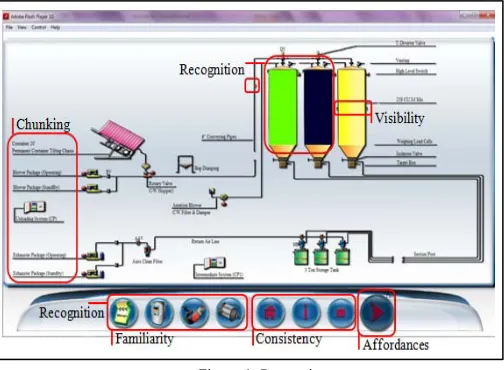
[image:2.612.311.563.346.531.2]Figure 1 illustrates the ISD for powder chemical handling system. The cognitive ISD criteria will be incorporated into the system design with the aim to help users to be able to perceive useful information while interacting with the system.
Figure 1. Perception.
the system, Table 1 describes lists of Cognitive ISD criteria included in the powder chemical handling system which have been identified from the analysis earlier on.
TABLE I. COGNITIVE PERCEPTION CRITERIA
Cognitive Perception Criteria
Affordances Meaning and value of the objects are directly perceived and not just the individual characteristics of these objects Chunking Information is not stored in memory literally, but is
processed or break up into abstractions level
Consistency Similar or common action sequences, terms, layouts, and colors within the system design
Familiarity Refers to the frequency of the information which it occurs in everyday life
Recognition Ability to remember previously seen or heard stimulus when it is represented
Visibility Information that is at the most salient display
B. Comprehension
[image:3.612.313.568.267.458.2]Figure 2 demonstrate driver failure solutions, if users having difficulties in maintaining the driver system failure. In this scenario, the alarm will strike if there are problems in transferring the powder chemical from storage tank to the next stage of production system. Users need to click the stop button in order to switch off the alarm signal. Then if the users are unfamiliar on how to solve the problems, the users can click on the menu button in order to retrieve the solutions to overcome the driver failure problems. The information is design in short and simple instructions and once the users have the idea to solve the problems, then users can proceed to the main machine to configure on the system maintenance process.
Figure 2. Comprehension
Table 2 lists out some of the Cognitive comprehension criteria which may help users to understand the situations if related system failure arise at their workplace. It is hope that, information provided through the ISD will help users to understand the situations and guide them to act calmly so that they will be able to decide the best actions that they need to perform to solve the problems.
TABLE II. COGNITIVE COMPREHENSION CRITERIA
Cognitive Comprehension Criteria
Association Method to gain information about eventual connections between stimulus and response for successful performance
Generalization Categorization and identification of representational objects and events
Informative Matching the information presentation with purpose and meet the situation context
Learnability The ease with which novice users can begin effective interaction and achieve maximal performance
C. Projection
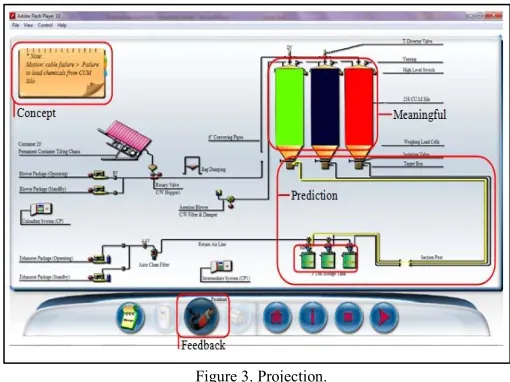
As depicted in Figure 3, the alarm signal will strike if the system cables are not connected appropriately to each other or to the system component. This situation will relate to cable position failure. As a result, the alarm signal will display red and yellow blinking signals on the affected cable area.
Figure 3. Projection.
For example at this stage, the affected cable position area is between Silo tank and storage tank. Once the users switch off the alarm signal, a small note will also pop out at the top left corner of the system, highlights the impact of the system failure problems. As the alarm signal will strike at the affected area, this will help users to easily keep track on the system maintenance problems during system monitoring process. Table 3 lists out the Cognitive projection criteria which have been included in the powder chemical handling system ISD.
TABLE III. COGNITIVE PROJECTION CRITERIA
Cognitive Projection Criteria
Concept Corresponds to the goal and tasks of a situation
Feedback Response from the system triggers a rule, and the user then follows the associated skilled routine
Meaningful Selections of information depends on the basis of familiarity and its associated imagery
[image:3.612.53.305.411.604.2]III. USABILITY TESTING
Usability testing can be used to assess a number of different aspects associated with a particular interface of a system. Generally, this includes a usability testing on user satisfaction, layout, labeling, control and displays. As for this usability testing, we will distribute questionnaires in order to test the ease of use of the system. The questionnaire was adapted from Software Usability Measurement Inventory (SUMI) technique to evaluate the powder chemical handling system. We used five point of Likert scale as we do not want to force the participants to choose one specific choice or another, negating the possibility of seeing how strongly the participants is committed to one choice of the other. The five Likert scale have the following values; 1=Strongly disagree, 2=Disagree, 3=Neutral, 4=Agree and 5=Strongly agree. In fact, SUMI questionnaires comprises of attitude scale statements to measure the usability of a system as long as the system has a display, a keyboard or other data entry devices and a peripheral memory device [20].
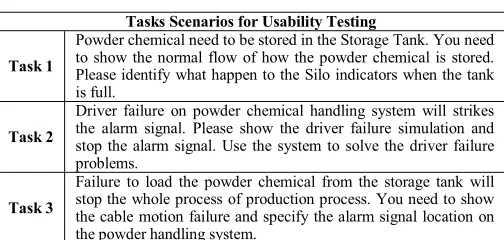
Moreover we will also use tasks scenario in order to keep track on user’s performance in utilizing the system accordingly. The task scenarios were designed in accordance with the common system maintenance problems occurring in manufacturing industries. The problems were identified through an interview with experts in the field of manufacturing industries and problems archived n system maintenance archiving data [21]. In this usability testing, the participants need to complete the task scenarios and they can only proceed to the next level of task scenarios once it is completed. The task scenarios are design in conjunction with human perception, where the participants need to perceive cues that help them to complete the task. As for the second task scenarios, the scenario is designed in line with how users try to comprehend and make meaningful meaning on the information conveyed to them through the cues available on the system. Finally, once the participants have perceived and understood the situation, they need to project their action. Table 4 illustrates tasks scenarios used in this research study.
IV. FINDINGS AND DISCUSSIONS
At about seventeen participants involved in this research study and most of the participants are those who have more than three years of experience in system maintenance. Majority of the participants are seniour and junior technicians. Findings and discussions in the following sections are literally to identify whether the ISD Cognitive criteria incorporated in the powder chemical handling system give deficiencies on users performance in using the system.
A. Perception Mean Value
In the perception survey findings with the highest 4.6 mean values, the participants claimed that the symbols and graphics used in the system are easy to understand since the system used standard symbols and graphics (refer Figure 4). Consequently, standardization and consistency is important in order to avoid ambiguous feeling within system users.
Indeed ambiguity is used to define causality where there is a need for necessary connection of events in time sequences [22] as to retain users performance in using the system. In addition recognizable symbols and graphics that represent its function would also be helpful to users in order to understand the system effectively.
TABLE IV. USABILITY TESTING TASK SCENARIOS
Tasks Scenarios for Usability Testing
Task 1
Powder chemical need to be stored in the Storage Tank. You need to show the normal flow of how the powder chemical is stored. Please identify what happen to the Silo indicators when the tank is full.
Task 2
Driver failure on powder chemical handling system will strikes the alarm signal. Please show the driver failure simulation and stop the alarm signal. Use the system to solve the driver failure problems.
Task 3
Failure to load the powder chemical from the storage tank will stop the whole process of production process. You need to show the cable motion failure and specify the alarm signal location on the powder handling system.
[image:4.612.311.563.156.276.2]Whilst at about 4.5 mean values, most of the participants agreed that the Cognitive ISD help them to identify critical cues on the system. For instance the alarm signal with flashing lights (yellow and red colour) that strikes able to attract their attention. Furthermore, the participants admitted that the system displays design provide useful information while interacting with the system. Buttons that includes affordances criteria help them to understand each button’s function. For example, clickable and mouse over text buttons give some hints to users on which button to click while interacting with the system. Indeed, the layout of the surfaces constitute on what the users afford to perceive directly from the environment [23].
Figure 4. Perception Mean Value
situations whilst intermediate and novice users will relate the chunk information with the situations as to understand the system interaction [24]. Additionally, in the range of 4.1 to 4.3 mean values, the participants reported that the system output linked with their expectations while using the system. The participants also claimed that they were familiar with the words, instructions or phrases used in the system. Simple and short instructions helped them to understand on how to use the system. In addition, the participants also agreed on the overall system design as the system was design in accordance to their needs. In relation to 4.4 perception mean values, the participants agreed on system displays and menu options design in the system as the system design provide clarity of the system usage. Furthermore, the participants felt satisfied with consistent ISD across system displays and menu. In addition the participants also reported that the instructions and prompts are helpful and easy to perceive. Although the system manual is informative, they also hoped that more detailed solutions should be incorporated into the system functions. Since the researcher is focus in highlighting the ISD cognitive criteria for interface design in this research study, nevertheless input and opinion from the participants on system functions will be bring forward to other researchers specifically in the engineering system maintenance field.
B. Comprehension Mean Value
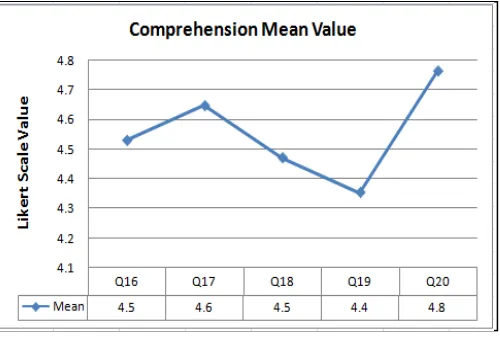
As depicted from Figure 5, the results show that with the highest 4.8 comprehension mean values, the participants claimed the alarm signal able to attract their attention while interacting with the system. The alarm signal is design in resemblance with the types of failure in this system. For example, if the driver failure alarm signal strikes, the blinking sign and the alarm sound will be displayed at the driver failure system area. The same situations will happen if the cable motion failure occurs. The cable affected area will be blinking and followed by the alarm signal. By activating both user’s visual and auditory sensory, it is hope that users will be aware on possible situations and alert with the information around them. In fact, to avoid users suffer from split attention, visual and auditory information can be presented concurrently, rather than presenting all information visually or auditory [25]. Subsequently, a short note that displays the cause of the system faulty problem will pop out after the alarm signal is switch off. This situation may help the participants and guide them to look for the solutions through the system.
[image:5.612.307.557.74.246.2]Additionally, with 4.6 mean values, the participants also agreed that the system help them to have a better understanding on the situation at their workplace. Likewise, with a slight fall from 4.6 to 4.5 mean values, the participants stated that, the system provide them with useful information which help them in doing their tasks at workplace. The participants also admitted that they understand the overall flow of how the ISD system operates during the usability testing process. Moreover, with 4.4 mean values the participants claimed that it takes a short period of time for them to learn the system function embedded in the system.
Figure 5. Comprehension Mean Value.
C. Projection Mean Value
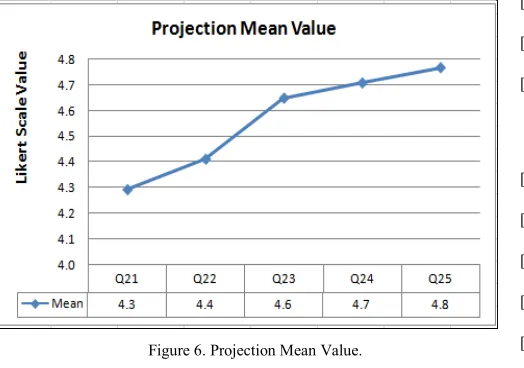
As illustrated in Figure 6.9 projection mean value increased gradually, from 4.3 to 4.8 mean values. At 4.3 mean values the participants claimed that they could predict what was about to happen next while using the system. The alarm signals that display the location and the information about faulty system component give some ideas to the participants about the system problems. This will help the participants for not being stressful, thinking about the system failure issues. Indeed, good instructions in interactive system must satisfy two criteria, firstly support human performance and user’s learning in handling the system [26].
On top of that, at about 4.4 projection mean values, the participants admitted that the system tasks used in the system matched their skills. It shows a good response that the system tasks were simple and easy to understand. Complicated tasks will give constraint to system users to explore the system and this eventually will distract their interest in using the system. There were slight increases on the next projection mean values, whereby the participants reported that the ISD support them to accomplish their work tasks. The participants feel comfortable while using the system and the system able to help them in making their tasks easier with the support of the system. They also stated that the system would be helpful for novice or intermediate users to use the system. Short and simple solutions included in the system design, hopefully will help to enlighten the users on how to handle system maintenance problems. By highlighting useful information that needed by users cognitive load, will at least keep them aware and familiar with the situations at their workplace. In fact, with conceptually driven process and bring the users into the context will aid recognition [6] for the users so that they can handle the situations effectively.
Figure 6. Projection Mean Value.
Pop out messages, alarm signals, clickable buttons and mouse over button with text were some of the examples of the ISD feedback that can be perceived by system users, comprehend by them and select the best actions in performing the tasks while using the system. Finally at about 4.8 projection mean value, the participants claimed that they could perform the usability testing tasks in a straight forward manner while using the system. Indeed this shows a good response from the participants where most of them were satisfied with the ISD cognitive criteria incorporated in the system and enables them to handle the system effectively
.
V. CONCLUSION
Findings from this usability testing are used to improve the powder chemical handling system. As a consequence of incorporating the ISD Cognitive criteria into the system design, we hope that we can always improve ISD which include human cognitive criteria into the system design. A good system is a system that is usable to use, by users. Usability problems can adversely affect the performance of motivated users, even when the users are capable of dealing with less usable information because they prefer more usable materials [27]. Even though the findings shows that most of the feedback on the ISD Cognitive criteria embedded in the ISD are above 4.0 mean values, there are always for an improvement to improve the ISD as to increase the ease of use of a system in the near future.
ACKNOWLEDGMENT
This research project is supported by the Faculty of Technical and Vocational Education Universiti Tun Hussein Onn Malaysia and fully funded by the Malaysia Ministry of higher Education Fundamental Research Grant.
REFERENCES
[1] Hollnagel, E. Woods, D. D., Joint Cognitive Systems. Foundations of Cognitive System Engineering. Boca Raton, FL: Taylor and Francis. 2005.
[2] Wickens, C. D., Lee, J., Liu, Y., and Becker, S. G., An Introduction to Human Factors Engineering. New Jersey: Pearson. 2004.
[3] Svenson, O., and Maule, A. J., Time Pressure and Stress in Human Judgement and Decision Making. New York: Plenum. 1993.
[4] Sobel, C. P. Cognitive Science: An Interdisciplinary Approach. Mountain View, CA: Mayfield. 2001.
[5] Sarter, N. Multiple Resources Theory as A Basis for Multimodal Interface Design: Success Stories, Qualifications, and Research Needs. In Kramer, A. F., Weigmann, D.A.,and Kirlik, A. (Eds). Attention: From Theory to Practice. NC, USA: Oxford University Press. 2006.
[6] Friedenberg, J., and Silverman, G. Cognitive Science: An Introduction to the Study of Mind. Thousand Oaks, CA: Sage. 2006. [7] Shiffrin, R. M., and Schneider, W. “Automatic and controlled
processing revisited”. Psychological Review. 1984.
[8] Endsley, M. R., and Garland, D. J. Situation Awareness Analysis and Measurement. Mahwah, NJ: Lawrence Earlbaum Associates. 2000. [9] Meister, D. Conceptual Aspects of Human Factors. Baltimore: John
Hopkins University Press. 1989.
[10] Caroll, J. M. HCI Models, Theories and Frameworks: Toward A Multidiciplinary Science. San Francisco: Morgan Kaufmann. 2003. [11] Shneiderman, B., Plaisant, C. Designing the User Interface. (4th Eds):
Strategies for Effective Human Computer Interaction. NY: Pearson. 2005.
[12] Dix, A., Finlay, J. Abowd, C. D., Beale, R. Human Computer Interaction. (3rd Eds). Essex, England: Pearson Prentice Hall. 2004.
[13] Preece, J., Rogers, Y., and Sharp, H. Interaction Design Beyond Human Computer Interaction (3rd Eds). Harlow, England: Pearson
Prentice Hall. 2004.
[14] Thimbleby, H. User Interface Design. New York: Addison Wesley. 1998.
[15] Endsley, M. R. Theoretical Underpinnings of Situation Awareness: A Critical Review. In Endsley, M. R., and Garland, D. J., (Eds). Situation Awareness Analysis and Measurement. NJ: Lawrence Erlbaum. 2000.
[16] Bosse, E., Roy, J., and Wark, S. Concepts, Models and Tools for Information Fusion. Boston: Artech House. 2007.
[17] Kaptelinin, V., and Nardi, B. A. Acting with Technology: Activity Theory and Interaction Design. Cambridge: MIT Press. 2009. [18] Krippendorff, K. Content Analysis: An Introduction to Its
Methodology. Newbury Park, CA: Sage. 1980.
[19] McBurney, D. H., Research Methods (5th Eds). Belmont, CA:
Wadsworth Thompson Learning. 2001.
[20] Kirakowski, J. Usability evaluation in Industry. London: Taylor and Francis. 1996.
[21] Rosli, D. I., Alias, R. A., and Rahman, A. A. “Cognitive Task Analysis Method for System Interface Design”. Journal of Research and Innovation in Information Systems. pp. 1-8. 2012.
[22] Rasmussen, J., Pejtersen, A. M., Goodstein, L. P. Cognitive Systems Engineering. NY: John Wiley. 1994.
[23] Gibson, J. J. The Ecological Approach to Visual Perception. NJ: Erlbaum, Hillsdale. 1986.
[24] Banbury, S., and Trembley, S. A Cogntiive Approach to Situation Awareness: Theory and Application. Hampshire, England: Ashgate. 2004.
[25] Wickens, C. D., and Carswell, C. M. Information Processing. In Salvendy, G. (Eds). Handbook of Human Factors and Ergonomics. (3rd Eds). New York: John Wiley. 2006.
[26] Payne, S. J. Mental Models in Human Computer Interaction. In Sears, A., and Jacko, J. A. (2nd Eds). The Human Computer Interaction
Handbook: Fundamentals, Evolving Technologies and Emerging Applications. NY: Taylor & Francis. 2008.