
Developing Mobile Learning Applications for Android using Web Services
Paul POCATILU
Economic Informatics Department
Academy of Economic Studies, Bucharest, Romania [email protected]
The evolution of today's mobile devices increases the number of mobile applications devel-oped, and among them the mobile learning applications. Mobile hardware and software plat-forms allow running of faster and richer applications. This paper presents the main steps in development of a distributed mobile learning application for Android. The client application communicates with the server using Web services. The prototype developed includes the test-ing module.
Keywords: Mobile Application, Android Operating System, Web Service
Introduction
Mobile learning applications are devel-oped using various technologies and plat-forms. Each implementation has specific cha-racteristics in terms of user interface and con-tent and influences the development process. A mobile learning system consists at least of the following components:
Mobile learning device;
Mobile learning software;
Mobile learning content.
The software required for mobile learning process is a simple mobile Web browser or a dedicated application, that can be standalone or a client application.
The students' actions within an m-learning system are to [2]:
Take online course;
Take exams;
Send feedback;
Send homework, projects.
The trainers involved in e-learning solutions, including m-learning, are to:
Deal with content management;
Prepare tests;
Assess tests, homework, projects taken by students;
Send feedback;
Communicate with students (forums, e-mails and other type of messaging).
One of most used architecture for mobile learning applications is Web based due to well known technologies that are used.
Usually, standalone mobile applications need that all the mobile learning content to be
stored within the mobile device.
Distributed mobile learning applications (in-cluding Web based) load and use the content when they need it.
Distributed platforms have a similar architec-ture as Web-based platforms, but the client application is a rich application and not a simple mobile Web browser and the server is also different.
The advantages of using this platform are:
Rich user interface;
Support for multimedia content;
E-learning content can be easily updated on the server;
There are also some disadvantages:
The user need to install and setup the client application;
The user have to learn how to use the ap-plication;
Possible additional costs for traffic usage. The development of distributed mobile learn-ing applications involves the followlearn-ing steps:
Project Management;
Analysis;
Design;
Implementation;
Testing.
The steps are applied to software develop-ment and to mobile content.
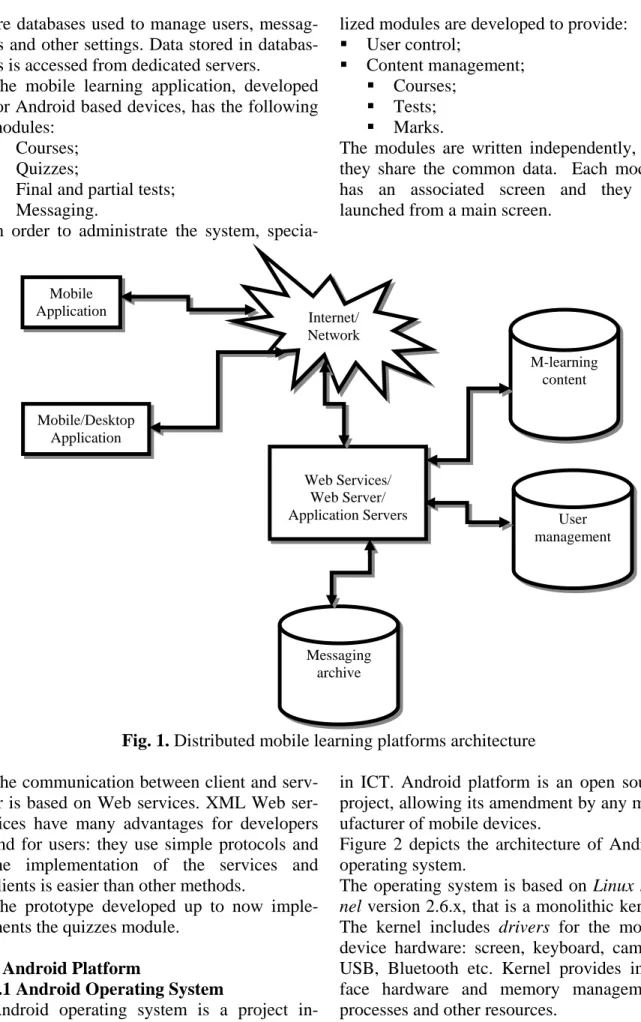
The application development consider the re-sults obtained in [5] and [6] related to the quality of mobile applications and systems. Figure 1 depicts the components involved in a distributed mobile learning system.
In addition to mobile learning content, there
are databases used to manage users, messag-es and other settings. Data stored in databas-es is accdatabas-essed from dedicated servers.
The mobile learning application, developed for Android based devices, has the following modules:
Courses;
Quizzes;
Final and partial tests;
Messaging.
In order to administrate the system,
specia-lized modules are developed to provide:
User control;
Content management;
Courses;
Tests;
Marks.
The modules are written independently, and they share the common data. Each module has an associated screen and they are launched from a main screen.
Fig. 1. Distributed mobile learning platforms architecture The communication between client and
serv-er is based on Web sserv-ervices. XML Web sserv-er- ser-vices have many advantages for developers and for users: they use simple protocols and the implementation of the services and clients is easier than other methods.
The prototype developed up to now imple-ments the quizzes module.
2 Android Platform
2.1Android Operating System
Android operating system is a project in-itiated by Google through the Open Handset Alliance, which includes over 30 companies
in ICT. Android platform is an open source project, allowing its amendment by any man-ufacturer of mobile devices.
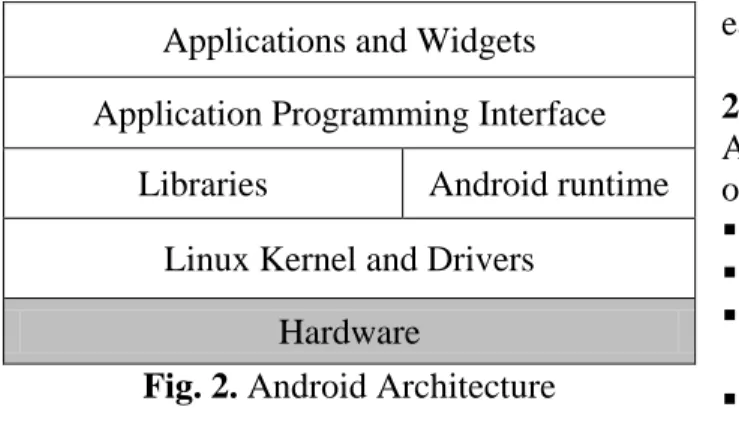
Figure 2 depicts the architecture of Android operating system.
The operating system is based on Linux ker-nel version 2.6.x, that is a monolithic kerker-nel. The kernel includes drivers for the mobile device hardware: screen, keyboard, camera, USB, Bluetooth etc. Kernel provides inter-face hardware and memory management, processes and other resources.
Internet/ Network Mobile Application Web Services/ Web Server/ Application Servers M-learning content User management Mobile/Desktop Application Messaging archive
Applications and Widgets Application Programming Interface
Libraries Android runtime
Linux Kernel and Drivers Hardware
Fig. 2. Android Architecture
Native libraries on the next level are depen-dent on hardware architecture of the mobile device. These libraries include support for 2D and 3D graphics (Single, OpenGL ES), multimedia, security, storage, browsing (WebKit) and standard C library [8].
Android applications are developed using Ja-va programming language. Applications re-quire an environment to manage their life-cycle. This includes a Java virtual machine (called Dalvik virtual machine) and Java class libraries that provide basic support for applications (collections, input/output opera-tions management etc.). Android applicaopera-tions are not compatible with Java ME or Java SE. The applications are optimized for mobile devices constraints.
The application programming interface al-lows accessing a framework that includes components used by all Android applica-tions. The application framework includes components for Android application man-agement (installation, execution), windows management and user interface graphical, event handling etc.
Application level includes pre-installed ap-plications (contact management, phone, ca-lendar, Internet browser) and user applica-tions. Applications are based on Java tech-nologies and use classes provided through application programming interface. In addi-tion, there is the possibility to use native functions in programs written in C/C++ pro-gramming language through NDK (Native Development Kit).
Widgets unlike applications, occupies only part of the main display screen and asso-ciated (Home).
Android operating system is multitasking,
each application running in a separate thread.
2.2 Android Application Development
Android applications are developed using one or more basic components [3], [4]:
activities (Activity base class),
services (base class Services),
content providers (ContentProvider base class)
components that receive and act on mes-sages sent to all applications (the base class BroadcastReceiver)
messages (class Intent)
A particular importance in application devel-opment is the resources that enable separa-tion of interface code.
Activities represent the screen associated to an application. An application can have one or more activities.
Services are routines that run in parallel with the main thread and do not have GUI. They allow the development of actions in the background without blocking the main thread execution and interaction with such applica-tion.
Content providers are used for sharing data between applications. Data sharing is done through files, databases or other means. An alternative to content providers is the use of communication between processes.
Applications can respond to the occurrence of events in the system by using classes de-rived from BroadcastReceiver. They do not GUI and an application can have several components of this type.
In order to activate components like activi-ties, asynchronous messages encapsulated in objects of Intent type are used.
Android applications are developed mainly using Eclipse IDE with Android Develop-ment Tools (ADT) plug-in. Android SDK and emulators are necessary for application development.
3 Graphical User Interface
The prototype developed consists of three ac-tivities:
Test selection;
Question and answers;
The interface is simple and intuitive, without any graphics and drawings. That will reduce the amount of memory required by the appli-cation and reduces the time of development. Future versions will include de redesigned and friendlier user interface. The application targets the mobile devices with touch screen, but is not limited to.
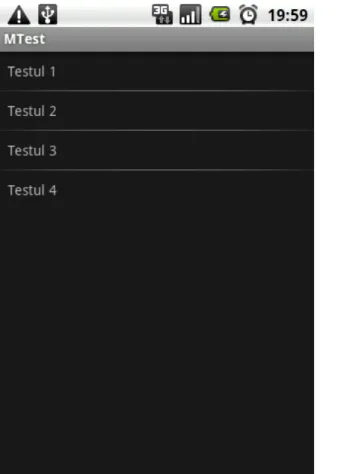
The main screen for the quizzes module is presented in Figure 3. The associated activity
is ActTeste and is declared as the main activi-ty in AndroidManifest.xml configuration file. When the application is launched, the list of tests is automatically loaded in this screen. The list is an object of ListView type. The description of list elements is defined in a resource file based on XML. For the exam-ple from Figure 3 the following structure was used for each list element:
<TextView xmlns:android="http://schemas.android.com/apk/res/android" android:layout_width="fill_parent"
android:layout_height="wrap_content" android:padding="10dp"
/>
Fig. 3. Test selection screen on an Android device
In order to start a new activity, an Intent in-stance is used. All activities need to be de-clared in AndroidManifest.xml file:
<activity android:name=".ActTeste" /> <activity android:name=".ActIntreb"/>
<activity android:name=".ActRasp"/> If the activities are not declared in
Android-Manifest.xml, a runtime exception will occur when the code is executed.
All the available tests are loaded from a da-tabase stored on the server side. A dedicated Web service method is used for this initial action.
The main menu includes items that allow to:
Login/Logout the application;
Exit the application;
View application version.
The main menu options are added when onCreateOptionsMenu method is called: public boolean
onCreateOptionsMenu(Menu menu) {
menu.add(0, LOGIN, 0, "Login"); menu.add(0, LOGOUT, 1, "Logout"); menu.add(0,IESIRE, 2,"Iesire"); menu.add(0,DESPRE, 3,"Despre");
return true; }
When the user selects a menu item onOptionsItemSelected function is called. For example, when user want to exit from the application, the code associated with IESIRE label is executed:
public boolean onOptionsItemSelected (MenuItem item) { switch (item.getItemId()) { //... case IESIRE:
android.os.Process.killProcess (android.os.Process.myPid()); return true; } return false; }
The following code is used to show the activ-ity associated with questions and answers, based on Adapter-View.OnItemClickListener interface:
public void onItemClick(AdapterView<?> parent, View item, int position, long id)
{
Intent intent = new Intent(ActTeste.this, ActIntreb.class); //add parameters
intent.putExtra("idTest", position + 1); //launch selected test
startActivity(intent); }
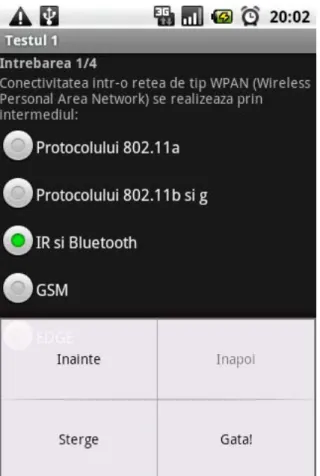
When the user selects a test from the list, the screen associated to the first question will be shown. Figure 4 illustrate the graphical inter-face associated to the question window.
Fig. 4. Question screen as shown on an An-droid device
The questions have only one correct answer. The student can navigate sequentially from one question to another. Some menu items are disabled for the first or the last question:
public boolean onPrepareOptionsMe-nu(Menu menu) { if (idIntrebareCurenta == numarIntrebari) menu.setGroupEnabled( ActIntreb.INAINTE, false); else menu.setGroupEnabled( ActIntreb.INAINTE, true); //… }
In order to pass complex objects from an ac-tivity to another, they have to implement the interface android.os.Parcelable through the methods describeContents and writeTo-Parcel.
For example, the class Intrebare, that represents a question, implements the write-ToParcel method in this way:
public void writeToParcel(Parcel
dest, int flags) {
dest.writeInt(idIntrebare); dest.writeString(text); dest.writeStringArray(var); }
The class must include a static field named CREATOR:
public static final Parcela-ble.Creator<Intrebare> CREATOR = new Parcela-ble.Creator<Intrebare>() { ... }
used when Intrebare objects are created using this method.
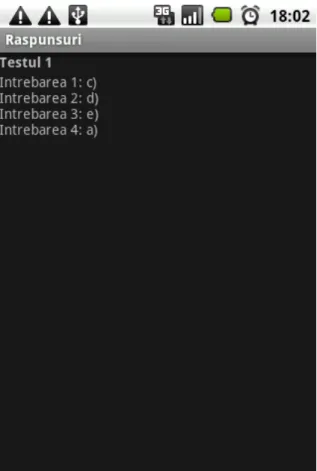
At the end, the student can review the an-swers and send them to the server in order to monitor the progress.
Fig. 5. Answers verification lists as shown on an Android device
The student has the possibility to review the answers and to calculate her or his score. Because the answers are stored in a HashMap and the questions need to be shown sorted by question code, the class Intrebare imple-ments the Comparable<Intrebare> inter-face.
4 Web Services
The Web service used by this application has been developed using Microsoft .NET tech-nologies. The Web service provides several Web methods that are used by this mobile learning application.
The use of Web services provide a very flex-ible way for client applications that can be developed on almost any mobile or desktop platform.
The GetNumarIntrebariTest method re-turns the number of questions of a given test identified through a code. The number of questions is taken from the database.
If an exception occurs, the method will return a negative value.
The following code is an example of a me-thod used in this Web service:
[WebMethod]
public int GetNumarIntrebariTest(int idTest) {
OleDbConnection conn = new OleDbConnection(connString + Context.Request.PhysicalApplicationPath + dbString); OleDbCommand cmd = new OleDbCommand();
cmd.Connection = conn;
cmd.CommandText = "SELECT COUNT(*) FROM Grile WHERE id_test = " + idTest; int nrIntrebari = -1; try { conn.Open(); nrIntrebari = (int)cmd.ExecuteScalar(); }
catch (Exception ex) {
nrIntrebari = -1; }
{
conn.Close();
}
return nrIntrebari; }
The Web services are consumed using a third-party library distributed as free source kSOAP2 (http://ksoap2.sourceforge.net/), optimized for Android.
The libraries need to be added to the project in order to be used. This library is based on the SOAP architecture and there is no need to generate a proxy/stub to call Web services methods.
A SOAP envelope is created using the Soap-SerializationEnvelope class (specifying the SOAP version) and the request details are
added to the envelope body (using SoapOb-ject class).
The HttpTransportSE class is used to make the actual call of the Web service method, the envelope being passed as parameter. The re-sult is retrieving from the response part of the envelope.
The getIntrebare function is used to access the Web service and to call a specific method used to get the specified question. The func-tion's source code is:
public static Intrebare getIntrebare(int idTest, int idIntrebare) {
Intrebare intrebare = new Intrebare(); try
{
SoapObject request = new SoapObject(NAMESPACE, GET_INTREBARE); // add paramaters and values
request.addProperty("idTest", idTest); request.addProperty("idIntrebare", idIntrebare); SoapSerializationEnvelope envelope = new SoapSerializationEnvelope(SoapEnvelope.VER11); envelope.dotNet = true; envelope.setOutputSoapObject(request); HttpTransportSE androidHttpTransport = new HttpTransportSE(URL_WS);
androidHttpTransport.call(NAMESPACE + GET_INTREBARE, envelope); SoapObject result = (SoapObject) envelope.getResponse();
//question initialization
intrebare.setIdIntrebare(Integer.parseInt(result.getProperty( "IdIntrebare").toString()));
intrebare.setText(result.getProperty("Text").toString()); SoapObject variante = (SoapObject) result.getProperty("Var"); for (int i = 0; i < Intrebare.VARIANTE; i++)
intrebare.setVarianta(i, variante.getProperty(i).toString()); } catch (Exception e) { e.printStackTrace();
intrebare = null; return intrebare; }
return intrebare; }
It is very important to send the right parame-ters to the methods. In this example, the pa-rameters used in these calls are initialized as follows:
NAMESPACE = "http://tempuri.org/"; – Web service namespace; in this exam-ple the default namespace is used
URL_WS =
"http://server/Service.asmx"; – Web service URL
GET_INTREBARE = "GetIntrebare"; – Web service method name
idTest, idIntrebare – the parameters used by GetIntrebare method
Using wrong values for these parameters will lead to Web service method call to fail. All the functions used to access the Web ser-vice are included in a class, in order to be ac-cessible from anywhere within the package. This is an example of this Web method
usage:
intrebare = AccesSW.getIntrebare (idTest, idIntrebareCurenta); In order to use Web services the application needs special permission. Permissions are stored in AndroidManifest.xml file. For this mobile application, the following line has to be added:
<uses-permission andro-id:name="android.permission.INTERNET "></uses-permission>
In this prototype, all data is stored in memo-ry, during program execution. All loaded questions and given answers are saved in or-der to reduce costs related to data transfer through wireless networks:
Vector<Intrebare> intrebari = new Vector<Intrebare>();
Hashtable<Intrebare, Raspuns> raspunsuri = new Hashtable<Intrebare, Raspuns>(); For the future versions the following
me-thods will be taken into account:
Local files;
Property files;
Local databases.
5 Security Issues
The security of distributed mobile learning
applications is very important and challeng-ing compared with stand alone applications. There are several areas where the security re-quirements are high and they need special at-tention.
Table 1 presents some security concerns re-garding the mobile learning solutions, based on [7].
Table 1. Security concerns of m-learning applications
Action Security requirements
Online exams High
Content management Medium-High
Feedback management (forums) Low-Medium Homework/Projects Assessment High
Quizzes Medium
User management High
different authentication levels;
password management;
data encryption;
location services.
Each of actions from Table 1 requires a cer-tain degree of security, depending on the im-portance and data sensitivity.
The databases with tests, marks and users contain sensitive data and they need a special attention.
The security requirements for examinations, homework/project assessment and user man-agement are very high due to the importance of data and information they use.
Quizzes and content management have me-dium security requirements, because the data manipulated is less sensitive.
Feedback management and messaging for these systems does not use sensitive data. The minimum requirement is to use authenti-cation through users and passwords.
Wireless data communication can be easily monitored, so high security need to be as-sured by using specific standards.
Application testing has to include several se-curity tests.
6 Conclusions and Future Work
The development of mobile applications is not an easy task. There is a variety of plat-forms and technologies to choose from. Mo-bile devices resources are limited. User expe-rience with mobile devices and software is various.
Using Web services for mobile learning ap-plications helps the process of development by providing a standardized way of commu-nication between mobile clients and servers. There are also drawbacks that need to be re-duced or eliminated:
data volume (optimization);
security (discover and eliminate security holes);
data serialization for custom and complex objects (refactoring).
Regarding the presented mobile application, the following development directions are considered:
new functionalities,
interface improvement,
Courses and Tests modules implementa-tion,
user management,
modules integration,
in order to provide a basis for an working m-learning application.
This prototype is a part of an m-learning sys-tem that will also be developed for other mo-bile platforms in order to cover a wide area of mobile devices and users.
Acknowledgements
This work was supported by CNCSIS – UEFISCSU, project number PNII – IDEI 2637/2008, project title: Project management methodologies for the development of mobile applications in the educational system.
References
[1] D. S. Metcalf II and J. M. De Marco, mLearning: Mobile Learning and Perfor-mance in the Palm of Your Hand, HRD Press, Inc., 2006.
[2] P. Pocatilu, F. Alecu and M. Vetrici, Measuring the Efficiency of Cloud Com-puting for E-learning Systems, WSEAS TRANSACTIONS on COMPUTERS, Issue 1, Volume 9, January 2010, pp. 42-51. [3] E. Burnette, Hello, Android: Introducing
Google’s Mobile Development Platform, 2nd Edition, The Pragmatic Bookshelf, 2009.
[4] R. Meier, Professional Android 2 Appli-cation Development, Wiley Publishing, Inc., 2010.
[5] C. Ciurea, "A Metrics Approach for Col-laborative Systems," Informatica Econo-mica, vol. 13, no. 2/2009, pp. 41-49. [6] C. Boja, L Batagan, “Analysis of
M-Learning Applications Quality,” WSEAS TRANSACTIONS on COMPUTERS, Issue 4, Vol. 8, May 2009, ISSN 1109-2750, pp. 767-777.
[7] F. Alecu, P. Pocatilu and S. Capisizu, WiMAX Security Issues in E-Learning Systems, Proc. of 2nd International Con-ference on Security for IT & C in Journal of Information Technology and Commu-nication Security, Bucharest, November 2009, pp. 45-52.
[8] The Developer's Guide | Android
Develop-ers [Online]. Available at:
http://developer.android.com/guide/index.h tml (March 2010).
Paul POCATILU graduated the Faculty of Cybernetics, Statistics and Eco-nomic Informatics in 1998. He achieved the PhD in EcoEco-nomics in 2003 with thesis on Software Testing Cost Assessment Models. He has published as au-thor and co-auau-thor over 45 articles in journals and over 40 articles on national and international conferences. He is author and co-author of 10 books, (Soft-ware Testing Costs, and Object Oriented Soft(Soft-ware Testing are two of them). He is associate professor in the Department of Economic Informatics of the Academy of Economic Studies, Bucharest. He teaches courses, seminars and laboratories on Mobile Devices Programming, Economic Informatics, Computer Programming and Project Management to graduate and postgraduate students. His current research areas are software testing, software quality, project management, and mobile application development.
![Table 1 presents some security concerns re- re-garding the mobile learning solutions, based on [7]](https://thumb-us.123doks.com/thumbv2/123dok_us/1259096.2669385/8.893.237.700.965.1117/table-presents-security-concerns-garding-mobile-learning-solutions.webp)
