Structured Product Labeling (SPL)
Implementation Guide with Validation
Procedures
Technical Specifications Document
This Document is incorporated by reference into the following Guidance Document(s):
Guidance for Industry – Electronic Submission of Lot Distribution Reports
Guidance to industry - Providing Regulatory Submissions in Electronic Format – Content of Labeling Guidance for Industry - Providing Regulatory Submissions in Electronic Format – Drug
Establishment Registration and Drug Listing
Guidance for Industry - SPL Standard for Content of Labeling Technical Questions and Answers Guidance for Industry - Indexing Structured Product Labeling (Final)
Guidance for Industry: Self-Identification of Generic Drug Facilities, Sites, and Organizations Guidance for Industry - Electronic Drug Product Reporting for Human Drug Compounding Outsourcing Facilities Under Section 503B of the Federal Food, Drug, and Cosmetic Act
Guidance for Industry - Registration of Human Drug Compounding Outsourcing Facilities Under Section 503B of the FD&C Act
Guidance for Industry - DSCSA Implementation: Annual Reporting by Prescription Drug Wholesale Distributors and Third-Party Logistics
For questions regarding this technical specifications document, contact [email protected].
U.S. Department of Health and Human Services Food and Drug Administration
Center for Biologics Evaluation and Research (CBER) Center for Drug Evaluation and Research (CDER)
Center for Veterinary Medicine (CVM) January 2016
Structured Product Labeling (SPL)
Implementation Guide with Validation Procedures
Version 1 Revision 201601140739 1 Introduction ... 6 1.1 Organization ...6 1.2 Validation Procedures ...6 2 SPL Documents in General ... 7 2.1 SPL Header ...7 2.1.1 General ... 7 2.1.2 XML references ... 7 2.1.3 Document information ... 8 2.1.4 Author Information ... 10 2.1.5 Identified Organizations... 11 2.1.6 Address ... 12 2.1.7 Telecommunication Addresses ... 13 2.1.8 Contact Party ... 13 2.1.9 AsNamedEntity ... 14
2.1.10 Core Document Reference ... 14
2.1.11 Predecessor Document ... 15
2.2 SPL Body ...16
2.2.1 Sections and subsections ... 16
2.2.2 Text ... 19
2.2.3 Images ... 24
2.2.4 Highlights ... 26
2.2.5 Product Data Elements Section ... 28
3 Product Data Elements ... 29
3.1 Product in General ...30
3.1.2 Equivalence to other Products, Product Source ... 33
3.1.3 Additional Identifiers for this Product ... 35
3.1.4 Ingredient ... 36
3.1.5 Packaging ... 38
3.1.6 Kits, Parts, Components and Accessories ... 41
3.1.7 Marketing Category and Application Number ... 46
3.1.8 Marketing status ... 49
3.1.9 Characteristics ... 51
3.1.10 Combination Product Type ... 54
3.1.11 Production Amount ... 54
3.2 Drug, Dietary Supplement and Medical Food Products ...55
3.2.1 Code and Name ... 56
3.2.2 Product source ... 58
3.2.3 Active ingredient ... 59
3.2.4 Active moiety ... 60
3.2.5 Reference Ingredient for Strength ... 61
3.2.6 Inactive ingredient ... 62
3.2.8 Parts... 63
3.2.9 Marketing Category ... 64
3.2.10 Marketing Status and Date ... 66
3.2.11 DEA schedule ... 66
3.2.12 Solid Oral Drug Product characteristics ... 66
3.2.13 Color ... 68 3.2.14 Shape ... 68 3.2.15 Size ... 69 3.2.16 Scoring ... 69 3.2.17 Imprint code ... 70 3.2.18 Flavor ... 70 3.2.19 Image... 70 3.2.20 Route of administration... 71 3.3 Device Product ...72
3.3.1 Item Code and Name ... 72
3.3.2 Additional Device Identifiers ... 73
3.3.3 Device Ingredient ... 74
3.3.4 Device Parts ... 74
3.3.5 Part of Assembly ... 75
3.3.6 Regulatory Identifiers ... 75
3.3.7 Marketing status and date ... 76
3.3.8 Device Characteristics ... 76
3.3.9 Reusability ... 77
3.3.10 Sterile Use ... 78
3.4 Cosmetic Product ...78
3.4.1 Item Code and Name ... 78
3.4.2 Cosmetic Ingredient ... 79
3.4.3 Cosmetic Parts ... 79
3.4.4 Marketing status and date ... 79
3.5 Summary of Product Data Elements ...80
4 Drug Labeling, Listing, and other Drug Product Submissions ... 80
4.1 Header ...80
4.1.1 Document Type ... 80
4.1.2 Labeler information ... 81
4.1.3 Registrant information ... 82
4.1.4 Establishment information ... 82
4.1.5 Business Operation Product ... 84
4.2 Body ...85
4.2.1 Required Sections ... 85
4.2.2 Reporting Period (for certain submissions) ... 87
5 NDC/NHRIC Labeler Code Request ... 89
5.1 Header ...89
5.1.1 Document type ... 89
5.1.2 Labeler information ... 90
5.1.3 Labeler Detail Information ... 91
5.1.4 Labeler US Agent ... 92
5.1.6 FDA Initiated Labeler Code Inactivation ... 94 5.2 Body - Empty ...94 6 Establishment registration ... 95 6.1 Header ...95 6.1.1 Document type ... 95 6.1.2 Registrant information ... 95 6.1.3 Establishment Information ... 96 6.1.4 Establishment US agent ... 97 6.1.5 Import business ... 98 6.1.6 Establishment operation ... 99
6.1.7 Business Operation Qualifier ... 100
6.2 Body - Empty ...101
7 Out of Business Notification ... 101
7.1 Header ...101
7.1.1 Document type ... 101
7.2 Body - Empty ...102
8 Pharmacologic Class Indexing ... 102
8.1 Header ...102
8.1.1 Document type ... 102
8.1.2 Author information ... 102
8.2 Body ...103
8.2.1 Pharmacologic Class Indexing Section ... 103
8.2.2 Pharmacologic Class Indexing ... 103
8.2.3 Pharmacologic Class Definition ... 104
9 Dietary Supplement Labeling ... 105
9.1 Header ...105 9.1.1 Document Type ... 105 9.1.2 Labeler information ... 106 9.1.3 Registrant information ... 106 9.2 Body ...106 9.2.1 Required Sections ... 106
10 Medical Food Labeling ... 107
10.1 Header ...107 10.1.1 Document Type ... 107 10.1.2 Labeler information ... 107 10.1.3 Registrant information ... 108 10.1.4 Establishment information ... 108 10.2 Body ...109 10.2.1 Required Sections ... 109
11 Medical Device Labeling ... 109
11.1 Header ...109
11.1.1 Document Type ... 109
11.1.2 Labeler information ... 110
11.2 Body ...110
11.2.1 Required Sections ... 110
12 Billing Unit Indexing ... 110
12.1.1 Document Type ... 111 12.1.2 Author ... 111 12.2 Body ...111 12.2.1 Indexing Section ... 111 12.2.2 NDC ... 112 12.2.3 Billing Unit ... 112
13 Generic User Fee Facility Self-Identification ... 113
13.1 Header ...113
13.1.1 Document type ... 113
13.1.2 Registrant information ... 113
13.1.3 Facility Information ... 114
13.1.4 Facility operation ... 115
13.1.5 Business Operation Qualifier ... 116
13.2 Body - Empty ...117 14 Substance Indexing ... 117 14.1 Header ...117 14.1.1 Document type ... 117 14.1.2 Author information ... 117 14.2 Body ...118
14.2.1 Substance Indexing Section ... 118
14.2.2 Substance Indexing – Substance Identification ... 118
14.2.3 Substance Name Detail ... 119
14.2.4 Substance Code Mappings – Equivalence ... 119
14.2.5 Structural Unit ... 120
14.2.6 Chemical Structure... 123
14.2.7 Stereochemistry structure ... 126
14.2.8 Optical Activity ... 126
14.2.9 Irregular Amino Acids for Substitutions... 127
14.2.10 Amino Acid Substitutions ... 129
14.2.11 Authority Citation for Organisms ... 131
15 Indexing - Product Concept ... 132
15.1 Header ...132
15.1.1 Document type ... 132
15.1.2 Author information ... 132
15.1.3 Reference Labeling ... 132
15.2 Body ...133
15.2.1 Product Concept Indexing Section... 133
15.2.2 Abstract Product/Part Concept ... 133
15.2.3 Ingredient ... 134
15.2.4 Abstract Product Concept Code Specification ... 135
15.2.5 Abstract Kit Concept Code Specification ... 137
15.2.6 Application Product/Kit Concept ... 138
15.2.7 Marketing Category and Application Number ... 138
15.2.8 Application Product/Kit Concept Code Specification ... 139
16 Lot Distribution Report ... 140
16.1 SPL Header ...140
16.1.2 Author information ... 141
16.1.3 Bulk-Lot Manufacturers... 141
16.2 SPL Body ...142
16.2.2 Data Elements Section ... 142
16.2.3 Product Data – Single Licensed Product ... 143
16.2.4 Dosing Specification ... 144
16.2.5 Fill Lot ... 144
16.2.6 Bulk Lot(s) ... 145
16.2.7 Label Lot(s) (Final Container Lot) ... 147
16.2.8 Container Data Elements ... 148
16.2.9 Containers Distributed ... 149
16.2.10 Containers Returned Data ... 150
16.2.11 Product Data – Kit with Multiple Licensed Products ... 150
17 Wholesale Drug Distributor/Third-Party Logistics Facility Report ... 151
17.1 Header ...151 17.1.1 Document type ... 151 17.1.2 Reporter information ... 152 17.1.3 Facility Information ... 153 17.1.4 Facility operation ... 154 17.1.5 License ... 155
17.1.6 Business Operation Qualifier ... 157
17.1.7 Approval Disciplinary Action ... 157
17.2 Body - Empty ...159
18 Indexing - Biologic or Drug Substance ... 160
18.1 Header ...160
18.1.1 Document Type ... 160
18.1.2 Author ... 160
18.1.3 Related Document ... 160
18.2 Body ...161
18.3 Index Data Element Section(s) in General ...162
18.4 New (or only) Index Data Element Section ...163
18.5 Old Index Data Element Section ...163
18.5.2 Biologic/Drug Product Information ... 164
18.5.3 Specified Substance ... 164
19 Indexing - Warning Letter Alert ... 165
19.1 Header ...165 19.1.1 Document Type ... 165 19.1.2 Author ... 165 19.1.3 Reference Labeling ... 166 19.2 Body ...167 19.2.1 Indexing Section ... 167
19.2.2 Warning Letter Alert Data Element ... 167
1
Introduction
Structured Product Labeling (SPL) is a Health Level Seven (HL7) standard based on Clinical Document Architecture and HL7 Reference Information Model (RIM) accredited by the American National Standards Institute (ANSI) for the exchange of product information. Structured Product Labeling documents include a header and body. The header includes information about the document such as the type of product, author and versioning. The body of the document includes product
information in both structured text and data element formats. The United States Food and Drug Administration (FDA) uses SPL documents to exchange information covering a growing number of product related topics.
This document provides technical conformance criteria for SPL documents used by FDA. This combines the information previously covered in separate implementation guide and validation procedures documents.1 A link to the latest SPL schema and controlled terminology used in SPL and other technical documents may be found on the FDA Data Standards Council web site at:
http://www.fda.gov/ForIndustry/DataStandards/StructuredProductLabeling.
1.1
Organization
This document is divided into three parts. The first part of this document describes the technical conformance criteria that are applicable to header and body of the SPL document independent of the information being exchanged. The second part of the document describes product related technical conformance criteria. The third part describes the technical conformance criteria applicable to the type of information being exchanged.
1.2
Validation Procedures
Detailed validation procedures are presented at the end of most sub-sections and are clearly marked with the heading “Validation Procedures.” These procedures can be used by humans as check-lists to verify if their submission is correct. The validation procedures are written specific and operational so that they may be checked by systems processing SPL documents. Each validation procedure has a unique
paragraph number. These paragraph numbers are generally stable over time, but they may change between versions of the document when – rarely – a validation procedure is inserted between existing ones; normally, however, new validation procedures are appended to the end of their respective sub-sections.
1
Instead of 2 documents that both contain details on the structure of SPL files for various purposes with examples, explanations and conformance criteria at varying degree of detailing, the combined document is a systematic compilation of all such technical information in a new topical organization. As SPL is used for an increasing number of different types of products or aspects about products, the old organization became difficult to read and to maintain consistently. The new unified implementation guide with topical
2
SPL Documents in General
2.1
SPL Header
2.1.1 General
Validation Procedures
2.1.1.1 XML is well formed and valid against the schema
2.1.1.2 There are no data elements and attributes in addition to those described in this document
2.1.1.3 There are no spaces in codes
2.1.1.4 Codes do not have a codeSystemName attribute 2.1.1.5 Display names are case insensitive
2.1.1.6 There are no spaces in id extensions
2.1.1.7 Letters in Globally Unique Identifiers (GUID) are lower case
2.1.1.8 There are no empty or incomplete elements except, in certain circumstances, code, title, text, and time (an id has a root, a code has a code system).
2.1.1.9 Characteristics have a class code of “OBS” or no class code at all. 2.1.1.10There is no confidentiality code on anything but inactive ingredients,
registrant, and assigned establishments outside establishment registrations. 2.1.1.11If there is a confidentiality code, then the code is “B” and the codeSystem is
“2.16.840.1.113883.5.25”
2.1.2 XML references
This information includes the location of the current stylesheet for the FDA view of the SPL and the location of the current schema. The start of the SPL file is the same for every SPL document and is as follows:
<?xml version="1.0" encoding="UTF-8"?> <?xml-stylesheet
href="http://www.accessdata.fda.gov/spl/stylesheet/spl.xsl" type="text/xsl"?>
<document xmlns="urn:hl7-org:v3"
xmlns:xsi="http://www.w3.org/2001/XMLSchema-instance" xsi:schemaLocation="urn:hl7-org:v3
http://www.accessdata.fda.gov/spl/schema/spl.xsd">
Validation Procedures
2.1.2.1 XML reference is for version 1.0 and encoding “UTF-8”. 2.1.2.2 There is an xml-stylesheet reference to
http://www.accessdata.fda.gov/spl/stylesheet/spl.xsl
2.1.2.3 The schemaLocation of the urn:hl7-org:v3 namespace is provided as “http://www.accessdata.fda.gov/spl/schema/spl.xsd”
2.1.2.4 There are no processing instructions other than the xml and xml-stylesheet declarations.
2.1.2.5 There are no comments.
2.1.2.6 SPL file name is the document id followed by “.xml”
2.1.2.7 A submission contains only the SPL file whose name ends in ‘.xml’ and,if appropriate, associated image files whose names end in '.jpg'.
2.1.2.8 All image files associated with the SPL document are actually referenced from that SPL document.
2.1.3 Document information
This provides basic information for the identity of the particular document, its type, title, date and versioning as a member of a document set.
Terminology: The SPL document types are from LOINC. This code provides information about the subject matter of the document e.g., prescription animal drug.
<document>
<id root="50606941-3e5d-465c-b4e0-0f5a19eb41d4"/> <code code="51725-0" codeSystem="2.16.840.1.113883.6.1" displayName="Establishment registration"/>
<title>Establishment Registration</title> <effectiveTime value="20070424"/>
<setId root="a30accef-f437-4136-808c-9ed4ada5fcf8"/> <versionNumber value=“1”/>
• The <id root> is a Globally Unique Identifier (GUID) and is unique for each version of the document. Letters used in a GUID are lower case.
• The <code> is the LOINC code which provides information on the document type.
• The <title> data element is used for the title for the document, if necessary. Images are not included in the title. Multiple lines may be used in the title with each line separated by the line break <br/> tag. (note: all titles can also be as follows: <title mediaType="text/x-hl7-title+xml">).
• The <effectiveTime> provides a date reference to the SPL version including the year, month and day as yyyymmdd.
• The <setId> is a GUID and is a unique identifier for the document that remains constant through all versions/revisions of the document.
• The <versionNumber> is an integer greater than zero that provides a sequence to the versions of the document.
Validation Procedures
2.1.3.1 There is a document id
2.1.3.2 id root is a Globally Unique Identifier (GUID). 2.1.3.3 id does not have an extension.
2.1.3.4 id does not match any other id in the document.
2.1.3.5 id (document id) is unique across all documents, sections and any other ids 2.1.3.6 There is a code
2.1.3.7 Code system is 2.16.840.1.113883.6.1 2.1.3.8 Code comes from the Document type list 2.1.3.9 Display name matches the code
2.1.3.10There are no figures in the title.
2.1.3.11There is an effective time with at least the precision of day in the format YYYYMMDD
2.1.3.12There is a set id 2.1.3.13set id is a GUID
2.1.3.14 There is a version number
2.1.3.15 Value of version number is a whole number > 0
2.1.3.16 Value of version number is greater than the value of any previously submitted version for the same set id
2.1.4 Author Information
The author information is represented as follows: <document>
<author>
<assignedEntity>
<representedOrganization>
Many times the author information is used to represent details on the businesses responsible for the products. This includes the labeler and registrant and
establishments involved in manufacturing: <author> <assignedEntity> <representedOrganization><!-- labeler --> <assignedEntity> <assignedOrganization> <!-- registrant --> <assignedEntity> <assignedOrganization> <!-- establishment --> <assignedEntity>
<assignedOrganization><!-- US agent and importers -->
The following is a representative coding of the common structures in the header: <document>
<author> <time/>
<assignedEntity>
<representedOrganization><!-- labeler -->
<id extension="DUNS Number" root="1.3.6.1.4.1.519.1"/>
<id extension="NDC Labeler Code" root=”2.16.840.1.113883.6.69”/> <name>business name</name>
<contactParty> <addr>
<streetAddressLine>address</streetAddressLine> <city>city</city>
<state>state</state>
<postalCode>postal code</postalCode> <country code="country code"
codeSystem="1.0.3166.1.2.3">country name</country> </addr>
<telecom value="tel:telephone number"/> <telecom value="mailto:email address"/> <contactPerson>
<name>contact person name for labeler</name> </contactPerson>
<assignedEntity>
<assignedOrganization><!-- registrant -->
<id extension="DUNS number” root="1.3.6.1.4.1.519.1"/> <name>business name</name>
<contactParty><!-- same structure as above --></contactParty> <assignedEntity>
<assignedOrganization><!-- establishment -->
<id extension="DUNS number" root="1.3.6.1.4.1.519.1"/> <id extension="FDA establishment identifier"
root=”2.16.840.1.113883.4.82”/> <name>Establishment name</name> <addr><!-- as above --></addr>
<contactParty><!-- as above --></contactParty> <assignedEntity>
<assignedOrganization><!-- U.S. agent -->
<id extension="DUNS Number" root="1.3.6.1.4.1.519.1"/> <name>business name</name>
<telecom value="tel: telephone number"/> <telecom value="mailto: email address"/> </assignedOrganization> <performance> <actDefinition> <code code="C73330" codeSystem="2.16.840.1.113883.3.26.1.1" displayName="display name"/> </actDefinition> </performance> </assignedEntity> </assignedOrganization> <performance> <actDefinition>
<code code="establishment business operation code" codeSystem="2.16.840.1.113883.3.26.1.1" displayName="display name"/>
</actDefinition> </performance> </assignedEntity> </assignedOrganization> </assignedEntity> </representedOrganization> </assignedEntity> </author> </document> 2.1.5 Identified Organizations
Most organizations are identified using Dun and Bradstreet identifiers (DUNS numbers). These are identifiers with the root 1.3.6.1.4.1.519.1 and an extension.
<representedOrganization>
<id extension="DUNS Number" root="1.3.6.1.4.1.519.1"/>
The only reason for an organization not being identified is if the organization remains anonymous but has sub-organizations (e.g., a listing file may not contain any
<representedOrganization>
<id extension="DUNS Number" root="1.3.6.1.4.1.519.1"/> <name>buiness name</name>
<assignedEntity>
<assignedOrganization>
<!-- pass-through organization without ids or name --> <assignedEntity>
<assignedOrganization>
<id extension="DUNS Number" root="1.3.6.1.4.1.519.1"/> <name>buiness name</name>
Validation Procedures
2.1.5.1 One id is a DUNS number with the root 1.3.6.1.4.1.519.1
2.1.5.2 The id with the root 1.3.6.1.4.1.519.1 (DUNS number) has a 9-digit extension 2.1.5.3 There is a name.
2.1.6 Address
For addresses (addr) the following rules apply <addr>
<streetAddressLine>1625 29th street</streetAddressLine> <city>Camden</city>
<state>NJ</state> <postalCode>08101</postalCode>
<country code="USA" codeSystem="1.0.3166.1.2.3">USA</country> </addr>
Validation Procedures
2.1.6.1 An address has street address line, city, and country
2.1.6.2 If there is a country code, then it is an ISO 3-letter country code (code system “1.0.3166.1.2.3”).
2.1.6.3 If there is no code attribute, then the country name may be the code, otherwise country is a full country name matching the code.
2.1.6.4 If the country is “USA”, then the contact party’s address has a state (2-letter abbreviation) and postal code
2.1.6.5 If the country is “USA”, then the postal code is 5 digits with optionally a dash followed by 4 numbers
2.1.6.6 If the country is not in the postal code validation list, then there is a postal code
2.1.7 Telecommunication Addresses
Some elements may have telecommunication addresses. If an element has
telecommunication addresses it usually allows for a telephone number and an email address. <contactParty> <telecom value="tel:+1-800-555-1213;ext=112"/> <telecom value="mailto:[email protected]"/> </contactParty> Validation Procedures
2.1.7.1 There are two <telecom> elements, except if the document is a lot distribution data(66105-8) there is one telecom or generic drug facility identification (72090-4 or 71743-9) there may be a third one.
2.1.7.2 One telecom value begins with “tel:” and is a telephone number 2.1.7.3 For telephone numbers, the following general rules apply: 2.1.7.4 telephone numbers are global telephone numbers;
2.1.7.5 telephone numbers contain no letters or spaces; 2.1.7.6 telephone numbers begin with “+”;
2.1.7.7 include hyphens to separate the country code, area codes and subscriber number;
2.1.7.8 have any extensions separated by “;ext=” (see Uniform Resource Identifier (URI) for Telephone Numbers RFC 3966).
2.1.7.9 If there is a semicolon, then it is followed by ext.
2.1.7.10One telecom value begins with “mailto:” and encodes an email address. 2.1.7.11an email address is of the simple form <username>@<dns-name>
2.1.7.12If there is a third telecom element, then its value begins with “fax:” and its format is the same as for a telephone number.
2.1.8 Contact Party
For most organizations, a contact party may be specified with a contact party as in the following example:
<contactParty> <addr>
<streetAddressLine>1625 29th street</streetAddressLine> <city>Camden</city>
<state>NJ</state> <postalCode>08101</postalCode>
<country code="USA" codeSystem="1.0.3166.1.2.3">USA</country> </addr> <telecom value="tel:+1-800-555-1213;ext=112"/> <telecom value="mailto:[email protected]"/> <contactPerson> <name>Bob Jones</name> </contactPerson> </contactParty> Validation Procedures
2.1.8.1 The contactParty has an addr, except if the document is a lot distribution data (66105-8) or Wholesale Drug Distributors and Third-Party Logistics Facility Report (75030-7).
2.1.8.2 The contactParty has telephone number and email addresses. 2.1.8.3 There is one contact person name.
2.1.9 AsNamedEntity
Validation Procedures
2.1.9.1 There is no asNamedEntity element, except if the document is a WDD/3PL.
2.1.10Core Document Reference
For some SPL documents it is permitted to specify a “core document” reference. A document with a core document reference “inherits” all the sections from the referenced core document and may override certain top-level sections with its own sections. A core document reference is specified as follows:
<document> ... <author .../> <relatedDocument typeCode="APND"> <relatedDocument> <setId root="20d9b74e-e3d8-4511-9df9-cec2087372fc"/> <versionNumber value="1"/> </relatedDocument> </relatedDocument> <component .../> </document>
The reference contains the setId of the referenced core-document. The document and the core-document can develop independently. The core-document may be updated, but the reference remains to the latest core-document with the same setId. The version number in the reference may be provided to indicate which version of the
core-document was used when at the time the referencing core-document was created or modified.
Validation Procedures
2.1.10.1There is no document id 2.1.10.2There is a set id
2.1.10.3Set id is a GUID
2.1.10.4Document set id is the set id of a core-document.
2.1.10.5 If there is a version number, then it is a whole number > 0.
2.1.10.6If there is a version number, then it is less or equal than the version of the current core document with that set id.
2.1.11Predecessor Document
Other documents may be merged into this document by providing a reference to the other predecessor documents that are replaced by this document. Do not provide a reference to the predecessor document under the same set id as the document being submitted, as this is implicitly given by the set id and incremented version number of this document. Only provide references to documents of different set ids. The
reference contains only the id of the other predecessor document, the setId and the version number. All these ids must match the ids of the other documents that had previously been submitted.
<document> ... <author .../> <relatedDocument typeCode="RPLC"> <relatedDocument> <id root="464239de-45c7-4d2f-a89a-45d303f428bd"/> <setId root=“9ea75e1e-84ef-4605-89ff-dd08a4c94f40”/> <versionNumber value=“3”/> </relatedDocument> </relatedDocument> <component .../> </document>
Validation Procedures
2.1.11.1 There is an id (document id) 2.1.11.2id (document id) is a GUID 2.1.11.3 There is a set id
2.1.11.4Set id is a GUID
2.1.11.5 Set id is different from the present document’s set id. 2.1.11.6 There is a version number, which is a whole number > 0.
2.1.11.7 Document id and versionNumber match the latest document previously submitted under that set id.
2.1.11.8Document type matches the latest document type previously submitted under that set id.
2.2
SPL Body
The body of the SPL document includes structured text such as product labeling and specific data elements such as ingredients.
<document> <!-- SPL header material --> <component>
<structuredBody> <!-- SPL bodyt material --> <component>
<section>
2.2.1 Sections and subsections
<component> <section>
<id root="62abedf9-6bde-4787-beb0-abd214307427"/> <code code="34067-9"
codeSystem="2.16.840.1.113883.6.1" displayName="Indications and Usage"/> <title>Indications and Usage</title>
<text>labeling text</text>
<effectiveTime value="20070822"/> <component/>
Sections and subsections have id, title, and code. LOINC codes are used for sections and subsections codes.
The <title>, if necessary, of the sections and subsections and order of the sections and subsections in the SPL are used to render the labeling contents. The numbering for the sections and subsections are included in the <title> text.
In the SPL schema, the <structuredBody> element contains multiple <component>s, and each <component> contains a <section>.
Sections are used to aggregate paragraphs into logical groupings. The order in which sections appear in an SPL document is the order the sections will appear when displayed (rendered) using the standard stylesheet. Major sections defined by the appropriate labeling regulations (e.g., 21 CRF 201.56 and 57 for human prescription drugs and 201.66 for human over the counter drugs) such as Indications and Usage are assigned LOINC codes. Sections that have not been assigned a LOINC code are assigned the LOINC code for “SPL Unclassified Section”. Major sections may also be defined by parts of a container or carton label (e.g., Principal Display panel).
<section>
<!-- this section’s id, codes --> <text>
<!-- actual text content in “narrative block” markup --> </text>
Each section has a unique identifier (<id>), an <effectiveTime>, and a LOINC code (i.e., the <code> element). A section may or may not contain a <title>.
The human readable content of labeling is contained within the <text> element in the <section>. The <section> can be nested to form sub-sections. The schema for
subsections in SPL requires that the nested <section> tag first be nested inside a <component> tag. Use nested sections to relate paragraphs. The section tag applies to all of the nested sections. By nesting sections, computer systems can use the section tags in SPL to display information useful for the care of patients. If information is not associated with the tag, it will not be displayed.
<section>
<!-- this section’s id, codes --> <text>
<!-- actual text content in “narrative block” markup --> </text> <component> <section> <!-- subsection content --> </section> </component> <component> <section> <!-- subsection content --> </section> </component> </section>
Using the following principles for markup of text information improves access to information in labeling:
• Capture the section heading using the <title> element rather than placing the text of the title within the <text> element. This allows computer systems to use and display this information properly.
• Capture the section heading even when the printed label does not include a heading. For example, tagging a pregnancy statement as a section in a label that does not have a heading for pregnancy is useful. Computer systems will be able to use the tag to capture the pregnancy use statement. Omitting the <title> would prevent the heading from appearing when the SPL is rendered.
• Link different parts of the labeling using the ID attribute to the <section> element. For example, <section ID="Clin_Pharm_Section”> serves as the target of a <linkHtml> element. Linking to the ID attribute of a section allows the link to 'reference' the section entirely, e.g., for retrieval of a whole section in a non-browser interface.
• For container or carton labels, when capturing text and figures outside the Drug Facts or equivalent sections, separate the text and figures for each concept using <paragraph> tags.
• The order of the placement of information is the content of the package insert, the content of the patient information and the carton and container labels with images.
Validation Procedures
2.2.1.1 Each section has zero to many subsections
2.2.1.2 Each section and subsection has an id root and no extension 2.2.1.3 id root is a GUID
2.2.1.4 id does not match any other id in the document
2.2.1.5 id does not match any other id across all sections, documents, or any id other than the id of the same section previously submitted
2.2.1.6 Each section and subsection has a code 2.2.1.7 Code system is 2.16.840.1.113883.6.1 2.2.1.8 Display name matches the code
2.2.1.9 Each section has an effective time with at least the precision of day in the format YYYYMMDD, except the Product Data Elements section (48780-1) of
Lot Distribution Data (66105-8) Human Compounded Drug Reporting (75031-5) and Animal Compounded Drug Label (77647-6) documents, and the
Indexing Data Elements section (48779-3) of Indexing - Biologic or Drug Substance (77648-4).
2.2.1.10There are no figures in the title for a section or subsection.
2.2.1.11Section for Medication Guide (42231-1) and Patient Package Insert (42230-3) is not a subsection.
2.2.2 Text
<section> <text>
<paragraph>Lorem ipsum dolor sit amet, consectetur adipisicing elit, sed do eiusmod tempor incididunt ut labore et dolore magna aliqua. Ut enim ad minim veniam, quis nostrud exercitation ullamco laboris nisi ut aliquip ex ea commodo consequat. Duis aute irure dolor in reprehenderit in
voluptate velit esse cillum dolore eu fugiat nulla pariatur. Excepteur sint occaecat cupidatat non proident, sunt in culpa qui officia deserunt mollit anim id est laborum.</paragraph>
<paragraph>At vero eos et accusamus et iusto odio dignissimos ducimus qui blanditiis praesentium voluptatum deleniti atque corrupti quos dolores et quas molestias excepturi sint occaecati cupiditate non provident,
similique sunt in culpa qui officia deserunt mollitia animi, id est laborum et dolorum fuga.</paragraph>
</text> </section>
The human readable text content of SPL documents is contained within the <text> element. The actual content is contained within a <paragraph>, <table>, and/or <list>. If a section consists only of nested sections, the <text> tag is not included. Elements that can be used within the <text> element to capture the human readable content of SPL include paragraphs (<paragraph>), lists (<list>), tables (<table>) and images (<renderMultimedia>). Elements permitted as children of the <text> element, used as children of the <paragraph> element or within <table> and <list> include superscripts (<sup>), subscripts (<sub>), links (<linkHtml>), line breaks (<br>), footnotes
(<footnote>), footnote references (<footnoteRef>). Images may be included in the content of labeling using the <renderMultiMedia> tag. This tag may be used as a direct child of <text> for ‘block’ images or as a child of <paragraph> for inline images.
There are certain aspects of the rendering of SPL that must be specified in the SPL source to insure that the content of labeling is formatted correctly when rendered. For example:
<text>
<paragraph>The next snippet <content styleCode="bold italics">will appear as bold italics</content> in the rendering.</paragraph>
Will be rendered as:
The next snippet will appear as bold italics in the rendering. The <content styleCode=””> can also be nested, for example:
<text>
<paragraph>
<content styleCode="bold italics"> will appear as bold italics</content>
Can also be represented as: <text>
<paragraph>
<content styleCode="bold”><content styleCode="italics”> will appear as bold italics.</content></content>
The values for <styleCode> for font effect are bold, italics and underline. To assist people who are visually impaired, the <styleCode=”emphasis”> is used to prompt computer screen reader programs to emphasize text such as text in a box warning. The bold, italics and underline font effects may be used together with each other and the emphasis styleCode. For example, <content styleCode=”bold”><content
styleCode=”emphasis”> </content></content> will appear as bold and will be emphasized by the screen reader programs.
A special styleCode is used for recent major changes (see below). 2.2.2.2 Symbols and special characters
Special characters can be included in the text. Superscripts and subscripts are
accomplished using the <sup> and <sub> tags. Because the SPL encoding is UTF-8, any Unicodecharacter can be included as is. Unicode references may also be inserted as either &#dddd; where dddd is the Unicode value in decimal notation or � where dddd is the Unicode value in hexadecimal notation. The font used in the standard stylesheet is a Unicode font assuring that most Unicodecharacters will be rendered correctly if viewed by a browser supporting this font. The only prohibited characters in XML that can not be directly used are less-than “<” (because SPL XML tags begin with it) and ampersand “&” (because XML entity references begin with it). Use of these two symbols mustbe replaced by the XML entity references <. and & respectively. For example, “<paragraph>The mean for group 1 was < 13.
</paragraph>” will render as “The mean for group 1 was <13.” and “D&C Yellow #10” will render as “D&C Yellow #10”.
2.2.2.3 Footnotes
The SPL schema includes a specific footnote element <footnote>. Footnotes are rendered automatically by the standard SPL stylesheet. <footnoteRef> is used to refer to another (usually earlier) footnote. For example, “<footnote ID=”testNote”>This is the footnote content</footnote>” will generate the following footnote at the
appropriate end of a section. “6 This is footnote content”
The <footnoteRef> element with the appropriate IDREF attribute, e.g., <footnoteRef IDREF=”testNote”/> will display the footnote reference in the text corresponding to the footnote with the same ID, e.g., in this example footnote 6.
Footnotes are rendered by the default stylesheet using Arabic numbers (e.g., 1,2 3,). Within tables, footnotes are rendered using footnote marks in the series: * † ‡ § ¶ # ♠ ♥ ♦ ♣,effectively separating numbered footnotes within general text and footnotes within tables. Footnotes within tables are rendered at the bottom of the table. 2.2.2.4 Lists
All lists are marked up using the <list> tag, and each item in a list is marked with an <item> tag. The ‘listType’ attribute identifies the list as ordered (numbered) or unordered (bulleted). The default numbering and bulleting are controlled by the stylesheet.
<text>
<paragraph>Lorem ipsum dolor sit amet, consectetur adipisicing elit, sed do eiusmod tempor incididunt ut labore et ...</paragraph>
<list listType="ordered" styleCode="BigRoman"> <item>Lorem ipsum dolor sit amet,</item> <item>consectetur adipisicing slit</item> </list>
<paragraph>At vero eos et accusamus et iusto ...</paragraph> </text>
Lists featuring a standard set of specialized markers (standard specialized lists) can be created using the styleCode attribute with the <list> element. Options available for ordered lists are:
• Arabic (List is ordered using Arabic numerals: 1, 2, 3)
• LittleRoman (List is ordered using little Roman numerals: i, ii, iii)
• BigRoman (List is ordered using big Roman numerals: I, II, III)
• BigAlpha (List is ordered using big alpha characters: A, B, C) For example: <list listType="ordered" styleCode="LittleRoman"> For unordered lists the following options exist:
• Disc (List bullets are simple solid discs: ●)
• Circle (List bullets are hollow discs: ○)
• Square (List bullets are solid squares: ■)
For example: <list listType=”unordered” styleCode=”Disc”>
In addition to the standard specialized lists, user-defined characters are also permitted as markers by nesting <caption> within the <item> tag. Note that any character, XML entity, or Unicode symbol, may be used in the <caption>, and that the <caption> for each <item> are not restricted to the same character.
For example: <item><caption>*</caption> the asterisk is used as item marker here.<item>
2.2.2.5 Tables
Tables can be created with the full structure (header (e.g., for column names), body (e.g. for the rows of the table) and footer e.g. for table footnotes)). The element <tbody> is required for an SPL table while the elements <thead> and <tfoot> are optional in the SPL schema. The structure will display a standard typographical table with rules between the caption (table title) and head, the head and body, and the body and <tfoot>. If a <tfoot> element is included and footnotes are present in a table, then footnotes are rendered after the existing content of the <tfoot> element.
It is recommended to always start with a standard table (i.e., <thead> and <tbody> elements) and test to see whether the rendering is unambiguous and interpretable. It is important that the table communicate labeling content not that it duplicates the
presentation in word processed or typeset versions of the package insert. In the unusual situation where additional formatting is needed, the rule styleCode specified or certain attributes may be used to modify the table.
The rule codes are as follows (note that the control names are case sensitive).
• Rule on left side of cell is Lrule
• Rule on right side of cell is Rrule
• Rule on bottom of cell is Botrule
Note: More than one rule control may be used in a cell, e.g., <td styleCode code=”Botrule Lrule”>Cell content </td>.
Rule control codes should be used only when necessary for the interpretability of the table. Use of these codes may result in overriding the default rules for tables. Rather than setting the rule for each cell, table rules may also be controlled according to entire rows or columns by use of the styleCode attributes with <col>, <colgroup>, <thead>, <tfoot>, <tbody> and <tr> elements.
To make rowgroups appear with horizontal rules, use the styleCode attribute "Botrule" with the appropriate <tr> element. The Botrule value is rarely needed on the <td> element.
The preferred method for using vertical rules is to define colgroup with styleCode="Lrule” or “Rrule" (or both). Only if this does not yield the desired vertical rule should the Lrule or Rrule code value with styleCode attributes on the <td> or <th> element itself be used. Note: In general, vertical rules should not be used. Good typography for tables means using few vertical rules.
To merge cells vertically and horizontally, the rowspan and colspan attributes should be used on the <td>element.
To determine the width of a table, the width attribute may be used on the <table> element and to determine the width of a table column, the width attribute may be used on the <col> and <colgroup> elements.
For horizontal alignment, the preferred method for aligning cell content within the margins is to use <col align=”.. ”/> in the <colgroup> element, though this can be used in the <colgroup> element as well. Valid values for align are “left”, “center”, “right”, “justify” (for full justification of contents within the cells), and “char” (for character alignment within the cells). Using the <col align=”.. ”/> markup ensures that the contents for all cells in the column share the same alignment.
For vertical alignment, the valign attribute can be used within cells. For cases in which the cell alignment must be different from other cells in the column, align is also available as an attribute on the other table elements, including <td>.
Markup for table footnote is rendered in the <tfoot> tag. This element does not need to be included in SPL; the standard stylesheet will include a <tfoot> tag if a
<footnote> element is present within either the <thead> or <tbody> sections. A <tfoot> section should be included in SPL only if there is additional information other than footnotes that needs to be rendered in this section.
For table text spacing, in some instances, the use of a “tab” or text indentation is desirable in a given table cell. In an SPL document, this effect is achieved by using
the nonbreaking space ( ) as if it were a “tab” space. As the following snippet of XML shows, two nonbreaking spaces were used to offset the word “Male” from the margin: <td>  Male</td>. The nonbreaking space can also be used to keep text in a table from breaking inappropriately due to browser resizing. 2.2.2.6 Hypertext links
SPL offers hypertext linking capabilities generally similar to those found in the HTML specification.
Links are specified by the <linkHtml> construct, where the value for the href attribute of <linkHtml> (the target of the link) is the ID attribute value of a <section>,
<paragraph>, <table>, <list>, <content>,<renderMultimedia> element. The stylesheet does not support the styleCode attribute of the <linkHtml> element; if a styleCode is needed for a link, this should be coded via the <content> element within the link as with other text.
2.2.2.7 Recent major changes in labeling text
SPL offers a notation to identify recent major changes in the labeling text including table elements <table> and table data <td>. The recent major text is tagged using the <content styleCode=“xmChange”>. For example,
<text>This is an example of text that is not changed.<content
styleCode=“xmChange”>This is an example of text that is a recent major change</content>This is an example of changed text that is not considered a recent major change</text>
Validation Procedures
2.2.2.8 Text is enclosed under <paragraph>, <list>, or <table> elements.
2.2.3 Images
The SPL schema uses <observationMedia> elements to identify graphic files to be rendered at the locations where they are referenced by <renderMultiMedia> elements in the <section>. In other words, an image in an SPL will be rendered wherever it is referenced by the renderMultimedia markup, no matter where the observationMedia markup appears. The referencedObject attribute of the renderMultiMedia element identifies the corresponding observationMedia instance by means of its ID identifier such as <renderMultiMedia referencedObject="MM1"/>
<section> <text> <paragraph>...</paragraph> <renderMultiMedia referencedObject="MM1"/> <paragraph>...</paragraph> </text>
<component>
<observationMedia ID="MM1"> <text>descriptive text</text>
<value xsi:type="ED" mediaType="image/jpeg"> <reference value="drug-01.jpg"/>
</value>
</observationMedia> </component>
</section>
The <observationMedia> element does not contain the graphics file, but instead points at the file. The <reference> value is the file name. The file name should not include spaces. The observationMedia identifies the graphic media type (i.e., JPEG). In addition, the observationMedia element includes the text description of the image used by screen reader software for visually impaired users. This is included in the <text> child of <observationMedia>. Note also that observationMedia is always contained within a <component> element as illustrated.
For image placement, if an image is a block image (i.e., should appear in its own space), insert the renderMultimedia tag between <paragraph> elements. If an image is inline (i.e., should appear alongside text), insert the renderMultimedia tag in the text of a <paragraph> as appropriate. Inline images are expected to be uncommon and basically represent symbols that cannot be represented by Unicode characters. In addition, <caption> are not applicable for inline images since these are not offset from the surrounding text.
The SPL stylesheet does not perform any resizing graphics or changing the resolution of graphics files. Thus, all images are rendered in the browser as-is, with all
characteristics of the actual graphic file itself. To ensure that a graphic will appear as desired, it is very important that the graphic file is edited to a dimension appropriate for its presentation within the browser. If this is not done, the appearance of the graphic may not be consistent with the narrative content reducing the readability of the file. JPEG image file type using appropriate pixels per inch for images for viewing in a browser using the standard stylesheet.
Validation Procedures
2.2.3.1 There is text
2.2.3.2 Value xsi:type is as above 2.2.3.3 Media type is image/jpeg
2.2.3.4 Reference value is the file name for a valid image 2.2.3.5 Size of image file is less than 1 MB
2.2.3.7 Image components are referenced at least once in the text of any section. 2.2.3.8 Image reference in text has an image “observationMedia” element with a
matching ID in the same document.
2.2.4 Highlights
The actual Highlights of a rendered SPL are constructed from four sources: “boilerplate” text rendered directly from the stylesheet, information from data elements inserted into the boilerplate text, <title> in the header which includes the drug names, dosage form, route of administration, controlled substance symbol and year of initial US approval, and text blocks corresponding to each major highlights part (Highlights text). Highlights section titles are derived from the FPI section LOINC codes. The Highlights text is captured for the following sections: Microbiology, Boxed Warning, Recent Major Changes, Indications and Usage, Dosage and Administration, Dosage Forms and Strengths, Contraindications,
Warnings and Precautions, Adverse Reactions, Drug Interactions and Use in Specific Populations.
The text blocks for Highlights are coded with the <excerpt> <highlight> elements of the major section of labeling in which they are contained.
<section> <excerpt> <highlight>
<text>...</text>
For example, the Highlights for Indications and Usage are located with the
Indications and Usage section of the labeling. The Highlights text is placed under the main section and not under subsections. The following is an example:
<component> <section>
<id root="47ef84cd-8314-48c3-8ee2-bdff3087f83f"/>
<code code="43685-7" codeSystem="2.16.840.1.113883.6.1" displayName="warnings and precautions section"/> <title>5 WARNINGS AND PRECAUTIONS</title>
<excerpt> <highlight> <text>
<list listType="unordered">
<item>Aplastic anemia has been observed in 8% of recipients and is irreversible in the majority of patients who experience this. (<linkHtml href=”#Section_5.1”>5.1</linkHtml>)</item>
<item>Monitor for hematological adverse reactions every 2 weeks through the second month of treatment (<linkHtml
href=”#Section_5.2”>5.2</linkHtml>)</item> </list>
</text> </highlight> </excerpt>
<component>
<section ID="Section_5.1">
<id root="a857689e-9563-43c0-a244-8a6d5a25966a"/> <title>5.1 Aplastic anemia</title>
<text>
<paragraph>Aplastic anemia has been observed in…..</paragraph> </text>
</section> </component> </section> </component>
This example illustrates the following principles:
a. The <text> block for the Highlights is included as the <excerpt> <highlight> <text> children of the respective section. In the example above, the text block rendered in the highlights section is the child of the “Warnings and Precautions” section.
b. The coding of the highlights text block is not in a subsection.
c. The text block is rendered similar to any other text block, although in a location separate from its actual position in the rendered SPL document.
d. Links to the section or subsection where the primary content exists are explicitly entered in the Highlights text block.
e. Section numbering is included in the title of sections and subsections (e.g., ‘5’ and ‘5.1’, above).
Highlights and labeling boilerplate items include:
• Statement -“Highlights of Prescribing Information”
• Highlights section titles
• Patient counseling statement with information taken from FPI section LOINC codes for patient information sections, specifically information for patient section (34076-0), SPL Medguide section (42231-1), SPL patient package insert section (42230-3) and SPL supplemental patient material (38056-8)
• Revision date is taken from the effective time
• Full Prescribing Information: Contents
• Statement – “Full Prescribing Information”
Validation Procedures
2.2.4.2 Excerpts occur only in sections with the following codes: 34066-1 (Boxed Warning), 43683-2 (Recent Major Changes), 34067-9 (Indications and Usage), 34068-7 (Dosage and Administration), 43678-2 (Dosage Forms and Strengths), 34070-3 (Contraindications), 43685-7 (Warnings and Precautions), 34084-4 (Adverse Reactions), 34073-7 (Drug Interactions), 43684-0 (Use in Specific Populations), 49489-8 (Microbiology)
2.2.4.3 If there is an excerpt, then it only has highlight text.
2.2.4.4 An excerpt in the adverse reactions section (34084-4) includes the statement: "to report suspected adverse reactions" and "1-800-332-1088" (different telephone number for documents of type 53404-0 – “Vaccine Label”).
2.2.4.5 If there are highlights excerpts, then the title for the SPL file includes the text string (without the quotation marks): “These highlights do not include all the information needed to use” “see full prescribing information for” and “Initial U.S. Approval”
2.2.5 Product Data Elements Section
Currently most of the time the product data elements are in a separate section of their own followed by the content of labeling sections that contain only text and no data elements. Product data element section and other special data elements sections are described in Section 3 below; this section describes the features used from the free text (so called “narrative”) part of the SPL documents.
<document> <!-- SPL header material here --> <component>
<structuredBody><!-- SPL body material here --> <component>
<section> <!-- Product data element section -->
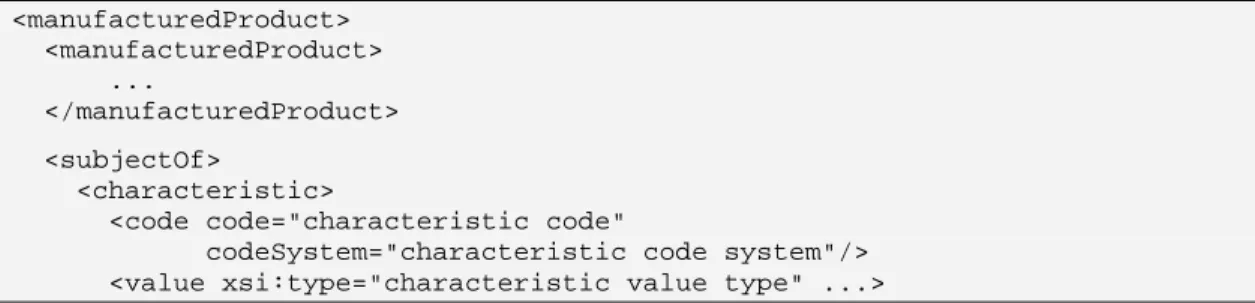
<code code="48780-1" codeSystem="2.16.840.1.113883.6.1" displayName="SPL product data elements section"/> <subject>
<manufacturedProduct>
<!-- product data elements --> </manufacturedProduct>
</subject> </section> </component>
<!-- Other content of labeling material --> <component>
<!-- ... -->
<component> <section>
<id root="e13a985b-f706-a5c8-e8ef-73891eb1c697"/> <code code="48780-1"
codeSystem="2.16.840.1.113883.6.1"
displayName="SPL product data elements section"/> <effectiveTime value="20070424"/>
<subject>
<manufacturedProduct>
Validation Procedures
2.2.5.1 Code, code system and display name are as above
2.2.5.2 There is one or more product, except in Human Compounded Drug Reporting
(75031-5) and Animal Compounded Drug Label (77647-6) documents. 2.2.5.3 There is an effective time with at least the precision of day in the format
YYYYMMDD
3
Product Data Elements
This section describes with examples in general the capabilities of the product data elements that are currently implemented in the scope of this Implementation Guide. More specific sections follow with more detail and more specific guidelines and validation procedures. These subsequent sections may constrain and detail what is described here, but may also introduce details not described here in general. In case of discrepancies, the later specific ruling preempts the general description given here.
Terminology:
• FDA terminology is used for the proprietary, non proprietary and ingredient name.
• National Drug Codes (NDC) System is used for
o NDC Labeler Code (4 or 5 digit code (e.g., 0001 or 11111)), to register the labeler prefix,
o NDC Product Code (8 or 9 characters beginning with the NDC Labeler Code separated by a hyphen from the product segment of the code (e.g., 0001-0001 or 11111-001 or 11111-0001)) for products independent of packaging, and
o NDC Package Code (10 characters beginning with the NDC Product Code separated by a hyphen from the package segment of the code (e.g., 0001-0001-01, 11111-001-01 or 11111-0001-1)) for packaged products.
• NDC System is also used for identifiers for the National Health Related Item Code (NHRIC)
o NHRIC Product Code (8, 9 or 10 digits beginning with the NHRIC Labeler Code separated by a hyphen from the product segment of the code and
o NHRIC Package Code (10 digits beginning with the NDC Product Code separated by a hyphen from the package segment of the code).
• ISBT-128 site and product codes are for licensed minimally manipulated cell products.
• GS1 GTIN and HIBCC codes are used for device item codes.
• FDA Substance Registration System (SRS) is used for the ingredient and active moiety Unique Ingredient Identifier (UNII).
• The FDA submission tracking system is used for application numbers.
• Codes derived from section references to the Code of Federal Regulations are used for monograph citations.
• The National Cancer Institute Thesaurus (NCIt) is used for dosage form, product characteristics, DEA schedule, unit of presentation, route of administration and equivalent codes.
• The Unified Codes for Units of Measure (UCUM) is used for the unit of measure.
• HL7 confidentiality code “B” is for business confidential information.
• FDA Product Classification codes are for device and cosmetic products.
3.1
Product in General
Among the product data elements that are always used are item code and name. These are children of <manufacturedProduct>.
Item Code is a unique identification of this product description whether or not the item code is printed on the product itself. Item codes must conform to the ISO 15459 system of codes. National Drug Code (NDC), National Health Related Item Code (NHRIC), GS1 GTIN, HIBCC all conform to ISO 15459. All these have in common that they are composed of a company prefix (e.g. NDC labeler segment) followed by the item reference that is assigned by the owner of the company prefix to create a unique item code. As long as the item code is unique, the digits (and letters) in it need not convey any other information.
Names: When specific manufactured or marketed products are described, the name is the proprietary name as it appears on the label divided between <name> and <suffix>. The <name> is the initial portion of the proprietary name describing the ingredients without any other descriptors including trademarks and dosage forms. If necessary, <suffix> is used for descriptors such as “extended release”. When using the <suffix>, a space after the proprietary name is added as necessary. Non-proprietary or generic names of drugs are found in the <genericMedicine><name> element. Device type codes and descriptions use <asSpecializedKind>.
A brief description is added in the <desc> element that states succinctly the kind of device. This text should be brief to be able to list it in short summary listings. While
the text can be up to 512 characters in length, it should normally be much shorter so that it will be useful for listing in tables. A device also has a device-nomenclature code in the <asSpecializedKind> element. This code comes from the FDA Product Classification terminology.
Marketing category and product type: The type of product is indicated by the “Marketing Category”.
Table 1: Marketing Category and Product Type Code Type Display Name
C73583 Drug ANADA C73584 Drug ANDA C73585 Drug BLA
C73588 Drug Conditional NADA C73590 Drug Export only C73593 Drug NADA C73594 Drug NDA
C73603 Drug OTC monograph final C73604 Drug OTC monograph not final C73605 Drug NDA authorized generic C73613 Drug unapproved medical gas C73614 Drug unapproved homeopathic C73627 Drug unapproved drug other C73626 Drug bulk ingredient C75302 Drug IND
C80438 Device Exempt device
C80440 Device Humanitarian Device Exemption C80441 Device Premarket Application
C80442 Device Premarket Notification C86964 Medical Food Medical Food
C86952 Dietary
Supplement Dietary Supplement C86965 Cosmetic Cosmetic
C92556 Drug Legally Marketed Unapproved New Animal Drugs for Minor Species C94795 Drug Drug for Further Processing
C95600 Drug Approved drug product manufactured exclusively for private label distributor C95601 Drug OTC monograph drug product manufactured exclusively for private label distributor C95602 Drug Unapproved drug product manufactured exclusively for private label distributor C96793 Drug Bulk Ingredient for Human Prescription Compounding
C98252 Drug Bulk Ingredient for Animal Drug Compounding C101533 Drug unapproved drug for use in drug shortage
<subject>
<manufacturedProduct> <manufacturedProduct>
<code code="NDC Product Code" codeSystem="2.16.840.1.113883.6.69"/> <name>proprietary name <suffix>suffix to name</suffix></name> <formCode code="dose form code"
codeSystem="2.16.840.1.113883.3.26.1.1" displayName="display name"/>
<asEntityWithGeneric> <genericMedicine>
<name>non proprietary name</name> </genericMedicine>
</asEntityWithGeneric> </manufacturedProduct> <subjectOf>
<approval>
<!-- possibly approval number --> <code code="C73594" displayName="NDA"
codeSystem="2.16.840.1.113883.3.26.1.1" />
<!-- possibly other attributes in the marketing category --> </approval>
</subjectOf>
</manufacturedProduct> </subject>
The following is an example for a device: <subject>
<manufacturedProduct> <manufacturedProduct>
<code code="Device Item Code" codeSystem="Item Code System"/> <name>proprietary name <suffix>suffix to name</suffix></name> <desc>Brief description of product (up to 512 characters)</desc> <asSpecializedKind>
<generalizedMaterialKind>
<code code="product classification code" codeSystem="2.16.840.1.113883.6.303" displayName="display name"/>
</generalizedMaterialKind> </asSpecializedKind>
</manufacturedProduct> <subjectOf>
<approval>
<!-- possibly approval number -->
<code code="C80441" displayName="Premarket Application" codeSystem="2.16.840.1.113883.3.26.1.1" />
<!-- possibly other attributes in the marketing category --> </approval>
</subjectOf>
</manufacturedProduct> </subject>
Validation Procedures
3.1.1.1 There is an Item Code, except for part products not requiring an Item Code or if the document type is Human Compounded Drug Reporting (75031-5),
Animal Compounded Drug Label (77647-6) or Indexing - Biologic or Drug Substance (77648-4).
3.1.1.2 General rules about the Item Code are:
3.1.1.3 Code system is 2.16.840.1.113883.6.69 (NDC, NHRIC), 1.3.160 (GS1), 2.16.840.1.113883.6.40 (HIBCC), or 2.16.840.1.113883.6.18 (ISBT 128). 3.1.1.4 Code is compliant with the code system’s allocation rules.
3.1.1.5 There is a name, i.e., proprietary name of the product as used in product labeling or in the catalog
3.1.1.6 If the document type is Human Compounded Drug Label (75031-5) then there may be an item code.
3.1.2 Equivalence to other Products, Product Source
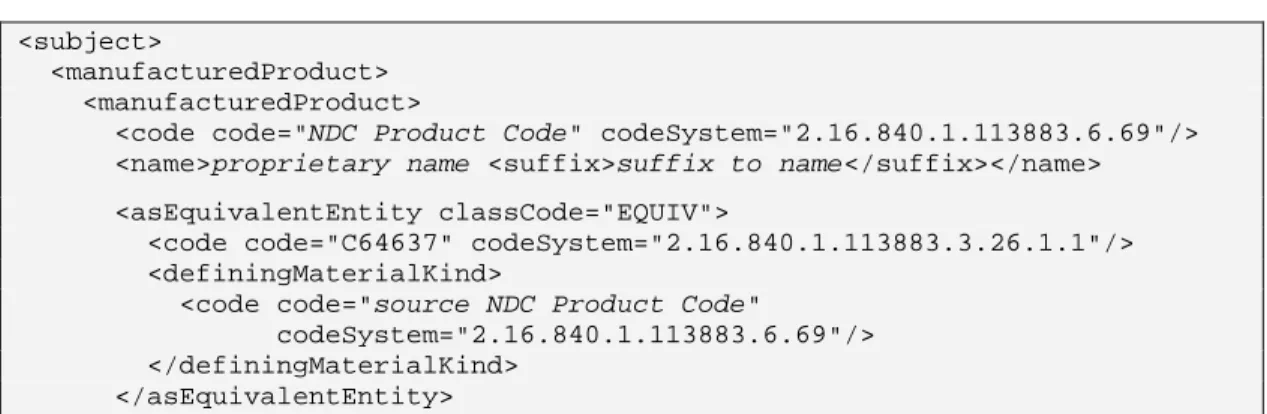
The following is for referencing information already submitted for a source drug: <subject>
<manufacturedProduct> <manufacturedProduct>
<code code="NDC Product Code" codeSystem="2.16.840.1.113883.6.69"/> <name>proprietary name <suffix>suffix to name</suffix></name> <asEquivalentEntity classCode="EQUIV">
<code code="C64637" codeSystem="2.16.840.1.113883.3.26.1.1"/> <definingMaterialKind>
<code code="source NDC Product Code" codeSystem="2.16.840.1.113883.6.69"/> </definingMaterialKind>
</asEquivalentEntity>
This is a special case of referencing other products for various purposes. Another purpose is for products that are updated with improvement, where it may be useful to indicate a succession to a previous version of the product identified by the item code of the predecessor product. This can be done using the equivalence relationship with <asEquivalentEntity> with a different Role code as in Table 2:
<manufacturedProduct> <manufacturedProduct> ...
<asEquivalentEntity classCode="EQUIV">
<code code="C?????" codeSystem="2.16.840.1.113883.3.26.1.1"/> <definingMaterialKind>
<code code="81234567890008" codeSystem="1.3.160"/>
The following equivalence codes are defined: