PoolPak.com
OPERATION AND MAINTENANCE MANUAL
DEHUMIDIFIERS
PPK SERIES
Table of Content
General Information ... 2
Operating Safety (Warnings, Cautions, and Notes) ... 2
Reference and Additional Information ... 3
Basic Information ... 4
Dehumidifier External Systems Connection ... 6
Layout and Components ... 10
Dehumidifier Main Components ... 10
Sequence of Operation ... 16
Ventilation ... 16
Purge (Additional Exhaust) Option ... 16
Heat Recovery Option ... 17
Air Conditioning, Dehumidification and Pool Heating... 17
Compressor(s) ... 18
Interface and Communication ... 20
Touch Display Operator Panel ... 20
Remote Communication ... 22
Basic Maintenance ... 23
Maintenance and Safety ... 23
Maintenance Key Points ... 23
Specific Components Maintenance ... 25
Special Maintenance Tasks. Fluid Cooler Winterization. ... 26
General Information
This manual provides basic information about the applicable dehumidifier and its operation.
Important information regarding installation, maintenance, and start up as well as additional and auxiliary systems and devices (outdoor condenser, communication interfaces, etc.) is normally provided with the dehumidifier and can also be obtained at factory (see Contact Us below).
Operating Safety (Warnings, Cautions, and Notes)
FOR YOUR SAFETY: READ BEFORE PERFORMING ANY OPERATIONS, MAINTENANCE OR SERVICE TASKS! Only qualified technicians should install, operate, maintain or service mechanical equipment including current dehumidification system.
Make sure to read this manual before performing any tasks to familiarize yourself with the equipment as well as with any potential hazards. Always exercise caution!
Beware of electrical power and high electrical voltage!
• Follow proper safety procedures – lockout, tagout, and other respective procedures • Failure to follow safety procedures can result in serious injury or death
Beware of moving parts and hot surfaces!
• Make sure to stop all moving parts (fans, blowers, etc.) before accessing the equipment’s internal space
• Be aware of hot surfaces (hot refrigeration, space heating pipes, coils, heaters, etc.)
Beware of high pressures and chemicals!
• Dehumidifiers, equipped with compressors, contain refrigerant under high pressure; oil is also contained in the compressor and refrigeration circuit(s)
• Some dehumidifiers may also contain other liquids such as glycol mixtures and pool water
The following warnings, cautions, and notes appear throughout this manual and referenced documentation whenever special care must be taken to avoid potential hazards that could result in equipment malfunction or damage, personal injury, or death.
WARNING
Indicates a potentially hazardous situation which could result in serious injury or death if handled improperly.
CAUTION
Indicates a potentially hazardous situation which could result in moderate injury or equipment damage if handled improperly.
Note
Indicates a situation that could result in equipment damage or improper/ineffective operation if handled improperly.
Reference and Additional Information
For safe, efficient and problem-free operation, it is critical to handle the dehumidifier (as well as related systems and components) properly at each step - from receiving and storage to installation and start up. Relevant
information can be found in the respective documents (like Installation Manual) provided with the dehumidifier.
This manual and other related documents could be obtained from the manufacturer (see Contact Us below).
Contact Us
PoolPak
3491 Industrial Drive York, PA 17403 USA PoolPak.com 1-833-DAS-POOL (327-7665) Schedule / Modify a Start-up:[email protected] Inquire about Warranty:
[email protected] Order Parts:
[email protected] All Other Product Support:
Attention: Installation and Service Contractors
WARNING!
Any work (installation, start up, service, maintenance, repair, etc.) on any mechanical equipment (dehumidifier, outdoor condenser, fluid cooler, etc.) must be performed in accordance withrespective manufacturer’s recommendations as well as submittal documentation, local Codes and Regulations,
and appropriate field practices. Failure to do so could result in personal injury, equipment damage or
malfunction, and will void equipment warranty. Only qualified and properly trained individuals should perform tasks on this equipment.
Attention: Maintenance Team
CAUTION.
To ensure equipment longevity and proper and efficient operation, the dehumidifier and its auxiliary systems and devices (outdoor condenser, fluid cooler, etc.) should be maintained properly and regularly. Failure to do so could negatively affect premise comfort levels and people’s health. It could also lead toBasic Information
Dehumidifier View and Options
Standard large dehumidifiers are semi-custom: while basic concept and layout is the same, options and specific systems and components layout and location may vary from one dehumidifier to another. One of the typical dehumidifier arrangement is shown on Pic.C.1.
Dehumidifier Options
• Indoor or outdoor installation.
o Note: Pic. C.1. shows outdoor model, equipped with louvers (to protect air intake and discharge openings from elements). Indoor model would have ducts connected to respective openings, no louvers would be needed.
• Capacity (number of compressors) – two to four compressors (see Dehumidifier Optional Arrangement below
for more details):
o Two-compressor dehumidifier option (models PPK070 to PPK340).
o Three-compressor dehumidifier option (models PPK380 and PPK420).
o Four-compressor dehumidifier option (model PPK530).
• Airflow/ductwork connection *. Pic. C.1 shows some options only; each option location availability depends on
the dehumidifier installation (indoor or outdoor) and other options:
o Return Air (RA) ductwork connection - top, bottom, end, sides.
o Supply Air (SA) ductwork connection – top, bottom, sides.
o Optional Min Outdoor Air (OA) ductwork connection/termination – top, sides.
o Optional Min Exhaust Fan (EF) and Purge Fan (PF) ductwork connections/terminations – end, sides.
o Optional Purge Outdoor Air (POA) ductwork connection/termination - top, sides.
• Optional Pool Water Heating **.
o Dehumidifier can accommodate up to two pool water heating circuits
• Optional Space Heating - hot water coil, electric or gas heater ***.
• Optional Heat Recovery (HR) circuit.
• Air Conditioning (AC)* – external water cooling or fluid cooler (packaged or separate).
o Note:Pic. C.1 shows outdoor model with “packaged” fluid cooler (mounted with the dehumidifier). “Packaged’ AC option is available for outdoor models only; alternatively, indoor and outdoor models could be fitted for separate/remote AC option – remote fluid cooler or other external cooling media source.
*
Some available options (tonnage, ductwork connections, AC options etc.) are shown. Refer to the submittal and other relevant documentation for your dehumidifier’s options.** The pool water heating option relies on compressor-created excess heat and is used as an additional heating source. It does not eliminate the need for a main pool water heater.
*** For specific details on space heating (hot water, gas, electric) option, refer to the submittal and other documentation:
• Gas-fired duct heater can be installed internally (fitted inside the dehumidifier at the factory) or provided for field installation (to be fitted in the supply air ductwork).
• Electric heater or hot water coil, depending on capacity, model, size, etc., can be installed externally (mounted on the top of SA opening or fitted in the supply air ductwork) or internally. Refer to your dehumidifier’s submittal
documentation.
Attention! Equipment Clearances and Dimensions!
CAUTION!
For equipment proper operation, maintenance and service, respective clearances should be maintained. Generally, 30” clearances to the equipment must be kept for the maintenance and service purposes. For the specific required clearances information, as well as dehumidifier overall dimensions, distances to pipe connections, duct connections etc., refer to the submittal documentation.Dehumidifier External Systems Connection
Pic. C.1 shows provisions for external systems connections, including ductwork, electric power and control wires and various piping connections.
Except for the condensate, all other piping systems are optional and may not be present in each dehumidifier
• Condensate Drain Line– bottom, side (through the dehumidifier base).
• Air Conditioning (AC) Connection.
o Packaged AC option (outdoor dehumidifier with outdoor fluid cooler (OAFC) incorporated with the dehumidifier), does not require piping connection to external AC system or device.
Pic 1.C. shows packaged outdoor model with OAFC mounted at the end of the dehumidifier; alternatively, if requested, OAFC could be mounted on the roof of the dehumidifier. o Remote (“split”) AC option (indoor or outdoor dehumidifier, connected to external cooled
water/glycol system or remote fluid cooler) – side or end (through the compressor compartment wall) connection.
• Pool Water Heating– bottom, side.
• Space heating (Hot Water connection)– bottom, side.
o Some connection location options for both, pool and space, heating pipe lines, are limited to indoor installation only – refer to submittal documentation
• Space Heating (Gas Heater connection, gas line). If the dehumidifier is equipped with a gas heater for space heating purposes, the gas line connection is to be brought to the gas heater directly.
• Electric Power and Control Connection. Electric power is normally brought to the dehumidifier disconnect, normally incorporated with main electric panel (see Pic. C.1). If dehumidifier is not equipped with the disconnect, power lines to be brought directly to the main electric panel.
Dehumidifier Optional Arrangement.
Multi-Compressor Arrangement and Compressor Compartment Layout
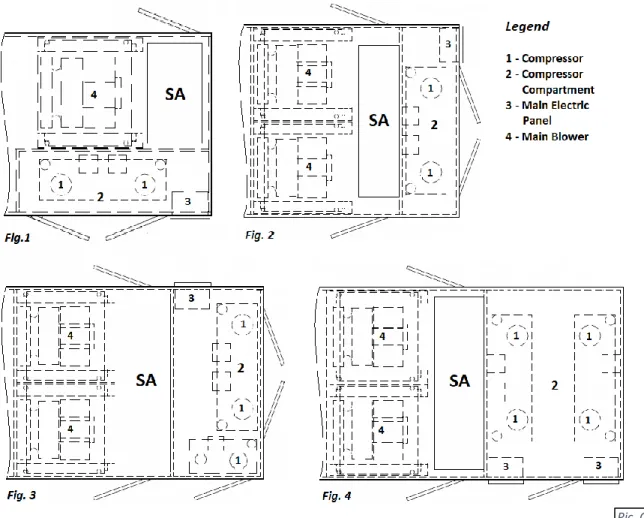
Large model dehumidifiers, depending on required capacity, could have two, three or four compressors. Pic.C.2 shows options of dehumidifier supply air (SA) end and compressor compartment arrangement, based on number of compressors.
Pic.C.2 shows top supply air (SA) connection option as an example – other connection options are available also.
CAUTION!
Current manual shows general/default connections’ location. For details regarding specificdehumidifier’s connections (actual location, piping sizes and position dimensions, circuit type and flow direction etc.), refer to the dehumidifier’s submittal documentation as well as dehumidifier’s labels and stickers.
NOTE.
Dehumidifier MUST be equipped with a P-trap at the condensate connection for proper operation! If dehumidifier is requested from the factory without P-trap, one MUST be installed on site prior to dehumidifier being commissioned. Refer to the Installation Manual for details.WARNING!
Gas Line. The gas line must be installed in accordance with respective device documentation and local codes and regulations.For two-compressor dehumidifier, compressor compartment may have side (Fig.1; same as dehumidifier, shown on Pic. C.1) or end (Fig.2) location. End location is mostly used in higher capacity dehumidifiers.
Three- and four-compressor dehumidifiers (Fig.3 and Fig.4, respectively) normally have end location of the compressor compartment.
Air Conditioning Options
–
Outdoor Air Fluid Coolers (OAFC).
Basic views of standard air conditioning options are shown on Pic.C.4 (below); standard combinations of the dehumidifier and respective fluid cooler (based on their capacities) are shown in Table C.1. Note, that depending on number of factors, dehumidifier may have different cooler provided with it - refer to the dehumidifier’s submittal documentation for more details.
Standard fluid coolers used with this model of dehumidifier is NG-V series, composed of number of “two-coils-two-fans” blocks, based on required capacity of the cooler:
• Fluid cooler NG-V-12 (Pic.C.4, Fig.1) is composed of one such block; NG-V-22 (Fig.2) composed of two such blocks etc. largest single fluid cooler, NG-V-62 (Fig.3) composed of six of them.
As an option, each block of fluid cooler could be equipped with the pump package (as shown on Fig.1 for NG-V-12).
Table C.1 Dehumidifier Fluid Cooler
PPK070 – 100 NG-V-12 PPK070 – 200 NG-V-22 PPK140 – 300 NG-V-32 PPK260 – 420 NG-V-42 PPK340 – 530 NG-V-52 PPK380 – 530 NG-V-62 PPK380 – 420 2*NG-V-32 PPK420 – 530 2*NG-V-42 PPK530 2*NG-V-52 Pic. C.2
Attention! Equipment Clearances!
Proper clearances should be maintained for adequate airflow and heat rejection! Generally, up to 36” side and 96” top clearances are required. For more information on clearances as well as equipment dimensions and other details, refer to the submittal documentation.
Equipment Specific Data
Specific information for individual dehumidifiers is provided in the following methods: Main Label (Pic. C.5): the manufacturer tag
attached to the front of the dehumidifier includes the dehumidifier’s most critical data:
General data including:
o Serial number
o Dehumidifier model
(nomenclature)
o Design room conditions (air
temperature and humidity) Operational data, including:
o Refrigeration (refrigerant type,
charge, etc.)
o Electrical/airflow
(dehumidifier voltage, CFM, etc.)
o Other applicable data (pool
heating, space/auxiliary heating features, etc.) Labels and Stickers: attached when
applicable to the exterior and interior of the dehumidifier to show:
External systems connections location/direction
(pool/space heating, cooling circuits, condensate)
Air filter locations, quantity, and size.
Additional Info (warning, caution stickers, etc.) Wiring Diagrams: attached to the interior side of the dehumidifier, depict dehumidifier control and power wiring.
Remotely installed condenser or cooler would have its specific information provided in similar manner (labels etc.).
Attention! Glycol Circuits.
Unless otherwise indicated, equipment fluid circuits (except for refrigeration and pool water circuits) such as heat recovery loop, compressor glycol loop, fluid cooler etc., are normally filled/to be filled with water/glycol mixture; normally, rust inhibitor-infused food-grade propylene glycol is used.
Glycol mixture concentration is normally shown on Main Label – refer as needed.
Note:
The main label shown above is just an example. Pic. C.5Layout and Components
The general layout and components location is the same for all dehumidifiers of current type, however some may vary, based on the dehumidifier’s specific options – refer to submittal documentation. Pic. D.1 below shows all/most available options, some of which may not be present on your dehumidifier.
Dehumidifier Main Components
• Main Blower (1) is in the main blower compartment behind or next to the Compressor Compartment (3) with Main Electric Panel (2). Based on airflow requirements, number of main blowers may vary (up to four).
o Two blowers could be installed either side by side or stacked on a top of each other (Pic. D.1A); four blowers’ arrangement would have two stacks, shown on Pic. 1.DA, installed side by side.
• Min Outdoor Air (OA) Opening (4) has a motorized damper and filter(s). The Manual OA Damper (5) is usually used to set proper amount of outdoor air intake; in some cases, it could be equipped with modulating
actuator for automatic adjustment of outdoor air intake.
o Outdoor-installed dehumidifier would have louver(s) (76) installed at the OA opening.
• Min Exhaust Fan(s)(EF)Assembly(6) (fan and motorized damper) is located on the dehumidifier’s return air side; Exhaust Air opening in outdoor-installed dehumidifier is equipped with louver(s) (76) also.
o Min Exhaust Fan Assembly is hinged and could be opened for better access to the fan electric box.
• Dehumidifier, equipped with Heat Recovery (HR) option, would have HR glycol coils (71), installed at the Min Exhaust (EF) and Min Outdoor Air(OA) openings, and HR pump (72), installed in return air compartment.
o If HR option is present, Min Exhaust Fan Assembly would normally be equipped with a filter rack.
• If dehumidifier is equipped with Purge option, additional Purge-exhaust fan(s) (PF) (73) with motorized damper would be installed on dehumidifier’s return air side, as well as additional(“Purge”) Outdoor Air (POA)
(74) opening(s), equipped with motorized dampers, would be located directly upstream of Main Filter Rack
(9). Motorized Return Air (RA) damper (75) would be located between return air side and POA opening(s).
o Outdoor- installed dehumidifier would have louvers (76) installed at the Purge-exhaust fan and Purge Outdoor Air openings.
• Refrigeration Evaporator coils (7) and water/glycol Reheat coils (8) are located directly downstream of the Main Filter Rack (9).
o Motorized Evaporator Bypass Damper (10) is
located next to the evaporator coils; it by-passes portion of air around evaporator, thus adjusting compressor circuit operation. Some dehumidifiers, based on airflow requirement, could be equipped with additional manual by-pass damper also.
o Each compressor circuit has its own evaporator
coil(s) set (one or two coils per circuit, depending on capacity), while all reheat coils, generally, are manifolded together and serve both compressor circuits together.
• Space heater location, if the dehumidifier is equipped with one, depends on the heater type:
o Hot water coil or Electric heater (11a) is usually located directly downstream of the reheat coil;
o Gas heater (11b) is usually located downstream of
11b
2
1
3
5
4
7
8
9
11a
10
Pic. D.1B72
75
71
74
6
71
73
76
76
21
22
23
24
29
Compressor Compartment and Main Electric Panel (detailed; seePic.D.1C).
• Compressor(s) (13), Receiver(s) (14) and other components are located within the Compressor Compartment (3):
o Each compressor circuit has glycol-to-refrigerant plate heat exchanger (16) and, common to both
circuits, glycol pump (16a), that circulates water/glycol to reject compressor-generated heat.
o Motorized water/glycol Reheat (79) and AC (80) valves’ opening position determines how much fluid is diverted to respective coil(s) (reheat and fluid cooler or external heat sink).
o If the dehumidifier has the standard pool water heating option, the compressor circuit additionally includes the coaxial pool water heat exchangers (15) and refrigeration pool water heating solenoid valves. Number of pool water heat exchanger varies based on dehumidifier type and capacity.
o Control sub-panel with Main Control
Board (17) and Operator Panel (18) is normally mounted on the compressor stand frame.
• Main Electric Panel (2) contains main blower(s) VFD (variable frequency drive) (78), main Disconnect (77), if one is installed, and other electrical and control components (contactors, fuses, control transformer etc.).
• Packaged Outdoor Fluid Cooler (19), if dehumidifier is equipped with it, is normally mounted at the end of the dehumidifier, adjacent to compressor compartment/supply air end (see Pic. D.1D).
13
14
15
18
17
19
77
Pic. D.1C Pic. D.1D78
16
16a
13
27
28
25, 26
80
79
Control System
The dehumidifier control system is composed of sensors, spread throughout the dehumidifier, Main Control
Board, Operator Panel and other electric components, located in the Main Electric Panel. Temperature Sensors (Pic. D.2):
a) Temperature sensors (thermistors) are used to monitor various temperatures (air, water, compressor, etc.); b) Combo sensor is used to monitor air temperature and
humidity.
Compressor operation is monitored with pressure sensors (Pic. D.3): c) Pressure Transducers (as main operational control and safety) and d) Pressure Switches (fast-reacting backup safety).
Note. Sensors and safeties approximate location is shown on Pic. D.1B and D.1C– refer as needed.
• RA ComboSensor (21) measures temperature and humidity of the pool room air (Return Air) entering the dehumidifier. It is located at the return air ductwork connection to the dehumidifier.
• OA Temperature Sensor (22) measures outdoor air temperature; it’s located at the OA filter rack.
o As an option, the combo sensor (instead of regular thermistor) can be installed at the OA intake to measure both the temperature and humidity of the outdoor air.
• ET (EvapT) Temperature Sensor (23) measures the temperature of air leaving evaporator coil. It’s located directly downstream of the evaporator coil(s) (one sensor per each compressor circuit).
• SA temperature sensor (24) measures the temperature of the air leaving the dehumidifier (supplied to the premise). It must be located downstream of the space heater:
o SA temperature sensor of dehumidifier, equipped with gas heater, would be composed of four
regular temperature sensors, installed in different points at supply duct connection, averaging temperature reading.
• If the dehumidifier is equipped with the pool heating option, the Pool Water Temperature sensors (Pool In (25) and Pool Out (26)) measure the entering and leaving pool water temperature. The sensors are located at respective manifolds.
o As an option, the pool water heat exchanger piping/manifold may have water flow switch also.
• The compressor’s discharge line (high pressure side) is equipped with Temperature and Pressure sensors set - Discharge Temperature Sensor, High Pressure Transducer and High Pressure Switch (27) - to protect the compressor and control its operation. A similar function is performed by Suction Temperature Sensor, Low Pressure Transducer and Low Pressure Switch (28) located at compressor’s suction line (low pressure side).
o Said safeties/sensors are installed on each compressor.
• If dehumidifier is equipped with Heat Recovery option, it could also have Exhaust Air(EA) Temperature Sensor (29), installed downstream of exhaust-side located heat recovery glycol coil.
Main Electric Panel, apart from devices listed above (control board, OP, etc.) also contains Voltage Monitor; some optional control sensors and devices such as an air pressure differential sensor, current sensor(s). It may also be located in main electrical panel or in the dehumidifier in general.
b
a
c
d
Pic.D.3 Pic. D.2Outdoor Air Fluid Coolers Layout and Components
.The general layout of AC options (air-and water-cooled) is shown on Pic.D.5 below with the outdoor fluid cooler
NG-V-12, equipped with additional pump package (Fig.1) and NG-V-32 (Fig.2) as an example. While layout and main components are similar for all applicable AC options, there are some deviations (number of fans, composition, etc.). Refer to AC Options Basic View (Basic Information chapter) for additional information.
• Cooling (AC) coils (31) (where heat from glycol mixture is rejected to the ambient air) is mounted onto metal frame, upstream (before) the fans (32), that pulls the air through the coils to absorb the heat.
o Normally, fluid cooler would have multiple coils and fans. Cooler NG-V-12 (Fig.1), comprised of two
coils, mounted on the angle to each other, and two fans, presents a single block. Depending on the capacity, cooler could be comprised of up to six such single blocks, stacked side by side on the same frame and manifolded together – NG-V-32 is comprised of three such blocks.
• Cooler piping connections (33) are identified respectively (IN – OUT);
o In some cases, fluid cooler piping connection(s) may be located within pump package box (37), if fluid cooler is provided with one.
o Piping connection location may vary – refer to particular cooler labels, stickers, submittal and other documentation.
• Electric power is normally to be brought to disconnect (35) (if cooler is equipped with such), which feeds it to the electrical box (36), that contains cooler power and control apparatuses.
o Depending on fluid cooler specifics, location of electrical box may slightly differ; in some cases, electrical box may be incorporated into pump package or located on the opposite side of the fluid cooler.
32
36
35
33
37
31
Pic. D.533
31
Fluid Coolers Pump Package.
Fluid Coolers, if equipped with such option, would have a pump package box. Pic.D.6 below shows general layout
of pump packages, used for NG-V modelfluid coolers. Note, that the package could be mounted onto the fluid
cooler directly (standard) or provided separately.
• Pump (38) establishes glycol mixture circulation through the fluid cooler and dehumidifier;
• Expansion tank (39) compensates for temperature-based glycol volume fluctuation;
• The pump package electrical sub-panel (40) contains the
pump package electrical power and control apparatuses.
• The pump package manifolds are usually equipped with
pressure gauges, automaticair venting valve, draining and other valves.
Pic. D.6
38
40
Sequence of Operation
The dehumidifier’s ventilation system establishes the required airflow through the dehumidifier. The control system compares air temperature and humidity to their desired values (set points) and proceeds to dehumidify, cool or heat the recirculating air.
If the dehumidifier is equipped with the pool water heating option, the pool water temperature is compared to its set point and pool heating is provided if required.
Set Points
The control system is constantly adjusting unit operation to achieve and maintain said parameters within couple degrees/percent of the set point.
Refer to the dehumidifier’s main label for the design value of control parameters, as well as the following note.
Ventilation
The main blower runs continuously, establishing required. The main blower speed is pre-set via adjustable variable signal.
Minimum Exhaust Fan (EF), if dehumidifier is equipped with such option, directs portion of return air outdoors. Like main blower, exhaust fan(s) speed is also controlled via adjustable (pre-set) variable signal, that varies based on scheduled ventilation mode (Occupied, Non-Occupied and Spectator) or call for Economiser Mode (as part of Air Conditioning and/or Dehumidificationoperation).
Minimum Outdoor Air (OA)damper, if dehumidifier is equipped with such option, opens to introduce fresh outdoor air into the premise. OA damper could be equipped with ON/OFF (simple fully open – fully closed) or modulating-controlled actuator; latter one would be controlled same way as minimum exhaust fan.
Purge (Additional Exhaust) Option
Along with Min Exhaust Fan and Min Outdoor Air damper, dehumidifier could have additional set of exhaust (purge) fan(s) (PF) and purge outdoor air damper (POA), commonly referred as Purge. Purge fan(s) and OA damper(s) function is to allow for higher exhaust and fresh air amount, up to complete (100%) air changeover (when all exhaust fans and OA dampers are at their max capacities).
Purge Fan(s) and Purge Outdoor Air damper(s) are controlled in the same fashion as min exhaust fans and min outdoor air. Some dehumidifiers may be equipped with additional Return Air damper: it closes in event of complete air changeover, separating return air side of dehumidifier from supply side (refer to Layout and Componentschapter, as needed, for respective devices’ location).
Complete air changeover, triggered manually, is known as Purge Mode.
• Note. Externally installed Exhaust Fan(s) and Outdoor Air damper(s) could be also controlled by the dehumidifier control system. This applies to both, Minimum and Purge/Additional, fans and dampers.
Note:
To ensure the dehumidifier’s most economical operation, we recommend maintaining the following relationship between pool water and room air temperatures:Heat Recovery Option
Dehumidifiers, packaged with Minimum Exhaust Fan and Minimum Outdoor Air damper, could also have additional Heat Recovery (HR) closed-loop glycol system.
Heat Recovery loop (see Pic. E.1 below) consists of two coils (air-to-glycol heat exchangers) and a pump, establishing glycol circulation between them. One coil, installed at exhaust air opening, recovers portion of exhausted air energy, another coil, installed at outdoor air intake, transfers this captured energy to entering outdoor air.
Space Heating
When premise air temperature drops below the set point, the dehumidifier control system issues a call for Space Heating Mode and engages space heater (electric heater, hot water coil with valve, gas boiler etc.) by sending space heating signal, respective to space heater control type - on/off, variable (0-10VDC), etc.
Air Conditioning, Dehumidification and Pool Heating
When premise air temperature goes over (exceeds) its set point, the dehumidifier control system issues a call for Air Conditioning Mode. Respectively, when premise air humidity goes over (exceeds) its set point, the dehumidifier control system issues a call for Dehumidification Mode. In some instances, these calls may co-exist.
To execute Dehumidification or Air Conditioning (Cooling) mode, control system, depending on current conditions, would resort to available means of cooling or dehumidification.
Economiser Mode Option
• Note. Economiser Mode requires dehumidifier to be equipped with full (min and additional) exhaust and outdoor air options!
If outdoor air is dry and/or cool, it could be used to dehumidify and/or cool the premise. In this case, on call for Dehumidification or Air Conditioning mode(s), control system would simply increase exhaust fan(s) speed signal to direct more stale return air outside and bring in more outdoor (dry/cool) air in, thus reducing supply air humidity and/or temperature (as needed).
Compressor(s)
Whenever the compressor operates, the evaporator is always dehumidifying and cooling the return air. The heat removed from the air at the evaporator, as well as the heat from the compressor's action, must be rejected to one of three heat sinks: room (premise) air, pool water (if applicable) or outdoors. The control system will direct the heat to where it is needed based on room (air and pool water temperature) conditions:
• If room air is needed to be warmed up – more heat is diverted towards reheat coil;
• If pool water is needed to be warmed up – more heat is diverted towards pool heating coaxial heat exchanger
(if dehumidifier is equipped with this option).
• Rest of the heat (if any) is diverted towards outdoors (outdoor fluid cooler, external heat sinks etc.)
Compressor Circuit Operation
Piping schematic for compressor circuit is shown on Pic. E.2.
• Schematic shows single compressor circuit (second compressor circuit schematic is the same) and common to
both compressor circuits’ glycol cooling circuit.
• Circuit operation below applies to both compressors; compressors are staged –if first compressor’s capacity is not enough to satisfy the call, second compressor will be engaged after certain time delay.
When a demand requires the compressor to operate, the following sequence occurs:
• Once blower operation, related safeties and timers are confirmed by the control system, following occurs:
o Compressor glycol pump starts, establishing cooling glycol/water flow through the compressor fluid
circuit - plate heat exchanger(s) and fluid cooling coils (reheat and/or fluid cooler or external cooling source).
o Pump down solenoid valve opens and once pressure stabilizes, the compressor starts.
• Based on the premise air temperature, the Reheat and AC valves would adjust their opening position (open
more/close more), reducing or increasing fluid flow to and through the respective fluid coils:
Reheat and AC valves are controlled in the same manner with opposite effect: for example, when AC valve opens 10% more, Reheat valve closes 10% more etc.
o if more heat is required by the room air, the Reheat valve opens more, and AC valve closes more, thus
diverting more fluid to the reheat coils (heat is rejected to the premise);
o if more cooling is required by the room air, the AC valve opens more, and Reheat valve closes more,
thus diverting more fluid to the fluid cooler (heat is rejected outdoors).
o Outdoor fluid cooler fans are engaged only if at least some fluid is diverted towards outdoor fluid cooler and compressor pressure is higher than pre-set level (see Outdoor Fluid Cooler Operation below).
• Dehumidifiers, equipped with pool water heating option, also engage the refrigeration pool water heating solenoid valve to reject heat into the pool water, based on pool water temperature.
• Once demand for the compressor’s operation is removed (respective call is satisfied), the pump down solenoid
valve closes; once the compressor suction pressure reaches the pre-set pressure, the glycol pump and compressor stop.
Outdoor Fluid Cooler Operation
Based on the type of the outdoor condenser or fluid cooler fans’ type (two-speed fans or EC-type/modulating fans), respective signal(s) are sent by control system to engage said fan(s): for two-speed fans - on/off signals (switching speeds, based on compressor head pressure level), for EC-type fans - variable 0-10VDC signal
(proportional to the compressor head pressure level). Refer to the fans’ type and wiring diagram if/when needed. If the fluid cooler is equipped with the built-in pump package (to establish cooling fluid flow between dehumidifier and the fluid cooler or to serve as additional/booster pump), the said pump is also engaged along with fluid cooler fans – pump would stay engaged while fans are engaged (regardless of the fans’ speed).
Interface and Communication
Touch Display Operator Panel
The Touch Display Operator Panel (OP), shown on Pic. F.1, is used as a main interface between the dehumidifier and operator. The same OP can be located in the dehumidifier main electric panel (default; used as a local OP) or installed remotely from the dehumidifier
• NOTE: length of CAT5 or CAT6 cable, between remote OP and the dehumidifier MUST NOT exceed 1000’! Touch Display OP allows to:
Access Touch Display Menus
View dehumidifier current operational statuses (Touch Display Communication, Alarms, dehumidifier operational calls, etc.) View controlled parameters’ values (premise air temperature, humidity and, if applicable, pool water temperature) and current date and time.
Touch Display Menus:
Home Opens/returns to the home page
Logs Access to dehumidifier logs and log-related features (Alarms, etc.)
User Access to user settings (Setpoints) and commands (Stop/Restart Dehumidifier, etc.) Advanced Access to advanced settings and features
Help Context sensitive help presenting information related to the viewed page Most common/basic maintenance tasks performed using Touch Display OP
Adjust Setpoint –in User menu: press the User button, then press the Setpoints button; select desired parameter (room air temperature etc.) and enter the desired value. Press the Enter button to confirm the entered value.
Stop/Restart Dehumidifier ––in User menu: press the User button, then press the System Restart button;
o To stop and restart dehumidifier, press the System Restart button
o To reboot Touch Display OP, press the Restart Display button
Review Alarm records ––done via the Logs menu: press the Logs button, then press the Alarm Log button. Unlock device/dehumidifier, stopped and currently locked out on the alarm ––done via Logs menu: press the Logs button, then press the Current Alarms button; press the Clear button next to the respective alarm (the alarm that’s locked out the device or entire dehumidifier).
For detailed information on TouchDisplay OP refer to CommandPak® Control System Touch Display User Manual, provided with the dehumidifier (or contact factory to obtain a copy).
Alarms
If the dehumidifier control system detects abnormal or unsafe for further operation situation, it issues Alarm (notification of such situation accompanied by respective component or entire dehumidifier stoppage and/or lockout) or Alert (notification of minor abnormal situation without any devices’ stoppage or lockout).
All alarms and alerts are recorded and can be viewed/cleared via the Touch Display OP: Viewed: to facilitate troubleshooting and addressing abnormal situation
Cleared: to unlock stopped device or entire dehumidifier and allow for further operation
The table F.1 below lists the basic alarms with their descriptions and recommended initial troubleshooting. Table F.1. Most Common Alarms/Alerts
Alarm Alarm Description Check
No Air No air flow (air flow switch fault –if air flow
switch is installed)
Check main blower operation and air flow switch
Blower OL Main Blower overload/safety fault Check main blower operation and its LED
light blinking pattern.
Fire Fire/smoke detector fault –if detector is installed
externally and connected to control board
Check external fire/smoke detector/system
Freeze Supply Air temperature is lower than Freezestat
Setting (default: 45 F)
Check SA temperature readout, space heating system operation
Filter Alert, indicating that filter change timer has
lapsed –if timer is activated
Clear the Filter alarm and cancel filter scheduler if not in use.
VM Voltage Monitor fault – power supply (phasing,
voltage etc.) is outside of pre-set limits
Check Voltage Monitor info/status, incoming power (voltage)
Compressor:
- HP1-(X)
- LP1-(X)
- SupHeat1
- DisTemp1
Various compressor-related alarms, relevant to:
- Compressor high/discharge pressure;
- Compressor low/suction pressure;
- Compressor superheat/suction temperature;
Check respective compressor-related data (pressure and temperature readouts), refrigerant level in the receiver’s sight glasses, cleanliness of air-side coils and air filters.
Pool Water: Water(X)1, Wtr(X)1
Various compressor pool water heating-related alarms indicating inadequate (too low/too high) pool water flow and/or pool water temperature.
Unless the alarm occurred due to a known water flow interruption (backwash, etc.), check the pool water flow (pump, filters, valves) and pool water temperatures.
HPRelief Alert, indicating that additional condensing
capacity is engaged (pool water heat exchanger etc.) to prevent compressor high pressure from rising too high.
No action required unless it’s accompanied by other (compressor-related) alarm or faulty situation. Note that proper and regular maintenance (example: keeping air filters and air-side coils clean) should reduce the chances of abnormal operations, dehumidifier alarm-related stoppages and downtime.
For more details regarding alarms and alerts, refer to the Alarms Description information (available via Help feature in Touch Display OP); contact factory if needed.
CAUTION!
We recommend you have a qualified professional investigate and remedy all reoccurring alarm-related stoppages and lock-outs. Continuous dehumidifier restarting (clearing alarms) without addressing actual issues may result in equipment malfunction, premature wear, and failure.Remote Communication
Although dehumidifier is designed to operate as a self-controlled device (not requiring any external control), communication between the dehumidifier and external control and monitoring systems is possible.
Virtual-Tech
Virtual-Techis an online tool (also referred to as Web Monitor), that allows for remote communication to the dehumidifier for various purposes such as monitoring, data collection, parameters adjustment, and notifications. This feature is included with all dehumidifiers and is useful for maintenance teams and service providers (HVACR technicians).
To establish Web Monitor communication, the dehumidifier must communicate with the factory server via the Internet:
- Connect the dehumidifier to a local network switch, router or wireless AP device (providing connection to a local network):
o Plug an Ethernet cable into the sub-board Ethernet RJ-45 jack (sub-board, called Core Module, is
located on the main control board in the main electric panel) – see Pic. F.2.
Note: separate RJ-45 jack (plastic, black) is mounted on the control board directly, for TouchDisplay connection. Make sure to use the proper jack (metal-surface one, located on the sub-board) for Web Monitor connection.
- Configure, as needed, local server and dehumidifier network settings.
BMS (Building Management System)
Communication to BMS can also be supported, depending on the type of communication protocol said BMS utilizes.
The equipment control software supports most common of them - different control software variation might be required to
support different BMS communication protocols. Contact factory if necessary.
BACnet (Internet, IP). Communication is established via the Ethernet cable (same method as Web Monitor).
BACnet and Web Monitor communication can be used simultaneously.
LON or Modbus. Communication requires external wiring between dehumidifier main control board and BMS terminal. Wiring schematic is normally indicated on wiring diagram (provided with dehumidifier).
If dehumidifier is equipped with LON communication option, it’s normally provided with pre-wired LonWorks Gateway for communication purposes.
For more information about Web Monitor or BMS communication set up (connection, configuration, access, point cutsheets, etc.) – contact factory.
Basic Maintenance
Although PoolPak equipment is built for minimal service downtime, periodic preventative maintenance is required to ensure maximum reliability, safety, and operating efficiency.
Maintenance and Safety
Only qualified/properly trained personnel should attempt to perform respective maintenance tasks.
• When it is necessary to work with live electrical components, have a licensed electrician or other qualified professional perform the required task.
• Be properly trained and equipped. Some maintenance tasks may involve usage of power tools, chemicals, etc. Refer to such tools and materials data (manuals, MSDS, etc.). Personnel performing such maintenance tasks should be:
o Properly trained to handle such tools and materials safely
o Equipped with proper personal protective equipment
• Turn the power off. Before performing any maintenance, disconnect all electrical power, including remote disconnect, and discharge all energy storing devices (VFDs, etc.) before servicing. Follow proper lockout procedures to ensure that power cannot be accidentally restored. Failure to follow provided safety warnings and labels could result in serious injury or death.
• Be aware of potential hazards. The Equipment contains moving mechanical parts, components under high refrigerant pressures and surfaces with high temperatures. Before entering the dehumidifier and/or performing any equipment maintenance work, make sure that all moving parts are stopped, and it is safe to perform required task.
Maintenance Key Points
Here are some basic/key maintenance considerations, pertinent to all dehumidifiers and their auxiliary systems:
• Dehumidifier in mechanical room.No chemicals should be stored in the same mechanical room where the dehumidifier is installed. Chemical fumes/off-gas can cause premature deterioration of the equipment.
o Store chemicals in a separate, well-ventilated room.
• Access to the Equipment. Ensure that the equipment is accessible (minimum clearances are maintained): approaches to the dehumidifier are not restricted/limited with materials in mechanical room (indoor installed) or with snow (outdoor installed dehumidifiers, OACC and OAFC).
• “MUST DO” maintenance task. Although all other maintenance tasks are as important, these two maintenance tasks are the most common and most helpful:
o Maintain clean air filters (return, outdoor air filters, etc.). Make sure to replace dirty filters regularly.
o Maintain clean air-side coils (especially Outdoor Condenser or Fluid Cooler). Make sure to clean coils regularly.
WARNING!
To ensure equipment longevity and proper and efficient operation, the dehumidifier and its auxiliary systems and devices (outdoor condenser, fluid cooler, boiler package, etc.) must be maintained properly and regularly. It is recommended to create a facility-specific Routine Maintenance Program.Failure to maintain the equipment properly and regularly could result in personal injury, equipment damage or malfunction and will void the equipment warranty.
• Pool Water Chemistry. Incorrect pool water chemistry (improper pH level or high concentration of chlorine, sea salt or other corrosive additives etc.) can result in equipment premature wear or malfunction (let alone poor air quality in the pool and potential health issues) and will void the equipment warranty. Refer to pool water quality standards; contact factory as needed.
Routine Maintenance Program
Creating facility-specific routine maintenance program and following it is vital to equipment longevity and efficient operation.
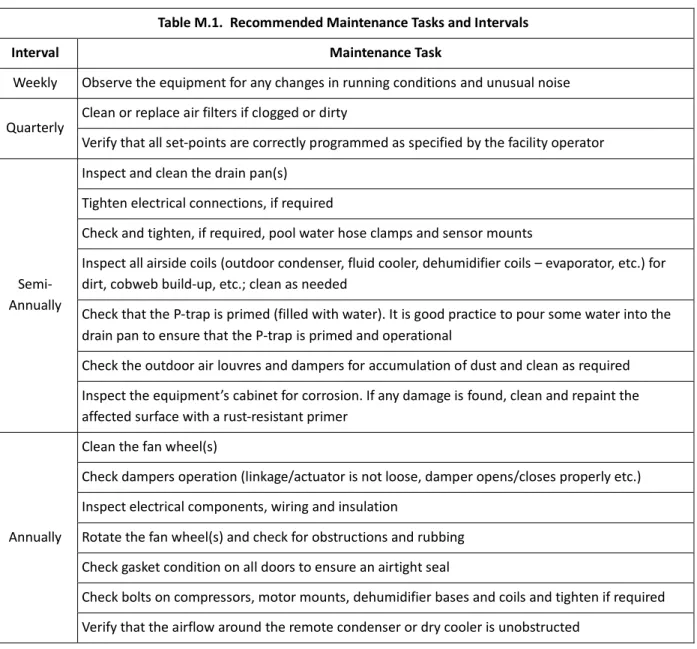
The suggested general maintenance operations and their frequency/intervals, listed in the table M-1 below, can be used to create such a program. For more detailed maintenance recommendations related to specific components,
refer to the respective component manufacturer’s manual.
Table M.1. Recommended Maintenance Tasks and Intervals
Interval Maintenance Task
Weekly Observe the equipment for any changes in running conditions and unusual noise Quarterly Clean or replace air filters if clogged or dirty
Verify that all set-points are correctly programmed as specified by the facility operator
Semi-Annually
Inspect and clean the drain pan(s) Tighten electrical connections, if required
Check and tighten, if required, pool water hose clamps and sensor mounts
Inspect all airside coils (outdoor condenser, fluid cooler, dehumidifier coils – evaporator, etc.) for dirt, cobweb build-up, etc.; clean as needed
Check that the P-trap is primed (filled with water). It is good practice to pour some water into the drain pan to ensure that the P-trap is primed and operational
Check the outdoor air louvres and dampers for accumulation of dust and clean as required Inspect the equipment’s cabinet for corrosion. If any damage is found, clean and repaint the affected surface with a rust-resistant primer
Annually
Clean the fan wheel(s)
Check dampers operation (linkage/actuator is not loose, damper opens/closes properly etc.) Inspect electrical components, wiring and insulation
Rotate the fan wheel(s) and check for obstructions and rubbing Check gasket condition on all doors to ensure an airtight seal
Check bolts on compressors, motor mounts, dehumidifier bases and coils and tighten if required Verify that the airflow around the remote condenser or dry cooler is unobstructed
Specific Components Maintenance
Actual maintenance plan may vary from installation to installation, yet there are several key components from maintenance prospective.
If needed, contact respective component manufacturer for additional maintenance information.
Filters
• Ensure air filters are clean. Dirty air filters will negatively affect dehumidifier performance and lifetime
• Frequency of filters replacement will vary based on air quality, dehumidifier usage, facility type, etc. Make sure to replace filters regularly
• Replace with filters of equivalent size and rating – refer to dehumidifier details (compartment stickers, etc.)
Insulation
Inspect dehumidifier insulation, exposed to airstream for microbial growth (i.e., mold). If there is evidence of microbial growth on the interior insulation, the insulation should be removed and replaced prior to operating the dehumidifier.
Air-Side Coils
• Warning: Hazardous chemicals! Cleaning agents can be highly acidic or alkaline. Handle all chemicals carefully and use appropriate personal protective equipment (PPE). Refer to the cleaning agent manufacturer's Materials Safety Data Sheet (MSDS) for safety and handling information. Failure to follow all safety instructions could result in serious injury or death.
• Warning: Hazardous pressures! Coils containing refrigerant under pressure must not be cleaned using a solution over 150 ºF. Failure to follow these safety precautions could result in coil bursting, which could result in serious injury or death.
To clean the coil
• Disconnect all electrical power to the equipment
• Use a soft brush to remove loose debris from the coil
• Mix a high-quality coil cleaning detergent with water according to the manufacturer's instructions
• Clean coil according to suggested instructions
• Thoroughly rinse both sides of the coil and the drain pan with, clean water
• Straighten any coil fins that have been bent during the cleaning process
• Confirm the drain line is clear
Special Maintenance Tasks. Fluid Cooler Winterization.
Normally fluid coolers are used in the systems, filled with glycol mixture to prevent the system and the fluid cooler from freezing and, potentially, rupturing, when exposed to temperatures below freezing point.
When fluid cooler is used with media that, when exposed to low temperatures, could freeze (water or lower-percentage glycol mixture), one way to protect the equipment is to drain it (also known as “winterization” of the equipment).
Though fluid cooler itself is normally equipped with means to be drained properly/fully, it is recommended to have same means in place for entire system (fluid cooler – piping – dehumidifier etc.):
• Have each local high point of the system equipped with means to bleed the air (air bleeding valve etc.)
• Have each local low point of the system equipped with means to drain the fluid.
CAUTION.
Draining and re-filling the fluid cooler must be performed by trained personnel, according to proper field practice and system layout. Improper draining or re-filling the system could lead to equipment damage, malfunction, premature tear and ware and may void equipment warranty.CAUTION.
Ensuring that the fluid cooler and associated system(s) equipped with proper means of draining, creating draining and re-filling procedures as well as determining whether draining is warranted to protect the equipment is outside of manufacturer’s scope and is a responsibility of installing contractor and local maintenance team.Pools
–
Equipment Warranty
General Policy
All PoolPak service and warranty work are managed exclusively by Dehumidified Air Services (DASV). All warranties apply to the original equipment owner and are not transferable. All warranty inquiries should be made to
Dehumidified Air Services. Dehumidified Air Services:
Phone: 1-833-327-7665 Email: [email protected]
PoolPak warrants as set forth and for the time periods shown below that it will provide through either a DASV Service Technician or an authorized service organization specified and approved by DASV, a new or rebuilt part to replace a factory installed part which has failed because of defect in workmanship or material.
NOTE:EVERY REQUEST RELATED TO WARRANTY OF ANY NATURE AS DESCRIBED BELOW MUST BE OFFICIALLY
AUTHORIZED AND DOCUMENTED IN ADVANCE BY DASV TO QUALIFY FOR WARRANTY COVERAGE.
Warranty Void Unless Registered
All Warranties are void unless the start-up of the equipment is approved by a DASV service technician. Upon completion of the start-up, a “Warranty Registration Certificate” will be issued, along with the Start-up Report, which activates the Warranty Period of the equipment. The Warranty Period will commence either upon completion of start-up registration of the equipment or 6 months from factory ship date, whichever comes first.
Initial 90‐Day Comprehensive Warranty
During the first 90 days from initial start-up, all parts and repairs related to factory defects or replacement parts are covered by PoolPak manufacturer warranty. All parts and labor requirements will either be handled by DASV technicians directly or managed and approved in advance by DASV through DASV authorized technicians.
Internet Connected, Conditional One Year Repair Warranty
If and only if the equipment is connected to the internet from the date of warranty activation, a Repair Warranty will be provided for an additional 9 months subsequent to the initial 90-Day Comprehensive Warranty for a total of 12 months of parts and labor warranty coverage. The unit must be connected and communicating to PoolPak Virtual-Tech® for the entire term from start-up in order to qualify.
If qualified, PoolPak will provide or pay for the required part and direct labor only, related to the part replacement. Only the labor required to replace the defective part is under warranty for this 9-month extension. Travel time, diagnostic time, per diems, truck charges, shipping charges etc. are not covered under this Conditional Repair Warranty.
Two-Year Parts Warranty
If any factory installed part supplied by PoolPak fails because of a defect in workmanship or material prior to the completion of the 24th
month from date of completion of the warranty activation, PoolPak will provide a new or rebuilt part F.O.B. factory. No labor reimbursement will be made for expenses incurred in replacing the part except as set in the Initial 90‐day Comprehensive or Internet Connected, Conditional One-Year Repair Warranty.
PoolPak reserves the right to have the defective part returned to the factory in order to determine the warranty applicability. Parts shipping and handling costs (to and from the factory) are not covered outside of the Initial 90‐
Replacement Part Warranty
If a replacement part provided by PoolPak under this warranty fails due to a material defect prior to the end of the Two-Year Parts Warranty (or the end of the extended warranty period if applicable), whichever comes first, PoolPak will provide a new or rebuilt part F.O.B. factory.
Applicability
This warranty is applicable only to products that are purchased and installed in the United States and Canada. This warranty is NOT applicable to:
1. Products that have become defective or damaged as a result of non-DASV or unauthorized service work,
poor maintenance, faulty electrical supply, act of God, or any other circumstances outside of the specified care, maintenance or operation of the equipment including:
• Components that have been relocated from their original placement as manufactured.
• Any portion of the system not supplied by PoolPak.
• Components on which the model and/or serial number plates have been removed or defaced.
• Components which have become defective or damaged as a result of unauthorized opening of the
refrigeration circuit, improper wiring, electrical supply characteristics, poor maintenance, accidents, transportation, misuse, abuse, fire, flood, alteration and/or misapplication of the product.
• Products not installed, operated and maintained as per the PoolPak Operating and Maintenance
Manual.
• Products operating in mechanical rooms that house chemicals (i.e. chlorine, bromine, water
treatment chemicals).
• Products on which payment is in default.
2. Parts that wear out due to normal usage, such as air filters, fuses and sensors are not covered by this warranty.
NOTE: Refrigerant lost during the Initial 90‐day Comprehensive or Internet Connected, Conditional One-Year Repair Warranty will be reimbursed in accordance to the current market price of refrigerant at the time of repair and upon discretion of DASV’s Customer Support team. PoolPak will not be responsible for refrigerant lost from the system due to improperly installed contractor piping to the remote outdoor air-cooled
condenser.
Limitations
1. DASV is a Manufacturer Service organization, not a first-response or urgent response local service company. As such, we highly recommend that equipment owners have a relationship with their own qualified first response service organization or one recommended by DASV.
DASV hours of operation are 8:00 AM to 6:00 PM Eastern, Monday through Friday unless otherwise agreed to under a separate agreement.
Parts replacement can be subject to availability. We highly recommend for mission-critical applications that owners purchase and maintain a local stock of critical components in case immediate replacement be required. If for any reason one of those components is replaced under applicable warranty conditions, PoolPak will reimburse the original cost of any component used under terms of Warranty.
NOTE: PoolPak expressly disclaims any liability for parts replacement delays due to parts unavailability or shipping delays.
2. This warranty is given in lieu of all other warranties. Anything in the warranty notwithstanding, any implied warranties of fitness for particular purpose and merchantability shall be limited to the duration of the warranties described above. PoolPak expressly disclaims and excludes any liability for consequential or incidental damage for breach of any express or implied warranty.
Where a jurisdiction does not allow limitations or exclusions in a warranty, the foregoing limitations and exclusions shall not apply to the extent of the legislation, however, in such case the balance of the above warranty shall remain in full force and effect.
This warranty gives specific legal rights. Other rights may vary according to local legislation.
Force Majeure
PoolPak will not be liable for delay or failure to provide warranty service due to government restrictions or restraints, war, strikes, material shortages, acts of God or other causes beyond PoolPak control.
Optional Extended Warranties
If purchased prior to shipment and documented with a registered extended warranty statement certificate, PoolPak will provide replacement components within the specified period of the extended warranties. Extended warranties commence either upon completion of start-up registration of the equipment or 6 months from factory ship date, whichever comes first, and cover parts replacement only for parts that fail as a result of manufacturing defect. The failed parts must be returned to the factory with transportation prepaid by the customer as a condition of these warranties. Optional extended warranties are for parts only and subject to all the terms of the Two-Year Parts Warranty.
1. Optional Five-Year Compressor Warranty
Subject to the terms above, PoolPak will provide a replacement compressor for up to 60 months from the date of the warranty activation.
2. Optional Five-Year Dehumidifier Coil Warranty
Subject to the terms above, PoolPak will provide a replacement coil for up to 60 months from the date of the warranty activation. Extended coil warranties are for parts of the dehumidifier only and does not cover parts of dry cooler or OACC coils.
3. Optional Ten Year Dehumidifier Coil Warranty
Subject to the terms above, PoolPak will provide a replacement coil for up to 120 months from the date of the warranty activation. Extended coil warranties are for parts of the dehumidifier only and does not cover parts of dry cooler or OACC coils.
4. Optional Five-Year Driveline Warranty
Subject to the terms above, PoolPak will provide driveline replacement parts for up to 60 months from the date of the warranty activation.
Driveline Components Include:
• Supply fan motor
• Exhaust fan motor (including Min Exhaust and Purge Exhaust motors)
• Heat recovery loop pump
• Compressor glycol/water pump
• Dry cooler/outdoor condenser fan(s)