What Makes a Visualization Memorable?
Michelle A. Borkin,Student Member, IEEE, Azalea A. Vo, Zoya Bylinskii, Phillip Isola,Student Member, IEEE, Shashank Sunkavalli, Aude Oliva, and Hanspeter Pfister,Senior Member, IEEE
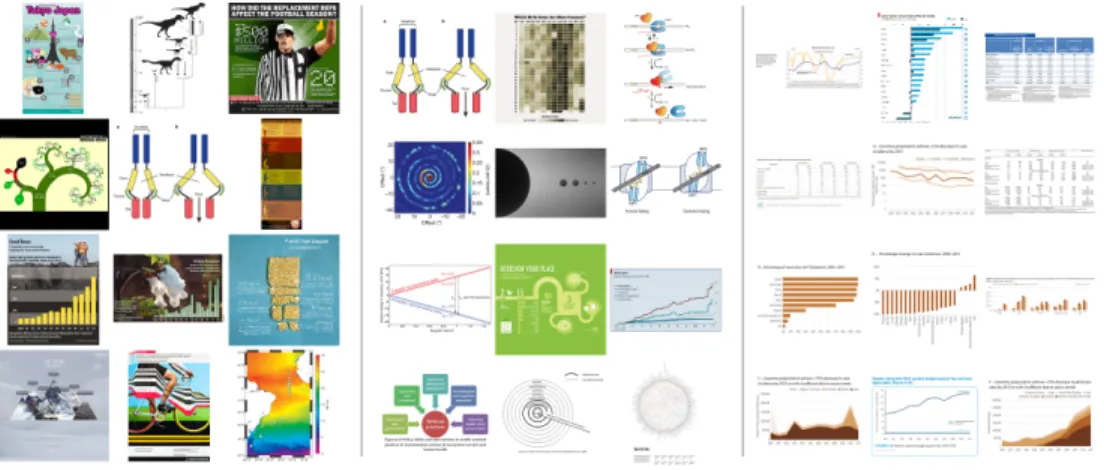
Fig. 1. Left: The top twelve overall most memorable visualizations from our experiment (most to least memorable from top left to bottom right). Middle: The top twelve most memorable visualizations from our experiment when visualizations containing human recognizable cartoons or images are removed (most to least memorable from top left to bottom right). Right: The twelve least memorable visualizations from our experiment (most to least memorable from top left to bottom right).
Abstract—An ongoing debate in the Visualization community concerns the role that visualization types play in data understanding. In human cognition, understanding and memorability are intertwined. As a first step towards being able to ask questions about impact and effectiveness, here we ask: “What makes a visualization memorable?” We ran the largest scale visualization study to date using 2,070 single-panel visualizations, categorized with visualization type (e.g., bar chart, line graph, etc.), collected from news media sites, government reports, scientific journals, and infographic sources. Each visualization was annotated with additional attributes, including ratings for data-ink ratios and visual densities. Using Amazon’s Mechanical Turk, we collected memorability scores for hundreds of these visualizations, and discovered that observers are consistent in which visualizations they find memorable and forgettable. We find intuitive results (e.g., attributes like color and the inclusion of a human recognizable object enhance memorability) and less intuitive results (e.g., common graphs are less memorable than unique visualization types). Altogether our findings suggest that quantifying memorability is a general metric of the utility of information, an essential step towards determining how to design effective visualizations.
Index Terms—Visualization taxonomy, information visualization, memorability
1 INTRODUCTION
The Visualization community has recently witnessed a divide over the value and impact of excessive chart annotation and decoration (i.e., “chart junk”). The conventional view, promoted by visualization ex-perts such as Edward Tufte and Stephen Few, holds that visualizations
• Michelle A. Borkin is with the School of Engineering & Applied Sciences, Harvard University. E-mail: [email protected].
• Azalea A. Vo is with the School of Engineering & Applied Sciences, Harvard University. E-mail: [email protected].
• Zoya Bylinkii is with the Computer Science and Artificial Intelligence Laboratory at the Massachusetts Institute of Technology. E-mail: [email protected].
• Phillip Isola is with the Department of Brain and Cognitive Sciences at the Massachusetts Institute of Technology. E-mail: [email protected]. • Shashank Sunkavalli is with the School of Engineering & Applied
Sciences, Harvard University. E-mail: [email protected]. • Aude Oliva is with the Computer Science and Artificial Intelligence
Laboratory at the Massachusetts Institute of Technology. E-mail: [email protected].
• Hanspeter Pfister is with the School of Engineering & Applied Sciences, Harvard University. E-mail: [email protected].
Manuscript received 31 March 2013; accepted 1 August 2013; posted online 13 October 2013; mailed on 4 October 2013.
For information on obtaining reprints of this article, please send e-mail to: [email protected].
should not include chart junk and should show the data as clearly as possible without any distractors [13, 14, 37, 38]. This view has also been supported by psychology lab studies, which show that simple and clear visualizations are easier to understand [11, 24]. At the other end of the spectrum, researchers have published that chart junk can pos-sibly improve retention and force a viewer to expend more cognitive effort to understand the graph, thus increasing their knowledge and understanding of the data [4, 8, 19]. However, the findings of these studies have been widely debated [13, 14].
What researchers agree on is that chart junk is not the only factor that influences how a person sees, interprets, and remembers a visual-ization. Other aspects of the visualization, such as graph type, color, or aesthetics, also influence a visualization’s cognitive workload and retention [8, 19, 39]. To disentangle these confounding factors we set out to answer the basic question: “What makes a visualization mem-orable?” Clearly, a more memorable visualization is not necessarily a more comprehensible one. However, knowing what makes a visual-ization memorable is a step towards answering higher level questions like “What makes a visualization engaging?” or “What makes a vi-sualization effective?”. Recent work has shown that memorability of images of natural scenes is consistent across people, suggesting that some images are intrinsically more memorable than others, indepen-dent of an individual’s contexts and biases [20]. We are interested in understanding if these findings hold for visualizations, and what key factors make some visualizationsintrinsicallymore memorable than others.
memora-bility of visualizations. Specifically, we studied the memoramemora-bility of visualizations as images to better understand their intrinsic memora-bility. While we did not specifically study the memorability or com-prehensibility of the underlying data presented in the visualization in the current work, identifying which type of visual information is mem-orableorforgettableprovides a basis for understanding a number of cognitive aspects of visualizations. This is because given limited cog-nitive resources and time to process novel information, capitalizing on memorable displays is an effective strategy. Research in cogni-tive psychology has shown that conceptual knowledge is an organizing principle for the storage and retrieval of information in memory. For instance, details of a story or a picture that are consistent within an existing schema are more likely to be remembered than those that are not [1, 22]. Recent large-scale visual memory work has shown that ex-isting categorical knowledge supports memorability for item-specific details [9, 22, 23]. In other words, many additional visual details of the image come for free when retrieving memorable items. Understanding the memorability of visualizations provides a baseline for leveraging these cognitive capabilities.
For our research, we first built a new broad taxonomy of static vi-sualizations that covers the large variety of vivi-sualizations used across social and scientific domains. Thesevisualization typesrange from area charts, bar charts, line graphs, and maps to diagrams, point plots, and tables. Next, we scraped over 5,693 real world visualizations from a variety of websites covering different areas of visualization publica-tions (e.g., news media, scientific journals, infographic blogs, etc.). We present a breakdown of visualization types by publication sources, showing some interesting visualization strategies and biases. Based on the distribution of visualization types “in the wild” we took a represen-tative sample of 2,070 single-panel visualizations from our database and annotated them with certainvisual attributesthat we consider to be informative for memorability, such as the data-ink ratio and the visual density. We then used these 2,070 visualizations in an online memorability study we launched via Amazon’s Mechanical Turk with 261 participants. This study allowed us to gather memorability scores for hundreds of these visualizations, and determine which visualiza-tion types and attributes were more memorable. While previous ex-periments have demonstrated that some visualizations are easier to re-member than others, this is the first study that systematically analyzes this intuition. We believe this opens a new domain of investigation at the interface between human cognition and visualization design. 2 RELATEDWORK
Perception Theory and the Chart Junk Debate:
Re-searchers have explored the perception of individual graph types based on tasks and data encodings [11, 24, 30]. More recently, there have been a number of studies aiming to evaluate the im-pact of embellishments on visualization memorability and comprehen-sion [4, 7, 8, 14, 19, 27, 39]. Bateman et al. conducted a study to test the comprehension and recall of graphs using an embellished ver-sion and a plain verver-sion of each graph [4]. They showed that the em-bellished graphs outperformed the plain graphs with respect to recall, and the embellished versions were no less effective for comprehension than the plain versions. There has been some support for the com-prehension results from a neurobiological standpoint, as it has been hypothesized that adding “visual difficulties” may enhance compre-hension by a viewer [8, 19]. Other studies have shown that the effects of stylistic choices and visual metaphors may not have such a signifi-cant effect on perception and comprehension [7, 39]. While there have been studies evaluating memorability and perception of graphical lay-outs for specific types of graphs, such as the work by Marriott et al. for network diagrams [27], there has not yet been a memorability study to target a wide variety of visualizations.
In response to the Bateman study, Stephen Few wrote a comprehen-sive critique of their methodology [14], most of which also applies to other studies. A number of these studies were conducted with a limited number of participants and target visualizations. Moreover, in some studies the visualization targets were designed by the experimenters, introducing inherent biases and over-simplifications [4, 8, 39]. We
reduced our biases by compiling a large database of thousands of real-world visualizations and enrolling a large and more diverse set of par-ticipants on Amazon’s Mechanical Turk. And while previous studies confound perception, recall, comprehension, and measurements of in-sight, we focus purely on memorability of the visualizations as images to remove any obfuscation by other variables.
Visualization Taxonomies: Within the academic visualiza-tion community there have been many approaches to creating visual-ization taxonomies. Traditionally many visualvisual-ization taxonomies have been based on graphical perception models, the visual and organiza-tional layout, as well as the graphical data encodings [6, 12, 35, 33]. Our proposed taxonomy most closely aligns with this approach. How-ever, in existing taxonomies, statistical charts are often considered as a group, even though they cover a broad range of visualization types. We propose a taxonomy with distinct categories for statistical charts based upon the visual encodings of data and the elementary perceptual tasks enabled by them. Our taxonomy also includes newer visualiza-tion types, such as text and matrix visualizavisualiza-tions, which do not appear in previously published taxonomies.
Another approach to visualization taxonomies is based on the un-derlying algorithms of the visualization and not the data itself [32, 36]. There is also recent work on taxonomies for interactive visualizations and the additional tasks they enable [16, 17, 33, 35]. Both of these approaches are not applicable in our case since we focus on a large number of static visualizations for which we do not have algorithm or task classifications.
Outside of the academic community there is a thriving interest in visualization collections for the general public. For example, the Peri-odic Table for Management [26] present a classification of visualiza-tions with a multitude of illustrated diagrams for business. The online community Visualizing.org introduces an eight-category taxonomy to organize the projects hosted on their site [25]. InfoDesignPatterns.com classifies visualization design patterns based upon visual representa-tion and user interacrepresenta-tion [5]. Our taxonomy is more comprehensive and identifies a dozen main graph types with many subtypes that span the variety of visualizations we found online. We were inspired by the reference guide by Harris [15], who provides a comprehensive refer-ence for graphic representations, but no taxonomical classification.
Cognitive Psychology: In our study we apply techniques from previous work in the visual cognition community on evaluating the memorability of natural images of objects and scenes [9, 21, 20]. These studies have demonstrated that the differences in the memora-bility of different images are consistent across observers, which im-plies that memorability is an intrinsic property of an image [21, 20]. Brady et al. [9] tested the long-term memory capacity for storing de-tails by detecting repeat object images when shown pairs of objects, one old and one new. They found that participants were accurate in detecting repeats with minimal false alarms, indicating that human vi-sual memory has a higher storage capacity for minute details than was previously thought.
More recently, Isola et al. have annotated natural images with attributes, measured memorability, and performed feature selection, showing that certain features are good indicators of memorabil-ity [20, 21]. Memorabilmemorabil-ity was measured by launching a “Memory Game” on Amazon Mechanical Turk, in which participants were pre-sented with a sequence of images and instructed to press a key when they saw a repeat image in the sequence. The results showed that there was consistency across the different participants, and that people and human-scale objects in the images contribute positively to the mem-orability of scenes. That work also showed that unusual layouts and aesthetic beauty were not overall associated with high memorability across a dataset of everyday photos [20].
In our study we apply the same methods of measuring memora-bility to visualizations. In contrast to the prior work that focused on natural images and real-world objects, visualizations are artificial rep-resentations of data. Our study contributes not only to the field of
Table 1. Summary of our visualization taxonomy, including visualization properties and attributes, for the memorability experiment. See supple-mental material for the full version of the taxonomy with sample figures.
CATEGORY SUBTYPES
Area Area Chart (Area Chart, Overlapped Area Chart, Stacked Area Chart); Proportional Area Chart (Aligned Area Chart, Centered Area
Chart, Overlapped Area Chart, Stacked and Linked Area Chart)
Bar Bar Chart (Bar Chart, Grouped Bar Chart, Stacked Bar Chart, Circular Bar Chart, Waterfall Chart, Bullet Graph)
Circle Belt Chart; Donut Chart; Pie Chart; Sector Graph
Diagram Flow Chart; Illustration or Rendering; Sankey Diagram; Timeline; Venn Diagram
Distribution Box-and-Whisker Plot; Distribution Curve; Dot Array; Histogram; Point Graph; Stem-and-Leaf Plot; Stripe Graph; Tally Graph
Grid & Matrix Heatmap
Line Contour Graph; Density Graph; Line Graph (Line Graph, Circular Line Graph, Trend Line (and Residual Graph) ); Slopegraph; Star
Plot; Surface Graph; Vector Graph
Map Flow Map; Geographic Map (Geographic Map, Street Map); Statistical Map (Choropleth Map, Contour Map, Distorted Map, Plotted
Map)
Point Dot Plot; Scatter Plot (Bubble Graph, Scatter Plot, (Trend Line and) Residual Graph, Trilinear Scatter Plot)
Table Table; Text Chart
Text Phrase Net; Word Cloud; Word Tree
Trees & Networks Trees and Networks (Graph, Matrix Representation, Tree, Treemap); Hive Graph; Hierarchical Edge Bundling
Properties Dimension (2D; 3D), Multiplicity (Single; Multiple; Grouped; Multi-panel; Small Multiples; Combination), Pictorial (Pictorial; Pictorial Unit), Time (Time Series)
Attributes Black & White [yes, no], Number of Distinct Colors [1, 2-6,≥7], Data-Ink Ratio [good, medium, bad], Visual Density [low, medium, high], Human Recognizable Objects [yes, no], Human Depiction [yes, no]
visualization but also adds memorability results for artificial images to the cognitive psychology literature.
3 VISUALIZATIONTAXONOMY
In order to address the span of visualization types we found across visualization sources we created a new taxonomy for static (i.e., non-interactive) visualizations. The taxonomy classifies static visualiza-tions according to the underlying data structures, the visual encod-ing of the data, and the perceptual tasks enabled by these encodencod-ings. It contains twelve main visualization categories and several popular sub-types for each category. In addition, we supply a set of proper-ties that aid in the characterization of the visualizations. This taxon-omy draws from the comprehensive vocabulary of information graph-ics presented in Harris [15], the emphasis on syntactic structure and information type in graphic representation by Englehardt [12], and the results of Cleveland and McGill in understanding human graph-ical perception [11]. A full break-down of the taxonomy and several visual properties is shown in Table 1. A visual version of this table with several examples is provided in the supplemental material.
Thepropertiesare additional visual encodings that may apply to any of the visualization categories. Each property may also have sub-categories. Dimensionrepresents the number of dimensions (i.e., 2D or 3D) of the visual encoding.Multiplicitydefines whether the visual-ization is stand-alone (single) or somehow grouped with other visual-izations (multiple). We distinguish several cases of multiple visualiza-tions. Groupedmeans multiple overlapping/superimposed visualiza-tions, such as grouped bar charts;multi-panelindicates a graphic that contains multiple related visualizations as part of a single narrative; and combinationindicates a graph with two or more superimposed visualization categories (e.g., a line plot over a bar graph). The pic-torialproperty indicates that the encoding is a pictogram (e.g., a pic-torial bar chart). Pictorial unitmeans that the individual pictograms represent units of data, such as the Istotype (International System of Typographic Picture Education), a form of infographics based on pic-tograms developed by Otto Neurath at the turn of the 19th century [29]. Finally,timeis included, specifically as atime series, as it is such a common feature of visualizations and dictates specific visual encod-ing aspects regardencod-ing data encodencod-ing and orderencod-ing. Visual examples of all these properties can be found in the supplemental material.
In order to gain insight into the effect of different visualization qual-ities on memorability we also defined a series of visualattributesthat we use for analysis in our memorability experiment (Sec. 6). The first
Table 2. List of visualization sources, their websites, and the respective number of visualizations in the database.
Source Total Website(s) Per website
(single) (single)
Government / World Organizations
607 (528) US Treasury Dept. 141 (117)
World Health Or-ganization (WHO)
464 (411)
News Media 1187 (704) Wall Street Journal 609 (309)
Economist 519 (378) National Post 55 (17) Infographics 1721 (490) Visual.ly 1721 (490) Scientific Publica-tions 2,178 (348) Nature 2,178 (348) TOTAL 5,693 (2,070)
two attributes,black & whiteandnumber of distinct colorsgive a gen-eral sense of the amount of color in a visualization. A measure of chart junk and minimalism is encapsulated in Edward Tufte’sdata-ink ratiometric [37], which approximates the ratio of data to non-data el-ements. Thevisual densityrates the overall density of visual elements in the image without distinguishing between data and non-data ele-ments. Finally, we have two binary attributes to identify pictograms, photos, or logos: human recognizable objectsandhuman depiction. We explicitly chose to have a separate category for human depictions due to prior research indicating that the presence of a human in a photo has a strong effect on memorability [21]. These attributes are separate from the properties in our taxonomy as they are subjective measures and are not tied to the data encodings.
4 DATACOLLECTION ANDANNOTATION
In order to have a large number of real world examples for our mem-orability experiment we scraped the web to collect 5,693 data visual-izations. To ensure a breadth of visualization types, design aesthetics, and visualization domains, we focused on the visualization sources listed in Table 2. These particular web sites were chosen because each contained a large number of static visualizations that could be auto-matically scraped without requiring a large manual clean-up effort. We noticed that certain visualization sources (in particular newspapers
0.1% 25.4% 6FLHQWLILF3XEOLFDWLRQ %DUV 7DEOH 'LDJUDPV /LQHV 0DSV 3RLQWV $UHD &LUFOHV 7UHHVDQG1HW 'LVWULEXWLRQ *ULGDQG0DW 7H[W ,QIRJUDSKLF 1HZV0HGLD *RYDQG:RUOG2UJ 3.8% 3.2% 15.6% 1.0% 1.0% 13.4% 10.2% 6.5% 17.4% 2.4%
Percent of Visualization Source by Visualization Type
% of
Total
Trees and Networks Grid and Matrix
0% 10% 20% 30% 40% 0% 10% 20% 30% 40% 0% 10% 20% 30% 40% 0% 10% 20% 30% 40% % of all Scientific Publications % of all Infographics % of all
News Media Government and% of all
World Organization
Fig. 2. Breakdown of visualization categories by visualization sources based on 2,070 single, static visualizations.
and magazines) do not provide many of their only-in-print visualiza-tions in digital form online. Also, some websites could not be scraped as their websites were poorly structured or constantly changing in an inconsistent manner. Finally, we chose to include only one source for infographics (Visual.ly) since most infographics websites cross-post the same images, thus leading to an excessively high rate of duplicate visualizations.
All of the 5,693 visualizations were manually categorized as single or multiple. Many of the infographics visualizations were categorized as multiple and were excluded from the study. In total we identified 2,070 single visualizations, i.e., stand-alone visualizations with one panel. They were further annotated with the twelve main categories of our taxonomy (Table 1) plus the binary property pictorial to iden-tify images with human-recognizable elements. The annotations were done by ten Harvard University undergraduates who had completed the Harvard introductory visualization course. The students received an introduction to the taxonomy and were monetarily compensated for their work. In the future we plan to further annotate our database with all the graph sub-types and properties of our taxonomy using Ama-zon’s Mechanical Turk.
5 ANALYSIS OFVISUALIZATIONTYPES
Our annotated data enables us to study the distribution of online visu-alization types across publication venues. Examining the ratio of sin-gle to multiple visualization images per source, as shown in Table 2, we see that visualizations categorized as multiple tend to be most nu-merous in scientific publications and infographic sources. These mul-tipanel visualizations are primarily used when narrative is involved, and having multiple visualizations are necessary for, e.g., explaining a concept or telling a story. These visualizations are usually designed to stand alone, without an associated article or paper, and thus are fully responsible for telling and encompassing the whole story. There is also a very high percentage of multiple visualizations in the scientific publication category. There are two primary explanations for this ob-servation. First, like infographics, multiple individual visualizations are combined in a single figure in order to visually explain scientific concepts or theories to the journal readers. Second, combining visual-izations into a single figure (even if possibly not directly related) saves page count and money. In contrast, a very high ratio of single visual-izations is seen in government / world organvisual-izations. These visualiza-tions are usually published one-at-a-time within government reports, and there are no page limits or space issues as with scientific journals. Analyzing the single visualizations, we see distinct trends of visual-ization categories between visualvisual-ization publication venues as shown
in Figure 2. Scientific publications, for example, have a large per-centage of diagrams. These diagrams are primarily used to explain concepts from the article, or illustrate the results or theories. Also in-cluded are renderings (e.g., 3D molecular diagrams). The scientific articles also use many basic visual encoding techniques, such as line graphs, bar charts, and point plots. Domain-specific uses of certain visual encodings are evident, e.g., grid and matrix plots for biological heat maps, trees and networks for phylogenic trees, etc. Infograph-ics also use a large percentage of diagrams. These diagrams primarily include flow charts and timelines. Also included in infographics is a large percentage of tables. These are commonly simple tables or ranked lists that are elaborately decorated and annotated with illustra-tions. Unlike the other categories, there is little use of line graphs.
In contrast to the scientific and infographic sources, the news me-dia and government sources publish a more focused range of topics, thus employing similar visualization strategies. Both sources primar-ily rely on bar charts and other “common” (i.e., learnt in primary school) forms of visual encodings such as line graphs, maps, and ta-bles. The line graphs are most commonly time series, e.g., of financial data. One of the interesting differences between the categories include the greater use of circle plots (e.g., pie charts) in government reports.
Looking at specific visualization categories, tree and network dia-grams only appear in scientific and infographic publications. This is probably due to the fact that the other publication venues do not pub-lish data that is best represented as trees or networks. Similarly, grid and matrix plots are primarily used to encode appropriate data in the scientific context. Interestingly, point plots are also primarily used in scientific publications. This may be due to either the fact that the data being visualized are indeed best visualized as point plot representa-tions, or it could be due to domain-specific visualization convenrepresenta-tions, e.g., in statistics.
Worth noting is the absence of text visualizations from almost all publication venues. The only examples of text based visualizations were observed in the news media. Their absence may be explained by the fact that their data, i.e., text, is not relevant to the topics published by most sources. Another possible explanation is that text visualiza-tions are not as “main stream” in any of the visualization sources we examined as compared to other visualization types. Also worth noting is that these are observations for single, static visualizations. The dis-tributions in Figure 2 may look very different if they included, or were focused solely on, interactive or multiple visualizations.
The distribution of visualizations in this database represents a snap-shot of the distributions of visualization types “in the wild.” With a database of this size and breadth we can now attempt to answer the
question of what makes a visualization memorable. Understanding memorability may also shed light on some of the strategies employed by the different publication venues. For example, unlike the readers of scientific journals and government reports who are already interested in the text and are pre-motivated to examine the sources, both info-graphic and news media outlets need to engage their audiences and capture their attention. Are they possibly employing visual strategies that help with memorability? Or are they employing strategies that they think will make a visualization memorable, but in fact are ineffec-tive? To answer these and other questions we designed a memorability experiment discussed in the following sections.
6 MEMORABILITYEXPERIMENT
We ran our memorability experiment using workers on Amazon’s Me-chanical Turk to maintain high external validity (i.e., provide us with a diverse pool of participants for the experiment).
6.1 Hypotheses
Based on the authors’ experience in practicing visualization, our hy-potheses entering the experiment were:
H.1 Participants will perform worse (i.e., overall have a harder time remembering visualizations) as compared to natural im-ages/photos.
H.2 A visualization is more memorable if it includes a pictogram or cartoon of a recognizable image.
H.3 A visualization is more memorable if there is more color. H.4 A visualization is more memorable if it has low visual density. H.5 A visualization is more memorable if it is more “minimalist”
(i.e., “good” data-ink ratio).
H.6 A visualization is more memorable if it includes a “familiar” vi-sualization type (i.e., basic graph type taught in school). H.7 A visualization is less memorable if it comes from a scientific
publication venue.
6.2 Target images
We selected a subset of 410 images (∼20% of the single-panel images in our database, Sec. 4) to be “target” visualizations. The attribute rankings (Sec. 3) for the target visualizations were generated by three visualization researchers. Each researcher independently rated the at-tributes for each visualization. In cases when all three researchers gave different rankings, the visualization was reviewed and discussed by all three researchers until a consensus was reached. If a majority of two out of three researchers agreed their ranking was applied.
Of the 410 target visualizations, 145 are extreme examples of “min-imalist” (i.e., data-ink ratio=“good”), 103 are extreme examples of “chart junk” (i.e., data-ink ratio=“bad”), and the other 162 are in-between on the spectrum (i.e., data-ink ratio=“medium”). Choosing them this way allows us to measure the effects of chart junk, among other attributes, without introducing bias. The target visualizations were also chosen to match the distribution of original visualization sources as well as the distribution of visualization categories of the to-tal 2,070 single-panel visualization population (Fig. 2). Thus the target population is representative of the observed diversity of real-world vi-sualization types.
6.3 Participants and Experimental Set-up
The methodology closely followed that of Isola et al. [21] for mea-suring scene memorability. The experiment was set up as a game on Amazon Mechanical Turk, where workers were presented with a se-quence of images, and had to press a key if they saw an image for the second time in the sequence. The repeated images were the tar-get images of which we had 410, and the rest of the sequence was composed of “filler” images (i.e., the rest of all the single-panel visu-alizations in the database). Workers could complete up to 17 “levels”
of the game, each comprised of about 120 images (targets and fillers) and taking about 4.8 minutes to complete. There was no change in difficulty across the levels, rather they were a way of partitioning the image stream and giving workers the option of taking a break (up to 5 minutes). Workers were paid $0.40 for each successfully-completed level, bringing their possible hourly wage up to almost $5. Workers could exit the game at any time, and were paid for the total amount of the game completed (including partially-completed levels). Upon completing a level, workers could see their average score (i.e., percent correctly-remembered images) for the level.
Target images were the ones for which we were interested in mea-suring memorability. The rest of the image sequence was filled with vigilance repeats and other filler images. Vigilance repeats consisted of an image repeated twice, with a spacing of 1-7 images, and were meant to be easy to detect. This was implemented to screen out work-ers that were not paying enough attention to the task. If a worker false-alarmed on more than 50% of the last 30 non-repeat images, the game would end, and the worker would be flagged. If flagged three times, a worker would be paid for the part of the game completed, and would be blocked from further participation.
Images in the sequence were presented for 1 second, with a 1.4 second gap between consecutive images. These sequences contained a different ordering of images for each worker. Images were presented a maximum of 2 times throughout the whole image sequence, and all the repeat images appeared 91-109 images apart. For our experiment, all images were resized to lie within a maximum dimension of 512×512 pixels (while preserving aspect ratios), so as to fit comfortably into a webpage containing the memorability game.
To begin the game, workers had to complete a practice trial with 30 images. Until a worker’s miss rate on the practice fell below 50% and the false alarm rate fell below 30%, the worker could not continue on to the real game. A worker who failed the practice three times would be paid $0.02 for the practice, and blocked from the game.
On Amazon Mechanical Turk, we posted 276 HITs (“Human Intel-ligence Tasks”), each of which consisted of our game with 17 possible levels. To accept one of our HITs, a worker had to have an approval rate of over 95% in Amazon’s system as a quality check. Of the work-ers who accepted our HITs, 261 passed the practice. Workwork-ers were able to accept the HIT multiple times and pick up where they left off (until either all 17 levels were completed or the worker failed the qual-ity screening described above). Of the 261 workers, 57% saw more than 90% of the target images. The rest completed fewer of the levels. On average, we have 87 responses (SD: 4.3) per target image. The age range of our workers spanned 16 to 66 years, and the mean age was 33.1 (SD: 10.5). The race distribution was: 41.7% Caucasian, 37.5% South Asian, 4.2% African, 4.2% East Asian, 1.1% Hispanic, and 11.3% other/unreported. We did not collect any other demographic information from our workers.
Because we did not restrict participation in our task based on any worker demographics, we believe that we have sampled fairly from the Mechanical Turk worker population. Other studies have surveyed the Mechanical Turk population, and have determined the education and income of the workers to be quite diverse, reporting that the majority of workers earn roughly U.S. $30kper year, and almost half have earned a bachelor’s degree [34, 28].
6.4 Experimental Design & Analysis
Performance Metrics: Workers saw each target image at most 2 times (less than twice if they prematurely exited the game). We measure an image’shit rate(HR) as the proportion of times work-ers responded on the second (repeat) presentation of the image. In signal detection terms: HR= HIT SHIT S+MISSES. We also measured how many times workers responded on thefirstpresentation of the image. This corresponds to workers thinking they have seen the image before, even though they have not. Thisfalse alarm rate(FAR) is calculated:
FAR= FAFA+CR, whereFAis the number of false alarms andCRis the number of correct rejections (the absense of a response).
For performing a relative sorting of our data instances we used the d-primemetric (otherwise called thesensitivity index). This is
a common metric used in signal detection theory, which takes into account both the signal and noise of a data source, calculated as:
d0=Z(HR)−Z(FAR)(whereZ is the inverse cumulative Gaussian distribution). A higherd0corresponds to a signal being more readily detected. Thus, we can use this as amemorability scorefor our visu-alizations. A high score will require theHRto be high and theFAR
to be low. This will ensure that visualizations that are easily confused for others (highFAR) will have a lower memorability score.
Data Analysis: Of the 410 target visualizations selected for the memorability experiment, 17 were subsequently filtered out because their aspect ratios were deemed too skewed for the comparison to other visualizations to be fair. Visualizations with aspect ratio greater than 3:1 made the text hard to read, and pictographic elements hard to deci-pher. An initial analysis showed that these images ended up with high
FAR, being confused for one another (losing their distinctiveness to aspect ratio similarities).
A set of analyses was run on the remaining images, whereby memorability score was plotted against various visualization attributes (Sec. 3). The plots were constructed by summarizing across all the visualizations, and also by individually considering visualization sources: government / world organizations, news media, infographics, and scientific publications. This was done to see whether there are differences in how the attributes correlate with memorability across different publication venues. To filter out the effect recognizable ele-ments like people and objects have on memorability, the analyses were repeated by only considering visualizations that did not contain picto-rial elements (filtered-out manually).
As d-prime is a normalized metric, corrected t-tests were applied in Sec. 7 to evaluate the statistical significance of the memorability scores of the different attributes, visualization types, and visualization sources.
7 EXPERIMENTALRESULTS& DISCUSSION
7.1 Memorability comparisons
Our memorability experiment was designed to understand the memo-rability of visualizations within the context of other memomemo-rability stud-ies, and treats the visualizations in our experiment as scenes (i.e., im-ages or photographs). This memorability study design does not eval-uate the cognitive impact or engagement of the visualization. Our ex-periment primarily presents baseline results to compare the memora-bility of visualizations to the memoramemora-bility of scenes. In other words, we have measured how visualizations would be remembered if they were images.
We observed a mean HR of 55.36% (SD=16.51%) and mean
FARof 13.17% (SD=10.73%). For comparison, scene memorabil-ity has a meanHRof 67.5% (SD=13.6%) with meanFARof 10.7% (SD=7.6%) [21], and face memorability has a meanHRof 53.6% (SD=14.3%) with meanFARof 14.5%(SD=9.9%) [2]. This possi-bly supports our first hypothesis that visualizations are less memorable than natural scenes. This demonstrates that there is memorability con-sistency with scenes, faces, and also visualizations, thus memorability is a generic principle with possibly similar generic, abstract, features.
We also measured the consistency of our memorability scores [2, 21]. By splitting the participants into two independent groups, we can measure how well the memorability scores of one group on all the tar-get images compare to the scores of another group (Fig. 3). Averaging over 25 such random half-splits, we obtain Spearman’s rank correla-tions of 0.83 for HR, 0.78 for FAR, and 0.81 for d-prime, the latter of which is plotted in Fig. 3. This high correlation demonstrates that the memorability of a visualization is a consistent measure across partic-ipants, and indicates real differences in memorability between visual-izations. In other words, despite the noise introduced by worker vari-ability and by showing different image sequences to different workers, we can nevertheless show that memorability is somehow intrinsic to the visualizations. 50 100 150 200 250 300 350 0 0.5 1 1.5 2 2.5 3
Image rank N sorted by score, according to specified group
Average score according to Group 1 of 25 images sorted upon rank N
Dprime consistency across 2 groups, averaged over 25 splits Group 1: r = 1.00 Group 2: r = 0.81 Chance: r = ï0.01
Fig. 3. Participants were split into two independent sets, Group 1 and Group 2. Visualizations were ranked by memorability scores (d-prime) from participants in Group 1 (green line) or Group 2 (blue line) and plot-ted against the average memorability scores given by participants in Group 1. Plots are averaged across 25 such random splits. For clarity, we also convolved the resulting plots with a length-25 box filter along the x-axis. The cyan chance line was simulated by assigning the images random ranks (i.e., randomly permuting the x-axis). Error bars depict 80% confidence intervals. Note that the scores of the two participant halves are highly correlated over the 25 random half-splits.
7.2 Visualization Attributes
Of our 410 target visualizations, 145 contained either photographs, cartoons, or other pictograms of human recognizable objects (from here on out referred to broadly as “pictograms”). Visualiza-tions containing pictograms have on average a higher memorabil-ity score (Mean (M)=1.93) than visualizations without pictograms (M=1.14,t(297) =13.67,p<0.001). This supports our second hy-pothesis. Thus not all chart junk is created equal: annotations and representations containing pictograms are across the board more mem-orable. However, this is not too surprising as we are evolved to see, segment, and recognize natural objects. Thus an image, or image of a visualization, containing a human recognizable object will be easily recognizable and probably memorable.
Due to this strong main effect of pictograms, we examined our re-sults for both the cases of visualizations with and without pictograms. As shown in the left-most panel of Fig. 1, all but one of the overall top most memorable images (as ranked by their d-prime scores) con-tain human recognizable pictograms. The one visualization without a human recognizable image, the molecular diagram in the middle of the second row, is the most memorable image of our non-pictogram visualizations (see Fig. 1, middle panel). The least memorable visual-izations are presented in the right-most panel of Fig. 1.
As shown in Fig. 4, there is an observable trend of more colorful visualizations having a higher memorability score: visualizations with 7 or more colors have a higher memorability score (M=1.71) than vi-sualizations with 2-6 colors (M=1.48,t(285) =3.97,p<0.001), and even more than visualizations with 1 color or black-and-white gradient (M=1.18,t(220) =6.38,p<0.001). When we remove visualizations with pictograms, the difference between visualizations with 7 or more
LWKRXW3LF 7 DE OH :LWK3LF * ULG D QG 0 DW UL[ 7 UH H DQ G 1 HW Z RU N ' LD JU DP $ UH D 0 DS ' LV WUL EX WLR Q 7 DE OH & LUF OH 3 RL QW % DU /L QH 0 H P R UD E LOL W\ 6 FR UH 0HPRUDELOLW\SORWWHGDJDLQVWYLVXDOL]DWLRQW\SH 3LF :LWKRXW3LF * ULG D QG 0 DW UL[ ' LD JU DP 7 UH H DQ G 1 HW Z RU N ' LV WUL EX WLR Q $ UH D 3 RL QW & LUF OH % DU /L QH 0HPRUDELOLW\SORWWHGDJDLQVWYLVXDOL]DWLRQW\SH HUURUORZHUDQGVXPRIYDOXHIRUHDFKFDWHJRU\EURNHQGRZQE\LVSLF Gri d a nd Ma tri x Tree a nd Netw or k Di a g ra m Area Ma p Di stri b uti on Ta b le Ci rc le Poi nt Ba r Li ne Gri d a nd Ma tri x Di a g ra m Tree a nd Netw or k Di stri b uti on Area Poi nt Ci rc le Ba r Li ne Ta b le Memor a b ili ty Sc ore 0.8 1.0 1.2 1.4 1.6 1.8 2.0 2.2
Memorability plotted against visualization type
With Pic Without Pic
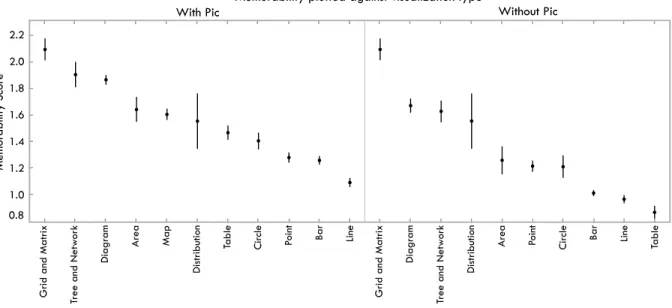
Fig. 7. Memorability scores for visualizations based on visualization type. On the left is all visualizations, and on the right visualizations with pictograms removed. :LWK3LF :LWKRXW3LF 0 HP RU D E LOL W\ 6 FR UH 0HPRUDELOLW\SORWWHGDJDLQVWFRORUUDWLQJ With Pic Number of Distinct Colors
1 2-6 !7
Without Pic Number of Distinct Colors
1 2-6 !7
Memorability plotted against color rating
Fig. 4. Memorability scores for visualizations based on the number of colors it contains. On the left is all visualizations, and on the right visu-alizations with pictograms removed.
colors (M=1.34) and those that have only 1 color (M=1.00) remains statistically significant (t(71) =3.61,p<0.001).
Considering all the visualizations together, we observed a statisti-cally significant effect of visual density on memorability scores with a high visual density rating of “3” (M=1.83), i.e., very dense, being greater than a low visual density rating of “1” (M=1.28,t(115) = 6.08,p<0.001) as shown in Fig. 5.
We also observed a statistically significant effect of the data-to-ink ratio attribute on memorability scores with a “bad” (M=1.81), i.e., low data-to-ink ratio, being higher than a “good” rating (M= 1.23,t(208) =6.92,p<0.001) as shown in Fig. 6. Note that using a corrected t-test, we also arrive at the results that the 3 levels of data-ink ratio are pairwise significantly different from each-other .
Summarizing all of these attribute results: higher memorabil-ity scores were correlated with visualizations containing pictograms, more color, low data-to-ink ratios, and high visual densities. This sup-ports our third hypothesis, and refutes our fourth and fifth hypotheses. However, as discussed in Sec. 7.1, we tested the memorability of
visu-:LWK3LF :LWKRXW3LF +LJK 0LG /RZ +LJK 0LG /RZ 0 HP RU D E LOL W\ 6 FR UH 0HPRUDELOLW\SORWWHGDJDLQVWYLVXDOGHQVLW\UDQNLQJ With Pic Low Medium High Without Pic Low Medium High
Memorability plotted against visual density ranking
Fig. 5. Memorability scores for visualizations based on visual density. On the left is all visualizations, and on the right visualizations with pic-tograms removed.
alizations as images and not the comprehension of the visualizations. Thus, looking at these visualizations asimagesand not data encodings, these attributes increased their memorability.
As shown in Fig. 7, diagrams were statistically more memorable than points, bars, lines, and tables. These trends remain observable even when visualizations with pictograms are removed from the data. Other than some minor ranking differences and addition of the map category, the main difference is in the ranking of the table visualization type, which without pictograms becomes least memorable.
The middle panel of Fig. 1 displays the most memorable visual-izations that do not contain pictograms. Why are these visualiza-tions more memorable than the ones in the right-most panel? To start with, qualitatively viewing the most memorable visualizations, most are high contrast. These images also all have more color, a trend quantitatively demonstrated in Sec. 7.2 to be correlated with higher memorability. As compared to the more subdued less memorable vi-sualizations, the more memorable visualizations are easier to see and discriminate as images. Another possible explanation is that “unique”
:LWK3LF :LWKRXW3LF %DG 0HGLXP *RRG %DG 0HGLXP *RRG 0 HP RU D E LOL W\ 6 FR UH 0HPRUDELOLW\SORWWHGDJDLQVWGDWDLQNUDWLRUDWLQJ With Pic Good Medium Bad Without Pic Good Medium Bad
Memorability plotted against data-ink ratio
Fig. 6. Memorability scores for visualizations based on the data-to-ink attribute ratings. On the left is all visualizations, and on the right visual-izations with pictograms removed.
types of visualizations, such as diagrams, are more memorable than “common” types of visualizations, such as bar charts. This trend is also evident in Fig. 7 in which grid/matrix, trees and networks, and di-agrams have the highest memorability scores. This observation refutes our sixth hypothesis. Examples of these unique types of visualizations are each individual and unique, whereas bar charts and line graphs are uniform with limited variability in their visual encoding methodology. Previously it has been shown that an item is more likely to interfere with another item if it has similar category or subordinate category in-formation, but unique exemplars of objects can be encoded in memory quite well [22]. This supports our findings that show high FAR and low HR for table and bar visualizations, which both have very similar vi-suals within their category (i.e., all the bar charts look alike). Another contributing factor is that target visualizations represented a distribu-tion of types found “in the wild.” Thus, of the 410 target visualizadistribu-tions, trees and networks totaled 11 targets and grid/matrix totaled 6 targets. Thus their low frequency may have contributed to their uniqueness. However, this was not the case for diagrams, which constituted 57 of the target visualizations.
Another possible explanation is that visualizations like bar and line graphs are just not natural. If image memorability is correlated with the ability to recognize natural, or natural looking, objects then people may see diagrams, radial plots, or heat maps as looking more “natu-ral”. Previous work has shown that people can rapidly identify com-mon objects or concepts, referred to as processing fluency, and that prior expectations will influence a person’s performance [31]. Since we are mostly attuned to natural scenes, it makes sense that some of the top memorable visualizations look closer to “nature” than the others. In these terms, we see that people may have more perceptual fluency with visualizations that at first glance appear to be more “natural” and that this fluency may be influencing memorability.
One common visual aspect of the most memorable visualizations is the prevalence of circles and round edges. Previous work has demon-strated that people’s emotions are more positive toward rounded cor-ners than sharp corcor-ners [3]. This could possibly support both the trend of circular features in the memorable images as well as the concept of natural-looking visualizations being more memorable since “natural” things tend to be round.
7.3 Visualization Sources
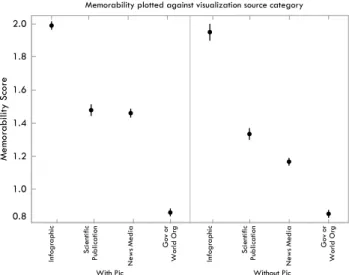
As shown in Fig. 8, regardless of whether the visualizations did or did not include pictograms, the visualization source with the highest memorability score was the infographic category (M=1.99,t(147) = 5.96,p<0.001 when compared to the next highest category, scien-tific publications with M=1.48), and the visualization source with
:LWK3LF :LWKRXW3LF ,Q IR J UD S KL F 6F LH QW LI LF 3X E OLF D WLR Q 1 HZ V 0 HG LD * RY R U : RU OG 2 UJ ,Q IR J UD S KL F 6F LH QW LI LF 3X E OLF D WLR Q 1 HZ V 0 HG LD * RY R U : RU OG 2 UJ 0 HP RU D E LOL W\ 6 FR UH 0HPRUDELOLW\SORWWHGDJDLQVWYLVXDOL]DWLRQVRXUFHFDWHJRU\ Memorability plotted against visualization source category
With Pic Without Pic
Fig. 8. Memorability scores for visualizations based on original source category. On the left is all visualizations, and on the right visualizations with pictograms removed.
the lowest memorability score was the government and world organi-zations category (M=0.86,t(220) =8.46,p<0.001 when compared to the next lowest category, news media withM=1.46). These re-sults were significant according to corrected t-tests. Note that these statistically-significant trends hold even with visualizations containing pictograms removed. In fact, with pictograms removed, scientific pub-lications (M=1.95) become significantly more memorable than news media (M=1.17,t(23) =6.92,p<0.001). The top ten most memo-rable visualizations from each source category are shown in Fig. 9.
A few things to bear in mind: first of all, as previously stated, this memorability study examined the memorability of visualizations as if they were images and not memorability based on engagement and comprehension of the visualization. Secondly, the visualizations in this category were drawn from Visual.ly with a more design focused venue and audience where the visualizations are intentionally created to be flashy and include stylized elements. Another factor is that vi-sualizations are submitted to Visual.ly and are pre-judged by people before being published. In contrast, the other venues contain a more unbiased and not pre-judged selection of visualizations. The visualiza-tions for a source such as Visual.ly, or even other news media sites, are competing for a viewer’s attention. Thus they will probably be more likely, intentionally or unintentionally, to use bright, bold, pictorial vi-sual elements to grab a reader’s attention. Thus this type of publication venue’s motivational bias may translate into design features that lead to higher memorability.
Another possible influence of visualization source on memorabil-ity score is publication venue specific aesthetics. Many visualizations, particularly those from the news media and government sources, tend to publish with the same visual aesthetic style. This may be due to either the venue maintaining a consistent look so viewers will auto-matically recognize that a visualization was published by them, or be-cause they have editorial standards to create visualizations that appear similar. This may have a negative impact on memorability scores be-cause visualizations of similar aesthetics lack uniqueness. This may be a contributing factor to the observed trend (see Fig. 8) that visual-ization sources that have non-uniform aesthetics tend to have higher memorability scores than sources with uniform aesthetics. This ob-servation refutes our last hypothesis that visualizations from scientific publications are less memorable. This may also be due to the fact that visualizations in scientific publications have a high percentage of diagrams (Fig. 2), similar to the infographic category.
8 CONCLUSIONS ANDFUTUREWORK
The results of our memorability experiment show that visualizations are intrinsically memorable with consistency across people. They are
Fig. 9. The top ten most memorable visualizations for each of the four visualization source categories: infographic (top left), scientific publications (top right), news media (bottom left), and government / world organization (bottom right). In each quadrant, the visualizations are ordered most to least memorable from top left to bottom right.
less memorable than natural scenes, but similar to images of faces, which may hint at generic, abstract, features of human memory. Not surprisingly, attributes such as color and the inclusion of a human rec-ognizable object enhance memorability. And similar to previous stud-ies we found that visualizations with low data-to-ink ratios and high visual densities (i.e., more chart junk and “clutter”) were more memo-rable than minimal, “clean” visualizations. It appears that we are best at remembering “natural” looking visualizations, as they are similar to scenes, objects, and people, and that pictorial and rounded features help memorability.
More surprisingly, we found that unique visualization types (pic-toral, grid/matrix, trees and networks, and diagrams) had significantly higher memorability scores than common graphs (circles, area, points, bars, and lines). It appears that novel and unexpected visualizations can be better remembered than the visualizations with limited vari-ability that we are exposed to since elementary school. In hindsight this finding is consistent with results for natural scenes and objects.
Our results seem to validate the opinions of proponents on both sides of the chart junk debate. Edward Tufte says: “All the history of information displays and statistical graphics – indeed of any com-munication device – is entirely a progress of methods for enhancing density, complexity, dimensionality, and even sometimes beauty.” [37] And Nigel Holmes states: “As long as the artist understands that the primary function is to convey statistics and respects that duty, then you can have fun (or be serious) with the image; that is, the form in which these statistics appear.” [18] We believe that visualizations are what Alberto Cairo calls a Functional Art: “something that achieves beauty not through the subjective, freely wandering self-expression of the painter or sculptor, but through the careful and restrained tinkering of the engineer.” [10] But it appears that the artist and designer can have a big influence in making visualizations more memorable.
Understanding what makes a visualization memorable is only the first step to understanding how to create effective data presentations. Making a visualization more memorable means making some part of the visualization “stick” in the viewers mind. We do not want just any part of the visualization to stick (e.g., chart junk), but rather we want the most important relevant aspects of the data or trend the author is trying to convey to stick. If we can accomplish this, then we will have a method for making data more memorable. This will have diverse applications in education, business, and more generally, in how data is presented to wide audiences.
In future work we hope to gain further understanding of the
mem-orability of visualizations. This would include expanding our visu-alization database in order to gain an even more diverse real world sample, annotating more of the images with all visualization types and attributes of our taxonomy in order to better understand the memora-bility subtleties of specific types or subtypes of visualizations, anno-tating visualizations with more fine-grained definitions and measures of visual density, and investigating how memorability is impacted by multiple visualizations (e.g., small multiples or multi-panel visualiza-tions). We plan to investigate the effect of time on memorability of visualizations, and investigate whether certain visual features stick in the viewers mind longer than others. A particular category worth in-vestigating further is pictograms. We would like to break this category down into subtypes to look for specific effects on memorability. We also hope to show in future work that memorability – i.e., treating visualizations as scenes – does not necessarily translate to an under-standing of the visualizations themselves. Nor does excessive visual clutter aid comprehension of the actual information in the visualiza-tion (and may instead interfere with it). Finally, we hope to conduct eye movement studies to identify the parts of visualizations used for memory or comprehension.
Having a more solid understanding of the memorability of visual-izations will also allow us to carefully craft future studies to ask the more important and interesting questions of what makes a visualiza-tion comprehensible, engaging, or impactful. With a more solid grasp of what visual elements impact memorability at a low level, we can control for them at a higher level so as not to interfere with other fac-tors in future experiments. We will then be able to start answering the larger questions of how to design effective visualizations.
ACKNOWLEDGMENTS
The authors wish to thank Krzysztof Gajos for his help and guidance in designing and developing the annotation pipeline for the visualization database, and Lars Kellogg-Stedman and the entire Harvard SEAS IT team for their help and technology support for this project. The au-thors also wish to thank Sean Yeh and Chelsea Yeh for their assistance in helping pilot the online visualization scraping and design of the vi-sualization database. This work was partly supported by the National Science Foundation (NSF) under grant 1016862 to A. Oliva, as well as Google and Xerox. M. Borkin was supported by the Department of Defense through the National Defense Science & Engineering Grad-uate Fellowship (NDSEG) Program, and P. Isola was supported by a NSF Graduate Research Fellowship.
REFERENCES
[1] R. C. Anderson and J. W. Pichert. Recall of previously unrecallable
infor-mation following a shift in perspective. Journal of Verbal Learning and
Verbal Behavior, 17(1):1–12, 1978.
[2] W. A. Bainbridge, P. Isola, and A. Oliva. The intrinsic memorability of
face images (in press). Journal of Experimental Psychology: General,
2013.
[3] M. Bar and M. Neta. Humans prefer curved visual objects.Psychological
science, 17(8):645–648, 2006.
[4] S. Bateman, R. L. Mandryk, C. Gutwin, A. Genest, D. McDine, and C. Brooks. Useful junk?: the effects of visual embellishment on
com-prehension and memorability of charts. InProceedings of the 28th
Inter-national Conference on Human Factors in Computing Systems, CHI ’10, pages 2573–2582. ACM, 2010.
[5] C. Behrens. Infodesignpatterns. http://www.niceone.org/
infodesignpatterns/index.php5, 2013.
[6] J. Bertin. Semiology of graphics: diagrams, networks, maps. 1983. [7] A. F. Blackwell and T. Green. Does metaphor increase visual language
usability? InVisual Languages, 1999. Proceedings. 1999 IEEE
Sympo-sium on, pages 246–253. IEEE, 1999.
[8] R. Borgo, A. Abdul-Rahman, F. Mohamed, P. W. Grant, I. Reppa, L. Floridi, and M. Chen. An empirical study on using visual
embel-lishments in visualization. Visualization and Computer Graphics, IEEE
Transactions on, 18(12):2759–2768, 2012.
[9] T. F. Brady, T. Konkle, G. A. Alvarez, and A. Oliva. Visual long-term
memory has a massive storage capacity for object details.Proceedings of
the National Academy of Sciences, 105(38):14325–14329, 2008.
[10] A. Cairo. The Functional Art: An Introduction to Information Graphics
and Visualization. New Riders, 2013.
[11] W. S. Cleveland and R. McGill. Graphical perception: Theory, exper-imentation, and application to the development of graphical methods.
Journal of the American Statistical Association, 79(387):531–554, 1984.
[12] Y. Englehardt.The language of graphics: A framework for the analysis of
syntax and meaning in maps, charts and diagrams. PhD thesis, Institute for Logic, Language and Computation, University of Amsterdam, 2002. [13] S. Few. Benefitting infovis with visual difficulties? Provocation without
a cause. Visual Business Intelligence Newsletter, 2011.
[14] S. Few. The chartjunk debate: A close examination of recent findings. Visual Business Intelligence Newsletter, 2011.
[15] R. L. Harris. Information graphics: A comprehensive illustrated
refer-ence. Oxford University Press, 1999.
[16] J. Heer, M. Bostock, and V. Ogievetsky. A tour through the visualization zoo.Communications of the ACM, 53(6):59–67, 2010.
[17] J. Heer and B. Shneiderman. Interactive dynamics for visual analysis.
Queue, 10(2):30, 2012.
[18] N. Holmes.Designer’s Guide to Creating Charts and Diagrams.
Watson-Guptill Publications, 1984.
[19] J. Hullman, E. Adar, and P. Shah. Benefitting infovis with visual
dif-ficulties. Visualization and Computer Graphics, IEEE Transactions on,
17(12):2213–2222, 2011.
[20] P. Isola, D. Parikh, A. Torralba, and A. Oliva. Understanding the intrin-sic memorability of images. In J. Shawe-Taylor, R. Zemel, P. Bartlett,
F. Pereira, and K. Weinberger, editors,Advances in Neural Information
Processing Systems (NIPS), volume 24, pages 2429–2437, 2011. [21] P. Isola, J. Xiao, A. Torralba, and A. Oliva. What makes an image
memo-rable? InComputer Vision and Pattern Recognition (CVPR), 2011 IEEE
Conference on, pages 145–152. IEEE, 2011.
[22] T. Konkle, T. F. Brady, G. A. Alvarez, and A. Oliva. Conceptual dis-tinctiveness supports detailed visual long-term memory for real-world
objects. Journal of experimental psychology. General, 139(3):558–578,
2010.
[23] T. Konkle, T. F. Brady, G. A. Alvarez, and A. Oliva. Scene memory is more detailed than you think the role of categories in visual long-term
memory.Psychological Science, 21(11):1551–1556, 2010.
[24] S. M. Kosslyn. Understanding charts and graphs.Applied cognitive
psy-chology, 3(3):185–225, 1989.
[25] E. Lee. Visualizing blog: A taxonomy of data visualization. http:
//www.visualizing.org, 2013.
[26] R. Lengler and M. J. Eppler. Towards a periodic table of visualization
methods for management. InIASTED Proceedings of the Conference
on Graphics and Visualization in Engineering (GVE 2007), Clearwater, Florida, USA, 2007.
[27] K. Marriott, H. Purchase, M. Wybrow, and C. Goncu. Memorability of
visual features in network diagrams.Visualization and Computer
Graph-ics, IEEE Transactions on, 18(12):2477–2485, 2012.
[28] W. Mason and S. Suri. Conducting behavioral research on Amazon’s
Mechanical Turk.Behav Res, 44:1–23, 2012.
[29] O. Neurath.From hieroglyphics to Isotype: A visual autobiography.
Hy-phen Press, London, 2010.
[30] S. Pinker. A theory of graph comprehension. Artificial intelligence and
the future of testing, pages 73–126, 1990.
[31] R. Reber, N. Schwarz, and P. Winkielman. Processing fluency and
aes-thetic pleasure: is beauty in the perceiver’s processing experience?
Per-sonality and social psychology review, 8(4):364–382, 2004.
[32] J. C. Roberts. Display models-ways to classify visual representations.
International Journal of Computer Integrated Design and Construction, 2(4):241–250, 2000.
[33] J. F. Rodrigues, A. J. Traina, M. C. F. de Oliveira, and C. Traina.
Review-ing data visualization: an analytical taxonomical study. InInformation
Visualization, 2006. IV 2006. Tenth International Conference on, pages 713–720. IEEE, 2006.
[34] J. Ross, L. Irani, M. S. Silberman, A. Zaldivar, and B. Tomlinson. Who
are the Crowdworkers? Shifting Demographics in Mechanical Turk.CHI
EA, pages 2863–2872, 2010.
[35] B. Shneiderman. The eyes have it: A task by data type taxonomy for
in-formation visualizations. InVisual Languages, 1996. Proceedings., IEEE
Symposium on, pages 336–343. IEEE, 1996.
[36] M. Tory and T. Moller. Rethinking visualization: A high-level taxonomy. InInformation Visualization, 2004. INFOVIS 2004. IEEE Symposium on, pages 151–158. IEEE, 2004.
[37] E. Tufte.Envisioning Information. Cheshire (Conn.), 1990.
[38] E. Tufte. The Visual Display of Quantitative Information. Cheshire
(Conn.), 2001.
[39] A. Vande Moere, M. Tomitsch, C. Wimmer, B. Christoph, and T. Grechenig. Evaluating the effect of style in information
visualiza-tion. Visualization and Computer Graphics, IEEE Transactions on,