International Journal of
Research
Available at https://edupediapublications.org/journals
p-ISSN: 2348-6848 e-ISSN: 2348-795X Volume 04 Issue 05
April 2017
Dalvik Virtual Machine and Binder in Android
Operating System
Wahhab Isam Altaee & Alaa Nazeeh
[email protected]
;
[email protected]
Department of Computer Applied Technology Advance Operating System Class
Abstract
This paper is an analysis of the Dalvik Virtual Machine and Java Virtual Machine and the different between them, and analysis the Inter process communication (IPC) in Android mobile operation system. Provided by a custom software is called Binder. And the last of paper Example for Building a Binder-based Service and Client.
Keyword:
Dalvik Virtual Machine (DVM), Inter-process communication (IPC), Remote Procedure Call (RPC)1. Introduction
A mobile operating system (or mobile OS) is an operating system for smartphones, tablets, PDAs, or other mobile devices. While computers such as the typical laptop are mobile, the operating systems usually used on them are not considered mobile ones as they were originally designed for bigger stationary desktop computers that historically did not have or need specific "mobile" features. This distinction is getting blurred in some newer operating systems that are hybrids made for both uses.
Mobile operating systems combine features of a personal computer operating system with other features useful for mobile or handheld use; usually including, and most of the following considered essential in modern mobile systems; a touchscreen, cellular, Bluetooth, Wi-Fi, GPS mobile navigation, camera, video camera, speech recognition, voice recorder, music player, near field communication.Mobile devices with mobile
operating systems the main user-facing software platform is supplemented by a second low-level proprietary real-time operating system which operates the radio and other hardware. Research has shown that these low-level systems may contain a range of security vulnerabilities permitting malicious base stations to gain high levels of control over the mobile device.
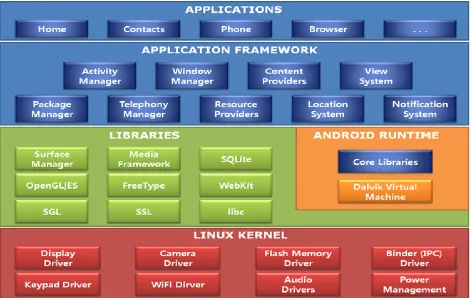
I will go further and discuss about the Dalvik (VM) and the Binder, the core subsystem of the complex and huge Android platform.
Android is a platform which embraces numerous technologies like Linux Kernel, C++, Java, Dalvik VM, e
International Journal of
Research
Available at https://edupediapublications.org/journals
p-ISSN: 2348-6848 e-ISSN: 2348-795X Volume 04 Issue 05
April 2017
Android provides the process-unit component model. In other words, system services which provide an application or a camera feature created in Java on Eclipse, or system services which are responsible for screen display, all such Android components are eventually expressed as Linux processes.
2. Dalvik Virtual Machine (DVM) .
Dalvik is a purpose-built virtual machine designed specifically for Android developed by Dan Bornstein and his team at Google.
The Java virtual machine (JVM) was designed to be a one-size-fits-all solution, and the Dalvik team felt they could do a better job by focusing strictly on mobile devices. They looked at which constraints specific to a mobile environment are least likely to change in the near future. One of these is battery life, and the other is processing power. Dalvik was built from the ground up to address those constraints. Another side effect of replacing the Java VM with the Dalvik VM is the licensing. Whereas the Java language, Java tools, and Java libraries are free, the Java virtual machine is not. This was more of an issue back in 2005 when the work on Dalvik started.
Nowadays, there are open source alternatives to Sun’s Java VM, namely the Open JDK and Apache Harmony projects. By developing a truly open source and license-friendly virtual machine, Android yet again provides a full-featured platform that others are encouraged to adopt for a variety of devices without having to worry about the license.
2.1 The .dex File Format
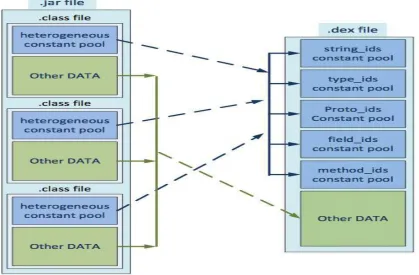
In standard Java environments, Java source code is compiled into Java bytecode, which is stored within .class files. The .class files are read by the JVM at runtime. Each class in your Java code will result in one .class file. This means that if you have, say, one .java source file that contains one public class, one static inner class, and three anonymous classes, the compilation process (javac) will output 5 .class files. On the Android platform, Java source code is still compiled into .class files. But after .class files are generated, the “dx” tool is used to convert the .class files into a .dex, or Dalvik Executable, file. Whereas a .class file contains only one class, a .dex file contains multiple classes. It is the .dex file that is executed on the Dalvik VM.
The .dex file has been optimized for memory usage and the design is primarily driven by sharing of data. The following diagram contrasts the .class file format used by the JVM with the .dex file format used by the Dalvik VM.
Figure (3) diagram contrasts the .class file format used by the JVM with the .dex file format used by the
International Journal of
Research
Available at https://edupediapublications.org/journals
p-ISSN: 2348-6848 e-ISSN: 2348-795X Volume 04 Issue 05
April 2017
3. Binder
The architectural paradigm of android applications is based on a distributed component model. The various components of an android application are decoupled from one another for modularity and scalability. These components can be part of the same process or different processes. If these components reside in different processes, then the components have to communicate with one another using the underlying Inter-process mechanisms exposed by the android platform. But these distributed components have to be present on the same host, because the IPC mechanism supported by the android platform does not allow communication across hosts.
Binder: is defined as a low overhead Remote Procedure call utility which facilitates synchronous reliable communication across processes. It is an elaborate framework and a binder kernel driver resides at the heart of this framework.
3.1 Why Android needs Binder ?
3.3 Binder that Binds All Functions
The Binder mechanism has started from a simple idea. "Let requests and responses be written in an area where all processes can share and let each process refer to the memory address." So, the kernel space is used for it.
Figure (4) Kernel Space Shared by All Processes.
A Binder Driver is implemented to use the kernel space. The role of the Binder driver is to convert the
memory address that each process has mapped with the memory address of the kernel space for reference.
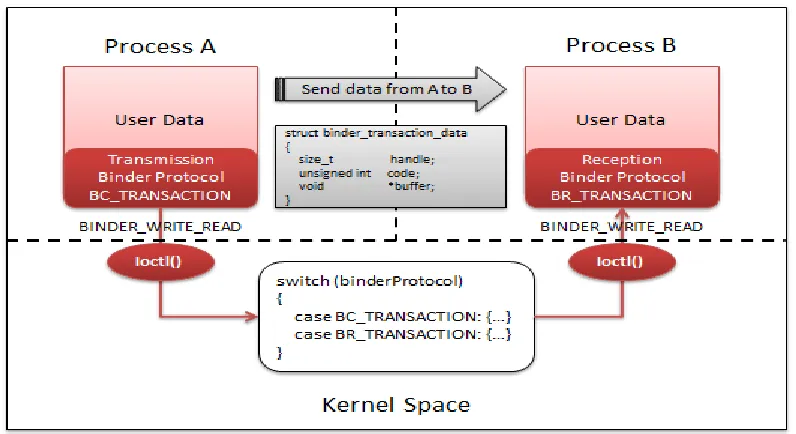
The Binder driver can be used by the ioctl() system function, which is a standard method in Linux. The
mechanism is called Binder IPC.
International Journal of
Research
Available at https://edupediapublications.org/journals
p-ISSN: 2348-6848 e-ISSN: 2348-795X Volume 04 Issue 05
April 2017
3.4 Binder Terminology
Binder (Framework)
The overall IPC architecture
Binder Driver
The kernel-level driver that fascinates the
Communication across process boundaries
Binder Protocol
Low-level protocol (ioctl-based) used to
Communicate with the Binder driver
IBinder Interface
A well-defined behavior (i.e. methods)
that Binder Objects must implement
AIDL
Android Interface Definition Language
used to describe business operations on an IBinder Interface
Figure (6) Binder Terminology
Binder (Object) : A generic implementation of the IBinder interface
Binder Token
An abstract 32-bit integer value that uniquely identifies a Binder object across all processes on the system
Binder Service
An actual implementation of the Binder (Object) that implements the business operations
Binder Client: An object wanting to make use of the behavior offered by a binder service
Binder Transaction
An act of invoking an operation (i.e. a method) on a remote Binder object, which may involve
sending/receiving data, over the Binder Protocol
Parcel
"Container for a message (data and object references) that can be sent through an IBinder." A unit of
transactional data - one for the outbound request, and another for the inbound reply
A procedure for converting higher level applications data structures (i.e. request/response parameters) into parcels for the purposes of embedding them into Binder transactions
Unmarshalling
A procedure for reconstructing higher-level application data-structures (i.e. request/response parameters)
from parcels received through Binder transactions
Proxy
An implementation of the AIDL interface that un/marshals data and maps method calls to transactions submitted via a wrapped IBinder reference to the Binder object
Stub
A partial implementation of the AIDL interface that maps transactions to Binder Service method calls while un/marshalling data
Context Manager (a.k.a. servicemanager)
A special Binder Object with a known handle (registered as handle 0) that is used as a registry/lookup service for other Binder Objects (name → handle mapping)
3.5 Binder Transactions
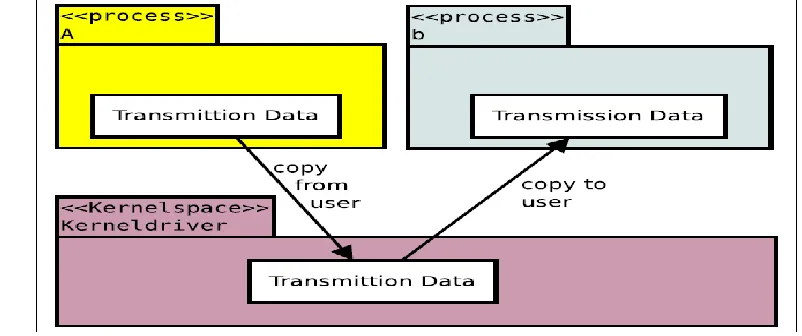
The BC REPLY command is used by the server to reply to a received BC
TRANSACTION. The Binder driver takes care of delivering the reply to the waiting thread. The Binder driver copies the transmission data from the user memory address space of the sending process to its kernel space and then copies the transmission data to the destination process. This is achieved by the copy from user and copy to user command of the Linux kernel.
International Journal of
Research
Available at https://edupediapublications.org/journals
p-ISSN: 2348-6848 e-ISSN: 2348-795X Volume 04 Issue 05
April 2017
3.2 IPC at the Kernel Level
The Binder kernel driver supports the file operations open, mmap (memory mapping), release, poll and the system call ioctl. The higher layers accesses the Binder driver through these file operations. The device file associated with the binder kernel module is "/dev/Binder". The open system call establishes a connection to the Binder driver and assigns it a file descriptor, and the release operation closes the connection. The mmap operation is needed to map Binder memory. The most significant operation is the ioctl system call. The higher layers send and receive all messages through the ioctl() system call. All interactions transpire through a small set of ioctl commands. These commands are:
BINDER WRITE READ is the most important command; it submits a series of transmission data. BINDER SET MAX THREADS sets the number of maximal threads per process to work on requests. BINDER SET CONTEXT MGR sets the context manager. It can be set only one time successfully and follows the first come first serve pattern.
BINDER THREAD EXIT This command is sent by middleware, if a binder thread exits
BINDER VERSION returns the Binder version number
To initiate an IPC transaction, ioctl call with BINDER_READ_WRITE command is invoked The data to be passed to the ioctl() call is of the type struct binder_write_read.[3]
Ioctl (fd, BINDER_WRITE_READ, &bwt);
The write buffer contains an enum BC_TRANSACTION followed by a binder_transaction_data. In this
structure target is the handle of the object that should receive the transaction. The code refers to the Method
The kernel driver does not start threads to dispatch requests to a target server, it is the responsibility of the
server to main a pool of threads and listen to the incoming requests by entering a polling loop. The target
server should execute these commands BC REGISTER LOOPER, BC ENTER LOOPER and BC EXIT
LOOPER to notify the binder about the looping Threads.
Remote Procedure Call (RPC)
3.5.1 Message passing.
An RPC is initiated by the client, which sends a request message to a known remote server to execute a
specified procedure with supplied parameters. The remote server sends a response to the client, and the
application continues its process. While the server is processing the call, the client is blocked (it waits until
the server has finished processing before resuming execution), unless the client sends an asynchronous
request to the server, such as an XHTTP call. There are many variations and subtleties in various
International Journal of
Research
Available at https://edupediapublications.org/journals
p-ISSN: 2348-6848 e-ISSN: 2348-795X Volume 04 Issue 05
April 2017
Figure (8) Active Binder
An important difference between remote procedure calls and local calls is that remote calls can fail
because of unpredictable network problems. Also, callers generally must deal with such failures without
knowing whether the remote procedure was actually invoked. Idempotent procedures (those that have no
additional effects if called more than once) are easily handled, but enough difficulties remain that code to
call remote procedures is often confined to carefully written low-level subsystems.
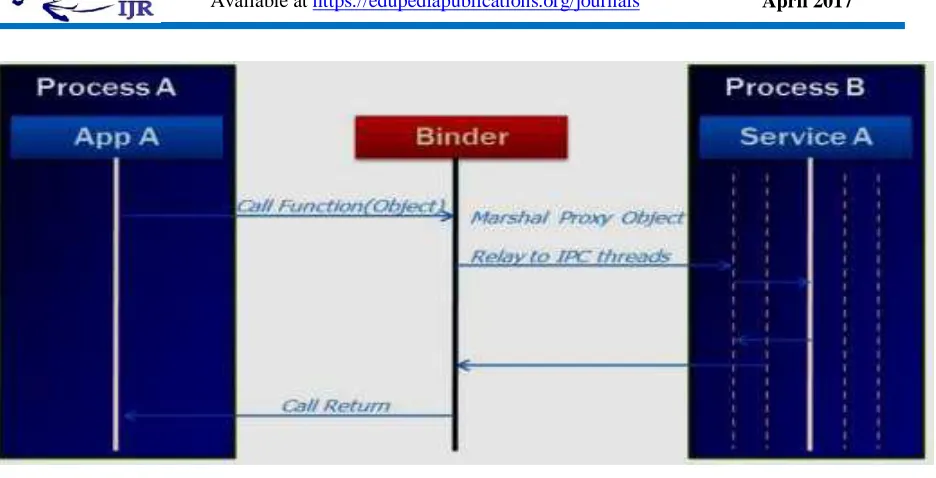
3.5.2 Sequence of events during an RPC
1. The client calls the client stub. The call is a local procedure call, with parameters pushed on to the
stack in the normal way.
2. The client stub packs the parameters into a message and makes a system call to send the message.
Packing the parameters is called marshalling.
3. The client's local operating system sends the message from the client machine to the server machine.
4. The local operating system on the server machine passes the incoming packets to the server stub.
5. The server stub unpacks the parameters from the message. Unpacking the parameters is called
unmarshalling.
6. Finally, the server stub calls the server procedure. The reply traces the same steps in the reverse
Standard contact mechanisms.
To let different clients access servers, a number of standardized RPC systems have been created. Most of
these use an interface description language (IDL) to let various platforms call the RPC. The IDL files can
then be used to generate code to interface between the client and server.
4.
Example for Building a Binder-based Service and Client
To demonstrate a Binder-based service and client (based on Fibonacci), we’ll create three separate Projects:
1. Fibonaccicommon library project - to define our AIDL interface as well as custom types for Parameters and return values.
2. Fibonacciservice project - where we implement our AIDL interface and expose it to the Clients.
3. Fibonacciclient project - where we connect to our AIDL-defined service and use it.
The code is available.
As a ZIP archive: https://github.com/marakana/fibonaccibinderdemo/zipball/master By Git: git clone : https://github.com/marakana/fibonaccibinderdemo.git
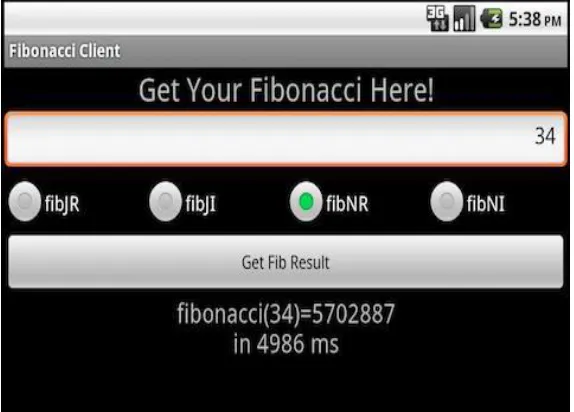
The UI will roughly look like this when done:
International Journal of
Research
Available at https://edupediapublications.org/journals
p-ISSN: 2348-6848 e-ISSN: 2348-795X Volume 04 Issue 05
April 2017
4.1 FibonacciCommon - Define AIDL Interface and Custom Types.
We start by creating a new Android (library) project, which will host the common API files (an AIDL interface as well as custom types for parameters and return values) shared by the service and its clients.
Project Name: FibonacciCommon
Build Target: Android 2.2 (API 8) or later
Package Name: com.marakana.android.fibonaccicommon
Min SDK Version: 8 or higher
No need to specify Application name or an activity
To turn this into a library project we need to access project properties → Android → Library and check Is Library.
We could also manually add android.library=true to
FibonacciCommon/default.properties and refresh the project Since library projects are never turned into actual applications (APKs)
We can simplify our manifest file:
FibonacciCommon/AndroidManifest
<?xml version="1.0" encoding="utf-8"?>
<manifest xmlns:android="http://schemas.android.com/apk/res/android"
package="com.marakana.android.fibonaccicommon" android:versionCode="1" android:versionName="1.0">
</manifest>
And we can remove everything from FibonacciCommon/res/ directory (e.g. rm
-frFibonacciCommon/res/*)
We are now ready to create our AIDL interface
FibonacciCommon/src/com/marakana/android/fibonaccicommon/IFibonacciService.aidl
package com.marakana.android.fibonaccicommon;
import com.marakana.android.fibonaccicommon.FibonacciRequest; import com.marakana.android.fibonaccicommon.FibonacciResponse; interface IFibonacciService {
long fibJR(in long n);
long fibJI(in long n);
long fibNR(in long n);
long fibNI(in long n);
FibonacciResponse fib(in FibonacciRequest request);
Our interface clearly depends on two custom Java types, which we have to not only
implement in Java, but define in their own
.aidl filespackage com.marakana.android.fibonaccicommon; import android.os.Parcel;
import android.os.Parcelable;
public class FibonacciRequest implements Parcelable {
public static enum Type {
RECURSIVE_JAVA, ITERATIVE_JAVA, RECURSIVE_NATIVE, ITERATIVE_NATIVE
}
private final long n; private final Type type;
public FibonacciRequest(long n, Type type) {
this.n = n;
if (type == null) {
throw new NullPointerException("Type must not be null"); }
this.type = type;
}
public long getN() { return n;
}
public Type getType() { return type;
}
public int describeContents() { return 0;
}
public void writeToParcel(Parcel parcel, int flags)
{ parcel.writeLong(this.n);
parcel.writeInt(this.type.ordinal()); }
public static final Parcelable.Creator<FibonacciRequest> CREATOR = new ParcelableCreator<FibonacciRequest>() {
public FibonacciRequest createFromParcel(Parcel in) {
long n = in.readLong();
Type type = Type.values()[in.readInt()];
return new FibonacciRequest(n, type); }
public FibonacciRequest[] newArray(int size) { return new FibonacciRequest[size];
International Journal of
Research
Available at https://edupediapublications.org/journals
p-ISSN: 2348-6848 e-ISSN: 2348-795X Volume 04 Issue 05
April 2017
FibonacciCommon/src/com/marakana/android/fibonaccicommon/FibonacciRequest.aidl
package com.marakana.android.fibonaccicommon;
parcelable FibonacciRequest;
package com.marakana.android.fibonaccicommon;
import android.os.Parcel;
import android.os.Parcelable;
public class FibonacciResponse implements Parcelable {
private final long result;
private final long timeInMillis;
public FibonacciResponse(long result, long timeInMillis) {
this.result = result;
this.timeInMillis = timeInMillis;
}
public long getResult() {
return result;
}
public long getTimeInMillis() {
return timeInMillis;
}
public int describeContents() {
return 0;
}
public void writeToParcel(Parcel parcel, int flags)
{ parcel.writeLong(this.result);
parcel.writeLong(this.timeInMillis);
}
public static final Parcelable.Creator<FibonacciResponse> CREATOR = new
Parcelable.Creator<FibonacciResponse>() {
public FibonacciResponse createFromParcel(Parcel in) {
return new FibonacciResponse(in.readLong(), in.readLong());
}
public FibonacciResponse[] newArray(int size) {
return new FibonacciResponse[size];
} }; }
FibonacciCommon/src/com/marakana/android/fibonaccicommon/FibonacciResponse.aidl
package com.marakana.android.fibonaccicommon;
parcelable FibonacciResponse;
Finally we are now ready to take a look at our generated Java interface
FibonacciCommon/gen/com/marakana/android/fibonaccicommon/IFibonacciService.java
package com.marakana.android.fibonaccicommon;
public interface IFibonacciService extends android.os.IInterface
{
public static com.marakana.android.fibonacci.IFibonacciService asInterface( android.os.IBinder obj) {
… }
public android.os.IBinder asBinder() {
return this;
} … }
public long fibJR(long n) throws android.os.RemoteException;
public long fibJI(long n) throws android.os.RemoteException;
public long fibNR(long n) throws android.os.RemoteException;
public long fibNI(long n) throws android.os.RemoteException;
public com.marakana.android.fibonaccicommon.FibonacciResponse fib(
com.marakana.android.fibonaccicommon.FibonacciRequest request)
throws android.os.RemoteException;
}
Conclusion
In this short article I have tried to provide only simple information despite the vast technology behind
Android. I hope it will be helpful in understanding the Android platform.
About Dalvik (VM) is Provides application
portability and runtime consistency Runs
optimized file format (.dex) and Dalvik bytecode.
Uses runtime memory very efficiently by
the .dex file has been optimized for memory
usage and the design is primarily driven by
sharing of data.
To wrap up, Binder is the base of the Android
platform. We have reviewed three components
of Binder: Driver, IPC and RPC. The Binder
Driver will be included in the main version of
the Linux kernel. The following summarizes the
description of Android and Binder.
•Android is a PC OS based on Linux Kernel and
is optimized for smartphones.
•Android has a process-unit component model
and provides system functions as server
processes. For a functional mesh-up of processes,
it provides Binder.
•Android Binder uses the kernel memory
reference to support communication between
International Journal of
Research
Available at https://edupediapublications.org/journals
p-ISSN: 2348-6848 e-ISSN: 2348-795X Volume 04 Issue 05
April 2017
References
[1]
http://www.cubrid.org/blog/dev- platform/binder-communication-mechanism-of-android-processes/
[2] http://www.slideshare.net/fullscreen/jserv/ android-ipc-mechanism/2
[3] http://elinux.org/Android_Binder.
[4] https://en.wikipedia.org/wiki/Android_%2 8operating_system%29.
[5] Aleksandar (Saša) Gargenta, Marakana, Deep Dive into Android IPC/Binder Framework at Android Builders Summit 2013.