MAINSAIL· Tutorial, Part II:
Efficiency and Implementation Tips
for the Advanced MAINSAIL Programmer
with Answers to the Exercises of Part I
Copyright (c) 1984, 1985,1986,1987,1989, by XIDAK, Inc., Menlo Park, California.
The software described herein is the property ofXIDAK. Inc., with all rights reserved, and is a confidential trade secret of XIDAK. The software described herein may be used only under license from XIDAK.
MAINSAIL is a registered trademark ofXIDAK. Inc. MAINDEBUG, MAINEDIT, MAINMEDIA, MAINPM. Structure Blaster, TDB. and SQIJr are trademarks of XIDAK, Inc.
CONCEN1R1X is a trademark of Alliant Computer Systems Corporation.
Amdahl. Universal TlDle-Sharing System, and UTS are trademarks of Amdahl Corporation. Aegis, Apollo, DOMA1N, GMR. and GPR are trademarks of Apollo Computer Inc.
UNIX and UNIX System V are trademarks of AT&T.
DASHER, DG/UX, ECLIPSE, ECLIPSE MV/4000, ECUPSE MV /8000, ECLIPSE MV/lOOOO, and ECLIPSE MV 120000 are trademarks of Data General Corporation.
DEC,PDP, TOPS-IO, TOPS-20, VAX-II, VAX,MicroVAX,MicroVMS, ULTRIX-32,and VAXNMS are trademarks of Digital Equipment Corporation.
EMBOS and ELXSI System 6400 are trademarks of ELXSI, Inc.
The KERMIT File Transfer Protocol was named after the star of THE MUPPET SHOW television series. The name is used by penniasion of Henson Associates, Inc.
HP-UX and Vectra are trademarks of Hewlett-Packard Company.
Intel is a trademark of Intel Corporation.
CLIPPER. CLIX, Intergraph, InterPro 32, and InterPro 32C are trademarks of Intergraph Corporation.
System/370, YM/SP CMS, and CMS are trademarks of International Business Machines Corporation.
MC68000, M68000, MC68020, and MC68881 are trademarks of Motorola Semiconductor Products Inc.
ROS and Ridge 32 are trademarks of Ridge Computers.
SP ARC, Sm Microsystems, Sm Workstation. and the combination of Sun wilh a numeric suffix are trademarks of Sun Microsystems, Inc.
WINfI'CP is a trademark of The Wollongong Group, Inc.
wy-so, WY-60, WY-75, and WY-IOO are trademarks ofWyse Technology.
Table of Contents
1. Program Efficiency • . . . . 1.1. Detecting Sources of Inefficiency . . . . 1.2. Use of Low-Level Data Types and Primitives 1.3. Explicit Disposal. . . . .
1.4. Free Lists; $newRecords. . . •
1.5. Areas • . . • • .
1.6. Use of String Space. • . . . . • . 1.7. String Comparison. • • . . . • • 1.8. Concatenation of Strings in Calls to write . 1.9. Inline Procedures • • . . • • • • • . 1.10. Compiletime Evaluation • • . . . . . 1.11. Substitution of Short for Long Operations
1.12. Comparisons with Zero . . . • . . 1.13. Intermodule vs. Local Calls. . . • .
1.14. Using exceptionPointerArg to Determine the Current Exception . . . . . 1.15. Input and Output of Large Quantities of Data . .
1.16. The Structure Blaster . . . . 2. More on Memory Management and String Space . 2.1. Module Swapping • . • . . • . . . . . 2.2. Selecting Memory Management Parameters .
2.3. Implementation of Strings . . . . . . . . . 2.3.1. Introduction. . • . . . . . . . . . 2.3.2. Operations That Do Not Put Characters into String Space . 2.3.3. String-Producing Operations . . . . . . . . . . 2.3.4. String Space and String Garbage Collection . . . . • . 2.3.5. String Space Control . . . • . . . '. . . 3. Implementation Note on Exceptions and Stack Frames
3.1. 3.2 .. 3.3. 3.4.
3.5.
3.6.
3.7. 3.8.Handle Statement . . Stack Frames . . . .
An Exception Occurs. . . Finding an Active Handler . Termination of the Handler. Exception Information Coroutines
Summary • • • • • •
4. Debugging Hints . . . .
4.1. Solving Debugger Confusion with Source Text . .
4.1.1. The Problem. . . . .
4.2. Solving Non-Deterministic Errors and Garbage Collector Errors. . • • • • 4.2.1. The Problem. • • • . • • • • . • . . • . • • • • • • . • . • . 4.2.2. If the Bug Is Still Non-Deterministic or Goes Away When You Try to Use the
Debugger • . . . • • . . . • . . 4.3. Determining Where MAINSAll.. Is in an Infinite Loop .
4.4. Displaying the Contents of a Structure . . . . 5. Common Pitfalls and Portability Problems
5.1. Character Set Assumptions. • . . 5.2. End-of-File, eof, and $gotValue. . 5.3. File Name Syntax . • . . • . . 5.4. Case Sensitivity in File Names . . 5.5. Random Access to Files . . . . •
5.6. Simultaneously Opening the Same File Several Times . 5.7. Number of File Handles • • • • •
5.8. Redirection of Input and Output. • • • . . • . 5.9. Assignment to cmdFile and logFile . • . . 5.10. Reading Non-String Values from a Text File . 5.11. Sizes of Data Types • . . . • • . . .
5.12. Logical File Name Fonnats . • • . • . . . .
5.13 . Valid Addresses . . . . 5.14. Garbage Collections during $storageUnitRead and $storageUnitWrite . 5.15. Date and Time Addition and Subtraction. . . .
5.16. Searching for" in the Line-Oriented Debugger Interface . . 5.17. Multiline CONF Commands. . . • .
5.18. Including Brackets in Bracketed Text •. 5.19. Reallocating a Local Own Array. . . . 5.20. Final Procedure Order . . . • . .
5.21. Use of $next in Coroutine Scheduling. . . .
6. Miscellaneous. . • . . • . . . 6.1. Compiletime Libraries . . . 6.2. MAINED Editing Techniques 6.2.1. Deleting in Insert Mode . .
• • l •
6.2.2. Search and Replace Macro . . . . • . 6.2.3. Defining Mode-Independent Macros with "QRM". . 6.3. Rationale for MAINSAIL's Binding Rules . . . • . 6.4. Selective Compilation of Modules in a File . . . . . 6.4.1. Asking Which Module Should Be Compiled . . . . 6.4.2. Asking Whether Each Module Should Be Compiled . . .
Appendices
A. Solutions to Most Exercises . . . . B. Comparison of MAINS All.. and C
B.l. Portability . . . . B.2. Modules and Dynamic Linking. . . B.3. Compiletime Facilities . . . . B.4. Control Structures . . . . B.S. Operators . . • . . . • • • . • B.6. Data Types and Data Structures. B. 7. Strings. . • . . . . B.S. Garbage Collection. . . . . B.9. Input and Output. . . . B.IO. Coroutines and Exceptions . B.II. Tools. . . .
·
·
·
·
S7 129 129
· .
130 131·
.
133·
133·
134136
·
137·
137138
List of Examples
1.4-1. Special-Purpose Allocation and Disposal Procedures. . . .
1.4-2. Use of $newRecords . . • . . • • . . • . . . . 1.14-1. Using exceptionPointerArg to Recognize an Exception Quicldy. . . . 2.3.2.3-1. Equivalent Procedures to Certain String Manipulation Procedures . 2.3.2.4-1. Equivalent Procedures to the Two Forms of Substring.
3.1-1. Typical Assembly Code Generated for a Handle Statement . 3.1-2. Exiting More Than One Handler 0 • • • • • • • • 3.2-1. Snapshot of Stack Growing towards Low Memory 3.3-1. Stack's Appearance upon Entry to $raise . . . . . 3.4-1. Nested Handle Statements . . . • . . . . 3.4-2. After Control Is Transferred to the Handler
3.4-3. After B Calls D . . . .
3.5-1. After the Stack Is Unwound. . . . . 3.5-2. After $raiseRetum Is Called . . . . . 3.5-3. After an Exception Occurs in E . . . . 3.5-4. Unwinding the Stack All the Way to A's Frame. • . 4.2.1-1. An Improper Access to a Disposed Record.
5.19-1. Allocating an Own Array Only Once . . . . • . 6.1-2. Declaration of Procedures in "lib" . • . . • . • . 6.1-1. Use of a Compiletime Library. • • • . . . .
6.4.1-l. A File That Asks Which Module Should Be Compiled . 6.4.2-1. A File That Asks Whether Each Module Should Be Compiled .
List of Tables
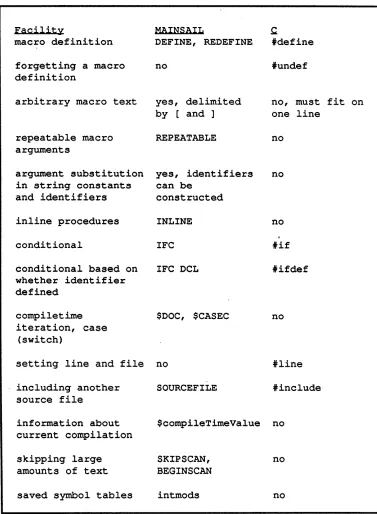
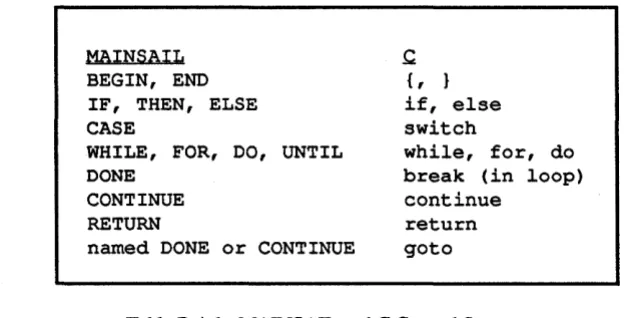
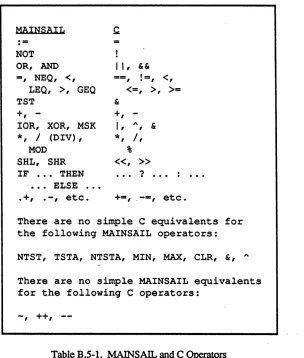
B.3-1. MAINSAll.. and C Compiletime Facilities. B.4-1. MAINSAll.. and C Control Structures B.5-l. MAINSAll.. and C Operators. . . . B .6-1. MAINSAll.. and C Simple Data Types • .
1. Program Efficiency
This chapter describes a variety of techniques for writing efficient MAINSAll.. code. Some of the techniques may make a considerable difference in a program's execution speed, and others have relatively minor effects. Of course, if a program is to execute well, its algorithm must be
properly chosen to begin with; most "efficient programming techniques", including those
described in this chapter, can be used to fine-tune a program but cannot rescue one that is grossly miswritten.
1.1. Detecting Sources of Inefficiency
The first step in improving a program's execution speed, once a satisfactory overall algorithm
has been chosen, is to determine where the program is spending most of its time.
Improvements to infrequently executed code are usually not worth a programmer's time, since they result in a negligible improvement in the performance of the program as a whole.
The MAINSAIL performance monitor, MAINPM, is an excellent tool for tracking the execution of programs in order to determine where they need improvement. MAINPM can give timings for various parts of a program as well as counts of individual statement executions. MAINPM can also be made to keep track of any user-specified quantity during program execution instead of CPU time. Furthermore, it can keep track of use of chunks (records, arrays, and data sections) and string space. MAINPM is described in detail in the "MAINPM User's Guide".
1.2. Use of Low-Level Data Types and Primitives
As described in Chapter 18 of part I of the "MAINSAIL Tutorial", the use of charadrs and addresses can be used to avoid some of the overhead associated with MAINSAIL high-level data types. Caution must be used when substituting low-level operations for high-level ones, for several reasons:
• Low-level operations are less convenient and more difficult to code than high-level ones. The programmer is more likely to err in writing low-level code.
• Low-level errors may be subtle and difficult to trace, since the program can
• High-level primitives often provide built-in explicit checks for errors (e.g .• array subscript checking). Such automatic checking is unavailable with low-level primitives.
• If garbage is accidentally generated in a static storage area. it cannot be reclaimed by MAINSAIL·s garbage collector.
1.3. Explicit Disposal
Avoiding unnecessary garbage collections is the purpose of many MAINSAIL efficiency techniques. A garbage collection brings MAINSAIL execution to a halt until the collection finishes; this can be annoying in an interactive program. especially if the collection is long. On systems that provide virtual memory (most modern operating systems do), garbage
collection can take much longer than usual if a process·s virtual address space has exceeded the amount of physical memory on the machine. MAINSAIL memory management accesses the pages of MAINSAIL's address space in an almost random fashion. which causes a virtual memory system to page heavily. The slowdown after a process has "gone virtual" can dramatic; garbage collections can take literally orders of magnitude longer.
Section 18.2 of part I of the "MAINSAll.. Tutorial" describes the use of the system procedure "dispose". dispose recycles memory without requiring a garbage collection; in some cases. sufficiently frequent use of dispose may avoid collections altogether. The use of dispose is therefore recommended for efficiency reasons, although, as described in Section 18.2 of part I of the "MAINSAIL Tutorial", considerable caution is required.
MAINPM facilities may be useful in determining where garbage is generated; see the "MAINPM User's Guide".
1.4. Free Lists; $newRecords
Some programs allocate and dispose records of some class with great frequency. In such cases, the overhead of the system procedures "new" and "dispose" may be considered too great. A program may keep its own free list of a class. making allocation and disposal of a record of the . class very fast. Example 1.4-1 shows the allocation and disposal procedwes for a class fooCls.
It is not worthwhile for a program to maintain its own free list unless the allocation and disposal of records is quite frequent The built-in new and dispose already use a free-list-like mechanism; their overhead is often not much greater than that of the procedures shown in Example 1.4-1. A program maintaining its own free list also gives up some flexibility. A free
CLASS fooCls (
POINTER (fooCls) next: # free list link .•. other fields ..•
) :
POINTER (fooCls) fooClsFreeList:
INLINE POINTER(fooCls) PROCEDURE newFooCls:
# Use built-in new only when free list is exhausted 0
BEGIN
POINTER (fooCls) p:
IF p :- fooClsFreeList THENB
fooClsFreeList := p.next: RETURN(p) END: RETURN(new(fooCls»i
END:
INLINE PROCEDURE disposeFooCls (MODIFIES POINTER (fooCls) p): BEGIN
p.next := fooClsFreeList; fooClsFreeList := Pi p := NULLPOINTER;
END:
Example 1.4-1. Special-Purpose Allocation and Disposal Procedures
cannot be used for data -structures other than records of fooCls. Records allocated with the special-purpose mechanism are not initially cleared.
An effective way of reducing the overhead of record allocation is to call $newRecords, which allocates many records at once. Example 1.4-2 shows the procedure newFooCls of Example
1.4-1 rewritten to allocate 50 new records whenever the free list is close to exhaustion. $newRecords also exists in a fonn that allocates an array of records; consult the "MAINSAIL
Language Manual" for details.
1.S. Areas
POINTER (fooCls) PROCEDURE newFooCls;
t The free list is assumed initialized to contain at # least one record by the initial procedure.
BEGIN
POINTER (fooCls) p;
IF (p := fooClsFreeList) .next THEN
fooClsFreeList := fooClsFreeList.next EF NOT fooClsFreeList :=
$newRecords(p,DSP(fooCls.next),SOL) THEN errMsg("Couldn't allocate records","",fatal); RETURN (p) ;
END;
Example 1.4-2. Use of $newRecords
operation. In programs where large amounts of data become obsolete at some well-defined point, allocating the data in an area and disposing the entire area at once can greatly reduce memory managment overhead. Areas are also appropriate for data structures in which no garbage is being generated, since garbage collection may be disabled forjust those areas. When using areas, considerable care must be taken to avoid errors that are difficult to track. See the "MAINSAIL Language Manual" for details.
1.6. Use of String Space
Garbage collections can be triggered by use of string space. Many string operations use string space, and it is difficult to avoid using string space entirely. Section 2.3.3 describes how a number of system procedures affect string space, and includes examples of code that makes good use of string space.
1.7. String Comparison
As desribed in Section 10.6 of part I of the "MAINSAIL Tutorial", string comparison may be
1.S. Concatenation of Strings in Calls to write
A common source of unnecessary inefficiency is the improper use of concatenation in a string written to a file. The inefficiency comes from two sources:
1. The failure to allow the compiler to perform concatenation at compiletime when it can, requiring that "write" be called more often than necessary.
2. The unnecessary concatenation of strings constructed at runtime, rather than making multiple calls to "write It. This can eat up quite a bit of string space, and is the more serious source of inefficiency.
Assuming that i and j are integer variables, consider the following call to "write": write(logFile,"First number:",tab,i,eol,
"Second number:",tab,j,eol);
It makes eight calls to the string and integer instances for write to a textFile. Fewer calls could be made if adjacent string constants were concatenated to produce the recommended way of writing these strings to 10gFile:
write(logFile,"First number:" & tab,i,eol
& "Second number:" & tab,j,eol);
which makes only five calls to write. The concatenations (between constant strings only!) are perfonned at compiletime; e.g.:
eol & "Second number:" & eol is evaluated by the compiler to produce a single string.
It would be a mistake (the second source of inefficiency mentioned above) to concatenate evetything to be written:
write(logFile,"First number:" & tab & cvs(i) & eol &
"Second number:" & tab & cvs(j) & eol);
copying of the last two operands), and so on. Enonnous quantities of string space can be used if enough strings are concatenated together.
1.9. InUne Procedures
Example 1.4-1 shows two inline procedures: procedures that are expanded inline, somewhat like macros. That is, a separate body for the procedure is not produced in the objmod; the body of the procedure is expanded inside the calling procedure, and the normal procedure call overhead is avoided. The semantics of an inline procedure call are exactly the same as a regular ("closed") call.
An inline procedure declaration is preceded by the qualifier "INLINE". An individual procedure call may also be preceded by the keyword "INLINE", in which case that call is also made inline (unless it is an interface procedure of another module). The keyword
"$AL WAYS" must precede "INLINE" if a procedure or call is to be made inline when
compiled debuggable, since the "DEBUG" option normally forces calls to be closed (so that the debugger can jump into them).
An inline procedure is often a better way to package a small amount of code than a macro. Inline procedures are more flexible with respect to parameters; they can take advantage of the generic mechariism, and can use the "REPEATABLE" and "OPTIONAL" qualifiers, with the usual effect. Furthermore, inline procedures can have local variables. Macros are best used when their strong point, the substitution of arbitrary text into source code, is really needed. Although inline calls are faster, they usually consume more space than closed calls. It is inadvisable to make a frequently called procedure inline unless it is quite small; otherwise, the objrnod may become quite large, or the compiler may run out of memory trying to compile it
1.10. Compiletime Evaluation
Compiletime evaluation may be used for data types other than strings; it performs the operations only once, at compiletime, instead of (potentially) many times, at runtime. Attention must be paid to the order of evaluation of operands; constant operands should be grouped together, either using "DEFINE" to create a new constant identifier or using parentheses to force operators with constant operands to be evaluated first. Otherwise, the compiler may not recognize the constant expression, and unneCessarily evaluate it at runtime. For example, if i is an integer variable, then:
i + 2 + 4 may be evaluated by the compiler as:
instead of:
i
+
(2+
4)The former expression entails two additions at runtime, the second only one. An alternative that makes it clearer to the reader that compiletime evaluation is being performed is:
DEFINE six - 2 + 4; . .. i
+
six ...since macro constants can be defined only as constant expressions.
(Long) real expressions are never evaluated at compiletime, so this strategy does not work for them.
1.11. Substitution of Short for Long Operations
Avoid unnecessary long integer multiplication and division, since some processors on which
MAINSAil.. runs do not provide these operations as instructions; the operations are performed in software, which is slow. For example, if it is known that the product of two integers i and j is within the guaranteed integer range, use:
cvli(i
*
j) rather than:cvli(i)
*
cvli(j)1.12. Comparisons with Zero
Comparison with Zero is more efficient on many processors than comparison with non-Zero values. For example, if it is known that an integer variable i must have either the value -1 or the value 0, then the code:
IF i THEN ...
often compiles to more efficient object code than:
1.13. Intermodule vs. Local Calls
A local (within the same module) call is faster than an intennodule call, though usually not so much faster as to make a great difference in execution speed. In some cases, though, it may be better to compile a small, frequently called procedure into every module that uses it than to put it in a single module as an interface procedure.
1.14. Using exceptionPointer Arg to Determine the Current Exception
Detennining the current exception can be inefficient if many different exceptions are possible. For example, code to handle each of the following exceptions:
Exception 1 Exception 2 Exception 3
Exception A
Exception B Exception C would look like:
IF $exceptionName .. "Exception 1" THENB END EF $exceptionName == "Exception 2" THENB END EF $exceptionName = "Exception 3" THENB END EF $exceptionName - "Exception A" THENB END EF $exceptionName - "Exception B" THENB END EF $exceptionName "Exception CIt THENB END EL $raisei
A sUing compare is not a very fast operation. It would be more desirable to use a Case Statement in this instance, but it is not possible to use a string as a Case Statement index. The solution is to pass a known record containing an exception code in the exceptionPointerArg parameter of $raise. See Example 1.14-1. This strategy requires an integer assignment (the exception code) at the time the exception is raised, a pointer comparison in the handler, and a Case Statement in order to get to the code to handle the exception properly. This is typically much faster than a series of string comparisons, especially if the list of possibilities is long.
1.15. Input and Output of Large Quantities of Data
Section 18.3 of part I of the "MAINSAll... Tutorial" discusses $storageUnitRead,
CLASS excptCodeCls (
INTEGER exceptionCode; ) ;
POINTER (excptCodeCls) excptCode;
*
Code to raise an exception: excptCode.exceptionCode := .. 0;$raise(nException o • • ","","",excptCode);
*
Code to handle an exception: $HANDLE ..•$WITH
IF $exceptionPointerArq NEQ excptCode THEN $raise EL CASE excptCode.exceptionCode OFB
*
Assume codes range from 1 to n [1] •••en] ••• END;
INITIAL PROCEDURE;
... allocate excptCode .•.
Example 1.14-1. Using exceptionPointerArg to Recognize an Exception Quickly
1.16. The Structure Blaster
The Structure Blaster (see the "MAINSAIL Structure Blaster User's Guide") provides a way to
read and write MAINSAIL data structures. The Structure Blaster is designed to be especially fast on input; indeed, for large structures, it may be faster to read a structure with the Structure Blaster than with "hand-crafted" routines written especially for the classes in the data structure. The Structure Blaster is typically slower on output than special-purpose routines, however. If a data structure is small, or if it is written almost as frequently as it is read, then it may be more efficient (although certainly less convenient) to write special code to store and retrieve a given data structure.
2. More on Memory Management and String Space
This chapter continues the discussion of memory management begun in Chapter 18 of part I of the "MAINSAIL Tutorial". It discusses the implementation of strings and string space in some detail.
The contents of this chapter are current as of the date of this writing, but some details are subject to change in future releases. Only those features described in the "MAINSAil.. Language Manual" are actually guaranteed to be available in the future.
2.1. Module Swapping
MAINSAIL does not need to keep in memory all control sections for which data sections exist Some control sections may be "swapped out"; in fact, only the currently executing control section (and the MAINSAil.. kernel module's control section) need be in memory at any given time. Module swapping takes place entirely automatically; most programs are completely unaware when swapping takes place.
A swapped-out control section is written to a file called the "swap file", unless the module was taken from an open module library, in which case MAINSAIL assumes that the control section may be re-read from the library when necessary. One side effect of closeLibrary is to read into memory (and perhaps then copy to the swap file) any modules from the library of which the control sections may be needed in the future.
MAINSAIL attempts to choose a unique name for the swap file, i.e., a name that does not match that of any other file on the current directory; otherwise, problems would arise if two MAINSAIL processes connected to the same directory were both swapping.
Modules are normally swapped only when the memory available to MAINSAIL is nearly full. Module swapping can be time-consuming, so a MAINSAil.. program that starts swapping intensively can appear to come to a halt (a program low on memory may be executing slowly even before swapping because of frequent garbage collection). The solution to this problem is to increase the amount of memory allowed to MAINSAIL by the bootstrap parameters or to rewrite the program so that fewer data structures are in memory (MAINSAIL swaps only code, never data). If neither of these is possible, you need to move to a computer with more memory. The MAINEX subcommmand "SW APINFO" causes MAINSAIL to display a message
2.2. Selecting Memory Management Parameters
The memory management parameters provided in the MAINSAIL bootstrap for all operating systems are "COLLECTMEMORYPERCENT", "MAXMEMORYSIZE", and
"INITIALSTATICPOOLSIZE". Some additional parameters may be provided on some operating systems, including the maximum address to be used by MAINSAIL and the size of MAINSAIL's stack; consult the appropriate system-specific MAINSAIL user's guide for details. In addition, MAINSAIL provides a variety of procedures to-control the caching of random access files (see the "MAINSAll.. Language Manual" for details).
It is not possible to determine a priori the best combination of bootstrap (and runtime, in the case of the file cache) settings of memory management parameters for a given application; this must be determined by experimentation. Users who are having problems with performance of large MAINSAll:. programs should experiment with different combinations of
"COLLECTMEMORYPERCENT", "MAXMEMORYSIZE", "INITIALSTA TICPOOLSIZE", and other relevant parameters. Some considerations in the choice of parameters are:
• On many operating systems, it is better to allow MAINSAIL to garbage collect or swap modules than to allow the operating system's virtual memory facility to swap pages of the MAINSAIL process. On such systems the limit on MAINS All.. 's memory should not exceed the physical memory available. On other systems, the tradeoff may be reversed, and a large virtual memory should be specified. • Applications that produce garbage at a more or less steady rate may benefit more
from frequent but short garbage collections than from infrequent, long collections. Long collections can be particularly annoying in interactive applications.
XIDAK regrets that it is not possible to offer more concrete advice on memory management performance, but it is our experience that such performance varies considerably from system to
system and application to application. Users of MAINSAIL are invited to contact XIDAK with results of their own memory management experiments, if any interesting phenomena tum up.
2.3. Implementation of Strings
2.3.1. Introduction
In contrast, a MAINSAll... string is a variable-length sequence of characters that can
dynamically grow and shrink. The programmer does not give an upper bound to the length of the string (though no suing can exceed 32,766 characters). A MAINSAll... suing is
implemented as a "string descriptor", which is an integer length and the charadr (character address) of the first character:
+---+
I length I
+---+
I charadr of first char I
+---+
"length(s)" returns the length part, while "cvc(s)" returns the charadr part. Both these procedures are very efficient. The null string has both parts equal to Zero.
The length is actually allocated as a long integer so that the length and charadr parts are the same size (on all machines for which MAINSAIL is implemented, long integers and charadrs are the same size). On eight-bit-byte-addressable machines, the format of a charadr is the same as that of an address.
The characters themselves reside in an area of memory called "string space". As strings are built up from new characters, string space fills up. When it becomes full, a garbage collection is perfonned that compresses string space to one end, squeezing out characters no longer referenced by any accessible string descriptor.
2.3.2. Operations That Do Not Put Characters into String Space
Certain string opemtions, such as assignment and substring access, involve just string descriptors, and hence are more memory-efficient than those that put characters into string space.
2.3.2.1. newString
"newString(c,t)" builds a string descriptor with length equal to t and charadr equal to c. This is a very efficient intine operation.
It is possible for a string descriptor to reference characters that are not in string space. For example, if the progmmmer has n characters on a static page at an address that he or she wishes to treat as a string, then the assignment:
creates a string descriptor that references those characters and assigns it to s. It is now possible to use s in subsequent string operations like any other string, since MAINSAll.. has been designed to properly handle such "foreign" strings.
2.3.2.2. Assignment, Parameter Passing
String assignment and parameter passing assign or pass the string descriptor, not the characters themselves. For example, if sis "abcdef', and the assignment "r:= S" is executed, s's
descriptor is copied to r, so that r and s are identical and reference the same characters:
+---+
I 6 I
+---+
I charadr of 'a' in "abcdef" I
+---+
Such sharing of characters does not lead to any confusion since there are no string operations that alter the characters of an existing string. String characters are "immutable objects" that can
be created, but not altered. This is quite different from Pascal-like strings of which the individual characters can be altered like array elements. Since MAINSAll.. string characters cannot be altered, there is no danger that after "r := s", the characters referenced by s could somehow be altered, thereby implicitly altering r.
Actually, MAINSAll... strings can be altered, but only by low-level use of charadrs, not by using the standard string manipulation facilities. For example, the following procedure sets the charNum'th character of s to charVal:
PROCEDURE changeChar (STRING s; INTEGER charNum,charVal); IF 1 LEQ charNum LEQ length(s) THEN
store(cvc(s),charVal,charNum - 1);
This is dangerous if the string is in MAINSAll... string space, because if any other string descriptors reference the altered character, the strings they represent will also be altered. For example:
r := s; changeChar(s,1,'x');
changes both r and s. If the programmer feels the need to alter individual characters of a string (for example, due to familiarity with Pascal), then the use of an integer array, or at least a string
2.3.2.3. first(s), last(s), cRead(s), rcRead(s)
The procedures first, last, cRead, and reRead generate efficient inline code. They are equivalent to the procedures listed in Example 2.3.2.3-1.
INLINE INTEGER PROCEDURE firatEquivalent (STRING a)i
RETURN(IF a THEN cLoad(cvc(a» EL -1)i
INLINE INTEGER PROCEDURE lastEquivalent (STRING S)i
RETURN(IF a THEN cLoad(cvc(a),length(a) - 1) EL -1)i
INLINE INTEGER PROCEDURE cReadEquivalent (MODIFIES STRING S)i
BEGIN
INTEGER i , t ; CHARADR Ci
IF NOT a THEN RETURN(-1); c :- cvc(s); t :- length(s);
i :- cRead(c); s :- IF t .- 1 THEN newString(c,t) EL RETURN (i) END;
"". ,
INLINE INTEGER PROCEDURE rcReadEquivalent (MODIFIES STRING a);
BEGIN
INTEGER i,ti
CHARADR Ci
IF NOT a THEN RETURN(-1); c :- cvc(a); t
i :- cLoad(c,t RETURN (i) END;
:- length(s);
- 1)i a :- IF t THEN newString(c,t) EL "".
,
Example 2.3.2.3-1. Equivalent Procedures to Certain String Manipulation Procedures
WHILE t := cRead(s) GEQ 0 DOB •.. examine te .. END; To examine from last to first use:
WHILE t := rcRead(s) GEQ 0 DOB 0 0 0 examine t .•• END;
In both cases the loop terminates when s becomes the null string, since t is then assigned -1. If
the original value of s is needed after such a loop, then just assign s to r, and use r in the loop: r := s; WHILE t := cRead(r) GEQ 0 DOB .•. END;
<s still references the original string>
Since the assignment copies just the descriptors rather than the characters, it takes a negligible amount of time.
2.3.2.4. Substring: s[i TO j], s[i FOR j]
The substring operator builds a new string descriptor; no characters are accessed or put into string space. The two forms (using "TO" and "FOR") are equivalent to the procedures in Example 2.3.2.4-1.
INLINE STRING PROCEDURE toSubstring (STRING s; INTEGER i,j);
BEGIN
i .MAX 1; j .MIN length(s); IF i > j THEN RETURN("");
i .- 1; RETURN(newString(displace(cvc(s),i),j - i» END;
INLINE STRING PROCEDURE forSubstring (STRING s; INTEGER i,j);
RETURN(toSubstring(s,i,i + j - 1»;
Example 2.3.2.4-1. Equivalent Procedures to the Two Forms of Substring
If read-only, random access to the characters of a string is required, the macro ith can be
defined to access the ith character of a string s:
If s is Zero or i < 1, or i > length(s), the result is -1. However, if the characters are being accessed in order, it is more efficient to use cRead (forwards) or reRead (backwards) than ith.
2.3.3. String-Producing Operations
There are many operations that cause characters to be put into string space. In each case, characters are put into the "top" of string space. Consider the following picture of string space, where the x' s represent used-up string space, and the blank space is available. The top of string space is just after the last x:
+---+
I xxxxxxxxxxxxxxxxxxxxxxx I Ixxxxxxxxxxxxxxxxxxxxxxxi Ixxxxxxxxxxxxxxxxxxxxxxxi Ixxxxxxxxxxxxxxxxxxxxxxxi Ixxxxxxxxxxxxxxxxxxxxxxxi
Ixxxxxxxxx I
I I
I I
I I
+---+
If the user types "abcdef<eol>tI to tls:= ttyRead", string space looks like the following:
+---+
Ixxxxxxxxxxxxxxxxxxxxxxxi Ixxxxxxxxxxxxxxxxxxxxxxxi Ixxxxxxxxxxxxxxxxxxxxxxxi Ixxxxxxxxxxxxxxxxxxxxxxxi I xxxxxxxxxxxxxxxxxxxxxxx I Ixxxxxxxxxabcdef I
I I
I I
I I
+---+
2.3.3.1. cvs(x)
x is one of the following data types: i, li, r, Jr, b, lb. The sUing representation for x is put into the top of string space.
2.3.3.2. cvcs(i)
The character with code i is put into the top of sUing space.
2.3.3.3. cvl(s), cvu(s)
cvl copies s to the top of string space only if s contains an uppercase character. Similarly, cvu copies s only if s contains a lowercase character. Otherwise, the original string descriptor is returned, and no string space is used.
2.3.3.4. scan(s,. • .,upperCase)
If any of the scanned chars are lowercase, the result is copied to the top of string space; otherwise, a substring of s is returned, and no string space is used. If the omit option is used, no characters are put into sUing space (and the result is the null sUing).
2.3.3.5. "abc" (any string constant)
The first time a data section is created for a given module, an implicit array of string descriptors is allocated, with one element for each unique string constant in the module. All subsequent data sections of the module share the same array. If the same string constant occurs many times in a module, a single element represents all of them. The first time a sUing constant is referenced in (any instance ot) a module, it is copied to the top of string space, and its element is initialized to reference the copied characters. Subsequent use of the same sUing constant detects that the element is already initialized, and hence does not copy the characters again.
2.3.3.6. ttyRead, scan(f, ... ), read(f,s), fldRead(f, ••• )
2.3.3.7. r & s
In the general case, r is copied to the top of string space, and then s is copied to the new top of string space (immediately after r). A string descriptor referencing the concatenated characters is returned.
Special cases are detected to avoid copying characters: • If r is Zero, return s.
• If s is Zero, return r.
• Ifr and s are already concatenated (i.e., s occurs immediately afterr in string space), then do not copy any characters.
• If r is already at the top of string space, do not copy it.
2.3.3.8. write(s,x)
x is one of the following data types: i, Ii, r, lr, b, lb, s. If x is a string, "write(s,x)" is equivalent to Its.& x"; otherwise, it is equivalent to"s.& cvs(x)".
Note that "write(s,a,b,c)" usually uses less string space than the equivalent "s .& (cvs(a) & cvs(b) & cvs(c»" since the fonner is really "write(s,a); wrlte(s,b); write(s,c)" , which first copies s to the top of string space, then cvs(a) (s is already at top), then cvs(b) (s is already at top), and finally cvs(c) (s is already at top). The latter operation is evaluated as if it were Itr := cvs(a) & cvs(b) & ·cvs(c); s .& r". This causes r to be formed at the top of string space. Unless s was already at the top, it will have to copied on top ofr, and then r copied once more on top of s, an inefficient operation.
2.3.3.9. cWrite(s,i)
Copy S to the top of string space if not Zero and not already at top, then put i immediately after s. Repeated use ofcWrite, such as:
s :- ""; FOR i := 1 UPTO n DO cWrite(s,char[i]);
r := ""I s := ""I FOR i := 1 UPTO n DOB
cWrite(r,charl[i]); cWrite(s,char2[i]) END;
is inefficient in its use of string space. For example, for n = 5, charI initialized to
'a' ,'b' ,'c\'d' ,'e\ and char2 initialized to '1 ','2'/3' ,'4','5', string space will be used as follows:
+---+
I xxxxxxxxxxxxxxxxxxxxxxx I Ixxxxxxxxxxxxxxxxxxxxxxxi Ixxxxxxxxxxxxxxxxxxxxxxxi Ixxxalab12abc123abcd1234I
labcde1234S I
I I
I I
+---+
Each iteration had to recopy r or s to the top of string space before adding the next character. It would be far better to use separate loops:
r := "H. I
"H.
I s:-FOR i := 1 UPTO n DO cWrite(r,charl[i]); FOR i :- 1 UPTO n DO cWrite(s,char2[i]);
This would use only 10 characters of string space, rather than 30:
2.3.3.10. rcWrite(s,i)
+---+
I xxxxxxxxxxxxxxxxxxxxxxx I Ixxxxxxxxxxxxxxxxxxxxxxxi I xxxxxxxxxxxxxxxxxxxxxxx I
Ixxxabcde1234S I
I I
I I
I I
+---+
Put the character i at the top of string space, then copy s to the new top of string space, immediately after i.
s :-
"".
Ir := ""; FOR i FOR i
:- 1 UPTO n DO cWrit~(s,char[i]);
:= n DOWNTO 1 DO rcWrite(r,char[i]); Though both lines build the same suing, the first line uses 5 characters of string space, while the second uses 15:
2.3.3.11. Areas
+---+
Ixxxxxxxxxxxxxxxxxxxxxxxi Ixxxxxxxxxxxxxxxxxxxxxxxi Ixxxxxxxxxxxxxxxxxxxxxxxi
Ixxxedecdebcdeabcde I
I I
I I
I I
+---+
Most of the above procedures take an optional area parameter. String space is really
maintained on a per-area basis, meaning each area has its own suing space (which has its own top). _When an area is specified to these procedures, string text is put at the top of that area's string space, if string text is generated.
2.3.4. String Space and String Garbage Collection
Actually, there can be any number of string spaces in an area. An area starts out with just one. At anyone time there is a "current" string space that is in use in that area. When it fills up,
MAINSAIL checks to see whether there is another suing space in the area with enough room; if not, a new string space is created, or a garbage collection occurs to attempt to reclaim space in the existing string spaces. Whether or not to garbage collect is based on various parameters that monitor how much garbage has already been collected, and on the predicted success of a garbage collection in reclaiming string space.
Conceptually, string garbage collection is sttaightforward For the algorithm, consider all string spaces in an area to be concatenated to fonn one large string space. There are three
phases:
1. Mark accessible characters: for each string descriptor, mark the characters that it references. This can be visualized as turning on a "mark bit" in each referenced character, though in practice the mark bits are stored elsewhere.
the charadr part of the suing by -no This adjusts each string descriptor to reference the charadr to which the string will be moved after step 3.
3. Compress string space: compress all marked characters towards the base of string space, squeezing out unmarked characters. Clear the mark bits.
It is possible to find each string descriptor because the MAINSAIL runtime data structures are self-descriptive; each data structure provides a way to locate each of its string descriptors. Each record has an implicit pointer to a class descriptor that describes the type of each field; each array has an implicit pointer to an array descriptor that gives the type of the array; each procedure frame has a descriptor that indicates the location of the strings, and so forth. In practice, several "tricks" are used to avoid actually examming all previous characters to check the mark bits. Also, there is a complication in that a string must not be moved so that it spans two string spaces.
No matter what tricks are used in the above algorithm, it is time-consuming since every accessible string descriptor and character is manipulated several times. Furthermore, the memory accesses tend to touch randomly a large number of memory pages, which can cause a virtual memory system to "thrash" as real pages are brought into memory.
2.3.5. String Space Control
Using the string space facilities of areas, the programmer can indicate which area's string space is to be used by a string-producing operation. All an area's string space can be discarded at once when the programmer knows that its text is no longer needed For example, the
MAINSAIL compiler can read the source files into a particular area, then clear that area's string space (or dispose the area) when the compilation is finished. This immediately reclaims the occupied memory without the need for garbage collection.
3. Implementation Note on Exceptions and Stack Frames
An understanding of how a language or runtime feature is implemented can facilitate its use. It must be understood that the description given here is not guaranteed to remain valid; the user must not write code that depends upon exceptions being implemented as described here. Even if this description is not rigorous, or becomes invalid with time, it should still shed light on the mechanisms behind the scenes, and thus show the way towards the proper use of exceptions.
3.1. Handle Statement
Consider the following Handle Statement, where the si are statements:
sO;
$HANDLE sl $WITH s2; s3
The assembly code generated for a typical ~achine looks something like Example 3.1-1.
sO # code for sO
sl # code for sl
BRANCH x # branch to s3
s2 # code for s2
PUSH #1 # number of handlers to e"xit:
# 1
KERCALL $handlerExit" # MAINSAIL kernel interface
# procedure call
x: s3 t code for 83
Example 3.1-1. Typical Assembly Code Generated for a Handle Statement
A Handle Statement causes just one extra instruction to be executed when no exception occurs, namely the BRANCH around the handler statement s2 and the handler exit code.
"ShandlerExit(n) II, where n is the appropriate number of handlers to exit. An example of n > 1, i.e., exiting more than one handler, is depicted in Example 3.1-2.
DOB
$HANDLEB sO;
$HANDLE sl $WITH s2; s3;
END $WITH s4;
END
Example 3.1-2. Exiting More Than One Handler
If the statement s2 is a Done or Return Statement, then two Handle Statements are exited. $handlerExit needs to know how many handlers to exit so it can properly "unwind" the stack as described below.
3.2. Stack Frames
An understanding of what happens when an exception occurs requires some understanding of MAINSAIL stack frames. Every procedure allocates (pushes) a stack frame on top of the stack upon entry, and deallocates (pops) it upon exit. Each stack frame contains parameters, local variables, and a frame header. The frame header for a frame X contains the caller"s return address (X.rtnAdr), the address of the caller's frame header (X.rtnFp), a pointer to the current data section (X.db), and a frame descriptor (X.dscr) that gives some fonnat infonnation about the frame.
Assuming that the stack grows towards low memory (upwards towards top of page), Example 3.2-1 shows what a snapshot of the stack might look like after a procedure A has called a procedure B and B has called a procedure C.
low memory
sp -->
+---+
FP --> I C I
+---+
I B I
+---+
I A I
+---+
I I
high memory
Example 3.2-1. Snapshot of Stack Growing towards Low Memory
3.3. An Exception Occurs
A procedure A has called a procedure B, which has in turn has called a procedure C. Suppose an exception occurs in C. This exception can be either an explicit call to $raise, a hardware exception such as overflow or divde-by-zero, or a software exception such as a subscript error or nullPointer access. In all cases, MAINSAIL makes it appear that a call has been made from the point of the exception to the procedure $raise (implemented as a kernel interface
procedure). The stack looks as in Example 3.3-1 upon entry to $raise:
sp -->
+---+
FP --> I $raise I
+---+
I C I
+---+
B
+---+
I A I
+---+
I I
$raise searches the stack frames, in the order C, B, A, etc., looking for an active Handle Statement. A Handle Statement is active if it encloses code that would be executed upon return from $raise, or C, or B, or A, etc. That is, if the flow of control has entered sl in "$HANDLE sl $WITH s2", and has not yet exited, then the Handle Statement is active.
3.4. Finding an Active Handler
How does $raise find an an active handler? The frame descriptor contains a bit,
$hasHandlerBit, which is set if and only if the corresponding procedure contains a Handle Statement. $raise skips over frames until it finds one with $hasHandlerBit set, thereby quickly ignoring frames that have no Handle Statement.
Once $raise finds such a procedure frame, it must then determine whether there is an active Handle Statement in the procedure. A procedure may contain many Handle Statements, but it could be the case that none, some, or all of them are currently active. Two or more Handle Statements can be active for a given exception only if they are nested. For example, consider the example in Example 3.4-1.
The procedure foo has five Handle Statements. If an exception occurs in sO, 81, s4, or s9 there are no active handlers in foo; if in sl, s3, or s8 there is one; if in s5 or s7 there are two; and if in
s6 there are three.
To determine whether there is an active handler, $raise consults the handler table that the code generator puts into each object module. For each Handle Statement "$HANDLE sl $WITH 81" in the module, the handler table gives the displacements (from the base of the control section) to sl and s2. $raise converts the return address (in the previous frame) into a return displacement (from the start of the module). It then searches the handler table to see if the return displacement falls within s1. The handler table is ordered in ascending value of the s2 displacements, so that nested handlers are examined from the inside out.
For example, consider the frame for B. The return address to B is in the frame for C. B.db points to the data section, which in turn points to the module descriptor (a record allocated for each control section), which in turn points to the control section itself. $raise subtracts the address of B 's control section from the return address to B to get the return address
displacement. It then searches the handler table contained in B' s control section to see if there is an active handler in B.
If there is an active handler, for example in B, the frame pointer register FP is pointed at B's frame header and control is transferred to the handler at:
(address of control section) +
PROCEDURE foo; BEGIN
sO;
$ HANDLE sl $WITH s2; $ HANDLE 53 $WITH 54;
$HANDLEB
$ HAND LE s5 $WITHB
$ HAND LE s6 $WITH s7; END
s8; END $WITH 59;
END
Example 3.4-1. Nested Handle Statements
sp
-->+---+
I $raise I
+---+
I C I
+---+
FP --> I B I
+---+
I A I
+---+
I I
Note that the frame B for the currently executing procedure is not the top stack frame. (Unfortunately, some computer architectures assume that the currently executing frame is always the top stack frame, causing XIDAK's code generator writers to resort to a certain amount of fakery to get the effect shown above.) If B calls a procedure D, the stack looks like Example 3.4-3.
SP -->
+---+
FP --> I D I
+---+
I $raise I
+---+
I C I
+---+
I B I
+---+
I A
+---+
I I
Example 3.4-3. After B Calls D
In this case, both D.rtnFp and $raise.rtnFp point at B. Also, D.rtnAdr and $raise.rtnAdr both return to B, though to different places.
3.5. Termination of the Handler
The handler statement s2 can be "terminated" in several ways:
• s2 can "handle" the exception by either "falling through", or by means of a Done, Continue, or Return Statement.
• s2 can "propagate" the exception by calling $raise (no arguments). • s2 can call $raiseRetum to return from the exception.
Another exception can occur while s2 is active, and be handled by a procedure at or before the frame for A.
SP -->
+---+
FP --> I B I
+---+
I -A I
+---+
I I
Example 3.5-1. After the Stack Is Unwound
If the exception is propagated (second case) by calling $raise (no arguments), then rather than pushing a new frame for $raise onto the stack, MAINSAIL realizes that an exception is being propagated and continues execution in the current invocation of $raise, and the search for another handler resumes. This search continues looking in the same handler table, since there may be another Handle Statement that encloses the one that just propagated the exception. If one is not found, it goes to the next frame, and so forth.
If s2 calls $raiseReturn (third case), control returns from the call to $raise that caused the exception, and the stack looks just as it did prior to the call to $raise (see Example 3.5·2).
Sp -->
+---+
FP --> C
+---+
I B I
+---+
I A I
+---+
Example 3.5-2. After $raiseRetum Is Called
Such continuation is allowed only for exceptions caused by an explicit call to $raise, since some computer architectures do not provide enough information to proceed from a hardware exception such as arithmetic overflow.
SP -->
+---+
FP --> I $raise I
+---+
E I
+---+
I D I
+---+
I $raise I
+---+
I C I
+---+
I B I
+---+
I A I
+---+
Example 3.5-3. After an Exception Occurs in E
In Example 3.5-3, E.rtnFp points to D, and D.rtnFp points to B. Thus the rtnFp's do not always point to the physically previous frame. $raise uses the rtnFp field to search E, D, B, A, etc., looking for a handler. If the exception is handled by a handler in A, the stack is unwound to be
that shown in Example 3.5-4, and the previous exception is simultaneously handled. If instead the exception is handled within D, then the stack is unwound to D, and eventually D returns to
B as if no other exception had occurred, and execution of the handler in B continues.
SF -->
+---+
FP --> A
+---+
I I
Example 3.5-4. Unwinding the Stack All the Way to A's Frame
If the active handler search falls off the end of the stack, then either an error occurs (fiNo handler for exception ... "), or a $miseRetum is simulated (this occurs if the $returnlfNoHandler bit is set in the ctrlBits argument to $raise; in this case, the $noHandler bit is set in the
3.6. Exception Information
All information about an active exception is contained in the stack frame for the invocation of $raise that raised the exception. The kernel interface variable $raiseFnune points to the frame for the most recent invocation of $raise (corresponding to the current exception). For example, the value of $exceptionName is obtained from a variable local to the frame referenced by $raiseFrame ("" if $raiseFrame = Zero).
The $raise frames are linked together from most recent to least recent MAINSAIL can determine whether there is an active exception by checking whether or not $raiseFrame is Zero. It is important that the exception information is stored in a stack frame rather than in a
dynamically allocated record since exceptions can occur at times (such as during memory management "critical sections") when record allocation is not possible.
3.7. Coroutines
All of the above descriptions assume there is just one coroutine. Since each coroutine has its own stack, the mechanism must be generalized to cope with situations such as exceptions being raised in one coroutine, but handled in another. The details are not described here; let us know if you would like to know more about how exceptions interact with coroutines.
3.8. Summary
In summary, the exception implementation involves a lot of stack traversal, plus some
supporting information in the control sections. The implementation has been careful too'support recursive exceptions properly (an exception during the handling of another exception). If there are not many stack frames, the overhead to raise and handle an exception is small. There is almost no overhead for Handle Statements in the absence of exceptions. The size of an object module is slightly increased by the handler table, which contains two long integers for each Handle Statement
The implementation is dynamic in the sense that the decision as to whether a handler will handle a particular exception is determined at runtime rather than at compiletime as with some languages; this is because MAINSAIL exceptions are dynamically determined strings rather than entities defined at compiletime.
4. Debugging Hints
This chapter contains some suggestions on the use of MAINDEBUG. Everything described herein works under the current version of MAINSAIL, but is subject to change in future releases.
4.1. Solving Debugger Confusion with Source Text
4.1.1. The Problem
Many MAINSAIL programmers have encountered a situation where the debugger seems to be confused about the position of statements in the source text The symptoms are usually as follows:
• An error occurs in a module and the programmer edits and recompiles the module. • The program that references the newly fixed module is re-executed, but although the
debugger can find the modified source text, the position of the cursor is incorrect. Such problems are most often due to the inadvertent use of an outdated inunod or objmod. This typically occurs under the following conditions:
• The source code for a module M is compiled to produce an inunod 1M and an objmod
OM.
• A program that references M is executed
• During the course of program execution, MAINSAIL brings the objmod OM and/or the inunod 1M into memory.
• The program terminates execution.
• The module M is edited and recompiled to produce a new objmod OM* and a new inunodIM*.
• MAINSAIL determines that M's objmod OM is already in memory, or that 1M is already open, so it uses the old version rather than bringing OM* or IM* into memory.
"
• The debugger is invoked during program execution and context is set to module M. • The debugger finds the modified source text, but since it is using OM instead of OM*
or 1M instead of IM* , and since the debug information recorded in OM or 1M is out of date, the cursor placement is wrong.
4.1.2. The Solution
The problem is that MAINSAll... has no way of knowing that OM is no longer the current object module. In general, objmods stay in memory and intmods stay open and are reused, unless they are explicitly gotten rid of. For example, if the compiler is invoked, and some other programs are run, and then the compiler is used again, it is likely that the compiler modules are still in memory and hence do not need to be loaded again. It is the ~ responsibility to
ensme that outdated modules are disposed of. The debugger's" -M" command can be used to dispose of old objmods and close old intmods when modules have to be recompiled. Exiting
MAINSAll... and then running MAINSAll... again has the effect of disposing of all modules and closing all intmods, and hence gets rid of outdated modules.
4.2. Solving Non-Deterministic Errors and Garbage Collector Errors
4.2.1. The Problem
Many MAINSAll... programmers have encountered bugs with these symptoms:
• An error occurs: the" garbage collector has detected an error" message, or some sort of processor-dependent memory error, unexpected arithmetic error, or perhaps some other exception.
• When the program is re-executed, the error disappears, or appears at a different point in the program, or manifests itself differently, making it very difficult to track.
Frequently, such problems are due to improper use of the system procedure" dispose". Use of misclassified pointers and of the low-level (charadr and address) primitives in such a way as to overwrite MAINSAIL data sttuctures can have the same effect. Another possibility for some types of error is an uninitialized local variable. More rarely, the problems are due to bugs in
the MAlNSAa code generator or runtime system, or even in the operating system on which
Problems with dispose occur in the following way:
1. The program has two or more pointers to the same data structure (array, record, or data section);
2. The data structure is disposed, using one of the pointers;
3. Then a component (field or element) of the disposed data structure is accessed using another pointer to it. Since the memory formerly occupied by the component of the disposed data structure may have been reallocated, this access has undefined effects, possibly including:
• Getting or assigning an invalid value for an arithmetic component. On some operating systems, using an invalid floating point value can cause an arithmetic exception, so this is one possible symptom of the bug;
alternatively, an unexpected value for a (long) integer could cause integer overflow or division by zero.
• Storing into a memory location used by the memory manager to keep track of the structure of memory. This can cause the collector to report an error at the time of the next collection (or perhaps earlier, at the time of allocation or disposal of some other data structure). If the next collection does not occur for a long time, the context in which the bug occurred may have disappeared, and the bug will appear to come from "out of nowhere". • Storing into a pointer, address, or charadr component of some other data
structure. If the component so altered does not represent a valid memory address, a processor-dependent memory error may occur the next time it is used. If the component does represent a valid address, it in turn can be used to load from or store into some unpredictable location in memory, which may damage the structure of memory or overwrite some component of yet another data structure. In this way, the manifestation of the bug can become far removed from its source.
The bug may not be repeatable because the input has changed. Try to run the program with EXACTLY the same input as the run that elicited the bug.
Since the bug may occur a long time before the garbage collector detects the problem you would like a way to "run the program backwards" from the point where the garbage collector issues its message back to the point where the problem is found. Needless to say, MAINSA~
BEGIN "dspBug"
CLASS c (INTEGER i); POINTER (c) pl,p2;
INITIAL PROCEDURE; BEGIN
pl := p2 := new(c); dispose(pl);
p2. i := 1;
END;
END "dspBug"
t
Both pointers point to the same ,. recordt
The record is now gonet This has undefined effects; p2
t
is pointing to a disposed recordExample 4.2.1-1. An Improper Access to a Disposed Record
Assuming the error has been made reproducible (otherwise, see Section 4.2.2), the following steps should help you track it down:
• Compile the relevant modules of the program with the "DEBUG" compiler option. • Run the program using the new bootsttap (the bug may "go away" when the
debuggable version of the module is executed; see Section 4.2.2).
• If the error occurs and gives an "Error response" prompt, enter MAINDEBUG (using the response "DEBUG").
• Note the count break where the error occurred (use the MAINDEBUG command "V #CNT").
• Do a binary search for the procedure in which the bug occurs:
1. Run the debugger (although running the debugger first may cause the bug to "go away"; see Section 4.2.2).
3. Execute the program.
4. Invoke CONCHK (tiE CONCHKtI
) when the count break is reached.
5. If CONCHK doesn't report an error then set the count break to a value that is halfway between the current count and the count at which the error occurred, continue program execution, and go to step 4.
6. If CONCHK reports an error then go to step 1, but at step 2 use a count break that is halfway between the highest count break at which there was no error and the lowest count break at which there was an error.
• Once the procedure in which the bug occurs is isolated, re-run the program, setting the count break to one less than that which gives the error. Then single step,
invoking CONCHK at each statement to determine which one is causing the problem. This type of binary search is a useful debugging tool for tracking many other kinds of bugs.
4.2.2. If the Bug Is Still Non-Deterministic or Goes Away When You Try to Use the Debugger
It may be that you cannot get the bug to reproduce consistently from execution to execution. In this case, the problem is usually either:
• An uninitialized local variable (on a system where the procedure stack is not cleared before each program execution), or
• A change outside MAINSAIL's direct control in its execution environment, but affecting the run of the program, e.g., a change in the layout of memory into which MAINSAIL is loaded, a change in the file system, affecting the sequence in which MAINSAIL performs file I/O calls, different behavior in another process with which the MAINSAIL process is communicating, or perhaps even a change in the time of day (if time-dependent code is executed by the program), or
• A bug in the operating system.
If you can, eliminate any changes in the execution environment; e.g., delete any files that might be opened by the program and have been created since the bug first appeared, or if the state of memory is dependent on the state of your login session, log out and log in again each time you
try to reproduce the bug.
If the bug continues to occur in a non-deterministic fashion, or if the bug goes away when you compile with the "DEBUG" option or attempt to use the debugger, it may still be beneficial to
collection error. Execute the program with the debugger, running CONCHK. at arbitrary intervals. If it does detect an error, it may provide valuable clues on where to look, even if you can't zero in on the bug immediately.
You may wish to instrument your program with calls to "write", or add procedures to verify the consistency of the state of your program. These methods may sometimes disturb the state of execution less than compiling your modules with the "DEBUG" option or attempting to use MAINDEBUG, and may give clues as to the location of the bug.
If a bug in the operating system is suspected, it is best to try to reproduce the problem in a language other than MAINSAIL, and then (if the bug occurs in the other language), report the problem to the manufacturer. XIDAK personnel may be of assistance in this endeavor. If all else has failed, it may be necessary to use your system's instruction-level debugger. If you are familiar with this debugger, you may be able to use the kernel's $modTimer field in a fashion analagous to the use of the debugger's count break (contact XIDAK for directions on how to do this). Otherwise, report the problem to XIDAK (including as many details as possible, and reducing the offending program to as small an example as possible), and we will try to track it
4.3. Determining Where MAINSAIL
Is
in an Infinite Loop
On some operating systems, there is a command to send an operating system exception to a program. For example, on UNIX, you can issue the shell command:
kill -SEGV <process id>
to simulate a segmentation violation (one of the UNIX signals caught by MAINSAIL) in the process with process number <process id> (use the UNIX lipS" command to determine the process number of your MAINSAIL program). This can be used (sometimes) to stop a MAINSAIL program in an infinite loop and determine what the program was doing when the segmentation violation was simulated. If all goes well, MAINSAIL traps the segmentation violation and raises the appropriate exception; if the program permits, an "error response" prompt is written, and the "CALLS" response may be used to examine the execution stack. This is an unreliable technique, however; there are many critical sections in a MAINSAIL program where the raising of an excpetion is impossible. If you simulate the operating system exception in a critical section, you may well not reach the "error response" prompt, but instead do further damage to the MAINSAIL process (perhaps causing the process to abort or to hang
in such a way that it is difficult to kill).
The same technique may be used on non-UNIX systems if the operating system provides a command to simulate one of the operating system exceptions caught by MAINSAIL. Check the operating system command guide and the appropriate system-specific MAINSAIL documentation for details.
4.4. Displaying the Contents of a Structure
The debuggert s "A" and ". V" commands are useful for displaying the contents of an array or
recor~ but it is sometimes useful to display an entire structure with a single command and then browse through the output. No such command exists in the debugger itself; however, those users licensed to run the Structure Blaster may display a structure by calling $structureWrite. For example, if a structure has its root at a pointer Pt the debugger command:
XS $structureWrite(logFile,p)
writes the entire structure as a text form to 10gFile. The usual $structure Write caveats apply. Be aware that writing a large structure to a terminal may take a long time; a temporary disk file "struct.txt" can be used instead with the command sequence:
.0 POINTER(textFile) f;
5.
Common Pitfalls
an~.PortabilityProblems
This chapter describes some common errors in writing MAINSAIL programs. Portability errors are an important category of error; a program that compiles and executes correctly on one machine can fail to compile for or execute properly on another machine if it has been written based on non-portable assumptions.
5.1. Character Set Assumptions
MAINSAIL does not assume that the Ascn character set is used; indeed, MAINSAIL implementations exist for EBCDIC machines. The guaranteed MAINSAil... character set does include all the printing characters in the ASCII character set, but there are printing characters in the EBCDIC character set that do not correspond to AScn characters. These characters should not be used in MAINSAIL source programs (since the source programs cannot then be moved from the EBCDIC machine), nor should a portable MAINSAIL program assume that these characters can be gene