Volume 8, No. 5, May – June 2017
International Journal of Advanced Research in Computer Science RESEARCH PAPER
Available Online at www.ijarcs.info
Malware Executables Analysis Using Static Analysis Technique for Android
Devices
Aman
M.Tech ScholarCentre for CST Central University of Punjab
Bathinda, India
Abstract: Malware is a worldwide epidemic. Recently, the threat of Android malware is spreading rapidly, especially due to third-party Android application developers. The growing amount and variety of these applications cannot take conventional defences, if taken, but they are largely ineffective, and thus, Android smartphones often remain unprotected from malwares. So, a huge need for static malware analysis is felt to overcome these problems and to look into these malware executables deeply. In this study, a static analysis technique using SandDroid Sandbox to detect the Android malware has been proposed. Sandboxes are used to run untested code that contain viruses or untrusted programs from third parties. This analysis technique considers the static information including permissions, certification, code features, advertisement modules and sensitive API calls which can characterize the behaviour of Android applications. SandDroid extracts the information (e.g., requested permissions, certificates and code features etc.) from each application's manifest file, and respective components (Events, Services, Broadcast Receivers) as entry points moving towards sensitive API Calls related to dangerous permissions. SandDroid is efficient since it takes only half of time than other sandboxes to analyse Android applications for malicious patterns and gives better insight.
Keywords: Malware, Polymorphism, Metamorphism, Android, API calls, etc.
I. ANDROID
Android is a popular open-sourced operating system for mobile devices and is currently executed on devices from a number of different manufacturers. It contains a custom Linux kernel and an application framework implemented in Java that interfaces with third-party applications. Third party application is an application that is provided by a vendor other than the manufacturer of the device [1]. For example, every android device comes with its own camera app, but there have been camera apps from third parties that offers advanced features such as a self-timer and more editing features. The entire idea behind Android platform is the fact that a user can customize these apps; and can run lots of different applications on the device [2].
The paper is organized as follows: Section II discuss about android applications, section III discuss the security threats in android devices, and section IV presents the classification of malwares. Section V illustrates the detection process of malwares by explaining different detection and analysis techniques that is followed by section VI which discusses research methodology, whereas section VII presents the analysis of results. Section VIII outlines the conclusion and future scope.
II. ANDROIDAPPLICATIONS
Android application has an extension file .apk which stands for Android package. It is an archive file that contains all the necessary files and folder in an application.
Each application contains a file named
Androidmanifest.xml. This file holds components of the application, specifies the requirements, and contains declared permissions. Android applications are event-driven and communicate with the device via the Android framework API [3].
When a user installs an application, they must first accept the permissions that the application requests. These permissions can include access to sensitive user data or the ability to send data to external parties.
III. SECURITYTHREATS
Here, focus is on Application-based threats which is also known as “malicious apps,” involve using apps to commit various forms of cybercrime. A few forms of application-based threats may include the following:
a. Malware threats that are designed with numerous cybercriminal purposes in mind, including taking control over smartphones, spamming texts, making false charges to a phone bill and the like.
b. Adware that automatically creates advertisements in order to generate a revenue stream for its creator.
IV. CLASSIFICATIONOFATTACKS
There are lots of attack vectors that exists in mobile devices which can compromises the security [3]. Three main categories of the attacks include – malware attacks, Grayware attacks and spyware attacks described as:
a. Malware- These are applications that are specifically designed to disrupt, damage, or gain unauthorized access to a device [4].
b. Grayware: Grayware are the applications which have annoying, undesirable, or undisclosed behavior but do not fall into any of the major threat categories [4].
V. MALWAREDETECTIONANDANALYSIS TECHNIQUES
There are several methods to infect mobile devices with malware. E.g. Repackaging legitimate application, Exploiting bugs in android applications, and Fake applications [5].
The need of analyzing the malwares to protect the sensitive information from being stolen was realized. Malware analysis is the process of studying the source code of the application, behavior, and functionality of malware so that severity of attack can be measured. Malware analysis is a necessary step to be able to develop effective detection techniques for malicious code.
1) Static Analysis Technique
Static analysis is a technique to detect malicious behavior by analyzing the code segments. This technique has a major drawback of code obfuscation and dynamic code loading [6]. The advantages of static analysis is that the cost of computation is low and low resource consumption. However, code obfuscation makes the pattern matching a major drawback in detecting the malicious behavior [3].
2) Dynamic Analysis
Dynamic analysis is a detection technique aimed at evaluating malware by executing the application in a real environment. The main advantage of this technique is it detects dynamic code loading and records the application behavior during runtime [7]. This technique fails to determine the malicious code in the applications (TABLE II) that were taken for the malware analysis. There are chances that the applications can fail to execute the malicious code while recording the parameters. Additionally, this technique is hard to implement as compared to static analysis, due to the overhead of executing the application [8].
3) Permission Based Analysis
When android devices came in the picture, it was observed that each Android app has to explicitly declare the permissions it required in its manifest file. Install time permissions should have more user control, so that user can decide which permissions to allow and which one to deny [1].
4) Hybrid Analysis
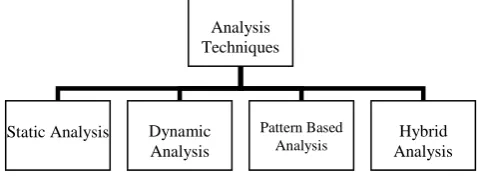
[image:2.595.309.566.602.748.2]Hybrid analysis combines the aspects of both static and dynamic analysis that was beyond the reach of these techniques standalone. This technique has the benefit of bringing the malicious code under the analyst’s control before its execution that was not possible with any of the techniques before.
Figure 1. Malware detection techniques.
VI. METHODOLOGY
Analyzing applications without executing it is called static analysis. Static analysis investigates downloaded apps
by inspecting source code and specific patterns. Implementation of static analysis is lightweight enough to run on-device. Code has been analyzed using two approaches.
1) Reverse engineering approach –
Reverse engineering (back engineering) is the process of disassembling the applications and examine or analyze in detail to discover the concepts involved in designing to know the exact working [9].
In this approach, application is first Decompressed and decompiled to find out specific patterns in application code. Therefore, the major drawback of this technique is that it's time-consuming and can find out only limited information. Methodology:
i. Prepare the simulation environment. (TABLE I) ii. Prepare the data set of various applications from
different sources so that these applications can be analyzed for malicious patterns. (TABLE II)
iii. Prepare dual-boot system with Kali Linux and Windows.
iv. Decompression and Decompilation of Applications:
Decompress the android application that is in .APK format because it holds Classes.dex file. Need to separate out Classes.dex is that this file holds the actual bytecode of the application which is typically in the machine language and not readable by human beings [10].
Once classes.dex file is extracted from the android application, it is converted into java language file named output-jar.jar which is easily readable. The commands for decompression and decompilation are given as below:
• Decompression Command: Unzip [Filename].apk classes.dex
This command will first unzip the APK file and then, will separate out classes.dex from it.
• Decompilation Command:
D2j-dex2jar -f -o output-jar.jar [Filename].apk By using this command, classes.dex file will be converted to .jar file named output-jar.jar.
v. Then output-jar.jar file can be seen in JD-GUI that is a graphical interface to check the code.
vi. Analyze for malicious code based on patterns that are taken in consideration. (TABLE I)
[image:2.595.48.287.612.701.2]S.No.
Table I. Simulation Environment
No. of Applications
Approaches used in Static Analysis
Parameters to be observed
1.
40
Reverse Engineering Approach
Dangerous Permissions
Application Events
2. Sandbox Approach
(SandDroid)
Dangerous Permissions
Application Events
Component analysis
Advertising modules
API calls
Parameters to be checked:
In Table I, these parameters provide vulnerability in the application. Here is why these parameters are checked: Analysis
Techniques
Static Analysis Dynamic Analysis
Pattern Based
• Dangerous Permission Analysis: Extract permissions (include customized permissions) and detect if the declared permission is used or is present unnecessarily. Access to dangerous permission can leak user’s data [11].
• Application Events: Extract applications event that can trigger the malware at specified condition or time.
• Component Analysis: Check dynamic loader usage, broadcast receivers, etc [11].
• Advertisement Module Analysis: Extract all the advertisement modules. Ad modules can annoy the users with lots of ads or can be used to steal user’s sensitive information by redirecting them to phishing web pages [11].
• Sensitive API Analysis: List all the sensitive APIs (Application Program Interface) and the caller code path. API tells how the app modules will interact with each other [11].
[image:3.595.54.291.109.477.2]Patterns
Figure 2. Methodology [3]
2) Sandbox approach –
Given the enormous growth of Android malware in the wild, more and more applications must be analyzed in a limited period by the security researchers to understand the purpose of the application, finding out malicious patterns and to develop countermeasures. Until recently, the analysis was done manually by using reverse engineering [12]. This process is very time-consuming and error-prone because it depends on the skill-set of the analyst [12]. Therefore, tools for automatic analysis of applications were developed, i.e. Sandboxes. Sandboxes are automated tools used to run the applications from third parties and untested code that is supposed to have malware [1].
Static analysis with sandbox investigates applications properties/patterns that cannot be investigated reverse engineering technique [11].
Methodology:
i. Prepare the simulation environment. (TABLE I) ii. Prepare the data set of various applications from
different sources so that these applications can be analyzed for malicious patterns. (TABLE II)
iii. Selection of the sandbox out of pre-existing sandboxes [11].
[image:3.595.72.289.285.481.2]SandDroid which is a web interface sandbox is chosen for static analysis on the basis of result features it provides. Here is the environment of SandDroid:
Figure 3. Application uploading in SandDroid
iv. Simulate the applications on SandDroid by uploading them as shown in figure 3.
v. Analyze for the malicious patterns e.g. Dangerous permissions, events, API calls, etc. (TABLE I)
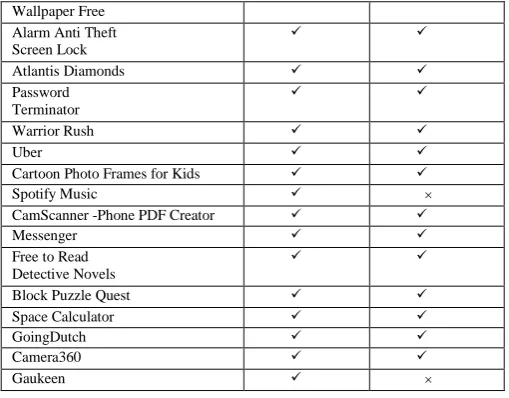
In Table II, a list of 40 Android applications that is taken as dataset is shown. The list
is
obtained by carefully examining the related security announcements and threat reports from existing mobile antivirus companies and by looking at the permissions accessed by the app if seemed suspicious. The number of samples in dataset collection differentiates the source from where the application is discovered, i.e., either from the official (Play Store) or alternative Android Markets (Third party stores).Table II.
Application Name
Android Applications Dataset
Official Market Alternate Market
Fake Call
Hair Care Tips
Accounting Ratio Calculator
Humphrey Solitaire
PIP Lock Screen Passcode
Mobile Summarizr
Traveline Scotland
GO SMS Pro
Fish Adventure Aquarium
Cargo Ship Car Transporter 3D
GO Keyboard Pink Hearts Theme
SAMASTHA Directory
Love or Friendship Calculator
Fingerprint Age Detector Prank
UnBlock The Block- Puzzle Game
Runtastic Push-Ups PRO Trainer
GBWhatsapp PLUS ×
AIO File Manager
신한S뱅크 mini
Simple Notepad
XPOSED IMEI Changer
Kaon Biz Apps
Mermaid kiss 2015
Christmas Live
APK
Logfiles
Run in Sandbox
Dangerous Permissions Application Events Component Analysis
Ads Modules API calls androidmanif
est.xml
Classes.dex
Resources
Pictures
Layout.xml
Libraries
Decompress APK
Decompile APK
[image:3.595.309.564.439.780.2]Wallpaper Free Alarm Anti Theft Screen Lock
Atlantis Diamonds
Password Terminator
Warrior Rush
Uber
Cartoon Photo Frames for Kids
Spotify Music ×
CamScanner -Phone PDF Creator
Messenger
Free to Read Detective Novels
Block Puzzle Quest
Space Calculator
GoingDutch
Camera360
Gaukeen ×
VII. ANALYSISOFRESULTS
In this section, once the application data is gone through the both analysis techniques i.e. reverse engineering technique and sandbox approach, result tables are created which contains all the parameters which needed to be checked for the malicious behaviour.
Table III shows the permissions and system wide events used by each application. Applications are analyzed for dangerous permissions and events manually using reverse engineering. There existed many permissions in the application code which were not used dynamically anywhere and those permissions are taken as threat level to DANGEROUS. Then, there exists permissions that are not necessary for the application to run but still its access is taken from the user at installation time [13]. Application events are also checked for when the malicious activity triggers in the applications.
i. EXPERIMENT: STATIC ANALYSIS USING REVERSE ENGINEERING
Analyzing applications with Reverse engineering is totally hit and trial method which maybe right or wrong.
• Dangerous Permissions
In permissions, SYSTEM_ALERT_WINDOW is most dangerous permission that is used by three applications, i.e. AIO File Manager, Warrior Rush and Camera 360. It means while using these applications, user will have an alert on his device screen showing some warning that is not a good practice by any app. Therefore, only this permission is kept in malicious permission. • Application Events
An Android malware typically relies on the built-in support of automated event notification/callbacks by registering for the system-wide events, which can flexibly trigger or launch its payloads. Among all available system events, BOOT_COMPLETED is the most interested one to existing Android event in android apps. This particular event is triggered as soon as system is booted up i.e. booting process which is a perfect timing for malware to initiate its background services [1].
Out of these three applications which has SYSTEM_ALERT_WINDOW permission, two applications
start themselves at the BOOT_COMPLETED event. This system-wide Android event can trigger Android malware.
Therefore, two applications are kept in malicious category based on dangerous permissions and events, i.e. AIO File Manager and Warrior Rush.
But as all the code was studied manually and using this technique, it’s not possible to get access of advertising modules and API calls. To achieve this, all the application data need to go through more extensive static analysis which is performed in sandbox and will prove better results.
[image:4.595.30.285.56.255.2]ii. EXPERIMENT: STATIC ANALYSIS USING SANDDROID
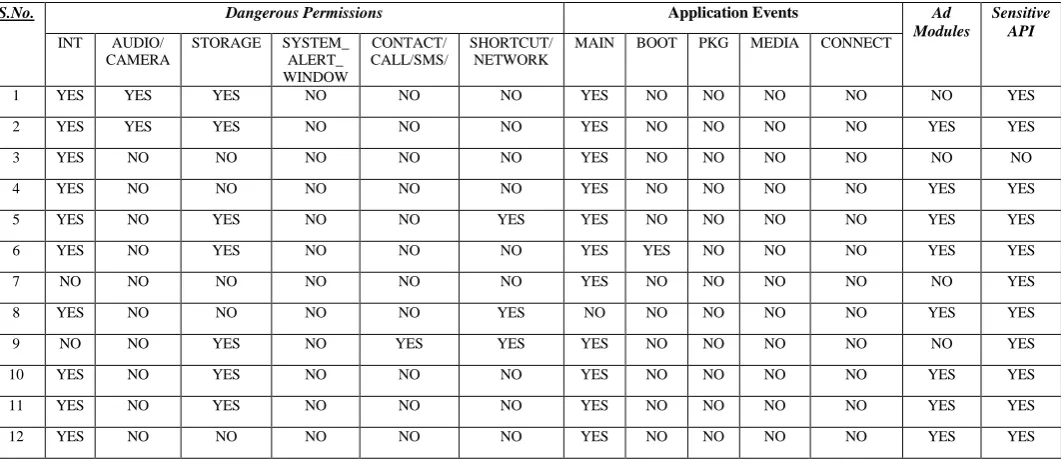
Table IV shows more detailed results as compared to table III (Reverse engineering approach).
• Dangerous Permissions
SYSTEM_ALERT_WINDOWS permission is used by five applications, i.e. AIO File Manager, Atlantis Diamonds, Password Terminator, Warrior Rush and Camera 360. All these five applications also fetch the information about running tasks on the device which is totally unacceptable from the point of user’s privacy.
• Application Events
All these applications also trigger the event at BOOT_COMPLETED which makes sure that these five applications come under malicious category and are capable of leaking user sensitive data.
• Advertising Modules
Out of these five applications, two apps have ad modules present in them which means these ads will annoy the user which using the app or redirect them to any phishing web page.
Therefore, these five applications, AIO File Manager, Atlantis Diamonds, Password Terminator, Warrior Rush and Camera 360 is kept under malicious apps.
VIII. CONCLUSION
With the rapid increase of smartphones equipped with a lot of features, the number of mobile malware is increasing. Since Android has been introduced, it has been (and still is) explored for its inherent security mechanisms. It is believed that additional security mechanisms should be applied to Android. In this paper, two static malware analysis technique for Android applications is presented for the applications that seems suspicious or malicious using reverse engineering and sandbox. By characterizing these malware samples from various aspects, it’s analyzed that SandDroid [11] detects three applications more as malicious applications than the reverse engineering approach and provide much results faster results.
However, main question arises if these applications can get user’s information up to this level – Is user’s sensitive information secure on the internet? What these applications would do with this sensitive information from the user? To find out answer to these questions, more detailed analysis is needed which can monitor the application behavior and network data on runtime, i.e. Dynamic analysis.
Table III. Results of Static Analysis using Reverse Engineering
S.No. Dangerous Permissions Application Events
INTERNET AUDIO/ CAMERA
STORAGE SYSTEM_
ALERT_WINDOW
CONTACT/ CALL/SMS
SHORTCUT/ NETWORK
MAIN BOOT PKG MEDIA CONNECT
1 YES YES YES NO NO NO YES NO NO NO NO
2 YES YES YES NO NO NO YES NO NO NO NO
3 YES NO NO NO NO NO NO NO NO NO NO
4 YES NO NO NO NO NO YES NO NO NO NO
5 YES NO YES NO NO YES YES NO NO NO NO
6 YES NO YES NO NO NO YES NO NO NO NO
7 NO NO NO NO NO NO YES NO NO NO NO
8 YES NO NO NO NO YES NO NO NO NO NO
9 NO NO YES NO YES YES YES NO NO NO NO
10 YES NO YES NO NO NO YES NO NO NO NO
11 YES NO YES NO NO NO YES NO NO NO NO
12 YES NO NO NO NO NO YES NO NO NO NO
13 YES NO NO NO NO YES YES NO NO NO NO
14 YES YES YES NO NO NO YES NO NO NO NO
15 YES YES YES NO NO NO YES NO NO NO NO
16 YES YES YES NO NO NO NO NO NO NO NO
17 YES NO YES NO NO NO YES NO NO NO NO
18 YES YES NO NO YES YES NO YES YES YES NO
19 YES YES YES YES YES YES YES YES YES NO NO
20 YES YES YES NO YES YES YES NO NO NO NO
21 NO NO YES NO NO YES NO NO NO NO NO
22 NO NO NO NO NO NO YES NO NO NO NO
23 YES NO YES NO NO YES NO NO NO NO NO
24 YES NO NO NO NO NO YES YES NO NO NO
25 YES NO NO NO NO YES YES YES NO NO NO
26 NO NO NO NO NO YES YES YES NO NO NO
27 YES NO YES YES NO NO YES NO YES NO YES
28 YES NO NO NO NO YES YES YES YES NO YES
29 YES NO YES YES NO NO YES YES YES NO YES
30 YES NO YES NO YES YES NO NO YES YES YES
31 YES NO YES NO NO NO YES NO NO NO NO
32 YES NO YES NO YES NO NO NO NO NO NO
33 YES YES YES NO NO NO YES NO NO NO NO
34 NO YES YES NO YES YES YES YES NO NO NO
35 YES NO YES NO NO YES YES YES NO NO NO
36 YES NO YES NO NO YES NO NO YES NO NO
37 YES NO NO NO NO NO YES NO NO NO NO
38 YES NO NO NO YES NO YES NO NO NO NO
39 YES YES YES YES NO YES YES NO NO NO NO
40 YES NO YES NO NO NO YES NO NO NO NO
Table IV. Results of Static Analysis using SanDroid
Dangerous Permissions
S.No. Application Events Ad
Modules
Sensitive API INT AUDIO/
CAMERA
STORAGE SYSTEM_ ALERT_ WINDOW
CONTACT/ CALL/SMS/
SHORTCUT/ NETWORK
MAIN BOOT PKG MEDIA CONNECT
1 YES YES YES NO NO NO YES NO NO NO NO NO YES
2 YES YES YES NO NO NO YES NO NO NO NO YES YES
3 YES NO NO NO NO NO YES NO NO NO NO NO NO
4 YES NO NO NO NO NO YES NO NO NO NO YES YES
5 YES NO YES NO NO YES YES NO NO NO NO YES YES
6 YES NO YES NO NO NO YES YES NO NO NO YES YES
7 NO NO NO NO NO NO YES NO NO NO NO NO YES
8 YES NO NO NO NO YES NO NO NO NO NO YES YES
9 NO NO YES NO YES YES YES NO NO NO NO NO YES
10 YES NO YES NO NO NO YES NO NO NO NO YES YES
11 YES NO YES NO NO NO YES NO NO NO NO YES YES
[image:5.595.37.568.557.790.2]13 YES NO NO NO NO YES YES NO NO NO NO YES YES
14 YES YES YES NO NO NO YES NO NO NO NO YES YES
15 YES YES YES NO NO NO YES NO NO NO NO YES YES
16 YES YES YES NO NO NO YES NO NO NO NO YES YES
17 YES NO YES NO NO NO YES NO NO NO NO YES YES
18 YES YES NO NO YES YES YES YES YES YES NO YES YES
19 YES YES YES YES YES YES YES YES YES NO NO YES YES
20 YES YES YES NO YES YES YES NO NO NO NO NO YES
21 NO NO YES NO NO YES NO NO NO NO NO NO YES
22 NO NO NO NO NO NO YES NO NO NO NO YES YES
23 YES NO YES NO NO YES NO NO NO NO NO YES YES
24 YES NO NO NO NO NO YES YES NO NO NO YES YES
25 YES NO NO NO NO YES YES YES NO NO NO YES YES
26 NO NO NO NO NO YES YES YES NO NO NO YES YES
27 YES NO YES YES NO NO YES NO YES NO YES NO YES
28 YES NO NO NO NO YES YES YES YES NO YES YES YES
29 YES NO YES YES NO NO YES YES YES NO YES YES YES
30 YES NO YES NO YES YES NO NO YES YES YES YES YES
31 YES NO YES NO NO NO YES NO NO NO NO YES YES
32 YES NO YES NO YES NO NO NO NO NO NO YES YES
33 YES YES YES NO NO NO YES NO NO NO NO NO YES
34 NO YES YES NO YES YES YES YES NO NO NO NO YES
35 YES NO YES NO NO YES YES YES NO NO NO YES YES
36 YES NO YES NO NO YES NO NO YES NO NO YES YES
37 YES NO NO NO NO NO YES NO NO NO NO YES YES
38 YES NO NO NO YES NO YES NO NO NO NO YES YES
39 YES YES YES YES NO YES YES NO NO NO NO NO YES
40 YES NO YES NO NO NO YES NO NO NO NO YES YES
IX. ACKNOWLEDGMENT
X. REFERENCES
Special thanks to all the author whose work has been used as reference and all technical and blog writers for their online tutorials which was handy during research work.
[1] T. Blä sing, L. Batyuk, A. Schmidt, S. Camtepe and S. Albayrak, "An Android Application Sandbox system for suspicious software detection", 2010 5th International Conference on Malicious and Unwanted Software, pp. 55-62, 2010.
[2] K. A. M. W. Rubayyi Alghamdi, "Android Platform Malware Analysis," International Journal of Advanced Computer Science and Applications, vol. 6, no. 1, pp. 140-146, 2015.
[3] P. M. G. Sarita T. Sawale, "Review of Different Techniques Used For," International Journal of Application or Innovation in Engineering & Management, vol. 5, no. 12, pp. 93-99, 2016.
[4] D. B. Lovi Dua, "Review On Mobile Threats And Detection Techniques," International Journal of Distributed and Parallel Systems, vol. 5, no. 4, pp. 21-29, 2014. [5] V. Rastogi, Y. Chen and W. Enck, "AppsPlayground",
Proceedings of the third ACM conference on Data and application security and privacy - CODASPY '13, pp. 209-220, 2013.
[6] D. Wu, C. Mao, T. Wei, H. Lee and K. Wu, "DroidMat: Android Malware Detection through Manifest and API Calls Tracing", 2012 Seventh Asia Joint Conference on Information Security, pp. 62-69, 2012.
[7] K. Michael and J. Sametinger, "Permission tracking in Android", In The Sixth International Conference on Mobile Ubiquitous Computing, Systems, Services and Technologies UBICOMM, pp. 148-155, 2012.
[8] L. Min and Q. Cao, "Runtime-Based Behavior Dynamic Analysis System for Android Malware Detection", Advanced Materials Research, vol. 756-759, pp. 2220-2225, 2013.
[10]Shabtai, Y. Fledel, U. Kanonov, Y. Elovici and S. Dolev, "Google Android: A State-of-the-Art Review of Security Mechanisms", arXiv preprint arXiv:0912.5101, 2009.
[11]Sanddroid.xjtu.edu.cn. (2016). SandDroid. [online] Available at: http://sanddroid.xjtu.edu.cn/ [Accessed 13 Nov. 2016].
[12]Z. Yajin, Z. Wang, W. Zhou and X. Jiang, "Zhou, Yajin, Zhi Wang, Wu Zhou, and Xuxian Jiang. "Hey, You, Get
Off of My Market: Detecting Malicious Apps in Official and Alternative Android Markets.", In NDSS, vol. 25, no. 4, pp. 50-52, 2016.
![Figure 2. Methodology [3]](https://thumb-us.123doks.com/thumbv2/123dok_us/685666.1075942/3.595.54.291.109.477/figure-methodology.webp)