I
A c t i v e and P a s s i v e G e s t u r e s - P r o b l e m s w i t h t h e R e s o l u t i o n of
D e i c t i c and Elliptic E x p r e s s i o n s in a M u l t i m o d a l S y s t e m
M i c h a e l Streit
Siemens AG c/o German Research Center for Artificial Intelligence
Stuhlsatzenhausweg 3
66123 Saarbrficken
streit@dfki, uni-sb, dem
A b s t r a c t
This paper deals with aspects of the resolu- tion of deictic and elliptic expressions that are related to gestures. It discusses differ- ent approaches to distinguish between deic- tic pointing and manipulative gestures. We compare two strategies of combining nat- ural multimodal communication with di- rect manipulation. The first approach uses click free mouse gestures for deictic point- ing, while manipulative gestures are per- formed by using mouse button events as is usual in graphic interfaces. The second ap- proach uses a touchscreen as gestural input device.
1
I n t r o d u c t i o n
This paper deals with aspects of the resolution of deictic and elliptic expressions that are related to gestures. It discusses two approaches to distinguish between deictic pointing and manipulative gestures. The resolution methods for both approaches have been implemented in a project for the development of a multimodal interface for route-planning, traf- fic information and driver guidance MOFA (Ger- man acronym for "Multimodale Fahrerinformation"- "Multimodal Driver Information"). 1 We proved the reusability of the methods and the architecture of MOFA in a completely different domain by imple- menting a prototype for multimodal calendar man- agement (the system TALKY).
The input modalities supported by our system are spoken and written natural language, deictic point- ing gestures and the interaction methods known from direct manipulation systems. As input devices for gestures we use either a mouse or touch screen
1For a description of MOFA see [Streit 96].
technology. The latter allows the user to perform deictical pointing in an (almost) natural way.
Our approach to multimodal systems aims at a smooth integration of a conversational communica- tion style with the features of direct manipulation. By conversational style of multimodal communica- tion we understand the use of natural speech sup- ported by deictical gestures, as in the combination of the utterance "an dem Tag gesch~iftlich in Kalser- slautern", ("at this day in Kalserslautern for busi- ness") with a pointing act to a graphical presenta- tion of the day under consideration. In this example the gesture acts only passively, supplying the spo- ken utterance with additional information. In con- trast gestures used in direct manipulation are active, they are expected to trigger some action by the sys- tem, e.g. clicking at an icon which represents "1st of May" opens a representation of this day. Verbal utterances that accompany or follow such gestures may be related to this gesture:
• If in this context the user utters "um 12 Uhr in Raum 17" ("at 12 o'clock in room 17") it is most likely that he specifies an appointment at the 1st of May. In this case the elliptic verbal utterance can be resolved by the manipulative gesture.
• But if the user utters "at 2nd of May meeting with Mr. X" he performs an unrelated tasks.
2
O v e r v i e w of t h e S y s t e m
A r c h i t e c t u r e of M O F A
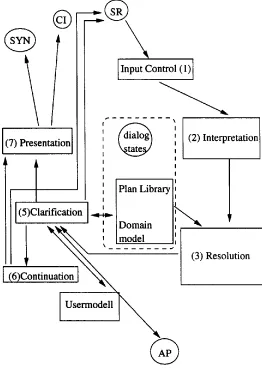
In our architecture the MOFA interface is organized into four main components that are realized as in- dependent processes that communicate via sockets:
• The Graphical Interface (GI) for gestural input and graphical output,
• the multimodal interpretation, dialogue and presentation planning process (MIDP)
• and the speech synthesis component (SYN).
The back end application (AP) may be integrated in the MIDP or realized as separate process (in case of MOFA, the AP is the route planner). This or- ganization allows for parallel input and output and also an overlapp of user input, interpretation and presentation.
The GI sends both gestural events like pointing to an object or selecting a menu item, and written input to the MIDP. It also realizes graphical presen- tations, which are planned by the MIDP. The speech recognizer is activated by the user via a speech- button which can be operated from the GI. We do this to avoid problems with recognition results that are not intended by the user (see [Gauvain 96]). Both the results of the speech recognition and the input processed by the GI are augmented with time information.
The MIDP consists of the following components:
1. The input controller checks if modalities are used in parallel or subsequently and determines temporal relations between events.
2. The interpretation module is responsible for ro- bust parsing and plan recognition. Parsing and plan recognition work in close interaction and produce a task oriented representation. The in- terpretation depends on the dialogue state as specified by the clarification or the continua- tion module. The interpretation module also handles gestures that the input controler recog- nizes as monomodal input.
3. Deictic and elliptic expressions are resolved in the resolution module.
4. A plan library and a simple domain model sup- port plan recognition and resolution.
5. The clarification module checks in a case based manner the partly instantiated task hypotheses. It first tries silently to repair certain inconsis- tencies and then starts a clarification dialogue or calls the back end application. The clarifica- tion module has an interface to the user model which proposes fillers for parameters which are not specified by the user.
6. The continuation module decides if the system keeps the initiative or if it simply waits for further user input. The modules (5) and (6) also control speech recognition. Depending on
the dialog state they select the appropriate lan- guage model.
7. The presentation module plans the presentation of the result of an application call. It controls the output of SYN and GI.
8. The user model follows a memory based learn- ing approach. The user model is an optional module, since it can be left out from the system without any changes to modules.
1
(7) Presentation I=%
@
(2) InterpretationP,a° Libra li
(5)Clarification .~_~
~_6)C~o n fi n ~ ~ O d D ° r ~ i n ~xxx~
(3)
ResolutionUserm°dell [ NNNN~
@
Figure 1: Architecture
3
Two implemented Applications:
Sample Interactions with MOFA
and TALKY
[image:2.612.328.590.214.592.2]46
M. Streit
into the trip simulation (e.g. invoking a traffic jam). T A L K Y is much more a mixture between manipu- lative interaction and multimodal conversation. If the system is running on a SUN Ultra Sparc, speech recognition is real time, if the user speaks slowly.
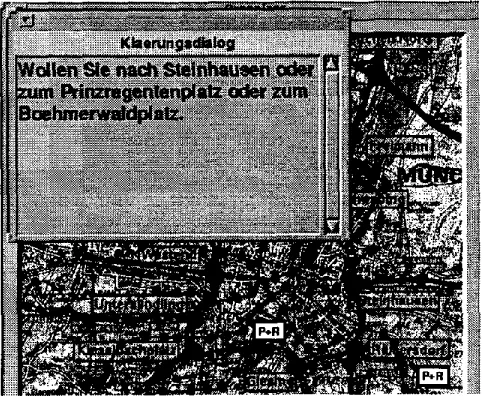
In the following we give three examples which are processed by our systems MOFA and TALKY. In these examples, natural language is spoken, unless otherwise stated. System reactions are given in spo- ken and written form. In our sample dialogs ,/a, indicates a pointing gesture, '/~(Y)' means that the gesture is unambiguously pointing to some object, where Y refers to an object on the screen.
Figure 2: MOFA
Example 1: Route Planning
• USER: "Von hier" ("From h e r e " ) / ~ ( A )
• MOFA: "Sie wollen nach A. Bitte zeigen Sie mir
Ihr Ziel." ("You want to start in A. Please show me your destination.")
• MOFA: highlights A.
• USER: " K a r t e nach Giesing" ("move map to
giesing")
• MOFA: moves map.
• USER: " Zeige mir diesen Platz" ("show me this
p l a c e " ) / ~ (X)
• MOFA: shows a picture
• USER: okay
• MOFA: removes the picture
• USER: "Dorthin" ("to this location") ,/a
. .
"Uber diese Kreuzungen" ("via these cross- i n g s " ) / ~ ( B ) , ,2~(C)
• MOFA: "Wollen Sie nach Steinhausen oder zum Prinzregentenplatz oder zum Boehmer- waldplatz ?" (Is your destination Steinhausen or Prinzregentenplatz or Boehmerwaldplatz ?")
• USER: "Boehmerwaldplatz" (Boehmerwald- platz is a tube-station)
• MOFA: "Von A fiber B nach C habe ich die gelbe Route gefunden. Von B aus ffihre ich Sie zu dem Park-und-Ride Platz U. Ffir diese Route gibt es einen Detallplan. Sie haben dort die folgenden U-Bahnverbindungen ... (etc) " ("I found the yellow route from A via B to C. From B I lead you to the park-and-ride parking U. T h a t route is shown on a more detailed map. There, you have the following tube connection ... (etc)") ( this information is only given as text)
Example 2: Route Planning
• USER: "Ab h i e r / ~ (A) zum Kiesselbachplatz"
("from here to Kiesselbachplatz")
• MOFA: ...presents route ...
• USER: "dorthin" ("to this location") ,2 ~ (B)
• MOFA: "Wollen Sie eine neue
Route definieren?" ("Do you want to define a new route?")
• (MOFA does not know, if the user wants to per- form a modification task referring to the route previously defined, or if he wants to define a new route)
• USER: "Nein" (" No")
• MOFA: ... presents route from A via Kiessel-
bachplatz to B ...
Example 3: Appointment Scheduling
• USER: 7
1st of May button"
• USER: "Morgen von viertel vor vier bis s e c h s
mit Maier" (Tomorrow at a quarter to four until six with Maier")
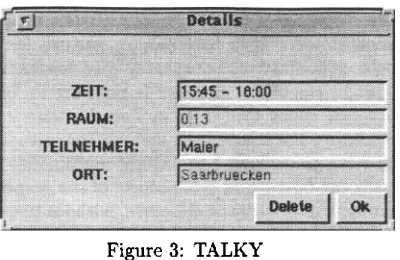
[image:3.612.56.297.240.450.2]Figure 3: TALKY
USER: "Im Konferenzraum, bis sieben Uhr" ("in the conference room, until seven o'clock")
TALKY: Adds the information that the Meet- ing Room is
Konferenzraum
and sets a new end time (cf. Figure 4). T h e continuation module propses as follw up task the information of the participants of the meeting. To avoid a clarifi- cation dialog, the system assumes, as long the user has not confirmed a proposal, he will still further modify the appointment.U S E R : / ~ (okay button)
TALKY: removes Dialog box
USER: "von zwei bis drei" (" from two to three")
TALKY: presents a new appointment presenta- tion box
Figure 4: T A L K Y
4
Problems with the integration of
direct manipulation and natural
m u l t i m o d a l
dialog
In direct manipulation gestures lead to an imme- diate reaction. The referent of a gesture is always unambiguous: Either there is a single object selected or the gesture is not successful at all. In this pro- cess of selection only the gesture and the objects are involved. In natural communication deictic ges- tures may be vague or ambiguous. They have to be interpreted by considering context and the nat- ural language utterances t h a t occur together with the gesture. T h e possibility of modifying a pointing gesture by spoken information is not a weakness but a valuable feature multimodal communication, that makes it easier to refer to structured objects or to closely assembled tiny objects.
For multimodal systems we are faced with the problem t h a t speech recognition and natural lan- guage analysis takes some time, which is somewhat contrary to the immediate reaction expected from direct manipulative gestures. The problem cannot be completely solved by making analysis faster be- cause the user may want to perform some manipula- tion and see the result while he is speaking a longer utterance.
If we could distinguish the manipulative or deictic nature of the gesture by analysing it's form and the object referred to we could avoid waiting for linguis- tic analysis. In the following we will discuss some approaches for a solution of this problem.
5 A c t i v e a n d P a s s i v e g e s t u r e s
Without the support of other modalities, an active gesture determines an action of the system (in case of a graphical user interface) or it causes the dia- log partner to perform an action (in case of natural communication). A passive or "merely referential" pointing gesture serves only as a reference to objects and does not call for any reaction, aside from rec- ognizing the act of reference. The gesture may be ambiguous or vague. Passive gestures are not always communicative in nature (e.g someone may point at a map to support his own perception without any intention to communicate an act of reference).
[image:4.612.108.308.78.208.2] [image:4.612.100.310.498.674.2]48 M. Streit
tive gesture forms and of passive and active objects. Then we analyse possible combinations.
Passive gesture forms are not used to trigger ac- tions, they may be used non-communicatively. Ac- tive forms are always intended communication, they may be used to trigger an action. Passive objects serve only as potential referents of referential acts, while active objects react if they are activated by an active gesture form without the support by other modalities. There may be mixed objects as well, that behave actively using certain active gesture forms and passively with others. With passive ges- ture forms every object behaves passive by defini- tion.
There are six possible cases for a combination of objects with gesture forms:
1. Passive gesture forms performed on passive ob- ject
2. Passive gesture forms performed on mixed ob- ject
3. Passive gesture forms performed on active ob- jects
4. Active gesture forms performed on passive ob- ject
5. Active gesture forms performed on mixed object
6. Active gesture forms performed on active ob- jects
We consider cases (1) to (4) as passive gestures, while (6) is considered an active one. If (5) is ac- tive or passive depends on the concrete gesture form. Passive gestures are candidates for conversationaly used deictic gestures, while manipulative gestures must be active. In the following, we will discuss two approaches to distinguish between deictic and manipulative uses of gestures.
5.1 D i s t i n c t i o n b e t w e e n Deietic and Manipulative Gestures by Active a n d
Passive Gesture Forms
To allow for a coexistence of natural communica- tion style and direct manipulative interaction in one multimodal interface we dedicate
• (1),(2) and (3) to natural communication
• and (4),(5) and (6) to graphical interaction ((4) could be seen as a communication failure or as an a t t e m p t to perform natural communication by manipulative gestures).
This results in a clear cut between the communi- cation styles: GUIs take passive gesture forms as non-communicative. T h e y may give feedback and highlight the object the user is pointing to, but we must not count this as an action, because it does not change the state of the dialog. This means t h a t the gestures dedicated to natural multimodal inter- action can operate on every object of the graphically represented universe of discourse, without unwanted manipulative effects. Another advantage of this ap- proach is, that the user can keep with the graphic interaction style, he is familiar with from graphi- cal interfaces. There is no conflict with the selec- tion process (i.e. the direct manipulative principle of reference resolution). We can introduce an addi- tional process, which combines ambiguous or vague information from deictic pointing with natural lan- guage information. Furthermore, passive pointing gestures with the mouse are much more convenient than active ones if they are performed in parallel with speech. We noticed t h a t the coordination of mouse clicks with deictic expressions requires high concentration on the side of the user and frequently leads to errors. This is quite different with touch- screens. We followed the approach, presented in this section, in an earlier version of MOFA (cf. section 6
Experience with A c t i v e a n d Passive Gesture Forms - MOFA with the Mouse as Input Device). We ob-
served two problems with t h a t approach.
• It may be difficult to decide between commu- nicative and non-communicative uses of passive gesture forms.
• If we use other input devices than the mouse, the distinction between passive and active ges- ture forms may be not available , or only be achievable by an artificial introduction of new gestures.
5.2 Distinction b e t w e e n Deictic a n d
Manipulative Gestures by different Active Gesture Forms
If we do not change the normal behaviour of ob- jects, we stay with objects for which we cannot de- cide if a gesture is meant deicticly or manipulatively. In particular, this means t h a t graphical selection may prevent pointing gestures from being modified by speech.
There is another small problem with active gesture forms. The user may expect that using them will cause some action even with passive objects, if the context or the nature of the objects suggests how to interpret such gestures.
We will elaborate on these problems in sections 8.1 Deictic Expressions and Pointing Gestures and 8.3 Deictic Pointing Gestures as Autonumuos Com- municative Acts.
6 E x p e r i e n c e w i t h A c t i v e a n d P a s s i v e G e s t u r e F o r m s - M O F A w i t h t h e M o u s e a s I n p u t D e v i c e
This version is implemented with mouse-based ges- tural communication. We used active gesture forms to achieve manipulative effects and passive ones for deictic pointing. Because the mouse h a s to move across the screen to point to a certain referent, it is very likely that objects are touched without inten- tion. This is especially important for route descrip- tions, where several pointing acts occur during one spoken command. Different filters are used to take out unintended referents.
• First, the search for referents is restricted to a time frame which is a bit longer than the inter- val within the user is speaking.
• Next, type restrictions are applied to the pos- sible referents. T y p e restrictions are inferred from deictic expressions e.g. "diese Strasse" " this street","diese U-Bahnstation" - "this tube station", but also from inherent restric- tions concerning the recognized task(s).
• Finally, we exploit the fact t h a t deictic expres- sions and deictic gestures are strictly synchro- nized in natural speech. The problem with this approach is t h a t speech recognizers usu- ally do not deliver time information on the word level. Therefore time stamps on the word level are interpolations. There is only a rudimen- tary analysis of the track and the temporal course of the mouse movement. Such an analy- sis would certainly improve referent resolution, though we noticed that pointing was sometimes not marked and on the other hand, users made pauses during mouse movement without point- ing intentionally.
In this MOFA version we can only use linguistic information to identify a task. The identification of referents by gesture analysis alone is to uncer- tain to use the type of the referents for task recog- nition. This is different in the recent touchscreen based MOFA version, which we will describe in the following.
7 M O F A a n d T A L K Y - t h e v e r s i o n f o r t o u c h s c r e e n i n p u t
The recent versions of MOFA and TALKY are im- plemented with touchscreen technology as input de- vice. T h e version also works with a mouse as input device, but in this case the user must perform mouse clicks for deictic pointing.
With touchscreens, every pointing to the screen is normally mapped to mouse b u t t o n events. There are no passive gestures at all. The distinction of deictic gestures must rely on active gesture forms. Further- more, the problem of vague or ambiguous pointing becomes more prominent: In the usual implementa- tion of touchscreens, pointing with the finger will be mapped to some exact coordination, but these co- ordinates are only vaguely related to the point the user wanted to refer to. A big advantage of touch- screen technology is t h a t there is no problem with unintended pointing. Although there is additional vagueness in pointing, we can use type information t h a t we get from referents much easier t h a n with passive mouse gestures. Also, active pointing at the touchscreen is completely natural in combina- tion with speech.
8 R e f e r e n c e P h e n o m e n a i n M O F A a n d T A L K Y
50
M. Streit
day)). The NPs and some of the adverbs are also used anaphoricly.
• In MOFA the universe of discourse is the map. The objects on the map are not of the active type. The interaction with the map is not ma- nipulative, but conversational. T h e r e are also some menu items, to which the user will hardly refer deicticly.
• In T A L K Y there are many active objects. The user may navigate in the calendar by speech or by manipulating graphical interaction elements. In contrast to MOFA there are manipulative ob- jects, t h a t are likely to be referred to also by deictic gestures.
8.1 D e i c t i c E x p r e s s i o n s a n d P o i n t i n g G e s t u r e s
Reference resolution for gestures as usual in graph- ical user interfaces works in an unambiguously way. To handle vague pointing we introduce transparent fields t h a t constitute neighbourhoods for clusters of objects. T h e selection of these fields or of one ob- ject on such a fields makes the neighbouring objects salient as referents. (cf. section 3
Two implemented
Applications: Sample Interactions with MOFA
andTALKY,
example 1 Route Planning). Now type in- formation is used as a filter. In example 1 every ob- ject t h a t is a possible starting point for a car route and also every tube-stations is of appropriate type. If there remains more t h a n one referent, or there is no referent left, a clarification dialog is invoked, the dialog must not be performed by natural language only, zooming on the cluster is also a possible reac- tion.• (1) " zu dieser U-Bahnstation ("to t h a t tube- s t a t i o n " ) / ~
In (1) referent resolution applies the type restriction
tube-node
before any clarification dialog is invoked.• (2) "dorthin" ("to there") ,2(U1) "von dort" (from there") ~2~(U2)
In (2) the system first recognizes an abstract task route planning. If the two referents of the gestures are tube stations the system does t h a t know by an unambiguous gesture or after a clarification dialog. T h e system will use these type constraints to recog- nize the concrete task "find a t u b e connection".
8.2 Elliptic E x p r e s s i o n a n d P o i n t i n g G e s t u r e s
• (3) mit der U-Bahn (by tube) / ~ , ~
(3) is an example for an elliptic expression related to deictic gestures. T h e gestures supply additional arguments to the task "plan a tube connection". In account of the order of the arguments, MOFA will guess the first referent is the start, the second is the destination of the route. T h e task is identified by analyzing the elliptic expression. The Task now imposes type restriction on the arguments.
8.3 D e i c t i c P o i n t i n g G e s t u r e s as A u t o n u m u o s C o m m u n i c a t i v e A c t s
We recall the fact, t h a t we use active gesture forms as deictic (i.e. passive) gestures in the touchscreen version of MOFA. As mentioned in section 5.2 this may give the user the idea to use them actively to communicate without speech. It is very natural to order a ticket just by e.g. saying "Saarbrficken Mfinchen" with the first town as starting point and the second town as destination. Similar one can describe a route on a map by pointing first to the s t a r t and then to the destination. In contrast, if the user is pointing only once, it is most likely, t h a t he
means the destination of a route. Such pointing acts communicate the same informations as speaking the names of the locations. This way to communicate is a sort of natural communication, t h a t does not fit to direct manipulation. T h e interpretation of the first pointing depends on the fact if there is a second one, which is not the way as direct manipulation works. We handle these
natural gestural
communication by the following steps.• T h e input control checks if the speech channel is active.
• If speech is not active it waits a short time until timeout.
• If there is a second gesture before timeout it waits again a short time.
• Otherwise the interpretation module is called for monomodal gesture interpretation.
• T h e interpretation module proceeds this input like a sequence of names, perhaps after a clari- fication dialog to resolve ambiguous reference.
8.4 A r e T e m p o r a l R e l a t i o n s n e c e s s a r y for t h e R e s o l u t i o n o f D e i c t i c E x p r e s s i o n s
1. With spoken input the deictic expressions con- tained in the utterance can be analysed in general only after all deictic gestures are performed, because speech recognizers do not provide incremental input. Therefore the temporal order has to be accounted for.
2. A deictic gesture may be refer to an object, that is not of appropriate type by an error of the user. From the temporal synchronization of deictic expressions and deictic gestures, we infer, that this gesture was intend to communicate the referent of the deictic expression. But if we apply anaphora res- olution methods, it is very likely that we exclude by type considerations the referent of the gesture from the set of possible referents of the deictic phrase. Perhaps we may instead find some other referent, from which we could now by temporal consideration, that it is not a possible referent.
3. If deictic gestures are used as in section 8.3
Deictic Pointing Gestures as Autonumuos Commu- nicative Acts, it is obvious that we need the temporal order of the gestural events for interpretation. This argument applies also to elliptic utterances as (4).
• (4) "mit der U-Bahn" ("by tube") ~ , / ~
In (4) we must now the order of the gestures to dis- tribute the referent in the right order to the argu- ments the route planning task.
9 O p e n Q u e s t i o n
As mentioned in section 8 Reference Phenomena in MOFA and T A L K Y some active objects in TALKY could appropriately be used for deictic reference. If the user opens a day-sheet in the calendar by manip- ulation and defines an appointment, without spec- ifying a day, by speech, TALKY will schedule the appointment to the day, opened by the user. The effect is the same as with an deictical reference to a passive representation of the day under considera- tion.
• (5) "Urlaub von d a n n / ~ bis dann. /~" ("Holi- days from then to then")
In (5) it is doubtful, if the user really wants to open the two day-sheets he is referring to. Is there a solu- tion for this problem, when you have a touchscreen as input device? Does the problem mean, that we must use or invent other gestural input technics?
R e f e r e n c e s
C. Huls, E. Bos, W. Claassen, "Automatic Refer- ent Resolution of Deictic and Anaphoric Expres- sions", Computational Linguistics, 1996.
J.L. Gauvain, J.J. Gangolf, L. Lamel, "Speech Recognition for an Information Kiosk", Proc. IC- SLP 96, Philadelphia, 1996.