Narrative Evolution: Learning from Students’ Talk about
Species Variation.
Rosemary Luckin
1, Lydia Plowman
2, Diana Laurillard
3, Matthew Stratfold
3, Josie
Taylor
3, Sara Corben
11
School of Cognitive & Computing Sciences, University of Sussex, Brighton BN1 9QH UK. [email protected]
2
Scottish Council for Research in Education, 15 St. John Street, Edinburgh EH8 8JR UK
3
Open University, Milton Keynes, MK7 6AA, UK
Abstract Learners do not always enjoy productive interactions with Multimedia Interactive
Learning Environments. Their attention can be distracted away from the educational focus intended by designers and teachers through poor design and operational inadequacy. In this paper we describe a study of groups of learners using a multimedia CD-ROM research tool called Galapagos. This tool was developed to enable us to observe groups of learners interacting with different versions of the same multimedia content. These different versions implemented different forms of guidance for learners both within the presented narrative structure of the material and in the tools offered to learners to help them build the individual content elements into a coherent whole. Our empirical work was conducted with groups of learners within their educational establishment using the Galapagos CD-ROM as part of their studies for national examinations in Biology. Their sessions with Galapagos were recorded using video and audio and our analysis of their dialogue has enabled us to gain a greater understanding of the factors that contribute to productive, educationally focused learning interactions. Through the construction of different representations we have been able to co-ordinate information about interactivity between learners and system at the interface with interactivity between individual learners within the group around the system interface. Varying the quantity and quality of guidance impacts upon the trajectory learners construct through multimedia content; it also influences the manner in which they use the facilities provided by system designers to assist them in their construction of task answers.
INTRODUCTION AND THEORETICAL BACKGROUND
This paper explores the collaborative use of Multimedia Interactive Learning Environments (MILEs) in the form of educational CD-ROMs. We discuss the role of learner dialogue and reflection in clarifying our understanding of what learners do when they use multimedia and how system design can impact upon their experience. The work reported here takes the form of three detailed case studies of groups of users interacting with a CD-ROM research tool we developed specifically to allow us to investigate users reactions to changes in the structure of the material they were being invited to interact with. Our data sources include video and audio recordings and a qualitative approach is taken to the analysis of this material. This approach has allowed us to start unpacking the complexities within the interactions between users and the CD-ROM and between individual users in a group.
which can accommodate diversions and tangents and allows learners to maintain their plans and goals.
The search for a satisfactory definition that might constrain what we mean by narrative in this context has proved somewhat elusive. However, the working definition for narrative (in interactive educational media) that we adopted for the purpose of this study is that narrative is: a
process of both discerning and imposing structured meanings which can be shared and articulated. The result of this process is also often referred to as a narrative i.e. the product of discerning and imposing structured meanings which can be shared and articulated. This
definition is still somewhat broad and we hoped to clarify it further through our empirical studies. It does however reflect the idea that there is a ‘designed-in’ narrative and a narrative as perceived by learners and that these two views may not coincide.
Why Narrative and Multimedia?
Multimedia offers the potential for learners to have access to, and control of, their interactions with a variety of different media: video, audio, text etc. In theory then, learners could benefit from a rich and varied learning experience, which they can tailor to their individual needs. However, the benefits of multimedia are also its potential pitfalls, in terms of providing coherence throughout both individual units or micro-narratives and the overall structure or macro-narrative (Kintsch, 1977). There are precedents for suggesting that books, films, drama and other narrative media can inform the design and usability of multimedia (Clanton, Iannella & Young, 1992; Laurel, 1993; McKendree & Mateer, 1991). Here we focus on how the form and function of narrative facilitates or impedes learning. The introduction of hypertexts has seen a resurgence of interest in the form and function of narrative (Bolter, 1991; Landow, 1992; Murray, 1997; O’Donnell, 1998) there has, however, been less interest in the role of narrative in non-literary texts and, particularly, in educational media.
An effective Multimedia Interactive Learning Environment (MILE) should provide global coherence within the macro-narrative, local coherence within the micro-narrative and a network of potential links between the two which enable learners to focus on content, maintain a clear goal and construct a personally meaningful understanding of the underlying concepts (Plowman, Luckin, Laurillard, Stratfold & Taylor, 1999). In order to inform the designers of such MILEs we needed to know the nature of the interactions learners were experiencing with the type of CD-ROMs typically used within schools. We therefore conducted a series of pilot studies during 1996 and 1997. These early studies were of groups of learners, ranging from 12 - 15 years in age, using commercially produced CD-ROMs relevant to their studies at that time. It was, and still is, common educational practice to allow learners to use CD-ROMs in small groups. Indeed, there is evidence to suggest that computers can play an important role in engendering peer collaboration and fostering learning (e.g. Crook, 1994; Scardamalia & Bereiter, 1996; Guzdial, Kolodner, Hmelo, Narayanan, Carlson, Rappin, Hubscher, Turns & Newstetter 1996; Dillenbourg, Baker, Blaye & O'Malley, 1995; Roschelle, 1992). These observations of group multimedia use also allowed us to study the conversations between learners as they used the CD-ROM. The following dialogue extract is taken from an interaction between a group of students who have been asked to find information about the effects of nuclear bombing during World War 2 in order to complete a worksheet provided by their teacher. They are using a commercially produced History CD-ROM and this conversation occurs approximately 12 minutes into the session:
Speaker Comment
1 There is no film there, is there 1& 2 No
2 That one has no film there, either 3 It’s the last one
2 Is there any text to go with it? (Reading from text entitled “cities in Hiroshima”)
2 One more.
1 It is Yorkshire television, made it. Err. What do they do, they do? They make Emmerdale, and CDs?
1 & 2 Have they?
2 Hitler? Do you want Hitler?
They find information about Hiroshima, which is relevant to their task, but pay no attention to it. Nuclear bombing was the teacher’s intended educational focus for the session, but this group are failing to interact at this conceptual level and are concentrating instead upon issues to do with the quality of the presentational media. In many of these early observations much of the group discussion was associated with operations and procedures rather than the educational content of the material (Plowman, 1996). On other occasions during this study, learners’ interactions with the content were present, but fragmented through the same sort of distraction from system features.
Through the research reported here we have been able to explore this lack of focus and its relationship to the structure of the CD-ROM. In particular, we wished to investigate the relationship between the guidance provided within the structure of the CD-ROM and the nature of the interactions learners experienced. We hoped that in this way we would be able to offer advice about the way CD-ROM material might be better designed to assist learners in their construction of personal meaning. To this end, we developed a research tool called Galapagos. In this paper we describe the methodology and analysis of the Galapagos study. We discuss our approach to representing and analysing the relationship between system feature use and types of learner talk. Through our studies with Galapagos we wanted to build a model of the process, which learners pursue when they use MILEs, and to identify what leads to engagement with the content rather than the media. The discussion of the results of our analyses in this paper concentrates upon the relationship between learner talk and system feature use. Our purpose is to explain the way in which we have analysed learner talk and its contingency to system feature use in order to elicit information about learners experiences with MILEs.
THE GALAPAGOS STUDY
The CD-ROM
We built the Galapagos CD-ROM as a research tool. It implements a three-way presentational manipulation of the same content material about Darwin’s visit to the Galapagos islands and his resultant theory of evolution. These three versions are called: Linear, Resource Based Leaning and Guided Discovery Learning. In all 3 versions of Galapagos learners are set the same task, they are asked to use the resources provided on the CD-ROM to construct an explanation in an on-line Notepad of the variations in the wildlife on the islands. In all three versions there are also the same 8 sections of content material, each of which deals with a particular aspect of Darwin’s visit. For example, there is a section that describes his arrival and first impressions of the Galapagos Islands, and sections about the identity of the different islands and the different varieties of finch which lived in these different locations. The full set of sections is as follows; the section numbers are used to refer to sections throughout this paper, but were not part of the structure presented to our users:
• Introduction
• Section 1: About Darwin’s Visit
• Section 2: About Islands
• Section 3: Island Formation
• Section 4: Island Location
• Section 5: Trade Winds
• Section 6: Currents
• Section 8: Explore the Islands
Each of these sections of content has its own micro-narrative and its own possibilities for interaction in the form of movies to play or images to click on. In addition, each of these sections has a role within the overall story about Darwin’s work on evolution. The micro-narrative within these sections is stronger in some cases than others. The section entitled ‘About Darwin’s Visit’ has a strong story about his trip and arrival, whilst the section called ‘Explore the Islands’ invites the learner to choose an island, after which a list of the species of birds which inhabit it is presented. In addition to these sections of content material all versions of
Galapagos allow the user access to the following information via a tool bar at the bottom of the
screen, see Figure 1:
• A reminder about the task they have been asked to complete at the outset of their interactions with Galapagos.
• An editable Notepad in which they can take notes and write their answer.
• A Model Answer which is a sample of an acceptable answer to the task they have been set and which can only be accessed when they have written 50 words in the Notepad.
• A script window that contains the transcript for all audio material.
For more detail about these features see Plowman, Laurillard, Stratfold & Taylor (1998).
The difference between the versions is in the amount of guidance the system provides to users to help them navigate through the available material:
1. Linear: When the material on this version is first viewed the system moves automatically between the content sections. After this, learners can elect to go back to certain selected points within this presentation and from there, they can move either backwards or forwards between the different sections of content. It provides no full menu or search facility and no overview of the structure of the CD-ROM. This version was designed to present an easily identifiable narrative that would enable us to investigate the extent to which MILEs should emulate more familiar narrative structures such as films.
2. Resource-Based Learning (RBL): Learners have free access to all sections of the CD-ROM through a menu and free text search facility. This version was designed to reflect the encyclopaedic nature of the existing commercially available CD-ROMs we had observed in our pilot studies of classroom use.
3. Guided Discovery Learning (GDL): The menu is expanded into a textual guide which breaks the initial task down into sub-tasks and suggests the relevant sections of the CD-ROM to access for information about these sub-tasks. In addition, as with the RBL version, learners have access to a free text search.
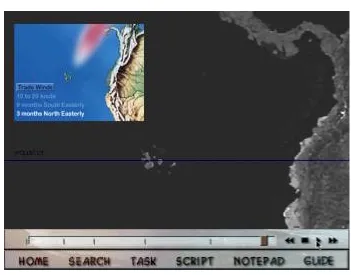
Figure 1 illustrates a screen shot of the Guided Discovery Learning version of Galapagos with a section of content called “Trade Winds” in use.
We hoped that the three different Galapagos designs would elicit different kinds of behaviour from learners and allow us to explore the extent to which the presented narrative influenced their style of interaction and how they used the system features provided to make sense of the material. We have already highlighted our desire to explore the relationship between the focus within educational experiences involving MILEs and the design of the MILE being used. The central question we explore here is: “ When are learners engaged with educational content as opposed to the mechanics of interaction?” In particular, we focus in this paper upon two questions where the analysis of dialogue has been of particular benefit:
2. How are the various system features used by learners? As designers we may, for example, include a model answer because we believe that its presence will motivate learners to construct an answer of their own and offer them guidance about what constitutes an answer in this context. Without exploring the use of such features we cannot however be sure that they are used in the way we intended or believed that they would be.
Figure 1. Galapagos Trade Winds.
The discussion of the results of our analyses here concentrates upon the relationship between learner talk and system use. Our purpose is to explain:
• The way in which we have analysed learner talk and its contingency to system use, and
• To elicit from this information a clearer picture about the process and focus of interactions learners experience when they use a MILE.
Participants
Four groups of three students, aged between 15 and 21 years, used one of the three versions of
Galapagos. The 36 students were based in two different institutions and all were studying for a
national examination in Biology. A session using Galapagos and completing the task (to explain the variation in the wildlife on the Galapagos Islands and write the answer in the Notepad) to their own satisfaction typically took about 45 minutes. Figure 2 illustrates the structure of the
Galapagos study.
Data Collection
reflections. Each session can be regarded as a case study in its own right. In addition, useful comparisons can be drawn between the use of particular system features across the different groups. These comparisons should provide useful information for the design of future CD-ROMs, both for educational use and further research.
Figure 2. Structure of Evaluation studies.
We collected a variety of data that included:
Video recordings. Every group session had two video-recorded sources: one recorded the group of learners at the computer to capture talk, movement, gesture and machine interaction; the other was the screen image, taken from the computer via a scan converter. These videotapes enable us to analyse learner talk and behaviour in detail and to trace the emerging Notepad answers they construct collaboratively.
Audio Recordings. After each group of learners had used the CD-ROM they were asked to use a simple tape machine to record their individual experiences by focusing upon a series of questions. They were asked to re-tell what they had just done as if for an absent friend and to answer specific factual questions about Darwin’s visit to the Galapagos Islands. These audio transcripts provided evidence about what each individual learner had gained from their collaborations with peers and their interactions with the CD-ROM. They offered the learners a means of expressing their impressions and recollections of what they had achieved in privacy without the need for writing. These records offered us a valuable opportunity to gain insights into the learner's reflective awareness and emerging understanding. Video and audio data was supplemented by:
• A pre-use questionnaire establishing computer experience and confidence,
• A teacher assessment of each student's oral abilities,
• The learners’ entries in the Notepad,
• Observation of the teacher's introductory lesson,
• The teacher’s assessment of the different Notepad responses.
Analysis
Our approach to dialogue analysis relies upon exploration and categorisation of the content of learners’ talk. This has enabled us to address the question: “ When are learners engaged with educational content as opposed to the medium of communication?” as specified earlier, and in particular the two more specific questions:
1. How can manipulations of the presented narrative within a CD-ROM impact upon educational focus?
2. How are the various system features used by learners?
There is a wide variety of work that considers the structure of the exchanges within the dialogue, the nature and quality of the argumentation, or the negotiation that occurs between participants (Ravenscroft & Hartley, 1999; Chi, 1997; Pilkington, Treasure-Jones & Kneser, 1999; Quignard & Baker, 1999, for example). It would certainly be interesting to explore the structure of the dialogues surrounding the use of Galapagos, but such work has been beyond the scope of our analysis to date.
The dialogue between learners as they use Galapagos has been transcribed and categorised. The categories used have been carefully selected and were informed by our early observations of commercial CD-ROMs and the questions we wanted to explore here. With respect to educational focus, these categories enable us to:
• Differentiate the times when learners are focusing on procedural or operational issues from the times when they are involved in the practicalities of answer construction, and
• To differentiate the times when they are trying to construct an understanding of the underlying concepts about evolution.
In order to investigate system feature use we developed a representation: CORDFU (described below) which enabled us to match the type of dialogue to the system feature in use at the time of that dialogue. This meant, for example, that we could see what learners were talking about when they were using the Notepad or the search facility.
Two researchers acting independently but using the same system of categorisation completed all coding of dialogue. Discrepancies were few and were discussed in order to reach a consensus about the final coding category to be used. The dialogue was categorised initially into Non-Task, Task and Content, each of these categories has then been sub-divided for a more detailed analysis.
1. The NON-TASK category encompasses navigational and operational talk other than that which relates specifically to using the Notepad or model answer e.g. “click on one” “play” for video or audio clips. This category focuses on the use of system features and learners’ interactions with the operational aspects of the system rather than the content.
2. The TASK category includes dialogue about the practicalities of answer construction, about getting the task done rather than what to put in the answer. For example, discussions about how and when to use the Notepad e.g. “shall I type?” The focus here is on specific software features such as the Notepad and model answer. Here learners are negotiating the use of tools that should enable them to interact with the content and construct an understanding of these concepts.
3. The CONTENT category of talk includes all discussions about Darwin, the Galapagos islands and evolution, both specifically related to constructing a group’s answer and in general. The sub-categories here are of particular interest to the investigation of the role of dialogue in the acquisition of conceptual understanding and at the next level of granularity consist of talk:
• Reactions to, descriptions of or comments about the nature of the resources or their content that contain no evidence of processing e.g. “It’s really cool”.
• About what the answer content should be and what they should write e.g. “Well they are all very similar aren’t they, just with slightly different -um”. (Here the “they” refers to the different birds species Darwin found on the Galapagos.)
• About the Model Answer e.g. “so we have missed that massive chunk out” There were very few examples of instances where dialogue fell into more than one category. These were entirely restricted to humorous comments that might for example be flippant and yet relate to content.
The audio recordings were transcribed and analysed in conjunction with the video transcript data. We explored the emergence and evolution of the concepts that first appeared during learners’ experience of the CD-ROM and later in their individual audio re-tellings.
Representations of Dialogue and System Use
To aid our analysis of this large data set we produced different representations to illustrate different aspects of learner interaction (see Luckin, Plowman, Gjedde, Laurillard, Stratfold & Taylor, 1998, for more detail about the methodology and analytical tools used). In this paper we concentrate on just one of these analytical tools and illustrate the manner in which it helped us relate the dialogue between learners to their use of the CD-ROM. We hoped that this would aid our understanding of what it is about a CD-ROM that leads to a focused educational experience.
Chronologically Ordered Dialogue & Features Used (CORDFU)
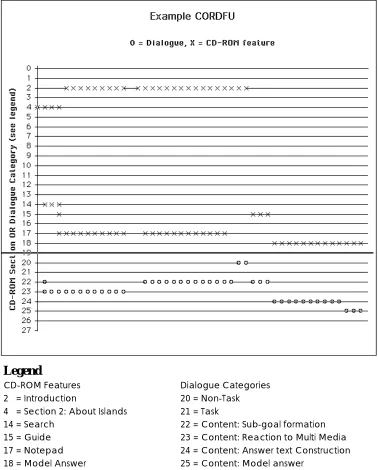
This is a graphical representation of the path navigated through the CD-ROM by each group of users integrated with information about the category of talk that occurred between the learners when a particular CD-ROM feature was in use. This tool is particularly useful for exploring the effect of narrative guidance on navigation and the manner in which the different system features are accessed. Figure 3 illustrates part of a CORDFU chart.
In which the upper part of the vertical axis (above the horizontal line) records the different features of the Galapagos CD-ROM: the introductory section, the eight sections containing material about Darwin, Galapagos and evolution, facilities such as the search engine and tools such as the Notepad. The lower part of the vertical axis (below the horizontal line) records the categories of talk. The last four of the headings i.e. Sub-goal formation, Reaction to MM, Answer text construction and Model answer are sub-divisions of the CONTENT category. Only the names of the features and categories present in the example have been included in Figure 3 to avoid confusion. All information is present during analysis. The horizontal axis records the amount of attention paid to a feature or dialogue category. The horizontal unit of measurement is a text unit that comprises up to 24 characters of dialogue text1. An X on one of the upper horizontal lines therefore indicates that one text unit worth of time has been spent with the CD-ROM feature specified. An O on one of the lower horizontal lines indicates that the text unit occurring at this point in the dialogue has been coded as belonging to the category specified. For each X recording a CD-ROM feature there is an O indicating the type of talk that occurred whilst this feature was in use. So, in the example CORDFU extract in Figure 3 we can see that the group of learners it represents used the Notepad in conjunction with the introductory section whilst discussing their reactions to the multimedia and the practicalities of constructing an answer to the set task.
1
Legend
CD-ROM Features Dialogue Categories
2 = Introduction 20 = Non-Task 4 = Section 2: About Islands 21 = Task
14 = Search 22 = Content: Sub-goal formation 15 = Guide 23 = Content: Reaction to Multi Media 17 = Notepad 24 = Content: Answer text Construction 18 = Model Answer 25 = Content: Model answer
Figure 3. A section from a CORDFU chart.
Our rationale for the creation of the CORDFU was motivated by the need to be able to identify what sort of system features were being used by learners both when they were talking about the their answer construction task and when they were not. We wanted to build up a picture of what they were doing with the CD-ROM at particular points in their interactions.
One disadvantage to this approach, as far as analysing system feature use is concerned, is that silence is not recognised. A feature may have been open on the screen and have been viewed, but not recorded on the CORDFU chart. This omission can however be compensated for by use of other analytical tools (Luckin, Plowman, Gjedde, Laurillard, Stratfold & Taylor, 1998). There were in fact few instances of complete silence during our studies.
RESULTS
individual learners were constructing as a result of these collaborative interactions. In addition to exploring these three aspects in their own right we also wished to unpack the relations between them; to answer questions such as: what sort of interactions occurred between learners when they were using feature X?
We therefore investigated the relationship between the content and themes within the learners’ dialogue and the structures and features existing within the CD-ROM. We present the results here in terms of the three Galapagos variations. Each of the three system versions is considered as a case study and the data relevant to each is discussed in terms of the two questions highlighted earlier:
1. How can manipulation of the presented narrative offered by a CD-ROM impact upon educational focus?
2. How are the various system features used by learners?
The information from the CORDFU charts for each group is used initially to discuss the general pattern of Galapagos use, and in particular the use of any guidance provided within the CD-ROM. A brief description of the whole interaction from which the CORDFU was extracted is included to contextualise the small section depicted in this representation. Particularly interesting sections of a group’s interaction are then supplemented with other data or representations of that data.
Analysis of the individual learners’ audio recordings offer indications about the relationship between the inter-group collaboration around Galapagos and each learner’s individual experience. Many factors will influence both the individual learner’s contribution to collaborative answer production and their subsequent re-telling (See Plowman, 1993, for a discussion of roles in the organisation of a co-authoring task). The effects of already established peer group relationships amongst the students, as well as their own individual ability will be influential here, for example. There are also strong cultural influences which impact upon both the group collaboration and upon how they recount their experience subsequently. We accept the complexities of the dynamics of peer group interaction (as highlighted by Cohen, 1994, for example) and concentrate here upon the relationships we can observe between an individual’s behaviour during inter group answer production and what that individual said about their learning experience afterwards.
Before discussing the individual system variations, there are findings arising from all the user groups that are worthy of note. These are relevant to answering questions about the presented narrative and educational focus and about the use of system features. With regard to educational focus, for example, the discussions conducted by all groups of learners were focused on the content of the CD-ROM to a much greater extent than in our previous pilot empirical study with commercial CD-ROMs. Within the learners’ dialogues, there was twice as much CONTENT type talk as talk categorised as NON-TASK or TASK. Likewise, with respect to individual system feature use: over 25% of the total discussion between learners took place when the Notepad editor was open on the screen and more than 10% when the model answer had been accessed and was open on the screen. This was true in total and for each of the three system variations. Talk about navigational and operational issues (i.e. categorised as NON-TASK dialogue) for all groups occurred throughout all but one content section of the CD-ROM as learners discussed when and how to play a particular video clip for example. Discussion about how to complete the task (i.e. categorised as TASK dialogue) was however less evenly distributed amongst these same content sections.
In each of the following three sections of this paper we describe the way learners used and talked about one of the Galapagos system versions. These sections share a common structure with each one presenting:
• Discussion of the way in which groups using this system version used the CD-ROM features available to them.
• Discussion of the audio retellings for individual learners.
Linear Galapagos
The version was designed to present an easily identifiable narrative. When the material on this version is first viewed the system moves automatically between the content sections. Learners can then elect to go back to certain selected points within this presentation and from there they can move either backwards or forwards between the different sections of content. There is no full menu or search facility and no overview of the structure of the CD-ROM.
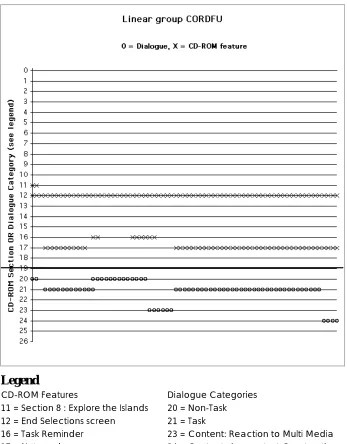
Figure 4 presents a section of the CORDFU for a Linear User group. It represents a small snapshot of one group’s interactions and illustrates the initiation of answer construction in the Notepad after all sections of the CD-ROM have been viewed.
Legend
CD-ROM Features Dialogue Categories
11 = Section 8 : Explore the Islands 20 = Non-Task 12 = End Selections screen 21 = Task
16 = Task Reminder 23 = Content: Reaction to Multi Media 17 = Notepad 24 = Content: Answer text Construction
The whole interaction for the group depicted in Figure 4 was as follows: the first 17.31 minutes (47% of total system time) of activity that precede the Notepad being opened for the first time consist of 4 iterations through the Linear path of CD sections: twice forward and twice backward. The task is accessed briefly at 11.22 minutes and 11.33 minutes. The only task relevant conversation is about whether they want to complete an answer and how they might type into the Notepad. The Task is presented to the students in the initial introduction and they access it briefly on 3 other occasions.
There is an attempt to access the model answer at 16.11 minutes and soon after this (17.31 minutes) the group start to use the Notepad to construct an answer. They start by looking at the task again and then work through the CD sections with the Notepad until they access the model answer at 33.24 minutes. During the time between 33.24 minutes and the end of the session at 37.51 minutes they read the model answer and discuss what they can add to their Notepad answer. The CORDFU chart in figure 4 is extracted from the period between 17 and 19 minutes into the session.
The Presented Narrative and Educational Focus
Navigation with this version of the CD-ROM was limited with back and forwards buttons on the toolbar being the only type of control that was always available to users. In fact, despite the availability of these controls, none of the Linear user groups altered the order of presentation of the CD-ROM sections until they had viewed them all at least once. All of these learners also viewed all sections of the CD-ROM before they started to construct an answer. Once answer construction started, reference back to the content sections of the CD-ROM was rare. One group, for example, did not refer back to any content section until they had written enough in the Notepad to access the model answer. All Linear groups entered sufficient text in the Notepad to allow access to the model answer and evidence from the records of text entered in the Notepad indicates that all made subsequent revisions to their text.
Discussion about the process of task completion (i.e. categorised as TASK dialogue) was rarely conducted whilst the content sections were being viewed. In fact, the co-ordination of this type of discussion with the use of a content section of the CD-ROM was predominantly conducted at two points in time: the first content section viewed by a group and the content section viewed immediately before starting to construct an answer. Likewise, CONTENT talk was less prevalent whilst learners were viewing the content sections of the CD-ROM. In particular, as with the TASK talk, there were instances of CONTENT talk occurring most prolifically when the first and, in particular, the last CD-ROM content section before answer construction, were on screen. In fact, for one Linear group CONTENT talk only occurred during these two CD-ROM sections. Clearly, learners using this system manipulation did not discuss the content whilst they viewed the content sections of the CD-ROM; in fact their conversations at this stage were minimal.
Galapagos Feature Use.
Speaker Comment
2 You have got to go to answer 1 What this one, oh all right then
3 (reading aloud from screen ) “You must write an answer of at least 50 words in the Notepad before looking at the model answer.”
Right OK.
1 You can write it Joe 2 You use the..
1 Yeah, Go to Notepad
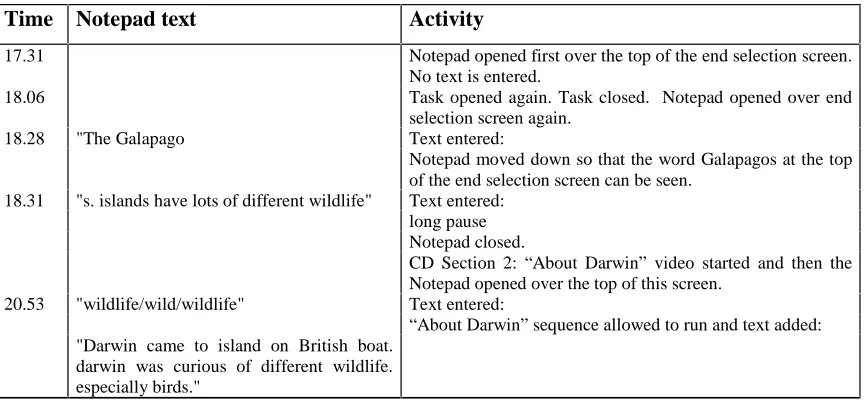
Evidence presented earlier in this paper suggested that the macro-structure of the Linear version encouraged learners to view all sections of the CD-ROM and so experience the ’whole story’ before they started constructing their own answer. Evidence from further analysis of the Notepad answers suggests that learners had adapted, though not copied verbatim, some recognisable material from the CD-ROM. The following extract of activity provides an example of this sort of text production.
Table 1. Combined Notepad text and Activity chart: Linear user group.
Time Notepad text Activity
17.31 Notepad opened first over the top of the end selection screen. No text is entered.
18.06 Task opened again. Task closed. Notepad opened over end selection screen again.
18.28 "The Galapago Text entered:
Notepad moved down so that the word Galapagos at the top of the end selection screen can be seen.
18.31 "s. islands have lots of different wildlife" Text entered: long pause Notepad closed.
CD Section 2: “About Darwin” video started and then the Notepad opened over the top of this screen.
20.53 "wildlife/wild/wildlife" Text entered:
“About Darwin” sequence allowed to run and text added: "Darwin came to island on British boat.
darwin was curious of different wildlife. especially birds."
The accompanying audio transcript for the video that makes up this part of the “About Darwin” content material is actually:
“Darwin visited the Galapagos islands in 1835. He was the first person to spot the peculiarities of the plants and animals. On the beaches iguanas were grazing on the seaweed and were happy to live on the salt water, giant tortoises, of a kind not found within thousands of miles of the islands. Seabirds he readily recognised in shape and form as cormorants, which had lost the power of flight. The royal navy survey ship, the HMS Beagle brought Darwin to the islands”.
Individual Learners
In the Linear version of Galapagos two students in each of the four groups dominated the production of the answer, whilst the third student either assumed the physical production role (typing) or remained quiet for the majority of the session. In two of these groups, one student took greatest control overall and produced the answer largely by himself, fielding comments from colleagues. These proactive individual’s personal audio accounts of the session tended to be less full (number of words) and less factually correct than the students who had played a less proactive, but productive role in the group. The least proactive individual in all cases produced the poorest re-telling, in comparison to the other members of that group (i.e. shorter, with less focus on, and accuracy in the factual questions).
the process of using the CD-ROM. The second account is a descriptive story of the learner’s experiences with the CD-ROM, but it reveals very little about her underlying conceptual understanding of the task she was asked to complete. This type of narrative about the process of using the CD-ROM was more prevalent amongst the Linear system users, which offers an indication about the possible impact of the presented narrative upon learner reflection. Such an indication may be useful in the design of future research tools and would certainly be an interesting question to explore with a larger user group.
Example 1. Extracts from the audio responses to the question: Imagine your friend couldn't get to today's lesson and asked you to fill them in on what they've missed. Try to give them a good idea by describing the lesson in plenty of detail.
Dominant Individual: Basically we were learning all about the genetic variation in a species called finches, which is a type of bird. They range in size from, you know, very small to great big inches, and they eat a variety of foods all the way from cactus leaves to you know, the small insects and creatures. Um, the islands in question were first discovered by Darwin and through his experiments into natural selection and the development of the species, that’s why it’s you, called Darwinian islands.
Less Dominant Individual (also rated ‘less able’ by the tutor): We entered the programme and we went through the introduction, where we were told about some animals and Darwin’s islands. We covered the areas of where we were told about, um, climates and breeds of finches and we discovered the Latin names for a lot of birds, 13 birds, and we were given a brief outline of how they, well, what their habits are. We were shown a map of the Galapagos islands and we were able to click on an island and a screen came up showing us what island it was, and what birds were found on it.
Resource Based Learning GALAPAGOS
In this version learners have free access to all sections of the CD-ROM through a menu and free text search facility. It was designed to reflect the encyclopaedic nature of the existing commercially available CD-ROMs we had observed in our pilot studies of classroom use.
The presented narrative and educational focus
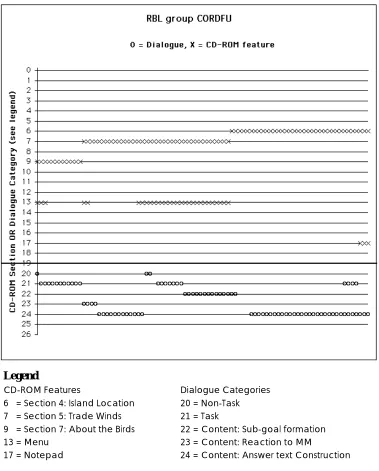
Figure 5 presents a section of the CORDFU for a RBL User group. It represents a small section of one group’s interactions and illustrates, in particular:
• The use of the menu to guide navigation through the content.
• The co-ordination of talk about answer construction with use of content material, both with and without the Notepad.
The whole interaction for the group depicted in Figure 5 was as follows. The first 4.58 minutes (13% of total system time) of activity which precede the Notepad being opened for the first time consists of menu and search engine use, plus viewing the first two CD sections. The task is presented to the students in the initial introduction and is re-accessed first at 8.17 minutes and on three other occasions at 12.29 minutes, 15.29 minutes and 15.5 minutes. There is no discussion of the task or what they need to do. Between opening the Notepad and accessing the model answer at 30.51 minutes (73% of total system time) activity consists initially of using the search engine that directs the group to Section 8 of the CD-ROM only. About 50% of the talk is specifically relevant to the completion of the task. Subsequently (12.47 - 30.51 minutes) activity consists of using the menu to move to different CD-ROM sections and then entering information in the Notepad.
Legend
CD-ROM Features Dialogue Categories
6 = Section 4: Island Location 20 = Non-Task 7 = Section 5: Trade Winds 21 = Task
9 = Section 7: About the Birds 22 = Content: Sub-goal formation 13 = Menu 23 = Content: Reaction to MM
17 = Notepad 24 = Content: Answer text Construction
Figure 5. A section from a RBL User Group CORDFU chart.
The RBL groups adopted a different approach to navigating through the CD-ROM. They used either the search or the menu facility as a central spine around which to manage navigation to other sections of the CD-ROM. Learners did not necessarily wait until all sections of content material had been viewed before they started to construct an answer, in fact not all groups viewed all the content available before they finished their session. All groups accessed the model answer, although examination of the Notepad records reveals that they did not all make subsequent revisions.
Speaker Comment
1 The islands have different relief in the middle
2 If you think about Japan, all the people live around the edges because its flat and I would have thought it would be the same on the islands
3 There are no people on the islands
2 Animals
3 If all the animals lived around the edges there 2 - live in the mountains?
1 Relief - yeah or no?
2 They have got things like goats in the mountains
Galapagos Feature Use
The menu was used to guide navigation through the CD-ROM. However, investigation of the dialogue reveals that it rarely accompanied discussions informed by the need to find specific information to complete the answer. The extract below is symptomatic as it occurs while the users are interacting with the menu and after they have attempted, unsuccessfully, to access the model answer. The model answer can only be accessed when 50 words of text have been entered in the Notepad. Prior to this being the case the computer emits a beep.
Speaker Comment
2 If you look at model answers it might not beep again 3 Model answer - we have already been there
2 Yeah but it might not beep again 1 No, what haven’t we done?
3 Go to the answers
2 No, we haven’t got enough information yet
3 Location
2 We know where it is - its in the sea
1 No
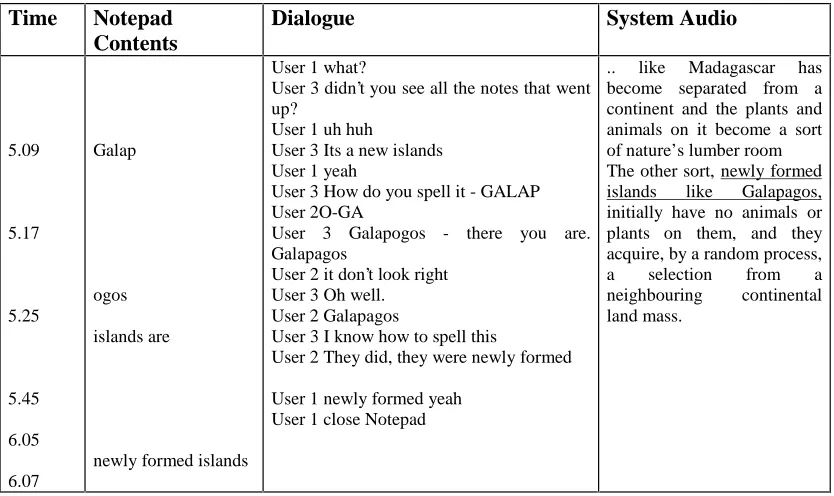
The Notepad was used throughout all the RBL groups’ sessions rather than simply towards the end. Text was also entered in the Notepad before learners had viewed all the content. The text itself was often entered in small sections, none larger than two short sentences with frequent instances of text being copied verbatim from the screen or audio. There was a cut and paste facility available within the audio transcripts feature, although not for other screen text. However, despite the availability of such a feature and students’ desire to complete copy and paste type activity, none of the students used it for this purpose. The extract of Notepad activity presented below illustrates the match between the system audio for a video clip and the text typed in to the Notepad by one group of RBL learners.
Table 2. Combined Notepad text and Activity chart: RBL user group.
Time Notepad Contents
Dialogue System Audio
5.09 5.17 5.25 5.45 6.05 6.07 Galap ogos islands are
newly formed islands
User 1 what?
User 3 didn’t you see all the notes that went up?
User 1 uh huh
User 3 Its a new islands User 1 yeah
User 3 How do you spell it - GALAP User 2O-GA
User 3 Galapogos - there you are. Galapagos
User 2 it don’t look right User 3 Oh well. User 2 Galapagos
User 3 I know how to spell this
User 2 They did, they were newly formed
User 1 newly formed yeah User 1 close Notepad
Individual Learners
It was difficult to map a relationship between inter-group activity and the subsequent re-tellings of the RBL learners. In two of the groups one individual took control of answer production. The audio retellings from individuals in one of these groups are all limited. In the second of these groups the dominant member produces a short but largely factually correct audio account whilst the others state very little. In a third group, two members of the group produce the answer, but the quietest student during the session produces the fullest audio session: a variation on what happened with the Linear version. In the last group, all students work together during the session, discussing all points. The student who constantly questioned the task admits to being confused in her audio session, which is the weakest of the group, but has contributed to the production of the group answer, largely through repeated questioning about the task itself. The Notepad answers these groups constructed were acknowledged by the teacher to be not particularly good, and in one case, an individual student from the group of most able students also acknowledged this. The consistency, which can be found within this group, is in the correlation between individual student ability and the ease with which they make meaning of the task: more able students produced fuller and more factually accurate audio re-tellings.
Guided Discovery Learning GALAPAGOS
In this system version the menu is expanded into a textual guide that breaks the initial task down into sub-tasks and suggests the relevant sections of the CD-ROM to access for information about these sub-tasks. In addition, as with the RBL version, learners have access to a free text search.
The presented narrative and educational focus
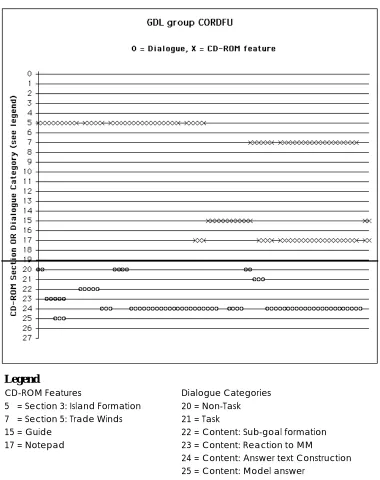
Figure 6 presents a section of the CORDFU for a GDL user group. In this section the Guide is being used between two sections of content material: “Island Formation” and “Trade Winds”. Unusually, there is no TASK type talk whilst the Guide was in use, although there is evidence of CONTENT talk whilst both content sections alone are on screen and whilst the Notepad is also in use.
the Notepad. The CORDFU chart in Figure 6 is extracted from the period between 23 and 25 minutes into the session
Legend
CD-ROM Features Dialogue Categories
5 = Section 3: Island Formation 20 = Non-Task 7 = Section 5: Trade Winds 21 = Task
15 = Guide 22 = Content: Sub-goal formation 17 = Notepad 23 = Content: Reaction to MM
24 = Content: Answer text Construction 25 = Content: Model answer
Figure 6. A section from a GDL User Group CORDFU chart.
In contrast to the users of the Linear version, no GDL groups viewed more than half the available CD-ROM sections before they started to enter text into the Notepad. They used the text-based Guide to direct their access to the rest of the material. The GDL learners discussed content relevant issues whilst accessing this on-screen Guide but the Guide was really a focus for TASK talk, with CONTENT talk being slightly less prolific. There was again, as with the
RBL groups, a tendency for the text to be entered in small sections with reference back to
Galapagos Feature Use
Evidence from analysis of the answers constructed in the Notepads suggests that, like the RBL groups, some of the GDL users took material verbatim from the CD-ROM: from audio and video tracks or from text on the screen (again, like the RBL group they made no use of the cut and paste facility). The following dialogue occurred whilst a group of GDL learners were using the on-screen Notepad as a ruler to underline bullet points of information about islands. They copied each of the bullet points into the Notepad, but, as was typical of talk when text was being copied in this way, they did not discuss the content.
Speaker Comment
2 (pointing at screen) - We can put that over there 3 That’s one up there - (reaches for keyboard) 1 You want to write it down?
2 I can't see it - move it across - there it is. (starts to type)
3 (to themselves) I am going to move up 2 You do some (pointing to 3)
3 I can't type - I can't type at all 2 I can't see (clicking with mouse) 1 You sure we have to write these down? 2 We are meant to be taking notes
1 (Moves mouse) - You want to do anymore? 2 We might as well do the last one
The model answer was a feature designed to help motivate and support learners. We have already seen reference to it in the dialogue extract from the RBL group. They were trying to decide whether to try and access it having failed once already. However, we wanted to know what learners talked about when they did succeed in opening the model answer: did they use it to revise their own text? The pattern of the dialogue for the time at which a group of GDL system learners are using the model answer to inform revisions to their own text is shown in the CORDFU chart in Figure 2 (used for the initial description of the CORDFU) and in the following dialogue extract (this matches part of the interaction illustrated in Figure 2).
Speaker Comment
1 Well I just put that 2 Did you just put that?
1 Yeah
2 Well done
2 That’s because
-1 We put the strong winds and ocean currents - it is most likely that the birds arrived in the islands via weed rafts - didn't know that - once there they survived without any human intervention - oh!
2 (reading aloud) - so we have missed that massive chunk out
-This dialogue illustrates the use of the model answer in prompting the group to revise their own answer. They recognised the information on strong winds and ocean currents in the model answer as being present in their own answer, but note that they have missed out something important about how the birds arrived. The model answer was intended to prompt reflection and revision, but it is only through looking at both the evolving answers in the Notepad and the dialogue when the model answer is being used that we can start to see that our intended use is in line with learners’ actual use of this feature.
Individual Learners
one which guarantees that all sections of the CD-ROM content would be shown, and yet the
GDL learners were more likely to attempt to answer all questions. This is illustrated in the
transcript of one such learner below:
Question A: Why are the islands interesting to biologists?
Answers
:
GDL Group Member
Islands are interesting to biologists because they are like on their own and they’ve got, like, you can see what’s, what’s actually in them and stuff like that.
Question B: Why were the Galapagos Islands interesting to Darwin?
Answers
:
GDL Group Member
They were interesting to Darwin because they were quite new to like the world because they had only been produced over a certain amount of time.
Question C: What is a trade wind?
Answers:
GDL Group Member
A trade wind is a wind that blows to 10 - 20 knots, um and it blows from South America across the Galapagos Islands.
Question D: Where are the Galapagos Islands?
Answers:
GDL Group Member
The Galapagos Islands are on the equator to the West of um South America.
DISCUSSION
The Galapagos study was designed to help us clarify our understanding of how learners use multimedia and how system design can impact upon learner experience. We have presented detailed case studies of groups of users interacting with the three versions of the Galapagos CD-ROM. The central question we set out to explore was: When are learners engaged with educational content as opposed to the medium of communication? We considered this question from two perspectives:
• How can manipulation of the presented narrative within a CD-ROM impact upon educational focus,
• How are the various system features used by learners?
In this discussion we present a summary of the implications of this study for the design of MILEs and for future research in this area. In all 3 versions of Galapagos there are:
1. Sections of content material each of which has its own micro-narrative, some stronger than others
2. Some guidance features that enable users to determine their own trajectory through the CD-ROM: the Menu, Guide, Linear end selection screen (constrained menu) and Search system facility.
3. Some answer construction tools or features designed to enable users to co-construct an answer: a Notepad, a model answer, a task and transcripts.
variations has lead to the proposal that it is not merely the presented narrative within the material that is influential, but also the relationship between this presented narrative guidance and the system features that support the answer construction process. Investigations of the use of system features has confirmed the usefulness of elements such as the Notepad and model answer. It has also offered some surprises: the importance of the Linear End Selection screen for example.
In Galapagos the guidance features plus the strength of the presented narrative help users make connections and build links between the task they have been set and the individual elements of content which they need to pull together into an answer. To ensure that learners capture a coherent narrative about species variation they need to co-ordinate their use of the features that offer them guidance through the content (including the structuring within the content itself) with their use of features designed to aid the process of answer construction. In the groups we observed the extent to which the guidance offered by the particular version of
Galapagos helped to build connections between answer construction tools and content varies
between the three versions of Galapagos.
• Linear users have a paucity of guidance outside that presented and controlled by the
system. Their control over what is available to them is also incomplete. For example, when they have seen all sections of the content available they are offered a meagre selection screen again which allows them access to certain points in the macro-narrative where after the system picks up control.
• For RBL users, both the search and the menu provide a link to both content and answer construction tools and there are many examples of both facilities, but predominantly the menu, being used as a ‘springboard’ to both sorts of feature (i.e. both Content and answer construction tools). The menu provides free access to all sections of the CD-ROM and requires learners to make an active selection but it gives no explicit indication as to the way these individual sections might slot together to answer the task. This is fine for confident and able learners who can piece things together and construct threads to their existing knowledge.
• The GDL learners, like the RBL groups have two means of free access to all parts of the CD-ROM: the guide and search. These act as effective links to both content and answer construction tools; this is particularly true for the guide. Unlike the menu, the guide offers explicit information about how individual content can be pieced together into an overview that is focused on the task. Users have to actively select a guide and then a section of content from that guide. However, also unlike the menu, the guide occupies the whole screen which means that learners cannot, for example, keep sight of the guide overview and the content at the same time as they are using the Notepad.
In addition to informing the production of guidelines for designers, our analysis has also highlighted potentially fruitful foci for future research. For example, the value of the Notepad in promoting content related talk and in prompting learners to discuss the practicalities of completing their task. Linear users in particular do not appear to talk about either the content or the practicalities of answer construction during much of the time when they access the content sections of the CD-ROM. In addition, there is some evidence to suggest that they use the meagre menu capabilities of the selection screen available at the end of their first pass through the content sections as a point of focus for discussing the practicalities of completing the task. This suggests that a useful avenue of enquiry would be into the possibility that learners find some information about the macro structure of the material available to them useful in order to prompt discussion about the practicalities of constructing an answer. The different types of talk that occurred when the menu and the guide were in use should prove informative. The menu was rarely accompanied by discussions about what sort of information the group should be trying to find for their answer. By contrast, the guide was accompanied by both TASK and CONTENT categories of talk.
micro-narrative and a network of potential links between the two which enable learners to focus on content, maintain a clear goal and construct a personally meaningful understanding of the underlying concepts.” Our study of learners’ talk whilst using Galapagos has been important in helping us identify this sort of experience. The following dialogue occurs when a group is about one-third of the way into their session. They are starting to construct an answer in the Notepad, and are all actively contributing to the answer and focused on the content.
Speaker Comment
2 Ocean currents, trade winds - right, you remember one of them, I’ll remember ocean currents
1 I’ll remember trade winds
2 ..and you remember island formation (Notepad opened on screen and text entered)
1 ..because of -2 Ocean currents 2 Trade winds
3 ..and island formation
When using MILEs learners should take some control for the construction of their own goals and sub-goals, and be able to interact with the content. Different abilities and types of individuals within the group will be more or less able to do this and, again, the nature of the guidance provided by the system will influence which links are built between the content within the media and the answer construction process. In addition to paying attention to this interaction between guidance and answer construction, the design of interactive multimedia might be improved by attending to narrative control. The appropriate degree of narrative control over the sequence of events and activities needs consideration to ensure that it will match the needs of different students:
• Full ‘program control’, using a default sequence with optional access to resources will tend to usurp control from the learners to the extent that they play no part in narrative construction at the appropriate level, remaining focused on the detail of the resources;
• Full ‘learner-control’, where learners have free access, at all times, to all the resources, together with the choice of a Notepad and Model Answer to assist their narrative construction, risks an incomplete coverage of key material, and, without the Guide, localised attention to resources, rather than the higher level account, as they construct their narrative;
• ‘Shared control’, where learners are repeatedly required to choose between the sub-goals for investigation, and the use of a Notepad or the Model Answer, will assist learners in reflecting on their findings, and articulating of their account of it.
CONCLUDING REMARKS
As part of a special issue about the use of educational dialogue analysis, this paper also offers an approach to the use of dialogue analysis and examples of its value to the enterprise of analysis. The CORDFUs showed when and how often groups accessed content sections of the CD-ROM and system features. It also indicated what learners were talking about when each type of resource was accessed. Without doubt this has enriched our evidence for system re-design and also indicated directions for further exploration.
Acknowledgments
This research was supported by grant no. L127251018 from the Economic and Social Research Council. We are indebted to the schools, teachers and students who made this research possible. We are also indebted to the BBC/Open University Production Centre, the Open University Science Faculty and Matthew Stratfold for the Galapagos Pilot CD-ROM.
References
Bolter, J. D. (1991). Writing Space: the Computer, Hypertext and the History of Writing. LEA, Hillsdale, NJ.
Chi, M. T. H. (1997). Quantifying qualitative analyses of verbal data: A practical guide. The
Journal of the Learning Sciences, 6 (3), 271-315.
Cohen, E. (1994). Restructuring the classroom: Conditions for productive small groups. Review
of Educational Research, 64(1), 1-35.
Crook, C. (1994). Computers and the collaborative experience of learning. Routledge. London. Clanton, C., Iannella F. & Young E. (1992). Film craft in user interface design. Tutorial Notes,
CHI’92, Monterey, Ca.
Dillenbourg P., Baker M., Blaye A. & O'Malley C. (1995). The Evolution of research on Collaborative Learning. In P. Reimann & H. Spada (Eds.), Learning in Humans and
Machine: Towards an Interdisciplinary Learning Science. Elsevier Science, Oxford.
Guzdial, M., Kolodner, J., Hmelo, C., Narayanan, H., Carlson, D., Rappin, N., Hubscher, R., Turns, J. & Newstetter, W. (1996). Computer support for learning through complex problem solving. Communications of the ACM, 39(4), 43-45.
Kintsch, W. (1977). On comprehending stories. In M.A. Just & P.A. Carpenter (Eds.), Cognitive
processes in comprehension. Lawrence Erlbaum, Hillsdale, NJ.
Landow, G. (1992). Hypertext: the Convergence of Contemporary Critical Theory and
Technology. Johns Hopkins University Press, Baltimore.
Laurel, B. (1993). Computers as Theatre. Addison-Wesley, Reading, Mass.
Luckin, R., Plowman, L., Gjedde, L., Laurillard, D., Stratfold, M. & Taylor, J. (1998). An Evaluator's Toolkit for Tracking Interactivity and Learning. In M. Oliver (Ed.), Innovation
in the Evaluation of Learning Technology. Latid, London. pp. 42-64.
Luckin, R., Plowman, L., Laurillard, D., Stratfold, M., & Taylor, J. (1998). Scaffolding learners' constructions of narrative. In A. Bruckman, M. Guzdial, J. Kolodner & A. Ram (Eds.),
Proceedings of the International Conference of the Learning Sciences. AACE,
Charlottesville, VA.
McKendree, J. & Mateer, J. (1991). Film techniques applied to the design and use of interfaces. In Proceedings of the IEEE Twenty-Fourth Annual Hawaii International Conference on
System Sciences, IEEE, NY. pp. 32-41
Murray, J. (1997). Hamlet on the Holodeck. The Future of Narrative in Cyberspace. Free Press, NY.
O’Donnell, J. (1998). Avatars of the Word: From Papyrus to Cyberspace. Harvard University Press, Cambridge, MA.
Pilkington, R. M., Hartley, J. R., Hintze, D. & Moore, D. J. (1992) Learning to Argue and arguing to learn: An interface for computer-based dialogue games. Journal of Artificial
Intelligence in Education, 3(3), pp. 265-295.
at C-LEMMAS, Roles of Communicative Interaction in Learning to Model in Mathematics
and Science, EU funded TMR Conference, Ajaccio, Corsica.
Plowman, L. (1993). Tracing the evolution of a co-authored text. Language and Communication 13, (3), pp.149-161.
Plowman, L. (1996). Narrative, linearity and interactivity: making sense of interactive multimedia. British Journal of Educational Technology, 27(2), 92-105.
Plowman, L., Luckin, R., Laurillard, D., Stratfold, M. & Taylor, J. (1999) Designing Multimedia for Learning: Narrative Guidance and Narrative Construction. In the
Proceedings of CHI 99. Pittsburgh, PA USA. pp 310-317.
Quignard, M. & Baker, M. (1999). Favouring modellable computer-mediated argumentative dialogue in collaborative problem-solving situations. In S. Lajoie & M. Vivet (Eds.) Artificial Intelligence in Education: Open Learning Environments, Amsterdam: IOS. pp. 129 - 136.
Ravenscroft, A., & Hartley, R. (1999). Learning as Knowledge Refinement. In S. Lajoie & M. Vivet (Eds.) Artificial Intelligence in Education: Open Learning Environments, Amsterdam: IOS. pp. 155 - 162.
Roschelle, J. (1992). Learning by Collaboration: Convergent conceptual change. Journal of the Learning Sciences, 2, 235-276.