© 2017, IRJET | Impact Factor value: 5.181 | ISO 9001:2008 Certified Journal | Page 3618
PocketAmbulance
Akshay Naik
1, Vaibhav More
2, Sagar Mache
3, Saurabh Borude
41234Student, Dept. of Computer Engineering, NBN Sinhgad School of Engineering, Maharashtra, India ---***---
Abstract :-
In the previous years, many convenientapplications for portable devices are sketched to deal with various issues under Android, iOS platforms. As we all know, there are three main emergency services available, they are, Police Service, Fire Brigade and Ambulance. This application for ambulance is developed on Android Platform. The application uses GPS (Global Positioning System), which is the position function. Firebase (BaaS) seamlessly integrates with the application to provide optimum results. The application has two main modules, first is the “On-Tap System” and another is “On-Call System”. First module is able to locate nearby ambulances and track the path on a map. Second module is able to locate real-time nearby hospitals, detail contact information and navigation are also provided. Singular attention was given to every aspect of the application developed.
Keywords—Global Positioning System; FireBase; On-Tap System; On-Call System; Android.
1.INTRODUCTION
India is subcontinent of color, spice and contradictions where every person loves to travel around. India is a rapidly developing country and the technology is sprouting even swiftly here. We are encircled by technology and it plays a requisite role in every life. People love to travel in diverse regions and plenty fresh commodities are uncovered. But, numerous people don’t have the bona fide understanding or knowledge of destined places. In this scenario, if there is a medical crisis, the proposed application can be handy and convenient. The main focus of our study is to construct an untroublesome domain for the clients, so that the individuals can effectively use the services issued by the application. [1]
There are two android applications affiliated to this project, they are “PocDriver” and “PocketAmbulance”. PocDriver is application is used by the ambulance drivers to pickup their clients and safely drop to the required destination, in this case, the destined hospital. PocDriver is connected to Firebase where the location of the driver is updated after a specific interval of time and the client can track the path of the driver accordingly. PocDriver receives the clients coordinates which helps the driver to reach the clients destination as fast as possible. PocDriver is also designed in an efficient manner so that the driver should reach the
destination hassle free. PocDriver consists of only one module which helps the driver to outreach the client’s location within a stipulated time.
PocketAmbulance is the other application which is used on the client’s side. There two main modules in PocketAmbulance, they are, On-Tap System and On-Call System. In the first module (On-Tap System), PocketAmbulance uses GPS and Android network location sources for retrieving the coordinates assuredly. GPS (Global positioning system) allows the application to get the users precise location while Android Network Location Sources allows to get users approximate location. GPS assists the clients to evaluate various parameters such as position, time and velocity. The key objective of lodging GPS in vehicles is to precisely locate them. PocketAmbulance uses Firebase (Back-end as a Service) that is further described in Section 6. Firebase provides the tools and infrastructure to build better applications. Firebase provides various services as real-time database, storage, authentication, crash reporting, etc. The application contains an elegant tracking system to trace the exact path of the ambulance. The nearby ambulances from the current location are revealed on the map provided. In the second module (On-Call System), the application uses Google Places API to provide nearby hospitals, clinics, pharmacy stores and physiotherapist. Other Emergency Services, such as Police and Fire Stations and also provided which are located nearby from the current location of user. Another feature of PocketAmbulance is Anonymous BloodBank which is further explained in Section 7 [1]. Remarkable respect is given to the design aspect of PocketAmbulance.
The paper organizes the following sections:
Section 2 comprises of Literature Survey Section 3 comprises of System level
description
Section 4 comprises of Android Application Section 5 comprises of Working
Section 6 comprises of Firebase
Section 7 comprises of Supplementary Features
© 2017, IRJET | Impact Factor value: 5.181 | ISO 9001:2008 Certified Journal | Page 3619 Section 9 comprises of Future Scope
2. LITERATURE SURVEY
Irtsam Ghazi, Muhammad Rashid Maqbool, Ihtisham ul Haq, Sanaan Saud: GPS Based Autonomous Vehicle Navigation and Control System.
The development of an overall routing system which accepts input from common users via a simple android application and as a result directs the nearest vacant Cab towards the passenger.
Amol Dhumal, Amol Naikoji, Yutika Patwa, Manali Shilimkar: Vehicle Tracking System using GPS and Android OS.
Mobile providers are also providing the variety of service to users. In attempt to expand on this, we propose a GPS based vehicle tracking system for an organization to help to find addresses of their vehicles and locate their positions on device.
Sih-Ting Zeng, Ching-Min Lee: Personal Emergency Notification Application Design for Mobile Devices.
The position function of GPS and an easy used interface capable for sending emergency notification messages or phone calls are included.
A.Martin-Campillo, J.Crowcroft, E. Yoneki and R.Mart: Evaluating Opportunistic Networks in Disaster Scenarios.
An example scenario is a disaster area, where forwarding information generated in the incident location, like victims’ medical data, to a co-ordination point is critical for quick, accurate and coordinated intervention.
Zongqing Lu, Guohang Cao and Thomas La Porta: Networking Smartphones and Disaster Recovery.
Investigate how to network smartphones for providing communications in case of emergency.
H.Nishiyama, M.Ito and N.Kato: Relay-by-Smartphones: realizing multi-hop device-to-device communications.
For disaster victims to utilize their communication devices, such as cellular phones, tablet computers, or laptop computers, to notify their families and friends of their safety and confirm the safety of their loved ones since the communication infrastructures were physically damaged or lacked the energy necessary to operate.
Amol Dhumane, Rajesh Prasad, Avinash Bagul, Parag Kulkarni: CAMRA: Context Aware Multipath Routing Algorithm in Internet of Things.
An example scenario is a disaster area, where forwarding information generated in the incident location, like victims’ medical data, to a co-ordination point is critical for quick, accurate and coordinated intervention.
3. SYSTEM LEVEL DESCRIPTION
A. Android Application
The android applications that are designed, called
“PocketAmbulance” and “PocDriver”.
“PocketAmbulance” is used on the client’s side and “Pocdriver” is used by the ambulance driver. Marked attention was given to every facet of the applications.
B. Firebase
The main function of Firebase is to store the driver’s and client’s information. Firebase continuously receive the Ambulance status, that is, available or not, as well as the coordinates of ambulance.
From the status of the Ambulance, the Firebase computes and decides whether to display it on the map, that is, if the ambulance driver is not available, the marker is not displayed on the map. [1]
C. Graphical User Interface
For supervising purpose, a GUI (Graphical User interface) is developed on which the ambulance can be traced. Google maps are used to display the list of nearby hospitals. A tailored map is used to locate nearby ambulances which retrieves data from Firebase. [3], [8]
4. ANDROID APPLICATION
© 2017, IRJET | Impact Factor value: 5.181 | ISO 9001:2008 Certified Journal | Page 3620 clients coordinates via SMS messaging service, the
driver can click on rescue and way to your client to reach the destination.
[image:3.595.308.560.149.309.2]
Fig. 1. Login Fig. 2. Register Fig. 3. Manager
Firstly, PocketAmbulance’s graphical layout has a login page and register page shown below. The user has to register by entering the required information and after the registration, he/she can login whenever required. Assorted custom features such as login with facebook, google and twitter is also provided. If a user forgets the password, security feature of recovering password is also imparted.
Fig. 4. Register Fig. 5. Login
Succeeding, the Main Activity has two main modules, Tap System and Call System. By clicking on On-Call System, a list of nearby hospitals is rendered. By clicking any hospital name required, user gets the detail information of that hospital, that is, name, contact information, address, latitude, longitude coordinates with two buttons, namely call and show on map. By clicking call, the user can directly contact the hospital and by clicking on show on map, the user gets the navigation open in google maps. Supplementary attributes such as locating nearby clinics, physiotherapist, dentists, pharmacies are also provided. Furthermore, other emergency services, such
as, nearby police stations and fire stations are also located using Google Places API.
Fig. 6.HomePage Fig. 7. List Fig. 8. Details
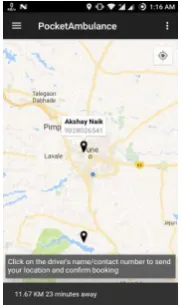
By clicking On-Tap System, a tailored map is opened where the nearby ambulances are shown. By tapping on the marker, driver details are revealed, that is, the name and contact number of the driver. The distance from client’s location to the ambulance is also shown and an estimate time is displayed. By clicking on the driver’s name, the ambulance is booked and another maps activity is shown with only the ambulance which is booked. The detail information of driver is provided and the user can locate and trace the ambulance and check the arrival time remaining. Status of the ambulance, that is, available or not available is also maintained and the back end.
[image:3.595.36.274.150.296.2]
Fig. 9. Nearby Ambulances Fig. 10. Driver Details
A. On Marker Click Listener
[image:3.595.51.252.426.573.2] [image:3.595.307.399.515.668.2]© 2017, IRJET | Impact Factor value: 5.181 | ISO 9001:2008 Certified Journal | Page 3621
color, anchor point via API.
GoogleMap.addMarker(markerOptions) is the method used to add marker on the map and markers are of the type Marker. We can add a marker, associate data with it, customize the marker. OnMarkerClickListener is used to listen for click events on the marker.
GoogleMap.setOnMarkerClickListener is called to set this listener on the map. onMarkerClick(marker) is called when the user clicks on the marker and the marker will be passed through an argument. This method returns a Boolean that indicates whether the user has consumed the event. The default behavior for a marker click event is to display an info window (if available). The GPS coordinates are sent when
onInfoWindowClickListener is called. On click handlers is the class which is to be specified containing the instance. The event holds data, such as how often it was clicked (normal click, long click, etc.)
B. Fetching GPS Coordinates
GPS and Android Network Location Sources are used for developing a location-aware application. GPS utilizes very high power and returns accurate location, but only outdoors. Android Network Location Sources are used for indoor purposes. When the user is indoors, Network Location adds low battery consumption and provides the necessary coordinates by deploying cell tower and Wi-Fi signals. The precise user’s location is retrieved by using GPS and approximate location is redeemed using Android Network Location Sources. [1], [2], [5]
addValueEventListener is implemented for retrieving latitude and longitude coordinates. The user’s location found in onDataChange is to be passed to
addValueEventListener. When the user’s location is
changed or status is changed, the
addValueEventListener should implement
onDataChange and onCancelled. In the Android manifest file, to retrieve location updates from network or GPS provider, user permissions are appealed by
declaring the ACCESS_FINE_LOCATION,
ACCESS_NETWORK_STATE and
ACCESS_COARSE_LOCATION permission. [1], [2], [4], [6]
C. SMS/Telephony Manager
Location of the client is the form of latitude and longitude coordinates are sent in the form of SMS messages from the android application itself. There are two distinct ways:
Using Content Resolver Using SmsManager class
In PocDriver, Content Resolver is used to implicitly read the messages received which contain the location of the client. By clicking on way to your client, google maps is opened showing navigation to the destination. On the other hand, SmsManager is be used to send messages. The SMS sending is facilitated by the use of SmsManager because it provides an opportunity to customize the functionality. [1], [5]
5. WORKING
© 2017, IRJET | Impact Factor value: 5.181 | ISO 9001:2008 Certified Journal | Page 3622 the handler class is activated which updates the
driver’s location every 10 seconds on the map. Furthermore, when the driver clicks on way to your client, the text message inbox is implicitly called by using content resolver and the coordinates are passed in google maps application that helps the driver for navigation to the destined place. After the driver has reached to the destination, he/she can go offline and update the base-station as per requirement. Below flowchart explains the actual working of PocDriver in detail. Firstly, the driver has to wait until the location of the destined place is not received, after that the driver clicks on rescue, then way to your client and with the help of google navigation, reached the destination.
[image:5.595.314.551.101.412.2]
Fig. 11. Initial Steps Fig. 12. PocDriver Manager
Fig. 13. PocketAmbulance Working Module
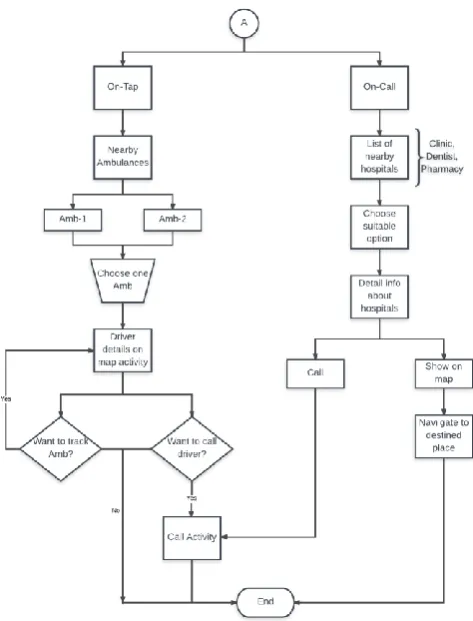
The initial steps are same for PocketAmbulance too, that is, connectivity checking and login/register credentials. After logging in successfully, the home page is displayed where there are two main modules. First is On-Tap System and other is On-Call System. In On-Tap System, nearby ambulances are located and in On-Call System, nearby hospitals, clinics, dentists and pharmacy stores are displayed. The below flowchart explains the working of PocketAmbulance in detail.
A. On-Tap System:
© 2017, IRJET | Impact Factor value: 5.181 | ISO 9001:2008 Certified Journal | Page 3623 of the users are fetched implicitly and sent to the driver
via SMS manager. SMS Manager manages SMS operations such as sending data, text, etc. When tapped on the marker, along with the information window, the distance from the current user (in KM) and estimated time (in minutes) is also displayed for convenience. When clicked on the information window, the driver credentials are transferred from one activity to another map activity implicitly by using bundle. While this operation, the status of the driver is changed from “Available” to “Not Available” in the database, so that the respective driver is now only visible to the current user and not others. When the status of the driver is changed from “Available” to “Not Available”, the marker is removed from the map and is not visible to other users. Further, new tailored map is opened, where only booked ambulance is displayed with driver’s name and contact number, which is visible to the current user only. The location of the driver is updated every 10 seconds on the map using the handler class and the estimated time, distance remaining is also shown dynamically. The client can track the ambulance in real-time. Furthermore, to confirm booking, the client can call the driver for more information. Now, if the user wants to trace the path of the ambulance, he/she should remain on the same screen, if not, a confirmation box is displayed to exit navigation. Telephony manager is used to call the driver if needed.
B. On-Call System:
On-Call System contains various sub-systems, such as, locating nearby hospitals, clinics, pharmacies, physiotherapists, dentists and other emergency services like Police and Fire stations. In on call system,
Async Task is used. Async task is a thread which runs in backstage which using only background threads, keeping the UI thread free. It consists of four methods, namely, onPreExecute(), doInBackground(),
onProgressUpdate(), onPostExecute(). onPreExecute() function fetches the data before sending request to the server. In PocketAmbulance, list of hospitals is pre-fetched. doInBackground() function adds the information about the hospitals in the list as they are fetched. onPostExecute() function stores all the results. After clicking on the suitable option, details information is displayed accordingly, that is, name, address, contact number, latitude and longitude coordinates. Here, two options are available, namely, “Call” and “Show on Map”. “Call” implicitly uses telephony manager to call the required place. “Show on
Map” gives directions to the respective destined place displaying navigation on google maps.
6. Firebase
Firebase is a web and mobile application platform with infrastructure and mechanism outlined to assist developers build high-quality apps. Firebase is made up of complementary features that developers can mix and match to fit their needs. The team of Firebase is based in Mountain View, San Francisco and California. Firebase’s main artefact is real-time database which gives an API that permits developers to load and sync data across diverse clients. This service issues application developers an API that authorizes application data to be synchronized over all the clients and stored on Firebase. Secure file uploads and downloads for the client’s storage is provided by Firebase Storage, notwithstanding the network quality. It is subsidized by Google Cloud Storage, which is an economical and powerful object storage amenity.
Firebase storage is used to store audio, images, videos or any other content generated by the drivers of clients. [8]
The main features of Firebase include the following:
Firebase Notification Authentication Real-time Database Storage
Crash Reporting
Firebase helps the user to develop the application, grow the client’s user base. The key edge of Firebase is each trait works independently. [8]
A. Firebase Notification:
Firebase Notification allows to effortlessly control the notification crusade. It helps to plan and send messages to captivate the appropriate users at the most pertinent time.
© 2017, IRJET | Impact Factor value: 5.181 | ISO 9001:2008 Certified Journal | Page 3624 The notification service sends free and
unlimited notifications across Android Platform and iOS platform.
B. Firebase Authentication:
Firebase authentication implements a complete authentication system that bears email & password. Facebook, Twitter, GitHub and Google Sign-In authentication is also supported. It easily integrates the sign up feature with the custom auth service to give the clients secure access to numerous of Firebase's other characteristics.
Firebase provides flexible SDKs on top of authentic, well grounded Google foundation. Authentication feature supplies an optional, out-of-the-box authentication UI, improved to relinquish the clients best experience. Advanced functionality like forgot
password, email verification, anonymous accounts is present.
Fig. 14. Snapshot of Firebase Authentication
In the above authentication table, various columns such as, email, providers, last date of creation, sign in and a unique user id is also provided for each client. Login with Facebook, google, and anonymous providers is also available. The developer can add diverse information about the profiles added in the Firebase which is associated to the unique id generated. PocketAmbulance and PocDriver, both are connected to the Firebase which helps to transfer data seamlessly.
C. Real-time Database:
Firebase database is a cloud-hosted NoSQL database. The data is synced across all the devices connected in a
very short span of time and is available even when the app goes offline. The data is stored as JSON is Firebase. Firebase real-time database is intuitive and
easy-to-use API.
Database remains responsive even when there is problem in internet connectivity regardless of network latency, it works offline and data is synchronized when the connectivity returns.
It provides tensile conflict solution and also handles the complexity of real-time synchronization.
Firebase database is accessible directly from client SDKs, or even from the user’s server with the REST API.
In Database, there are two sections, “clients” and “users”. Users include the drivers detail information, name, contact number, coordinates, status. Clients include name, contact, city, blood-group, user id, etc. Real-time database provides various features, data, rules, usage, backups. In rules, the developer can provide the norms for database with which the read, write permissions can be altered.
Fig. 15. Snapshot of Firebase Database
D. Firebase Storage:
With Firebase storage, the client can store and retrieve user-generated content like video, images and audio directly from the Firebase client SDK.
Firebase provides robust downloads and uploads in the background.
Integrated with Authentication, Firebase Storage provides secure client side authentication.
© 2017, IRJET | Impact Factor value: 5.181 | ISO 9001:2008 Certified Journal | Page 3625
E. Crash Reporting:
Firebase crash reporting helps to receive actionable information on stability concerns after the user publishes the app.
Firebase prioritizes crashes by the impact and frequency.
It includes comprehensive data surrounding each crash, device circumstances, including device features, stack trace, and more. Whether the device is online or offline, it
accurately gathers crashes that occur. Via Firebase analytics, the impact of a crash
[image:8.595.41.281.312.360.2]on user behaviour is measured by Firebase crash reporting.
Fig. 16. Graph of Firebase Crash Reporting
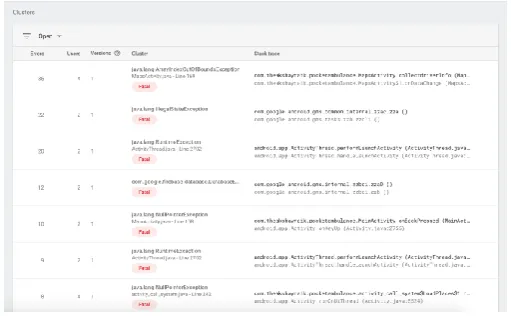
A sample screenshot is displayed above to show the number of errors in PocketAmbulance occurred while creating the project. Crash reporting reveals the errors, users impacted and clusters. A cluster is a clan of errors that have similar stack traces. Each row in the table below represents cluster.
Fig. 17. Snapshot of Firebase Clusters
7. Supplementary Features
PocketAmbulance provides other features like: Locating nearby clinics, pharmacies:
Clinics and pharmacy stores are also displayed which are in the vicinity of the current user dynamically.
Locating dentists, physiotherapists in the neighborhood vicinity:
Dentists and physical therapy doctors are also located in real-time which are present in the nearby radius of the current client.
Anonymous Blood Bank: The user, if he/she wishes to donate blood can update their respective profiles where details about name, contact number, city and blood group is asked. Once the data is entered by the user, it is stored in the database. Further, this data is available globally to all the users. Now, if any user needs blood in emergency, he/she has to enter the city and the blood group required and its just a tap away. A list of names will appear as per the requirement; the user can click on the name to contact the person for more details.
Locating nearby other two main emergency services:
Police Service. Fire Station.
8. Conclusion
Firebase will allow PocketAmbulance to track the locations of the ambulance driver and the client. The system allows to trace the appropriate traveled routes with the help of Google Maps API. The extensive assessment can be done by stating that this application will evinced to be reliable in displaying the positioning of the devices. It will also reveal the list of nearby hospitals in vicinity with the detailed data such as the latitude and longitude co-ordinates, contact information of the hospital, address of the hospital so that it is convenient for the client to connect with the hospital. The universal estimation can be done by expressing that this application will be demonstrated to be definitive by calling the hospital programmatically and tracking the nearby ambulances. [1], [2], [3], [6], [7]
9. Future Scope
[image:8.595.34.290.492.650.2]© 2017, IRJET | Impact Factor value: 5.181 | ISO 9001:2008 Certified Journal | Page 3626 services, namely, fire brigade and police service and
amplify the evolution of this application. To make the client’s job hassle free, we would also like to initiate the trait of offline maps. We would also like to launch the feature of panic button. When the panic button is clicked or tapped, the ambulance in vicinity will arrive at the client’s place without any inconvenience.
Acknowledgment
We are very thankful to our supervisor and guide Prof. Shwetambari Chiwhane. During the extensive expedition of this project, she supported us at every point. She was the one who assisted and propelled us to advance research in this area and inspired us with her passion on research, her skills and her dynamic character.
REFERENCES
[1] Irtsam Ghazi, Muhammad Rashid Maqbool, Ihtisham
ul Haq, Sanaan Saud, “GPS Based Autonomous Vehicle Navigation and Contol System”, Proeedings of 2016 13th
International Bhurban Conference on Applied Sciences & Tehcnology (IBCAST), 12 – 16 January 2016.
[2] Amol Dhumal, Amol Naikoji, Yutika Patwa, Manali
Shilimkar, Prof. M.K. Nighot, “Vehicle Tracking System using GPS and Android OS”, International Journal of Advanced Research in Computer Engineering & Technology (IJARCET), Vol. 4 Issue 4, April 2015.
[3] Sih-Ting Zeng, Ching-Min Lee, “Personal Emergency
Notification Application Design for Mobile Devices”, Institute of Electrical and Electronics Engineers (IEEE), 2014.
[4] Abraham Martin-Campillo, Jon Criwcroft, Eiko Yoneki,
Ramon Marti, “Evaluating opportunistic networks in disaster scenarios”, Journal of Network and Computer Applications, 27 November 2012.
[5] Zongqing Lu, Guohong Cao and Thomas La Porta,
“Networking Smartphones for Disaster Recovery”, IEEE International Conference on Pervasive Computing and Communications, 2016.
[6] Hiroki Nishiyama, Masaya Ito, Nei Kato,
“Realy-by-Smartphone Realizing Multihop Device-to-Device Communications”, IEEE Communications Magazine, April 2014.
[7] Amol Dhumane, Rajesh Prasad, Avinash Bagul, Parag
Kulkarni, “CAMRA: Context Aware Multipath Routing Algorithm in Internet of Things”, Advances in Innovative Engineering and Technologies, pp. 334 – 343, May 2016.