Bridging the Gap Between a Simple Set of Structured
Documents and a Functional Digital Library
1Amit Kumar1, Alejandro Bia2, Martin Holmes3, Susan Schreibman1, Ray Siemens4,
John Walsh5
1 Maryland Institute for Technology in the Humanities (MITH), University of Maryland, USA 2 Miguel de Cervantes DL & DLSI, University of Alicante, Spain
3 University of Victoria Humanities Computing and Media Centre, Canada 4 Department of English, Malaspina University College
5 Digital Library Program / University Information Technology Services, University of Indiana
Abstract. Digital Libraries are complex systems that take a long time to create and tailor to specific requirements [1]. Their implementation requires specialized computer skills, which are not usually found within humanities text encoding projects. Many encoders working on text encoding projects find they cannot take their work to the next level by transforming their collections of structured XML [2] texts into a publishable web searchable and browsable service. Most often these teams find the way to encode their texts with a high degree of sophistication, but unless they have funds to hire computer programmers their collections remain on local disk storage away from public access. <teiPublisher> is a novel tool designed with the aim of bridging the gap between simply having a collection of structured documents and having a functional digital library for public access via the web. The goal of this project is to build the tools to manage an extensible, modular and configurable XML-based repository which will house, search/browse on, and display documents encoded in TEI-Lite [3] on the World Wide Web. <teiPublisher> provides an administrative interface that allows DL administrators to upload and delete documents from a web accessible repository, analyze XML documents to determine elements for searching/browsing, refine ontology development, decide on inter and intra document links, partition the repository into collections, create backups of the entire repository, generate search/browse and display pages for users of the website, change the look of the interface, and associate XSL transformation scripts and CSS stylesheets to obtain different target outputs (HTML [4], PDF, etc.)♣.
1 The authors gratefully acknowledge Springer-Verlag
<http://www.springer.de/comp/lncs/index.html> for permission to reproduce this article. © Springer-Verlag, 2004.
1 Background
Administrators of TEI2 repositories working in SGML were limited to few databases, such as Dynaweb, to deliver their documents over the World Wide Web. While Dynaweb was revolutionary in its day, throughout the late 1990s, advances in web technology and plugins for HTML rendered the Dynaweb look old fashioned. With the release of the XML standard in 1998, industry experts predicted that there would be a proliferation of XML-aware software as programmers would find it easier to program applications to deliver XML over the Web. This has indeed come to pass. Over the past few years, a number of open source XML or native XML databases have been developed utilizing the XML:DB API3, such as eXist4 and Xindice to name only two.
Programmers in the humanities computing community have begun using these databases for individual projects with great success. However, for projects that cannot afford programming support, the bar is still extremely high. Thus, a group of programmers and content developers teamed to create an extensible, modular and configurable XML-based repository entitled <teiPublisher>, that can house, search on, browse on, and display documents encoded in TEI-Lite. This is an open source initiative which is being made available to the digital library community to allow projects with limited programming support to mount their TEI-Lite encoded texts in a web-deliverable database. The date for the beta release of <teiPublisher> is June 2004.
2 Functionality and features
<teiPublisher> utilizes the native XML database eXist and upon it, it generates a public interface for browsing and searching. Equally as important, it provides an administrative interface that will help repository administrators with limited technical knowledge to:
• establish an XML repository for TEI-Lite documents; • upload and delete documents;
• analyze XML documents to determine elements for searching; • develop ontology consistency and refine ontology development; • index and store XML documents for efficient search and retrieval;
• generate search/browse, results and metadata display pages for users of the site; • provide an extensible framework with plugin architecture;
2 There are only three widely-used general-purpose markup vocabularies: HTML, DOCBOOK and TEI. HTML is more focused on presentational than on structural issues, while the other two are meant exclusively for structural markup. DOCBOOK is more adequate for manuals while TEI is mostly used to structure humanities contents. TEI stands for Text Encoding Initiative, and is run by the TEI-Consortium: http://www.tei-c.org/
• decide on inter and intra document links; • partition the repository into collections; • create backups of the entire repository; • change the look of the interface;
• associate XSL transformation scripts to transform documents or metadata to different output formats;
• associate CSS stylesheets to control rendering.
Some of the features mentioned above, particularly ontology development, cannot be met by the software alone. Rather, <teiPublisher> provides a helper application to allow content creators to view the content of elements and attributes used in controlled vocabularies, and highlight semantic inconsistencies. It also assists in selecting elements and attributes which will ultimately be searched on.
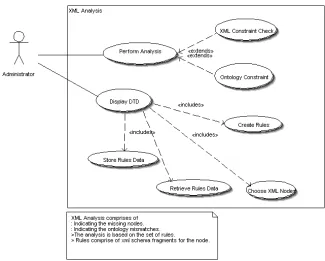
[image:3.612.144.469.321.582.2]The following UML Use-Case diagrams serve to clarify the tasks of the Administrator:
Fig. 1. The teiWizard helps the administrator of the repository with XML Analysis
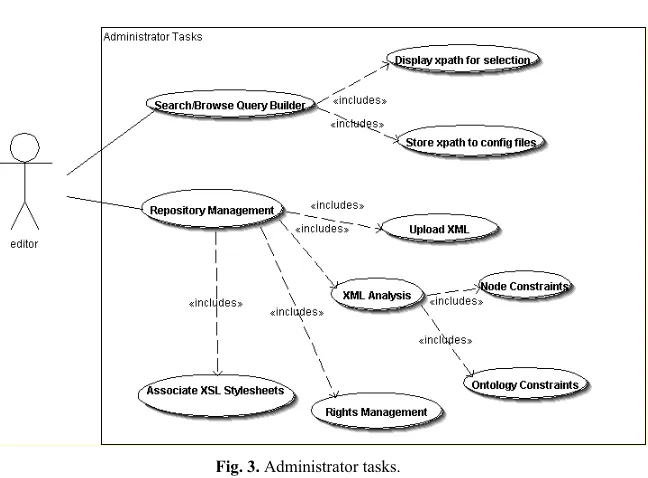
to XML configuration files that are then read by a set of XSL style sheets to render the browse/search and index pages.
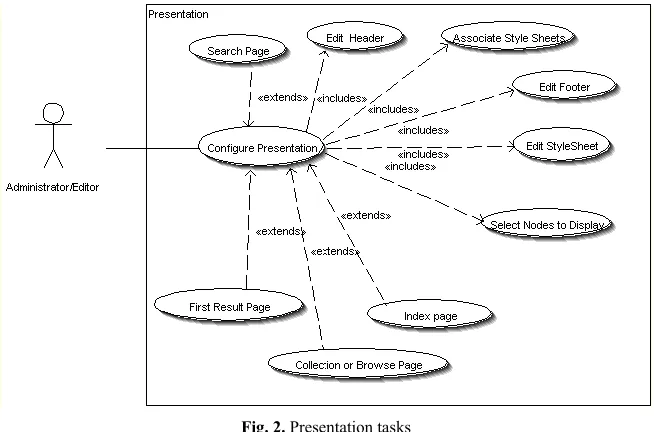
Fig. 2. Presentation tasks
The administrator customizes the looks of the repository (figure 2), by modifying the header/footer and CSS stylesheet of the project. The dynamic repository, search and browse pages can be further customized by selecting an appropriate HTML form element like a select box or an anchor.
Fig. 3. Administrator tasks.
The rest of this paper will describe various components of <teiPublisher> in detail.
3 Structure and operational issues
The application can be divided into two broad parts: an XML Analysis Tool and a
Repository Management System.
Analysis of Document Instances
A majority of elements typically searched on via a search page are contained in the
teiHeader5. The teiHeader provides declarative and descriptive information about the
text (metadata) which is composed of four distinct parts: the fileDesc, encodingDesc,
profileDesc and revisionDesc. These elements, along with their associated child elements, can be selected as areas of interest in an XML document and be checked for uniformity across the entire repository. This check can be as broad as confirming the existence of a particular element or elements, or an element set, or confirming that a predefined set of values developed for an ontology has been adhered to.
When administrators first load documents into the repository, <teiPublisher>'s XML analyzer will take them through a series of steps that will highlight information regarding elements in the teiHeader present across the document set. It will then point
5teiHeader is the element used by TEI to mark the beginning of the metadata section of a TEI
out elements missing from particular instances, and will act as a visualizer so that the administrators can decide if missing elements need to be added before the instance is added to the database.
Once the original set of documents has been homogenized, as new instances are added, <teiPublisher> will process the XML document confirming whether particular elements from the teiHeader are present, and that elements which contain controlled vocabulary information are not only present, but conform to a pre-existing scheme. For the first release of the software, the customization tools of <teiPublisher> are predicated on a project using TEI-Lite. By developing <teiPublisher> for the TEI-Lite DTD, certain assumptions can be made which are built into the logic of the application. These rules can be overridden or customized by an administrator to match a particular repository's requirements.
Repository Management
Search and browse facilities are a key aspect of DLs. Thus, a key feature of
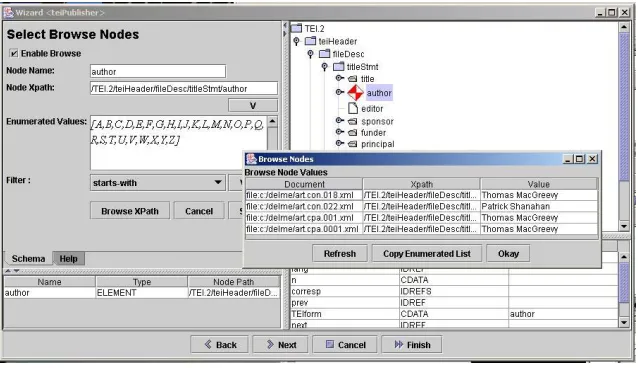
<teiPublisher> is the ability to allow administrators to construct search or browse pages based on TEI elements or attributes. The selection of a node or attribute creates an XPath6 expression that is used for search purposes. This mechanism also allows scholars with knowledge of XPath to further refine searches. For example, the application may automatically generate an XPath expression to search for the
<author> element, but to search both for <author> and <editor>, the administrator will have to modify the XPath. An example of this feature can be seen in the image below:
Fig. 4. Selecting browse nodes.
The steps to select Search Nodes to create the Advanced Search Page are similar to the steps taken to construct the Browse Page. The only difference is that the user has the option of creating a text search within a particular node. The search node is displayed as a textbox for full text search. Given this similarity, and for the sake of brevity, we will focus on how the browse page is implemented to demonstrate how easy and user friendly this procedure is.
[image:7.612.144.463.308.492.2]First, administrators select a node from the teiHeader via the DTD tree structure shown by the application (see the right window of figure 4). When the tree expands, the administrator then selects the elements which will form the basis for the browse/search page (the browse page may be made up of multiple elements). Once the element to be browsed on is selected, a right click allows the administrator to choose an attribute to further refine the browse parameter (for example, you might want to browse on <title type="main">).
Fig. 5. The node XPath, and the filter selection.
The element name and XPath is copied to the panel on the left, as in the illustration above. Next, the filter we wish to browse by is chosen. The administrator can select
starts-with to browse alphabetically by the first letter of the node. The options equals
Web Page Design
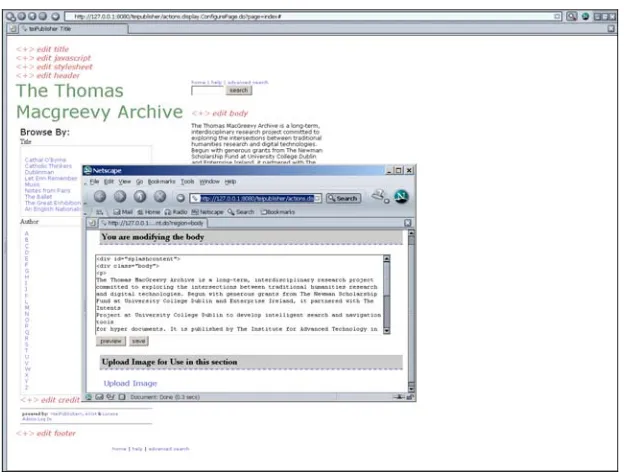
[image:8.612.151.463.220.458.2]The design of the repository’s web pages is customizable using the WIKI concept7. In other words, an administrator can control the looks of the web pages through a dynamic window which reflects changes immediately. An example of this feature can be seen in the image below (figure 6) in which the HTML modifications made in the right hand pane are reflected in the generated page to the left.
Fig. 6. Web page design.
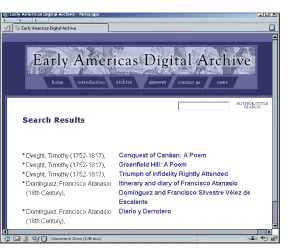
In addition, administrators are provided with an interface to customize the first result page so that only the value from selected elements (such as author, date, and title) is displayed, as in the example below (figure 7):
Fig. 7. Interface to customize the first result page.
By the same token, the browse page will allow the contents of repositories categorized by collection, such as primary and secondary texts, or another sorting mechanism, such as alphabetical or date order, to be displayed by category. The repository will also allow administrators to control access to the collection by allowing only certain IP addresses or a range of IP addresses to access content.
4 Publishing Documents
<teiPublisher> allows a broad range of customizations. Since we are employing XSLT scripts to produce display documents, these scripts can be customized according to project needs.
automatically produce HTML with sophisticated functionality based on structural markup information, providing added-values to collections.
<teiPublisher> default XSLT scripts are designed to produce XHTML, and use CSS stylesheets both to make HTML code lighter, and to allow easy global control of certain rendering properties.
As the application includes an Apache Tomcat server to publish the repository on the web, very little technical knowledge is assumed of administrators. The administrative interface is thus designed to guide administrators through a series of steps that will set up and publish the repository.
5 Architecture
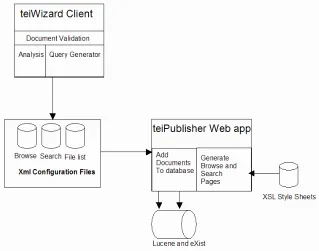
Customization data generated by the user, such as XPath expressions, HTML code, CSS stylesheet, search terms, and access control is stored in several XML files (figure 8). This information is used to generate the public interfaces of the repository.
[image:10.612.146.465.383.634.2]The project is based on eXist. Since it utilizes the XML:DB API, other XML databases such as Xindice and Tamino that support the API can be plugged in. The figure below shows the interaction between the administrative client, which generates the XML configuration files per project repository, and the <teiPublisher> web application which reads the configuration files to generate the repository portal:
The user interface elements are represented as stateful objects on the server, separating rendering and event management. The use of Model View Controller Architecture along with XSLT helps to decouple the binding between data, logic and view. The customization data for logic is largely based upon XPath expressions which are generated by administrators' interaction with the XML analyzer. Data customization, such as the development of a controlled vocabulary, is made possible through XPath expressions which, in turn, create the search and browse facility.
6 Conclusion
The process of making a customizable repository is much more challenging than developing a repository for specific content. Even a restricted tagset, such as TEI-Lite, allows users great flexibility. For example, an administrator of a repository based on letters might want to create a browse page which is date based. An administrator of repository based on poems might want her browse page to be searched in alphabetical order by poem title and author. Thus the approach we have taken in configuring <teiPublisher> is to allow the administrator to make the widest variety of choices. Thus the problems or unsatisfactory results created by a one size fits all solution are mitigated by the customization modules which provide administrators with choices, from how to store the data, to what elements will be searched on, to display modes. In addition, the more an administrator knows about the XML publishing environment, the more she will be able to work with<teiPublisher>
to customize her site. For example, knowing CSS and HTML will allow her to customize the looks even further, by adding a background image, or an image-based logo. Knowing XPath will allow administrators to go into the code and create search possibilities, for example, searching on two nodes at one time, which are currently not possible using teiWizard alone. Not only is the <teiPublisher> team committed to improving the software based on feedback from the beta and subsequent releases, in the spirit of open source software in which this product was created, we plan on incorporating the contributions of others into the product, which will further refine and improve it, making it a truly community-based tool.
References
1 Qinwey Zhu, Marcos-André Gonçalves, Rao Shen, Lillian Casell, and Edward Fox.Visual Semantic Modeling of Digital Libraries. In T. Koch and I.T. Solvberg, editors, Research and Advanced Technology for Digital Libraries: 7th European Conference, proceedings/ECDL 2003, volume 2769 of Lecture Notes in Computer Science, pages 325-337, Trondheim, Norway, 17-22 August 2003. (c) Springer-Verlag.
3 Sperberg-McQueen, C.M.. and Burnard, L. (eds.) (2002). TEI P4: Guidelines for Electronic Text Encoding and Interchange. Text Encoding Initiative Consortium. XML Version: Oxford, Providence, Charlottesville, Bergen.
4 Dave Raggett, Arnaud Le-Hors and Ian Jacobs, HTML 4.0 Specification (W3C Recommendation), World Wide Web Consortium, 24th April 1998, http://www.w3.org/HTML/