Steps to Reduce Global Warming Issues by Power
management in networked Desktop computers using
Java LAN Controller
Nilima Zade
Prafull Kherde
Sachin Bojewar
Department of Electronics Engg. Engineer - Product Development Department of Computer Engg. P.V.P.P.C.O.E SunGard Solutions (I) Pvt.Ltd. Vidyalankar Institute of Technology
Mumbai, India Pune , India Mumbai, India
ABSTRACT
Computer power management for standalone computer is widespread globally but very few enterprises and educational institutes utilize computer power management in Local Area network. Networks pose special challenges for Computer power management. Depending on the systems (hardware and software), the network can partially or entirely defeat power management, or may require extra configuration changes for it to function. Now a day‘s many LAN have heterogeneous environment in which different operating systems are running on client side such as Microsoft windows and Linux based OS, generally windows on client side and Linux based system on server side. Microsoft dispatches the power management patches for the LAN which has only Microsoft client and server. So we need third party solution for the power management in LAN which can be used in such heterogeneous environment. Some software solutions are available that you need to be purchased and to pay for maintenance which discourages people to install it in their LAN.
In this paper we propose a software system that can be used as remote control for PCs connected as Local Area Network. This software can be used to identify idle machine in network and put them in standby mode remotely.
Keywords
LAN – Local area network, JNI – Java native interface, BIOS – Basic input output system, PC – personal computer, OS – operating system. CPM-computer power management
1.
INTRODUCTION
In many recent survey it is found that hundreds of professionals keeps their desktops powered on during 40% to 45 % of total non-work hours, including evenings and weekends it means that computers are operating yet unused for more than 55 hours a week in LAN. Worse, each respondent‘s computer in network was almost certainly equipped with power management settings which is energy-saving features that went unused. This equates to an unnecessary, additional electricity cost of more than Rs 1000 per medium capability desktop annually. It would save approximately 15 million megawatt hours, enough electricity to light 8 million homes. It would also prevent approximately six million tons of greenhouse gas (CO2) emissions, roughly equivalent to removing a million cars from the road. Most important barrier to make CPM compatible in LAN is that CPM should not adversely affect on regular computer maintenance tasks such as periodic delivery of software
updates and security patches.
Specific applications and usage models drive the need for continuous network connectivity, but they rely on an infrastructure of basic network protocols to work. A simple example of a needed basic function for connectivity is the Address Resolution Protocol (ARP), which associates an Ethernet or Wi-Fi hardware (or MAC) address with the IP address of each PC and router port on a subnet. Each PC (and router port) maintains an ARP cache that contains the IP and MAC addresses for every PC on the subnet. In the router, the ARP cache refreshes by periodically broadcasting ARP requests to all hosts on the subnet, but if a PC is in sleep mode, it can‘t reply to such requests. This missing reply means that the entry for the sleeping PC in the router table will be timed-out and removed, which has an extremely serious consequence: the router can no longer forward packets from outside the subnet to the sleeping PC. Quite simply, the router no longer knows how to address packets to the no responding host. The router can‘t even deliver a special wake-up packet, so the sleeping PC remains effectively unreachable to the rest of the world (outside its subnet).
1.1.
PC Power Management with Network
As many computers are connected in networks, users become more dependent on the ability to access individual machines at any time of day. Individual users want to access their own files as well as user are relying more on accessing data on other user's systems. As software become more sophisticated, user become less aware of how many machines may be required to be on and running to accomplish any particular task.
Fig 1: Client Server network model
In many networks, a central server will send out periodic "Are you there?" messages to see which computers are still on and connected to the network. For many computers, these messages cause enough activity to keep the PC and monitor awake, defeating power management. If the PC does successfully go to sleep, it may fail to respond to the "Are you there?" message, so that the server assumes the machine is off and terminates network services to it. When the user brings the PC back to full-on operation, the network connection has been lost. This problem usually results in power management being disabled by network administrator.
Some newer BIOS systems are able to treat network activity differently from other activity, such as from the keyboard. Network activity on these PCs will only power up those parts of the system needed to respond to the network request. For example, the processor may switch from 'stopped' to half of the normal speed, process the task, and then return to a stopped mode. The PC is not returned to a full-on mode, and the monitor is not activated.
Now a day‘s few systems are able to successfully power manage and maintain full network services. Some of these have smart interface card that respond to the routine message without bothering the CPU. Others have a chip installed that bypasses operating system operation that would otherwise defeat power management. But need to pay for these newer systems which discourage people to upgrade their system. Practically in an organization changing infrastructure is very difficult. [3]
1.2.Computer Power Management
The energy usage of a PC is dependent on several things: 1. The make and model of PC and the component used in its construction.
2. Power state of monitor 3. Power state of system 4. Utilization of PC resources
There are several different ways in which the energy use of a PC can be managed such as placing the monitor into standby mode, spinning down the hard disk, placing the PC in low power state.
Following table1 shows power consumption in different states.
[image:2.595.322.533.98.207.2]
Table 1. Power consumption in idle and standby state [7]
Java LAN controller basically deals with how to save power while the PC is ON. There are two reasons to optimize idle power consumption on the system. First there are various times throughout the day when the PC is idle and the more the system gets to idle and stays idle, the less power it uses. Second, idle power consumption is the ‗base‘ power consumption for all other workloads. A system which consumes 15W at Idle will consume additional power over the idle power consumption while is use for other workloads. By reducing the idle power consumption on the platform we will improve most other scenarios as well.
Using an example desktop PC, power consumption is measured for Sleep, Hibernate, Shut Down and the basic ON state, with just the desktop shown and no open programs. Resume latency can be measured —the amount of time to get the system back to the on state.
The fig 2 makes it pretty clear why it is focused on Sleep reliability and performance, and encourages most people to use it when they are not using their computer. Sleep consumes nearly the same amount of power as Shut Down, but resumes the system in less than 2 seconds, instead of going through the boot process. It is well-known that boot takes a significant amount of power so when considering whether to turn off the machine to save power or to put it into a low power state, think about how long the machine will be out of use.
Power generation is a leading producer of CO2 in the world [1]. Many organizations are exploring ways to reduce the impact of their power consumption and thus create a positive effect on the environment. Using the centrally managed power
PC Model Idle state Standby mode
Low Capability PC
32.21 1.23
Medium Capability PC
66.59 1.95
High Capability PC
91.00
0.93
[image:2.595.316.538.500.702.2]settings in computers is one way organizations can help lower power consumption, and as a result, reduce energy costs and emissions.
Following table will illustrates how saving power results in saving trees.
Table 2. Shows saving of power and trees.
1.3.Avoiding conflicts with regular software
updates and security patches
[1]A sleeping computer can‘t run software patches and security updates. Activating computer power management in LAN should not adversely affect on updating and maintaining their networks. Overcoming this challenge is the primary concern of most network administrators.
There are three basic network management scenarios opportunistic, scheduled or on-demand.
Opportunistic maintenance refers to patching and updating that occurs as soon as computer becomes available on the network. Scheduled updates automatically occur at a preset time. On-demand updates are network administrator- initiated and take place immediately.
1.3.1.
Opportunistic Patching and
Maintenance:
As sleeping computer does not respond for patching and updating, in opportunistic maintenance patching and updating occur when computer wakes. So in this scenario any additional configuration does not require to run CPM effectively. When services like antivirus update is running in conjunction with a sleeping computer, these services will force a check-in and catch-up to where it should be with software updates. Opportunistic maintenances does not affect adversely on load balancing if appropriate offset period is set.
1.3.2.
Scheduled Updates
Scheduled updates can be done through Task Scheduler by setting it through OS. Task Scheduler can awaken sleeping computers for updates. Scheduled tasks use the real time clock and power management events provided by advanced configuration and power interface to wake the computer out of standby. For standalone computers enabling scheduled wakeup is easy but for networks it require third party desktop
management tool. Also, network administrators can centrally manage scheduled tasks via scheduled task file.
1.3.3.
On-demand Updates
It is a Layer 2- based means which can be used for waking up machines from sleep states and for remote access to them. Network administrator can use Wake on LAN (WOL) to wake up sleeping machine at any time. The WOL setting tied to the network interface card driver is activated by selecting the appropriate options on the network adapter power management properties located in the device manager. While designing Java LAN Controller opportunistic patching maintenance scenario is considered which does not require any additional configuration but only thing need to take care of setting appropriate of system management server offset time. To ensure that every computer in LAN should get update and security patches, one more step is added in this scenario. Before installing java LAN controller, network administrator opinion may be taken to decide one fix time slot. In this fixed time slot administrator will check the all machines in LAN has got update or patch if not then updating and security patch can be distributed to the machine during that time slot. If machine sends standby request to server during this time server will disallow that.
2. IMPLEMENTATION
Here client side algorithm and sever side algorithm is presented. When System idle task scheduler find system idle for set time it broadcast state transition message to all application running on system. Each application has two seconds to perform any necessary actions before the system starts the transition to sleep and application can deny the request. An application is created that catches this message and sends to server for permission.
Client side algorithm is implemented in C++ to invoke power management system call and java to communicate with server.
Server side algorithm is implemented in java and for user interface is done by using java swing.
Client side implementation
Small application will trigger an event through which we make idle to standby.
This application will do three tasks
1.
SetStatus () : when user will install application it will set the idle timer and that can be in native language.To save power as we know power management policies are supported by operating system and BIOS. We can set the power options But here we cannot follow this path as we don‘t want user access on power management polices so we used Power Management settings can be set through a logon script using the command line utility.
2.
EventHandelerSleep (): This will notify to server that machine is going to standby mode.3.
EventHandelerWakeup (): This will notify to Server that machine resumes in active mode.JNI allows one to write native methods to handle situations when an application cannot be written entirely in the Java programming language, e.g. when the standard Java class
PC model Processor speed
Power saved in
one hour in
watts
Savings: Acres of Trees freed from Carbon Processing[6]
Low Capability PC
2.2 GHz 30.5 1,075
Medium Capability PC
2.8 GHz 64 2,280
High Capability PC
library does not support the platform-specific features or program library. It is also used to modify an existing application—written in another programming language—to be accessible to Java applications.
The JNI framework lets a native method utilize Java objects in the same way that Java code uses these objects. JNI is sometimes referred to as the "escape hatch" for Java developers because it allows them to add functionality to their Java application that the standard Java APIs cannot otherwise provide. It can be used to interface with code written in other languages, such as C and C++. JNI specifies a communication protocol between Java code and external, native code. It enables your Java code to interface with native code written in other languages (such as C, C++). We required this feature as power management functionality is supported by underlying hardware and BIOS of O.S. mostly implemented in C or C++.
Client side implementation will change according to operating system. We have taken an example of windows operating system for which this implementation is somewhat difficult as we cannot access the system files whereas in Linux operating system it is easy as we can access system files.
2.2.1
Client side algorithm
Set idle timer
If PBT_BROADCAST message received
Identify the message
If PBT_APMSUSPEND message received
Send PBT_APMSUSPEND request to server
Get reply from server
If sever allowed to standby Go to standby mode
Else
do not go to standby mode
Else PBT_APMWAKEUP message received
Send wakeup event to server
Sever side implementation
Working of Java Lan Controller is based on the fact that BIOS will initiate the power management event as per ACPI policies for desktop computers. This indicates that standby request can be generated only by client computer in network. There are two approaches to put idle machine in standby mode in network. In first approach after getting standby request from client server will check whether other users are logged in or machine is doing anything which require less CPU utilization such as machine working as router. Router has to be on even if it is idle. Below is the algorithm given for this approach.
1.3.4.
Server side Algorithm 1.
After getting standby request from client side, check
server gets standby request from client
If ClientStatus = = Active
If
there are any user connected
If
they are doing anything No standby allowed
Else
If the system is doing anything No standby allowed
Else
Allow standby
Else server gets wakeup event from client
If ClientStatus = = standby || inactive
Then change Client Status to Active
Above method is useful when many users may work on same desktop and relatively fewer computers are in network. Because BIOS sends PME (power management event as per ACPI) to all the devices connected and application running on it, wait for few seconds. If it gets OK signal from the devices and application running on it within this period then only it goes to standby mode. If many computers are in network then load on server will increase itmay possible that server could not respond within limit otherwise above algorithm is very efficient.
This situation can be modified by making algorithm simple. After study it is found that standby request generates only when users are not doing anything, CPU utilization is below 10%, all the running application accepts PME message. Taking this in to account, algorithm given below is designed. As mentioned above one fixed time slot can be considered to take additional care of updating and patching of all the machines. Beauty of this algorithm is it can work safely in any kind of network environment and save energy.
After getting request from client side, server checks it is standby request or wakeup event. If it is wake up event then it just changes client status active and if request is for standby permission then according to set time zone it allow or disallow the standby request.
1.3.5.
Server side Algorithm 2
If server gets standby request from client
If
If RequestTime ! = SetTimeZone
Then Standby allowed and change Client Status to Standby
Else RequestTime = = SetTimeZone
No standby allowed
Else server gets wakeup event from client
If
[image:5.595.74.300.385.583.2]ClientIpAdd = = IpAdd && ClientStatus = = standby || inactive
Then change Client Status to Active
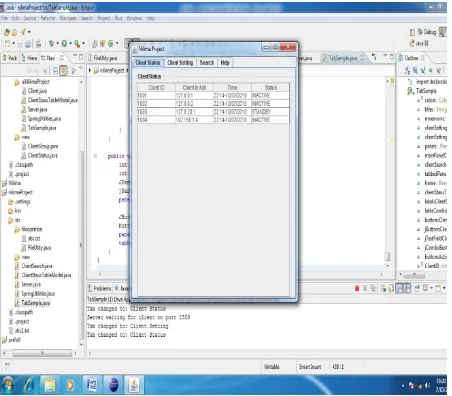
Server will have one user interface which shows status of all clients in the LAN
Server side application will have a method which will be invoke when ClientEventH() ping the message to their application and by utilizing this it will show machine status to the user.
Figure 4 shows server side window where administrator can monitor all the client status and time duration for which client is standby, active, off.
Figure 4 network administrator side result window
3. RESULTS
3.1. Empirical Data
This utility software has deployed in a LAN in which just three clients and one server is connected to demonstrate the results. Results are monitored for one month. Table 3 shows state of computer during specific period of the month. We have deployed this software in educational complex‘s LAN where PC‘s are completely shutdown at night and during holydays. But if you deployed this in companies then you can save considerable amount of power because in industry PC‘s are kept on during night, holydays for distribution of software
patches and antivirus updating. Also Microsoft says computer consumes 1.5 to 2.5 watt power even in off state, this reduces battery life. Thus by putting pc in standby mode we can save battery which automatically results in saving money. Following window shows client connection to the server and request to the server.
Fig 3 Client connection to server
Following window shows administrator side client Status according to time zone and state of client when administrator client status tab.
Here many number of clients can be shown as java Swing scroll ball is used, but in such case it will be very time consuming and hectic to see status of any one client . Solution to this problem is search tab. By pressing search tab you can select IP address and can find status particular client.
Administrator has full rights to set client in which he can remove and add client. To add client administrator has to select only group and time zone and IP address will generate automatically.
Table 3 State of client and hours of its state
Clients Active (hours)
Standby (hours)
Inactive (hours)
PC1 210 210 300
PC2 230 200 290
PC3 280 220 220
3.2.
Discussions
Total hours are 720 in a month. These are medium capability PCs, so saving 60 watts per hour. Following are the calculations for total energy saving in a month. In standby mode one PC is for near about 7 hours in a day.
Total energy (kWh) saved in a month for one PC is as per given below.
Suppose Tariff is 6.5 rupees per kWh for commercial then rupees saved for one PC in a month approximately is 1000 rupees as per following calculation.
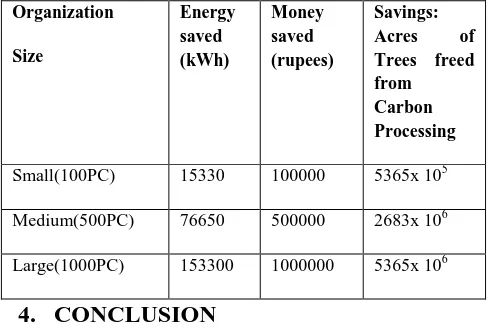
[image:6.595.45.290.178.342.2]10.8 kWh x 6.5 = 70.2 rupees per month so Rs 997 annually. Following table gives us illustration how energy and trees can be saved in different organizations by using this software.
Table 4. Power saved in various types of organization in a month.
Organization
Size
Energy saved (kWh)
Money saved (rupees)
Savings: Acres of Trees freed from Carbon Processing
Small(100PC) 15330 100000 5365x 105
Medium(500PC) 76650 500000 2683x 106
Large(1000PC) 153300 1000000 5365x 106
4.
CONCLUSION
Thus we have proposed a solution to reduce power consumption in LAN. By using this software we can save power, which will lead to reducing CO2 emission. The software is step toward GREEN TREE MANTRA to reduce GLOBAL WARMING.
At this first stage we have developed it for windows platform. We have chosen the windows platform as mostly client side desktop PCs in organization are having this operating system. The same concept can be applied to other operating environments.
The Java LAN Controller provides an easy to use and cost effective approach for improving the energy efficiency and environmental friendliness of PC environment.
Electricity costs continue to rise, yet most PCs today are not even utilizing minimal power management settings when they are connected in network. Deploying the Java LAN Controller power management solution IT energy cost can be reduced by up to Rs 1000 per PC, per year.
At this stage client side operating system is considered windows xp, it can be easily modified for windows 7. Server side application is open sourced no need to change. In the next version client side application can be developed for unix based operating system.
5.
ACKNOWLEDGMENT
We are greatly indebted to teachers in the VIT and PVPPCOE. We are also thankful to head of department for allowing to use laboratory for deployment of this software and taking results.
6.
REFERENCES
[1.] Power management of computersElectronics and the Environment, 2004. Conference Record. 2004 IEEE International Symposium on Issue Date : 10-13 May 2004
[2.] Power management for networked computers: A review of incentive programs Sustainable Systems and
Technology, 2009. ISSST '09. IEEE International Symposium on Issue Date: 18-20 May 2009
[3.]User Guide to Power Management for PCs and Monitors Bruce Nordman, Mary Ann Piette, Kris Kinney, and Carrie WebberEnvironmental Energy Technologies Division Lawrence Berkeley National Laboratory University of California Berkeley, CA 94720 http://eetd.lbl.gov/pubs/39466.pdf
[4.] AMD White Paper: Power Consumption 2010 – The Truth About Power Consumption Starts Here
[5.] Powerprofile white paper - why power schemes are not enough.
[6.] White Paper Green ICT T-Systems Enterprise Services GmbH
[7.] [A.T. Kearney 2008] Green IT – vom Umweltsünder zum Klimaretter [Green IT – from environmentalpolluter to cliamate saver]
[8.] [Experton 2007.2] Building a Green Server Infrastructure [9.] Managing energy consumption costs in desktop PCs and LAN switches with proxying, split TCP connections, and scaling of link speed international journal of network management int. J. Network Mgmt 2005; 15: 297–310 [10.] Whitepaper Ian Godfrey - Remote Management of BIOS
Configuration
[11.]M.C. Sanchez et al., ―Savings 1. Estimates for the United States Environmental Protection Agency‘s ENERG Y STAR Voluntary Product Labeling Program,‖ Energy Policy, vol. 36 no. 6, 2008, pp. 2098–2108.
[12.] Energy Information Administration, ―Electric Power Monthly,‖ US Dept. Energy, 2009; www.eia.doe.gov/ cneaf/electricity/epm/table1_1.html.
[13.] J. Roberson et al., After-Hours Power Status of Office Equipment and Inventory of Miscellaneous Plug-Load Equipment, tech. report LBNL-53729-Revised, Lawrence Berkeley Nat‘l Lab., 2004.
[14.] Power management Schemes Build date: 5/27/2010
http://msdn.microsoft.com/en-us/library/aa372711%28VS.85%29.aspx [15.] System Sleep Criteria Build date: 5/27/2010
http://msdn.microsoft.com/en-us/library/aa373233%28VS.85%29.aspx
[16.] Windows Energy Efficiency Build date: 6/01/2009 http:// msdn.com/b/e7/archive/2009/01/06/windows-7-energy-efficiency.aspx
[17.] Introduction to area network and network types http://compnetworking.about.com/od/basicnetworkingco ncepts/Networking_Basics_Key_Concepts_in_Computer _Networking.html [Date of reference 03-11-2009]
[18.] Power Scheme Management
http://msdn.microsoft.com/en-us/library/aa372711%28VS.85%29.aspx[Date of reference 12-12-2009]
[19.] Power Scheme Management
http://msdn.microsoft.com/en-us/library/aa372711%28VS.85%29.aspx[Date of reference 12-12-2009]
[20.] Standby power
![Table 1. Power consumption in idle and standby state [7]](https://thumb-us.123doks.com/thumbv2/123dok_us/8119058.793581/2.595.316.538.500.702/table-power-consumption-idle-standby-state.webp)