This brief applies to all Microsoft Volume Licensing programs.
Table of Contents
Summary ... 1
What’s New in This Brief ... 1
Details ... 1
Additive CAL ... 2
Microsoft Lync Server (Formerly Microsoft Office Communications Server) Licensing Changes Effective December 1, 2010 ... 4
Frequently Asked Questions ... 6
Summary
Server software that requires Client Access Licenses (CALs) offers one base CAL and may offer one or more additive CALs. Base CALs license access to server functionality. Additive CALs license access to advanced server functionality and must be licensed in addition to the corresponding base CAL. Both types of CALs are available on a per-user and per-device basis.
What’s New in This Brief
This brief replaces a previous version published in April 2013. The content has been updated to reflect the current products as of November 2013.
Details
There are two practical components when licensing access to Microsoft server products: access to the Windows Server operating system itself, and access to the Microsoft application that works within the Windows Server environment. This is often referred to as licensing “the stack” of products used in an IT environment. Users must license access to each layer of the stack. Common examples of this include use of Exchange Server and Lync Server: users must acquire CALs for Windows Server, which is required for use with these products, as well as the appropriate CALs for Exchange and/or Lync Server.
Base and Additive Client Access
Licenses (CALs): An explanation
November 2013 2
Figure 1: License structure for base and additive Server/CAL products
Additive CAL
Some Microsoft software products, such as the Windows Server operating system, license additional functionality with licenses known as “additive CALs.” Additive CALs license functionality in the base server product and must be licensed in addition to the base CAL. Additive CALs are sometimes referred to as “premium” or “premium services” CALs. External Connectors are generally available for both base and additive functionalities.
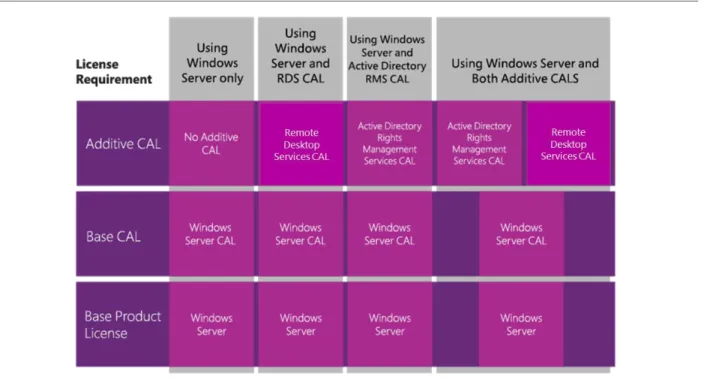
Examples of additive CALs include the Windows Server Remote Desktop Services (formerly Terminal Services) CAL and the Windows Server Active Directory Rights Management Services (RMS) CAL. Both of these additive CALs license functionality included in Windows Server and require a Windows Server CAL for their use.
The following figure describes the four licensing options with Windows Server CALs.
Figure 2: Windows Server CAL license structure options
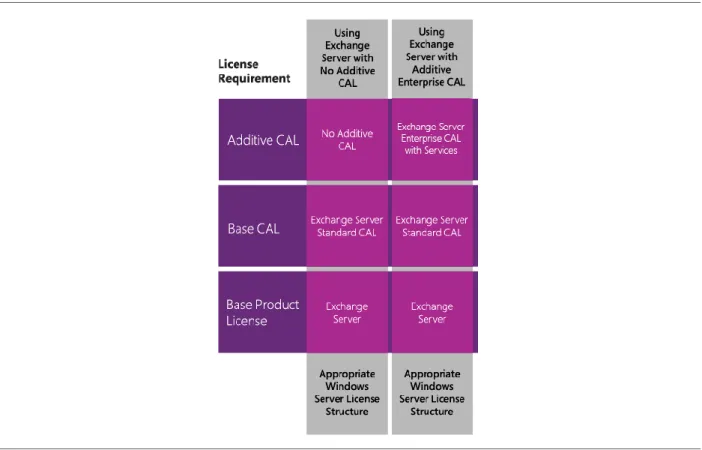
Microsoft Exchange Server offers an additive CAL called the Exchange Server Enterprise CAL, which is licensed in addition to the Exchange Server Standard CAL. Each user or device requiring functionality from the Exchange Server Enterprise CAL (unified messaging, personal archiving, etc.) also needs to purchase a matching Exchange Server Standard CAL as prerequisite.
November 2013 4 The following figure describes the two licensing options with Exchange Server CALs.
Figure 3: Exchange Server CAL license structure options
In a similar fashion to these examples, Microsoft SharePoint Server offers the SharePoint Standard CAL (portals, enterprise content management) and the SharePoint Enterprise CAL (business intelligence, enterprise search, electronic forms). Microsoft Lync Server offers the Lync Server Standard CAL (instant messaging and presence), the Lync Server Enterprise CAL (audio/video/web conferencing), and the Lync Server Plus CAL (Enterprise Voice).
Microsoft Lync Server (Formerly Microsoft Office
Communications Server) Licensing Changes Effective
December 1, 2010
For Lync Server, formerly named Office Communications Server (OCS), access to Enterprise voice workloads are licensed through the Lync Server Plus CAL (Plus CAL). Enterprise voice capabilities previously available through the OCS Enterprise CAL are now available only through the Lync Server Plus CAL. Like the Enterprise CAL, the Plus CAL is an additive CAL, and can be purchased only once the Lync Server 2010 Standard CAL has been acquired. In other words, both the Lync Server Enterprise and Plus CALs are additive CALs; however, neither is a prerequisite for the other.
The Lync Server Plus CAL is not included with the Enterprise CAL Suite (ECAL Suite). The price for the Lync Server Enterprise CAL has decreased to reflect the transfer of voice functionality to the Plus CAL.
Customers who purchased the OCS Enterprise CAL or Enterprise CAL Suite after June 30, 2009, but before the scheduled General Availability of Lync Server 2010 on December 1, 2010, and maintained active Software Assurance, have access rights equivalent to those rights under the Lync Server Plus CAL. Customers need to separately renew
their Software Assurance for the Lync Server Plus CAL at their first renewal period after the Lync Server 2010 launch if they choose to keep the Lync Server Voice CAL SA benefits.
Customers who purchased an OCS Enterprise CAL or the Enterprise CAL Suite before July 1, 2009, and maintained active SA have access rights equivalent to those rights under the Lync Server Plus CAL for two releases, Lync Server 2010 and Lync Server 2013. Customers need to separately renew Software Assurance for Lync Server Plus CAL at their first renewal period after the Lync Server 2013 release in order to maintain their SA benefits. This grandfathering policy addresses concerns about the transition and provides sufficient time for deployment and budgeting.
Customers who do not have or maintain active Software Assurance on their OCS Enterprise CAL or the Enterprise CAL Suite will not be qualified for either grandfathering offer and will be required to purchase the Lync Server Plus CAL to acquire the voice functionality.
The following figure outlines the four licensing options with Lync Server CALs.
November 2013 6
Frequently Asked Questions
1. Are premium services CALs the same as additive CALs?
Yes. Additive CALs are sometimes referred to as “premium” or “premium services” CALs. The terminology was updated to be more descriptive and reduce confusion with online services.
2. Do I need more than one additive CAL per user or device to access the same functionality running on
more than one server?
No. Only one user or device additive CAL is needed to use the services on any number of your licensed servers. For example, a Remote Desktop Services User CAL permits one user to access Remote Desktop Services functionality on any of your licensed Windows Server operating systems.
3. Do additive CALs work with only specific editions of server software, such as Standard Edition or
Enterprise Edition, or do they work with any edition?
Generally, additive CALs can access any edition of the server software. For example, Exchange Server is available in both a Standard Edition server and Enterprise Edition server. The Exchange Standard CAL and Exchange Enterprise CAL may be used with either edition of the server software.
4. Are all CALs licensed in the same way?
Please consult the Microsoft Product Use Rights to find full information about the different Microsoft Client Access Licenses usage rights. The Product Use Rights are available here:
http://www.microsoft.com/licensing/about-licensing/product-licensing.aspx
5. Can a single-server product have multiple additive CALs?
Yes. A single-server product can have multiple additive CALs. An example of this is Windows Server, which has Windows Active Directory Rights Management Services as well as Remote Desktop Services, each of which requires separate device and/or user CALs if used by a customer.
6. Do additive CALs come with the Core CAL Suite? For example, do Core CAL Suite customers receive rights
to Remote Desktop Services and Active Directory Rights Management Services?
No. Additive CALs are not included in the Core CAL Suite. Additive CALs are only required when their
corresponding functionality is used, and they need to be licensed separately. However, additive CALs can be used in conjunction with the Core CAL Suite.
7. What additive CALs come with the Enterprise CAL Suite?
As of April 1, 2013, the additive CALs found in the Enterprise CAL Suite are: Windows Server 2012 Active Directory Rights Management Services CAL, Exchange 2013 Enterprise CAL with Services, SharePoint 2013 Enterprise CAL, and the Lync Server 2013 Enterprise CAL.
8. Is the Enterprise CAL Suite an additive CAL to the Core CAL Suite?
No. CAL Suites are not additive. The Enterprise CAL Suite includes the components of the Core CAL Suite, so customers may buy it without also buying the Core CAL Suite. Core CAL Suite licensees may buy a separate “step-up” license that converts their Core CAL Suite license into an Enterprise CAL Suite license.
9. What CALs come with the Enterprise CAL Suite and the Core CAL Suite?
The diagram below shows the components being offered in the Core CAL Suite and Enterprise CAL Suite as of April 2013. For more information about the Microsoft Core CAL Suite and Enterprise CAL Suite, visit
http://www.microsoft.com/calsuites.
Figure 5: Core CAL Suite and Enterprise CAL Suite Components
© 2013 Microsoft Corporation. All rights reserved.
This document is for informational purposes only. MICROSOFT MAKES NO WARRANTIES, EXPRESS OR IMPLIED, IN THIS DOCUMENT. This information is provided to help guide your authorized use of products you license; it is not your agreement. Your use of products licensed under your volume