Learning the VB 2005
Language
B
efore you can create an ASP.NET application, you need to choose a .NET language in which to program it. If you’re an ASP or VB developer, the natural choice is VB 2005. If you’re a longtime Java programmer or old-hand C coder, C# will suit you best.This chapter presents an overview of the VB 2005 language. You’ll learn about the data types you can use, the operations you can perform, and the code you’ll need to define functions, loops, and conditional logic. This chapter assumes you’ve programmed before and you’re already familiar with most of these concepts—you just need to see how they’re implemented in VB 2005.
If you’ve programmed with an earlier version of Visual Basic, you might find that the most beneficial way to use this chapter is to browse through it without reading every section. This approach will give you a general overview of the VB 2005 language. You can then return to this chapter later as a reference when needed. But remember, though you can program an ASP.NET application without mastering all the language details, this deep knowledge is often what separates the casual programmer from the legendary program-ming guru.
■
Note
The examples in this chapter show individual lines and code snippets. You won’t actually be able to use these code snippets in an application until you’ve learned about objects and .NET types. But don’t despair—the next chapter builds on this information, fills in the gaps, and presents an ASP.NET example for you to try.The .NET Languages
The .NET Framework 2.0 ships with three core languages that are commonly used for building ASP.NET applications: VB, C#, and J#. These languages are, to a large degree, functionally equivalent. Microsoft has worked hard to eliminate language conflicts in the
21
.NET Framework. These battles slow down adoption, distract from the core framework fea-tures, and make it difficult for the developer community to solve problems together and share solutions. According to Microsoft, choosing to program in VB instead of C# is just a lifestyle choice and won’t affect the performance, interoperability, feature set, or develop-ment time of your applications. Surprisingly, this ambitious claim is essentially true.
.NET also allows other third-party developers to release languages that are just as feature rich as C# or VB. These languages (which already include Eiffel, Pascal, Python, and even COBOL) “snap in” to the .NET Framework effortlessly. In fact, if you want to install another .NET language, all you need to do is copy the compiler to your computer and add a line to register it in the machine.config file (which is found in a directory like c:\Windows\Microsoft.NET\Framework\v2.0.40607\Config). Typically, a setup program would perform these steps for you automatically. Once installed, the new compiler can transform your code creations into a sequence of IL (Intermediate Language) instructions, just like the VB and C# compilers do with VB and C# code.
IL is the only language that the CLR (Common Language Runtime) recognizes. When you create the code for an ASP.NET web form, it’s changed into IL using the C# compiler (csc.exe), the VB compiler (vbc.exe), or the J# compiler (vjc.exe). You can perform the compilation manually or let ASP.NET handle it automatically when a web page is requested, as you’ll learn in Chapter 5.
The Evolution of Visual Basic
Before .NET appeared, traditional ASP development was restricted to the VBScript pro-gramming language, which was first developed as a basic scripting language for writing macros and other simple code that would be used by another application. VBScript was never intended for sophisticated, interactive web applications, hence expert programmers had to strain the language to its limit to create first-rate ASP pages. To get around many limitations in VBScript, advanced pages needed to rely on separate components written in other languages, which generally had to be installed and configured separately on the web server. In the end, even though VBScript was intended to be easier to use than ordi-nary Visual Basic, writing advanced ASP pages actually became much more complicated because of the additional effort needed to circumvent VBScript’s limitations.
Just replacing VBScript with any full-fledged version of Visual Basic would have been a significant advantage for web developers. However, .NET completely skipped over this stage in evolution and introduced a complete language redesign. This language, first called VB .NET and now named VB 2005, answers years of feature requests and complaints and extends the VB language into new territory.
• Structured error handling: The end of the aggravating “On Error Goto” message has finally arrived. VB 2005 uses .NET’s standard—clean, concise, structured exception handling. You’ll see it in Chapter 7.
• Language refinements: Every aspect of the VB language has been tweaked and refined for .NET. You can now overload functions, declare and assign variables on the same line, and use shortened assignment syntax.
• Strong typing: Visual Basic 6 performed some automatic variable conversions that could cause unusual bugs. VB 2005 allows you to rein in your program and prevent possible errors with strict type checking.
• True object-oriented programming: Inheritance, interfaces, polymorphism, con-structors, shared members, and abstract classes ... the list goes on, and VB 2005 integrates them all into the language.
These are only some of the changes, but they’re enough to show you that VB 2005 is separated from VBScript by two major evolutionary leaps. All of these features are avail-able in other .NET languages such as C#, but Visual Basic and VBScript developers will have to adjust the most.
■
Note
From this point on, all references to VB in this book are referring to Visual Basic 2005, the latest version of the VB language for the .NET platform.Variables and Data Types
As with all programming languages, you keep track of data in VB using variables. Variables can store numbers, text, dates, and times, and they can even point to full-fledged objects.
When you declare a variable, you give it a name, and you specify the type of data it will store. To declare a local variable, you use the Dim statement, as shown here:
' Create an integer variable named ErrorCode. Dim ErrorCode As Integer
' Create a string variable named MyName. Dim MyName As String
Every .NET language uses the same variable data types. Different languages may provide slightly different names (for example, a VB Integer is the same as a C# int), but the CLR makes no distinction—in fact, they are just two different names for the same base data type. This design allows for deep language integration. Because languages share the same core data types, you can easily use objects written in one .NET language in an application written in another .NET language. No data type conversions are required.
■
Note
The reason all .NET languages have the same data types is because they all adhere to the CTS (common type system), a Microsoft-designed ECMA standard that sets out the ground rules that all .NET languages must follow when dealing with data.To create this common data type system, Microsoft needed to iron out many of the inconsistencies that existed between VBScript, VB 6, C++, and other languages. The solu-tion was to create a set of basic data types, which are provided in the .NET class library. Table 2-1 lists these core data types.
Table 2-1. Common Data Types
Class Library Name VB Name C# Name Contains
Byte Byte byte An integer from 0 to 255.
Int16 Short short An integer from –32,768 to 32,767.
Int32 Integer int An integer from –2,147,483,648 to
2,147,483,647.
Int64 Long long An integer from about –9.2e18 to 9.2e18.
Single Single float A single-precision floating point number from approximately –3.4e38 to 3.4e38.
Double Double double A double-precision floating point number from approximately –1.8e308 to 1.8e308.
Decimal Decimal decimal A 128-bit fixed-point fractional number that supports up to 28 significant digits.
Char Char char A single 16-bit Unicode character.
String String string A variable-length series of Unicode characters.
Boolean Boolean bool A True or False value.
DateTime Date * Represents any date and time from 12:00:00
Class Library Name VB Name C# Name Contains
TimeSpan * * Represents a period of time, as in ten seconds
or three days. The smallest possible interval is 1 tick(100 nanoseconds).
Object Object object The ultimate base class of all .NET types. Can contain any data type or object.
* If the language does not provide an alias for a given type, you can just use the .NET class name.
You can also define a variable by using the type name from the .NET class library. This approach produces identical variables. It’s also a requirement when the data type doesn’t have an alias built into the language. For example, you can rewrite the earlier example that used VB data type names with this code snippet that uses the class library names:
Dim ErrorCode As System.Int32 Dim MyName As System.String
This code snippet uses fully qualified type names that indicate that the Int32 type is found in the System namespace (along with all the most fundamental types). In Chapter 3, you’ll learn about types and namespaces in more detail.
Assignment and Initializers
Once you’ve created your variable, you can freely assign values to them, as long as these values have the correct data type. Here’s the code that shows this two-step process:
' Define variables. Dim ErrorCode As Integer Dim MyName As String
' Assign values. ErrorCode = 10 MyName = "Matthew"
You can also assign a value to a variable in the same line that you create it. This example compresses four lines of code into two:
Visual Basic is kind enough to let you use simple data types without initializing them. Numbers are automatically initialized to 0 and strings are initialized to an empty string (""). That means the following code will succeed in VB:
Dim Number As Integer ' Number now contains 0. Number = Number + 1 ' Number now contains 1.
WHAT’S IN A NAME? NOT THE DATA TYPE!
You’ll notice that the preceding examples don’t use variable prefixes. Most C and VB programmers are in the habit of adding a few characters to the start of a variable name to indicate its data type. In .NET, this practice is discouraged, because data types can be used in a much more flexible range of ways without any problem, and most variables hold references to full objects anyway. In this book, variable prefixes aren’t used, except for web controls, in which it helps to distinguish lists, text boxes, buttons, and other common user interface elements. In your own programs, you should follow a consistent (typically companywide) standard that may or may not adopt a system of variable prefixes.
Arrays
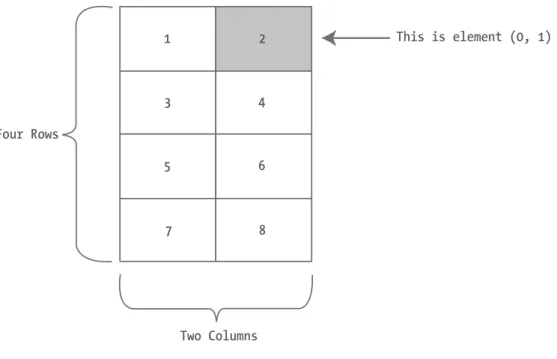
Arrays allow you to store a series of values that have the same data type. Each individual value in the array is accessed using one or more index numbers. It’s often convenient to picture arrays as lists of data (if the array has one dimension) or grids of data (if the array has two dimensions). Typically, arrays are laid out contiguously in memory.
All arrays start at a fixed lower bound of 0. This rule has no exceptions. When you cre-ate an array in C#, you specify the number of elements. Because counting starts at 0, the highest index is actually one less than the number of elements. (In other words, if you have three elements, the highest index is 2.) When you create an array in VB, you simply specify the upper bound:
' Create an array with four strings (from index 0 to index 3). Dim StringArray(3) As String
' Create a 2 x 4 grid array (with a total of eight integers). Dim IntArray(1, 3) As Integer
You can also fill an array with data at the same time that you create it. In this case, you don’t need to explicitly specify the number of elements, because .NET can determine it automatically:
Figure 2-1. A sample array of integers
The same technique works for multidimensional arrays, except that two sets of curly brackets are required:
' Create a 4 x 2 array (a grid with four rows and two columns). Dim IntArray() As Integer = {{1, 2}, {3, 4}, {5, 6}, {7, 8}}
Figure 2-1 shows what this array looks like in memory.
To access an element in an array, you specify the corresponding index number in parentheses. Array indices are always zero-based. That means that MyArray(0) accesses the first cell in a one-dimensional array, MyArray(1) accesses the second cell, and so on.
' Access the value in row 0 (first row), column 1 (second column). Dim Element As Integer
Element = intArray(0, 1) ' Element is now set to 2.
One nice feature that VB offers is array redimensioning. In VB, all arrays start with an initial size, and any array can be resized. To resize an array, you use the ReDim keyword.
Dim MyArray(10, 10) As Integer ReDim MyArray(20, 20)
Dim MyArray(10, 10) As Integer
ReDim Preserve MyArray(10, 20) ' Allowed, and the contents will remain. ReDim Preserve MyArray(20, 20) ' Not allowed. A runtime error will occur.
The ArrayList
In many cases, it’s easier to dodge counting issues and use a full-fledged collection rather than an array. Collections are generally better suited to modern object-oriented program-ming and are used extensively in ASP.NET. The .NET class library provides many types of collection classes, including simple collections, sorted lists, key-indexed lists (dictionaries), and queues.
One such class is the ArrayList, which always allows dynamic resizing. Here’s a snippet of VB code that uses an ArrayList:
' Create the ArrayList. It's an object, not an array, ' so the syntax is slightly different.
Dim DynamicList As New ArrayList()
' Add several strings to the list.
' The ArrayList is not strongly typed, so you can add any data type. DynamicList.Add("one")
DynamicList.Add("two") DynamicList.Add("three")
' Retrieve the first string. Notice that the object must be converted to a ' string, because there's no way for .NET to be certain what it is.
Dim Item As String = CType(DynamicList(0), String)
You’ll learn more about the ArrayList and other collections in Chapter 3. You’ll exam-ine the CType() function, which is used to perform the conversion in the preceding example, later in this chapter (in the “Type Conversions” section).
Enumerations
■
Note
Just to keep life interesting, the word enumerationactually has more than one meaning. As described in this section, enumerations are sets of constant values. However, programmers often talk about the process of enumerating, which means to loop, or iterate, over a collection. For example, it’s common to talk about enumerating over all the characters of a string (which means looping through the string and examining each character in a separate pass).Here’s an example of an enumeration that defines different types of users:
' Define an enumeration called UserType with three possible values. Enum UserType
Admin Guest Invalid End Enum
Now you can use the UserType enumeration as a special data type that is restricted to one of three possible values. You assign or compare the enumerated value using the dot notation shown in the following example:
' Create a new value and set it equal to the UserType.Admin constant. Dim NewUserType As UserType
NewUserType = UserType.Admin
Internally, enumerations are maintained as numbers. In the preceding example, 0 is automatically assigned to Admin, 1 to Guest, and 2 to Invalid. You can set a number directly in an enumeration variable, although this can lead to an undetected error if you use a num-ber that doesn’t correspond to one of the defined values.
In some scenarios, you might want to control what numbers are used for various values in an enumeration. This technique is typically used when the number has some specific meaning or corresponds to some other piece of information. For example, the following code defines an enumeration that represents the error code returned by a legacy component:
Enum ErrorCode
NoResponse = 166 TooBusy = 167 Pass = 0 End Enum
Dim Err As ErrorCode Err = DoSomething()
If Err = ErrorCode.Pass ' Operation succeeded. End If
Clearly, enumerations create more readable code. They also simplify coding, because once you type in the enumeration name (ErrorCode) and add the dot (.), Visual Studio will pop up a list of possible values using IntelliSense.
■
Tip
Enumerations are widely used in .NET. You won’t need to create your own enumerations to use in ASP.NET applications, unless you’re designing your own components. However, the concept of enumerated values is extremely important, because the .NET class library uses it extensively. For example, you set colors, border styles, alignment, and various other web control styles using enumerations provided in the .NET class library.Variable Operations
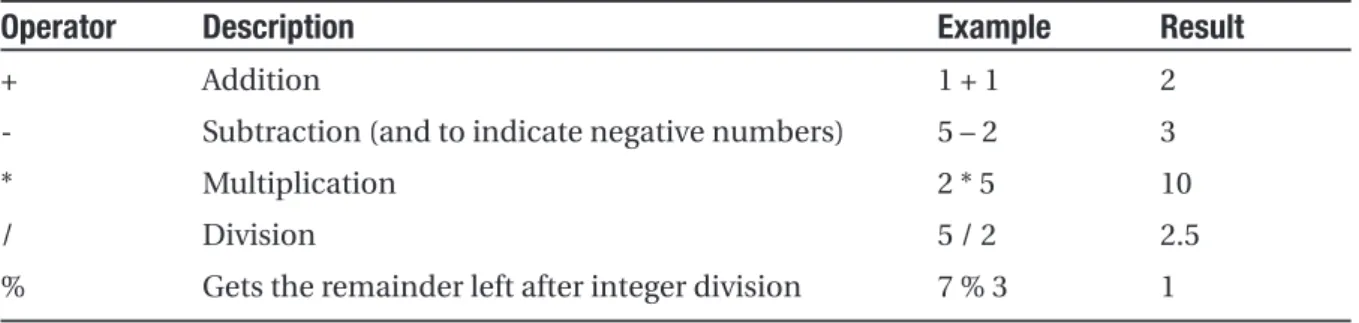
You can use all the standard types of variable operations in VB. When working with num-bers, you can use various math symbols, as listed in Table 2-2.
Table 2-2. Arithmetic Operations
Operator Description Example Result
+ Addition 1 + 1 2
- Subtraction (and to indicate negative numbers) 5 – 2 3
* Multiplication 2 * 5 10
/ Division 5 / 2 2.5
% Gets the remainder left after integer division 7 % 3 1
VB follows the conventional order of operations, performing exponentiation first, followed by multiplication and division and then addition and subtraction. You can also control order by grouping subexpressions with parentheses.
Dim Number As Integer
Number = (4 + 2) * 3 ' Number will be 18.
When dealing with strings, you can use the concatenation operator (&), which joins together two strings.
' Join two strings together. Could also use the + operator. MyName = FirstName & " " & LastName
The addition operator (+) can also be used to join strings, but it’s generally clearer and safer to use the concatenation operator. The concatenation operator automatically attempts to convert both variables in the expression to the string data type, if they are not already strings.
In addition, VB also provides special shorthand assignment operators. Here are a few examples:
' Add 10 to MyValue (the same as MyValue = MyValue + 10). MyValue += 10
' Multiply MyValue by 3 (the same as MyValue = MyValue * 3). MyValue *= 3
' Divide MyValue by 12 (the same as MyValue = MyValue / 12). MyValue /= 12
LINE TERMINATION
Sometimes, code statements are too long to efficiently fit on a single line. In Visual Basic, you can break a code statement over multiple lines by adding a space followed by the line-continuation character (an underscore) to the end of the line. Here’s an example:
' A long line of code.
MyValue = MyValue1 + MyValue2 + MyValue3
' A code statement split over several lines in VB. MyValue = MyValue1 + MyValue2 + _
MyValue3
Advanced Math
However, you can also use a centralized System.Math class that’s part of the .NET Framework. This has the pleasant side effect of ensuring that the code you use to perform mathemat-ical operations can easily be translated into equivalent statements in any .NET language with minimal fuss.
To use the math operations, you invoke the methods of the Math class. These methods are shared, which means they are always available and ready to use. (The next chapter explores the difference between shared and instance members in more detail.)
The following code snippet shows some sample calculations that you can perform with the Math class:
Dim MyValue As Double
MyValue = Math.Sqrt(81) ' MyValue = 9 MyValue = Math.Round(42.889, 2) ' MyValue = 42.89 MyValue = Math.Abs(-10) ' MyValue = 10
MyValue = Math.Log(24.212) ' MyValue = 3.18.. (and so on) MyValue = Math.PI ' MyValue = 3.14..
The features of the Math class are too numerous to list here in their entirety. The pre-ceding examples show some common numeric operations. For more information about the trigonometric and logarithmic functions that are available, refer to the Visual Studio Help and look up the Math class in the index.
Type Conversions
Converting information from one data type to another is a fairly common programming task. For example, you might retrieve text input for a user that contains the number you want to use for a calculation. Or, you might need to take a calculated value and transform it into text you can display in a web page.
The Visual Basic .NET rules for type conversion are slightly less strict than some other languages, such as C#. For example, VB will automatically allow the (potentially risky) conversions shown here:
Dim BigValue As Integer = 100 Dim SmallValue As Short
Dim MyText As String = "100"
' Convert your 32-bit BigValue number into a 16-bit number. SmallValue = BigValue
The problem with code like this is that it isn’t guaranteed to work. Conversions are of two types: widening and narrowing. Widening conversions always succeed. For example, you can always convert a number into a string, or a 16-bit integer into a 32-bit integer.
On the other hand, narrowing conversions may or may not succeed, depending on the data. If you’re converting a 32-bit integer to a 16-bit integer, you could encounter an error if the 32-bit number is larger than the maximum value that can be stored in the 16-bit data type. Similarly, some strings can’t be converted to numbers. A failed narrowing conversion will lead to an unexpected runtime error.
It’s possible to tighten up Visual Basic’s type conversion habits by adding an Option Strict instruction to the beginning of your code files.
Option Strict On
In this case, VB will not allow automatic or implicitdata type conversions if they could cause an error or lose data. Instead, you’ll need to explicitly indicate that you want to perform a conversion.
To perform an explicitdata type conversion in VB, you use the CType() function. This function takes two arguments. The first specifies the variable you want to convert, and the second specifies the data type you’re converting it to. Here’s how you would rewrite the earlier example with explicit conversions:
Dim BigValue As Integer = 100 Dim SmallValue As Short
Dim MyText As String = "100"
' Explicitly convert your 32-bit number into a 16-bit number. SmallValue = CType(BigValue, Short)
' Explicitly convert your string into a number. BigValue = CType(MyText, Integer)
Just like implicit conversions, explicit conversions can still fail and produce a runtime error. The difference is that when you add the CType() function, you clearly indicate that you are aware a conversion is taking place. At the same time you use CType(), you should add code that validates your data before you attempt to convert it, or catches any errors using the error-handling techniques described in Chapter 7.
You can also use the classic Visual Basic keywords such as Val(), CStr(), CInt(), CBool(), and so on to perform data type conversions with the standard data types. However, the CType() function is a nice generic solution that works for all scenarios. The examples in this book almost always use explicit conversion with the CType() function. A few excep-tions apply. For example, Visual Basic’s built-in Val() function is more convenient than CType() in some scenarios because it just returns a zero if it fails to convert a string to a number.
Dim TextString As String = "Hello"
Dim Number As Integer
Number = Val(TextString)
' Number is now 0, because TextString contains no numeric information.
You’ll also find that you can use object methods to perform some conversions a little more elegantly. The next section demonstrates this approach.
Object-Based Manipulation
.NET is object-oriented to the core. In fact, even ordinary numeric variables like the ones you’ve seen earlier are really full-fledged objects in disguise. This means that common data types have the built-in smarts to handle basic operations. For example, all strings are actually complete string objects, with useful methods and properties (such as a Length property that counts the number of letters in the string). Thanks to this design, you can manipulate strings, dates, and numbers in the same way in C# and in VB. This wouldn’t be true if developers used special keywords that were built into the C# or VB language.
As an example, every type in the .NET class library includes a ToString() method. The default implementation of this method returns the class name. In simple variables, a more useful result is returned: the string representation of the given variable. The following code snippet demonstrates how to use the ToString() method with an integer:
Dim MyString As String
Dim MyInteger As Integer = 100
' Convert a number to a string. MyString will have the contents "100". MyString = MyInteger.ToString()
To understand this example, you need to remember that all integer variables are based on the Int32 type in the .NET class library. The ToString() method is built into the String type, so it’s available when you use an integer in any language. (You’ll learn more about types in Chapter 3.)
The String Type
One of the best examples of how class members can replace built-in functions is found with strings. In the past, every language has defined its own specialized functions for string manipulation. In .NET, however, you use the methods of the String type, which ensures consistency between all .NET languages.
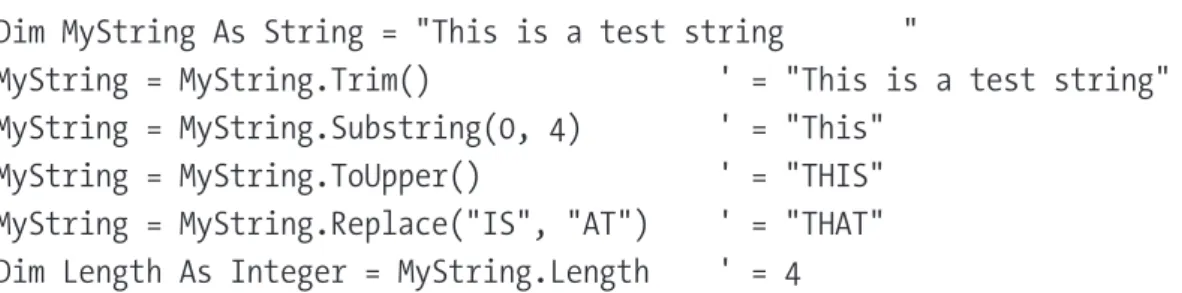
The following code snippet shows several ways to manipulate a string using the methods in the String type:
Dim MyString As String = "This is a test string "
MyString = MyString.Trim() ' = "This is a test string" MyString = MyString.Substring(0, 4) ' = "This"
MyString = MyString.ToUpper() ' = "THIS" MyString = MyString.Replace("IS", "AT") ' = "THAT" Dim Length As Integer = MyString.Length ' = 4
The first few statements use built-in methods of the String type, such as Trim(), Substring(), ToUpper(), and Replace().methods generate new strings, and each of these statements replaces the current MyString with a new string object. The final statement uses a built-in Length property, which returns an integer that represents the number of letters in the string.
■
Tip
A method is just a function or procedure that’s hardwired into an object. A property is similar to a variable—it’s a way to access a piece of data that’s associated with an object. You’ll learn more about methods and properties in the next chapter.Note that the Substring() method requires a starting offset and a character length. Strings use zero-based counting. This means that the first character is in position 0, the second character is in position 1, and so on. You’ll find this standard of zero-based count-ing throughout the .NET Framework for the sake of consistency. You’ve already seen it at work with arrays.
You can even use the string methods in succession in a single (rather ugly) line:
MyString = MyString.Trim().SubString(0, 4).ToUpper().Replace("IS", "AT")
Or, to make life more interesting, you can use the string methods on string literals just as easily as string variables:
MyString = "hello".ToUpper() ' Sets MyString to "HELLO"
Table 2-3. Useful String Members*
Member Description
Length Returns the number of characters in the string (as an integer).
ToUpper() and ToLower() Returns a copy of the string with all the characters changed to uppercase or lowercase characters.
Trim(), TrimEnd(), and TrimStart() Removes spaces or some other characters from either (or both) ends of a string.
PadLeft() and PadRight() Adds the specified character to either side of a string, the number of times you indicate. For example, PadLeft(3, " ") adds three spaces to the left side.
Insert() Puts another string inside a string at a specified (zero-based) index position. For example, Insert(1, "pre") adds the string
preafter the first character of the current string.
Remove() Removes a specified number of characters from a specified position. For example, Remove(0, 1) removes the first character.
Replace() Replaces a specified substring with another string. For example, Replace("a", "b") changes all acharacters in a string into b
characters.
Substring() Retrieves a portion of a string of the specified length at the specified location (as a new string). For example, Substring(0, 2) retrieves the first two characters.
StartsWith() and EndsWith() Determines whether a string ends or starts with a specified substring. For example, StartsWith("pre") will return either True or False, depending on whether the string begins with the letters prein lowercase.
IndexOf() and LastIndexOf() Finds the zero-based position of a substring in a string. This returns only the first match and can start at the end or beginning. You can also use overloaded versions of these methods that accept a parameter that specifies the position to start the search.
Split() Divides a string into an array of substrings delimited by a specific substring. For example, with Split(".") you could chop a paragraph into an array of sentence strings.
Join() Fuses an array of strings into a new string. You can also specify a separator that will be inserted between each element.
* Remember, all the string methods that appear to change a string actually return a copy of the string that has the changes.
The DateTime and TimeSpan Types
• Extract a part of a DateTime (for example, just the year) or convert a TimeSpan to a specific representation (such as the total number of days or total number of minutes).
• Easily perform date and time calculations.
• Determine the current date and time and other information (such as the day of the week or whether the date occurs in a leap year).
For example, the following block of code creates a DateTime object, sets it to the cur-rent date and time, and adds a number of days. It then creates a string that indicates the year that the new date falls in (for example, 2006).
Dim MyDate As DateTime = DateTime.Now MyDate = MyDate.AddDays(100)
Dim DateString As String = MyDate.Year.ToString()
The next example shows how you can use a TimeSpan object to find the total num-ber of minutes between two DateTime objects.
Dim MyDate1 As Date = DateTime.Now
Dim MyDate2 As Date = DateTime.Now.AddHours(3000)
Dim Difference As TimeSpan
Difference = MyDate2.Subtract(MyDate1)
Dim NumberOfMinutes As Double
NumberOfMinutes = Difference.TotalMinutes
These examples give you an idea of the flexibility .NET provides for manipulating date and time data. Tables 2-4 and 2-5 list some of the more useful built-in features of the DateTime and TimeSpan types.
Table 2-4. Useful DateTime Members
Member Description
Now Gets the current date and time.
Today Gets the current date and leaves time set to 00:00:00.
Year, Date, Day, Hour, Minute, Returns one part of the DateTime object as an Second, and Millisecond integer. For example, Month will return 12 for any
day in December.
Table 2-4. Continued
Member Description
DayOfWeek Returns an enumerated value that indicates the day of the week for this DateTime, using the DayOfWeek enumeration. For example, if the date falls on Sunday, this will return DayOfWeek.Sunday.
Add() Adds a TimeSpan to a DateTime and returns the
result as a new DateTime.
Subtract() Subtracts a TimeSpan or DateTime from another
DateTime. Returns a TimeSpan that represents the difference.
AddYears(), AddMonths(), AddDays(), Accepts an integer that represents a number of AddHours(), AddMinutes(), AddSeconds(), years, months, and so on, and returns a new
AddMilliseconds() DateTime. You can use a negative integer to perform a date subtraction.
DaysInMonth() Returns the number of days in the month represented by the current DateTime.
IsLeapYear() Returns True or False depending on whether the current DateTime is in a leap year.
ToString() Changes the current DateTime to its string repre-sentation. You can also use an overloaded version of this method that allows you to specify a parameter with a format string.
■
Note
Methods like Add() and Subtract() don’t changea DateTime object. Instead, they return a new DateTime or TimeSpan object.Table 2-5. Useful TimeSpan Members
Member Description
Days, Hours, Minutes, Seconds, Returns one component of the current TimeSpan. Milliseconds For example, the Hours property can return an
integer from 0 to 23.
TotalDays, TotalHours, TotalMinutes, Returns the total value of the current TimeSpan, TotalSeconds, TotalMilliseconds indicated as a number of days, hours, minutes, and
so on. For example, the TotalDays property might return a number like 234.342.
Add() and Subtract() Combines TimeSpan objects together.
FromDays(), FromHours(), FromMinutes(), Allows you to quickly specify a new TimeSpan. For FromSeconds(), FromMilliseconds() example, you can use TimeSpan.FromHours(24) to
define a TimeSpan object exactly 24 hours long.
The Array Type
Arrays also behave like objects in the new world of .NET. All arrays in .NET are actually instances of the Array type, which provides its own built-in features. For example, if you want to find out the size of an array, you can use the Array.GetUpperBound() method in any language. The following code snippet shows this technique in action:
Dim MyArray() As Integer = {1, 2, 3, 4, 5} Dim Bound As Integer
' Zero represents the first dimension of an array. Bound = MyArray.GetUpperBound(0) ' Bound = 4
Arrays also provide a few other useful methods, which allow you to sort them, reverse them, and search them for a specified element. Table 2-6 lists some useful members of the System.Array type.
Table 2-6. Useful Array Members
Member Description
Length Returns an integer that represents the total number of elements in all dimensions of an array. For example, a 3×3 array has a length of 9.
GetLowerBound() and GetUpperBound() Determines the index position of the last element in an array. As with just about everything in .NET, you start counting at zero (which represents the first dimension).
Clear() Resets all the elements in an array to empty values (such as 0 for numbers, and "" for strings).
IndexOf() and LastIndexOf() Searches a one-dimensional array for a specified value and returns the index number. You cannot use this with multidimensional arrays.
Sort() Sorts a one-dimensional array made up of comparable
data such as strings or numbers.
Reverse() Reverses a one-dimensional array so that its elements are backward, from last to first.
Conditional Structures
In many ways, conditional logic—deciding which action to take based on user input, exter-nal conditions, or other information—is the heart of programming.
Table 2-7. Logical Operators
Operator Description
= Equal to
<> Not equal to
< Less than
> Greater than
<= Less than or equal to
>= Greater than or equal to
And And (evaluates to True only if both expressions are True)
AndAlso Similar to And, but it doesn’t evaluate the second expression if the first one is False. This is a useful approach if evaluating the second option would be time consuming or could cause an error if the first condition is False.
Or Or (evaluates to True if either expression is True)
OrElse Similar to Or, but it doesn’t evaluate the second expression if the first one is True. This is a useful approach if evaluating the second option would be time consuming.
You can use the comparison operators (<, >, <=, >=) with numeric types and with strings. A string is deemed to be “less than” another string if it occurs earlier in an alphabetic sort. Thus “apple” is less than “attach.”
The If ... End If Block
The If block is the powerhouse of conditional logic, able to evaluate any combination of conditions and deal with multiple and different pieces of data. Here’s an example with an If block that features two conditions:
If MyNumber > 10 Then ' Do something.
ElseIf MyString = "hello" Then ' Do something.
Else
' Do something. End If
Keep in mind that the If block matches one condition at most. For example, if MyNumber is greater than 10, the first condition will be met. That means the code in the first conditional block will run and no other conditions will be evaluated. Whether MyString contains the text hellobecomes irrelevant, because that condition will not be evaluated.
The Select Case Block
VB also provides a Select Case structure that you can use to evaluate a single variable or expression for multiple possible values. The Select Case statement supports the String, Char, Date, and Boolean data types, as well as virtually every simple numeric data type.
In the following code, each case examines the MyNumber variable and tests whether it’s equal to a specific integer.
Select Case MyNumber Case 1
' Do something if MyNumber = 1. Case 2
' Do something if MyNumber = 2. Case Else
' Do something if MyNumber is anything else. End Select
If desired, you can handle multiple cases with one segment of code by including a list of comma-separated values in the Case statement.
Select Case MyNumber Case 1, 2
' Do something if MyNumber = 1 Or MyNumber = 2. Case Else
' Do something if MyNumber is anything else. End Select
Unlike the If block, Select Case is limited to evaluating a single piece of information at a time. However, it provides a leaner, clearer syntax than the If block for situations where you need to test a single variable against a limited set of possible values.
Loop Structures
Loop structures allow you to repeat a segment of code multiple times. VB has three basic types of loops. You choose the type of loop based on the type of task you need to perform. Your choices are as follows:
• You can loop a set number of times with a For ... Next loop.
• You can loop through all the items in a collection of data using a For Each loop.
The For ... Next and For Each loops are ideal for chewing through sets of data that have known, fixed sizes. Do ... Loop is a more flexible construct that allows you to continue processing until a complex condition is met. Do ... Loop is often used with repetitive tasks or calculations that don’t have a set number of iterations.
The For ... Next Block
The For block is a basic ingredient in many programs. It allows you to repeat a block of code a set number of times, using a built-in counter. To create a For loop, you need to specify a starting value, an ending value, and the amount to increment with each pass. Here’s one example:
Dim i As Integer For i = 1 To 10 Step 1
' This code executes 10 times. Debug.Write(i & " ")
Next
In this example, the counter you’re using is a variable named i. The loop begins at 1 and ends at 10. The Step 1 clause specifies that i will be increased by 1 each time the code passes through the loop. You can omit this part of the code, because 1 is the default incre-ment. Once i reaches 10 the final pass is made through the loop, with i set to 10.
If you run this code using a tool such as Visual Studio, it will write the following num-bers in the Debug window:
1 2 3 4 5 6 7 8 9 10
It often makes sense to set the counter variable based on the number of items you’re processing. For example, you can use a For loop to step through the elements in an array by checking the size of the array before you begin. Here’s the code you would use:
Dim StringArray() As String = {"one", "two", "three"} Dim i As Integer
For i = 0 To StringArray.GetUpperBound(0) Debug.Write(StringArray(i) & " ") Next
This code produces the following output:
BLOCK-LEVEL SCOPE
If you define a variable inside some sort of block structure (such as a loop or a conditional block), the variable is automatically released when your code exits the block. That means you will no longer be able to access it. The following code demonstrates the problem:
Dim TempVariableA As Integer For i = 1 To 10
Dim TempVariableB As Integer TempVariableA = 1
TempVariableB = 1 Next
' You cannot access TempVariableB here.
' However, you can still access TempVariableA.
This change won’t affect many programs. It’s really designed to catch a few more accidental errors. If you do need to access a variable inside and outside of some type of block structure, just define the variable beforethe block starts.
The For Each Block
VB also provides a For Each block that allows you to loop through the items in a set of data. With a For Each block, you don’t need to create an explicit counter variable. Instead, you create a variable that represents the type of data for which you’re looking. Your code will then loop until you’ve had a chance to process each piece of data in the set.
The For Each block is particularly useful for traversing the data in collections and arrays. For example, the next code segment loops through the items in an array using For Each. This code is identical to the previous example but is a little simpler:
Dim StringArray() As String = {"one", "two", "three"} For Each Element As String In StringArray
' This code loops three times, with the Element variable set to ' "one", then "two", and then "three".
Debug.Write(Element & " ") Next
In this case, the For Each loop examines each item in the array and tries to access it as a string. Thus, the For Each loop defines a string variable named element. If you used a different data type, you’d receive an error.
Dim IntArray() As Integer = {1,2,3} For Each Num As Integer In IntArray
Num += 1 Next
' IntArray is still unchanged at this point.
In this case, you would need to fall back on a basic For block with a counter.
The Do ... Loop Block
Finally, VB supports a Do ... Loop block structure that tests a specific condition before or after each pass through the loop. When this condition evaluates to False, the loop is exited. This allows you to create more freeform looping code that continues until a specific con-dition is met.
To build a condition for a loop, you use the While or Until keyword. These two keywords are opposites. Whilemeans “as long as this is true,” and Untilmeans “as long as this is not true.”
Here’s an example that loops ten times. At the end of each pass, the code evaluates whether the counter (i) has exceeded a set value:
Dim i As Integer = 0 Do
i += 1
' This code executes 10 times. Loop While i < 10
You can also place the condition at the beginning of the loop. In the following exam-ple, the condition is tested at the start of each pass through the loop:
Dim i As Integer = 0 Do While i < 10
i += 1
' This code executes 10 times. Loop
■
Tip
Sometimes you need to skip to the next iteration of a loop in a hurry. In VB, you can use the Continue statement to skip the rest of the current pass, evaluate the condition, and (if it returns True) start the next pass. The Continue statement also works with the For loop. Finally, you can use the Exit Do and Exit For statements to jump straight out of a loop.Methods
Methods are the most basic building block you can use to organize your code. Ideally, each method will perform a distinct, logical task. By breaking your code down into meth-ods, you not only simplify your life, but you also make it easier to organize your code into classes and step into the world of object-oriented programming.
■
Note
In pre-.NET versions of Visual Basic (such as VB 6), functions and subroutines are usually described as procedures. In object-oriented speak, the term methodis equivalent to procedure. Method is the .NET standard, and it’s what you’ll see in this book.Visual Basic distinguishes between two types of procedures: subroutines and functions. The only difference between the two is that functions return a value, while subroutines do not. To return a value from a function and exit it immediately, you use the Return keyword. Subroutines are declared with the Sub keyword, and functions are declared with the Function keyword. Here’s an example of each one:
' This method doesn't return any information. Private Sub MySub()
' Code goes here. End Sub
' This method returns an integer. Private Function MyFunc() As Integer
' As an example, return the number 10. Return 10
End Function
Calling a method is straightforward—you simply enter the name of the method, followed by parentheses. If you call a function, you have the option of using the data it returns, or just ignoring it.
' This call is allowed. MySub()
' This call is allowed. MyFunc()
' This call is allowed. Dim MyNumber As Integer MyNumber = MyFunc()
' This call isn't allowed.
' MySub does not return any information. MyNumber = MySub()
Parameters
Methods can also accept information through parameters. Parameters are declared in a similar way to variables. By .NET convention, parameter names always begin with a lowercase letter in any language.
Here’s how you might create a function that accepts two parameters and returns their sum:
Private Function AddNumbers(number1 As Integer, number2 As Integer) _ As Integer
Return number1 + number2 End Sub
When calling a method, you specify any required parameters in parentheses or use an empty set of parentheses if no parameters are required.
' Call a subroutine with no parameters. MySub()
' Call a subroutine with two Integer parameters. MySub(10, 20)
Method Overloading
VB supports method overloading, which allows you to create more than one method with the same name, but with a different set of parameters. When you call the method, the CLR automatically chooses the correct version by examining the parameters you supply.
This technique allows you to collect different versions of several functions together. For example, you might allow a database search that returns an array of Product objects representing records in the database. Rather than create three functions with different names depending on the criteria, such as GetAllProducts(), GetProductsInCategory(), GetActiveProducts(), you could create three versions of the GetProducts() function. Each function would have the same name but a different signature, meaning it would require different parameters.
This example provides two overloaded versions for the GetProductPrice() method:
Private Overloads Function GetProductPrice(id As Integer) As Decimal ' Code here.
End Function
Private Overloads Function GetProductPrice(name As String) As Decimal ' Code here.
End Function
' And so on...
Now you can look up product prices based on the unique product ID or the full product name, depending on whether you supply an integer or string argument:
Dim Price As Decimal
' Get price by product ID (the first version). Price = GetProductPrice(1001)
' Get price by product name (the second version). Price = GetProductPrice("DVD Player")
You cannot overload a method with versions that have the same signature—that is, the same number of parameters and parameter data types—because the CLR will not be able to distinguish them from each other. When you call an overloaded method, the version that matches the parameter list you supply is used. If no version matches, an error occurs.
Delegates
Delegates allow you to create a variable that “points” to a method. You can use this vari-able at any time to invoke the method. Delegates help you write flexible code that can be reused in many situations. They’re also the basis for events, an important .NET concept that you’ll consider in the next chapter.
The first step when using a delegate is to define its signature. A delegate variable can point only to a method that matches its specific signature. In other words, it must have the same return type and the same parameter types. For example, if you have a method that accepts a single string parameter and another method that accepts two string parame-ters, you’ll need to use a separate delegate type for each method.
To consider how this works in practice, assume your program has the following function:
Private Function TranslateEnglishToFrench(English As String) As String ' Code goes here.
End Function
This function returns a string and accepts a single string argument. With those two details in mind, you can define a delegate type that matches this signature. Here’s how you would do it:
Private Delegate Function StringFunction(inputText As String) As String
Notice that the name you choose for the parameters and the name of the delegate don’t matter. The only requirement is that the data types for the return value and param-eters match exactly.
Once you’ve defined a type of delegate, you can create and assign a delegate vari-able at any time. Using the StringFunction delegate type, you could create a delegate variable like this:
Dim FunctionReference As StringFunction
Once you have a delegate variable, the fun begins. Using your delegate variable, you can point to any method that has the matching signature. In this example, the StringFunction delegate type requires one string parameter and returns a string. Thus, you can use the FunctionReference variable to store a reference to the TranslateEnglishToFrench() function you saw earlier. To actually store the reference to the TranslateEnglishToFrench() func-tion, you use the AddressOf operator. Here’s how to do it:
FunctionReference = AddressOf TranslateEnglishToFrench
Dim FrenchString As String
FrenchString = FunctionReference("Hello")
In the previous code example, the procedure that the FunctionReference delegate points to will be invoked with the parameter value "Hello," and the return value will be stored in the FrenchString variable.
The following code shows all these steps—creating a delegate variable, assigning a method, and calling the method—from start to finish.
' Create a delegate variable.
Dim FunctionReference As StringFunction
' Store a reference to a matching method in the delegate. FunctionReference = AddressOf TranslateEnglishToFrench
' Run the method that functionReference points to. ' In this case, it will be TranslateEnglishToFrench(). Dim FrenchString As String
FrenchString = FunctionReference("Hello")
The value of delegates is in the extra layer of flexibility they add. It’s not apparent in this example, because the same piece of code creates the delegate variable and uses it. However, in a more complex application one piece of code would create the delegate variable, and another piece of code would use it. The benefit in this scenario is that the second piece of code doesn’t need to know where the delegate points. Instead, it’s flexible enough to use any method that has the right signature. In the previous example, imagine a translation library that could translate between English and a variety of different lan-guages, depending on whether the delegate it uses points to TranslateEnglishToFrench(), TranslateEnglishToSpanish(), TranslateEnglishToGerman(), and so on.
DELEGATES ARE THE BASIS OF EVENTS
Wouldn’t it be nice to have a delegate that could refer to more than one function at once and invoke them both? This would allow the client application to have multiple “listeners” and notify the listeners all at once when something happens.
The Last Word
It’s impossible to do justice to an entire language in a single chapter. However, if you’ve programmed before, you’ll find that this chapter provides all the information you need to get started with the VB 2005 language. As you work through the full ASP.NET examples in the following chapters, you can refer to this chapter to clear up any language issues.