White Paper: Deploying QlikView
White Paper: Deploying QlikView
From Personal Edition to Enterprise Deployment
V1.0
CFG
QlikTech May 2010
White Paper: Deploying QlikView
Contents:
Introduction
3
Your First QlikView – QlikView Personal Edition
4
Sharing QlikView with Others
4
Stand-Alone QlikView Desktop Deployment
5
Single QlikView Server Deployment
7
Automatic Distribution of Your QlikView Applications
10
Multiple Servers and Hundreds of Users – Enterprise Deployment
11
Cloud Based QlikView Deployments
13
Introduction
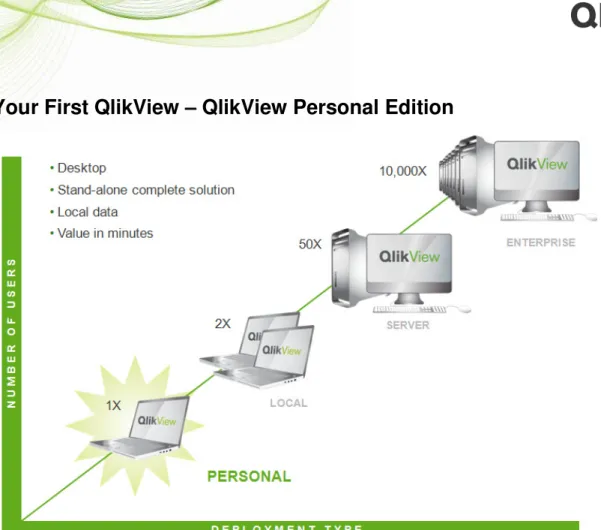
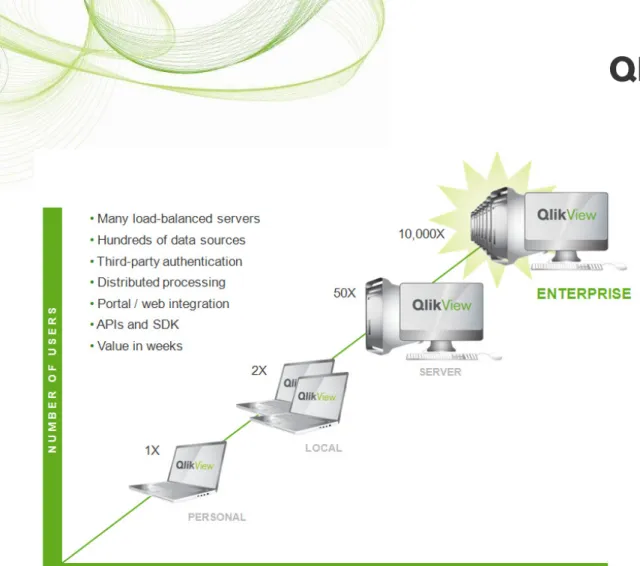
A QlikView deployment can scale from a single desktop user to tens of thousands (or greater) of users across a global enterprise if required. This white paper discusses how to take that journey from the first download of QlikView Personal Edition to an enterprise scale, resilient business intelligence solution.
Your First QlikView – QlikView Personal Edition
Figure 2: The first step – QlikView Personal Edition
QlikView Personal Edition can be downloaded for free for personal use from www.qlikview.com. QlikView Personal Edition is the full QlikView developer product with some minor restrictions around sharing the QlikView applications you build. These restrictions prohibit you from sharing applications you have built with other users of QlikView Personal Edition. You can always share your applications with users who have a valid QlikView license, either on a QlikView Server or with a stand-alone license.
An online discussion forum, getting started guide, and other information is available for new users of QlikView Personal Edition at http://community.qlikview.com/gettingstarted/.
Sharing QlikView with Others
A user with a standalone QlikView Desktop license can access any QlikView application built by QlikView Personal Edition. This paper describes how to scale your QlikView applications from single user, personal edition to the rest of your enterprise.
Options for sharing QlikView applications include standalone QlikView Desktop deployment or deploying a QlikView Server. A QlikView Server has several distinct advantages over the standalone desktop deployment. A QlikView Server provides web-based access to your application, using a wide variety of clients, including mobile devices (iPhone, iPad, Android, Blackberry, and other Java Mobile J2ME enabled devices) and browsers.
Stand-Alone QlikView Desktop Deployment
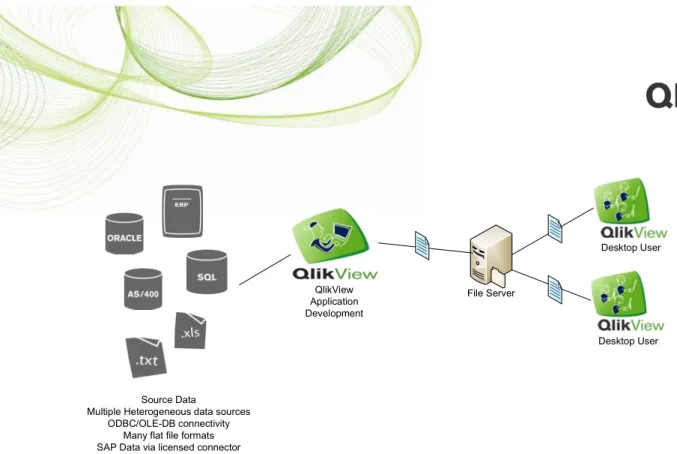
Deploying QlikView in a standalone desktop configuration is possible and quick, but it’s important to weigh the pros and cons of this deployment type.
Source Data
Multiple Heterogeneous data sources ODBC/OLE-DB connectivity
Many flat file formats SAP Data via licensed connector
File Server QlikView Application Development Desktop User Desktop User
Figure 4: QlikView Desktop deployment architecture
Advantages
• Rapid deployment of QlikView to a small number of users
• Off-line analysis is enabled as end users have access to the QlikView application locally
Disadvantages
• Installation for each end-user. QlikView upgrades require all users to have the same
release of QlikView
• Reloading of data. You either need to allow the end user to reload the application or have the developer do it. Either way it’s difficult to manage the data reload in a consistent fashion, which either leads to different versions of the data or out-of-date data being used for analysis
• Memory requirements on end-user machines may impose a limit on data volume.
QlikView is a memory-resident technology and limited client RAM may constrain your deployment to the low millions of rows
• Difficult to scale beyond a small departmental deployment (less than 10 users) • Data protection challenges. Once users have a QlikView application, they have the
underlying data as well, and this may be more data access than the company wishes to share with the users
• License management. Each user needs a license for running QlikView on his or her
Single QlikView Server Deployment
Server-based deployment of QlikView offers a variety of advantages. Those with a desire to scale QlikView across the enterprise will find server-based deployments, whether via a single server (as described here) or on numerous servers (as described later in this paper), a very compelling option. For hardware requirements and sizing information for QlikView Servers, please refer to the series of papers entitled “Simplifying Analysis on a Massive Scale.”
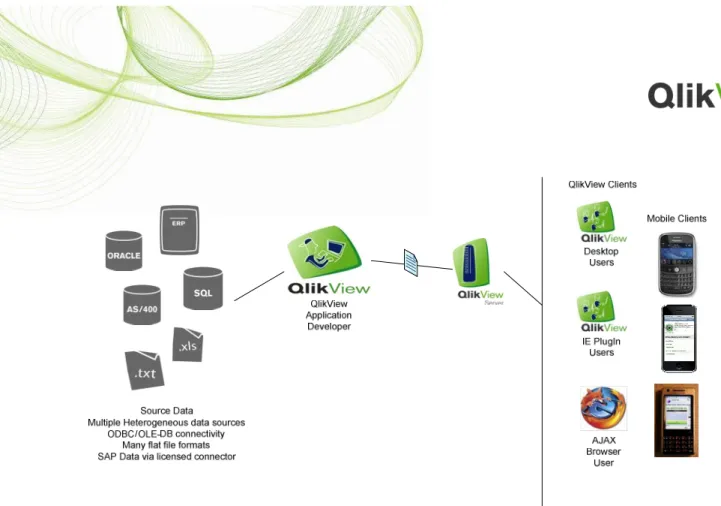
Figure 6: Single QlikView Server deployment architecture
Benefits
• Increased data protection. The QlikView application and data are locked down on a
QlikView Server
• Increased scalability. QlikView Servers handle the memory requirements for the
end-users, allowing larger data sets (into the billions of rows of data using 64-bit technology) to be analyzed by hundreds or thousands of users
• Add users rapidly. Some server clients are completely browser-based, meaning that the
user needs only a license and login credentials on the server
• Minimal client memory requirements. For the Ajax-based browser client, nothing more
than a web browser is required
• Centralized license management. All licenses are managed and registered on the server • Scheduled application reloads. QlikView Servers can be scheduled to reload the data in
your QlikView application to ensure a single version of the truth
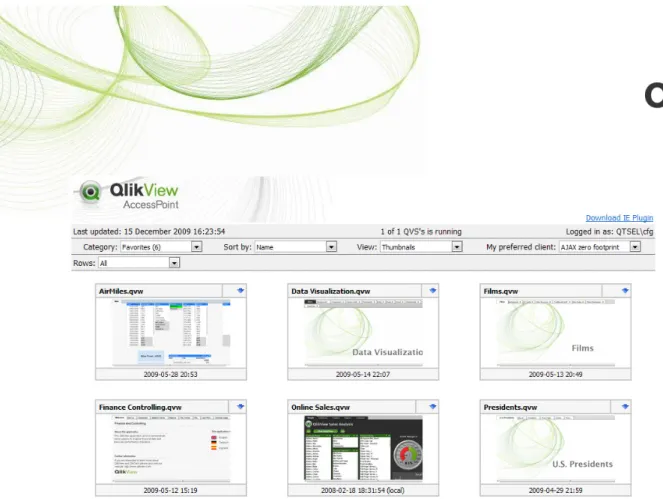
• The QlikView AccessPoint portal provides a graphical, secure portal entry point to
your QlikView applications
• Easy system management via the web-based management console
• Increased resilience and failover. Adding additional QlikView Servers in a cluster
The QlikView Server Clients
A variety of clients are available for QlikView Server, including installed, browser-based, and mobile clients.
Internet Explorer Plugin
An ActiveX plugin is available for Microsoft Internet Explorer 6 and above. This plugin provides exactly the same end-user interface and experience that the QlikView developer has when building the QlikView application. The plugin can also be used to integrate QlikView into web pages using ActiveX.
Installed QlikView Client
All of the installable QlikView clients (including QlikView Personal Edition) can open a
document hosted on a QlikView Server and be used as a QlikView client. This is possible because the QlikView license is stored on the server.
Ajax-based Client
A zero-footprint browser-based client based on Ajax technology (Asynchronous Java and XML) provides cross-platform browser-based access to your QlikView application. This is the quickest QlikView client to deploy and the easiest to manage; it requires nothing other than a JavaScript-enabled web browser. This makes it an ideal QlikView client to deploy to users outside the corporate firewall. See the QlikView System Requirements for the latest details on supported web browsers.
QlikView Mobile Clients
QlikView mobile clients let you bring QlikView everywhere, with access to your QlikView applications using mobile devices such as iPhones, iPads, Blackberries, Google Android base devices, or other devices that support Java Mobile Technology.
The latest information on supported mobile devices is detailed in the QlikView System Requirements. This document also lists the supported platforms for QlikView and QlikView Server.
Automatic Distribution of Your QlikView Applications
QlikView Publisher is an add-on product to the QlikView Server that can manage the distribution of hundreds of QlikView documents to hundreds or thousands of users, either accessing these applications using a QlikView Server or receiving (via email) a personalized QlikView application or a flat PDF document based on a QlikView report.
QlikView Publisher is a highly scalable multi-server engine for reloading and distributing QlikView applications.
Figure 9: The QlikView product family – Working in harmony to simplify analysis
Multiple Servers and Hundreds of Users – Enterprise
Deployment
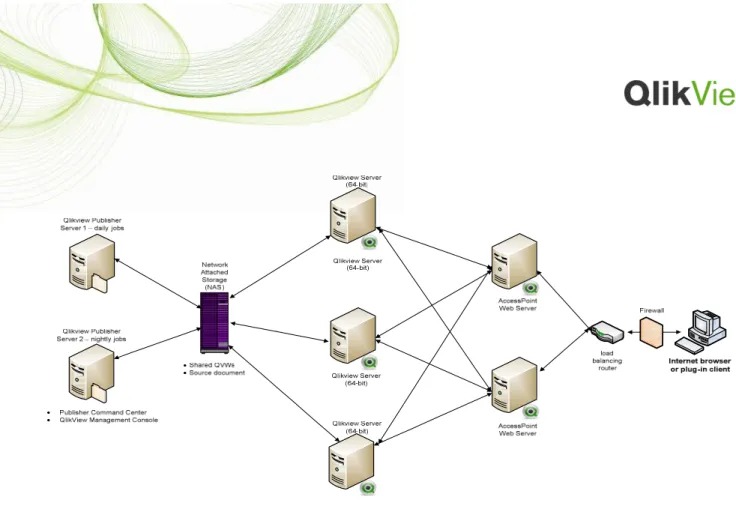
Figure 11: A multi-server, resilient QlikView deployment architected to support thousands of users
Cloud Based QlikView Deployments
With QlikView 9 comes the option to deploy your QlikView environment in the cloud using Amazon’s EC2 service1 (a part of the Amazon Web Service offerings – see
http://aws.amazon.com for further details). Using the cloud in this fashion, it is possible to build a resilient, dynamically scalable QlikView Server-based deployment. Further, deployment using this model could not be faster; it is possible to get your first QlikView Server up and sharing QlikView applications to end-users in under 15 minutes.
QlikTech’s own product demo site (http://demo.qlikview.com) is deployed in this manor, and QlikView Servers are started and stopped based on the real-time demand of end users. Not only does this allow provisioning of capacity on demand, but also it shifts the costs of running such a deployment from upfront capital costs for hardware, data-centre hosting to a monthly operational expense.
Conclusion
Many users start their journey with QlikView by downloading QlikView Personal Edition and trying it out. What users may not know is that it is possible to easily scale QlikView all across their enterprise using the deployment options we’ve discussed in this paper. QlikView at your enterprise may start small with just one download, but this revolutionary game-changing tool can easily evolve into an enterprise-grade Business Intelligence deployment supporting billions of rows of data for thousands of users underpinned by a resilient, scalable infrastructure. Once the vision of how QlikView enables an entirely new view of your data catches on, it’s helpful to know that you can easily spread QlikView applications across your enterprise in a way that is affordable, scalable, resilient, and secure.