Practical Guide to Cloud Computing
Version 2.0
Contents
Acknowledgements ... 3
Revisions ... 3
Executive Overview ... 4
Rationale for Cloud Computing ... 5
Essential Characteristics of Cloud Computing ... 5
The Benefits of Cloud Computing ... 5
What is the Importance of Standards-Based Cloud Computing? ... 6
Roadmap for Cloud Computing ... 7
Step 1: Assemble your Team... 7
Step 2: Develop Business Case and an Enterprise Cloud Strategy ... 9
Step 3: Select Cloud Deployment Model(s) ... 13
Step 4: Select Cloud Service Model(s) ... 15
Step 5: Determine Who Will Develop, Test and Deploy the Cloud Services ... 23
Step 6: Develop Governance Policies and Service Agreements ... 25
Step 7: Assess and Resolve Security and Privacy Issues ... 27
Step 8: Integrate with Existing Enterprise Systems ... 29
Step 9: Develop a Proof-of-Concept before Moving to Production ... 31
Step 10: Manage the Cloud Environment ... 32
Summary of Keys to Success ... 33
Works Cited ... 36
© 2014 Cloud Standards Customer Council.
All rights reserved. You may download, store, display on your computer, view, print, and link to the Practical Guide to Cloud Computing at the Cloud Standards Customer Council Web site subject to the following: (a) the Guidance may be used solely for your personal, informational, non-commercial use; (b) the Guidance may not be modified or altered in any way; (c) the Guidance may not be redistributed; and (d) the trademark, copyright or other notices may not be removed. You may quote portions of the Guidance as permitted by the Fair Use provisions of the United States Copyright Act, provided that you attribute the portions to the Cloud Standards Customer Council Practical Guide to Cloud Computing Version 2.0 (2014).
Acknowledgements
The Practical Guide to Cloud Computing is a collaborative effort that brings together diverse customer-focused experiences and perspectives into a single guide for IT and business leaders who are considering cloud adoption. The following participants have provided their expertise and time to this effort: Claude Baudoin (cébé IT & Knowledge Management), Jeff Boleman (IBM), Asher Bond (Elastic Provisioner), Mike Edwards (IBM), Melvin Greer (Lockheed Martin), Larry Hofer (Cloud and Security Services), Yves Le Roux (CA Technologies), John McDonald (CloudOne Corporation), John Meegan (IBM), Jem Pagan (JNK Securities), Sujatha Perepa (IBM), Keith Prabhu (Confidis), Ram Ravashankar (IBM), Gurpreet Singh (Ekartha), Joe Talik (AT&T), Amy Wohl (Wohl Associates), Elizabeth Woodward (IBM), Steven Woodward (Cloud Perspectives).
Revisions
Much has changed in the realm of cloud computing since the original Practical Guide to Cloud Computing whitepaper was published in October, 2011. Version 2.0 includes the following updates:
• A new Executive Overview section has been written.
• The Rationale section has been trimmed significantly since it is no longer necessary to explain the basics of cloud computing.
• The service agreements step in the Roadmap has been extended to include governance policies. • A new step has been added to the Roadmap focused on security and privacy.
• The integration step in the Roadmap has gone through major revisions.
• All other sections have been updated, albeit to a lesser degree, to reflect the evolution and maturity of both the business and technical aspects of cloud computing.
• References have been added to several CSCC whitepapers that have been written since the original Practical Guide to Cloud Computing.
Executive Overview
The aim of this guide is to provide a practical reference to help enterprise information technology (IT) and business decision makers adopt cloud computing to solve business challenges. The emergence of cloud computing, like any new technology model, has the side effect of flooding the market with information and jargon that adds to the confusion and uncertainty amongst decision makers. The Practical Guide to Cloud Computing aims to remedy this by providing comprehensive and actionable information in a single reference.
The cloud computing marketplace has changed in the three years since we first wrote and published this Guide. Cloud computing has moved from an interesting experiment to a proven information technology with multiple vendors, large and small, taking different approaches. Most customers have adopted at least some cloud computing technology; others are using cloud computing as their sole IT infrastructure or are moving in that direction.
There is much more interest and support for cloud computing from formal IT, but there continues to be a strong presence of Line of Business (LOB) managers spending their IT budgets on cloud services, often without the knowledge or approval of IT management. Also, large numbers of business customers are choosing their own cloud technologies and expecting IT to support them.
This Guide continues to provide a way of evaluating the market from the point of view of your
organization’s needs and providing information that is helpful in selecting both a cloud architecture and an implementation approach through the use of in-house staff, cloud vendor(s) or both.
From an architectural perspective, we have moved beyond the discussion of private vs. public clouds. Hybrid clouds (including multiple clouds, both private and public temporarily or permanently
interconnected) are commonplace.
Today, it is expected that an organization may have any or all of these models, depending on its needs for speed of execution, available resources, need for data protection and security, and an array of other reasons. A discussion of how to choose the most effective cloud service and deployment model is included in this Guide.
The “Roadmap for Cloud Computing” section is the heart of the guide. It details both strategic and tactical activities for decision makers implementing cloud solutions. It also provides specific guidance to decision makers on the selection of cloud service and deployment models. The activities and
recommendations in the roadmap take into account the different sizes and IT maturity of customer organizations, and act as a useful template for both large enterprises and small-and-medium businesses (SMBs).
Rationale for Cloud Computing
Cloud computing offers a value proposition that is different from traditional enterprise IT environments. By providing a way to exploit virtualization and aggregate computing resources, cloud computing can offer economies of scale that would otherwise be unavailable. With minimal upfront investment, cloud computing enables global reach of services and information through an elastic utility computing
environment that supports on-demand scalability. Cloud computing can also offer pre-built solutions and services, backed by the skills necessary to run and maintain them, potentially lowering risk and removing the need for the organization to retain a group of scarce highly skilled staff.
Cloud computing does not exist in a vacuum. Most organizations will have a broad variety of
applications already running in their data center. For most, cloud computing will extend their existing IT infrastructure. Cloud computing can be dedicated to particular tasks. It can be used mainly for new projects. Or, an organization may use it for overflow, guaranteeing a certain level of performance for enterprise computing.
Essential Characteristics of Cloud Computing
• On-demand self-service. A customer can provision computing capabilities, such as server time and network storage, as needed, automatically without requiring human interaction with the service provider.
• Omni-channel access. Capabilities and services are available over the network and accessed through standard mechanisms that promote use by heterogeneous client platforms (e.g., mobile devices, laptops, and even other devices such as automobiles, home appliances and point-of-sale kiosks). • Resource pooling. Cloud computing poolsa provider’s computing resources to serve multiple
customers using a multi-tenant model, with different physical and virtual resources assigned and reassigned according to customer demand. Cloud computing provides a sense of location
independence. Customers generally have no control or knowledge of the exact location of the resources. But, they may be able to specify location at a higher level of abstraction (e.g., country, state, or data center). Examples of resources include storage, processing, memory, network bandwidth, and virtual machines.
• Rapid elasticity. Resources can be rapidly and elastically provisioned, sometimes automatically, to scale out quickly, and be rapidly released to scale in quickly. To customers, the resources often appear to be unlimited and can be purchased in any quantity at any time.
• Measured Service. Cloud services automatically control and optimize resource use by leveraging a metering capability at some level of abstraction suitable to the type of service (e.g., storage, processing, bandwidth, and active user accounts). Providers and customers can monitor, control, and report on services with transparency.
Refer to the National Institute for Standards and Technology (NIST) Cloud Computing Reference Architecture [1] for more details on cloud computing characteristics, roles, deployment models and service models.
The Benefits of Cloud Computing
In addition to providing access to a shared pool of configurable computing resources (e.g., networks, servers and storage), cloud computing promotes a loosely-coupled, composable and highly-reusable services type environment for agile application development and roll-out. Because virtual instances can
be provisioned and terminated at any time and the customer organization pays only for the computing resource they are employing, costs can be lower.
Cloud computing enables business agility. Cloud computing provides the ability to make use of
computing resources on an immediate basis, rather than a need to first invest time and skilled resources in designing and implementing infrastructure (hardware and middleware) and/or applications, and then deploying and testing it. This leads to faster time to value which may mean enhanced revenue, larger market share, or other benefits.
In essence, the top five benefits of cloud computing can be summarized as follows:
1. Achieve economies of scale. Increase volume output or productivity with fewer resources (computing and human).
2. Reduce CapEx by moving to OpEx.The pay as you go model (weekly, quarterly or yearly), based on demand / utility computing, will help reduce capital expenditure on hardware and software licenses.
3. Improve access. Information access can be anytime, anywhere and anyhow through omni-channel access.
4. Implement agile development at low cost. Design, development and rollout of new solutions and services using agile methodologies on cloud based shared development operations.
5. Leverage global workforce. Follow-the-sun model for defining, developing and rolling out new solutions and applications. Cloud computing can be rolled out in multiple data centers around the globe, ensuring that services are close to end users – providing better performance and appropriate redundancy.
What is the Importance of Standards-Based Cloud Computing?
Standards-based cloud computing ensures that cloud services can readily interoperate, based on open standard interfaces. Standards allow workloads to be readily moved from one cloud provider to a different cloud provider. Services created for one cloud computing environment can be employed in another cloud computing environment, eliminating the need to rewrite or duplicate code.
We are still at a relatively early stage of cloud computing and many different standards have been proposed. Some permit interoperability and portability, others support limited interoperability and portability, and others are, in fact, proprietary environments. Once a proprietary environment is selected, an organization will probably experience vendor lock-in. This means that integrating applications or services across differing proprietary cloud platforms is likely to require extensive, expensive, and time-consuming work.
tend to leverage the advantage of early adoption of emerging technology at the price of having to move to a standard (and perhaps an open source) environment at a later date.
Roadmap for Cloud Computing
This section provides a prescriptive series of steps that should be taken to ensure a successful cloud deployment from the perspective of a cloud service customer. It takes into account differences that result based on the size of the organization and its IT maturity level. The following steps are discussed in detail:
1. Assemble your team
2. Develop a business case and an enterprise cloud strategy
3. Select cloud deployment model(s) 4. Select cloud service model(s)
5. Determine who will develop, test and deploy the cloud services
6. Develop governance policies and service agreements
7. Assess and resolve security and privacy issues 8. Integrate with existing enterprise services
9. Develop a proof-of-concept (POC) before moving to production 10. Manage the cloud environment
Depending on the maturity of the organization and the level of adoption of cloud computing, the entry point will change for each new service being evaluated.
Step 1: Assemble your Team
It is important that the cloud customer1 establishes a clearly defined team to develop and approve a cloud business strategy and implementation plan for cloud services that will be part of the total IT environment. In the past, the recommendations, design, development, deployment and maintenance of the IT environment was primarily driven by the IT department. Cloud computing is creating an evolution where the business leaders are getting engaged because they see cloud computing as a tool to get closer to their customers and increase sales/revenue.
Adoption of cloud computing is viewed as a strategic business decision that allows business not only to improve IT efficiency but also help in achievement of global business goals like streamlining of the supply chain and extending the business processes to make them more accessible by third parties.
1 Note that this section focuses on the cloud customer. Points of contact between the cloud customer and cloud brokers, carriers and providers are covered in the later steps of this section.
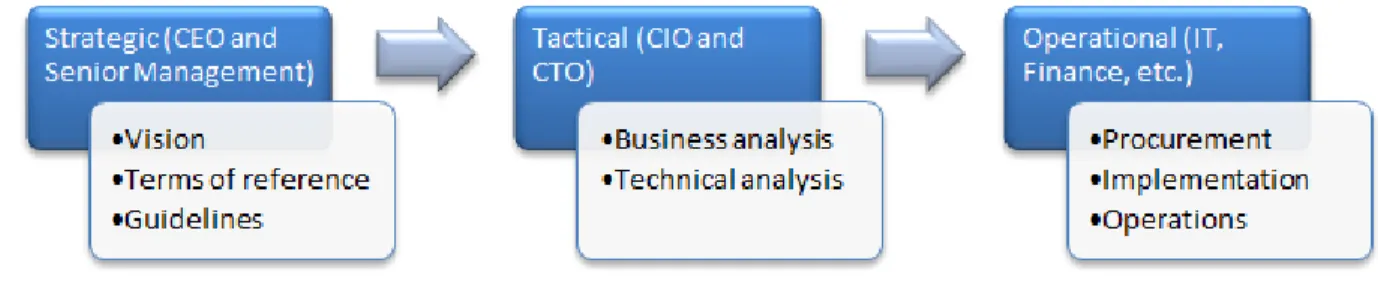
Hence, it is logical that the adoption of cloud computing should be led by senior management including the CEO and CFO with the CIO and CTO playing the role of key advisors. In essence, resources must be drawn from IT, business (sales and marketing), finance, legal and the administrative areas of the organization to build a team that can address the various aspects of adoption. Different skills are required at the different phases of cloud adoption—strategic, tactical and operational.
Figure 1: Three Phases of Cloud Adoption
Strategic Phase
During the strategic phase of cloud service adoption, CEOs and the senior management team lead the organization to establish the vision, terms of reference and guidelines.
• Vision. The CEO and senior management team should define the overall vision for cloud adoption. It is critical that the business leadership, particularly the executive levels, collaborate and buy in to the vision. The vision should address the future of the business and the acquired differentiation, competitive advantage and/or value proposition gained through a leveraged cloud strategy. • Terms of reference. It is important to define the terms of reference early in the cloud adoption
process to ensure that the adoption stays focused on the target business goals. An effective Terms of Reference at minimum should address in clear and concise language, the purpose, goals, guiding principles and roles and responsibilities and rules of engagement of the teams involved in forming the cloud computing vision and strategy.
• Guidelines. Based on the culture of the business, it is important for senior management to provide broad guidelines for cloud adoption, including security and privacy posture, data maintenance and location policies, etc. The guidelines will provide a business framework to capture the initial high-level requirements, and support the alignment of the leadership team.
Tactical Phase
During the tactical phase, typically led by the CIO or CTO, the organization performs both a business and a technical analysis.
computing that delivers sufficient return on investment or return on value. It is critical that the opportunities and needs of the business remain the primary focus during this phase. Technology comparisons and early calls on the technology solution could negatively impact the formation of a sound business analysis if introduced too early in the process. This phase will begin the process of categorizing and identify potential business applications/solutions that will be considered as candidates for implementation by means of cloud services.
• Technical analysis. This phase requires the attention of IT including the CIO, CTO and lead architects, operations personnel, and senior business managers. The goal of this phase is to develop a technical strategy for cloud deployment taking into consideration the business analysis results from the previous step and an examination of the various service and deployment models that are available. As part of the technical analysis, the business case for application migration, as well as building versus buying, is developed and presented to the strategic team for their feedback and approval.2 Operational Phase
During the Operational phase, leaders from various operations groups work through procurement and implementation details, and establish ongoing operations for the cloud deployment.
• Procurement. This phase includes negotiations with potential cloud service providers and requires the procurement team, finance, legal, senior business managers, and IT including the CIO, CTO and lead architects to be engaged. Assessment models/instruments should be discussed to provide consistency during the evaluation and contract negotiation phases. For example, a proof-of-concept or weighted scoring matrix may be developed to align business and technology requirements. • Implementation. This phase includes the development, customization and configuration of services
which will be deployed in the cloud environment and requires the attention of IT including lead architects, developers and testers as well as operations personnel. This phase should begin the process of identifying potential changes in processes/procedures and provide a high level gap analysis to identify risk mitigation/management opportunities.
• Operations. This phase addresses ongoing operations and management of the cloud infrastructure and deployed services. Business owners, operations personnel, customer support, and IT including developers and testers are required in this phase. During this phase the gap analysis moves from a high level to a more detailed examination to determine what and how changes to existing
operations will be impacted by the cloud computing initiative.
Step 2: Develop Business Case and an Enterprise Cloud Strategy
To ensure a smooth transition to cloud computing, an organization should develop an overarching cloud strategy which creates the foundation for project-specific adoptions. Cloud computing presents
interesting business model opportunities to organizations of all sizes. Developing a business case and
2 The CSCC whitepaper Migrating Applications to Public Cloud Services: a Roadmap for Success provides a detailed roadmap for assessing the business value of migrating existing applications to cloud computing.
strategy that clearly articulates how cloud computing will transform key business processes like procurement, marketing, customer acquisition and support, product development, etc. is critical. Within the context of an enterprise strategy for cloud computing, individual business problems that cloud computing can potentially address need to be identified, and specific business justification must show that cloud computing is the right strategic alternative. High level value propositions for cloud computing, including the shift of capital expenditures (CAPEX) to operational expenses (OPEX), cost savings, faster speed of deployment, elasticity, etc., are necessary but insufficient unless quantified. Obtaining executive support for the initiative is critical. Executives from IT, Lines of Business (LOBs), procurement and executive management must review and approve the business plan before proceeding. Getting key executives on-board early in the process will help alleviate potential issues down the line.
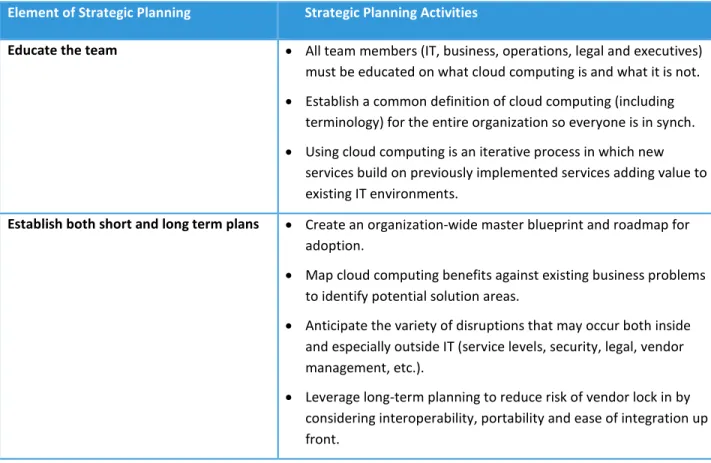
When developing an enterprise strategy for cloud computing, the considerations highlighted in the following table should be taken into account.
Table 1: Key Elements of Strategic Planning
Element of Strategic Planning Strategic Planning Activities
Educate the team • All team members (IT, business, operations, legal and executives) must be educated on what cloud computing is and what it is not.
• Establish a common definition of cloud computing (including terminology) for the entire organization so everyone is in synch.
• Using cloud computing is an iterative process in which new services build on previously implemented services adding value to existing IT environments.
Establish both short and long term plans • Create an organization-wide master blueprint and roadmap for adoption.
• Map cloud computing benefits against existing business problems to identify potential solution areas.
• Anticipate the variety of disruptions that may occur both inside and especially outside IT (service levels, security, legal, vendor management, etc.).
• Leverage long-term planning to reduce risk of vendor lock in by considering interoperability, portability and ease of integration up front.
Understand required services and functionality
• Determine business case and potential ROI and/or potential new revenue opportunities
• Leverage enterprise architectures, standards and industry frameworks to help accelerate the collection of service information and improve consistency.
• Customer facing services require separate categorization and analysis from internal services.
Execute a thorough cost analysis [6] The overall cost of application migration to cloud computing must include the following elements:
• On-going cloud service costs
• Service management
• License management
• Application re-designs
• Application deployment and testing
• Application maintenance and administration
• Application integration
• Cost of developing cloud computing skills
• Human resources and talent management implications Assess the impact to service levels [6] For each application being migrated to cloud computing, consider
the impact on the following application characteristics:
• Application availability
• Application performance
• Application security
• Privacy
• Regulatory compliance Identify clear success goals and metrics to
measure progress
• The team sponsoring the project must include success factors in their proposal.
• Metrics need to be agreed to by executives making the final decision to proceed with the project.
• Define benchmarks for the existing service before launching the new service in order to determine its impact.
• Clearly identify trigger points to be measured.
Consider the existing IT environment • Develop a complementary cloud adoption strategy with a focus on integrating and leveraging existing technologies and standards.
• Develop a strategy to ensure that any existing services to be migrated to cloud computing will continue to comply with standards.
• Leverage reusable internal services to improve delivery efficiency of customer facing services
Understand legal/regulatory requirements
• Customers of cloud services must understand the responsibilities associated with their respective national and supranational obligations for compliance with regulatory frameworks and ensure that any such obligations are appropriately complied with. Some examples of legal/regulatory constraints upon electronically stored information are as follows:
• Physical location of the data
• Data Breach
• Personal Data Privacy
• Data destruction when the corporation no longer wants the relevant data available or transfers it to a different host
• Intellectual Property, Information Ownership
• Law Enforcement Access
• Service Availability
• With over 150 countries having ratified the United Nation’s Convention on the Rights of Persons with Disabilities and an increasing focus on accessibility regulations, it is important to establish a plan for ensuring accessibility compliance.
• Understand cloud service specific deployment standards and compliances required by various industries, for example, FISMA & FedRAMP for US Federal government agencies.
Identify required skills • Map required skills against available skills.
• Develop a plan to enhance internal skills to address potential gaps.
• Consider external skills as an option for addressing gaps. Track results for an extended time • Reinforce that the objective of implementing the new cloud
service has been achieved
• Identify any trends that may need to be addressed to improve the existing service or contract for a new service to take advantage of the trend
Understand the exit process [2] [3] • An exit clause should be part of every cloud service agreement
• Understand the details of the exit process including the responsibilities of the cloud service provider and cloud service customer
• The exit process should include detailed procedures for ensuring business continuity - it should specify measurable metrics to ensure the cloud provider is effectively implementing these procedures
• The most important aspect of any exit plan is the retrieval and preservation of cloud service customer data
Step 3: Select Cloud Deployment Model(s)
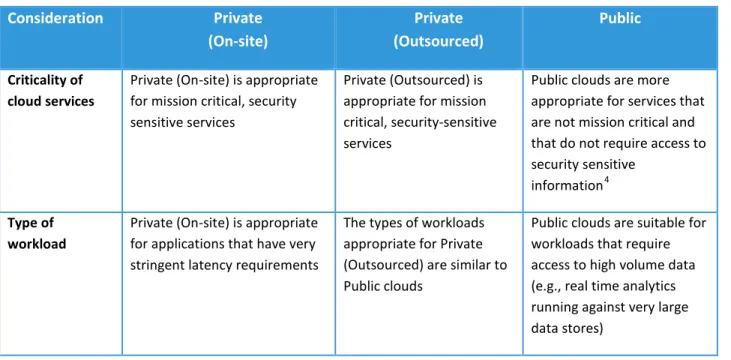
In order to determine the cloud deployment model(s) that best suits your company’s business requirements you must take into consideration the factors highlighted in Table 23.
Table 2: Considerations for selecting a cloud deployment model
Consideration Private (On-site) Private (Outsourced) Public Criticality of cloud services
Private (On-site) is appropriate for mission critical, security sensitive services
Private (Outsourced) is appropriate for mission critical, security-sensitive services
Public clouds are more appropriate for services that are not mission critical and that do not require access to security sensitive
information4 Type of
workload
Private (On-site) is appropriate for applications that have very stringent latency requirements
The types of workloads appropriate for Private (Outsourced) are similar to Public clouds
Public clouds are suitable for workloads that require access to high volume data (e.g., real time analytics running against very large data stores)
3 The information in this section is based on information from the NIST Cloud Computing Synopsis and
Recommendations document, Special Publication 800-146. The Community deployment models are not called out explicitly in this section since they are similar to the Private deployment options.
4 SMBs and new companies without existing infrastructure may be more inclined to use public cloud services sooner than larger and more established enterprises but must thoroughly consider security implications. Other requirements may drive the use of public cloud services including geographical dispersion of end users, extremely elastic workloads and immediate procurement of resources as a service.
Migration costs With a Private (On-site) deployment model, installing and managing cloud software may incur significant cloud software costs even if non-allocated hardware exists within a consumer organization. Expenses may be mitigated if the organization has adopted a service oriented architecture environment and moves to an expense formula for internal departments.
Private (Outsourced) has lower migration costs than Private (On site) since resources are provisioned by the provider. Main additional startup costs relate to negotiating the terms of the SLA and possibly upgrading the customer's data center infrastructure to accommodate the outsourced private cloud.
Public clouds have low upfront costs for the use of cloud services. The implications are similar to the outsourced private cloud scenario except that
additional security precautions need to be taken into account.
Elasticity With Private (On-site), finite resources are available since computing and storage capacity is fixed and has been sized to correspond to anticipated workloads and cost restrictions. If an organization is large enough, it may be able to provide enough elasticity to clients within the consumer organization.
With Private (Outsourced), extensive resources are available since a consumer can rent resources in any quantity offered by the provider. This depends on the SLAs, network, and data center infrastructure.
Public clouds can generally be considered unrestricted in their size. Additionally, they can generally use multi-tenancy without being limited by static security perimeters, which allows a potentially high degree of flexibility in the movement of customer workloads to available resources. Security threats With Private (On-site),
consumers have the option of implementing appropriately strong security to protect resources against external threats to the same level of security as can be achieved for non-cloud resources.
Private (Outsourced) is similar to Private (On- site). The main difference is that the techniques need to be applied both to a
customer's perimeter and provider's perimeter, and that the communications link needs to be protected.
With a Public model, customers have limited visibility and control over data regarding security. The details of provider system operation are usually considered proprietary and not available for
examination by customers. Certification of cloud services may provide a level of assurance to customers.
Multi-tenancy With Private (On-site), risks are mitigated by restricting the number of possible attackers: all of the clients would typically be members of the customer organization or authorized guests or partners.
The implications for Private (Outsourced) are similar to those for Private (On-site) cloud.
With a typical Public model, a single machine may be shared by the workloads of any combination of customers. In practice, this means that a customer’s workload may be co-resident with the workloads of competitors. This introduces both reliability and security risk, and a failure or attack could be perpetrated by any customer or virtual machine.
Useful hybrid cloud configurations are also possible. For example, "cloud bursting" is a concept in which a consumer uses on-premise IT resources for routine workloads but optionally accesses one or more external private or public clouds during periods of high demand.5 Different cloud deployment variants may also be appropriate for particular organizational functions or roles. For example, an organization may elect to process sensitive data such as payroll information in an outsourced private cloud but use a public cloud for new software development and testing activities.
The IT maturity of an organization along with its size will have a significant impact on the service deployment decisions that are made. Larger organizations with mature IT environments may lean initially towards Private (On-site) deployments and may transition some workloads to Private (Outsourced) and Public deployments over time for primarily non-critical workloads.
SMBs and new companies without existing infrastructure may transition more rapidly to public cloud deployments. SMBs have much to gain in terms of cost savings, IT capacity, lower skill requirements and improved application functionality that was not available to them previously. Security and reliability issues with Public deployment must be taken into consideration. As a result, SMBs are advised to initially consider Hybrid deployments, moving non-critical applications to Public deployment in the early
transition phases. New companies without existing infrastructure have the ability to quickly grow their workloads without the startup costs of a data center.
Step 4: Select Cloud Service Model(s)
While the business value of cloud computing is compelling, many organizations face the challenge of staging a gradual adoption of cloud service capabilities, incrementally advancing their IT environment. There are a variety of ways that organizations today are leveraging the benefits of cloud computing. Many patterns of implementation start with an infrastructure virtualization project to establish a
5 Note that it is important that mission-critical workloads be transferred to external cloud environments that provide appropriate security controls.
foundation that enables future cloud service adoption. Conversely, some companies are simply consuming business or IT solutions from a public cloud outside their organization. As depicted in the figure from the NIST Cloud Computing Reference Architecture [1], the three most common cloud service models are SaaS, PaaS, and IaaS. In order to determine the service models that best suit your company’s business requirements, the potential benefits and issues of each model must be given careful
consideration. In addition, the IT maturity of an organization along with its size will significantly impact the service model decisions that are made.
Software as a Service (SaaS)
SaaS involves the acquisition of a complete application or business service running as a cloud service – it is the cloud computing equivalent of buying a packaged application – one that typically requires minimal configuration before it is ready for use. SaaS allows businesses to benefit from the “pay-as-you go” concept in addition to being highly scalable, offering flexibility to companies to provision and
de-provision based on business needs. This consumption based model for software eliminates many of the high start-up costs for initial licensing and installation of software delivered in a traditional model. SaaS gives businesses complete freedom from managing IT infrastructure and the entire software stack which enables them to concentrate on using the features of the service to achieve their business objectives. Business solutions implemented as cloud services provide customers the flexibility to choose the approach that is best for their company by making it possible to consume and execute business processes, analytics and applications in the cloud.
We can categorize SaaS under two broad headings:
• Horizontal SaaS offerings. These are SaaS offerings that are typically applicable to organizations across a range of business sectors. Some of the common SaaS applications are in the areas of email, customer relationship
management (CRM), productivity, collaboration, analytics, etc. • Sector-specific offerings. With the
proven success and maturing of the horizontal SaaS offerings, sector specific SaaS offerings are emerging. These include applications in the areas of logistics and supply chain management (SCM), for example. SaaS has the following key features:
• SaaS works on a usage-based pricing model which enable businesses to subscribe to only those services that it needs and for the required number of users.
• SaaS typically offers a standard feature set which allows some level of configuration for individual customers but typically no customization.
• Organizations can reduce their capital expenditures (CAPEX) towards procurement of software licenses by adopting SaaS offerings on a subscription basis.
• Deployment of SaaS offerings is typically much shorter than deployment of traditional packaged solutions. This enables businesses to capture any short “window of opportunity” that may present itself.
• SaaS upgrades are typically instantaneous and are the burden of the provider. They get tested prior to deployment and the process is transparent to the users.
• SaaS offerings are typically scalable as vendors plan for scalability in their cloud solutions. This enables businesses to scale up rapidly if the business needs dictate.
• Availability of the solution, including the backup of customer data, is usually taken care of by the service provider, thereby eliminating the need for users to maintain their own disaster recovery procedure for these solutions.
Approaches for Adoption of SaaS
The approach for adopting SaaS offerings will differ based on the IT maturity of the organization. For simplicity, two approaches are described below: one for large organizations and one for SMBs. However, given that each organization is unique with its own challenges, it is recommended that organizations evaluate both options and come up with a strategy that addresses their unique requirements. Organizations with mature IT systems already have implemented in-house packaged applications. Having spent years with these systems and making significant investment in hardware, software and management of these systems, they are reluctant to let go of these systems which have stood the test of time. These applications often have the highest costs per unit of functionality to enhance, support and operate, therefore significant cost reductions can be realized. Unfortunately, migrating this class of application (legacy or non-virtualized) will incur higher project costs.
Organizations with nascent IT systems, especially SMBs, may not have made significant investments in their IT systems. The reasons for this could vary from cost concerns to the complexity of managing such deployments in-house. However with the emergence of subscription based SaaS offerings, such
organizations now have an option to adopt SaaS solutions for business needs which was not possible earlier.
Table 3: SaaS Adoption Approaches
SaaS Adoption Approach for Large Organizations SaaS Adoption Approach for SMBs Large organizations can take the following approach to
SaaS adoption:
1. Analyze SaaS offerings in terms of TCO/ROI and risks such as vendor lock in, interoperability and existing IT infrastructure—especially network and data center infrastructure. 2. Define a clear SaaS strategy for both private
and public implementations before adopting specific SaaS offerings.
3. Consider SaaS for non-critical business
functions that would deliver improved ROI in a cloud environment.
4. Consider SaaS for rapidly evolving business environments where new requirements are likely to emerge, such as social business and Web campaigns.
5. Evaluate SaaS offerings when packaged applications need to be renewed due to a software or hardware refresh which involves additional purchases.
6. Adopt new disruptive SaaS solutions (perhaps sector-specific) to maintain or extend competitiveness.
SMBs can take the following approach to SaaS adoption:
1. Analyze SaaS offerings in terms of TCO/ROI and risks, such as vendor lock in, interoperability, and existing IT infrastructure—especially network and data center infrastructure. 2. Define a SaaS strategy for both private and
public implementations before adopting specific SaaS offerings
3. Reevaluate business processes and identify those that can be enhanced through use of applications that can help improve
competitiveness with larger organizations 4. Identify availability of SaaS offerings for these
specific processes
5. Evaluate the various SaaS offerings from a business and technical perspective
Platform as a Service (PaaS)
PaaS provides an integrated development and runtime platform for creating, deploying and managing custom applications in a cloud service. Based on the standardization and automation of a common set of topologies and software components, the platform provides elasticity, efficiency and automated
workload management. A PaaS environment dynamically adjusts workload and infrastructure
characteristics to meet existing business priorities and SLAs. The big advantage of a PaaS offering is that it provides a ready-deployed software stack that caters to the development and deployment of custom applications in a cloud computing environment, sharply reducing the effort required by developers and
The incentives for an organization to transition to a PaaS environment differ based on the size and IT maturity of the organization. For large organizations, a key motivation for considering PaaS is the ability to quickly and inexpensively develop and deploy new applications. Large organizations have additional incentives for considering a move to PaaS. PaaS provides:
• Highly standardized and automated provisioning of predefined workloads • An integrated development and runtime platform for specific workloads • Consistent pattern-based deployments for most common workloads
• DevOps capability that facilitates communication, collaboration and integration
between software developers and IT professionals - refer to Step 6 of the Convergence of Social, Mobile and Cloud: 7 Steps to Ensure Success whitepaper [7]
• Integrated workload management for SLA enforcement, dynamic resource management, high availability and business priorities
• Awareness and optimization of workloads based on business priorities and SLAs • Consolidation of workloads under a simplified management system
Smaller organizations can benefit from the ready provision of running instances of major portions of the software stack required by a custom application, such as databases and messaging infrastructure, removing the need to have skilled staff to set up, run and maintain what can be complex software. Approaches for Adoption of PaaS
Organizations with mature IT systems already have significant investments in their development and runtime platforms along with significant investments in human resources associated with solution development and testing. As a result, they will initially look to refactor these assets as they transition to cloud computing. Custom applications which may benefit from the use of a PaaS offering could include new applications written to support mobile devices or applications which support social computing. In many cases, SMBs do not possess the resources to invest significantly in development and runtime platforms and they lack the in-house human resources to develop and test home-grown applications. Many SMBs are dependent on ISVs to deliver their application functionality. As a result, they are dependent on an external cloud provider to support a PaaS environment that is consistent with their ISVs’ applications.
Table 4: Approaches for Adoption of PaaS
PaaS Adoption Approach for Large Organizations PaaS Adoption Approach for SMBs The following steps provide a recommended approach
for PaaS adoption by large organizations:
1. Analyze PaaS offerings in terms of total cost of ownership (TCO) / return on investment (ROI) and risks such as vendor lock
in/interoperability/existing IT infrastructure. 2. Define a clear PaaS strategy for both private and public implementations before adopting specific PaaS offerings.
3. Identify early offering candidates based on specific criteria (for example, low risk to the business).
4. Consider starting with either the Private (On-site) or Private (Outsourced) deployment model which provides a good initial transition to PaaS for both mission critical and non-mission critical workloads with relatively low risk.
5. For Public deployments, consider moving only non-critical applications in the early transition phases.
6. Consider a platform that leverages existing expertise – i.e., a development team experienced in Java will likely gravitate to a Java-based platform.
The following steps provide a recommended approach for PaaS adoption by SMBs:
1. Analyze PaaS offerings in terms of TCO/ROI and risks such as vendor lock in,
interoperability and existing IT infrastructure. 2. Define a PaaS strategy for both private and
public implementations before adopting specific PaaS offerings.
3. Determine if there’s sufficient in-house development resource to justify the use of a PaaS environment – if not, SaaS may be the best alternative.
If sufficient in-house development resources exist, both the Private (Outsourced) and Public deployment models are viable options. Selection will be dependent upon the mission criticality of the services being developed and deployed.
Here are a few specific projects that large organizations should consider to get started on the transition to a PaaS environment:
• Deliver development and testing environments. Standardize the delivery of development and test tools that conform to enterprise processes and instantly deliver to a globally-distributed team.
• Develop and deploy new applications. Create, deploy and manage new applications in a simple, fast and “low touch” way through a PaaS application pattern – such applications can include those for mobile device access.
Infrastructure as a Service (IaaS)
The incentives for an organization to transition to an IaaS environment differ based on the size and IT maturity of the organization. For SMBs, the primary motivation for considering IaaS is capital expense reduction and access to IT capacity that would otherwise not be available. For large organizations with potentially several data centers and departmental silos in different geographical locations, there are additional incentives for considering a move to IaaS. Incentives include addressing low server utilization, high administrator-to-server ratios, data center sprawl, proliferation of ad-hoc IT solutions, and desire for improved, more centralized control of IT assets.
While many organizations today are using virtualization to consolidate their IT infrastructures, hardware consolidation is only one piece of virtualization’s benefit. Organizations that move beyond virtualization with IaaS capabilities such as integrated service management, automation and rapid provisioning can realize significant benefits:
• Reduction in IT operating expenses and capital expenses by improving resource utilization and administrator-to-server ratios
• Faster time to market through increased efficiency and automation of standardized solutions • Simplified, integrated management, including real-time monitoring and high-scale low-touch
provisioning
• Greater visibility into business processes and system performance to identify redundancies and bottlenecks
• Scaled operations that can meet market dynamics and business strategy Approaches for Adoption of IaaS
Organizations with mature IT systems already have significant investments in both infrastructure hardware and in-house IT management skills. As a result, they will initially look to refactor these assets as they transition to cloud computing.
Organizations with nascent IT systems, especially SMBs, may not have made significant investments in their IT systems. As a result, they will be incented to transition more rapidly to infrastructure services that are delivered and managed by an external cloud service provider.
Table 5: IaaS Adoption Approaches
IaaS Adoption Approach for Large Organizations IaaS Adoption Approach for SMBs The following steps provide a recommended approach
for IaaS adoption by large organizations:
1. Analyze IaaS offering in terms of total cost of ownership (TCO)/return on investment (ROI) and risks such as vendor lock in,
interoperability and existing IT infrastructure. 2. Define a clear IaaS strategy for both private
and public implementations before adopting specific IaaS offerings.
3. Start with an infrastructure virtualization project to establish a foundation that enables future cloud adoption.
4. Consider moving to a Private (On-site) deployment model which provides a good initial transition to IaaS with relatively low risk. 5. Consider Private (Outsourced) and Public
deployment models which can potentially deliver added business value. Closely consider security and reliability issues as well as integration with existing enterprise services. 6. For Public deployments, consider moving only
non-critical applications in the early transition stages.
The following steps provide a recommended approach for IaaS adoption by SMBs:
1. Analyze IaaS offerings in terms of TCO/ROI, risk (vendor lock in/interoperability/existing IT infrastructure).
2. Define an IaaS strategy for both private and public implementations before adopting the IaaS offerings.
3. In many cases, the Private (On-site)
deployment model will not be feasible given insufficient ROI associated with consolidating a relatively small number of existing IT assets. 4. Consider the Public deployment model which
provides access to computing and storage capacity at the lowest cost.
5. For Public deployments, consider moving only non-critical applications in the early transition phases.
6. Consider Private (Outsourced) deployment to handle spillover of workloads during periods of high demand or as a backup resource for disaster recovery.
7. Application migration and administration costs must be taken into account for Public and Private (Outsourced) options.
Large organizations should consider the following types of projects as good candidates for a transition to a Private (On-site) cloud-enabled data center include:
1. Consolidate and virtualize your infrastructure. Realizing the benefits of cloud computing begins with the foundation—efficient and effective consolidation and virtualization across server and
as an enabler of standardized high-quality service delivery. When clients implement effective image management, they are better suited to progress into a cloud computing model.
3. Manage the virtual environment. Organizations can expand beyond infrastructure virtualization with integrated service management, automation, provisioning and self-service to more quickly deploy IT services, improve visibility, increase resource utilization and better manage their cloud environments.
As illustrated in this section, there are numerous considerations that need to be taken into account when selecting a service model that best meets your company’s business requirements. An effective initial approach is to identify a contained, non-critical business area where cloud could be impactful, identify one or more cloud service models that could be effective in addressing the requirement, and initiate a proof of concept to assess the feasibility and ROI of the alternatives.
Step 5: Determine Who Will Develop, Test and Deploy the Cloud Services
Determining the most effective method to design, develop and deploy new cloud application services can be a struggle. In many cases, there is no right answer. The direction will be based on the needs and capabilities of the organization. There are essentially four options for the organization to consider6:
• In-house development and deployment • Cloud provider development and deployment • Independent cloud service development provider • Off the shelf purchase of a cloud service
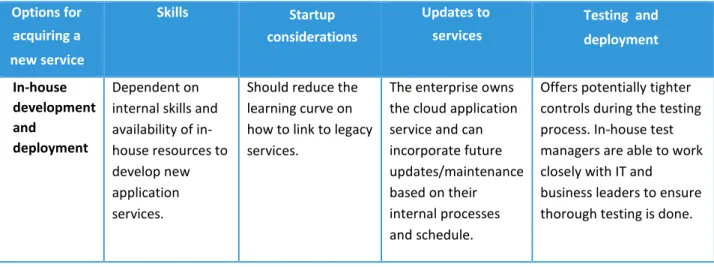
Table 6 examines the pros and cons of the various options for acquiring a new service. Table 6: Options for Acquiring a New Cloud Application Service
Options for acquiring a new service Skills Startup considerations Updates to services Testing and deployment In-house development and deployment Dependent on internal skills and availability of in-house resources to develop new application services.
Should reduce the learning curve on how to link to legacy services.
The enterprise owns the cloud application service and can incorporate future updates/maintenance based on their internal processes and schedule.
Offers potentially tighter controls during the testing process. In-house test managers are able to work closely with IT and business leaders to ensure thorough testing is done.
6The design of the cloud application service is omitted since that should originate from the enterprise and will require the efforts of the IT, business and administrative teams. The new service must have functional capabilities which meet the requirements of the target users and will have also a positive ROI. Designing a cloud service is an extended discussion which will not be covered here, other than to state that ensuring that the design process is followed will be critical to the development and deployment activities.
Cloud provider development and deployment The cloud provider’s area of expertise is cloud computing which should translate into a shorter development and deployment timeline especially with the first cloud service.
A cloud provider will have to be educated on the legacy services which will be linked to the cloud service (APIs, data formats, security, etc.).
If the cloud provider does the
maintenance for new features, the
enterprise needs to understand costs and the expected
responsiveness to complete requested updates.
Requires coordination between the enterprise development and
operations teams with the cloud provider
development and test teams. Independent cloud service development provider Should have proven experience and expertise on the specific cloud application service under consideration, thereby reducing development, testing and deployment costs. Will require education and production knowledge of the legacy services which will be linked to the cloud service.
Will require coordination and a structured
engagement with the enterprise
implementation team and also the cloud provider
implementation team in order to test and deploy the cloud service.
Ongoing updates and testing could be more complex and costly as well as take longer given the need to coordinate three parties as opposed to two.
Off the shelf purchase of a cloud service
Ensure that the application service meets all the business
requirements for the enterprise’s cloud service and all the open standards and API requirements of the enterprise.
Validate the level of effort required to map the off the shelf data formats to the enterprise’s data formats.
Determine who will be responsible for the modification, testing deployment, and maintenance activities.
Ensure the total cost of ownership of the off the shelf service offsets the costs for modification. If the time to production-ready deployment is significantly shorter then off the shelf option should be considered.
Selecting a methodology for implementing a cloud application service can vary depending on whether the customer is a large organization or a SMB. Typically, the skills available within a SMB are targeted towards existing services and it may make more sense to consider contracting for resources from a
cloud computing skills. An investment in cloud training and best practices should be decided during the early phases of the effort. Ultimately, the organization needs to take its own unique requirements into account in order to make a decision that best meets their business needs. This effort can translate into leveraging several of the options in parallel, based on the needs of a particular cloud service.
Step 6: Develop Governance Policies and Service Agreements
Cloud computing service agreements should be evaluated in conjunction with specific needs, expectations, governance processes and other cultural considerations. Service agreements vary greatly based on the deployment models they support (Public, Private, Hybrid), the service models they support (SaaS, PaaS, IaaS) and the specific cloud service. The CSCC has published two guides [2] [3] that help cloud consumers evaluate cloud service agreements, leveraging a prescriptive ten step roadmap highlighted in the figure.7
Currently, no standard nomenclature is used across cloud providers to define cloud service
agreements. Cloud service agreements are generally intended to protect cloud providers from litigation, rather than assure a high level of service for customers. Public cloud service agreements are usually non-negotiable, making it even more critical to read and understand them in detail.
In addition, cloud service agreements are often cascading, leading to more challenges regarding the accountability and governance of the end-to-end cloud solution. For example, the cloud carrier is a major consideration, where cloud connectivity
and transport services between the customer and “cloud edge” have a direct impact on the overall experience of a cloud service. Similarly, a cloud provider may use peer service
providers, where the service agreements offered by those peer providers may be of significant interest.
At the end of the day the cloud consumer is responsible for performing due diligence,
understanding their service agreements and potential impact to their business.
7 Pressure is growing to enhance and standardize cloud service agreements, for example, the EU government and ISO standards body have initiated activities in this space.
In general, cloud service agreements can be decomposed into three major artifacts: “Customer
Agreement,” “Acceptable Use Policy” (or Terms & Conditions), and “Service Level Agreement,” although the boundaries between these artifacts are vague and can vary from provider to provider. Bear in mind that these three artifacts may change at different times, independently from each other. Evaluation of cloud service agreements should include the following considerations.
• Policies. What policies and processes does your organization have that constrain cloud service decisions? These may include, but are not limited to:
- Geographic distribution of data stored, processed and in transit - Procurement policies and processes
- Regulatory requirements - Security and privacy - Audit policies
• Culture. Are there cultural considerations, where Service Agreements can potentially mitigate concerns? These may include, but are not limited to:
- Perceived and real threats - Receptiveness to change - Relinquishing some control
• Governance. Good governance requires transparency and accountability that leads to
appropriate decisions that foster trust and assurance. What you need governed is, of course, a key consideration. Governance topics can include, but are not limited to:
- Prioritization of governance requirements (carrier, provider, broker, consumer, service models, pricing, security, privacy, geographic and regulatory requirements)
- Potential measure, metrics, analytics and reporting
- Relinquishing some control, while retaining appropriate governance - Modification of service and associated notifications to the customer - Suspension of service
- Planning, deployments, enhancement, support, migration, exit process, etc.
• Objectives. While developing and or evaluating cloud service agreements, overall objectives and expectations will drive many of the discussions and approaches. Some examples include: - Reducing total cost of ownership
- Reduce time to market - Improve availability
- Improve business capabilities
- Provide a secure solution for sensitive data
• Metrics/ Measures. Cloud service agreements, especially aspects of Service Level Agreements, require consistent measurement. Measures and metrics will be used to validate service levels and determine when remediation needs to be applied or resources dynamically allocated to
• Service Level Agreements. A document stating the technical performance promises made by the cloud service provider, remedies for performance failures, and how disputes are to be
discovered and handled.
• Remediation and Compensation. When fault and failures occur, what compensation is offered and what are the responsibilities of the parties involved.
A cloud service agreement does not absolve the cloud service customer of all responsibilities. Ongoing vigilance is required to ensure that service users continue to receive the expected level of service. Customers should maintain a continuous level of responsibility by receiving direct feedback on the service level objectives of the service and be aware of any additional features which may be needed.
Step 7: Assess and Resolve Security and Privacy Issues
Security and privacy are two of the issues that concern would-be cloud adopters the most. Depending on the domain in which they work (various industries, government, education, etc.), these concerns may rank just above or below those about availability and performance. Our practical guidance in this area should be used to avoid overreaction and paralysis, which often result from the concerns.
Understanding the Concerns
Security and privacy concerns were raised as soon as the cloud computing model appeared. In the early 2000s, organizations were already struggling to maintain adequate security in the presence of increasingly effective malware and other security threats. The general model of security viewed the enterprise as a fortress, with ramparts of firewalls and virus scanners isolating the inside from the outside. The cloud computing model means that some enterprise resources are outside the "fortress," leading many CISOs to believe that a cloud service could not be secure. At the same time, privacy rules were being tightened worldwide, and it seemed improbable that Personal Identification Information (PII) could be kept under appropriate control outside of the enterprise. Assessing the Risks
Security and privacy are risk management issues, and should be treated using the same formal approaches:
evaluate the probability and the impact of the potential threats, prioritize the risks accordingly, design and implement mitigation measures, test them, and keep monitoring the situation.
In Security for Cloud Computing: 10 Steps to Ensure Success [4], the CSCC takes a very broad view of the risks involved (see sidebar).
Cloud Security Risks •Loss of governance •Compliance and legal risk •Responsibility ambiguity •Isolation failure
•Data protection
•Insecure or incomplete data deletion •Handling of security incidents •Service unavailability
•Management interface vulnerability • Vendor lock-in
•Business failure of the provider •Malicious behavior of insiders (Source: CSCC, Security for Cloud Computing: 10 Steps to Ensure Success)
Adopting a cloud solution means some transfer of control from the customer to the provider, but four considerations allow the risks to be discussed rationally:
• Many of the security and privacy concerns raised by cloud computing have existed since the first forms of IT outsourcing were introduced. These challenges should be seen as variants on
previously existing issues, not totally new ones.
• The levels of security and privacy that are achieved in-house are often no higher than are achieved by cloud services. Cloud service providers typically have many more resources to assign to security design and monitoring than a single customer does, and providers have a strong business case for good security since a breach could undermine their entire business. • Once a customer’s information is in a cloud service, an attacker may have more difficulty finding
it than if it is held on premises.
• Cloud customers must take responsibility for their use of cloud services, not abandon the responsibility to the providers. This includes understanding which data resides in the cloud service, what its level of confidentiality is, how sensitive it is, whether it is encrypted, who has access to it, and so on.
Ten Sub-Steps for Security
The CSCC’s Guide to Security for Cloud
Computing provides 10 specific steps (within this Guide, they become sub-steps of Step 7) to manage cloud computing security.
• Step 1, customers must understand the specific laws and regulations (data retention, privacy, disclosure requirements, etc.) that apply to their business.
• Step 2 provides guidance to obtain professional security audits of the cloud service, and to monitor usage for suspicious activity. Audits should be consistent with general security standards such as ISO 27001/27002, and with cloud-specific standards such as ISO 27017 and 27018.
• Step 3 ensures proper user identification, strong authentication, and role-based access control to resources, possibly using federated identity management and single sign-on.
• Step 4 is about assigning a security classification to all data (without forgetting proprietary
• Step 6 consists of understanding what security responsibilities the customer has, which differs according to the choice of deployment model (IaaS, PaaS, or SaaS).
• Step 7 ensures that the provider’s internal network, as well as the connections between the customer and the cloud services are protected and monitored against external threats. • Step 8 concerns the physical security of the computer center and building, protection against
accidents and the environments (fires, earthquakes, flooding, etc.), screening of provider personnel, disposition of removable media, and so on.
• Step 9 is about Service Agreements, and is in fact so crucial that, based on work that the CSCC did on this specific topics, it deserves its own subsection below.
• Step 10 is about what happens to customer data during and after the termination of the use of a cloud service, including the complete removal of customer data from all tiers of storage by the provider.
Any of these steps can lead to the decision that the project is not feasible. Just like with any good safety policy, the people who assess the situation should have the right to declare that they have found a showstopper and that the project must be halted unless the problem is fixed.
Security in the Cloud Service Agreements
Since a cloud service customer always transfers some responsibility to the provider, it is important to understand what the service agreements say about the relative roles and responsibilities of the parties. The CSCC’s Practical Guide to Cloud Computing SLAs [2] calls out a number of issues with the current state of service agreements:
• Privacy and security considerations appear in different documents, with inconsistent titles and language.
• Most agreements impose stringent security obligations on the customer to protect the cloud provider – who decides unilaterally that a security violation occurred – but rarely any similar obligations or penalties regarding the harm that the provider might inflict on the customer. • Privacy terms usually protect about the customer representatives’ contact information, but not
the customer’s own users, who may be millions of end users.
• Escalation mechanisms are not specified or do not include response time commitments. Cloud providers often present a “take it or leave it” deal, instead of offering a bona fide ability to negotiate the terms. In the companion paper Cloud Service Agreements: What to Expect and What to Negotiate [3], we advise customers to examine these documents, request clarification, and negotiate what can be negotiated, possibly accepting to pay more for a higher tier of service with more acceptable terms.
Step 8: Integrate with Existing Enterprise Systems
Cloud computing is not typically a total replacement for existing applications and services within the organization. Particularly for large organizations, there is a significant investment in existing applications and systems which may include compliance with government legislation and industry standards. As a
result, adoption of cloud services typically involves integration of the cloud services with the existing applications and systems. Integration may be bidirectional and may involve configuration changes or technical changes to the existing applications and systems and/or the creation of new integration components.
Integration involves a number of different components, both within the organization and within the cloud service provider. The components include:
• Data, where applications and services share common data, or synchronization of some kind is required between data in-house and data in a cloud service
• Process integration between applications/services, where one application or service invokes operations provided by another as part of some workflow
• Management capabilities, which include the monitoring of cloud services and the control of cloud services. These include security capabilities such as Identity and Access Management. • Business capabilities including usage reporting, invoicing and payments
Further, organizations may adopt cloud services to extend their business processes so that they become more accessible to others in their business ecosystem. In this case, some adaptation of existing
applications and services may be necessary.
There are several ways of establishing links between cloud services and existing applications and systems. If the organization has already established a direction of adopting open standards for data formats or for communication protocols and APIs, then the integration of cloud services should build on what has been already implemented. This increases the opportunity for achieving interoperability between cloud services and the enterprise applications and systems.
If the organization has not implemented a discipline of adopting open standards, then the new cloud services can be used to set the baseline for the necessary integration components. A clear plan for adopting open standards will help enable interoperability and portability for cloud services and simplify the process of integrating new cloud services, independent of where or how the new cloud service is acquired.
The use of open standards for data formats and for APIs and protocols can assist in the process of integration of cloud services. Ideally, the cloud service itself should utilize open standards – but the existing in-house applications and systems may need some adaptation and updating in order to conform to those standards. Any work done to update and adapt the existing applications and systems to use open standards should pay for itself in the long run, especially where there is an ongoing commitment to migrate more and more functionality to cloud services over time. One approach to adapting existing applications and systems is to create an adapter component which is able to translate between the existing applications and systems and the standard data formats, APIs and protocols used to