Vulnerability Management for the
Distributed Enterprise
Vulnerability Management and Distributed Enterprises
All organizations face the threat of unpatched vulnerabilities on critical systems, unknown devices attached to their network, or rogue wireless access points on their network. To mitigate those threats, organizations deploy Vulnerability Management (VM) technology to discover and scan systems on their network for vulnerabilities.
Large distributed enterprises, however, face an additional challenge of deploying VM in dozens, hundreds, or even thousands of remote locations. Regulations such as Payment Card Industry Data Security Standard (PCI DSS) require organizations to maintain a VM system for every affected location, regardless of size. These organizations need a VM solution that is low-cost, easy to install, yet able to scan a network effectively for policy compliance purposes.
The Integration Challenge
VM systems can significantly improve the security of your data and networks by helping you identify and remediate vulnerable systems, as well as benchmark compliance against industry regulation, best practices, or internal requirements. They also complement other network and system security technologies by giving you visibility into potential targets of the malicious traffic directed at your network. The challenge that large distributed organizations face is how to fully integrated VM with their network and system security technologies. VM tools fall into three broad categories:
• Appliances are dedicated devices that can protect headquarters environments or large regional offices due to their ability to scan large networks quickly and effectively. The primary disadvantage is the high price point, as deploying hundreds or thousands of appliances to protect smaller remote offices or retail locations is prohibitively expensive. • Software Applications are typically commercial but can be open-source freeware as well. Although priced lower than
appliances, applications require additional configuration of the hardware (including hardening the operating system to reduce the risk of attack) as well as the application. A distributed enterprise requires a substantial investment to configure and deploy even a small number of systems.
• Cloud Services are scanning services delivered via a service provider. Although touted as a low-cost, easy alternative, cloud-based VM is only able to scan internet-facing IP addresses, significantly limiting its effectiveness. To scan internal IP addresses, you would need to deploy a device inside your perimeter or open huge gaps in your firewall to allow the scan traffic inside, leaving you far worse off than if you had done nothing.
All of the VM solutions described above are stand-alone security tools, meaning organizations cannot fully integrate these vulnerability management tools into their overall threat management strategy. Although some of these tools provide integration with trouble ticketing, patch management, or security event and information management (SEIM) systems, they lack full integration with comprehensive threat management systems.
The Fortinet Solution – Integrated VM and UTM
FortiGate multi-threat security platforms address the need of integrating VM with UTM by including vulnerability management. The benefit is twofold: First, you now have the ability to deploy the widest range of system and network security technologies on the market. Second, you now have visibility into both the threats directed at your network as well as the vulnerability of systems to attack, all from a single management console.
The VM feature in FortiGate gives you the ability to deploy fully integrated vulnerability management to every location in your distributed environment, without the additional cost and management overhead associated with other VM technologies. FortiGate’s integrated VM technology offers the following benefits to any size organization:
The Four Essential
Capabilities of Vulnerability
Management
1. Network Discovery
2. Scanning
3. Reporting & Correlation
4. Asset Prioritization
• Continuously leverage the security and performance of a purpose-built hardware solution at no additional cost • Consistently define and enforce policies across your distributed wired and wireless network, from a single
management console
• Accurately measure and document your progress in reducing risk and increasing policy compliance by reducing system and network threats
• Quickly modify your security posture to add additional protection to vulnerable systems before you can deploy a patch
• Effectively identify and remediate poor security practices
• Easily implement a regular scanning of your network to ensure policy compliance
How FortiGate VM Works
You configure the VM feature directly from the FortiGate console. You have several options to configure when creating a scan, including asset discovery or vulnerability scan, adding Windows or Unix authentication credentials for more detailed results, executing a manual or scheduled scan, as well as choice of scan modes.
Each FortiGate platform ships with a database of more than 2,500 vulnerability signatures. A FortiGuard Vulnerability Management Service subscription ensures the addition of new vulnerabilities as the FortiGuard Labs global research team discovers them. This allows you to scan your hosts for the most current security risks. FortiGuard Labs continuously deliver dynamic updates attractively priced as subscriptions with discounts for multiple year contracts. This team enables Fortinet to deliver a combination of multi-layered security knowledge and provide true zero-day protection from new and emerging threats.
The FortiGate platform scans all hosts in the specified range of IP addresses and generates logs for every system it discovers and analyzes. It stores these logs in standard (Syslog) format to the local storage (either internal hard disk or storage module), FortiAnalyzer (FAZ) analysis and reporting platform, or other remote log destinations.
Reporting and Correlation
You can view the results of your local scan on an individual FortiGate device equipped with storage (internal or a module), or you can aggregate the results from multiple FortiGate devices to FortiAnalyzer™, Fortinet’s logging, reporting, and analysis platform, for a comprehensive view of your distributed network.
FortiGate and FortiAnalyzer systems produce three types of reports, as well as giving you the ability to create custom reports:
• Summary: Identifies overall network host vulnerabilities discovered by all scans • Scan: Identifies network host vulnerabilities discovered by a specific scan • Compliance: Reports on hosts’ compliance to the PCI data security standard
Within each type of report there are multiple pre-defined reports that are immediately useful and can also be used as templates for customization. For example, the Summary reports include:
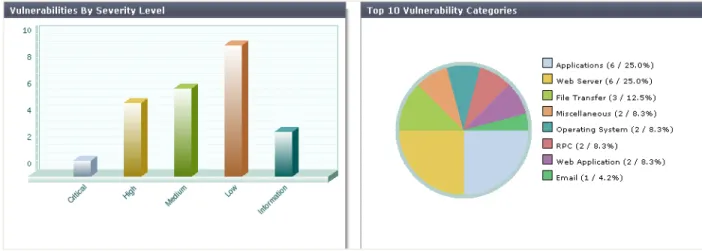
• Vulnerabilities by category • Vulnerabilities by severity
• Top vulnerable operating systems
• Top vulnerable services • Top vulnerable TCP services • Top vulnerable UDP services
Fig. 1: Summary report showing Vulnerabilities by Severity Level and Category
In addition to the identification of vulnerabilities, detail reports also include correlation data with remediation action from the FortiGuard Vulnerability Encyclopedia. Remediation tasks that could take hours to research are immediately available through active links included in the reports.
The FortiGate Vulnerability Management solution allows you to group your network assets based on your own assessment of criticality and impact. Mission critical resources such as ERP or critical groups such as finance can and should be scanned more frequently. In a large distributed enterprise with geographically dispersed mission critical assets, the ability to group assets is an essential tool that assures implementation of best practices throughout the organization.
FortiAnalyzer™: Centralized Analysis and Scanning
The FortiAnalyzer family of logging, analyzing, and reporting appliances securely aggregates log data from distributed Fortinet devices and other syslog-compatible devices. FortiAnalyzer also delivers robust VM scanning for your central locations such as headquarters or regional offices, giving you a complete VM solution for all locations in your distributed network. FortiAnalyzer’s enterprise-class VM scanning engine is able to conduct multiple scans in parallel to minimize the time required to scan the network. The
FortiAnalyzer scan data, combined with the aggregated FortiGate scan data, gives you comprehensive visibility into the security posture of your distributed network.
FortiAnalyzer’s suite of easily-customized reports lets you filter and review records, including traffic, event, virus, attack, web content, and email data. You can mine the data to determine your security stance and assure regulatory compliance. FortiAnalyzer appliances also provide advanced
security management functions such as quarantined file archiving, event correlation, traffic analysis, and archiving of email, web access, instant messaging and file transfer content. You can also utilize eDiscovery to expedite comprehensive responses to legal inquiries.
Fig. 2: FortiGate and FortiWiFi multi-threat security platforms provide local protection and scanning; FortiAnalyzer delivers centralized analysis and scanning
FortiManager™: Centralized Management
The FortiManager family enables you to manage any size Fortinet security infrastructure effectively, from a few devices to thousands of appliances and agents. FortiManager provides centralized policy-based provisioning, configuration, and update management for FortiGate, FortiAnalyzer, FortiWiFi™, FortiMail™, and FortiSwitch™ appliances, as well as FortiClient™ end point security agents.
FortiManager systems reduce the cost of managing large numbers of Fortinet deployments by minimizing both initial deployment costs and through ongoing operating efficiencies. A single FortiManager device can support up to 4,000 appliances or virtual domains (VDOMs) and 100,000 FortiClient agents, giving you efficient and effective control.
FortiManager allows you to simplify policy deployment using role-based administration to define user privileges for specific management domains and functions by aggregating collections of Fortinet appliances and agents into independent management domains.
FortiScan™: Dedicated Vulnerability Management
FortiScan vulnerability management is a centrally managed, enterprise-scale solution that enables organizations to close IT compliance gaps, and implement continuous monitoring in order to audit, evaluate, and comply with internal, industry, and regulatory policies for IT controls and security at the Operating System (OS) level. Organizations realize quick time-to-value with easy to install, intuitive, high value standard compliance policies (NIST SCAP, FDCC, PCI-DSS, SOX, GLBA, HIPAA) ready out-of-the-box with regular updates by FortiGuard to ensure OS regulatory compliance requirements are met. FortiScan integrates endpoint vulnerability management, industry and federal compliance, patch management, remediation, auditing and reporting into a single, unified appliance for immediate results. Centralized administration facilitates
management of multiple FortiScan appliances across the enterprise.
Summary
The FortiGate platform’s simple licensing, high performance, and unmatched breadth of security services enable you to protect all of your remote locations. The addition of VM scanning to the FortiGate platform’s multi-threat security technology gives distributed enterprises the ability to add vulnerability scanning and remediation quickly and easily to every distributed office in your network. Unlike other VM technologies, there is no additional device to install in remote locations as it is incorporated into the FortiGate multi-threat security platform. FortiAnalyzer’s integrated VM scanning and data aggregation/analysis delivers the improved visibility and reduced complexity your distributed organization needs. With FortiGate and FortiAnalyzer, you now have a single view of what is at risk in your network, the policies in place to protect those systems, and the remediation knowledge of FortiGuard Labs to guide protection efforts.
Copyright© 2010 Fortinet, Inc. All rights reserved. Fortinet®, FortiGate®, and FortiGuard®, are registered trademarks of Fortinet, Inc., and other Fortinet names he rein may also be t rademarks of Fortinet. All other p roduct or company names m ay be trademarks of their respective owners. Fortinet disclaims in full a ny guarantees. Fortinet reserves the right to change, modify, transfer, or othe rwise revise this public ation without noti ce, and the most current version of the public ation shall be applicabl e.