Available online at www.cuijca.com
International Journal of Computational Analysis
Vol (3), No. (1), pp. 19-28 DOI: 10.33959/cuijca.v3i1.8
* Corresponding author: E-mail address: [email protected]
AR for All – Is this Democratization of Spatial Design?
Muhammad Ashraf Khan
Department of Architecture, City University of Science and Information Technology, Peshawar
Keywords:
Geo-situated augmented reality Participatory spatial design Democratization
Architecture
Computer-mediated collaborative design communication
ABSTRACT
Augmented reality is hailed in published discourse for its potential to democratise spatial authorship. It offers the possibility for people to participate in spatial design activity without requiring any specialised skills. Everyone has ideas about the built environment, but conveying 3D information has conventionally relied either on scaled down models or 2D representations, in turn requiring extensive education and training to master. This convention has precluded anyone from participating in decision-making who did not have access to such skills. Augmented reality, or AR, offers communication of 3D ideas directly through 3D visualisations on handheld devices, thus re-kindling the dream of all citizens to have equal access to spatial decision-making. For this vision to turn into reality however, the technology will have to become more prolific than sketching. This paper seeks to encourage more and more people into playing with AR and identifying ways to ease the use of the technology. It aims to promote experimentation with AR by sharing a basic level protocol for setting up a customised operation, along with brief descriptions of two key caveats: accuracy and reliability. Overall it seems that AR is as yet predominantly geared towards gaming, and therefore requires some tweaking for use as a spatial design tool. Experimenting with it though has certainly become accessible for all.
1. Introduction
This paper contributes towards recent published discourse on the potential of augmented reality technology, or AR, to democratise spatial design. AR has this potential because it offers an opportunity for non-exert everyday citizens to participate in spatial decision-making, whereas this domain has conventionally remained confined to trained experts. However, for the vision of democratisation of spatial design to become reality it is imperative that AR technology should be made even more prolific than sketching. That may still be a long way off, but an immediate achievable first step can be to maximise the number of people using AR. This paper aims to encourage people by sharing the protocol for a basic level AR setup, so that more and more people may begin playing with it, thereby leading to identification of ways to further streamline the technology. Two key caveats have been identified, namely accuracy and reliability, and rudimentary suggestions have been given at the end for developing a work-around for each.
20
Democratisation is a significant concern in the domain of spatial design because decision-making in all related formal disciplines, including Interior Design, Architecture and Urban Design, has conventionally been limited to skilled professionals. This in turn is primarily due to the use of 2D representations for communication of 3D information. Such communication involves a cumbersome system of coding and decoding 3D ideas back and forth from 2D representations, such as using sketches and orthogonal drawings for discussing building proposals. To use this method effectively requires extensive knowledge and training, thus limiting spatial design activity to only those who had access to such skills. It had precluded lay citizens from participating in decision-making. AR on the other hand, eliminates the need for drawing skills for communicating 3D ideas, and has hence become a symbol for moving towards democratisation of spatial design. AR offers communication of spatial information in a close-to-real and more intuitive experiential format via handheld devices. Although AR is now a commonplace gaming term, it can be briefly mentioned for anyone unfamiliar with how it works that AR operates on handheld devices by overlaying 1:1 scale perspectival images of the virtual model of a spatial design object on the live video display of its proposed physical site. These overlayed images change in terms of size, viewing angle and perspective simulation in real-time response to any change in the position of viewers as they move about on the site. It creates a walk-around experience – as if the object was actually there. Whereas initially AR was operational only on expensive specialised equipment, from 2009 onwards it became possible to operate AR visualisations in commonly available smartphones and tablets. To set it up though, had still required some degree of computing skills. Even this hurdle has now evaporated however, with third party solutions recently offering ready to initiate packages that anyone with a laptop and a compatible device can use, without the need for any prior technical know-how. Does this mean that AR has completed the democratisation of spatial design?
This paper suggests not as yet. AR has certainly become accessible for all, but the dream of it replacing sketches and drawings will turn into reality as its use increases. Plus, some further though minor tweaking work remains. In this paper a protocol for setting up a basic level custom operation has been shared to encourage others to also begin playing with AR. More experimentation can help in identifying and ultimately resolving any remaining issues. Two minute yet important concerns of accuracy and reliability have been identified during the tests documented here, beginning with a brief contextualisation of the discussion within published literature on the subject.
2. Theoretical Context
In terms of past literature, this article essentially adds to recent discourse on performance evaluation of AR technology. Publications on this topic first appeared in 2008, then 2009 and 2011 [1-3] and have continued to progress steadily [e.g. 4, e.g. 5, 6, 7]. These have focused on a specific type of augmented reality technology, namely geo-situated augmented reality, or G-AR (pronounced ‘gee-ar’), because this sub-category bears most relevance to participatory spatial design (PSD). These evaluations are significant in turn within the context of theoretical work on spatial design democratisation [e.g. 8, 9-14]. There are a number of works in this field that are pertinent as a background to the subject of G-AR specifically, including: reviews targeting the identification of general potentials and problems [e.g. 15, 16-19]; explorations on increasing the fidelity of 3D simulations within 2D formats [e.g. 20]; exploration of populist approaches to engagement of end-users via tapping into social media [e.g. 21]; and, efforts to harness cutting edge advancements for enhancing PSD processes, such as
device-21
based engagement experiments by Korn et al [22], and an idea for capturing spontaneous suggestions of users for adjusting interior spatial layouts by Ratti et al [23].
Taming emergent technologies however, begs the question of whether or not the solutions may actually perform in the realm of practice the way they are being claimed or imagined to perform in theory. It is a critical question but has been relatively less explored as compared to other important though different questions, such as: whether the use of hi-fidelity visualizations promotes participation or not, as explored for example by McCall et al [24], and Ertiö et al. [25, 26]; and, the question of whether the popularity of G-AR applications is increasing or decreasing [27]. Among the first works on the performance of the technology itself that appeared in published discourse was the evaluation by Wang, in which the issue of inconsistency between intended dimensions of a virtual object and its size or shape as it appeared within the video display of its actual location was identified [2]. This report had mentioned the inaccuracy issue in a general or qualitative manner, while a study in 2011 investigated the quality and detail of displayed content versus the internet processing time involved [1, 19]. An advancement has been made in the present study by presenting a precise quantitative evaluation, albeit using a straightforward dimensional measurement technique to record observations regarding any variations between the display of a given virtual object in a real world context and its intended or designed dimensions and placement.
Another contribution of this study is a crude though rapidly implementable protocol for setting up a rudimentary customised iOS-based G-AR operation. Facilitative tools for iOS app creation in general have been available since 2009, including the outstanding DAPP app that allows a complete novice to bring an idea to life [28]. However, a number of reviews specifically targeting the numerous application programming interfaces (APIs) available for developing AR-based apps, ranging from those that require no programing skills to those requiring advanced skills, have found that these are predominantly aimed at creation of leisure-time applications, rather than functioning as meta-designing tools [29, 30]. A number of other publications have shared APIs for facilitating others to develop customised setups, such as AR-based classroom teaching and histo-cultural tour tools [e.g. 29, 31-35], but the protocol presented in the present study is distinct in providing a customisable solution relevant for the PSD context in particular.
It is important to mention at the outset that though GPS-based G-AR products may have the dual advantage of allowing completely intrusion-free deployment while also enabling end-users to engage their own devices [1], the reliability and accuracy of visual-tracking-based solutions is superior. Therefore for the present testing a decision was made to tolerate the intrusive aspect of placing markers in deployment sites for the sake of an increase in accuracy. Furthermore, some visual-tracking-based solutions offer the option of custom-designed markers, thereby opening the possibility of blending specially designed markers into the scene of deployment, or to even completely do away with intrusion by using natural-feature tracking [36], as explored extensively by HITLabNZ [37]. Such products can be useful till GPS-based technology begins to offer higher levels of accuracy.
3. Method and Scope
This study implemented empirical performance testing to measure the extent of consistency between intended and displayed dimensions of virtual objects. For a G-AR application to deliver its anticipated utility the visualisations of the given spatial design proposal must fit into the dimensions of its actual intended site as visible on the device screen. For example, if the dimensions of the spatial design in question are flagged on the actual site and subsequently become visible on the live video of that site on a device screen then the virtual model displayed on the same screen via G-AR technology should fit the flagged dimensions. Accuracy therefore means the extent to which the dimensions of the displayed virtual object are found to match the site dimensions visible in the live video feed. Similarly, it is also critical that the position of the displayed object must sync with the live video of the actual site, in order for G-AR displays to be useful, especially in the context of participatory spatial design, or PSD. This is critical due to the expected involvement of people at a collective scale. For example, if an application may involve calling envisaged end-users to a site for a G-AR-based evaluation of the design proposal of a future building then the technology should work seamlessly, without any software faults. Otherwise participants may become
22
disappointed and disillusioned with the technology, causing them to disengage in spatial design participation activities, and hence eventually posing a risk for adversely affecting G-AR’s utility in the PSD context.
3.1 Set-up
Two leading products available in the internet-based marketplace were selected for the testing, namely ARToolkit, now owned by DAQRI [38], and Vuforia by PTC [36]. An extended tracking feature was unavailable in the ARToolkit option therefore this report is focused on the testing completed on the Vuforia product. Extended tracking is a term used to denote the feature of continued display of the virtual model even when the marker used by the device to determine position is not in the video camera view. It is especially useful for one-off events, as is the case mostly with PSD applications, when users may not be skilled enough to be able to continuously keep the marker in view while moving around to examine the displayed model.
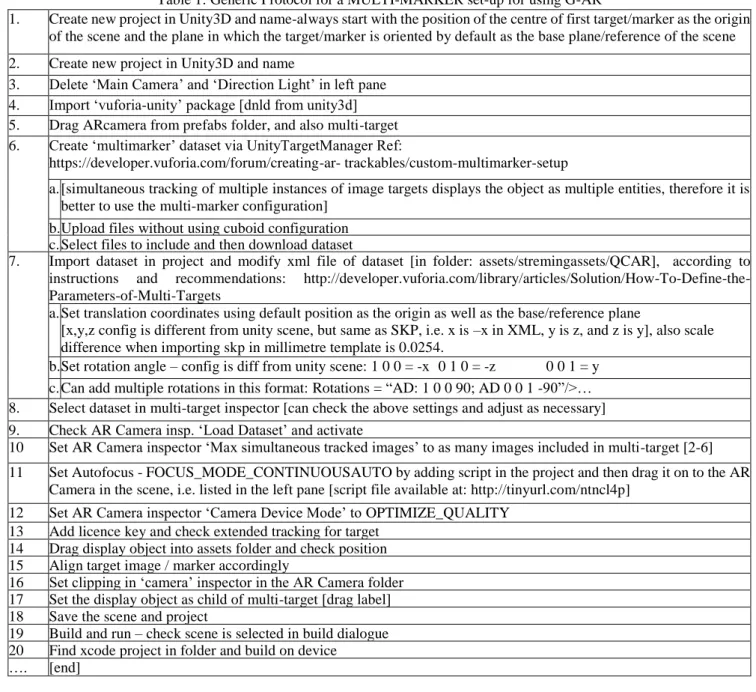
Table 1: Generic Protocol for a MULTI-MARKER set-up for using G-AR
1. Create new project in Unity3D and name-always start with the position of the centre of first target/marker as the origin of the scene and the plane in which the target/marker is oriented by default as the base plane/reference of the scene
2. Create new project in Unity3D and name
3. Delete ‘Main Camera’ and ‘Direction Light’ in left pane
4. Import ‘vuforia-unity’ package [dnld from unity3d]
5. Drag ARcamera from prefabs folder, and also multi-target
6. Create ‘multimarker’ dataset via UnityTargetManager Ref:
https://developer.vuforia.com/forum/creating-ar- trackables/custom-multimarker-setup
a. [simultaneous tracking of multiple instances of image targets displays the object as multiple entities, therefore it is better to use the multi-marker configuration]
b. Upload files without using cuboid configuration c. Select files to include and then download dataset
7. Import dataset in project and modify xml file of dataset [in folder: assets/stremingassets/QCAR], according to
instructions and recommendations:
http://developer.vuforia.com/library/articles/Solution/How-To-Define-the-Parameters-of-Multi-Targets
a. Set translation coordinates using default position as the origin as well as the base/reference plane
[x,y,z config is different from unity scene, but same as SKP, i.e. x is –x in XML, y is z, and z is y], also scale difference when importing skp in millimetre template is 0.0254.
b. Set rotation angle – config is diff from unity scene: 1 0 0 = -x 0 1 0 = -z 0 0 1 = y c. Can add multiple rotations in this format: Rotations = “AD: 1 0 0 90; AD 0 0 1 -90”/>… 8. Select dataset in multi-target inspector [can check the above settings and adjust as necessary]
9. Check AR Camera insp. ‘Load Dataset’ and activate
10 Set AR Camera inspector ‘Max simultaneous tracked images’ to as many images included in multi-target [2-6]
11 Set Autofocus - FOCUS_MODE_CONTINUOUSAUTO by adding script in the project and then drag it on to the AR
Camera in the scene, i.e. listed in the left pane [script file available at: http://tinyurl.com/ntncl4p]
12 Set AR Camera inspector ‘Camera Device Mode’ to OPTIMIZE_QUALITY
13 Add licence key and check extended tracking for target
14 Drag display object into assets folder and check position
15 Align target image / marker accordingly
16 Set clipping in ‘camera’ inspector in the AR Camera folder
17 Set the display object as child of multi-target [drag label]
18 Save the scene and project
19 Build and run – check scene is selected in build dialogue
20 Find xcode project in folder and build on device
23
For the preliminary test the virtual model of a medium-sized building was used to check the tracking and display performance of the Vuforia product. A marker was placed in an outdoor setting and a mini-iPad was used to test tracking distance and speed as well as display scale and renderings. Two versions of the virtual model were used, one with a smaller total file size, namely 2.0MB, and the other detailed version had a larger file size, namely 31.0MB. Size of the final Xcode project folder used to install the software on the device was 742.0MB and 1.32GB, respectively. Scales of the models were also varied - from full to 1/10 scale. Models were set to display at a distance of approximately 1.0m from the marker.
Advanced precision testing was setup in an indoor studio, aimed at measuring inaccuracies if any, and to also check performance changes if any, in using a multi-marker configuration. This interest included an exploration of the possibility of a work-around for overcoming distortions observed at times during the testing. A virtual model of a simple 1.0m by 1.0m cube was prepared using GoogleSketchUp and Unity3D, and 1.0m width custom-designed markers were placed in a 90º orientation. This setup was aimed at finding out if the display of the 1.0m cube could perhaps be anchored to both markers simultaneously. That is why the widths of the markers were deliberately set to be same as the width of the display. If it was found to work then this possibility had the potential to serve as a work-around for any distortions found in the virtual object display.
A protocol for G-AR deployment was documented based on the experience gained through this study to help PSD practitioners to easily access this useful technology for widespread deployment. A short video tutorial of this protocol is available at the link : https://tinyurl.com/y8l84gc6, while a stepwise listing of this protocol is also displayed in a table 1 for public dissemination in the interest of promoting PSD practice by facilitating G-AR deployment using the Vuforia product.
4. Results
Vuforia was found to offer eye-catching results but fell short of full accuracy, as described in detail below.
4.1 Preliminary Tests
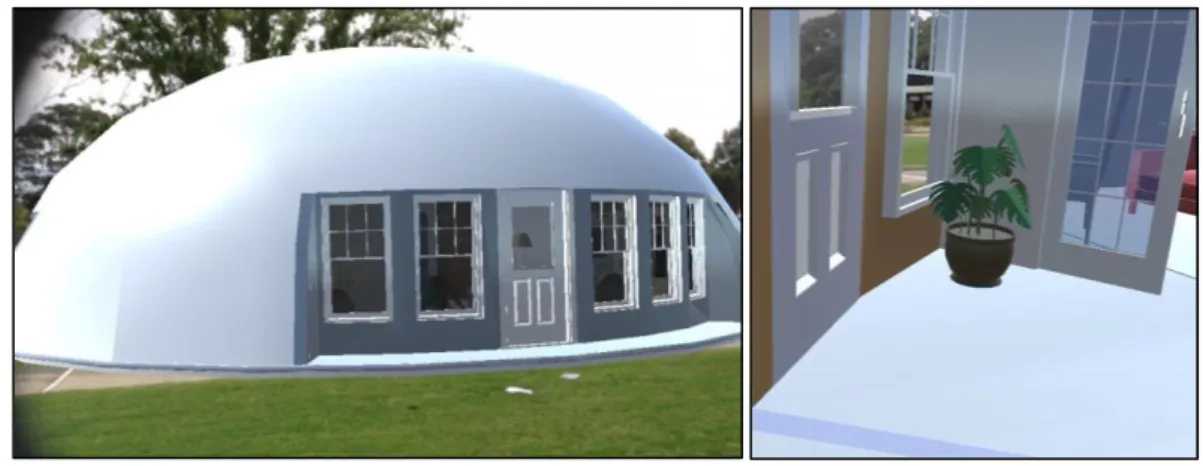
Total variation between the display and its expected position in the video feed was less than 2.0m to 3.0m (Fig.1).
Fig. 1. Outdoor display of the virtual model using Vuforia.
Extended tracking was tested by rotating the device away from the marker. It was found that the display was sustained till 90º then crashed. Maximum linear distance of operation was observed to be 30.0m. That is, the display was sustained till the marker was approximately 30.0m away and then the display would crash. No significant difference in performance was observed when using a 1/10 scale model of the building, or between using a detailed version with a larger file size and a
non-24
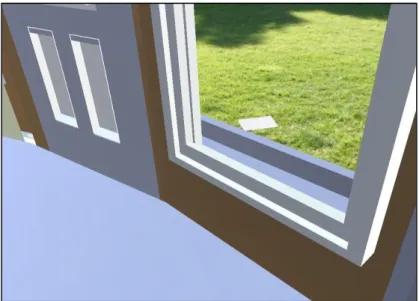
detailed version with a smaller file size. Results were eye-catching, as illustrated in the image given below of the view from inside the model looking outside from one of the windows, with the marker visible on the ground outside (Fig.2).
Fig. 2. Eye-catching results – view from a window looking outside from inside the virtual model display (marker visible on
the ground)
At times it was observed that the outlines of the virtual object appeared to converge more sharply as they receded away from the viewing plane in comparison to real world surroundings. Also, crashes of the display in various combinations of distance and rotation suggested that a multi-marker setup may offer a more robust result. If so, then having a marker at extremities of the display could be expected to auto-correct any anomalies in the perspective effect rendering.
4.1 Advanced Testing
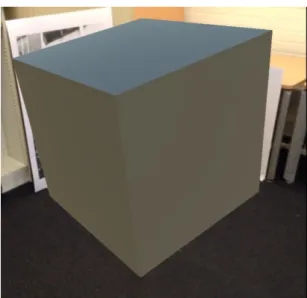
Two markers were used to test the accuracy of the display when projected in front of a multi-marker configuration (Fig.3).
25
After creating the scene in Unity3D it was carefully recreated in the real world to check for consistency across both (Fig.4). Upon deployment an accurate rendering was obtained (Fig.5).
Fig. 4. Physical translation of the scene, and Fig. 5. Accurate rendering of virtual object
It was evident from this result that the foreshortening effect noted in the outdoor deployment was an issue for only deployments of a large scale and size. Therefore the next step was to determine if the SDK would track both markers simultaneously or not, as that could provide insights for developing a work-around using a multi-marker configuration. For this purpose the same scene was used except that one of the markers was deliberately placed 10.0cm off from its designed position, to specifically test if the SDK was designed to track more than one marker simultaneously. In the device view the virtual cube was observed to alternate between placement in accordance to one marker or the other, appearing to jump from one marker to the next. At one point it also appeared to be placed in accordance to both simultaneously but its orientation became skewed into an approximately 10º tilt in an anti-clockwise direction (Fig.6).
Fig. 6. Skewed rendering in response to deliberately introducing an error in the placement of the two markers.
This result indicated that a multi-marker configuration operated by tracking one marker at time, not all markers simultaneously. Therefore it could not serve as a work-around option in case any distortions had to be removed.
26
4.2 A Basic Level Work-Around
One possible though crude work-around that could be tested in future explorations would be to deliberately reverse-distort the virtual model so that it could be rendered by the SDK in a more accurate-looking appearance. This would involve first testing the rendering according to each marker, measuring the correction needed, and then preparing modified versions of the model for each marker position.
5. Conclusion
Marker-based solutions have higher accuracy but at the expense of limitations of cumbersome designing of markers and configurations plus work-arounds for any anomalies encountered. Undoubtedly GPS-based G-AR solutions may offer a more visceral experience for end-users, along with the advantage of the possibility of end-users deploying web-apps directly onto their own devices, as desirable for an accentuated participatory environment [39, 40]. However, the reliability issues reported in performance evaluations of third-party solutions, such as Layar and Wikitude, still stand because the GPS functionality available in devices is pre-limited to a fixed level of accuracy via governmental controls in view of security considerations [41-43]. Therefore until GPS systems begin to offer better speed and accuracy the best option available for economical deployment of G-AR in the spatial design context are marker-based third-party solutions. A future follow-up on this study can be to formalise the rudimentary protocol that has been shared into a formal API, and testing it with aspiring designers, in the pattern of tests already completed by Mota et al. for facilitation of teachers for development of customised AR apps as teaching tools in classrooms [29]. While another exciting direction can be to combine G-AR with haptic and holographic technologies [e.g. 44]. A follow-up paper is planned to explore a design approach for AR interfaces that is sensitive to the visceral aspect of spatial authorship.
Acknowledgments
Author wishes to acknowledge the following contributions: (a) overall supervision and invaluable research support by Dr. Lian Loke; (b) technical advice and assistance by Dr. Callum Parker during the setup and configuration of the Vuforia product on iPad devices; (c) client support at Vuforia by AlessandroB; (d) 3D model files by www.monolithic.org; (e) premises used at University of Sydney, main campus; and, (f) loan of devices by Department of Psychology, University of Sydney.
R
EFERENCES[1] Khan, M.A. and A. Dong, Using Geo-Located Augmented Reality for Community Evaluation, in CAAD Futures
2011: Designing Together, P. Leclercq, A. Heylighen, and G. Martin, Editors. 2011, CAADFutures: University of Leige, Belgium. p. 701-720.
[2] Wang, X., Augmented reality in architecture and design: potentials and challenges for application. International
Journal of Architectural Computing, 2009. 7(2): p. 309-326.
[3] Dünser, A., R. Grasset, and M. Billinghurst, A survey of evaluation techniques used in augmented reality studies.
2008: Human Interface Technology Laboratory New Zealand.
[4] Billinghurst, M., A. Clark, and G. Lee, A survey of augmented reality. Foundations and Trends® in Human–
Computer Interaction, 2015. 8(2-3): p. 73-272.
[5] Hartmann, J. and D. Vogel. An Evaluation of Mobile Phone Pointing in Spatial Augmented Reality. In Extended
Abstracts of the 2018 CHI Conference on Human Factors in Computing Systems. 2018. ACM.
[6] Park, M.K., et al., Spatial augmented reality for product appearance design evaluation. Journal of Computational
27
[7] Santos, M.E.C., et al., Augmented reality learning experiences: Survey of prototype design and evaluation. IEEE
Transactions on learning technologies, 2014. 7(1): p. 38-56.
[8] Hoskyns, T., Designing the Agon: Questions on Architecture, Space, Democracy and “the Political, in Making
Things Public: Atmospheres of Democracy, B. Latour and P. Weibel, Editors. 2005.
[9] Kolarevic, B., From Mass Customisation to Design ‘Democratisation’. Architectural Design, 2015. 85(6): p. 48-53.
[10] Verebes, T., Mass-Customised Cities. 2015: Wiley.
[11] Lupton, E., and D.I.Y.: Design It Yourself: A Design Handbook. 2006: Princeton.
[12] Alexander, C., S. Ishikawa, and M. Silverstein, a Pattern Language: Towns, Buildings, Construction. 1977: Oxford
University Press.
[13] Walker, B., Another Kind of Science: Christopher Alexander on Democratic Theory and the Built Environment.
Canadian Journal of Political Science 2003. 36(5): p. 1053-1072.
[14] Foth, M., H.G. Klaebe, and G.N. Hearn, The role of new media and digital narratives in urban planning and
community development. Body, Space & Technology, 2008. 7(2).
[15] Akçayır, M. and G. Akçayır, Advantages and challenges associated with augmented reality for education: A
systematic review of the literature. Educational Research Review, 2017. 20: p. 1-11.
[16] Chen, P., et al., A review of using Augmented Reality in Education from 2011 to 2016, in Innovations in Smart
Learning. 2017, Springer. p. 13-18.
[17] Brusaporci, S., Advanced Mixed Heritage: A Visual Turn through Digitality and Reality of Architecture.
International Journal of Computational Methods in Heritage Science (IJCMHS), 2018. 2(1): p. 40-60.
[18] Abdullah, F., M.H.B. Kassim, and A.N.Z. Sanusi, Go virtual: exploring augmented reality application in
representation of steel architectural construction for the enhancement of architecture education. Advanced Science Letters, 2017. 23(2): p. 804-808.
[19] Ens, B., et al. Ivy: Exploring spatially situated visual programming for authoring and understanding intelligent
environments. In Proceedings of the 43rd Graphics Interface Conference. 2017. Canadian Human-Computer Communications Society.
[20] Barton, J., J. Plume, and B. Parolin, Public participation in a spatial decision support system for public housing.
Computers, Environment and Urban Systems, 2005. 29(6): p. 630-652.
[21] Gordon, E. and E. Manosevitch, Augmented deliberation: Merging physical and virtual interaction to engage
communities in urban planning. New Media & Society, 2011. 13(1): p. 75-95.
[22] [22] Korn, M., Place and Situated Deliberation in Partic-ipatory Planning–A Research Proposal. Guest Editors,
2011: p. 41.
[23] Ratti, C. and M. Claudel, A/B Architecture: Publicly Augmented Design. Architectural Design, 2016. 86(5): p.
42-47.
[24] McCall, M.K. and C.E. Dunn, Geo-information tools for participatory spatial planning: Fulfilling the criteria for
28
[25] Ertiö, T.-P., Participatory Apps for Urban Planning--Space for Improvement. Planning Practice & Research, 2015.
30(3): p. 303-321.
[26] Ertiö, T.-P., et al. Supporting ‘participation ‘in mobile participation. in Proceedings of the ePart 2014 Conference,
Dublin, Ireland. 2014.
[27] Pascoal, R., et al. A survey of augmented reality: Making technology acceptable in outdoor environments. in 2018
13th Iberian Conference on Information Systems and Technologies (CISTI). 2018. IEEE.
[28] Viegas, C. DAPP. 2009 [cited 2017; Available from:
https://download.cnet.com/Dapp-Lite-The-App-Creator-for-iPhone-and-iPad/3000-2124_4-77651160.html.
[29] Mota, J.M., et al., Augmented reality mobile app development for all R. 2017.
[30] Amin, D. and S. Govilkar, Comparative study of augmented reality SDKs. International Journal on Computational
Science & Applications, 2015. 5(1): p. 11-26.
[31] Clini, P., et al., Real/not real: pseudo-holography and augmented reality applications for cultural heritage, in
Handbook of Research on Emerging Technologies for Digital Preservation and Information Modeling. 2017, IGI Global. p. 201-227.
[32] Cuendet, S., et al., Designing Augmented Reality for the Classroom. 2012, Elsevier.
[33] Wüest, R. and S. Nebiker, Geospatial Augmented Reality for the interactive exploitation of large-scale walkable
orthoimage maps in museums. Proceedings of the ICA, Volume 1, 2018, pp. 124, 2018. 1: p. 124.
[34] Pryss, R., et al., The AREA Framework for Location-Based Smart Mobile Augmented Reality Applications.
International Journal of Ubiquitous Systems and Pervasive Networks (JUSPN), 2017. 9(1): p. 13-21.
[35] Mota, J.M., et al., Augmented reality mobile app development for all. Computers & Electrical Engineering, 2018.
65: p. 250-260.
[36] Vuforia. Vuforia. 2016 [cited 2016; Available from: https://http://www.vuforia.com/.
[37] HITLab. CityViewAR. 2011 [cited 2016; Available from: http://www.hitlabnz.org/index.php/products/cityviewar/.
[38] ARToolKit. ARToolKit. 2016 [cited 2016; Available from: https://artoolkit.org/.
[39] Ganapathy, S., Design guidelines for mobile augmented reality: User experience, in Human Factors in Augmented
Reality Environments. 2013, Springer. p. 165-180.
[40] Reinwald, F., et al., Augmented Reality at the Service of Participatory Urban Planning and Community Informatics–
a case study from Vienna. The Journal of Community Informatics, 2014. 10(3).
[41] Wikitude. Wikitude World Browser. 2016 [cited 2016 24th February]; Available from:
http://www.wikitude.com/tour/wikitude-world-browser.
[42] Layar. Layar Reality Browser. 2016 [cited 2016 10th January]; Available from: http://www.layar.com/browser/.
[43] Cooley, B., GPS Update. 2015.
[44] Maisto, M., et al., Evaluation of wearable haptic systems for the fingers in augmented reality applications. IEEE