Stephanie C. Adamson. Soliciting user contribution in the modern digital library: a critique framework for evaluating methods and a case study recommendation for a digital library of historical materials. A Master’s Paper for the M.S. in L.S. degree. April, 2008. 36 pages. Advisor: Catherine Blake.
Today’s information consumer wants to interact with and contribute to information resources that they encounter. Digital library managers must balance the benefit provided by user contributions, with content quality. In this paper, we characterize existing
technologies into six categories based on the role of the user at the time of contribution. We then introduce an evaluation framework comprised of five criteria: validity,
accessibility, accountability, utility, and resource requirements. We demonstrate the feasibility of this framework by providing a detailed analysis for three of the six
categories, and for a case study of Documenting the American South (DocSouth), which is part of the Carolina Digital Library and Archives at the University of North Carolina at Chapel Hill. We conclude with recommendations for methods that best satisfy the needs of DocSouth.
Headings:
Digital libraries.
Semantic networks—Information theory. Electronic publishing.
Collaborative computing. Web-based interaction.
RECOMMENDATION FOR A DIGITAL LIBRARY OF HISTORICAL MATERIALS
by
Stephanie C. Adamson
A Master’s paper submitted to the faculty of the School of Information and Library Science of the University of North Carolina at Chapel Hill
in partial fulfillment of the requirements for the degree of Master of Science in
Library Science.
Chapel Hill, North Carolina
April 2008
Approved by
TABLE OF CONTENTS
1. Introduction...4
2. Methods...8
3. Categorization and Evaluation Criteria...10
3.1 Characterizing user-provided technologies...10
3.2 Evaluation framework...15
4. Evaluation...19
4.1 Users provide unstructured responses to existing content published by the information provider (Category B). ...19
4.1.1 Example 1: Contributing annotations via PynchonWiki...21
4.1.2 Example 2: Adding comments to A View to Hugh blog posts ...23
4.2 Users provide structured responses to existing content published by the information provider (Category C). ...26
4.2.1 Example 1: Perseus Digital Library’s morphological disambiguation tool...27
4.2.2 Example 2: Everglades Digital Library’s resource rating system...30
4.3 Users create relationships between materials for public benefit (Category D)...34
4.3.1 Example 1: Tagging Books in LibraryThing...35
4.3.2 Example 2: Linking products with Amazon's Listmania!...38
5. Case Study: Documenting the American South...41
5.1 Background...41
5.2 User population. ...42
5.3 Technical resources. ...42
5.4 Workflow. ...43
5.5 Current DocSouth Needs...43
5.6 Recommendations ...46
5.6.1 Problem 1: Identifying and disambiguating named entities...46
5.6.2 Problem 2: Optimizing subject and topic organization across all collections. ..47
5.6.3 Problem 3: Enhancing collections with limited content, or for which there is a significant public history component. ...48
6. Conclusion ...49
7. Notes ...51
1. Introduction
The way we experience information has changed drastically in a short period of time. As
networked communication pervades nearly every facet of daily life, so too does
information. Thanks to the ever-increasing ease and convenience of networked
communication, information no longer has physical limitations. Moreover, the ways in
which we work with information—the methods by which we assimilate, create, organize,
distribute and protect various forms of data—are increasingly reliant on the freedom of
exchange across networks. We use RSS feeds to compile information that is important us,
and web applications to author presentations; we store and share files in virtual folders
(on servers thousands of miles away) and we rely on web-based backup utilities to keep
those files safe. Networked communication affords information a new kind of freedom—
a freedom that has drastically changed our expectations of information providers.
Information consumers have come to expect more of the information available to them.
Reading the works of others in an ‘analog’ sense is outdated; today’s users want to add
comments, and highlight the portions that are wrong or with which they do not agree.
Information consumers want to interact with the information they encounter and
re-imagine it for their own purposes. Today’s users assume a much more participatory role
This shift in utility and expectations did not occur spontaneously; the change is the result
of advances in web and network technology. As technology has allowed the user a greater
role in the web experience, the user has become the focus of information-providing
services. Though criticized for characterizing this as an abrupt change as opposed to a
gradual shift, Tim O’Reilly’s concept of “Web 2.0” puts a name to this new focus.
According to O’Reilly’s 2005 introduction to the idea, “Web 2.0” technologies present
information that is “organic,” and “participatory.”1 “Web 2.0” services put a certain
amount of faith in the “wisdom of crowds,”2 a concept that since 2005 has gained a
certain worth for both intellectual (in the case of Wikipedia3) and commercial content.
O’Reilly cites the importance of harnessing user contributions with a commercial
example: “[Amazon4] harnessed their users to annotate [their] data, such that after ten
years, Amazon … is the primary source for bibliographic data on books, a reference
source for scholars and librarians as well as consumers.” 5
This example concerning Amazon and bibliographic data is of particular interest to
librarians and serves to suggest that the line between information gathered via user input
for academic applications and commercial ones could be a thin one. We do not usually
use the terms “Organic” and “participatory” to academic materials, however; academics
contributions of others in the highest detail, with the failure to do so a potential threat to
the reputation and academic standing of authors and their supporting institutions.
Quality reviews can be time-consuming, and they often require input from many parties.
Still, peer review is a revered institution among scholars. The academic world relies on
the construct of peer review to determine value in a piece of information, and “organic”
or “participatory” information is somewhat at odds with that system of rewards.
Given the problems inherent in the marriage of two such disparate concepts of
information, how can scholarly resources hope to keep up as networked communication
becomes increasingly interactive? Libraries are a part of a growing debate in higher
education that involves the access to scholars’ work in academic journals, a problem
caused by that disparity. The push to make articles available electronically has resulted in
a myriad of methods of online delivery, from those that require payment according to the
length of requested documents, to those that are now publicly available free of charge.
This tension becomes particularly apparent in the case of web-accessible digital libraries.
Digital libraries, or collections of digitized content and associated scholarly material
(produced by libraries, cultural institutions, and university initiatives), are freely available
online alongside those sites that best exemplify O’Reilly’s “Web 2.0.”6 This juxtaposition
1. How can digital libraries best resolve the tension between a traditional construct
of scholarly communication and the newfound freedom of web-accessible
information? How can digital libraries support the participatory nature of today’s
networked information?
2. What are the prevailing methods to solicit user participation in a web
environment, and which of those methods have the highest utility for an academic
library environment? How can we characterize their strengths and weaknesses? If
there are examples of current use, what are successes, and what are failures?
3. What resources are required, in order to implement the recommended methods?
Our objective is to organize facilities that allow web-based user contributions into
functional categories. An in-depth discussion will follow of the three categories that
apply to digital libraries. We then evaluate the categories using an evaluation framework
comprised of five categories: validity, accessibility, accountability, utility, and resource
requirements. We then demonstrate the framework using Documenting the American South7 as a case study. Documenting the American South is a web-based collection of
historical documents and associated intellectual content produced by professors, graduate
students and staff of the Carolina Digital Library and Archives at the University of North
Carolina at Chapel Hill. Finally, we recommend the categories most suited to the needs
2. Methods
This study and its recommendations concern a dynamic topic; as mentioned previously,
our interaction with information relates to advances in technology that occur on a daily
basis. The discussions and conclusions put forth here are thus time-limited. For this
study to be of use in the future, it will be necessary to repeat these procedures.
The hope of the researcher is that replicating this study will not require a completely new
approach; to this end, a detailed description of the research procedures and methodology
involved. The method outlined below should provide a framework for future studies with
a similar purpose, and, if desired, data that may be used for a historical comparison.
This study began with a search for relevant literature. We chose the fields of library
science, computer science, web technology, and interface design as most relevant to the
topic and most representative of the spectrum of information available. We then chose
the ACM Digital Library and EbscoHost’s Academic Search Premier as databases within which to perform documented searches, based on their inclusion of respected resources
in the aforementioned disciplines. The ‘hits’ obtained according to each phrase entered in
a simple keyword search were recorded and articles chosen for perusal based on
motivated by a systematic review process. We considered articles retrieved by more than
one search term especially relevant; in the case of a high volume, or multiple pages, of
results, the database’s relevance scheme was trusted and pages skimmed for relevant
articles until pages were reached of which no articles were considered useful. We chose
books for which a review appeared among relevant articles in search results, and obtained
copies through Interlibrary Loan if not locally available.
Search terms: Search terms: Search terms:
Search terms: ACM Digital LibraryACM Digital Library ACM Digital LibraryACM Digital Library Academic Search PremierAcademic Search PremierAcademic Search PremierAcademic Search Premier
“web collaboration” 18 80
“disambiguation” 2,785 264
“library 2.0” 10 95
“web 2.0” 334 749
“web applications” 2,197 1,733
“annotations” 5,424 3.442
“semantic web” 2,267 485
“digital library” 4,434 4,102
“user contribution” 21 24
“user input” 2,429 215
“folksonomy” 66 38
“user participation” 383 159
Figure Figure Figure
Figure 1111. Database search term distribution.. Database search term distribution.. Database search term distribution.. Database search term distribution.
Figure 1 provides the search terms used and the number of 'hits' obtained in each
database. We collected additional resources from citations included in articles collected in
the initial search. We also recorded the subject headings assigned to relevant articles
database-specific subject headings associated with the articles consulted for use in this
study.
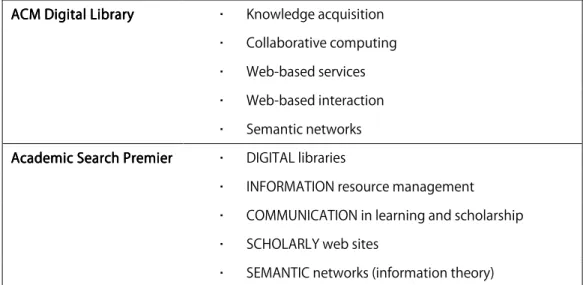
Knowledge acquisition Collaborative computing Web-based services Web-based interaction ACM Digital Library
ACM Digital LibraryACM Digital Library ACM Digital Library
Semantic networks DIGITAL libraries
INFORMATION resource management COMMUNICATION in learning and scholarship SCHOLARLY web sites
Academic Search Premier Academic Search PremierAcademic Search Premier Academic Search Premier
SEMANTIC networks (information theory)
Figure Figure Figure
Figure 2222. Top subject headings per database for documented searches.. Top subject headings per database for documented searches.. Top subject headings per database for documented searches.. Top subject headings per database for documented searches.
3. Categorization and Evaluation Criteria
In this section, we characterize use provided technologies and introduce a new
framework for evaluating technologies that support user input.
3.1 Characterizing user-provided technologies
As we collected sources, we compiled a list of relevant technologies (“facilities”) that we
encountered. When an appropriately large sample of literature was covered, we grouped
the list into functional categories based on the role of the user when contributions are
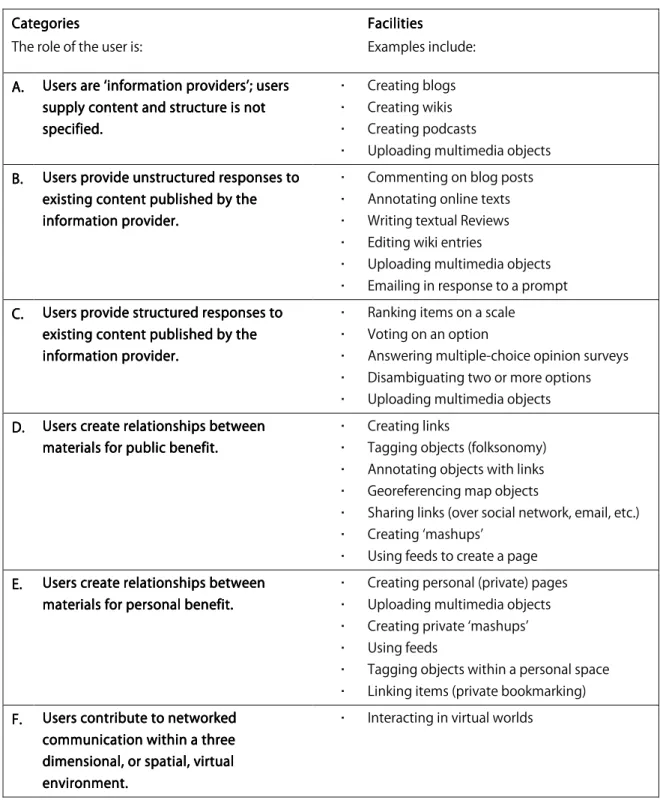
made. The characterization presented in Figure 3 can be used independently of our
appropriate categories for emerging technologies and apply the evaluation framework accordingly. Categories Categories Categories Categories
The role of the user is:
Facilities Facilities Facilities Facilities Examples include: A. A. A.
A. Users are ‘information providers’; users Users are ‘information providers’; users Users are ‘information providers’; users Users are ‘information providers’; users supply content and
supply content and supply content and
supply content and structure is not structure is not structure is not structure is not specified specifiedspecified specified.... Creating blogs Creating wikis Creating podcasts
Uploading multimedia objects B.
B. B.
B. Users provide unstructured responses to Users provide unstructured responses to Users provide unstructured responses to Users provide unstructured responses to existing content published by the existing content published by the existing content published by the existing content published by the informat
informatinformat
information provider.ion provider.ion provider.ion provider.
Commenting on blog posts Annotating online texts Writing textual Reviews Editing wiki entries
Uploading multimedia objects Emailing in response to a prompt C.
C. C.
C. Users provide structured responses to Users provide structured responses to Users provide structured responses to Users provide structured responses to existing content published by the existing content published by the existing content published by the existing content published by the informatio
informatioinformatio
information provider.n provider.n provider.n provider.
Ranking items on a scale Voting on an option
Answering multiple-choice opinion surveys Disambiguating two or more options Uploading multimedia objects D.
D. D.
D. Users create relationships between Users create relationships between Users create relationships between Users create relationships between materials for public benefit. materials for public benefit.materials for public benefit. materials for public benefit.
Creating links
Tagging objects (folksonomy) Annotating objects with links Georeferencing map objects
Sharing links (over social network, email, etc.) Creating ‘mashups’
Using feeds to create a page E.
E. E.
E. Users create relationships between Users create relationships between Users create relationships between Users create relationships between materials for personal benefit. materials for personal benefit.materials for personal benefit. materials for personal benefit.
Creating personal (private) pages Uploading multimedia objects Creating private ‘mashups’ Using feeds
Tagging objects within a personal space Linking items (private bookmarking) F.
F. F.
F. Users contribute to networked Users contribute to networked Users contribute to networked Users contribute to networked communication within a three communication within a three communication within a three communication within a three dimensional, or spatial, dimensional, or spatial,dimensional, or spatial, dimensional, or spatial, virtual virtual virtual virtual environment.
environment.environment. environment.
Interacting in virtual worlds
Figure Figure Figure
We discovered that, between categories, there exist several overlapping facilities;
inclusion as an example in each category depends on the user’s role at the time of
contribution. To avoid confusion, we provide a detailed description of the types of
facilities comprising each category.
Category A. Users are ‘information providers’; users supply content and structure is not
specified. Facilities belonging to this category enable users to publish content to the web on their own accord, or by their own choosing. Users decide what type of content they
want to add to the body of information available via the web, and thus themselves become
information providers. A site does not explicitly request contributions from users, and
contributions are not provided in response to existing content. Examples include
personal blogs, project wikis, personal interest podcasts, and upload facilities for personal
photographs, as found on Flickr.8
Category B. Users provide unstructured responses to existing content published by the
information provider. Facilities representing this category are those that encourage users
to contribute in response to existing content, but without an enforced structure.
Examples include sites that ask users to write textual reviews of products, and blogs
whose authors have enabled user comments on individual posts. We also consider the
upload of multimedia objects here when provided in response to a request for
information without specification on format or nature (for example, contest entries.)
require qualitative evaluation; e.g., an essay question on a test, as opposed to a
multiple-choice question.
Category C. Users provide structured responses to existing content published by the
information provider.This category also contains facilities that encourage users to
contribute content based on their own knowledge; however, the information provider
provides a recognizable framework by which users can express that knowledge. Examples
include ranked review systems (“give this product one to five stars”), web-based voting,
and facilities which harness users’ opinions to disambiguate discrete options. You can
compare the kinds of user responses gained by these facilities to survey responses that
allow quantitative evaluation; e.g., a multiple-choice question on a test, as opposed to an
essay question.
Category D. Users create relationships between materials for public benefit. This
category deals less with the submission of content by users and focuses on the aspects of
network communication to which users can contribute. “For public benefit” indicates
that the contribution will be of use to other information consumers. Examples include
linking relevant pages to one another, tagging resources using a public or shared
vocabulary (as Del.icio.us9 allows), and referencing geospatial data within a mapping
service. Feeds and ‘mashups’ are included here when their purpose is to be of use to an
Category E. Users create relationships between materials for personal benefit. “For personal benefit” here characterizes the use of many of the above facilities for purely
personal or private use. A unique example, however, involves allowing users to create
personal portals to content that he or she is most likely to use. The creation of feeds and
‘mashups’ are included here when their purpose is for personal use only. Examples
include services such as iGoogle10, which allow users to pull data from various sources
into a personal home page restricted to access by personal login.
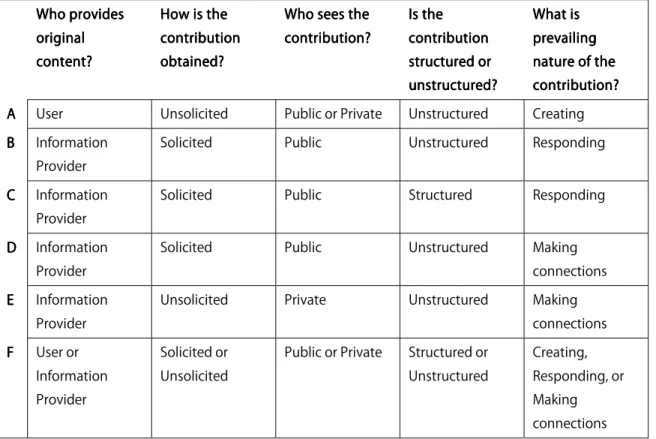
Who prov Who prov Who prov Who provides ides ides ides original original original original content? content? content? content?
How is the How is the How is the How is the contribution contribution contribution contribution obtained? obtained? obtained? obtained?
Who sees the Who sees the Who sees the Who sees the contribution? contribution? contribution? contribution?
Is the Is the Is the Is the contribution contribution contribution contribution structured or structured or structured or structured or unstructured? unstructured?unstructured? unstructured?
What is What is What is What is prevailing prevailing prevailing prevailing nature of the nature of the nature of the nature of the contribution? contribution?contribution? contribution? A
AA
A User Unsolicited Public or Private Unstructured Creating BBBB Information
Provider
Solicited Public Unstructured Responding
CCCC Information Provider
Solicited Public Structured Responding
D D D
D Information Provider
Solicited Public Unstructured Making connections EEEE Information
Provider
Unsolicited Private Unstructured Making connections FFFF User or
Information Provider
Solicited or Unsolicited
Public or Private Structured or Unstructured Creating, Responding, or Making connections Figure Figure Figure
Figure 4444. Summary of characterization scheme by category.. Summary of characterization scheme by category.. Summary of characterization scheme by category.. Summary of characterization scheme by category.
Category F. Users contribute to networked communication within a three dimensional,
their own category because they depart from a text-based web interface. The way in
which users contribute content within a virtual environment is disparate enough from
other methods (in terms of system requirements, for example) that a discussion that
includes the facilities within them as examples of alternate methods (especially where
implementation is concerned) may be misleading.
We chose three categories from the original six for their emphasis on the user as
information consumer and public benefit, two aspects inherent to digital libraries. For
this reason, we examine the following methods of obtaining user input toward use within
an already established digital library environment:
Category B. Users provide unstructured responses to existing content published
by the information provider.
Category C. Users provide structured responses to existing content published by
the information provider.
Category D. Users create relationships between materials for public benefit.
A potential for integration with an already established (i.e., non-virtual-world) web
environment was also taken into account. We will evaluate these three categories in detail
according to the evaluation framework described in section 3.2.
We introduce a new evaluation framework by which to judge each category described in
section 3.1. The framework is comprised of questions reflecting aspects of conventional
scholarly communication. The higher the number of questions that can be answered ‘yes’
in regard to a particular method, the more aptly that method exemplifies that criterion.
Organized by criterion, they are as follows:
Validity
The content obtained from users can be trusted (five questions):
Does the method require citations in contributed material?
Does the method employ a framework or controlled vocabulary in soliciting
responses?
Does the method communicate the potential for bias?
Are user contributions subject to ‘refereeing’ by experts in the field?
Does the method communicate appropriate disclaimers as to the user-contributed
nature of content?
Accessibility
The method of obtaining content from users does not itself prevent some users from
contributing (four questions):
Is the equipment required to make use of the facility standard? (Will the facility
function on the equipment used by a majority of the information provider’s
Are the computer skills required to make use of the facility standard? (Can the
facility be used by a majority of the information provider’s current user
population?)
Are the equipment/skill requirements in line with those required by the rest of the
content provided by the same provider?
Will the distribution of the user group that is able to respond accurately reflect the
distribution of the user population?
Accountability
The method provides a means by which to verify contributed information through its
author(s) (three questions):
Are users required to supply personal information (name, address, etc.) before
their contributions may be made?
Are users required to supply qualifications (prove their credentials) before their
contributions may be made?
Is a user’s information to some extent associated with the content they provide in
the end result?
Utility
The nature of user contributed information is consistent with the way that information is
used, “making sure that, as a side effect to what the user is actually doing, libraries
Does the method serve to add to the understanding of the original content?
Does the method meet the demonstrated need of a user group?
Is the facility well situated among the materials not provided by the information
provider? (Does the contributed information complement the original content?)
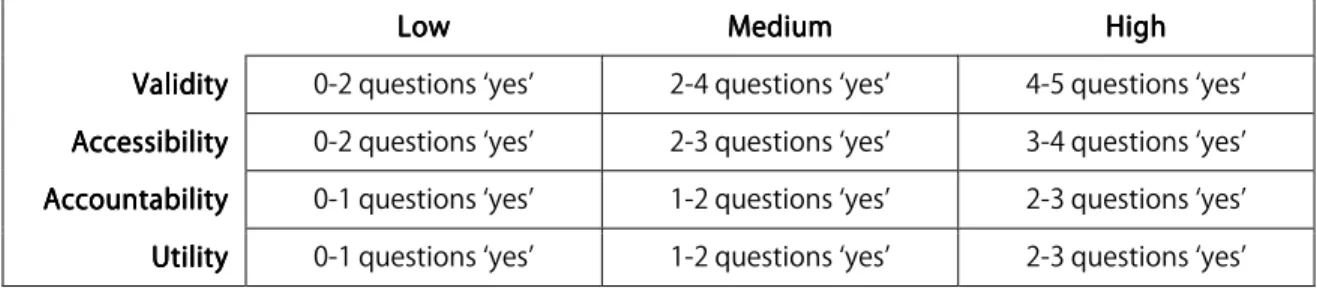
The following chart details how we decided that these questions determine if a method
exhibits a low, medium, or high level of each criterion. For example, if the answer to only
one ‘validity’ question was answered ‘yes,’ then we consider the level of validity ‘low.’
LowLowLowLow MediumMedium MediumMedium HighHigh HighHigh Validity
Validity Validity
Validity 0-2 questions ‘yes’ 2-4 questions ‘yes’ 4-5 questions ‘yes’ Accessibility
Accessibility Accessibility
Accessibility 0-2 questions ‘yes’ 2-3 questions ‘yes’ 3-4 questions ‘yes’ Accountability
Accountability Accountability
Accountability 0-1 questions ‘yes’ 1-2 questions ‘yes’ 2-3 questions ‘yes’ Utility
UtilityUtility
Utility 0-1 questions ‘yes’ 1-2 questions ‘yes’ 2-3 questions ‘yes’
Figure Figure Figure
Figure 5555. Scheme for determining how well a. Scheme for determining how well a. Scheme for determining how well a. Scheme for determining how well a category satisfies the demands of a criterion. category satisfies the demands of a criterion. category satisfies the demands of a criterion. category satisfies the demands of a criterion.
Overlapping values allow the discussion of each method’s strengths and weakness to take
complex facets into account; for example, if a method allows for only one ‘yes’ in terms of
accountability, but in such a way as should carry more weight, that method’s
accountability may be termed ‘medium’ rather than ‘low.’
Resource Requirements
In addition to an analysis based on the criteria of validity, accessibility, accountability,
service provider. What resources does the method require? Will the method require
extra staff, or more computational power? What is the minimum of programming
expertise required, and will such expertise be required on a continual basis? Keeping in
mind the nature of its application, how sustainable is the facility and how will the service
be maintained in the long term? Categories may include facilities that require very
different amounts of resources; the purpose of this section to address those.
4. Evaluation
4.1 Users provide unstructured responses to existing content published by the information provider (Category B).
Information providers have been soliciting “free-form” user-provided content since the
web was born: a simple “email us” link at the bottom of a page is a facility that supports
this method. With the advent of forms, the submission of free-form content became
more complex, and more flexible. Forms extend an invitation to comment on blog posts,
to review products provided by a company, and more. Most recent technologies include
facilities for annotating digital texts. When an information provider publishes free-form
user contributions alongside original content, they demonstrate how important the user
has become to networked communication. For this idea to translate to the scholarly
sphere, we must consider the issues of trust and moderation.
Academic sources carry with them a certain sense of trustworthiness. By traditional
or a critique, following the appropriate procedures, and seek to have their response
published in a respected place. Scholars write the critiques, rebuttals and addendums of
the peer review process with as much care as the original work and published responses
carry the same respectability. If the public at large can offer information that might
appear alongside a piece of carefully researched content, the publisher must indicate
difference between the two sources. In a study aimed toward determining the best
method of harnessing user input in the form of annotations, Catherine Marshall notes
that analog annotations are usually “visually set apart from the published text,”13 and that,
by extension, users themselves actually “wanted their marks to be distinguishable from
the source document.”
Moderation is another consideration specific to free-form user contribution. Content
received via an input facility may be impossible to validate, offensive, or unrelated to the
content to which the input is supposed to contribute. Moderation, or ‘review’ of
submissions can be the job of an expert, a task given to the system (machine censorship),
or left up to users themselves.
Two real-world examples of facilities that solicit unstructured responses from users are
PynchonWiki’s14 wiki-driven annotation system and the comment system employed by A
the following discussion, we use our evaluation criteria to determine the strengths and
weaknesses of each.
4.1.1 Example 1: Contributing annotations via PynchonWiki
PynchonWiki is a wiki-based online community whose purpose is to allow interested individuals to “provide factual material of scholarly use, backed up with pointers to
papers and books, plus the opportunity to generate new literary talk with kindred folks.”16
Each section of the wiki represents a particular book written by Thomas Pynchon.
Validity
The facility does not require the use of citations or references, but the user community at
large expects them as the hallmark of a valid contribution. Where there exist too many
open-ended or inconclusive additions, the “quality…is regarded as disappointing.”17 Wiki
systems by nature do not require users to contribute using a predefined vocabulary or
strict structure, and this is no exception. This facility does not clearly state the potential
for bias in its content and thus relies on a user’s knowledge of the way information on a
wiki is compiled to serve as warning. Because annotations are freely editable by
registered users, entries are to some extent ‘refereed,’ though without certainty as to the
credentials of the referee. As Robert Glass puts it, “… if [a] contribution to the wiki [is]
malicious or wrong, someone else can come along and replace it. But, by the same token,
if someone makes a brilliant contribution, someone else can come along and replace that,
Accessibility
The computational requirements of PynchonWiki’s annotation are similar to that of its predecessor, a static web page devoted to the works of Pynchon. Thus, the wiki is
accessible to the user population of the original site. This site also makes use of the
popular MediaWiki software, “most prominently adopted by the free online encyclopedia
project Wikipedia.”19 However, the skills required edit a wiki page are particular to wikis.
PynchonWiki has tried to offset this by providing a ‘Help’ page with wiki syntax “cheat sheets.” On the plus side, this does mean that each member of the user population (an
online community of Pynchon enthusiasts) has an equal opportunity to contribute, or
gain the skills necessary to contribute.
Accountability
PynchonWiki’s contributing users are required to register with an email address. This is the only personal information required, and the wiki's creator confirms registration
requests. This is a measure intended “mainly to check that no malicious users use the site
who might do damage to it.”20 Users are not expected to ‘prove their mettle,’ beyond
demonstrating interest in contributing to the site. As in all MediaWiki facilities, the
names of contributing users appear alongside the content they contribute in a ‘History’
Utility
The wiki facility used by PynchonWiki’s pages to gather annotative material presents user contributions as something valuable to its user population: Pynchon enthusiasts. Its
policies allow for discussion, as opposed to allowing contributors to “only report what
other people have said,”21 thus satisfying the need for a forum the likes of which are not
found in any other type of publication. In this example, information provided via the
facility constitutes the entirety of the body of information available and the situation of
the facility cannot be judged.
Resource Requirements
PynchonWiki is the creation of Tim Ware, who estimates that “after the initial set-up, the wiki has taken an hour or two of [his] time every day.” This is in part due to the fact that
he personally approves each registering user. Additional hours may be required if the
wiki is hosted on a server owned by its administrator; however, this study was unable to
determine how the site is hosted.
4.1.2 Example 2: Adding comments to A View to Hugh blog posts
A View to Hugh is a weblog maintained by a project team at the University of North Carolina at Chapel Hill’s Digital Production Center. The team is digitizing the
photographic archive of Hugh Morton, which contains “half a million transparencies,
This blog is intended to provide information about our progress, to provide glimpses into how photographic archivists work, to highlight interesting discoveries we make along the way, and to foster discussion and input from the many “Friends of Hugh”— residents of the state to which he devoted his life and any other interested parties.23
Users are encouraged to make comments on the content of individual posts, in an effort
to promote discussion and interest in the project's completion.
Validity
This informal comment system does not require citations in posts; the onus of research
and validation still lies with the project team. Like the wiki, this example by its nature
solicits unstructured responses and does not make use of any controlled vocabulary. The
facility to some extent communicates the potential for bias, as comments are clearly
marked as comments and only visible when viewing the dedicated page for each post (the
grouping of most recent posts available from the home page only displays a link to view
comments along with the number of comments already made). The “discussion” quality
of these comments means that “policing” takes the form of rebuttal; unlike the wiki, users
in A View to Hugh cannot delete material that they did not contribute, and a
noncontributing user can see both the original comments and the rebuttals that follow.
Accessibility
Comments are not unusual to blogs as a whole, and the submission facility mirrors those
that are already in use on the parent library website as a means to gain feedback. Thus,
technology that users encounter in similar environments. Due to the familiarity of form
use in web environments, this facility is equally available to all of its users.
Accountability
The system prompts users to enter their name, email address and web site along with
their comments; however, nothing but an actual comment is actually required. No
qualifications are required of users in order to comment. The name of the user is
associated with his or her comment prominently, ifa name has been provided in the
appropriate form field alongside comments.
Utility
There may be a discrepancy between the user population as a whole and those that make
comments. Posts on A View to Hugh solicit users’ opinions on who individuals appearing in photos are, or the location of an image's subject. A user who has found the site because
of an interest in the technicalities of media digitization may not have anything to
contribute to the research questions posed by the posts. The same is also true of
historians who find the site because of an interest in a particular subject; posts prompt
these users alike to offer advice on how best to calibrate photographic equipment.
However, this facility brings these two groups to a common ground, and serves each by
promoting discussion and excitement about the completion of this large-scale digitization
project. This is an example of the blog as a “…way to capture lessons learned,” and
Comments exist as supplements to the original post, and are of great use to the blog’s
administrators themselves; in many cases they inform research, and the blog's
administrators record user-aided discoveries for potential use in descriptive metadata.
Resource Requirements
The web address of this blog indicates that a parent institution administers the hosting
server. Maintaining the comment ‘conversation’ takes work on behalf of its
administrators, “communicating with other people, asking questions, and responding to
questions,” but is considered “very much worth the effort.”25 A View to Hugh’s
administrators informed us via email that they check comments for fake or offensive
comments “daily,” but the process takes “minimal time,” and to date neither has been a
problem.
Validity Validity Validity
Validity AccessibilityAccessibilityAccessibilityAccessibility AccountabilityAccountability UtilityAccountabilityAccountability UtilityUtility Utility
Resource Resource Resource Resource Requirements RequirementsRequirements Requirements PynchonWiki PynchonWiki PynchonWiki PynchonWiki’s ’s ’s ’s annotations annotations annotations annotations
Low Medium Medium High 2 person
hours per day A View to
A View to A View to A View to Hugh Hugh Hugh Hugh’s ’s ’s ’s comments comments comments comments
Medium High Medium Medium Small-scale human moderation required. Figure. Summa
Figure. SummaFigure. Summa
Figure. Summary table, Category B. Users provide unstructured responses to ry table, Category B. Users provide unstructured responses to ry table, Category B. Users provide unstructured responses to ry table, Category B. Users provide unstructured responses to content published by an information provider
content published by an information provider content published by an information provider content published by an information provider
4.2 Users provide structured responses to existing content published by the information provider (Category C).
Facilities that solicit content from users by more controlled means are not dissimilar from
satisfaction on a scale of 1 to 5, we still contribute to the information presented; the
difference is that by this method the administrators of the site or facility guide our
answers and thereby ensure that the ways in which we contribute fit the needs of the site.
In comparison to method one, this means that the chance of receiving undesirable
submissions is virtually eliminated (as long as the system accounts for various modes of
submission bias.) The need for either a dedicated staff member or a facility to allow users
to referee submissions is also unnecessary.
Two real-world examples of facilities that allow users to provide responses in a predefined
format are that of the Perseus Digital Library’s26 morphological disambiguation tool, and
the Everglades Digital Library’s27 resource rating system.
4.2.1 Example 1: Perseus Digital Library’s morphological disambiguation tool
The Perseus Digital Library’s28 facility enables users to vote on the correct part of speech
of a word in a Greek or Latin text that a computational system has not been able to
discern with accuracy higher than a certain percentage.
Figure 7. Figure 7. Figure 7.
The system asks a user to “vote” on the part of speech they believe is the correct one, and
then highlights the part of speech with the best combination of user confidence and
computational accuracy. Figure 7 shows that no users have voted for one form over the
other, but the system indicates a fairly decisive victory for the first based on
computational accuracy alone. Percentages are viewable, however, so that users may
decide for themselves if they will trust the recommendation. In this way, the system can
extend a service with the help of user input rather than produce a dead end, or supply the
wrong information. Using this facility, “improvement over the performance of automated
disambiguation is substantially higher, since users overwhelmingly vote on words for
which the system has assigned the wrong analysis.”29
Validity
The Perseus service does not require citations, or any other justification for voting for one interpretation over another; however, it does employ a structured framework that guides
responses and identifies options that could be correct, before presenting them to the user.
By presenting the number of votes alongside the percentage of computational confidence
in each choice, this facility communicates potential biases. The system does not referee
votes; the only recourse another user may take to correct an erroneous vote is to
themselves vote for the right option. Thus, trust in this kind of disambiguation is
dependent on the idea that “safety is in numbers”—the correct answer is more easily
Accessibility
The facility appears in a pop-up window, containing a table as shown in Figure 7. Pop-up
windows are ubiquitous, but modern browsers often block them and they constitute a
barrier to accessibility. However, the facility appears the same way that information
appears for words that do not require disambiguation. The skills and equipment needed
to contribute via this facility are thus in line with those required by the rest of the site.
Users who click on words to determine their morphology and meaning constitute a user
population with a vested interest in determining the correct one. A disparity may exist,
however, between those users that are students of a language and those more qualified to
determine which form an author intended.
Accountability
When placing a vote, users of the Perseus morphological disambiguation system do not
supply any personal information or qualifications when they contribute. Thus, their
personal information is not associated with their votes. This reflects an aspect of this
system discussed in the ‘Validity’ section: trust is dependent on the number of users that
contribute.
Utility
As mentioned in the introduction to this section, this facility, when applicable, definitely
users astray. The creators of the Perseus Digital Library established the collection for students of ancient languages, and this facility serves its target population well. The
interface incorporates the facility seamlessly into its presentation of morphological
information.
Resource Requirements
The Perseus Digital Library’s word disambiguation tool is built on automated processes that were, for the most part, already in place for determining accuracy by computational
methods alone. The library’s administrators have chosen to leave the tool as automated
as possible, noting:
We could solicit expert users to fill in the remaining accuracy gap, but a better solution may simply be to focus on enlarging the contributor base: the more individual votes per word, the more likely that all, when taken together, will be correct.30
4.2.2 Example 2: Everglades Digital Library’s resource rating system
The Everglades Digital Library (EDL) contains documents that include “unique materials,” including digitized “government documents, museum holdings, and other
materials.”31 From the site’s ‘About’ page:
The site allows each document, or ‘piece,’ of the collection to be assigned a rating by its
users. The site encourages users to lend ratings to the collection.
When you rate resources you give the [Everglades Digital Library] Portal more information that helps provide you with better recommendations. Also, the more users provide ratings, the more valuable the Portal becomes to the user
community.33
Validity
The Everglades Digital Library’s facility for rating documents is much like
Amazon.com’s34; users are presented with five radio buttons, labeled “not useful” on the
left and “very useful” on the right. Users choose a radio button and are not required to
justify a rating. By presenting five discrete options, this facility provides a structure by
which users submit a response. The system then translates the submitted rating into a
graphic on the document’s main page that represents the rating on a scale of one to five
stars. This graphic is labeled “Cumulative Rating” and has a parenthetical note that
indicates how many responses the cumulative rating (an average) is based on. This
communicates the potential for bias, as the facility makes explicit how many votes have
produced the average. There is no system in place to allow the policing or “refereeing” of
contributions; once a rating has been made, a user themselves can return to the document
and change his or her response.
Accessibility
The facility does not pose an accessibility issue from an equipment standpoint; the system
accomplish its dynamic effects, which means an end-user’s browser or computer will not
see a difference between these pages and standard HTML. Users enter information
through a web form consisting of five radio buttons. Moreover, users are required to sign
in with a form to use the site (see the ‘Accountability’ section that follows), so forms do
not present an accessibility issue. In fact, the site offers a wide range of accessibility
options—from enlarging text, to changing colors—which also affect the facility (for
example, enlarging the text makes the radio button form larger.) A final consideration
involves what portion of the user population is able to make a contribution; since many of
the documents held in the collection are in Portable Document Format (PDF), only those
with a Reader for these types of files will be able to offer a viable rating.
Accountability
The Everglades Digital Library requires users to sign in, providing a user name and password, in order to rate documents. To register, an email address is required. This is
for purposes of linking a rating to a specific user in the back end, rather than the front
end; this way, the site can readjust the cumulative rating if a single user changes the way
he or she has rated a document. The ‘Help’ page states in ‘Frequently Asked Questions’
format:
Can other users see what I rated a resource? No. Only the cumulative rating and number of responses are shown to other users. However, on the Full Record screen you will be able to see what you rated a selected resource.35
Utility
The Everglades Digital Library uses this facility as a means to provide more data about a document to its users. Rather than extending the information of the document itself,
ratings add another dimension: they present to users how useful other people just like
themselves have found a particular portion of the digital collection. This addresses the
need of users to ‘narrow’ the options presented to them, especially as the collection grows.
User ratings are clearly marked and situated below all other content relating to each
document on the document summary pages; they do not compete with factual data.
Resource Requirements
This collection represents the combined efforts of more than seven discrete institutional
bodies (Florida International University Libraries36, the Florida Center for Library
Automation37 and the Publication of Archival, Library, and Museum Materials38, the
Everglades Education Consortium39, the Everglades National Park40, the South Florida
National Resources Center41, the Historical Museum of Southern Florida42, the University
of Miami43, and the Everglades Priority Ecosystems Science Initiative44 of the United
States Geological Survey45. Thus, the collection can make use of people and equipment
from a variety of sources. Most importantly, the Everglades Digital Library takes
advantage of a suite of software developed by the Internet Scout Project46: the Collection
Workflow Integration System, or CWIS. The CWIS automates several important
the interface for accessibility.47 With this automation, as well as the distribution of people
and equipment across all contributors, the ratings facility in particular probably does not
demand much by way of resources from any one source.
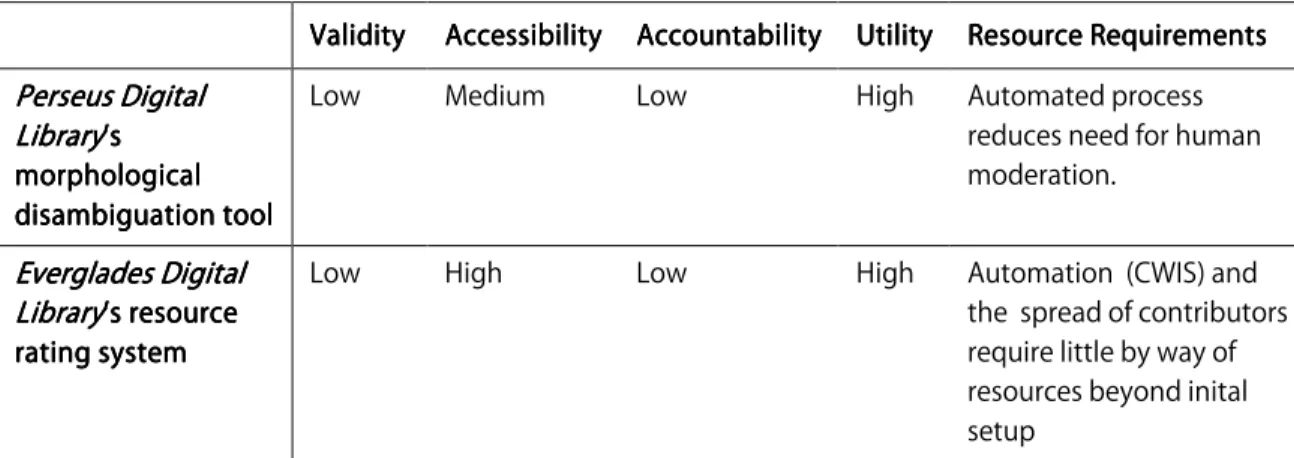
ValidityValidityValidityValidity AccessibilityAccessibilityAccessibility AccAccessibility AccountabilityAccAccountabilityountabilityountability UtilityUtilityUtilityUtility Resource RequirementsResource RequirementsResource RequirementsResource Requirements Perseus Digital Perseus Digital Perseus Digital Perseus Digital Library Library Library Library’s ’s ’s ’s morphological morphological morphological morphological disambiguation tool disambiguation tool disambiguation tool disambiguation tool
Low Medium Low High Automated process reduces need for human moderation. Everglades Digital Everglades Digital Everglades Digital Everglades Digital Library Library Library
Library’s resource ’s resource ’s resource ’s resource rating system rating system rating system rating system
Low High Low High Automation (CWIS) and the spread of contributors require little by way of resources beyond inital setup
Figure 8. Summary table, Category C. Users provide responses to content published Figure 8. Summary table, Category C. Users provide responses to content published Figure 8. Summary table, Category C. Users provide responses to content published Figure 8. Summary table, Category C. Users provide responses to content published
by an information provider in a format specified by the information provi by an information provider in a format specified by the information provi by an information provider in a format specified by the information provi by an information provider in a format specified by the information providerderderder
4.3 Users create relationships between materials for public benefit (Category D).
Allowing users to contribute to the shared networking of information is the third method
of potential interest to digital libraries. This method also has roots in the first web media
advancement: the hyperlink. Hyperlinks essentially create relationships between two
pieces of information and put forth that relationship for public benefit. Networking
facilities of late have expanded on this concept and today the internet without social
bookmarking sites such as Del.icio.us48 or photographs with tag clouds (as seen on
Flickr49) may be hard to imagine. Users identify relationships between pieces of content,
bookmarking is a quintessential example of the “wisdom of crowds” theory.50 Compared
with keywords assigned by librarians, folksonomies are a highly unstructured:
Folksonomies provide no formal guidelines for the choice and form of tags, such as the use of compound headings, punctuation, word order, and so forth.51
A facility that allows this activity beyond the scope of a particular resource is also userful.
A scholar may be able to identify linkages among the documents in the collection he or
she is digitizing, but a user might identify linkages between documents available from one
collection and those available from another. These allow users to “build a community of
expertise,” in the process compiling “‘expert’ discovery tools.”52
Two existing examples of services belonging to this category are LibraryThing’s facility that allows users to tag bibliographic data based on their own perceptions, and
Amazon.com’s Listmania! , that allows users to categorize groups of products and place links to them in a public list.
4.3.1 Example 1: Tagging Books in LibraryThing
LibraryThing allows users to create a personal collection of books via bar code scanning or manual entry. Users can then tag their own books based on their impressions. Tags
result in a categorization scheme that is very practical to LibraryThing’s main user population: avid readers. Tags include identifiers such as, “books I want to read.” In this
practice of organizing materials. We make a mistake in assuming that the same scheme
makes sense for readers or researchers, since “indexes and catalogues are management
tools, not access tools.”53 The following points made by Chklovski and Gil are relevant to
this argument:
… the challenge for collecting knowledge…becomes how to draw on its
expressivity and ubiquity while sidestepping the challenges of ambiguity and non-uniqueness…when contributors are asked to explain something, they tend to underestimate the richness of the knowledge they are imparting.54
User-supplied tag data allows users to retrieve items “using language that is more in
keeping with the user’s approach to information-seeking rather than more traditional
classification schemes.”55
Validity
LibraryThing does not require users to cite why they chose to add a particular tag to a book or material. By the nature of “folksonomy,” the tags users can add are not limited to
a controlled vocabulary. Groups of tags are marked as user-supplied description. Tags are
for the most part not subject to refereeing, though the site allows users to “combine”
multiple spellings of a name, misspelled titles, etc. into one term—thereby making a
controlled vocabulary out of a user-supplied, free-form one.
On LibraryThing everyone is a librarian. Members combine editions,
Accessibility
Tagging materials on LibraryThing does not require specialized equipment or skills; instructions are provided and the dynamic features are accomplished outside of the web
browser. A majority of the site’s content is user supplied; tagging items is thus in line with
the rest of the site’s content. Since the target user population is comprised of users that
want to contribute content, the user group that is able to make use of this facility
represents the user population as a whole. Additionally, LibraryThing incorporates Tagmash, a service that allows users to enter “multiple tags as a query” to retrieve works
associated with those tags. Accessibility is a feature of Tagmash: queries appear in the
result page URL, “readily decipherable by a user.”57
Accountability
Users must create an account with LibraryThing to interact with the site’s features. The site requests personal information; however, since users tag their own contributed
materials only, their knowledge of their own libraries is considered a qualification. Users
create screen names that are associated with everything they do within the site. Screen
names are public to both registered an nonregistered users.
Utility
Tagging items with relevant descriptors serves to enhance the understanding of a piece of
content—in this case, a book record. The user group, readers and book lovers, can
have used to describe their favorite books. LibraryThing’s user tags are also used to inform recommender systems in much the same way that Amazon recommends products
to users based on what a user has already bought; founder Tim Spaulding claims,
however, that LibraryThing data is even more helpful: “the books you own being a much greater representation of taste than the books you buy on a given retailer.”58 This is a
readers’ advisory function, and satisfies a demonstrated need. The facility's placement
enhances, rather than competes with, the bibliographic information placed in a separate
section.
Resource Requirements
This facility employs users as “helpers” to clean up data, and does not require
maintenance by the site's administrators as long as the system is working properly.
LibraryThing had in 2007 over 160,000 registered users,59 who at that point had
contributed to the site more than 16 million records with associated data.60 This serves as
a testament to the automated nature of the systems behind this facility: LibraryThing is run by “a small company with two developers.”
4.3.2 Example 2: Linking products with Amazon's Listmania!
of products found within Amazon’s offerings according to topics, or titled, as they choose
fit, with the benefit of making products “imminently more browsable by the rest of the
web world.”61
Validity
Listmania! does not require citations, or for users to reasonably prove why they have chosen products for inclusion within a list; however, the facility does employ a controlled
vocabulary. The items added to the list are all of one type: Amazon products. The facility
does communicate that the lists are user-generated, but there is no mechanism by which
to rate ‘trust’ in a given list. Lists are not ‘refereed.’
Accessibility
The facility employs forms and hyperlinks to achieve its goals. These are standard to the
Amazon.com website, and are simple compared to the form system used to place orders.
Users with Amazon.com accounts are likely to have placed an order through Amazon,
and thus have the skills necessary to make use of the facility. Listmania! is an opt-in feature of Amazon’s site, and has no bearing on an Amazon product’s specifications.
Therefore, an unequal distribution of the user population making use of the service is not
an accessibility issue.
Accountability
Because list contributors must log in to an Amazon.com account, personal information
prompts for “qualifications” in conjunction with a title for the list and a description; here
the interface encourages users to give information about themselves as relates to the
current list. Examples include “Science Fiction Fan,” or as the website suggests,
“Third-grade Teacher.” Listmania! does not verify user-contributed information, so this field may not truly reflect the qualifications of the user.
Utility
Listmania! lists are part of Amazon.com’s recommender system and affect the way the system suggests products to customers searching for specific items. The site indexes lists
and presents them to new users when they are relevant to search terms. Listmania! thus presents a way for users to create relationships between various materials and aid other
users in product discovery. This serves to aid in a customer’s assessment of the original
content, or the products available to them. This service also satisfies another
demonstrated need: university library officials, as discussed in Perth College Library’s
blog post of March 4, 2008, are using the service to create subject guides and lists of
recommended reading with volumes available from the library indicated.62
Resource Requirements
As mentioned previously, the Listmania! facility is portable and is not as complicated administratively as other areas of the Amazon.com website: i.e., the order process form.
assume that some sort of moderation (most likely machine-implemented) takes place
before a list becomes a part of the system.
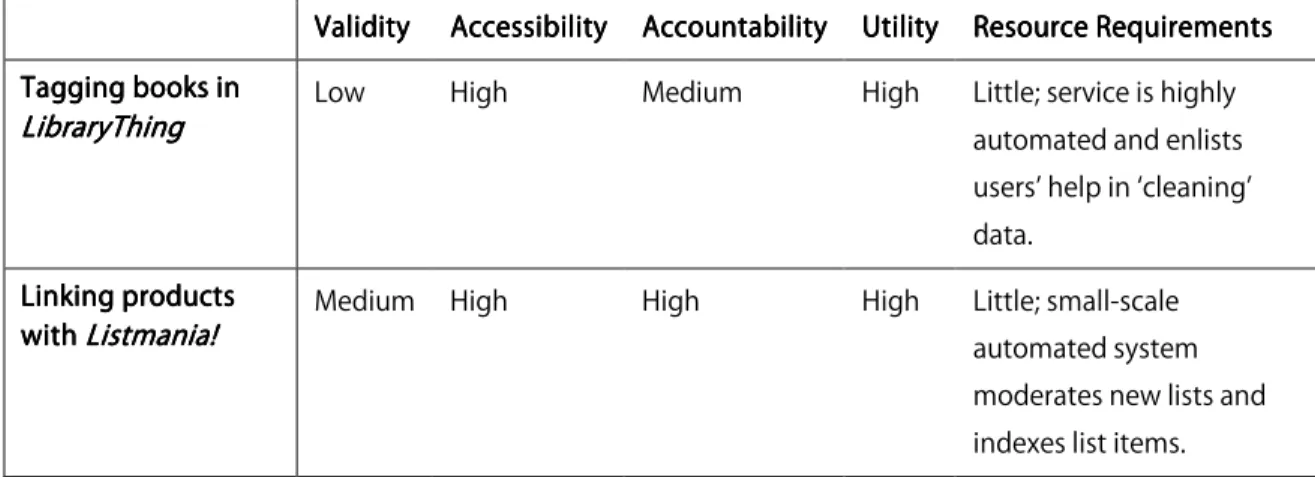
ValidityValidityValidity AccessibilityValidity AccessibilityAccessibilityAccessibility AccountabilityAccountability UtilityAccountabilityAccountability UtilityUtilityUtility Resource RequirementsResource RequirementsResource Requirements Resource Requirements Tagging books in
Tagging books in Tagging books in Tagging books in Lib
Lib Lib
LibraryThingraryThingraryThingraryThing Low High Medium High Little; service is highly automated and enlists users’ help in ‘cleaning’ data. Linking products Linking products Linking products Linking products with with with
with Listmania!Listmania!Listmania!Listmania! Medium High High High Little; small-scale automated system
moderates new lists and indexes list items. Figure
Figure Figure
Figure 9. Summary table, Category D. Users create relationships between materials for public benefit9. Summary table, Category D. Users create relationships between materials for public benefit9. Summary table, Category D. Users create relationships between materials for public benefit9. Summary table, Category D. Users create relationships between materials for public benefit
5. Case Study:
Documenting the American South
5.1 Background.
Documenting the American South (DocSouth) is a well-established, internationally renowned digital publishing program of the University Libraries at the University of
North Carolina at Chapel Hill. Begun in 1996, DocSouth is now a part of the Carolina Digital Library and Archives (CDLA), a new department within the University of North
Carolina library system. (see the department's web site for the CDLA mission
statement63). The description on Documenting the American South’s home page states,
The collections within Documenting the American South comprise both primary and secondary materials which are compiled and maintained by a staff of scholarly advisors,
graduate students, project managers, and programmers who are committed to
maintaining an audience of scholars and researchers and thus treat access to these purely
electronic resources as just as important as the physical.
5.2 User population.
Though scholars constitute a large portion of Documenting the American South’s user population, materials are accessible to school-age children via teacher workshops and
lesson kits. The site also serves family historians and those involved in genealogical
research, in part due to the high volume of original manuscripts published there and the
searchable metadata associated with names and places across documents.
5.3 Technical resources.
Documenting the American South is housed in a MySQL database, however, work on recent projects has involved eXist XML databases. Staff members encode documents in
XML according to Text Encoding Initiative standards65 and work is in progress to
establish a collection standard for using Metadata Object Description Schema (MODS)66
and Metadata Encoding and Transmission Standard (METS)67 description. The Carolina
Digital Library and Archives currently employs three staff programmers, as well as two
5.4 Workflow.
When interest in a digitization project is expressed, a scholarly advisor and a project
manager are identified and funding is sought. With respect to the timeframe of the
proposal and budget constraints, additional staff in the form of research assistants and
programmers are hired or brought to work on the project. Along with the scholarly
advisor, research assistants work to compile the materials for digitization and carry out
the processes necessary. The scholarly advisor then identifies areas for which intellectual
content related to, or as an enhancement of, the digitized primary materials are
appropriate, and content is produced. Meanwhile, project programmers construct the
systems necessary to carry the digitized material through the web in such a way that
makes use of its electronic format to the greatest extent possible. When the efforts of
both groups have neared completion, the content is used to populate the system and the
collection is published to the web. If changes are made following initial publication, they
are to correct mistakes or complete additional phases of a project.
5.5 Current DocSouth Needs
It is the purpose of this recommendation to discuss where user-contributed data, and a
facility that allows them, is appropriate to a specific application. For a facility to be
appropriate to an application, it must satisfy a demonstrated need—or contribute the
Documenting the American South collections to which user-contributed data has the potential to offer a solution:
1. Identifying and disambiguating named entities. Names of people, places and organizations in several Documenting the American South collections are tagged with a type and, where applicable, a standardized form pulled from Gazetteers or
Library of Congress Subject Headings. Some have extended the convention to
identify certain nouns referring to people, places or organizations with the
appropriate data: a reference to “sister” in a letter written by a known entity could
feasibly include that person’s given name. DocSouth is currently investigating
computational name entity identification and disambiguation methods, but where
a machine cannot differentiate between different spellings of a name or between
two of the same name in different contexts, user contribution may provide an
answer.
2. Optimizing subject and topic organization across all collections. Many of the collections among those published by Documenting the American South have employed different taxonomies, or different levels of a taxonomy, to the digital
objects they include. Images are described using one standardized vocabulary,
while textual data is given subject headings from another. Different catalogers
have chosen to identify materials in different ways, and some collections employ a
Again, a computational method of identifying subjects or topics may be possible,
but given how many users access the material for scholarly research, a facility that
allows a “folksonomy” to enhance the subject headings and topics already in place
could prove very useful in the identification of complex relationships between
materials.
3. Enhancing collections with limited content, or for which there is a significant public history component. Some of Documenting the American South’s newer collections have been identified as ones for which the contributions of users in the form of
personal stories or memorabilia could add a substantial amount of value. An
upcoming collection, Going to the Show, involves the digitization of numerous maps and newspaper clippings collected in reference to movie attendance in
North Carolina during the period which encompasses, among other things,
desegregation and the spread of transportation into rural areas of the state. The
collected materials were enough to foster interest in such a project, but significant
‘holes’ exist among the data in the collection concerning certain theaters and
spans of time. Given this and the number of users the project team hypothesizes
could have relevant information to contribute, a facility for collecting content