Tessa Sullivan. Current Metadata Process Practices. A Master’s Paper for the M.S. in I.S degree. August, 2007. 47 pages. Advisor: Jane Greenberg
An effective and easily maintainable information organization system is vital to the success of any enterprise, be it in the public or private sector. The proper use of metadata is a key means to this end. Applying metadata, however, is not a static task. Rather, it is a process by which metadata is created and manipulated by any number of people, using a variety of tools at different stages of the lifecycle of a digital object. Information on these components of the metadata process was gathered via a survey of metadata practitioners. The study found the metadata process is quite complex, with substantial variability in all components. A large variety of software applications are used for manipulating of metadata. This result and the fact that in-house developed tools were most common suggest there is no single turn-key solution for the metadata process. In conclusion, careful planning of the metadata process, including consideration of all sources of an enterprise’s information, is essential to the successful implementation of a metadata process.
Headings:
Surveys/Metadata
Business Processes/Metadata
Metadata/Management
Metadata/Software
A Survey of Current Practices in Metadata Process
by Tessa Sullivan
A Master’s paper submitted to the faculty of the School of Information and Library Science of the University of North Carolina at Chapel Hill
in partial fulfillment of the requirements for the degree of Master of Science in
Information Science.
Chapel Hill, North Carolina
August 2007
Approved by
_______________________________________
Table of Contents
Introduction ... 2
Literature Review... 3
1.1 People involved with metadata ... 5
1.2 Resources and Metadata ... 7
1.3 Tools and Metadata ... 8
1.4 Rules of the metadata process ... 10
Research goals ... 13
Methodology ... 13
Results ... 14
1.5 People working with metadata ... 15
1.6 The Setting and the metadata ... 17
1.7 Tools and Metadata ... 19
1.8 Software features, their importance, support level, necessity ... 23
1.9 Rules and Requirements for the Metadata Process ... 28
1.10 Process in action ... 37
Discussion ... 38
Limitations and Areas for future research ... 40
Conclusion ... 40
Introduction
In this age of vast and ever-expanding amounts of information, organizing that
information in order to aid resource discovery, improve the ability to administer
resources, ensure its authenticity, and manage access rights has become paramount. The
implementation of metadata is a key means to this end. Metadata elements are, in
essence, the encoding of information an organization designates as important (Kim 2005)
and “metadata management is the process of acquiring and maintaining a controlled set
of metadata with or without automation, in order to describe, discover, preserve, retrieve,
and access the data to which it refers” (Westbrooks 2004, 144).
The process of metadata implementation and management, however, is
recognized to be difficult so many organizations, including those in both the public and
private sectors, choose not to implement metadata or do so only in a limited fashion
(Smith 2002, Westbrooks 2004). One oft-heard reason for not using metadata concerns
cost. Some organizations believe it is too expensive to create a system that supports
metadata (both in time – particularly if using a home-grown software tool – and in the
expense of any outside expertise and software tools deemed necessary) (Morville and
Rosenfeld 2007). In some cases, organizations that do incorporate some sort of metadata
process have people who believe creating metadata is pointless (Greenberg, et al. 2003)
or the metadata that is created is inconsistent or not maintained (Hutt and Riley 2005).
An organization could go a long way towards solving these problems if they had
guidelines for the creation and management of metadata – hereafter referred to as
‘metadata process’.
All organizations benefit from well-organized information. Non-profit and
governmental organizations, however, tend to be more open about their business
processes than those in the private sector due to the competitive nature of businesses in
the private sector. Examples of available information for the processes used by public
Dushay, et al. 2003; Lagoze, et. al 2006), the National Institute of Environmental Health
Sciences (NIEHS) (Greenberg, et al. 2003), the US Government Information Locator
Service (GILS) (Moen, et al. 1997), Sandia National Laboratories (Holmes, et. al 2004),
cultural heritage institutions in the US (Palmer and Knutson 2004; Hutt and Riley 2005)
and digital libraries in the UK (Currier, et al. 2004; Kelly, et. al 2005). Not surprisingly,
a study of metadata in corporate environments conducted by the Comité Européen de
Normalisation (CEN) found that, while many of the practitioners would like to share their
experience, they were unable to do so publicly due to the competitive nature of their
industry, (CEN 2005). Given the fast-paced nature of competitive businesses, any
improvement in accessing and managing information can give a corporation a better edge
in the marketplace. Since few guidelines exist, any organization that wants the benefits
of metadata has to start from scratch, which is expensive in terms of both money and
development time. The first step to creating such guidelines is to understand what
process organizations are currently using to address these problems. The goal of this
study is to understand current practices and limitations of the ‘metadata process’ in the
corporate environment. To study this objective, this study gathered data on who is
creating and editing metadata, on when it is being created and edited, the software tools
used, as well as any approval or verification process(es) that are in place.
Literature Review
Process, in general, can be defined by activity theory as that which is comprised of
people who manipulate objects using tools, guided by rules working towards some goal
(Wilson 2006). Metadata process, therefore, includes the people of an organization
involved with metadata in some way, such as the creation, management, approval /
evaluation, and preservation of metadata. It, of course, also includes the metadata being
manipulated. The tools of the metadata process are the methods, procedures and software
tools used to manipulate metadata. The rules of metadata process dictate how metadata
should be created, edited, and managed along with what metadata must be included as
well as the syntax of that metadata. Metadata process, however, does not contain people,
metadata, tools, and rules as autonomous objects. Rather, it is the understanding of the
process as a whole. Therefore, a few brief examples of metadata processes will be
discussed. After which, we will focus a bit more closely on these different components.
The goal of the Facilitating Access to Information on Learning Technology for
Engineering (FAILTE) project was to provide a “unified approach to the description and
cataloging of electronic learning resources for engineering” (Slater 2002a). The FAILTE
project provides documentation on how metadata records are created and evaluated and
even include a flowchart illustrating the steps (Chumbe 2000). A cataloger, using either a
MS Access front end or web browser, can create, analyze, alter status or remove records.
They also review resources suggested by the users and approve or reject them. When
they create a record, its status is ‘admitted’. Then, the cataloger, using a web browser,
checks the FAILTE database, along with two others from related organizations. If the
record is not in any of those, the status of the record is changed to ‘pending’ and the
system waits for cataloger to verify it. If, however, the record is in one of those
databases, it is removed from FAILTE. The cataloger then checks the resource itself to
determine if it is appropriate for FAILTE. The metadata records are examined for those
resources. The cataloger checks for
• spelling errors
• required fields empty
• duplication of metadata fields
Once the record has been edited to the satisfaction of the cataloger (who is free to add
additional metadata), its status becomes ‘valid’. Next, an automatic process checks for
required fields. If one is missing, it is marked ‘incomplete’ and sent back to the
cataloger; otherwise it is marked ‘complete’. An automatic process runs periodically to
take complete records and move them to the main database (i.e., the one users search on)
(Chumbe 2000).
A second example of metadata workflow concerns Intute (Burgess 2006a;
Burgess 2006b; Intute 2006). Intute is a gateway provided by UK universities to
educational and research resources on the web, divided into four subject areas. Intute is
one place where subject experts are responsible for selecting and assigning subject
metadata to websites included in its directory. It is unclear from available documentation
thesauri are used for some elements during creation but the process is a manual one.
There are two keywords fields – one ‘controlled’ and one ‘uncontrolled’. To use a
controlled keyword, a cataloger enters a keyword into the search box, chooses the
thesaurus, selects ‘look up’ and then finds the appropriate term in the thesaurus and
selects it (Intute 2006). Spell checking is also incorporated. A weekly automatic process
is run to check links. Once a resource is added, there are two automatic practices for
ensuring quality. First, the administrator of the resource being cataloged is sent an email
informing them that the resource has been added and is invited to send comments or
corrections to the Intute cataloger. The second automatic method for ensuring quality is a
yearly email reminder to the cataloger to verify the resource (Intute 2006).
The third and final example of metadata process concerns the Exploit Interactive
E-Journal (Kelly 2002). This journal was funded by the European Union’s Telematics
for Libraries program and provided information about projects funded by the program.
Their goal for metadata was to enhance search facilities. Using Dublin Core, they wanted
to allow users to search on author, title, and description and also allow them to restrict
searches by 1) article type and/or 2) funding body. The metadata was stored in
server-side include (ssi) files located in the same directory as the article the metadata describes.
This metadata was converted to HTML <meta> tags via the ssi file. They chose this
route because using ssi files meant metadata could be converted to other formats (e.g.
XHTML) with a simple script change. Next, they used Microsoft’s SiteServer software
to index the <meta> tags. Users then had access to this metadata via a web form.
1.1
People involved with metadata
The research reviewed thus far illustrates some of the relationships among several
components of the metadata process. The roles of the people involved with the metadata
process in these and other organizations ranges widely. In the case of the FAILTE
project, metadata professionals were the ones responsible for metadata creation and
editing (Chumbe 2000), while Intute uses subject experts and the e-journal employed
journal editors (neither metadata professional nor subject expert) (Kelly, et. al 2005). In
other research, we see at the Cornell University Geospatial Information Repository
manipulation of metadata (Westbrooks 2004). As part of the Automatic Metadata
Generation Applications (AMeGA) Project, Greenberg, et al. surveyed metadata experts
and found a variety of roles creating metadata (2005). This included
administrative/executive professionals, metadata professionals, and Information Web
Architects.
The performance of the people involved in the three examples of metadata process
provided above was not explicitly measured so we turn to other research to shed light on
this. By performance, here we mean how good, consistent and meaningful the metadata
is. When comparing the performance of metadata professionals and authors / subject
experts, the results are mixed. One study found that metadata specialists had a better
understanding of the purpose of metadata (and consequently included a wider range of
elements) while resource creators had a better understanding of the context (and so
focused on these aspects when creating metadata). Neither group, however, did well at
handling the pedagogic aspects of the resources (Barton, et al. 2003). Another study
found that, with a small amount of training, NIEHS authors could produce metadata
“acceptable for inclusion in a Web resource header…that would facilitate resource
discovery” (Greenberg, et al. 2001). The consensus seems to be that there are advantages
and disadvantages to using either content creators or metadata professionals. Some
authors feel that assistance from catalogers during metadata creation would help them
understand how to create high quality metadata along with improving their consistency
(Greenberg and Robertson, 2002). This sentiment is echoed by researchers (Barton et al.
2003; Lagoze et al. 2006) who suggest that a “collaborative approach to metadata
creation is needed to optimise the quality of metadata” (Barton, et al. 2003, 5).
Authors / subject experts and metadata professionals are not the only classes of
people creating or editing metadata. Most of the literature, however, tends to focus on
these two classes but as Greenberg, et al. showed, there are potentially many more classes
of people that could be involved in creating or editing metadata. This includes
administrative personnel, project managers, and system administrators. This study hopes
1.2
Resources and Metadata
Turning from the people involved, we now look at objects of the metadata process
– the digital objects described by the metadata and the metadata itself. Exploit
Interactive, FAILTE, and Intute were primarily concerned with textual objects. In the
journal’s case, they created metadata for journal articles while both FAILTE and Intute
created metadata for web sites. FAILTE and Intute gathered various kinds of metadata
including automatically generated metadata, fields with a restricted set of allowed values
(e.g. controlled vocabulary), and free text fields. The e-journal, on the other hand, only
had free text fields. FAILTE and Intute also gathered a much more extensive set of
metadata than the e-journal. All three gathered author, title, and description metadata. In
addition, FAILTE and Intute gathered administrative metadata and access rights
management metadata. The use of a controlled vocabulary was evident in FAILTE’s
subject metadata element and in Intute’s keyword metadata element.
In other research, a study by Obershaw of element usage by corporate intranets found
that there are some elements corporations need which are not in the Dublin Core schema,
often used alone or as the basis for a metadata schema (2002). Nor was there a schema
available for intranets at the time of the study. Security and contact information were the
two most prevalent pieces of information schemas lacked. Security defines the access
level required to view the document and, in the case of one company surveyed, was used
to filter resources so that the user only saw listings for documents he could access.
Knowing which metadata elements are being used is important but looking at how
the metadata is used can also tell us something about metadata process. In many cases,
people employ workarounds in order to capture metadata that their schemas do not
support. In a study of the usage of Dublin Core in cultural heritage institutions, Cole and
Shreeves found disparities in the semantics of elements between different providers of
metadata (2004). As an example of the semantic disparity, when describing coverlets,
data provider A used the ‘source’ element to define materials used such as cotton and
embroidery floss. Data provider B, however, used the ‘description’ element for this
information. There is some confusion also as to what the metadata record is representing.
Data provider A focused on the digital image of the coverlet while B described the
describes the type of scanner and software used to create the image while B gives the
measurements of the coverlet. Another study found that 28% of the creator elements
served as a pseudo-qualifier of the individual’s role, rather than containing the name of
the individual (Hutt and Riley 2005). They believe this “implies that data providers of
cultural heritage materials feel role qualification is of significant importance either within
a local collection interface or within an aggregated search environment” (Hutt and Riley
2005, 266). In addition to role qualification, they and others found a number of
refinements to the creator element used for inexact dates such as ‘summer 1957’ or ‘80s’
(Hutt and Riley 2005; Shreeves, et al. 2005).
1.3
Tools and Metadata
The next component of the metadata process to consider is the set of tools used to
create and maintain metadata. FAILTE and Intute had a database backend for storing the
metadata. FAILTE catalogers were also required to check other databases. The e-journal
instead relied on a combination of ssi files, Microsoft SiteServer, and custom scripts to
add and manage their metadata. All three used a web form for the initial entering of
metadata.
Another factor the three had in common was their reliance on custom built tools
for their metadata. This seems quite prevalent as a number of other organizations built
in-house, custom tools. This includes various digital libraries (Palmer and Knutson 2004)
and Sandia National Laboratories (Holmes, et al. 2004). Sandia National Laboratories,
responsible for ensuring the nuclear weapons stockpile is safe, created SimTracker, a
metadata tool that allows scientists to manage and organize massive amounts of data
generated from computer simulations. SimTracker tracks all files associated with
simulation, as well as create graphic snapshots as the simulation is running. The most
prevalent tool used by the corporations the CEN surveyed were in-house developed tools.
Over 20% used in-house tools while the second most common tool, ContentDM, was
only used by 5% of the corporations surveyed (CEN 2005).
Custom solutions for metadata creation and management can range from complex
systems such as SimTracker to simpler tools such as templates, which are
… basic cribsheets that sketch a framework or provide an outline of schema
electronic format, have been predominant in metadata generation, probably because they are simple to produce and maintain.
-- Greenberg 2003
The CEN found that 71% of the corporations they surveyed provided some sort of
web or paper-based form where, “in some cases pull-down lists of controlled values have
been developed locally and are available to content originators and metadata staff” (2005,
10). NIEHS and the Gateway to Educational Materials (GEM) are just two examples of
organizations using templates. A third is NSDL, which not only includes Simple Dublin
Core and a few OAI elements, but also indicates which elements are required, and
provides definitions of the elements (NSDL 2001).
In addition to custom software and templates, there are a number of commercial
software tools which can affect metadata. A partial list includes Microsoft Office,
EndNote, Adobe Dreamweaver, Adobe Photoshop, Moveable Type and ContentDM
(Greenberg, et. al 2005), In some cases, content creation or management software plays
the primary role in metadata creation. In others, a tool specifically for metadata will be
primary. Often, though, a number of tools will be used throughout the different phases of
metadata process. The AMeGA project, for instance, found that while a majority of the
organizations they surveyed mentioned using only one tool, 30% used two and 19% used
3-7 (Greenberg, et. al 2005).
Clearly, the extent and type of a software application’s support for metadata
elements has a direct impact on metadata process. If metadata are created automatically,
then there is less work on the part of the author. AMeGA found that Macromedia’s
Dreamweaver did not have any automatically derived metadata while EndNote had 12 of
15 elements filled in automatically (Greenberg, et al. 2005). AMeGA also found that
more than half of those surveyed had worked with tools that did some sort of automatic
creation. Some examples of metadata elements handled by the tools surveyed included
title – which Microsoft Word 2003 pre-fills from the first line in the document; author –
which many applications pre-fill based on the computer’s system properties; and subject
– which generally requires manual input.
The Adobe Creative Suite (ACS), a more sophisticated metadata environment
based on the eXtensible Metadata Platform (XMP) than that which is provided with
with others (Adobe 2005). Not only are there a number of additional elements available
to users, but metadata templates can be created which serve to improve metadata quality
and simplify metadata creation. Origin, contact information, and metadata captured by
digital cameras are a few examples of additional metadata available. Metadata templates
allow the administrator to determine which elements are available to users, include
custom metadata elements, and set default values for the elements. The goal of this
functionality is to help to create good and consistent metadata, in order to lessen the time
spent correcting mistakes further along the object’s lifecycle.
There are other ways in which the Adobe suite can affect metadata process.
Because all applications in the suite are based on XMP and metadata is embedded in the
object, metadata can travel with the digital object through various stages of its
development. An Adobe white paper describes one possible workflow of a digital object
– a logo is created with Illustrator, version controlled via Version Cue, rasterized by
Photoshop into appropriate formats for use in InDesign to create a newsletter and GoLive
to include on a web page (Adobe 2005). Applications other than Adobe can use and
manage this metadata. A partial list includes Documentum, Interwoven’s Digital Asset
Management, and Profium’s Semantic Information Router (SIR). These various tools can
read and manipulate the XMP metadata, supporting Adobe’s claim that XMP could be
used for workflow information.
1.4
Rules of the metadata process
Now that we have talked a bit about the people, metadata, and tools involved in the
metadata process, it is time to consider the rules of metadata process. There is any
number of possible rules for guiding the metadata process. Some of the most basic ones
include:
• Who can create or otherwise manipulate metadata? • What values are valid for a given metadata element? • What metadata is required or optional?
• When metadata should be manipulated? • Which tools should be used?
The FAILTE metadata process includes automatically generatedmetadata, some of
from a specified vocabulary can be used for certain metadata elements for both FAILTE
and Intute; including subject, rights: cost of resource, and medium of resource. Some of
the free text fields are restricted in length. With FAILTE, many of the rules are enforced
via the web form that is the interface. However, they also have rules without an
enforcement mechanism. FAILTE and Intute also clearly indicate if a metadata field is
compulsory or optional. FAILTE also includes conditional elements where filling in one
field requires filling another. Some compulsoryfields include title, recordID, and main
URL. Most fields are optional, including different types of dates (creation, modification,
and publication), and medium of resource. One example of a conditional element is
catalogue – where the code assigned must be paired with the catalogue scheme from
which it came. The e-journal, however, does not seem to have had many rules. There
were conventions (e.g. the correct formatting of an author’s name) but no systematic
method for enforcing these conventions.
A primary source for the rules of a metadata process is documentation, also called
‘best practices’. Both FAILTE and Intute have publicly published their documentation
which lay out the rules discussed above along with a good deal of information on how
metadata should be generated. It is unclear what kind of documentation the e-journal had
for their metadata process. The NSDL, the national digital library for education and
research in science, technology, engineering, and math, contains resources that come
from a wide array of people, most of whom are educators and not metadata specialists.
Therefore, NSDL put together a Metadata Primer with guidance on how to use certain
elements, which elements best help resource discovery (e.g., format, description, and
type), along with a list of recommended elements and information on how to best fill
those elements (NSDL).
One item particularly stressed in best practice guides as well as in the research
literature concerns the usage of controlled vocabularies. Both the AMeGA project and
the CEN found support for and integration of controlled vocabularies to be very high on
organizations’ wish list (Greenberg, et al. 2005; CEN 2005). The NSDL Primer
recommends using standard controlled vocabularies such as LCSH for subject and the
Thesaurus of Geographic Names (TGN) for geographic information. CEN found that
Gateway for Educational Materials (GEM) provides controlled vocabularies for most of
its elements, including Subject, teaching methods, and assessment (Laundry 2006). CEN,
however, believes that for commercial enterprises, there is still a need to develop
controlled vocabularies. Because of this, this study will gather information on the usage
of controlled vocabularies in the corporate environment.
Good documentation is one part of setting up the rules of an organization’s
metadata process. The ability to enforce these rules, however, also needs to be built into
the metadata process. Otherwise, that documentation will be put on shelf and forgotten!
There are various ways and times that rules can be enforced. Software tools and people
are the two primary methods of enforcing rules. Rules can be built into the metadata
tools to check formatting of entered metadata, to force the selection of a metadata value
from a controlled vocabulary, or to ensure that certain elements are filled in. Requiring
approval or verification by a person other than the initial metadata creator / editor are
other possible ways to enforce the rules of the metadata process.
Quality control is another way of enforcing the rules of the metadata system.
Measuring the quality of the metadata is key to knowing if the metadata process is really
functional. Quality control processes involved in checking for quality range from
automatic, to manual, or to a combination of the two. There are also various points in the
metadata process where QC can occur. In some cases, QC can be performed as part of
the metadata creation process (e.g., spell checking). Often, however, QC is a phase
separate from creation. Both FAILTE and Intute had some automatic spell checking.
FAILTE had an automatic check for required fields. In the AMeGA study, participants
were asked to discuss their evaluation / quality control practices, where quality control
was defined as separate from metadata creation (Greenberg, et. al 2005). They found that
63% stated that some type of formal QC is done, while 17% noted evaluation done at
metadata creation stage. Processes mentioned included:
• selecting high-quality metadata records for copy cataloging • using authority files or controlled vocabularies
• proofreading
Most QC processes relied on human involvement – 69%, while 12% had a combination
There are a number of pieces to any metadata process. Obviously, people are
intimately involved (even in systems with automatic components) in the process of
manipulating metadata. In order to manipulate said metadata, tools such as software or
other means are necessary and often affect the performance of a metadata system. In
order for metadata to be consistent and conformant to expectations, rules on which tools
should be used, the way to fill out metadata elements, which elements are required and
other requirements are essential.
Given the number of pieces involved in a metadata process. it behooves any
organization to have a set of guidelines to follow. There is a fair amount of information
on the metadata creationprocess. Very little of this information, however, comes from
the corporate sector. In addition, research has focused more on the creation portion of the
metadata process and less on quality control and tool usage. Understanding current
practices could help corporations in creating or modifying a metadata process that fits
their business needs. This could potentially reduce the cost and time of implementation,
along with improving the quality and consistency of the metadata. Therefore this
research aims to fill this gap by focusing on metadata process in the corporate sector.
Research goals
The goal of this study is to understand current components in the metadata
process. It is hoped this research will benefit organizations who wish to create or
improve their metadata process as well as software and system designers in building
better tools to support this process. With that in mind, this study examines the following
overarching research questions:
• Who creates and / or edits metadata? • When is metadata created and edited?
• What tools are used for creating and editing metadata?
• What kind of documentation exists in conjunction with the metadata process • which software features are important to an institution?
• How well features of the software are supported?
Methodology
A survey of metadata professionals was conducted in September 2006 and
how and when metadata was created and edited. In addition, participants were asked
about software tools currently used as part of their metadata process along with rating the
importance and support level of certain software features. The participants were sought
by sending email to several mailing lists related to metadata. These included:
• DublinCore – Corporate • Dublin Core – General • Dublin Core – Tools
• Taxonomy Community of Practice (TaxoCoP) • MetadataLibrarians
• GIS Metadata Discussions • Taxonomy
Participation was totally voluntary and participants could quit the survey at any time.
There were a total of 40 questions. SurveyMonkey was used to conduct the survey which
included both structured and open ended questions. Questions fell broadly into the
following categories:
• Creation phase – who creates metadata, when creation occurs and what tools are used
• Editing phase – who edits, when editing occurs, what tools are used • Tool features – what is currently supported, what is important and needed
Descriptive statistics will be provided to describe the results. Use of inferential statistics,
which depend on a probability sample, are not applicable and so will not be reported.
Results
Fifty-six (56) survey participants provided responses useful for data analysis. Five
others started the survey but did not go beyond the first few questions and hence were not
useful for analysis. Of the 56 participants who took the survey, forty-five (45) actually
completed it. All questions were optional and the data presented here is based upon the
response rate for each individual question. It was hoped that by soliciting responses from
mailing lists geared towards corporate workers, a picture of metadata process in the
corporate environment would emerge. Unfortunately, this was not the case as half of the
participants indicated they work in academic libraries. In spite of this, the results will
still benefit the corporate sector because the goals of expediting information access and
1.5
People working with metadata
There is no consensus on the number of people involved in creating and editing
metadata. Participants were asked about the number of people involved with metadata –
and could choose from 1-3; 4-6; 7-9; 10+. No single range held a majority or even
differed much from the others. Nineteen respondents (35%) indicated that between 1 and
3 people are involved with metadata, while eleven respondents (20%) had 4-6, eight
(15%) had 7-9 and 17 (31%) had 10 or more.
Often, people with different roles in an organization are involved in some way with
metadata. This could be different types for different roles (content administrators
overseeing administrative metadata; content creators responsible for subject metadata).
Or, the various roles could be involved with metadata at different points in the digital
object’s lifecycle. Information on participant’s primary interaction with metadata was
gathered. Over half (58%) indicated that their primary interaction with metadata was as a
metadata specialist. While 16% described themselves as catalogers, only a few (11%)
indicated they are information specialists and just 1 apiece described themselves as a
content creator and an editor.
There were a variety of other primary roles described by participants themselves.
A few indicated that they did not have a ‘primary’ role but instead had several roles.
One, for instance, stated that they create, edit and catalog metadata. One described
themselves as a metadata schema manager. Another said their role was to “create
metadata for an online repository and to validate metadata entered by researchers
depositing their work in the repository.” Similarly, one described themselves as a
manager of a “repository service with author created metadata”. Two participants
explained that they both create metadata and create systems for metadata creation and
metadata. Respondents also included a taxonomist and a team manager. One respondent
described themselves as a programmer responsible for quality control – “transform and
massage metadata.”
When compared against the institution type (discussed more fully below), we find
that 2/3 of the corporate employees designated themselves as ‘metadata specialists’,
along with 15 of 28 academic librarians. In addition, 9 out of 10 of those who identified
Data was gathered on the variety of roles responsible for creating and editing
metadata. Catalogers are the most common people who create metadata – 2/3 of the
respondents indicated that catalogers are one party responsible for creating metadata but
content creators follow closely behind with 62% respondents indicating that content
creators also create metadata. When it comes to editing, however, catalogers give up first
place to metadata specialists, 54% indicated they have catalogers who edit metadata.
Figure 1: Roles of those creating and editing metadata
0% 10% 20% 30% 40% 50% 60% 70%
Creators of metadata Editors of metadata
Content creators Content editors Cataloger Metadata specialist Information specialist Internal user External user Other
In addition to the ability to select one or more of the above categories, respondents
were able to write in other roles of people creating or editing metadata. One participant
indicated that collection managers and their staff create metadata and they anticipate
incorporating user-contributed metadata into their systems. Other roles mentioned by
participants included linguists, taxonomists, student employees and volunteers, domain
1.6
The Setting and the metadata
Data was gathered concerning the type of institution the participants work in, along
with what resource formats have metadata and where that metadata is stored.
Half of the participants surveyed work in an academic library setting while the
other half works in a wide variety of settings. Eight people (14%) work in a corporate
setting while 13% work in a government agency. Only a few work in the rest of the
categories with 7% working for a non-profit organization, 5% working for a university, 3
for a non-academic library and 4% are consultants.
Data was gathered about the types of digital objects that have metadata. They
were asked to include all types of formats with metadata. As expected, given the
predominance of textual documents in general, textual objects were the top of the list
with 88% of the participants; while those with metadata for images follow closely behind
at 81%. Not only text and images, but greater than 50% of the participants have metadata
for video (54%) and audio (52%). Only 11% of the participants have metadata for
geospatial data. Participants had the option of describing other types of objects which
had metadata. These included: projects, program source code, manuscripts, gene
sequences, multimedia objects, and data sets. Some mentioned that metadata for audio
and video is ‘in the works’.
Figure 2: Percentage of object types with metadata
0% 10% 20% 30% 40% 50% 60% 70% 80% 90% 100%
Almost half (48%) of the participants have four or more types of digital objects
for which they have metadata. In fact, the most common number of types (mode) was
four – 30%.
Data was gathered on the location of participant’s metadata with respect to the
organization. Over half of the participants indicated that metadata is stored both in the
organization and in a third party location (for instance, a repository). Almost half of the
participants (45%) store the metadata within only their organization while only a fraction
of the participants (4%) store their metadata exclusively with third party organizations.
Closer inspection of the data indicate that Academic Libraries dominate the
‘Both’ category. If they are left out, we find that 2/3 store their metadata only within
their institution and less than 1/3 (29%) store their metadata both locally and within a
third-party organization.
Metadata, with respect to the digital object, can be stored in a variety of places
and a variety of ways. Certain types of digital objects, like text files or mp3 files, can
store their metadata within the object itself. For example, meta fields or comments can
be used in HTML files to store the metadata. There are even standards for what kind of
metadata and its format for various types of objects. The standard for mp3 files, for
instance, allows for close to 50 different fields to be stored within the file itself. Other
objects, on the other hand, cannot store their metadata internally and so must rely on an
outside storage place, such as a database or spreadsheet.
The advantage of storing metadata internal to a digital object is obvious –
wherever the object goes, the metadata goes with it. On the other hand, if metadata is
only stored within the object, then this makes it more difficult for retrieval and
management. Thus, it seems likely, perhaps even necessary, that organizations would
store their metadata in multiple locations.
Across all types of institutions, three-quarters of the participants indicated that
they store their metadata in a relational database. In addition, half also store their
metadata within the object itself. Slightly less than half (46%) store their metadata in a
(29%) use spreadsheets. Participants had the option to also manually enter a response.
Four participants explained that at least some of their metadata is stored in XML
documents / databases. Three indicated the usage of flat files.
It was the belief of the author’s that, in this situation, it was highly likely that
organizations would store their metadata in multiple locations. Over three-quarters of
those surveyed keep their metadata in two or more locations; though the most common
number (mode) is only 1. One participant mentioned in one of the open-ended process
questions that metadata for HTML documents are stored as HTML tags but that for
non-HTML files, they used a database.
Table 1 gives a break down of the top three types of institutions and the storage
location of their metadata. Relational databases are also the most frequently used means
of storing the metadata for the individual institution types. A slightly higher percentage
of people in academic libraries use digital object management systems (68%) than do
corporate bodies (50%). Corporate entities instead favored within-object storage of
metadata – 63% versus 43% of the academic libraries. Government agencies used mostly
within-object and relational databases for storing their metadata.
Table 1: Institution and storage location Within object
Relational DB
Dig Obj Mgmt System
Spreadsheet XML Other
Academic Library 43% 75% 68% 39% 11% 18%
Corporate 63% 100% 50% 25% 0% 13%
Government agency 86% 86% 14% 14% 14% 14%
1.7
Tools and Metadata
Tools are the instruments people use to affect the objects they are working with. In
the case of metadata process, this means any mechanism used to create, edit, store or
manipulate metadata; including software applications, templates for creation, as well as
1.7.1 Tool usage for creating and editing metadata
Participants answered questions on which software tools, along with other
methods are used to create and edit metadata. A list of 19 commercially available
software tools, along with the option to indicate internally developed software and 2
additional methods for creating and editing software were included, along with the option
to add additional information. The additional methods included template-based and
manually manipulating metadata. Though the author tried to incorporate a sizeable list of
the different tools, it was inevitable that many tools participants used were not available
from the pick list. Many chose to describe their tools in the ‘other’ section. Of those,
Access, Excel, and Oxygen stood out as being more frequently used than others
mentioned. Therefore, these have been extracted from the ‘Other’ option and included in
Table 2. Some tools were not chosen by anyone and those have been omitted from Table
2. In all but 3 cases, the difference between usage in creation and editing are due to
drop-outs and not differences in tool usages. In those 3 cases (Oxygen, template, and manual),
1-2 people indicated that they used the tool during editing but not during creation of
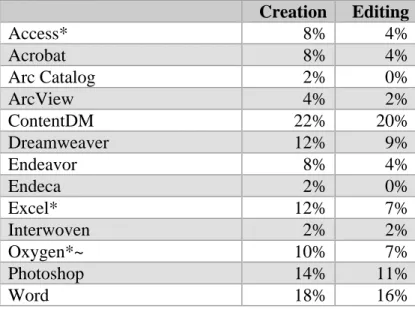
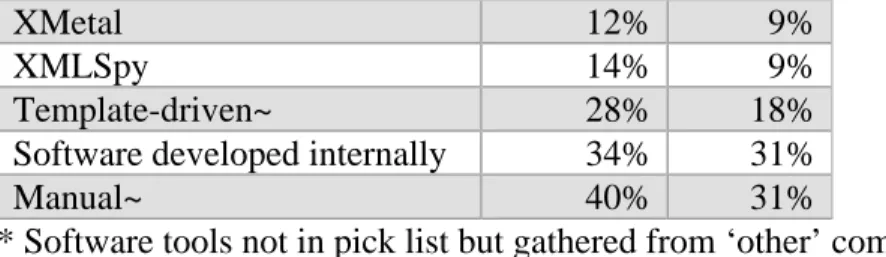
metadata. The most used commercial tool is ContentDM with 22% using it for creation
and 20% for editing. The most used means, however, is non-commercial – manually
creating metadata (40%) and manually editing metadata (31%). The second most used
means was also non-commercial – internally developed software is used by 34% for
creating metadata and 31% for editing metadata.
Table 2: Tool usage for creating and editing metadata
Creation Editing
Access* 8% 4%
Acrobat 8% 4%
Arc Catalog 2% 0%
ArcView 4% 2%
ContentDM 22% 20%
Dreamweaver 12% 9%
Endeavor 8% 4%
Endeca 2% 0%
Excel* 12% 7%
Interwoven 2% 2%
Oxygen*~ 10% 7%
Photoshop 14% 11%
XMetal 12% 9%
XMLSpy 14% 9%
Template-driven~ 28% 18%
Software developed internally 34% 31%
Manual~ 40% 31%
* Software tools not in pick list but gathered from ‘other’ comments ~ 1 person (2 for manual) indicated usage for editing but not creation
Another way to consider the tool usage is to group them into categories according
to their primary function/role. Content creation tools are “essentially any software that
can be used to create digital content, whether textual or multimedia” (Greenberg, et al.
2005, 8). Content management systems generally refer to systems used to organize and
control content, often within the confines of an organization’s content workflow. Digital
repository systems, on the other hand, manage access and retrieval of digital objects. For
a list of tools and how they were coded, see Table 3.
Table 3: A selection of tools used to create and manage metadata
Tool Type Tools
Content Creation tools Acrobat, Microsoft Word, Dreamweaver, jEdit, Photoshop, NoteTab Pro
Content Management Systems ContentDM, Joomla, Vignette, Millennium, Innovative Interfaces Symposia, Learning edge
XML Editors XMLSpy, oXygen, xforms, xmetal
Digital Repository System Connexion, Sirsi Hyperion, dSpace, DLXS, LUNA Insight, ePrints
Database / Spreadsheet Access, Excel
Metadata tools Reload editor, Editor-Convertor Dublin Core Metadata, Interwoven MetaTagger
GIS ArcCatalog, ArcView
Figure 3 below gives us the percentage of people who indicated that they use the
particular tool type as well as the percentage that use the other methods (manual
manipulation and templates). Non-commercial means were the clear winners with
manual manipulation the most common means used to create (40%) and edit (37%)
metadata. This is followed by internally developed software with just under 35% for
both creation and editing of metadata. Under the commercial umbrella, both content
creation and content management software were used by approximately 1/3 of those
Figure 3: Percentage of people using each tool type and method 0 5 10 15 20 25 30 35 40 45 Con tent Cre atio n Con tent Mgm t Data base /Sp reads hee t Digi
tal R
epo sitor y GIS Meta data tools XM L Ed itors Inte rnally deve lope
d so
ftwar e Tem plate -driv en Manu ally P e rc e nt a ge R e s p on s e Creation Editing
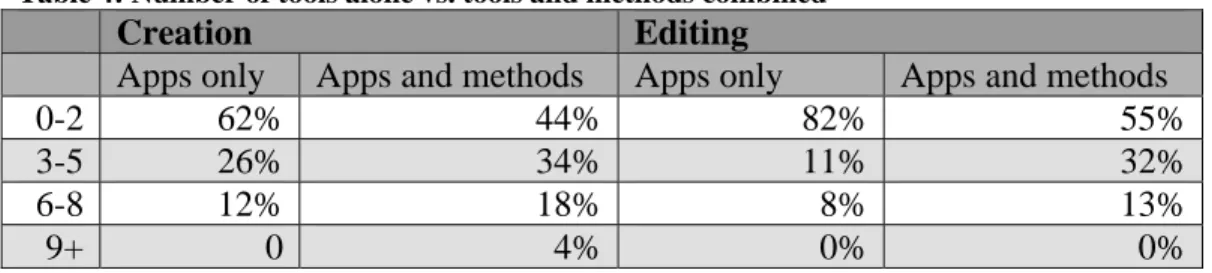
1.7.2 Number of tools / methods
Calculations were made on the number of applications participants use, as well as
on the total of applications and metadata creation/edit methods. The average number of
tools used during the creation phase was 2.4 and that for editing was 1.7. When you
combine tools and methods, means go up by approximately 1 method for both creation
and editing. A quarter have 4 or more tools and methods used for creation and 16% have
4 or more for editing.
Table 4: Number of tools alone vs. tools and methods combined
Creation Editing
Apps only Apps and methods Apps only Apps and methods
0-2 62% 44% 82% 55%
3-5 26% 34% 11% 32%
6-8 12% 18% 8% 13%
9+ 0 4% 0% 0%
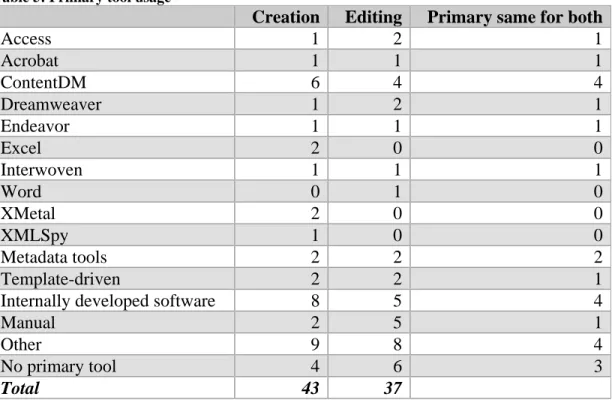
1.7.3 Primary tool usage
Data was gathered on what tool was primarily used for creating and editing
metadata. As can be seen in Table 5, the most commonly used tools for creation and
editing were, as with overall tool usage, found in non-commercially available tools – 8
using internally developed software for creation, 5 for editing as well as 5 primarily
editing manually. Of the commercially available software, ContentDM ranked above the
Six people indicated that there was no primary tool for creating metadata; rather
there were several tools used, depending on such things as format type (one participant
uses Filemaker for images and oXygen and NoteTab for text), departments having or
preferring different tools and “by collection type and by the system in which the object
will eventually end up”. As with tools in general, most of the differences between
creation and editing in primary tool usage was due to drop-outs. For those who answered
both, generally the same tool or method was used for creation and editing.
Table 5: Primary tool usage
Creation Editing Primary same for both
Access 1 2 1
Acrobat 1 1 1
ContentDM 6 4 4
Dreamweaver 1 2 1
Endeavor 1 1 1
Excel 2 0 0
Interwoven 1 1 1
Word 0 1 0
XMetal 2 0 0
XMLSpy 1 0 0
Metadata tools 2 2 2
Template-driven 2 2 1
Internally developed software 8 5 4
Manual 2 5 1
Other 9 8 4
No primary tool 4 6 3
Total 43 37
1.8
Software features, their importance, support level, necessity
In addition to asking participants about key aspects of their metadata process,
participants were also asked about various features of their software tools. They were
asked to rate three different aspects of these software features – how well the feature is
currently supported, how important it is and how much they need it. The features asked
about included:
• Controlled vocabulary for metadata values
• Ability to designate metadata as required or optional • Rule-based (if X is filled then Y must be)
• Ability to select metadata schema(s) • Ability to create custom metadata fields • Type-ahead functions
• Track changes to metadata • Tool is open source
• Tool has strong vendor support
For support – they were asked to indicate if the feature was not supported at all,
poorly supported, fairly supported, well supported, or extremely well supported. For
importance – they were asked to indicate if the feature was unimportant, mostly
unimportant, somewhat important, important or extremely important. Lastly, for need –
they were asked to indicate if the feature was unnecessary, mostly unnecessary,
somewhat needed, needed or desperately needed.
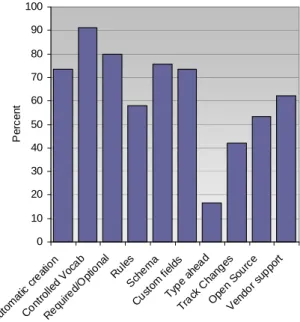
By comparing Figure 3 with Figures 4 and 5 below, it is easy to see that
satisfaction with the support level of a feature does not match its importance or level of
0 10 20 30 40 50 60 70 80 90 Auto mati
c cre atio
n
Cont rolled V
oca b Req uire d/Op tiona l Ru les Sch em a Cust om fiel ds Type ah ead Track Chan ges Ope n So
urce
Vend or su
ppor t Pe rc e n t
Figure 3: Well or extremely well supported features
0 10 20 30 40 50 60 70 80 90 Aut om atic cre ation Cont rolled V
ocab Requi red/ Op tiona l Rule s Sche ma Custo m fi
elds
Type ahe ad
Trac k C
hang es
Open S ourc e Vendo r su ppor t P er c ent
Figure 4: Important or Extremely Important Features
0 10 20 30 40 50 60 70 80 90 100 Auto mati
c cre atio
n
Cont rolled V
ocab Requi red/O ptio nal Rules Sche ma Custo m fi
elds
Type a hea d Trac k C hang es Open Sou rce Vendo r sup
port
P
erc
e
nt
Figure 5: Needed and Desperately Needed Features
Automatic creation of metadata – Less than 10% said this feature was well supported
in the tools used by the participants; while just over half rate it as important or extremely
important and almost three-quarters (73%) either need it or desperately need it.
Controlled vocabulary for metadata values – The most important and needed feature,
91% reported it as being either needed or desperately needed and 79% stated that it was
important or extremely important. The controlled vocabulary feature also has the largest
those who need it say it is well supported while only one half of those who say it is
important say it is well supported.
Ability to designate metadata as required or optional – Second only to the controlled
vocabulary feature in terms of both importance and need, around 80% said that it was
important and needed. Support was judged as being fairly poor – 62% stated that it was
not, poorly, or fairly supported.
Rule-based – Just over half (56%) said that it was important or extremely important as
well as needed or desperately needed (58%) but only 22% said it was well or extremely
well supported.
Ability to select schema(s) – While approximately three-quarters said it was important
or extremely important as well as needed or desperately needed, only a third said that it is
well or extremely well supported.
Ability to create custom fields – The best supported feature, just over half of the
participants stated that it is either well or extremely well supported while approximately
three-quarters said it is important or extremely important as well as needed or desperately
needed.
Type-ahead – This is clearly the most unimportant (79%) and most unneeded (83%)
feature. The fact that no one listed it as well or extremely well supported is not an issue,
though, one could argue that this feature could help with quality, by reminding users of
previously used terms as they were typing.
Tool is open source – After the ability to add custom fields, open source is the best
supported feature – 44% state that it is either well or extremely well supported. Roughly
one half indicate that it is important and needed.
Vendor support – Clearly, vendors have some work ahead of them – only 36% agreed
that vendor support was decent, compared to the 63% who indicate a need for it, and
compared to the 55% who said it was important.
Given human nature, one might expect that the support level and necessity would
have an inverse relationship – the worse a feature is, the greater the perceived need. One
might also expect there to be a correspondence between the importance and need of a
feature. Figures 6-15 below seem to bear both of these assumptions out. For instance,
outstrips the number who said it was somewhat needed. On the flip side, those who rated
the need for the ability to set metadata as required was substantially greater than those
who said it was well supported.
Automatic Creation of Metadata
0 10 20 30 40 50 60 70
Lowest Low Med High Highest
P erc ent ag e R es po ns e
Support Importance Necessity
Figure 6: automatic creation of metadata
Controlled Vocabulary for metadata values
0 10 20 30 40 50 60 70
Lowest Low Med High Highest
P er c en ta ge R es pons e
Support Importance Necessity
Figure 7: Controlled Vocabularies for metadata
Ability to designate metadata as required or optional 0 10 20 30 40 50 60 70
Lowest Low Med High Highest
P e rc en tage R e s p on s e
Support Importance Necessity
Figure 8: Designate requirements for metadata
Ability to create and enforce rules
0 10 20 30 40 50 60 70
Lowest Low Med High Highest
P e rc ent ag e r es pon s e
Support Importance Necessity
Figure 9: Ability to create and enforce rules Schema Support 0 10 20 30 40 50 60 70
Lowest Med Highest
P re c e n tage R e s pon se
Support Importance Necessity
Figure 10: Schema Support
Ability to create custom fields
0 10 20 30 40 50 60 70
Lowest Low Med High Highest
P er c e nt ag e R es pons e
Support Importance Necessity
Figure 11: Custom fields
Type Ahead 0 10 20 30 40 50 60 70
Lowest Low Med High Highest
P e rc ent ag e R es po ns e
Support Importance Necessity
Figure 12: Type Ahead
Ability to track changes
0 10 20 30 40 50 60 70
Lowest Low Med High Highest
P er c ent age R es ponse
Support Importance Necessity
Figure 13: Track changes
Open Source 0 10 20 30 40 50 60 70
Lowest Low Med High Highest
Per c ent age Res pons e
Support Importance Necessity
Figure 14: Open source
Vendor Support 0 10 20 30 40 50 60 70
Lowest Low Med High Highest
P e rc entag e r e s p o n s e
Support Importance Necessity
Participants were asked to describe any other metadata tool features that are
important for their organization and how well they are currently supported. A few
indicated that rights control with respect to metadata was desirable. One method
mentioned concerned integration with internal systems such as LDAP for granting editing
or viewing privileges. This respondent indicated that this is a “must for any tool and is
well supported in most systems.” Another desired feature concerns the ability to suggest
keywords or subject assignment (using a controlled vocabulary such as LCSH).
Interconnectivity / separation of functionality – one respondent indicated that they
wanted to see a certain separation of functionality. They want to “separate the process of
managing a shared metadata standards (elements, controlled vocab, etc.) but have
different systems own the data.” Another respondent, however, expressed a desire for
interconnectivity between different systems to connect authority control files and
improve cross referencing capability.
Other desired features (most of which are currently not well supported), include:
• templates
• global change / batch updating • potential duplicate detection • integration with documentation
• xml validation with error messages that are understandable by non-programmers
• something that maps MARCXML in and out so they can “easily leverage existing MARC data and transform it into our metadata schema of choice”
1.9
Rules and Requirements for the Metadata Process
There are potentially many different rules employed to govern the metadata
process. Participants answered questions on a few rules considered likely to be
incorporated in some way. They were asked about the timing of creation and editing of
metadata. They were also asked about the inclusion of semantic and syntactic
enforcement mechanisms, whether approval was required, and the requirements
regarding the presence of elements along with rules regarding the verification of metadata
values.
1.9.1 Timing of metadata manipulation
Not only are there many people manipulating metadata and many places to store
Participants were asked about the creation or editing of metadata for several stages of a
digital object’s lifecycle. There were six stages specifically asked about in this survey for
both the creation and editing of metadata. Metadata could be created before the content
of the digital object has been created – in the case of an anticipated object. Metadata is
often manipulated during the process of creating content, before publishing (where
publishing means making the object available to its audience); during the process of
publishing; after publication; and upon user request. In some cases, creation and editing
occur simultaneously. Table 6 lists which stages were asked about during the creation
and editing of metadata.
Table 6: Stages asked about Stage
Before content is created (only asked about during creation phase) During content creation
Before publishing When publishing After publication
Upon user request (only asked about during editing phase) Other
As was expected, metadata is generally created or edited for a number of stages.
People manipulated an average of 2.76 stages for creating and 2.84 for editing metadata.
A majority indicated that there are at least 3 stages where metadata is created and 3 where
it is edited.
Three creation and four editing stages have a majority creating and editing
metadata. Indeed, all but 1 stage have a majority editing metadata. The proportion of the
creation and editing stages participants indicated they used is illustrated in Figure 16
below. Two-thirds work with metadata in 3 or more creation stages, with one-quarter
working with it in 4 or more creation stages. Half of the participants work with metadata
in 4 or more editing stages.
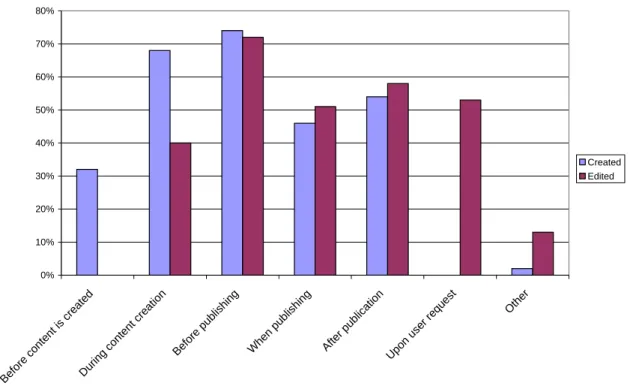
Thirty-two (32) percent create metadata before creating content. During the
creation of content, 68% create metadata and 40% also edit it. Creation and editing both
occur most often before publishing – three-quarters during creation and 72% during
publication of content, over half both create (54%) and edit (58%) metadata. Over half
also edit metadata upon user request.
Figure 16: Percentage of those manipulating metadata at various stages
0% 10% 20% 30% 40% 50% 60% 70% 80%
Before c onte
nt is cre ate
d
Dur ing cont
ent cre ation
Befor e p
ublis hing
When publ
ishi ng
After publ
icati on
Upo n use
r req
uest Other
Created Edited
1.9.2 Guidelines
Controlled vocabularies, thesauri and similar semantic tools help ensure that the
correct term is used for a metadata field, which can improve consistency. Formatting
guidelines help ensure the syntax used for metadata is correct by checking that the
metadata values conform to the correct format. This was one of the issues Hutt and Riley
explicated in their study of the date element for cultural heritage institutions (2004).
Controlled vocabularies. formatting guidelines and the like are sometimes
incorporated into the software used to create and edit metadata. This makes using the
right term and format more seamless (Bruce and Hillmann 2004) – as opposed to
requiring users to consult a separate document or rely on their memory while in the
process of creating or editing a metadata record. Therefore, participants were asked
about the existence of these semantic and syntactic guidelines both outside and within the
confines of their software tools. They reported on whether they had guidelines all of the
indicated that they have guidelines for the semantics of the metadata values all of the
time but disappointing that just under 60% of those had these guidelines incorporated into
their metadata tools.
We see a similar pattern with formatting guidelines; 74 % have formatting
guidelines all of the time for metadata values however, just over half of those with
guidelines actually have them all of the time within their tool. Ninety-four percent have
formatting guidance at least some of the time while three-quarters had at least some
formatting support in the software.
Approximately 20% do not have any semantic or formatting guidelines in their
metadata software.
1.9.3 Approval
Another way to reduce incorrect information in metadata is to require approval for
metadata creation and editing, thus ensuring that at least one person other than the
manipulator verifies the metadata. An example was the process at Intute of emailing the
resource administrator for verification of the metadata and approval. In that case,
approval was an opt-in activity (i.e., resources were not under the control of Intute so
resource administrators were free to simply ignore the email). In other cases, approval is
not an optional activity. Therefore, participants were asked if they were required to get
approval all of the time, some of the time or not at all. There is no consensus with
respect to requiring approval for either creation or editing. Just under a quarter are
required to get approval for all created and edited metadata. Two-thirds, however, have
approval required at least some of the time for created metadata and 58% for editing.
That still leaves 34% of created and 42% of edited metadata with no approval required.
In general, the frequency of required approval for editing tends to follow those for
creating. Only 3 of the 12 participants who said approval is required all of the time did
not require it all of the time when editing. Three of the 21 who said it is required some of
the time for creation said it is not required while 1 has it required all of the time for edits.
Only 2 of 17 who said it was never required for creation of metadata said approval was
1.9.4 Checking for presence of required metadata elements
Ninety-four percent of the respondents indicated that they do have elements
which are required.
It is possible for software used for metadata creation and editing as well as other
software to enforce the existence of certain elements. They can either give warnings to
the user or not allow submission of the content and/or metadata until this requirement is
satisfied. In addition, people (either the creator themselves or another party) are often
responsible for manually checking the existence of required elements.
Participants were asked about different ways that enforce or check for the presence of
these required elements. Four methods of checking were asked about: 1) by the creation
or editing tool, 2) by another software tool, 3) manually by the person creating or editing,
and 4) manually by someone other than the primary actor.
1.9.4.1 During Metadata Creation
As Table 7 below indicates, most participants have at least one method of
checking for the required elements, with 84% of the participants indicating that at least
some of the time required elements are checked for in the metadata creation tool. Almost
half of the respondents (48%) reported that their metadata creation software checks for
this all of the time. The creation tool is the only one where the largest number check all
of the time. For all other methods, the majority only check some of the time.
When metadata is created, the most common method for checking the existence
of required elements was by someone other than the creator.
Table 7: Tool/Method used to check for required elements during metadata creation
All of the time Sometimes Never
Metadata creation tool 48% 36% 17%
Other software tool 27% 50% 23%
Manually by metadata creator 35% 58% 8%
manually by someone other than creator 11% 74% 14%
1.9.4.2 During Metadata Editing
The greatest number where requirement checking occurred all of the time during
the editing phase was in the metadata tool – a measly 32%. Only 3 people report using a
different tool for checking. As with creation, the majority of those who use the various
those using a different tool, 60% of those where the editor checks and 78% of those
where someone other than the editor checks for required elements.
When metadata is edited, the most common method for checking the existence of
required elements was by someone other than the editor.
Table 8: Tools/Methods used to check for required elements when metadata is edited
All of the time Sometimes Never
Metadata editing tool 32% 43% 24%
Other software tool 10% 50% 40%
Manually by metadata editor 30% 60% 10%
Manually by someone other than editor 3% 78% 19%
1.9.4.3 Comparison of Creation and Editing
As with the approval process, the trend seems to be that what happens at creation
also happens during editing: the level of requirement checking for editing mirrors that for
creation – 63% who have checking occur all the time in the metadata tool; 92% who
sometimes check via the metadata tool during creation do the same when editing. All of
the people who indicated that they never have the tool check while creating also never
have checking during editing. The same pattern can be seen in both tool types as well as
both manual methods.
Most participants indicated that they use multiple methods for checking both
during the creation phase and the editing phase. It was most common that all 4 methods
were used both in creation – 45% and editing – 56%.
1.9.5 Verifying metadata values
Verification of metadata values concerns itself with the accuracy of the data itself.
This can range from checking for spelling or typographical errors to checking for the
correct syntax (e.g. date is yyyy-mm-dd instead of mm-dd-yyyy).
1.9.5.1 Verification during metadata creation
Verification of metadata values does not seem to occur as frequently as checking
for required elements does – only 21% indicated that the metadata creation tool was used
all of the time for verification, as compared to 48% for requirements checking. Just over
half of the respondents do not ever use an additional tool to verify metadata values,