Redirected Touching
Luv Kohli
A dissertation submitted to the faculty of the University of North Carolina at Chapel Hill in partial fulfillment of the requirements for the degree of Doctor of Philosophy in the Department of Computer Science.
Chapel Hill 2013
Approved by:
©2013 Luv Kohli
ABSTRACT
LUV KOHLI: Redirected Touching (Under the direction of Frederick P. Brooks, Jr.)
In immersive virtual environments, virtual objects cannot be touched. One solution is to use
passive haptics—physical props to which virtual objects are registered. The result is compelling;
when a user reaches out with a virtual hand to touch a virtual object, her real hand touches and feels
a real object. However, for every virtual object to be touched, there must be an analogous physical
prop. In the limit, an entire real-world infrastructure would need to be built and changed whenever a
virtual scene is changed.
Virtual objects and passive haptics have historically been mapped one-to-one. I demonstrate that
the mapping need not be one-to-one. One can make a single passive real object provide useful haptic
feedback for many virtual objects by exploiting human perception. I developed and investigated
three categories of such techniques:
1. Move the virtual worldto align different virtual objects in turn with the same real object
2. Move a virtual objectinto alignment with a real object
3. Map real hand motion to different virtual hand motion, e.g., when the real hand traces a real
object, the virtual hand traces a differently shaped virtual object.
The first two techniques were investigated for feasibility, and the third was explored more
deeply. The first technique (Redirected Passive Haptics) enables users to touch multiple instances
of a virtual object, with haptic feedback provided by a single real object. The second technique
(The Haptic Hand) attaches a larger-than-hand virtual user interface to the non-dominant hand,
mapping the currently relevant part of the interface onto the palm.
The third technique (Redirected Touching) warps virtual space to map many differently shaped
virtual objects onto a single real object, introducing a discrepancy between real and virtual hand
motions. Two studies investigated the technique’s effect on task performance and its potential for use
in aircraft cockpit procedures training. Users adapt rather quickly to real-virtual discrepancy, and
after adaptation, users perform no worse with discrepant virtual objects than with one-to-one virtual
To my parents, Om and Pushp, and to my brother, Manu.
ACKNOWLEDGMENTS
While working on this dissertation, I have been helped by many people. I am grateful for their
support. Though I cannot possibly express the depth of my appreciation in the few short sentences
below, I would like to acknowledge those that have helped me complete this work.
I first thank my doctoral committee:
• Fred Brooks, for his guidance, patience, encouragement, and understanding. I could not ask
for a better advisor. He always found time to meet with me whenever I needed his advice (even
late at night), and he pushed me when I most needed it. His advice on research, writing, and
life has forever shaped the way I think.
• Mary Whitton, for entrusting me with implementing her idea forThe Haptic Hand; working
on it gave me a new appreciation for virtual environments research and started me on the path
to completing the rest of this work. Also, she always found time to help me when deadlines
were fast approaching.
• Rob Lindeman, for his friendship throughout the years and for introducing me to virtual reality
(it’s all his fault).
• Russ Taylor, for helping me with the various technical problems I encountered during my work
in the lab, enabling me to benefit from his expertise.
• Mark Hollins, for guiding my research in ways that made it more efficient, helping me avoid
falling into research rabbit holes.
I am grateful for the support and funding that I have received from different agencies and
programs during my time at UNC: the NIH National Institute of Biomedical Imaging and
Bioengi-neering, the NIH National Center for Research Resources, the Office of Naval Research, the Link
Foundation, the North Carolina Space Grant, and Electronic Arts. I thank CyberGlove Systems for
The faculty and staff in the Department of Computer Science are outstanding. I would particularly
like to thank:
• John Thomas, for building most of the physical infrastructure required for my research. Every
time I went to him with a research need, he had an idea for how to address it quickly and
efficiently, even when my requirements changed after he already built something for me. I
would not have been able to do any of my experiments without John.
• David Harrison and Herman Towles, for letting me borrow so much of their equipment and
bailing me out whenever I had last-minute equipment failures.
• Henry Fuchs, Gary Bishop, Anselmo Lastra, Steve Weiss, and Tim Quigg, for giving me so
much advice about research, graduate school, and more over the years.
• Missy Wood and Kelli Gaskill, for being so kind and caring, and for always helping me find a
solution to whatever strange problem I had in the lab.
I am also indebted to the many friends and colleagues who have spent their time meeting with
me, giving me advice, teaching me, encouraging me, and otherwise supporting me:
• Anatole L´ecuyer, for discussing Redirected Touching with me in its very early stages, and for
encouraging me to move forward with it.
• Rohit Saboo, for giving me the space-warping code that provided the foundation for my code.
Without it, I would not have been able to investigate Redirected Touching.
• Anish Chandak, for helping me with FMOD during my first Redirected Touching study.
• Kan Anant and Tracy McSheery at PhaseSpace, Inc. for their excellent support whenever I
had difficulties getting tracking to work.
• Rob Teather, for helping me understand ISO 9241-9.
• Chris Wiesen, for his pragmatic explanations of statistics.
• Lt. Col. Paul Holst, USAF, for his interest in my research, and for his help in getting the Link
Foundation Fellowship in Advanced Simulation and Training.
• All of the previous members of Effective Virtual Environments (EVE) whose research created
giant shoulders upon which my work could rest.
• Chris VanderKnyff and Chris Oates, the other two members of the EVEIL trio. My work is
built upon their technical expertise.
• Paul Zimmons, for his continued encouragement, for his sense of humor, and for drawing
Chicken Luv, Happy Luv, Messed-up Luv, Angry Luv, and Frightened Luv, some of which
became unofficial EVE mascots.
• Eric Burns and Sharif Razzaque, for their friendship, and for always being willing to help me
figure out my problems even when they had very busy schedules.
• Jeremy Wendt, for helping me get through grad school by being a model of perseverance.
• Alexis Chan, for believing in me.
• Tabitha Peck, for helping me get through my first time teaching a course.
• Jason Jerald, Jeff Feasel, Jess Martin, Rick Skarbez, Ky Waegel, and Zhen Shao, for helping
me work through my research ideas and giving me valuable feedback.
• Sachin Patil, for always being willing to be a guinea pig for my research.
• Ariele Sieling, for encouraging me and for proofreading my dissertation.
• Elise Carmichael, for helping me recruit participants, and for helping me find Waldo.
• Peter Lincoln, for giving me his pan-tilt unit code for my first Redirected Touching study. In
addition to Peter, Ryan Schubert, Miranda Steed, Sean and Marie Curtis, Chris and Anna Berg,
and everyone else in the barn-cs group helped bring sanity to long weeks of stressful work.
• Matt Nealon, for drawing art for my dissertation.
• Tammy Shenkman, for being so supportive, particularly during the weeks leading up to my
defense when I had hardly any time for anything but work.
• Mark Bolas and Haruo Noma, for giving me the opportunity to work in their respective labs.
• Matt Brown and Tony Marinello, for being outstanding mentors during my internships at
Electronic Arts.
Finally, and most importantly, I thank my parents, Om and Pushp Kohli, and my brother, Manu.
Their love and kindness have guided me throughout my life. I cannot adequately express how grateful
I am for their support; without them, I would be lost.
TABLE OF CONTENTS
LIST OF TABLES . . . xv
LIST OF FIGURES. . . xvi
1 What and Why . . . 1
1.1 Thesis statement . . . 4
1.2 Technique 1:Redirected Passive Haptics. . . 4
1.2.1 Summary of results . . . 4
1.3 Technique 2:The Haptic Hand . . . 5
1.3.1 Summary of results . . . 6
1.4 Technique 3:Redirected Touching . . . 6
1.4.1 Summary of results . . . 7
2 Redirected Passive Haptics . . . 9
2.1 Moving the virtual world . . . 10
2.2 Proof of concept . . . 13
2.3 Informal evaluation. . . 15
3 The Haptic Hand. . . 17
3.1 Bimanual interaction and indirect manipulation . . . 18
3.1.1 Exploiting proprioception . . . 19
3.2 The idea: The Haptic Hand. . . 20
3.2.1 The interface panel . . . 20
3.2.2 Interacting with the virtual environment using hand gestures . . . 20
3.2.4 Widget manipulation . . . 23
3.2.5 Calibration . . . 23
3.2.6 Manipulation issues . . . 24
3.3 Usability study . . . 24
3.3.1 Materials and methods . . . 25
3.3.2 Study design . . . 25
3.4 Results . . . 27
3.5 Future work . . . 30
3.6 Insights from mapping a virtual object onto the non-dominant hand . . . 31
4 Redirected Touching. . . 33
4.1 Warping virtual space . . . 34
4.2 Preliminary exploration . . . 38
4.3 Implementation changes . . . 40
4.3.1 Tracking . . . 40
4.3.2 Automating space warping: thin-plate splines . . . 41
4.4 Further exploration . . . 42
4.5 Quickly set-up passive haptics . . . 44
4.5.1 Finger tracking and calibration . . . 44
4.5.2 Determination of physical geometry . . . 45
4.5.3 Discrepant objects . . . 46
5 Redirected Touching: Task Performance . . . 47
5.1 Research questions . . . 48
5.2 System . . . 49
5.3 Warping space . . . 50
5.3.1 Choosing correspondences for space-warping . . . 50
5.3.2 Hand orientation. . . 51
5.4 Measuring task performance . . . 51
5.5 Non-inferiority testing . . . 53
5.5.1 Indifference zone: throughput . . . 53
5.5.2 Indifference zone: error rate . . . 54
5.5.3 Movement time. . . 54
5.6 Study . . . 54
5.6.1 Participants . . . 54
5.6.2 Notation . . . 54
5.6.3 Angle range . . . 55
5.6.4 Adaptation . . . 55
5.6.5 Target distances and widths . . . 55
5.6.6 Trials and counterbalancing . . . 56
5.6.7 Procedure . . . 56
5.7 Results . . . 58
5.7.1 Spatial outliers . . . 58
5.7.2 Learning effect and analysis . . . 58
5.7.3 Throughput . . . 59
5.7.4 Error rate . . . 60
5.7.5 Movement time. . . 61
5.8 Discussion . . . 63
5.8.1 Caveats . . . 63
5.8.2 Computing throughput with 2D endpoint deviation . . . 64
5.8.3 Participant comments and other observations . . . 65
5.9 Revisiting adaptation . . . 66
5.10 Exploratory detectability data . . . 75
5.11 Summary . . . 76
6 Redirected Touching: Training and Adaptation. . . 77
6.1.1 Non-inferiority indifference zones . . . 80
6.1.2 Apparatus . . . 80
6.1.3 Participants . . . 81
6.1.4 Study procedure . . . 81
6.2 Results: task performance . . . 82
6.2.1 Posttest vs. Pretest . . . 84
6.2.2 Non-inferior task performance . . . 86
6.3 Measuring adaptation by path variability . . . 88
6.4 Results: adaptation . . . 91
6.5 Discussion . . . 92
6.5.1 Participant comments: discrepancy detected? . . . 93
6.5.2 Other participant comments . . . 94
6.6 Summary and conclusions . . . 94
7 Conclusions and Future Work. . . 96
7.1 Revisiting the thesis statement . . . 96
7.2 Future work . . . 97
7.2.1 Training . . . 97
7.2.2 Discrepancy detectability . . . 97
7.2.3 Space-warping . . . 98
7.2.3.1 Automatic geometry determination and correspondence generation 98 7.2.3.2 Multiple objects . . . 98
7.2.3.3 Moving rigid objects . . . 99
7.2.3.4 Whole-hand interaction . . . 99
7.2.3.5 Adding active haptics . . . 99
7.3 Implementing Redirected Touching with off-the-shelf hardware . . . 100
A Questionnaires . . . 101
A.1 The Haptic Hand . . . 101
A.2 Redirected Touching: Task Performance . . . 108
A.3 Redirected Touching: Training and Adaptation . . . 110
B Target Ring Details. . . .112
LIST OF TABLES
5.1 Differences between discrepant and one-to-one throughputs (bps) . . . 60
5.2 Differences between discrepant and one-to-one error rates . . . 61
5.3 Differences between discrepant and one-to-one movement times (ms) . . . 62
5.4 Differences between discrepant and one-to-one throughputs (bps) com-puted using 2D endpoint deviation . . . 65
5.5 t-test results for path variability differences between first and second exposures to the largest-target-width ring in each condition . . . 73
6.1 ANOVA results for mean throughput differences . . . 85
6.2 ANOVA results for mean error rate differences . . . 85
6.3 ANOVA results for mean movement time differences . . . 85
LIST OF FIGURES
1.1 A virtual hand penetrates a virtual object because there is no real object to touch. . . 1
1.2 Passive haptics (images from Insko [2001]) . . . 2
1.3 Mapping many different virtual objects onto one physical object . . . 3
1.4 A VE with five differently colored virtual pedestals. The real pedestal and tracked space are superimposed. . . 5
1.5 A user touches the one cylindrical object intended to provide haptic feed-back. The foam walls mark the tracked space boundaries. . . 5
1.6 A user interacts with a virtual interface panel by touching his non-dominant hand. . . . 5
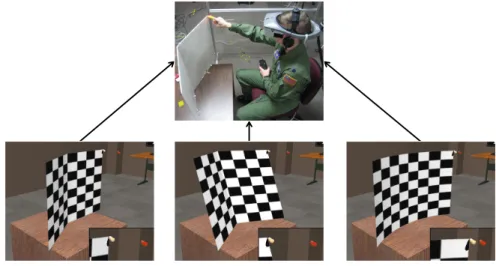
1.7 A user touches a virtual board that is oriented differently than the real board providing passive-haptic feedback . . . 7
2.1 Five virtual easels (upper left) and five real easels (upper right) that provide haptic feedback, enabling a user to draw effectively on the virtual easels. Mr. Unsavory Character seeks to disrupt the task and steals four of the real easels (lower left). Can the task still be done with only one real easel (lower right)? (Artwork by Matt Nealon) . . . 9
2.2 The virtual world is moved so that each virtual easel is in turn aligned with the real easel. (Artwork by Matt Nealon) . . . 10
2.3 When the virtual world is rotated, real and virtual objects become misaligned. . . 11
2.4 Rotating the virtual world around the user’s head . . . 12
2.5 Difficulties with object alignment . . . 12
2.6 A VE with five differently colored virtual pedestals. The real pedestal and tracked space are superimposed. . . 13
2.7 A user touches the one cylindrical object intended to provide haptic feed-back. The foam walls mark the tracked space boundaries. . . 13
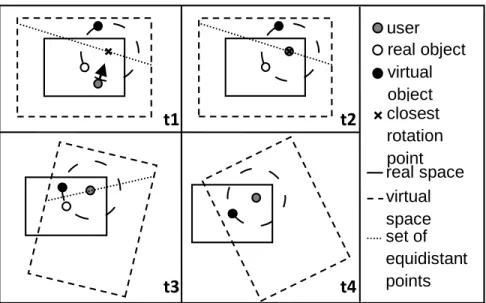
2.8 Step-by-step method to align virtual objects with real object: (t1) User guided towards rotation point, equidistant from real and virtual objects; (t2) user reaches rotation point; (t3) user turns head, virtual world rotates imperceptibly; (t4) real and virtual objects aligned . . . 14
2.9 A transporter beam (left) and droid (right) . . . 15
3.1 A virtual easel and a real easel that provides haptic feedback (upper left). Mr. Unsavory Character shoots the real easel with a shrink ray (upper right, lower left), yielding a real easel that is smaller than the virtual easel (lower right). Can a virtual drawing task still be done using the small easel for
haptic feedback? (Artwork by Matt Nealon) . . . 17
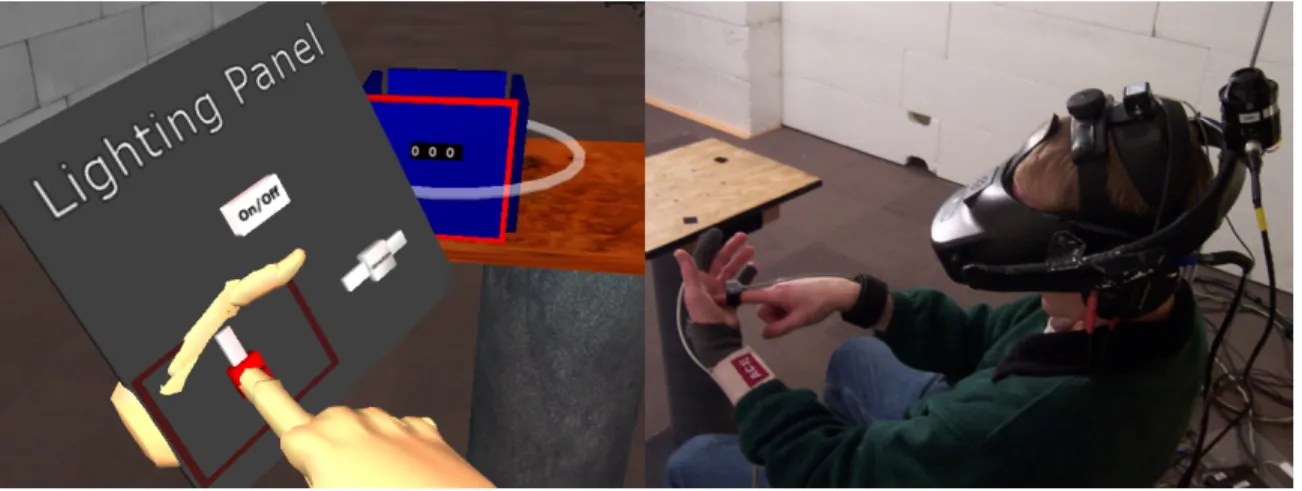
3.2 A user interacts with a virtual interface panel by touching his non-dominant hand. . . . 19
3.3 A sample interface panel with buttons and sliders . . . 21
3.4 Interface panel manipulation: (a) the panel is not attached to the NDH; (b) the NDH is closed and intersects the panel to highlight the desired widget; (c) the NDH is opened to snap the desired widget to the center of the palm; (d) the DH is used to manipulate the active widget; (e) the NDH is closed and moved to a new desired widget; (f) the NDH is opened and the new
widget is snapped and activated. . . 22
3.5 The NDH (left) and DH (right) with trackers attached. The white circles indicate where the NDH trackers are located underneath the sports bandage: one on the fingertip to monitor whether the palm is open or closed, and
one on the back of the hand to determine its pose. . . 23
3.6 The interface panel and environment for the matching task . . . 26
3.7 User-reported ratings of ease of interaction on a scale from 1 (extremely
easy) to 7 (extremely difficult) . . . 28
4.1 A virtual easel and a real easel that provides haptic feedback (upper left). Mr. Unsavory Character sees he must try something new (upper right), so he angrily bends the real easel (lower left), yielding a real easel that no longer matches the shape of the virtual easel (lower right). Can a virtual drawing task still be done despite the real-virtual shape discrepancy?
(Artwork by Matt Nealon) . . . 33
4.2 A flat virtual easel and a curved real easel, viewed from above. When the real hand moves 10cm to touch the real easel, the virtual hand must move
15cm to touch the virtual easel. . . 36
4.3 Horizontal slices of unwarped (a) and warped (b) spaces and objects
(viewed from above) . . . 37
4.4 A user touches a flat square table . . . 38
4.5 Differently shaped virtual objects for which a square-top real table
(Fig-ure 4.4) serves as haptic feedback . . . 39
4.6 Horizontal slices of unwarped space and real square table (left) and warped space and tapered virtual table (Figure 4.5d), viewed from above (not
drawn to scale). Note that the warped space is not smooth as in Figure 4.3b. . . 40
4.7 PhaseSpace® IMPULSE™ tracking cameras mounted on an aluminum frame. Inset shows tracking LEDs mounted onto an index finger using a
self-adhesive athletic bandage. . . 41
4.8 Correspondences between real (left) and virtual (right) geometries . . . 42
4.9 Eight different deformed virtual objects mapped onto the square real table (Figure 4.4) 43 4.10 A low-cost two-faced passive-haptic foam board . . . 45
4.11 Finger calibration . . . 45
4.12 A user (wearing an NVIS nVisor SX60 HMD) touches a corner of the physical foam board. The virtual finger position is warped to touch the corners of three different virtual objects. The insets show the distances between the virtual finger and the superimposed real finger (red). . . 46
5.1 Lockheed Martin® C-130 Hercules® cockpit . . . 47
5.2 System constructed for space-warping studies. Inset shows the finger tracking ring. . . 49
5.3 The multi-directional tapping task. Overlaid arrows show the target sequence. . . 52
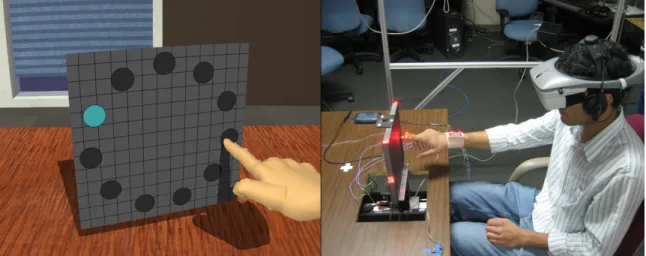
5.4 Left: front view of real board at180; Middle: virtual board at180; Right: real board at00. Left and middle panels make up a one-to-one condition, and right and middle panels a discrepant condition . . . 55
5.5 A user touches a virtual board that is oriented differently than the real board . . . 57
5.6 A learning effect is seen in the throughput data, most evident between the first three and last eight blocks of target rings . . . 59
5.7 Throughput by virtual angle. Error bars are 95% confidence intervals. . . 60
5.8 Error rate by virtual angle. Error bars are 95% confidence intervals.. . . 61
5.9 Movement time by virtual angle. Error bars are 95% confidence intervals. . . 62
5.10 Throughput computed using 2D endpoint deviation. Error bars are 95% confidence intervals. . . 65
5.11 One participant’s motion paths for a target ring in thep18,18qcondition . . . 67
5.12 One participant’s motion paths for a target ring in thep0,18qcondition (first exposure to largest target width) . . . 68
5.14 Path variability by path sample number (page 69) for each participant’s first and second exposures to the largest-target-width rings in condition p18,18q. The numbers in each plot are the participant number and the total
path variability for the first and second exposures. . . 71
5.15 Path variability by path sample number (page 69) for each participant’s first and second exposures to the largest-target-width rings in condition p0,18q. The numbers in each plot are the participant number and the total path variability for the first and second exposures. . . 72
5.16 Path variability across all participants for one-to-one and discrepant condi-tions, first and second exposures to largest-target-width rings. Error bars are 95% confidence intervals. . . 74
5.17 Throughput across all participants for one-to-one and discrepant conditions, first and second exposures to largest-target-width rings. Error bars are 95% confidence intervals. . . 74
5.18 Exploratory discrepancy detectability data . . . 75
6.1 A user sees an180monitor in an HMD (upper left) while touching a00 touchscreen monitor (upper right); Lower left: touchscreen oriented at180; Lower right: touchscreen at00. . . 79
6.2 Mean throughput across all participants forR,V1–1, andVdconditions. Error bars are 95% confidence intervals. . . 83
6.3 Mean error rate across all participants for R, V1–1, and Vd conditions. Error bars are 95% confidence intervals. . . 83
6.4 Mean movement time across all participants forR,V1–1, andVdconditions. Error bars are 95% confidence intervals. . . 84
6.5 Mean throughput differences between pairs of conditions. Error bars are one-tailed 95% confidence intervals. Shaded area represents non-inferiority indifference zone. . . 86
6.6 Mean error rate differences between pairs of conditions. Error bars are one-tailed 95% confidence intervals. Shaded area represents non-inferiority indifference zone. . . 87
6.7 Mean movement time differences between pairs of conditions. Error bars are one-tailed 95% confidence intervals. Shaded area represents non-inferiority indifference zone. . . 87
6.8 AVdparticipant’s motion paths, first Training target ring. . . 89
6.9 AVdTraining target ring just after the first break. . . 89
6.10 AVdparticipant’s motion paths . . . 90
6.11 Mean path variability across all participants forR,V1–1, andVdconditions.
Error bars are 95% confidence intervals. . . 91
6.12 Mean path variability differences between pairs of conditions. Error bars are one-tailed 95% confidence intervals. Shaded area represents
non-inferiority indifference zone. . . 92
7.1 Upper left: a user’s hand is tracked by the Leap Motion™ Controller while he touches the corner of a physical object onto which virtual objects will map; Upper right: horizontal slice of warped space, viewed from above (real object: black; virtual: blue); Bottom half: two differently shaped
CHAPTER 1
What and Why
Figure 1.1: A virtual hand penetrates a virtual object because there is no real object to touch.
Imagine a world in which the only physical constraints on your movement are your own body
and the ground on which you stand. In some ways, this world might be desirable; you could walk
from room to room very efficiently, not needing to plan your path around obstacles such as walls. In
other ways, life would be very difficult; you would not be able to pick up a glass to take a sip, sit
down on a chair, or lie down on a bed. Your body would go right through these objects. Many virtual
environments (VEs) behave much like this imagined world: you can move through a beautifully
rendered environment, but you cannot touch anything. Experiences such as that in Figure 1.1 destroy
the illusion upon which the usefulness of VEs depends.
There are two broad classes of haptic (touch) feedback solutions in VEs:active-hapticfeedback
(oractive haptics), andpassive-hapticfeedback (orpassive haptics). Active haptics are
computer-controlled devices that supply tactile or force feedback to the user through electric, electronic, or
Remote Manipulator, Sensable Technologies, Inc.® PHANTOM®, and Novint Falcon®; vibrotactile
pager motors; and pin arrays that can be used to approximate different shapes. Active haptics can be
programmed to provide compelling haptic feedback for a variety of virtual objects. However, they
are often expensive and have a limited working volume. Low-cost active-haptic devices, such as
vibrotactile pager motors, can be used wirelessly to provide a large working volume, but the resulting
haptic feedback is not precise enough for many applications.
I focus on passive haptics—physical props to which virtual objects are registered (Figure 1.2).
Traditional passive haptics use a one-to-one mapping between real and virtual objects. In a
head-mounted display (HMD), users see a VE filled with virtual objects. When a user touches a virtual
object with her virtual hand, her real hand touches the corresponding real object. This technique is
compelling because the user experiences a real sense of having touched something. However, to
enable a user to touch everything in the VE, there must be a physical mock-up of every virtual object.
In the limit, an entire real-world infrastructure would need to be built.
(a) Virtual kitchen (b) Passive-haptic kitchen mock-up
Figure 1.2: Passive haptics (images from Insko [2001])
Insko found that compared to no haptics, using even low-fidelity passive haptics (such as real
Styrofoam walls in place of virtual brick walls) led to significantly increased presence (loosely, the
sense of being in an environment) and spatial knowledge training transfer [Insko, 2001]. Using
low-fidelity mock-ups makes an environment designer’s job easier, but passive haptics impose constraints
on changes to the environment: if there is a need to change the position, size, or shape of a virtual
object, its corresponding physical object must also change accordingly. Depending on the complexity
Now imagine that one physical object could effectively represent many different virtual objects
(Figure 1.3). Fewer mock-ups would be needed to provide a rich haptic experience, and existing
mock-ups would be reusable rather than obsolete. If the mapping between virtual and real objects
could be changed quickly by modifying the VE, then less time need be spent on updating physical
mock-ups.
Figure 1.3: Mapping many different virtual objects onto one physical object
The goal of this dissertation is to demonstrate that the mapping between passive haptics and
virtual objects need not be one-to-one, and that one passive real object can be made to provide useful
haptic feedback for many virtual objects by exploiting the peculiarities of human perception. This
dissertation develops and investigates three techniques that change the mapping between real and
virtual objects. The first two techniques are investigated for feasibility, and the third is explored more
deeply to evaluate its effect on task performance and its potential use in training applications. Ideally,
these techniques will enable users to physically interact with many virtual objects without detracting
from their experience. The techniques fall into three categories:
1. Move the virtual worldto align different virtual objects with the same real object
2. Move a virtual objectinto alignment with a real object
3. Map real hand motion to different virtual hand motion, e.g., when the real hand traces a real
object’s surface, the virtual hand traces a differently shaped virtual object’s surface.
1.1
Thesis statement
Part I:In a virtual environment, computer-controlled variable mappings between real and virtual objects can enable a single passive real object to provide haptic feedback for different instances and
kinds of virtual objects.
Part II:By warping virtual space, one can incorporate a non-zero amount of real-virtual shape discrepancy without impacting task performance.
I will demonstrate Part I using three techniques I developed: Redirected Passive Haptics,
The Haptic Hand, andRedirected Touching. I will demonstrate Part II usingRedirected Touching.
1.2
Technique 1:
Redirected Passive Haptics
The first technique (Chapter 2) supports the general idea of mapping more than one virtual
object onto the same physical object. It demonstrates that, for well-planned scenarios, a VE with
spatially separated instances of a virtual object can be remapped onto the real world such that only
one passive real object provides effective haptic feedback for several virtual objects. This technique
usesRedirected Walking[Razzaque, 2005] to map different parts of the VE onto the same real space.
1.2.1 Summary of results
This technique was developed as a course project. In an informal demonstration, eight users
walked around a VE (8.26m x 13.12m) in a much smaller tracked space (4.13m x 6.56m) and touched
five virtual pedestals (Figure 1.4), which were actually the same object in the real world (Figure 1.5).
None of the users reported detecting that there was only one physical object, or that the world was
rotating around them at a different rate from their head rotation. Even those users who had previously
heard an explanation of how the system worked expressed surprise that they were able to touch all
five virtual pedestals without detecting the manipulation.
In its original form, this technique does not enable unconstrained free exploration with haptics.
The scenario was contrived, but it was developed to demonstrate that it is possible to map more than
one virtual object onto a single physical object. Generalized mapping of virtual objects onto physical
Figure 1.4: A VE with five differently colored virtual pedestals. The real pedestal and tracked space are superimposed.
Figure 1.5: A user touches the one cylindrical object intended to provide haptic feedback. The foam walls mark the tracked space boundaries.
1.3
Technique 2:
The Haptic Hand
Even when there are no physical objects to provide haptic feedback in a VE, one haptic device
is always available: the user’s body. The second technique (Chapter 3) enables interaction with
many virtual widgets (buttons, sliders) on a plane fitted to the non-dominant palm; users receive
haptic feedback from a virtual interface panel by touching their own hands (Figure 1.6). Of particular
relevance here is the result that users can interact effectively with a virtual object shaped differently
from its physical counterpart.
Figure 1.6: A user interacts with a virtual interface panel by touching his non-dominant hand.
1.3.1 Summary of results
For this technique, I created a system to present a user interface on a virtual plane fitted to
the user’s non-dominant hand (NDH). The user manipulates widgets (buttons and sliders) with the
dominant hand. Because the virtual interface was larger than the palm, gestures to switch between
active widgets were needed. These gestures enabled the NDH to provide haptic feedback for several
different widgets, despite their being at different locations on the virtual interface panel. A feasibility
study was run to determine the technique’s promise for future development. Eight users were asked
to rate ease of interaction via several questions arranged on Likert scales from 1 (extremely easy) to
7 (extremely difficult). Users were also asked to provide comments about their experience with the
system.
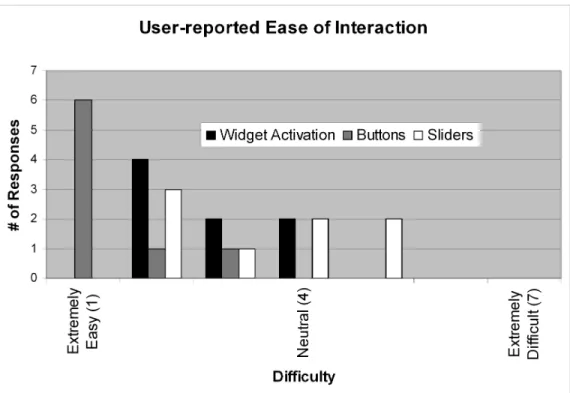
All but two participants rated widget activation as easy or extremely easy. The remaining two
rated it neutral. Universally, participants found buttons to be easier to use than sliders. Half of the
participants rated sliders to be moderately easy, easy, or extremely easy. Two participants rated
sliders neutral, and two rated them moderately difficult. Participant data indicate that the technique
is viable and warrants further study, but care must be taken to improve performance with sliders.
However, the technique was not further developed for this dissertation.
1.4
Technique 3:
Redirected Touching
Realistic and technology-rich simulator training is often inaccessible to deployed armed forces.
Deployable virtual training systems can help maintain combat readiness in the field [Vincenzi et al.,
2008]. Haptic feedback enables users to learn about their environments through touch, but it is
typically difficult to deploy. The third technique (Chapters 4–6) warps virtual space to enable
low-cost, quickly set-up passive haptics to provide coarse haptic feedback that can be repurposed for
different training scenarios (e.g., different aircraft withdifferently shapedand instrumented cockpits).
When a user moves her real hand along some path (e.g., on the surface of a real object) in the real
world, this technique moves her virtual hand along a different path (e.g., on the surface of a virtual
object). Because vision usually dominates proprioception, users can be made to believe that the
This technique,Redirected Touching, is not intended as a replacement for full flight
simula-tors, but as a mechanism for enabling continued training while deployed, particularly for mission
familiarity and emergency procedures, and for retraining on updated models of familiar aircraft.
Warping virtual space may have unintended effects on task performance, which is important
for training applications. I investigated Redirected Touching deeply to determine its effect on task
performance.
1.4.1 Summary of results
Figure 1.7: A user touches a virtual board that is oriented differently than the real board providing passive-haptic feedback
To make the scope of this research manageable, I focused on angular discrepancy between real
and virtual objects. In two separate studies, participants were presented with a vertically oriented
102x102 virtual surface upon which they performed a rapid-aiming task (Figure 1.7). In the first
study, angular discrepancies between seen and felt surfaces of up to 18° around the vertical axis
(~4cm positional discrepancy at the left and right surface edges) yielded acceptable task performance
relative to a one-to-one mapping. Furthermore, a pilot study of six research group members suggested
that 18° was near the discrepancy detection threshold—12° discrepancies were usually undetected,
and 24° discrepancies were usually detected.
The second study investigated whether participants could adapt to and train in a discrepant
VE. Participants were divided into three groups: Real, in which participants did a rapid-aiming
task on a monitor oriented at 18° in the real world; Virtual One-to-One, in which participants did
the task while wearing an HMD, with both real and virtual monitors oriented at 18°; and Virtual
Discrepant, in which the real monitor was at 0° and the virtual monitor was at 18°. Results indicate
that training in either virtual condition was not as effective as in the real condition. However, there
was clear evidence of adaptation to the discrepancy. Participants were slower in the virtual discrepant
condition than in the virtual one-to-one condition, but after adaptation, were no worse in error rate
CHAPTER 2
Redirected Passive Haptics
1
Figure 2.1 shows a VE with five virtual easels. Suppose each easel has a paper pad on it, and you
are tasked with drawing something precisely on each one. Drawing is easier with haptic feedback,
which can be provided by putting five appropriately registered real easels into the tracked space.
Now suppose that Mr. Unsavory Character comes along and steals four of the real easels. Despite
this setback, your virtual drawing task must not go unfinished. However, you need haptic feedback
to complete your task. How might haptic feedback be reintroduced for the four missing easels?
Figure 2.1: Five virtual easels (upper left) and five real easels (upper right) that provide haptic feedback, enabling a user to draw effectively on the virtual easels. Mr. Unsavory Character seeks to disrupt the task and steals four of the real easels (lower left). Can the task still be done with only one real easel (lower right)? (Artwork by Matt Nealon)
1
Typically, passive haptics have been mapped one-to-one to their virtual counterparts. However,
passive-haptic displays do not actually require a strict one-to-one mapping from positions in the
VE to positions in the real world. They do require that a virtual object intended to provide haptic
feedback map to a position in the real world that contains a real object. Likewise, every open space
in the VE must map to open space in the real world. These mappings could be many-to-many,
opening up the possibility that passive haptics could be used even if real and virtual world positions
became decoupled. In the example above, is there some way to map each virtual easel onto the single
remaining real easel?
One possibility is tomove the virtual worldto align the different virtual easels with the real easel (Figure 2.2). Different areas of the VE are mapped onto the real environment as needed. In this
chapter, I presentRedirected Passive Haptics, a technique I developed to explore this idea.
Figure 2.2: The virtual world is moved so that each virtual easel is in turn aligned with the real easel. (Artwork by Matt Nealon)
2.1
Moving the virtual world
The virtual world could be moved while the user remains stationary. For example, once drawing
on the first virtual easel is complete, the virtual world could translate and rotate until the second
virtual easel is aligned with the real one. However, this sort of manipulation might be expected to
lead to disconcerting self-motion perception. A large discrepancy between a user’s vestibular sense
(“I am stationary”) and visual sense (“the world is moving around me or I am moving through the
world”) often results in discomfort and even simulator sickness [Pausch et al., 1992]. Ideally, the
virtual world would move without these adverse effects.
Razzaque developed Redirected Walking, a technique for enabling users to explore VEs that
of the VE onto a smaller real space by injecting a discrepancy between a user’s real-world head
rotation and virtual head rotation. During high-frequency head turns, the vestibular system is more
sensitive than the visual system [Duh et al., 2004], and the injected discrepant visual rotation can
be quite large and go undetected. Even when a user is not turning her head, small amounts of
virtual-head rotation can be injected without her noticing. The injected rotational discrepancies cause
users to walk along real-world paths that are different from their virtual paths, enabling navigation
in larger-than-tracked-space VEs. One of the goals of Redirected Walking is to enable large-VE
exploration without increasing the likelihood of simulator sickness. It seemed a reasonable choice
for moving the virtual world. Nevertheless, Redirected Walking presents some difficulties in the
context of passive-haptic feedback.
Passive haptics require positions in the VE to remain coupled with positions in the real world.
Redirected Walking, by its nature, breaks this coupling by rotating the virtual world with respect
to the real world. Suppose a real object and a virtual object are aligned. When Redirected Walking
rotates the virtual world about the user’s head, the two objects become misaligned (Figure 2.3).
Virtual
Real
Physical prop
Figure 2.3: When the virtual world is rotated, real and virtual objects become misaligned.
Suppose the five virtual easels and the single real easel in Figure 2.1 are arranged such that they
lie on a circular arc and that a user is standing at the center of the circle (Figure 2.4a). Assume the
user remains stationary except for turning her head back and forth. As she turns her head, the virtual
world is rotated such that one of the virtual easels aligns with the real easel (Figures 2.4b–c). The
user can then approach the aligned easel and draw on it (Figure 2.4d).
Now suppose the user wanted to draw on the next virtual easel. If she remains in front of the
current easel and turns her head, no amount of rotation about her head will align the real easel with
the next virtual easel (Figures 2.4e–f). She would first need to return to the original circle center and
then turn her head.
user
virtual easels
real easel
(a) A user stands in the center of a circle on which a real easel and five virtual easels lie.
virtual easels
real easel
(b) The user turns her head back and forth and the system rotates the virtual world about her head.
virtual easels
real and virtual easels aligned
(c) One of the virtual easels is now aligned with the real easel.
virtual easels
real and virtual easels aligned
(d) The user walks to the aligned easel to draw on it.
virtual easels
real and virtual easels aligned
(e) The user turns her head back and forth again and the virtual world rotates about her head.
virtual easels
real and virtual easels misaligned
(f) The incorrect rotation origin leads to real-virtual misalignment.
Figure 2.4: Rotating the virtual world around the user’s head
Thus far, the easels have all been oriented towards the center of the original circle. Suppose
instead that the easels all faced in the same direction (Figure 2.5a). Aligning objects via virtual-world
rotation is now much more difficult. Even though the easels still lie on the same circle, rotation about
the circle center can achieve only positional alignment, and not rotational alignment (Figure 2.5b).
virtual easels
real easel
(a) All easels face the same direc-tion.
virtual easels
positional but not rotational alignment
(b) Virtual-world rotation about the user’s head leads to rotational mis-alignment.
All of this discussion has ignored the fact that users do not typically remain perfectly stationary,
and that there may be other real and virtual objects in the environment, dramatically increasing the
number of constraints imposed. It is theoretically possible to find a sequence of rotations about
different points in the environment that would eventually align another virtual object onto the same
real object. The problem can be cast as a motion-planning problem:
Given a user’s start pose, desired end pose near a virtual object, and sets of real and
virtual objects, determine a real- and virtual-collision-free path between the start and
end poses that aligns the desired virtual object with a real object; the virtual world can
be rotated about the user’s head as she walks along the path.
Assume such a path is found for a given environment. If the path were to be followed by a
robot, one could command the robot to follow the path. A human user, however, is less likely to
follow commands exactly. Users typically want to explore more freely; even if a user is somehow
enticed to follow the predetermined path, she is unlikely to do so perfectly. It is not clear under what
circumstances all constraints can be satisfied. To test the basic concept, I simplified the problem.
2.2
Proof of concept
I created a VE of a room that was empty except for five differently colored cylindrical pedestals,
chosen for their rotational symmetry (Figure 2.6). The real world was empty except for one cylindrical
object intended to provide haptic feedback for all five virtual pedestals (Figure 2.7).
Figure 2.6: A VE with five differently colored virtual pedestals. The real pedestal and tracked space are superimposed.
Figure 2.7: A user touches the one cylindrical object intended to provide haptic feedback. The foam walls mark the tracked space boundaries.
real object virtual object closest rotation point user
virtual space
t1
t2
t3
t4
set of equidistant points real space
Figure 2.8: Step-by-step method to align virtual objects with real object: (t1) User guided towards rotation point, equidistant from real and virtual objects; (t2) user reaches rotation point; (t3) user turns head, virtual world rotates imperceptibly; (t4) real and virtual objects aligned
To bring a virtual object into alignment with its real counterpart by using just rotation (as in
Redirected Walking), the rotation point must be equidistant from the real and virtual objects (so they
lie on a circle centered at the rotation point, Figure 2.8).
The user must move to one of these rotation points and turn her head (more imperceptible
redirection is possible when the user’s head is turning). I needed a task that required users to
do so. For a class project, Dorian Miller made a game calledVirtual Reality Quest; it extended
Redirected Walking by adding a distracting task. The game introduced a dragon avatar that, through
its actions, guided the user through a predetermined path in the VE. At waypoints along the path, the
dragon would appear with a fire in its mouth, and fly back and forth in front of the user. The user was
required to douse the flame with her hand before moving on. As the dragon flew back and forth, the
user had to turn her head, thus enabling more redirection.
I used a similar distracting task for my VE. Users were told that droids had stolen a precious gem
collection. To recover the gems, users needed to activate and destroy all the droids. Users activated
a droid by walking into its transporter beam (Figure 2.9, left). The beams were placed such that
they were in the plane of potential rotation points. When a user reached the beam, a droid appeared,
and the user jabbed at it with a hand-held weapon until it was destroyed. The droid traced out a
Figure 2.9: A transporter beam (left) and droid (right)
When a user turned her head during the distracting task, the system rotated the virtual world in
the opposite direction by a rate (ωV E) based on the head’s angular velocity (ωhead) and the current
angle between the real and virtual pedestals (θRV).ωV Ewas computed as:
ωV Eωhead c p0.25 0.75sinp
θRV
2 qq (2.1)
cis a predefined constant where1 crepresents the maximum gain applied to apparent virtual head rotation;cwas set to0.45(e.g., ifωhead 600{secandθRV 1800, thenωV E 270{sec,
leading to an apparent virtual head angular velocity of870{sec). This value forcwas chosen based on an informal investigation of how much rotational gain is undetectable.2 The highest magnitude
rotational gain is applied whenθRV 1800.
Users inevitably did not turn precisely about the ideal rotation point. The system tolerated error
below a certain threshold, but if it became too large, the user was directed to another transporter
beam around which the virtual world could be rotated again to more closely align the real and virtual
objects.
2.3
Informal evaluation
As part of a class project demonstration, eight users walked around a VE (~8m x ~13m) in a
tracked space one-quarter that size and touched five virtual pedestals, which were actually the same
physical object in the real world. Users expressed surprise that they were able to touch all five virtual
2
Steinicke et al. [2008a] present a more rigorous exploration of undetectable gain thresholds for Redirected Walking.
pedestals without detecting the visual manipulation—even those users who had previously heard an
explanation of how the system worked. Figure 2.10 shows one user’s paths in the real and virtual
environments.
Despite the contrived scenario, this technique demonstrates that it is possible to map multiple
virtual objects onto a single real object by moving the virtual world. However, generalizing the
technique requires significant additional research. A more complex VE would require much more
sophisticated user route planning. Adequate route planning may even be impossible for dense
environments, especially if objects of different shapes and sizes are used. Others have extended this
work with a framework for interacting with less-constrained virtual objects [Steinicke et al., 2008b],
but developing a practical and general technique is ongoing work. Peck has further explored using
distractors to enhance Redirected Walking [Peck et al., 2008; Peck, 2010].
CHAPTER 3
The Haptic Hand
1
Suppose you are once again tasked with drawing on a virtual easel, as in Chapter 2. This time,
you have a single real easel and a single virtual easel that properly map onto each other (Figure 3.1).
Mr. Unsavory Character returns to wreak havoc again. He shoots the real easel with his shrink ray,
making the easel half its original size, and leaves as unceremoniously as he arrived. Needing to draw
on the entire virtual easel, how might you do it given the real-virtual size discrepancy?
Figure 3.1: A virtual easel and a real easel that provides haptic feedback (upper left). Mr. Unsa-vory Character shoots the real easel with a shrink ray (upper right, lower left), yielding a real easel that is smaller than the virtual easel (lower right). Can a virtual drawing task still be done using the small easel for haptic feedback? (Artwork by Matt Nealon)
One possibility is to move the virtual easel to align different parts of it with the real easel. In this
chapter, I explore the idea ofmoving a virtual objectto align it with a real object, in the context of a virtual widget interface; I presentThe Haptic Hand, an interaction technique that maps different
parts of a larger-than-hand virtual interface to the non-dominant hand.
3.1
Bimanual interaction and indirect manipulation
Guiard studied the distribution of work between the dominant and the non-dominant hands and
classified tasks asunimanual(e.g., one-handed throwing),bimanual symmetric(identical actions
performed by each hand), andbimanual asymmetric(both hands perform closely coordinated but
different actions) [Guiard, 1987]. Studies have shown that two-handed interaction techniques can
provide significant advantages over one-handed techniques [Buxton and Myers, 1986; Balakrishnan
and Kurtenbach, 1999]. These observations have been used in the development of user interfaces for
VEs [Cutler et al., 1997; Hinckley et al., 1997b, 1998; Lindeman et al., 1999]. The general idea is to
provide a user interface that is held and/or coarsely adjusted by the non-dominant hand (NDH), and
manipulated more finely by the dominant hand (DH). However, the lack of haptic feedback makes
this fine manipulation difficult in VEs, much as it does in the real world: writing on a sheet of paper
held in the air is much more difficult than when the paper rests on a desk.
In some VEs it is necessary to provide the user with a control for precisely manipulating VE
parameters. For example, when interactively designing a VE, one may want to adjust an object’s
color or height. This function is often provided through widgets (e.g., buttons, dials, and sliders) on a
virtual hand-held interface panel. Research has shown that using physical props for haptic feedback
helps users interact with VEs more effectively. A common physical prop is a tracked tablet or paddle,
held in the NDH [Poupyrev et al., 1998; Schmalstieg et al., 1999; Coquillart and Wesche, 1999;
Lindeman et al., 1999, 2001]. In the VE, a virtual tablet aligned with the real one presents the user
with an interface panel of widgets. The user can move the tablet with the NDH as necessary and
interact with the widgets using the DH.
It is impractical to carry a physical paddle in cases where both hands are required to perform
some task in a VE [Lindeman et al., 2001]. What should be done with the paddle when the NDH is
Figure 3.2: A user interacts with a virtual interface panel by touching his non-dominant hand.
multiple props for different tasks increases the number of objects that must be tracked, and there
must be a sensible place to store these props if the user needs to switch between them often.
3.1.1 Exploiting proprioception
Proprioception is our sense of the position, orientation, and movement of our limbs, joints, and
muscles (e.g., one can accurately touch one’s nose with one’s eyes shut). Research suggests that,
independent of visual feedback, proprioception gives humans a good sense of where their hands are
relative to one another [Hinckley et al., 1997a].2 This idea has been used in the development of user
interfaces for immersive VEs [Mine et al., 1997]. I developed a technique,The Haptic Hand, that
exploits proprioception; it uses the NDH itself to provide haptic feedback for a portable 2D user
interface in an immersive VE (Figure 3.2).
Implementing this technique presented several challenges:
1. Properly tracking a user’s hands is difficult; the relative position of the two hands is critical.
Because people have varying hand sizes and shapes, trackers cannot be mounted in exactly the
same way on every person. This variability necessitates additional calibration.
2. It is difficult to provide an accurate representation of a user’s hands in a general-purpose VE
without explicit per-person measurement and calibration.
2In the presence of visual-proprioceptive discrepancy, vision usually dominates. This idea is discussed in Chapter 4.
3. The palm is non-planar. Dragging an object along the palm may not feel smooth enough to
adequately emulate a planar surface.
I conducted an initial usability study to determine the feasibility of the technique. Results from
the study were sufficiently positive to warrant further development.
3.2
The idea:
The Haptic Hand
I created a system in which a user interface is presented to the user on a plane fitted to the NDH
palm. The interface panel contains widgets that are used to manipulate and modify objects in the
VE. Touching the NDH palm with the DH gives both hands haptic feedback when manipulating
these widgets: the DH senses that it has touched the NDH, and the NDH senses where on the palm
it was touched. Although the study reported here does not include a direct comparison with other
techniques, it is my hypothesis (to be tested in future work) that this method is easier to use than a
system with no haptic feedback and less cumbersome than systems that use physical paddles. My
goal for this work was to demonstrate feasibility and to collect subjective, qualitative data about
usability.
3.2.1 The interface panel
To test using the NDH to provide haptic feedback, I designed the interface panel to include
widgets that control both discrete and continuous variables: buttons (discrete) and sliders (continuous)
(Figure 3.3). In its initial state, the panel floats in the VE; it can easily be initialized to appear in a
location conveniently within the user’s reach.
3.2.2 Interacting with the virtual environment using hand gestures
The system assumes that, at a minimum, there are virtual representations (avatars) of the user’s
two hands. The NDH model must support at least two poses: open and closed. The DH model must
support a pose with a pointing index finger. In this system, these three are the only supported hand
poses. The user interacts with the interface panel using two simple hand gestures: opening and
closing the NDH. These gestures are used for grabbing, holding, and releasing the interface panel;
Figure 3.3: A sample interface panel with buttons and sliders
3.2.3 Widget activation
One of the challenges of using the NDH for haptic feedback as opposed to a fixed-size (large)
physical paddle is the limited amount of real estate available on the palm. Unless tracking is very
precise, many widgets cannot be active simultaneously. Consequently, we need a way to select which
widget is currently active.
In my initial implementation, which proved unsatisfactory, the panel was initially placed in the
VE at some location near the user, and widgets were activated by moving the open NDH behind
the desired widget. Once activated, the user could manipulate the widget with the DH. Closing the
NDH while intersecting the panel enabled the user to grab the panel and move and rotate it as desired
to position it more comfortably. However, this particular implementation suffered from precisely
the same problem that I intended to tackle: because the interface panel had no real-world physical
manifestation, there was no way for the user to steady the NDH. It was therefore extremely difficult
and tiresome to keep a widget active; the NDH would drift in and out of the widget’s activation area.
Given this experience, I took a new approach: the panel is snapped to the NDH so that the panel
and NDH move and rotate together in the VE. An activated widget remains active until explicitly
deactivated by the user, instead of being affected by the hand’s natural tendency to drift when nothing
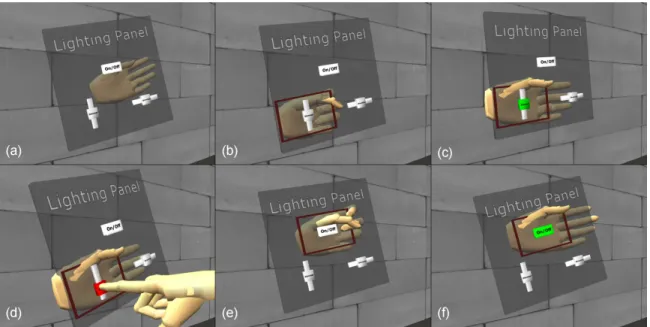
Figure 3.4: Interface panel manipulation: (a) the panel is not attached to the NDH; (b) the NDH is closed and intersects the panel to highlight the desired widget; (c) the NDH is opened to snap the desired widget to the center of the palm; (d) the DH is used to manipulate the active widget; (e) the NDH is closed and moved to a new desired widget; (f) the NDH is opened and the new widget is snapped and activated.
steadies it. To implement this approach, I reversed the effect the two hand gestures have on the panel
and widgets (Figure 3.4).
Initially, the panel is not attached to the NDH, and the two are not intersecting. To select which
widget to activate, the user must close her NDH and move it so that it intersects the panel. At this
point, the widget that is closest to the NDH is highlighted via a surrounding red rectangle. If the
NDH is opened while a widget is highlighted, the panel snaps to the NDH such that the highlighted
widget is centered on and oriented with the palm. The highlighted widget changes to a second color
to indicate that it has been activated and can be manipulated with the DH. The panel now moves and
rotates with the NDH.
To activate a different widget the user closes the NDH, selects the desired widget, and opens the
NDH, causing the new widget to snap to the center of the palm. The user can let go of the panel by
3.2.4 Widget manipulation
Once a widget has been activated, it is manipulated by bringing the tip of the DH index finger
in contact with the widget on the NDH palm. An active widget will change to a third color when
being manipulated (Figure 3.4d). Buttons are pressed and released using discrete, ballistic motions,
whereas sliders are changed by continuous dragging along the NDH palm’s surface.
3.2.5 Calibration
To snap the interface panel to the palm of the user’s NDH, we must know where the surface of
the palm is. The user’s hands are tracked with Polhemus Fastrak® magnetic trackers. Because the
palm surface must be unobstructed, a tracker is rigidly mounted on the back of the user’s NDH using
stretchable sports bandages (Figure 3.5).
Figure 3.5: The NDH (left) and DH (right) with trackers attached. The white circles indicate where the NDH trackers are located underneath the sports bandage: one on the fingertip to monitor whether the palm is open or closed, and one on the back of the hand to determine its pose.
Because different people’s hands are different in shape and size, the tracker mounts differently
relative to the palm surface for each person. To calibrate the user’s palm relative to the NDH tracker,
the user’s hand is placed flat in a fixed pose on a pedestal. The transform between the NDH tracker
and the fixed pose is determined and then applied to all subsequent tracker readings. The DH
index-finger tracker is placed 2cm from the fingertip.
3.2.6 Manipulation issues
I determined when the user was manipulating a widget by detecting collisions between the user’s
virtual DH fingertip and the widget. This technique usually worked well. However, since the surface
of the palm is not truly planar, and the user can make any number of small motions that affect her
palm shape, the approximated plane and the surface of the NDH palm do not always coincide. As
a result, the system may not always know when the DH fingertip is physically touching the NDH
palm. One consequence of this is that lifting the DH finger off the NDH palm does not immediately
deactivate widgets. This is not a problem for buttons because they require only ballistic input and
have two discrete states: pressed or released. Sliders, however, are continuous input devices; lifting
the DH finger off of the NDH palm may leave the slider still active until the virtual finger and slider
are no longer colliding. In this situation, the user once again has no way to steady the DH finger, and
the slider value wanders from the intended value very easily.
To alleviate this problem, I implemented a slider locking mechanism. If the user holds the slider’s
value for at least 200ms, the value is locked. If the user removes the virtual finger from the slider
within the next 500ms, the value of the slider snaps back to the locked value. If the virtual finger
does not leave the slider within those 500ms, then the slider value will not snap back. During those
500ms, the slider behaves normally (i.e., values are updated). These time thresholds were chosen
by trial and error, but they seem to work acceptably in practice. This slider locking mechanism is
similar to techniques proposed for solving the same problem for touch-sensitive tablets. In particular,
Buxton, et al. discuss keeping a short FIFO queue of tracking samples [Buxton et al., 1985]. When
the user lifts her finger off of the tablet, the oldest sample in the queue is used, and the queue is
cleared. The queue’s length is determined through experimentation.
3.3
Usability study
I ran a small usability study to test the idea of using the NDH as haptic feedback for user
interfaces in immersive VEs. The goal was to determine if the technique is worth pursuing further.
As such, I did not run a rigorous study comparing the technique with a physical paddle interface, nor
it is to learn to use the interface, and whether the technique enables both discrete and continuous
interaction.
3.3.1 Materials and methods
Participants
Eight people participated (six male, two female, seven right-handed) and were paid $5 each for
their time. Participants were a mix of graduate and undergraduate students of various majors. Three
participants had never been in a VE, three had been in a VE occasionally, and two had been in a VE
many times.
Equipment
In addition to the Polhemus Fastrak® magnetic hand trackers mentioned, participants wore a
Virtual Research Systems V8 HMD. The head was tracked by a 3rdTech™ HiBall™-3000 wide-area
tracker. Participants were immersed in the VE for approximately 15 minutes and were seated.
3.3.2 Study design
The study consisted of a training session and a matching task. Before entering the VE,
partici-pants were shown the environment and interface panel on a desktop display and were told how to
interact with the panel and with objects in the environment. The training session in the VE enabled
participants to familiarize themselves with these interactions while immersed. Once participants felt
comfortable, they were given a matching task to perform.
Training session
The interface panel used for the training session controlled a red light in the environment
(Figure 3.3). A button labeled “On/Off” toggled the light, and sliders labeled “Dimmer” and
“Direction” controlled the light’s intensity and the lateral direction it came from, respectively. The
training environment also included a four-sided object (essentially a cube without the top and bottom
faces) sitting atop a pedestal in front of the participant. Each cube face was selectable by the DH
fingertip. The cube was surrounded by a ring that served as a handle to rotate the cube about
its vertical axis. Intersecting the ring with a closed NDH and moving around the ring with the
intersecting hand rotated the cube. This action required the participant to let go of the interface panel.
Matching task
The participant’s goal in the matching task was to make two cubes look alike (Figure 3.6). The
right cube was the reference cube; each face was a different shade of blue, and had a different number
from 0 to 100 on it. The interface panel had two sliders (“Number” and “Color”) and two buttons
(“Reset Face” and “Done”). The “Number” and “Color” sliders adjusted the number and color of
the currently selected face, respectively. The “Reset Face” button reset the currently selected face to
a default shade of blue and the number 0. Upon pressing the “Done” button, participants received
audio cues indicating whether their attempt was successful.
Participants were told that the numbers on the two cubes had to be exactly the same, but that the
colors had to be only “close.” A fairly large threshold was used to determine if colors were matched,
to avoid potential frustration from performing a perceptual task. However, I did want both horizontal
and vertical sliders to test both dimensions of the NDH palm surface plane.
When the left cube was rotated, the right cube rotated in synchrony, so the participant always
saw the two corresponding faces that were to be matched. Participants had to rotate the left cube
several times to get to all four sides. This task required participants to discard and reacquire the panel
several times and, consequently, it enabled me to query the participants on the difficulty of these
actions.
Measures
After participants had completed both the training and matching tasks, they were orally
inter-viewed with several open-ended questions. These questions were designed to elicit comments on
fatigue, ease of learning to use the panel, ease of manipulating widgets, and ease of discarding and
reacquiring the panel as needed for their task.
Following the interview, participants were given a written exit questionnaire with questions
arranged on Likert scales (Appendix A.1). These questions asked participants to rate ease of use of
the different user interface components on a scale from 1 (extremely easy) to 7 (extremely difficult)
and complemented the open-ended comments received during the interview.
3.4
Results
Overall, participants reported the interface intuitive to use after becoming familiar with it over
the 10-15 minutes they used it for the training session and the matching task.
Using the widgets
Figure 3.7 shows how participants rated the ease of interacting with the system. All but two
participants rated widget activation as moderately easy, easy, or extremely easy. The remaining
two rated it neutral. Universally, participants found buttons to be easier to use than sliders. Half of
the participants rated sliders to be moderately easy, easy, or extremely easy. Two participants rated
sliders neutral, and two rated them moderately difficult. Those who rated sliders neutral had not been
told about the slider locking mechanism due to experimenter error, and I observed that the two who
Figure 3.7: User-reported ratings of ease of interaction on a scale from 1 (extremely easy) to 7 (extremely difficult)
rated sliders as moderately difficult did not hold the NDH palm flat when open, leading to the issues
discussed in Section 3.2.6.
The numeric ratings were supported by user comments in the interviews:
At first I found myself not actually touching my hand, but once I realized it’s a lot easier to go all the way down and touch [my NDH], it got a lot better. It made it much quicker. . . instead of [slowly] moving my hand [(DH finger)] until I got close enough, I could just put my hand [(DH finger)] down and control [the widgets].
[Touching the NDH] was fine; . . . it made it easier to actually comprehend the contact with the widgets.
Selecting the various widgets, that was really easy. . . .
[For] buttons . . . it was fine, it was good to have a stop, but with the sliders, your hand isn’t perfectly smooth, so you can hit something [that restricts your movement].
. . . eventually my [DH] finger ran out of room to go, especially when [trying to] go all the way to 99. . . . you’re all the way over here on the palm, right near the [NDH] fingers, so that gets pretty difficult.