Software Version: 7.2.x
statements accompanying such products and services. Nothing herein should be construed as constituting an additional warranty. HPE shall not be liable for technical or editorial errors or omissions contained herein. The information contained herein is subject to change without notice.
Restricted Rights Legend
Confidential computer software. Valid license from HPE required for possession, use or copying. Consistent with FAR 12.211 and 12.212, Commercial Computer Software, Computer Software Documentation, and Technical Data for Commercial Items are licensed to the U.S. Government under vendor's standard commercial license.
Copyright Notice
© Copyright 2015 Hewlett Packard Enterprise Development LP
Trademark Notices
Adobe™ is a trademark of Adobe Systems Incorporated.
Microsoft® and Windows® are U.S. registered trademarks of Microsoft Corporation. UNIX® is a registered trademark of The Open Group.
This product includes an interface of the 'zlib' general purpose compression library, which is Copyright © 1995-2002 Jean-loup Gailly and Mark Adler.
Kafka Terminology 4
Data Loader Terminology 4
How Vertica and Apache Kafka Work Together 5
Kafka Job Scheduler 6
What the Scheduler Does 7
What Happens When You Create a Scheduler 7
Launching a Scheduler 8
Launching Multiple Schedulers for High Availability 8
Using Kafka with Vertica 8
Create and Configure Scheduler 9
Create a Data Table 9
Associate a Topic 9
Launch a Scheduler 10
Using COPY with Kafka 10
KafkaSource 11
KafkaParser 12
KafkaJSONParser 12
KafkaAVROParser 13
Kafka Utility Options 13
Shared Utility Options 14
Shutdown Utility Options 16 Scheduler Utility Options 16
Topic Utility Options 19
Launch Utility Options 22
Kafka Function Reference 23
KafkaExport 23
Syntax 23
Parameters 23
Examples 23
Kafka Schema Tables 24
kafka_offsets 25
kafka_events 27
kafka_scheduler 28
kafka_scheduler_history 30
kafka_targets 31
Kafka Integration Terms
Vertica integrates with Kafka through a number of components. To use Vertica with Kafka, you should be familiar with these terms.
Kafka Terminology
Kafka Term Description
Broker A Kafka server.
Topic A feed of messages in a common category which streams into the same Vertica target tables.
Partition Unit of parallelism within Kafka. Kafka splits a topic into multiple partitions, which can each be served in parallel to consumers such as a Vertica database. Within a partition, all messages are time ordered.
Offset An index into a partition. This index is the position within an ordered queue of messages, not an index into an opaque byte stream.
Message A unit of data within Kafka. The data is typically in JSON or AVRO format. Messages are loaded as rows into Vertica tables, and are uniquely identified by their topic, partition, and offset.
Data Loader Terminology
Data Loader Term Description
Job scheduler A tool for continuous loading of data from Kafka into Vertica.
Micro-batch A pair of statements that: a) load data from all topics configured for this micro-batch into a Vertica target table; and b) update the progress within the streams. Being an atomic transaction, the micro-batch will roll back if any part
Data Loader Term Description
of these operations fail so that each message is loaded exactly once.
Frame Duration of time in which the scheduler will attempt to load each configured topic once.
Stream A feed of messages from Kafka that is identified by a topic and partition.
The offset uniquely identifies the position within a particular topic-partition stream.
Lane A thread within a job scheduler instance that issues micro-batches to perform the load.
The number of lanes available is based on the
PlannedConcurrency of the job scheduler's resource pool. Multiple lanes allow for parallelism of micro-batches during a frame.
How Vertica and Apache Kafka Work
Together
Vertica provides a high-performance loading mechanism for streaming data from an Apache Kafka message bus into your Vertica database.
Kafka is designed for a streaming use case (high volumes of data with low latency). In Vertica, you can achieve this streaming effect by running many COPY statements, each of which loads small amounts of data into your Vertica database. However, this process can become complex. Instead of writing complicated ETL processes and dispatching COPY statements manually, you can use the Kafka integration feature to automatically load data as it streams through Kafka.
l A UDL library that loads data from a Kafka message bus into Vertica
l A job scheduler that uses the UDL library to continuously consume data from Kafka with exactly-once semantics
This process contributes to low latency and minimal impact on the other processes on the database. You can think of Kafka as a temporary buffer between two systems: one that generates data, and your Vertica database, which consumes this data.
Kafka Job Scheduler
The Kafkajob scheduleris a tool for continuous loading of data from Kafka into Vertica. The scheduler comes pre-packaged and installed with the Vertica rpm. The scheduler needs to make a JDBC connection to the target database, and requires Java 7.0 or later to run. You can use the scheduler from any node by running the vkconfig script:
/opt/vertica/packages/kafka/bin/vkconfig
Note:If you do not want the scheduler to use Vertica host resources, or if you want to limit user access to the Vertica nodes, install the RPM on the host but do not create a database.
What the Scheduler Does
A scheduler instance works by creating frames and issuing micro-batches that load data from Kafka into tables in your Vertica database. The scheduler loads all (enabled) Kafka topics to Vertica target tables during a single frame duration and continuously schedules frames as one completes.
You can add as many topics as you want to a single scheduler. Doing so allows the scheduler to collect all data from all these topics every single frame. This option is helpful if you have a large number of topics.
What Happens When You Create a Scheduler
When you create a new scheduler, three events occur:
l The script creates a new Vertica schema with a name you specify (default is kafka_ config). You use this name to identify the scheduler during configuration.
l The script createsKafka Schema Tablesfor the Vertica schema.
l The script creates the resource pool kafka_default_pool, if it does not already exist. When the script creates the schema and associated tables, it sets the
LOCKTIMEOUT configuration parameter to 0 for the session running the micro-batches. When LOCKTIMEOUT is 0, data loads continuously because the scheduler does not have to wait for a lock to be released.
The script creates the resource pool with defaults that benefit loading data from Kafka into Vertica. While you can alter this pool to your business needs, Hewlett Packard Enterprise strongly recommends following these guidelines:
l Leave the QUEUETIMEOUT parameter set to 0 (default for job scheduler resource pools) so that data loads continuously. If the scheduler has to wait for resources, it cannot progress, causing scheduling configurations to be compromised.
l Leave reflexive moveout turned on (this option is on automatically when you create a scheduler). With reflexive moveout turned on, the Tuple Mover automatically
performs a moveout operation when data is committed so that your WOS always has space to load data.
Launching a Scheduler
To launch a scheduler, you must have a running Kafka instance in a place Vertica can access. Additionally, you must configure the scheduler and set up Kafka topics for streaming.
When you launch a scheduler, the scheduler collects data from Kafka topic or topics, starting at the specified offset. You can view thekafka_offsetstable to see what the scheduler is doing at any given time.
To learn how to create, configure, and launch a scheduler, seeUsing Kafka with Vertica in this guide.
You can also choose to bypass the scheduler. For example, you might want to do a single load with a specific range of offsets. For more information, seeUsing COPY with Kafkain this guide.
Launching Multiple Schedulers for High
Availability
For high availability, you can launch two or more identical schedulers that target the same configuration schema. You can differentiate these different schedulers using the --instance-name CLI option with the launch utility. The scheduler not in use remains in stand-by mode and can only perform scheduling if the active scheduler fails. In this case, the stand-by process will allow the stream to continue without interruption.
Using Kafka with Vertica
To begin using Kafka and Vertica, use the vkconfig script to complete the following tasks from your Vertica database:
l Create and Configure a Scheduler l Create a Data Table
l Associate a Topic l Launch a Scheduler
Create and Configure Scheduler
Your first step to using Kafka with Vertica is to create a new scheduler. Create a new scheduler using the vkconfig script with theschedulersub-utility and--addoption:
/opt/vertica/packages/kafka/bin/vkconfig scheduler --add
The--addoption is all that is required to add a scheduler with default options.
You can use additional configuration parameters to further customize your scheduler. The following example shows how you can use the commands to:
l Create a scheduler called "myScheduler" with the --config-schemaoption. l Grant privileges to run the scheduler to user1 with the--operatoroption. The
dbadmin user must specify user1's additional privileges separately.
/opt/vertica/packages/kafka/bin/vkconfig scheduler --add --config-schema myScheduler --operator user1
See the Scheduler Utility table in theKafka Utility Optionssection of this guide for more information.
Create a Data Table
Before configuring a Kafka topic for streaming, create a target table in your Vertica database to store the data you capture. If you are not using flexible tables, you must verify that the data you are streaming matches the columns in your target table.
CREATE FLEX TABLE public.kafka_tgt();
You do not need to create a rejection table, which stores rejected messages, because the table is created automatically when you run thetopic utility.
Associate a Topic
To associate a Kafka topic with a configured scheduler, use thetopic sub-utility.
The following example shows how you can associate a Kafka topic, messages, and four of its partitions to the default "kafka_config" scheduler. After you launch the scheduler, data from the “messages” topic streams into the public.kafka_tgt table. Vertica stores any rejections in the public.kafka_rej table.
/opt/vertica/packages/kafka/bin/vkconfig topic --add --target public.kafka_tgt --rejection-table public.kafka_rej --topic messages --num-partitions 4
See the Topic Utility table in theKafka Utility Optionssection of this guide for more information about utility options.
Launch a Scheduler
After you create a table and associate a topic, you are ready to launch the scheduler and start streaming data. Launch a configured scheduler by using thelaunchsub-utility. The following example launches the default scheduler, kafka_config, and specifies a properties file, configFile.properties, which contains additional CLI options. To start a different scheduler, use the --config-schemaparameter option.
/opt/vertica/packages/kafka/bin/vkconfig launch --conf configFile.properties
Important:Hewlett Packard Enterprise does not recommend specifying a password on the command line. Instead, put the password in a properties file.
See the Launch Utility table in theKafka Utility Optionssection of this guide for more information.
Using COPY with Kafka
When a job scheduler instance loads data into a Vertica database, it issues COPY statements similar to the following:
=> COPY schema.target_table
SOURCE KafkaSource (stream='topic1|1|1,topic2|2|2', brokers='host1:9092,host2:9092',duration= INTERVAL'timeslice',stop_on_eof=TRUE, eof_timeout= INTERVAL'timeslice')
PARSER KafkaJSONParser(flatten_arrays=False, flatten_maps=False) REJECTED DATA AS TABLE schema.rejection_table TRICKLE;
The above statement is just an example; with the job scheduler you do not need to have in-depth knowledge of the COPY statement because the scheduler will issue them all for you.
When you use COPY TRICKLE, Hewlett Packard Enterprise recommends enabling the ReflexiveMoveout configuration parameter to trigger a Tuple Mover moveout task every time a commit occurs:
ALTER DATABASE dbname SET ReflexiveMoveout=1;
Most of the parameters in the preceding COPY statement apply to general Vertica COPY statements.
Using the job scheduler allows for a few additional User Defined Load (UDL) functions:
KafkaSource
The KafkaSource UDL pulls data in from a Kafka cluster. All Kafka parsers must use KafkaSource.
Parameter Description
stream(required) A comma-separated list of topic|partition|starting_offset triples from which Vertica loads data. The partition and starting_offset values are expressed as integers.
brokers A comma-separated list of host:port pairs. Hewlett Packard Enterprise recommends running Kafka on a different machine thanVertica.
Default Value:
localhost:9092
duration A timeslice of type INTERVAL that specifies the duration of the frame. After this specified amount of time, KafkaSource
terminates the COPY statements. If this value is not set, you must set stop_on_eof instead.
stop_on_eof Determines whether KafkaSource should terminate the COPY statement after it reaches the end of a file. If this value is not set, you must set duration instead.
Default Value:
FALSE
eof_timeout A timeslice of type INTERVAL. If a COPY command does not receive any Kafka messages within the eof_timeout interval,
Parameter Description
Vertica responds by ending that COPY statement. This parameter applies only if stop_on_eof is TRUE.
KafkaParser
The KafkaParser does not take any parameters. The parser loads the data bytes into a regular Vertica table directly from Kafka. You can use this parser as a catch-all for unsupported formats.
KafkaJSONParser
The KafkaJSONParser parses JSON-formatted Kafka messages and loads them into a regular Vertica table or a Vertica flex table.
Parameter Description
flatten_maps Flattens all JSON maps if set to TRUE flatten_arrays Flattens JSON arrays if set to TRUE
start_point Specifies the name of a key in the JSON load data at which to begin parsing. The parser ignores all data before the start_point value.The parser processes data after the first instance, and up to the second, ignoring any remaining data.
omit_empty_keys If set to TRUE, omits any key from the load data that does not have a value set.
reject_on_duplicate If set to TRUE, rejects data that contains duplicate key names.
reject_on_materialized_ type_error
When set to TRUE, rejects the data row if the data includes keys matching an existing materialized column and has a key that cannot be mapped into the
materialized column's data type.
reject_on_empty_key If set to TRUE, rejects any row containing a key without a value.
SeeLoading JSON Datain the core documentation for more information.
KafkaAVROParser
The KafkaAVROParser parses AVRO-formatted Kafka messages and loads them into a regular Vertica table or a Vertica flex table.
Parameter Description
reject_on_materialized_ type_error
When set to TRUE, rejects the data row if it contains a materialized column value that cannot be mapped into the materialized column's data type.
flatten_maps If set to TRUE, flattens all Avro maps. flatten_arrays If set to TRUE, flattens Avro arrays. flatten_records If set to TRUE, flattens all Avro records.
external_schema Used to specify the schema of the Avro file as a JSON string. If this parameter is not specified, the parser assumes that each message has the schema on it. codec Used to specify the codec in which the Avro file was
written. This parameter accepts "default" (Avro´s default) or "snappy" for snappy compression. SeeLoading Avro Datain the core documentation for more information.
Kafka Utility Options
The Kafka integration feature for Vertica consists of three utilities that you can customize:
l Scheduler utility l Shutdown utility l Topic utility l Launch utility
Customize the various utilities with the vkconfig script, using a double dash (--) with the command-line options described in this section.
You can use the options in theShared Utility Optionstable with any of the three utilities. Utility-specific options appear in their respective tables.
Shared Utility Options
Some utilities require you to specify additional options.
Option Parameter Description
--config-schema schema Identifier for the Vertica schema. This value is the same name as the scheduler. You use this name to identify the scheduler during configuration.
Default Value:
kafka_config
--help Prints out a help menu listing available options with a description.
--dbhost host name The host name or IP address to which a
Vertica node can connect.
Default Value:
localhost
--dbport port The port to use to connect to a Vertica database.
Default Value:
5433
--username username The Vertica database user.
Default Value:
Current user
--password password Password for the database user.
Option Parameter Description
database connection parameters.
--conf filename A properties file (.properties) that contains
configuration details for the CLI command. The configuration file follows the standard java properties file format.
Using a properties file is helpful for options that do not change across CLI commands. Any additional options added at the
command line override parameters set in the properties file.
Examples
Example 1:Display help for the scheduler utility:
/opt/vertica/packages/kafka/bin/vkconfig scheduler --help PARAMETER REQUIRED #ARGS DESCRIPTION
help no 0 Outputs a help context for the given subutility.
conf no 1 Allows the use of a properties file to associate parameter keys and values enabling for easy reuse of command strings and a cleaner command string.
dbhost no 1 The Vertica database hostname to connect to that contains the metadata and configuration information. Default is 'localhost'
dbport no 1 The port to connect to the Vertica database at the given hostname. Default is '5433'.
. . .
Example 2:Use a property file to set some parameters in the topic utility, and then override the password in the file with another password:
#config.properties: username=myuser password=mypassword dbhost=localhost dbport=5433
Shutdown Utility Options
Use the shutdown utility to terminate all Vertica Kafka schedulers. Run this command before restarting the scheduler. Restarting the scheduler without terminating existing schedulers can produce unexpected behavior.
Examples
Example 1:Terminate all Vertica Kafka schedulers:
/opt/vertica/packages/kafka/bin/vkconfig shutdown
Scheduler Utility Options
Use the scheduler utility to add, edit, or remove a scheduler, defined by config-schema. All options specified after--add,--remove, or--editact on the scheduler specified in--config-schema(or kafka_config if the--config-schemaoption is left out).
Option Parameter Description
--add --remove --edit
Adds, removes, or edits a scheduler.
--frame-duration HH:MM:SS The interval of time that all individual frames will last with this scheduler. Hewlett Packard Enterprise recommends
configuring the duration based on the amount of expected throughput and acceptable latency.
Default Value:
00:00:10
--config-refresh-interval
HH:MM:SS The interval of time that the scheduler runs before updating its cached metadata (such as
Option Parameter Description
changes made by using the --edit option).
Default Value:
00:05:00
--brokers b1:port,b2:port… A comma-separated list of Kafka brokers and their respective network port numbers handling the Kafka instance.
Default Value:
localhost:9092
--resource-pool pool_name The resource pool to be used by all queries executed by this scheduler.
Default Value:
kafka_default_pool --new-topic-policy FAIR|START
|END
Determines when during the frame that the newly added topic will run.
Valid Values:
l FAIR: Takes the average
length of time from the previous batches and schedules itself appropriately.
l START: All new topics start
at the beginning of the frame. Thus, the batch is given the minimal amount of time to
Option Parameter Description run.
l END: All new topics start at
the end of the frame. The batch is given the maximum amount of time to run.
Default Value:
FAIR
--eof-timeout HH:MM:SS If a COPY command does not received any Kafka messages within the eof_timeout interval, Vertica responds by ending that COPY statement.
Default Value:
One tenth of the frame duration. SeeUsing COPY with Kafkain this guide for information on how this value is used in the KafkaSource function. --operator username Allows the dbadmin to grant
privileges to a previously created Vertica user.
This option gives the specified user all privileges on the scheduler instance, and EXECUTE privileges on the libkafka library and all its UDxs.
Caution:Granting operator privileges gives the user the
Option Parameter Description
right to read data off any topic in any Kafka cluster that can be reached from the Vertica node.
The dbadmin must grant the user separate permission for them to have write privileges on the Kafka target tables.
To revoke privileges, use the --removeoption with the --operatoroption.
Caution:If you omit the --operator syntax when removing an operator, will this option removes the entire schema.
Examples
Example 1:Give a user, Jim, privileges on the JimScheduler scheduler. We specify that we are making edits to the JimScheduler scheduler with the--config-schemaoption:
/opt/vertica/packages/kafka/bin/vkconfig scheduler --edit --config-schema JimScheduler --operator Jim
Example 2:Edit the default scheduler (kafka_config) so that it stops issuing COPY statements after one second of inactivity:
/opt/vertica/packages/kafka/bin/vkconfig scheduler --edit --eof-timeout 00:00:01
Topic Utility Options
Use the topic utility to add, remove, or edit a topic. If you are adding a topic, you must specify both the topic and target using the--topicand--targetoptions. If you are
removing or editing a topic or target, you only need to specify the topic or target you want to modify. All additional options act on the topic or target you specify.
Option Parameter Description
--add --remove --edit
Adds, removes, or edits a topic or target configuration.
--target schema.table_
name
The existing Vertica target table to add, remove, or edit from a scheduler
configuration.
--topic topic_name The Kafka topic to add, remove, or edit
from a scheduler configuration.
--rejection-table table_name A name for the Vertica table where the scheduler stores rejected data. The scheduler automatically creates this table when you use the--add option.
Requires: --target option --new-target table_name Changes the Vertica target table
associated with this schema to a new, already created table.
All topics targeting the old target table will now target this new target table.
Requires:--editand--target options
--new-topic topic Changes all instances of this Kafka topic unless this option is used with the --targetoption. If used with the --targetoption, only the topics
associated with the specified target are changed.
Option Parameter Description options --load-method AUTO|TRICKLE
|DIRECT
The COPY load method to use for all loads with this scheduler. See the COPY statement for more information.
Default Value:
TRICKLE
--num-partitions count Used to create all partitions from 0 ton– 1.
Default Value:
1
Requires:--addand--topicoptions
Caution:You must keep this consistent with the number of partitions in the Kafka topic.
--enabled TRUE|FALSE Turns data collection for a target table on (TRUE) or off (FALSE).
Default Value:
TRUE
Requires: --targetoption
--parser parser Vertica UDParser to use in conjunction with a specified target.
Default Value:
KafkaParser
Requires: --targetoption
--parser-parameters
key=value, key=value
Parameters for the UDParser.
Option Parameter Description
--start-offset START|num The Kafka topic offset where all partitions will start.
Default Value:
START
Requires:--topicoption --target-columns column_name,
...|column expression
A column expression for the target table. This value can be a list of columns or a complete expression.
Requires:--targetoption
See the COPY statementParametersin the core documentation for a description of column expressions.
Examples
Example 1:Specify that the existing target table, avroTarget, use the KafkaAVROParser:
/opt/vertica/packages/kafka/bin/vkconfig topic --edit --target avroTarget --parser KafkaAVROParser
Example 2:Change the topic associated with the myTarget target table:
/opt/vertica/packages/kafka/bin/vkconfig topic --edit --topic myTopic --target myTarget --new-topic myTopic2
Launch Utility Options
Option Parameter Description
--instance-name name (Optional) Allows you to name the process
running the scheduler. You can use this command when viewing the scheduler_ history table, to find which instance is currently running.
Examples
Example 1:Name this scheduler instance instance1:
/opt/vertica/packages/kafka/bin/vkconfig launch --instance-name instance1
Kafka Function Reference
l KafkaExportKafkaExport
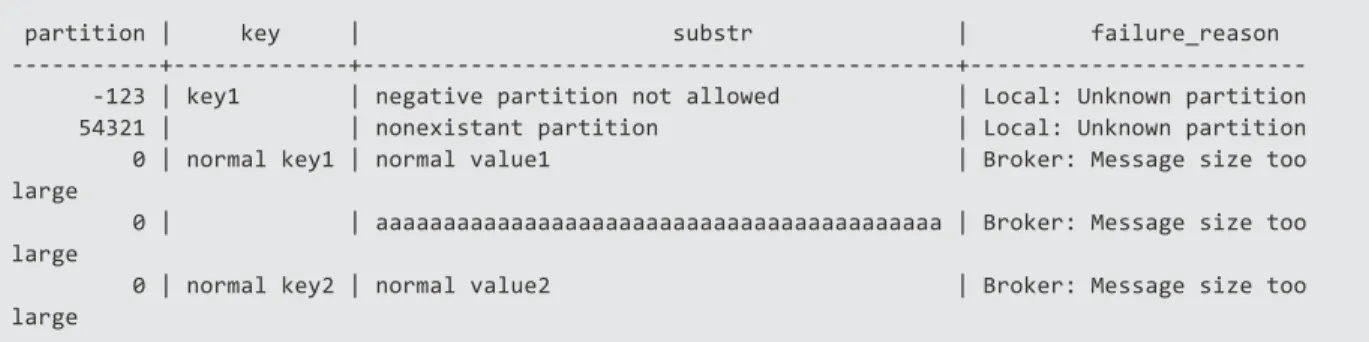
Outputs rows that Vertica was unable to send to Kafka. If all of your messages have imported successfully, this function returns zero rows. You can use this function to copy failed messages to a secondary table for evaluation and reprocessing.
Syntax
SELECT KafkaExport(partitionColumn, keyColumn, valueColumn
USING PARAMETERS brokers='host', topic='topicname') OVER () FROM
table;
Parameters
Argument Description
partionColumn Optional. The target partition for the export. If you do not specify a partition, Vertica uses the default Kafka partition. You can use the partition column to send messages to partitions that map to Vertica segments. keyColumn Optional. The user defined key value associated with
the valueColumn.
valueColumn Optional. The Kafka message itself. brokers A list of one or more Kafka brokers.
topic The Kafka topic to which you are exporting.
Examples
topic='failure_test',
kafka_conf='message.max.bytes=64000') OVER (partition best) from failure_test);
partition | key | substr | failure_reason
---+---+---+---123 | key1 | negative partition not allowed | Local: Unknown partition 54321 | | nonexistant partition | Local: Unknown partition 0 | normal key1 | normal value1 | Broker: Message size too large
0 | | aaaaaaaaaaaaaaaaaaaaaaaaaaaaaaaaaaaaaaaaaa | Broker: Message size too large
0 | normal key2 | normal value2 | Broker: Message size too large
Kafka Schema Tables
Every time a new scheduler is added (--add), Vertica creates a new schema for that scheduler with the name you specify or the default "kafka_config". Each schema has the following tables:
Table Description
kafka_offsets Controls the offset information for each <target_table, topic, partition> triple and stores information about the progress within the stream for each topic or partition.
kafka_scheduler Holds the metadata related to the active scheduler for this schema.
kafka_scheduler_history Shows the history of launched scheduler instances.
kafka_targets Contains the metadata for all Vertica target tables, along with their respective rejection tables. Kafka_ targets also holds the COPY information necessary for the corresponding micro-batch. Because the target, not the Kafka topic, determine batches, each row in this table corresponds to a separate micro-batch.
kafka_events Internal log table. kafka_events includes the log level, the target, topic, or partition information that relates to the log message, and any errors that occurred during micro-batch executions.
Table Description
which allows only one scheduler to run at a time in this schema.
Caution:Hewlett Packard Enterprise recommends that you do not alter these tables except in consultation with support.
kafka_offsets
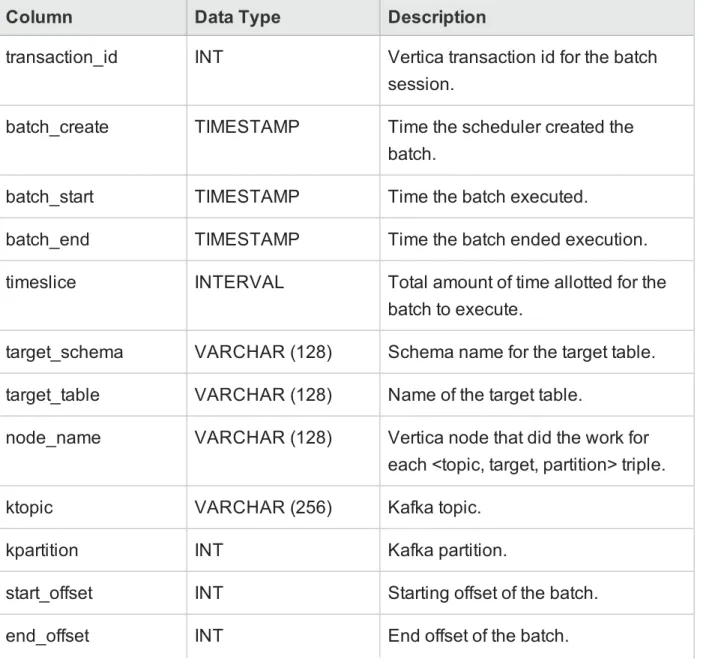
Controls the offset information for each <target, topic, partition> triple.
Column Data Type Description
transaction_id INT Vertica transaction id for the batch session.
batch_create TIMESTAMP Time the scheduler created the batch.
batch_start TIMESTAMP Time the batch executed.
batch_end TIMESTAMP Time the batch ended execution.
timeslice INTERVAL Total amount of time allotted for the batch to execute.
target_schema VARCHAR (128) Schema name for the target table. target_table VARCHAR (128) Name of the target table.
node_name VARCHAR (128) Vertica node that did the work for each <topic, target, partition> triple.
ktopic VARCHAR (256) Kafka topic.
kpartition INT Kafka partition.
start_offset INT Starting offset of the batch.
Column Data Type Description
num_messages INT Number of messages transferred
from a Kafka topic partition to a Verticatarget table.
last_duration INTERVAL Length of time the entire batch took.
total_bytes INT Total bytes transferred from Kafka
topic partition to Vertica target table. reason VARCHAR (256) Explanation for why the batch ended.
Example:
End of stream or End of file
Examples
=> SELECT * FROM kafka_config.kafka_offsets; -[ RECORD 1 ]--+---transaction_id | 45035996274054029 batch_create | 2015-09-17 12:30:15.629 batch_start | 2015-09-17 12:30:15.639644 batch_end | 2015-09-17 12:30:17.995045 timeslice | 00:00:09.952 target_schema | public target_table | kafka_flex2 node_name | ktopic | test4 kpartition | 0 start_offset | end_offset | 119 num_messages | 120 last_duration | 00:00:01.031629 total_bytes | 600000 reason | END_OF_STREAM -[ RECORD 2 ]--+---transaction_id | 45035996274054029 batch_create | 2015-09-17 12:30:15.629 batch_start | 2015-09-17 12:30:15.639644 batch_end | 2015-09-17 12:30:17.995045 timeslice | 00:00:09.952 target_schema | public target_table | kafka_flex2 node_name | ktopic | test4 kpartition | 1 start_offset | end_offset | 20970 num_messages | 20971 last_duration | 00:00:02.289001total_bytes | 104855000 reason | END_OF_STREAM
kafka_events
Logs micro-batches and other important events from the scheduler in an internal log table.
Column Data Type Description event_
time
TIMESTAMPTZ The time the event was logged.
log_level VARCHAR (32) The type of event that was logged.
Valid Values: l TRACE l DEBUG l FATAL l ERROR l WARN l INFO location VARCHAR (1024)
The class responsible for logging the message.
batch_ create
TIMESTAMP Displays the time the micro-batch was created, if the event is related to a specific batch.
target_ schema
VARCHAR (256)
Displays the target schema for the micro-batch, if the event is related to a specific batch.
target_ table
VARCHAR (256)
Displays the target table for the micro-batch, if the event is related to a specific batch.
message VARCHAR (65000)
Column Data Type Description exception VARCHAR
(4096)
If this log is in the form of a stack trace, this column lists the exception.
Examples
=> SELECT * FROM kafka_config.kafka_events; -[ RECORD 1 ]-+---event_time | 2015-09-17 13:28:35.548-04 log_level | INFO location | com.vertica.solutions.kafka.scheduler.StreamCoordinator batch_create | target_schema | target_table |message | Received configuration details; frame duration: 10000, refresh interval 60000, eof timeout interval: 0, brokers (eng-g9-004:9092,eng-g9-005:9092), resource pool: kafka_default_pool exception | -[ RECORD 2 ]-+---event_time | 2015-09-17 13:28:45.643-04 log_level | INFO location | com.vertica.solutions.kafka.scheduler.MicroBatch batch_create | 2015-09-17 12:28:45.633 target_schema | public target_table | kafka_flex1
message | Generated tuples: test3|2|-2,test3|1|-2,test3|0|-2 exception | -[ RECORD 3 ]-+---event_time | 2015-09-17 13:28:50.701-04 log_level | INFO location | com.vertica.solutions.kafka.scheduler.MicroBatch batch_create | 2015-09-17 12:28:45.633 target_schema | public target_table | kafka_flex2
message | Total rows inserted: 0 exception |
kafka_scheduler
Holds the metadata related to a singular scheduler.
Column Data Type Description
scheduler_version VARCHAR Version of the scheduler.
frame_duration INTERVAL Indicates the length of time of the frame.
brokers VARCHAR Comma-separated list of Kafka
Column Data Type Description
config_refresh_interval INTERVAL The interval of time that the scheduler runs before applying any changes to its metadata (such as, changes made by using the--editoption).
See the--frame-refreshscheduler utility option inKafka Utility Options section of this guide.
resource_pool VARCHAR The resource pool associated with this scheduler.
new_topic_policy VARCHAR Displays when during the frame the topic runs. This is the value set with the--new-topic-policyin the topic utility.
l FAIR: Takes the average length of
time from the previous batches and schedules itself appropriately.
l START: Runs all new topics at the
beginning of the frame. In this case, Vertica gives the minimal amount of time to run.
l END: Runs all new topics starting
at the end of the frame. In this case, Vertica gives the maximum amount of time to run.
Default Value:
FAIR
eof_timeout_interval INTERVAL End of File timeout interval
Maximum amout of time the scheduler waits for Kafka before ending the
Column Data Type Description batch.
Kafka pauses if the end of a stream is met or a bad offset is given.
Default Value: max_duration/10
Examples:
=> SELECT * FROM kafka_config.kafka_scheduler; -[ RECORD 1 ]---+---scheduler_version | 0.9 frame_duration | 00:00:10 brokers | eng-g9-004:9092,eng-g9-005:9092 config_refresh_interval| 00:01 resource_pool | kafka_default_pool new_topic_policy | FAIR eof_timeout_interval |kafka_scheduler_history
Shows the history of launched scheduler instances. Column Data Type Description elected_leader_
time
TIMESTAMP Time when this instance took over.
host VARCHAR
(256)
Host name of the machine running the scheduler instance.
launcher_name VARCHAR (128)
Name of the currently active scheduler instance.
Default Value: NULL scheduler_ version VARCHAR (64) Scheduler version.
Examples
=> SELECT * FROM kafka_config.kafka_scheduler_history;-[ RECORD 1 ]---+---elected_leader_time | 2015-09-17 12:28:35.509 host | 10.20.41.201 launcher_name | scheduler_version | 0.9
kafka_targets
Contains the metadata for all Vertica target tables, along with their respective rejection tables.
Kafka_targets also holds the COPY information necessary for the corresponding micro-batch. Because the target, not the Kafka topic determines the batches, each row in this table corresponds to a separate micro-batch.
Column Data Type Description target_schema
(primary key/identifier)
VARCHAR (128)
Name of the schema for the target table.
target_table (primary key/identifier)
VARCHAR (1024)
Name of the target table for this batch.
enabled BOOLEAN If FALSE, the batch will not run.
parser VARCHAR
(1024)
Identifies the parser used for this target table.
rejection_table VARCHAR (1024)
Name of the rejection table for this target table.
parser_ parameters
VARCHAR (65000)
List of the parameters already set for the active parser.
load_method VARCHAR Specifies the method of loading data into the Vertica target table.
Valid Values:
Column Data Type Description l TRICKLE l DIRECT Default Value: TRICKLE target_columns VARCHAR (65000)
Either a list of columns used to load data into for this target table or a column expression.
Examples
=> SELECT * FROM kafka_config.kafka_targets; -[ RECORD 1 ]---+---target_schema | public target_table | kafka_flex1 enabled | t parser | KafkaJSONParser rejection_table | public.kafka_rej parser_parameters | omit_empty_keys=true load_method | TRICKLE target_columns | -[ RECORD 2 ]---+---target_schema | public target_table | kafka_flex2 enabled | t parser | KafkaJSONParser rejection_table | public.kafka_rej parser_parameters | omit_empty_keys=true load_method | TRICKLE target_columns |email. If an email client is configured on this system, click the link above and an email window opens with the following information in the subject line:
Feedback on Integrating with Apache Kafka (Vertica Analytic Database 7.2.x) Just add your feedback to the email and click send.
If no email client is available, copy the information above to a new message in a web mail client, and send your feedback to [email protected].