Extending Touch with Eye Gaze Input
Ken Pfeuer
B.Sc., M.Sc., University of Duisburg-Essen, Germany
School of Computing and Communications
Lancaster University, UK
Extending Touch with Eye Gaze Input
Ken Pfeuer
Submitted for the degree of Doctor of Philosophy April 2017
Abstract
Direct touch manipulation with displays has become one of the primary means by which people interact with computers. Exploration of new interaction methods that work in unity with the standard direct manipulation paradigm will be of benet for the many users of such an input paradigm. In many instances of direct interaction, both the eyes and hands play an integral role in accomplishing the user's interaction goals. The eyes visually select objects, and the hands physically manipulate them. In principle this process includes a two-step selection of the same object: users rst look at the target, and then move their hand to it for the actual selection.
This thesis explores human-computer interactions where the principle of direct touch input is fundamentally changed through the use of eye-tracking technology. The change we investigate is a general reduction to a one-step selection process. The need to se-lect using the hands can be eliminated by utilising eye-tracking to enable users to sese-lect an object of interest using their eyes only, by simply looking at it. Users then employ their hands for manipulation of the selected object, however they can manipulate it from anywhere as the selection is rendered independent of the hands. When a spatial oset exists between the hands and the object, the user's manual input is indirect. This allows users to manipulate any object they see from any manual input position. This funda-mental change can have a substantial eect on the many human-computer interactions that involve user input through direct manipulation, such as temporary touchscreen in-teractions. However it is unclear if, when, and how it can become benecial to users of such an interaction method. To approach these questions, our research in this topic is guided by the following two propositions.
a distance located in the virtual scene. Overall, we demonstrate that using eye gaze to enable indirect input yields many interaction benets, such as whole-screen reachability, occlusion-free manipulation, high precision cursor input, and low physical eort.
Integration of eye gaze with manual input raises new questions about how it can comple-ment, instead of replace, the direct interactions users are familiar with. This is important to allow users the choice between direct and indirect inputs as each aords distinct pros and cons for the usability of human-computer interfaces. These two input forms are nor-mally considered separately from each other, but here we investigate interactions that combine those within the same interface.
In this context, the second proposition is that gaze and touch input enables new and seam-less ways of combining direct and indirect forms of interaction. We develop this propo-sition by regarding multiple interaction tasks that a user usually perform in a sequence, or simultaneously. First, we introduce a method to enable users switching between both input forms by implicitly exploiting visual attention during manual input. Direct input is active when looking at the input, and otherwise users will manipulate the object they look at indirectly. A design application for typical drawing and vector-graphics tasks has been prototyped to illustrate and explore this principle. The application contributes many example use cases, where direct drawing activities are complemented with indirect menu actions, precise cursor inputs, and seamless context switching at a glance.
Declaration
This thesis is a presentation of my original research work. No part of this thesis has been submitted for another degree or qualication. The work was done under the guidance of Hans Gellersen and Jason Alexander at Lancaster University.
Acknowledgements
A lot of people were involved in the direction that my life took to get to the point that I am now. Many helped me during my way from the start of life in university and start of the computer science program, which I only did because my lovely sister Mariko suggested to me, and further persuasion by my beloved mother Toshiko. I started computer science at the University of Duisburg-Essen, Germany, where I have not only met Enrico Rukzio and Christian Winkler who connected me to Lancaster, but also I met Ayse, Kay, Jens, Elena, Sven, and I can't name all of the people involved in the joint activities around WG21 but one I must, my wife Tata, who I love. All these people and experiences aected my way of thinking and with it the research.
None of the research would be possible if it wouldn't be for the always positive and open-minded supervisors Hans Gellersen and Jason Alexander. I wanted to stay in Lancaster because of the dynamic research team with Janxia, Minki, Melodie, Chris, Pauline, Eduardo, Jayson, Adalberto and so on from the old garde, and from the new, Chris, Argenis, Baiyang, Diako, Bennedict, and there were so many more people I've met in Lancaster, such as Harry, Matt, and Gareth, or those of summer'15 including Martin, Markus, Becky, and the visiting Thomas. But the biggest inuence was Hans who shaped the group that I wanted to be in, and shaped my research to what it is now.
Publications
This work has been published in peer-reviewed publications at conferences. Below are the references of these publications. Each publication relates to one chapter in this thesis.
Chapter 3 Ken Pfeuer, Jason Alexander, Ming Ki Chong, and Hans Gellersen. 2014. Gaze-touch: combining gaze with multi-touch for interaction on the same surface. In Proceedings of the 27th annual ACM symposium on User interface software and technology (UIST '14). ACM, New York, NY, USA, 509-518. DOI: http://dx. doi.org/10.1145/2642918.2647397
Chapter 4 Ken Pfeuer, Jason Alexander, Ming Ki Chong, Yanxia Zhang, and Hans Gellersen. 2015. Gaze-Shifting: Direct-Indirect Input with Pen and Touch Modulated by Gaze. In Proceedings of the 28th Annual ACM Symposium on User Interface Soft-ware and Technology (UIST '15). ACM, New York, NY, USA, 373-383. DOI: http://dx.doi.org/10.1145/2807442.2807460
Chapter 5 Ken Pfeuer, Jason Alexander, and Hans Gellersen. 2016. Partially-indirect Bimanual Input with Gaze, Pen, and Touch for Pan, Zoom, and Ink Interac-tion. In Proceedings of the 2016 CHI Conference on Human Factors in Com-puting Systems (CHI '16). ACM, New York, NY, USA, 2845-2856. DOI: http: //dx.doi.org/10.1145/2858036.2858201
Contents
Abstract
ii
1 Introduction
1
1.1 Direct Manipulation . . . 1
1.2 Eye-tracking . . . 2
1.3 Extending Touch with Eye Gaze Input . . . 3
1.4 Design Space and Thesis Outline . . . 5
1.5 Methodology . . . 6
1.6 Contributions . . . 7
2 Related Work
9
2.1 Gaze Interaction . . . 92.1.1 Explicit Gaze Interaction . . . 10
2.1.2 Implicit Gaze Interaction . . . 14
2.2 Direct and Indirect Interaction . . . 17
2.2.1 Direct Input . . . 18
2.2.2 Indirect Input . . . 19
2.3 Summary . . . 21
3 Gaze-Touch: Indirect Input by Combining Gaze with
Multi-touch On the Same Surface
22
3.1 Design Space . . . 243.2 Applications . . . 26
3.3 Application: Image Gallery . . . 26
3.3.1 Switching between Gaze-Touch or Direct-Touch . . . 26
3.3.2 Interaction Techniques . . . 27
3.3.3 Implementational Details . . . 28
3.3.4 Study Design . . . 28
3.3.6 User Feedback . . . 29
3.3.7 Summary . . . 30
3.4 Application: Paint . . . 30
3.4.1 Interaction Techniques . . . 31
3.4.2 Implementational Details . . . 32
3.4.3 User Feedback . . . 32
3.4.4 Summary . . . 33
3.5 Application: Map Navigation . . . 33
3.5.1 Implementational Details . . . 33
3.5.2 User Feedback . . . 34
3.5.3 Summary . . . 34
3.6 Application: Multiple Objects . . . 35
3.6.1 Implementational Details . . . 35
3.6.2 Interaction Techniques . . . 35
3.7 Discussion . . . 36
3.7.1 Limitations . . . 37
3.8 Conclusion . . . 38
4 Gaze-Shifting: Direct-indirect Input with Pen and Touch
Mod-ulated by Gaze
39
4.1 Gaze-Shifting . . . 414.1.1 Design Opportunities . . . 41
4.1.2 System Design Considerations . . . 42
4.2 Gaze-Shifting for pen and touch . . . 44
4.3 Application . . . 44
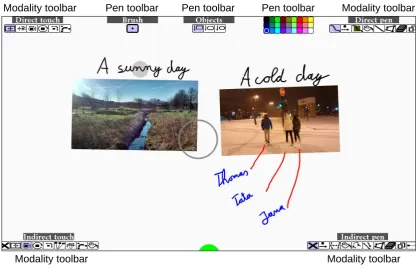
4.3.1 Toolbars . . . 44
4.3.2 System Implementation . . . 45
4.4 Direct-indirect Interaction Examples . . . 46
4.5 Pen . . . 46
4.5.1 Draw Directly, Congure Pen Indirectly . . . 46
4.5.2 Trace Line Directly, Edit Line Indirectly . . . 47
4.5.3 Trace Line Directly and Indirectly . . . 49
4.6 Touch . . . 49
4.6.1 Select Colour Directly, Set Colour Indirectly . . . 49
CONTENTS CONTENTS
4.7 Pen and touch . . . 51
4.7.1 Copy & Paste Directly and Indirectly . . . 51
4.7.2 Pen Draws and Edits, Touch Zooms . . . 52
4.7.3 Draw Directly, Associate Indirectly (Pen), Select Directly, Transfer and Manipulate Indirectly (Touch) . . . 53
4.8 User Study . . . 54
4.8.1 Results . . . 56
4.9 Discussion . . . 57
4.10 Conclusion . . . 58
5 Direct-indirect Bimanual Input with Gaze, Pen, and Touch for
Pan, Zoom, and Ink Interaction
59
5.1 Interaction Techniques . . . 605.1.1 Analysis of Interaction Properties . . . 61
5.2 Experiment . . . 64
5.2.1 Research Questions . . . 64
5.2.2 Tasks . . . 64
5.2.3 Design and Factors . . . 65
5.2.4 Participants . . . 66
5.2.5 Procedure . . . 66
5.2.6 Apparatus . . . 66
5.2.7 Statistical Analysis . . . 67
5.3 Results . . . 67
5.3.1 Task Completion Time . . . 67
5.3.2 Accuracy . . . 68
5.3.3 Gesture Characteristics . . . 69
5.3.4 Parallelism between Pen and Touch . . . 70
5.3.5 Spatial Distribution of Input Modalities . . . 73
5.3.6 User Feedback . . . 74
5.4 Discussion . . . 75
5.5 Conclusion . . . 77
6 Gaze and Touch Interaction on Tablets
78
6.1 User Study . . . 796.1.2 Results . . . 81
6.1.3 Discussion . . . 83
6.2 CursorShift . . . 83
6.3 Touch, Gaze, and Cursor . . . 85
6.4 Browser . . . 86
6.4.1 Scrolling and Clicking . . . 86
6.4.2 Menu Navigation . . . 87
6.4.3 Keyboard . . . 88
6.5 Maps . . . 89
6.5.1 Zooming . . . 89
6.5.2 Minimap . . . 91
6.5.3 Bimanual Combinations with Markers . . . 91
6.6 Gallery . . . 92
6.6.1 Area Scrolling . . . 92
6.6.2 Image and Folder Selection . . . 93
6.6.3 Bimanual Combinations with Image Dragging . . . 93
6.7 Discussion . . . 96
6.8 Conclusion . . . 97
7 Discussion
98
7.1 Summary and Reection . . . 987.1.1 Gaze-Touch: Indirect Input by Combining Gaze with Multi-touch On the Same Surface . . . 98
7.1.2 Gaze-Shifting: Direct-indirect Input with Pen and Touch Modulated by Gaze . . . 99
7.1.3 Direct-indirect Bimanual Input with Gaze, Pen, and Touch for Pan, Zoom, and Ink Interaction . . . 100
7.1.4 Gaze and Touch Interaction on Tablets . . . 101
7.2 Generalising Across Input Technologies . . . 103
7.3 Understanding Direct and Indirect Input . . . 104
7.4 Reection on Eye-tracking HCI Research . . . 106
7.5 Generalising to Visual Attention Area Based Techniques . . . 108
7.6 Limitations and Challenges . . . 109
8 Conclusion
112
References
115
Appendix
126
.1 Gaze-Shifting: Direct-indirect Input with Pen and Touch Modulated by Gaze . 127 .2 Direct-indirect Bimanual Input with Gaze, Pen, and Touch for Pan, Zoom,
and Ink Interaction . . . 130 .3 Gaze and Touch Interaction on Tablets . . . 136
List of Figures
1.1 The direct touch modality becomes indirect by redirecting input to the gaze position. . . 4 1.2 Left: eye gaze and touch converge, Right: eye gaze and touch are separate. 4 1.3 Explored design space and outline of the thesis. . . 6
2.1 MAGIC pointing: the cursor warps to the gaze area (blue circle), followed by ne manual positioning. Image from Zhai et al. [ZMI99]. . . 15
3.1 More expressive input from the same touch position: three examples of users touch on the same touch position, but each time manipulate a dif-ferent target. . . 23 3.2 More expressive input to the same target: three examples of manipulating
the same target that the user sees, but each time with dierent touches on the surface. . . 23 3.3 Users select by gaze, and manipulate with multi-touch from anywhere
3.5 Indirect-RST: in addition to direct image manipulation (a), users can indi-rectly manipulate images for easy acquisition of small targets (b), or more precision (c). . . 27 3.6 Multi-Image-Dragging: after multiple Gaze-Touch selections, users can
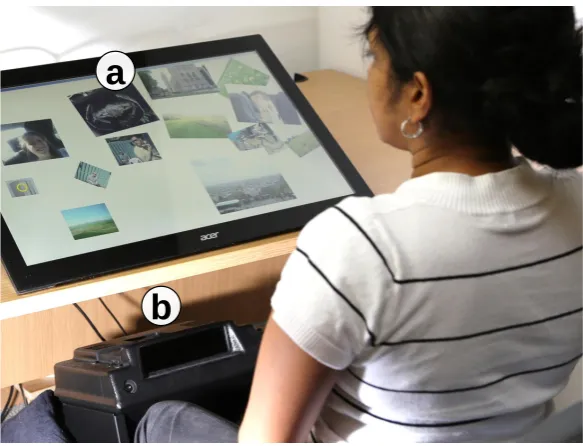
drag them out of the pile using a single dragging gesture. Through a dynamic control-display gain, small movements can overcome large distances. 28 3.7 Setup for the user study, consisting of a 27" 1080p multi-touch sensitive
surface (a), and the 120hz Eye Follower eye tracking device (b). . . 29 3.8 Remote-Colour-Select: a user draws the tree stem directly (a). The user
then changes to the `green' colour by a look at the corresponding menu icon, and a tap (b). The user directly continues drawing (c). The color change takes place the moment users touch down. If users start drawing immediately, users draw with a new color. If users only tap to change color, no line is drawn. . . 31 3.9 Copy-Paste-Object: the user can copy an existing object with a
single-touch. Usually, a touch on the object leads to dragging. However, when the user looks at the copy icon in the menu (a), and then touches down on the object, the user obtains a copy of the touched object under her nger (b). Then, the user can directly drag the new copy to a desired position (c). 32 3.10 Gaze-Focused-Zooming: users can change their zoom-in position during
several zooms without changing the pinching position. . . 34 3.11 Multi-Finger-Dragging: users can select the ve closest objects to their
gaze by touching down ve ngers (a). Users can then sort them out at once with a single dragging gesture (b, c). . . 36 3.12 Multi-Object-Pinching: when multiple objects were selected (a), a
pinch-ing gesture moves the objects to the hand's position (b). . . 36
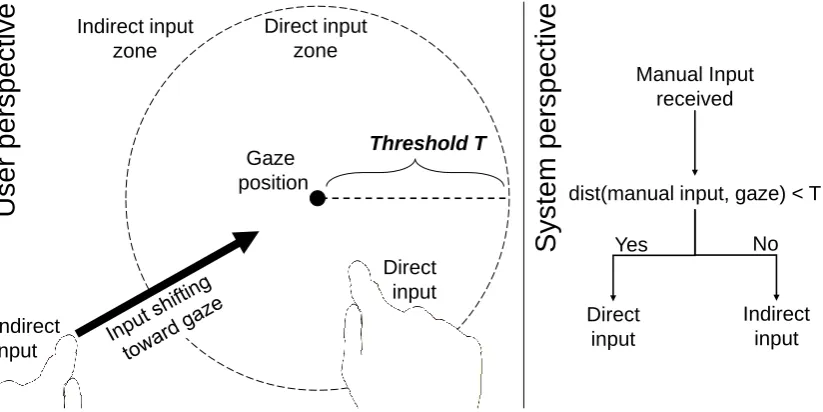
4.1 Gaze-shifting: manual input by the user is modulated by their gaze. Input is direct when the user's gaze is on the touch location (left), but redirected to the gaze location if gaze and touch are separate (right). . . 40 4.2 Direct-indirect input enabled by gaze-shifting: a) direct pen input is used
LIST OF FIGURES LIST OF FIGURES
4.3 Direct-indirect transitions: successive input can involve four types of tran-sition. In this example, the same task is completed while transitioning across dierent modes. Alternatively, a designer can associate each type
of transition with dierent semantics. . . 42
4.4 Input/output mappings for direct and indirect input . . . 43
4.5 Gaze-shifting from a system's perspective . . . 43
4.6 The user interface and its toolbars . . . 44
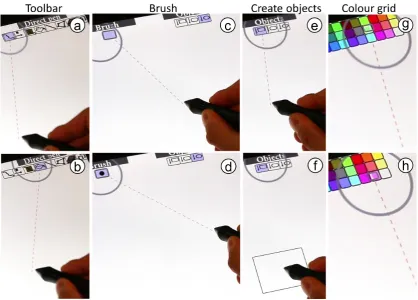
4.7 Draw directly, congure pen indirectly: users switch a toolbar's mode by look and indirect touch down (a), and vertical drag (b). Special toolbars are 'brush' that displays one adjustable widget (c-d), 'objects' where a drag down creates the selected shape at the pen's position (e-f), and 'color palette' where 2D dragging switches colours (g-h). . . 47
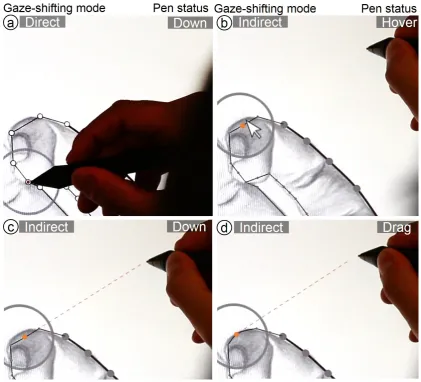
4.8 Trace line directly, edit line indirectly: direct pen input enables drawing straight lines from point to point (a). Transitioning from direct to indirect pen input makes a mouse cursor appear at the user's gaze. Indirect pen hover moves this cursor (a), indirect pen down selects a specic point of a line (b), and pen dragging moves this point which adjusts the roundness of the line (d). . . 48
4.9 Trace line directly and indirectly: direct tap sets an outline point (a). The user lifts the pen and looks at the next point, which extends the line to the gaze (b). Indirect pen down takes over (c), and pen dragging renes the point's position (d). Pen up conrms the point and initiates a new point snapped to the user's gaze (e). Indirect pen down (f) and drag renes the next point (g). Pen up and look back shaps the line to the hover position (g), and direct pen down sets the next outline point (i). . . 50
4.10 Select colour directly, set colour indirectly: select the colour by looking at the toolbar (a) and directly tapping on the colour (b), and set the colour by looking at the target and an indirect tap (c). . . 51
4.12 Five techniques for copy & paste: direct copy & paste (a), direct copy & indirect paste (b), indirect copy & direct paste (c), indirect copy & indirect paste at the same position (d), and indirect copy & indirect paste
at another position (e). . . 53
4.13 Pen writes and edits, touch zooms: A user rst directly traces with the pen (a), performs indirect gaze-directed zooming with touch (b-c), and then performs line editing with indirect pen input (d). . . 54
4.14 Users can directly draw on notes with the pen (a). Then, users can transfer notes by directly touching the note (b), looking at the transfer destination (c), where it is transferred to (d). Next, users can create associations between notes, by looking at a note and indirect pen down (e), looking at the second note (f), and pen up (g). Lastly, users can perform indirect touch manipulation on notes (h). . . 55
4.15 Used shapes in the user study for tracing and puzzle tasks . . . 55
4.16 Study tasks for pen (a), touch (b), and both (c) . . . 55
4.17 Likert ratings of gaze-shifting across the study tasks . . . 56
5.1 We investigate the indirect gaze-touch and pen-touch techniques in com-parison to direct-touch for use in bimanual interfaces. . . 60
5.2 Gaze-touch: from an overview medical image, users quickly zoom into their gaze position to then use the pen for annotations. The user's gaze position is indicated with the green circle. . . 61
5.3 Pen-touch: While users are drawing a line, users can zoom into the pen's position and then precisely nish the line drawing. . . 61
5.4 Simultaneity: each techniques has dierent feasibility for simultaneous interaction on the same or on separate targets. . . 63
5.5 Dynamic Targeting: With indirect touch techniques such as gaze-touch, users can change the target during the gesture without lifting ngers. . . . 63
5.6 Substeps of the two study tasks on the example of the direct-touch technique 65 5.7 System setup: pen and touch display (a), user's multi-touch input (b), pen input (c), eye tracker (d). . . 67
LIST OF FIGURES LIST OF FIGURES
5.9 Zoom-accuracy over time during zoom-in gestures for the sequence task, revealing that indirect techniques (pen-touch, gaze-touch) have constant accuracy during zooming, but direct-touch's accuracy decreases over time. 69 5.10 Zoom-accuracy over time during zoom-in gestures for the parallel task,
revealing that indirect techniques (pen-touch, gaze-touch) have constant accuracy during zooming, but direct-touch's accuracy decreases over time. 70 5.11 (a, b) Zoom-in gesture duration and count, indicating dierent zoom
be-haviour between direct-touch and the indirect techniques. (c) How parallel users performed with the pen and touch modalities. . . 70 5.12 How distant users kept each modality-pair. . . 71 5.13 Sequence task parallelism: Parallelism of the pen and touch modalities
over the duration of each trial. Parallelism denotes the minimum move-ment in cm that both modalities share. Trial durations are normalised to 0-100% of time. . . 72 5.14 Parallel task parallelism. . . 72 5.15 Illustrative heatmaps of the users' average touch (red), pen (blue), and
gaze (green) positions across the screen. . . 73 5.16 Mean Likert Scale responses from participants . . . 75 5.17 User rankings after the tasks indicate a preference toward gaze-touch. . . 75
6.1 We explore gaze and touch input for tablet interaction during grip, e.g. to enable the user to scroll a webpage with direct-touch (a), and temporally use a cursor to click hyperlinks (b) with the same hand. A two-handed grip allows a comfortable two-thumb based zoom, while the zoom location is specied with gaze (c). Our gallery application allows users to open an image simply by looking at it and a tap from the gripping hand (d). Or, to drag images through direct-touch, while users indirectly scroll the view they look at (e). The red circle indicates the user's gaze in all gures. . . 79 6.2 User study: users interacted with the tablet placed on a table (a), and
performed a task that resembled homescreens of tablet UIs (b). . . 80 6.3 Quantitative study results . . . 81 6.4 Gaze-to-target distance over time, averaged across all tapping tasks. As
6.6 CursorShift is a method to temporally enable a cursor, without interfering with default direct-touch actions. . . 84 6.7 State model of CursorShift. . . 84 6.8 Target selection with the three investigated techniques. . . 85 6.9 Illustration of bimanual congurations of direct-touch, gaze-touch, and
cursor. . . 86 6.10 Click an element with direct-touch (a) or with a cursor (b). . . 86 6.11 A user scrolls the page (a), toggles the cursor to click a link (b), then
continues scrolling the next page (c). The system uses the user's eye gaze direction, that is indicated by the red circle, only to position the cursor in (b). If users accidentally tap and get a cursor, users can simply tap again on empty space to remove it. . . 87 6.12 In a two-handed grip, users can divide cursor control and website scrolling.
The right hand scrolls (a), the left hand clicks a hyperlink (b). The blue circle indicates the invisible touchpad area. . . 87 6.13 Menu navigation using gaze-touch, i.e. indirect touches that can rapidly
navigate the tabs when visually focusing on the menu. The red line indi-cates the indirect handle to the remote point. . . 88 6.14 The virtual keyboard allows to use one hand to hold the device, and a
second for direct-touch key input (a). Or, users hold the device and with the same hand issue gaze-touch input to select keys (b). . . 89 6.15 Our maps application supports three zoom variants: direct pinch-to-zoom
(a), two-thumb gaze based pinch-to-zoom (b), and one-thumb variant that uses a 3-part widget for thumb-sliding (c) to zoom at gaze position (d). . . 90 6.16 By gaze-touch on a minimap, users pan long distances with a single drag
gesture from remote. . . 91 6.17 Three bimanual combinations, each demonstrated in their own task: direct
marker dragging with indirect minimap control (a), direct panning with cursor based marker control (b), and indirect zooming with cursor based marker input (c). . . 92 6.18 In the gallery and single image UIs, scroll gestures aect the view the user
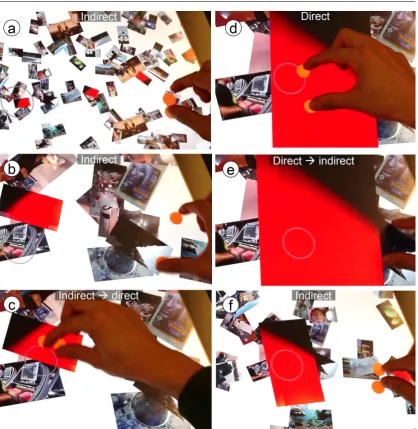
6.19 A dynamic switching mechanism allows direct- and gaze-touch image navi-gation. With direct-touch, users physically touch the image and the `back' button (a-b). With gaze-touch, users can comfortably use the same nger
to do the same actions without using a second hand (c-d). . . 94
6.20 Illustrating the input exibility with gaze and touch: the same image drag & drop task (rows) can be performed with three dierent techniques (columns). . . 95
7.1 Example input technologies that could support direct and indirect input modes. . . 104
7.2 Generalised principle of utilising visual attention area as a technique. . . . 109
List of Tables
3.1 Summary of the dierences of direct-touch to Gaze-Touch. . . 244.1 Overview of the direct-indirect interactions (rows indicate the task, columns the integrated modalities) . . . 46
5.1 Summary of dierences between techniques . . . 62
5.2 The techniques share the overall division of labour, and vary for the 'select' sub-task during touch gestures. The `manipualate' part is touch only across all techniques to support all standard touch gestures. . . 62
5.3 Study distance factors (for both tasks) in three metrics. . . 66
6.1 Tap gestural dierences between the techniques. . . 83
6.2 Summary of the interaction techniques' properties. . . 85
1
Introduction
This thesis explores interaction techniques that enhance a user's capability to interact with computers in novel and ecient ways. A multimodal interface is the main compo-nent in this exploration, formed by combining the eye gaze modality with manual input such as multi-touch, pen, or hand gesture. The goal is to better understand its useful-ness and usability in common human-computer interaction contexts. In particular, this thesis presents novel concepts that allow designers and manufacturers of user interfaces to extend the familiar direct input paradigm, that, e.g., is widely adopted on touchscreen devices, with advanced eye gaze based interaction techniques.
1.1 Direct Manipulation
Interacting with computers through direct manipulation is an integral part of our life. For example, multi-touch emerged as the dominant input paradigm over the last decade across a variety of computing devices. The technology allows users to provide direct input to a computer through physical contact on the screen, contrasting previous input devices such as a mouse [SPS92]. The directness of the interaction aords ease of use and is practical for many kinds of interactive surfaces ranging from from hand-helds, tablets, booklets, desktops, table-tops, and wall displays [B+07, Rek02, RWAF96]. Direct
gestures are based on analogies from the real world, making them highly intuitive to use. Most of these gestures are covered by tap, drag, and pinch actions, providing users a simple way to accomplish much of their work with touchscreen devices.
1. Introduction 1.2. Eye-tracking
however, it can similarly decrease comfort in cases involving frequent interactions as extensive hand/arm movements cause physical fatigue [KAB+12, KAB+14, SZ11].
The pros and cons of direct manipulation should be considered in comparison to indi-rect input, usually enabled with traditional input devices such as a mouse or a touch-pad where the user's manual input space is separated from the output display space [FWC84, BL00, HW12]. Direct and indirect input represent fundamental categories of input technology, with contrasting implications on the design of input devices, interaction techniques, and user interfaces. Direct input resembles real-world physical manipulation that lends itself to create intuitive and easy interactions, to an extend not possible with indirect input. However, indirect input provides benets where direct input is limited (and vice versa). The separation of input/output surface solves the occlusion problem as users don't occlude the content with their hands [VB07, VB10]. In addition, exible input/output mappings increase selection precision [AZ03, BWB06, PWS88], and there is lower physical eort without the necessity to reach out across the UI for each selection task [KAB+12, KAB+14, SZ11].
1.2 Eye-tracking
For its wide application to a variety of computer interfaces, advances for direct interac-tion will be highly benecial for the many users of such an input paradigm. It is therefore important to explore potential new ways of interaction that work in unity with the stan-dard direct manipulation paradigm. A technology that we investigate for the potential to do so is eye-tracking. It provides the capability to sense the user's eye information, and with it infer the position users are looking at on a computer display [Duc07]. This can be taken for user input for pointing at graphical elements in an user interface [Bol81, Jac90]. The core interaction is looking at a target on a screen to select it, which aligns with the natural human eye behaviour of looking at the object we are interested in [V+03].
Eye gaze input has been extensively studied in context of human-computer interaction performance [Duc02, Ray98]. Eye movements are one of the fastest movements of the body with minimal physical fatigue. User studies have shown that use of gaze point-ing can be faster than manual input devices [ZMI99, SJ00, TJ00]. Pointpoint-ing techniques with intelligent integration of eye gaze pointing within manual input devices allows for reduction of pointing eort and higher selection speed [ZMI99]. We can use our eyes to interact over a distance [TBG11, SD12b], and in combination with other modalities [ZMI99, Jac90, Bol81].
current eye-tracking hardware is rapidly advancing toward precise sensing capabilities of the user's act of looking, pointing us toward a future where any computer has eye-tracking capability integrated by default [Bul16, FWT+17]. In that case, a particular
interest is how we can take advantage of this technology within the existing user interface paradigms that users are familiar with, such as direct manipulation.
1.3 Extending Touch with Eye Gaze Input
To explore how eye gaze can work together with direct touch input, this thesis is con-cerned with the exploration of interaction possibilities from combining the two modalities. The goal of the exploration is to provide users with usable and ecient capabilities to interact with computers by designing novel interaction techniques based on hybrid gaze and manual inputs. Early work considered gaze pointing with manual input from devices such as controller, keyboard, or mouse [Bol81, Jac90, ZMI99]. Gaze and manual (touch) gesture in particular has received increasing interest in the last decade, with multi-touch devices becoming ubiquitous in everyday life. Prior research showed this input combi-nation allows to bridge the distance between user and display, with eye gaze acting as a pointer to remote displays [SD12b, TAB+13].
The research in this thesis focuses on extension of the direct touch paradigm in general, whether the UI is nearby or far away. Consideration of nearby interfaces is particularly important as it aligns with how multi-touch devices are commonly used at present. This leads to dierent implications on the user interface design in essence, use of eye gaze on everyday touchscreens raises the question of how eye gaze can work together with the default direct manipulation paradigm. This calls for a consideration of the natural roles of the modalities into the design of interactions with computers. Eye gaze is considered as an ideal indicator of the object of interest [V+03], and is thus used as a method of
pointing, to select a target. The user's hands are particularly t for expressive spatial manipulation [HPGK94], and therefore manual gesture is used as a method to manipulate targets. Taken together, this yields a hybrid technique where users look at a target by gaze, and manipulate this target using their hands. This represents a fundamental change of the default manual way to interact with computers, with unique implications on the design of user interfaces that integrate eye gaze and manual input. To better understand the design of such interfaces, this thesis is guided by the following propositions.
1. Introduction 1.3. Extending Touch with Eye Gaze Input
Figure 1.1: The direct touch modality becomes indirect by redirecting input to the gaze position.
We develop this proposition through the design of prototypical systems that allow users to interact with new interactive capabilities. The developed systems cover the extensive design of numerous interaction techniques and fusing of various input modalities on sta-tionary and mobile devices. We also provide user evaluation to support the propositions through a detailed view on usability and user performance with the proposed interac-tions. The breadth of proposed interaction examples is informally evaluated through user testing and feedback. In depth, we empirically evaluate gaze and hand input in contrast to hand only input through rigorous user study of selected tasks.
Second, hybrid gaze and touch user interfaces enable new ways to combine direct and indirect forms of interaction. This is particularly relevant in context of the prior understanding of direct and indirect input in HCI. We normally think of direct and indirect interaction as very dierent styles, as choices we make. They are normally totally juxtaposed: people promote one or the other. However, by utilising the eyes we can relax this strict relation, and combine direct and indirect input. This is accomplished by eye-tracking during manual interaction in order to implicitly distinguish two dierent interaction contexts. The rst context occurs when the user's visual attention lies close to their touch input, and the second context occurs when it lies somewhere else (Figure 1.2). From a system's perspective, this provides the capability to implement a dierent system reaction depending on whether the user sees their manual input, or not. For example, to use direct manipulation when the user visually attends to their input, and indirect input otherwise. From a user's perspective, the user can exploit the two contexts to use direct input for nearby objects, indirect input on objects at a distance, and switch between them by a glance. Therefore the interaction technique retains the strength direct manipulation, as users can employ the default way of manipulation but at any time gain advanced eye based interactions.
This proposition is developed through the design of systems that allow distinction of these two contexts, and with it allow exploration of many examples for this multimodal input as a demonstration of its generality. We rst propose Gaze-Shifting as the general mechanism to allow such an input switching, that is then explored in context of a design application. The application supports typical interactions using a stylus, or multi-touch, and users gain the ability to use direct-indirect input with both modalities. We further extend this principle to a tablet device, showing that mobile and commercial devices allow similar application. Here, users can either interact with an application using direct-touch, but at the same time users can take advantage of Gaze-Touch inputs for unimanual interaction with the whole screen using the hand that holds the device. This is shown through the design of prototype map navigation, browser, and image gallery applications on a tablet.
1.4 Design Space and Thesis Outline
The main focus of this thesis is the exploration of the propositions as introduced above. Each chapter in the thesis therefore adds to the exploration of both propositions in the development of a new technique, in context of a new scenario, or to demonstrate use cases.
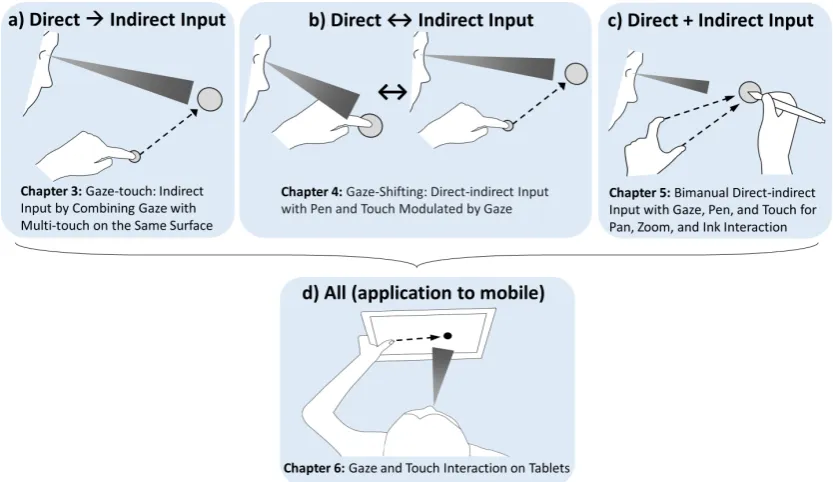
Each chapter also has a primary focus. The rst three chapters explore specic points of the design space of direct and indirect input. Here we consider direct input as the default way of interaction with a touchscreen, and indirect input as the technique where manual input is redirected to the user's gaze target. Figure 1.3 illustrates the particular design space. The combinations include using direct as indirect input (a), switching between direct and indirect input (b), and using both at the same time (c). The fourth chapter (d) focuses on application of these concepts to a currently widely successful multi-touch device in form of a mobile tablet. In the following, the chapters are described in more detail.
• Chapter 3: Gaze-Touch: Indirect Input by Combining Gaze with
Multi-touch On the Same Surface explores the use of indirect Multi-touch that aects the target the user looks at. Usually, modalities such as touch are exclusively used for direct input. In this chapter, we regard new interaction possibilities when using indirect touch input that is enabled through redirecting touches to the user's eye gaze position. This allows to increase our understanding of potential benets and pitfalls when using gaze based indirect touch systems.
• Chapter 4: Gaze-Shifting: Direct-indirect Input with Pen and Touch
1. Introduction 1.5. Methodology
Figure 1.3: Explored design space and outline of the thesis.
• Chapter 5: Direct-indirect Bimanual Input with Gaze, Pen, and Touch
for Pan, Zoom, and Ink Interaction investigates the simultaneous use of direct and indirect input. Bimanual input is usually either both hands exclusively direct, or indirect. Using eye gaze, we can enable a hybrid variant where one hand employs direct, and the other indirect input. This chapter explores this technique and provides an extensive user study. The work contributes to a better understanding of user performance using hybrid eye gaze and manual interaction for two handed tasks.
• Chapter 6: Gaze and Touch Interaction on Tablets takes a step further
and explores the application of all direct-indirect relationships on a tablet, a pop-ular personal multi-touch device. Tablet use usually requires two hands, one hand holding the device and the other issuing input. Here gaze and touch can enable single-handed use, by using indirect touch from the hand that holds the device. This interaction capability is studied in a controlled experiment, and explored in applications for uni- and bimanual interaction tasks. The work extends the knowl-edge on user performance on eye gaze and touch based interaction placed within the context of everyday tablet computers.
At last, Chapter 7: Discussion provides a reection on the conducted research, im-plications on user interfaces using gaze and touch, and discusses the work in context of prior research. Chapter 8: Conclusion presents the concluding remarks and points to future work of eye gaze and manual interaction.
1.5 Methodology
input interface and explore various possibilities that fuse the modalities in specic ways to aid the task at hand, with the aim to allow users (more) ecient interaction with the computer.
In particular, the work on the propositions involves the following two specic research methods centered around design and prototyping of human-computer interactions. In addition, we employ a third research method of laboratory study to empirically evaluate proposed interactions.
The rst is a design space analysis [MYBM91], a description of the possibilities within the design of a user interface that is based on the respective interaction techniques. Par-ticularly with eye gaze, new possibilities emerge that we systematically analyse regarding interaction properties that are specic to the technique and commonly used in the liter-ature. We refer to Figure 1.3 that summarises the content of the design space, including direct as indirect input (Chapter 3), switch between direct and indirect input (Chapter 4), and bimanual direct vs. indirect input (Chapter 5), and direct and indirect input on mobile devices (Chapter 6).
The second research method is the exploration of the design space through prototyping interaction techniques, user interfaces, and applications for the used system in context. This method is closely coupled with the design space analysis, but is more steered to the technical design of new kinds of interaction artefacts [Fal03]. Artefacts can be basic interaction techniques or whole user interfaces, and in this work also heavily based on application probes [HMW+03]. In essence, it is unclear how a new artefact applies to
the conventional user interface, and how it integrates within a given application context. Prototyping dierent examples allows to explore and assess new capabilities quickly, and with it broaden and rene the design space. Chapter 3, 4, and 6 mainly follow this research method, and chapter 6 partly does as well.
The third research method is the laboratory study [DFAB98], i.e. testing an interaction technique with users within a controlled environment, often in comparison to a baseline technique. All chapters involve user studies but with dierent extent. Chapter 3, 4, and 7 provide informal study and focus on qualitative user feedback of the developed applications. Chapter 5 focuses on a user study of bimanual techniques in a controlled environment for both qualitative and quantitative performance measures. The rst part of chapter 6 also provides a controlled study comparing gaze vs. touch on a tablet device, including both qualitative and quantitative performance measures.
1.6 Contributions
The contributions in this thesis include the following points.
1. Introduction 1.6. Contributions
• Introduction of the Gaze-Touch interaction technique where each single touch
in-put aects the user's gaze target. We analyse the properties that distinguish this technique to the default direct-touch input paradigm, and provide various proto-type applications that showcase benecial use cases of Gaze-Touch interactions, and evaluate them informally.
• Provision of interaction concepts that combine eye gaze and digital pen interactions
for exploiting high precision drawing and pointing for interaction with the area indicated by the user's visual attention.
• Empirical evaluation of Gaze-Touch based zooming in the context of a bimanual
interaction task, showing comparable performance as the direct baseline, and ex-tension to bimanual design/navigation tasks.
• Extension of the Gaze-Touch concept to tablets (that is dierent as users hold
the device), enabling users whole-screen reachability with only the holding hand, supported by an empirical study on Gaze-Touch vs. direct-touch.
Second, we present new ways of combining direct and indirect forms of interaction. Nor-mally direct and indirect inputs as very dierent styles, isolated from each other through dierent input devices and techniques. We show that by exploiting eye gaze, direct and indirect input can be mixed together into novel and innovative interaction contexts. We show this on a range of input and output devices.
• Use of direct input as indirect input is demonstrated by the Gaze-Touch work on
the example of the multi-touch input paradigm. Following applications show initial design strategies how gaze complements direct-touch.
• Switching between direct and indirect input with eye gaze is introduced as the
Gaze-Shifting technique, on a system that supports this mechanism with both pen and touch input modalities for interactions within a design-oriented application environment.
• Simultaneous direct and indirect input is investigated in our work on bimanual
in-teraction in a compound drawing/navigation task. An empirical study is presented showing comparative performance to the baseline of direct input, and further pro-viding insights into interaction benets for bimanual navigation tasks.
• The application to tablets explores bimanual direct-indirect interactions in a
dier-ent context, where gaze based touches of the holding hand merge with direct input of the free hand for various interactions involving image organisation of a gallery, map navigation, and web browsing.
2
Related Work
This thesis investigates gaze interaction on touchscreens in the eld of human-computer interaction. The gaze modality is considered for explicit input, to select and manipulate targets, but also for implicit input, to indicate whether manual input is direct or indi-rect. We therefore start with reviewing work in gaze interaction for both categories of implicit and explicit use of the modality. We then review the literature in manual touch interaction, considered from the perspectives of direct and indirect touch input.
2.1 Gaze Interaction
Eye-tracking research goes back to before the 19th century, where early tracking devices were used as a tool to better understand the perceptual and cognitive processes involved in human eye behaviour [Ray98]. In HCI, eye-tracking is investigated as a method to interact with computers using their eye movements. The basic eye movements of humans include xations and saccades [Car77]:
• Fixations occur when a user is xating on a point, i.e. looking at a point steadily.
They typically last between 200-600 ms, and their purpose is to acquire a still image of the scene for neural processing. A xation has still small, jittery micro-movements [CK08] around the xated point which is why they are considered an eye movement.
• Saccades are rapid eye movements that happen between xations, i.e. when looking
from one point to another point in the scene. Movement speed can go up to 500 degrees of visual angle per second, within a usual time frame of 20 to 120ms. During a saccade, humans do not acquire visual information of their environment.
2. Related Work 2.1. Gaze Interaction
camera. This information is then used to determine the eye's rotation, which indicates the eye direction and movement over time. See Hansen et al.'s survey for more details about technical aspects of eye-tracking [HJ10].
Eye based human-computer interaction usually involves an intelligent algorithm that in-terprets the user's eye movements received from an eye tracker. Most of the techniques are based on the user's ability to look at a point (xation), often called eye gaze, gaze direction, gaze input, or simply gaze. Numerous gaze interaction techniques were de-signed, implemented, and evaluated in the literature. We review related papers from two perspectives: with regards to how implicit vs. explicit the user employs their eye gaze for an interactive task.
2.1.1 Explicit Gaze Interaction
Eye gaze can be used as a main modality of input, where the user explicitly looks at a target to select it on the computer display. The unique characteristic of explicit gaze interaction is therefore the act of pointing with the eyes that represents the main part within the conducted human-computer task. These include not only interaction tech-niques where users interact by only gaze, but also where users use their gaze to point, and supplement this with additional modalities.
Initial research
The rst system that integrated gaze for computer input was Gaze-orchestrated Dynamic Windows by Bolt in 1981 [Bol81]. The system presented a user interface that consisted of multiple windows, each gaze-interactive. A window showed a video, with the idea of linking multiple TV channels to one large display. A video was active/running as long as a user was looking at it the others were automatically paused, reducing visual and cognitive overhead of the multimedia installation, while enabling rapid access to any video. Bolt further discussed challenges of the system, such as zooming in and out of windows. A dwell-time technique, where a user looks at a window for a xed time (e.g. 300 ms) to trigger an eect, was considered as a method based on the eyes. Further, using manual input (in form of a joystick) or speech (through an speech recognition device) were also considered to allow the user to explicitly trigger what they look at.
the main advantage of gaze: a very fast selection speed. Second, however, gaze input is only fast for large targets if targets are small, speed declined and more errors happen. In 1990 Jacob investigated how gaze interaction techniques better integrate in conven-tional user interfaces, based on the input principle What You Look At Is What You Get [Jac90]. He argued that the main barrier is not the technology, but rather the study of techniques that can naturally integrate gaze within the human-computer dialogue. In this paper, he introduced the Midas Touch problem, that describes the ambiguity issue of selecting a target with gaze. When a user looks at an object, it is unclear whether the user wants select the object, or only looks at it without intention. Finding a mechanism to explicitly distinguish these two states has been subject of many research eorts we discuss below. Aligning with Bolt's explorations, Jacob suggests either using dwell-time or a manual conrmation. This depends on the application context, as Jacob emphasises through his exploration of several application scenarios. In particular, manual input e.g. a button press is faster as users do not need to wait for the dwell-time to nish it's good for repetitive tasks. However, in other instances, it can be more convenient to use dwell-time as it frees the hand from input it reduces user eort. Yet for situations where an action is dicult to undo, manual conrmation is denitely preferable. Jacob pioneered many other use cases for gaze input in this paper, such as moving objects (simply look at the destination), text scrolling (automatic scrolling based on the gazed area), menus (where combined gaze and button press is more useful), or window control (always activating the xated window).
10 years later, Sibert and Jacob revisited the work for a controlled evaluation of this kind of gaze interaction [SJ00]. At the time, the mouse has already become the standard pointing device for computers, hence the interest of using the mouse as a baseline for comparing gaze input (using dwell-time selection). Across two selection tasks in the study, it was found that users performed faster with gaze than mouse, making the point that gaze can provide natural eye based inputs without incurring any performance penalty. Contrary results were found by Miniotas in his investigation of how Fitts' Law applies to eye gaze [Min00]. In the study reported, the dwell-time based gaze technique was found slower than mouse input. However, they discuss that it might be aected by their gaze signal smoothing, that makes pointing more reliable but also introduces a lagging eect that slows down performance. They conclude that optimal gaze data ltering, as well as the optimal dwell-time, needs further study for practical use cases. Later work indeed studied gaze signal (c.f. [KKP+08, ZRZ08]) and dwell-time conguration (e.g. see
[MR02] or [MMAR06]).
2. Related Work 2.1. Gaze Interaction
Small target selection
Improving small target selection was further investigated by researchers, when interacting with the combination of gaze and manual input. Miniotas et al. investigated how target expansion works for gaze interaction [MvM04]. Target expansion is a method where the size of the targets that users are pointing at gradually increases to ease selection of small targets [MB02]. Applied to gaze, the target would expand as long as the user keeps looking at the target. Across two studies they found that this method reduces gaze selection error, but it also comes with an increase in movement time. They conclude that with gaze with expanding targets can render the eyes a more suitable input modality when the precision of eye-tracking might be improved in future. However, note that target expansion is not suitable for generic UIs, because the space occupied by the expanded area is not available for other interactive objects.
Kumar et al. proposed a variation of the above approach to enable small-target interaction [KPW07]. Rather than expanding the target, they propose to expand the region of the user interface similar to the ERICA system [Lan00], but with manual input. They propose the EyePoint technique that is based on a look-press-look-release procedure. The user rst looks at the target region and presses a button to magnify this region. Then, the user looks at the target within the magnied region, and releases the button to select it. In the study, they compared this approach to mouse input, where the time performance was similar in both conditions. The use of gaze however led to more errors, that could be accounted to either the technique, or the hardware. They state that the error rate varied signicantly across participants, and for those where eye-tracking was poor, error rate increased. Nonetheless, their approach represents a practical technique that enables gaze interaction for both small/big targets within WIMP based interfaces.
Following up on the issues of inaccuracy, researchers developed intelligent methods to improve the gaze signal data [KKP+08, ZRZ08]. Signal smoothing algorithms were
pro-posed such as threshold saccade detection, Kalman lter, early trigger correction (Kumar et al. [KKP+08]), force eld, or speed reduction (Zhang et al. [ZRZ08]). These methods
can reduce the noise and thus improve the user's gaze pointing abilities. Kumar et al. also analysed issues of gaze/manual input synchronisation: the problem of users clicking just before or after looking at a target. To approach this issue, they suggest using temporal corrections toward the most recently viewed target.
Eye gesture interaction
Drewes and Schmidt took this approach further in their work on gaze gestures [DS07]. Gaze gestures are directional movements with the eyes, i.e. a saccade, or multiple sac-cades. Compared to the on-screen eye icks, gaze gestures are relative, and thus inde-pendent of the user interface. The idea of gaze gestures is to issue them complementary to the default computer interactions. Users can normally visually inspect the interface, and interact with it manually but also users can use gaze gestures, eye movement distinct from normal viewing, to quickly issue commands with their eyes. In their study, they showed that users can perform complex gestures intentionally, and that gestures can be designed to not accidentally occur during normal viewing. Gaze gestures have been further investigated in various contexts such as mobile phones [DDLS07, KAR+14],
games [HIV12], or wearables [BRT09], for use of basic command triggers when other modalities are unavailable.
Gaze and touch
With the ubiquity of mobile touch-sensitive devices of our time, researchers also explored various ways to combine gaze pointing with manual input from touchscreens. Most of the resesarch in gaze and touch interaction falls into one the following three categories: remote display interaction (Stellmach et al., [SSND11, SD12a, SD12b, SD13], across-display interaction (Turner et al., [TAB+13, TBAG13, TBAG14, TABG15]), and near
display interaction (this thesis). The following sections detail this research with regards to the categories.
Across-display interaction: Turner et al. rstly proposed gaze and touch based techniques in a concept paper [TBG11], motivated by the goal to enable interaction with out-of-reach content. The proposed interaction techniques use gaze to select a position, and manual touch to conrm. The investigated tasks were based on drag & drop, where users rst select a target on one (local) place, and then move this to a dierent (remote) place. The proposed interaction technique uses gaze for the pointing task, and touch to conrm the steps. An example operation includes four steps: look at a target (select), touch down (conrm), look at the destination (drag), touch up (drop). The authors conclude that the techniques and variations of it are promising for interaction with remote displays, and for transfer between local and remote systems.
Their ideas were investigated in detail in a few follow-up studies. In Eye Pull, Eye Push [TAB+13], the concept for transfer between public and private device is investigated.
They compared variations of gaze based drag & drop variations in a user study where users interact across a tablet and a distant, large display. The results indicate that users are able to use gaze and touch for the tasks, and that a technique where users hold their touch input during drag & drop was most positively received. In a subsequent study they compared gaze vs. manual pointing for drag & drop tasks [TBAG14]. Using a gaze snapping mechanism to counter tracking inaccuracy, they found that users performed with as well as with manual input.
2. Related Work 2.1. Gaze Interaction
rotate/scale tasks aect performance, and that gaze and touch can be designed integral for rotate-scale-translate tasks.
Remote display interaction: Stellmach et al. focused on interaction with a remote display by using a combination of input from the eyes and a handheld touch-enabled device. The rst work looked at the scenario of large image collections, and various gaze-supported multimodal techniques including physical keyboard and a tilt-sensitive mobile device [SSND11]. Users preferred the Look-Touch-Tilt technique for zooming, that combines gaze, touch, and device tilt. This technique was later evaluated for a pan and zoom task, where although mouse zooming was preferred, gaze-supported zooming indicated high potential.
They also considered gaze and touch more generally for selection tasks on distant dis-plays in their Look & Touch work [SD12b]. Based on the principle gaze suggests, touch conrms, they developed a set of gaze and touch interaction techniques. In particular, a user point roughly at the area of interest with their gaze, and then uses touch gestures to rene the position, as inspired by Zhai's MAGIC pointing technique [ZMI99]. In a user study, all gaze and touch based techniques outperformed the gaze-only approach. In a follow-up paper, they investigated combined selection, positioning, and manipulation tasks in the same setup [SD13]. The corresponding study showed that gaze and touch were faster than head based alternatives for the tasks tested.
Other: Research conducted by me and my colleagues looked at gaze and touch interac-tions on diverse setups as early steps into the work of this thesis. The Gaze+Touch vs. Touch study took an empirical look into user performance of gaze and touch interaction [PAG15]. Gaze and touch input on a remote display was compared to default touch input on a close-range display. Results of the study showed rst signs of the potential of this modality combination, indicating that gaze and touch is slower for dragging tar-gets, but as fast and more accurate for scaling and rotation tasks. GazeArchers [PAG16] is a two-player collaborative game where the users shoot arrows by gaze pointing (aim at target) and touch tapping (shoot arrow). This work focused on the design space of multiple users that utilises multi-gaze and multi-touch input.
Researchers also considered gaze and touch interaction on tabletop systems. Holman proposed initial ideas for using gaze input on tabletops [Hol07]. Mauderer et al. im-plemented a technique with gaze pointing and touch icking to select remote targets [MDK13]. Newn et al. designed a tabletop UI with dierent techniques, i.e. normal touch input for the near area, gaze and touch input for the further area, and gaze only for far away areas [NVCV16].
2.1.2 Implicit Gaze Interaction
Initial work was conducted in 1990, where Starker and Bolt proposed their Gaze-responsive Self-disclosing Display [SB90]. A system is presented that operates interpretively, i.e. by aggregating xations of the user to determine an interest level on the displayed ob-jects. Objects of higher interest are shown in more detail, giving the user an impression of subtle gaze highlightings.
MAGIC pointing
The rst work that argued for implicit use of gaze is Zhai et al.'s seminal paper in 1999, where they proposed the Manual And Gaze Input Cascaded (MAGIC) pointing approach [ZMI99]. This approach also investigated gaze and manual input combination as in prior work, but with the main focus on retaining manual input. They argue that it is unnatural to overload a perceptual channel such as vision with a motor control task. The pointing task should remain a manual task to the user, and the role of gaze is rather in the background of the user's attention. The MAGIC technique is an instance of this principle. Users perform the majority of the pointing task with manual control, but large parts of the pointing are eliminated by warping the cursor to the user's gaze area (Figure 2.1). In a pilot study, the technique indicated reduced eort as compared to manual pointing, while having greater accuracy than gaze-only pointing. This showed that the inaccuracy issue found by Ware and Mikaelian can be approached by hybrid gaze+manual interaction techniques, while preserving the speed advantages of gaze as indicated in many other works.
Figure 2.1: MAGIC pointing: the cursor warps to the gaze area (blue circle), followed by ne manual positioning. Image from Zhai et al. [ZMI99].
Note that the idea of using a modality in the background of a user's attention has been generalised by Vertegaal in his work on Attentive User Interfaces (AUI) [V+03].
As devices will `bombard' users with requests for attention, it is necessary that user interfaces better adapt to the limited user attention. The user's eyes are an ideal indicator of attention to help in this matter. Zhai's MAGIC work is taken as the prime example, as the user's visual attention is combined with manual actions to improve the interaction with the UI.
2. Related Work 2.1. Gaze Interaction
research community, as researchers extended and studied the principle idea in many more computing contexts. Drewes and Schmidt extended MAGIC pointing to a touch-sensitive mouse in their MAGIC touch project [DS09]. Their work was motivated by a recurring issue of MAGIC: when should the cursor move to the user's gaze position? Most of the prior work warped the cursor when users moved the mouse, thus requiring small manual eort for each movement. With MAGIC touch, the cursor is warped when the user touches the left mouse button, eliminating the need to initially move the mouse. They compared this technique to mouse input, and found that performance was similar between the techniques, but perceived as faster and more convenient.
Fares et al. explored further variations of the MAGIC technique with a mouse. Instead of warping the mouse cursor, MAGIC-SENSE [FDK12] changes the cursor sensitivity depending on the user's gaze position. If the cursor is far away from the user's gaze, it moves rapidly. If the cursor is close to the user's gaze, sensitivity is reduced for precise pointing. A pilot study showed low error rates and task completion times similar to the mouse. In a follow up paper, they conducted a user study comparing the default MAGIC technique to a mouse, as the original paper used a dierent pointing device [FFK13]. They also provided a slight design improvement by animating the cursor movement to the gaze to better provide visual feedback. The results of a standard pointing user study showed that MAGIC outperformed the mouse by 8%, and that the amount of hand movement is reduced by half, conrming the initial results of the original paper.
For a further discussion of MAGIC to concepts explored in this thesis, we refer to section
Gaze-added UI
A notable work that aligns with the direction of implicit gaze interaction is Salvucci and Anderson gaze-added interfaces in 2000 [SA00]. The idea is to keep the conventional manual input as it is, but the user can issue complementary gaze functionality. This gives the benet of giving users more exibility in choosing when and how to employ gaze input. The idea of gaze-added UIs was simple; a conventional WIMP operating system was given that users normally control via the usual mouse and keyboard inputs. However, one button on the keyboard (Control key) was saved for gaze interactions. With this button, users could initiate typical gaze + button interactions as e.g. investigated in Jacob [Jac90] or Bolt's [Bol81] interfaces. Users point with their gaze at a target, push the button to select it, or hold the button to perform drag & drop actions.
Gaze as Contextual Information
Researchers have investigated implicit gaze with manual input beyond the MAGIC point-ing concept. For example, the LookPoint system uses eye gaze to switch input devices between multiple screens [DHVE06]. The system redirects the input of mouse and key-board, with regards to which screen the user is visually attending. This provided practical benets, e.g. the user does not need to reconnect input devices from one to another com-puter. A study showed that this method is faster than traditional methods (mouse, keys, multiple keyboards), and is preferred by users.
time [KI08], but need a method to select a cursor. With the Rake Cursor, the user selects the desired cursor by simply looking at it, and then controls it by standard mouse control. Their experiment showed that it is faster than default mouse or MAGIC pointing. As an approach for leveraging implicit gaze input, Santella et al. investigated image cropping with eye gaze [SAD+06], as an instance of Vertegaal's implicit AUI [V+03].
Their system uses xation data to identify important image regions, and then crops the images accordingly. A study showed that users prefer this technique over uncropped images, or automatic cropping.
During the course of this thesis, two research papers also involved the use of gaze in consideration with direct and indirect manual input. Voelker et al. investigated input redirection on interactive workspaces, systems that provide users a combined horizontal and vertical touchscreen [VMSB15]. Direct touch input is active when users look at the horizontal surface, enabling default input on the reachable screen. But users can also issue indirect touch input from the same horizontal surfaces, when their gaze lies on the vertical screen. In their study, they compared this method to using direct-touch only, and found that the gaze approach leads to higher performance.
Serim and Jacucci use eye-tracking to support varying degrees of visual feedback during manual input [SJ16]. The system distinguishes two cases: input with visual guidance (user looks where they touch), or without visual guidance (user looks elsewhere). In the latter case, the system provides feedback of the non-visual manual input, to the area the user is looking at. Our direct and indirect input exploration goes in a similar direction, but applied to a dierent usage context. Rather than redirecting the visual feedback to the user, our focus is on explicit interaction with either direct or indirect input depending on the user's gaze area.
2.2 Direct and Indirect Interaction
The majority of a user's human-computer interactions are manual, as the hands provide a high delity for interaction with computers. Researchers have investigated a diverse set of interaction techniques involving one and two hands of the user, that in their entirety go beyond the coverage of this thesis. We therefore focus on two categories of manual interaction that can characterise many of a user's manual computer inputs; direct and indirect input. We derive the denition of these input forms based on prior work of Foley et al. [FWC84], Beaudouin-Lafon [BL00], and Hinckley and Wigdor [HW12]. Here the input denotes the actual physically sensed motion that is sensed through an input modality, and the output is the display or the object of interest that the user wants to manipulate.
• Direct input: when input and output are spatially equal. Examples include
multi-touch input or a stylus.
• Indirect input: when input and output are spatially separate. Examples include
2. Related Work 2.2. Direct and Indirect Interaction
2.2.1 Direct Input
Direct input can be described as user input to a computer, where the user directly manipulates the physical position on the computer interface. The most common example is the touchscreen, that senses a user's touch and also displays the digital content on the same screen. The rst technical prototypes and research papers of touch interactions date back to the 1960s [Joh65, Hla69], and over the years researchers rened the technology (e.g., [LBS85, SPS92, Wel93, Rek02, Han05]), leading to the current state of the art where multi-touch displays became standard for mobile phones, tablets, and large information displays.
Early explorations of multi-touch possibilities, i.e. the way to interact directly with a screen by tap, pinch, and other gestures, began with Krueger's Videoplace system [KGH85]. The popular pinch-to-zoom gesture has been showcased in Krueger's demon-strations, where a gure's shape, displayed on the screen, was directly manipulated through a thumb and index nger gesture. Among others, a notable work is also Wellner's Digital Desk in 1993 [Wel93]. He explored various new concepts using multi-touch and a digital pen, including paper-like virtual document annotation, drawing/design work, and complementary stylus usage for digital inking operations.
Sears et al. summarised developments of touchscreens in the early 90s [SPS92]. They state one of the main advantages of the technology is the directness of input. Unlike indirect input devices, such as a mouse, users simply point at the desired object, making the input fast, easy to learn, and exible; all without the necessity of additional input devices. From a system's perspective, the directness makes a hover state obsolete (in contrast to a mouse that needs hover to show visual feedback of the cursor [BHR85]). With the multi-touch hardware increasingly maturing around the millennium, researchers started exploring direct multi-touch interactions more broadly. The SmartSkin prototype allowed Rekimoto to pioneer various direct touch interaction techniques [Rek02]. For instance, single-touch dragging and pinch-to-zoom for map navigation, or whole-palm gestures for a menu calls. Researchers extensively explored further gestural interaction techniques, e.g. multi-nger and multi-user gestures [WB03], touch on vertical displays [ABCD15], or bimanual touch [BWB06, WPHB16]. Indeed, the expressiveness of touch aords many dierent techniques and task scenarios.
Considering the current status-quo touch devices, i.e. phones and tablets, a interaction paradigm emerged that is based on and two-touch gestures. Basically, single-touch for selection and dragging of objects, and two-single-touch for continuous pinch-to-zoom actions. The paradigm covers a large range of actions that are oered to the user on contemporary mobile devices. Hence many of our example interactions are based on single touch and two-touch pinch-to-zoom operations.
To enhance interaction while retaining this touch paradigm, researchers have aimed for implicit usage of touch inputs as well [HB16]. One of the approaches it to avoid acciden-tal touches by the palm, that can be detected from the size of the touch area, and hence ignored by the system [SXM+14]. Touch detection around the device can provide
infor-mation of how users are holding a mobile device [YHB+15], and with it one can adapt
2.2.2 Indirect Input
Indirect computer input was considered earlier than direct input, with the mouse intro-duced by Engelbart in 1963 as a prime example of an established indirect input device [EEB67]. Most indirect input devices are designed for desktop computers, e.g. mouse, keyboard, or a game controller/joystick. As desktop computers have vertical displays, direct-touch input might be too dicult to use over time, but an indirect input device away from the display and closer to the user is comfortable to use. One of the main advantages is that users only need to employ small nger/hand movements to be able to interact with the whole user interface.
Another established input device that in its nature is close to indirect touch input is a touchpad [MO97, ML04], that nowadays comes as a standard component on laptop computers. The touchpad can be regarded as a physically-separate space where users perform touch based tap and drag gestures to control the cursor on the display. This provides the user mouse-like interactions without the necessity to attach an additional device.
Indirect input however is not necessarily tied to a device that is physically separate from the output display. Touchscreens for example, that usually employ direct touch input, can also integrate indirect input. The UI software can simply redirect touch inputs to a target that is oset from the physical location at which the input is sensed [HBPB12], resulting in indirect touch input.
Early work explored indirect touch in order to improve the low accuracy of touchscreens. For example, Potter et al. argue that while touchscreens evoke high user satisfaction, they are also prone to high error rates [PWS88]. To improve this, they suggested oset cursor techniques, where users control a cursor with touch. At touch down, the cursor appears that is oset from the nger position, but moves with it to precisely select a target. Evaluation of the technique showed that the technique led indeed to fewer errors than default touch. Further studies by Sears et al. conrm these results [SS91].
With innovations in multi touch sensing hardware around the millenium such as the Portfolio Wall, DiamondTouch [DL01], or SmartSkin [Rek02], it became clearer that direct touch will become the standard input paradigm on interactive surfaces. Thus part of indirect touch research explored how indirect touch can be used complementary to direct touch inputs.
In 2003, Albinsson and Zhai investigated additional interface elements around a direct touch position to improve touchscreen precision [AZ03]. For instance, the Cross-keys technique shows virtual arrow keys around the touch position, that allow post-hoc re-nements of the cursor position. The Precision-Handle technique provides a lever that directs to the touch position, that users can indirectly control through touch dragging to manipulate the virtual touch position. Their experiments showed that both techniques are a viable addition to complement existing direct touch interactions.