Design and Implementation of Linux based Workflow for
Digital Forensics Investigation
Moses Ashawa
Centre for forensic Computing and Security Cranfield University, United Kingdom
Shrivenham, SN6 8LA
Morris Ntonja
Centre for Forensic Computing and Security Cranfield University, United Kingdom
Shrivenham, SN6 8LA
ABSTRACT
Window based digital forensic workflow has been the traditional investigation model for digital evidence. Investigating using Linux based platform tends challenging since there is no specific investigation workflow for Linux platform. This study designed and implemented a Linux forensic based-workflow for digital investigation. The workflow was divided into different investigation phases. The digital investigations processes in all the phases were performed using Linux riggings. The work-flow was tested and evidence such as (E01) Image was accurately acquired.
This paper is presented in the following sections. Section one and two provided introduction and literature on existing forensic workflow using windows-based workflow respectively. Section three provided the approach to window workflow. The experimental design and tools used were presented in section four. The rest of the sections considered the research analysis, discussion and conclusion respectively. The implication of the test conducted, tools used with their corresponding weakness and strengths were highlighted in the appendix.
General Terms
Digital Forensics, Investigation, live-acquisition, Timeline Analysis, expert witness
Keywords
Linux workflow, E01 image, Digital investigation, Digital Evidence
1.
INTRODUCTION
The field of digital investigation is increasingly expanding to all platforms. Operating system platform such as windows has an established forensic workflow for digital investigation. Digital forensics requires the application of accepted procedures and approaches in seizing, preserving, analysing and determining what happened in relation to the electronic evidence. As such, repeatable and effective methods have to be followed and be properly employed in the designed forensic workflows in adherence to electronic evidence standards and guidelines such as the ACPO principles according to Montasari et al., (2019); Bird, B. et al., (2017); MacDermott, A. et al., (2018); Hintea, D. et al., (2017); Hassan & Lutta, (2017); and Wahyudi, et al., (2018).
This is critical as it ensures production of actionable information during digital forensic cases. Ideally, workflows in the digital forensics follow four major steps during a forensic examination of as seen in the study conducted on disk image examination by Sachowski, J. (2018) and extraction of left artefacts from IM applications as outlined in the study of Ashawa & Innocent (2018) respectively. The research of Karabiyik & Sudhir (2016); Omeleze & Hein (2015); Sumalatha & Pranab (2016) stated the digital investigation
processes as Seizure, Acquisition, Analysis, and Reporting which are according to NIST investigation framework asserted in the research of Jaquet et al. (2018); Wilson & Hongmei (2018); Horsman (2018); Kigwana et al., (2018) respectively.
While the most common forensic workflow in the digital forensic community is based on windows operating system tools, there is no existing forensic workflow based on Linux tools. In addition, when Linux based investigation is required, experts of windows platform investigation turn to be startled on which approach to follow since there is no workflow based in Linux. To cover this gap, the research designed and implemented a workflow for performing digital forensic investigation using Linux based tools. This research will provide forensic and cyber investigators with detailed workflow when engaged in Linux based investigation operation. The aim of this paper is to design and implement a Linux based forensic workflow using Linux tools as an alternative to windows platform.
2.
RELATED WORK
Digital investigators are challenged many times when faced with Linux based investigation. There has been a well-established windows forensic workflow for digital forensic investigation. The study of Soltani & Seno (2017) performed an inspection on digital forensics images and their authentication during investigation.
The research produced a life cycle for digital image processing. A paper published by SAN (2018) designed a logical digital forensic workflow for windows on VM Windows 7, 10 and XP using different data volume and excerpt sizes. Experiments were carried on these Windows images to examine some of their high-value artefacts hence establish a resourceful process for selectively acquiring and processing digital images using windows platform. In determining forensic image acquisition on Microsoft Windows, [Andreafortuna.org,] designed a window investigation workflow on a 64-bit running system.
3.
FORENSIC WORKFLOW
APPROACH
(2016); Quick & Choo (2018). Respectively. According to countuponsecurity.com, (2018), acquisition phase may involve imaging of both volatile and non-volatile memory of a digital device. Both of these acquisition processes will generate disks images which must be verified for the data integrity. After, acquisition the subsequent phases include preliminary and post preliminary analysis and finally documentation and reporting of the findings and conclusions of the examination. Worthy of notice is that window forensic workflow has considered a limited number of computer forensics tools amid many open source and commercial tools available on Windows platform. The major phases in the forensic examination of digital devices in windows operating system environment are acquisition, analysis and reporting.
4.
EXPERIMENTAL DESIGN
Before the experiment was conducted, some forensics tools were carefully selected for testing and result validation. The design was done in accordance to the ACPO principles to ensure that digital evidence integrity is preserved.
4.1
Tools Selected for the Design Work
Flow
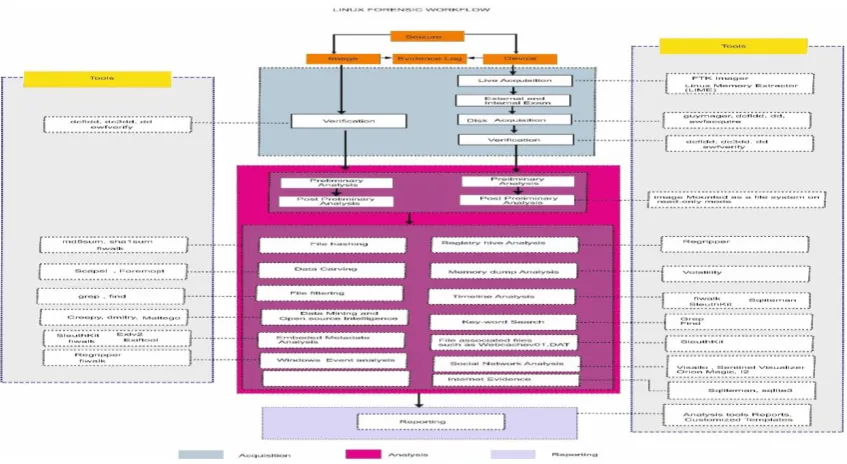
[image:2.595.67.491.284.516.2]Ubuntu virtual machine named tonjaforensics was created to be used as the forensic workstation. Two-dimensional tools were installed for the designed workflow. The first tools were installed and configured for evidence acquisition purpose while the second phase was for integrity check, analysis and post analysis. Consideration was given basically on their implication in test conducted and with implication but not discarding their strengths and limitations. Some of the tools included guymagger, ewfacquire, exftool, exiv2, Regripper, Sqliteman and Creepy etc. (See Appendix for details). The designed workflow is shown below. The model follows the same process of seizure, acquisition and verification, analysis and reporting. Using the concept of windows workflow, a similar model was developed using Linux tools as shown below.
Fig 1: The Designed Linux Based Workflow for Digital Forensic Investigation
4.2
Experimental Implementation of the
Workflow
Usual forensic investigation procedures were followed in the implementation of the workflow. This was carriedout flowing a number of digital forensic investigation processes and procedures. Details of which are discussed below.
4.2.1
Disk Image
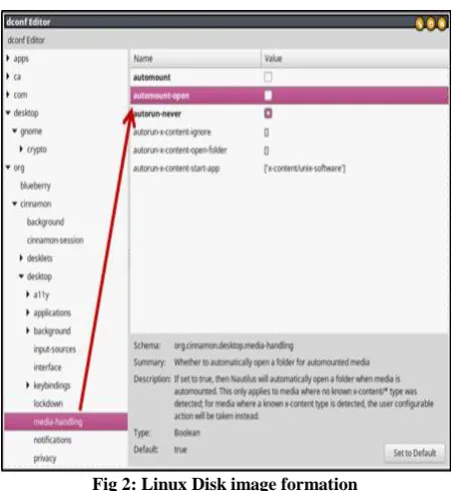
Fig 2: Linux Disk image formation
[image:3.595.317.550.98.229.2]When there are many devices on the workflow, identification of the right device becomes a challenging. Execution of the commands sudo lshw -short -class disk,volume and lsblk respectively from the terminal is therefore very essential for appropriate disk identification. This was implemented as shown in figure 3 below. The description of the identified image and its class was achieved.
Fig 3: image Identification
All the devices connected to the virtual machine tonjaforensics including their volume information and specifications were listed. Identification of devices mounted was done using lsblk command. Image acquisition and verification was conducted using dd, dc3dd, dcfldd and ewf-tools. Image sizes with their corresponding map data were hashed using md5 and SHA1. The Creation of the raw image error logs and hashing of the acquired data was performed on the hash functions using the command ‘sudo dcfldd if=/dev/sdb1 of=morris_flashdrive.dd bs=4096 hashwindow=64k errlog=err.txt hashlog=hash.txt | md5sum > md5_hash.txt | sha1sum > sha1_hashsdb1.txt’.
4.2.2
Acquisition and Verification of Expert
Witness Format (E01) Image
Using Ewfacquire and guymager for USB device acquisition on Linux platform, E01 image was acquired with details on its compression method and level. The main implication of using
Linux acquisition methods is that it involves mounting disk on a read-only mode.
Fig 4: (E01) Image Acquisition
4.2.3
Evidence Integrity Check
Linux provides a number of tools that can be used to create and verify disk images. These tools include dd, dc3dd, dcfldd, guymager, ewfacquire and ewfverify. Using Wine application [winehq.org, 2018], tools such as FTK imager can be installed and used on Linux platform. Unlike in windows where commercial write-blockers such as Tableau are used in acquisition, Linux workflow provides an option of mounting and imaging disk on a read-only mode. Tools such as dconf Editor are used to prevent disk auto-run when disk is connected to the Linux computer to be used in acquisition. Acquisition commands can be piped with verification commands which generate the resultant image hash values such as MD5 and SHA1 hash values. The integrity of the image (see figure 4) was also determined using “ewfverify” Linux forensic tool as shown in the result below.
Fig 5: Prove of image integrity using the workflow
5.
ANALYSIS
[image:3.595.57.279.403.573.2] [image:3.595.316.561.415.574.2]on the workflow. User data details prior to post analysis such as time Zone information content and last system shutdown was generated by parsing SYSTEM hive.
5.1
Post Analysis
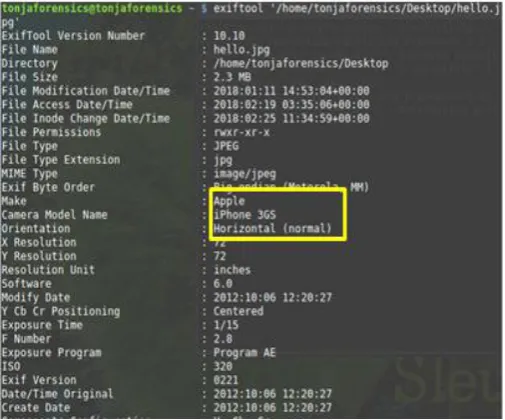
[image:4.595.55.308.243.453.2]Post analysis involves further investigation on identified system artefacts in search of additional evidential artefacts patterns that were not set as objectives of the initial analysis. Post analysis can be conducted on files modified, accessed and created within a particular timeline of interest as per the investigation requirements. Forensic workflow using Linux platform provides diverse tools that can be used in post analysis. Post analysis on this workflow was done using tools such as exiv2, sleuthkit, fiwalk, exiftool and exiv2 to analyse metadata. Using Exiftool, more details about the image was extracted as shown below.
Fig 6: Image post analysis with iPhone
5.1.1
Bash scripting and automation for the
designed workflow
Bash scripts were written to automate tasks performed by multiple tools. Some of the scripts were timeline script, keyword search script and hash script. Scripts for Timeline creates period map of all files in a mounted disk image on the designed Linux workflow. Once executed in a mounted disk image the script generates a report containing all files with their modified accessed and created times. This script works only on mounted images and scripts all files in a mounted directory and creates two separate files named sums.md5 and
sums.sha1 containing lists of md5 and sha1 hash values in two separate output files in the working directory. Timelinegenerator.sh bashes script is was scripted for created, modified and accessed time. See Appendix A for details of other scripts.
#!/bin/bash
# timelinegenerator.sh
# how to use this script - mount your image| script.sh | /mnt/image > files.csv
usage () {
echo "usage: $0 <timelinegenerator.sh' /mnt/morrishdd/ > filetimelines.csv>"
echo "A triage script to obtain Modification, Access and Created times for all files in a mounted DISK IMAGE"
exit 1
}
if [ $# -lt 1 ] ; then
usage
fi
# use of semicolon delimited file makes it easier to export the output in a csv file
olddir=$(pwd)
cd $1 # this avoids having the mount point added to every filename
printf "Access Date;Access Time;Modified Date;Modified Time;Created Date;\
Created Time;Permissions;User ID;Group ID;File Size;Filename\n"
find ./ -printf
"%Ax;%AT;%Tx;%TT;%Cx;%CT;%m;%U;%G;%s;%p\n" cd $olddir
[image:4.595.322.560.361.618.2]The search result of the above scripts is shown below.
Fig 7: Timeline script and the output
6.
EVALUATION
artefacts that would have provided indispensable evidence during the investigation process.
Open source tools used in windows forensic workflow usually provide limited results in most investigation processes. One advantage of windows workflow is that it heavily utilises commercial tools that can perform the entire investigation from acquisition through analysis to reporting. Additionally, upon purchase, investigators can obtain free support from developers through updates, continuous research and testing of the tools. However, most of the commercial tools are very expensive on budgeting when considering window forensics workflow.
The main implication of this design is that it involves mounting disk on a read only mode. As a result, composite and proper care should always be taken because a slight mistake can result to evidence contamination or imaging of a wrong disk. Again, it does not create a single imaging report as the FTK IMAGER does on window workflow. This may make it difficult to track image handling processes if the examiner is does not have expertise with this. Finally, most tools used in this Linux workflow are command line inclined and may not be user friendly to incompetent investigators. The designed model is faster in image acquisition when compared with window’s workflow.
7.
CONCLUSION
Linux provides variety of open source tools that can be used to conduct digital forensic investigation. As such, it has powerful tools that can be used to meet various investigation requirements at any point of investigation. The major advantage of Linux workflow is that it provides majority of free tools that can be used to conduct entire investigation unlike windows workflow. Worthy of note is that this design can be reviewed by wider forensic community and the implementation proved to produce reliable results.
8.
REFERENCES
[1] M, Ashawa, and Innocent, O. 2017. Forensic Data Extraction and Analysis of Left Artifacts on emulated Android Phones: A Case Study of Instant Messaging Applications," Seizure 19, 16.
[2] Andreafortuna.org. Retrieved on October 22, 2018 from https://www.andreafortuna.org/dfir/forensic-disk-images-of-a-windows-system-my-own-workflow/
[3] Bird, B. Diana, H., and Mandeep, P. 2017. Professionalising the Science of Digital Forensics: Policy Logging and Auditable Record Keeping as a Life-Long Record. In European Conference on Cyber Warfare and Security, pp. 44-52.
[4] countuponsecurity.com. 2018. Retrieved on September 2,
2018 from
https://countuponsecurity.com/2014/08/06/computer-forensics-and-investigation-methodology-8-steps.
[5] Hassan, M., and Lutta, P. 2017. An investigation into the impact of rooting android device on user data integrity. In Emerging Security Technologies (EST), 2017 Seventh International Conference on, pp. 32-37.
[6] Horsman, G. 2018. Framework for Reliable Experimental Design (FRED): A research framework to ensure the dependable interpretation of digital data for digital forensics. International Journal of Computers & Security, 73(5), 294-306.
[7] Hintea, D., Robert, B., and James, M. 2017. An Investigation into Identifying Password Recovery and Data Retrieval in the Android Operating System", In ECCWS 2017 16th European Conference on Cyber Warfare and Security, p. 165. Academic Conferences and publishing limited.
[8] Jaquet, C., David, O, Eoghan, C., Mark, P., and Pavel, G. 2018. A Framework for Harmonizing Forensic Science Practices and Digital/Multimedia Evidence. No. 0002. OSAC/NIST.
[9] Karabiyik, U., and Sudhir, A. 2016. Model of hierarchical disk investigation. In Digital Forensic and Security (ISDFS), 2016 4th International Symposium on, pp. 84-88.
[10] Kigwana, I., Victor, R. Kebande, and Venter H. S. 2018. A proposed digital forensic investigation framework for an eGovernment structure for Uganda. In IST-Africa Week Conference (IST-Africa) on 1-8.
[11] MacDermott, A. Thar, B., and Qi, S. 2018. IoT Forensics: Challenges for The IoT Era. In New Technologies, Mobility and Security (NTMS), IFIP International Conference on, pp. 1-5.
[12] Montasari, R., Hill, R., Carpenter, V., & Montaseri, F. 2019. Digital Forensic Investigation of Social Media, Acquisition and Analysis of Digital Evidence. International Journal of Strategic Engineering (IJoSE), 2(1), 52-60.
[13] Omeleze, S., and Hein, V. 2015. A model for access management of potential digital evidence". In International Conference on Cyber Warfare and Security, p. 491. Academic Conferences International Limited.
[14] Quick, D., & Choo, K. K. R. 2018. Digital Forensic Data and Intelligence. In Big Digital Forensic Data (pp. 29-47). Springer, Singapore.
[15] Roussev, V. 2016. Digital forensic science. 1st ed. pp.29-70.
[16] Sachowski, J. 2018. Digital Forensics and Investigations: People, Process, and Technologies to Defend the Enterprise. CRC Press.
[17] SAN. 2018. Using Image Excerpts to Jumpstart Windows Forensic Analysis. Retrieved on December 2, 2018 from https://www.sans.org/reading- room/whitepapers/forensics/image-excerpts-jumpstart-windows-forensic-analysis-38485.
[18] Soltani, S., & Seno, S. A. H. 2017. A survey on digital evidence collection and analysis. In Computer and Knowledge Engineering (ICCKE), 2017 7th International Conference on 247-253. IEEE.
[19] Sumalatha, M. R., and Pranab, B. 2016. Data collection and audit logs of digital forensics in cloud. In Recent Trends in Information Technology (ICRTIT), 2016 International Conference on, pp. 1-8.
[21]Wilson, R., and Hongmei, C. 2018. A framework for validating aimed mobile digital forensics evidences. In Proceedings of the ACMSE 2018 Conference, p. 17.
[22] Winehq.org. 2018. Retrieved on July 03, 2018 from https://www.winehq.org.
9.
APPENDIX
A: Acquisition Tools For The Designed Linux Digital Investigation Workflow
Tool Test Conducted and Implication Sample Results of the tool
Exftool – this is a powerful tool to Read and write meta information in
files
The tool was first tested using a pdf file extracted from the test disk image. This tool is able to extract mac times of the pdf files
among meta information. This tool was tested with different sets
of files including JPEG, DOCX, MP3, MP4 and shown to produce comprehensive meta information.
exiv2 – is Image metadata manipulation tool
Several tests were done on this tool by giving it different image formats including jpeg, png, gif. This tool does not work on all image file formats as listed in man
pages. However, it is reliable on some particular image compressions. The results shown
Regripper – this is a tool for Windows Registry hive data
extraction in Linux.
Several tests were carried in this tool. One of the tests was to demonstrate the ability of the tool
to parse NTUSER.DAT hive for one of the users in the test disk
image and identify softwares. The other test was the ability of the tool to parse userassist keys in
the NTUSER.DAT registry hive.
APPENDIX B: Limitations And Strengths Of The Tools Used
Tools Test Conducted Implication Strength Limitations
dd Acquisition of a USB stick
The following command was executed;
sudo dd if= /dev/sdb1
of=/home/tonjaforensics/case/usbimage.dd bs=512
test done:
During acquisition
bs was set to 512, 4096 and also removed from the command.
dd produces a bit by bit copy of a disk.
Bs refers to block size which is copied at a
time.
Getting rid of bs resulted to extremely slow copy process as the tool reads one bit at
a time
Imaging and hashing command can
be piped to produce both
the image and verification
report.
no feedback on acquisition progress
hashing is a separate process
Cannot produce other image formats
slow
dcfldd The following command was executed;
sudo dcfldd if= /dev/sdb1
of=/home/tonjaforensics/case/usbimage.dd bs=512
test done:
during acquisition
bs was set to 512, 4096 and also removed from the command.
increase in bs resulted to increase in copy
speed.
-Getting rid of bs resulted to extremely slow copy process as the tool reads one bit at
a time
Indicate the imaging
process
The tool uses command line and slight mistake in selecting the disk to image
can result to imaging of a wrong disk.
guymager Acquisition of a USB stick. This tool uses GUI N/A It indicates the imaging process.
Facilitates GUI usage
Technical in usage