Android Application for Content Query from Fedena
based School Management Server
MohanKumar.J
School of Information Sciences Manipal University, Manipal
Gaurav Sinha
School of Information Sciences Manipal University, Manipal
Abhishek Sinha
Manipal Institute of Technology Manipal University, Manipal
Linda Varghese
Manipal Institute of Technology Manipal University, Manipal
ABSTRACT
Android is a current trend when it comes to smartphone usage in the current market. Most of the users’ community of Android the young generation, most of them attend either college or school. In this paper we describe the original work done in the development of Android application for content query from Fedena (an open source School management system). This application focuses on student as user group and enables them to view their attendance, time table, exam schedule and news directly from the web server running Fedena with data as stored by the school administrator. This application works on any Android mobile device running Gingerbread and higher versions with 3G/Wi-Fi capabilities. The student specific details are accessed using their admission number.
Keywords
Fedena, School Management System, Android, CMS, Apache, MySQL, PHP
1.
INTRODUCTION
Smart phones and tablets have become an integral part of the student community. These devices help make their life simple and easier and with the means of fast Wireless communication and give the access to the World Wide Web in their hands. Why Android and Fedena? Android is an open source and most popular software stack for handheld devices covering more than 75% of market share [1]. With such a big market share this application has the potential to reach a very big community and provide students with a liberty to view their attendance, time table, examination schedule and recent announcements/news. Fedena is an open source and user friendly school management system developed on Ruby on Rails by Foradian Technologies [2]. It comes in various different versions, with the basic version with limited features available as free and open source software, making it very useful and suitable for small institutes. Fedena covers more than 40,000 schools and colleges having more than 20 million user base. Assuming only 50% of the students have Android devices, this application will reach more than 10 million users enabling them to manage their errands and keep track of their record, through one single application, as made available by the school administrator.
Sundaresan. C
School of Information Sciences Manipal University, Manipal
2.
ARCHITECTURE
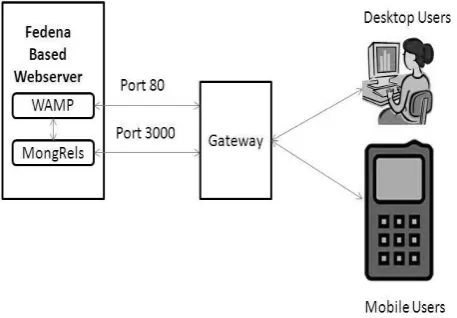
The entire system operating here is divided into two parts. One is the mobile application developed for android based handheld devices implemented only for the student user base while the other is the web application used to manage the data by the administrator. The system block diagram is as shown in figure 1. The intended user here connects to the remote web server running WAMP and Mongrels.
Figure 1: System Block Diagram
2.1 Android Architecture
Android is a free and open source software stack performing all tasks of operating system, consisting of Linux kernel, middleware libraries and applications [4]. Initially developed by Android Inc., financially backed and later acquired by Google, was released and maintained under open handset Alliance where more than 80 companies, from various sectors like service, semiconductors, software and many more, have joined hands together to maintain it [5, 6].
The Linux kernel manages resource allocation, hardware interaction; inter process communication like a general operating system is bound to do. The middleware libraries include a set of general library files to run the application. For example SQLite library to support database in the device itself. Figure 2 shows the architecture of android.
Figure 2: Android Architecture
The Dalvik Virtual Machine (DVM) is similar to Java Virtual Machine (JVM) used Java development platform except that it is optimized for performance factors like power and memory, two major constraints in mobile devices. JVM runs byte code and creates a single file for each class while DVM compiles all classes into single .dex file and executes it. The application framework layer provides support for the entire application and provides the entire API support for the applications to run. The application layer is the top most layer in the architecture that is responsible to store the actual application and interact with the user. The API to develop android based applications is available through Software Development kit (SDK) from Google. The standard IDE used is Eclipse in Java perspective. The application built to a .apk file which can be used to deploy the application into device and to test in the emulator.
2.2 Fedena Architecture
Fedena is a web based application developed in Ruby on Rails and deployed over Mongrel server. It is based on the typical Model-View-Controller architecture which is discussed in section 2.3. This architecture is further expanded to support our application as shown in the figure [7]. The view or the user interface isprovided to the user as a basic web page and can be accessed through any web browser. Therequestmade by the user generates HTTP request and sent to Apache server, which forwards the request to Mongrel server that
works as dispatcher and feeds the data to the controller. As in standard MVC architecture, the controller is responsible to display and retrieve the data from the user as well as retrieve and store data into the database through the model. The database management system initially used by the Fedena project is MySQL hosted on Mongrel server. As shown in the diagram the database has now been entirely shifted to MySQL hosted in WAMP server. Now the android application interacts directly with the database on Apache server through internet and retrieves the requested data from the server.
Figure 3: Extended Fedena architecture for Android
The entire operation now is handled through PHP and the Android application merely provides a user interface to retrieve the student information to be used to retrieve data from server and to display the records of students as available in the database.
2.3 Model-View-Controller Architecture
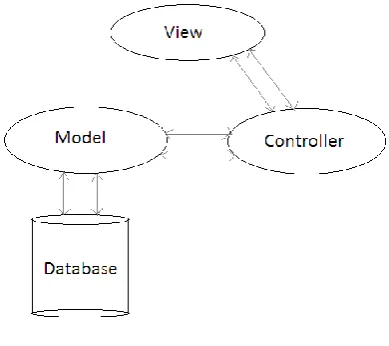
Figure 4: MVC architecture
the controller and relies on it to provide and manipulate all information. The controller and view interacts with each other for data manipulation. The controller interacts with the model to store and retrieve the data in database. Model is responsible for data handling in the DBMS. In the entire architecture, the controller interacts with both model and view and vice versa. But a view does not directly interact with model. All transactions between view and model are through controller only.
3.
WORKING
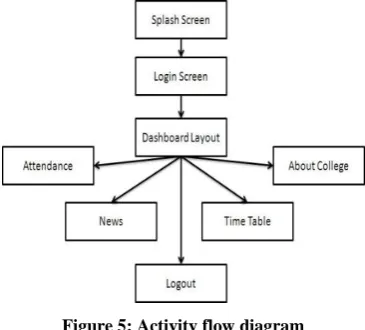
Like many other android application, our application also contains several activities. An activity is anything that a user sees. An activity can contain several views. Views are different elements that provide specific functionality to the user. All the views available to create UI are available as a class integrated in android library. The activity flow diagram for this application is as shown in the Figure 5.
Figure 5: Activity flow diagram
When the user launches this application, first screen that appears is a splash screen that is displayed for 5 seconds and then the user is automatically redirected to the login page. Upon successful login the user is sent to dashboard which gives the user an option to navigate to any other activity as shown in the flow diagram. The login page inputs username and password from the students. The username, by default, is the registration number of the student, as it always remains unique in the institute. The username and password is sent to the server for validation.
The Figure 6 shows the snapshot of the login screen validating the user credentials when the user clicks on Login button. The data retrieved from the user is sent to the server through POST method where the validation takes place through a PHP script invoked by the request. On successful login, user enters their account and dashboard activity appears which only displays icons of different modules user can access.
From Figure 7, dashboard activity is shown. This dashboard activity user can directly navigate to different modules.
Each of these modules invokes a PHP script on the server. The script for Login activity does not send large amount of data back to android application. Its purpose is only to validate the user credentials. Thus, the output of this script is only one single value and does not require any encoding to be done. For rest of the PHP scripts, except for the script invoked by the news activity as it is made general for all the students and are not specific to one student, username, which is the registration number of the student, is passed from the
individual activity invoking that script. Thus username as retrieved from login screen upon successful validation is passed along all the activities using Intent class in Android. All PHP scripts that are specific to the user, take admission number as input and retrieves corresponding data from server. This data needs to be send back to the android application to display it to the user. This is achieved by sending the entire data by encoding it to JSON format. Android provides several library classes to manipulate JSON array and retrieve the data as sent by the server.
Figure 6: Performing validation on login screen
Figure 7: User dashboard
Figure 8: Attendance module
Thus, in our application we assume that all the classes in the semester have happened and not more, then we count the number of days student has remained absent by the number of date entries have been found for a particular subject, and calculate the total percentage In each subject. As shown in the Figure 8, the attendance for every subject is shown in percentage in tabular format.
On the top of every activity, except for the dashboard activity, we have provided link to navigate back directly to dashboard in order to access the other modules. This is useful when the user would have navigated to multiple activities from the dashboard and would require several hits on back button to reach the dashboard. For convenience, every activity also implements menu from which the user can directly navigate to other modules and also logout.
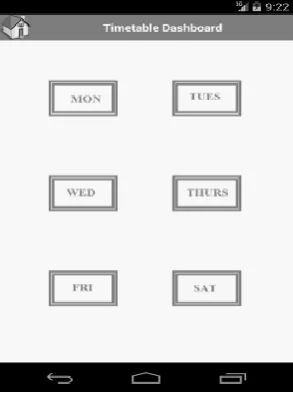
The time table module contains two different activities. The first activity is the time table dashboard activity that displays icons for all days of the week except for the Sunday as shown in the Figure 9. Upon picking up the particular date the timetable can be retrieved from the server and displayed on the activity as shown in Figure 10.
The user input for the day is taken from the user and send to server through POST method along with the username. The PHP script invoked retrieves the students’ batch number from the admission number, the corresponding time table schedule for that batch for the given input day and displayed in tabular format as shown in Figure 11.
Figure 11 shows the examination activity. The examination schedule module is similar to the time table activity except that it displays exclusively the exam time table. The name and code of the subject along with its starting date and time and ending time is displayed on the activity. Thus the student can know the exact time the exam starts and manage their time accordingly.
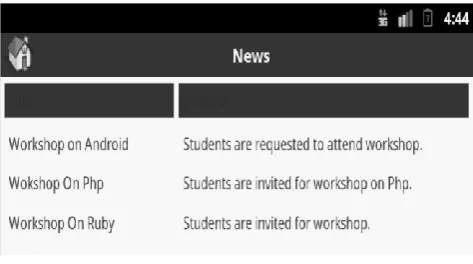
The news activity is different from the rest of the modules as it is not dependent on the user registration number. All the announcements have been assumed common to all the users. Thus the PHP script invoked through this activity does not take as input any information from the user and sends all the news detail to the application. The news activity is shown in Figure 12.
Figure 9: Time table dashboard
Figure 10: Time table display
Figure 11: Exam schedule
Figure 12: News display in application
4.
CONCLUSIONS
This application discussed here is based on the core module of Fedena, which also comes with higher modules with more features for school management system. Moreover this application only focuses on students as the user base. Foradian Technologies has developed a web based mobile app for Fedena which is available on all mobile devices through browser. However, that application requires internet connection even to login the app. As a future scope of this application we can store certain data in the device in order to still display information to student without the requirement of internet. Those will be only static information that will not change continuously. Moreover this application is currently beneficial for students providing only four modules. It can be expanded to include more modules and made capable of bringing other information like hostel management, fees management, etc. in the application. Also we can expand this application to make it available for administrator so some minor information can be updated in database directly from their android application.
5.
ACKNOWLEDGEMENT
Our Sincere thanks to Dr. Harishchandra Hebbar for providing great support from SOIS. The application is solely created a part of SOIS project.
6.
REFERENCES
[1] Smartphone market: Android extends gains on Apple, Windows Phone is third. The Economics Times. (2014, February 13). Retrieved from http://articles.economictimes.indiatimes.com/2014-02- 13/news/47305037_1_ryan-reith-market-share-smartphone-market
[2] Fedena. (n.d.). Retrieved from http://projectfedena.org/about
[3] Ruby Forge. (n.d.) Retrieved from http://rubyforge.org/projects/mongrel/
[4] Open Handset Alliance. (n.d.). Retrieved from http://www.openhandsetalliance.com/android_overview. html
[5] Elgin, Ben. (2005, August 17). Google Buys Android for its Mobile Arsenal. Retrieved from http://www.webcitation.org/5wk7sIvVb
[6] Open Handset Alliance. (2007, November 5). Industry Leaders Announce open Platform for Mobile Devices. (Press release). Retrieved from http://www.openhandsetalliance.com/press_110507.html