Network Programming in java
Lecture
Socket concepts
A B C X Y Z Mayur villa nirwan villa 2Socket concepts
A B C X Y Z Mayur villa nirwan villa I have to write letter to Mr. X. Nirwan Villa 3Socket concepts
A B C X Y Z Mayur villa nirwan villa I have to write letter to Mr. X.?
?
?
4Socket concepts
A B C X Y Z Mayur villa nirwan villa I have to write letter to Mr. X. Mr. X Nirwan Villa 5Socket concepts
A B C X Y Z Mayur villa nirwan villa I have to write letter to Mr. X. I got a letter. 6Computer networks
210.23.34.21 118.123.34.11 118.123.34.11?
?
?
7Solution
Port Number
Computer networks
210.23.34.21 118.123.34.11 118.123.34.11, 21 102 678 21 9Socket
IP address + Port Number
Well know port
Service Port Telnet 23 SMTP 25 DNS 53 HTTP 80 HTTPS 443Apple quick time 458
What is a socket?
• Socket
– The combination of an IP address and a port number. (RFC 793 ,original TCP specification)
– The name of the Berkeley-derived application programming interfaces (APIs) for applications using TCP/IP protocols.
– Two types
• Stream socket : reliable two-way connected communication streams • Datagram socket
• Socket pair
– Specified the two end points that uniquely identifies each TCP connection in an internet.
– 4-tuple: (client IP address, client port number, server IP address, server port number)
Host Guest Scenario
Host waiting for guest Receive Guest
Serve them
Client Server Scenario
Server waiting for client Receive request
Process client request
Request
Response
Network Application
•
You need to develop
–
Server
–
Client
Developing Server in java
1. Server program waiting for client request. 2. Client Server exchange information
3. Close the connection
Socket programming
•
Tcp/ip
–
Connection Oriented
•
Udp/ip
–
Connection Less
17Socket class
• Corresponds to active TCP sockets only!
– Socket(Client)
– socket returned by accept();
• Passive sockets are supported by a different class:
– ServerSocket(Server)
• UDP sockets are supported by
– DatagramSocket
JAVA TCP Sockets
• java.net.Socket
– Implements client sockets (also called just “sockets”).
– An endpoint for communication between two machines.
– Constructor and Methods
• Socket(String host, int port): Creates a stream socket and connects it to the specified port number on the named host.
• InputStream getInputStream() • OutputStream getOutputStream() • close()
• java.net.ServerSocket
– Implements server sockets.
– Waits for requests to come in over the network.
– Performs some operation based on the request.
– Constructor and Methods
• ServerSocket(int port)
• Socket Accept(): Listens for a connection to be made to this socket and accepts it. This method blocks until a connection is made.
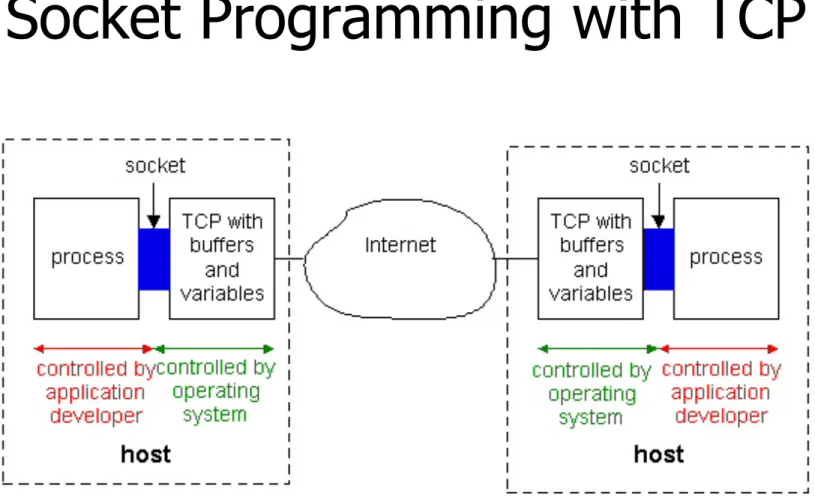
Socket Programming with TCP
Figure 2.6-1: Processes communicating through TCP sockets
The application developer has the ability to fix a few TCP
TCP Connection Oriented
Request for connectionOk connection Data Exchange Connection close request Connection closed 21
UDP-Connection Less
Data Exchange
TCP three way handshaking
12350 12349 12348 12347 12346 12345 23123 23122 23121 23120 23119 23118My data packet sequence start from 1234
SYN
I receiced your sequence number + My data packet sequence start from 23118
SYN + ACK
I have received your sequence number.
ACK
1
2
3
Creating server in java: Step1
ServerSocket sc=new ServerSocket(<Port Number>);
ServerSocket sc=new ServerSocket(1700);
One server is created.
Port number 1700 will be assigned to this server.
Hint: Can we change this port number
Creating server in java: Step2
Start Waiting for client
Socket so=so.accept();
Creating client in java: Step1
Socket so=new Socket(127.0.0.1,1700);
Client making request for connection.
If server running accept() method, then server allow request and
Connection will be established.
Socket so=new Socket(<ip address>,port);
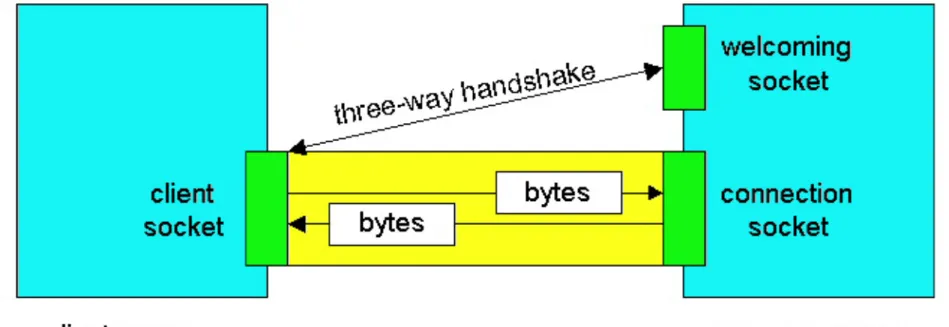
Sockets for server and client
• Server
– Welcoming socket
• Welcomes some initial contact from a client.
– Connection socket
• Is created at initial contact of client.
• New socket that is dedicated to the particular client.
• Client
– Client socket
• Initiate a TCP connection to the server by creating a socket object. (Three-way handshake)
• Specify the address of the server process, namely, the IP address of the server and the port number of the process.
Socket functional calls
• socket (): Create a socket
• bind(): bind a socket to a local IP address and port #
• listen(): passively waiting for connections
• connect(): initiating connection to another socket
• accept(): accept a new connection
• Write(): write data to a socket
• Read(): read data from a socket
• sendto(): send a datagram to another UDP socket
• recvfrom(): read a datagram from a UDP socket
Sockets
Socket-programming using TCP
TCP service:
reliable byte stream transfer
process TCP with buffers, variables socket controlled by application developer controlled by operating system process TCP with buffers, variables socket
internet
client server socket( ) bind( ) connect( ) socket( ) bind( ) listen( ) accept( ) send( ) recv( ) close( ) close( ) recv( ) send( ) TCPconn. request
TCP ACKSocket programming with TCP
Example client-server app:
• client reads line from standard
input (inFromUser stream) ,
sends to server via socket
(outToServer stream)
• server reads line from socket
• server converts line to
uppercase, sends back to client
• client reads, prints modified
line from socket
(inFromServer stream)
Input stream: sequence of bytes into process output stream: sequence of bytes out of processClient
process
client TCP socketClient/server socket interaction: TCP
wait for incoming connection request Socket conSocket = wc.accept() create socket, port=x, for incoming request: ServerSocket wc = new ServerSocket(x) create socket,
connect to hostid, port=x
Socket clientSocket = new Socket(server ip, port)
close
connectionSocket
read reply from
clientSocket
close
clientSocket
Server (running on hostid) Client
send request using
clientSocket
read request from
connectionSocket write reply to connectionSocket TCP connection setup 32
33
TCP Client/Server Interaction
Client
1. Create a TCP socket 2. Communicate
3. Close the connection
Server
1. Create a TCP socket 2. Repeatedly:
a. Accept new connection
b. Communicate
c. Close the connection
34
TCP Client/Server Interaction
Client
1. Create a TCP socket 2. Communicate
3. Close the connection
Server
1. Create a TCP socket 2. Repeatedly:
a. Accept new connection
b. Communicate
c. Close the connection ServerSocket servSock = new ServerSocket(servPort);
35
TCP Client/Server Interaction
Client
1. Create a TCP socket 2. Communicate
3. Close the connection
Server
1. Create a TCP socket 2. Repeatedly:
a. Accept new connection
b. Communicate
c. Close the connection for (;;) {
36
TCP Client/Server Interaction
Client
1. Create a TCP socket 2. Communicate
3. Close the connection
Server
1. Create a TCP socket 2. Repeatedly:
a. Accept new connection
b. Communicate
c. Close the connection Server is now blocked waiting for connection from a client
37
TCP Client/Server Interaction
Client
1. Create a TCP socket 2. Communicate
3. Close the connection
Server
1. Create a TCP socket 2. Repeatedly:
a. Accept new connection
b. Communicate
c. Close the connection Later, a client decides to talk to the server…
38
TCP Client/Server Interaction
Client
1. Create a TCP socket 2. Communicate
3. Close the connection
Server
1. Create a TCP socket 2. Repeatedly:
a. Accept new connection
b. Communicate
c. Close the connection Socket socket = new Socket(server, servPort);
39
TCP Client/Server Interaction
Client
1. Create a TCP socket 2. Communicate
3. Close the connection
Server
1. Create a TCP socket 2. Repeatedly:
a. Accept new connection
b. Communicate
c. Close the connection OutputStream out = socket.getOutputStream();
40
TCP Client/Server Interaction
Client
1. Create a TCP socket 2. Communicate
3. Close the connection
Server
1. Create a TCP socket 2. Repeatedly:
a. Accept new connection
b. Communicate
c. Close the connection Socket clntSock = servSock.accept();
41
TCP Client/Server Interaction
Client
1. Create a TCP socket 2. Communicate
3. Close the connection
Server
1. Create a TCP socket 2. Repeatedly:
a. Accept new connection
b. Communicate
c. Close the connection InputStream in = clntSock.getInputStream();
42
TCP Client/Server Interaction
Client 1. Create a TCP socket 2. Establish connection 3. Communicate4. Close the connection
Server
1. Create a TCP socket 2. Bind socket to a port 3. Set socket to listen 4. Repeatedly:
a. Accept new connection
b. Communicate
c. Close the connection
Connection-Client
import java.io.*;
import java.net.*;
class Client1
{
public static void main(String g[]) throws IOException
{
Socket s1=new Socket("localhost",9090);
System.out.println("connect");
}
}
Importing package required for input/output and socket programming
Server
import java.io.*;
import java.net.*;
public class Server1
{
public static void main(String g[]) throws IOException
{
ServerSocket ss=new ServerSocket(9090);
Socket s=ss.accept();
System.out.println("Connect");
}
}
Importing package required for input/output and socket programming
Start server Start waiting for client
How to exchange information?
Streams
Get a stream from socket and perform read/write operation on that stream.
sc.getOutputStream
();sc.getInputStream
();Reading from keyboard. Uses an input stream like
BufferedReader connected to System.in.
Sending data to the other system what is read from keyboard. Uses an
output stream like PrintWriter connected to getOutputStream() method of
Socket.
Receiving data from the other system. Uses an input stream like
Server
import java.io.*; import java.net.*
public class myServer {
public static void main(String[] args) throws IOException { ServerSocket listener = new ServerSocket(9090);
try {
Socket socket = listener.accept(); try {
PrintWriter out = new PrintWriter(socket.getOutputStream(), true); out.println(“Hello this is server”);
} catch(Exception e) { System.out.println(e); } } catch(Exception e) { System.out.println(e); } } }
DataOutputStream dos=new DataOutputStream(socket.getOutputStream()); dos.writeUTF(“Hello this is sever”);
Importing package required for input/output and socket programming
Start server Start waiting for client request.
Client
import java.io.*; import java.net.*; class myClient {
public static void main(String[] args) throws IOException {
Socket s = new Socket(“127.0.0.1”, 9090);
DataInputStream dis=new DataInputStream(s.getInputStream()); String answer=dis.readUTF();
System.out.println(“msg from server”+answer); System.exit(0);
} } }
49
Example: Java client (TCP)
import java.io.*;import java.net.*; class TCPClient {
public static void main(String argv[]) throws Exception {
String sentence;
String modifiedSentence;
BufferedReader inFromUser =
new BufferedReader(new InputStreamReader(System.in)); Socket clientSocket = new Socket("hostname", 6789);
DataOutputStream outToServer = new DataOutputStream(clientSocket.getOutputStream()); Create input stream Create client socket, connect to server Create output stream attached to socket
50
Example: Java client (TCP), cont.
BufferedReader inFromServer = new BufferedReader(new InputStreamReader(clientSocket.getInputStream())); sentence = inFromUser.readLine(); outToServer.writeBytes(sentence + '\n'); modifiedSentence = inFromServer.readLine();System.out.println("FROM SERVER: " + modifiedSentence);
clientSocket.close(); } } Create input stream attached to socket Send line to server Read line from server
51
Example: Java server (TCP)
import java.io.*; import java.net.*;
class TCPServer {
public static void main(String argv[]) throws Exception {
String clientSentence;
String capitalizedSentence;
ServerSocket welcomeSocket = new ServerSocket(6789);
while(true) {
Socket connectionSocket = welcomeSocket.accept();
BufferedReader inFromClient = new BufferedReader(new InputStreamReader(connectionSocket.getInputStream())); Create welcoming socket at port 6789 Wait, on welcoming
socket for contact by client Create input stream, attached
52
Example: Java server (TCP), cont
DataOutputStream outToClient =
new DataOutputStream(connectionSocket.getOutputStream());
clientSentence = inFromClient.readLine(); capitalizedSentence = clientSentence.toUpperCase() + '\n'; outToClient.writeBytes(capitalizedSentence); } } } Read in line from socket Create output stream, attached to socket
Write out line to socket
End of while loop, loop back and wait for another client connection
Problem
•
Communication can be seen by any person on
network.
•
Not secure
•
Can’t be used for sensitive information
exchange.
Port Scanner
•
Check for port range 0-65535. Is there any
port is open( any network application is
running on target machine or not)
Port scanner
import java.io.*;
import java.net.*;
class myClient
{
public static void main(String[] args) throws IOException {
try{
Socket s = new Socket(“128.10.100.2”, 6588);
System.out.println(Port is open”);
}
catch(Exception e)
{ System.out.println(“Port is not open”); }
}
}
Efficiency
•
Program only check whether 6588 port is
open or not.
•
Genarally we want to see how many ports are
open.
Port scanner
import java.io.*;
import java.net.*;
class myClient
{
public static void main(String[] args) throws IOException {
try{
Socket s = new Socket(“128.10.100.2”, 6588 );
System.out.println(Port is open”);
}
catch(Exception e)
{ System.out.println(“Port is not open”); }
}
}
For(int i=0;i<65535;i++) {
} i 57URL
import java.io.*;
import java.net.*;
public class URLDemo{
public static void main(String[] args){
try{
URL url=new URL("http://www.gmail.com");
System.out.println("Protocol: "+url.getProtocol());
System.out.println("Host Name: "+url.getHost());
System.out.println("Port Number: "+url.getPort());
System.out.println("File Name: "+url.getFile());
}catch(Exception e){System.out.println(e);}
}
IntelAddress
import java.io.*;
import java.net.*;
public class InetDemo{
public static void main(String[] args){
try{
InetAddress
ip=InetAddress.getByName("www.gmail.com");
System.out.println("Host Name: "+ip.getHostName());
System.out.println("IP Address:
"+ip.getHostAddress());
}catch(Exception e){System.out.println(e);}
}
Socket Programming with UDP
• UDP
– Connectionless and unreliable service.
– There isn’t an initial handshaking phase.
– Doesn’t have a pipe.
–
transmitted data may be received out of order, or lost
• Socket Programming with UDP
– No need for a welcoming socket.
– No streams are attached to the sockets.
– the sending hosts creates “packets” by attaching the
IP destination address and port number to each batch
of bytes.
– The receiving process must unravel to received
packet to obtain the packet’s information bytes.
Client/server socket interaction: UDP
close
clientSocket
Server (running on hostid)
read reply from
clientSocket
create socket,
clientSocket = DatagramSocket()
Client
Create, address (hostid, port=x, send datagram request
using clientSocket create socket, port=x, for incoming request: serverSocket = DatagramSocket()
read request from
serverSocket write reply to serverSocket specifying client host address, port umber
Example: Java client (UDP)
Output: sends packet (TCP sent “byte stream”) Input: receives packet (TCP received “byte stream”)Client
process
client UDP socketJAVA UDP Sockets
• In Package java.net
– java.net.DatagramSocket
• A socket for sending and receiving datagram
packets.
• Constructor and Methods
– DatagramSocket(int port): Constructs a datagram socket
and binds it to the specified port on the local host
machine.
– void receive( DatagramPacket p)
– void send( DatagramPacket p)
– void close()
UDPClient.java
import java.io.*;
import java.net.*;
class UDPClient {
public static void main(String args[]) throws Exception
{
BufferedReader inFromUser =
new BufferedReader(new InputStreamReader(System.in));
DatagramSocket clientSocket = new DatagramSocket();
InetAddress IPAddress =
InetAddress.getByName(“localhost");
byte[] sendData = new byte[1024];
byte[] receiveData = new byte[1024];
String sentence = inFromUser.readLine();
UDPClient.java
DatagramPacket sendPacket =
new DatagramPacket(sendData, sendData.length,
IPAddress, 9876);
clientSocket.send(sendPacket);
DatagramPacket receivePacket =
new DatagramPacket(receiveData, receiveData.length);
clientSocket.receive(receivePacket);
String modifiedSentence =
new String(receivePacket.getData());
System.out.println("FROM SERVER:" + modifiedSentence);
clientSocket.close();
}
}
UDPServer.java
import java.io.*;
import java.net.*;
class UDPServer {
public static void main(String args[]) throws Exception
{
DatagramSocket serverSocket = new
DatagramSocket(9876);
byte[] receiveData = new byte[1024];
byte[] sendData = new byte[1024];
while(true)
{
DatagramPacket receivePacket =
new DatagramPacket(receiveData, receiveData.length);
serverSocket.receive(receivePacket);
UDPServer.java
InetAddress IPAddress = receivePacket.getAddress();
int port = receivePacket.getPort();
String capitalizedSentence = sentence.toUpperCase();
sendData = capitalizedSentence.getBytes();
DatagramPacket sendPacket =
new DatagramPacket(sendData, sendData.length, IPAddress, port);
serverSocket.send(sendPacket);
}
}
}
Multithreading server
•
1. Create server (using ServerSocket class)
•
2. Start listening (calling accept method)
•
3. When a client request received, create a
new thread and in that thread pass socket
object.
•
4.Put all these three steps in a infinite loop.
Multithreading server
While(true)
{
ServerSocket ss=new ServerSocket(9999);
Socket so= ss.accept();
ClientHandler ch=new ClientHandler(so);
Thread th=new Thread(ch);
th.start();
}
Execution of chat server
C:/> java chatserver This is server 1.1 This is client 1.1
This server is not multithreading server Make this multithreading that is better
C:/> java chatclient This is server 1.1 This is client 1.1
This server is not multithreading server Make this multithreading that is better
Server cmd Client cmd
Chat Server
Chat Client
Create serversocket class object to make server. Call accept method
Make object of input and output stream.
Create socket class object. Make object of input and output stream.
Read from input stream and print.
Read from input stream and print it.
Read from user a string Write that string to output stream.
Read from user a string. Write that string to socket.
Creating Simple Web Server
www.google.com
Get / http1.1
Host:www.google.com
Accept: image/gif, image/jpeg Accept-language: En
User-Agent: Mozilla/4.0 Connection:keep-Alive
1