Text X-Ray: A Visual Text Analyzer for Language Teaching
“Text X-Ray is an excellent way to get students to become more engaged with their language learning.” – CF, Instructor, Hall County Alliance for Literacy, Gainesville, GA
Summary of Innovation and Learning Associated with Text X-Ray
Text X-Ray is a collaborative project between the Department of Computer Science (Dr. Ying Zhu) and the Department of Applied Linguistics and ESL (Dr. Eric Friginal) at Georgia State University. This program merges computer technology, natural language processing techniques, and approaches to language teaching and learning in developing an online text visualizer that can be used to raise learners’ awareness of lexico-syntactic structure of texts (and especially their own writing). The design of Text X-Ray takes into account teachers’ needs, focusing on content-based activities that can be applied to help students build academic vocabulary and analyze discipline-specific features of writing. Overall, pilot tests of Text X-Ray’s classroom applications from a range of users have yielded very positive feedback indicating learning gains from instructors’ perspectives. An informal survey of student use also suggested that the computer program contributed to students’ heightened awareness of grammatical features of texts prepared by their instructors.
Text X-Ray: A Visual Text Analyzer for Language Teaching (One-Page Description)
Ying Zhu, Department of Computer Science
Eric Friginal, Department of Applied Linguistics and English as a Second Language
There has been an on-going “buzz” focusing on the use of computational tools and corpora in language teaching, especially in university-level, data-driven writing instruction in academic writing classrooms across disciplines (Reppen, 2010). Tools such as Compleat Lexical Tutor, AntConc, and Word and Phrase have been used by writing instructors for various teaching applications across student levels and language backgrounds (e.g., native or non-native English speakers). However, Conrad (2007) noted that there are considerably more topics and areas to explore in corpus-informed writing research, including the successes or failures of innovative usage-based approaches. Additionally, while there have been advances in the development of part-of-speech (POS) taggers and parsers in the last 20 years, few have transferred well into the online, digital age for a majority of university-level writing programs in the United States (U.S.). In response to these teaching and research considerations, we have developed Text X-Ray: An online visual text analyzer for writing instruction that is intended to be used by students and instructors/researchers in analyzing the structure of academic writing in various settings.
Text X-Ray is a collaborative project between the Department of Computer Science and the Department of Applied Linguistics and ESL at Georgia State University. This program merges online technology, natural language processing techniques, and approaches to language teaching and learning in developing an online text visualizer that can be used to raise learners’ awareness of vocabulary and grammatical structure of texts (and especially their own writing). Text X-Ray’s beta version (accessible online from: http://www.cs.gsu.edu/yzhu/Documents/TextVis/launch.jnlp) works as a basic text editor with built-in applications such as a visualizer for various parts-of-speech tags (e.g., nouns, verbs,
prepositions), readability and lexical diversity measures, wordlist comparisons, and a word cloud
application. Another important feature of this program is its ability to compare normalized frequencies of linguistic features, e.g., word/phrasal classes, with those aggregated from advanced, A-graded student papers categorized primarily across disciplines and text types. (We have provided screenshots and descriptions of Text X-Ray’s basic applications in our Documentation file as part of our application packet.)
Currently, we have given access to Text X-Ray to a range of users, primarily graduate students and instructors at the Department of Applied Linguistics and ESL at GSU. Our on-going run of pilot classroom applications and usability testing includes users from various universities in the U.S. such as Iowa State University, Northern Arizona University, and University of California, Sacramento. We also have international users from the Philippines, Korea, and China. We have received very positive and encouraging user feedback from teachers, researchers and students over the last three semesters (see a summary of Teacher Feedback, Section 5 in our Documentation file). Graduate students who are
conducting corpus-based research have also used Text X-Ray to obtain POS-tags and readability measures for their corpus. In addition, instructors from GSU’s Intensive English Program (IEP) have developed lessons and activities for higher-level international students using Text X-Ray; Master’s students in a Technology and Language Learning course have created classroom activities making use of the features of this program for an audience composed of ESL/IEP teachers (see Section 6 of Documentation for two sample lessons). Two papers that featured Text X-Ray were presented at the Georgia TESOL Conference 2012 in Atlanta (October 17-18, 2012) and one will be presented at the American Association for Corpus Linguistics Conference 2013 in San Diego (January 19-20, 2013).
References
Conrad, S. (2007). Does training in corpus linguistics really affect teacher practices? Presentation at Georgia State University Applied Linguistics. Atlanta, GA.
Text X-Ray: A Visual Text Analyzer for Language Teaching
Why the innovation was thought to enable improved learning:
Recent advancements in the applications of technology in language teaching/learning, particularly with interactive corpus-based software and corpora, continue to produce a variety of materials/textbooks and data-driven classroom activities intended for a range of learners. Explorations into the usefulness of these tools for pedagogy are expanding with online technology and the availability of internet-based resources that are freely distributed to teachers and students. Text X-Ray, we believe, is a user-friendly tool that can be immediately used by teachers/instructors in various contexts of language teaching, especially in academic writing across disciplines (e.g., writing across the curriculum at GSU). Although lexico-grammar and writing instruction are the primary focal areas of its immediate applications, the software can also be used extensively and productively for small group peer-reviewing activities in writing or peer-editing dyads that are mediated by computer technology.
The design of Text X-Ray takes into account teachers’ needs and objectives focusing on content-based activities that can be applied to help students build academic vocabulary and analyze texts and especially their own writing. Student-directed comparisons of vocabulary/POS features of texts can be facilitated through Text X-Ray by analyzing academic word lists and grammar patterns from teacher-prepared focal writing excerpts. Activities utilizing Text X-Ray may help students develop greater awareness of grammar and usage across contexts. This approach can contribute to classroom energy, thus encouraging students to become autonomous learners and provide effective alternatives for students with different learning styles (i.e., Student-Driven Learning). Feedback from one of our pilot testers (below) illustrates these benefits:
MC, MA student/Literacy Workshops Instructor, GSU
It’s great to help students see how people write. I really like the feature about reader expectations. You could use that to discuss with students whether or not the topic is really stated at the beginning of sentences in a text (whether it be a student or expert paper), and if the new information is given at the end of a sentence. This gives students the
opportunity to analyze how we organize information in a text. How learning principles or theories were applied in the instruction:
Corpus-based approaches including POS visualizers have become popular in most teacher training programs such as the MA and PhD programs in Applied Linguistics at GSU, yet many active writing teachers/instructors, especially those who were trained before these technology-driven courses were common are still relatively unfamiliar with corpus tools and how they can be utilized to enhance classroom teaching (Snell & Larsson, 2011). It is clear, however, that the practical aspects of developing corpus-based activities in the writing classroom have been supported by recent research (e.g., Lee & Swales, 2006). We believe that Text X-Ray contributes a wealth of data and information for teachers and learners in providing an effective description of written texts across academic genres. This program combines features from available tools such as Compleat Lexical Tutor, Coh-Metrix, and Word and Phrase, with the addition of a more user-friendly interface that teachers can directly use in their classrooms to highlight academic genres. For example, the linguistic characteristics of writing which define specific sub-genres such as narrative, argumentative, analytical, or technical writing have been identified and explored by researchers essentially focusing on their descriptive and teaching applications. Results from corpus descriptions of genre-specific writing and the use of local learner corpora in writing research (Seidlhofer, 2002) have provided interesting insights into the uniqueness of these individual genres and have exposed the systematic patterns of word use, structure, and conventional lexical associations commonly employed by writers in the same field (Hyland, 2008). Intuitively, one might expect that knowledge gleaned from
corpus-based research which identifies features and systematic associations of language characteristic of writers in a particular field could aid the teaching of writing for specific purposes and writing across various disciplines. We have structurally developed Text X-Ray’s interface to match these and other language teaching (especially the teaching of writing in U.S. universities) concerns.
How the evidence of improved learning was attributed to the innovation
As mentioned in our one-page description of Text X-Ray, we have asked users in the last three semesters to pilot the software for various applications in their classrooms. Our goal for this beta version of the software is to obtain usability data from a limited release to enable us to develop and finalize the next set of tools that will significantly enhance the program’s capabilities and usefulness in the classroom. Overall, we have received very positive feedback indicating learning gains from teachers’ perspectives, as illustrated by a comment below from an instructor at Hall County Alliance for Literacy (Gainesville, GA). An informal survey of student usage also suggested that the program contributed to students’ heightened awareness of grammatical features of texts prepared by their instructors.
CF, Instructor, Hall County Alliance for Literacy, Gainesville, GA
Text X-Ray is a program that I could sit here and play with all day because I just think it’s cool that a program can pick out parts of speech in a selected text. I haven’t noticed any mistakes made by Text X-Ray yet, but I’m determined to stump it.
My first thought on using Text X-Ray in the classroom was as a sort of self-check device that the students could use in our technology room. My class is for beginners and we do go over the basic parts of speech, so by having students enter a pre-selected text into the program, having them pick out the nouns in the passage, and then checking their own accuracy with Text X-Ray is an excellent way to get students to become more engaged with their language learning.
Finally, instructors from GSU’s IEP, AL 3101 (“English Grammar in Use”), AL 8720 (“Corpus Linguistics”), and GSU Master’s students who completed the course “Technology and Language Learning” (AL 8620, Spring 2012) have created classroom activities making use of the features of this program intended for GSU students or an audience composed of ESL/IEP teachers. These activities successfully facilitated student-driven writing tasks which may lead to improved learning.
(Word Count, not including references and main heading: 1,000) References
Hyland, K. (2008). Make your academic writing assertive and certain. In J. Reid (Ed.), Writing Myths: Applying second language research to classroom writing (pp. 70-89). Ann Arbor: University of Michigan Press.
Lee, D., & Swales, J. (2006). A corpus-based EAP course for NNS doctoral students: Moving from available specialized corpora to self-compiled corpora. English for Specific Purposes, 25(1), 56-75.
Seidlhofer, B. (2002). Pedagogy and local learner corpora: Working with learning-driven data. In Granger S., Hung J. and Petch-Tyson S. (Eds.). Computer Learner Corpora, Second Language Acquisition and Foreign Language Teaching. Language Learning and Language Teaching 6 (pp. 213-234). Philadelphia: John Benjamins.
Snell, D. & Larsson, M. (2011). Enhance Your Teaching with Corpus Linguistics. Paper presented at the American Association for Corpus Linguistics Conference 2011, Atlanta, GA.
Text X-Ray: A Visual Text
Analyzer
for Language Teaching
Ying ZhuDepartment of Computer Science Eric Friginal
Department of Applied Linguistics and English as a Second Language Georgia State University
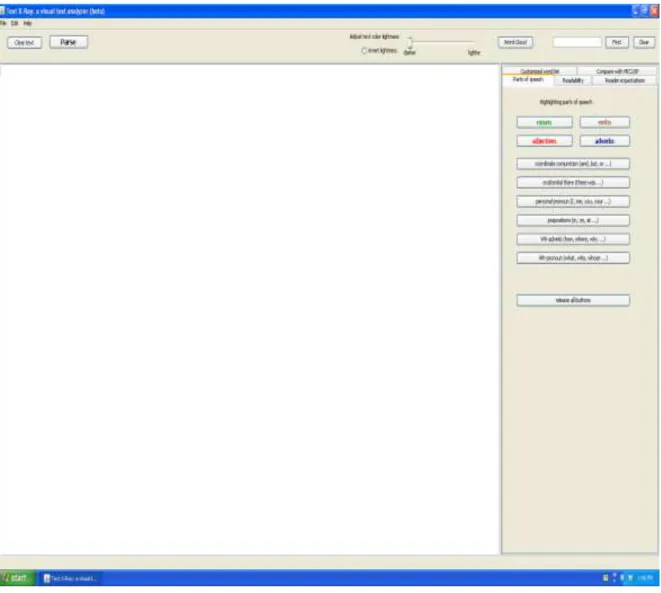
Figure1. A screenshot of Text X-Ray’s (beta) text editor page. The program is accessible online from: http://www.cs.gsu.edu/yzhu/Documents/TextVis/launch.jnlp
1. Overview
Text X-Ray is a product of collaborative work between the Department of Computer Science (Dr. Ying Zhu) and the Department of Applied Linguistics and English as a Second Language (Dr. Eric Friginal) at Georgia State University (GSU). This program merges computer technology, natural language processing techniques, and approaches to language teaching and learning to develop an online text visualizer that can be used to raise learners’ awareness of the vocabulary and grammatical structure of texts (and especially their own writing). Text X-Ray’s beta version <available at: http://www.cs.gsu.edu/yzhu/Documents/TextVis/launch.jnlp> works as a basic text editor with built-in applications such as a POS visualizer for various parts-of-speech tags (e.g., nouns, verbs, prepositions, etc.), readability and lexical diversity measures, wordlist comparisons, and a word cloud application. Another important feature of this program is its ability to compare normalized frequencies of linguistic features, e.g., word/phrasal classes, with those aggregated from the Michigan Corpus of Upper-level Student Papers (MICUSP). MICUSP is composed of advanced, A-graded student papers categorized primarily across disciplines and text types collected from University of Michigan (O’Donnell and Römer, 2012). Student-produced texts can be immediately compared with MICUSP data across disciplines, paper types, and student levels (including gender and native speaker vs. non-native speaker groups).
Currently, we have given access to Text X-Ray to a range of users, primarily graduate students and instructors at the Department of Applied Linguistics and ESL at GSU. Users are asked to pilot the software in various applications in their classrooms. Our pilot activities include users from various universities in the United States (U.S.) and also international users from the Philippines, Korea, and China. Our plan is to distribute Text X-Ray to a wider range of users in 2013. The beta version of this software is being examined for usability data from a limited release in order for us to develop and finalize the next set of improved tools that will significantly
enhance the program’s capabilities and usefulness. We are submitting a Cyber Learning National Science Foundation (NSF) grant application in December 2012 to secure funding for
programming Text X-Ray’s advanced features (see Section 4 for a summary of these features) and conducting large-scale research.
2. Rationale for Text X-Ray: Technology and Online Tools in the Writing Classroom Explorations into the usefulness of corpus tools for pedagogy are expanding with online technology and the availability of internet-based resources that are freely distributed to teachers and students. In general, vocabulary learning and the analysis of grammatical structures for different proficiency levels of language learners appear to be the more dominant foci of many online tools intended for classroom use (Bloch, 2010; Hinkel, 2002). Word lists such as the Academic Word List from Coxhead (2002) or Nation and Waring (1997) have shown university-level learners the importance of frequency data in how they can improve their writing across academic genres. Studies highlighting academic vocabulary for ESL learners in content-based language instruction (CBI) (e.g., Nesselhauf, 2003; Salsbury & Crummer, 2008) have
programs in the United States (U.S.). For example, Horst, Cobb, and Nicolae (2005) reported specific learning gains in vocabulary (transfer of word knowledge) that are attributable to the use of concordance programs and computer-based tools by language learners. A similar study by Chan and Liou (2005) showed how web-based concordancing instruction significantly helped students’ learning of verb-noun collocations. Innovative corpus tools that aid in the introduction of new words and word collocations help learners to improve their awareness of meanings and uses of words in various contexts. In addition, hands-on work with corpora has also facilitated successful learning of new vocabulary and students’ performance in tests and activities (Chan & Liou, 2005).
Many corpus-based activities in the teaching of grammar and sentence structure of English have also been used in the language classroom through pioneering endeavors such as the
COBUILD project (Gavioli, 2005). Biber, Johansson, Leech, Conrad, and Finegan’s (1999) seminal work in the Longman Grammar of Spoken and Written English (LGSWE) has brought significant corpus data and information that are propitious to pedagogy. From 2004 to 2010, new corpus-based textbooks that feature specific activities in teaching with corpora include Sinclair’s (2004) How to Use Corpora in Language Teaching; O’Keeffe, McCarthy, and Carter’s (2007) From Corpus to Classroom; Conrad and Biber’s (2009) Real Grammar: A Corpus-Based
Approach to English; Bennet’s (2010) Using Corpora in the Language Learning Classroom; and Reppen’s (2010) Using Corpora in the Language Classroom. These developments in
materials/textbook production in the classroom demonstrate that the combination of CBI, data-driven learning, and corpus tools contributes to the acquisition of vocabulary and grammar
especially in ESL classes in the U.S. We believe that Text X-Ray contributes a wealth of data and information for teachers and learners by providing an effective description of written texts across academic genres. This program combines features from available tools such as Compleat Lexical Tutor, Coh-Metrix, and Word and Phrase, with the addition of a more user-friendly interface that teachers can directly use in their classrooms to highlight and differentiate specific characteristics of various academic genres.
3. Features and Applications of Text X-Ray
Figure 2 below shows the primary text editor view of Text X-Ray and its current set of tools and command buttons:
File/Edit/Help – Standard application tools used to load (copy/paste) a text or obtain technical, help information
Clear Text – Button allowing users to clear/delete texts loaded on the text editor Parse – Command to run analysis
Visualizer for Text Color Lightness (darker or lighter) – Color lightness control Word Cloud
Search Bar (Find/Clear) Applications:
o Part of Speech
o Customized Word List o Compare with MISCUSP o Readability
o Reader Expectations
Figure 2. Primary text editor view of Text X-Ray (beta) and its current set of tools
Text X-Ray, in its most basic application, can show teachers/learners the use of particular parts of speech (e.g., nouns, verbs, adjectives, and adverbs) in a text.
If a specific objective in a course, perhaps a course in second language grammar for international students in the U.S., focuses on the use of a certain feature such as
‘existential there’, Text X-ray can provide a quick access to many potential examples for students to analyze (i.e., data-driven learning applications).
This feature can build awareness of a form’s construction and typical placement at
sentence-level, paragraph-level, and even entire composition-level writing. A color-coded visualizer helps users to focus on these ‘tagged’ features easily within the same text or group of texts (Figure 3).
Figure 3. Color-coded visualizer for part of speech (output) and readability measures
Text X-Ray could be used for research regarding the structure of writing students are producing across disciplines, genres of writing, school districts, grade levels, and even among different instructors teaching the same classes.
Text X-Ray provides several useful analyses on its readability tab, such as Flesh-Kincaid grade level and the ability to look at words with high (or low) numbers of syllables and sentences with high (or low) numbers of words.
Compiling classroom averages might be an indicator of the type of teaching task that is working best, or which instructors seem to be using the most effective teaching methods to produce quality writing.
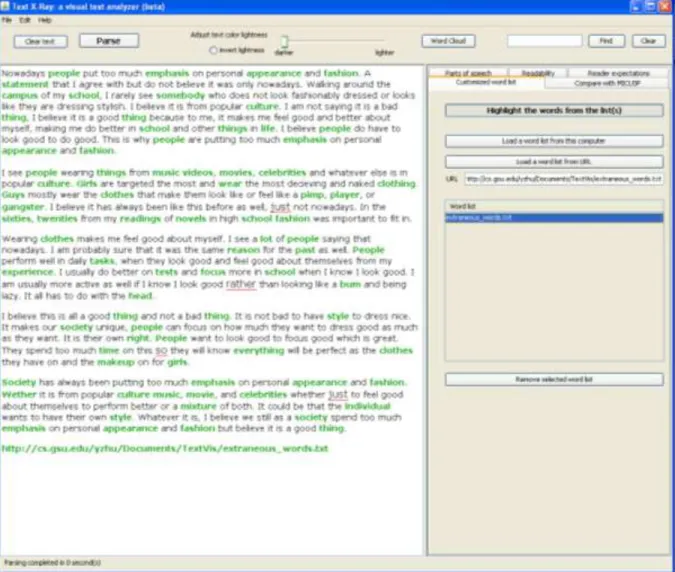
Figure 4. Customized word list output visualizer
Teacher/classroom research could be done to see if students are using vocabulary words learned in the course in their writing. By uploading a word list of vocabulary taught during the course and using the highlight feature, an instructor can see if students are actually internalizing these words and adding them to their personal writing lexicon.
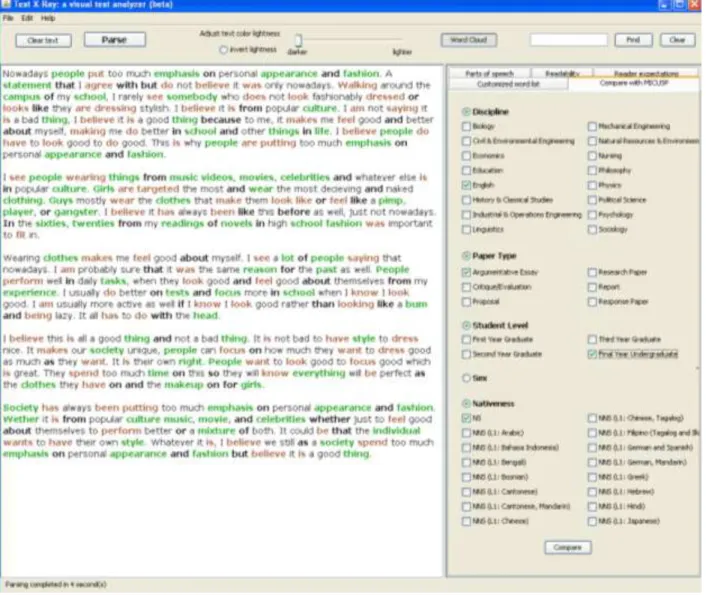
Figure 5. Comparison with A-graded papers from MICUSP
Not only can this feature provide an opportunity for students to closely examine their own work, but they are also able to compare the use of a certain form or structure to the use of the same form or structure in MICUSP.
The usage and construction of this same form could also be compared between MICUSP (written text) and a text which has been transcribed from an interview, television program, etc. (spoken texts), providing students in a writing classroom with examples of the form which are perhaps inappropriate for written text, or simply more common in spoken language.
A quick scan of a student's work by the teacher can indicate problem areas with grammatical forms which may need more attention in class. Text X-Ray is especially useful to teachers who are new to teaching writing, as they can compare what their students are producing to MICUSP if they are unsure about the standards in the quality of an “upper-level, A-graded” paper.
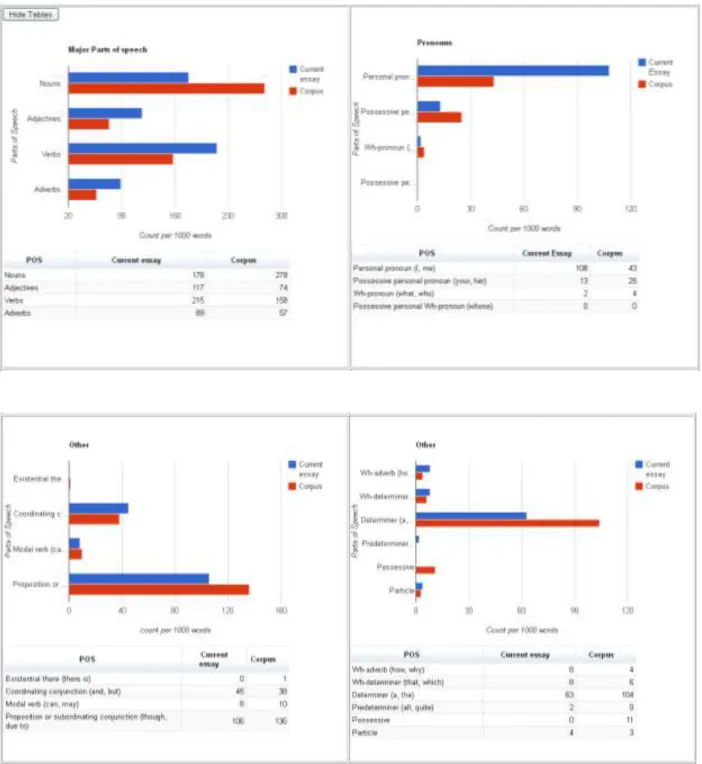
Figure 6. Sample MICUSP comparison output
Visualized comparison output of student paper and MICUSP averages (automatically obtained by clicking the “Compare” button under the “Compare with MICUSP” tab.
Figure 7. Word cloud output based on the frequency of words on the text/s loaded onto the program
4. Future Directions: Release of Text X-Ray v.1, Program Enhancements and Large-Scale Research
A list of program enhancements and large-scale research is provided below:
Incorporate user-activity tracking for students who use Text X-Ray in writing or revising their essays
Program mechanisms for users to upload their own target corpus (in addition to MICUSP) for comparison with another set of essays/texts
Add linguistic tag features including semantic categories, lexical features, and clausal/phrasal structures
Add more readability and writing complexity measures (e.g., type-token ratio, VocD, latent semantic indexing) for research applications
Improve program parsing/tagging speed
Conduct large-scale quantitative analysis of user-activity tracking data Conduct detailed qualitative case studies of teacher/classroom
Develop a dedicated website for access/download information Create help data and protocols for sharing results and datasets
5. Selected Teacher Feedback
We have collected teacher feedback on Text X-Ray as part of our exploratory usability research for this beta version. Below are selected qualitative comments:
CF, Instructor, Hall County Alliance for Literacy, Gainesville, GA
Text X-Ray is a program that I could sit here and play with all day because I just think it’s cool that a program can pick out parts of speech in a selected text. I haven’t noticed any mistakes made by Text X-Ray yet, but I’m determined to stump it. My immediate thought was to introduce this program to the other
instructors where I teach. Several were interested entering their students’ essays and comparing them to the MICUSP papers. The intermediate and advanced level teachers were interested in seeing if there was any notable difference between their students’ writing and the papers in MICUSP. I haven’t checked with any of them to see if they have had a chance to do this yet, but I think that there will most definitely be a difference between the papers because MICUSP handles academic papers at the collegiate level, while the papers at the Hall County Alliance for Literacy are mostly written by students who hope to get into the GED program or apply for citizenship. But, it would still be interesting to see what the MICUSP papers have that the ones written at HCA4L don’t have.
My first thought on using Text X-Ray in the classroom was as a sort of self-check device that the students could use in our technology room. My class is for
beginners and we do go over the basic parts of speech, so by having students enter a pre-selected text into the program, having them pick out the nouns in the
passage, and then checking their own accuracy with Text X-Ray is an excellent way to get the students more engaged with their language learning.
Another feature of the Text X-Ray that I could see myself using in the future for vocabulary purposes is the word list tab. Approximating word meaning from context is a very difficult task in any writing classroom, but if I were able to create a list of words that I think will be difficult for the students in my classroom from a specific passage of written text, and then use Text X-Ray to highlight the words in the passage, it would bolster class discussion of the context in which the words are used.
CM, Doctoral Student, GSU
I played with this program quite a lot and found many things that I liked about it. It’s user-friendly and straightforward. It goes beyond POS, giving information about readability and offering an opportunity to compare the user's sample with other corpora.
JX ,Visiting Scholar - China
Using Text X-Ray can highlight how native speakers of English use certain language forms, vocabulary items, and expressions. It offers students the use of authentic and real-life examples when learning writing which are better than examples that are made up by the teacher. It allow students to learn useful phrases and typical collocations they might use themselves as well as language features in context which means that students learn language in context and not in isolation. And it can help students get a broader view of language by comparison. By doing so, students become aware of lexical chunks that are useful when it comes to completing writing tasks. It helps teachers to demonstrate how vocabulary,
grammar, idiomatic expressions and pragmatic constraints with real-life language.
JH, ESL Teacher – Korea
What it can do to help students and teachers in the writing classroom?
Comparing with other concordancers, it is VERY user-friendly. I thought that I could use concordancers only when I prepare the class, but I thought I won't recommend students to use this kind of program before I saw the text x-ray. However, this test x-ray changed my thoughts. It is colorful and it is very easy to use. Without tagging, if students can find the nouns, verbs, and adjectives, I could use it when I teach verb valency to students. Since my interest is teaching
grammar using corpus, I mainly thought of the methodology that I can use for grammar teaching. Because of this visual recognition on the screen of Text x-ray, I think students' learning will last than simple rote memory.
MM, Instructor of Japanese, GSU Department of Modern and Classical Languages
Articles are hard to learn for Japanese learners of English since Japanese does not have articles. Texts with highlighted articles (a, an, the) can be used in the writing classroom as a focus on form activity.
Compare with MICUSP shows the comparison of frequency of major part of speech between corpus and the current essay. By focusing on article use, the program gives a clue to Japanese students if they supplied necessary articles. If their frequency of articles is much lower compared to a corpus, they can focus on articles when they proof read their essay.
Word Cloud – It might help students with writing a summary of a text. I remember when I was an undergraduate student, writing a summary in English was so difficult. Visual presentation of Word Cloud might be a useful
information.
CM, IEP Instructor, GSU
I can imagine Text X-Ray being very helpful to advanced EAP students who are practicing genre analysis, especially as more and more ELT writing instructors are attempting to empower students to become their own investigators of genre. The Text X-Ray tool would allow such students to determine for themselves the differences in say, nominalization, between academic texts and other types of writing.
In my experience, because of the tendency to associate writing skills with reading skills, a good deal of literacy practice in EAP programs is focused primarily on writing. Even though students may be reading a good deal for homework, there is little explicit instruction on how to approach a text or improve one's reading fluency and/or accuracy. Having taught an upper-level reading course in an ESL
program in the past, I certainly would have devoted class time to having students explore their assigned reading through Text X-Ray. For example, I may have begun by having students highlight the nouns and do a quick scan for nouns they already know (good for developing their scanning / skimming skills, as well). Which nouns do they recognize? Which are unfamiliar? Which come from verbs?
MC, MA student, GSU
It's great to help students see how people write. I really like the feature about reader expectations. You could use that to discuss with students whether or not the topic is really stated at the beginning of sentences in a text (whether it be a student or expert paper), and if the new information is given at the end of a sentence. This gives students the opportunity to analyze how we organize information in a text.
I also think that the customized word list tool could really help students to analyze if they're using academic language in their writing. They could base that off AWL or other vocabulary that has been discussed in the class so far. They could also use the part of speech color tagger to analyze what verbs the experts in their field are using. They can then compare all of their part of speech usage to MiCUSP which could be really helpful since these are upper-level student A papers. This has great potential in classroom. I would certainly use it once it was made available to the public.
6. Sample lessons/activities with Text X-Ray
Lesson A: Using Corpus Tools for Context-Based Grammar Lessons
Developed by: JooHyun Cun and Particia Ferguson
Context in Grammar Teaching
Any formal grammar instruction is more effective if it is discourse-based and context-based than if it is sentence-based and context-free (Celce-Murcia, 2006).
Learning transfer from reading tasks to grammatical points….which is context-based or discourse-context-based could be made more effective when teaching grammar in context than grammar in isolation (Mashhady, Manzuri, & Lotfi, 2011).
Lexical bundles in speech tend to be composed of verb phrase and clause fragments, while the bundles in writing tend to be composed of noun phrase and prepositional phrase fragments (Biber, Conrad & Cortes 2004).
Benefits in Using Corpus Tools
Allow teachers to customize lexical items within pedagogical contexts
Using context-consistent materials from corpora rather than random sentences provides learners realia for data-driven learning
Why Use X-Ray for a Context-Based Grammar Lesson?
Text X-ray allows teachers to teach context-based grammar points without tagging the corpus for part-of-speech.
Text X-ray has user-friendly interface which helps teachers to devise context-consistent teaching materials
Lesson Setting and Context
When teaching a novel in an ESL class for university-level international students, for example, The Road, written by Cormac McCarthy, the teacher can consider focusing on specific grammatical points (such as multi-word verbs) within the context of the story.
What are the multi-word verbs?
Multi-word verbs such as phrasal verbs, prepositional verbs, and phrasal prepositional verbs function as a single verb with some idiomatic meanings. The phrasal verbs and phrasal prepositional verbs are especially frequent in conversation and fiction registers, and the prepositional verbs are common across all registers (Biber, Conrad, & Leech, 2002).
Part 1: Instructions using Text X-ray
Follow the instructions below to investigate multi-word verbs in the novel, The Road.
1. Go to the Text X-ray applications page at:
2. Load the chapters you want to use into the software and click the verbs and
prepositions tabs together to visualize the verb phrases (Figure A).
3. This action produces highlighted verbs and prepositions as illustrated in Figure B.
4. Teachers can modify the text on the screen as needed for color lightness. 5. This feature of Text X-ray is especially useful in the creation of drill activities. 6. Develop discussion questions on the structure of highlighted verbs and
prepositions:
What patterns do you see from the highlighted verbs and prepositions in the text except?
How are verbs used in relation to prepositions?
What types of verbs were used by the author in this narrative excerpt? Can you identify their specific functions?
Caveat: Expanding your applications by using Text X-Ray will expose students to various uses of grammatical forms, concurrently minimizing your workload. Your task is to train the students by giving clear instructions in the use of these programs, and encouraging them to explore in order to gain autonomy in their language learning.
Lesson B: Classroom Application of Text X-Ray in High-Beginner or Low Intermediate English for Academic Purposes (EAP) Writing Courses
Developed by: Carol Floyd and Monique Pooni
For this learner population (high-beginner/low intermediate learners), Text X-Ray would be most effectively used as a tool for students to assess the level of
academic complexity in their writing.
We Suggest
Using Text X-Ray as part of self and peer evaluation process in a multi-draft writing assignment.
Why?
Students can use Text X-Ray as part of peer review to explore and evaluate each other’s work. Text X-Ray can help ESL learners develop their academic writing by identifying common patterns and allowing opportunity for growth in complexity at word and sentence-level.
How?
Instructors may develop a set of evaluation criteria to guide students in their peer review activity.
Choose appropriate context addressing the overall purpose of the lesson.
Evaluation guides include which tool the students should use and what they are looking for.
Students may enter each other’s work into Text X-Ray and evaluate based on criteria outlined by instructor. For example:
How to Use Text X-Ray? It’s Easy!
Step 1: Copy any text you want (articles, papers, blogs, etc.)
Step 2: Paste the text into the Text X-Ray program
Step 3: Play! Choose a tab you would like to work from on the right side of Text X-Ray.
Parts of Speech Tab: Highlight individual parts of speech. You can also control the brightness of the highlighted words with the slider at the top center of the
application.
Readability Tab: Lexical density calculator, reading level, reading ease score, and the highlighting tools for complex words and sentences
Parts of Speech Tool
Highlight the personalpronouns. Are personal pronouns appropriate for academic writing?
Highlight the verbs. Is the correct tense being
used? Agreement?
Highlight the articles. Are they being used
correctly?
Readability Tool
Check for academic complexity by highlighting complex words and sentences.(Here the instructor would provide the amount of syllables and
Reader Expectations Tab: Contains the highlighting tool for topic strings, and words in stress positions
Compare with MICUSP: Choose the paper type you wish to compare with the MICUSP Corpus
Customized Word List Tab: Copy and paste your own word list or one from the internet (AWL, for example) and then click “Highlight the words from the list.” You can also parse the text and create a word cloud by clicking the “Parse” or “Word Cloud” buttons at the top of the screen
Tips and Ideas
All files must be saved as plain text files to be opened in Text X-Ray Text X-Ray uses Java software
Upper level students may benefit from comparing their paper to the MICUSP Corpus. Teachers can also compare their students’ papers to MICUSP as a diagnostic tool.
Word Cloud is a good tool to use for creating a word list from a specific text.
Text X-Ray is relatively easy to use, but the students would benefit from a class session dedicated to working with Text X-Ray before they are given an assignment.
8. References
Bennet, G. (2010). Using Corpora in the Language Learning Classroom. Michigan: Michigan University Press.
Biber, D., Johansson, S., Leech, G., Conrad, S., & Finegan, E. (1999). Longman Grammar of Spoken and Written English. Harlow, Essex: Pearson.
Bloch, J. (2010). A concordance-based study of the use of reporting verbs as rhetorical devices in academic papers. Journal of Writing Research, 2 (2), 219-244.
Chan, T., & Liou, H. (2005). Effects of web-based concordancing instruction on EFL students' learning of verb-noun collocations. Computer Assisted Language Learning, 18(3), 231-250.
Conrad, S., & Biber, D. (2009). Real Grammar: A Corpus-Based Approach to English. New York: Pearson-Longman.
Coxhead, A. (2002). The academic wordlist: A corpus-based word list for academic purposes, in Kettemann, B., Marko, G. (Eds.), Teaching and Learning By Doing Corpus Analysis, (pp.73-89). Amsterdam: Rodopi.
Gavioli, L. (2005). Exploring Corpora for ESP Learning. Philadelphia: John Benjamins. Hinkel, E. (2002). Second Language Writers Texts: Linguistic and Rhetorical Features. New
Jersey: Lawrence Earlbaum Associates.
Horst, M., Cobb, T., & Nicolae, I. (2005). Expanding academic vocabulary with an interactive on-line database. Language Learning and Technology, 9(2), 90-110.
Nation, P. &Waring, R. (1997). Vocabulary size, text coverage, and word lists, in Schmitt, N., McCarthy. M. (Eds.), Vocabulary: Description, Acquisition and Pedagogy, (pp. 6-19). Cambridge: Cambridge University Press.
Nesselhauf, N. (2003). The use of collocations by advanced learners of English and some implications for teaching. Applied Linguistics, 24(2), 223-242.
O’Donnell, M. B. & Römer, U. (2012). ‘From student hard drive to web corpus (Part 2): The annotation and online distribution of the Michigan Corpus of Upper-level Student Papers (MICUSP)’, Corpora 7 (1), pp. 1-18.
O’Keeffe, A., McCarthy, M., & Carter, R. (2007). From Corpus to Classroom: Language Use and Language Teaching. Cambridge: Cambridge University Press.
Reppen, R. (2010). Using Corpora in the Language Classroom. Cambridge: Cambridge University Press.
Salsbury, T., & Crummer, C. (2008). Using teacher-developed corpora in the CBI classroom. English Teaching Forum, 2, 28-37.
Sinclair, J. (Ed.) (2004). How to Use Corpora in Language Teaching. Philadelphia: John Benjamins.