Access Tutorial 3: Relationships
3.1 Introduction: The advantage of
using tables and relationships
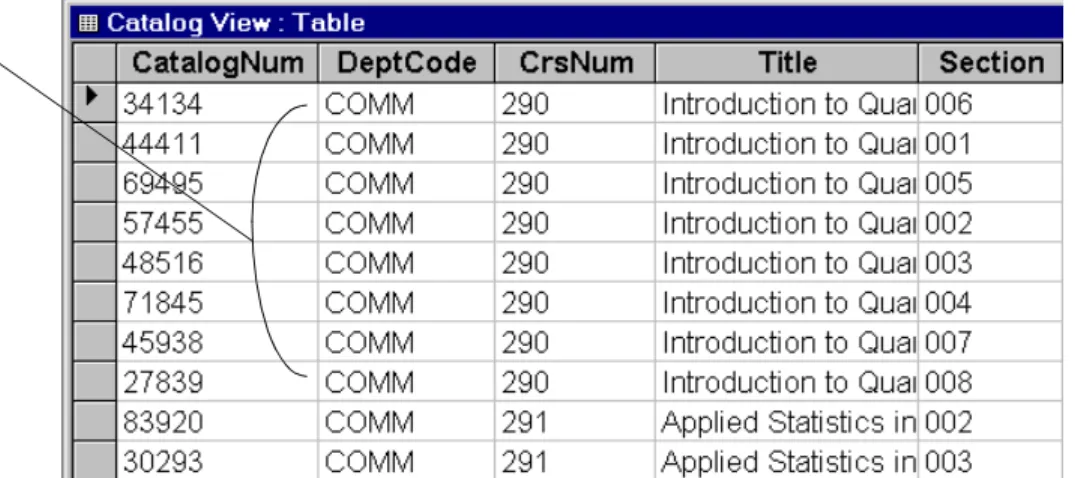
A common mistake made by inexperienced data-base designers (or those who have more experience with spreadsheets than databases) is to ignore the recommendation to model the domain of interest in terms of entities and relationships and to put all the information they need into a single, large table.Figure 3.1 shows such a table containing information about courses and sections.
• If you have not already done so, open the univ0_vx.mdb database.
• Open the Catalog View table.
The advantage of the single-table approach is that it requires less thought during the initial stages of application development. The disadvantages are too numerous to mention, but some of the most impor-tant ones are listed below:
1. Wasted space — Note that for COMM 290, the same basic course information is repeated for every section. Although the amount of disk space wasted in this case is trivial, this becomes an important issue for very large databases.
2. Difficulty in making changes — What happens if the name of COMM 290 is changed to “Mathe-matical Optimization”? This would require the same change to be made eight times. What if the person responsible for making the change for-gets to change all the sections of COMM 290? What then is the “true” name of the course? 3. Deletion problems — What if there is only one
section of COMM 290 and it is not offered in a particular year? If section 001 is deleted, then the system no longer contains any information about the course itself, including its name and number of credits.
Introduction: The advantage of using tables and
relation-3. Relationships
FIGURE 3.1: The “monolithic” approach to database design—the Catalog View table contains information about courses and sections.
The course “COMM 290” consists of many sections.
Each section has some information unique to that section (such as Time, Days, Building, Room); however, the basic course information (e.g., Title,
Credits) is the same for all sections of a particular course.
Introduction: The advantage of using tables and
relation-3. Relationships
4. Addition problems — If a new section is added to any course, all the course information has to be typed in again. Not only is this a waste of time, it increases the probability of introducing errors into the system.
3.1.1
“Normalized” table design
The problems identified above can be avoided by spitting the Catalog View table into two separate tables:
1. Courses— information about courses only 2. Sections — information about sections only. The key to making this work is to specify a relation-ship between Courses and Sections so that when we look at a section, we know which course it
belongs to (see Figure 3.2). Since each course can have one or more sections, such a relationship is called “one-to-many”.
Access uses relationships in the following way: Assume you are looking at Section 004 of
COMM 290. Since Dept and CrsNum are included in the Sections table, and since a relationship line exists between the same two fields in the Courses table, Access can trace back along this line to the Courses table and find all the course-specific infor-mation. All other sections of COMM 290 point back FIGURE 3.2: A one-to-many relationship between
Learning objectives
3. Relationships
to the same record in the Courses table so the course information only needs to be stored once.
3.2 Learning objectives
Why do I want to represent my information in multiple tables connected by relationships?
How do I create relationships in Access?
How do I edit or change relationships?
What is referential integrity and why is it important?
3.3 Tutorial exercises
3.3.1
Creating relationships between
tables
• Close the Catalog View table and return to the database window.
• Select Tools > Relationships from the main menu.
In version 2.0 the menu structure is slightly different. As such, you select Edit > Relation-ships instead.
• To add a table to the relationship window, select Relationships > Show Table from menu or press the show table icon ( ) on the tool bar.
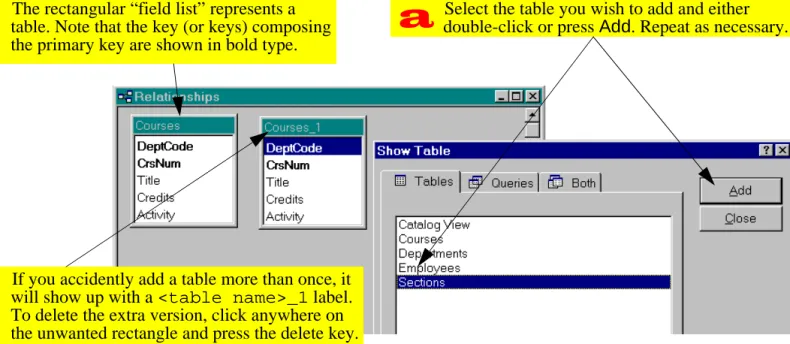
• Perform the steps shown in Figure 3.3 to add the Courses and Sections tables.
• Specify the relationship between the primary
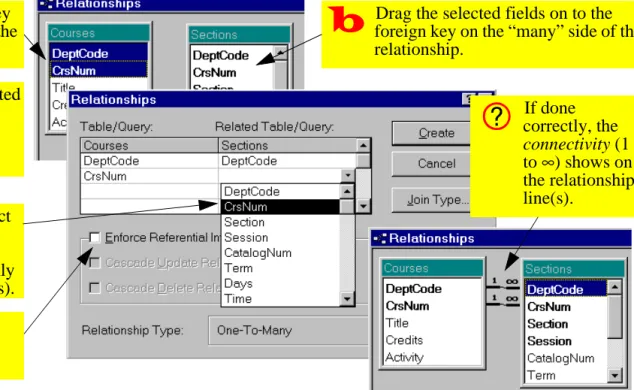
key in Courses and the foreign key in Sec-tions. This is shown in Figure 3.4.
Do not check cascading deletions or updates unless you are absolutely sure what they mean. See on-line help if you are curious.
Tutorial exercises
3. Relationships
FIGURE 3.3: Add the Courses and Sections tables to the relationship window.
Select the table you wish to add and either double-click or press Add. Repeat as necessary.
The rectangular “field list” represents a table. Note that the key (or keys) composing the primary key are shown in bold type.
If you accidently add a table more than once, it will show up with a <table name>_1 label. To delete the extra version, click anywhere on the unwanted rectangle and press the delete key.
Tutorial exercises
3. Relationships
FIGURE 3.4: Create a relationship between the two tables.
Select the primary key on the “one” side of the relationship.
To select a concatenated key (more than one field) hold down the Control key while selecting.
Drag the selected fields on to the foreign key on the “many” side of the relationship.
Ensure that the correct fields are associated with each other (this must be done manually for concatenated keys).
Check the box to enforce referential integrity.
If done correctly, the connectivity (1 to ∞) shows on the relationship line(s).Discussion
3. Relationships
3.3.2
Editing and deleting relationships
There are two common reasons for having to edit or delete a relationship:
1. You want to change the data type of one of the fields in the relationship — Access will not let you do this without first deleting the relationship (after you change the data type, you must re-create the relationship).
2. You forget to specify referential integrity — if the “1” and “∞” symbols do not appear on the rela-tionship line, then you have not checked the box to enforce referential integrity.
In this section, assume that we have forgotten to enforce referential integrity between Courses and Sections.
• Perform the steps shown in Figure 3.5 to edit the relationship between Courses and Sections.
Note that simply deleting the table in the rela-tionship window does not delete the relation-ship, it merely hides it from view.
3.4 Discussion
3.4.1
One-to-many relationships
There are three types of relationships that occur in data modeling:
1. one-to-one — A one-to-one relationship exists between a student and a student number. 2. one-to-many — A one-to-many relationship
exists between courses and sections: each course may consist of many sections, but each section is associated with exactly one course. 3. many-to-many — A many-to-many relationship
exists between students and courses: each stu-dent can take many courses and each course can contain many students.
Discussion
3. Relationships
FIGURE 3.5: Edit an existing relationship.
The missing “1” and “∞” symbols indicate that referential integrity has not been enforced.
Select the relationship by clicking on the joining line (click on either line if the key is concatenated). If you do this correctly, the line becomes darker.
With the relationship selected, right-click to get the edit/delete pop-up menu. If you do not get this menu, make sure you have correctly selected the relationship.
Discussion
3. Relationships
Although the data modeling technique used most often in information system
development—Entity-Relationship diagraming—permits the
specifica-tion of many-to-many relaspecifica-tionships, these relaspecifica-tion- relation-ships cannot be implemented in a relational database. As a consequence, many-to-many rela-tionships are usually broken down into a series of one-to-many relationships via “composite entities” (alternatively, “bridging tables”). Thus to implement the student-takes-course relationship, three tables are used: Students, Courses, and Student-TakesCourse.
3.4.2
Referential integrity
One important feature of Access is that it allows you to enforce referential integrity at the relationship level. What is referential integrity? Essentially, refer-ential integrity means that every record on the
“many” side of a relationship has a corresponding record on the “one” side.
Enforcing referential integrity means that you cannot, for instance, create a new record in the Sections table without having a valid record in the Courses table. This is because having a section called “BSKW 101 Section 001” is meaningless unless there is a course called “BSKW 101”. In addition, ref-erential integrity prevents you from deleting records on the “one” side if related records exist on the “many” side. This eliminates the problem of
“orphaned” records created when parent records are deleted.
Referential integrity is especially important in the context of transaction processing systems. Imagine that someone comes into your store, makes a large purchase, asks you to bill customer number “123”, and leaves. What if your order entry system allows you to create an order for customer “123” without
Application to the assignment
3. Relationships
first checking that such a customer exists? If you have no customer 123 record, where do you send the bill?
In systems that do not automatically enforce referen-tial integrity, these checks have to be written in a pro-gramming language. This is just one example of how table-level features can save you enormous pro-gramming effort.
Enforcing referential integrity has obvious implications for data entry: You cannot popu-late the “many” side of the table until you pop-ulate the “one” side.
3.5 Application to the assignment
• Specify all relationships—including referentialintegrity constraints—between tables in your sys-tem. You are not responsible for cascading updates/deletions in this assignment.
A primary key and a foreign key must be of the same data type before a relationship can be created between them. Because of this, it is important to remember that the autonumber data type (or counter in version 2.0) is really a long integer.
It never makes sense to have a relationship between two autonumber fields. A foreign key cannot be an autonumber since referential integrity constraints require it to take on a an existing value from a parent table.