AB Sciex Pte. Ltd. Blk 33, #04-06
Marsiling Ind Estate Road 3 Woodlands Central Indus. Estate SINGAPORE 739256
reproduction of this document or any part of this document is strictly prohibited, except as AB SCIEX may authorize in writing.
Software that may be described in this document is furnished under a license agreement. It is against the law to copy, modify, or distribute the software on any medium, except as specifically allowed in the license agreement. Furthermore, the license agreement may prohibit the software from being disassembled, reverse engineered, or decompiled for any purpose. Warranties are as stated therein.
Portions of this document may make reference to other manufacturers and/or their products, which may contain parts whose names are registered as trademarks and/or function as trademarks of their respective owners. Any such use is intended only to designate those
manufacturers' products as supplied by AB SCIEX for incorporation into its equipment and does not imply any right and/or license to use or permit others to use such manufacturers' and/or their product names as trademarks.
AB SCIEX warranties are limited to those express warranties provided at the time of sale or license of its products and are AB SCIEX’s sole and exclusive representations, warranties, and obligations. AB SCIEX makes no other warranty of any kind whatsoever, expressed or implied, including without limitation, warranties of merchantability or fitness for a particular purpose, whether arising from a statute or otherwise in law or from a course of dealing or usage of trade, all of which are expressly disclaimed, and assumes no responsibility or contingent liability, including indirect or consequential damages, for any use by the purchaser or for any adverse circumstances arising therefrom.
For research use only. Not for use in diagnostic procedures.
The trademarks mentioned herein are the property of AB Sciex Pte. Ltd. or their respective owners.
AB SCIEX™ is being used under license. © 2013 AB Sciex Pte. Ltd.
Chapter 1 Introduction . . . 7
Support . . . .7
How to Use These Release Notes . . . .7
Chapter 2 Enhancements and Fixes . . . 9
New Enhancements and Fixes in Analyst 1.6.2 Software . . . .9
New Features and Enhancements . . . .9
Fixed Issues . . . .10
New Enhancements and Fixes in Analyst 1.6.1 Software . . . .13
New Features and Enhancements . . . .13
Fixed Issues . . . .14
New Enhancements and Fixes in Analyst 1.6 Software Components for 6500 Series Instruments . . . .15
New System Features . . . .15
Fixed Issues . . . .18
Known Issues and Limitations . . . .19
New Enhancements and Fixes in Analyst 1.6 Software . . . .21
New Enhancements and Fixes in the Analyst 1.5.2 Software with HotFixes to February 2011 . . . .25
AAO and Companion Software . . . .25
Acquire — Acquisition and Batch Editor . . . .26
Configure — Hardware Configuration . . . .26
Explore . . . .27
Explore — Library Search . . . .27
Firmware Files . . . .28
Help Files and Tutorials . . . .28
Quantitate . . . .28
Scripts . . . .29
Program Shortcuts . . . .29
Device Support . . . .30
New Enhancements and Fixes in the Analyst 1.5.1 HotFix . . . .30
Acquire . . . .30 Quantitate . . . .30 Security . . . .31 Fixed Issues . . . .31 Acquire . . . .31 Security . . . .32 Quantitate . . . .32
New Enhancements and Fixes for the Analyst 1.5.1 Software . . . .32
Configure — Hardware Configuration . . . .34
Acquire — Acquisition and Batch Editor . . . .34
Tune and Configure . . . .35
Quantitate . . . .35
Compatible Software . . . .35
Acquire — Acquisition and Batch Editor . . . .36
Acquire — Information Dependent Acquisition (IDA) and IDA Method Wizard . . . .38
Quantitate . . . .39
Other . . . .41
New Enhancements and Fixes in the Analyst 1.5 Components for 5500 Systems . . . .41
Acquire — Acquisition and Batch Editor . . . .41
Other . . . .42
Notes on Use . . . .42
New Enhancements and Fixes in the Analyst1.5 Software and the Analyst 1.4.2 HotFixes . . . .43
Audit Trail . . . .43
Acquire — Acquisition and Batch Editor . . . .45
Tune and Calibrate . . . .46
Explore . . . .46
Quantitate . . . .46
Peripheral Devices . . . .48
Other . . . .49
Chapter 3 Notes on Use, Known Issues, and Limitations . . . 53
Guidance for Antivirus and Backup Software . . . .53
Guidance on File Encryption . . . .53
Audit Trail . . . .54
Configure — Administration/Security . . . .55
Configure — Hardware Configuration . . . .56
Configure — Acquisition Method Editor . . . .57
Tune and Calibrate — Compound Optimization . . . .58
Tune and Calibrate — Instrument Optimization . . . .58
Tune and Calibrate — Manual Tuning . . . .60
Acquire — IDA and IDA Method Wizard . . . .62
Acquire — Method / Batch Editor/Queue Manager . . . .64
Acquire — Scheduled MRM Algorithm . . . .69
Acquire — Network Data Acquisition . . . .70
Explore . . . .72
Explore — Library Search . . . .75
Explore — WIFF Data File . . . .76
Quantitate . . . .76
Analyst Software Reporter . . . .81
Installer . . . .82
Other . . . .82
Compatible Software . . . .83
Scripts . . . .84
Peripheral Devices . . . .86
CTC PAL / Leap Devices . . . .86
Shimadzu Devices . . . .88
LC Packings Devices . . . .91
DAD Devices . . . .91
Chapter 4 21 CFR Part 11 Compliance. . . 95
Appendix A Programs and Utilities . . . .97
Appendix B Technical Information Regarding Integration . . . .99
Integration Issue Addressed in the Analyst® 1.4.2 Software . . . .99
1
Thank you for choosing AB SCIEX to supply your LC/MS/MS system. We are pleased to give you the Analyst® 1.6.2 software, the most comprehensive LC/MS/MS software package available. The Analyst® 1.6.2 Software Release Notes describe the many new features introduced in the Analyst 1.6.2 software, as well as workarounds for possible issues. Use these release notes for reference as you become familiar with the software, and for future reference. For installation and software compatibility information, see the Analyst® 1.6.2 Software Installation Guide.
Support
At AB SCIEX, we are committed to providing the highest level of support for our Analyst software users. To obtain answers to questions about any of our products, report problems, or suggest improvements, visit www.absciex.com. For on-site service, support, and training, visit www.absciex.com/FAQ or www.absciex.com/training.
How to Use These Release Notes
To help you understand what is new and what is fixed relative to your current Analyst software version, the Analyst 1.6.2 software release notes have been structured so that you only have to read the sections that are relevant to you.
Read New Enhancements and Fixes in Analyst 1.6.2 Software on page 9 of the release notes and then also read up to and including the section describing the software version you are upgrading from.
Everyone should read Notes on Use, Known Issues, and Limitations on page 53, as this section applies specifically to issues that are known in the Analyst 1.6.2 software.
Note: For reference, the name of the software patch or HotFixes release where the issue was previously fixed is included.
Note: The numbers in brackets are reference numbers to each issue or feature in our internal tracking system.
2
New Enhancements and Fixes in Analyst 1.6.2
Software
New Features and Enhancements
Added support for Windows 7 (64-bit) operating system (OS)
The Analyst® 1.6.2 software now supports Windows 7 (64-bit) SP1 OS and it continues to support Windows 7 (32-bit) SP1 and Windows XP SP3 operating systems.
Added support for all mass spectrometers
The Analyst 1.6.2 software supports all current triple quadrupole and QTRAP® instruments including support for SelexION™ technology on the 5500 and 6500 series of instruments.
New Scheduled MRM™ Pro Algorithm
The Scheduled MRM Pro algorithm offers enhancements that improve flexibility and data quality for users who monitor large numbers of transitions per experiment.
Added support for MS Office 2013 for the Reporter 3.2 Software
The Reporter 3.2 software included with the Analyst 1.6.2 software can now print reports using MS Office 2007, 2010, or 2013.
New cable-free synchronization mode for autosamplers using AAO
A new synchronization mode has been added to the Method Editor to allow autosampler synchronization without the use of the AUX I/O cable. This is only applicable to AAO-controlled devices with drivers supporting this synchronization mode.
New firmware for 4500, 5500, and 6500 series instruments
The firmware for the 4500, 5500, and 6500 series of instruments has been harmonized into a single version. It also supports SelexION technology on the 5500 and 6500 series instruments. There are no changes that affect data or data quality. For information on how to upgrade the firmware of your mass spectrometer, refer to the Installation Guide for the Analyst 1.6.2 software.
Change to inter-scan operation for MRM Scheduled™ MRM Algorithm scans
A change has been made to inter-scan timings for the 4500 and 6500 series of instruments. The changes provide improved signal stability and reduce crosstalk in all scans included those using SelexION™ technology. In some cases signal intensity might increase slightly. (AN-238)
Target Scan Time was incorrectly applied for methods with two Scheduled MRM
Algorithm experiments
When a method was created with two Scheduled MRM™ algorithm experiments, if the user specified differing target scan times for each Scheduled MRM algorithm experiment, the software would apply the scan time of the second experiment for both. This has been corrected, and each experiment will use the target scan time assigned in the method. (AN-155)
Cycle time calculation changed for methods with two Scheduled MRM Algorithm
experiments
When creating a method with two Scheduled MRM algorithm experiments, the Analyst software now optimizes the cycle time which might result in dwell times being calculated lower than in previous releases. As a result, users running a method that was also run previous to the Analyst 1.6.2 software might now notice more data points being collected in the same period of time. (AN-155)
Documentation Changes
The Analyst 1.6.2 software does not include Ion Source Guides and Site Planning Guides. Ion source guides are now delivered with the ion sources, and the Site Planning Guides are available on the AB SCIEX Web site, http://www.absciex.com/downloads/mass-spectrometry-user-guides.
Retention time up to two decimal places is now displayed in saved Scheduled
MRM Algorithm methods opened in the Analyst 1.6.2 software
The Analyst 1.6.2 software allows the user to enter a value with two decimal places in the Time (min) column. This value is used for acquisition and is displayed in File Info. When the saved
Scheduled MRM algorithm method was opened in the Acquisition Method Editor, retention time values entered with two decimal places were only displayed up to one decimal place in the Time (min) column. This issue has been corrected and now retention time up to two decimal places is displayed. (AN-221)
Fixed Issues
Data files were being saved in the wrong data file during network acquisition
In very rare cases, when acquiring to network locations it was possible for data to be stored in the wrong data file. This has been corrected. (AN-25)Certain character combinations could cause acquisition issues
When acquiring data, the Analyst software was unable to acquire properly if the data folder had certain character combinations in the name. This would lead to failed acquisitions. The issue has been corrected. (AN-24)
Reporter — Users could create and print report for the Results Table that was
changed but not saved
Previously, users could print Results Tables that contained unsaved changes, using the Reporter software. The behavior of the Analyst software has been changed and now the software displays a message prompting the user to save the changes in the Results Table before printing the report. (AN-231)
Analyst
®1.6 Patch for Agilent G4234 Column Selection Valve
The Analyst® 1.6 Patch for Agilent G4234 Column Selection Valve adds support for the G4234 Column Selection Valve when installed in the Agilent 1290 G1316C Thermostatted Column Compartment. This patch functionality is included in the Analyst 1.6.2 software. (AN-10)
GS2 parameter remains editable when IonDrive™ Turbo V Ion Source is being
used
Previously, the GS2 parameter was editable when the IonDrive Turbo V Ion Source was used with the APCI probe on the 6500 series of instruments, but no gas was actually applied. This issue has been corrected, and the GS2 parameter is greyed out when the IonDrive Turbo V Ion Source with APCI probe is used on the 6500 series of instruments. (AN-40)
Reports generated using the Reporter software do not display the names of the
4500, 5500, and 6500 series instruments
The reports generated using the Reporter software were not displaying the instrument name for data acquired with the 4500, 5500, and 6500 series instruments. This issue has been corrected. (AN-17)
Analyst
®1.6.1 Patch for Empty Password Issue added in Analyst 1.6.2 Software
The Analyst® 1.6.1 Patch for Empty Password Issue fixed an issue in which entering a ‘blank’ password into an e-signature window after entering the correct password would cause the Analyst service to crash. This patch functionality is included in the Analyst 1.6.2 software. (AN-30)Analyst
®1.6.1 Patch for Agilent Devices
The Analyst® 1.6.1 Patch for Agilent Devices added support for acquisition with the Agilent Series 1260 G1329B (Standard) autosampler. It also provided a fix for hardware profile activation failure with the Agilent Series 1200 G1315C DAD. The G1315C DAD can now be activated successfully and used for acquisition. (AN-26)
Log-on User field in File Info displays N/A in Windows 7 OS
When a user submitted a batch and closed the Analyst software before acquisition was
completed, the File Info of samples acquired after the software was closed displayed N/A in the Log-on User field in File Info. This issue only existed on Windows 7 and has been corrected. (AN-47)
Calculated Concentration values were not updated if Dilution Factor for Standard
was set to zero in the Results Table
If the Dilution Factor for the Standard was set to zero, the values in the Calculated Concentration field were not being updated in the Results Table. This issue has been corrected. (AN-51)
Network Acquisition could cause checksum failure
When running a network acquisition with datafile checksums enabled, the checksum of the acquired network datafile is verified at the end of the batch. As part of this verification, the datafile must be opened. However, if the local cache file has not been copied to the network yet, the open
operation will fail and lead to an invalidation of the checksum. This issue has been corrected. (AN-83)
Report still generated when Cancel was selected in eSignature dialog
When the Reason Prompt and E-Signature check boxes were selected for the Printing document on printer event in the Audit Map editor, and a report was printed from a Results Table, the report was still generated even when Cancel was pressed in the eSignature window. This issue has been fixed. (AN-129)
Checksum validation added in quantitation
During quantitation, when the user selects a sample to add using the Add/Remove samples, the software verifies whether the checksum is enabled and if the .wiff file has a valid checksum. If the checksum is invalid, then a message is shown informing the user and the file is not used for quantitation. (AN-156)
Checksum validation added before running a sample
If the user tries to acquire a sample to a .wiff file with an invalid checksum, then that sample is aborted, and an error message is shown. The batch continues to the next sample. If all of the samples in the batch are stored in the same wiff file, then the rest of the batch is aborted, sample by sample. When the checksum validation fails, an audit trial entry is entered in the project section of the audit trail. (AN-156)
Checksum validation added in Manual Tune
In Manual Tune, when the user tries to acquire manual tune data to a data file with an invalid checksum, the checksum validation fails. When the checksum validation fails, an audit trail entry is entered in the project section of the audit trail. (AN-156)
Checksums may be invalid or not written at all if acquisition to a network location
is aborted
If an acquisition with datafile checksums enabled to a network location is aborted due to an instrument or device fault, the resulting file might have either an invalid or no checksum recorded. In general, failed or aborted samples should not be used for data analysis, as the conditions leading to the failure may result in improper or incomplete data being collected. This issue has been fixed. (AN-188)
Audit Trail archive can be lost during archival process over the Network
When the audit trail file (project.atd) reaches 1000 records, it will be archived. If the root project is located on a network drive, the audit trail archive can be lost if connectivity to the network is lost during the archiving process. This issue has been corrected. (AN-184)
File Information shows incorrect units/values for Total Scan Time field in a
Scheduled MRM Algorithm method
The File Information of a .wiff file generated using a Scheduled MRM algorithm method displayed the value and unit of the Target Scan Time field incorrectly as 1000 sec instead of 1000 msec or 1 sec. This issue has been corrected. (AN-190)
The MRM3 Optimization script is not supported on Windows 7
For Windows 7 users, using the MRM3 Optimization script causes the AnalystService to stop responding. This script is not supported for Windows 7. This issue has been corrected. (ST 33878)
New Enhancements and Fixes in Analyst 1.6.1
Software
New Features and Enhancements
4500 Series Instrument support
The Analyst 1.6.1 software adds support for the following new instruments: • AB SCIEX QTRAP® 4500 system
• AB SCIEX Triple Quad™ 4500 system
Shimadzu SIL-30ACMP and CTO-30AS
The Analyst 1.6.1 software adds support for the Shimadzu SIL-30ACMP autosampler and CTO-30AS column oven.
Method Converter for the 4500 Series of Instruments
The Method Converter script has been updated to allow conversion of existing methods to be used on the 4500 Series of instruments. In addition, several enhancements and improvements have been made to the script to address various issues. Refer to the Fixed Issues section for more information.
New firmware available for 5500 instruments
The firmware for the AB SCIEX QTRAP 5500 and AB SCIEX Triple Quad 5500 systems has been upgraded. The new firmware addresses an issue where some mass spectrometers would reset if the acquisition queue was aborted while the system was in the equilibration state. There are no changes that affect data or data quality. For information on how to upgrade the firmware of your mass spectrometer, refer to the Installation Guide for the Analyst 1.6.1 software.
Documentation Changes
Combined Hardware- and Software-Specific Information for 4500 Series of
Instruments into a Single Guide
All the hardware- and software-specific information for the 4500 series of instruments has been combined into a single guide called the 4500 Series of Instruments System User Guide. The guide also contains basic information for setting up and using the Analystsoftware to create methods, acquire samples, and analyze data. This System User Guide replaces the Getting Started Guide for the 4500 series of instruments. The Getting Started Guide is still applicable to instruments other than the 4500 series of instruments.
Advanced User Guide
A new guide called the Advanced User Guide has been created. It contains all the advanced information needed to set up and use the Analyst software to create methods, acquire samples and analyze data. This guide replaces the Software Reference Guide.
Updated Reference Tables
The calibration reference tables have been updated in the Analyst 1.6.1 software. The changes are only applicable to the 4000 and 4500 series of instruments. Existing calibration reference tables will not be updated.
When installing a new 4500 series instrument, the FSE will install the new calibration reference tables.
Fixed Issues
Corrected MRM Optimization script issue on the Windows 7 operating system
Occasionally when running the MRM Optimization script on the Windows 7 operating system, the script would stop responding during the optimization process. This issue has been fixed and the script now runs to completion. (TT 33878)Unable to extract Multiple XICs to stacked panes
In the Analyst 1.6 software, if users attempted to extract multiple ion chromatograms to individual panes, only one pane would contain an XIC; the rest would be blank. This issue has been corrected and the Extract XIC functionality has been restored. (TT 34196)
Method duration may be calculated incorrectly
When calculating the expected duration of multi-period mass spectrometer acquisitions or acquisitions with polarity switching, there may have been a mismatch between the calculated number of cycles and method duration. As a result, acquisitions may have appeared to end early. There was no data lost as the number of cycles acquired was correct — the defect was graphical. This has been corrected and the expected duration now matches the calculated number of cycles. (TT 34541)
Method Converter
Several defect fixes have been implemented in the Method Converter script for the Analyst 1.6.1 software:
• Users were unable to convert AB SCIEX Triple Quad™ 5500 system methods to the API 4000™ or API 5000™ system methods.(TT 34543)
• Various user interface corrections, such as spelling, punctuation, and so on.
• When converting MCA methods, the “Number of Scans to Sum” parameter was not transferred to the converted method. (TT 34788)
Column Oven Parameters Help topic updated
Maximum/Minimum DP values for the 5500 instruments in Compound Optimization
was showing +/- 400 instead of +/- 300
When running the Compound Optimization routine, the reports were incorrectly showing the Declustering Potential (DP) for the 5500 series of instruments as +/- 400 instead of +/- 300. This issue has been corrected and the limits now show properly. (TT 34909)
No message displayed for source change when method editor active
The Analyst 1.6 software introduced a change that inadvertently removed the user message when the source was removed or replaced while an acquisition method was open. This issue has been addressed, and users will again see a message if the source is removed. (TT 34919)
Scheduled MRM™ Algorithm: Unable to save method if RT < Half Detection
Window
The Analyst 1.6 software introduced a requirement that retention times for ions in Scheduled
MRM™ algorithm methods had to be less than half of the user-set detection window. In response to customer feedback, this limitation has been removed. (TT 35095)
Text in Current Spectrum window may overlap in Instrument Optimization
When running Instrument Optimization, users may have seen overlapping text in the Current Spectrum window. This has been resolved. (TT 35177)Agilent 1260/1290 DAD: Data mismatch with Agilent Instant Pilot
Recent firmware changes by Agilent have modified the scale used for absorbance data sent from the Agilent 1260 and 1290 DADs to the Analyst software. As a result, users may have seen a mismatch between the data shown in the Analyst software and the data shown on the Agilent Instant Pilot. This has been corrected and features have been implemented to ensure that scale changes will not affect the Analyst software data in the future. (TT 35191)
New Enhancements and Fixes in Analyst 1.6
Software Components for 6500 Series
Instruments
New System Features
These features are in addition to the features and enhancements listed in the Analyst 1.6 software release notes.
Note: The absorbance data as collected in the Analyst software was correct, but was scaled improperly. Because DAD data is relative, the data was internally consistent.
Support for the 6500 Series Instruments
The Analyst 1.6 Software Components for 6500 Series Instruments adds support for the 6500 series of instruments, which can be used with or without SelexIon™ technology. The software allows users to configure hardware profiles in two modes for each instrument:
• Low mass mode, which provides high sensitivity within the 5 Da to 1250 Da range for quadrupole scans and 50 Da to 1000 Da for LIT (linear ion trap) scans.
• High mass mode, which expands the mass range to 5 Da to 2000 Da for quadrupole scans and 50 Da to 2000 Da for LIT scans.
Configuring the mass mode to be used for acquisition
To activate a hardware profile for the 6500 series of instruments, the mass mode must first be selected. This choice is located within the “Setup” page for the 6500 series of instruments. When configuring a hardware profile, select the mass spectrometer and then click “Setup Device” to open the configuration page. Use the Dual Mass Mode options located at the bottom of the dialog to select the mass mode.
Note: Users should create two hardware profiles for the mass spectrometer — one for high mass mode and the other for low mass mode. This will help to avoid inadvertently submitting methods for a mass mode that is different from the activated hardware profile.
Mass Mode is visible within the Analyst Software
After a hardware profile is activated, the mass mode of a 6500 series of instrument is visible to users from within the Analyst software. The Status display in the software has been updated to show the active mass mode, and the File Information section of acquired data files will also show which mass mode was used to acquire the data.
Support for SelexION™ Technology
The SelexION technology can be used with the 6500 series of instruments. The SelexION technology allows the user to:
• Control and monitor all DMS-related parameters from within the Analyst software. • Perform Compound Optimization for DMS parameters.
• Separate isobaric compounds using DMS technology.
• Use DMS parameters in IDA methods, including ramping Compensation Voltages. For more information, refer to the SelexION Technology User Guide.
Method Converter updated for 6500 Series Instruments
The Convert Methods script has been updated to allow conversion of existing methods to be used with the 6500 series of instruments. However, the Convert Methods script does not allow conversion of existing methods with mass ranges over 1250 Da into a type that is compatible with the low mass range 6500 series of instruments. In this case, the Save button in the script will not be active.
Support for the IonDrive™ Turbo V Source
The 6500 Series instruments support the IonDrive™ Turbo V ion source. The source information will be visible in the Instrument Status window.
Note: Users are unable to submit acquisition methods that do not match the currently configured mass mode. If the user attempts to submit a method that does not match the currently configured mass mode, on clicking the Submit tab, the user is presented with a message stating that the method is incompatible with the currently configured mass mode. Also, the Submit button is not active. Submission of the method will not be allowed.
Note: The Calibration Peak List for a low mass hardware profile for a 6500 series instrument displays some additional ions that exceed 1000 Da for the quadrupole mode or 1250 Da for the LIT mode (to view the calibration peak list, right-click in an open data file, click List Data, and then click Peak List tab). For example, in the case of PPG positive, the Calibration Peak List for a low mass hardware profile displays 1254, 1545, and 1952 masses. The presence of additional ions in the list does not affect the actual mass calibration of the instrument, and the additional ions are only displayed in the Calibration Peak List. The workflows for Reference tables in Calibrate from Spectrum and Tuning Options do not show additional ions in the low mass mode.
MS3 scan type updated for 6500 Series Instruments
MS3 scan type has been updated for the 6500 series of instruments. The overall scan time for a mass range will be significantly shorter than on the 5500 series of instruments, which will result in more data points being acquired over the duration of the method acquisition.
New AAO interfaces added
The Analyst 1.6 Software Components for 6500 Series Instruments adds two new AAO
interfaces, to allow add-on applications to access features associated with the new mass modes provided for the 6500 Series instruments. Refer to the AAO Release Notes and AAO User Guide for more information.
Shimadzu SIL-30ACMP and CTO-30AS
The Analyst 1.6.1 software adds support for the Shimadzu SIL-30ACMP autosampler and CTO-30AS column oven.
Documentation Changes
Combined Hardware- and Software-Specific Information for 6500 Series of Instruments into a Single Guide
All the hardware- and software-specific information for the 6500 series of instruments has been combined into a single guide called the 6500 Series of Instruments System User Guide. The guide also contains basic information for setting up and using the Analystsoftware to create methods, acquire samples, and analyze data. This System User Guide replaces the Getting Started Guide for the 6500 series of instruments. The Getting Started Guide is still applicable to instruments other than the 6500 series of instruments.
Advanced User Guide
A new guide called the Advanced User Guide has been created. It contains all the advanced information needed to set up and use the Analyst software to create methods, acquire samples and analyze data.
Fixed Issues
Change to Quantitation Fix introduced in Analyst 1.5.2 HotFixes to February 2011
software
In the Analyst 1.5.2 HotFixes to February 2011 software, a fix was introduced to allow the use of the Sum Multiple Ions feature with compressed data. This fix has been improved upon. This change has no effect on quantitation results. (TT 31956)
Improved support for Agilent 1260 DAD
The Agilent 1260 G4212B DAD was introduced in the Analyst 1.5.2 software. However, users were not able to reliably activate the device or use it for acquisitions. This issue has been fixed. (TT 33318)
Shimadzu Nexera POST treatment is now supported
In the Analyst 1.6 software, it was recommended to make sure that post-injection wash cycles were completed before the end of the mass spectrometer acquisition to avoid errors. The Analyst
1.6 Software Components for 6500 Series Instruments allows users to use post-injection wash cycles of any length with the Shimadzu Nexera devices. Wash cycles no longer need to be completed before the end of acquisition. (TT 33825)
Known Issues and Limitations
These issues are in addition to the known issues and limitations listed in the Analyst 1.6 Software Release Notes.
Users should deactivate the hardware profile before turning the SelexION
controller module on or off
If users want to turn the SelexION controller module on or off (to temporarily add or remove the SelexION technology to or from the system), first deactivate the currently active hardware profile in the Analyst software. Failure to do so may result in the mass spectrometer entering an
unstable state resulting in a loss of control from the Analyst software. If the user does not deactivate the profile and the mass spectrometer enters this unstable state, control may be recovered by removing and re-seating the ion source, or by power cycling both the mass spectrometer and the controller module and then reactivating the hardware profile. (ST 34011)
Using multiple DT values in a single acquisition method
When creating acquisition methods in which DT (DMS Temperature) is specified, users should refrain from using different DT values between experiments and periods. While the DMS technology is able to change DT during acquisition of a single sample, the system (mass spectrometer and DMS technology) requires approximately 10 minutes to equilibrate before collecting consistent data. Therefore, changing DT during a scan may lead to incorrect or inconsistent data. (ST 33961)
Changing DT value in Manual Tuning
While in the Manual Tuning mode, if the user changes DT between scans, they should allow approximately 10 minutes for the system (mass spectrometer and DMS technology) to equilibrate before collecting consistent data.
Applying all DMS parameters to all experiments in Method Editor
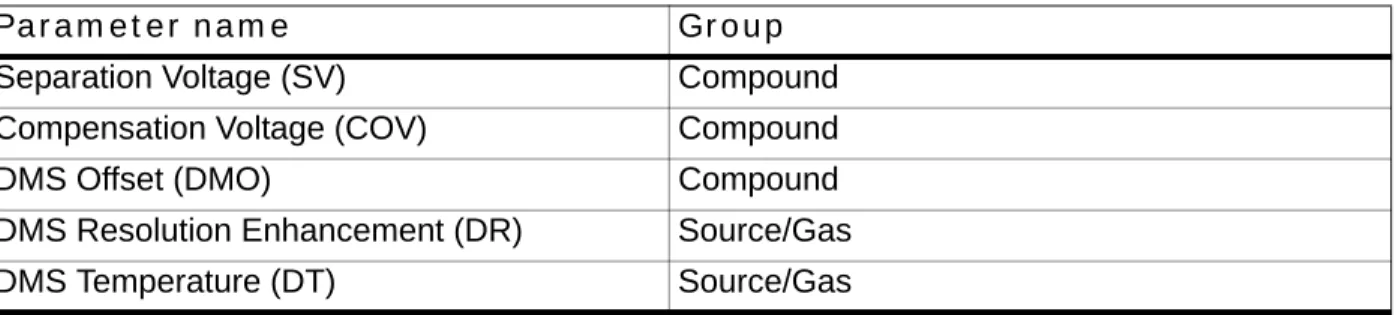
When creating an acquisition method, if users want to apply their currently set DMS parameters to all experiments of the same polarity, they do so by clicking Edit Parameters and then selecting the options to apply the Source/Gas and Compound parameters to all other experiments of the same polarity. Alternately, to apply only a subset, they can select either the Source/Gas or the Compound option as listed in Table 2-1. (ST 33411)
Table 2-1 DMS parameters and their respective groups
Parameter name Group
Separation Voltage (SV) Compound
Compensation Voltage (COV) Compound
DMS Offset (DMO) Compound
DMS Resolution Enhancement (DR) Source/Gas
Ramping COV in Method Editor
When creating an acquisition method with the Ramp COV option enabled, users will see that the COV value is still editable in the Parameter Table. Editing this field will not affect the COV Ramp. However, the value in this field will be displayed in the File Info. (ST 33573)
Ramping DMS parameters in Manual Tuning
When using the Ramp Parameter option in Manual Tuning and choosing to ramp a DMS parameter (COV, DMO, or SV), users will see that the selected parameter is still editable under the DMS Tab. Editing the value in the tab will not affect the selected ramp. This behavior is consistent with other rampable Compound parameters. (ST 33573)
Indexes shown in Compound Optimization (FIA) may be incorrect
When running FIA Compound Optimization, on the Source Parameters window, users may see that the indexes shown for Parameters do not progress linearly. This is because the DMS parameters that cannot be optimized in the FIA workflow are hidden from view and the list is not indexed again. (ST 33950)
Inaccurate error message if DMS controller box changes state during acquisition
If the DMS controller box is turned on or off during acquisition to a state that does not match the method being acquired, the acquiring sample is aborted with the reason given as “stopped by user.” (ST 35133)Peak Hopping scans should not be used with the 6500 Series Instruments
The Analyst 1.6 Software Components for 6500 Series Instruments has not been optimized for peak hopping scans with the 6500 series instruments. As a result, users should not use this scan type with the 6500 Series Instruments. (ST 35863)
Convert Methods script incorrectly truncates masses to 1250 Da for LIT scans
When using the Convert Methods script to convert a method with a mass range above 1000 Da (for example, a High Mass QTRAP 6500 method) for the QTRAP 6500 instrument whenoperating in Low Mass mode, the script will incorrectly truncate the mass range to 1250 Da. However, the Save button will be unavailable, so methods cannot be incorrectly saved. (ST 36069)
Compound Optimization allows gradient methods to be used with Shimadzu LC
devices
When running Compound Optimization, the software cannot detect if a Shimadzu LC method is isocratic. As Compound Optimization is only possible with isocratic methods, users should make
Modifier (MD) Source/Gas
Modifier Composition (MDC) Source/Gas
Modifier Density (MDD) Source/Gas
Modifier MW (MDW) Source/Gas
Table 2-1 DMS parameters and their respective groups
sure that the starter method uses an isocratic flow when a Shimadzu LC stack is used. (ST 36322)
When running Instrument Optimization, the final graph will not be displayed
When running Instrument Optimization, the on-screen graphs will show the results of the scan that has just completed. However, after the final scan completes, the Optimization Report will be shown, skipping the final graph. If Instrument Optimization is then executed immediately again, the missed graph will be shown on-screen during the first scan. This a graphical issue only, and optimization is not affected by this behavior. (ST 36328)Guidance on using Reporter 3.2 with Library Search templates
If you are planning to use the Library Search templates in the Reporter 3.2 software to generate reports, contact Technical Support using [email protected]. An action may be required on the Dell OptiPlex 990 computers to enable these reports. (TT 36350)
Shimadzu autosampler state shows as green when a vial is missing
If a missing vial is detected during acquisition, the Analyst software will continue to display the green Ready state for the Shimadzu stack, instead of showing red. However, the detailed status for the stack does show that the autosampler has encountered a missing vial, and the event log records the same warning. (TT 36339)
Compound optimization report cannot be saved properly in .pdf format
Users should refrain from saving Compound Optimization reports in .pdf format. Selecting this option will product blank reports. (TT 36232)
Syringe pump button name in Manual Tune updates slower than usual
In Manual Tune, when the Start Syringe Pump button is clicked, occasionally the button name does not update to “Stop Syringe Pump” in real time. This may cause the user to click the button again, not realizing that the syringe pump has already started running. (TT 35711)
Graph Information Window is grayed out after more than one peak is highlighted
When the data being acquired in Manual Tune is viewed using the View > Graph Information Window menu item and the user resizes the Graph Information window, then this window becomes non-active and cannot be enabled. (TT 36158)EPI method with CES enabled acquires longer than the set duration time
When an EPI method with enabled Collision Energy Spread (CES) and set method duration is used to acquire data in manual tune, the data is acquired longer than the set duration time. (TT 36079)
New Enhancements and Fixes in Analyst 1.6
Software
• Introduces support for Windows 7 (Professional Edition)
• For users with Administrator privileges (Built-in Administrator or Protected Administrator Users), the following UAC level is recommended: “Default – Notify me only when programs try to make changes to my computer”. • For users without Administrator privileges (Standard Users), the following
UAC level is recommended: “Default – Always notify me when”.
• Added the ability to pin both the AnalystLauncher and Analyst software shortcuts to the Task bar. The shortcuts are consolidated into one button that launches the Analyst software.
• Ability for the Analyst software to track recently or frequently used files using the Windows 7 jump list feature.
• Enhancements for methods using the Scheduled MRM™ algorithm
• Two Scheduled MRM algorithm experiments are now supported within a single acquisition method.
• IDA acquisition methods can now include two Scheduled MRM algorithm experiments.
• Introduces the ability to switch polarity during cycles that contain two
Scheduled MRM algorithm experiments.
• The 5500 series of instruments now supports the acquisition of 4000
Scheduled MRM algorithm transitions with four parameters (CE, DP, EP, CXP).
• Scheduled MRM algorithm data containing more than 2500 transitions will be opened in TIC mode.
• Reporter 3.2 software is included with the Analyst 1.6 software
• Reporter 3.2 software is now automatically installed during the installation of the Analyst software.
• Users can edit the Reporter 3.2 templates found in the <drive>:\Analyst Data\Projects\API Instrument\Templates folder. User-created templates that were created using previous versions of the Reporter software must be updated using the Reporter Template Converter.
• Analyst software now supports CTC firmware version 4.2.
• Increased the mass range of the 3200 QTRAP® system to 2000 Da in RFDC mode. LIT scan types are still limited to 1700 Da. A new configuration file for the 3200 QTRAP system is included. To use the increased mass range, the configuration table must be updated using the ConfigUpdater.
New firmware for 5500 instruments is included
This firmware allows users to ramp the collision energy parameter using the CE values in the mass ranges table. (ST 29645)
Analyst Access Object subproject support
User-created audit map enhancements
You can now delete the Default audit map and select a user-created audit map that will be applied automatically when a new project is created. (ST 18933)
Users with the Administrator role can unlock the software
Users that have the Administrator role for the Analyst software can now unlock the Analyst software if the application is locked by the current user. (ST 27692)
Users can print Results Tables that have been changed but not saved
If users modified the peak review layout and attempted to print the Results Table without first saving it, they were prompted with a message stating that the Results Table has to be saved. This issue has been corrected and users can now print the Results Table after the peak review layout has been changed but not saved. (ST 27869)
Files in Cache folder are deleted
If you have confirmed that all data has successfully been uploaded to the server and files still remain in the cache folder, restart the PC, navigate to \Analyst Data\WIFF_CACHE_BACKUP (hidden folder) and delete the contents before re-launching the Analyst software. This issue has been corrected. After network acquisition during which one sample file is saved per .wiff file has completed, the files in the Cache folder are now deleted. (ST 28260, ST 28323)
Acquiring data to a network location does not clear temporary (Cache) files
When using Network Acquisition, the local cache folder may not be emptied after successfully uploading the data file to the network. If this happens, users may see that the “Date Modified” date for some data (.wiff) files in Windows has changed to a more recent time than when the file was actually acquired. While the Windows timestamp of the file has been changed, the actual contents of the file are not modified, unless there are actual changes to the data file that have not yet been uploaded to the network.Mapped drives are converted automatically
Previously network acquisition over mapped drives was not recommended. Now mapped drives are converted automatically to full UNC paths. Full network path lengths must be limited to 128 characters. (ST 29237)
Audit Trail Manager logs invalid checksum
If Data File Checksum is activated, at the end of batch acquisition, the Audit Trail Manager now logs any invalid checksum. (ST 31209)
Data discrepancy in quantitation
When performing an integration using the Analyst Classic algorithm, a discrepancy between the chromatogram in the peak review and the Results Table is observed if the sample is corrupted. The remaining samples were integrated incorrectly. This issue has been corrected. (ST 16964)
Unable to open Wiff to MatLab files generated using the Analyst 1.5 software
Files generated using the Wiff to MatLab script and Analyst 1.5 software data cannot be opened in later versions of the Analyst software. This issue has been corrected. (ST 21099)During infusion Compound Optimization on the 5500 series of instruments, the
preset syringe pump options are used
Previously, during infusion Compound Optimization, the preset syringe pump options were used; the syringe pump diameter and flow rate used were 4.61 mm and 7µL/min respectively and could not be changed. To use a different syringe pump diameter, start the syringe pump in Manual Tuning and then start Compound Optimization. (ST 9255, 24334)
Custom Injection program does not work for Agilent autosamplers
Previously, users could only create a basic custom injection program. This issue has been corrected and users can now also create a custom injection program. (ST 31036)
Data acquisition using DFT occasionally results in a loss of sensitivity during
some DFT-enabled scans
When acquiring data using Dynamic Fill Time (DFT), in some rare instances users may
experience a loss of sensitivity during some DFT-enabled scans. When viewing the DFT Tracker, they will also see that negative fill times are occasionally calculated during these scans. This issue has been corrected. (ST 29880)
Shimadzu software stops responding during sample acquisition
The software stops responding during sample acquisition, either in pre- or post-run. This issue has been corrected. (ST 29804)
Analyst
®1.5.1 Patch for AAO Batches
This patch corrects an issue found in the Analyst 1.5.1 software that prevents users from using the Quantitation option available within the Batch Editor when the selected quantitation method contains more than 150 transitions and control of any LC device is established through AAO (Analyst Access Objects). In this scenario, attempting to acquire the batch results in failed acquisitions. This patch functionality is included in the software.
Analyst
®1.5.1 Patch for DiscoveryQuant™ Software
This patch corrects the following issue: DiscoveryQuant — Optimize 2.1 software is not able to successfully process certain product ion spectra (CE), and returns the error—2147467259 to the user. The issue occurs randomly and is not always for the same sample. This patch functionality is included in the software.
New Enhancements and Fixes in the Analyst
1.5.2 Software with HotFixes to February 2011
AAO and Companion Software
ChemoView Software Reports with large numbers of samples would intermittently
fail
When using the ChemoView™ software to create reports with large numbers of samples, users would intermittently see reporting fail for some samples. This was only seen for large (typically over 100 samples) report batches, and re-running the report would often work properly. This has been corrected. (ST 24863)
Submission of a batch fails if the user selects a Quantitation method with more
than 150 transitions
When creating an acquisition batch through an AAO application, if the user selected a
Quantitation method with more than 150 transitions, the batch submission would fail. This has been corrected. (ST 21398)
Reporter 3.0.1 Software Integrated into the Analyst Software Installer
Previously, the Reporter 1.0 software was installed by default, and the Reporter 3.0.1 software was included in the installation DVD as an optional software. The Reporter 3.0.1 software is now integrated into the Analyst1.5.2 Software with HotFixes to February 2011 and installed along with this software. If users have older Reporter 1.0 reports and wish to use them with the Reporter 3.0.1 software, there is a conversion utility available from Start > Programs > AB SCIEX > Reporter 3.0.1. (ST 24738)
Users were required to log-in twice when using certain Companion Software
When a user logged into the Analyst software with Mixed Mode security enabled and then launched certain companion software (for example, MPX™ driver software), they may have been required to enter their logon credentials when launching the Analyst software as well as whenNote: If the standalone Reporter 2.0 software is installed on the computer, it should be
uninstalled before installing the Analyst 1.5.2 Software with HotFixes to February 2011.
If the Reporter 3.x software is installed on the computer, it will be automatically removed and replaced with the integrated Reporter 3.0.1 Software during the installation of the Analyst 1.5.2 Software with HotFixes to February 2011. Any custom queries and templates will be preserved. If a default query has been modified, a new unmodified version will also be installed with the suffix “_new”.
Note: If the standalone Reporter (2.0 or 3.x) software is installed after installing the Analyst 1.5.2 Software with HotfFixes to February 2011 and is later uninstalled, the Analyst 1.5.2 Software with HotfFixes to February 2011 may lose reporting capabilities. In this scenario, the Analyst 1.5.2 Software with HotfFixes to February 2011 should be reinstalled.
launching the companion software. This has been changed, and users will be required to provide their credentials only upon launching the Analyst software. (ST 25713)
DiscoveryQuant — Optimize software would fail during acquisition
When using the DiscoveryQuant™ — Optimize software, data acquisition would fail for certain samples and report the error - 2147467259. The Analyst software has been corrected to prevent this issue from occurring in future versions of the DiscoveryQuant — Optimize software that support the Analyst 1.5.2 Software with HotFixes to February 2011. (ST 26055)
Acquire — Acquisition and Batch Editor
Some Scheduled MRM algorithm scans would result in lower intensities than the
corresponding MRM scans
In rare situations, users would see that a Scheduled MRM algorithm scan would show lower intensities than the corresponding MRM scan if the line obtained by plotting Resolution offsets against Mass passed through (or near to) the origin. This has been corrected, and now the corresponding Scheduled MRM algorithm scans will show proper intensities. (ST 24728)
Configure — Hardware Configuration
Included support for the following Agilent 1260 devices (ST 24294):
• G1310B Isocratic Pump• G1311B Quaternary Pump • G1312B Binary Pump
• G1316A Thermostatted Column Compartment (TCC) • G1367E Autosampler
• G4212B Diode Array Detector (DAD)
Included Support for the following Agilent 1290 devices (ST 25922):
• G4220A Binary Pump• G4226A Autosampler
• G4212A Diode Array Detector (DAD)
• G1316C Thermostatted Column Compartment (TCC)
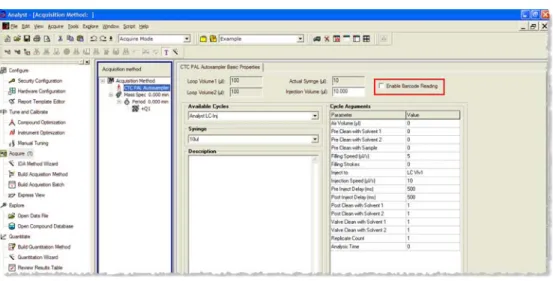
Added support for barcode reading with CTC PAL autosamplers
Users are now able to enable or disable reading and recording the barcode information on vial labels during acquisition, when using a CTC PAL autosampler that supports this feature. The information will be stored and visible in the data file (File Info). Also, when data containing scanned barcodes is quantitated, a “Scanned Barcode” column will automatically be added to the Results Table. (ST 26786)
RFID tags supported for 1290 TCC switching valve
The Agilent 1290 TCC (G1316C) supports switching valves with RFID tag. When data is acquired with an RFID tagged switching valve, the valve type and serial number will be added to the File Info of the sample.
RFID tags supported for DAD Flow Cell and Lamp
The Agilent 1290 DAD (G4212A) supports RFID-tagged flow cells and lamps. When data is acquired using an RFID tagged flow cell or lamp, the serial number of the part will be added to the File Info of the sample.
Analyst 1.5.2 Software with HotFixes to February 2011 supports the most recent
Agilent devices firmware
The Analyst 1.5.2 Software with HotFixes to February 2011 has been tested with the latest (at time of release) released firmware versions for supported 1100, 1200, 1260 and 1290 devices. For a list of supported firmware, see the Software Installation Guide for the Analyst software.
Explore
The Calibration Tables timestamp shown in File Info may be incorrect if a non-US
time format is used
If data was acquired on a computer using a non-US date format, and if the users view the File Information on a different computer, they might see that the “Last Modification Date” for the Calibration Tables was the same as the Sample Acquisition timestamp. This has been corrected, and the data acquired on a computer using a non-US date format will display the correct
timestamp for the Calibration Tables’ Last Modification Date. (ST 22722)
Checksum Verification may fail even though the data file is intact and not
corrupted
In rare instances, when verifying the Checksum information embedded within a .Wiff file, the Analyst software would incorrectly report that the verification had failed. The Analyst 1.5.2 Software with HotFixes to February 2011 corrects this issue and will now correctly report that the verification has succeeded when the data is intact. This does not affect the verification results of corrupted/modified files, which will continue to fail checksum verification. (ST 26701)
Explore — Library Search
Printed Library Search results do not match the on-screen results
When printing the results of library searches, users would see the following formatting errors in the printed output: the font size of the printed text would be too large; in single-page printing, the second library match would always be printed even when not requested; and in multi-page printing, UV spectra would not be printed even when requested. The Library Search printing functionality now works properly; the text is printed in a reasonable font size, and only the requested elements are printed. (ST 23330)
Firmware Files
New firmware available for AB SCIEX QTRAP 5500 and AB SCIEX Triple Quad 5500
systems
The firmware for the AB SCIEX QTRAP® 5500 and AB SCIEX Triple Quad™ 5500 systems has been upgraded. The changes made in this firmware revision are not customer facing. For information on how to upgrade the firmware of your mass spectrometer, see the Software Installation Guide for the Analyst software.
Help Files and Tutorials
Contents of Ion Optics Tutorial revised
The Ion Optics Tutorial (available at Start > Programs > AB SCIEX > Analyst > Tutorials) has been revised for content and accuracy. (ST 25565)
“Library Search Results” Help topic updated
The topic “Search Results: Print Options Dialog” has been updated to more accurately reflect the various printing options. (ST 28211)
Obsoleted Help files removed
Two help files, ENDURANCEAS.hlp and PALAS.hlp are no longer required and have been removed from the \Program Files\Analyst\Help folder. (ST 23351)
Quantitate
Quantitation fix to prevent rounding errors with IntelliQuan Algorithm (addendum
to fix in the Analyst 1.4.2 software)
In the Analyst 1.4.2 software, a change was implemented for the IntelliQuan algorithm to reduce the likelihood of rounding errors causing a discrepancy between the Results Table and Peak Review due to an improper selection of the Noise Threshold. The Analyst 1.5.2 Software with HotFixes to February 2011 builds upon this fix by further reducing the likelihood of these discrepancies being created. The IntelliQuan algorithm has not been changed. (ST 27614)
Quantitation fix to prevent rounding errors with Analyst Classic Algorithm
When using the Analyst Classic algorithm to create Results Tables, there was a rare possibility that users might see a discrepancy between the values shown in the Results Table and in Peak Review. Depending on the Peak Separation Width selected, a small rounding error could affect the baseline calculation and cause the Peak Review pane to calculate areas differently than in the Results Table. The likelihood of users experiencing this discrepancy has been significantly reduced without changing the Analyst Classic algorithm. (ST 21863)
Note: For details on the original solution implemented in the Analyst 1.4.2 software, see Appendix B (reprinted from the Analyst 1.4.2 Software Release Notes).
Record Modified flag stays on even though the entire quantitation method was
updated
If the user changed some integration parameters in Peak Review and then selected the option to Update the Method, the Record Modified flag would not always be cleared for the updated peaks. This has been corrected and the Record Modified flag will now be cleared when the method is updated. (ST 26582)
Sum Multiple Ions may produce incorrect results
Previously, when the Sum Multiple Ions option was used to create a quantitation method, the Results Tables produced with this method may have shown visible artifacts when the peaks were viewed in Peak Review. This issue has been corrected. (ST 21831)
Accept Changes dialog may not be shown for manual integrations
If the user performed a manual integration in Peak Review and navigated to a different sample or the Results Table, they may not have been prompted to accept the change before it was
committed. This has been corrected, and the Accept Changes dialog will be displayed when navigating away from an uncommitted change. If the Audit Map is configured to require either a Reason or E-Signature for a manual integration, the Accept Changes dialog will not be presented to the user. (ST 22745)
Scripts
MRM3 Optimization Script replaces MS3 Quant Optimization script and is installed
by default
The MS3 Quant Optimization script has been replaced by the MRM3 Optimization Script. This script provides the functionality of the MS3 Quant Optimization script and adds the ability to work with peptides and multiple charged ions. Users who upgrade from a previous version of the Analyst software will retain the previous MS3 Quant Optimization script and also receive the new MRM3 Optimization script. Users who perform a fresh installation of the Analyst software will see only the MRM3 Optimization Script in the Script menu within the Analyst software. (ST 22752)
Program Shortcuts
New documentation is available in Start > Programs > AB SCIEX > Analyst > Site
Planning Guides
• API 2000™ System Site Planning Guide
New documentation is available in Start > Programs > AB SCIEX > Analyst >
Qualified Maintenance Guides
• API 2000™ Qualified Maintenance Guide
New documentation available in Start > Programs > AB SCIEX > Analyst > Ion
Source Guides
• NanoSpray® Ion Source Operator’s Guide • DuoSpray™ Ion Source Operator’s Guide • API 2000™ Source Operator’s Guide
• NanoSpray III Head and Emitter Tip Assembly • PhotoSpray® Ion Source Operator’s Guide • Ion Source Specifications
Device Support
Support for Agilent G1367D Autosampler
Analyst® 1.5.1 HotFixes to June 2010 adds support for the Agilent 1367D model Autosampler. (ST 18976)
Support for Agilent 1200 G1329B Autosampler
Analyst® 1.5.1 HotFixes to June 2010 adds support for the Agilent 1200 1329B model Autosampler. (ST 18976)
New Enhancements and Fixes in the Analyst
1.5.1 HotFix
Acquire
Default scan speed for ER scans on the 3200 QTRAP system changed to 1000
amu/s
The default scan speed for ER (Enhanced Resolution) scans on the 3200 QTRAP system has been changed to 1,000 amu/s. The option for 250 Da/s still exists and can be selected by users who want to use the slower speed. (ST 21519)
Quantitate
Prevent exporting or saving Results Tables containing unsaved changes
Users will now be forced to save a results table before they export or print from it. This new workflow feature is designed to help customers adhere to operating procedures that prohibit the practice of printing or exporting unsaved results tables. However, it remains the responsibility of the customer to ensure that SOPs are created and followed to prevent users from taking actions in the software that may be possible, but not desirable. (ST 19788)Note: For reference, the name of the software patch or HotFixes release where the issue was previously fixed is included.
Security
Project Level Security enhancement when using AAC
Analyst 1.5.1 software introduced changes to the way in which project-level security is managed when using AAC (Analyst Administrator Console). The Analyst® HotFixes to June 2010
introduces the ability for users to choose between strict project-level control (as in Analyst 1.5.1 software) and the previous (pre-1.5.1) project-level control. Administrators have the option to enable or disable enhanced project-level security on a client-by-client basis, allowing some users to operate in a relaxed environment while tightly controlling the project-level security of other users. No changes were made to the AAC Server for this enhancement. (ST 20497)
Fixed Issues
Acquire
IDA Experiments with an ADC Card in the active hardware profile are now possible
If an ADC (Analog-Digital Conversion) card was active in the Hardware Profile, users were unable to run IDA experiments. Doing so caused the ADC card to fail and turn red in the Instrument Status area, which in turn caused the acquisition to fail. (ST 16102)Users can now control Agilent 1100 or 1200 Hardware in a CAN configuration over
Ethernet
Users were unable to connect Agilent LC hardware in a CAN configuration if the first device was connected to the computer via Ethernet. Users can now use both Ethernet and RS-232
connections for the first device in a CAN configuration. (ST 16108)
Peak Hopping scans missing first data point
When performing acquisitions using the Peak Hopping scan mode, the data list would begin above the requested start mass. This has been corrected and when performing Peak Hopping scans, users will see all non-zero data points. (ST 16866)
Mass Defect not applied uniformly during Peak Hopping scans
When performing acquisitions using the Peak Hopping scan mode, if the number of
measurements (or spectrum data points) was less than or equal to 97 users would see the entered Mass Defect only applied to the first data point. Subsequent points would then be incremented solely based on the step size. However, if the mass range was greater than 97 Da, the Mass Defect would be applied correctly, but data points would be shifted as described above. (ST 22642)
Dynamic Fill Time was occasionally calculated incorrectly for ER scans
When an ER scan using DFT was included in a method that uses LC, occasionally, the required fill time was improperly estimated and defaulted to the maximum fill time value regardless of ion intensities. This sometimes resulted in ER scans that were of poor spectral quality due to space charge. This issue applied only to non-AB SCIEX QTRAP 5500 systems, but is now fixed.
IDA methods using two EMS scans of opposite polarities now properly triggers
dependent scans
If an IDA method contained two EMS survey scans of opposite polarities, the dependent scan would not be triggered even if the IDA criteria were satisfied. (ST 17045)
Security
Analyst software now supports long domain names in Mixed Mode
If a network domain contained more than 15 characters, users were unable to use Audit Trails. Users would find that upon entering their credentials for an e-signature, the password would be rejected and an error message would be presented. (ST 20279)
Quantitate
Area Ratio columns containing Div/0! would be exported as “-7”
When exporting Results Tables to text files, if an Area Ratio column containing Div/0! entries was exported, the Div/0! fields would be exported as “-7”. They will now be exported as “N/A”. (ST 18919)
Quantitation Methods with multiple decimal places may be modified if the user
switches between tabs
If the user was building or viewing a quantitation method that includes transitions specified to 2 or 3 decimal places, switching between the Components and Integration tabs in the full method editor may have caused similar transitions to be modified or switched. Users would notice that the decimal components of the transitions were rounded or changed upon returning to the Components tab and the chromatograms may have become mismatched with their respective analytes in the Integration tab. (ST 22277)
New Enhancements and Fixes for the Analyst
1.5.1 Software
Merged two software platforms into a single version of the software
This release combines the Analyst 1.5 software and the Analyst software 1.5 5500 Components, providing one software version that supports all our currently supported QTRAP and triple quadrupole instruments. For a list of supported instruments, see the Analyst® 1.5.1 Software Installation Guide. In addition, previously released HotFixes and patches have been included.
Added support for the following Microsoft products
• Microsoft Office 2007Note: For reference, the name of the software patch or HotFixes release where the issue was previously fixed is included.
• Microsoft Windows XP SP3
New software and hardware documentation available
In Start > Programs > AB SCIEX, the following new documentation is available: • Standard Quantitation Tutorial
• Hardware Guides for all systems
• Safety Guides in the following languages: French, German, Italian, Japanese, Spanish, and English
• Protein and Peptide Quantitation Tutorial
• Ion Optics Tutorial for the 5500 series of instruments • Qualified Maintenance Guides
• Site Planning Guides
Integrated support for GPIB driver version 2.5
GPIB driver version 2.5, including USB.Script enhancements
• Improved IDA Trace Extractor script to allow the ability to select polarity per fragment or neutral loss specified or fragment and neutral loss specified.
• Improved Dynamic Background Subtraction™ (DBS) algorithm to add more control over the DBS functionality embedded in methods created in the Analyst software. Users now have access to the number of background spectra that they want to average as well as access to the number of points for smoothing the current spectrum.
• Improved Merge MRM methods script to allow the option to populate the Compound ID column in the final MRM method with the compound name used in Compound Optimization.
• Improved the Regression calculator by resizing the form, text boxes, and labels to enable the display of values smaller than 0.001. (ST 16959)
• Convert Methods script enhancements. The following Convert Methods script issues have been fixed:
• Convert Methods script incorrectly converted Scheduled MRM algorithm methods to MRM methods. This script now allows the user to automatically carry over the retention time information and all other Scheduled MRM parameters without having to enter them manually. (ST 15463)
• The Compound IDs were not carried over to the newly created method when running the Convert Methods script. The Compound IDs are now carried over automatically. (ST 15464)
• When users converted IDA methods, the IDA criteria and dependent scan experiments were lost. This script now carries over the IDA Criteria and dependent scans automatically. (ST 15326)
• The Convert Methods script did not optimize the mass ranges for LIT scan types when converting methods for use between QTRAP systems. This script