TC35 Module
TC37 Module
TC35 Terminal
Version:
04.00
DocID: TC3X_ATC_01_V04.00
Document Name:
AT Command Set
Siemens Cellular Engines
Version: 04.00
Date: May 29, 2002
Doc Id: TC3X_ATC_01_V04.00
Status: Released
General note
With respect to any damages arising in connection with the described product or this document, Siemens shall be liable according to the General Conditions on which the delivery of the described product and this document are based.
This product is not intended for use in life support appliances, devices or systems where a malfunction of the product can reasonably be expected to result in personal injury. Siemens AG customers using or selling this product for use in such applications do so at their own risk and agree to fully indemnify Siemens for any damages resulting from illegal use or resale.
Applications incorporating the described product must be designed to be in accordance with the technical specifications provided in these guidelines. Failure to comply with any of the required procedures can result in malfunctions or serious discrepancies in results.
Furthermore, all safety instructions regarding the use of mobile technical systems, including GSM products, which also apply to cellular phones must be followed.
Handheld applications such as mobile phones or PDAs incorporating the described product must be in accordance with the guidelines for human exposure to radio frequency energy. The Specific Absorption Rate (SAR) of the application must be evaluated and approved to be compliant with national and international safety standards or directives.
Subject to change without notice at any time.
Copyright
Copying of this document and giving it to others and the use or communication of the contents thereof, are forbidden without express authority. Offenders are liable to the payment of damages. All rights reserved in the event of grant of a patent or the registration of a utility model or design.
Contents
0
Version History ...7
1
Introduction...10
1.1 Scope of the document ...10
1.2 Supported product versions and related documents ...10
1.3 Conventions ...11
1.4 AT command syntax ...11
1.4.1 Using parameters...11
1.4.2 Combining AT commands on the same command line ...12
1.4.3 Entering successive AT commands on separate lines ...12
1.5 Supported character sets ...13
1.6 Flow control...14
1.6.1 Software flow control (XON/OFF flow control) ...14
1.6.2 Hardware flow control (RTS/CTS flow control) ...14
2
Standard V.25ter AT Commands ...15
2.1 A/ Repeat previous command line ...15
2.2 +++ Switch from data mode to command mode ...15
2.3 AT\Qn Flowcontrol ...16
2.4 ATA Answer a call...16
2.5 ATD Mobile originated call to dial a number ...17
2.6 ATD><mem><n> Originate call to phone number <n> in memory <mem> ...18
2.7 ATD><n> Originate call to phone number selected from active memory...20
2.8 ATD><str> Originate call to phone number in memory with corresponding field ...21
2.9 ATDI Mobile originated call to dialable ISDN number <n> ...22
2.10 ATDL Redial last telephone number used ...23
2.11 ATE Enable command echo ...24
2.12 ATH Disconnect existing connection ...24
2.13 ATI Display product identification information...25
2.14 ATI[value] Display additional identification information...25
2.15 ATL Set monitor speaker loudness...26
2.16 ATM Set monitor speaker mode ...26
2.17 ATO Switch from command mode to data mode...26
2.18 ATQ Set result code presentation mode...27
2.19 ATP Select pulse dialling ...27
2.20 ATS0 Set number of rings before automatically answering the call ...27
2.21 ATS2 Escape code sequence...28
2.22 ATS3 Write command line termination character ...28
2.23 ATS4 Set response formatting character...28
2.24 ATS5 Write command line editing character...29
2.25 ATS6 Set pause before blind dialling...29
2.26 ATS7 Set number of seconds to wait for connection completion ...30
2.27 ATS8 Set number of seconds to wait for comma dial modifier ...30
2.28 ATS10 Set disconnect delay after indicating the absence of data carrier ...31
2.29 ATS18 Extended error report...31
2.30 ATT Select tone dialling ...31
2.31 ATV Set result code format mode...32
2.32 ATX Set CONNECT result code format and call monitoring...32
2.33 ATZ Set all current parameters to user defined profile ...33
2.34 AT&C Set circuit Data Carrier Detect (DCD) function mode...33
2.35 AT&D Set circuit Data Terminal Ready (DTR) function mode...34
2.36 AT&F Set all current parameters to manufacturer defaults ...34
2.40 AT+GCAP Request complete TA capabilities list ...38
2.41 AT+GMI Request manufacturer identification...38
2.42 AT+GMM Request TA model identification...38
2.43 AT+GMR Request TA revision identification of software status ...39
2.44 AT+GSN Request TA serial number identification(IMEI)...39
2.45 AT+ILRR Set TE-TA local rate reporting ...40
2.46 AT+IPR Set fixed local rate...41
2.46.1 Autobauding ...42
3
AT Commands for FAX...43
3.1 AT+FBADLIN Bad Line Threshold ...43
3.2 AT+FBADMUL Error Threshold Multiplier...44
3.3 AT+FBOR Query data bit order ...44
3.4 AT+FCIG Query or set the Local polling id ...45
3.5 AT+FCLASS Fax: Select, read or test service class ...45
3.6 AT+FCQ Copy Quality Checking ...46
3.7 AT+FCR Capability to receive...46
3.8 AT+FDCC Query or set capabilities...47
3.9 AT+FDFFC Data Compression Format Conversion ...48
3.10 AT+FDIS Query or set session parameters...49
3.11 AT+FDR Begin or continue phase C data reception...50
3.12 AT+FDT Data Transmission ...50
3.13 AT+FET End a page or document ...51
3.14 AT+FK Kill operation, orderly FAX abort...51
3.15 AT+FLID Query or set the Local Id setting capabilities ...51
3.16 AT+FMDL Identify Product Model...52
3.17 AT+FMFR Request Manufacturer Identification ...52
3.18 AT+FOPT Set bit order independently...52
3.19 AT+FPHCTO DTE Phase C Response Timeout ...53
3.20 AT+FREV Identify Product Revision...53
3.21 AT+FRH Receive Data Using HDLC Framing ...53
3.22 AT+FRM Receive Data ...54
3.23 AT+FRS Receive Silence ...54
3.24 AT+FTH Transmit Data Using HDLC Framing ...54
3.25 AT+FTM Transmit Data ...55
3.26 AT+FTS Stop Transmission and Wait ...55
3.27 AT+FVRFC Vertical resolution format conversion ...56
4
AT Commands originating from GSM 07.07 ...57
4.1 AT+CACM Accumulated call meter (ACM) reset or query ...57
4.2 AT+CALA Set alarm time...58
4.3 AT+CAMM Accumulated call meter maximum (ACMmax) set or query...61
4.4 AT+CAOC Advice of Charge information ...62
4.5 AT+CBST Select bearer service type ...63
4.6 AT+CCFC Call forwarding number and conditions control...64
4.6.1 Examples: Call forwarding ...65
4.7 AT+CCLK Real Time Clock ...67
4.8 AT+CEER Extended error report ...68
4.9 AT+CFUN Set phone functionality...69
4.10 AT+CGMI Request manufacturer identification ...71
4.11 AT+CGMM Request model identification...71
4.12 AT+CGMR Request revision identification of software status ...71
4.13 AT+CGSN Request product serial number identification (IMEI) identical to GSN ...72
4.14 AT+CHLD Call hold and multiparty...72
4.15 AT+CHUP Hang up call ...73
4.16 AT+CIMI Request international mobile subscriber identity...73
4.18.2 Examples: Phone lock...77
4.18.3 Examples: Call barring ...79
4.19 AT+CLIP Calling line identification presentation...81
4.20 AT+CLIR Calling line identification restriction (by *# sequence) ...82
4.21 AT+CLVL Loudspeaker volume level ...83
4.22 AT+CMEE Report mobile equipment error ...84
4.23 AT+CMUT Mute control ...85
4.24 AT+CMUX Enter multiplex mode...86
4.24.1 Restricted use of AT commands in Multiplex mode...87
4.25 AT+COPN Read operator names ...89
4.26 AT+COPS Operator selection...90
4.27 AT+CPAS Mobile equipment activity status ...92
4.28 AT+CPBR Read current phonebook entries...93
4.29 AT+CPBS Select phonebook memory storage...94
4.30 AT+CPBW Write phonebook entry ...95
4.31 AT+CPIN Enter PIN ...96
4.31.1 What to do if PIN or password authentication fails? ...99
4.32 AT+CPIN2 Enter PIN2 ...101
4.33 AT+CPUC Price per unit and currency table ...103
4.34 AT+CPWD Change password ...104
4.35 AT+CR Service reporting control ...106
4.36 AT+CRC Set Cellular Result Codes for incoming call indication...107
4.37 AT+CREG Network registration ...108
4.38 AT+CRLP Select radio link protocol param. for orig. non-transparent data call...110
4.39 AT+CRSM Restricted SIM access ...111
4.40 AT+CSCS Set TE character set...112
4.41 AT+CSNS Single Numbering Scheme ...113
4.42 AT+CSQ Signal quality ...114
4.43 AT+CSSN Supplementary service notifications...115
4.44 AT+CUSD Unstructured supplementary service data ...116
4.45 AT+VTD=<n> Tone duration...117
4.46 AT+VTS DTMF and tone generation (<Tone> in {0-9, *, #, A, B, C, D}) ...118
4.47 AT+WS46 Select wireless network ...119
5
AT commands originating from GSM 07.05 for SMS ...120
5.1 AT+CMGC Send an SMS command ...120
5.2 AT+CMGD Delete SMS message...121
5.3 AT+CMGF Select SMS message format ...121
5.4 AT+CMGL List SMS messages from preferred store ...122
5.5 AT+CMGR Read SMS message ...125
5.6 AT+CMGS Send SMS message...128
5.7 AT+CMGW Write SMS message to memory...130
5.8 AT+CMSS Send SMS message from storage...132
5.9 AT+CNMA New SMS message acknowledge to ME/TE, only phase 2+ ...133
5.10 AT+CNMI New SMS message indications ...134
5.11 AT+CPMS Preferred SMS message storage ...137
5.12 AT+CSCA SMS service centre address ...138
5.13 AT+CSCB Select cell broadcast messages...139
5.14 AT+CSDH Show SMS text mode parameters ...140
5.15 AT+CSMP Set SMS text mode parameters...141
5.16 AT+CSMS Select Message Service ...142
6
Siemens defined AT commands for enhanced functions ...143
6.1 AT+CXXCID Display card ID (identical to AT^SCID)...143
6.2 AT^MONI Monitor idle mode and dedicated mode ...144
6.7 AT^SCKS Set SIM connection presentation mode and query SIM connection status ...152
6.8 AT^SCNI List Call Number Information ...153
6.9 AT^SCTM Set critical operating temperature presentation mode or query temperature...154
6.10 AT^SDLD Delete the “last number redial“ memory...156
6.11 AT^SHOM Display Homezone...156
6.12 AT^SLCD Display Last Call Duration...156
6.13 AT^SLCK Facility lock...157
6.14 AT^SMGL List SMS messages from preferred storage...158
6.15 AT^SMGO Set or query SMS overflow presentation mode or query SMS overflow ...159
6.16 AT^SMGR Read SMS message without set to REC READ...160
6.17 AT^SMONC Cell Monitoring ...161
6.18 AT^SMSO Switch off mobile station ...162
6.19 AT^SM20 Set M20 Compatibility ...162
6.20 AT^SNFD Set audio parameters to manufacturer default values...163
6.21 AT^SNFI Set microphone path parameters ...163
6.22 AT^SNFM Mute microphone...164
6.23 Audio programming model...164
6.24 AT^SNFO Set audio output (= loudspeaker path) parameter...165
6.25 AT^SNFPT Call progress tones ...166
6.26 AT^SNFS Select audio hardware set...167
6.27 AT^SNFV Set loudspeaker volume...168
6.28 AT^SNFW Write audio setting in non-volatile store ...168
6.29 AT^SPBC Search the first entry in the sorted telephone book ...169
6.30 AT^SPBG Read entry from active telephone book via sorted index ...170
6.31 AT^SPBS Steps the selected phonebook alphabetically...171
6.32 AT^SPIC Display PIN counter...172
6.33 AT^SPLM Read the PLMN list ...173
6.34 AT^SPLR Read entry from the preferred operators list ...174
6.35 AT^SPLW Write an entry to the preferred operators list...175
6.36 AT^SPWD Change password for a lock ...176
6.37 AT^SSCONF SMS Configuration...177
6.38 AT^SSDA Set Display Availability...178
6.39 AT^SSYNC Configure SYNC Pin...179
6.40 AT^STCD Display Total Call Duration ...180
7
APPENDIX ...181
7.1 Summary of ERRORS and Messages...181
7.1.1 Summary of CME ERRORS related to GSM 07.07...181
7.1.2 Summary of CMS ERRORS related to GSM 07.05...183
7.1.3 Summary of Unsolicited Result Codes (URC) ...185
7.1.4 Result codes ...187
7.1.5 Cause Location ID for the extended error report (AT+CEER) ...187
7.1.6 GSM release cause for L3 Radio Resource (RR) (AT+CEER) ...188
7.1.7 SIEMENS release cause for L3 Radio Resource (RR) (AT+CEER) ...188
7.1.8 GSM release cause for Mobility Management (MM) (AT+CEER) ...189
7.1.9 SIEMENS release cause for L3 Mobility Management (MM) (AT+CEER) ...189
7.1.10 GSM release cause for L3 Call Control (CC) (AT+CEER) ...190
7.1.11 SIEMENS release cause for L3 Call Control (CC) and Mobile Station Manager (MSM) (AT+CEER) ...191
7.1.12 SIEMENS release cause for L3 Advice of Charge (AOC) (AT+CEER) ...192
7.1.13 GSM Release cause for Supplementary Service call (AT+CEER)...192
7.1.14 SIEMENS release cause for Call-related Supplementary Services (CRSS) (AT+CEER)...193
7.2 Summary of PIN requiring AT Commands...194
7.3 AT commands available before entering the SIM PIN...196
7.4 Standard GSM service codes ...198
7.4.1 Additional notes on ^SCCFC, ^SCCWA, ^SCLCK ...200
0 Version History
This chapter reports modifications and improvements over previous versions of the document. "AT Command Set" Version TC3x-ATC-01-V03.10=> TC3x5-ATC-01-04.00
Chapter Page AT command What is new
1.5 13 Character sets Chapter revised and associated character set tables in Chapter 7.5 updated.
1.6 14 Flow control How to use flow control.
1.4.2 12 Any command Maximum length of command line buffer added. Note regarding on sequential order of concatenated commands added.
2.3 16 AT\Qn Further details added: Using RTS/CTS handshake.
Restoring AT\Q settings.
2.21 28 ATS2 Command description added.
4.2 58f AT+CALA Statement regarding the URC +CALA <text> revised: If autobauding is active neither the URC +CALA nor the individual <text> will appear.
4.6 and 4.6.1
64f 65
AT+CCFC New <class> parameters added. Further examples added.
4.18 4.18.3
75
79
AT+CLCK New <class> parameters added.
Under parameter “PS” lock, the following statement has been removed: “ME may remember numbers of previously used cards.”
Further examples for call barring added. 4.24.1 87 AT+CMUX Fax specific AT commands are not usable.
AT\Q3 (hardware flow control) is recommended. Minimum bit rate set with AT+IPR: 4.8 kbps 4.31.1 99 AT+CPIN Timing algorithm of incorrect password corrected 4.42 114 AT+CSQ Note added: Realistic BER values can be obtained
only if there is a call in progress.
4.5 63 AT+CBST Command syntax corrected: Parameter <speed> is mandatory.
4.21 83 AT+CLVL Further notes regarding the usage of AT+CLVL and AT^SNFV added.
4.23 85 AT+CMUT Further notes regarding the usage of AT+MUT and AT^SNFM added.
4.39 111 AT+CRSM Chapter revised.
5.4 5.2 122 121 AT+CMGL AT+CMGR
Note regarding AT^SSCONF added.
5.10 134 AT+CNMI Note regarding AT^SSCONF added.
Note regarding the handling of Class 0 short messages added.
5.7 130 AT+CMGW Parameter <length> corrected (only required for PDU, not for text mode).
Result code after failure of storing a message to the SIM card (ME returns OK).
Statement about sending e-mails via SMS corrected: If not recognized by provider, @ may be replaced with
<chann> and <rs> explained in greater detail References for 3GPP TS 05.05 and 05.08 added Frequency hopping will now be indicated with “h” (instead of the previously used “0”.
Notes modified: If during a connection the radio cell is changed, the parameters PWR and RXLev of the ‘Serving Cell’ part will not be updated.
Statement regarding RING line revised.
Statement regarding different values of identical cell monitoring parameters (used for AT^MONI, AT^MONP and AT^SMONC) added.
6.3 146 At^MONP <chann> and <rs> explained in greater detail
Notes modified: During a connection new neighbour cells can be added, but their parameters C1 and C2 will be updated after the call.
Statement regarding RING line revised.
6.7 152 AT^SCKS Notes regarding empty SIM card tray corrected. 6.13 157 AT^SLCK New <class> parameters added.
6.17 161 AT^SMONC New AT command: Cell monitoring
6.25 166 AT^SNFPT New AT command: Switch on / off Call Progress tones 6.20, 6.22,
6.24 – 6.28 163ff AT^SNF… All Chapters revised.
6.37 177 AT^SSCONF New AT command: Configuring recipient address parameters in SMS result codes and in +CDS URCs. 6.38 178 AT^SSDA New AT command: Set display availability
7.1.2 183f CMS errors List of codes revised: Deleted unnecessary codes. Note and example added: Mapping of CME and CMS errors if SIM PIN authentication has not been done. 7.1.4 187 Result codes “Connect 14400/RLP” added.
7.1.5 187 Location ID for
AT+CEER List of codes revised: Deleted unnecessary codes.
7.1.11 191 Release cause
for call control Notification 300 and note regarding Location ID added. 7.4
7.4.1
198 200
*# codes Abbreviations explained in greater detail. Further examples added.
7.3 196 AT+VTS Added to List of PIN1 independent AT commands
"AT Command Set" Version TC3x-ATC-01-V03.00=> TC3x5-ATC-01-03.10
Chapter Page AT command What is new
1.4.2 12 Any command
AT+IPR
Maximum length of command line buffer added. To be used standalone.
2.13 25 ATI[value] Only value 9 supported 2.37 35 AT&S <value>2 removed
2.20 27 ATS0 Notes added
2.26 30 ATS7 Notes added
2.46 41 AT+IPR Recommendation added: To be used standalone. 2.46.1 42 AT+IPR List of bit rates detectable in autobaud mode
RTC initialization after wake-up into Alarm mode described.
4.5 63 AT+CBST Transmission rate 14400 bps now supported. 4.6 64 AT+CCFC Description revised, examples added
4.7 67 AT+CCLK RTC initialization after wake-up into Alarm mode described
4.9 69 AT+CFUN Chapter revised
4.15 73 AT+CHUP Note added: AT+CHUP implemented like ATH
4.18 75 AT+CLCK Description revised, examples for phone security lock types and call barring added
4.22 84 AT+CMEE Setting not saved when ME is powered down 4.24 86 AT-CMUX Overview on Multiplex mode updated
4.24.1 87 AT+CMUX Restrictions on Multiplex mode updated
4.26 90 AT+COPS Chapter revised
4.28 93 AT+CPBR Description revised, examples added
4.31 / 4.31.1 96 / 99 AT+CPIN Description revised. Summary of actions to be taken after authentication failure
4.32 101 AT+CPIN2 Description revised, examples added 4.34 104 AT+CPWD Description revised, examples added 4.37 108 AT+CREG Description revised, examples added
5.15 141 AT+CSMP Command syntax corrected, first parameter
mandatory
6.5 148 AT^SBC Default setting of <current> described Automatic shutdown explained in more detail 6.7 152 AT^SCKS URC not stored when ME is powered down
6.19 162 AT^M20 Description revised
7.1.5- 7.1.14 181 - 193 Several AT+CEER location Ids and release causes added 7.1.3 185 URCs Further explanations relating to URCs
7.2 / 7.3 194/196 Usability of AT commands with or without PIN authentication: Both lists updated
1 Introduction
1.1 Scope of the document
This document presents the AT Command Set for the Siemens cellular engines TC35 Module
TC37 Module TC35 Terminal
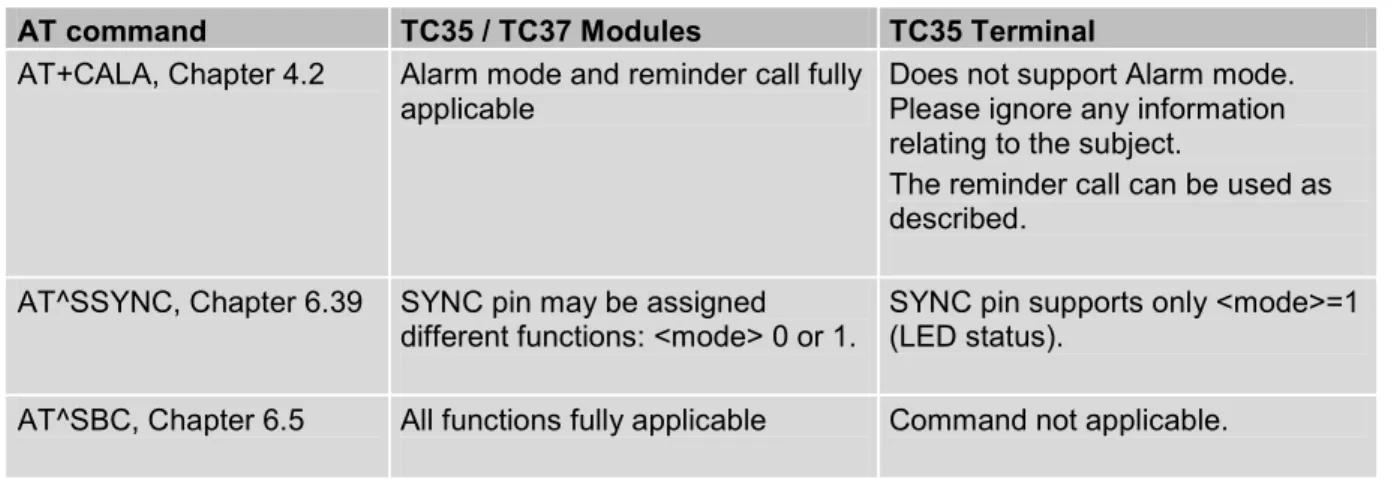
The AT commands detailed in this document are generally supported by all products. Where differences occur, they are noted in the chapter that refers to the command. In the present version, the only exceptions concern the following commands:
Table 1: Product specific use of AT commands
AT command TC35 / TC37 Modules TC35 Terminal
AT+CALA, Chapter 4.2 Alarm mode and reminder call fully
applicable Does not support Alarm mode. Please ignore any information relating to the subject.
The reminder call can be used as described.
AT^SSYNC, Chapter 6.39 SYNC pin may be assigned
different functions: <mode> 0 or 1. SYNC pin supports only <mode>=1 (LED status). AT^SBC, Chapter 6.5 All functions fully applicable Command not applicable.
1.2 Supported product versions and related documents
Please note that TC35, TC37 Modules and TC35 Terminal are using the same firmware, referred to as TC35. The present AT Command Set applies to all products based on the TC35 software version 04.00.
Related documents
[1] TC35 / TC37 Hardware Interface Description (applies to TC35 and TC37)
[2] TC3x Release Notes related to TC35 software version 04.00 (applies to TC35, TC37 and TC35T) [3] TC3x Multiplexer User's Guide (applies to TC35, TC37 and TC35T)
[4] Application Note 16: Updating TC35 Firmware (applies to TC35, TC37 and TC35T) [5] TC35 Terminal Hardware Interface Description (applies to TC35T)
[6] TC35 MC35 Terminal User's Guide (applies to TC35T and MC35T) [7] Application Note 02: Audio Interface (applies to TC35, TC37 and TC35T)
Prior to using TC35 /TC37 or TC35T or upgrading to a new firmware release, be sure to carefully read the latest product information provided in the Release Notes.
To visit the Siemens Website you can use the following link: http://www.siemens.com/wm
Throughout the document, the GSM engines are referred to as ME (Mobile Equipment), MS (Mobile Station), TA (Terminal Adapter), DCE (Data Communication Equipment) or facsimile DCE (FAX modem, FAX board). When the Siemens product names are required to distinguish the two models, TC3x is short for the engine type and TC35T for the terminal.
To control your GSM engine you can simply send AT Commands via its serial interface. The controlling device at the other end of the serial line is referred to as TE (Terminal Equipment), DTE (Data Terminal Equipment) or plainly ´the application´ (probably running on an embedded system).
1.4 AT command syntax
The "AT" or "at" prefix must be set at the beginning of each command line. To terminate a command line enter <CR>.
Commands are usually followed by a response that includes “<CR><LF><response><CR><LF>”. Throughout this document, only the responses are presented, <CR><LF> are omitted intentionally.
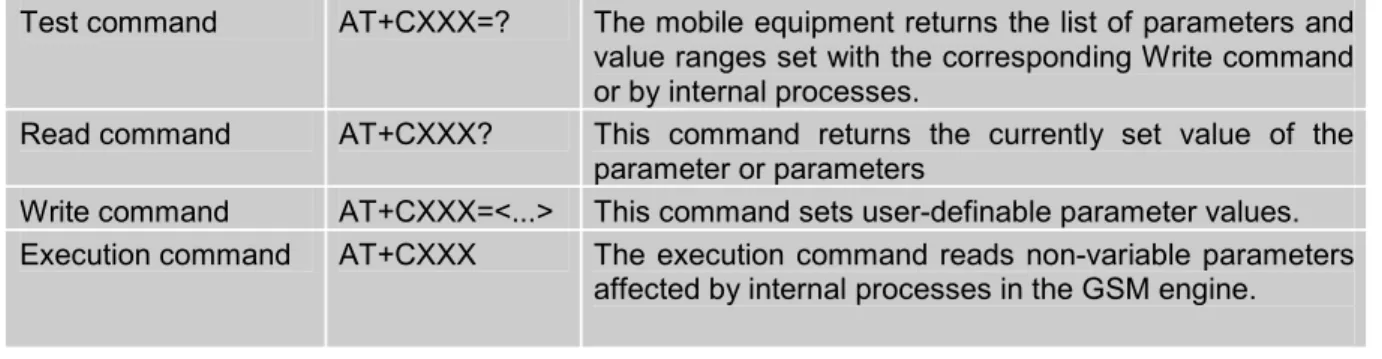
Table 2: Types of AT commands and responses
Test command AT+CXXX=? The mobile equipment returns the list of parameters and value ranges set with the corresponding Write command or by internal processes.
Read command AT+CXXX? This command returns the currently set value of the parameter or parameters
Write command AT+CXXX=<...> This command sets user-definable parameter values. Execution command AT+CXXX The execution command reads non-variable parameters
affected by internal processes in the GSM engine.
1.4.1 Using parameters
· Default parameters are underlined throughout this document.
· Optional parameters are enclosed in square brackets. If optional parameters are omitted, the current settings are used until you change them.
· Optional parameters or subparamters can be omitted unless they are followed by other parameters. If you want to omit a parameter in the middle of a string it must be replaced by a comma. Example:
AT+CPBW=,<number>,<type>,<text> writes a phonebook entry to the first free memory location. AT+CPBW=<index>,<number>,<type>,<text> writes a phonebook entry to the memory location specified by <index>.
· When the parameter is a character string, e.g. <text> or <number>, the string must be enclosed in quotation marks, e.g. "Charlie Brown" or "+49030xxxx". Symbols within quotation marks will be recognized as strings.
· All spaces will be ignored when using strings without quotaton marks. · It is possible to omit the leading zeros of strings which represent numbers.
· In case of using V.25ter commands without giving an optional parameter, its value is assumed to be 0.
You may enter several AT commands on the same line. This eliminates the need to type the "AT" or "at" prefix before each command. Instead, it is only needed once at the beginning of the command line. Use a semicolon as command delimiter.
The command line buffer accepts a maximum of 391 characters. If this number is exceeded none of the commands will be executed and TA returns ERROR.
The table below lists the AT commands you cannot enter together with other commands on the same line. Otherwise, the responses may not be in the expected order.
Table 3: Illegal combinations of AT commands
V.25ter commands With FAX commands, Prefix AT+F GSM 7.07 commands With Siemens commands, Prefix AT^S GSM 7.05 commands (SMS) --- To be used standalone
Commands starting with AT& --- To be used standalone
AT+IPR --- To be used standalone
Note: Generally, appending the same or mixed AT commands should be avoided. If nevertheless you need to do enter several commands on the same line, note that the number of subsequent commands is limited.
1.4.3 Entering successive AT commands on separate lines
When you enter a series of AT commands on separate lines, leave a pause between the preceding and the following command until OK appears. This avoids sending too many AT commands at a time without waiting for a response for each.
The ME supports two character sets: GSM 03.38 (7 bit, also referred to as SMS alphabet) and UCS2 (16 bit, refer to ISO/IEC 10646). See Chapter 4.40 for information about selecting the character set. Character tables are provided in Chapter 7.5.
Due to the constraints described below it is recommended to prefer the USC2 alphabet in any external application.
If the GSM alphabet is selected all characters sent over the serial line are in the range from 0 ... 127. CAUTION: GSM alphabet is not ASCII alphabet!
Several problems resulting from the use of the GSM alphabet:
1. "@" character with GSM alphabet value 0 is not printable by an ASCII terminal program (e.g. Microsoft© Hyperterminal®).
2. "@" character with GSM alphabet value of binary 0 will terminate any C string!
This is because the \0 is defined as C string end tag. Therefore, the GSM Null character may cause problems on application level when using a ´C´-function as „strlen()“. This can be avoided if it is represented by an escape sequence as shown in Table 4.
By the way, this may be the reason why even network providers often replace "@"with “@=*” in their SIM application.
When sending e-mails via SMS the @ character may also be replaced with “*” as defined in GSM 03.40 (3GPP TS 23.040).
3. Other characters of the GSM alphabet are misinterpreted by an ASCII terminal program. For example, GSM "ö" (as in "Börse") is assumed to be "|" in ASCII, thus resulting in "B|rse". This is because both alphabets mean different characters with values hex. 7C or 00 and so on.
4. In addition, decimal 17 and 19 which are used as XON/XOFF control characters when software flow control is activated, are interpreted as normal characters in the GSM alphabet.
When you write characters differently coded in ASCII and GSM (e.g. Ä, Ö, Ü), you need to enter escape sequences. Such a character is translated into the corresponding GSM character value and, when output later, the GSM character value can be presented. Any ASCII terminal then will show wrong responses.
Table 4: Character definitions depending on alphabet (examples) GSM 03.38
character GSM character hex. value Corresponding ASCII character ASCII Esc sequence Hex Esc sequence
Ö 5C \ \5C 5C 35 43
" 22 “ \22 5C 32 32
ò 08 BSP \08 5C 30 38
@ 00 NULL \00 5C 30 30
CAUTION: Often, the editors of terminal programs do not recognize escape sequences. In this case, an escape sequence will be handled as normal characters. The most common workaround to this problem is to write a script which includes a decimal code instead of an escape sequence. This way you can write, for example, short messages which may contain differently coded characters.
Flow control is essential to prevent loss of data or avoid errors when, in a data or fax call, the sending device is transferring data faster than the receiving side is ready to accept. When the receiving buffer reaches its capacity, the receiving device should be capable to cause the sending device to pause until it catches up.
There are basically two approaches to regulate data flow: software flow control and hardware flow control. The High Watermark of the input / output buffer should be set to approximately 60% of the total buffer size. The Low Watermark is recommended to be about 30%. The data flow should be stopped when the capacity rises close to the High Watermark and resumed when it drops below the Low Watermark. The time required to cause stop and go results in a hysteresis between the High and Low Watermarks.
In Multiplex mode, it is recommended to use hardware flow control. For details please refer to [3].
1.6.1 Software flow control (XON/OFF flow control)
Software flow control sends different characters to stop (XOFF, decimal 19) and resume (XON, decimal 17) data flow. The only advantage of software flow control is that three wires would be sufficient on the serial interface.
1.6.2 Hardware flow control (RTS/CTS flow control)
Hardware flow control sets or resets the RTS/CTS wires. This approach is faster and more reliable, and therefore, the better choice. When the High Watermark is reached, CTS is set inactive until the transfer from the buffer has completed. When the Low Watermark is passed, CTS goes active once again.
To achieve smooth data flow, ensure that the RTS/CTS lines are present on your application platform. The application should include options to enable RTS/CTS handshake with the GSM engine. This needs to be done with the AT command AT\Q3 - it is not sufficient to set RTS/CTS handshake in the used Terminal program only.
The default setting of the GSM engine is AT\Q0 (no flow control) which must be altered to AT\Q3 (RTS/CTS hardware handshake on). The setting is stored volatile and must be restored each time after the GSM engine was switched off. For further details refer to Chapter 2.3.
AT\Q has no read command. To verify the current setting of AT\Q, simply check the settings of the active profile with AT&V.
Often, fax programs run an intialization procedure when started up. The intialization commonly includes enabling RTS/CTS hardware handshake, eliminating the need to set AT\Q3 once again. However, before setting up a CSD call, you are advised to check that RTS/CTS handshake is set. Note: After deactivating the RTS line, the ME may still send up to 32 bytes. This can be easily
handled if the buffer of the host application is sufficiently sized, and if a hysteresis is implemented in its Rx buffer as mentioned in Chapter 1.6. A total buffer capacity of 256 bytes has been proved to work well.
2 Standard V.25ter AT Commands
These AT Commands are related to ITU-T (International Telecommunication Union, Telecommunication sector) V.25ter document.
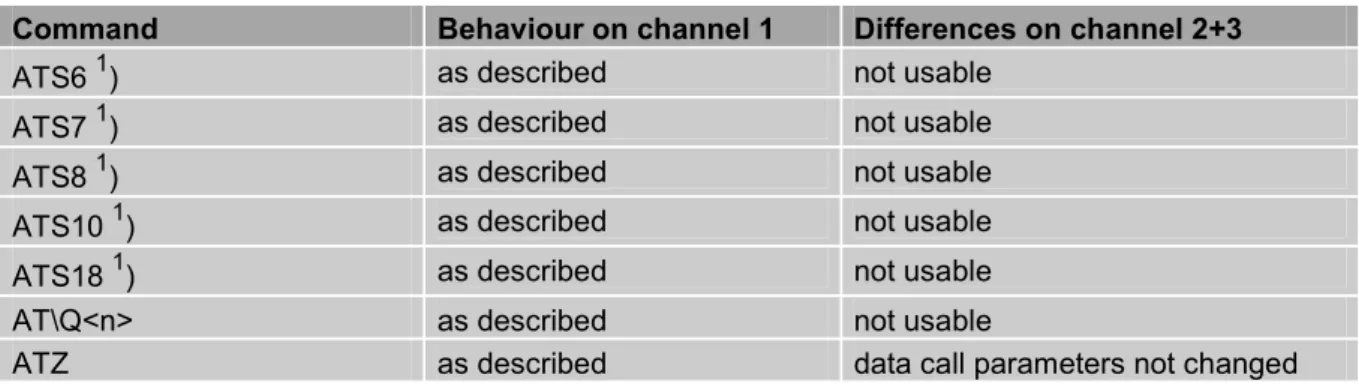
TC35, TC37 and TC35T support the registers S0-S29. You can change S0,S3,S4,S5,S6,S7,S8,S10,S18 by using the appropriate ATSn commands. All the other registers are read-only and for internal usage only!
2.1 A/ Repeat previous command line
Execute commandA/
Response
Repeats previous command line. Line does not need to end with terminating character.
Parameter Reference
V.25ter
Note
· After beginning with the character “a“ or „A“, a second character “t“ ,”T“ or “/“ has to follow. In case of using a wrong second character, it is necessary to start again with character “a“ or “A“.
· If autobauding is active (see +IPR, pg. 40) A/ (and a/) cannot be used.
2.2 +++ Switch from data mode to command mode
Execute command+++
Response
This command is only available during data calls. The +++ character sequence causes the TA to cancel the data flow over the AT interface and switch to command mode. This allows you to enter AT commands while maintaining the data connection to the remote device.
OK
To prevent the +++ escape sequence from being misinterpreted as data, it must be preceded and followed by a pause of at least 1000 ms. The +++ characters must be entered in quick succession, all within 1000 ms.
Reference V.25ter
Note:
· To return from on-line command mode to on-line data mode: Enter ATO as described in Chapter 2.17.
2.3 AT\Qn Flowcontrol
Execute command AT\Q<n> Response OK Parameter<n> 0 AT\Q0 No flow control
1 AT\Q1 XON/XOFF software flow control 2 AT\Q2 Only CTS by DCE
3 AT\Q3 RTS/CTS hardware flow control
Required for the following procedures: incoming or outgoing data calls, fax calls.
Often, the initialization routine of Fax programs includes enabling RTS/CTS handshake,
eliminating the need to issue AT\Q3 once again. Reference
Note
Line state refers to RS-232 levels.
The setting of AT\Q is stored volatile and must be restored each time after the GSM engine was switched off. Also, there is no way to store AT\Q to the user defined profile.
See also Chapter 1.6 for general information on flow control.
2.4 ATA Answer a call
Execute commandATA
TA causes remote station to go off-hook (e.g. answer call).
Note1: Any additional commands on the same command line are ignored. Note2: This command may be aborted generally by receiving a character during
execution. It can´t be aborted in some connection setup states, such as handshaking.
Response
Response in case of data call, if successfully connected: CONNECT<text> TA switches to data mode.
Note: <text> output only if +ATX parameter setting with value > 0. Response in case of voice call, if successfully connected:
OK
When TA returns to command mode after call release: OK Response if no connection: NO CARRIER Parameter Reference V.25ter Note
2.5 ATD Mobile originated call to dial a number
Execute commandATD[<n>] [<mgsm][;]
This command can be used to set up outgoing voice, data or fax calls. It also serves to control supplementary services.
Note:
The command may be aborted generally when receiving an ATH command during execution. It can´t be aborted in some connection setup states, such as handshaking. Two different call setup options can be determined for voice calls: TA returns OK either after dialing was completed or after call has been established. The setting is made with AT^SM20 (see Chapter 6.19). In data connections, call setup always terminates when the call has been established. Response
If no dialtone (parameter setting ATX2 or ATX4): NO DIALTONE
If busy (parameter setting ATX3 or ATX4): BUSY
If a connection cannot be set up: NO CARRIER
If successfully connected and non-voice call: CONNECT<text> TA switches to data state.
Note:<text>output only if +ATX parameter setting with value > 0. When TA returns to command mode after call release:
OK
If successfully connected and voice call: OK
Parameter
<n> String of dialling digits and optionally V.25ter modifiers (dialling digits):
0-9, * , #, +, A, B, C
V.25ter modifiers: these are ignored: ,(comma), T, P, !, W, @ Emergency call:
<n> = 112 worldwide number (no SIM needed)
<mgsm> String of GSM modifiers:
I Activates CLIR (disables presentation of own phone number to called party)
i Deactivates CLIR (enables presentation of own phone number to called party)
<;> Only required to set up voice calls. TA remains in command mode.
Reference V.25ter/GSM 07.07
Note
· Before setting up a data call, check that RTS/CTS handshake is enabled. See Chapters 1.6 and 2.3.
· Parameter “l“ and “i“ only if no *#-code is within the dial string.
· <mgsm> is not supported for data calls.
· <n> is default for last number that can be dialled by ATDL.
· See also +ATX and chapter 7.1.4 for <text>.
· The *# codes can only be used with voice calls (i.e. use ´; ´) only.
· If ATD is used with a USSD command (e.g. ATD*100#;) an AT+CUSD=1 is executed implicitly. (see AT+CUSD, pg. 116).
2.6 ATD><mem><n> Originate call to phone number <n> in memory <mem>
This command allows you to dial a phone number from a specific phonebook. To initiate a call, enter a two letter abbreviation for the phonebook <mem>, followed by the memory location <n> of the desired entry. The location range of each phonebook can be queried by AT+CPBR (see Chapter 4.28).Execute command ATD><mem> <n>[<mgsm>][;]
TA attempts to set up an outgoing call to the specified number.
Note: This command may be aborted generally by receiving a character during execution. Abortion is not possible during some states of connection setup such as handshaking.
Response
If error is related to ME functionality: +CME ERROR: <err>
If no dialtone (parameter setting ATX2 or ATX4): NO DIALTONE
If busy (parameter setting ATX3 or ATX4): BUSY
If connection cannot be set up: NO CARRIER
If successfully connected and non-voice call:
CONNECT<text>TA switches to data state.
Note:<text>output only if +ATX parameter setting with value > 0. When TA returns to command mode after call release:
OK
If successfully connected and voice call: OK
Parameter
<mem> phonebook:
"SM” SIM phonebook (storage depending on SIM card)
”FD” SIM fixdialling phonebook (pos. 1-7)
”LD” SIM last-dialling-phonebook (usually the last 10 numbers dialed are stored on the SIM card, no matter whether or not the calls were successfully set up)
”MC” ME missed (unanswered received) calls list (up to 10 numbers) ”RC” SIM received calls list
”ME” ME Phonebook (up to 50 numbers) ”ON” SIM (or ME) own numbers (MSISDNs) list
Note: <mem> must be included in quotation marks (""), if parameter <mgsm> is used. If not, quotation marks are optional.
<n> Integer type memory location in the range of locations available in
the selected memory, i.e. the index number returned by AT+CPBR.
<mgsm> I Activates CLIR (disables presentation of own phone number to
to called party)
<;> Only required to set up voice calls. TA remains in command mode.
Reference V.25ter/GSM 07.07
Note
· There is no <mem> for emergency call (“EN”). · Command is not supported for data call!
· Parameter <mgsm> only if no *# code is within the dial string.
· The *# codes can only be used with voice calls (i.e.if “;” is appended). · See also ATX and chapter 7.1.4 for <text>.
Example To query the location number of the phonebook entry: AT+CPBR=1,xx
TA returns the entries available in the active phonebook.
To dial a number from the SIM phonebook, for example the number stored to location 15:
ATD>SM15; OK
To dial a phone number stored in the last dial memory on the SIM card:
ATD>LD9; OK
2.7 ATD><n> Originate call to phone number selected from active memory
This command can be used to dial a phone number selected from the active memory. The active memory is the phonebook selected with AT+CPBS (see Chapter 4.29). To set up a call simply enter the memory location of the desired entry. The memory location range of each phonebook can be queried by AT+CPBR (see Chapter 4.28).Execute command ATD><n>[<mgsm>][;]
TA attempts to set up an outgoing call to the stored number.
Note: This command may be aborted generally by receiving a character during execution. It can´t be aborted in some connection setup states, such as handshaking.
Response
If error is related to ME functionality: +CME ERROR: <err>
If no dialtone (parameter setting ATX2 or ATX4): NO DIALTONE
If busy (parameter setting ATX3 or ATX4): BUSY
If a connection cannot be set up: NO CARRIER
If successfully connected and non-voice call:
CONNECT<text> TA switches to data state.
Note:<text>output only if +ATX parameter setting with value > 0. When TA returns to command mode after call release:
OK
If successfully connected and voice call: OK
Parameter
<n> integer type memory location should be in the range of locations
available in the memory used, i.e. the index number returned by AT+CPBR.
<mgsm> I Activates CLIR (disables presentation of own phone number to called party)
i Deactivates CLIR (enables presentation of own phone number to called party)
<;> Only required to set up voice calls. TA remains in command mode.
Reference
V.25ter/GSM 07.07
Note
· Parameter <mgsm> only if no *# code is within the dial string. · Command is not supported for data call!
· The *# codes can only be used with voice calls (i.e.if “;” is appended). · See also +ATX and chapter 7.1.4 for <text>.
corresponding field
This command searches the active phonebook for a given string <str> and dials the assigned phone number. The active phonebook is the one set with AT+CPBS.
Execute command ATD><str>[mgsm][;]
TA attempts to set up an outgoing call to stored number
Note: This command may be aborted generally by receiving a character during execution. It can´t be aborted in some connection setup states, such as handshaking.
Response
If error is related to ME functionality: +CME ERROR: <err>
If no dialtone (parameter setting ATX2 or ATX4): NO DIALTONE
If busy (parameter setting ATX3 or ATX4): BUSY
If a connection cannot be set up: NO CARRIER
If successfully connected and non-voice call: CONNECT<text> TA switches to data state.
Note:<text>output only if +ATX parameter setting with value > 0. When TA returns to command mode after call release:
OK
If successfully connected and voice call: OK
Parameter
<str> string type value (“x”), which should equal an alphanumeric field in
at least one phonebook entry in the searched memories; used character set should be the one selected with Select TE Character Set +CSCS. <str> can contain escape sequences as described in chapter „“, pg. 11.
<str> must be wrapped in quotation marks (""), if escape sequences or parameter <mgsm> are used or if the alphanumeric strings contains a blank. If not, quotation marks are optional.
<mgsm> I Activates CLIR (disables presentation of own phone number to called party)
i Deactivates CLIR (enables presentation of own phone number to called party)
<;> Only required to set up voice calls. TA remains in command mode.
Reference
V.25ter/GSM 07.07 Note
Command is not supported for data calls! See also ATX and Chapter 7.1.4 for <text>
2.9 ATDI Mobile originated call to dialable ISDN number <n>
Execute commandATDI<n>[;] TA attempts to set up an outgoing call to ISDN number. Note: This command may be aborted generally by receiving a character during execution. This command cannot be aborted in some connection setup states, such as handshaking.
Response
If no dialtone (parameter setting ATX2 or ATX4): NO DIALTONE
If busy (parameter setting ATX3 or ATX4): BUSY
If a connection cannot be set up: NO CARRIER
If successful connected and non-voice call: CONNECT<text> TA switches to data state.
Note:<text>output only if +ATX parameter setting with value > 0. When TA returns to command mode after call release:
OK
If successfully connected and voice call: OK
Parameter
<n> [+]<d> phone number
string with maximum length of 20 characters + international dialling format
<d> ISDN number
string of digits: +,0-9, A, B, C <;> voice call
Reference V.25ter
2.10 ATDL Redial last telephone number used
Execute commandATDL[;]
This command redials the last voice and data call number used in the ATD command.
· To redial the last data call number simply enter ATDL · To redial the last voice call number type ATDL;
Note: The command may be aborted generally by receiving a character during execution. This command cannot be aborted in some connection setup states, such as handshaking.
Response
If there is no last number or number is not valid: +CME ERROR
If no dialtone (parameter setting ATX2 or ATX4): NO DIALTONE
If busy (parameter setting ATX3 or ATX4): BUSY
If a connection cannot be set up: NO CARRIER
If successfully connected and non-voice call: CONNECT<text> TA switches to data state.
Note:<text>output only if +ATX parameter setting with value > 0. When TA returns to command mode after call release:
OK
If successfully connected and voice call: OK Parameter <;> voice call Reference V.25ter Note
2.11 ATE Enable command echo
Write commandATE[<value>]
This setting determines whether or not the TA echoes characters received from TE during command state.
Response OK Parameter
<value> 0 Echo mode off 1 Echo mode on Reference
V.25ter
Note
In case of using the command without parameter, <value> is set to 0.
2.12 ATH Disconnect existing connection
Execute commandATH[n]
Disconnects any call in progress, such as voice calls, fax or CSD data calls. Response
OK Note:
OK is issued after circuit 109 (DCD) is turned off (RS-232 level), if it was previously on. Parameter <n> 0 terminate call Reference V.25ter Note
Using ATH in Multiplex mode (AT+CMUX)
· ATH terminates every data call, even if it is issued via logical channels 2 or 3. · This behaviour is in accordance with ITU-T V.25 ter; (07/97, see „6.3.6 Hook
2.13 ATI Display product identification information
Execute commandATI
Response
ME issues product information text SIEMENS
REVISION TC35 x.yy xx.yy
OK
Explanation of „Revision“ parameter: Version xx and variant yy of software release.
Reference V.25ter
Note
2.14 ATI[value] Display additional identification information
Execute commandATI[value]
Response
Delivers no specific information and simply returns OK. Reference
V.25ter
2.15 ATL Set monitor speaker loudness
Execute command ATL[val] Response OK Reference V.25ter Note· The two commands ATL and ATM are implemented only for V.25ter compatibility reasons and have no effect.
· In multiplex mode the command is supported on logical channel 1 only.
2.16 ATM Set monitor speaker mode
Execute command ATM[val] Response OK Reference V.25ter Note· The two commands ATL and ATM are implemented only for V.25ter compatibility reasons and have no effect.
· In multiplex mode the command is supported on logical channel 1 only.
2.17 ATO Switch from command mode to data mode
Execute commandATO[n]
Response
ATO is the corresponding command to the +++ escape sequence described in Chapter 2.2: When you have established a data call and TA is in command mode, ATO causes the TA to resume the data connection and return to data mode. If connection is not successfully resumed
NO CARRIER or
TA returns to data mode from command modeCONNECT <text>
Note:<text>output only if +ATX parameter setting with value > 0. Parameter
<n> 0 switch from command mode to data mode
Reference V.25ter
2.18 ATQ Set result code presentation mode
Write commandATQ[<n>]
Response
Specifies whether or not the TA transmits any result code to the TE. Information text transmitted in response is not affected by this setting.
If <n>=0: OK If <n>=1: (none) Parameter
<n> 0 DCE transmits result code
1 Result codes are suppressed and not transmitted Reference
V.25ter
Note
2.19 ATP Select pulse dialling
Execute command ATP Response OK Reference V.25ter Note No effect for GSM2.20 ATS0 Set number of rings before automatically answering the call
Read commandATS0?
Response <n> OK
Write command
ATS0=<n> Specifies whether or not the TA will accept an incoming data / fax call without user intervention. <n> determines the number of rings to wait before the TA will automatically answer.
Response OK Parameter
<n> 000 disables automatic answer mode
001-255 enables automatic answering after specified number of rings Reference
V.25ter
Note
· Auto-answer mode is only applicable to data or fax calls.
· If <n> is set too high, the calling party may hang up before the call can be automatically answered.
· The correlation between ATS7 and ATS0 is important. Example: Call setup may fail if ATS0=20 and ATS7=30.
2.21 ATS2 Escape code sequence
Read commandATS2?
Response
S2 determines the decimal value of the ASCII character used in the escape code sequence, which serves, during a data call, to change from data to command mode. Compare Chapter 2.2.
The default value 043 is equivalent to an ASCII “+”. Please note that the value cannot be changed, and therefore, test or write commands are not supported. Reference
V.25ter
Note
2.22 ATS3 Write command line termination character
Read command ATS3? Response <n> OK Write command ATS3=<n>This parameter setting determines the character recognized by TA to terminate an incoming command line.
Response OK Parameter
<n> 000-013-127 command line termination character Reference
V.25ter
Note
2.23 ATS4 Set response formatting character
Read commandATS4?
Response <n> OK Write command
ATS4=<n> This parameter setting determines the character generated by the TA for result code and information text. Response
OK Parameter
<n> 000-010-127 response formatting character.
Reference V.25ter
2.24 ATS5 Write command line editing character
Read command ATS5? Response <n> OK Write commandATS5=<n> This parameter setting determines the character recognized by TA as a request to delete the immediately preceding character from the command line. Response
OK Parameter
<n> 000-008-127 command line editing character
Reference V.25ter
Note
2.25 ATS6 Set pause before blind dialling
Read commandATS6?
Response <n> OK Write command
ATS6=<n> No effect for GSM Response OK
Parameter
<n> 000-255 number of seconds to wait before blind dialling. Reference
V.25ter
2.26 ATS7 Set number of seconds to wait for connection completion
Read command ATS7? Response <n> OK Write commandATS7=<n> Specifies the number of seconds the TA will wait for the completion of the call setup when answering or originating a data call. Also referred to as "no answer timeout". To put it plainly, this is the time to wait for the carrier signal. If no carrier signal is received within the specified time, the TA hangs up.
Response
OK
Parameter
<n>0 <n> 000 – 060 no. of seconds to wait for connection completion. Reference
V.25ter
Note
· Values greater than 60 cause no error, but <n> will be restored to the maximum value of 60.
· If called party has specified a high value for ATS0=<n>, call setup may fail. · The correlation between ATS7 and ATS0 is important.
Example: Call setup may fail if ATS7=30 and ATS0=20. · ATS7 is only applicable to data calls.
2.27 ATS8 Set number of seconds to wait for comma dial modifier
Read commandATS8?
Response <n> OK Write command
ATS8=<n> No effect for GSM Response OK
Reference V.25ter
2.28 ATS10 Set disconnect delay after indicating the absence of data carrier
Read command ATS10? Response <n> OK Write command ATS10=<n>This parameter setting determines the amount of time, that the TA remains connected in absence of a data carrier. If the data carrier is detected before disconnect, the TA remains connected.
Response
OK
Parameter
<n> 001-002-254 number of tenths of seconds of delay
Reference V.25ter
Note
2.29 ATS18 Extended error report
Test command ATS18? Response <n> OK Execute command ATS18=<n>TA returns an extended report of the reason for the last call release and location.
<n> 0 – 255, odd numbers set extended error report and even
numbers disable this feature. Response
+Cause: <location ID>: <reason > OK Parameter
<location ID> Location ID as number code (see subclause 7.1.5).
<reason> Reason for last call release as number code (see subclause
7.1.5). Reference
Siemens
Note
This command works for data calls only. For voice calls please use AT+CEER.
2.30 ATT Select tone dialling
Execute command ATT Response OK Reference V.25ter Note No effect for GSM2.31 ATV Set result code format mode
Write commandATV[<value>]
Response
This parameter setting determines the contents of the header and trailer transmitted with result codes and information responses.
When<value> =0 0 When<value> =1 OK Parameter <value>
0 Information response:<text><CR><LF> Short result code format:<numeric code><CR> 1 Information response:<CR><LF><text><CR><LF>
Long result code format:<CR><LF><verbose code><CR><LF> Reference
V.25ter
Note
In case of using the command without parameter <value> will be set to 0. Information responses described in chapter 7 (verbose code and numeric code).
2.32 ATX Set CONNECT result code format and call monitoring
Write commandATX[<value>]
Response
This parameter setting determines whether or not the TA detects the presence of dial tone and busy signal and whether or not TA transmits particular result codes. OK
Parameter <value>
0 CONNECT result code only returned, dial tone and busy detection are both disabled
1 CONNECT<text> result code only returned, dial tone and busy detection are both disabled
2 CONNECT<text> result code returned, dial tone detection is enabled, busy detection is disabled
3 CONNECT<text> result code returned, dial tone detection is disabled, busy detection is enabled
4 CONNECT<text> result code returned, dial tone and busy detection are both enabled
Reference V.25ter
Note
2.33 ATZ Set all current parameters to user defined profile
Execute commandATZ[<value>]
Response
TA sets all current parameters to the user profile stored with AT&W (see Chapter 2.39 on page 37). If a connection is in progress, it will be terminated. The user defined profile is stored to the non-volatile memory.
Note: If invalid, the user profile will be reset to the factory default profile. Any additional commands on the same command line will be ignored. A delay of 300 ms is required before next command is sent, otherwise “OK” response may be corrupted.
OK Parameter
<value> 0 Reset to user profile Reference
V.25ter
Note
The GSM engines referred to in this manual can be assigned two profiles: the factory profile (restored with AT&F) and the user profile (stored with AT&W). See Chapter 2.36 for details on AT&F.
2.34 AT&C Set circuit Data Carrier Detect (DCD) function mode
Write commandAT&C[<value>]
Response
This parameter determines how the state of circuit 109(DCD) relates to the detection of received line signal from the distant end.
OK Parameter
<value> 0 DCD line is always ON.
1 DCD line is ON in the presence of data carrier only. Reference
V.25ter
Note
2.35 AT&D Set circuit Data Terminal Ready (DTR) function mode
Write commandAT&D[<value>]
Response
This command is only intended for data calls. The <value> parameter determines how the TA responds when circuit 108/2 (DTR) is changed from ON to OFF during data mode.
OK Parameter
<value> 0 TA ignores status on DTR.
1 ON->OFF on DTR: Change to command mode while retaining the connected call.
2 ON->OFF on DTR: Disconnect data call, change to command mode. During state DTR = OFF is auto-answer off.
Reference V.25ter
Note
Line state refers to RS-232 levels.
2.36 AT&F Set all current parameters to manufacturer defaults
Execute commandAT&F[value]
Response
TA sets all current parameters to the manufacturer defined profile. OK
Parameter
<value> 0 set all TA parameters to manufacturer default
Reference V.25ter
Note
· List of parameters reset to manufacturer default (sorted by the associated AT commands):
E, Q, V, X, +CBST, +CRLP, +CRC, +CR, +CNMI, +CMEE, +CSMS, ^SCKS, ^SACM, +CREG, +CLIP, the S Parameters, &D, &C, &S
· In addition to the default profile, you can store an individual one with AT&W. To alternate between the two profiles enter either ATZ (loads user profile) or AT&F (restores factory profile). Refer to Chapter 2.39 for AT&W and Chapter 2.33 for ATZ.
2.37 AT&S Set circuit Data Set Ready (DSR) function mode
Write commandAT&S<value>
Response
This parameter determines how the TA sets circuit 107 (DSR) depending on the communication state of the TA interfacing TE.
OK Parameter
<value> 0 DSR always on.
1 TA in command mode: DSR is OFF. TA in data mode: DSR is ON. Reference
V.25ter
Note
2.38 AT&V Display current configuration
Execute commandAT&V[<n>]
Response
TA returns the current parameter setting. The configuration varies depending on whether or not PIN authentication has been done, or Multiplex mode has been activated.
Parameter
<n> 0 profile number
PIN entered (see AT+CPIN, pg. 95) PIN not entered Configuration without Multiplex mode or configuration on channel 1 if Multiplex mode is enabled ACTIVE PROFILE:
E1 Q0 V1 X4 &C1 &D2 &S0 \Q0
S0:000 S3:013 S4:010 S5:008 S6:000 S7:060 S8:000 S10:002 S18:000 +CBST: 7,0,1 +CRLP: 61,61,78,6 +CR: 0 +FCLASS: 0 +CRC: 0 +CMGF: 0 +CNMI: 0,0,0,0,1 +ILRR: 0 +IPR: 0 +CMEE: 0 ^SMGO: 0,0 +CSMS: 0,1,1,1 ^SACM: 0,"000000","000000" ^SCKS: 0,1 +CREG: 0,1 +CLIP: 0,2 +CAOC: 0 +COPS: 0,0,"operator" OK ACTIVE PROFILE:
E1 Q0 V1 X4 &C1 &D2 &S0 \Q0
S0:000 S3:013 S4:010 S5:008 S6:000 S7:060 S8:000 S10:002 S18:000 +CBST: 7,0,1 +CRLP: 61,61,78,6 +CR: 0 +FCLASS: 0 +ILRR: 0 +IPR: 0 +CMEE: 0 ^SCKS: 0,1 OK Logical channels 2 and 3 (Multiplex mode enabled) +CRC: 0 +CMGF: 0 +CNMI: 0,0,0,0,1 +ILRR: 0 +IPR: 19200 +CMEE: 0 ^SMGO: 0,0 +CSMS: 0,1,1,1 ^SACM: 0,"000000","000000" ^SCKS: 0,1 +CREG: 0, 1 +CLIP: 0,2 +CAOC: 0 +COPS: 0,0,"operator" OK +ILRR: 0 +IPR: 19200 +CMEE: 0 ^SCKS: 0,1 OK
2.39 AT&W Store current configuration to user defined profile
Execute commandAT&W[<n>]
TA stores the current settings to a user defined profile in the non-volatile memory. Response
OK or if error is related to ME functionality: ERROR / +CME ERROR: <err> Parameter
<n> 0 number of profile
Reference V.25ter
Note
The user defined profile will be loaded automatically after PowerUp. Use ATZ to restore user profile and AT&F to restore factory settings. Until the first use of AT&W, ATZ works as AT&F. See Chapter 2.33 for details on ATZ and Chapter 2.36 for AT&F.
List of settings stored to user defined profile:
· ATE, ATQ, ATV, ATX, AT+CRC, AT+CMGF, AT+CSDH, AT+CNMI, AT+ILRR, AT+CMEE, AT^SMGO, AT+CSMS, AT^SACM, ^SCKS, AT+CREG, AT+CLIP, AT+COPS.
AT&C, AT&D, AT&S, ATS0, ATS3, ATS4, ATS5, ATS6, ATS7, ATS8, ATS10, ATS18, AT+FCLASS, AT+CBST, AT+CRLP, AT+CR.
User defined profiles in multiplex mode:
· On each multiplexer channel you can save an individual profile. · List of settings stored to profile on multiplexer channel 1:
ATE, ATQ, ATV, ATX, AT+CRC, AT+CMGF, AT+CSDH, AT+CNMI, AT+ILRR, AT+CMEE, AT^SMGO, AT+CSMS, AT^SACM, ^SCKS, AT+CREG, AT+CLIP, AT+COPS.
AT&C, AT&D, AT&S, ATS0, ATS3, ATS4, ATS5, ATS6, ATS7, ATS8, ATS10, ATS18, AT+FCLASS, AT+CBST, AT+CRLP, AT+CR.
· List of settings stored to profile on multiplexer channels 2 and 3:
ATE, ATQ, ATV, ATX, AT+CRC, AT+CMGF, AT+CSDH, AT+CNMI, AT+ILRR, AT+CMEE, AT^SMGO, AT+CSMS, AT^SACM, ^SCKS, AT+CREG, AT+CLIP, AT+COPS. (Parameters for data call are not relevant on channels 2 and 3.)
2.40 AT+GCAP Request complete TA capabilities list
Test command AT+GCAP=? Response OK Parameter Execute command AT+GCAP ResponseTA reports a list of additional capabilities. +GCAP: <name>
OK Parameter
<name> e.g.:+CGSM,+FCLASS
Reference V.25ter
Note
+CGSM: The response text shows which GSM commands of the ETSI standard are supported.
2.41 AT+GMI Request manufacturer identification
Test command AT+GMI=? Response OK Execute command AT+GMI ResponseTA reports information to identify the manufacturer. SIEMENS
OK Reference
V.25ter
Note
See also ”AT+CGMI Request manufacturer identification”.
2.42 AT+GMM Request TA model identification
Test command AT+GMM=? Response OK Execute command AT+GMMTA reports one or more lines of information text which permit the user to identify the specific model of device.
TC35 OK Reference
V.25ter
Note
2.43 AT+GMR Request TA revision identification of software status
Test command AT+GMR=? Response OK Execute command AT+GMR ResponseTA returns product software version identification text. REVISION x.yy
OK
x.yy Version x and variant yy of software release. Reference
V.25ter
Note
See also AT+CGMR Request revision identification of software status
2.44 AT+GSN Request TA serial number identification(IMEI)
Test command AT+GSN=? Response OK Execute command AT+GSN ResponseTA reports one or more lines of information text which permit the user to identify the individual device.
<sn> OK Parameter
<sn> IMEI of the telephone(International Mobile station Equipment Identity)
Reference V.25ter
Note
2.45 AT+ILRR Set TE-TA local rate reporting
Test commandAT+ILRR=?
Response
+ILRR:(list of supported <value>s) OK
Parameter
See write command Read command
AT+ILRR?
Response
+ILRR: <value> OK Parameter
See write command Write command
AT+ILRR= <value>
The write command specifies whether or not an intermediate result code shall indicate the currently used local rate when an incoming or outgoing data call is established. The message is transmitted from the DCE (= TA) to the DTE (=TE) before the final result code of the connection setup (e.g. CONNECT) appears. Response
OK Parameter
<value> 0 Disables reporting of local port rate
1 Enables reporting of local port rate Intermediate result code
+ILLR:<rate> Parameter
<rate> port rate setting in bit per second
0 (Autobauding, see Chapter 2.46.1) 300 600 1200 2400 4800 9600 14400 19200 28800 38400 57600 115200 Reference V.25ter Note Example ATD030112233445 +ILRR: 57600 CONNECT 9600/RLP
2.46 AT+IPR Set fixed local rate
Test commandAT+IPR=?
Response
+IPR: (list of supported auto-detectable <rate>s), (list of supported fixed-only
<rate>s) OK Parameter
See write command Read command
AT+IPR?
Response
+IPR: <rate> OK Parameter
See write command Write command
AT+IPR=<rate>
This command specifies the DTE-DCE bitrate. When you set a fix rate, make sure that both DTE (TE) and DCE (= TA) are configured to the same rate. When you select autobauding the DCE will automatically recognize the bitrate currently used by the DTE.
A selected bitrate takes effect following the issue of any result code associated with this command (e.g. OK).
The setting is stored in the non-volatile memory and will be used whenever the engine is powered up again. However, in case of autobaud mode (+IPR=0) the detected DCE bitrate will not be saved and, therefore, needs to be be re-synchronized after restarting the GSM engine (see Chapter 2.46.1).
Response
OK or if error is related to ME functionality: ERROR / +CME ERROR: <err> Parameter
<rate> bit rate per second
0 (Autobauding, see Chapter 2.46.1) 300 600 1200 2400 4800 9600 14400 19200 28800 38400 57600 115200 Reference V.25ter Note
Your current setting of AT+IPR will be preserved
· when you download new firmware (i.e. a firmware update does not restore the factory setting);
· in the event of power failure.
Generally, AT+IPR=x should be used as a standalone command. If nevertheless combinations with other commands on the same line cannot be avoided, there are several constraints to be considered:
last command (e.g. OK) and the next command on the same line.
· When you enter AT+IPR=0, autobauding will be activated after the response to the last command is received.
· When local echo is active (ATE1) and you enter AT+IPR=x with other commands you may encounter the following problem: If switching to the new bit rate takes effect while a response is being transmitted, the last bytes may be sent at the new bit rate and thus, not properly transmitted. The following commands will be correctly sent at the new bit rate.
2.46.1 Autobauding
Autobauding allows the GSM engine to automatically detect the bitrate configured in the host application. The serial interface of the GSM engine supports autobauding for the following bitrates: 1200, 2400, 4800, 9600, 19200, 38400, 57600, 115200. Factory setting is autobauding enabled. This gives you the flexibility to put the GSM engine into operation no matter what bitrate your host application is configured to.
To take advantage of autobaud mode specific attention must be paid to the following requirements: Synchronization between DTE and DCE
Ensure that DTE and DCE are correctly synchronized and the bitrate used by the DTE is detected by the DCE (= ME). To allow the bitrate to be synchronized simply issue an "AT" or "at" string. This is necessary
· after you have activated autobauding
· when you start up the GSM engine while autobauding is enabled. It is recommended to wait 3 to 5 seconds before sending the first AT character. Otherwise undefined characters might be retur