HyperSQL User Guide
HyperSQL Database Engine (HSQLDB) 2.1
$Revision: 4146 $
Published $Date: 2011-03-13 22:44:24 -0400 (Sun, 13 Mar 2011) $
Copyright 2002-2011 The HSQL Development Group. Permission is granted to distribute this document without any alteration under the terms of the HSQLDB license. You are not allowed to distribute or display this document on the web in an altered form.
Preface ... xiv
Available formats for this document ... xiv
1. Running and Using HyperSQL ... 1
The HSQLDB Jar ... 1
Running Database Access Tools ... 1
A HyperSQL Database ... 2
In-Process Access to Database Catalogs ... 2
Server Modes ... 3
HyperSQL HSQL Server ... 4
HyperSQL HTTP Server ... 4
HyperSQL HTTP Servlet ... 4
Connecting to a Database Server ... 4
Security Considerations ... 5
Using Multiple Databases ... 5
Accessing the Data ... 5
Closing the Database ... 6
Creating a New Database ... 7
2. SQL Language ... 8
Standards Support ... 8
Short Guide to Types ... 8
SQL Data and Tables ... 9
Temporary Tables ... 10
Persistent Tables ... 10
Lob Data ... 11
Basic Types and Operations ... 11
Numeric Types ... 11
Boolean Type ... 13
Character String Types ... 13
Binary String Types ... 14
Bit String Types ... 15
Storage and Handling of Java Objects ... 16
Type Length, Precision and Scale ... 16
Datetime types ... 17 Interval Types ... 20 Arrays ... 23 Array Definition ... 23 Array Reference ... 24 Array Operations ... 24
Indexes and Query Speed ... 26
Query Processing and Optimisation ... 27
Indexes and Conditions ... 27
Indexes and Operations ... 27
Indexes and ORDER BY, OFFSET and LIMIT ... 28
3. Sessions and Transactions ... 29
Overview ... 29
Session Attributes and Variables ... 29
Session Attributes ... 30
Session Variables ... 30
Session Tables ... 30
Transactions and Concurrency Control ... 31
HyperSQL User Guide
Two Phase Locking with Snapshot Isolation ... 31
Lock Contention in 2PL ... 32
MVCC ... 32
Choosing the Transaction Model ... 33
Schema and Database Change ... 33
Simultaneous Access to Tables ... 34
Session and Transaction Control Statements ... 34
4. Schemas and Database Objects ... 41
Overview ... 41
Schemas and Schema Objects ... 41
Names and References ... 42
Character Sets ... 42 Collations ... 43 Distinct Types ... 43 Domains ... 43 Number Sequences ... 43 Tables ... 45 Views ... 46 Constraints ... 46 Assertions ... 47 Triggers ... 47 Routines ... 47 Indexes ... 48
Statements for Schema Definition and Manipulation ... 48
Common Elements and Statements ... 48
Renaming Objects ... 49
Commenting Objects ... 50
Schema Creation ... 50
Table Creation ... 51
Table Manipulation ... 56
View Creation and Manipulation ... 61
Domain Creation and Manipulation ... 61
Trigger Creation ... 63
Routine Creation ... 64
Sequence Creation ... 66
SQL Procedure Statement ... 68
Other Schema Object Creation ... 69
The Information Schema ... 72
Predefined Character Sets, Collations and Domains ... 72
Views in INFORMATION SCHEMA ... 72
5. Text Tables ... 79
Overview ... 79
The Implementation ... 79
Definition of Tables ... 79
Scope and Reassignment ... 79
Null Values in Columns of Text Tables ... 80
Configuration ... 80
Disconnecting Text Tables ... 81
Text File Usage ... 82
Text File Global Properties ... 82
Transactions ... 82
6. Access Control ... 84
Overview ... 84
Built-In Roles and Users ... 85
Access Rights ... 86
Statements for Authorization and Access Control ... 87
7. Data Access and Change ... 92
Overview ... 92
Cursors And Result Sets ... 92
Columns and Rows ... 92
Navigation ... 92 Updatability ... 93 Sensitivity ... 94 Holdability ... 94 Autocommit ... 94 JDBC Overview ... 94 JDBC Parameters ... 95
JDBC and Data Change Statements ... 95
JDBC Callable Statement ... 95 JDBC Returned Values ... 96 Cursor Declaration ... 96 Syntax Elements ... 96 Literals ... 96 References, etc. ... 100 Value Expression ... 101 Predicates ... 107
Other Syntax Elements ... 112
Data Access Statements ... 115
Table ... 116 Subquery ... 117 Query Specification ... 117 Table Expression ... 118 Table Primary ... 119 Joined Table ... 121 Selection ... 122 Projection ... 122 Computed Columns ... 122 Naming ... 122 Grouping Operations ... 123 Aggregation ... 123 Set Operations ... 124
With Clause and Recursive Queries ... 124
Query Expression ... 125
Ordering ... 126
Slicing ... 126
Data Change Statements ... 127
Delete Statement ... 127 Truncate Statement ... 127 Insert Statement ... 127 Update Statement ... 129 Merge Statement ... 130 8. SQL-Invoked Routines ... 132 Routine Definition ... 133 Routine Characteristics ... 135 SQL Language Routines (PSM) ... 137
Advantages and Disadvantages ... 137
HyperSQL User Guide Compound Statement ... 139 Table Variables ... 139 Variables ... 139 Cursors ... 140 Handlers ... 141 Assignment Statement ... 142
Select Statement : Single Row ... 142
Formal Parameters ... 142
Iterated Statements ... 143
Iterated FOR Statement ... 144
Conditional Statements ... 144
Return Statement ... 146
Control Statements ... 146
Raising Exceptions ... 147
Routine Polymorphism ... 147
Returning Data From Procedures ... 148
Recursive Routines ... 149
Java Language Routines (SQL/JRT) ... 150
Polymorphism ... 151
Java Language Procedures ... 152
Java Static Methods ... 153
Legacy Support ... 154
Securing Access to Classes ... 154
User Defined Aggregate Functions ... 155
Definition of Aggregate Functions ... 155
SQL PSM Aggregate Functions ... 156
Java Aggregate Functions ... 157
9. Triggers ... 159 Overview ... 159 BEFORE Triggers ... 159 AFTER Triggers ... 160 INSTEAD OF Triggers ... 160 Trigger Properties ... 160 Trigger Event ... 160 Granularity ... 160
Trigger Action Time ... 160
References to Rows ... 161
Trigger Condition ... 161
Trigger Action in SQL ... 161
Trigger Action in Java ... 162
Trigger Creation ... 163
10. Built In Functions ... 166
Overview ... 166
String and Binary String Functions ... 167
Numeric Functions ... 171
Date Time and Interval Functions ... 175
Array Functions ... 181
General Functions ... 182
System Functions ... 184
11. System Management and Deployment Issues ... 188
Mode of Operation and Tables ... 188
Mode of Operation ... 188
Tables ... 188
Deployment context ... 189
Readonly Databases ... 189
Memory and Disk Use ... 190
Table Memory Allocation ... 190
Result Set Memory Allocation ... 190
Temporary Memory Use During Operations ... 190
Data Cache Memory Allocation ... 191
Object Pool Memory Allocation ... 191
Lob Memory Usage ... 191
Disk Space ... 192
Managing Database Connections ... 192
Tweaking the Mode of Operation ... 192
Application Development and Testing ... 192
Embedded Databases in Desktop Applications ... 193
Embedded Databases in Server Applications ... 193
Embedding a HyperSQL Server (Listener) ... 194
Using HyperSQL Without Logging ... 194
Bulk Inserts, Updates and Deletes ... 194
Server Databases ... 195
Persistence and Reliability ... 195
Upgrading Databases ... 195
Upgrading From Older Versions ... 196
Manual Changes to the *.script File ... 196
Backing Up Database Catalogs ... 197
Making Online Backups ... 197
Making Offline Backups ... 198
Examining Backups ... 198
Restoring a Backup ... 198
Encrypted Databases ... 198
Creating and Accessing an Encrypted Database ... 199
Speed Considerations ... 199
Security Considerations ... 199
Monitoring Database Operations ... 199
Statement Level Monitoring ... 200
Internal Event Monitoring ... 200
Server Operation Monitoring ... 200
Backward Compatibility Issues ... 200
Compatibility With Other RDBMS ... 201
PostgreSQL Compatibility ... 202
MySQL Compatibility ... 202
Firebird Compatibility ... 203
Apache Derby Compatibility ... 203
Oracle Compatibility ... 203
DB2 Compatibility ... 204
MS SQLServer and Sybase Compatibility ... 204
Database Security ... 204 Authentication Control ... 205 Statements ... 205 System Operations ... 205 Database Settings ... 207 SQL Conformance Settings ... 209
Cache, Persistence and Files Settings ... 214
Authentication Settings ... 217
HyperSQL User Guide
Connection URL ... 220
Variables In Connection URL ... 221
Connection properties ... 221
Database Properties in Connection URL and Properties ... 223
SQL Conformance Properties ... 224
Database Operations Properties ... 227
Database File and Memory Properties ... 228
Crypt Properties ... 232
System Properties ... 233
13. HyperSQL Network Listeners (Servers) ... 234
Listeners ... 234
HyperSQL Server ... 234
HyperSQL HTTP Server ... 234
HyperSQL HTTP Servlet ... 234
Server and Web Server Properties ... 235
Starting a Server from your Application ... 236
Allowing a Connection to Open or Create a Database ... 237
TLS Encryption ... 237
Requirements ... 237
Encrypting your JDBC connection ... 238
JSSE ... 239
Making a Private-key Keystore ... 240
Automatic Server or WebServer startup on UNIX ... 240
Network Access Control ... 240
14. HyperSQL on UNIX ... 243
Purpose ... 243
Installation ... 243
Setting up Database Catalog and Listener ... 245
Accessing your Database ... 246
Create additional Accounts ... 249
Shutdown ... 250
Running Hsqldb as a System Daemon ... 250
Portability of hsqldb init script ... 251
Init script Setup Procedure ... 251
Troubleshooting the Init Script ... 255
Upgrading ... 255
A. Lists of Keywords ... 257
List of SQL Standard Keywords ... 257
List of SQL Keywords Disallowed as HyperSQL Identifiers ... 258
B. Building HyperSQL Jars ... 260
Purpose ... 260
Building with Ant ... 260
Obtaining Ant ... 260
Building Hsqldb with Ant ... 260
Building for Older JDKs ... 261
Building with IDE's ... 261
Hsqldb CodeSwitcher ... 262
Building documentation ... 263
C. HyperSQL with OpenOffice.org ... 264
HyperSQL with OpenOffice.org ... 264
Using OpenOffice.org as a Database Tool ... 264
Converting .odb files to use with HyperSQL Server ... 264
D. HyperSQL File Links ... 265
List of Tables
1. Available formats of this document ... xiv
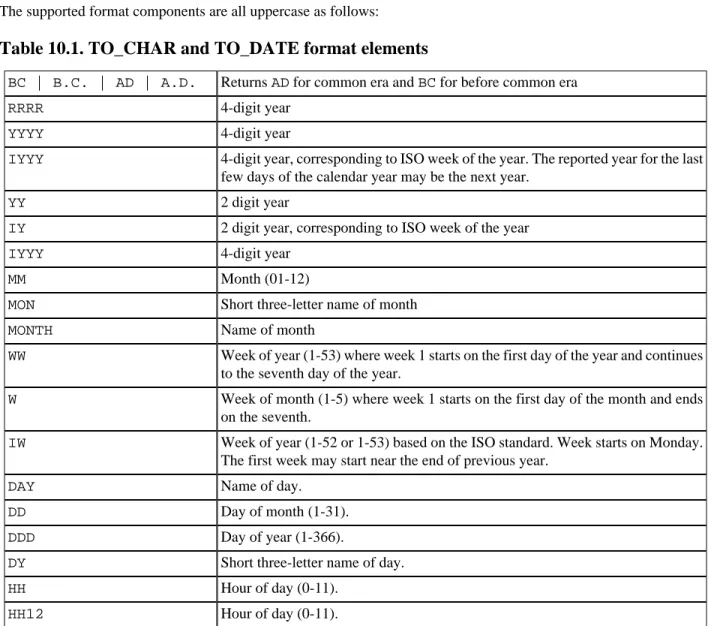
10.1. TO_CHAR and TO_DATE format elements ... 180
12.1. Memory Database URL ... 220
12.2. File Database URL ... 220
12.3. Resource Database URL ... 220
12.4. Server Database URL ... 221
12.5. User and Password ... 221
12.6. Column Names in JDBC ResultSet ... 222
12.7. Creating New Database ... 222
12.8. Automatic Shutdown ... 223
12.9. Validity Check Property ... 223
12.10. SQL Keyword Use ... 224
12.11. Reference to Columns Names ... 224
12.12. String Size Declaration ... 224
12.13. Type Enforcement in Comparison and Assignment ... 224
12.14. Foreign Key Triggered Data Change ... 225
12.15. Use of LOB for LONGVAR Types ... 225
12.16. Concatenation with NULL ... 225
12.17. NULL in Multi-Column UNIQUE Constraints ... 225
12.18. Truncation or Rounding in Type Conversion ... 226
12.19. Support for NaN values ... 226
12.20. MSSQL Style Syntax ... 226
12.21. MySQL Style Syntax ... 226
12.22. Oracle Style Syntax ... 226
12.23. PostgreSQL Style Syntax ... 227
12.24. Default Table Type ... 227
12.25. Transaction Control Mode ... 227
12.26. Default Isolation Level for Sessions ... 227
12.27. Transaction Rollback in Deadlock ... 227
12.28. Time Zone and Interval Types ... 228
12.29. Opening Database as Read Only ... 228
12.30. Opening Database Without Modifying the Files ... 228
12.31. Temporary Result Rows in Memory ... 228
12.32. Event Logging ... 229
12.33. Rows Cached In Memory ... 229
12.34. Size of Rows Cached in Memory ... 229
12.35. Size Scale of Disk Table Storage ... 229
12.36. Size Scale of LOB Storage ... 230
12.37. Internal Backup of Database Files ... 230
12.38. Use of Lock File ... 230
12.39. Logging Data Change Statements ... 230
12.40. Automatic Checkpoint Frequency ... 230
12.41. Logging Data Change Statements Frequency ... 231
12.42. Logging Data Change Statements Frequency ... 231
12.43. Use of NIO for Disk Table Storage ... 231
12.44. Use of NIO for Disk Table Storage ... 231
12.45. Default Properties for TEXT Tables ... 231
12.46. Forcing Garbage Collection ... 232
12.47. Crypt Property For LOBs ... 232
12.48. Cipher Key for Encrypted Database ... 232
12.50. Cipher Specification for Encrypted Database ... 232
12.51. Logging Framework ... 233
12.52. Text Tables ... 233
12.53. Java Functions ... 233
13.1. common server and webserver properties ... 235
13.2. server properties ... 236
List of Examples
1.1. Java code to connect to the local hsql Server ... 4
1.2. Java code to connect to the local http Server ... 5
1.3. Java code to connect to the local secure SSL hsql and http Servers ... 5
1.4. specifying a connection property to shutdown the database when the last connection is closed ... 6
1.5. specifying a connection property to disallow creating a new database ... 7
3.1. User-defined Session Variables ... 30
3.2. User-defined Temporary Session Tables ... 30
3.3. Setting Transaction Characteristics ... 36
3.4. Locking Tables ... 36
3.5. Rollback ... 37
3.6. Setting Session Characteristics ... 38
3.7. Setting Session Authorization ... 38
3.8. Setting Session Time Zone ... 38
4.1. inserting the next sequence value into a table row ... 44
4.2. numbering returned rows of a SELECT in sequential order ... 44
4.3. using the last value of a sequence ... 44
4.4. Column values which satisfy a 2-column UNIQUE constraint ... 47
11.1. Using CACHED tables for the LOB schema ... 191
11.2. MainInvoker Example ... 194
11.3. Offline Backup Example ... 198
11.4. Listing a Backup with DbBackup ... 198
11.5. Restoring a Backup with DbBackup ... 198
11.6. Finding foreign key rows with no parents after a bulk import ... 214
13.1. Exporting certificate from the server's keystore ... 238
13.2. Adding a certificate to the client keystore ... 238
13.3. Specifying your own trust store to a JDBC client ... 239
13.4. Getting a pem-style private key into a JKS keystore ... 240
13.5. Validating and Testing an ACL file ... 242
14.1. example sqltool.rc stanza ... 251
B.1. Buiding the standard Hsqldb jar file with Ant ... 261
B.2. Example source code before CodeSwitcher is run ... 262
B.3. CodeSwitcher command line invocation ... 262
HSQLDB (HyperSQL DataBase) is a modern relational database manager that conforms closely to the SQL:2008 Standard and JDBC 4 specifications. It supports all core features and many of the optional features of SQL:2008. The first versions of HSQLDB were released in 2001. Version 2.0, first released in 2010, includes a complete rewrite of most parts of the database engine.
This documentation covers the latest HyperSQL version 2.1. This documentation is regularly improved and undated. The latest, updated version can be found at http://hsqldb.org/doc/2.0/
If you notice any mistakes in this document, or if you have problems with the procedures themselves, please use the HSQLDB support facilities which are listed at http://hsqldb.org/support
Available formats for this document
This document is available in several formats.
You may be reading this document right now at http://hsqldb.org/doc/2.0, or in a distribution somewhere else. I hereby call the document distribution from which you are reading this, your current distro.
http://hsqldb.org/doc/2.0 hosts the latest production versions of all available formats. If you want a different format of the same version of the document you are reading now, then you should try your current distro. If you want the latest production version, you should try http://hsqldb.org/doc/2.0.
Sometimes, distributions other than http://hsqldb.org/doc/2.0 do not host all available formats. So, if you can't access the format that you want in your current distro, you have no choice but to use the newest production version at http:// hsqldb.org/doc/2.0.
Table 1. Available formats of this document
format your distro at http://hsqldb.org/doc/2.0
Chunked HTML index.html http://hsqldb.org/doc/2.0/guide/
All-in-one HTML guide.html http://hsqldb.org/doc/2.0/guide/guide.html PDF guide.pdf http://hsqldb.org/doc/2.0/guide/guide.pdf
Chapter 1. Running and Using HyperSQL
Fred Toussi, The HSQL Development Group
$Revision: 4101 $
Copyright 2002-2011 Fred Toussi. Permission is granted to distribute this document without any alteration under the terms of the HSQLDB license. Additional permission is granted to the HSQL Development Group to distribute this document with or without alterations under the terms of the HSQLDB license.
Published $Date: 2011-02-24 14:02:50 -0500 (Thu, 24 Feb 2011) $
The HSQLDB Jar
The HSQLDB jar package is located in the /lib directory of the ZIP package and contains several components and programs.
Components of the Hsqldb jar package
• HyperSQL RDBMS Engine (HSQLDB) • HyperSQL JDBC Driver
• Database Manager (GUI database access tool, with Swing and AWT versions) • Sql Tool (command line database access tool)
The HyperSQL RDBMS and JDBC Driver provide the core functionality. An additional jar contains Sql Tool (com-mand line database access tool). SqlTool and the DatabaseManagers are general-purpose database tools that can be used with any database engine that has a JDBC driver.
Running Database Access Tools
The tools are used for interactive user access to databases, including creation of a database, inserting or modifying data, or querying the database. All tools are run in the normal way for Java programs. In the following example the Swing version of the Database Manager is executed. The hsqldb.jar is located in the directory ../lib relative to the current directory.
java -cp ../lib/hsqldb.jar org.hsqldb.util.DatabaseManagerSwing
If hsqldb.jar is in the current directory, the command would change to:
java -cp hsqldb.jar org.hsqldb.util.DatabaseManagerSwing
Main classes for the Hsqldb tools
• org.hsqldb.util.DatabaseManager
• org.hsqldb.util.DatabaseManagerSwing
When a tool is up and running, you can connect to a database (may be a new database) and use SQL commands to access and modify the data.
Tools can use command line arguments. You can add the command line argument --help to get a list of available arguments for these tools.
A HyperSQL Database
Each HyperSQL database is called a catalog. There are three types of catalog depending on how the data is stored.
Types of catalog data
• mem: stored entirely in RAM - without any persistence beyond the JVM process's life • file: stored in filesystem files
• res: stored in a Java resource, such as a Jar and always read-only
All-in-memory, mem: catalogs can be used for test data or as sophisticated caches for an application. These databases do not have any files.
A file: catalog consists of between 2 to 6 files, all named the same but with different extensions, located in the same directory. For example, the database named "test" consists of the following files:
• test.properties • test.script • test.log • test.data • test.backup • test.lobs
The properties file contains a few settings about the database. The script file contains the definition of tables and other database objects, plus the data for non-cached tables. The log file contains recent changes to the database. The data file contains the data for cached tables and the backup file is a compressed backup of the last known consistent state of the data file. All these files are essential and should never be deleted. For some catalogs, the test.data and
test.backup files will not be present. In addition to those files, a HyperSQL database may link to any formatted text files, such as CSV lists, anywhere on the disk.
While the "test" catalog is open, a test.log file is used to write the changes made to data. This file is removed at a normal SHUTDOWN. Otherwise (with abnormal shutdown) this file is used at the next startup to redo the changes. A test.lck file is also used to record the fact that the database is open. This is deleted at a normal SHUTDOWN.
Note
When the engine closes the database at a shutdown, it creates temporary files with the extension .new
which it then renames to those listed above. These files should not be deleted by the user. At the time of the next startup, all such files will be deleted by the database engine. In some circumstances, a
test.data.xxx.old is created and deleted afterwards by the database engine. The user can delete these test.data.xxx.old files.
A res: catalog consists of the files for a small, read-only database that can be stored inside a Java resource such as a ZIP or JAR archive and distributed as part of a Java application program.
In-Process Access to Database Catalogs
In general, JDBC is used for all access to databases. This is done by making a connection to the database, then using various methods of the java.sql.Connection object that is returned to access the data. Access to an in-process database is started from JDBC, with the database path specified in the connection URL. For example, if the file:
Running and Using HyperSQL
database name is "testdb" and its files are located in the same directory as where the command to run your application was issued, the following code is used for the connection:
Connection c = DriverManager.getConnection("jdbc:hsqldb:file:testdb", "SA", "");
The database file path format can be specified using forward slashes in Windows hosts as well as Linux hosts. So relative paths or paths that refer to the same directory on the same drive can be identical. For example if your database path in Linux is /opt/db/testdb and you create an identical directory structure on the C: drive of a Windows host, you can use the same URL in both Windows and Linux:
Connection c = DriverManager.getConnection("jdbc:hsqldb:file:/opt/db/testdb", "SA", "");
When using relative paths, these paths will be taken relative to the directory in which the shell command to start the Java Virtual Machine was executed. Refer to the Javadoc for JDBCConnection for more details.
Paths and database names for file databases are treated as case-sensitive when the database is created or the first connection is made to the database. But if a second connection is made to an open database, using a path and name that differs only in case, then the connection is made to the existing open database. This measure is necessary because in Windows the two paths are equivalent.
A mem: database is specified by the mem: protocol. For mem: databases, the path is simply a name. Several mem: databases can exist at the same time and distinguished by their names. In the example below, the database is called "mymemdb":
Connection c = DriverManager.getConnection("jdbc:hsqldb:mem:mymemdb", "SA", "");
A res: database, is specified by the res: protocol. As it is a Java resource, the database path is a Java URL (similar to the path to a class). In the example below, "resdb" is the root name of the database files, which exists in the directory "org/ my/path" within the classpath (probably in a Jar). A Java resource is stored in a compressed format and is decompressed in memory when it is used. For this reason, a res: database should not contain large amounts of data and is always read-only.
Connection c = DriverManager.getConnection("jdbc:hsqldb:res:org.my.path.resdb", "SA", "");
The first time in-process connection is made to a database, some general data structures are initialised and a few helper threads are started. After this, creation of connections and calls to JDBC methods of the connections execute as if they are part of the Java application that is making the calls. When the SQL command "SHUTDOWN" is executed, the global structures and helper threads for the database are destroyed.
Note that only one Java process at a time can make in-process connections to a given file: database. However, if the
file: database has been made read-only, or if connections are made to a res: database, then it is possible to make in-process connections from multiple Java in-processes.
Server Modes
For most applications, in-process access is faster, as the data is not converted and sent over the network. The main drawback is that it is not possible by default to connect to the database from outside your application. As a result you cannot check the contents of the database with external tools such as Database Manager while your application is running.
Server modes provide the maximum accessibility. The database engine runs in a JVM and opens one or more
in-process catalogs. It listens for connections from programs on the same computer or other computers on the network.
It translates these connections into in-process connections to the databases.
Several different programs can connect to the server and retrieve or update information. Applications programs (clients) connect to the server using the HyperSQL JDBC driver. In most server modes, the server can serve an unlimited number of databases that are specified at the time of running the server, or optionally, as a connection request is received.
A Sever mode is also the prefered mode of running the database during development. It allows you to query the database from a separate database access utility while your application is running.
There are three server modes, based on the protocol used for communications between the client and server. They are briefly discussed below. More details on servers is provided in the HyperSQL Network Listeners (Servers) chapter.
HyperSQL HSQL Server
This is the preferred way of running a database server and the fastest one. A proprietary communications protocol is used for this mode. A command similar to those used for running tools and described above is used for running the server. The following example of the command for starting the server starts the server with one (default) database with files named "mydb.*" and the public name of "xdb". The public name hides the file names from users.
java -cp ../lib/hsqldb.jar org.hsqldb.server.Server --database.0 file:mydb --dbname.0 xdb
The command line argument --help can be used to get a list of available arguments.
HyperSQL HTTP Server
This method of access is used when the computer hosting the database server is restricted to the HTTP protocol. The only reason for using this method of access is restrictions imposed by firewalls on the client or server machines and it should not be used where there are no such restrictions. The HyperSQL HTTP Server is a special web server that allows JDBC clients to connect via HTTP. The server can also act as a small general-purpose web server for static pages. To run an HTTP server, replace the main class for the server in the example command line above with the following:
org.hsqldb.server.WebServer
The command line argument --help can be used to get a list of available arguments.
HyperSQL HTTP Servlet
This method of access also uses the HTTP protocol. It is used when a separate servlet engine (or application server) such as Tomcat or Resin provides access to the database. The Servlet Mode cannot be started independently from the servlet engine. The Servlet class, in the HSQLDB jar, should be installed on the application server to provide the connection. The database is specified using an application server property. Refer to the source file src/org/ hsqldb/server/Servlet.java to see the details.
Both HTTP Server and Servlet modes can only be accessed using the JDBC driver at the client end. They do not provide a web front end to the database. The Servlet mode can serve only a single database.
Please note that you do not normally use this mode if you are using the database engine in an application server. In this situation, connections to a catalog are usually made in-process, or using a separate Server
Connecting to a Database Server
When a HyperSQL server is running, client programs can connect to it using the HSQLDB JDBC Driver contained in hsqldb.jar. Full information on how to connect to a server is provided in the Java Documentation for JD-BCConnection (located in the /doc/apidocs directory of HSQLDB distribution). A common example is con-nection to the default port (9001) used for the hsql: protocol on the same machine:
Example 1.1. Java code to connect to the local hsql Server
try {
Running and Using HyperSQL
} catch (Exception e) {
System.err.println("ERROR: failed to load HSQLDB JDBC driver."); e.printStackTrace();
return; }
Connection c = DriverManager.getConnection("jdbc:hsqldb:hsql://localhost/xdb", "SA", "");
If the HyperSQL HTTP server is used, the protocol is http: and the URL will be different:
Example 1.2. Java code to connect to the local http Server
Connection c = DriverManager.getConnection("jdbc:hsqldb:http://localhost/xdb", "SA", "");
Note in the above connection URL, there is no mention of the database file, as this was specified when running the server. Instead, the public name defined for dbname.0 is used. Also, see the HyperSQL Network Listeners (Servers) chapter for the connection URL when there is more than one database per server instance.
Security Considerations
When a HyperSQL server is run, network access should be adequately protected. Source IP addresses may be restricted by use of our Access Control List feature , network filtering software, firewall software, or standalone firewalls. Only secure passwords should be used-- most importantly, the password for the default system user should be changed from the default empty string. If you are purposefully providing data to the public, then the wide-open public network connection should be used exclusively to access the public data via read-only accounts. (i.e., neither secure data nor privileged accounts should use this connection). These considerations also apply to HyperSQL servers run with the HTTP protocol.
HyperSQL provides two optional security mechanisms. The encrypted SSL protocol , and Access Control Lists . Both mechanisms can be specified when running the Server or WebServer. From the client, the URL's co connect to an SSL server is slightly different:
Example 1.3. Java code to connect to the local secure SSL hsql and http Servers
Connection c = DriverManager.getConnection("jdbc:hsqldb:hsqls://localhost/xdb", "SA", ""); Connection c = DriverManager.getConnection("jdbc:hsqldb:https://localhost/xdb", "SA", "");
The security features are discussed in detail in the HyperSQL Network Listeners (Servers) chapter.
Using Multiple Databases
A server can provide connections to more than one database. In the examples above, more than one set of database names can be specified on the command line. It is also possible to specify all the databases in a .properties file, instead of the command line. These capabilities are covered in the HyperSQL Network Listeners (Servers) chapter
Accessing the Data
As shown so far, a java.sql.Connection object is always used to access the database. But the speed and per-formance depends on the type of connection.
Establishing a connection and closing it has some overheads, therefore it is not good practice to create a new connection to perform a small number of operations. A connection should be reused as much as possible and closed only when it is not going to be used again for a long while.
Reuse is more important for server connections. A server connection uses a TCP port for communications. Each time a connection is made, a port is allocated by the operating system and deallocated after the connection is closed. If
many connections are made from a single client, the operating system may not be able to keep up and may refuse the connection attempt.
A java.sql.Connection object has some methods that return further java.sql.* objects. All these objects belong to the connection that returned them and are closed when the connection is closed. These objects can be reused, but if they are not needed after performing the operations, they should be closed.
A java.sql.DatabaseMetaData object is used to get metadata for the database.
A java.sql.Statement object is used to execute queries and data change statements. A
java.sql.Statement can be reused to execute a different statement each time.
A java.sql.PreparedStatement object is used to execute a single statement repeatedly. The SQL statement usually contains parameters, which can be set to new values before each reuse. When a
java.sql.PreparedStatement object is created, the engine keeps the compiled SQL statement for reuse, until the java.sql.PreparedStatement object is closed. As a result, repeated use of a
java.sql.PreparedStatement is much faster than using a java.sql.Statement object.
A java.sql.CallableStatement object is used to execute an SQL CALL statement. The SQL CALL statement may contain parameters, which should be set to new values before each reuse. Similar to java.sql.PreparedStatement, the engine keeps the compiled SQL statement for reuse, until the
java.sql.CallableStatement object is closed.
A java.sql.Connection object also has some methods for transaction control.
The commit() method performs a COMMIT while the rollback() method performs a ROLLBACK SQL statement. The setSavepoint(String name) method performs a SAVEPOINT <name> SQL statement and returns a java.sql.Savepoint object. The rollback(Savepoint name) method performs a ROLLBACK TO SAVEPOINT <name> SQL statement.
The Javadoc for JDBCConnection , JDBCDriver , JDBCDatabaseMetadata JDBCResultSet
, JDBCStatement , JDBCPreparedStatement list all the supported JDBC methods together with information that is specific to HSQLDB.
Closing the Database
All databases running in different modes can be closed with the SHUTDOWN command, issued as an SQL statement. When SHUTDOWN is issued, all active transactions are rolled back. The catalog files are then saved in a form that can be opened quickly the next time the catalog is opened.
A special form of closing the database is via the SHUTDOWN COMPACT command. This command rewrites the
.data file that contains the information stored in CACHED tables and compacts it to its minimum size. This command should be issued periodically, especially when lots of inserts, updates or deletes have been performed on the cached tables. Changes to the structure of the database, such as dropping or modifying populated CACHED tables or indexes also create large amounts of unused file space that can be reclaimed using this command.
Databases are not closed when the last connection to the database is explicitly closed via JDBC. A connection property,
shutdown=true, can be specified on the first connection to the database (the connection that opens the database) to force a shutdown when the last connection closes.
Example 1.4. specifying a connection property to shutdown the database when the last
connection is closed
Running and Using HyperSQL
"jdbc:hsqldb:file:/opt/db/testdb;shutdown=true", "SA", "");
This feature is useful for running tests, where it may not be practical to shutdown the database after each test. But it is not recommended for application programs.
Creating a New Database
When a server instance is started, or when a connection is made to an in-process database, a new, empty database is created if no database exists at the given path.
With HyperSQL 2.0 the username and password that are specified for the connection are used for the new database. Both the username and password are case-sensitive. (The exception is the default SA user, which is not case-sensitive). If no username or password is specified, the default SA user and an empty password are used.
This feature has a side effect that can confuse new users. If a mistake is made in specifying the path for connecting to an existing database, a connection is nevertheless established to a new database. For troubleshooting purposes, you can specify a connection property ifexists=true to allow connection to an existing database only and avoid creating a new database. In this case, if the database does not exist, the getConnection() method will throw an exception.
Example 1.5. specifying a connection property to disallow creating a new database
Connection c = DriverManager.getConnection(
"jdbc:hsqldb:file:/opt/db/testdb;ifexists=true", "SA", "");
A database has many optional properties, described in the System Management and Deployment Issues chapter. You can specify most of these properties on the URL or in the connection properties for the first connection that creates the database. See the Properties chapter.
Fred Toussi, The HSQL Development Group
$Revision: 4113 $
Copyright 2002-2011 Fred Toussi. Permission is granted to distribute this document without any alteration under the terms of the HSQLDB license. Additional permission is granted to the HSQL Development Group to distribute this document with or without alterations under the terms of the HSQLDB license.
Published $Date: 2011-03-04 14:44:52 -0500 (Fri, 04 Mar 2011) $
Standards Support
HyperSQL 2.0 supports the dialect of SQL defined by SQL standards 92, 1999, 2003 and 2008. This means where a feature of the standard is supported, e.g. left outer join, the syntax is that specified by the standard text. Almost all syntactic features of SQL-92 up to Advanced Level are supported, as well as SQL:2008 core and many optional features of this standard. Work is in progress for a formal declaration of conformance.
At the time of this release, HyperSQL supports the widest range of SQL standard features among all open source RDBMS.
Various chapters of this guide list the supported syntax. When writing or converting existing SQL DDL (Data Def-inition Language), DML (Data Manipulation Language) or DQL (Data Query Language) statements for HSQLDB, you should consult the supported syntax and modify the statements accordingly. Some statements written for older versions may have to be modified.
Over 300 words are reserved by the standard and should not be used as table or column names. For example, the word POSITION is reserved as it is a function defined by the Standards with a similar role as String.indexOf()
in Java. HyperSQL does not currently prevent you from using a reserved word if it does not support its use or can distinguish it. For example CUBE is a reserved words that is not currently supported by HyperSQL and is allowed as a table or column name. You should avoid using such names as future versions of HyperSQL are likely to support the reserved words and may reject your table definitions or queries. The full list of SQL reserved words is in the appendix Lists of Keywords .
If you have to use a reserved keyword as the name of a database object, you can enclose it in double quotes.
HyperSQL also supports enhancements with keywords and expressions that are not part of the SQL standard. Expres-sions such as SELECT TOP 5 FROM .., SELECT LIMIT 0 10 FROM ... or DROP TABLE mytable IF EXISTS are among such constructs.
Many print books cover SQL Standard syntax and can be consulted. For a well-written basic guide to SQL with ex-amples, you can also consult PostgreSQL: Introduction and Concepts [http://www.postgresql.org/files/documenta-tion/books/aw_pgsql/index.html] by Bruce Momjian, which is available on the web. Most of the core SQL coverage in the book applies also to HyperSQL. There are some differences in keywords supported by one and not the other engine (OUTER, OID's, etc.) or used differently (IDENTITY/SERIAL, TRIGGER, SEQUENCE, etc.).
In HyperSQL version 2.0, all features of JDBC4 that apply to the capabilities of HSQLDB are fully supported. The relevant JDBC classes are thoroughly documented with additional clarifications and HyperSQL specific comments. See the JavaDoc for the org.hsqldb.jdbc.* classes.
Short Guide to Types
Most other RDBMS's do not conform to the SQL Standard in all areas, but they are gradually moving towards Standard conformance. When switching from another SQL dialect, the following should be considered:
SQL Language
• Numeric types TINYINT, SMALLINT, INTEGER and BIGINT are types with fixed binary precision. These types are more efficient to store and retrieve. NUMERIC and DECIMAL are types with user-defined decimal precision. They can be used with zero scale to store very large integers, or with a non-zero scale to store decimal fractions. The DOUBLE type is a 64 bit, approximate floating point types. HyperSQL even allows you to store infinity in this type. • The BOOLEAN type is for logical values and can hold TRUE, FALSE or UNKNOWN. Although HyperSQL allows
you to use one and zero in assignment or comparison, you should use the standard values for this type.
• Character string types are CHAR(L), VARCHAR(L) and CLOB. CHAR is for fixed width strings and any string that is assigned to this type is padded with spaces at the end. Do not use this type for general storage of strings. If you use CHAR without the length L, then it is interpreted as a single character string. Use VARCHAR(L) for general strings. There are only memory limits and performance implications for the maximum length of VARCHAR(L). If the strings are larger than a few kilobytes, consider using CLOB. The CLOB types is for very large strings. Do not use this type for short strings as there are performance implications. The CLOB type is a better choice for the storage of long strings. By default LONGVARCHAR is a synonym for a long VARCHAR and can be used without specifying the size. You can set LONGVARCHAR to map to CLOB, with the sql.longvar_is_lob
connection property or the SET DATABASE SQL LONGVAR IS LOB TRUE statement.
• Binary string types are BINARY(L), VARBINARY(L) and BLOB. Do not use BINARY(L) unless you are storing keys such as UUID. This type pads short binary strings with zero bytes. BINARY without the length L means a single byte. Use VARBINARY(L) for general binary strings, and BLOB for large binary objects. You should apply the same considerations as with the character string types. By default LONGVARBINARY is a synonym for a long VARCHAR and can be used without specifying the size. You can set LONGVARBINARY to map to BLOB, with the sql.longvar_is_lob connection property or the SET DATABASE SQL LONGVAR IS LOB TRUE statement.
• The BIT(L) and BITVARYING(L) types are for bit maps. Do not use them for other types of data. BIT without the length L argument means a single bit and is sometimes used as a logical type. Use BOOLEAN instead of this type. • The datetime types DATE, TIME and TIMESTAMP, together with their WITH TIME ZONE variations are
avail-able. Read the details in this chapter on how to use these types.
• The INTERVAL type is very powerful when used together with the datetime types. This is very easy to use, but is supported mainly by "big iron" database systems. Note that functions that add days or months to datetime values are not really a substitute for the INTERVAL type. Expressions such as (datecol - 7 DAY) > CURRENT_DATE
are optimised to use indexes when it is possible, while the equivalent function calls are not optimised.
• The OTHER type is for storage of Java objects. If your objects are large, serialize them in your application and store them as BLOB in the database.
• The ARRAY type supports all base types except LOB and OTHER types. ARRAY data objects are held in memory while being processed. It is therefore not recommended to store more than about a thousand objects in an ARRAY in normal operations with disk based databases. For specialised applications, use ARRAY with as many elements as your memory allocation can support.
HyperSQL 2.1 has several compatibility modes which allow the type names that are used by other RDBM's to be accepted and translated into the closest SQL Standard type. For example the type TEXT, supported by MySQL and PostgreSQL is translated in these compatibility modes.
SQL Data and Tables
In an SQL system, all significant data is stored in tables and sequence generators. Therefore, the first step in creating a database is defining the tables and their columns. The SQL standard supports temporary tables, which are for temporary data, and permanent base tables, which are for persistent data.
Temporary Tables
Data in TEMPORARY tables is not saved and lasts only for the lifetime of the session. The contents of each TEMP table is visible only from the session that is used to populate it.
HyperSQL supports two types of temporary tables.
The GLOBAL TEMPORARY type is a schema object. It is created with the CREATE GLOBAL TEMPORARY TABLE
statement. The definition of the table persists, and each session has access to the table. But each session sees its own copy of the table, which is empty at the beginning of the session.
The LOCAL TEMPORARY type is not a schema object. It is created with the DECLARE LOCAL TEMPORARY TABLE
statement. The table definition lasts only for the duration of the session and is not persisted in the database. The table can be declared in the middle of a transaction without committing the transaction.
When the session commits, the contents of all temporary tables are cleared by default. If the table definition statements includes ON COMMIT PRESERVE ROWS, then the contents are kept when a commit takes place.
The rows in temporary tables are stored in memory by default. If the hsqldb.result_max_memory_rows ( SET SESSION RESULT MEMORY ROWS <row count> ) has been specified, tables with row count above the setting are stored on disk.
Persistent Tables
HyperSQL supports the Standard definition of persistent base table, but defines three types according to the way the data is stored. These are MEMORY tables, CACHED tables and TEXT tables.
Memory tables are the default type when the CREATE TABLE command is used. Their data is held entirely in memory but any change to their structure or contents is written to the *.log and *.script files. The *.script file and the *.log file are read the next time the database is opened, and the MEMORY tables are recreated with all their contents. So unlike TEMPORARY tables, MEMORY tables are persistent. When the database is opened, all the data for the memory tables is read and inserted. This process may take a long time if the database is larger than tens of megabytes. When the database is shutdown, all the data is saved. This can also take a long time.
CACHED tables are created with the CREATE CACHED TABLE command. Only part of their data or indexes is held in memory, allowing large tables that would otherwise take up to several hundred megabytes of memory. Another advantage of cached tables is that the database engine takes less time to start up when a cached table is used for large amounts of data. The disadvantage of cached tables is a reduction in speed. Do not use cached tables if your data set is relatively small. In an application with some small tables and some large ones, it is better to use the default, MEMORY mode for the small tables.
TEXT tables use a CSV (Comma Separated Value) or other delimited text file as the source of their data. You can specify an existing CSV file, such as a dump from another database or program, as the source of a TEXT table. Alternatively, you can specify an empty file to be filled with data by the database engine. TEXT tables are efficient in memory usage as they cache only part of the text data and all of the indexes. The Text table data source can always be reassigned to a different file if necessary. The commands are needed to set up a TEXT table as detailed in the Text Tables chapter.
With all-in-memory databases, both MEMORY table and CACHED table declarations are treated as declarations for non-persistent memory tables. TEXT table declarations are not allowed in these databases.
The default type of table resulting from future CREATE TABLE statements can be specified with the SQL command:
SET DATABASE DEFAULT TABLE TYPE { CACHED | MEMORY };
SQL Language
SET TABLE <table name> TYPE { CACHED | MEMORY };
SQL statements access different types of tables uniformly. No change to statements is needed to access different types of table.
Lob Data
Lobs are logically stored in columns of tables. Their physical storage is a separate *.lobs file. In version 2.0 this file is created as soon as a BLOB or CLOB is inserted into the database. The file will grow as new lobs are inserted into the database. In version 2.0, the *.lobs file is never deleted even if all lobs are deleted from the database (In this case you can delete the .lobs file after a SHTUDOWN).
Basic Types and Operations
HyperSQL supports all the types defined by SQL-92, plus BOOLEAN, BINARY and LOB types that were added later to the SQL Standard. It also supports the non-standard OTHER type to store serializable Java objects.
SQL is a strongly typed language. All data stored in specific columns of tables and other objects (such as sequence generators) have specific types. Each data item conforms to the type limits such as precision and scale for the column. It also conforms to any additional integrity constraints that are defined as CHECK constraints in domains or tables. Types can be explicitly converted using the CAST expression, but in most expressions they are converted automatically. Data is returned to the user (or the application program) as a result of executing SQL statements such as query ex-pressions or function calls. All statements are compiled prior to execution and the return type of the data is known after compilation and before execution. Therefore, once a statement is prepared, the data type of each column of the returned result is known, including any precision or scale property. The type does not change when the same query that returned one row, returns many rows as a result of adding more data to the tables.
Some SQL functions used within SQL statements are polymorphic, but the exact type of the argument and the return value is determined at compile time.
When a statement is prepared, using a JDBC PreparedStatement object, it is compiled by the engine and the type of the columns of its ResultSet and / or its parameters are accessible through the methods of PreparedStatement.
Numeric Types
TINYINT, SMALLINT, INTEGER, BIGINT, NUMERIC and DECIMAL (without a decimal point) are the supported integral types. They correspond respectively to byte, short, int, long, BigDecimal and BigDecimal Java types in the range of values that they can represent (NUMERIC and DECIMAL are equivalent). The type TINYINT is an HSQLDB extension to the SQL Standard, while the others conform to the Standard definition. The SQL type dictates the maximum and minimum values that can be held in a field of each type. For example the value range for TINYINT is -128 to +127. The bit precision of TINYINT, SMALLINT, INTEGER and BIGINT is respectively 8, 16, 32 and 64. For NUMERIC and DECIMAL, decimal precision is used.
DECIMAL and NUMERIC with decimal fractions are mapped to java.math.BigDecimal and can have very large numbers of digits. In HyperSQL the two types are equivalent. These types, together with integral types, are called exact numeric types.
In HyperSQL, REAL, FLOAT, DOUBLE are equivalent and all mapped to double in Java. These types are defined by the SQL Standard as approximate numeric types. The bit-precision of all these types is 64 bits.
The decimal precision and scale of NUMERIC and DECIMAL types can be optionally defined. For example, DECI-MAL(10,2) means maximum total number of digits is 10 and there are always 2 digits after the decimal point, while DECIMAL(10) means 10 digits without a decimal point. The bit-precision of FLOAT can also be defined, but in this
case, it is ignored and the default bit-precision of 64 is used. The default precision of NUMERIC and DECIMAL (when not defined) is 100.
Note: If a database has been set to ignore type precision limits with the SET DATABASE SQL SIZE FALSE command, then a type definition of DECIMAL with no precision and scale is treated as DECIMAL(100,10). In normal operation, it is treated as DECIMAL(100).
Integral Types
In expressions, TINYINT, SMALLINT, INTEGER, BIGINT, NUMERIC and DECIMAL (without a decimal point) are fully interchangeable, and no data narrowing takes place.
If the SELECT statement refers to a simple column or function, then the return type is the type corresponding to the column or the return type of the function. For example:
CREATE TABLE t(a INTEGER, b BIGINT); SELECT MAX(a), MAX(b) FROM t;
will return a ResultSet where the type of the first column is java.lang.Integer and the second column is
java.lang.Long. However,
SELECT MAX(a) + 1, MAX(b) + 1 FROM t;
will return java.lang.Long and BigDecimal values, generated as a result of uniform type promotion for all the return values. Note that type promotion to BigDecimal ensures the correct value is returned if MAX(b) evaluates to Long.MAX_VALUE.
There is no built-in limit on the size of intermediate integral values in expressions. As a result, you should check for the type of the ResultSet column and choose an appropriate getXXXX() method to retrieve it. Alternatively, you can use the getObject() method, then cast the result to java.lang.Number and use the intValue() or
longValue() methods on the result.
When the result of an expression is stored in a column of a database table, it has to fit in the target column, otherwise an error is returned. For example when 1234567890123456789012 / 12345687901234567890 is evaluated, the result can be stored in any integral type column, even a TINYINT column, as it is a small value.
In SQL Statements, an integer literal is treated as INTEGER, unless its value does not fit. In this case it is treated as BIGINT or DECIMAL, depending on the value.
Depending on the types of the operands, the result of the operations is returned in a JDBC ResultSet in any of related Java types: Integer, Long or BigDecimal. The ResultSet.getXXXX() methods can be used to retrieve the values so long as the returned value can be represented by the resulting type. This type is deterministically based on the query, not on the actual rows returned.
Other Numeric Types
In SQL statements, number literals with a decimal point are treated as DECIMAL unless they are written with an exponent. Thus 0.2 is considered a DECIMAL value but 0.2E0 is considered a DOUBLE value.
When an approximate numeric type, REAL, FLOAT or DOUBLE (all synonymous) is part of an expression involving different numeric types, the type of the result is DOUBLE. DECIMAL values can be converted to DOUBLE unless they are beyond the Double.MIN_VALUE - Double.MAX_VALUE range. For example, A * B, A / B, A + B, etc. will return a DOUBLE value if either A or B is a DOUBLE.
Otherwise, when no DOUBLE value exists, if a DECIMAL or NUMERIC value is part an expression, the type of the result is DECIMAL or NUMERIC. Similar to integral values, when the result of an expression is assigned to a table
SQL Language
column, the value has to fit in the target column, otherwise an error is returned. This means a small, 4 digit value of DECIMAL type can be assigned to a column of SMALLINT or INTEGER, but a value with 15 digits cannot. When a DECIMAL values is multiplied by a DECIMAL or integral type, the resulting scale is the sum of the scales of the two terms. When they are divided, the result is a value with a scale (number of digits to the right of the decimal point) equal to the larger of the scales of the two terms. The precision for both operations is calculated (usually increased) to allow all possible results.
The distinction between DOUBLE and DECIMAL is important when a division takes place. For example, 10.0/8.0
(DECIMAL) equals 1.2 but 10.0E0/8.0E0 (DOUBLE) equals 1.25. Without division operations, DECIMAL values represent exact arithmetic.
REAL, FLOAT and DOUBLE values are all stored in the database as java.lang.Double objects. Special values such as NaN and +-Infinity are also stored and supported. These values can be submitted to the database via JDBC PreparedStatement methods and are returned in ResultSet objects. In order to allow divi-sion by zero of DOUBLE values in SQL statements (which returns NaN or +-Infinity) you should set the prop-erty hsqldb.double_nan as false (SET DATABASE SQL DOUBLE NAN FALSE). The double values can be re-trieved from a ResultSet in the required type so long as they can be represented. For setting the values, when
PreparedStatement.setDouble() or setFloat() is used, the value is treated as a DOUBLE automatically. In short,
<numeric type> ::= <exact numeric type> | <approximate numeric type>
<exact numeric type> ::= NUMERIC [ <left paren> <precision> [ <comma> <scale> ] <right paren> ] | { DECIMAL | DEC } [ <left paren> <precision> [ <comma> <scale> ] <right paren> ] | SMALLINT | INTEGER | INT | BIGINT
<approximate numeric type> ::= FLOAT [ <left paren> <precision> <right paren> ] | REAL | DOUBLE PRECISION
<precision> ::= <unsigned integer> <scale> ::= <unsigned integer>
Boolean Type
The BOOLEAN type conforms to the SQL Standard and represents the values TRUE, FALSE and UNKNOWN. This type of column can be initialised with Java boolean values, or with NULL for the UNKNOWN value.
The three-value logic is sometimes misunderstood. For example, x IN (1, 2, NULL) does not return true if x is NULL. In previous versions of HyperSQL, BIT was simply an alias for BOOLEAN. In version 2.0, BIT is a single-bit bit map.
<boolean type> ::= BOOLEAN
The SQL Standard does not support type conversion to BOOLEAN apart from character strings that consists of boolean literals. Because the BOOLEAN type is relatively new to the Standard, several database products used other types to represent boolean values. For improved compatibility, HyperSQL allows some type conversions to boolean.
Values of BIT and BIT VARYING types with length 1 can be converted to BOOLEAN. If the bit is set, the result of conversion is the TRUE value, otherwise it is FALSE.
Values of TINYINT, SMALLINT, INTEGER and BIGINT types can be converted to BOOLEAN. If the value is zero, the result is the FALSE value, otherwise it is TRUE.
The CHARACTER, CHARACTER VARYING and CLOB types are the SQL Standard character string types. CHAR, VARCHAR and CHARACTER LARGE OBJECT are synonyms for these types. HyperSQL also supports LONG-VARCHAR as a synonym for LONG-VARCHAR. If LONGLONG-VARCHAR is used without a length, then a length of 16M is assigned. You can set LONGVARCHAR to map to CLOB, with the sql.longvar_is_lob connection property or the SET DATABASE SQL LONGVAR IS LOB TRUE statement..
HyperSQL's default character set is Unicode, therefore all possible character strings can be represented by these types. The SQL Standard behaviour of the CHARACTER type is a remnant of legacy systems in which character strings are padded with spaces to fill a fixed width. These spaces are sometimes significant while in other cases they are silently discarded. It would be best to avoid the CHARACTER type altogether. With the rest of the types, the strings are not padded when assigned to columns or variables of the given type. The trailing spaces are still considered discardable for all character types. Therefore if a string with trailing spaces is too long to assign to a column or variable of a given length, the spaces beyond the type length are discarded and the assignment succeeds (provided all the characters beyond the type length are spaces).
The VARCHAR and CLOB types have length limits, but the strings are not padded by the system. Note that if you use a large length for a VARCHAR or CLOB type, no extra space is used in the database. The space used for each stored item is proportional to its actual length.
If CHARACTER is used without specifying the length, the length defaults to 1. For the CLOB type, the length limit can be defined in units of kilobyte (K, 1024), megabyte (M, 1024 * 1024) or gigabyte (G, 1024 * 1024 * 1024), using the <multiplier>. If CLOB is used without specifying the length, the length defaults to 1M.
<character string type> ::= { CHARACTER | CHAR } [ <left paren> <character length> <right paren> ] | { CHARACTER VARYING | CHAR VARYING | VARCHAR } <left paren> <character length> <right paren> | LONGVARCHAR [ <left paren> <character length> <right paren> ] | <character large object type>
<character large object type> ::= { CHARACTER LARGE OBJECT | CHAR LARGE OBJECT | CLOB } [ <left paren> <character large object length> <right paren> ]
<character length> ::= <unsigned integer> [ <char length units> ]
<large object length> ::= <length> [ <multiplier> ] | <large object length token> <character large object length> ::= <large object length> [ <char length units> ] <large object length token> ::= <digit>... <multiplier>
<multiplier> ::= K | M | G
<char length units> ::= CHARACTERS | OCTETS
CHAR(10) CHARACTER(10) VARCHAR(2) CHAR VARYING(2) CLOB(1000) CLOB(30K)
CHARACTER LARGE OBJECT(1M) LONGVARCHAR
Binary String Types
The BINARY, BINARY VARYING and BLOB types are the SQL Standard binary string types. VARBINARY and BINARY LARGE OBJECT are synonyms for BINARY VARYING and BLOB types. HyperSQL also supports
SQL Language
LONGVARBINARY as a synonym for VARBINARY. You can set LONGVARBINARY to map to BLOB, with the
sql.longvar_is_lob connection property or the SET DATABASE SQL LONGVAR IS LOB TRUE statement. Binary string types are used in a similar way to character string types. There are several built-in functions that are overloaded to support character, binary and bit strings.
The BINARY type represents a fixed width-string. Each shorter string is padded with zeros to fill the fixed width. Similar to the CHARACTER type, the trailing zeros in the BINARY string are simply discarded in some operations. For the same reason, it is best to avoid this particular type.
If BINARY is used without specifying the length, the length defaults to 1. For the BLOB type, the length limit can be defined in units of kilobyte (K, 1024), megabyte (M, 1024 * 1024) or gigabyte (G, 1024 * 1024 * 1024), using the <multiplier>. If BLOB is used without specifying the length, the length defaults to 16M. If the property
sql.longvar_is_lob has been set true, then LONGVARCHAR is translated to CLOB.
<binary string type> ::= BINARY [ <left paren> <length> <right paren> ] | { BINARY VARYING | VARBINARY } <left paren> <length> <right paren> | LONGVARBINARY [ <left paren> <length> <right paren> ] | <binary large object string type>
<binary large object string type> ::= { BINARY LARGE OBJECT | BLOB } [ <left paren> <large object length> <right paren> ]
<length> ::= <unsigned integer>
BINARY(10) VARBINARY(2) BINARY VARYING(2) BLOB(1000) BLOB(30K)
BINARY LARGE OBJECT(1M) LONGVARBINARY
Bit String Types
The BIT and BIT VARYING types are the supported bit string types. These types were defined by SQL:1999 but were later removed from the Standard. Bit types represent bit maps of given lengths. Each bit is 0 or 1. The BIT type represents a fixed width-string. Each shorter string is padded with zeros to fill the fixed with. If BIT is used without specifying the length, the length defaults to 1. The BIT VARYING type has a maximum width and shorter strings are not padded.
Before the introduction of the BOOLEAN type to the SQL Standard, a sigle-bit string of the type BIT(1) was commonly used. For compatibility with other products that do not conform to, or extend, the SQL Standard, HyperSQL allows values of BIT and BIT VARYING types with length 1 to be converted to and from the BOOLEAN type. BOOLEAN TRUE is considered equal to B'1', BOOLEAN FALSE is considered equal to B'0'.
For the same reason, numeric values can be assigned to columns and variables of the type BIT(1). For assignment, the numeric value zero is converted to B'0', while all other values are converted to B'1'. For comparison, numeric values 1 is considered equal to B'1' and numeric value zero is considered equal to B'0'.
It is not allowed to perform other arithmetic or boolean operations involving BIT(1) and BIT VARYING(1). The kid of operations allowed on bit strings are analogous to those allowed on BINARY and CHARACTER strings. Several built-in functions support all three types of string.
<bit string type> ::= BIT [ <left paren> <length> <right paren> ] | BIT VARYING <left paren> <length> <right paren>
BIT(10)
BIT VARYING(2)
Storage and Handling of Java Objects
Any serializable JAVA Object can be inserted directly into a column of type OTHER using any variation of
PreparedStatement.setObject() methods.
For comparison purposes and in indexes, any two Java Objects are considered equal unless one of them is NULL. You cannot search for a specific object or perform a join on a column of type OTHER.
Please note that HSQLDB is not an object-relational database. Java Objects can simply be stored internally and no operations should be performed on them other than assignment between columns of type OTHER or tests for NULL. Tests such as WHERE object1 = object2 do not mean what you might expect, as any non-null object would satisfy such a tests. But WHERE object1 IS NOT NULL is perfectly acceptable.
The engine does not allow normal column values to be assigned to Java Object columns (for example, assigning an INTEGER or STRING to such a column with an SQL statement such as UPDATE mytable SET objectcol = intcol WHERE ...).
<java object type> ::= OTHER
Type Length, Precision and Scale
In older version of HyperSQL, all table column type definitions with a column length, precision or scale qualifier were accepted and ignored. HSQLDB 1.8 enforced correctness but included an option to enforce the length, precision or scale.
In HyperSQL 2.0, length, precision and scale qualifiers are always enforced. For backward compatibility, when old-er databases which had the propold-erty hsqldb.enforce_strict_size=false are convold-erted to vold-ersion 2.0, this propold-erty is retained. However, this is a temporary measure. You should test your application to ensure the length, precision and scale that is used for column definitions is appropriate for the application data. You can test with the default database setting, which enforces the sizes.
String types, including all BIT, BINARY and CHAR string types plus CLOB and BLOB, are generally defined with a length. If no length is specified for BIT, BINARY and CHAR, the default length is 1. For CLOB and BLOB an implementation defined length of 1M is used.
TIME and TIMESTAMP types can be defined with a fractional second precision between 0 and 9. INTERVAL type definition may have precision and, in some cases, fraction second precision. DECIMAL and NUMERIC types may be defined with precision and scale. For all of these types a default precision or scale value is used if one is not specified. The default scale is 0. The default fractional precision for TIME is 0, while it is 6 for TIMESTAMP.
Values can be converted from one type to another in two different ways: by using explicit CAST expression or by implicit conversion used in assignment, comparison and aggregation.
String values cannot be assigned to VARCHAR columns if they are longer than the defined type length. For CHAR-ACTER columns, a long string can be assigned (with truncation) only if all the characters after the length are spaces. Shorter strings are padded with the space character when inserted into a CHARACTER column. Similar rules are applied to VARBINARY and BINARY columns. For BINARY columns, the padding and truncation rules are applied with zero bytes, instead of spaces.
Explicit CAST of a value to a CHARACTER or VARCHAR type will result in forced truncation or padding. So a test such as CAST (mycol AS VARCHAR(2)) = 'xy' will find the values beginning with 'xy'. This is the equivalent of SUBSTRING(mycol FROM 1 FOR 2)= 'xy'.
SQL Language
For all numeric types, the rules of explicit cast and implicit conversion are the same. If cast or conversion causes any digits to be lost from the fractional part, it can take place. If the non-fractional part of the value cannot be represented in the new type, cast or conversion cannot take place and will result in a data exception.
There are special rules for DATE, TIME, TIMESTAMP and INTERVAL casts and conv