
researched extensively during its development process. Over the past years enormous strides have been made to create a more secure language that provides safety to the browser users. Security analysis have to be done continuously during the further im-plementation of the specification in the browsers to discover as many vulnerabilities as possible. Many researches focused mostly on one or many attack techniques; in this re-search we try to provide a clear understanding about the inner workings of the browsers and to relate this to the way certain attack techniques work. We discuss a number of attack techniques; the selection of which was based on the OWASP HTML5 security cheat sheet and previous research about HTML5. A number of these attack techniques result in experiments that were done to assess the security of HTML5 in three of the modern browsers. The results of these experiments will be used to provide recommen-dations towards three groups of readers: the web developers, browser users and browser vendors. A number of bug reports about the discovered vulnerabilities are also sent to the corresponding browser vendors.
This thesis was written to complete my Master of Information Sciences at the Hasselt University. It was written over a long period of time and I would like to thank all of my family and friends who have been supportive of my efforts during this time. I also would like to thank Ars Technica reporter Dan Goodin for raising awareness of browser security by writing an article about one of the techniques discussed in this work. But foremost I would like to thank Bram Bonn´e for his numerous useful feedback on the thesis and his ever-positive attitude, and Professor Wim Lamotte for his invaluable comments on how the improve the quality of the research.
Inleiding
Het studie onderwerp van deze thesis is een beveiligingsanalyse van de HyperText Mar-kup Language Versie 5 (HTML5) uitvoeren in drie van de meest populaire desktop web browsers: Mozilla Firefox, Google Chrome en Microsoft Internet Explorer. Uiteindelijk zullen we hieruit aanbevelingen afleiden voor drie groepen van lezers: de web ontwikke-laars, browser gebruikers en browser ontwikkelaars.
De browsers staan centraal in het Internet gebruik van bijna iedereen. Zeker op de traditionele computers zijn ze het primaire informatiekanaal, dat voor zeer kritieke taken gebruikt wordt. Het aantal en de variatie van toepassingen die de browser tegen-woordig heeft is moeilijk te overschatten. Veel financi¨ele diensten zoals online bankieren en winkelen, social networking, cloud service management en vele zakelijke toepassingen maken gebruik van de browser als interactiemedium.
Sinds het begin van hun ontwikkeling bieden ze steeds meer en complexere functio-naliteit aan, die op hun beurt voor een breed scala aan nieuwe mogelijkheden in de web industrie zorgen. Deze evolutie brengt ook nieuwe uitdagingen met zich mee in termen van veiligheid, zowel aan de kant van thuisgebruikers als voor bedrijven. Veel zorg moet besteed worden aan het implementeren van nieuwe standaarden, zoals HTML5, en ge-noeg aandacht moet worden besteed aan de veiligheidsaspecten van de implementatie.
Het belang van HTML in het dagelijks gebruik van het Web is enorm; de webpa-gina’s die men bezoekt worden beschreven door de taal. Dit zorgt ervoor dat haast iedereen die gebruik maakt van het Internet er dagelijks mee in contact komt. HTML is zeer populair geworden omdat het makkelijk te gebruiken is, en zeer vergevingsgezind met fouten kan omspringen. Aangezien HTML zo wijdverspreid is, kunnen eventuele kwetsbaarheden in de manier waarop de taal ge¨ınterpreteerd wordt door de browsers invloed hebben op de veiligheid en privacy van vele gebruikers.
Dit maakt het voor kwaadwilligen ook een aantrekkelijke technologie om uit te bui-ten. Verschillende beveiligingsverslagen tonen de afgelopen jaren een toenemende trend aan in het aantal aanvallen dat van de technologie gebruik maakt. Dit komt ook omdat HTML5 een ideale manier is om bepaalde aanvallen te initi¨eren; HTML documenten
worden automatisch door de browser geladen wanneer een webpagina bezocht wordt en meestal wordt de inbegrepen code direct uitgevoerd.
In deze thesis geven we eerst een overzicht van de ontwikkelingsgeschiedenis van HTML en leggen we uit hoe de vijfde versie van de taal de beveiliging be¨ınvloed. Waarna we overgaan tot een bespreking van de interne werking van de browser en hoe deze is gerelateerd met HTML5. We lichten verschillende aan HTML5 gerelateerde APIs toe en bespreken in welke mate ze in de browsers aangeboden worden.
Na de werking van de browsers besproken te hebben, wordt er dieper in gegaan op specifieke aanvalstechnieken die gerelateerd zijn aan HTML5. Vertrekkende van deze technieken wordt er een methodologie opgesteld voor het uitvoeren van experimenten. Deze experimenten zijn gebaseerd op de aanvalstechnieken en worden uitvoerig geana-lyseerd. De verschillen tussen de geteste browsers worden ook telkens aangehaald.
Vanuit de experimenten die we uitgevoerd hebben en aanvalstechnieken die bespro-ken werden, worden aanbevelingen afgeleid voor de drie groepen van lezers. Voor de web ontwikkelaars zullen we onze aanbevelingen toespitsen op de veilige implementatie van de web documenten, maar ook toepasselijk tips voor beveiligingen op de servers geven.
Uiteindelijk wordt er een conclusie van het onderzoek geformuleerd en worden idee¨en aangereikt voor toekomstig werk.
HTML5 Achtergrond Informatie
HTML werd doorheen zijn geschiedenis ontwikkeld bij verschillende grote organisaties: bij CERN, bij IETF en uiteindelijk bij het World Wide Web Consortium (W3C). Na versie 4, werd de ontwikkeling van de taal stop gezet. In plaats werd een XML variant van de taal, XHTML, ontwikkeld. Uiteindelijk werd de ontwikkeling van de taal opge-nomen door de Web Hypertext Application Technology Working Group, dat door een aantal browser ontwikkelaars was opgestart. Hierna toonde het W3C ook interesse om mee te helpen met de verdere ontwikkeling. De ontwikkeling wordt nu in samenwerking tussen beide organisaties gedaan; hoewel er geprobeerd wordt om de specificaties van beide partijen uniform te houden, zijn er minimale verschillen.
De evolutie naar HTML5 brengt ook beveiligingsimplicaties met zich mee. Zo is de vijfde versie van de taal uitgebreider dan zijn voorganger, wat meer ingangspunten cre¨eert voor mogelijke veiligheidslekken. Sommige elementen van de oude versie zijn verouderd en werden aangepast of overbodig gemaakt, maar door de benodigde achter-waartse compatibiliteit zijn ze vaak nog bruikbaar in de browsers. Dit levert nog meer mogelijke beveiligingsproblemen op. Ook worden er samen met HTML5 vele nieuwe APIs ge¨ımplementeerd die bijkomende functionaliteit bieden en eveneens een beveili-gingsanalyse nodig hebben.
Overzicht van de Browser
Om een grondige beveiligingsanalyse van HTML5 te maken is het belangrijk dat de interne werking van de browsers gekend is. Hoewel de specifieke implementaties ver-schillen van browser tot browser, zijn er een heel aantal processen die uitgevoerd moeten worden. De user interface van de browsers is ook veelal uniform ge¨evolueerd, maar zon-der dat er een standaardisatieproces aan is vooraf gegaan.
De browsers bestaan ruwweg uit dezelfde onderdelen: zo zijn er onder andere altijd een rendering engine, netwerk module, JavaScript interpreter, module voor gegevenson-derhoud en parser aanwezig. Elke module staat zo in voor zijn eigen set van taken.
Het renderen van de webpagina is een complex proces dat kan opgesplitst worden in een aantal stappen: het parsen van het HTML document zodat de DOM boom kan opgesteld worden, het opstellen van de render boom, het layout (opmaak) proces en tenslotte het paint proces. Deze stappen volgen elkaar op, maar kunnen soms in elkaar overlopen. Het render proces wordt ook be¨ınvloed door JavaScript code op de pagina, omdat via JavaScript veranderingen aan de pagina toegebracht kunnen worden.
Browsers kunnen ook opgedeeld worden in twee grote categorie¨en: multiproces en single proces browsers. Multiproces browsers zijn over het algemeen een stuk effici¨enter en veiliger omdat ze de inhoud van elke tab in een apart proces afhandelen. Dit zorgt ervoor dat ze de code die wordt uitgevoerd in een tab kunnen sandboxen door minder rechten aan de uitvoering toe te kennen. Hierdoor kan kwaadwillige code bepaalde taken niet uitvoeren zonder eerst de sandbox te breken. Als de code bijvoorbeeld geen schrijf-toestemming heeft kunnen er geen bestanden aangemaakt worden. Firefox is voorlopig nog een single proces browser, al zijn ze aan de ontwikkeling van een multiproces versie bezig. Internet Explorer en Chrome zijn jaren geleden al overgeschakeld naar multipro-ces versies.
Opslagbeheer is ook een belangrijk nieuw aspect dat HTML5 met zich meebracht. Voor HTML5 was er geen echte opslag aan de kant van de gebruiker mogelijk (buiten cookies), zonder daarvoor externe plug-ins te gebruiken. Met de komst van opslag APIs, moet de informatie die opgeslagen wordt op het device ook beschermd worden. De op-slag APIs moeten ervoor zorgen dat de informatie alleen kan opgevraagd worden door het domein (de website) zelf. Eveneens moeten ze een limiet plaatsen op de grootte van de plaats die ingenomen kan worden per domein. Twee storage APIs die in alle drie de browsers worden aangeboden zijn Web Storage (local + session) en IndexedDB.
Verder is de Scalable Vector Graphics (SVG) specificatie nu deel van HTML5; alle browsers ondersteunen de standaard nu. SVG bestanden zijn geen traditionele afbeel-dingen, maar beschrijven de afbeeldingen die ze voorstellen. Er is ook script uitvoering mogelijk in SVG bestanden en de browsers bieden verschillende manieren aan om ze in een HTML document in te bedden.
Aanvalstechnieken gerelateerd aan HTML5
De selectie van de te bespreken aanvalstechnieken hebben we zowel gebaseerd op het OWASP HTML5 Security Cheat Sheet, als op vorig onderzoek over HTML5. Er wor-den algemene technieken onderzocht, maar ook aanvalstechnieken die gebruikt kunnen worden voor zeer specifieke doeleinden.
De eerste kwetsbaarheid die we beschrijven is cross site scripting (XSS). XSS is een code injectie kwetsbaarheid waarlangs schadelijke code de browser kan binnendringen. XSS aanvalstechnieken zijn zeer kritisch omdat ze vanuit hetzelfde domein als de web-site uitgevoerd worden.
Een ander type van aanval zijn client-side storage abuse technieken. Deze proberen de implementatie van het opslagbeheer in de browsers te misbruiken om de gebruiker schade te berokkenen. We bespreken een techniek die de harde schijf van de gebruiker kan opvullen met data.
Er is eveneens de mogelijkheid om botnets te vormen met behulp van HTML5. Deze hebben andere eigenschappen dan de traditionele botnets omdat er geen software ge¨ınstaleerd moet worden; alles speelt zich in de browser zelf af. Dit zorgt ervoor dat een computer makkelijk uitgebuit kan worden als bot op de achtergrond van webpagina’s. Het principe van browser botnets wordt besproken en de mogelijke toepassingen worden opgelijst.
De watering hole techniek is een voorbeeld van een gerichte aanval. Er moet eerst informatie verzameld worden over het slachtoffer. Waarna de informatie gebruikt wordt om ergens een aanval op te stellen, bijvoorbeeld een website waar het slachtoffer vaak gebruik van maakt. Daarna wordt er gewacht tot er teruggekeerd wordt naar de be-stemming.
HTML5 heeft zelfs de mogelijkheid om een netwerk te verkennen. Door gebruik te maken van WebSockets en Cross Domain Requests kan er poort- en netwerkscanning ge¨ımplementeerd worden.
SVG is ook een mogelijk ingangspunt voor aanvallen. Als een website bijvoorbeeld toelaat om SVG avatars te uploaden, kunnen er mogelijk scripts in het bestand zitten waardoor mogelijk cross site scripting optreedt. Het is zelfs mogelijk om met inline XML transformation SVG bestanden te transformeren in HTML bestanden. Er zijn SVG filter libraries beschikbaar, maar sommige kunnen mogelijk omzeild kunnen wor-den door gebruikt te maken van verduisteringsmechanismen.
Verduisteringstechnieken zijn mogelijk om kwaadaardige JavaScript code te verber-gen. We bespreken een techniek die code in een lossless afbeelding bestand verbergt, om zo eventuele application level scanning te omzeilen.
De laatste klasse van technieken die we bespreken zijn de browser timing attacks. Deze proberen informatie af te leiden uit het rendergedrag van de browsers. Zo kunnen er bijvoorbeeld history sniffing aanvallen uitgevoerd worden door de renderstijl van de
links op een computationeel zware stijl te zetten.
Beveiligingsevaluatie van HTML5 en Experimenten
De setup die we gebruikten om experimenten uit te voeren bestond vaak uit een enkele computer. De HTML documenten die getest dienden te worden werden dan meestal op de file hosting website Dropbox geplaatst, en op die manier in the browser geladen. Ook werd er gebruik gemaakt van een lokale Apache server die met behulp van XAMPP opgezet werd wanneer dit voor de experimenten vereist was. Wanneer er meerdere sys-temen voor netwerkinteractie nodig waren, werden meerdere machines met het lokale network verbonden.
De browsers die we gebruikt hebben voor onze experimenten in uit te voeren zijn Mozilla Firefox 27/28/29, Google Chrome 33 and Internet Explorer 11. We hebben ons toegespitst op de gedragingen van HTML5 in de browsers en relateren deze gedragingen aan de innerlijke werking. Wanneer verschillende browsers verschillende gedragingen vertonen, worden deze vergeleken.
In het eerste experiment wordt het opslagbeheer van de IndexedDB API getest. Omdat er aanvallen ontdekt zijn die de harde schijf van een computer kunnen opvullen, werd er besloten om dit experiment uit te voeren. Er werd vastgesteld dat in alle drie de geteste browsers de limiet niet per domein vastligt, maar per subdomein. Hierdoor zou een aanval verschillende subdomeinen kunnen gebruiken om de opslaglimiet te omzeilen. Internet Explorer lijkt wel een algemene limiet over alle domeinen heen op te leggen die voorkomt dat de API de totale harde schijf kan gebruiken.
Er werd ook gecontroleerd of een connectie limiet werd gezet op het aantal FTP connecties dat een HTML document kan openen in een browser. Er is nog altijd geen limiet toegevoegd aan deze verbindingen.
In een volgend experiment wordt de poort scanningstechnieken in de browsers getest. Er werd geconcludeerd dat de techniek werkt in alle drie de browsers, maar zeer traag in Firefox wanneer er meerdere poorten worden gescand. Verder werden er nog mogelijke optimalisaties onderzocht, om de scanning sneller te laten verlopen. Deze optimalisatie werkt momenteel niet in Firefox omdat WebSockets momenteel nog niet functioneel zijn in WebWorkers.
De interpretatie van SVG bestanden in de browsers werd ook bestudeerd. Na uitge-breide analyse werd vastgesteld dat de browsers veelal overeenkomen in het afhandelen van SVG bestanden. Het<img>element voorkomt de uitvoering van scripts compleet, maar verder zijn ze altijd uitvoerbaar.
Het render gedrag en effici¨entie van de browsers werd diepgaand geanalyseerd als voorbereiding voor het implementeren van browser tijdsaanvallen. Er werd gekeken
naar de frame rate die de browser haalt bij het renderen van een link met een complexe stijl en hoe lang elke frame duurt. Op basis van deze analyse werd voor elke browser apart een tijdsaanval geschreven. Firefox is het minst effici¨ent omdat het nog een single proces browser is; Internet Explorer en Chrome zijn multiproces browsers en renderen dus veel sneller. De browsers verschillen eveneens in de manier waarop ze browser ge-schiedenisopvragingen doen. De tijdsaanvallen werken momenteel nog in alle drie de browsers.
Ook verschillende HTML en XML filters werden getest. Deze kunnen gebruikt wor-den om bestanwor-den (HTML of SVG) te filteren en de potentieel kwaadaardige code te neutraliseren. De filters die getest werden zijn htmLawed, HTML Purifier en SVGPu-rifier; ze behaalden allemaal positieve resultaten.
Als laatste worden crashes in de browsers besproken: wanneer ze voorkwamen en wat voor effect ze hadden. Dit is het grootste probleem voor Firefox, omdat het een single proces browser is, en dus volledig crasht. We testen twee scripts die Firefox met succes laten crashen.
Aanbevelingen
Voor elke groep van lezers werden een aantal belangrijke aanbevelingen opgesteld die uit het onderzoek voortgekomen zijn.
De suggesties voor web developers omvatten onder andere het toepassen van een whi-telist XSS preventiemodel zoals gedefinieerd door OWASP en het implementeren van inhoud sanering bij bestanden die door gebruikers ge¨upload worden. Verder kunnen ze best voorzichtig omspringen met third party content die ze op hun website hosten, zoals reclame, omdat hierlangs code in de browser van be gebruiker geladen kan worden.
De browser gebruikers zouden best een aantal add-ons, zoals bijvoorbeeld Adblock Plus en noscript, installeren om hun beveiliging en privacy te verhogen. Al moet de lezer zich bewust zijn van de mogelijke gevaren van browser add-ons; ze kunnen zelf kwaadaardige code bevatten. Andere aanbevelingen worden gemaakt, zoals het aanpas-sen van de browse gewoontes: altijd zeer veel tabs hebben open staan zorgt ervoor dat mogelijke aanvallen langer actief blijven. Het is eveneens goed om compartimentering toe te passen bij het browsen: security kritische web applicaties, zoals online bankieren, kunnen best afgescheiden worden van het andere surfgedrag door bijvoorbeeld een an-dere browser to gebruiken. Verder kan er ge¨opteerd worden om een browser te gebruiken zoals WhiteHat Aviator, die security centraal plaatst.
Er worden een heel aantal aanbevelingen voor de browser ontwikkelaars gemaakt. Het is zeer belangrijk dat de browsers altijd hun security blijven updaten; kritische bugs zouden niet voor een lange tijd ongepatcht mogen blijven. Daarom hebben we versla-gen van bepaalde fouten aan de browser ontwikkelaars doorgegeven. We bevelen onder
andere aan om de IndexedDB opslag quota per domein in te stellen, in plaats van per subdomein. Hiervoor hebben we een bug rapport verzonden naar alle geteste browsers. Ook zou het browser link repainting gedrag aangepast moeten worden in alle drie de browsers, zodat geschiedenisdetectie aanvallen niet meer via tijdsaanvallen in de brow-ser mogelijk zijn. Bij Firefox is er nog een bug rapport actief over deze kwetsbaarheid, maar bij Chrome was het rapport zonder oplossing afgesloten. We hebben de discussie over een oplossing in Chrome terug opgestart en voor Internet Explorer zelf een bug rapport verzonden. Het verzonden rapport heeft eveneens een artikel op Ars Technica voortgebracht over geschiedenisdetectie aanvallen. Chrome heeft bovendien nog een kwetsbaarheid die toeliet onge¨encrypteerde WebSockets aan te maken in documenten die verstuurd waren over een ge¨encrypteerde verbinding, dit werd eveneens aangekaart. Verder is er nog een rapport verzonden naar Firefox dat waarschuwt over mogelijke cross site scripting aanvallen door het gebruik van SVG afbeeldingen. In het algemeen moeten zoveel mogelijk XSS voorkomen worden, onder andere door de implementatie van de content security policy. We hebben ook actief bijgedragen aan een aantal actieve bug rapporten.
Conclusie en Toekomstig Werk
We hebben de algemene werking van de browsers beschreven en een uitgebreide secu-rity analyse van de HTML5 in drie van de meest populaire browsers uitgevoerd met behulp van een wijde vari¨eteit van experimenten. Deze experimenten bestrijkten een divers aantal HTML5 gerelateerde APIs en elementen. Van deze experimenten hebben we verscheidene aanbevelingen afgeleid gericht op alle doelgroepen afzonderlijk. Een aantal regels werden opgesteld die web developers kunnen volgen om hun applicaties veiliger te maken.
Er werden nuttige tips gegeven over mogelijke browser extensies en andere technolo-gische oplossingen die browser gebruikers kunnen helpen om meer veiligheid te cre¨eren. We hopen dat we gebruikers hebben laten nadenken over hun eigen browsegewoontes en de gevolgen die deze hebben op veiligheid en privacy. Ons onderzoek heeft een aantal beveiligingsfouten aangetoond in de browsers die getest werden, waarna een aantal bug rapporten naar de leveranciers verstuurd zijn.
Er werd aangetoond dat een aantal kwetsbaarheden die lang geleden aan de ont-wikkelaars waren doorgegeven nog niet gepatcht waren. Zoals bijvoorbeeld de history sniffing aanval die over een jaar geleden aan Firefox, Chrome en Internet Explorer ge-rapporteerd werd, maar nog altijd mogelijk is. Het is een zeer slechte gewoonte om kwetsbaarheden die publiek aangetoont zijn voor een lange tijd onopgelost te laten.
Een history sniffing aanval kan bijvoorbeeld gebruikt worden om na te gaan of een mogelijke klant van een verzekeringsbedrijf webpagina’s over ernstige ziektes of
gevaar-lijke sporten bezocht heeft, en op basis daarvan een klant te weigeren.
Toekomstig werk over HTML5 is zeker wenselijk. De specificatie is enorm groot en hoewel veel aspecten in deze thesis besproken werden, zijn er ook veel die niet aan bod gekomen zijn. Er wordt nog actief gewerkt aan de specificatie van HTML5, en even-eens aan de implementatie in de browsers. Dit zal onvermijdelijk resulteren in andere veiligheidskwetsbaarheden die ook opgelost zullen moeten worden. De OWASP aanbe-velingen over HTML5 bieden een nuttig startpunt voor onderzoeken over de taal.
De thesis laat ook veel ruimte voor het onderzoeken van HTML5 op mobiele appa-raten en de mogelijkheden van kwaardaardige extensies in de browser.
1 Introduction 1
1.1 Motivation . . . 1
1.1.1 Web Security in Recent Years . . . 1
1.1.2 HTML5 on the Rise . . . 2
1.1.3 Importance of HTML5 in Security Research . . . 3
1.2 Goals and Outline of the Thesis . . . 4
1.2.1 Goals and Outline . . . 4
1.2.2 Thesis Statement . . . 6
2 Background Information about HTML5 7 2.1 Brief Development History of HTML . . . 7
2.2 HTML5 and Security . . . 9
3 High Level View of the Browser 11 3.1 Main Functionality . . . 11
3.2 High Level Structure . . . 12
3.3 The Rendering Engine . . . 14
3.3.1 The Main Flow . . . 14
3.3.2 HTML Parsing and DOM tree construction . . . 15
3.3.3 Render tree construction . . . 18
3.3.4 Render tree to DOM tree relation . . . 19
3.3.5 Layout . . . 20
3.3.6 Painting . . . 21
3.3.7 Dynamic Changes . . . 22
3.4 Multiprocess Browsers . . . 22
3.4.1 The Browsers and Rendering Processes . . . 22
3.4.2 Performance . . . 23
3.4.3 Security . . . 24
3.4.4 Crash Bugs . . . 25
3.5.1 Important Storage Features . . . 26 3.5.2 Before HTML5 . . . 29 3.5.3 Web Storage . . . 29 3.5.4 IndexedDB . . . 31 3.5.5 Web SQL Database . . . 33 3.5.6 File API . . . 34 3.5.7 Application Cache . . . 35 3.5.8 Comparison . . . 36 3.5.9 Offline Applications . . . 36
3.6 Scalable Vector Graphics . . . 37
3.6.1 Description . . . 37
3.6.2 Deployment Techniques . . . 40
4 Attack Techniques Related to HTML5 43 4.1 Cross Site Scripting . . . 44
4.1.1 Description . . . 44
4.1.2 Encoding . . . 45
4.1.3 Attack Vectors . . . 45
4.2 Client-side Storage Abuse . . . 48
4.2.1 Description . . . 48
4.2.2 Results of the Research . . . 49
4.3 Browser based Botnets . . . 49
4.3.1 Description . . . 50
4.3.2 Advantages and Disadvantages over Traditional Botnets . . . 50
4.3.3 Recruitment . . . 51
4.3.4 Tasks of the Botnet . . . 51
4.4 Watering Hole Attack . . . 52
4.4.1 Description . . . 52
4.4.2 Effectiveness of the Attack . . . 53
4.5 HTML5 Network Reconnaissance . . . 54
4.5.1 Description . . . 54
4.5.2 Limitations of HTML5 Network Scanning . . . 56
4.5.3 Observations . . . 58
4.5.4 Scope of HTML5 Network Scanning . . . 58
4.6 Scalable Vector Graphics Attack Vectors . . . 59
4.6.1 Viewing SVG Files Directly . . . 59
4.6.2 SVG Chameleons . . . 60
4.6.3 SVG Masking . . . 60
4.6.4 XSS and SVG . . . 62
4.6.6 Changes in Policy over the last years . . . 66
4.7 Code Injection Through iframe and Image Files . . . 66
4.7.1 Description . . . 66
4.7.2 Previous Uses of the Technique . . . 68
4.8 Browser Timing Attacks . . . 69
4.8.1 Using the requestAnimationFrame API . . . 69
4.8.2 Conditions of the Timing Attacks . . . 71
4.8.3 Browser History Sniffing . . . 72
4.8.4 Rendering Links and Redraw Events . . . 73
4.8.5 Detecting Redraw Events . . . 75
4.8.6 Timing Attack Methods . . . 76
5 Security Assessment of HTML5 and Experiments 79 5.1 Methodology . . . 79
5.1.1 Experimental Set-up used . . . 79
5.1.2 Scope . . . 80
5.2 Client-side Storage Browser Evaluation . . . 80
5.3 Connection Limit Bypass . . . 82
5.4 Network Reconnaissance Browser Evaluation . . . 83
5.5 Scalable Vector Graphics Browser Evaluation . . . 84
5.5.1 Mozilla Firefox . . . 84
5.5.2 Google Chrome . . . 86
5.5.3 Internet Explorer . . . 86
5.6 Timing Attack Vector Browser Evaluation . . . 88
5.6.1 Evaluation of the Browser Rendering Performance . . . 89
5.6.2 Evaluation of the Implemented Timing Attack Vectors . . . 92
5.7 HTML and XML Filters . . . 93
5.8 Crash Bugs . . . 95
5.8.1 Crash Occurrences . . . 96
5.8.2 Mozilla Firefox . . . 96
5.8.3 Google Chrome and Internet Explorer . . . 97
6 Recommendations 99 6.1 Web Developers . . . 99
6.1.1 XSS Prevention Model . . . 100
6.1.2 User Submitted Content Sanitation . . . 101
6.1.3 Advertisement Restriction . . . 102
6.2 Users . . . 103
6.2.1 Browser Extensions . . . 103
6.2.3 Compartmentalising Browsing . . . 105
6.2.4 Technological Knowledge . . . 106
6.2.5 High Security Browsers . . . 107
6.2.6 Recommended Browser . . . 107
6.3 Browser Vendors . . . 108
6.3.1 XSS Mitigation and Content Security Policy . . . 108
6.3.2 Client-side Storage Management Quota and Subdomains . . . 108
6.3.3 Restrict Browser Connections to Internal IP Addresses by Default 109 6.3.4 XSS through SVG . . . 109
6.3.5 Browser Link Repaint Behaviour . . . 110
6.3.6 Secure Connection Policies . . . 111
6.3.7 Overview of the Bug Reports . . . 111
7 Conclusion and Future Work 113 7.1 Conclusion . . . 113
7.2 Recommendations for Future Work . . . 114
A Background Information 115 A.1 Types of Malware in Percentages . . . 115
A.2 WhiteHat Aviator Features . . . 117
B Attacks: Additional Information 119 B.1 IndexedDB Storage Abuse . . . 119
B.2 HTML5 Network Reconnaissance: Modified JS-Recon Code . . . 121
B.3 HTML5 Network Reconnaissance: Ping Function Using Image Element 123 B.4 SVG Browser Policy Test Files . . . 124
B.5 PNG iframe Injection . . . 126
B.6 Browser Timing Attacks . . . 128
B.6.1 Browser Refresh Rate Experiments And Data . . . 128
B.6.2 Time Attack History Sniffing Documents . . . 153
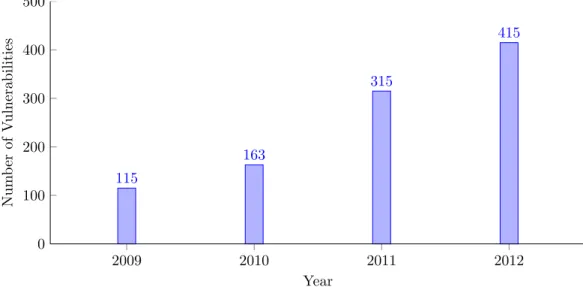
1.1 Number of mobile vulnerabilities from 2009 to 2012 reported in the
Symantec Internet Security Thread Reports. Source: [1, 2] . . . 2
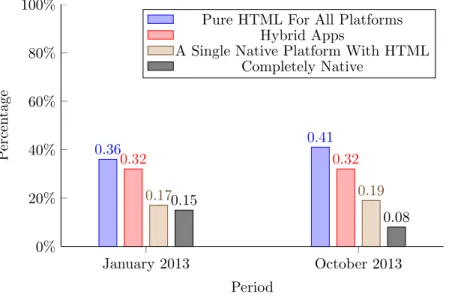
1.2 Preferred approach for serving multiple platforms, evolution January 2013 to October 2013. Source: [3] . . . 4
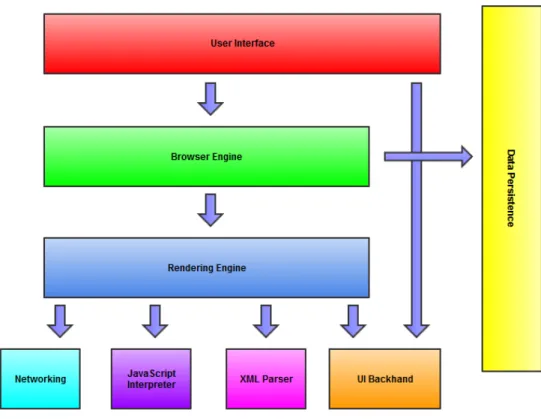
3.1 The browser architecture: Main Components. . . 13
3.2 The basic flow of the rendering engine. Source: [4] . . . 14
3.3 Document Object Model tree of the example markup. Source: [4] . . . . 19
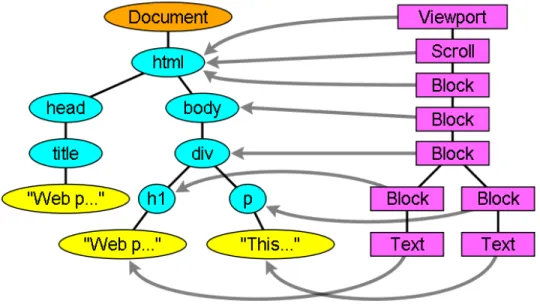
3.4 This figure demonstrates how the render tree relates to the DOM tree. Source: [4] . . . 20
3.5 The typical workflow of an offline application. Source: [5] . . . 38
3.6 Comparison of small PNG and SVG images. Source: [6] . . . 40
3.7 Comparison of Enlarged PNG and SVG images. Source: [6] . . . 40
4.1 Watering Hole Attack Sequence . . . 53
4.2 Rendered clipped circle SVG. . . 61
4.3 Rendered masked SVG. . . 61
4.4 The dron.png file loaded in the attack. Source: [7] . . . 67
4.5 The content of the strData variable, so the data which is executed. Source: [7] . . . 68
4.6 An example of the browser rendering phases and their durations. Source: [8] . . . 71
5.1 Comparison of the unvisited and visited style recalculation in Chrome when the attack vector is ran. . . 92
5.2 Comparison of the unvisited and visited paint in Chrome when the attack vector is ran. . . 93
6.1 This graph depicts the minimum, average and maximum percentage of tabs open at the same time. Source: [9] . . . 105
A.1 Trends in mobile malware 2012-2013. Source: [2, 10, 11] . . . 116
B.1 JavaScript file jquery.js that instigated the attack and appears non-malicous. Source: [7] . . . 127 B.2 One result of our refresh rate experiment in Firefox, using 50 links. . . . 131 B.3 One result of our refresh rate experiment in Chrome, using 50 links. . . 132 B.4 One result of our refresh rate experiment in Internet Explorer, using 50
links. . . 133 B.5 One result of our refresh rate experiment in Firefox, using 500 links.
Firefox produces the highest frame generation durations in situations with high load (highlighted frame). . . 134 B.6 One result of our refresh rate experiment in Chrome, using 500 links. . . 135 B.7 One result of our refresh rate experiment in Internet Explorer, using 500
links. . . 135 B.8 Another result of our refresh rate experiment in Internet Explorer,
us-ing 500 links. Here, there is a spike in duration in the second frame (highlighted). . . 136 B.9 Result of our refresh rate experiment in Internet Explorer, using 5000
links. The difference between the 50 link result is only noticeable due to a small increase of duration in the first frame. . . 137 B.10 First result of our refresh rate experiment in Firefox, using 5000 links. . 138 B.11 Second result of our refresh rate experiment in Firefox, using 5000 links. 139 B.12 One result of our refresh rate experiment in Firefox, using 50 links on a
75 Hz refresh rate monitor. . . 140 B.13 One result of our refresh rate experiment in Chrome, using 50 links on a
75 Hz refresh rate monitor. . . 141 B.14 One result of our refresh rate experiment in Internet Explorer, using 50
links on a 75 Hz refresh rate monitor. . . 142 B.15 The effect of changing the layout by adding elements at the top of the
DOM on the refresh rate in Firefox. . . 147 B.16 The effect of changing the layout by adding elements at the top of the
DOM on the refresh rate in Chrome. . . 148 B.17 The effect of changing the layout by adding elements at the top of the
DOM on the refresh rate in Internet Explorer. . . 149 B.18 The effect of triggering a high intensity repaint by changing the elements
style on the refresh rate in Firefox. . . 150 B.19 The effect of triggering a high intensity repaint by changing the elements
style on the refresh rate in Chrome. . . 151 B.20 The effect of triggering a high intensity repaint by changing the elements
3.1 Mozilla same-origin example table. Source: [12] . . . 27
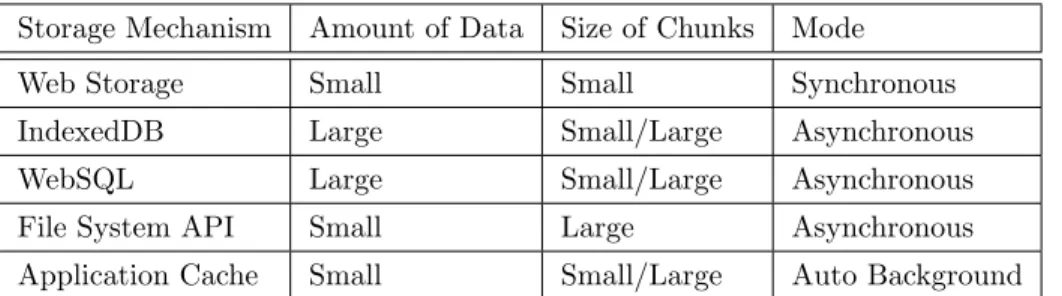
3.2 A comparison table for the storage APIs. This table gives a general sense of the preferred/best choices when selecting a storage API. . . 36
4.1 Behaviour based on port status. Source: [13] . . . 56
4.2 Behaviour based on application type. Source: [13] . . . 57
4.3 Major browser link repainting events. . . 75
5.1 Firefox scripting and DOM access policies when using SVG. . . 85
5.2 Firefox scripting and DOM access policies when using SVG. . . 85
5.3 Chrome scripting and DOM access policies when using SVG. . . 86
5.4 Internet Explorer scripting and DOM access policies when using SVG. . 87
5.5 Internet Explorer scripting and DOM access policies when using SVG, modified chameleon. . . 88
3.1 Example markup: very badly written HTML document. . . 17
3.2 Example markup: Firefox output after reading the badly written HTML. 17 3.3 Example markup: a simple HTML document. . . 18
3.4 Simple sessionStorage example that sets the key “user” to the value “David”. . . 31
4.1 Typical onerror attack vectors. . . 46
4.2 The onscroll event gets used to inject script code. . . 46
4.3 XSS vector that requires the user to click a button. . . 46
4.4 XSS attack vectors that do not require src attributes to launch onload events. . . 47
4.5 An XSS object attack vector, using base64 encoded data. . . 47
4.6 Encoded attack vector exploiting the iframe srcdoc attribute. . . 47
4.7 Example of three attack vectors exploiting special tags. . . 48
4.8 XSS obfuscation by using an embedded newline. . . 48
4.9 Example clipping SVG . . . 60
4.10 Example masking SVG . . . 61
4.11 SVG XSS attack vector using a simple <img> element and an invalid source in combination with the “onerror” attribute. . . 62
4.12 SVG XSS attack vector using an <img> element and CDATA section delimiters to obfuscate the attack. . . 63
4.13 SVG XSS attack vector exploiting the <animate> element in combina-tion with the “from” attribute. . . 63
4.14 SVG XSS attack vector exploiting the <animate> element in combina-tion with the “values” attribute. . . 64
4.15 Old SVG attack vector used to bypass XSS filters, the <script>closing tag is missing. This attack does not work anymore. . . 65
4.16 SVG attack vector that still works, the <script> tags are both opened and closed. . . 65
4.17 SVG attack vector that fails to inject script elements into the DOM. . . 66
4.19 Script that calculates the t values. The time it takes for a render phase to complete. . . 70 4.20 Example HTML document that shows the link repainting behaviour when
the href attribute is changed. . . 73 5.1 Code added to the XAMPP virtual host configuration file. . . 81 5.2 Code added to the Windows hosts file. . . 81 5.3 Modified line to test iframe DOM change. . . 88 5.4 SVG file containing invalid tags. . . 95 B.1 HTML document that bypasses the IndexedDB storage limit . . . 119 B.2 Source HTML document for testing . . . 124 B.3 SVG alert document cookie test file. . . 125 B.4 SVG chameleon alert document cookie through iframe test file. . . 125 B.5 SVG chameleon alert document cookie through<script>tags test file. . 126 B.6 One of the HTML documents used to test the browser refresh rates. . . 128 B.7 Extended HTML test document that checks the performances changes
when different parts of the rendering process are affected. . . 143 B.8 Original timing attack used to do browser history sniffing. . . 153 B.9 Modified timing attack used to do browser history sniffing in Google
Chrome. . . 156 B.10 Modified timing attack used to do browser history sniffing in Internet
Explorer. . . 159 B.11 Crash inducing script 1. Source: [14]. . . 162 B.12 Crash inducing script 2. Source: [14]. . . 162
Introduction
1.1
Motivation
The modern browsers more and more resemble miniature operating systems. The func-tionality they provide is growing more complex every year, which ensures a wide range of new possibilities in the web development industry. However, it also poses new chal-lenges in terms of security, on both the side of home users and companies. Much care has to be taken when implementing new standards, like HTML5, and enough attention has to be spent on the security aspects of the implementation.
The reason this is especially important in browsers is that it is one of the most security-critical components of the current information infrastructure. On the tradi-tional home computers and laptops it is the primary information channel for financial and social interaction. On the mobile platforms it has to share this role with role-specific applications, but it remains a vital channel that is used for important tasks. The number and variation of uses the browser has these days is hard to overestimate. Many financial services like online banking and shopping, social networking, cloud ser-vice management and many business related applications all make use of the browser as interaction medium. In addition to the importance of HTML5 in modern web browsers, it has also vastly increased in importance in mobile application development.
1.1.1
Web Security in Recent Years
Since web browsers have adopted this role, they have also become more attractive targets for criminals in the past years. The amount of web-based attacks has been increasing for several years on end. In its Internet Security Threat Report of 2011, Symantec Corporation reports a 93% increase in the volume of Web-based attacks in 2010 over the volume observed in 2009 and a 42% increase in mobile vulnerabilities [1].
Figure 1.1: Number of mobile vulnerabilities from 2009 to 2012 reported in the Symantec Internet Security Thread Reports. Source: [1, 2]
2009 2010 2011 2012 0 100 200 300 400 500 115 163 315 415 Year Num b er of V ulnerabilities
They also observe that shortened URLs appear to be playing a role in the increase in Web-based attacks in these years. During a three-month observation period in 2010, 65% of the malicious URLs observed on social networks were shortened URLs. These shortened URLs could serve as an ideal entry point for an HTML5 attack vector through social engineering. The more recent 18th volume (2013) of the Internet Security Threat Report shows that there was an increase in the number of Web-based attacks of almost a third from the year 2011 to 2012 [2, 15]. The emerging of watering hole attacks was the biggest innovation in targeted Web-based attacks in 2012. This type of attack makes use of HTML or javascript injection. We will give a detailed explanation about this attack in section 4.4. The report also displays a rise in number of mobile vulnerabilities, shown in figure 1.1, and a 58% increase in mobile malware families from 2011 to 2012. This trend clearly shows that the mobile devices are becoming more important targets for network attacks. For this reason the thesis will also regard mobile browsers as important part of the research.
In appendix A.1 we provide some more statistics about the types of malware that are most prevalent. The reader must note that these statistics are about general malware and not solely about HTML5 based vectors.
1.1.2
HTML5 on the Rise
HTML5 has been gaining support over the past years, both in mobile and classical devices. Kendo UI, part of Telerik Corporation, has been conducting extensive surveys about HTML5 in the past two years [3, 16, 17]. The surveys, conducted in
Septem-ber 2012, January 2013 and OctoSeptem-ber 2013 have respectively 4,043, over 5,000 and over 3,500 participants and thus give a clear view of the popularity of the standard. The participants include developers, technology executives and others and also diversifies in the businesses in which they work and where in the world they are located. The survey from 2012 resulted in 82% of developers saying that they think HTML5 will be important to their job within the coming 12 months. An even larger 94% either was already actively developing with HTML5 or had plans to do so in the future, and it indicated that even the 6% that are not planning on actively using it find it im-portant within the next 12 to 24 months. The 2013 survey had similar usage results, with 50% of those surveyed developed a variety of HTML5 applications in 2012 and 9 out of 10 planned to do so in the coming year. When inquiring about their preferred approach for developing apps that support multiple platforms, only 15% of the partic-ipants would use native-only. Another interesting statistic was that the primary focus of 87% of those surveyed was building desktop websites/web apps with HTML5 and at 53% mobile websites were second most popular. The most recent Telerik survery at time of writing, has some important key findings about trends in mobile application development. One of these conclusions is that HTML5 is not necessarily always the best option, but that developers should be judged separately for each case. Factors that influence the decision include business needs, application requirements, developer skill and development timeline. Kendo UI states that there are no “one-size-fits-all” solutions for mobile application development. Many developers are finding mid-project that the approach they started with, Hybrid/HTML5 or Native, might not be the best approach, whether it is changing requirements or an improved understanding of the ca-pabilities each mobile solution offers. Even though, two other key findings are that web and hybrid approaches are still gaining in popularity among developers and that the web platform is the top choice for building cross-platform applications. Figure 1.2 shows the change in mobile application development evolution from January 2013 to October 2013.
1.1.3
Importance of HTML5 in Security Research
The reason HTML5 security is an important factor in today’s security landscape is because it is1, from an attackers point of view, a very interesting way of initiating
certain attacks. Browsers automatically download resources when a web page is visited, so potential malicious code is also downloaded and executed. Especially because it is a very popular and widespread technology, used in many different ways, both by businesses and home users. A device could become more easily compromised by traditional threats with the help of HTML, either by socially engineering an attack in such a way that it
Figure 1.2: Preferred approach for serving multiple platforms, evolution January 2013 to October 2013. Source: [3] January 2013 October 2013 0% 20% 40% 60% 80% 100% 0.36 0.41 0.32 0.32 0.170.15 0.19 0.08 Period P ercen tage
Pure HTML For All Platforms Hybrid Apps
A Single Native Platform With HTML Completely Native
seems harmless or legit2 or by exploiting a badly implemented aspect of the standard
in a browser. Certain attacks that are becoming ever more popular, like user tracking (See figure A.1), are ideal to be executed by HTML5 due to the inherent silent nature of many of these attacks. When an attacker wants to track a user, they will want to do this in such a way that the user is unaware of them being tracked. HTML5 meets these requirements because it does not leave any trace on the device, it is executed inside the browser. In addition to its silent nature, it also has the advantage that it provides different APIs which could be exploited for different types of attacks, e.g. the Geolocation API [18] for tracking GPS coordinates.
1.2
Goals and Outline of the Thesis
In this section we will attempt to provide the reader with a clear understanding of what we wish to achieve by writing this thesis and what kind of results we strive for. We will also provide the reader with an hierarchical outline of the thesis, to clarify its structure and to give a more high-level look of the flow.
1.2.1
Goals and Outline
There are a number of goals we wish to achieve by writing this thesis. Seeing as HTML is a technology used by everyone who uses the internet, this thesis is written not only for
developers but also for businesses and home users. An evaluation about the browsers has to be included, because their importance these days is ubiquitous, as explained in section 1.1. We will try to provide a comparison of the most popular modern web browsers to the readers, and security advice on different aspects. This way home users and business users alike can make an informed decision about which would be most desirable to use from a security point of view. Despite the recent surge in popularity of HTML5 on mobile devices, we will focus mainly on making a comparison of the desktop browsers. Although many of the principles that are concluded from the experiments are equally true on mobile platforms. To raise awareness about the possibilities of web-attacks we will describe a number of well-known attack types who use or can use HTML5. This will allow users to be more mindful when browsing the Internet and possibly become more observant. We will also do some experiments involving attack vectors to show the reader that security is a real-life concern and not just a theoretical reflection. Eventually, we will deduce a number of best practices for using browsers from these experiments and provide some recommendations to the browser vendors themselves. We summarise this subsection in two bullet point lists to clearly stipulate the list of goals we want to achieve throughout the thesis. First, we list the outline of the thesis.
• Chapter 2 gives a development history of HTML and how HTML5 relates to
security.
• Chapter 3 provides a high level view of the browser and how this relates to the workings of HTML5.
• Chapter 4 discusses a number of attack vectors related to HTML5.
• Chapter 5 explains which experiments we have performed in the browsers. These experiments are analysed and the differences between the browsers are discussed.
• Chapter 6 is the recommendation chapter. From the analysis of the experiments we make recommendations toward three groups of readers: the web developers, browser users and browser vendors.
• Chapter 7 contains the conclusion of the thesis and states ideas that can be used for future work.
Second, we list the high-level final goals we want to supply the reader with.
• Draft a set of recommendations for the web developers.
• Defining some best security practises for both home users and businesses.
• Provide recommendations toward the browser vendors to create a safer browsing experience.
• Like most papers about this subject, raising awareness about the possible security concerns and to encourage the users to be mindful of these potential dangers.
1.2.2
Thesis Statement
A security analysis of different aspects of the HyperText Markup Language Version 5 in three mainstream browsers: Mozilla Firefox, Google Chrome and Microsoft Inter-net Explorer. A comparison of the different browser implementations of the HTML5 specification and related APIs will be used as basis for recommendations made to three parties: web developers, browser users and browser vendors. The choice of which as-pects of the language to consider was based on the OWASP HTML5 Security Cheat Sheet, as well as previous research.
Background Information about
HTML5
In this chapter we will provide some general information about HTML5 that might be of interest to the reader. It will give a more complete view of the development of the standard and explain some terminology that is used in relation to HTML. We will also provide some more insight in the way HTML5 is used on mobile devices, because it also provides interesting applications outside of the browser.
2.1
Brief Development History of HTML
The HyperText Markup Language was developed at various organisations throughout its history. It started its life at CERN1[19] and later continued at the IETF2 [20]. During these first five years, HTML went through a series of revisions and experienced a num-ber of extensions. After this period the World Wide Web Consortium (W3C) [21] was formed and took over the active development of the HTML standard. In January 1997 they released the HTML 3.2 Recommendation, with the HTML 4.0 Recommendation to follow not even a year later in December 1997. We refer the readers that are unfamiliar with the W3C Specification Maturity Levels to [22]. For more information about HTML during the first seven years of its existence we refer the reader to [23] where a more de-tailed account is given for the events that took place in those years and the impact it had on the world. After the HTML 4.0 Recommendation, the W3C decided to stop evolving the HTML standard and instead started to develop an XML-based equivalent, XHTML. In the following years this evolution towards XML-based standards continued,
1The European Organization for Nuclear Research, in Geneva, Switzerland.
2The Internet Engineering Task Force, the mission of this organisation is to make the Internet work better by producing high quality, relevant technical documents that influence the way people design, use, and manage the Internet.
with the reformulation of HTML4 in into XHTML 1.0 and XHTML Modularization3. In parallel with this, the W3C also worked on a new language, XHTML 2.0. This lan-guage was not backwards compatible with the earlier lanlan-guages.
The reader should also be aware that when the evolution of HTML was stopped in 1998, some parts of the API for HTML developed by browser vendors themselves were specified and published. These were given the name DOM Level 1 (1998), DOM Level 2 Core and DOM Level 2 HTML (2000-2003). Some DOM Level 3 specifications were still published in 2004 but the working group was closed before all specifications were completed.
In 2004 the World Wide Web Consortium tested the possibility of reopening the evo-lution of HTML. It was evaluated by some of the principles that underlie the HTML5 work (that were presented at the time), as well as some early draft proposals about forms-related features. The presentation of this position paper was done jointly by Mozilla and Opera, who opted for focusing on developing technologies that are back-ward compatible with existing browsers. The proposal, however, was rejected by the W3C on the grounds that it conflicted with the previously chosen direction for the Web’s evolution. The W3C staff and membership voted to continue developing XML-based replacements instead. They continued to work on XHTML 2.0 until they decided to retire its working group in 2009.
Shortly after the proposition was declined the Web Hypertext Application Technol-ogy Working Group (WHATWG) [24] was founded jointly by Apple, Mozilla and Opera as a way for them to continue working on the effort themselves. The venue was based on several core principles, they state that in particular technologies need to be backwards compatible, that specifications and implementations need to match even if this means changing the specification rather than the implementations, and that specifications need to be detailed enough that implementations can achieve complete interoperability with-out reverse-engineering each other. The latter requirement especially required that the HTML5 specification included three previous specification documents, namely HTML4, XHTML1, and DOM2 HTML. Also considerable more detail had to be included than had been the norm in the previous standards. This was the first time the HTML5 development process started.
The W3C eventually indicated an interest to participate in the development of HTML5 after all in 2006. A working group chartered to work with the WHATWG on the HTML5 specification development was formed in 2007. The specification was allowed to be published under the W3C copyright as long as Apple, Mozilla and Opera could keep a version with the less restrictive license on the WHATWG site.
Both groups continued to work together for a number of years. Eventually, in 2011, the groups concluded that they had different goals. The W3C wanted to publish a
finished version of HTML5, and have the specification follow a maturity process. The WHATWG wanted, instead, to continue working on a Living Standard for HTML. This way they could continuously maintain the specification rather than freezing it in a state with known problems. This also allowed them to add new features as needed to evolve the platform. This was the point in time when two different types of HTML5 came to be. However, the reader must note that the W3C states that its HTML working group actively pursues convergence of the HTML specification with the WHATWG living standard, within the bounds of the W3C HTML working group charter. Since then, the WHATWG has been working on the Living Standard specification, and the W3C has been using the fixes made in their own specification, as well as making other changes. Some differences, with minimal information and rationale, between the W3C HTML 5.1 specification and WHATWG LS can be found at [25]. The reader can find a list of milestones over a period of 10 years in the development of the HTML5 language at [26], the 10 year chunk recorded here starts at the publication of the HTML4 specification on through to the publication of the first W3C Working Draft of the HTML5 specification. The reader should note that this source also records a variety of related milestones it deems significant in the HTML development, this includes web application and browser technology evolutions, as well as important usage of these technologies. The WHATWG also provides a brief HTML history, which can be found at [27].
Because the W3C HTML5 specification is not a living standard it has set clear goals in the maturation of the specification, these can be found in its HTML5 Plan 2014 [28]. The plan proposes a schedule in which the HTML 5.0 Candidate Recommendation is expected to advance to Proposed Recommendation in the fourth quarter of 2014, and being promoted to an endorsed W3C Recommendation later in the same quarter. It also provides some HTML 5.1 milestones in the coming years, with the Candidate Rec-ommendation being placed in the first quarter of 2015 and the RecRec-ommendation in the fourth quarter of 2016. We will not provide more details here on how the W3C plans to achieve these goals as this is not the primary focus of this thesis, the plan is freely accessible and can be consulted by interested readers.
In conclusion to this section the reader should note that in the rest of the thesis var-ious different implementations of HTML5 are considered and that they need not be in complete correspondence with the specifications of W3C and/or WHATWG but rather depend on the implementation of the considered browser or platform.
2.2
HTML5 and Security
HTML5 is a more extended version of the HyperText Markup Language than HTML4. It is defined in a way that allows user agents to handle the content in a backwards compatible manner. Many older elements and attributes are now obsolete, but are still
supported by the user agents. An example of one type of elements are presentational elements that are better handled by CSS. HTML5 has also been extended by many new elements and attributes, and certain old elements and attributes have been changed. Its syntax also differs from HTML4, e.g., the HTML5 syntax allows for the inline use of MathML and SVG elements. We will discuss Scalable Vector Graphics in section 3.6.
Changes to the content model have also been introduced in HTML5. The content model defines how elements may be nested. In HTML4, the elements were subdivided in two major categories: “inline” and “block-level”. HTML5 on the other hand, has seven different categories of elements; each of these elements falls into zero or more of these categories. We will not elaborate about the different categories. The reader is referred to [29] for more information about the categories and their characteristics.
The last aspect of the specification that has changed a great deal is are the APIs: many new APIs have been introduced, and various other existing APIs have been ex-tended, changed or obsoleted. Some APIs that relate strongly to the HTML5 specifica-tion have been defined in their own specificaspecifica-tions, due to the fact that they are too large to add to the HTML5 specification itself. A document that discusses the differences between HTML4 and HTML5 can be found in [30].
The large amount of new features and changes to the HTML standard opens up many new security areas that need to be researched and thoroughly evaluated. Several APIs, such as storage APIs, were previously unavailable for HTML4. These create many new potential security breaches, such as client storage data theft. In this thesis we will give a security evaluation of many of these features.
High Level View of the
Browser
This chapter will focus on giving a high level view of how the mainstream web browsers work. The goal is to provide the reader with an understanding about what happens when a web page is loaded in the browser. We will not give a meticulous and detailed report on everything that happens; this is beyond the scope of this thesis. Instead, the general flow of the internal operations and the structure of the rendering engine will be described. The literature used to write this chapter is based on the open source browsers Mozilla Firefox and Google Chrome, and Safari. The rendering engines of which are respectively Gecko, Blink and Webkit; however, we will not go into detail about specific rendering engines in this chapter. Readers who require more detailed information are referred to the original research [4, 31]. The information here also does not address network protocols used to retrieve web pages from the Internet.
3.1
Main Functionality
The browser is probably the most used class of software in the world at the moment, and it is the primary way users are able to access web pages on the Internet. Its main functionality is to retrieve and render the web resources the user requests from the server. The rendering of the resource is done in the browser window. The resource is mostly commonly an HTML file, but it can also be another resource such as image files or PDF documents. Most modern browsers have a wide range of file types that they can properly render. The location of the resource is specified by the user using a Uniform Resource Identifier (URI).
The way HTML files are interpreted and displayed are implemented by the browser vendors happens in accordance with the HTML [32, 33] and CSS [34] specifications;
background information about HTML5 can be found in chapter 2.
The user interfaces of the most popular browsers are very similar to each other, some of the most common elements that are provided by all the popular browsers:
• Address bar
• Back and forward buttons
• Refresh and stop button
• Status bar
• Home button
• Bookmarking options
• Most commonly in modern browsers buttons to access installed Extensions/Add-ons.
There exists no standard that specifies the browser’s user interface, but many similar elements are common due to a combination of best practices, practicality and imitat-ing one another. Which, in practice is useful, as it creates a large consistency across browsers. This makes it easy for users to change browsers with little to no effort and immediately knowing how to operate them.
3.2
High Level Structure
The main components that every web browser has are listed in the following enumeration [4], most of these are also shown in the main component architecture, figure 3.1.
1. User Interface: this includes all the elements in the list of section 3.1. Every part of the browser display is part of it, except for the main window where the requested resources are displayed.
2. Browser Engine: provides a high level interface for querying and manipulating the Rendering Engine. It is the interface for actions between the UI and the Rendering Engine.
3. Rendering Engine: is responsible for displaying the requested content. In the case of HTML, it performs the parsing and layout for HTML documents, optionally styled with CSS. It is important to note that some browsers can hold multiple instances of the rendering engine, depending on implementation. Google Chrome for example holds a rendering engine instance for each tab, and each tab is a separate process.
4. Networking Subsystem: is used for all network communication, such as all HTTP requests. The interface is usually platform independent with underneath imple-mentations for each platform.
5. JavaScript Interpreter: is responsible for the execution of all JavaScript code.
6. XML Parser: is responsible for the XML Parsing. A HTML parser could also be included in the diagram, more information about this will be given in section 3.3.2.
7. UI Backend: provides drawing and windowing primitives, user interface widgets, and fonts. As with the networking subsystem, it exposes a generic interface that is not platform specific, and underneath it uses the operating system’s user interface methods.
8. Data Persistence Subsystem / Data Storage: is responsible for all data storage on disk, such as cookies, bookmarks and cache. The HTML5 specification defines a web database in the browser for local storage. We will elaborate on client-side storage in section 3.5.
3.3
The Rendering Engine
In the following subsections the workings of the rendering engine will be explained. We will attempt to keep this as general as possible, seeing as different browsers often use different rendering engines; e.g., Internet Explorer uses Trident, Firefox uses Gecko and Chrome uses Blink (WebKit based) on desktop.1
3.3.1
The Main Flow
The requested resource in this section will be a HTML document, seeing as other re-sources such as images do not need these processing steps. The rendering engine will start by getting the requested document from the networking subsystem. This data transfer is usually done in 8 kB chunks. After that, figure 3.2 displays the basic flow of the rendering engine.
Figure 3.2: The basic flow of the rendering engine. Source: [4]
In the first phase, the rendering engine will start parsing the HTML document and convert the elements it encounters to DOM nodes in a tree; this tree is known best as the “DOM tree”, but is also referred to as the “content tree”. The engine will also parse the style data, both in the external CSS files and in the HTML style elements, whichever are available.
In the second phase, there is visual information available from two sources: the styling information and the visual instructions in the HTML document. This informa-tion will be combined to create another tree, the render tree, which consists of rectangles with visual attributes like colour and dimensions. The rectangles are inserted in the tree in such a way that they are in the right order to be displayed in the main browsing window.
After the construction of the render tree, the third phase begins: the rendering en-gine will begin its layout process. Here, the main goal is to provide each node with exact coordinates, so it is known where exactly in the rendering window the node should be displayed.
The final stage consists of painting, the render tree will be traversed in the right order and each node will be painted. During this painting process the UI backend layer is used.
As one has probably noticed from browser use, the modern browsers are
mented in such a way that later steps do not wait for earlier ones to complete. The browser flow is a gradual process, the rendering engine will try to display contents on its browsing window as soon as possible. This is done for user experience, it provides a better experience when web page elements are displayed as soon as possible, than having to stare at a blank screen and wait until the whole loading and processing is complete. The browsers handle this process in different ways: some browsers start the rendering before the full DOM content is loaded, while others wait for it to complete. WebPageTest [35] can be used to analyse the browser content loading in relation to its rendering process.
3.3.2
HTML Parsing and DOM tree construction
In this section, a small description will be given on how the HTML parser is different
from most other parsers. We will also provide an example of how a small HTML
document is translated into a DOM tree. We refer the reader to other literature [4] for more details about the browser HTML parsing process, as it is beyond the scope of this thesis. The vocabulary and syntax of HTML [36] are defined in specifications created by the W3C organization.
HTML Grammar and Parsing
Grammar syntax can usually be defined formally using formats such as BackusNaur Form (or Backus Normal Form). This is a notation technique used to describe the syntax of context-free grammars. However, the conventional parser topics do not apply to HTML, because it is not a context free grammar. The browser will make use of the traditional context-free parsers for XML, JavaScript and CSS. It might strike some readers as odd that XML and HTML parsers would be inherently different, seeing as the languages are rather closely related, and there even exists an XML variation of HTML, XHTML. The biggest difference between the two is that the HTML approach was designed to be more “forgiving” of strictly invalid syntax, while XML employs a more stiff and demanding syntax. When a browser detects certain closing tags to be missing, it is possible that these tags will be added implicitly without any error being thrown. This forgiving nature of HTML is one of the main reasons why it is so popular: mistakes are often automatically solved and it facilitates the work of the developer of the HTML document. The downside of this is that it makes it difficult to write a formal grammar, and it may cause (and has caused) additional security vulnerabilities. Strict interpretation is needed to be a context-free grammar, as such HTML needs another formal definition format. The formal format used for defining HTML is Document Type Definition (DTD), which is thus not a context free grammar. This format is used to define languages of the SGML family and it contains definitions for all allowed elements, their attributes and hierarchy. The recommended Doctype deceleration list
can be found at [37]. Because it is the parsing method of an HTML document, it is strongly advised that a correct doctype declaration is added when authoring HTML or XHTML documents.2 It is important that the doctype must be exact in spelling and
case to have the desired effect.
We also note that browsers can switch parsing context while parsing an HTML document. There are situations where an element will switch the parsing context to XML, after the parsing of this element is complete the context will be switch back to HTML. This will become apparent in both the examples and experiments of section 4.6. We will not discuss the specifics of the parsing algorithms here3, the reader is again
referred to [4] for additional details. We will, however, list the reasons why HTML cannot be parsed using the regular top down or bottom up parsers:
1. As mentioned earlier, the forgiving nature of the language.
2. As an addition to the forgiving nature, most browsers have error tolerance to support well known cases of invalid HTML.
3. The parsing process is reentrant. In the case of HTML, this is caused by the fact that script tags can possibly add extra tokens (elements), so it is possible that the parsing process actually modifies the input. This can be achieved by using the document.createElement() JavaScript method.
Browser error tolerance is an important feature of HTML and closely related to the topics discussed here, we will discuss it in the next section.
Browser Error Tolerance
Browser error tolerance is, as discussed before, one of the features that makes HTML such a popular standard. Modern browsers never throw an “Invalid Syntax” error on an HTML page, but merely fix any invalid content in the requested document and render it as best they can.4 The HTML file in listing 3.1 is an example of very badly written
HTML code. It breaks many rules: <badtag> is not a standard tag, the <p> and
<div>elements are nested invalidly and the<html>closing tag is even left out. The
browser will not throw any errors and fix the invalid document, so it can be displayed in the browsing window. A lot of the parser code is thus committed to fixing HTML coding mistakes. Listing 3.2 gives the same HTML code as seen in Firebug [38], after it has been fixed by Firefox.
2We will often not include a doctype declaration in the examples of this thesis ourselves; however, we advise to declare the doctype when developing HTML documents for public (or business) use.
3They consist of the tokenization and tree construction algorithm and are specified in the HTML5 specification.
4We must note that it is possible to receive parsing errors in browsers on XML files, but when browsing content is switched to XML inside an HTML document they will not. Parsing context will instead be switched back to HTML.
1 <html> 2 <b a d t a g> 3 </ b a d t a g> 4 <div> 5 <p> 6 </div> 7 Bad HTML 8 </p>
Listing 3.1: Example markup: very badly written HTML document.
1 <html> 2 <head></head> 3 <body> 4 <b a d t a g> </ b a d t a g> 5 <div> 6 <p> </p> 7 </div> 8 Bad HTML 9 <p></p> 10 </body> 11</html>
Listing 3.2: Example markup: Firefox output after reading the badly written HTML.
The error handling was quite consistent in browsers even before it was part of any HTML specification, and it was something that has evolved cross-browser over the years. With the introduction of HTML5 into the world wide web, the error handling is finally being standardised to some extent. The HTML5 specification also includes an extended section about “An introduction to error handling and strange cases in the parser” [36]. For the first time since the start of HTML development, a specification exists that also defines what browsers should do when they are dealing with badly formed documents.
Because Webkit summarizes the error handling requirements nicely in the comment at the beginning of the HTML parser class, we will quote this comment here.
“The parser parses tokenized input into the document, building up the document tree. If the document is well-formed, parsing it is straightforward.
Unfortunately, we have to handle many HTML documents that are not well-formed, so the parser has to be tolerant about errors.
We have to take care of at least the following error conditions:
1. The element being added is explicitly forbidden inside some outer tag. In this case we should close all tags up to the one, which forbids the element, and add it afterwards. 2. We are not allowed to add the element directly. It could be that the person writing the document forgot some tag in between (or that the tag in between is optional). This
could be the case with the following tags: HTML HEAD BODY TBODY TR TD LI (did I forget any?).
3. We want to add a block element inside to an inline element. Close all inline elements up to the next higher block element.
4. If this doesn’t help, close elements until we are allowed to add the element or ignore the tag.”
Document Object Model
The parsing of the HTML document will result in the DOM tree; this parse tree is a tree of DOM element and attribute nodes. It is the object presentation of the HTML document and the interface of HTML elements to the other modules, like the JavaScript Module. The root of the tree is the “Document” object.
The DOM has an almost one to one relation to the markup. In listing 3.3 a simple HTML document is given, and in figure 3.3 the corresponding DOM tree can be seen.5
1 <html>
2 <body>
3 <p>
4 H e l l o World 5 </p>
6 <div> <img s r c=” example . png ” /></div>
7 </body>
8 </html>
Listing 3.3: Example markup: a simple HTML document.
The DOM is also specified by the W3C organization, the DOM technical reports can be found in [39].
3.3.3
Render tree construction
While the DOM tree is being constructed, the browser will simultaneously also construct the render tree. This tree represents the visual elements in the order in which they will be displayed in the browsing window. It is, as such, the visual representation of the document and its purpose to enable painting the contents in their correct order. Usually, this implementation is done by creating objects in a tree that know how to layout and paint themselves and their children. In Firefox they are referred to as frames, Webkit based browsers refer to them as renderers (or render objects).
Each of these visual objects represents a rectangular area usually corresponding to
5It should be noted that when parsed by modern web browsers, an empty<header>element would be added to the HTML document.
![Figure 3.2: The basic flow of the rendering engine. Source: [4]](https://thumb-us.123doks.com/thumbv2/123dok_us/9333947.2811863/36.783.118.677.434.504/figure-basic-flow-rendering-engine-source.webp)
![Figure 3.3: Document Object Model tree of the example markup. Source: [4]](https://thumb-us.123doks.com/thumbv2/123dok_us/9333947.2811863/41.783.114.673.111.419/figure-document-object-model-tree-example-markup-source.webp)
![Table 3.1: Mozilla same-origin example table. Source: [12]](https://thumb-us.123doks.com/thumbv2/123dok_us/9333947.2811863/49.783.115.706.109.257/table-mozilla-same-origin-example-table-source.webp)
![Figure 3.5: The typical w orkflo w of an offline application. Source: [5]](https://thumb-us.123doks.com/thumbv2/123dok_us/9333947.2811863/60.783.138.657.126.1040/figure-typical-w-orkflo-w-offline-application-source.webp)
![Figure 3.7: Comparison of Enlarged PNG and SVG images. Source: [6]](https://thumb-us.123doks.com/thumbv2/123dok_us/9333947.2811863/62.783.236.554.419.595/figure-comparison-enlarged-png-svg-images-source.webp)
