UNIVERSITY OF OSLO
Department of Informatics
Generic Software
Distribution and
Deployment
Master thesis
Arve Knudsen
31st January 2006
Acknowledgments
My family and my supervisors Hans Petter Langtangen and Halvard Moe, thank you for keeping your faith in me. A special thanks to Professor Langtangen for providing constant encouragement and invaluable input in this difficult process.
Contents
Acknowledgments .. .. .. .. .. .. .. .. .. .. .. .. .. .. .. .. .. .. iii Chapter 1. Introduction .. .. .. .. .. .. .. .. .. .. .. .. .. .. .. .. .. 1 1.1. A specific problem scenario .. .. .. .. .. .. .. .. .. .. .. .. .. 1
1.1.1. Manual deployment .. .. .. .. .. .. .. .. .. .. .. .. 2
1.1.2. Deployment solutions at our disposal .. .. .. .. .. .. .. 4 1.1.3. Applying PyPkg to the problem .. .. .. .. .. .. .. .. .. 5
1.2. Implementation notes .. .. .. .. .. .. .. .. .. .. .. .. .. .. 6
1.3. Thesis structure .. .. .. .. .. .. .. .. .. .. .. .. .. .. .. .. 6 Chapter 2. Vision .. .. .. .. .. .. .. .. .. .. .. .. .. .. .. .. .. .. 9 2.1. The current situation .. .. .. .. .. .. .. .. .. .. .. .. .. .. .. 9
2.1.1. Distribution .. .. .. .. .. .. .. .. .. .. .. .. .. .. 9
2.1.2. Deployment .. .. .. .. .. .. .. .. .. .. .. .. .. .. 10
2.1.3. Software directories .. .. .. .. .. .. .. .. .. .. .. .. 11
2.2. The PyPkg vision .. .. .. .. .. .. .. .. .. .. .. .. .. .. .. 11
2.2.1. The conduit concept .. .. .. .. .. .. .. .. .. .. .. .. 12 2.2.2. Precursors to the conduit concept .. .. .. .. .. .. .. .. 13 Chapter 3. Model .. .. .. .. .. .. .. .. .. .. .. .. .. .. .. .. .. .. 15 3.1. Considerations for an automated software transfer process .. .. .. .. 16 3.1.1. Involved problems .. .. .. .. .. .. .. .. .. .. .. .. .. 16 3.1.2. Achieving a generalized conduit .. .. .. .. .. .. .. .. .. 17 3.2. Distribution .. .. .. .. .. .. .. .. .. .. .. .. .. .. .. .. .. 18 3.2.1. Some words on the use of RDF .. .. .. .. .. .. .. .. .. 20
3.2.2. The PyPkg RDF model .. .. .. .. .. .. .. .. .. .. .. 22
3.2.3. The PyPkg project portal .. .. .. .. .. .. .. .. .. .. .. 26
3.3. Deployment .. .. .. .. .. .. .. .. .. .. .. .. .. .. .. .. .. 27
3.3.1. The agent concept .. .. .. .. .. .. .. .. .. .. .. .. .. 28 3.3.2. The design .. .. .. .. .. .. .. .. .. .. .. .. .. .. .. 29 3.4. The dependency scheme .. .. .. .. .. .. .. .. .. .. .. .. .. .. 34
3.4.1. Rationale .. .. .. .. .. .. .. .. .. .. .. .. .. .. .. 35
Chapter 4. Usage .. .. .. .. .. .. .. .. .. .. .. .. .. .. .. .. .. .. .. 39 4.1. Distributing SciPy .. .. .. .. .. .. .. .. .. .. .. .. .. .. .. 39 4.1.1. Publishing the project .. .. .. .. .. .. .. .. .. .. .. .. 39 4.1.2. Adding a PyPkg package .. .. .. .. .. .. .. .. .. .. .. 40 4.1.3. Creating the installation script .. .. .. .. .. .. .. .. .. 44 4.2. Installing SciPy .. .. .. .. .. .. .. .. .. .. .. .. .. .. .. .. 46 4.2.1. Starting the installation .. .. .. .. .. .. .. .. .. .. .. 46 4.2.2. Calculating dependencies .. .. .. .. .. .. .. .. .. .. .. 46 4.2.3. Acquiring and installing packages .. .. .. .. .. .. .. .. 47 4.2.4. Finishing the installation .. .. .. .. .. .. .. .. .. .. .. 47 Chapter 5. Conclusion - Future Directions .. .. .. .. .. .. .. .. .. .. .. 49
5.1. Evaluation .. .. .. .. .. .. .. .. .. .. .. .. .. .. .. .. .. 49
5.1.1. Deployment .. .. .. .. .. .. .. .. .. .. .. .. .. .. 49
5.1.2. Distribution .. .. .. .. .. .. .. .. .. .. .. .. .. .. 50
5.1.3. Summing up .. .. .. .. .. .. .. .. .. .. .. .. .. .. 50
5.2. Future directions .. .. .. .. .. .. .. .. .. .. .. .. .. .. .. .. 51 5.2.1. Solidifying base functionality .. .. .. .. .. .. .. .. .. 51 5.2.2. Extending the PyPkg system .. .. .. .. .. .. .. .. .. .. 52 Appendix A. PyPkg RDF vocabulary .. .. .. .. .. .. .. .. .. .. .. .. .. 55
A.1. sw .. .. .. .. .. .. .. .. .. .. .. .. .. .. .. .. .. .. .. 55
A.2. pypkg .. .. .. .. .. .. .. .. .. .. .. .. .. .. .. .. .. .. 57 A.3. swidx .. .. .. .. .. .. .. .. .. .. .. .. .. .. .. .. .. .. 57 Appendix B. PyPkg Framework Design Document .. .. .. .. .. .. .. .. .. 59 B.1. Introduction .. .. .. .. .. .. .. .. .. .. .. .. .. .. .. .. .. 59 B.2. Installation .. .. .. .. .. .. .. .. .. .. .. .. .. .. .. .. .. 62 B.3. Installation.DependencyHandling .. .. .. .. .. .. .. .. .. .. .. 64 B.4. Installation.PackageFormat .. .. .. .. .. .. .. .. .. .. .. .. .. 64 B.5. Installation.ParallelDownload .. .. .. .. .. .. .. .. .. .. .. .. 65 B.6. Installation.Profile .. .. .. .. .. .. .. .. .. .. .. .. .. .. .. 65 B.7. Installation.Environment .. .. .. .. .. .. .. .. .. .. .. .. .. 66 B.8. Uninstallation .. .. .. .. .. .. .. .. .. .. .. .. .. .. .. .. 67 B.9. Uninstallation.DependencyHandling .. .. .. .. .. .. .. .. .. .. 68 B.10. Uninstallation.Environment .. .. .. .. .. .. .. .. .. .. .. .. 68 References .. .. .. .. .. .. .. .. .. .. .. .. .. .. .. .. .. .. .. .. .. 71 vi
Glossary .. .. .. .. .. .. .. .. .. .. .. .. .. .. .. .. .. .. .. .. .. 75
List of Figures
2.1. The software conduit .. .. .. .. .. .. .. .. .. .. .. .. .. .. .. .. .. 13
3.1. From vision to model .. .. .. .. .. .. .. .. .. .. .. .. .. .. .. .. 15
3.2. The PyPkg distribution model .. .. .. .. .. .. .. .. .. .. .. .. .. .. 18 3.3. Graph representation of example RDF triple .. .. .. .. .. .. .. .. .. .. 21
3.4. Example RDF triple in XML syntax .. .. .. .. .. .. .. .. .. .. .. .. 22
3.5. DOAP class hierarchy (simplified) .. .. .. .. .. .. .. .. .. .. .. .. .. 23
3.6. PyPkg RDF model (DOAP extension) .. .. .. .. .. .. .. .. .. .. .. .. 26
3.7. PyPkg portal RDF model .. .. .. .. .. .. .. .. .. .. .. .. .. .. .. 27
3.8. The PyPkg deployment model .. .. .. .. .. .. .. .. .. .. .. .. .. .. 27
3.9. PyPkg installation process .. .. .. .. .. .. .. .. .. .. .. .. .. .. .. 31 3.10. PyPkg uninstallation process .. .. .. .. .. .. .. .. .. .. .. .. .. .. 33
3.11. The PyPkg dependency scheme .. .. .. .. .. .. .. .. .. .. .. .. .. 34
4.1. SciPy DOAP/PyPkg description .. .. .. .. .. .. .. .. .. .. .. .. .. .. 41 4.2. Description of SciPy version 0.3.2 .. .. .. .. .. .. .. .. .. .. .. .. .. 42
4.3. Portal index .. .. .. .. .. .. .. .. .. .. .. .. .. .. .. .. .. .. .. 43
4.4. SciPy build recipe .. .. .. .. .. .. .. .. .. .. .. .. .. .. .. .. .. 44
4.5. SciPy PyPkg package description .. .. .. .. .. .. .. .. .. .. .. .. .. 44
4.6. Creating SciPy package with PyPkg.PkgMaker .. .. .. .. .. .. .. .. .. 45
4.7. Product data for SciPy installation script .. .. .. .. .. .. .. .. .. .. .. 46 4.8. scipy-installer.pypresents itself .. .. .. .. .. .. .. .. .. .. .. 47 4.9. scipy-installer.py after calculating dependencies .. .. .. .. .. .. .. .. .. 48 4.10. Installing SciPy and dependencies .. .. .. .. .. .. .. .. .. .. .. .. .. 48 5.1. CodeZoo entry for the SciPy project .. .. .. .. .. .. .. .. .. .. .. .. 54
List of Tables
Chapter 1. Introduction
Distribution and deployment of software is a recurring theme in dealing with computers, whether the emphasis is on the former or the latter depends on the individual’s level of involve-ment. As a user one will typically deal with deployment tasks on a fairly regular basis, in order to add to one’s system or as part of maintaining existing installations. If one is to install some-thing or apply an update, acquiring the software generally involves some contact with distribution mechanisms. As a provider (developer) of software on the other hand, a deeper level of involve-ment with the distribution process is required, since it governs how one’s products are offered to users.
PyPkg is intended as an integrated, generic, system for handling tasks related to distribution and deployment of software, in a way that serves both the user and provider perspective. The two are integrated since they are ultimately facets to the same higher purpose: to deliver software into the hands of users so it can be applied. PyPkg approaches the problem by presenting facilities for distribution and deployment, aimed at providers and users respectively. These facilities together form a system, through which users can obtain and deploy software from providers in one seamless operation.
The distribution facilities serve to establish a layer of software providers, that describe them-selves and their products in a generic language (expressed through XML). The deployment facili-ties, which collaborate with the distribution layer, manifest themselves as Python [36]-based tools that follow a common, platform-agnostic, scheme for deploying software on target platforms. As of the current version of PyPkg, deployment tasks are served by a single tool, a fully automated installation client. Also, PyPkg tools are at this stage invariably bound to the Linux platform.
The focus on Linux during development was a conscious decision, a way to keep complexity down. This platform is somewhat of a moving target, given the differences between individual Linux distributions, so it presents a significant challenge in itself. As such, this thesis is largely coloured by a Linux-centric perspective.
We will now go on to present a concrete scenario involving distribution and deployment of a software suite for simulating tsunamis. This example should give a suitable impression of the complexity involved in providing Linux users with a less than trivial software package, and, ultimately, how PyPkg may be of help in dealing with this complexity.
1.1. A specific problem scenario
Scientists at the Scientific Computing department of the Simula Research Laboratory [43] wish to distribute a base set of tools for performing tsunami simulations, the Simula Suite. The suite is originally being composed in support of projects conducted at the Norwegian Geophys-ical Institute, but Simula would like to distribute it freely for the benefit of fellow scientists. In-spired by the Python Enthought Edition (“Enthon”) [17] software bundle for Windows, it
2 Chapter 1. Introduction
tains for the most part Python programs and components. Numerical engines in C/C++/Fortran underlying Python code are to ensure good performance.
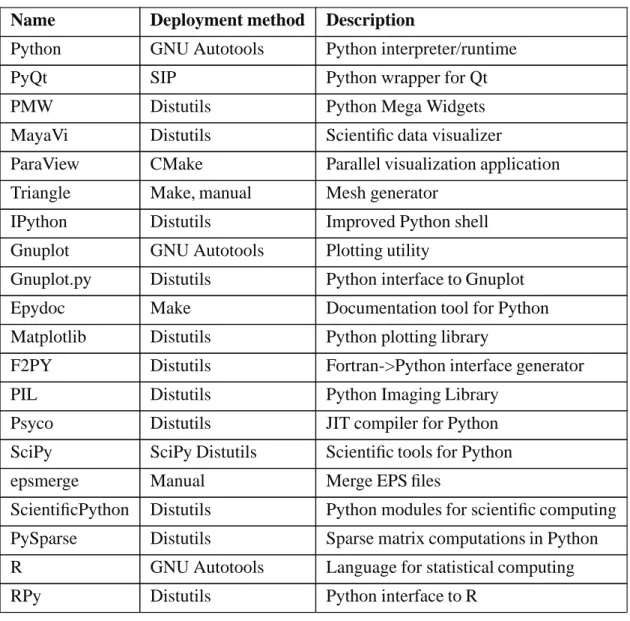
The suite is a mix of programs and components for software development, that are developed independently and provided under a license supportive of free distribution. Given that the software is originally provided by many independent projects with little coherence in terms of deployment, the suite’s constituent parts would be unwieldy to install and subsequently manage (update, uninstall) by themselves. The Python-based products are for the most part relatively easy to install, since they almost exclusively use the Distutils [12] framework which is standard with Python. The rest of the suite’s components present a variety of installation methods however, many must be compiled from source code (C/C++/Fortran), Python itself for instance, which can be an error-prone and time consuming process. The products constituting the Simula Suite are presented in Table 1.1.
As evidenced by the table of Simula Suite components, the suite is quite complex in nature. As such, some consideration should be put into its composition on the provider’s (Simula’s) part. That is to say, one should look into ways of streamlining the deployment process on targeted plat-forms. On Windows, one may simply look to Python Enthought Edition for guidance. Enthought takes the approach of bundling everything into a single Windows Installer [28] package, which is a simplistic but decidedly practical approach. It means the provider can distribute a single self-contained executable that will install everything on the user’s machine so that it will work out of the box. The whole bundle can also be uninstalled as a single entity.
On the other hand, there’s no such obvious solution for Linux at least. All components of the suite support deploying on Linux through their individual deployment procedures, but there’s no clear alternative for merging them all into a single deployable representation. Unlike the standard integrated Windows Installer service found on Windows, integrated deployment support on Linux tends to be tied to individual distribution architectures (Red Hat, Slackware, Debian etc.). Therefore the “universal” solution for distributing third party software to Linux users has typically been as platform-independent source code archives (which is true for the software included in the Simula Suite). Due to the complexity of deploying on this platform, the remainder of this section is devoted to investigating possible solutions.
Another concern especially pertinent to Linux is that of user rights; Linux systems are normally quite restrictive in terms of how a normal user may modify his/her surroundings, but provide no real facilities for installing software outside of system-wide locations. For Simula it is imperative that users without administrative rights be able to make use of the Simula Suite, so the chosen deployment solution must reflect this.
1.1.1. Manual deployment
Installing software using source level procedures (e.g., Distutils or Make [20] deployment scripts) can be a tedious and picky process, for some packages more than others. In addition to sheer difficulty of building and/or installing, some packages also present rather complex requirements on the runtime environment. That is, they typically depend on other third party software to be present in the host system. For instance, the Python interface to VTK (part of the Simula Suite) requires that theTkinter Python module be present and functional, VTK and Tkintermust also use the exact same version of the Tk library.
1.1. A specific problem scenario 3
Name Deployment method Description
Python GNU Autotools Python interpreter/runtime
PyQt SIP Python wrapper for Qt
PMW Distutils Python Mega Widgets
MayaVi Distutils Scientific data visualizer
ParaView CMake Parallel visualization application
Triangle Make, manual Mesh generator
IPython Distutils Improved Python shell
Gnuplot GNU Autotools Plotting utility
Gnuplot.py Distutils Python interface to Gnuplot
Epydoc Make Documentation tool for Python
Matplotlib Distutils Python plotting library
F2PY Distutils Fortran->Python interface generator
PIL Distutils Python Imaging Library
Psyco Distutils JIT compiler for Python
SciPy SciPy Distutils Scientific tools for Python
epsmerge Manual Merge EPS files
ScientificPython Distutils Python modules for scientific computing
PySparse Distutils Sparse matrix computations in Python
R GNU Autotools Language for statistical computing
RPy Distutils Python interface to R
Table 1.1. The Simula Suite
[24]. It is a Python library, but parts of it are implemented in compiled languages (C, C++, For-tran). That parts of the library must be compiled doesn’t present an immediate problem to the user, since it uses the standard Distutils procedure for building and installing (“python setup.py install”) but the user can get exposed to some “interesting” errors during compilation. For in-stance, it is not entirely unusual to see C++ code (not SciPy specifically) fail to compile as new (and increasingly strict) versions of the GNU C++ compiler (the customary C++ compiler on Linux) are released. One may also run into binary incompatibilities: if the Fortran parts of SciPy are compiled with a different symbol naming convention (one versus two added underscores) than Fortran libraries it is linked with, mayhem will ensue.
The most problematic aspect of SciPy though is its external dependencies. It directly de-pends on Python (obviously) >= 2.1.x, Numeric [42] >= 21.0, F2PY [35] and BLAS/LAPACK. For the BLAS/LAPACK dependency one will normally want to utilize the ATLAS (Automati-cally Tuned Linear Algebra Software) [2] implementation, which automati(Automati-cally tunes the built library to perform optimally on the user’s machine. According to SciPy documentation, ATLAS
4 Chapter 1. Introduction
may improve performance by a factor of 5 to 15 compared to the reference implementation. The price for this performance however is a highly complex build process, that requires the user to answer a series of questions. Once the build commences, it will be a lengthy process (several hours on a Pentium 4).
The built ATLAS libraries can’t be installed directly either, according to the SciPy guide on this subject they must be combined with the reference BLAS/LAPACK libraries (a procedure not for the faint of heart) [41]. The finished ATLAS libraries must then be placed in the path of the system’s linker, so they are properly included when building dependent programs (SciPy).
Given the error-prone and time consuming nature of deploying Simula Suite components from their source representation, it is something best not exposed to end users. Therefore we shall look into different ways of packaging the suite for deployment on Linux.
1.1.2. Deployment solutions at our disposal
Traditionally, when preparing a piece of software for (more or less) streamlined deployment on Linux, one would consider various Linux distribution-dependent package management systems. There are several popular alternatives, prominent examples include Red Hat RPM [3], Debian APT [48] and Gentoo Portage [44], ruling out one would affect the level of support for users of distributions employing the scheme in question. If we were to follow the traditional package management route when distributing the Simula Suite, we would likely find ourselves packaging each release in several different formats in order to meet users’needs. At least it would be much preferable from the user perspective compared to manual deployment. Some systems, notably APT and Portage, support automatic updates of installed software as well. For this to work, however, packages must be published through corresponding repositories.
A significant concern regarding typical package management systems is that they are not designed with user-specific installations in mind. Instead they are aimed squarely at installing software in system locations, and thus require the appropriate privileges. Many users wishing to install software lack administrative rights, or they don’t see the need to clutter the system unnecessarily. In such cases conventional package management is of little help.
New designs are surfacing, though, that aim to provide package management-like facilities but free from ties to specific Linux distributions. Two initiatives that have come to our attention, in this respect, are Autopackage [23] and Zero Install [26].
1.1.2.1. Autopackage
Autopackage is not a package management system per se; rather, it presents a shell script API for writing binary1 installation scripts that are portable across Linux. It does include facilities for adorning such scripts with automatic dependency handling though, and also offers management of installations. By management we mean that the API can record modifications of the filesystem during installation, in a database, so they may be undone when uninstalling. A special tool is provided for uninstalling software in the database.
Autopackage supports our requirement of being able to install without administrative rights, even completing an installation by configuring the user’s environment. That is, any 1Autopackage scripts install from binary packages.
1.1. A specific problem scenario 5 installed executables for instance will be added to thePATHvariable of the user’s shell.
The distribution model of Autopackage is rather simple. There are no special package repositories, instead packages are intended to be offered directly by the provider like any other type of resource. This would be beneficial for distributing the Simula Suite, as we wouldn’t need to concern ourselves with any centralized distribution channel.
The most problematic aspect of Autopackage in our view is the script API approach. Since the installation management logic is embedded in supportive functions (part of the API), a script can completely bypass the management logic and modify the filesystem directly (intentionally or not). The same goes for uninstallation which is also delegated to the individual script. Autopack-age does represent a possible solution for deploying the Simula Suite on end users’ systems, but autonomous deployment scripts represent a step backward compared to the declarative package management approach. The PyPkg system is an example of the latter, where software packages are treated as simple data and the deployment logic itself is embedded within the client.
1.1.2.2. Zero Install
Zero Install represents a more sane approach to software deployment in our opinion, since it operates with declarative packages (primitive archives in fact) rather than autonomous scripts, but still doesn’t quite fit the bill. The problem is that it is aimed at installing applications, i.e., it handles everything needed to run a program even if it isn’t present in the user’s system. When discussing Zero Install in this context, we are referring to the Injector implementation. The Zero Install Injector can run a program identified by a valid Zero Install resource identifier (a URI); it takes care of everything needed to run the program, acquiring packages for it and the whole dependency chain, installing them beneath the Zero Install cache and constructing a suitable runtime environment before the program is run. Programs can be removed simply by deleting the corresponding directory in the Zero Install cache.
The problem when considering Zero Install for deploying the Simula Suite is that it’s not of much help for those parts of the suite that aren’t complete applications. The suite also contains many modules for software development, these must be explicitly installed within the filesystem so they are available for development purposes. For instance, we could create a Zero Install “interface” (an XML document) for IPython, which is part of the Simula Suite, and place it at http://www.simula.no/suite/IPython. A user could then run the packaged application by executing the command “0launch http://www.simula.no/suite/IPython”. This won’t work for Psyco, also part of the Simula Suite, since it is not a runnable program. Rather, Psyco must be installed where it can be found by the Python interpreter.
1.1.3. Applying PyPkg to the problem
The PyPkg system, which is under development independently of the Simula Suite effort, offers a balanced view of the distribution/deployment problem. It is meant to reflect the needs of both providers and users, so the model includes support for the whole chain from initial distribution of software to its deployment on the systems of end users. The distribution facilities are even detached from the deployment side of things, so once software has been registered with the PyPkg distribution network it can be exploited for other purposes as well (presentation via HTML for instance). When it comes to deployment PyPkg shares some desirable qualities with Autopackage and Zero Install; it is free of ties to any particular Linux distribution and
6 Chapter 1. Introduction
supports user-specific installations, in addition to typical package management functionality like automated uninstallations (only partially implemented at this time, granted).
Autopackage and PyPkg stand out as the best suited alternatives for deploying the Simula Suite on Linux, given their cross-distribution support and that they both enable per-user instal-lations. We’ve already mentioned our disapproval of Autopackage’s approach of autonomous deployment scripts however. PyPkg represents the sane approach in this respect, from our point of view. A PyPkg package contains only files and information on how to integrate them with the host system, therefore the client exerts full control over its effect on the user’s system.
The actual distribution of the Simula Suite through the PyPkg network will require some initial effort. Given PyPkg’s project-oriented type of software distribution (see Section 3.2 for an explanation of the distribution model), an RDF project description must be created for each component of the Simula Suite according to the DOAP/PyPkg specification. Also, project descriptions must declare releases corresponding to component versions and associate them with PyPkg packages (a dedicated tool exists for this purpose). Lastly, each project must be registered with the central PyPkg project portal since clients access project information through this. The latter requirement isn’t much of a problem given that the portal is controlled by Simula.
The creation of PyPkg packages for each part of the Simula Suite is likely to be the most difficult/time consuming aspect of the distribution process, given the time involved (especially with large packages like VTK) and likelihood of encountering errors in adapting the many source packages to PyPkg equivalents. Thankfully the PyPkg package authoring tool is quite usable already and many packages will build directly with built-in build rules, but some have their quirks and require special consideration. For instance, SciPy uses a special version of Distutils that would not work when invoked in discrete steps, and so required adaptation of the Distutils build rule. Section 4.1.2 shows in detail how a package is created for SciPy.
1.2. Implementation notes
All PyPkg programs, an installation client and a package authoring tool, are written in pure Python and feature a PyQt [39] GUI. The programs are heavily based on the common PyPkg framework, which is implemented as a Python package,pypkg.base. To improve performance, PyPkg programs use the Psyco [37] JIT compiler for Python when available. It should also be noted that our code relies on features introduced with Python 2.4, both on the language and library level.
Software packages in the PyPkg format are currently built for the Intel Pentium Pro processor architecture [53] only, which is supported by all newer (superseding Pentium Pro) x86 architecture processors (including the AMD Athlon range, Pentium 4 etc.).
The Python source code and documentation (generated with
Epydoc) for PyPkg can be downloaded as a bzip2-compressed tar archive from http://home.broadpark.no/~aknuds-1/pypkg.tar.bz2.
1.3. Thesis structure
In writing this thesis we’ve employed a certain logical structure. The idea is that we first present a vision for PyPkg, stating what the system is to develop into, before we describe
1.3. Thesis structure 7 the model for the current version of PyPkg, which is a step toward realizing the vision. This discussion is then complemented by a chapter on practical usage of PyPkg facilities, centered around the distribution and deployment of a certain software product. Finally, we conclude the thesis with a chapter devoted to reflection on PyPkg’s current and future state.
Chapter 2. Vision
PyPkg is to provide a generic system for distribution and deployment of software, that much is clear, but it is too weak a notion to be of any real use in our work. The background is that we have a certain idea of how we think that software distribution and deployment should be conduct-ed in general; this underlying intention neconduct-eds to be refinconduct-ed in concrete terms, such that we make a commitment to how PyPkg is meant to manifest itself to the intended audience. In this regard it helps to keep in mind that our process should result in a tangible product, a software system to be exact. In order to ensure that the composed system, likely of significant complexity, corresponds to the expected result we establish an authoritative reference, that development must adhere to. This is the PyPkg vision, given that it describes the envisioned generic distribution/deployment system.
But let’s not get ahead of ourselves. Before we present how it is we envision PyPkg, it makes sense to discuss how software distribution and deployment is in the general case conducted with existing means. This is to build an understanding of the complex problem PyPkg is meant to solve, and should as such form a suitable backdrop for the discussion of the vision itself.
2.1. The current situation
With PyPkg we wish to ultimately address how software is distributed and deployed in the
general case, so we will concentrate our discussion in this section on how these processes are
generally handled today. Highly advanced systems have been developed for these purposes, but they don’t apply to the general case (those we are aware of at least). As an example the more advanced Linux package management systems tend to make deployment very convenient for users, but are tied to a certain platform (normally a specific Linux flavour at that). We consider instead the generally applicable method for getting software from developer to user, so that it can be put to use (i.e. fully installed), where distribution and deployment are disjoint processes. Concretely we’re thinking of how software is distributed from individual websites to users, who proceed to deploy the software according to various procedures.
2.1.1. Distribution
Since the World Wide Web offers a generic1method for distributing software, as download-able resources, it has effectively become a catch-all for this purpose. Even on Linux where there exist package management systems that are specially tailored for presenting/bringing software to users, developers themselves tend to resort to distributing through their Web pages since there is no single agreed-upon distribution channel for such systems. The problem with the Web being the least common denominator is that it doesn’t provide special-purpose facilities (not a problem with the Web per se). Software is but one kind of digital content available from websites, and general tools for browsing and searching the Web provide little assistance in locating content of a 1In the sense that it’s not particular to any platform or purpose.
10 Chapter 2. Vision
specific kind. Additionally, the sheer amount of software, coupled with incoherent presentation, can itself prove overwhelming.
2.1.2. Deployment
There are not only difficulties involved in getting hold of software, deploying it on target systems can present even more of a challenge. The exact procedure depends essentially on the individual software provider. Different platforms vary in their support for deployment, some are developed to a greater degree than others in this regard.
On Windows support for software installation and uninstallation is integrated through the Windows Installer service since Windows 2000 [28]. As a result software for the Windows plat-form is normally installed through a simple Windows Installer-compatible graphical “wizard”, and eventually uninstalled via an integrated Windows tool.
On Linux things are not so rosy, there being no standard deployment service à la Windows Installer. Instead users are in the general case stuck with generic archives, which typically contain some sort of installation script along with documentation on its intended use. Sometimes these installation scripts (Make scripts for the most part) support subsequent uninstallation, but in a generally unsafe manner (blindly removing files corresponding to what was/would be installed).
2.1.2.1. Dependencies
Also, Linux programs tend to (more often than not) require certain other programs to be installed beforehand. Such dependencies tend to come about as a side effect of the Free Software [21] development model, where projects are prone to depend on other software distributed under a Free license (e.g. GPL [19]) rather than “reinventing the wheel”. Dependencies on third party software can of course occur in conjunction with Windows software too, but in practice far less often. The convention with Windows Installer packages seems to be to include necessary components with the installation instead, an approach that will at least enlarge the installation but saves the user hassle.
2.1.2.2. Updates
Another deployment related problem is that of updating software once installed. This is particularly intertwined with the distribution process, since one must first be aware that an update has been released and then acquire it, before it can be applied. Considering how often updates are typically issued these days, this process can quickly become a regular ritual.
Apart from receiving updates, deploying them can be a more or less daunting experience depending on the method employed. Installation scripts of the Windows Installer type tend to handle the transition from old to new version automatically, indeed the Windows Installer service has built-in support for ‘upgrading’ and ‘patching’1installations [28]. Generic Linux installation
scripts on the other hand can not be trusted to have this functionality, in the general case they will overwrite the files of an old version but not remove any remnants.
2.1. The current situation 11 Convenience on the user’s part is but one concern with regard to updating installations. Security is becoming more and more of an issue in the digital environment, with constant reports of vulnerabilities in programs. The same technology that enables developers to transmit software fixes in rapid succession (the Internet), lets knowledge of security breaches spread among subversive elements. Given the short timeframe involved in such situations it is key that updates are deployed with the highest possible efficiency, which can not be said of the current disjoint model where distribution and deployment are independent processes. Maximum efficiency in this respect can only be achieved with some integration between the two.
2.1.3. Software directories
Software directories of the Freshmeat [33]/Sourceforge [34] variety alleviate the problem of software distribution via the Web, by aggregating information about software projects and presenting them and their products in a consistent manner to users. Finding specific products in such directories is facilitated through grouping of projects, according to categories, and searching and sorting services. Unfortunately directories like Freshmeat and Sourceforge fail to exhibit generality in how they collect and present information. That is to say, they don’t cooperate on content nor format, so as a result the same project can be described completely differently depending on which directory one visits.
While software directories facilitate discovering and attaining software, they offer little help when it comes to deploying it. The exact procedure is still up to the individual project. That being said they facilitate the update process somewhat. As a project in a software directory releases updates, they can at least be sought out by visiting the project’s directory entry and examining its release list. Directories may even provide an RSS feed so users can be notified of new project releases, at least Sourceforge has this option [32]. In either case, it is left to the user to acquire updates and deploy them.
2.2. The PyPkg vision
conduit
a passage (a pipe or tunnel) through which water or electric wires can pass; “the computers were connected through a system of conduits”
- Dictionary.com [10]
The preceding discussion should provide some insights on the situation that we mean to improve. To recapitulate, we are interested in facilitating distribution and deployment of software in gener-al. In this respect we see the former as a supportive function to the latter, since software must first be distributed to users before they are able to deploy it (barring direct access to the “master” copy, obviously). That being said, the distribution process is of course relevant outside the deployment context. What we are dissatisfied with when it comes to current conventions, regarding both dis-tribution and deployment, is essentially the lack of a uniform method. Software is made available in so many ways (both with regard to reachability and format), and as a user one is exposed to great variability in terms of deployment approach (depending on one’s platform, granted). This
12 Chapter 2. Vision
is something we believe is possible to rectify with a common system, hence PyPkg. 2.2.1. The conduit concept
Having applied considerable thought to the distribution/deployment problem through-out this project, we’ve come to the conclusion that it is best solved by a conduit-like system (Figure 2.1). To elaborate on this idea, one could say the Internet already presents a general conduit for transferring digital content between parties, we propose a specialized conduit for software. The utility of this special conduit is that it is capable of integrating deployment with transfer of software, meaning that it extends the “Internet conduit” beyond simple distribution. By integrating distribution with the deployment process, we effectively attain a uniform distribu-tion method as a byproduct, being a requirement for seamless integradistribu-tion. Like the lower-level conduit enabled by Internet protocols our software conduit is intended to be completely general with regard to platform and content (provided it falls in the software category of course).
On the basic level software is a type of (digital) content; when treated in a totally generic manner, as a sequence of bytes, the Internet serves as an unbroken conduit for moving it from A to B. Thanks to the generic nature of the Internet Protocol Suite [8] content can be effortlessly dis-tributed between parties, regardless of their respective platforms or how many intermediate net-work links it must pass through. We can see no intrinsic reason why this shouldn’t be true of the general software transfer process as well1, conceptually a platform could exist where downloaded
software could invariably be applied directly without any need for installation. Since the general platform is a lot more complex than this, software content must receive special consideration.
Thus we envision PyPkg as a special conduit that treats software as “rich” content, that must be deployed in order to truly complete the transfer process. Since the system is to model the unhindered flow of a conduit, it must be capable of conducting deployment in a completely seamless manner, regardless of involved complexity (e.g., requirements related to installing software). This can be likened to how Internet protocols let two parties open a seemingly direct connection without worrying about the physical path, a number of interconnected nodes, connecting them.
To make this notion more concrete, PyPkg is to provide facilities for software distribution and deployment that are capable of collaborating in order to form a conduit for transferring software. These facilities should be generic with regard to type of software and platform.
Since we mean to establish a common method our distribution facilities must be applica-ble to general distribution purposes, corresponding to the role traditionally filled by project Web pages and software directories, in addition to supporting deployment through PyPkg. Hopeful-ly this will compel developers to agree on PyPkg as a common distribution system, while also paving the way for our software conduit concept. Furthermore, PyPkg should present a certain distribution network for all software reachable through the conduit, that can be used both to ac-cess and discover software. This should serve as a kind of generic software directory, conceivably it can act as a source of information for special-purpose software directories, thereby avoiding the problem where directories operate with separate representations of indexed software.
The deployment facilities are to present a streamlined method for deploying software
1By software transfer we are thinking of how a piece of software is obtained from a provider and deployed on a target system, ready for use.
2.2. The PyPkg vision 13
Users Software conduit Providers
Figure 2.1. The software conduit
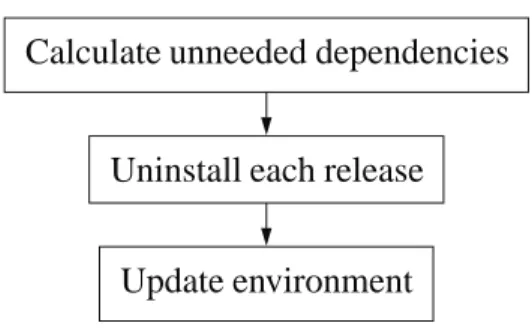
on target systems. This means that they must handle all requirements when software is being installed; notably, any inter-software dependencies should be handled for the user. In addition PyPkg’s deployment functionality is to include support for updating and uninstalling installed software. Given the direct connection to the distribution layer presented by the conduit, it is only natural to automate the update process, especially considering the security aspect discussed in Section 2.1.2.2.
2.2.2. Precursors to the conduit concept
Although the conduit concept may be novel, the idea is not entirely original. Inspiration was to a great extent drawn from the APT style of Linux package management, via the derivative Portage system. Such systems establish a type of conduit through which users can obtain (deploy) software, in what is to the user a single operation. What characterizes the APT model in this respect is that software is collected, in packaged form, in central repositories. Compatible client programs (package managers) can contact such repositories and thereby gain access to all data they need to process offered software on behalf of users. As such, a conduit is effectively established between package repositories in one end and clients (doing the user’s bidding) in the other.
Package management systems like APT and Portage are able to offer their users some great functionality; notably, when installing a package, other packages depended on are also installed (cf. Section 2.1.2.1). In addition, installed packages can be updated either on an individual or a global basis (by considering all installed programs) as new versions are released. Traditional Linux package management systems take on a more fundamental responsibility as well; there being no standard system level deployment service on Linux (like Windows Installer [28]), this has come to be the responsibility of package management systems. Installations are recorded in databases (these differ between systems) so they may be managed by the user (e.g. uninstalled). Although the APT model serves as a good example of how software deployment may be streamlined in a heterogeneous environment (software is collected from many different providers), it is a greatly flawed solution. It simplifies the problem by being highly specific, i.e. each package management system establishes its own independent distribution channel. That is to say, APT has its own package repositories, Portage has its own package repositories etc. To the user the distribution channel appears streamlined, but in most cases it will require an extra adaptive step.
The centralized (and specialized) repository model does not reflect how software is normally developed and distributed in a completely decentralized manner. Providers cannot simply publish their software in one location, say in the “Downloads” section of the project website, for it to enter the distribution channels of APT-style package management systems. Each release must be packaged in the corresponding format (.deb for APT/dpkg [49]) and placed in a centralized repository, a procedure that must be repeated for all different package management systems one
14 Chapter 2. Vision
intends to support. The result is that providers tend to stick to the tried and true solution of re-leasing their software in a generic manner, as discussed in Section 2.1.1, leaving it to volunteers to package software for various package management systems (the adaptive step).
The Windows Update [52] service is another point of reference for our conduit concept, albeit even more specialized than APT-style package management. This service is specifically directed at automatically deploying updates to Microsoft Windows system components on users’ systems, as they are published centrally. Windows Update establishes an unbroken conduit between the provider (Microsoft) and end users, and as such it is very good for what it does (transferring/applying updates).
Chapter 3. Model
Vision
Demands
Model
Figure 3.1. From vision to model
The concept of a conduit for facilitating software transfers is something we believe strongly in, the previous chapter helped define how we intend this notion to manifest itself. Still, the product vision serves as a highly abstract definition and doesn’t quite reflect the complexity of creating a corresponding software system (which is not the vision’s purpose either). There are many obstacles that such a system must cope with; there’s a lack of formal conventions for distributing software on the Internet, software tends to impose various requirements with regard to installation, platforms vary greatly in their support for software deployment etc. The PyPkg model defines in exhaustive detail how the system is to solve these problems.
Considering the involved complexity, it is imperative that we are systematic in design-ing PyPkg. To this end, we take a certain approach. First of all the high-level product vision is translated into a set of discrete demands on PyPkg, this serves as our concept of the distribu-tion/deployment problem so to speak. Moreover, this concept represents a simplification of the full problem, at least in early stages, in order to simplify development. That is to say, for each development iteration we identify a set of discrete demands from the product vision, that is de-liberately limited with regard to the full vision. The next iteration identifies, and takes on, new demands etc. From such a set of demands it’s possible to deduce a model, that details (to differing degrees) how the corresponding solution is to manifest itself. Figure 3.1 illustrates this process of refining the vision into a model.
Before discussing PyPkg’s design in full detail we will provide some background on how we derived the high-level architecture, in the context of involved problems. As per our design method, we’ve decided on a somewhat simplified problem with regard to the vision, where the system only concerns itself with two deployment tasks: installation and uninstallation. Otherwise the model is quite in line with the envisioned distribution/deployment facilities (described in Section 2.2.1).
The in-depth discussion on the design is divided into three sections. Our model consists really of two main parts (sub-models) corresponding to the two ends of the software conduit, distribution and deployment, but the scheme for handling software dependencies (refer to Section 2.1.2.1) is shared between these two and so discussed separately. The division into two
16 Chapter 3. Model
main parts was natural since PyPkg’s distribution network is to exist independently of the deploy-ment facilities. There is a need for collaboration on the distribution network’s part to enable the PyPkg deployment process, but it is done in a generic manner that can even be exploited by other systems. In conjunction with the discussion of each of the two sub-models, the corresponding set of demands is presented.
3.1. Considerations for an automated software transfer process
As described in Section 2.2.1, PyPkg is meant to provide a generalized software conduit on top of Internet transfer mechanisms. The Internet solves the problem of transferring data between heterogeneous parties for us, but there’s still the problem of heterogeneity in how software is presented for distribution and how it is deployed on target systems. This implies that in order to automate the transfer of software on a general basis, a higher level architecture must be imposed on the process, covering all relevant aspects.
3.1.1. Involved problems
In order to at all enable a homogeneous transfer process, a common method for publishing distributed software must be decided on (given the lack of a standard approach). Navigating an arbitrary project Web page in order to find offered software may prove difficult even for a human, if the project in question has indeed released any at all. When distributing through an automated system software releases should be subject to formal rules, thereby eliminating uncertainty related to this process.
The actual deployment of software on individual systems can get quite involved, depending on the particular software and target platform. Some problems related to deployment are general in scope, while others emerge through dealing with particular platforms. A rule of thumb for us when considering automated deployment is that all steps that would have to be performed manually are to be encompassed by the deployment process. This includes handling any requirements imposed by software with regard to installation.
A particularly problematic type of requirement in conjunction with installing software is dependencies on other software (as discussed in Section 2.1.2.1). It is possible to ignore this problem altogether design-wise and instead require that providers bundle their software together with any dependencies, but such an approach would cost us some flexibility. Apart from extra effort on the providers’ part and added space requirements (due to bundling), it is problematic in conjunction with software updates. Any updates to dependencies would have to be bundled with new versions of dependents, in order to replace older versions installed on users’ systems. Such an update model would be especially inhibitive with regard to Free Software projects, that are prone to reuse components developed independently by other projects. Free Software is of particular relevance to us given our focus on the Linux platform, with its affinity to this development philosophy.
In order to retain flexibility we’ve decided on an explicit dependency scheme. Software distributed through PyPkg should be allowed to depend on other software (distributed through PyPkg), as long as such dependencies are explicitly stated. Consequently, our distribution method should provide the means for representing dependencies between different software. Also, with automation in mind, PyPkg must concern itself with satisfying such dependencies
3.1. Considerations for an automated software transfer process 17 when installing software:when a software product is transferred across the conduit to a user other software may be included as dependencies.
It should be noted that despite motivating the flexible (modular) dependency scheme, we’re leaving out support for automated updates at this stage. This will hopefully be addressed in future development.
For our conduit to support heterogeneous target systems it must present a layer on top of system-specific deployment mechanisms, that serves as an interface to all supported deployment functionality. A homogeneous deployment layer should be appreciated especially by users who deal with multiple operating systems, given that they can (conceivably) spend more time applying software and less time installing/maintaining it. That being said, when prototyping PyPkg it makes little sense to prioritize multi-platform support.
3.1.2. Achieving a generalized conduit
When designing our system we look to other conduit-like systems such as APT and Win-dows Update (see Section 2.2.2 for a discussion of sources of inspiration), with the difference that we are not developing a solution for a particular platform nor a specialized purpose. Our design most resembles the APT-style package management model, but for us it is imperative to meet the general usage case. That is to say, we’d like for our system to be the common method for developers to offer their software to users, corresponding to the role of Windows Installer packages (.msi) when targeting Windows users for example.
Designing such a system is, as might be expected, easier said than done. We already know that the PyPkg model is to consist of two top-level aspects, distribution and deployment. The distribution aspect is to present facilities for publishing software so that it can be reached through the conduit, i.e. it must allow providers to present their products according to a specific protocol. The deployment aspect is concerned with letting users deploy software published through PyPkg, and uses the distribution protocol to query the products of individual providers. Hence, the distribution aspect plays a supportive role relative to the deployment aspect. Even so, the protocol needn’t be particular to PyPkg. In fact, in our view all parties would be best served by a common protocol for publishing software. Regrettably, there exists no commonly agreed-upon alternative, instead we will have to settle on a distribution model in the hope that it will find general acceptance.
As a whole, then, the PyPkg model must represent an environment for establishing a conduit between those offering products (providers) and those interested in said products (users). We conceive this environment as populated with representations of the two types, where one kind assumes a passive role (providers) whereas the other (users) is active. This role division should enable a push/pull model, where providers can publish their products once (push) and interested parties query this information directly (pull). In practice this environment should manifest itself as a “database” of distributed software products, represented in terms of the PyPkg protocol, which is accessed by PyPkg agent programs, acting on behalf of users.
In order to involve providers directly in the distribution process as much as possible, the model must allow for decentralization in the distribution aspect. The “database” of distributed software should actually be shattered across individual Web resources, typically corresponding to project websites. This is because we want distribution through PyPkg to primarily integrate with ordinary distribution mechanisms (i.e., avoid creating another distribution channel). It
18 Chapter 3. Model
would be unrealistic to expect instant widespread acceptance of our distribution model, but this is the base behaviour we should strive to accommodate.
3.2. Distribution
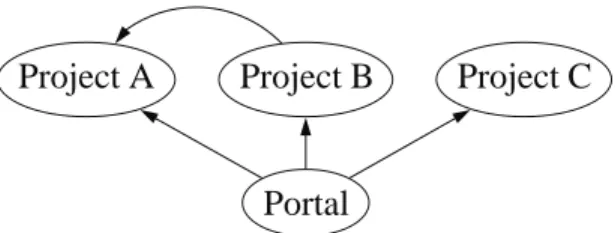
Project A Project B Project C
Portal
depends
Figure 3.2. The PyPkg distribution model
The distribution aspect of our model pertains to the envisioned PyPkg distribution network (Section 2.2.1). Based on the ruminations in Section 3.1.2 we’ve given some thought to how to establish a network of decentralized representations of software resources, in a generic manner. What seems the sensible option to us is a Semantic Web [29] approach, which is how the World Wide Web inventor Tim Berners-Lee envisions that machine-processable information be shared across the Web [6]. The Semantic Web initiative seeks to augment traditional Web technology (HTML), which provides facilities for describing format rather than content, with means to convey meaningful information (through semantic assertions) between machines (e.g. computers). This approach of meshing with current Web architecture is particularly appealing to us, in that it should ease the transition from traditional Web-based software publishing.
In practice the Semantic Web provides us with a common, general, language for de-scribing distributed resources. This language gives us the means to devise the PyPkg protocol (Section 3.1.2), for publishing software in a manner that enables a general software conduit. More specifically, we’ve decided to compose the PyPkg distribution layer from Semantic Web representations of individual software providers and associated resources, described according to the PyPkg protocol.
The demands
Having outlined the basic model for the PyPkg distribution layer, we present the concrete set of demands. These serve to flesh out the informal demands presented in the discussion of the product vision, in Section 2.2.1.
1 The PyPkg distribution layer must present a network that allows for navigation of software resources
2 The PyPkg network is to consist of decentralized representations of software resources 3 PyPkg must expose a Semantic Web protocol that governs the description of software
resources
4 The PyPkg distribution protocol must support general publishing of software releases, analogous to how it’s done via Web pages
3.2. Distribution 19 5 The PyPkg distribution protocol must give access to software packages deployable by
PyPkg agents for software releases
6 The PyPkg distribution protocol must make it possible to express inter-software depen-dencies
The last demand has to do with the dependency scheme which affects both the distribution and deployment aspects of the PyPkg model, described in Section 3.4.
The model
Figure 3.2 shows a condensed version of the PyPkg distribution model. As can be gleaned from the diagram, the model employs a hybrid approach where decentralized software project repre-sentations are accessed through a central portal. The portal meets the first demand by presenting a public index of the distribution network, organized in terms of providers. Each such provider is associated with a set of projects, each project representing a specific software resource (product). The second demand is accommodated through an indirection scheme, where provider descrip-tions in the portal index simply refer to project representadescrip-tions that can reside anywhere on the Web (i.e., they are decentralized). This means that providers are (as far as the model is concerned) responsible with hosting and maintaining representations of distributed software themselves, reflecting how distribution traditionally revolves around autonomous project websites.
The providers (in the portal index) and associated projects are described through a special Semantic Web protocol (as per demand number 3). Now, the Semantic Web itself is an umbrella for several languages intended to facilitate sharing of data on the Web between machines (com-puters). Of particular interest to us, RDF (Resource Description Framework) has emerged as a W3C recommendation [45]. RDF provides the basic building blocks for sharing data, through the description of distributed resources and relations between them. As such, the PyPkg distribution protocol is expressed as an RDF vocabulary (containing special terms relevant to the software distribution problem).
Software is published according to this protocol by adding descriptions of software releases to RDF project representations, such descriptions give access to data both relevant to general distribution purposes (demand 4) and to PyPkg agents (demand 5). Essentially each release description states general metadata about a release, such as its version, and also refers to one or more downloadable packages. There should at least be a package in the PyPkg format (which PyPkg agents are able to utilize), but additional packages can be offered in arbitrary formats (e.g., zip or tar archives) for general distribution purposes. Due to the general nature of RDF and the PyPkg protocol, project releases published in this way can really be harnessed for any intent, not just PyPkg purposes. For instance, the RDF data can be used to automatically generate release announcements on project Web pages.
The diagram also shows a dependency relation from project B to project A, this is to illus-trate that the protocol has support for modeling dependencies between different software (corre-sponding to demand 6). This happens on the project release level, such that a release description can state dependencies on software offered by other projects, which need to be satisfied upon installing the release. Such dependency declarations are particularly directed at PyPkg agents, but the dependency scheme is designed in such a way that it can serve as a general method for formalizing software dependencies.
20 Chapter 3. Model
A proper in-depth treatment of the distribution model is given in subsections 3.2.2 and 3.2.3. The former details the base PyPkg distribution model, which is centered around decentralized project descriptions, while the latter describes the portal which provides a central access point to the network of projects. Before we get to that however, an explanation of the RDF fundament on which our distribution model rests.
3.2.1. Some words on the use of RDF
Basically, what RDF provides us with is the means to describe distributed resources, represented by URIs (Unique Resource Identifiers), through binary relations to primitives (RDF literals) and/or other resources. Each such relation serves to assert a property of the described resource. RDF itself isn’t a concrete language but an abstract datamodel, for describing data on a
triple form. According to this model, knowledge (of resources) is aggregated through successive
evaluation of such triples.
3.2.1.1. The RDF datamodel
An RDF triple consists of the components subject, predicate, object [25]. The subject is the URI of the resource being described, the predicate, also a URI, denotes a certain property of the subject, while the object is the value (either a resource, identified by a URI, or a primitive) of this property. Effectively, an RDF triple states a relationship, indicated by the property, between the subject and the object. A simple example of a possible RDF statement (triple), (thesis, http://www.simula.no/rdf/author, “Arve Knudsen”), states the author of this thesis.
The triple is the basic mechanism for conveying meaning in RDF, but the amount of infor-mation that can be expressed on this form is limited (to binary relationships). Rather, a collec-tion of RDF triples is normally interpreted as a graph. Nodes correspond to subjects and objects, which are connected by directed arcs corresponding to predicates. A graph of this kind will then represent a comprehensive bank of encountered knowledge about contained resources. When compiling a graph, individual statements can come from entirely different sources. Knowledge from statements is simply added to the graph as they (statements) are evaluated, a single resource (identified by a URI) can even be described by different sources (statements referring to a re-source are merged without regard to their location). Figure 3.3 displays the graph representation of the example triple.
3.2.1.2. RDF Schema
In order to attach some meaning to information expressed by RDF graphs, there must be a certain vocabulary involved. That is to say, when stating a property of a resource, the property must have a specified semantics. Otherwise the statement won’t tell us much, i.e. the meaning of the property in question is unknown to us. As properties in RDF are identified by URIs they can be recognized by the processing application, and translated into corresponding semantics (if they are indeed recognized). For instance it should be fairly obvious to a human reader what the http://www.simula.no/rdf/author property of the previous example signifies, while a typical RDF-processing program would match it directly against known properties.
When it comes to sharing information between parties a well-specified vocabulary is especially pertinent; a vocabulary effectively presents a protocol, which consumers come to
3.2. Distribution 21
thesis http://www.simula.no/rdf/author “Arve Knudsen”
Figure 3.3. Graph representation of example RDF triple
rely on in order to make sense of data presented to them. In a typical RDF scenario vocabularies from different sources are also mixed and matched, so to reuse well-known semantics. This is accommodated by the use of URIs for RDF properties, so name clashes and resulting ambiguities are avoided.
Even though RDF descriptions can be parsed without any formally defined vocabulary, there exists a special layer for this purpose: RDF Schema (RDFS) [46]. RDFS vocabularies can be used to validate RDF sources, but in general they are used to document semantics. If an RDF processing application validates against RDFS definitions it can catch the use of unknown properties or unintended use of properties.
An RDF vocabulary defined in RDFS can establish a class hierarchy, as known from the object-oriented programming paradigm [51]. RDFS lets you define resource classes, themselves resources, and associated properties. RDF properties are really free-standing, but when defining a property it can be associated with a class by specifying its domain. The domain is actually itself a property of instances of classProperty, which is used to define new properties, and refers to a class resource. Thus, new properties can be added for a class at any time, anywhere. Classes can also derive from existing classes, in order to be compatible with base class properties.
The primary reason for defining an RDF class (in RDFS) is to constrain the set of properties that can be used to describe a type of resource. By doing so for a set of classes, one may precisely model a domain of resource types (i.e., an ontology). For our purposes this is relevant for modeling the roles that partake in our distribution layer, creating a common RDF vocabulary so software providers may describe themselves to interested parties (PyPkg agents for instance).
For a relatively simple example of RDFS definitions one may refer to the PyPkg RDF vocabulary, in Appendix A.
3.2.1.3. Concrete syntax
The abstract RDF graph model needs a concrete syntax in order to be machine-processable, i.e., graphs must be serialized according to some language. There exist several serialization syntaxes for RDF, of which RDF/XML [47] is the most common. RDF concepts map cleanly (albeit not uniquely) to XML terms: element names, attribute names, element contents and attribute values. RDF vocabularies (as defined using RDFS) translate to XML namespaces.
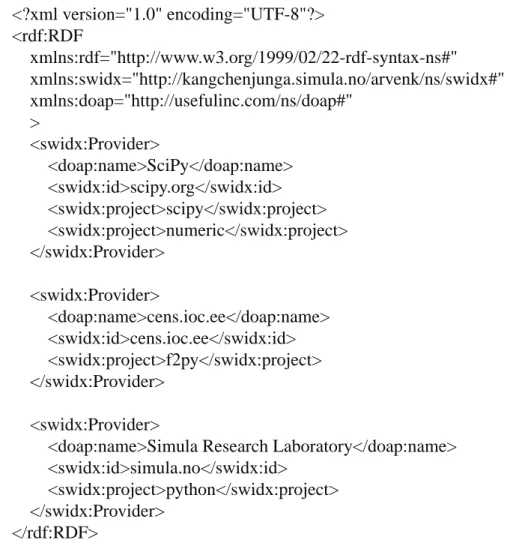
RDF/XML is our syntax of choice for information exchange in the PyPkg distribution layer. There exist more compact/“intentional” syntaxes for expressing RDF statements, for instance Turtle (Terse RDF Triple Language) [5] makes for a very readable and at the same time expressive syntax. However, XML is by now a commonly understood declarative language in the IT world and should be a safe choice for both computer-aided and manual reading and editing. In fact, the PyPkg distribution layer is in practice composed of RDF/XML documents pertaining to software providers (the portal index) and their projects (hosted separately).
22 Chapter 3. Model
<rdf:Description rdf:nodeID="thesis">
<simula:author>Arve Knudsen</simula:author> </rdf:Description>
Figure 3.4. Example RDF triple in XML syntax
3.2.2. The PyPkg RDF model
The PyPkg distribution layer, organized in terms of software providers, is modeled with an appropriate object-oriented RDF vocabulary. As such, we will be required to decompose the problem domain into classes of resources. A sufficiently descriptive and well designed model can be complex enough to develop in itself, in addition it is a stated goal that the model should strive to integrate with ordinary distribution mechanisms. The latter is important when it comes to achieving acceptance among those responsible for developing and distributing software, we’d like to ease their burden rather than adding to it. So in order to avoid reinventing the wheel, and possibly also leverage existing momentum, it is a good idea to evaluate any previous efforts in the field.
3.2.2.1. DOAP
We’ve discovered at least one RDF vocabulary with goals compatible with ours, that aims to provide a common framework for self-describing software providers on the Web. The DOAP (Description Of A Project) vocabulary [15] is centered around the project entity, as indicated by its name. A DOAP project corresponds to our concept of a software provider, with the distinction that a DOAP project directly represents a single product. Apart from this, the vocabulary is meant to provide descriptive terms of such a general nature that interested parties can pull metadata directly from software projects, rather than it being scattered across different sources (e.g., software directories).
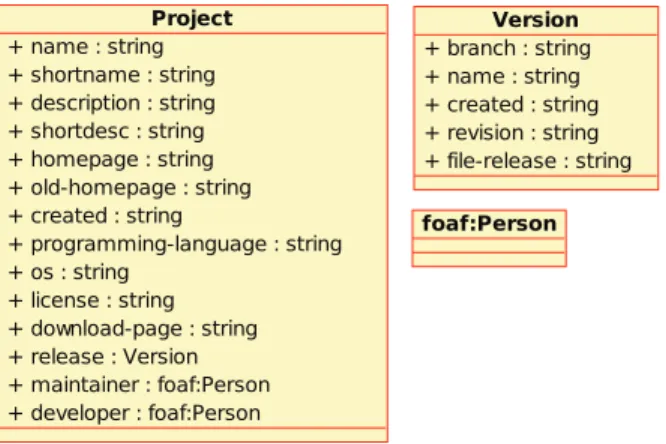
The main entity in the DOAP vocabulary is the doap:Project class (doap denotes the vocabulary). A number of properties are defined for this class, that are deemed generally interesting when describing a software project. Prominent properties include doap:name, doap:descriptionanddoap:homepage. Figure 3.5 shows a somewhat simplified represen-tation of the DOAP class hierarchy. For full disclosure of the vocabulary see [16]. There is some support for the distribution aspect in DOAP, but it is currently rather weak and restricted to de-scribing the current project release. Such a description (through thedoap:releaseproperty) can be used to provide a link to a downloadable package but not much more.
A project supports the DOAP model by hosting a corresponding DOAP document. The model is fully decentralized, and there is no particular way of registering a DOAP-enabled project so that it can be discovered by others. The DOAP author recognizes that there may be a need to uniquely identify a project however, for referral by others. The raw URI of the project description is not a good idea for this purpose since it is subject to change, instead a project is in the DOAP context uniquely identified by its current and previous homepages [14]. For this to work a project may never acquire a homepage previously owned by another. The doap:homepage and doap:old-homepage properties are used to describe the current and
3.2. Distribution 23
Figure 3.5. DOAP class hierarchy (simplified)
any previous homepages, respectively. Every previous homepage of a project should be listed usingdoap:old-homepage, so that a processing agent can recognize a project even based on a reference to an outdated homepage.
3.2.2.2. PyPkg: extending the DOAP vocabulary
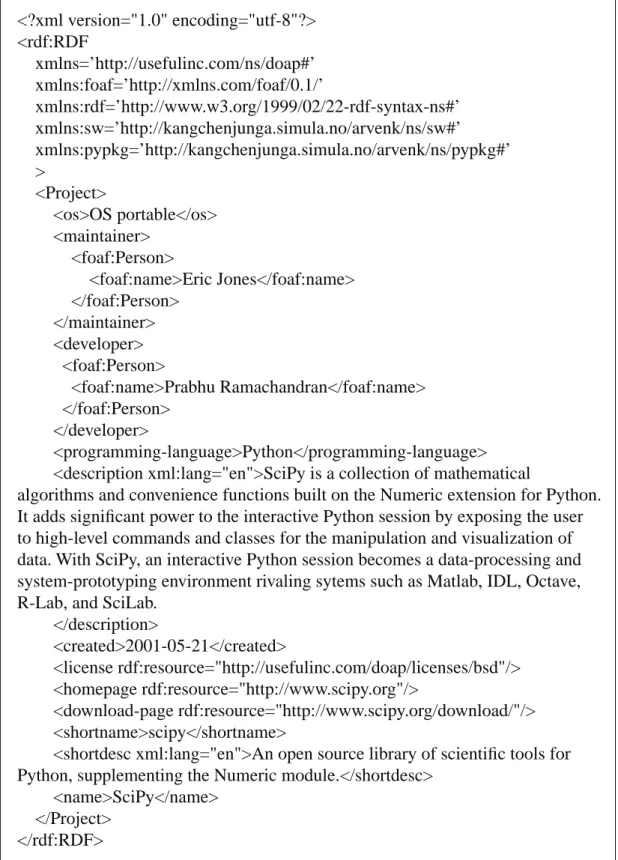
As far as we can tell DOAP is a very good design for what it does. It represents a sensible approach for publishing projects online, and as such it has recently been adopted by the O’Reilly CodeZoo initiative [31], a software directory strictly dedicated to components and development utilities. It lacks real support for deployment agents, though. That being said, a hallmark of RDF is the ease with which one can combine/extend vocabularies. DOAP itself imports the Friend Of A Friend (FOAF) [13] and Dublin Core (DC) [4] vocabularies, in order to employ established “standards” for certain types of metadata (for instance DC defines adc:creatorproperty).
For the PyPkg distribution layer DOAP forms an excellent foundation through which projects may express generally useful metadata, the additional needs of deployment agents can be addressed through some PyPkg-specific vocabulary extensions. Those familiar with the result-ing vocabulary, DOAP/PyPkg, will be able to both extract general project metadata (courtesy of DOAP) and determine how to deploy a project’s software releases: how may a deployable pack-age be acquired, what other software is required (dependencies).
We will now look at what is concretely required to extend DOAP with deployment support. To recapitulate, the underlying intention is to create distribution facilities capable of provid-ing autonomous agents with all information necessary to deploy distributed software. Refer to Section 3.3.1 for a definition of the PyPkg agent concept. A useful rule when dealing with such agents is that they possess limited reasoning powers, and gain necessary knowledge mainly by ap-plying simple logic to input data (RDF in this case). To this end, it is the PyPkg distribution layer’s responsibility to provide sufficient information so agents may carry out their tasks successfully. Whereas humans can utilize tacit (implicit) knowledge or synthesize new knowledge through experience, agents of the PyPkg type need unambiguous facts (assertions) that they can act upon. As an example, when installing a software package the user may need to take several requirements into consideration. For one, the software may be bound to a certain platform (Win-dows 2000 or newer, perhaps). Two, it may depend on other third party software during execu-tion. Both requirements may be communicated informally by the provider, if at all. For instance,
24
it is possible that the user is first able to deduce requirements from error messages when trying to run the program. If an agent is to perform this task for the user it must receive such information upfront. In our case, RDF is the transport for knowledge (or “actionable information”) intended for agents.
As we know, the project is the central DOAP entity. The doap:Project class has many different properties that are of little relevance for deployment purposes, reflecting how DOAP is mainly aimed at consolidating project metadata. The distribution aspect is served by the doap:release property, which can be used to publish the current software release of a doap:Project.
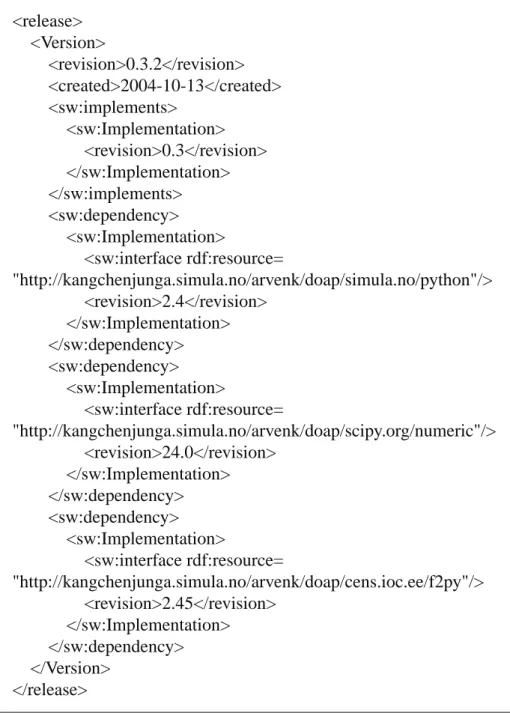
A concrete release is described by a doap:Version instance. This is a relatively bare-bones representation that can communicate some typical properties of a release: when was it released (doap:created), what’s its revision number (doap:revision), does it belong to any release branch (doap:branch), is it assigned a particular name (doap:name), how can it be acquired (doap:file-release). Such metadata are generally interesting to consumers, but far from sufficient for deploying the release in an automated manner. The newly added doap:file-releaseproperty should at least give access to a deployable package, but only as a raw URL (meaning that the deployment method must be inferred by other means, by inspecting the file type or its contents if its an archive).
Thesw:Packageclass
Thedoap:file-releaseproperty proves a good starting point for adding more extensive sup-port for the deployment aspect to the DOAP model. As it s