* AGH University of Science and Technology, Faculty of Electrical Engineering, Automatics, Com-puter Science and Electronics, Department of Automatics, al. A. Mickiewicza 30, 30-059 Krakow, Poland
** Oprogramowanie Naukowo-Techniczne, Kraków
235 Jaromir Przyby³o*, Marcin Pi¹tek*, Mariusz Pauluk*, Jakub Galicki**
Low-Cost Mobile Image Processing Platform**
1. Introduction
In recent years mobile application development has earned massive popularity. Mobile phones and tablets are not just tools for making voice calls but also a comfortable way to web browsing, emailing, entertainment and business operation. The latest smartphones are almost hand-held computer equipped with an additional hardware (camera, GPS, accele-rometer) that allows performing various tasks including voice and image processing. Mo-bile apps are pre-installed in the phone or can be downloaded via webstore.
The main advantage of smartphones/tablets is low-cost, mobility, connectivity and ver-satility which makes possible using these platforms as a base for various specialized appli-cations such as: surveillance and monitoring (especially elders and patients), mobile robot navigation, etc.
Many vendors provide platform development environments (Android, iOS, Symbian) which boosts software development. However, the main drawback of these environments is a limited functionality narrowed to typical tasks such as: user interface development, con-nectivity and gaming. On the other hand, there are many matured development environ-ments (IDE) and programming libraries targeted to desktop computers.
The OpenCV library [6] is widely used for programming functions mainly aimed at real time computer vision, developed by Intel and now supported by Willow Garage. It is free for use under the open source BSD license. The library is a cross-platform. Another popular environment is MATLAB/Simulink [5] – a high-level technical computing lan-guage and interactive environment for algorithm development, data visualization, data ana-lysis and numeric computation. Is is not free, but can be used in a wide range of applica-tions, including signal and image processing, communication and control design. Also, with additional module (Simulink Coder or Embedded Coder) it is possible to generate C/C++ code from Simulink diagrams and use it for real-time and nonreal-time applications in the mobile platforms.
236 Jaromir Przyby³o, Marcin Pi¹tek, Mariusz Pauluk, Jakub Galicki
In this paper we present our work towards integration OpenCV computer vision algo-rithms and code generated from Simulink diagrams, with Android IDE running on the DevKit 8000 development kit.
2. Platform description
The first step of the computer vision algorithms is image acquisition, followed by im-age processing, analysis and finally interpretation and visualisation [12]. Depending on the analysed scene the image processing and analysis can be performed in different ways [7]. Therefore, we select and configure hardware and software environment fulfilling computer vision requirements for examplary applications (i.e. surveillance and monitoring [9], mo-bile robot navigation [10]) and constitutive algorithms (i.e. thresholding, Canny edge detec-tion [1], Hough transform [2]).
2.1. Hardware
Three basic functional elements of the platform have been distinguished: camera,
image processing module,
a module which presents the results of image processing.
The original concept of the system assumed that a processor used in the image process-ing module, has sufficient reserves of computprocess-ing power to be able to handle the generation of digital video standard DVI. During work, this assumption was relaxed in favor of a touch panel system, performing functions in addition to the presentation, also as a user interface. As the central data processing unit, the ARM family of processors were considered due to their popularity, performance and availability of many manufacturers in various forms. We abandoned the Intel x86 family processors, because of their high cost, the need for cost-ly implementation and application of advanced peripherals.
The ARM7 processor series is available since 1994. It enjoyed great popularity and also cemented the position of ARM processors. This is a 32 bit system, often used in embed-ded applications. The major disadvantage of this class of processors (in view of the platform design) is the lack of MMU (Memory Management Unit), which makes impossible to use Linux, Windows CE, or Android, etc.
Some CPUs of ARM9 series are equipped with the MMU, which allows a fully func-tional support for the Linux operating system, Android or Windows CE. For example, the ARM926EJ-S processor, additionally can also work in the Floating Point mode. The disadvantage of the CPU is the low operating frequency: 366 MHz, which may be insuffi-cient to generate a DVI signal.
ARM11 series meets all requirements of the platform concept, ie: it contains the DSP module, block MMU and floating point mode and also a maximal system operating fre-quency: 772MHz is satisfactory, due to the requirement generation DVI
A separate branch of the family is a series of ARM cortex, aimed at the designers of embedded applications. Particularly interesting is the version of the Cortex-A. This series is dedicated to the smartphone applications or digital television. Meets all the requirements posed in the project. For further work, the Texas Instruments OMAP 3530, based on the processor Cortex A-8 was selected.
It is a dual system, consisting of Cortex A8 processor and digital signal processor TI C64 +. For both cores, there are free compilers and development environments. To build a prototype of the platform, the DevKit 8000 board, based on the OMAP3530 processor was selected.
2.2. Integrated development environment (IDE)
It was decided that the platform will be equipped with an operating system due to the complexity of the tasks to be solved. The main advantages of this decision are:
the existing/ready-to-use drivers of the typical devices like displays, serial port, USB port, memory cards etc.
the existing/ready-to-use implementation of the typical communication protocols like TCP/IP, Bluetooth etc.
the possibility of using commercial-of-the-shelf (COTS) or free (like Open Source) libraries
the mechanism for the multiprocessing and the threads implemented in the most of the popular operating systems
The important disadvantage of using operating system is the additional CPU load and the increased memory consumption [8, 11].
We use the Android operating system by Google™ for the mobile phones and the tab-lets in version 2.1. The main reasons for this choice were the convenient touch screen inter-face and large number of available drivers – i.e. for: Ethernet, SD memory cards, USB pro-tocol (important for used camera) and many others. The other advantage of this operating system is its growing popularity among the users.
The applications for the Android operating system can be developed in two different programming languages: Java and C. Android is the modified (a port) GNU/Linux operat-ing system for the processors of the ARM family. It was extended by the user interface and the extensive set of the applications typical for the mobile phones, smart phones and tablets. The user interface has been developed in the Java language and it is executed under control of the Dalvik virtual machine. Dalvik [4] was created specifically for the embedded plat-forms. According to company where Dalvik was designed and developed it has nothing to
238 Jaromir Przyby³o, Marcin Pi¹tek, Mariusz Pauluk, Jakub Galicki
do with popular Java implementation by Oracle widely used in other mobile platforms and denoted as Java 2 Mobile Edition (J2ME). It means that from one side it is completely incompatible with J2ME but from other side it is more efficient and better adapted to the needs of embedded systems.
The Android operating system limits the possibility of creating user interfaces for user applications to Java but it also supports creating libraries in languages like C and C++. They can be linked to the main application statically or dynamically (.so). The data are exchanged between the application and the library with JNI mechanism (Java Native Interface) [3]. It supports calling functions from the library, passing parameters to the library with the data type conversion and receipt of the returned values. In particular sending data to the library by the pointers is supported what is specially important for the big data structures like images. This kind of the libraries are called “native” to underline the fact that its not working under the virtual machine control and that it is recompiled specially for this CPU architecture.
3. Software components
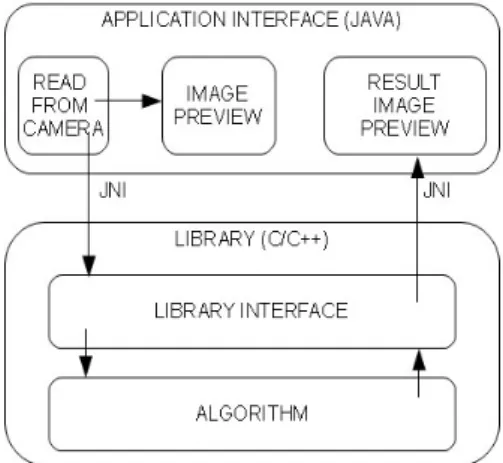
The concept of the prepared platform software components is presented in Figure 1. It was assumed that every image/video processing algorithm consists of three basic functions:
initializing function,
the function calculating one step of the algorithms, closing function (deinitialization).
Fig. 1. The scheme of the software components architecture
The basic parameters of the initializing function are: width and height of the analyzed image. Those parameters are required to allocate proper memory size. The parameters of the function calculating one step of the algorithm are:
pointertothebufferoftheinputdata(theimagereadfromthecamera),
pointertothebufferoftheoutputdata(theplaceinthememorywheretheimage pro-cessedbythealgorithmisstored),
anextraintegerparameterthatcanbeusedinthealgorithm.
Created software components based on this concept were used to implement some sample image processing algorithms. The image taken from the USB camera was used as input data. Those algorithms helped us to verify the correctness and usability of the de-signed structure.
3.1. OpenCV interface
OpenCV is a collection of C functions and a few C++ classes that implement many popular Image Processing and computer vision algorithms. It provides cross-platform mid-dle-to-high level API that includes about 300 functions and a few C++ classes. Using OpenCV library (version 2.0) on Android requires the following additional steps:
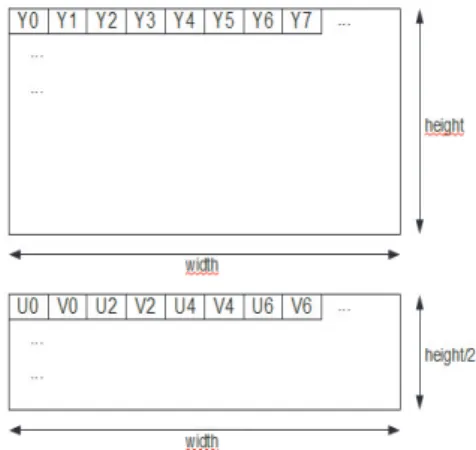
color-space conversion: development platform utilizes YUV422sp (Fig. 2) format whichhastobeconvertedintoABRGformatusedbyandroidAPI.,
OpenCV libraryusesitsownimageframeformat(IplImage),thereforeproperheader withadditionalinformationhastobeaddedtorawimagedata.
Fig.2.DescriptionoftheYUV422spframe(detailscanbefoundi.e. inTexasInstrumentsvideodevelopmentboardmanuals)
3.2.EmbeddedCoderinterface
Embedded Coder is a part of MathWorks code generation technology [5]. It genera-tes C/C++ code and executables for algorithms that are modelled programmatically with MATLAB or graphically in the Simulink environment. The process of code generation is fully automated and can be customized to fulfill target platform requirements.
240 JaromirPrzyby³o,MarcinPi¹tek,MariuszPauluk,JakubGalicki
The target platform has multiple components, both hardware and software. For exam-ple: an operating system (Android), physical hardware (camera), device drivers, etc. Code generated by Embedded Coder is not generated for any of these components particularly. Instead, it provides standard interfaces and entry-points that allow integration with external framework. The main entry-points are the following:
model_initializeistheinitializationentrypointingeneratedcode,
model_stepsteps routineentrypointingeneratedcode,it hastobecalledwhennew imageframeisavailable,
model_terminateterminationentrypointingeneratedcode.
Additionally,datastructurescontainingdeclarationsforthemodelI/O,parametersand datatypesaregenerated.
The main entry-points of the generated code match our application code structure. However there are some issues that has to be adressed:
Oneofthelimitationsofthegeneratedcodeisfixedsizeof modelsinputandoutput signals.Thiswasaddressedintheplatformsframeworkbysettingfixedsizeofimage frames.
Simulinkmatrix signalsare storedinthememory incolum-order. Imageson the an-droidarestoredinrow-order.Therefore,properconversionwasrequired.
4
.
E
x
perimental
results
In order to verify developed framework the following algorithms have been imple-mented:
1)Test application basic application tovalidate our framework. It consists of image acquisition,datastructuresconversionandimagevisualization.
2)Basicimageprocessingalgorithm:
RGBtograyscaleimageconversion, thresholdingwithfixedlevel, visualization.
3)Compleximageprocessingandanalysisalgorithm(Fig.3):
RGBtograyscaleimageconversion,
convolutionoftheimagewithGaussiankernel, Cannyedgedetector,
linedetectionwithHoughtransform, visualization.
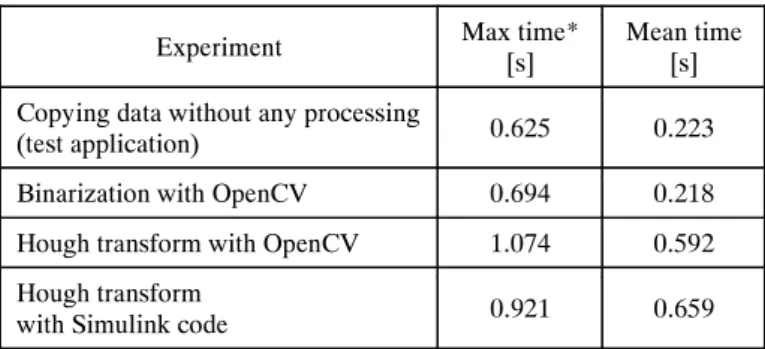
The test application allows evaluation of hardware and framework performance – exe-cution time of copying data without any processing. The image resolution was 320*240 pixels. In order to compare performance of OpenCV vs generated code from Simulink mo-del, the execution time of complex image processing algorithm has been measured. The results (averaged over multiple scenes) are summarized in Table 1.
Experiments showed the correctness of the implementation. Also – it can be noticed that framework performance represents significant part of whole system performance.
Above algorithms are often part of examplary applications like surveillance and moni-toring [9] and mobile robot navigation [10]. Therefore, our platform can be used to imple-ment such applications.
Table1
Experimentalresultsexecutiontimeofselectedalgorithms
* max and mean time has been measured over 10 000 frames.
Fig.3. Resultsofcompleximageprocessingandanalysisalgorithm
5
.
Conclusion
As a result of work undertaken, a fully functional and practical framework for mobile image processing platform has been constructed. The framework allows integration of com-puter vision algorithms:
developedusing OpenCV libraryand
modelledgraphicallyintheSimulinkenvironmentandthenautomaticallyconvertedto C/C++ usingMathWorkscode generationtechnology.
Experiment Max time* [s] Mean time [s] Copying data without any processing
(test application) 0.625 0.223
Binarization with OpenCV 0.694 0.218 Hough transform with OpenCV 1.074 0.592 Hough transform
242 JaromirPrzyby³o,MarcinPi¹tek,MariuszPauluk,JakubGalicki
One of the drawback of selected Android operating system is the additional CPU load and the increased memory consumption, which results in low frame rate of implemented algorithms. Therefore, further work has to focus on the optimization of the software compo-nents – possible writing dedicated camera and display drivers. We also consider replacing hardware platform to one with the newer and faster processor.
Acknowledgement
This work is supported by AGH University Science and Technology, grant nr. 11.11.120.612
References
[1] CannyJ.,A Computational Approach To Edge Detection.IEEETrans.PatternAnalysisand Ma-chineIntelligence,8,1986,679714.
[2] Duda R.O.,HartP.E.,Use of the Hough Transformation to Detect Lines and Curves in Pictures. Comm.ACM,vol.15,January,1972,1115.
[3] HorstmannC.S.,CornellG.,Core Java. Techniki zaawansowane.Helion,Gliwice2009.
[4] http://www.android.com.
[5] http://www.mathworks.com.
[6] http://opencv.willowgarage.com/wiki/.
[7] Keselman Y., Dickinson S., Bridging the representation gap between models and examplars. IEEEConf.onComp.Soc. Work.onModelsversusExemplarsinComp. Vis.,2001.
[8] MarchewkaD.,Pi¹tekM.,Stosowanie systemów wbudowanych do sterowania robotami mobilny-mi.Automatyka(pó³rocznikAGH),vol.12,No.2,2008.
[9] MikrutZ.,AugustyniakP.,Mobilny system zdalnego nadzoru kardiologicznego aspekty imple-mentacyjno-techniczne.Automatyka(pó³rocznikAGH),t.10,z.3,2006,7990.
[10] Schuster R.,AnsariN.,Bani-HashemiA.,Steering a robot with vanishing points.IEEE Transac-tionson RoboticsandAutomation,vol.9,No. 4,Aug1993, 491498.
[11] Silberschatz A., Galvin P.B., Gagne G., Podstawy systemów operacyjnych. WNT, Warszawa 2005.
[12] Tadeusiewicz R.,Korohoda P.,Komputerowa analiza i przetwarzanie obrazów. Wydawnictwo FundacjiPostepuTelekomunikacji,1997.