VIRTUALIZED STORAGE IN
CA APPLOGIC
JANUARY 2011
A PRINCIPLED TECHNOLOGIES WHITE PAPER
Commissioned by CA TechnologiesOVERVIEW
Storage is a key infrastructure component for application deployment and performance. In a cloud environment, where agility, resiliency, and high availability are essential, changing business requirements and infrastructure environments require very efficient application storage provisioning and robust and fail-safe storage management. CA AppLogic, an application-centric cloud solution with an innovative way of managing storage resources, meets these criteria.
In our tests at Principled Technologies, we found the CA AppLogic storage management to provide a failure-resistant and powerful virtualized storage infrastructure. The CA AppLogic cloud technology abstracts physical storage by virtualizing storage resources. In doing so, it separates the management of physical cloud storage from the operation of applications that use the cloud achieving high agility and responsiveness, which are central to realizing the full potential of cloud computing. This reduces the time needed for application deployment and providing application-independent automated storage failure detection and recovery.
A Principled Technologies white paper 2
Virtualized storage in CA AppLogic
This paper focuses on the storage management aspects of CA AppLogic. We tested CA AppLogic storage management features for version 2.9.9 on four dual-processor Dell™ PowerEdge™ 2950 servers. We configured these servers with direct-attached storage drives, and connected them with dual front-end and backend switches and an Internet accessible input/output security layer.
We examined several aspects of the CA AppLogic cloud storage management, in particular (1) how easy it was to configure and set up a VSAN as part of a cloud deployment, (2) how easy it was to define and change application storage requirements in terms of virtual volumes, and (3) how resilient cloud applications and the underlying storage infrastructure were in the face of unexpected failures of storage devices and servers.
INTRODUCTION
Cloud applications and storage
Cloud platforms provide computational, bandwidth, and storage resources on demand to their users. Cloud storage is an important layer of a cloud’s computational stack. Key objectives in cloud storage
provisioning are low cost, low latency, and high bandwidth from local storage to compute nodes. Cloud implementations provide different storage management strategies, usually at the infrastructure and platform levels. Efficient storage allocation, storage replication, and cloud resiliency under physical storage failures are important design objectives for cloud platforms, regardless of the implementation model.
In this paper, we address the way CA AppLogic abstracts physical storage management to virtualized storage management at the application layer, and how by doing so, it simplifies the allocation of storage to applications and allows virtualized application components to access storage from anywhere in the cloud without changing their structure or how they are configured and implemented.
VIRTUAL STORAGE MANAGEMENT IN CA APPLOGIC
Storage in CA AppLogic
The CA AppLogic platform uses commodity hardware to combine compute resources, storage, networking, high availability, security, and policy management into a single system that is managed through an intuitive graphical interface. This streamlines and simplifies the operation of the cloud infrastructure.
In recent years, both the volume of enterprise data and the level of information sharing throughout an organization have been growing at an incredible rate. Storage pooling is commonly used to handle data
A Principled Technologies white paper 3
Virtualized storage in CA AppLogic
growth and shareability. Storage area networks (SANs) and RAID controllers are one traditionally used solution. The cost and complexity of such SAN-based storage solutions precludes their use in some settings.
The CA AppLogic platform provides simple high-availability (HA), scalable, reliable managed storage for all cloud applications using commodity IDE/SATA direct-attached storage and storage mirroring across
multiple cloud servers to prevent data loss. It does so by creating a virtual IP SAN that pools direct-attached storage in cloud servers and provides redundancy and failover features. The platform also is flexible enough to allow using a SAN as external storage and making it accessible via iSCSI to one or more cloud appliances.
Application virtual volumes
Virtual volumes are an essential part of the way CA AppLogic manages storage. Application storage is defined in terms of virtual volumes that contain application-specific code and content. The AppLogic cloud controller allocates them on the cloud’s VSAN built at cloud initialization time from all direct-attached storage in cloud nodes. These virtual volumes are stored in a global volume store (GVS) that implements a distributed storage subsystem accessible from all cloud servers, and are physically replicated onto multiple servers to increase read performance and availability and to ensure that a server failure never results in data loss. Virtual volumes have unique system-wide names that enable CA AppLogic to access storage resources in a location-independent manner in the cloud, as well as to automatically migrate virtual volumes either between cloud servers in the same cloud or in different clouds without disrupting running applications. CA AppLogic virtual volumes are managed in a hierarchical name space, in which they can be created, destroyed, and cloned on demand. Storage backup is simplified by GVS, as it allows taking snapshots of a volume or set of volumes.
Applications in CA AppLogic are built as hierarchical compositions of IP interconnected virtualized components (appliances). Storage is allocated to applications by assigning virtual named storage volumes to the various application components. Virtual volumes are commonly assigned to a single appliance, although they can be shared across appliances normally in read-only mode. Appliance storage stores both the appliance code and any local content needed by the appliance. Application volumes are created by specifying a name, size, and type of the file system to use. Content volumes can be shared across instances of the same
application. One instance when this is very useful is when several Web server application instances share the same volume containing static content, code, and data.
A Principled Technologies white paper 4
Virtualized storage in CA AppLogic
Storage failure recovery
CA AppLogic monitors the health of storage devices in order to help prevent data loss in the event of a storage device failure. Should an actual failure be detected in a storage device in a server, CA AppLogic routes all accesses to volumes in that device to their replicas in other servers, and brings the containing server down to allow repair of the failing unit.
In summary
CA AppLogic uses commodity storage in cloud nodes to implement a VSAN with replication and failure tolerance and recovery functionality. It eliminates the high cost of traditional SANs and RAID controllers to manage reliability in the storage layer, replacing them with cloud software that achieves the same objectives. Replication is built into appliances and storage mirroring is managed directly by cloud software. It also
provides the possibility of running multiple application instances in the same cloud or in remotely accessible clouds to provide hot swapping of an application’s main instance with a backup instance should the main instance fail. All these characteristics greatly improve the availability of both applications and the underlying storage infrastructure.
WHAT WE FOUND
To test the virtualized storage features of CA AppLogic, we set up a test-bed cloud and defined a redundant database server and virtualized storage application on it. In the process, we verified how easy it was to get a cloud and application running. To determine the storage complexity of CA AppLogic, we evaluated both the physical and virtual functionalities of the storage for this application.
Initial cloud setup
We began our testing of CA AppLogic by setting up an operational cloud. The most challenging part of the process was to ensure that our physical hardware setup satisfied all constraints imposed by the CA AppLogic cloud controller, which involved our studying in depth the available documentation and performing several experiments. Once we achieved this, deploying the cloud was simple and involved only a minimal amount of work. We expect that, for most users, a successful first CA AppLogic cloud deployment will make subsequent deployments much simpler as users will better understand the physical hardware requirements of their clouds.
We decided to build our cloud using commodity Linux servers. We selected one of these as our
A Principled Technologies white paper 5
Virtualized storage in CA AppLogic
CA AppLogic software onto it and set up the software. Next, we defined a cloud configuration file, which included a number of required attributes at the cloud boundary, including the name of the cloud, the IP address range for external IPs, a list of IP addresses of all servers to use for deployment of the cloud, an SSH certificate path, and a user name associated with the certificate. Defining the configuration file was
straightforward. The SSH certificate needed to be set up from the outset as it serves the role of a license key— it is authenticated by the CA AppLogic servers, verifies that an AppLogic cloud deployment is valid, and is required to download updates from the CA AppLogic Web site.
Before you can install CA AppLogic on a cloud server, it must be running a Linux distribution. CA has verified that AppLogic works with Red Hat®, CentOS, and Fedora™ distributions. We had CA AppLogic install 32- and 64-bit versions of CentOS initially, and later we had it add a Red Hat Enterprise Linux® 5.5 server to our cloud.
Once we defined the configuration file and our deployment and cloud servers were in place, we ran a CA AppLogic command to create the cloud from the configuration file. This installed a bare-minimum Linux configuration on each of the cloud servers, and created two partitions in each cloud server with the CA
AppLogic cloud software, one active and one backup. This feature allows you to roll back to a previous version of CA AppLogic if a software upgrade does not work as expected.
At this point, CA AppLogic built a VSAN accessible from all directly attached storage in the cloud
servers. During this process, CA AppLogic selected one of the cloud servers as the primary server for the cloud controller and one or more secondary servers as backups should the primary server fail. Once CA AppLogic had finished deploying the cloud, we verified that the cloud was operational and that we could log in and start defining our test application. Figure 1 shows the cloud test environment we built.
A Principled Technologies white paper 6
Virtualized storage in CA AppLogic
Figure 1: Our test environment.
Virtual volume definition
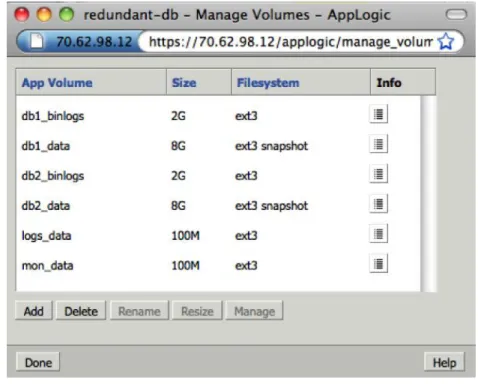
We created storage volumes before creating our application for testing. To do this, we selected Manage Volumes from the application
drop-down menu. We found the process of adding, deleting, resizing, and
managing the volumes to be quite easy. Figure 2 shows the CA AppLogic Manage Volumes window with the configurations we used for testing.
We clicked Add to create a new volume. This opens an additional window that allows you to enter the volume name, size, and file system. After that information is entered, the program creates the volume. The Delete and
A Principled Technologies white paper 7
Virtualized storage in CA AppLogic
allowing us to delete or rename existing volumes. The Resize button let us change the size of an existing volume.
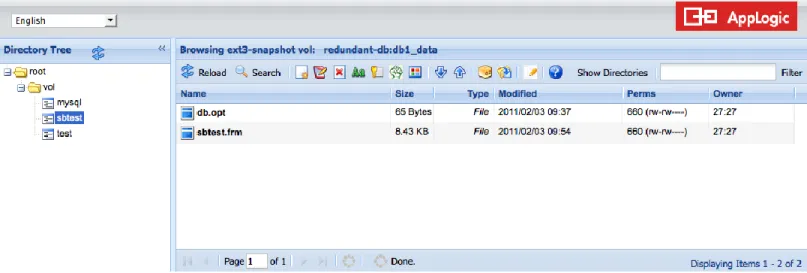
The Manage button allows additional functionality by letting the user view and manage the files on the volume. Figure 3 shows the CA AppLogic Volume Browser window. Here the user can perform various file administrative tasks including creating, editing, copying, renaming, deleting, and uploading files. We found this type of volume management extremely useful in our setup process.
Figure 3: The CA AppLogic Volume Browser window.
Application deployment and execution
Next, we defined an application to run while we tested the resiliency of CA AppLogic cloud virtualized storage. To examine the effects of disks failures on cloud application performance, we elected to define a redundant database and storage application. We created a load-balanced application executing in redundant database servers against individual 8GB data and 2GB log volumes. We found application definition to be extremely simple, especially given our understanding of the types of appliances CA AppLogic provides.
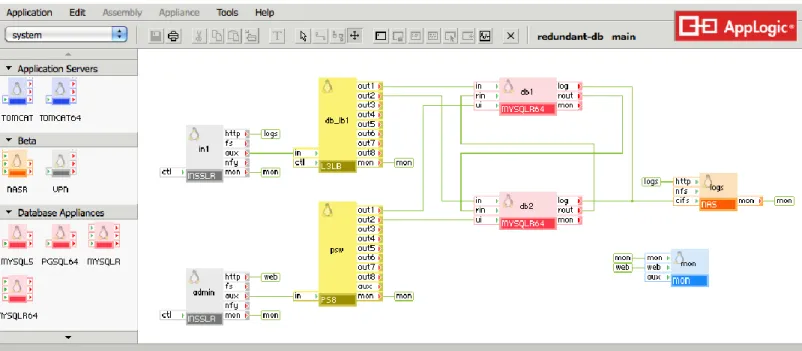
The application template is created using a Microsoft® Visio®-style diagrammatic user interface that includes a catalog of appliance icons. The user drags and drops these onto a drawing frame, and connects the appliances by dragging links from output pads to input pads. Because all appliances are running on their own virtual machines, the user is effectively drawing the network topology by drawing the application graph. We chose high availability load balancing (HALB) components to experiment with the HA features introduced in the CA AppLogic 2.9.9 release we were testing.
A Principled Technologies white paper 8
Virtualized storage in CA AppLogic
Aside from the simplicity of the visual interface for defining an application, the CA AppLogic feature we found most useful for this stage was the self-documenting nature of each AppLogic component. By right-clicking a component and selecting Class Documentation, the user goes directly to detailed documentation of the component. This documentation includes a description of the component, its properties, its attributes, and—most valuably—many examples of actual application deployment situations the user can alter or use as desired. CA AppLogic self-documentation is invaluable for application definition.
High-availability functionality
High availability functionality, the ability to recover from all types of failures with little to no downtime, is crucial for modern networks. Cloud computing addresses this by implementing full network and system redundancy.
We configured a redundant database server storage application in CA AppLogic as we mentioned above, to verify fault tolerance. We performed several tests to evaluate how well the application recovered from disk failures while under load.
We used SysBench 0.4.12, a cross-platform and multi-threaded benchmark tool for evaluating a database under load, to simulate traffic in our test environment. SysBench gives results of transactions per second. More information on SysBench is available at http://sysbench.sourceforge.net/.
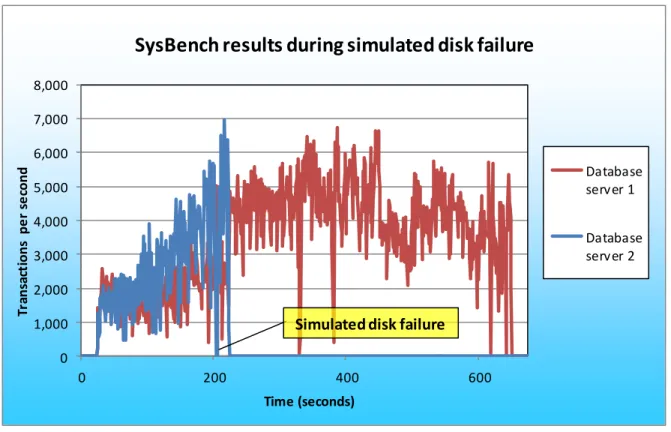
We pulled a hard drive from one of the servers to initiate a failure and see how well the system recovered. To do this, we ran a 10-minute SysBench test to simulate read and write traffic on the hard disks. We started the SysBench benchmark and let it run for 3 minutes before removing the hard drive. Figure 4 illustrates the results we saw in our test.
A Principled Technologies white paper 9
Virtualized storage in CA AppLogic
0 1,000 2,000 3,000 4,000 5,000 6,000 7,000 8,000 0 200 400 600 Tr ans ac ti on s pe r se con d Time (seconds)
SysBench results during simulated disk failure
Database server 1 Database server 2
Simulated disk failure
Figure 4: SysBench results during a simulated disk failure.
As Figure 4 shows, both database servers were actively handling transactions prior to the disk failure. Once the hard drive was pulled and the failure occurred, an alert was sent to the CA AppLogic dashboard console and Database server 2 stopped processing transactions due to the failure, but the application as a whole did not stop. Database server 1 continued processing transactions as if nothing was wrong. Thus, after encountering a catastrophic disk failure, the redundant database application continued to function.
HOW WE TESTED
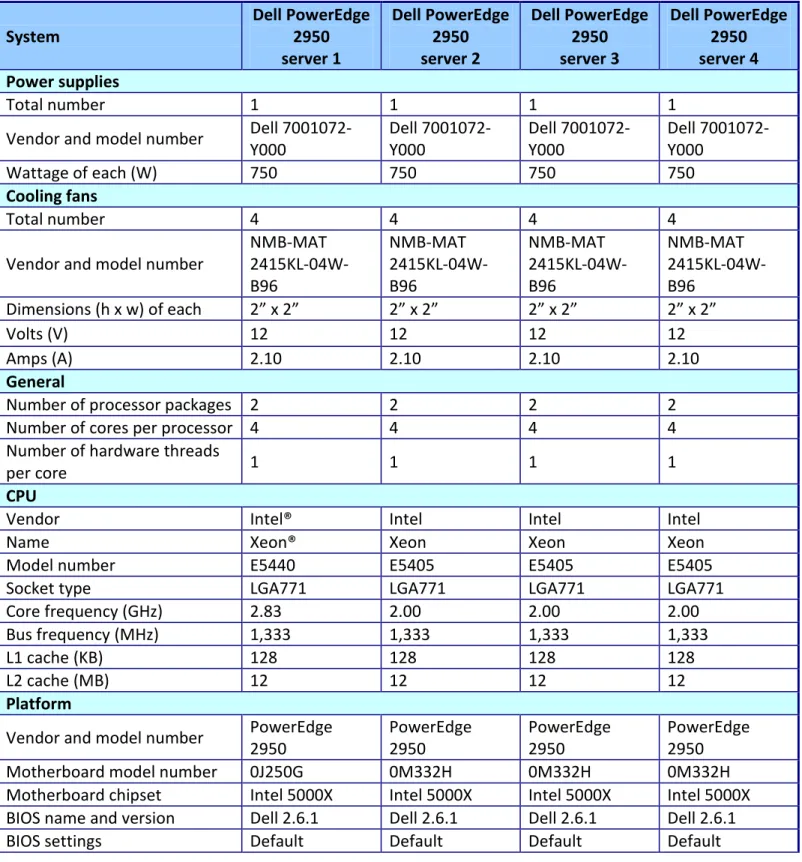
One advantage of using CA AppLogic is that the user does not need identical server configurations for his or her cloud infrastructure. For testing, we used four Dell PowerEdge 2950 servers with different hardware configurations. Figure 1 in the What We Found section illustrates our test environment. Appendix A provides detailed configuration information for the test servers.
Configuring high availability functionality
Figure 5 shows the redundant database server application we used for high availability functionality testing. We dragged all components from the left pane to the application editor main window. We connected all components as we outline. We added monitoring to view data behavior during testing.
A Principled Technologies white paper 10
Virtualized storage in CA AppLogic
Figure 5: The redundant database server and storage application we used for our evaluation.
Configuring the gateway
We added two gateways to our application, one for test traffic and one for administrative functions. We made the following configuration changes to the gateways:
ip_addr: 172.16.84.112 (in1); 172.16.84.113 (admin) netmask: 255.255.255.0
gateway: 172.16.84.1 l7_accept: http
l3_accept_proto: tcp l3_accept_port: 3306 Configuring the load balancer
We used a L3LB – TCP/UDP load balancer application to evenly distribute the workload across the two database servers. We made the following configuration changes to the load balancer:
ports: 3306 Configuring the volume
We used manage volume configuration window to set up the virtual storage for testing. We created six different ext3 data volumes for the application. The volume names and sizes are as follow:
Db1_binlogs: 2GB Db1_data: 8GB Db2_binlogs: 2GB
A Principled Technologies white paper 11
Virtualized storage in CA AppLogic
Db2_data: 8GB Logs_data: 100MB Mon_data: 100MB Configuring the database
We added two database servers to the application. We made the following configuration changes on both database servers:
error_log_filename: db1.log(Server 1); db2.log(Server 2) error_log_level: warn
timezone: EST
server_id: 1 (Server 1); 2 (Server 2) rpl_mode: master_and_slave
web_pwd: password Configuring the NAS appliance
We added a NAS appliance for log data. We made the following configuration changes: http_dir_enabled: yes
timezone: EST Configuring the port switch
We added a PS8 cascadable port switch to the application for administrative purposes. We made the following configuration changes:
out1_protocol: tcp out1_in_port: 8081 out1_out_port: http out2_protocol: tcp out2_in_port: 8082 out2_out_port: http Configuring the monitor
We added an application-monitoring appliance to the application so we could monitor system activity during testing. We made the following configuration changes:
user: admin
password: password alarm_view: db_alarm
A Principled Technologies white paper 12
Virtualized storage in CA AppLogic
APPENDIX A – SERVER CONFIGURATION INFORMATION
Figure 6 provides detailed configuration information about the test servers.
System Dell PowerEdge 2950 server 1 Dell PowerEdge 2950 server 2 Dell PowerEdge 2950 server 3 Dell PowerEdge 2950 server 4 Power supplies Total number 1 1 1 1
Vendor and model number Dell 7001072-Y000 Dell 7001072-Y000 Dell 7001072-Y000 Dell 7001072-Y000 Wattage of each (W) 750 750 750 750 Cooling fans Total number 4 4 4 4
Vendor and model number
NMB-MAT 2415KL-04W-B96 NMB-MAT 2415KL-04W-B96 NMB-MAT 2415KL-04W-B96 NMB-MAT 2415KL-04W-B96 Dimensions (h x w) of each 2” x 2” 2” x 2” 2” x 2” 2” x 2” Volts (V) 12 12 12 12 Amps (A) 2.10 2.10 2.10 2.10 General
Number of processor packages 2 2 2 2
Number of cores per processor 4 4 4 4
Number of hardware threads
per core 1 1 1 1
CPU
Vendor Intel® Intel Intel Intel
Name Xeon® Xeon Xeon Xeon
Model number E5440 E5405 E5405 E5405
Socket type LGA771 LGA771 LGA771 LGA771
Core frequency (GHz) 2.83 2.00 2.00 2.00
Bus frequency (MHz) 1,333 1,333 1,333 1,333
L1 cache (KB) 128 128 128 128
L2 cache (MB) 12 12 12 12
Platform
Vendor and model number PowerEdge 2950 PowerEdge 2950 PowerEdge 2950 PowerEdge 2950
Motherboard model number 0J250G 0M332H 0M332H 0M332H
Motherboard chipset Intel 5000X Intel 5000X Intel 5000X Intel 5000X BIOS name and version Dell 2.6.1 Dell 2.6.1 Dell 2.6.1 Dell 2.6.1
A Principled Technologies white paper 13
Virtualized storage in CA AppLogic
System Dell PowerEdge 2950 server 1 Dell PowerEdge 2950 server 2 Dell PowerEdge 2950 server 3 Dell PowerEdge 2950 server 4 Memory module(s)
Total RAM in system (GB) 32 16 16 16
Vendor and model number
Hynix HYMP151F72CP 4N3-Y5 Samsung M395T5750EZ4-CE66 Samsung M395T5750EZ4-CE66 Samsung M395T5750EZ4-CE66 Type PC2-5300F PC2-5300F PC2-5300F PC2-5300F Speed (MHz) 667 667 667 667
Speed running in the system
(MHz) 667 667 667 667
Timing/latency
(tCL-tRCD-tRP-tRASmin) 5-5-5-15 5-5-5-15 5-5-5-15 5-5-5-15
Size (GB) 4 2 2 2
Number of RAM module(s) 8 8 8 8
Chip organization Double-sided Double-sided Double-sided Double-sided
Rank Dual Dual Dual Dual
Hard disk
Vendor and model number Western Digital WD1602ABKS Western Digital WD1602ABKS Seagate ST973402SS Western Digital WD1602ABKS
Number of disks in system 2 2 3 3
Size (GB) 160 160 73 160
Buffer size (MB) 16 16 16 16
RPM 7,200 7,200 10,000 7,200
Type SATA SATA SAS SATA
Disk controller Dell SAS 6/IR Dell SAS 6/IR Dell PERC 6/I Dell SAS 6/IR Operating system
Name CentOS Release
5.5 CentOS Release 5.3 CentOS Release 5.3 CentOS Release 5.3
Kernel release 2.6.18-194.el5 2.6.18.8-xen0 2.6.18.8-xen0 2.6.18.8-xen0 Kernel version SMP Fri Apr 2
14:58:14 #1 Thu May 13 11:28:43 #1 Thu May 13 11:28:43 #1 Thu May 13 11:28:43
File system ext3 ext3 ext3 ext3
Language English English English English
Ethernet NIC Type 1
Vendor and model number
Broadcom® 5708 NetXtreme® II 5708 Ethernet Adapter Broadcom 5708 NetXtreme II 5708 Ethernet Adapter Broadcom 5708 NetXtreme II 5708 Ethernet Adapter Broadcom 5708 NetXtreme II 5708 Ethernet Adapter
A Principled Technologies white paper 14
Virtualized storage in CA AppLogic
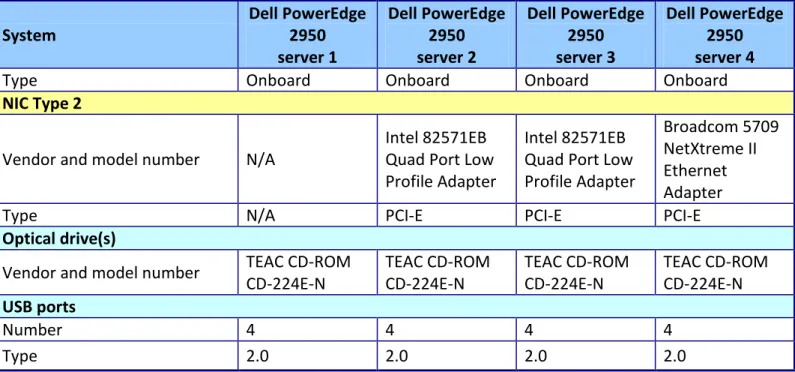
System Dell PowerEdge 2950 server 1 Dell PowerEdge 2950 server 2 Dell PowerEdge 2950 server 3 Dell PowerEdge 2950 server 4
Type Onboard Onboard Onboard Onboard
NIC Type 2
Vendor and model number N/A
Intel 82571EB Quad Port Low Profile Adapter
Intel 82571EB Quad Port Low Profile Adapter
Broadcom 5709 NetXtreme II Ethernet Adapter
Type N/A PCI-E PCI-E PCI-E
Optical drive(s)
Vendor and model number TEAC CD-ROM CD-224E-N TEAC CD-ROM CD-224E-N TEAC CD-ROM CD-224E-N TEAC CD-ROM CD-224E-N USB ports Number 4 4 4 4 Type 2.0 2.0 2.0 2.0
A Principled Technologies white paper 15
Virtualized storage in CA AppLogic
ABOUT PRINCIPLED TECHNOLOGIES
Principled Technologies, Inc. 1007 Slater Road, Suite 300 Durham, NC, 27703
www.principledtechnologies.com
We provide industry-leading technology assessment and fact-based marketing services. We bring to every assignment extensive experience with and expertise in all aspects of technology testing and analysis, from researching new
technologies, to developing new methodologies, to testing with existing and new tools.
When the assessment is complete, we know how to present the results to a broad range of target audiences. We provide our clients with the materials they need, from market-focused data to use in their own collateral to custom sales aids, such as test reports, performance assessments, and white papers. Every document reflects the results of our trusted independent analysis.
We provide customized services that focus on our clients’ individual
requirements. Whether the technology involves hardware, software, Web sites, or services, we offer the experience, expertise, and tools to help our clients assess how it will fare against its competition, its performance, its market readiness, and its quality and reliability.
Our founders, Mark L. Van Name and Bill Catchings, have worked together in technology assessment for over 20 years. As journalists, they published over a thousand articles on a wide array of technology subjects. They created and led the Ziff-Davis Benchmark Operation, which developed such industry-standard benchmarks as Ziff Davis Media’s Winstone and WebBench. They founded and led eTesting Labs, and after the acquisition of that company by Lionbridge Technologies were the head and CTO of VeriTest.
Principled Technologies is a registered trademark of Principled Technologies, Inc. All other product names are the trademarks of their respective owners.
Disclaimer of Warranties; Limitation of Liability:
PRINCIPLED TECHNOLOGIES, INC. HAS MADE REASONABLE EFFORTS TO ENSURE THE ACCURACY AND VALIDITY OF ITS TESTING, HOWEVER, PRINCIPLED TECHNOLOGIES, INC. SPECIFICALLY DISCLAIMS ANY WARRANTY, EXPRESSED OR IMPLIED, RELATING TO THE TEST RESULTS AND ANALYSIS, THEIR ACCURACY, COMPLETENESS OR QUALITY, INCLUDING ANY IMPLIED WARRANTY OF FITNESS FOR ANY PARTICULAR PURPOSE. ALL PERSONS OR ENTITIES RELYING ON THE RESULTS OF ANY TESTING DO SO AT THEIR OWN RISK, AND AGREE THAT PRINCIPLED
TECHNOLOGIES, INC., ITS EMPLOYEES AND ITS SUBCONTRACTORS SHALL HAVE NO LIABILITY WHATSOEVER FROM ANY CLAIM OF LOSS OR DAMAGE ON ACCOUNT OF ANY ALLEGED ERROR OR DEFECT IN ANY TESTING PROCEDURE OR RESULT.
IN NO EVENT SHALL PRINCIPLED TECHNOLOGIES, INC. BE LIABLE FOR INDIRECT, SPECIAL, INCIDENTAL, OR CONSEQUENTIAL DAMAGES IN CONNECTION WITH ITS TESTING, EVEN IF ADVISED OF THE POSSIBILITY OF SUCH DAMAGES. IN NO EVENT SHALL PRINCIPLED TECHNOLOGIES, INC.’S LIABILITY, INCLUDING FOR DIRECT DAMAGES, EXCEED THE AMOUNTS PAID IN CONNECTION WITH PRINCIPLED TECHNOLOGIES, INC.’S TESTING. CUSTOMER’S SOLE AND EXCLUSIVE REMEDIES ARE AS SET FORTH HEREIN.