SCFS: A Shared Cloud-backed
File System
Alysson Bessani, Ricardo Mendes, Tiago Oliveira, Nuno Neves, Miguel Correia, Marcelo Pasin*, Paulo Veríssimo
University of Lisbon - Portugal
* now at University of Neuchatel - Switzerland
Cloud-backed Storage
Amazon EC2 and S3
DropBox “System”
Personal Storage Services (e.g., DropBox, OneDrive)
Cloud-backed File Systems (e.g., BlueSky, S3FS)
Proxy
Shared Cloud-backed File
System (
SCFS
)
Cloud Storage SCFS Agent SCFS Agent SCFS Agent DATA DATA Client-based Use existing cloud services Controlled sharingAccess control for security and concurrency
Pay-per ownership
Each client pays
for its own files
Design Choices
•
Data layout/access pattern
– Each file is an object (single-block file)
– Multiple versions of the files are maintained
– Always write, avoid reading (exploiting free writes)
•
Cache
– Persistent file cache
• Local storage is used to hold copies of all/most client files
• Opened files are also maintained in main-memory
– Short lived main-memory metadata cache
Design Choices
•
Consistency
– Consistency-on-close semantics
– Control of durability and consistency – Locks used to avoid write-write conflicts
•
Modular coordination
– Separate data from metadata
– Metadata is stored in a coordination service
• E.g., Zookeeper [ATC’10], DepSpace [EuroSys’08]
Storage clouds Coordination Service Cloud storage Cache Cache Cache Lock Service Access Control Metadata Computing clouds SCFS Agent SCFS Agent SCFS Agent
SCFS Architecture
Strong vs Weak Consistency
x.write(v) x.read() è v x.write(v) x.read() è ? x.read() è v … Strong Consistency (e.g., Paxos-based Systems, Azure Storage)Weak Consistency
(e.g., Amazon S3, Rackspace Files) x.read() è v
Consistency Anchor
• Problem: How to provide strong consistency on top of weak consistent storage clouds?
• Key property: the composite storage’ consistency is
Storage Service Consistency Anchor Algorithm write read Composite Storage strong consistency strong consistency weak consistency write read write read
Consistency Anchor in SCFS
! fd = open(“x”,…);! …! read(fd,…);! write(fd,…);! …! fsync(fd);! …! write(fd,…);! …! close(fd);! ! Coordination Service Cloud(-of-Clouds) Persistent Storage Main Memory READ WRITE Local Storage If “x” is cached, it is only validated 1 2 1 2Implementation and
Evaluation
14
• SCFS can use different backends
– i.e., different cloud storage and a coordination service plugin
• Operation: blocking, non-blocking and non-sharing
With PNSs, the amount of storage used in the coordi-nation service is proportional to the percentage of shared files in the system. Previous work show traces with 1 mil-lion files where only 5% of them are shared [33]. Without
PNSs, the metadata for these files would require 1 million tuples of around 1KB, for a total size of 1GB of storage (the approximate size of a metadata tuple is 1KB, assum-ing 100B file names). With PNSs, only 50 thousand tuples plus one PNS tuple per user would be needed, requiring a little more than 50MB of storage. Even more importantly, by resorting to PNSs, it is possible to reduce substantially the number of accesses to the coordination service, allow-ing more users and files to be served.
3 SCFS Implementation
SCFS is implemented in Linux as a user-space file sys-tem based on FUSE-J, which is a wrapper to connect the SCFS Agent to the FUSE library. Overall, the SCFS implementation comprises 6K lines of commented Java code, excluding any coordination service or storage back-end code. We opted to develop SCFS in Java mainly because most of the backend code (the coordination and storage services) were written in Java and the high latency of cloud accesses make the overhead of using a Java-based file system comparatively negligible.
3.1 Modes of Operation
Our implementation of SCFS supports three modes of operation, based on the consistency and sharing require-ments of the stored data.
The first mode, blocking, is the one described up to this point. The second mode, non-blocking, is a weaker ver-sion of SCFS in which closing a file does not block until the file data is on the clouds, but only until it is written locally and enqueued to be sent to the clouds in back-ground. In this model, the file metadata is updated and the associated lock released only after the file contents are updated to the clouds, and not when the close call returns (so mutual exclusion is preserved). Naturally, this model leads to a significant performance improvement at cost of a reduction of the durability and consistency guarantees. Finally, the non-sharing mode is interesting for users that do not need to share files, and represents a design similar to S3QL [7], but with the possibility of using a cloud-of-clouds instead of a single storage service. This version does not require the use of the coordination service, and all metadata is saved on a PNS.
3.2 Backends
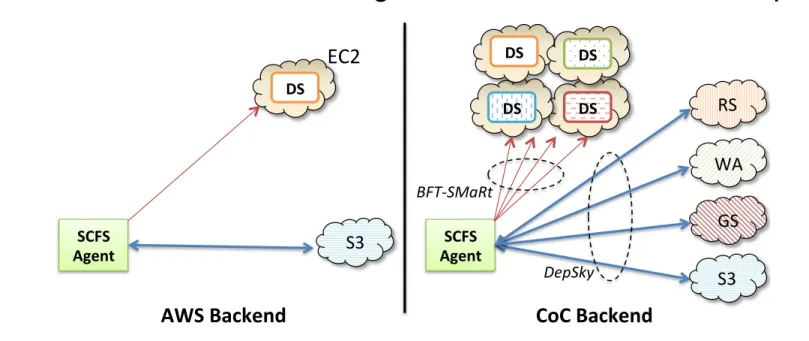
SCFS can be plugged to several backends, including different coordination and cloud storage services. This pa-per focuses on the two backends of Figure 5. The first one is based on Amazon Web Services (AWS), with an EC2 VM running the coordination service and file data being
of-clouds (CoC) technology, recently shown to be prac-tical [9, 12, 15]. A distinct advantage of the CoC back-end is that it removes any depback-endence of a single cloud provider, relying instead on a quorum of providers. It means that data security is ensured even if f out-of 3f + 1
of the cloud providers suffer arbitrary faults, which en-compasses unavailability and data deletion, corruption or creation [15]. Although cloud providers have their means to ensure the dependability of their services, the recurring occurrence of outages, security incidents (with internal or external origins) and data corruptions [19, 24] justifies the need for this sort of backend in several scenarios.
SCFS% Agent% SCFS% Agent% DS% BFT$SMaRt* DepSky* S3( EC2( AWS%Backend% CoC%Backend% S3( DS% DS% DS% DS% RS( WA( GS( S3(
Figure 5: SCFS with Amazon Web Services (AWS) and Cloud-of-Clouds (CoC) backends.
Coordination services. The current SCFS prototype sup-ports two coordination services: Zookeeper [29] and DepSpace [13] (in particular, its durable version [16]). These services are integrated at the SCFS Agent with sim-ple wrappers, as both support storage of small data entries and can be used for locking. Moreover, these coordina-tion services can be deployed in a replicated way for fault tolerance. Zookeeper requires 2f + 1 replicas to tolerate
f crashes through the use of a Paxos-like protocol [30]
while DepSpace uses either 3f + 1 replicas to tolerate
f arbitrary/Byzantine faults or 2f + 1 to tolerate crashes
(like Zookeeper), using the BFT-SMaRt replication en-gine [17]. Due to the lack of hierarchical data structures in DepSpace, we had to extend it with support for triggers to efficiently implement file system operations like rename.
Cloud storage services. SCFS currently supports Ama-zon S3, Windows Azure Blob, Google Cloud Storage, Rackspace Cloud Files and all of them forming a cloud-of-clouds backend. The implementation of single-cloud backends is simple: we employ the Java library made available by the providers, which accesses the cloud stor-age service using a REST API over SSL. To implement the cloud-of-clouds backend, we resort to an extended version of DepSky [15] that supports a new operation, which instead of reading the last version of a data unit, reads the version with a given hash, if available (to imple-ment the consistency anchor algorithm - see §2.4). The hashes of all versions of the data are stored in DepSky’s
15
The Cloud-of-Clouds Backend
• Does not require trust on any single cloud provider
– SCFS works correctly as long as less than a third of the
providers misbehave
Figure 6 shows how a file is securely stored in the cloud-of-clouds backend of SCFS using DepSky (see [15] for details). The procedure works as follows: (1) a ran-dom keyK is generated, (2) this key is used to encrypt the
file and (3) the encrypted file is encoded and each block is stored in different clouds together with (4) a share of
K, obtained through secret sharing. Stored data security
(confidentiality, integrity and availability) is ensured by the fact that no single cloud alone has access to the data since K can only be recovered with two or more shares
and that quorum reasoning is applied to discover the last version written. In the example of the figure, where a sin-gle faulty cloud is tolerated, two clouds need to be ac-cessed to recover the file data.
Storage%Services% Client% 2. encrypt 1. gen. key File Data 4. secret sharing 3. erasure coding RS( WA( GS( S3( 1 1 2 2 3 3 4 4 Figure 6: A write in SCFS using the DepSky protocols.
4 Evaluation
This section evaluates SCFS using AWS and CoC back-ends, operating in different modes, and comparing them with other cloud-backed file systems. The main objective is to understand how SCFS behaves with some representa-tive workloads and to shed light on the costs of our design.
4.1 Setup & Methodology
Our setup considers a set of clients running on a cluster of Linux 2.6 machines with two quad-core 2.27 GHz Intel Xeon E5520, 32 GB of RAM and a 15K RPM SCSI HD. This cluster is located in Portugal.
For SCFS-AWS (Figure 5, left), we use Amazon S3 (US) as a cloud storage service and a single EC2 instance hosted in Ireland to run DepSpace. For SCFS-CoC, we use DepSky with four storage providers and run replicas of DepSpace in four computing cloud providers, tolerat-ing a stolerat-ingle fault both in the storage service and in the coordination service. The storage clouds were Amazon S3 (US), Google Cloud Storage (US), Rackspace Cloud Files (UK) and Windows Azure (UK). The computing clouds were EC2 (Ireland), Rackspace (UK), Windows Azure (Europe) and Elastichosts (UK). In all cases, the VM instances used were EC2 M1 Large [2] (or similar).
The evaluation is based on a set of benchmarks fol-lowing recent recommendations [37], all of them from
Filebench[3]. Moreover, we created two new benchmarks to simulate some behaviors of interest for cloud-backed
popular open source S3-backed files systems: S3QL [7] and S3FS [6]. Moreover, we use a FUSE-J-based local file system (LocalFS) implemented in Java as a baseline to en-sure a fair comparison, since a native file system presents much better performance than a FUSE-J file system. In all SCFS variants, the metadata cache expiration time was set to 500 ms and no private name spaces were used.
Al-ternative configurations are evaluated in §4.4.
Blocking Non-blocking Non-sharing
AWS SCFS-AWS-B SCFS-AWS-NB SCFS-AWS-NS
CoC SCFS-CoC-B SCFS-CoC-NB SCFS-CoC-NS
Table 2: SCFS variants with different modes and backends.
4.2 Micro-benchmarks
We start with six Filebench micro-benchmarks [3]: se-quential reads, sese-quential writes, random reads, random writes, create files and copy files. The first four bench-marks are IO-intensive and do not consider open, sync or close operations, while the last two are metadata-intensive. Table 3 shows the results for all considered file systems.
The results for sequential and random reads and writes show that the behavior of the evaluated file systems is sim-ilar, with the exception of S3FS and S3QL. The low per-formance of S3FS comes from its lack of main memory cache for opened files [6], while S3QL’s low random write performance is the result of a known issue with FUSE that makes small chunk writes very slow [8]. This bench-mark performs 4KB-writes, much smaller than the recom-mended chunk size for S3QL, 128KB.
The results for create and copy files show a difference of three to four orders of magnitude between the local or single-user cloud-backed file system (SCFS-*-NS, S3QL and LocalFS) and a shared or blocking cloud-backed file system (SCFS-*-NB, SCFS-*-B and S3FS). This is not surprising, given that SCFS-*-{NB,B} access the coor-dination service in each create, open or close operation. Similarly, S3FS accesses S3 in each of these operations, being even slower. Furthermore, the latencies of SCFS-*-NB variants are dominated by the coordination service ac-cess (between 60-100 ms per access), while in the
SCFS-*-B variants such latency is dominated by read and write operations in the cloud storage.
4.3 Application-based Benchmarks
In this section we present two application-based bench-marks for potential uses of cloud-backed file systems.
File Synchronization Service. A representative work-load for SCFS corresponds to its use as a personal file synchronization service [20] in which desktop application files (spreadsheets, documents, presentations, etc.) are
SCFS Agent
DepSpace/BFT-SMaRt [EuroSys’08, DSN’14]
DepSky CoC Storage [ACM ToS’13]
16
Sharing Latency: SCFS vs DropBox
Amazon S3 Google Storage Rackspace Files Windows Azure Blob DATA DATA ?$ #! %| 0 20 40 60 80 100 120 256K 1M 4M 16M Latency (s) Data Size 90% value 50% value
CoC-B CoC-NB AWS-B AWS-NB
Dropbox
CoC-B CoC-NB AWS-B AWS-NB
Dropbox
CoC-B
CoC-NB
AWS-B
AWS-NB Dropbox CoC-B
CoC-NB
AWS-B
AWS-NB
Dropbox
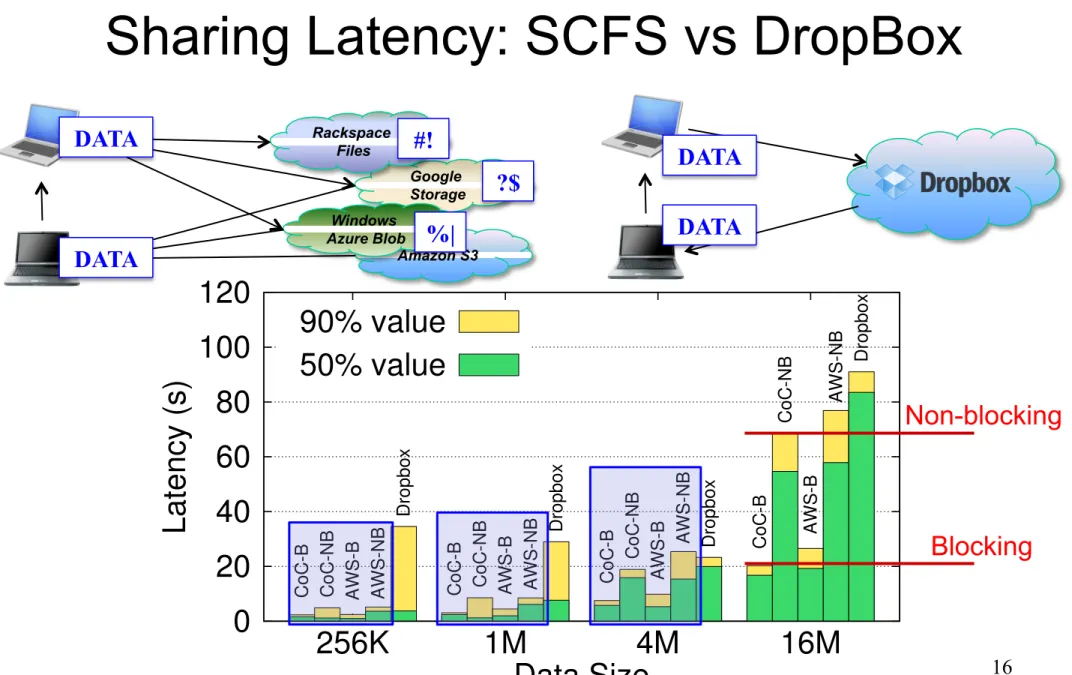
Figure 9: Sharing file 50th and 90th latency for SCFS (CoC B and NB, AWS B and NB) and Dropbox for different file sizes.
the benefits of deduplication, which SCFS currently does not support. However, if a user encrypts its critical files locally before storing them in Dropbox, the effectiveness of deduplication will be decreased significantly.
Figure 9 also shows that the latency of the blocking SCFS is much smaller than the non-blocking version with both AWS and CoC backends. This is explained by the fact that the SCFS-*-B waits for the file write to complete before returning to the application, making the benchmark measure only the delay of reading the file. This illustrates the benefits of SCFS-*-B: when A completes its file clos-ing, it knows the data is available to any other client the file is shared with. We think this design can open interest-ing options for collaborative applications based on SCFS.
4.4 Varying SCFS Parameters
Figure 10 shows some results for two metadata-intensive micro-benchmarks (copy and create files) for SCFS-CoC-NB with different metadata cache expiration times and percentages of files in private name spaces.
0 30 60 90 120 150 180 0 250 500 Time (s) Expiration time (ms) Create Copy
(a) Metadata cache.
0 20 40 60 80 100 120 0 50 100 0 50 100 Time (s) Sharing (%) Create Copy
(b) Private Name Spaces.
Figure 10: Effect of metadata cache expiration time and PNSs with different file sharing percentages in two metadata intensive micro-benchmarks.
As described in §2.5.1, we implemented a short-lived metadata cache to deal with bursts of metadata access op-erations (e.g., stat). All previous experiments used an
expiration time of 500 ms for this cache. Figure 10(a)
shows how changing this value affects the performance of the system. The results clearly indicate that not using such metadata cache (expiration time equals zero) severely de-grades the system performance. However, beyond some
Figure 10(b) displays the latency of the same bench-marks considering the use of PNS (see §2.7) with dif-ferent percentages of files shared between more than one user. Recall that all previous results consider full-sharing (100%), without using PNS, which is a worst case
sce-nario. As expected, the results show that as the number of private files increases, the performance of the system improves. For instance, when only 25% of the files are
shared – more than what was observed in the most recent study we are aware of [33] – the latency of the bench-marks decreases by a factor of roughly 2.5 (create files) and 3.5 (copy files).
4.5 SCFS Operation Costs
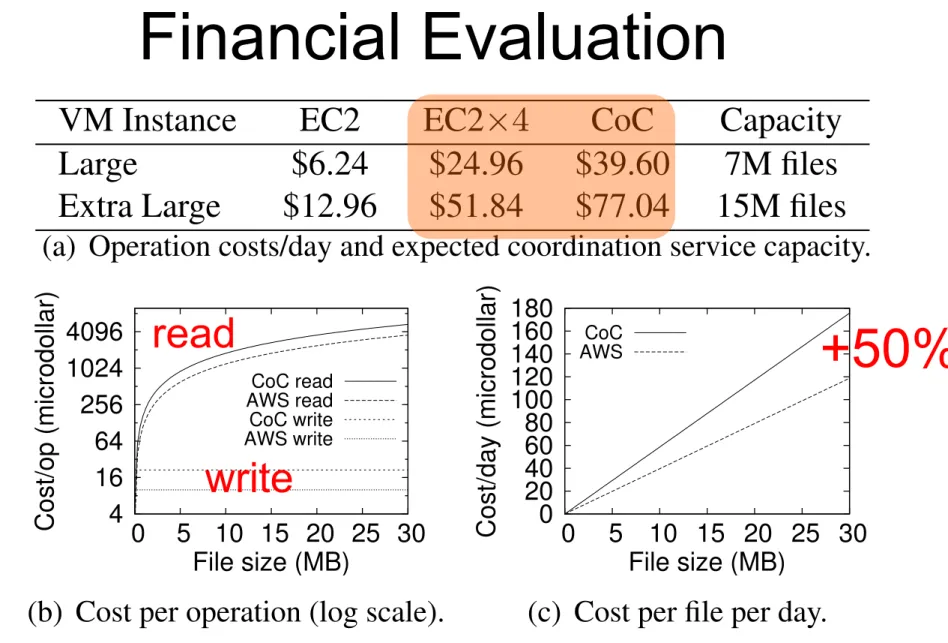
Figure 11 shows the costs associated with operating and using SCFS. The fixed operation costs of SCFS comprise mainly the maintenance of the coordination service run-ning in one or more VMs deployed in cloud providers. Figure 11(a) considers two instance sizes (as defined in Amazon EC2) and the price of renting one or four of them in AWS or in the CoC (one VM of similar size for each provider), together with the expected memory capacity (in number of 1KB metadata tuples) of such DepSpace setup. As can be seen in the figure, a setup with four Large in-stances would cost less than $1200 in the CoC per month while a similar setup in EC2 would cost $749. This differ-ence of $451 can be seen as the operation cost of tolerating provider failures in our SCFS setup, and comes mainly from the fact that Rackspace and Elastichosts charge al-most 100% more than EC2 and Azure for similar VM in-stances. Moreover, such costs can be factored among the users of the system, e.g., for one dollar per month, 2300 users can have a SCFS-CoC setup with Extra Large repli-cas for the coordination service. Finally, it is worth to mention that this fixed cost can be eliminated if the orga-nization using SCFS hosts the coordination service in its own infrastructure.
Besides the fixed operation costs, each SCFS user has to pay for its usage (executed operations and storage space) of the file system. Figure 11(b) presents the cost of reading a file (open for read, read whole file and close) and writing a file (open for write, write the whole file, close) in SCFS-CoC and SCFS-AWS (S3FS and S3QL will have similar costs). The cost of reading a file is the only one that depends on the size of data, since providers charge around $0.12 per GB of outbound traffic, while in-bound traffic is free. Besides that, there is also the cost of the getMetadata operation, used for cache
valida-tion, which is 11.32 microdollars (µ$). This corresponds
to the total cost of reading a cached file. The cost of writ-ing is composed by metadata and lock service operations (see Figure 4), since inbound traffic is free. Notice that the design of SCFS exploits these two points: unmodified data is read locally and always written to the cloud for
DATA DATA
Non-blocking
17
Benchmarking (Unmodified)
Desktop Applications
OpenOffice Writer
Micro-benchmark #Operations File size NSSCFS-AWSNB B NSSCFS-CoCNB B S3FS S3QL LocalFS
sequential read 1 4MB 1 1 1 1 1 1 6 1 1 sequential write 1 4MB 1 1 1 1 1 1 2 1 1 random 4KB-read 256k 4MB 11 11 15 11 11 11 15 11 11 random 4KB-write 256k 4MB 35 39 39 35 35 36 52 152 37 create files 200 16KB 1 102 229 1 95 321 596 1 1 copy files 100 16KB 1 137 196 1 94 478 444 1 1
Table 3: Latency of several Filebench micro-benchmarks for SCFS (six variants), S3QL, S3FS and LocalFS (in seconds).
The benchmark follows the behavior observed in traces of a real system, which are similar to other modern desk-top applications [25]. Typically, the files managed by the cloud-backed file system are just copied to a temporary directory on the local file system where they are manipu-lated as described in [25]. Nonetheless, as can be seen in the benchmark definition (Figure 7), these actions (espe-cially save) still impose a lot of work on the file system.
Open Action: 1 open(f,rw), 2 read(f), 3-5 open-write-close(lf1), 6-8 open-read-close(f), 9-11 open-read-close(lf1)
Save Action: 1-3 close(f), 4 close(f), 5-7 read-close(lf1), 8 delete(lf1), 9-11 write-close(lf2), 12-14 open-read-close(lf2), 15 truncate(f,0), 16-18 open-write-close(f), 19-21 open-fsync-close(f), 22-24 open-read-close(f), 25 open(f,rw)
Close Action: 1 close(f), 2-4 open-read-close(lf2), 5 delete(lf2)
Figure 7: File system operations invoked in the file synchro-nization benchmark, simulating an OpenOffice document open, save and close actions (f is the odt file and lf is a lock file).
Figure 8 shows the average latency of each of the three actions of our benchmark for SCFS, S3QL and S3FS, con-sidering a file of 1.2MB, which corresponds to the aver-age file size observed in 2004 (189KB) scaled-up 15% per year to reach the expected value for 2013 [11].
0 0.5 1 1.5 2 2.5
AWS-NBAWS-NB(L). CoC-NBCoC-NB(L). CoC-NSCoC-NS(L). S3QLS3QL(L)
Latency (s) CloseSave Open (a) Non-blocking. 0 5 10 15 20 25
AWS-BAWS-B(L). CoC-BCoC-B(L). S3FSS3FS(L)
Latency (s)
CloseSave
Open
(b) Blocking.
Figure 8: Latency of file synchronization benchmark actions (see Figure 7) with a file of 1.2MB. The (L) variants maintain lock files in the local file system. All labels starting with CoC or AWS represent SCFS variants.
Figure 8(a) shows that SCFS-CoC-NS and S3QL ex-hibit the best performance among the evaluated file sys-tems, having latencies similar to a local file system (where a save takes around 100 ms). This shows that the added
dependability of a cloud-of-clouds storage backend does not prevent a cloud-backed file system to behave similarly to a local file system, if the correct design is employed.
Our results show that SCFS-*-NB requires substan-tially more time for each phase due to the number of
ac-cesses to the coordination service, especially to deal with the lock files used in this workload. Nonetheless, saving a file in this system takes around 1.2 s, which is acceptable
from the usability point of view. A much slower behavior is observed in the SCFS-*-B variants, where the creation of a lock file makes the system block waiting for this small file to be pushed to the clouds.
We observed that most of the latency comes from the manipulation of lock files. However, the files accessed did not need to be stored in the SCFS partition, since the lock-ing service already prevents write-write conflicts between concurrent clients. We modified the benchmark to repre-sent an application that writes lock files locally (in/tmp),
just to avoid conflicts between applications in the same machine. The (L) variants in Figure 8 represent results with such local lock files. These results show that remov-ing the lock files makes the cloud-backed system much more responsive. The takeaway here is that the usability of blocking cloud-backed file systems could be substan-tially improved if applications take into consideration the limitations of accessing remote services.
Sharing files. Personal cloud storage services are of-ten used for sharing files in a controlled and convenient way [20]. We designed an experiment for comparing the time it takes for a shared file written by a client to be available for reading by another client, using SCFS-*-{NB,B}. We did the same experiment considering a Dropbox shared folder (creating random files to avoid deduplication). We acknowledge that the Dropbox de-sign [20] is quite different from SCFS, but we think it is illustrative to show how a cloud-backed file system com-pares with a popular file synchronization service.
The experiment considers two clients A and B deployed in our cluster. We measured the elapsed time between the instant client A closes a variable-size file that it wrote to a shared folder and the instant it receives an UDP ACK from client B informing the file was available. Clients A and B are Java programs running in the same LAN, with a ping latency of around 0.2 ms, which is negligible considering
the latencies of reading and writing. Figure 9 shows the results of this experiment for different file sizes.
The results show that the latency of sharing in SCFS-*-B is much smaller than what people experience in current personal storage services. These results do not consider
Micro-benchmark #Operations File size NSSCFS-AWSNB B NSSCFS-CoCNB B S3FS S3QL LocalFS
sequential read 1 4MB 1 1 1 1 1 1 6 1 1 sequential write 1 4MB 1 1 1 1 1 1 2 1 1 random 4KB-read 256k 4MB 11 11 15 11 11 11 15 11 11 random 4KB-write 256k 4MB 35 39 39 35 35 36 52 152 37 create files 200 16KB 1 102 229 1 95 321 596 1 1 copy files 100 16KB 1 137 196 1 94 478 444 1 1
Table 3:
Latency of several Filebench micro-benchmarks for SCFS (six variants), S3QL, S3FS and LocalFS (in seconds).The benchmark follows the behavior observed in traces
of a real system, which are similar to other modern
desk-top applications [25]. Typically, the files managed by the
cloud-backed file system are just copied to a temporary
directory on the local file system where they are
manipu-lated as described in [25]. Nonetheless, as can be seen in
the benchmark definition (Figure 7), these actions
(espe-cially save) still impose a lot of work on the file system.
Open Action: 1 open(f,rw), 2 read(f), 3-5 open-write-close(lf1), 6-8 open-read-close(f), 9-11 open-read-close(lf1)
Save Action: 1-3 close(f), 4 close(f), 5-7 read-close(lf1), 8 delete(lf1), 9-11 write-close(lf2), 12-14 open-read-close(lf2), 15 truncate(f,0), 16-18 open-write-close(f), 19-21 open-fsync-close(f), 22-24 open-read-close(f), 25 open(f,rw)
Close Action: 1 close(f), 2-4 open-read-close(lf2), 5 delete(lf2)
Figure 7:
File system operations invoked in the file synchro-nization benchmark, simulating an OpenOffice document open, save and close actions (f is the odt file and lf is a lock file).Figure 8 shows the average latency of each of the three
actions of our benchmark for SCFS, S3QL and S3FS,
con-sidering a file of 1.2MB, which corresponds to the
aver-age file size observed in 2004 (189KB) scaled-up 15% per
year to reach the expected value for 2013 [11].
0 0.5 1 1.5 2 2.5
AWS-NBAWS-NB(L). CoC-NBCoC-NB(L). CoC-NSCoC-NS(L). S3QLS3QL(L)
Latency (s) CloseSave Open (a) Non-blocking. 0 5 10 15 20 25
AWS-BAWS-B(L). CoC-BCoC-B(L). S3FSS3FS(L)
Latency (s)
CloseSave Open
(b) Blocking.
Figure 8:
Latency of file synchronization benchmark actions (see Figure 7) with a file of 1.2MB. The (L) variants maintain lock files in the local file system. All labels starting with CoC or AWS represent SCFS variants.Figure 8(a) shows that SCFS-CoC-NS and S3QL
ex-hibit the best performance among the evaluated file
sys-tems, having latencies similar to a local file system (where
a save takes around
100
ms). This shows that the added
dependability of a cloud-of-clouds storage backend does
not prevent a cloud-backed file system to behave similarly
to a local file system, if the correct design is employed.
Our results show that SCFS-*-NB requires
substan-cesses to the coordination service, especially to deal with
the lock files used in this workload. Nonetheless, saving a
file in this system takes around
1
.
2
s, which is acceptable
from the usability point of view. A much slower behavior
is observed in the SCFS-*-B variants, where the creation
of a lock file makes the system block waiting for this small
file to be pushed to the clouds.
We observed that most of the latency comes from the
manipulation of lock files. However, the files accessed did
not need to be stored in the SCFS partition, since the
lock-ing service already prevents write-write conflicts between
concurrent clients. We modified the benchmark to
repre-sent an application that writes lock files locally (in
/tmp
),
just to avoid conflicts between applications in the same
machine. The (L) variants in Figure 8 represent results
with such local lock files. These results show that
remov-ing the lock files makes the cloud-backed system much
more responsive. The takeaway here is that the usability
of blocking cloud-backed file systems could be
substan-tially improved if applications take into consideration the
limitations of accessing remote services.
Sharing files.
Personal cloud storage services are
of-ten used for sharing files in a controlled and convenient
way [20]. We designed an experiment for comparing
the time it takes for a shared file written by a client to
be available for reading by another client, using
SCFS-*-
{
NB,B
}
. We did the same experiment considering a
Dropbox shared folder (creating random files to avoid
deduplication). We acknowledge that the Dropbox
de-sign [20] is quite different from SCFS, but we think it is
illustrative to show how a cloud-backed file system
com-pares with a popular file synchronization service.
The experiment considers two clients A and B deployed
in our cluster. We measured the elapsed time between the
instant client A closes a variable-size file that it wrote to a
shared folder and the instant it receives an UDP ACK from
client B informing the file was available. Clients A and B
are Java programs running in the same LAN, with a ping
latency of around
0
.
2
ms, which is negligible considering
the latencies of reading and writing. Figure 9 shows the
results of this experiment for different file sizes.
The results show that the latency of sharing in
SCFS-*-B is much smaller than what people experience in current
AWS CoC CoC(NS) S3QL AWS CoC S3FS Non-blocking Blocking 80% 40% 55% lock files 11 CoC read/writes
18
Financial Evaluation
VM Instance EC2 EC2⇥4 CoC Capacity
Large $6.24 $24.96 $39.60 7M files
Extra Large $12.96 $51.84 $77.04 15M files
(a) Operation costs/day and expected coordination service capacity.
4 16 64 256 1024 4096 0 5 10 15 20 25 30 Cost/op (microdollar) File size (MB) CoC read AWS read CoC write AWS write
(b) Cost per operation (log scale).
0 20 40 60 80 100 120 140 160 180 0 5 10 15 20 25 30 Cost/day (microdollar) File size (MB) CoC AWS
(c) Cost per file per day.
Figure 11: The (fixed) operation and (variable) usage costs of SCFS. The costs include outbound traffic generated by the coor-dination service protocol for metadata tuples of 1KB.
Storage costs in SCFS are charged per number of files and versions stored in the system. Figure 11(c) shows the cost/version/day in SCFS-AWS and SCFS-CoC (con-sidering the use of erasure codes and preferred quo-rums [15]). The storage costs of SCFS-CoC are roughly 50% more than of SCFS-AWS: two clouds store half of the file each while a third receives an extra block gener-ated with the erasure code (the fourth cloud is not used).
It is also worth to mention that the cost of running the garbage collector corresponds to the cost of a list opera-tion in each cloud ( µ$1/cloud), independently of the
number of deleted files/versions. This happens because all used clouds do not charge delete operations.
5 Related Work
In this section we discuss some distributed file systems and cloud storage works that are most relevant to SCFS.
Cloud-backed file systems. S3FS [6] and S3QL [7] are two examples of cloud-backed file systems. Both these systems use unmodified cloud storage services (e.g., Amazon S3) as their backend storage. S3FS employs a blocking strategy in which every update on a file only re-turns when the file is written to the cloud, while S3QL writes the data locally and later pushes it to the cloud. An interesting design is implemented by BlueSky [39], another cloud-backed file system that can use cloud stor-age services as a storstor-age backend. BlueSky provides a CIFS/NFS proxy (just as several commercially available cloud storage gateways) to aggregate writings in log seg-ments that are pushed to the cloud in background, im-plementing thus a kind of log-structured cloud-backed file system. These systems differ from SCFS in many ways (see Figure 1), but mostly regarding their lack of controlled sharing support for geographically dispersed clients and dependency of a single cloud provider.
Some commercial cloud-enabled storage gateways [4, 5] also supports data sharing among proxies. These sys-tems replicate file system metadata among the proxies,
en-Complex distributed locking protocols (executed by the proxies) are used to avoid write-write conflicts. In SCFS, a coordination service is used for metadata storage and lock management. Moreover, these systems neither sup-port strongly consistent data sharing nor are capable to use a cloud-of-clouds backend.
Cloud-of-clouds storage. The use of multiple (unmod-ified) cloud storage services for data archival was first described in RACS [9]. The idea is to use RAID-like techniques to store encoded data in several providers to avoid vendor lock-in problems, something already done in the past, but requiring server code in the providers [31]. DepSky [15] integrates such techniques with secret shar-ing and Byzantine quorum protocols to implement sshar-ingle- single-writer registers tolerating arbitrary faults of storage providers. ICStore [12] showed it is also possible to build multi-writer registers with additional communica-tion steps and tolerating only unavailability of providers. The main difference between these works and SCFS(-CoC) is the fact they provide a basic storage abstraction (a register), not a complete file system. Moreover, they vide strong consistency only if the underlying clouds pro-vide it, while SCFS uses a consistency anchor (a coordi-nation service) for providing strong consistency indepen-dently of the guarantees provided by the storage clouds.
Wide-area file systems. Starting with AFS [28], many file systems were designed for geographically dispersed locations. AFS introduced the idea of copying whole files from the servers to the local cache and making file updates visible only after the file is closed. SCFS adapts both these features for a cloud-backed scenario.
File systems like Oceanstore [32], Farsite [10] and WheelFS [36] use a small and fixed set of nodes as lock-ing and metadata/index service (usually made consistent using Paxos-like protocols). Similarly, SCFS requires a small amount of computing nodes to run a coordina-tion service and simple extensions would allow SCFS to use multiple coordination services, each one dealing with a subtree of the namespace (improving its scala-bility) [10]. Moreover, both Oceanstore [32] and Far-site [10] use PBFT [18] for implementing their metadata service, which makes SCFS-CoC superficially similar to their design: a limited number of nodes running a BFT state machine replication algorithm to support a meta-data/coordination service and a large pool of untrusted storage nodes that archive data. However, on the contrary of these systems, SCFS requires few “explicit” servers, and only for coordination, since the storage nodes are re-placed by cloud services like Amazon S3. Furthermore, these systems do not target controlled sharing of files and strong consistency, using thus long-term leases and weak cache coherence protocols. Finally, a distinctive feature of SCFS is that its design explicitly exploits the charging
+50%
write
read
Wrap Up
• SCFS is a cloud-backed file systems that can be used
for backup, disaster recovery and sharing data
• Key design principles:
– Always write, avoid reading (very cheap in terms of $$$)
– Strong consistency (despite storage cloud’ weak consistency)
• Experience so far…
– Multi-cloud replication is feasible (CoC not slower!)
• This is a case for BFT… crash-only solution will not make things better – Being employed for sharing dataset metadata among Biobanks
Timeline of this work
•
Summer 2011 – initial idea for two MsCs
•
October 2012 – MsCs concluded
•
November 2012 - Demo at the 2
ndTClouds FP7 project review
•
April 2013 – first submission (C2FS)
•
September 2013 – second submission
Thanks!
•
SCFS code available at
http://code.google.com/p/depsky/wiki/SCFS
• DepSky and DepSpace/BFT-SMaRt also available
http://code.google.com/p/depsky/ http://code.google.com/p/bft-smart/
![Figure 6 shows how a file is securely stored in the cloud-of-clouds backend of SCFS using DepSky (see [15]](https://thumb-us.123doks.com/thumbv2/123dok_us/887480.2613864/15.1263.159.1102.422.797/figure-shows-securely-stored-cloud-clouds-backend-depsky.webp)