I n t e r n a t i o n a l T e l e c o m m u n i c a t i o n U n i o n
ITU-T
FG Cloud TR
TELECOMMUNICATION STANDARDIZATION SECTOR OF ITUVersion 1.0
(02/2012)
Focus Group on Cloud Computing
Technical Report
Part 1: Introduction to the cloud ecosystem:
definitions, taxonomies, use cases and
FOREWORD
The procedures for establishment of focus groups are defined in Recommendation ITU-T A.7. The ITU-T Focus Group on Cloud Computing (FG Cloud) was established further to ITU-T TSAG agreement at its meeting in Geneva, 8-11 February 2010, followed by ITU-T study group and membership consultation.
Even though focus groups have a parent organization, they are organized independently from the usual operating procedures of the ITU, and are financially independent. Texts approved by focus groups (including Technical Reports) do not have the same status as ITU-T Recommendations.
INTELLECTUAL PROPERTY RIGHTS
The ITU draws attention to the possibility that the practice or implementation of this Technical Report may involve the use of a claimed Intellectual Property Right. ITU takes no position concerning the evidence, validity or applicability of claimed Intellectual Property Rights, whether asserted by ITU-T Focus Group participants or others outside of the Technical Report development process.
ITU 2012
All rights reserved. No part of this publication may be reproduced, by any means whatsoever, without the prior written permission of ITU.
Table of Contents
1. Scope ... 1
2. Definitions ... 1
2.1 Cloud related basic terminology ... 1
2.2 Cloud deployment models ... 3
2.3 Inter-cloud ... 3
2.4 Other cloud related definitions ... 4
3 Abbreviations and acronyms ... 5
4 Introduction to cloud computing in telecommunications ... 6
4.1 The emergence of the cloud computing model ... 6
4.2 Opportunities for market players through cloud computing ... 6
5 Cloud ecosystem ... 7
5.1 Actors and Roles of a Cloud ecosystem ... 7
5.2 Scenarios of inter-cloud ... 9
6 Cloud services taxonomy and mappings to cloud service categories ... 11
6.1 Cloud services mapping ... 11
7 Use cases ... 12
8 High-level requirements to be considered for cloud infrastructure and cloud services 13 8.2 General requirements ... 13
8.3 Requirements for cloud services ... 15
8.4 SLA support ... 16
8.4 Management ... 19
8.5 Inter-cloud support ... 19
Annex A Use cases ... 23
A.1 From the perspective of cloud service users and cloud service providers ... 23
A.2 From the inter-cloud perspective ... 37
Appendix I Details on desktop as a service (DaaS) ... 48
Appendix II Schema-mapping techniques to support multi-tenancy ... 50
Appendix III Details on SLA for cloud computing ... 52
III.1 Example of SLA metrics ... 52
Appendix IV Additional details on business aspects in a cloud ecosystem... 56
IV. 1 Examples of a business-value chain ... 56
Appendix V Detailed scenarios of cloud interaction involving the inter-cloud role ... 58
V.1 Inter-cloud scenario with QoS control ... 58
V.2 Inter-cloud scenario with cloud service composition ... 58
Appendix VI Details on mobile cloud ... 60
VI.1 Configuration of a mobile cloud ... 60
1. Scope
Definitions, use cases, technologies, players, risks and benefits of cloud ecosystems are still an evolving paradigm.
The scope of this Technical Report is to provide an introduction to cloud ecosystems, focusing on integration and support of the cloud computing model and technologies in telecommunication environments. The Technical Report addresses:
Cloud computing related definitions and taxonomies based on the current status of the art Actors and roles of a cloud ecosystem
Scenarios of inter-cloud
A set of relevant telecommunication-centric use cases
High-level requirements for cloud infrastructure and cloud services
A companion Technical Report provides an introduction to cloud computing benefits from the telecommunication/ICT perspectives.
2. Definitions
2.1 Cloud related basic terminology 2.1.1 Cloud computing
Cloud computing: A model for enabling service users to have ubiquitous, convenient and on-demand network access to a shared pool of configurable computing resources (e.g., networks, servers, storage, applications, and services), that can be rapidly provisioned and released with minimal management effort or service-provider interaction. Cloud computing enables cloud services.
NOTE - It is considered from a telecommunication perspective that users are not buying resources but cloud services that are enabled by cloud computing environments.
The cloud computing model promotes availability and is composed of five essential characteristics, five cloud service categories and four deployment models.
2.1.2 Cloud service
Cloud service: A service that is delivered and consumed on demand at any time, through any access network, using any connected devices using cloud computing technologies.
2.1.3 Cloud ecosystem actors
Cloud service user (CSU): A person or organization that consumes delivered cloud services. NOTE – A CSU can include intermediate users that will deliver cloud services provided by a cloud service provider (CSP) to actual users of the cloud service, i.e. end users. End users can be persons, machines, or applications.
Cloud service provider (CSP): An organization that provides and maintains delivered cloud services.
Cloud service partner (CSN): A person or organization that provides support to the building of the service offer of a cloud service provider (e.g. service integration).
2.1.4 Cloud computing essential characteristics
On-demand self-service: A cloud service user can unilaterally provision computing capabilities, such as server time, network storage and communication and collaboration services, as needed automatically without requiring human interaction with each service’s cloud service provider.
Broad network access: Capabilities are available over the network and accessed through standard mechanisms that promote use by heterogeneous thin or thick client platforms (e.g., mobile phones, laptops, and PDAs).
Resource pooling: The cloud service provider’s computing resources are pooled to serve multiple users using a multi-tenant model, with different physical and virtual resources that are dynamically assigned and reassigned according to user demand. There is a sense of location independence in that the customer generally has no control or knowledge over the exact location of the provided resources, but may be able to specify the location at a higher level of abstraction (e.g., country, state, data centre). Examples of resources include storage (typically on hard or optical disc drives), processing, memory (typically on DRAM), network bandwidth, and virtual machines.
Rapid elasticity: Capabilities can be rapidly and elastically provisioned, in some cases automatically, to quickly scale out, and rapidly released to quickly scale in. To the cloud service user, the capabilities available for provisioning often appear to be unlimited and can be purchased in any quantity at any time.
Measured service: Cloud systems automatically control and optimize resource use (e.g., storage, processing and bandwidth) by leveraging a metering capability at some level of abstraction appropriate to the type of service (e.g., the number of active user accounts). Resource usage can be monitored, controlled, and reported, providing transparency for both the cloud service provider and cloud service user of the utilized service.
2.1.5 Cloud service categories
Cloud software as a service (SaaS): A category of cloud services where the capability provided to the cloud service user is to use the cloud service provider’s applications running on a cloud infrastructure.
NOTE - All applications have the common characteristic to be non-real-time and may be of different kinds, including IT and business applications, and may be accessible from different user devices. The cloud service user does not manage or control the underlying cloud infrastructure, with the possible exception of limited user-specific application configuration settings.
Communicationsas a service (CaaS): A category of cloud services where the capability provided to the cloud service user is to use real-time communication and collaboration services. NOTE - Communication and collaboration services include voice over IP, instant messaging, and video conferencing, for different user devices.
Cloud platform as a service (PaaS): A category of cloud services where the capability provided to the cloud service user is to deploy user-created or acquired applications onto the cloud
infrastructure using platform tools supported by the cloud service provider.
NOTE - platform tools may include programming languages and tools for application development, interface development, database development, storage and testing. The cloud service user does not manage or control the underlying cloud infrastructure, but has control over the deployed applications and, possibly, over the application hosting environment configurations.
Cloud infrastructure as a service (IaaS): A category of cloud services where the capability provided by the cloud service provider to the cloud service user is to provision processing, storage, intra-cloud network connectivity services (e.g. VLAN, firewall, load balancer, and application acceleration), and other fundamental computing resources of the cloud infrastructure where the cloud service user is able to deploy and run arbitrary application.
NOTE - The cloud service user does not manage or control the resources of the underlying cloud infrastructure but has control over operating systems, deployed applications, and possibly limited control of select networking components (e.g., host firewalls).
Network as a service (NaaS): A category of cloud services where the capability provided to the cloud service user is to use transport connectivity services and/or inter-cloud network connectivity services.
NOTE - NaaS services include flexible and extended VPN, bandwidth on demand, etc.
2.2 Cloud deployment models
Private cloud [b-NIST DFN]: The cloud infrastructure is operated solely for an organization. It may be managed by the organization or a third party and may exist on premise or off premise.
Community cloud [b-NIST DFN]: The cloud infrastructure is shared by several organizations and supports a specific community that has shared concerns (e.g., mission, security requirements, policy, and compliance considerations). It may be managed by the organizations or a third party and may exist on premise or off premise.
Public cloud [b-NIST DFN]: The cloud infrastructure is made available to the general public or a large industry group and is owned by an organization selling cloud services.
Hybrid cloud: The cloud infrastructure is a composition of two or more clouds using different deployment models (private, community, or public) that remain unique entities but are bound together by standardized or proprietary technology that enables data and application portability (e.g., cloud bursting for load-balancing between clouds).
NOTE - It should be noted that the cloud-deployment models do not reflect where services, platforms, applications, or resources are actually hosted. For example, a private cloud can be hosted internally (on site) or externally (outsourced).
2.3 Inter-cloud
Inter-cloud computing: Inter-cloud computing allows on-demand assignment of cloud resources, including computing, storage and network, and the transfer of workload through interworking of cloud systems.
NOTE 1 - In the context of the ITU-T FG Cloud deliverables, the term “inter-cloud” is used instead of “inter-cloud computing”.
NOTE 2 - From the view point of a CSP, inter-cloud computing can be implemented in different manners, including inter-cloud peering, inter-cloud service broker and inter-cloud federation. These manners correspond to distinct possible roles that a CSP can play when interacting with other CSPs.
Inter-cloud peering: direct inter-connection between two CSPs.
Inter-cloud service broker (ISB): indirect interconnection between two (or more) CSPs achieved through an interconnecting CSP which, in addition to providing interworking service functions between the interconnected CSPs, also provides brokering service functions for one (or more) of the interconnected CSPs. ISB also covers the case in which one (or more) of the interconnected entities receiving the brokering service is a cloud service user (CSU).
NOTE 1 - Brokering service functions generally include, but are not limited to, the following three categories: service intermediation, service aggregation and service arbitrage.
Inter-cloud federation: a manner to implement inter-cloud computing in which mutually trusted clouds logically join together by integrating their resources. Inter-cloud federation allows a CSP to dynamically outsource resources to other CSPs in response to demand variations.
2.4 Other cloud related definitions
Desktop as a service (DaaS): The capability provided to the cloud service user to use virtualized desktops from a cloud service provider in the form of outsourcing.
NOTE - A central server located in the cloud retains the virtualized desktops instead of maintaining and running desktop operating system and applications on the local storage of remote clients, and all of the used applications and data are kept and run centrally. Based on application streaming and virtualization technologies, cloud service users can access desktop operating system and applications through a completely hosted system.
Cloud communication centre: A cloud communication centre (service) enables advanced features for the customer-enterprise interaction using the communication and management capabilities provided by a cloud-based telecommunication infrastructure (managed by the cloud service provider).
NOTE - Such capabilities include for example: management in the cloud of communication centre relevant resources, such as customer resources, enterprise agent resources, media storage resources, content resources, transport resources and communication resources; access of fixed and mobile customers and enterprise agents via a unified client, such as a Web browser; sharing of enterprise applications which are common among different enterprises; and application charging to enterprises on a per-resource usage basis.
Service delivery platform as a service (SDPaaS): The capability provided to the cloud service user to use service delivery platform (SDP) functionalities and services provided by a cloud service provider, and the capability provided to a cloud service provider to deploy, control and manage SDP functionalities.
NOTE -SDPaaS may be implemented via utilization and intermediation of different SaaS/CaaS and PaaS cloud services.
Multi-tenancy [b-SC38 N430]: A characteristic of cloud in which resources are shared amongst multiple cloud tenants. There is an expectation on the part of the cloud tenant that its use of the cloud is isolated from other tenants’ use of any shared resources; that tenants in the cloud are restricted from accessing or affecting another tenant’s assets; that the cloud tenant has the perception of exclusive use of, and access to, any provisioned resource. The means by which such isolation is achieved vary in accordance with the nature of the shared resource, and can affect security, privacy and performance.
Resource: Any kinds of resources to be shared to compose cloud services, including computing power, storage, network, database, and applications.
Service delivery platform [b-Moriana-SDP2.0]: A system architecture or environment that enables the efficient creation, deployment, execution, orchestration and management of one or more classes of services.
SLA [b-CSA Glossary]: An abbreviated service agreement stating the technical performance promises made by a provider, including remedies for performance failures. An SLA is composed of three parts. The first part is a collection of promises made to subscribers, (2) a collection of
promises explicitly not made to subscribers, i.e., limitations, and (3) a set of obligations that subscribers must accept.
NOTE - In practice, an SLA may contain non-quantitative parameters, such as specific regulations, citizenship requirements, business process standards (e.g. ISO 20000). Cloud services may have different types of SLAs.
3 Abbreviations and acronyms
This Technical Report uses the following abbreviations and acronyms API Applications Programming Interface
ASP Application Service Provider BI Business Intelligence
BSS Business Support System
CaaS Communications as a Service CPU Central Processing Unit
CSN Cloud Service Partner CSP Cloud Service Provider
CSU Cloud Service User
DaaS Desktop as a Service
DRAM Dynamic Random-Access Memory IaaS Infrastructure as a Service
ICT Information and Communication Technologies
IT Information Technology
IDC Internet Data Centre
IMS IP Multimedia Subsystem
IoT Internet of Things
IPTV Internet Protocol Television ISB Inter-cloud Service Broker ISP Internet Service Provider M2M Machine-to-Machine NaaS Network as a Service OSS Operations Support System PaaS Platform as a Service
PC Personal Computer
QoS Quality of Service SaaS Software as a Service SDP Service Delivery Platform
SDPaaS SDP as a Service
SLA Service Level Agreement
VLAN Virtual Local Area Network
VM Virtual Machine
VPN Virtual Private Network
4 Introduction to cloud computing in telecommunications 4.1 The emergence of the cloud computing model
The term “cloud” was first introduced in 2008 to designate a new approach for service delivery through the network (the network schema is usually illustrated by a cloud in telecommunication architecture diagrams).
Software as a service (SaaS) emerged in the last five years as a new concept for accessing a software application (computing task) which can be described as "IT service-centric": SaaS can be seen as a software distribution model in which applications are hosted by a service provider and made available to customers over a network, typically the Internet, and where a single instance (virtual application) of the software runs on the SaaS provider servers, following a multi-tenant 1-to-N architecture, and charged on a per usage basis. The SaaS model has some similarity with the application service provider (ASP) model introduced in the beginning of 2000 as an evolution of the Internet service provider (ISP) model, but it is considered a more advanced model for managing (self-management and rapid provisioning), hosting (virtualization resources), software architecture modularization (multi-tenant API), and licensed applications instantiation under a usage-based transaction.
The recent development of high-bit-rate access and improvement of the network layer availability by major ISPs can be considered as the most important starting point for the emerging online/SaaS and cloud market.
Considering cloud computing as an evolution of ASP and some generalization of SaaS online services, with an extension to platform and infrastructure services (PaaS and IaaS), cloud computing can be also named network computing (or Internet computing).
4.2 Opportunities for market players through cloud computing
Cloud computing is changing the ICT ecosystem with emerging business roles and modification of the ICT industry value chain.
Opportunities for small and medium enterprises
Small and medium enterprises consider the usage of cloud computing to improve flexibility and to reduce the cost of their IT systems. Furthermore, their needs for hardware and software ownership may be reduced.
The hardware and software for the support of cloud services may be increased, since operators need to possess extensive hardware and software resources for economies of scale. This may promote business growth for hardware and software providers.
Opportunities for large ICT enterprises
In general, cloud computing offers opportunities of business transformation for large ICT enterprises.
Opportunities for other market players
Cloud computing provides opportunities for other market players, e.g. application developers, application integrators, application providers, content providers. Cooperation with operators of cloud services enables the creation of a broader market and win-win situations between operators and these market players.
5 Cloud ecosystem
In line with a general definition of a business ecosystem [b-HBR], a cloud computing business ecosystem (cloud ecosystem) is a business ecosystem of interacting organizations and individuals - the actors of the cloud ecosystem - providing and consuming cloud services.
5.1 Actors and Roles of a Cloud ecosystem
The following actors are identified in a cloud ecosystem: Cloud service users (CSU),
Cloud service providers (CSP), Cloud service partners (CSN).
NOTE – The definitions of these actors are provided in clause 2.
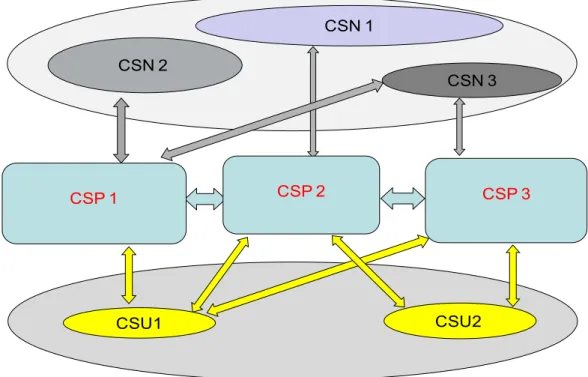
Figure 1 - The three actors of a cloud ecosystem
Figure 2 depicts the actors with some of their possible roles in a cloud ecosystem.
Figure 2 - Actors with some of their possible roles in a cloud ecosystem
The following provides a non-exhaustive list of possible roles that can be played by each of the three cloud eco-system actors:
Cloud service provider (CSP):
Provider of SaaS and/or CaaS and/or PaaS and/or IaaS and/or NaaS NOTE – a CSP may offer cloud services of one or more of these five cloud service categories.
CSU1 CSN 3 CSP 1 CSU2 CSN 2 CSN 1 CSP 3 CSP 2 CSU1 (enterprise) CSN 3 CSP 1 (SaaS/PaaS/IaaS/CaaS/ NaaS provider and
Inter-Cloud) CSU2 (consumer) CSN 2(content provider) CSN 1 (application developer) CSP 3 (SaaS/PaaS/IaaS/ CaaS/NaaS provider and Inter-Cloud) CSP 2 (Inter-Cloud)
Inter-cloud:
o Inter-cloud peering,
o Inter-cloud service broker,
o Inter-cloud federation Cloud service user (CSU):
Consumer,
Enterprise (including enterprise administrator), Governmental/public institution
Cloud service partner (CSN): Application developer, Content provider, Software provider, Hardware provider, Equipment provider, System integrator, Auditor
Appendix IV provides some additional details on business aspects of a cloud ecosystem.
5.2 Scenarios of inter-cloud
This clause provides scenarios of inter-cloud involving the different inter-cloud roles identified in clause 5.1.
Appendix V describes detailed scenarios of cloud interaction involving the inter-cloud roles.
5.2.1 Scenario with inter-cloud peering
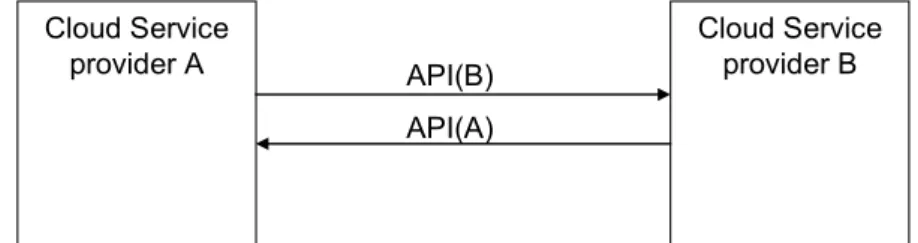
Two CSPs interwork directly with each other. Each CSP exposes its own API for cloud interworking, and the CSPs interwork with each other directly by using the other CSP’s API. In Figure 3, CSP A interworks with CSP B using API provided by CSP B and vice versa.
Figure 3 – Inter-cloud peering
Cloud Service provider A Cloud Service provider B API(B) API(A)
5.2.2. Scenario with inter-cloud federation
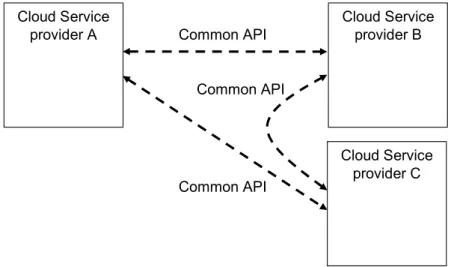
Mutually trusted CSPs logically join an alliance together. The common API for cloud interworking is defined in the alliance, and each CSP interworks with other CSPs in the alliance through the common API (Figure 4).
Figure 4 – Inter-cloud federation 5.2.3 Scenario with inter-cloud service broker
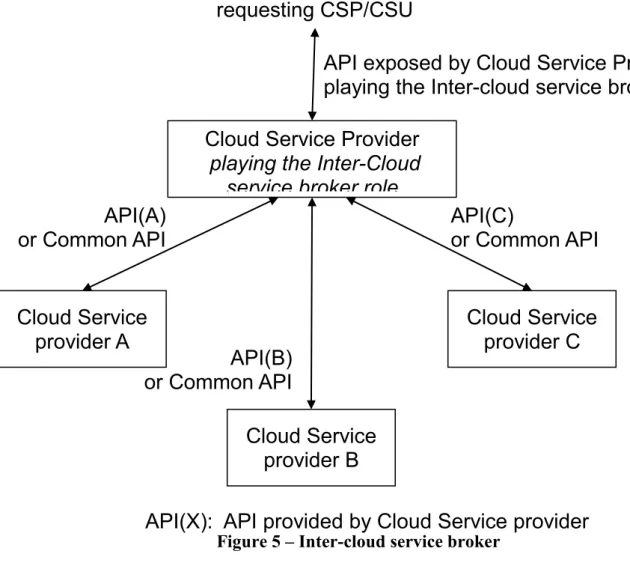
The scenario of inter-cloud with an inter-cloud service broker is shown in Figure 5. In this scenario, the CSP playing the inter-cloud service broker role receives a cloud service request from a cloud-service provider or a cloud-cloud-service user through its own API. The CSP playing the role of inter-cloud service broker, interworks with one or more other CSPs and provides brokering-service functions by integrating services provided by these CSPs. Interworking between the CSP playing the inter-cloud service broker role and the other CSPs, is established by either inter-cloud peering or inter-cloud federation. Cloud Service provider A Cloud Service provider B Common API Cloud Service provider C Common API Common API
Figure 5 – Inter-cloud service broker
6 Cloud services taxonomy and mappings to cloud service categories
Clause 2 provides definitions for the following cloud service categories in a telecommunication-centric cloud ecosystem:
SaaS
IaaS
PaaS
NaaS
CaaS
CaaS and NaaS are specialized service categories of a telecommunication-centric cloud ecosystem. Although services of these categories are assumed to be supported in different cloud deployment models, they fully empower the service offering of telecommunication service market players in a cloud ecosystem.
6.1 Cloud services mapping
Table 1 shows examples of mapping of some relevant cloud services to the identified cloud service categories.
Cloud Service
provider A
Cloud Service
provider B
Cloud Service
provider C
Cloud Service Provider
playing the Inter-Cloud
service broker role
requesting CSP/CSU
API exposed by Cloud Service Provider
playing the Inter
-
cloud service broker role
API(A)
or Common API
API(B)
or Common API
API(C)
or Common API
API(X): API provided by Cloud Service provider
X
Table 1 – Map of cloud services to cloud-service categories
SaaS PaaS IaaS NaaS CaaS
Desktop as a service X
Service delivery platform
as a service X X X
Cloud communication
centre X X
(Flexible and extended) VPN
X
Bandwidth on demand X
7 Use cases
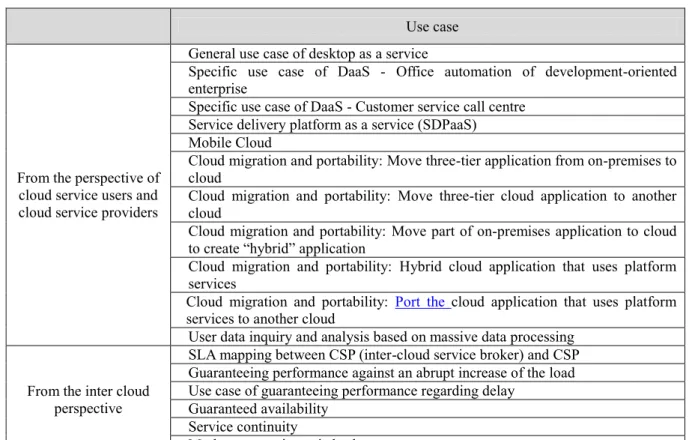
The following table identifies relevant use cases of a cloud ecosystem. Details about each of these use cases are provided in Annex A.
Table 2 – Use cases
Use case
From the perspective of cloud service users and cloud service providers
General use case of desktop as a service
Specific use case of DaaS - Office automation of development-oriented enterprise
Specific use case of DaaS - Customer service call centre Service delivery platform as a service (SDPaaS) Mobile Cloud
Cloud migration and portability: Move three-tier application from on-premises to cloud
Cloud migration and portability: Move three-tier cloud application to another cloud
Cloud migration and portability: Move part of on-premises application to cloud to create “hybrid” application
Cloud migration and portability: Hybrid cloud application that uses platform services
Cloud migration and portability: Port the cloud application that uses platform services to another cloud
User data inquiry and analysis based on massive data processing From the inter cloud
perspective
SLA mapping between CSP (inter-cloud service broker) and CSP Guaranteeing performance against an abrupt increase of the load Use case of guaranteeing performance regarding delay
Guaranteed availability Service continuity
8 High-level requirements to be considered for cloud infrastructure and cloud services
NOTE – As far as the requirements in this clause are concerned, the term “cloud infrastructure” is intended to address the capabilities to be supported by a cloud service provider (unless clearly specified otherwise). The range of cloud services is very broad, thus a great number of requirements for cloud infrastructure and cloud services are expected.
This clause lists high-level requirements for cloud infrastructure and cloud services which should be considered by the actors of the cloud computing business.
It does not intend to mandate specific features, but proposes relevant considerations for further development of detailed specifications on requirements and capabilities of cloud infrastructure and cloud services.
8.2 General requirements
General requirements are as follows:
Multi-tenancy: As defined in Clause 2.4, multi-tenancy is an essential characteristic of cloud systems aiming to provide isolation of the different users of the cloud system (tenants) while maximizing resource sharing among them. It is expected that multi-tenancy be supported at various levels of a cloud infrastructure.
NOTE - As an example, at the application level, multi-tenancy is a feature that allows a single instance of an application to satisfy several users at the same time. This results in the ability to consolidate several tenants within a single database and leverage the economy of scale. Some details about techniques for multi-tenancy are provided in Appendix II.
Service lifecycle management: Cloud services are paid as used and can be started and ended anytime. Therefore, it is required that a cloud infrastructure supports automatic service provisioning. In addition, metering and charging settlement need to be provided for services that are dynamically created, modified and then released in virtual environments. Security: Security of each individual service needs to be ensured in the multi-tenant cloud
environment, including when data and business logic move between servers to achieve optimal service.
It is also expected that a cloud infrastructure provides strict control for different tenants’ access to different resources, to avoid the abuse of cloud resources and to facilitate the management of cloud service users by cloud service providers.
Responsiveness: The cloud architecture is expected to enable early detection, diagnosis and fixing of infrastructure or service related problems.
Intelligent service deployment: It is expected that the cloud architecture enables efficient use of resources in service deployment, i.e. maximising the number of deployed services while minimizing the usage of resources and still respecting the SLAs.
NOTE - For instance, the specific application characteristics (e.g. CPU-intensive, IO-intensive etc.) - which can be provided by application developers or via application monitoring - may help cloud service providers in making efficient use of resources.
Portability: It is expected that a cloud infrastructure supports the portability of software and data over its underlying resources. It is also expected that cloud service providers be able to accommodate cloud workload portability (e.g. VM portability) with limited service disruption.
Interoperability: It is expected to have available well-documented and well-tested specifications that allow heterogeneous systems in cloud environments to work together. Regulatory aspects: All applicable regulations shall be respected, including for privacy
protection.
Accessibility: It is expected that a cloud infrastructure supports capabilities for adaptation of cloud service user access to user requirements, including persons with disabilities and older persons with age-related disabilities. The usage of universal design criteria [b-UN-accessibility] should be considered in order to incorporate the needs of persons with disabilities and older persons with age-related disabilities at the design stage of cloud service user access interfaces.
NOTE - Applying universal design will also reduce expensive refits and redesign later.
It is expected that a cloud infrastructure supports capabilities to manage a cloud service user’s personal profiles and, according to the profile of the user who wishes to access the cloud, to adapt – if and as needed - the cloud service user access. For example, persons with disabilities often gain access to assistive Technologies (ATs) in public access points, such as a library or an information kiosk, as well as at work and at home. They could rent the use of ATs from the cloud as required, reducing the cost of purchasing and consistently updating rarely used ATs.
Concerning the specific subject of ATs - ATs are typically only translated into a relatively small number of languages. It is expected that a cloud infrastructure provides AT translation capabilities so that this task is not left to each AT producer, thus contributing to making ATs more widely available.
Environmental sustainability: a key characteristic of cloud computing is the capability to access, through broad network and thin clients, on-demand shared pools of configurable resources that can be rapidly provisioned and released. Cloud computing can then be considered in its essence as an ICT energy consumption consolidation model.
It is expected that cloud infrastructure deployments support mainstream technologies aiming to optimize energy consumption (e.g. in data centres) and application performance. NOTE - examples of technologies include virtualization and multi-tenancy.
Service reliability, service availability and quality assurance: Cloud service users demand for their services end-to-end quality of service assurance, high levels of reliability and continued availability to their cloud service providers.
NOTE - Service level agreements (SLAs) can be structured to meet the specific demands of the various businesses. See specific requirements for SLAs in clause 8.3.
Service access: A cloud infrastructure is expected to provide cloud service users with access to cloud services from any user device. It is expected that cloud service users have a consistent experience when accessing cloud services.
Flexibility: It is expected that the cloud architecture be capable of supporting multiple cloud deployment models and cloud service categories.
Accounting and charging: It is expected that a cloud infrastructure be capable to support various accounting and charging models and policies.
Massive data processing: It is expected that a cloud infrastructure supports mechanisms for massive data processing (e.g. extracting, transforming and loading data), for example to enable support of business intelligence capabilities.
NOTE - Distributed parallel processing systems will be used in cloud infrastructure deployments to provide large-scale integrated data storage and processing capabilities that scale with off-the-shelf hardware and provide software-based fault tolerance.
8.3 Requirements for cloud services
8.3.1 Requirements for cloud service categories
It is expected that requirements for services of the IaaS category include:
computing hardware requirements (including processing, memory, disk, network interfaces, virtual machines, etc.);
computing software requirements (including OS and other pre-installed software) storage requirements (including storage capacity);
network requirements (including QoS specifications, such as bandwidth and traffic volumes);
availability requirements (including protection/ backup plan for computing, storage and network resources).
It is expected that service requirements for services of the NaaS category include:
network requirements (including QoS specifications such as bandwidth and traffic volumes);
availability requirements (including protection/ backup plan for network resources). It is expected that service requirements for services of the PaaS category include:
requirements similar to those of the IaaS category;
deployment options of user-created applications ( e.g. scale-out options).
It is expected that service requirements for services of the SaaS and CaaS categories include: application specific requirements (including licensing options);
network requirements (including QoS specifications such as bandwidth and traffic volumes).
8.3.2 Requirements for specific cloud services 8.3.2.1 DaaS
Some of the general requirements in clause 8.1 are particularly important for DaaS, including service reliability and quality assurance, environmental sustainability, accessibility and security. DaaS specific requirements include (but are not limited to):
Comparable experience: DaaS users require a comparable experience, including the running speed of application programs and the capability to select and run various applications, to when application programs run in their local PCs.
Fast boot-up time: DaaS users, especially paying users, are eager for fast boot-up time of their virtualized desktops.
Support for high-definition applications: High definition applications (e.g. high-definition 3D videos or games) are becoming one of the major user demands in the PC software market. Some DaaS users may also need to execute high-definition applications on virtualized desktops.
Configurability of the virtual environment: DaaS users require the capability to configure the virtualized desktops’ virtual environment, such as CPU, memory, storage, network etc.
Storage for data backup: DaaS users may require DaaS to provide storage service (e.g. for backups or seldom-used data) in order to supplement the local storage resources.
8.3.2.2 SDPaaS
SDPaaS is required to provide support for service delivery platform (SDP) capabilities based on cloud architecture;
SDPaaS is required to provide support for SDP applications as SaaS;
SDPaaS is required to provide support for services (like those provided by a traditional SDP) as SaaS/CaaS;
SDPaaS is required to support SDP deployment as PaaS;
SDPaaS is required to support SDP control and management functions as PaaS.
8.4 SLA support
This clause provides features for SLA in a cloud infrastructure from both cloud service user’s perspective and cloud service provider’s perspective.
8.4.1 A cloud service user’s perspective
There are a number of features that cloud service users should consider for SLA in a cloud infrastructure.
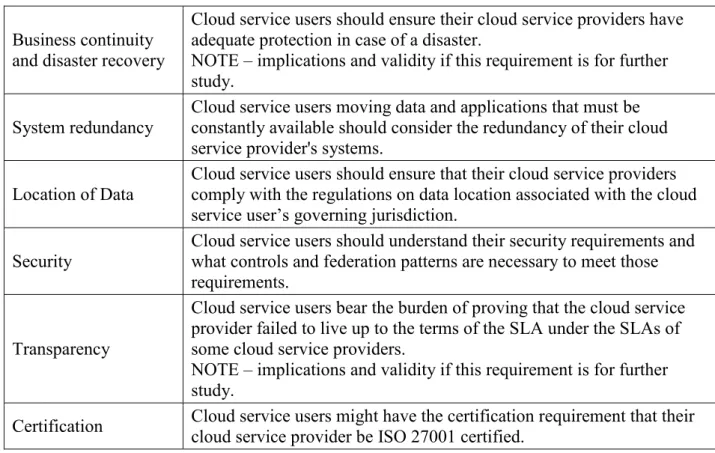
Table 3 – Cloud service user’s SLA requirements
Component Description
Responsibilities
Cloud service users should be responsible for limits on system usage and restrictions on the type of data that can be stored.
NOTE – implications and validity if this requirement is for further study.
Business continuity and disaster recovery
Cloud service users should ensure their cloud service providers have adequate protection in case of a disaster.
NOTE – implications and validity if this requirement is for further study.
System redundancy
Cloud service users moving data and applications that must be constantly available should consider the redundancy of their cloud service provider's systems.
Location of Data
Cloud service users should ensure that their cloud service providers comply with the regulations on data location associated with the cloud service user’s governing jurisdiction.
Security
Cloud service users should understand their security requirements and what controls and federation patterns are necessary to meet those requirements.
Transparency
Cloud service users bear the burden of proving that the cloud service provider failed to live up to the terms of the SLA under the SLAs of some cloud service providers.
NOTE – implications and validity if this requirement is for further study.
Certification Cloud service users might have the certification requirement that their cloud service provider be ISO 27001 certified.
8.4.2 A cloud service provider’s perspective
There are a number of features that cloud service users should consider for SLA in a cloud infrastructure.
Table 4 – Cloud service user’s SLA requirements
Component Description
Security
Cloud service provider must understand what they must deliver to the cloud service users to enable the appropriate controls and federation patterns.
Data encryption The details of the encryption algorithms and access control policies should be specified in the SLA.
Privacy Regulations applicable in the cloud service user’s governing jurisdiction shall be respected. Data retention and
deletion Regulations applicable in the cloud service user’s governing jurisdiction shall be respected. Hardware erasure and
destruction
Cloud service providers should offer the added protection of zeroing out memory space after a consumer powers off a VM.
Regulatory compliance
Cloud service providers must be able to prove their compliance if regulations must be enforced.
Transparency Cloud service providers must be proactive in notifying consumers when the terms of the SLA are breached for critical data and applications. Certification Cloud service provider is responsible for proving their certification and
SLA monitoring
The cloud service provider should be able to monitor the quantitative parameters of the applicable SLA, when it is feasible and relevant. Note: In practice, an SLA may contain non-quantitative parameters, such as specific regulations, citizenship requirements, and business process standards (e.g. ISO 20000). Cloud services may have different types of SLAs.
8.4.3 Common features
There are a number of common features that should be considered for SLA in a cloud infrastructure.
Table 5 – Common SLA requirements Component Description
Auditability An SLA should make it clear how and when those audits take place.
Metrics Monitoring and auditing require something tangible that can be monitored as it happens and audited after the fact. The metrics of an SLA must be objectively defined and preferably broadly used.
Human interaction
Although on-demand self-service is one of the basic characteristics of cloud computing, the fact remains that there will always be problems that can only be resolved with human interaction. These situations must be rare, but many SLAs will include guarantees about the cloud service provider's responsiveness to requests for support.
Inter-cloud service brokers and resellers
Inter-cloud service brokers and resellers must be able to prove their compliance if regulations must be enforced.
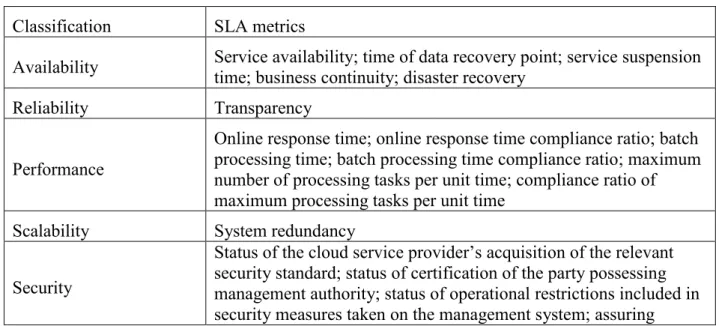
8.4.4 Classification of SLA metrics
SLA metrics can be classified in a number of categories. These include availability, performance and security.
Table 6 – SLA metrics classification
Classification SLA metrics
Availability Service availability; time of data recovery point; service suspension time; business continuity; disaster recovery
Reliability Transparency
Performance
Online response time; online response time compliance ratio; batch processing time; batch processing time compliance ratio; maximum number of processing tasks per unit time; compliance ratio of maximum processing tasks per unit time
Scalability System redundancy
Security
Status of the cloud service provider’s acquisition of the relevant security standard; status of certification of the party possessing management authority; status of operational restrictions included in security measures taken on the management system; assuring
confidentiality of data transmitted between cloud systems; data location; status of acquisition of a log for detection of malicious acts; period during which a log is kept for detection of malicious acts; status of communication control to block malicious
communication; status of measures against network congestion to circumvent denial of service (DoS)/distributed denial of service (DDoS) attacks; implementation of measures against malware; certification.
Data Management Data encryption; privacy; data retention and deletion; hardware erasure and destruction
Serviceability Policy of maintenance; human interaction
An example of SLA metrics is shown in Appendix III.
8.4 Management
Security management: It is expected that a cloud infrastructure supports integrated management of the IT security and network security.
Performance management: It is expected that a cloud infrastructure supports integrated management of performance from an end-to-end perspective (including management of both IT and network performances).
Accounting management: It is expected that a cloud infrastructure supports integrated accounting management of both network and IT sides.
Customer self-monitoring and supervision (according to the SLAs): It is expected that a cloud infrastructure provides capabilities to cloud service users for service-level self-monitoring and automatic supervision of the resources allocated to them if allowed, included and according to the SLAs.
Unified management: It is expected that cloud infrastructure deployments support unified management platforms on which the various OSSs can be built on. This allows rapid deployment of new OSSs as well as unified management and scheduling. In order to support unified management platforms, unified data management is expected to be supported.
Resource management:
It is expected that a cloud infrastructure supports capabilities for resource planning, discovery, reservation, allocation, release and monitoring;
Unified resource management: It is expected that a cloud infrastructure supports unified management and on-demand distribution of heterogeneous computing, storage and network resources based on virtualization.
8.5 Inter-cloud support
8.5.1 Matching between QoS requirements and SLA, and policy negotiation
This capability deals with the matching between QoS requirements (requested by cloud service users), and SLAs (proposed by the cloud service providers), to enable the multiple interworked cloud service providers to satisfy the user’s QoS requirements. This capability deals also with negotiation of the service provisioning policies associated with different cloud service providers. The QoS requirements of a given cloud service are expected to be met by appropriate interworking with selected cloud service providers, even in the event of service performance degradation or of a disaster.
The general requirements for this capability are:
- In order for the inter-cloud service brokering capability to compare cloud service user’s QoS requirements with the SLAs offered by other cloud service providers’ infrastructures, the QoS and performance aspects of the SLAs of cloud infrastructures shall be presented (publication or distribution) using standard formats.
- It should be possible to compare, negotiate, and settle down service provisioning policies between multiple cloud service providers (for example, based on the settlement, these cloud service providers may be considered as a trusted group for inter-cloud support).
NOTE - In this clause, policy refers to a way for a CSP to provide services in terms of presumed reliability, including its backup scheme and target service levels. The policy impacts on SLAs. Policies may be different among CSPs. Policies may be negotiated beforehand and settled down. This process refers to policy negotiation.
8.5.2 Resource management
This capability deals with the management of resource configurations in a secure way for each service across multiple cloud infrastructures.
The general requirements for this capability are:
- It should be possible to describe resource information (e.g. resource type, resource status, etc.) in a standard manner, in order to be able to manage resources across multiple cloud infrastructures. - It should be possible to update cloud infrastructure’s configuration information across multiple cloud infrastructures in synchronization with events (e.g., reserve or release of resources) involving multiple cloud infrastructures.
8.5.3 Resource and service status monitoring
This capability deals with the collection and monitoring of the various status attributes of cloud infrastructure’s resources (e.g. usage, performance, service quality etc.) residing in the interworked CSPs.
By monitoring status information about resource availability (e.g., dead/alive status of machines) or service level performance degradation (e.g., delay or response time degradation), a CSP can initiate actions to maintain the service availability with the help of other CSPs (see inter-cloud use cases in Annex A).
The general requirements for this capability are:
- It should be possible to, periodically or on a request basis, collect information about the usage and performance status of the resources of the different CSPs’ cloud infrastructures. - It should be possible to, periodically or on a request basis, collect information about the
- It should be possible to exchange monitoring information, in commonly-defined ways, across different CSPs’ cloud infrastructures. In case of mutual monitoring among interworked CSPs, it should be possible to maintain the appropriate level of security.
8.5.4 Resource performance estimation and selection
This capability deals with the resource selection from those which are candidate and have been already reserved in other CSPs’ cloud infrastructures. This capability estimates the achievable performance by available reserved resources and assists the selection of the resources to be effectively used from all the reserved resources.
The general requirements for resource planning are:
- It should be possible to estimate the achievable performance of available reserved resources (e.g. computing resources, storage resources, input/output capacity between storages, network bandwidth) in other CSPs’ cloud infrastructures.
8.5.5 Resource discovery and reservation
This capability deals with search, discovery, and reservation of the available resources in other CSPs’ cloud infrastructures. This capability deals also with reservation acknowledgement for the candidate resources which have been tentatively reserved in other CSPs’ cloud infrastructures. The general requirements for resource discovery and reservation are:
- It should be possible to search resources available in other CSPs’ cloud infrastructures. - It should be possible to reserve the discovered resources in other CSPs’ cloud
infrastructures.
- It should be possible to provisionally reserve the discovered resources, i.e. to keep the resources to be used (as candidates), for later acknowledgement (for some of them) or release (for others).
- It should be possible to search for resources based on different priorities (e.g., in a different order of searching).
NOTE - Quality requirements may vary from service to service and each resource contribution to the service quality may vary as well. For example, if latency is critical, it should be possible to firstly reserve servers that are near to the user, and then network resources. In contrast, if bandwidth is critical, it should be possible to firstly reserve networks that can provide sufficient bandwidth, and then search for available servers that are connected to those networks.
- It should be possible to reserve available resources based on different priorities (e.g. early recovery, required quality guarantee, service type etc.).
NOTE - For example, a huge quantity of resources are required for recovery from a large-scale disaster. However, all required resources may not necessarily be available. Then, it should be possible, to forcefully reserve resources for lifeline services rather than for other services.
8.5.6 Resource setup and service activation
This capability deals with the setup of the reserved resources in the remote interworked CSPs and the activation of the middleware and applications for service provision over the remote CSPs. This includes connecting cloud infrastructures via networks, remotely activating (i.e. invoking) application or middleware, and transferring or copying data to enable the use of resources in other CSPs’ cloud infrastructures.
- It should be possible to remotely set up reserved resources in the remote cloud infrastructure, and to access their configuration and policy settings from the requesting cloud infrastructure.
8.5.7 Switch-over and switch-back of the cloud service user access
This capability deals with the switch-over of the cloud service user access from the original cloud infrastructure to other cloud infrastructures to which the services may be delegated in order to cope with a disaster or degradation in service performance. It also deals with the switch-back to the original cloud infrastructure when it becomes able to provide the services again.
The general requirements for switch-over and switch-back of the cloud service user access are: - It should be possible to switch over the cloud service user access to the substitute cloud
infrastructure without any cloud service user’s operations, in order to allow cloud service users to use services similarly to the pre-disaster situation.
- It should be possible to switch over the cloud service user access without any cloud service user’s operations if load distribution between interworking cloud infrastructures is no longer needed.
- It should be possible to switch back the cloud service user access to that of the original cloud infrastructure, when the affected original cloud infrastructure has recovered from a disaster or when load distribution between interworking cloud infrastructures is no longer needed.
8.5.8 Releasing resources
This capability deals with release of resources reserved and used from other cloud infrastructures by judging that cloud interworking is no longer needed based on monitoring results, e.g. that disaster recovery has been completed or load distribution has been adopted.
The general requirements for release of reserved resources are:
- It should be possible to release other resources that were activated when the reserved resources began to be used, to update the remote cloud infrastructure’s configuration information, and to erase and/or transfer back the previously received data.
8.5.9 Inter-cloud service brokering
The inter-cloud service brokering capability (for support of inter-cloud as inter-cloud service broker, as described in clause 5) is required to provide the following key features:
Service intermediation: enhancing a given service, by improving some specific capability and providing value-added services.
Service aggregation: combining and integrating multiple services into one or more new services, with integration and secure movement of data.
Service arbitrage: similarly to service aggregation, except that the services being aggregated are not fixed.
Annex A
Use cases
A.1 From the perspective of cloud service users and cloud service providers A.1.1 Desktop as a service
A.1.1.1 Introduction
DaaS is defined as the capability provided to the cloud service users to use virtualized desktops from a cloud service provider in the form of outsourcing.
Figure 6 shows the concept of DaaS.
Figure 6 - The concept of DaaS
Instead of maintaining and running a desktop operating system and applications on the local storage of remote clients, a central server located in the cloud retains the virtualized desktops, and all of the used applications and data are kept and run centrally.
Based on application streaming and virtualization technologies, cloud service users can access the desktop operating system and applications through a completely hosted system.
Further details on DaaS-related characteristics and technical solutions are provided in Appendix I.
Cloud Service Users
Cloud Service Users
Cloud Infrastructure
Central Server Virtualized Desktops
A.1.1.2 General use case of DaaS
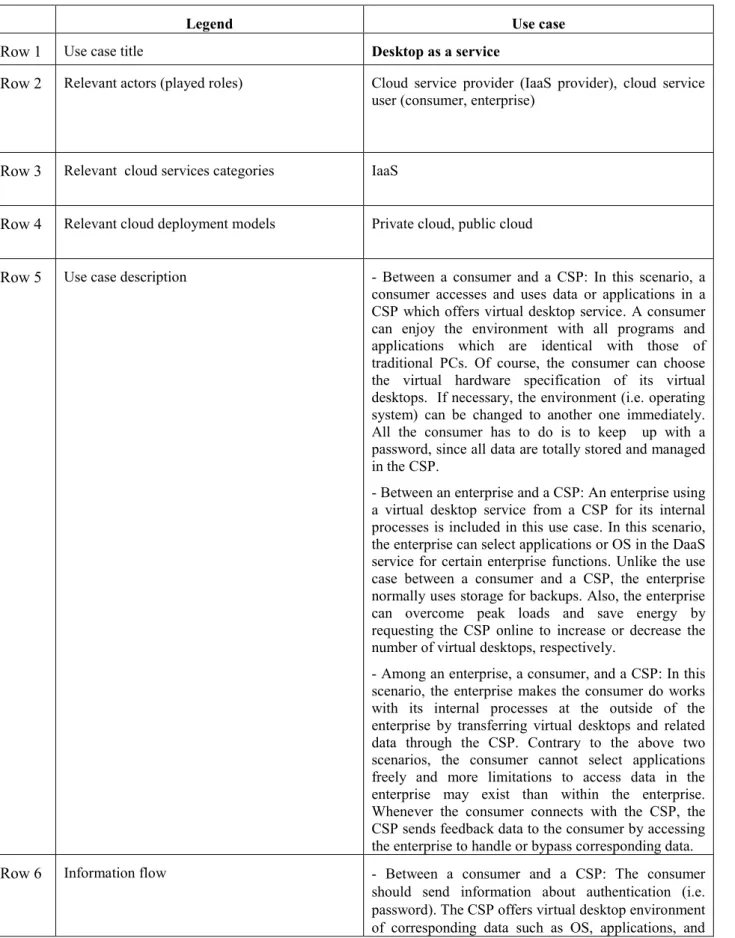
Table 7 – Desktop as a service use case
Legend Use case
Row 1 Use case title Desktop as a service
Row 2 Relevant actors (played roles) Cloud service provider (IaaS provider), cloud service user (consumer, enterprise)
Row 3 Relevant cloud services categories IaaS
Row 4 Relevant cloud deployment models Private cloud, public cloud
Row 5 Use case description - Between a consumer and a CSP: In this scenario, a consumer accesses and uses data or applications in a CSP which offers virtual desktop service. A consumer can enjoy the environment with all programs and applications which are identical with those of traditional PCs. Of course, the consumer can choose the virtual hardware specification of its virtual desktops. If necessary, the environment (i.e. operating system) can be changed to another one immediately. All the consumer has to do is to keep up with a password, since all data are totally stored and managed in the CSP.
- Between an enterprise and a CSP: An enterprise using a virtual desktop service from a CSP for its internal processes is included in this use case. In this scenario, the enterprise can select applications or OS in the DaaS service for certain enterprise functions. Unlike the use case between a consumer and a CSP, the enterprise normally uses storage for backups. Also, the enterprise can overcome peak loads and save energy by requesting the CSP online to increase or decrease the number of virtual desktops, respectively.
- Among an enterprise, a consumer, and a CSP: In this scenario, the enterprise makes the consumer do works with its internal processes at the outside of the enterprise by transferring virtual desktops and related data through the CSP. Contrary to the above two scenarios, the consumer cannot select applications freely and more limitations to access data in the enterprise may exist than within the enterprise. Whenever the consumer connects with the CSP, the CSP sends feedback data to the consumer by accessing the enterprise to handle or bypass corresponding data.
Row 6 Information flow - Between a consumer and a CSP: The consumer should send information about authentication (i.e. password). The CSP offers virtual desktop environment of corresponding data such as OS, applications, and
user data by virtual desktop delivery protocol (VDDP). In case of the consumer’s change in the virtual desktop environment, including virtual hardware specification, the consumer can transfer additional information related with selection.
- Between an enterprise and a CSP: This case is similar to that between a consumer and a CSP, except with regard to controlling the number of virtual desktops. The enterprise can send warning information when an abnormal situation (i.e. peak load) occurs.
- Among an enterprise, a consumer, and a CSP: Information for authentication flows from the consumer to the enterprise through the CSP. Once the consumer is identified, information regarding internal processes is transferred to the CSP and is dispatched to the end user by VDDP. The consumer’s output data is stored to the CSP or the enterprise, but there is no path for selection information as in the first case since the consumer cannot have an authority to alter the virtual desktop environment.
Row 7 High-level figure describing the use case
Row 8 Derived requirements for the cloud ecosystem - Consumers require accessing their desktop environments independently of locations, with their various devices.
- Desktop environment needs to guarantee the business continuity and a recovery solution for a system failure. - Consumers desire to use their personal tasks, separating business computing.
- Consumers eager to run various applications as in traditional PCs.
Row 9 Other information specific to the use case
A.1.1.3 Specific use case of DaaS - Office automation of development-oriented enterprise Table 8 – Office automation of development-oriented enterprise use case
Legend Use case
Row 1 Use case title Office automation of development-oriented enterprise
Consumer Enterprise
Cloud Infrastructure
Cloud Service Provider
Row 2 Relevant actors (played roles) Cloud service provider (IaaS provider), cloud service user (consumer, enterprise)
Row 3 Relevant cloud services categories IaaS
Row 4 Relevant cloud deployment models Private cloud, public cloud
Row 5 Use case description In this scenario, the end users access the enterprise applications and data hosted in virtual desktops which are created within a DaaS server. Common applications of this type include online word processing, email, communication, co-operating development, and so on. The sales staff also can view customer information and marketing records on the enterprise website. The DaaS server interacts with traditional enterprise IT facilities to achieve many control tasks, for instance, using DHCP to assign an IP address for thin client, leveraging internal DNS server to resolve local host names, and consulting AD to authenticate user desktop sessions.
Row 6 Information flow
Row 7 High-level figure describing the use case
Row 8 Derived requirements for the cloud ecosystem - Authorization: Currently, the most virtual desktop solutions care for enterprise’s internal usage only, and use local security facilities to authenticate user desktop session. This indeed cannot satisfy the needs for small and medium enterprises (SME) because they cannot afford the capital investment of virtual desktop implementation. Being aware of this huge market opportunity, telecom operators are driving into public cloud based virtual desktop implementation aimed at providing desktop VM services for SME based on their own existing IT Infrastructure, e.g. RADIUS. So current virtual desktop solutions must be changed to accommodate new security requirements.
- Coherency: Since a variety of VM infrastructure implementations exist today, there is an increasingly urgent demand that a high-level abstract layer should provide unified access methods without concerning the technical details of the underlying infrastructure. Unfortunately, almost all virtual desktop implementation is bundled with a specific VM infrastructure. Coherency
is needed in order to increase the expandability and scalability of DaaS system.
- Equipment specification: Thin client as the new coming user-side equipment needs to be standardized, including electric characteristics, physical port, video decode, desktop protocols and others, in order to carry more powerful applications and further enhance end-user experience just like the rich client did.
Row 9 Other information specific to the use case
A.1.1.4 Specific use case of DaaS - Customer service call centre
In a traditional telecommunication operator call centre (customer support), various issues exist from different perspectives: a growing complexity of the application environment, the need of frequent updates for the computer configurations, the presence of a large number of PCs with high energy consumption, a multi-level IT environment with high maintenance costs, no uniform PC/terminal configurations, and multiple PC/terminal management platforms.
This case describes a cloud-based telecommunication call centre, which provides a solution for the main issues of a traditional call centre. This cloud-based customer service call centre can also be seen as a specific use case of DaaS.
The replacement of PCs/terminals by the combination of one (or multiple) cloud server(s) and DaaS terminals can reduce both hardware and software cost. In particular, DaaS terminals consume less power and run without fan cooling; software is only installed and configured on the cloud server as a SaaS application; upgrades and maintenance are performed only on the cloud server; DaaS terminal do not need to be protected (no data being stored in the DaaS terminals, they are not a target of security attacks).
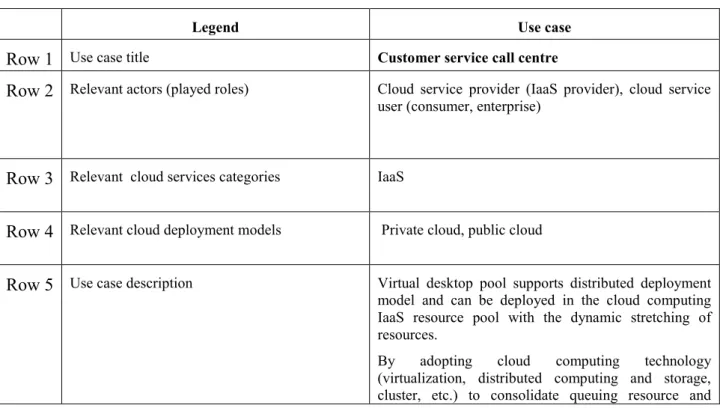
Table 9 – Customer service call centre use case
Legend Use case
Row 1 Use case title Customer service call centre
Row 2 Relevant actors (played roles) Cloud service provider (IaaS provider), cloud service user (consumer, enterprise)
Row 3 Relevant cloud services categories IaaS
Row 4 Relevant cloud deployment models Private cloud, public cloud
Row 5 Use case description Virtual desktop pool supports distributed deployment model and can be deployed in the cloud computing IaaS resource pool with the dynamic stretching of resources.
By adopting cloud computing technology (virtualization, distributed computing and storage, cluster, etc.) to consolidate queuing resource and
desktop resources, unified phone call dispatching and delivery and maintenance of the desktop can be achieved in an intensive way.
Row 6 Information flow
Row 7 High-level figure describing the use case
Row 8 Derived requirements for the cloud ecosystem - Management convenience: New methods, such as virtual desktops, are required to achieve desktop and application delivered centrally as needed. And centrally maintenance of a virtual desktop for the service representatives could be achieved so as to achieve dynamically deploying, scaling and upgrading the virtual desktops.
- Security assurance: It must be guaranteed that the virtual desktops and the data in the call centre prevented from stolen and loosen, also the system in the data centre prevented from attacking by computer virus or hackers.
- Cost saving: It is desired that the total cost of ownership could be reduced. So the capital expenditure (CAPEX) or operating expenditure OPEX should be reduced. Since virtual desktop mainly using thin client device so the power consumption could be brought down than PCs, and manpower for operational maintenance could also be brought at the same time. - Terminal diversity: multiple kinds of terminal devices are desired to be used, e.g. PC, thin client, pad computer, even intelligent mobile phones could be used.
Row 9 Other information specific to the use case
A.1.2 Service delivery platform as a service (SDPaaS) A.1.2.1 Introduction
The term “service delivery platform” (SDP) [b-Moriana-SDP2.0] usually refers to an environment-enabling efficient creation, deployment, execution, orchestration and management of one or more classes of services. SDPs apply to both consumer and business applications.
As SDPs evolve, they often require integration of telecom and IT capabilities and the creation of services beyond technology and network boundaries. SDPs available today are optimized for the delivery of a service in a given technological or network domain (examples of such SDPs include IMS, IPTV, M2M/IoT, etc.) and application developers cannot fully collaborate and share services.
SDPs typically provide a service-creation environment, a service orchestration and execution environment, a service-delivery control environment, and abstraction functions for network service capabilities.
Through the abstraction of network service capabilities and the introduction of new service capabilities, SDPaaS (Service Delivery Platform as a Service) can provide service integration and convergence of capabilities offered by different network domains. Via the exposure of SDPaaS APIs by cloud service providers, cloud service users can access anytime and anywhere cloud converged services supported by easily manageable and chargeable capabilities.
By expanding the service delivery process of the traditional SDPs, SDPaaS not only supports service capability operations, but also provides platform capabilities for full collaboration and service sharing among application developers, significantly accelerating the development cycle of end-to-end applications.
Also, SDPaaS allows traditional service providers deploying SDP platforms to be cloud service providers offering SDPaaS.
A.1.2.2 SDPaaS use case
Table 10 – SDPaaS use case
Legend Use case
Row 1 Use case title Service delivery platform as a service (SDPaaS)
Row 2 Relevant actors (played roles) Cloud governmental/public institution), cloud service providers service users (consumer, enterprise, (SaaS, CaaS, PaaS, IaaS, NaaS provider and inter-cloud), cloud service partners (application developer, content provider)
Row 3 Relevant cloud services categories PaaS、SaaS/CaaS
Row 4 Relevant cloud deployment models Public cloud, private cloud, community cloud, hybrid cloud
Row 5 Use case description The traditional SDPs are not able to support multi-domain service convergence, or an environment where application developers can fully collaborate and share services.
In the new world of converged service delivery, SDP should also be considered not just as a core function within a telecommunication service provider infrastructure, but as a number of interconnected, distributed service nodes