International Journal of Advanced Research in
Computer Science and Software Engineering
Research Paper
Available online at:
www.ijarcsse.com
Use of Wireless Network to Extract Password Using Packet Analyzer
Gurleen kaur*, Mandeep Kaur RESEARCH SCHOLAR(CSE)
India
Abstract— This paper is based on the Literature survey. Packets are units of data traveling in computer networks and they carry all-important information from source to destination. They also provide us with network activity and its behavioral description also including the information regarding network traffic. They are many tools available to analyze the network traffic, packet etc. in this we discuss an architecture of packet analyzer and implementation using network analyzer Wireshark tool formally knows as “Ethereal” a free packet sniffer application that has tools to capture, view and analyze packets. A network packet analyzer will try to capture network packets and tries to display that packet data as detailed as possible. You could think of a network packet analyzer as a measuring device used to examine what's going on inside a network cable.
Keywords— Data, Network, packets analyzer tools, sniffer
I. INTRODUCTION
Packets contain a lot of useful information about password activity that can be used as a description of the general password behavior. Cain and Abel a useful tool for system and network administrator to capture such kind of network information. Packets are units of data traveling in these computer networks and they can carry all the important information from its source to final destination. Packets also contain a wealth of information about the network infrastructure, topologies and provide the information of network traffic. Password packet analyzer will be very useful to people who have the intention to look into more details of what is actually going on inside the network. This analyzer provides additional information about sniffing which users may find helpful. Packet Analyzer also detects network misuse by internal and external users and also handles the documenting regulatory compliance through logging all perimeter and endpoint traffic. This topic is similar to the network packet analyzer. Network packet analyzer provides the information about the network traffic but in this topic it is also provide the information about recover password as well as provide the information of network traffic. This tool to provide forensics, criminal investigators, security officers and government authorities with the ability to retrieve a variety of passwords stored on a PC.
How can I detect a Packet Analyzer
ARP method
DNS method
Address Resolution Protocol Method
ARP is a protocol used to find mappings between the layer 3 Internet Protocol IP address and the layer 2 MAC address.
Sending node constructs and sends a ARP request packet to all nodes in the same LAN, the node with the host address equal to the destination address in the request returns a ARP response packet including its Mac address
Figure No: - 1 Over View ARP
ARP and RARP
Network Layer
Link Layer IP
ARP
NetworkAccessRARP
Media
ICMP IGMP
Transport Layer
March - 2014, pp. 1100-1105
Note:
o The Internet is based on IP addresses
o Data link protocols (Ethernet, FDDI, ATM) may have different (MAC) addresses
The ARP and RARP protocols perform the translation between IP addresses and MAC layer addresses We will discuss ARP for broadcast LANs, particularly
Figure No: - 2 ARP & RARP
Figure No: - 3 ARP Packet Format DNS Method
DNS is a host name to IP address translation service DNS is
o A distributed database implemented in a hierarchy of name servers
o An application level protocol for message exchange between clients and servers
Why DNS?
It is easier to remember a host name than it is to remember an IP address.
An name has more meaning to a user than a 4 byte number.
Applications such as FTP, HTTP, email, etc., all require the user to input a destination.
The user generally enters a host name.
The application takes the host name supplied by the user and forwards it to DNS for translation to an IP address.
DNS Services
Besides the address translation service, DNS also provides the following services:
o Host aliasing: a host with a complicated name can have one or more aliases that are simpler to remember,e.g., relay1.west-coast.media.com -> media.com. The longer name is the canonical hostname, the shorter the alias hostname.
o Mail server aliasing: same as above, aliases can exist for long canonical host names.
o Load Balancing: a set of servers can have one name mapped onto several machines.
DNS provides the full list of names to the end user’s application which generally takes the first one in the list. DNS rotates the names on the list.
How does it work?
DNS works by exchanging messages between client and server machines.
A client application will pass the destination host name to the DNS process (in Unix referred to as the gethostbyname() routine) to get the IP address.
The application then sits and waits for the response to return.
Why not centralize DNS?
RARP
Ethernet MAC address (48 bit)ARP
IP address (32 bit) Destination address 6ARP Request or ARP Reply
28 Source address 6 2 CRC 4 Type 0x8060 Padding 10 Ethernet II header
Hardware type (2 bytes) Hardware address
length (1 byte)
Protocol address
length (1 byte) Operation code (2 bytes)
Target hardware address*
Protocol type (2 bytes)
Source hardware address* Source protocol address*
Target protocol address*
March - 2014, pp. 1100-1105
Single point of failure
Traffic volume
Distant centralized database
Maintenance
II SYSTEM STUDY AND ANALYSIS
Existing System
In late 1997, Gerald Combs needed a tool for tracking down networking problems and wanted to learn more about networking, so he started writing Ethereal (the former name of the Wireshark project) as a way to solve both problems. Ethereal was initially released, after several pauses in development, in July 1998 as version 0.2.0. Within days, patches, bug reports, and words of encouragement started arriving, so Ethereal was on its way to success. Not long after that, Gilbert Ramirez saw its potential and contributed a low-level dissector to it. In October, 1998, Guy Harris of Network .Appliance was looking for something better than tcpview, so he started applying patches and contributing dissectors to Ethereal. In late 1998, Richard Sharpe, who was giving TCP/IP courses, saw its potential on such courses, and started looking at it to see if it supported the protocols he needed. While it didn't at that point, new protocols could be easily added. So he started contributing dissectors and contributing patches. The list of people who have contributed to the project has become very long since then, and almost all of them started with a protocol that they needed that Wireshark or Ethereal did not already handle. So they copied an existing dissector and contributed the code back to the team. In 2006 the project moved house and re-emerged under a new name: Wireshark. In 2008, after ten years of development, Wireshark finally arrived at version 1.0. This release was the first deemed complete, with the minimum features implemented. Its release coincided with the first Wireshark Developer and User Conference, called SharkFest Wireshark is a network packet analyzer. A network packet analyzer will try to capture network packets and tries to display that packet data as detailed as possible. You could think of a network packet analyzer as a measuring device used to examine what's going on inside a network cable, just like a voltmeter is used by an electrician to examine what's going on inside an electric cable (but at a higher level, of course). In the past, such tools were either very expensive, proprietary, or both. However, with the advent of Wireshark, all that has changed. Wireshark is perhaps one of the best open source packet analyzers available today.
Here are some examples people uses Wireshark for:
Network administrators use it to troubleshoot network problems Network security engineers use it to examine security problems Developers use it to debug protocol implementations
People use it to learn network protocol internals
Beside these examples, Wireshark can be helpful in many other situations too. Here are some things Wireshark does not provide:
Wireshark isn't an intrusion detection system. It will not warn you when someone does strange things on your network that he/she isn't allowed to do. However, if strange things happen, Wireshark might help you figure out what is really going on.
Wireshark will not manipulate things on the network, it will only "measure" things from it. Wireshark doesn't send packets on the network or do other active things (except for name resolutions, but even that can be disabled).
Proposed system
There are lots of tools available for the sake of Extract Password Packet Analyzer. We will use some tools in our research and will examine them for their efficiency and correctness. First of all we will use –
Wireshark: - Wireshark is a network packet analyzer. A network packet analyzer will try to capture network packets and tries to display that packet data as detailed as possible. You could think of a network packet analyzer as a measuring device used to examine what's going on inside a network cable, just like a voltmeter is used by an electrician to examine what's going on inside an electric cable (but at a higher level, of course).In the past, such tools were either very expensive, proprietary, or both. However, with the advent of Wireshark, all that has changed. And another software tool is Cain and Abel.
Cail and Abel: - This tool is depend upon client server architecture and provide information regarding how to retrieve password on local or remotely.
III EXPERIMENTAL STUDY
Wireshark is a software protocol analyzer, or "packet sniffer" application, used for network troubleshooting, analysis, software and protocol development, and education. A packet sniffer (also known as a network analyzer or protocol analyzer) is computer software that can intercept and log data traffic passing over a data network. As data streams travel back and forth over the network, the sniffer "captures" each protocol data unit (PDU) and can decode and analyze its content according to the appropriate RFC or other specifications. Wireshark is programmed to recognize the structure of different network protocols. This enables it to display the encapsulation and individual fields of a PDU and interpret their meaning. To capture PDUs the computer on which Wireshark is installed must have a working connection to the network
March - 2014, pp. 1100-1105
and Wireshark must be running before any data can be captured. When Wireshark is launched, the screen below is displayed.
Figure No 4Wireshark Menu Bar
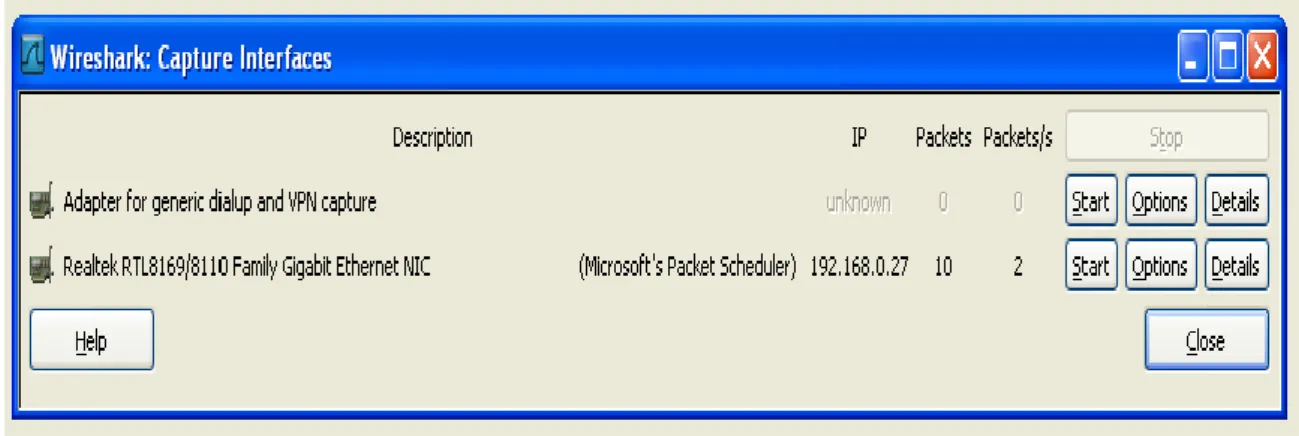
To start data capture it is first necessary to go to the Capture menu and select the Options choice. The Options dialog provides a range of settings and filters which determines which and how much data traffic is captured.
Figure No 5 Wireshark Capture Interfaces
This main display window of Wireshark has three panes.
Figure No 6 Wireshark Capture Interfaces
The PDU (or Packet) List Pane at the top of the diagram displays a summary of each packet captured. By clicking on packets in this pane, you control what is displayed in the other two panes. The PDU (or Packet) Details Pane in the middle of the diagram displays the packet selected in the Packet List Pane in more detail. The PDU (or Packet) Bytes Pane at the
Packet List
Pane
Packet Details Pane
Packets Bytes
Pane
March - 2014, pp. 1100-1105
bottom of the diagram displays the actual data (in hexadecimal form representing the actual binary) from the packet selected in the Packet List Pane, and highlights the field selected in the Packet Details Pane.
IV RESULTS AND DISCUSSIONS
Capturing the packets generated by the Ping program. You may recall that the Ping program is simple tool that allows anyone to verify if a host is live or not. The Ping program in the source host sends a packet to the target IP address; if the target is live, the Ping program in the target host responds by sending a packet back to the source host. As you might have guessed both of these Ping packets are ICMP (Internet Control Message Protocol) packets.
Do the following
Opening the Windows Command Prompt application
Start up the Wireshark packet sniffer, and begin Wireshark packet capture.
The ping command is in c:\windows\system32, so type either “ping –n 10 hostname” or “c:\windows\system32\ping –n 10 hostname” in the MS-DOS command line (without quotation marks), where hostname is a host on another continent. If you’re outside of Asia, you may want to enter www.ust.hk for the Web server at Hong Kong University of Science and Technology. The argument “-n 10” indicates that 10 ping messages should be sent. Then run the Ping program by typing return.
When the Ping program terminates, stop the packet capture in Wireshark.
At the end of the experiment, your Command Prompt Window should look something like Figure 6.1. In this example, the source ping program is in Massachusetts and the destination Ping program is in Hong Kong. From this window we see that the source ping program sent 10 query packets and received 10 responses. Note also that for each response, the source calculates the round-trip time (RTT), which for the 10 packets is on average 375 msec.
Figure No 7 Command Prompt window after entering Ping command
Figure No 8 Wireshark capture of ping packet with ICMP packet expanded
March - 2014, pp. 1100-1105
For one of the programming assignments you created a UDP client ping program. This ping program, unlike the standard ping program, sends UDP probe packets rather than ICMP probe packets. Use the client program to send a UDP packet with an unusual destination port number to some live host. At the same time, use Wireshark to capture any response from the target host.
V CONCLUSION
We presented an architecture and implementation that enables using the popular network analyzer Wireshark to inspect packet data exported by routers, switches, and monitoring probes. We described the system components and their realization, evaluated the system performance with trace files captured in two different networks, and discussed the advantages and limitations of our approach compared to conventional distributed network analysis systems. We have also highlighted the capabilities of Wireshark in packet data interpretation and data handling too. Wireshark, in this experiment has been used primarily in Access Control List filtering. Many other variations of filtering are available in the Wireshark utility such as filtering based on packet size, filtering based on protocols used, filtering of substrings etc. Thus, with proper use of filtering commands and complementing utilities, Wireshark can be developed into comprehensive intrusion detection software.
FUTURE WORK
Wireshark as a Network Protocol Analyzer has already proven its mettle in all necessary realms. However it still has scope of improvement in it as far as alert generation and heuristic development is concerned. We are working to introduce certain utilities in the source code of Wireshark to overcome the above shortcomings by making Wireshark capable of alert generations.
REFERENCES
[1] Andrew Zonenberg, “Distributed Hash Cracker: A Cross-Platform GPU-Accelerated Password Recovery System “, Rensselaer Polytechnic Institute 110 8th Street Troy, New York U.S.A. 12180, April 28, 2009. [2] Karen Scarfone, Murugiah Souppaya ,” Guide to Enterprise Password Management (Draft) “, National
Institute of Standards and Technology, Gaithersburg, MD 20899-8930, April 2009.
[3] Pallavi Asrodia, Hemlata Patel, “Network Traffic Analysis Using Packet Sniffer”, International Journal of Engineering Research and Applications, (IJERA) ISSN: 2248-9622, Vol. 2, Issue 3, May-Jun 2012, pp.854-856. [4] Timothy Jason Shepard,” TCP Packet Trace Analysis”, Massachusetts Institute of Technology, June, 1990. [5] Luke St.Clair · Lisa Johansen · Kevin Butler · William Enck · Matthew Pirretti · Patrick Traynor · Patrick
McDaniel · Trent Jaeger , “Password Exhaustion: Predicting the End of Password Usefulness”, International Journal of Information Security manuscript No.
[6] CHANDRIKA PALAGIRI ,” NETWORK-BASED INTRUSION DETECTION USING NEURAL NETWORKS”, Department of Computer Science Rensselaer Polytechnic Institute Troy, New York 12180-3590. [7] Zoltán Fehér1, András Veres2, Zalán Heszberger1 ,” Ping-pong Reduction using Sub cell Movement Detection”. [8] Jonathan Shea,” Converting SSFNet Simulation Definition to Genesis Format”, Rensselaer Polytechnic
InstituteTroy, NY 12180.
[9] Chi Yu Chan, “A Network Packet Analyzer with Database Support ”, DEPARTMENT OF COMPUTER SCIENCE RENSSELAER POLYTECHNIC INSTITUTE TROY, NEWYORK 12180 August, 2002.
[10] Holger Dreger,Anja Feldmann,Michael Mai,Vern Paxson, Robin Sommer , “Dynamic Application-Layer Protocol Analysis for Network Intrusion Detection”.
[11] Joseph Gehring Instructor: Janusz Zalewski ,” Packet Analysis Using Wireshark”, Software Projects with Computer Networks CNT 4104 Florida Gulf Coast University Fort Myers, Florida , Fall 2011.
[12] Gerhard M¨unz, Georg Carle, “Distributed Network Analysis Using TOPAS and Wireshark”, Computer Networks and Internet Wilhelm Schickard Institute for Computer Science, University of Tuebingen, Germany. [13] Usha Banerjee, Ashutosh Vashishtha, Mukul Saxena ,” Evaluation of the Capabilities of WireShark as a tool for
Intrusion Detection”.
[14] A. Bivens, L. Gao, M. F. Hulber and B.K. Szymanski, ``Agent-Based Network Monitoring,'' Proc. Autonomous Agents99Conference, Seattle, WA, May 1999, pp. 41-53.
[15] A. Bivens, P. Fry, L. Gao, M.F. Hulber, Q. Zhang and B.K. Szymanski, ``Distributed Object-Oriented Repositories for Network Management,'' Proc. 13th Int. Conference on System Engineering, pp. CS169-174, Las Vegas, NV, August, 1999.
[16] A. Bivens, R. Gupta, I. McLead, B. Szymanski and J. White, ``Scalability and Performance of an Agent-based Network Management Middleware,'' International Journal of Network Management, submitted, 2002.
[17] A. Bivens, M. Embrechts, C. Palagiri, R. Smith, and B.K. Szymanski, ``Network-based Intrusion Detection using Neural Networks,'' Intelligent Engineering Systems through Artificial Neural Networks, Vol. 12, Proc. ANNIE 2002 Conference, November 10-13, 2002, St. Louis, MI, ASME Press, New York, NY, 2002, pp. 579-584. [18] A. Bivens, M. Embrechts, and B.K. Szymanski, ``Forecasting and Mitigating Network Congestion using Neural
Networks,'' 5th Online World Conference on Soft Computing in Industrial Applications,, September 4 - 18, 2000. [19] J. Bivens, M. Embrechts, and B.K. Szymanski, ``Network Congestion Arbitration and Source Problem Prediction
Using Neural Networks,'' Smart Engineering System Design, vol. 4, 2002, pp. 243-252.
[20] J. Bivens, B.K. Szymanski, and M. Embrechts, ``Network Congestion Arbitration and Source Problem Prediction using Neural Networks,'' Proc. Artificial Neural Networks in Engineering, ANNIE'2000, ASME Press,