Evaluating the Impact of Pair Testing on Team
Productivity and Test Case Quality – A Controlled
Experiment
Nosheen Qamar*1,2, Ali Afzal Malik2
1. Department of Computer Science, University of Lahore, Defense Road, Lahore, Pakistan
2. Department of Computer Science, National University of Computer & Emerging Sciences, Faisal Town, Lahore, Pakistan
Corresponding Author: Email: [email protected]
Abstract
One of the main objectives of software testing is to uncover the maximum number of faults while consuming the least amount of resources. This research is an attempt to investigate the utility of an unconventional testing technique called pair testing in achieving this goal. In pair testing, two individuals sit together at one keyboard to test the software. An empirical study was designed and conducted to evaluate the performance of pair testing vis-à-vis conventional testing. Six pairs of testers divided into two different groups - one using pair testing and the other using conventional testing - participated in a controlled experiment involving three separate projects. The productivity of the groups and the quality of their work were quantitatively evaluated and compared. The results of comparison revealed that the group using pair testing spent more effort but the quality of its work was better.
Key Words:
Black box Testing, Empirical Study, Equivalence Partitioning, Pair Testing, Software Testing, Testing1.
Introduction
Despite its challenging nature, software testing is an integral part of the software development lifecycle (SDLC) [1]. Its primary objective is to find anomalies during the execution of software [2]. Generally, two different types of methods are employed to test the quality of software viz. white box testing and black box testing. White box testing techniques focus on the program structure [3]. Black box testing techniques, on the other hand, deal with system functionality without looking at internal structure [4].
Equivalence partitioning [1,2,3] is one of the most widely used black box testing techniques. It is based upon the idea that the domain of a program can be split into a finite number of valid and invalid classes called equivalence classes. Members of the same equivalence class exercise the same functionality(i.e. produce same output). Therefore, only one test case is required for each equivalence class. This eventually reduces the number of test cases required for functional/architectural coverage– a metric used for measuring the proportion of total features that are actually tested[5]. These test cases, however, are designed and documented prior to the testing phase and a tester cannot deviate from these in traditional black box testing [6].
In contrast to the traditional black box testing techniques, Exploratory Testing (ET) [7] lays emphasis on experience-based testing during which a tester’s primary focus is on the execution of tests with minimum planning (i.e. without creation of pre-defined test cases). The activities of designing, execution, and learning from the results of executed tests (used later for designing more tests) are performed simultaneously [8]. The number of practitioners taking interest in this error guessing approach [7][9] has grown recently with an increase in the number of reports and studies highlighting the benefits of exploratory testing [8][10][11][12].
Despite the fact that a lot of work has been done on techniques, languages, and tools to improve the quality of software, around $500 billion are lost every year due to poor software quality [13][14]. According to Santhanam and Hailpern, testing and debugging make up fifty to seventy percent of the total project cost [15]. These figures indicate a lot of room for further improvement.
Past research (discussed in the following section) has shown that a significant improvement in software quality and development productivity can be obtained by using the concept of working in pairs i.e. two individuals sitting side by side at
the same machine while doing programming [16], designing [26][27][28], or documentation [30]. These improvements provided the motivation for us to evaluate the utility of working in pairs while performing exploratory black box testing using the equivalence partitioning technique.
An empirical study was performed to comparethe performance of pair /unconventional testing (exploratory black box testing using equivalence partitioning performed by testers in a pair)with traditional/conventional testing (exploratory black box testing using equivalence partitioning performed by testers working alone). A controlled experiment involving six pairs of testers working on three different projects was designed and conducted to determine whether the benefits of working in pairs reported for other phases of the SDLC are applicable to the testing phase as well.
The rest of the paper is structured as follows. The next section gives a brief summary of related work done in this area. Section 3 contains the details of our experiment and the results obtained. Threats to validity of these results are discussed in section 4. Finally, section 5 concludes this paper by highlighting the main findings and presenting directions for future work.
2.
Related Work
The concept of developing software while working in pairs has been experimented with in different phases of the SDLC. The implementation phase, however, has received the most attention in this regard. The first study on collaborative programming (commonly known as pair programming) was conducted by Nosek [17]. During this study it was observed that collaborative work improved the efficiency of coding. This result was corroborated by other research.
According to Williams et al. [18], for instance, pair programming was 40-50% faster as compared to solo programming. Lui and Chan, also, reported 5% savings in time due to pair programming [19]. Similarly, Müller observed that pair programming halved the time spent on quality assurance activities [20]. Other studies [21-24] highlighted even more benefits of pair programming e.g. higher team spirit, enhanced learning, knowledge management, and higher product quality.
A few researchers, however, could not find supporting evidence. Empirical research by Nawrocki and Wojciechowski, for instance, revealed that there are no noteworthy differences
in development times of traditional groups and groups employing pair programming [25].
Some research has also been done on pair design in which a duo of designers works on the same machine. One member of this duo generates the design while the other monitors its quality [26]. An experiment conducted in an academic setting using computer science students [27] revealed that, as compared to solo designing, pair designing produces a good quality design document in less time. These results were partially supported by an empirical study carried out in a Spanish company. Here they found that, while it took more time to complete the task when using pair designing, the quality improved more than 15% [28].
Limited research has also been carried out to investigate the dividends of documenting software in pairs. Introduced by Scott Ambler [29], pair documentation involves two individuals working collaboratively while writing the software specifications. One member of the pair writes the requirements while the other reviews those requirements. An empirical study conducted on pair documentation [30] revealed that the team using pair documentation was not only more productive than the team using traditional documentation but it also produced a better quality software requirements specification document.
Similar in concept to pair programming, pair design, and pair documentation, pair testing employs two individuals sitting together at one keyboard - one performs the testing and the other reviews it [31]. To the best of our knowledge, so far only one informal study [31] has been conducted on pair testing. The author of that study was a black box tester and different developers (who were working on test-driven development projects) wanted to learn about testing from him. The author involved them in pair testing by pairing up with one developer at a time. First, the pair decided the area of the program that needed to be tested and established a goal of finding bugs using exploratory testing. Later, the author performed exploratory testing and the developer played the role of reviewer and vice versa. The author of this study reports that by implementing pair testing he learned a lot about the application itself. He also found that, with collaboration, it is very easy to find failures that occur occasionally. These findings, however, come from an informal study. They are not rooted in a controlled experiment. This research tries to investigate the utility of pair testing by conducting a controlled experiment. The next section describes the design and results of this experiment in detail.
3.
Experiment
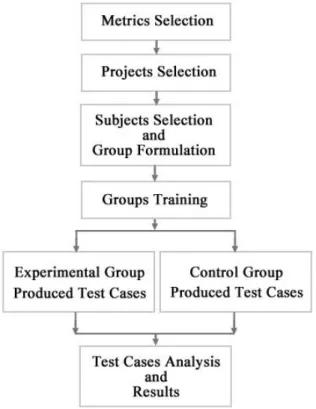
Fig. 1 presents a pictorial summary of the design of our experiment. It shows the main steps of the experiment and the sequence in which these were carried out. The following subsections describe each of these steps in detail.
Fig. 1: Experimental Design
3.1 Metrics Selection
The selection of appropriate metrics to analyze and compare the productivity of teams and quality of produced test cases was the first step of our experiment. As shown in Equation (1), the effort (which is usually measured in person hours) of each team of two members was calculated by aggregating the time spent by its members on testing their assigned project. Information related to time spent was extracted from the time logs filled by the teams as shown in Fig. 2. The value of effort was, in turn, used to calculate the productivity of a team (Equation (2)). The total number of unique test cases produced by a team were divided by the effort it spent to determine its productivity.
n
i i
s PersonHour
1
Effort (1)
Where
n = number of members working on a project Productivity = Unique Test Cases Produced/Effort (2)
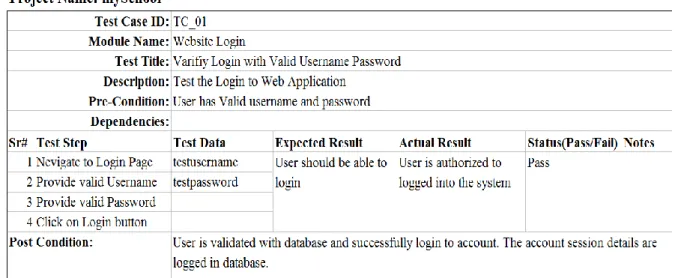
Three metrics i.e. architectural coverage, number of unique detected failures, and test case conformity [32] were used to get insight about the quality of test cases produced by each team. Equations (3)–(5) show the formulas for obtaining the values of these metrics.Tested Features refer to the number of features tested by a team andTest Case Attributes are the attributesof test case template which team members need to provide to document a test case (e.g. test case id, module name, test case title, etc.). Fig. 3 shows a sample test case documented using our test case template.
Architectural Coverage = (Tested Features/Total Features) * 100 (3) Unique Detected Failures = Failed Test Cases (4) Test Case Conformity = (Total Correct Test Case Attributes/Total Test Case Attributes) * 100 (5) Obtaining values of architectural coverage and unique detected failures were relatively straightforward. The former uses a ratio of two counts while the latter represents a simple count. Information related to failures, for instance, can be obtained easily by glancing at the test cases documented using the template. Determining test case conformity, however, requires detailed assessment of a test case. This detailed assessment was done manually by one of the authors. During this assessment, this author checked whether the subjects documented test cases based on the given template i.e. all the required fields (e.g. Test Case ID, Module Name, Test Title, Description, etc.) were filled properly.
Fig. 3: Test Case Template (Filled Samples)
3.2 Projects Selection
Three commercial web-based projects representing three different domains were selected for our experiment. Table I provides a brief overview of these projects. Original project names have been replaced with pseudonyms for reasons related to confidentiality.
The first project - mySchool - is a full-fledged school management system. It includes different student management features e.g. student registration, transfer, leaves, attendance, enrolment, etc. It also covers HR management (e.g. teacher registration, transfer, class/section assignment, re-joining, leaves, etc.), billing (fee submission, fee calculation, fee statements, etc.), grading (grade entry, results calculation, report cards generation, etc.), and various kinds of reports.
The second project - eShop - is an online shopping portal. In this portal, different products are catalogued under specified categories and sub-categories. Customers can, inter alia, search products, add them to the shopping cart, and checkout. A variety of payment options are provided at the time of checkout.
The third and last project - resMenu - is a web application for restaurants and takeaways. Using this online application, customers can book their table if they prefer to dine-in. Customers preferring home delivery can select food items from given menus and place their orders. Apart from online payment, cash-on-delivery is also accepted.
As is clear from the number of modules and features shown in Table I, the mySchool project is the biggest of the three. It is also the most complex of the three projects. All of these three projects have undergone multiple development iterations and each project was developed by a team comprising four to seven software developers. Table 1: Project Details
Project
Pseudonym Domain
No. of Modules
No. of Feature
s
Source Lines of Code
mySchool Education 44 331 659,397
eShop Ecommerce 19 152 547,397
resMenu Hospitality 16 132 101,179
The primary reason for selecting these projects was the deep familiarity of one of the authors with these projects. This knowledge is required to evaluate the quality of test cases produced during the experiment. One of the authors has personally worked on these projects and has, therefore, in-depth knowledge of each project’s internal structure and external behavior. Besides this, as mentioned earlier, each of these projects has undergone multiple iterations and is, therefore, mature enough. This maturity is required to make bug identification a challenging task for the experiment's subjects.
3.3 Subjects Selection and Group
Formulation
After the selection of projects, the next step was the selection of subjects and their grouping. Twelve individuals were selected for this
experiment. Four of these twelve were professional Testing/Quality Assurance (QA) engineers currently working in the industry with roughly the same experience (i.e. around 1 year) and the same educational qualification (i.e. Bachelors degree in Computer Science). The remaining eight participants were final-year undergrad computer science students. All of these students had studied (and passed) the "Software Engineering" and "Software Testing & Quality Assurance" courses. Moreover, all of these students were enrolled in their final year projects (also known as capstone projects).
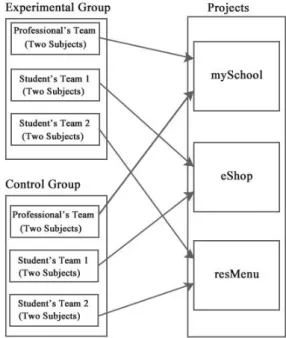
The twelve subjects were divided into two groups – Experimental Group and Control Group. The Experimental Group had to use pair testing while the Control Group had to perform conventional testing. Fig.4 depicts group formulation and project assignment. As shown in this figure, a total of six teams (with two randomly chosen subjects in each team) were formed. Three of these six teams were assigned to the Experimental Group while the remaining three were assigned to the Control Group. Each group contained one team of professionals and two teams of students. In order to evaluate the difference between conventional and pair testing, every project was assigned to one team from each group. The relatively bigger and more complicated mySchool project was assigned to teams containing professionals while the eShop and resMenu projects were assigned to student teams.
Fig. 4: Group Formulation and Project Assignment
3.4 Groups Training
Before starting the actual experiment, both groups had to be trained. Separate two-hour long training sessions were arranged for each team. All of these training sessions were conducted by the same person i.e. one of the authors who had personally worked on these projects before. The goal of these training sessions was to provide an overview of the assigned project, required outcomes, test case template, and general experiment guidelines.
As per the guidelines, the teams in the Experimental Group had to perform pair testing. In other words, they had to work collaboratively using the same computer and the team members had to share their thoughts/ideas with each other while testing the project. On the other hand, teams belonging to the Control Group had to perform conventional testing. Features would be divided among team members and each team member would work independently of the other and, therefore, would be responsible for his/her own part. After completion of work, these team members would merge their respective parts and submit one complete document.
All teams were asked to perform only exploratory blackbox testing of their assigned projects using the equivalence class partitioning technique. All features were supposed to be tested with possible valid and invalid classes.
3.5 Experimental and Control Group
Produced Test Cases
After providing the training, both groups were given 10 working days to test their respective projects. Upon reaching this deadline, all teams submitted their test case documents along with their duly filled time logs.
3.6 Test Cases Analysis and Results
Compilation and analysis of results was the last step of this experiment. The two groups were compared with respect to their effort, productivity, and test cases' quality.Table II depicts the data related to effort. It shows the person hours spent by each team in testing its respective project. This data clearly indicates that, for each project, the team using pair testing spent more effort than the team performing traditional testing. The proportion of the increase in effort is more for the smaller projects (resMenu and eShop) than for the larger project (mySchool). The absolute value of the increase, however, remains between 2 to 4 person hours. This may be
an indication that individuals participating in pair testing need some minimum amount of time to jell together.
Table 2: Comparison w.r.t. Effort Project
pseudonym s
Pair Testing Effort (Person Hours) (Experimental Group)
Solo Testing Effort (Person
Hours) (Control
Group)
mySchool 25 22.5
eShop 11 7.5
resMenu 10 7
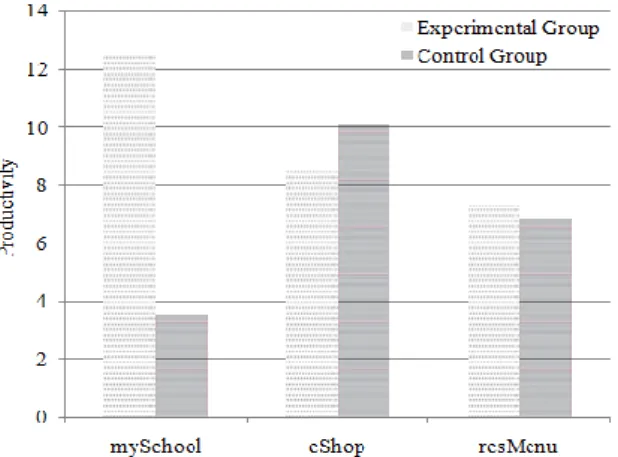
A comparison of the productivity of teams (see Equation (2)) in the Experimental Group and the Control Group is shown in Fig.5. In only one of the three projects (i.e. eShop) the team performing traditional testing is slightly more productive than the team using pair testing. The difference in productivity is not much for smaller projects. For the larger project (i.e. mySchool), however, this difference in productivity is much more pronounced - the team using pair testing is at least three times more productive.
One explanation of this large difference in productivity for the larger project and small difference in productivity of smaller project could be the synergy developed between the testing pair. Initially, the testing pair needs some time to jell and develop a rapport. However, once this understanding has developed and frequencies have matched, the pair becomes more than the sum of its parts.
Fig. 5: Productivity Comparison
Information regarding the test cases produced by different teams in the two groups is summarized in Table III. This information is
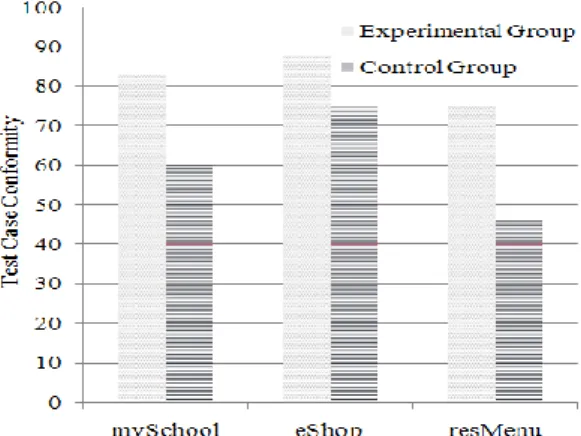
plugged in Equations (3)–(5) to determine the values of the three quality metrics for the output of each team. The comparison of the Experimental Group and the Control Group with respect to quality is depicted in Fig.6 - 8. As is evident from these figures, in all three areas i.e. architectural coverage, defect identification, and test case conformity, the team using pair testing outperforms the team using traditional testing. In two out of three projects, the architectural coverage achieved by the pair testing team is almost twice that achieved by the team performing traditional testing. The same holds true for failure identification. For two out of three projects, the pair testing team identifies at least twice as many failures as the team performing traditional testing. The gains in test case conformity range from about 17% (eShop) to 63% (resMenu).
The reason for this improvement in the quality of test cases produced by pair testers is obvious: two pairs of eyes are better than one in detecting problems and performing run-time quality assurance of work at hand.
Fig. 6: Architectural Coverage Comparison
Fig. 8: Test Case Conformity Comparison Table 3: Details of Test Cases
Project
Pseudonym TF
Tested
Features Total TC Passed TC Failed TC CTCA TTCA
EG CG EG CG EG CG EG CG EG CG EG CG
mySchool 331 156 73 312 79 308 77 4 2 3208 643 3852 1068
eShop 152 47 40 94 76 91 75 3 1 996 743 1128 987
resMenu 132 73 37 73 48 70 46 3 2 657 322 876 700
(TF=Total Features, TC=Test Cases, EG= Experimental Group, CG=Control Group, CTCA=Correct Test Case Attributes, TTCA=Total Test Case Attributes)
4.
Threats to Validity
Although the results of our experiment seem to be in favor of pair testing, some factors must be kept in mind while interpreting these results. Firstly, the subjects who had previously used only traditional testing could have gotten excited with this new approach to testing (i.e. pair testing). This excitement may have led to better productivity. Secondly, differences in personal characteristics such as learning ability, intelligence, and individual interest in testing and quality assurance may also affect the results. Furthermore, past experience of working together may play a role. Team mates who are students may have worked together previously on one or more course projects thus developing a rapport. Similarly, team mates who are professionals may have developed an understanding by virtue of being involved together in one or more real-life projects in the past.
5.
Conclusions and Future Work
The aim of this research was to quantitatively evaluate the utility of pair testing vis-à-vis traditional testing. A carefully designed controlled experiment was conducted for this purpose. The results of our controlled experiment reveal that although the group using pair testing spent more effort the quality of its work wasbetter. It achieved more architectural coverage, identified more failures, and had better test case conformity.
This research can be extended in a number of different ways. Firstly, the experiment designed in this research can be replicated with industrial strength projects done completely by professionals operating in an industrial environment. Secondly, utility of a variety of different white-box and black box testing techniques can be investigated while testing in pairs. Thirdly, other aspects of quality such as the severity of detected failures may be looked at. Last, but not the least, effects of variations in project domain, novelty, and size on the output of pair testing may also be explored.
6.
References
[1] Sommerville, I. (2011). Software Engineering, Addison-Wesley, USA. [2] Myers, G.J., Badgett, T., Thomas, T.M.,
Sandler, C. (2004). The Art of Software Testing, John Wiley & Sons, USA.
[3] Kaner, C., Batch, J.,Pettichord, B. (2002). Lesson Learned in Software Testing, Addison-Wesley, New York.
[4] Nidhra, S., Dondeti, J. (2012). Black box and White box Testing Techniques - A Literature Review, International Journal of
Embedded Systems and Applications, Vol. 2, No. 2, pp.29-50.
[5] Wong, W.E., Sugeta, T., Li, J.J., Maldonadoc, J.C. (2003). Coverage Testing Software Architectural Design in SDL, Computer Networks, Elsevier, Vol. 42, No. 3, pp. 274 –283.
[6] Irena, J. (2009). Software Testing Methods and Techniques, IPSI BgD Transactions on Internet Research, Vol. 5, No. 1, pp. 30-41. [7] Bach, J. (2004). Exploratory Testing, The
Testing Practitioner, UTN Publishers. [8] Beizer, B. (1990). Software Testing
Techniques, Van Nostrand Reinhold. [9] Vaga, J., Amland, S. (2002). Managing
High-Speed Web Testing, Software Quality and Software Testing in Internet Times, Springer.
[10] Lyndsay, J., Eeden, N.V. (2016). Adventures in Session-Based Testing .
Available:http://www.workroom-productions.com/papers/ AiSBTv1.2.pdf. [11] Wood, B., James, D. (2003). Applying
Session-Based Testing to Medical Software, Medical Device & Diagnostic Industry, Vol. 25, No. 5, pp.90.
[12] Tuomikoski, J., Tervonen, I. (2009). Absorbing Software Testing into the Scrum Method, Proc. 10th Int’l Conf. Product-Focused Software Process Improvement, pp.15-17.
[13] Jones, C. (2011). Software Quality in 2011: A survey of the State of the Art. Available: http://www.asq509.org/ht/a/GetDocumentA ction/id/62711.
[14] Lonetti F., Marchetti, E. (2018). Emerging Software Testing Technologies, Advances in Computers, Vol. 108, No. 1, pp. 91-143. [15] Santhanam P., Hailpern, B. (2002).
Software Debugging, Testing, and Verification, IBM Systems Journal, Vol. 41, No. 2, pp.4-12.
[16] Biscione F., Garzuoli, M. (2016). Pair Programming and Other Agile Techniques: An Overview and a Hands-on-Experience, Proc. 4th International Conference in Software Engineering for Defence Applications, Springer, pp. 87-101.
[17] Nosek, J.T. (1998). The Case for
Collaborative Programming,
Communications of the ACM, Vol. 41 No. 3, pp. 105-108.
[18] Williams, L., Kessler, R.R., Cunningham, W., Jeffries, R. (2000). Strengthening the Case for Pair Programming, IEEE Software, Vol. 17, pp. 19-25.
[19] Lui, K.M., Chan, K.C.C. (2003). When Does a Pair Outperform Two Individuals, Proc. International Conference on Extreme Programming and Agile Processes in Software Engineering, pp. 225-233.
[20] Müller, M.M. (2003). Are Reviews an Alternative to Pair Programming, Proc. 7th International Conference on Empirical Assessment in Software Engineering, pp. 335-351.
[21] Williams, L. (2001). Integrating Pair Programming into a Software Development Process, Proc. 14th Conference on Software Engineering Education and Training, pp.19-21.
[22] Williams, L., Shukla, A.,Antón, A.I. (2004). An Initial Exploration of the Relationship between Pair Programming and Brooks' Law, Proc. Agile Development Conference. [23] Jensen, R.W. (2003). A Pair Programming
Experience, CrossTalk, Journal of Defense Software Engineering, Vol. 16, pp. 22 - 24. [24] Cockburn, A., Williams L. (2001). The
Costs and Benefits of Pair Programming, Extreme Programming Examined, ACM Press, 2001.
[25] Nawrocki, J., Wojciechowski, A. (2001). Experimental Evaluation of Pair Programming, Proc. 12th European Software Control and Metrics Conference, UK.
[26] Bellini, E., Canfora, G., García, F., Piattini, M.,Visaggio, C.A. (2006). Pair Designing as Practice for Enforcing and Diffusing Designs Knowledge, Journal of Software Maintenance and Evolution, Vol. 17, No. 6, pp. 401-423.
[27] Canfora, G., Cimitile, A., García, F., Piattini, M., Visaggio, C.A. (2006). Performances of Pair Designing on Software Evolution: AControlled Experiment, Proc. 10th European Conference on Software Maintenance and Reengineering, IEEE, pp. 198-205.
[28] Canfora, G., Cimitile, A., Garcia, F., Piattini, M., Visaggio, C.A. (2007).
Evaluating performances of Pair Designing in Industry, Journal of Systems and Software, Elsevier, Vol. 80, No. 8, pp. 1317–1327.
[29] Ambler, S.W. (2002). Agile Modelling: Effective Practices for extreme Programming and the Unified Process, John Wiley & Sons.
[30] Waqas, M., Malik, A.A., Qamar, N. (2016). Empirical Study on Pair Documentation,
FAST-NU Research Journal, Vol. 2, No. 2, pp. 1-8.
[31] Kohl, J. (2004). Pair Testing: How I Brought Developers into the Test Lab, Better Software Magazine. Available: http://www.kohl.ca/articles/pairtesting.pdf. [32] Harry, M.S. (2018). Measuring the
Effectiveness of a Test. Available: