
C++ Hacker's Guide
Copyright 2008, Steve Oualline. This work is licensed under the Creative Commons License which appears in Appendix F. You are free:
● to Share — to copy, distribute, display, and perform the work ● to Remix — to make derivative works
Under the following conditions:
● Attribution: You must attribute the work by identifying those portions of the book you use as “Used by permission of Steve Oualline
(http://www.oualline.com) under the the Creative Commons License.” (The attribution should not in any way that suggests that Steve
Oualilne endorses you or your use of the work).
● For any reuse or distribution, you must make clear to others the license terms of this work. The best way to do this is with a link to the web page: http://creativecommons.org/licenses/by/3.0/us/. ● Any of the above conditions can be waived if you get permission
from Steve Oualline.
Table of Contents
Real World Hacks...9
Hack 1: Make Code Disappear...10
Hack 2: Let Someone Else Write It...12
Hack 3: Use the const Keyword Frequently For Maximum Protection...12
Hack 4: Turn large parameter lists into structures...14
Hack 5: Defining Bits...16
Hack 6: Use Bit fields Carefully...18
Hack 7: Documenting bitmapped variables...19
Hack 8: Creating a class which can not be copied...21
Hack 9: Creating Self-registering Classes...22
Hack 10: Decouple the Interface and the Implementation...25
Hack 11: Learning From The Linux Kernel List Functions...27
Hack 12: Eliminate Side Effects...29
Hack 13: Don't Put Assignment Statements Inside Any Other Statements...30
Hack 14: Use const Instead of #define When Possible...31
Hack 15: If You Must Use #define Put Parenthesis Around The Value...32
Hack 16: Use inline Functions Instead of Parameterized Macros Whenever Possible...33
Hack 17: If You Must Use Parameterized Macros Put Parenthesis Around The arguments...34
Hack 18: Don't Write Ambiguous Code...34
Hack 19: Don't Be Clever With the Precedence Rules...35
Hack 20: Include Your Own Header File...36
Hack 21: Synchronize Header and Code File Names...37
Hack 22: Never Trust User Input...38
Hack 23: Don't use gets...40
Hack 24: Flush Debugging...41
Hack 25: Protect array accesses with assert...42
Hack 26: Use a Template to Create Safe Arrays...45
Hack 27: When Doing Nothing, Be Obvious About It...46
Hack 28: End Every Case with break or /* Fall Through */...47
Hack 29: A Simple assert Statements For Impossible Conditions...47
Hack 30: Always Check for The Impossible Cases In switches...48
Hack 31: Create Opaque Types (Handles) Which can be Checked at Compile Time...49
Hack 32: Using sizeof When Zeroing Out Arrays...51
Hack 33: Use sizeof(var) Instead of sizeof(type) in memset Calls...51
Hack 34: Zero Out Pointers to Avoid Reuse...53
Hack 35: Use strncpy Instead of strcpy To Avoid Buffer Overflows...54
Hack 37: Use snprintf To Create Strings...56
Hack 38: Don't Design in Artificial Limits...57
Hack 39: Always Check for Self Assignment...58
Hack 40: Use Sentinels to Protect the Integrity of Your Classes...60
Hack 41: Solve Memory Problems with valgrind...61
Hack 42: Finding Uninitialized Variables...63
Hack 29: Valgrind Pronunciation...65
Hack 43: Locating Pointer problems ElectricFence...65
Hack 44: Dealing with Complex Function and Pointer Declarations...65
Hack 45: Create Text Files Instead of Binary Ones Whenever Feasible...67
Hack 46: Use Magic Strings to Identify File Types...69
Hack 47: Use Magic Numbers for Binary Files...69
Hack 48: Automatic Byte Ordering Through Magic Numbers...70
Hack 49: Writing Portable Binary Files...71
Hack 50: Make You Binary Files Extensible...72
Hack 51: Use magic numbers to protect binary file records...74
Hack 52: Know When to Use _exit...76
Hack 53: Mark temporary debugging messages with a special set of characters...78
Hack 54: Use the Editor to Analyze Log Output...78
Hack 55: Flexible Logging...79
Hack 56: Turn Debugging On and Off With a Signal...81
Hack 57: Use a Signal File to Turn On and Off Debugging...82
Hack 58: Starting the Debugger Automatically Upon Error...82
Hack 59: Making assert Failures Start the Debugger...88
Hack 60: Stopping the Program at the Right Place...90
Hack 61: Creating Headings within Comment...92
Hack 62: Emphasizing words within a paragraph...93
Hack 63: Putting Drawings In Comments...93
Hack 64: Providing User Documentation...94
Hack 65: Documenting the API...96
Hack 66: Use the Linux Cross Reference to Navigate Large Coding Projects. 99 Hack 67: Using the Pre-processor to Generate Name Lists...103
Hack 68: Creating Word Lists Automatically...104
Hack 69: Preventing Double Inclusion of Header Files...105
Hack 70: Enclose Multiple Line Macros In do/while...105
Hack 71: Use #if 0 to Remove Code...107
Hack 72: Use #ifndef QQQ to Identify Temporary Code...107
Hack 73: Use #ifdef on the Function Not on the Function Call to Eliminate Excess #ifdefs...108
Hack 74: Create Code to Help Eliminate #ifdef Statements From Function Bodies...109
...115
Hack 77: Avoid Recompiling by Using ccache...117
Hack 78: Using ccache Without Changing All Your Makefiles...118
Hack 79: Distribute the Workload With distcc...119
Hack 80: Don't Optimize Unless You Really Need to ...120
Hack 81: Use the Profiler to Locate Places to Optimize ...120
Hack 82: Avoid the Formatted Output Functions...122
Hack 83: Use ++x Instead of x++ Because It's Faster...123
Hack 84: Optimize I/O by Using the C I/O API Instead of the C++ One...124
Hack 85: Use a Local Cache to Avoid Recomputing the Same Result...126
Hack 86: Use a Custom new/delete to Speed Dynamic Storage Allocation....128
Anti-Hack 87: Creating a Customized new / delete Unnecessarily...129
Anti-Hack 88: Using shift to multiple or divide by powers of 2...130
Hack 89: Use static inline Instead of inline To Save Space...131
Hack 90: Use double Instead of Float Faster Operations When You Don't Have A Floating Point Processor...132
Hack 91: Tell the Compiler to Break the Standard and Force it To Treat float as float When Doing Arithmetic...133
Hack 92: Fixed point arithmetic...134
Hack 93: Verify Optimized Code Against the Unoptimized Version...138
Case Study: Optimizing bits_to_bytes...139
Hack 94: Designated Structure Initializers...144
Hack 95: Checking printf style Arguments Lists...145
Hack 96: Packing structures...146
Hack 97: Creating Functions Who's Return Shouldn't Be Ignored...146
Hack 98: Creating Functions Which Never Return...147
Hack 99: Using the GCC Heap Memory Checking Functions to Locate Errors ...149
Hack 100: Tracing Memory Usage...150
Hack 101: Generating a Backtrace...152
Anti-Hack 102: Using “#define extern” for Variable Declarations...156
Anti-Hack 103: Use , (comma) to join statements...158
Anti-Hack 104: if (strcmp(a,b)) ...159
Anti-Hack 105: if (ptr) ...161
Anti-Hack 106: The “while ((ch = getch()) != EOF)” Hack...161
Anti-Hack 107: Using #define to Augment the C++ Syntax...163
Anti-Hack 108: Using BEGIN and END Instead of { and }...163
Anti-Hack 109: Variable Argument Lists...164
Anti-Hack 110: Opaque Handles...166
Anti-Hack 111: Microsoft (Hungarian) Notation...166
Hack 112: Always Verify the Hardware Specification...170
Hack 113: Use Portable Types Which Specify Exactly How Wide Your Integers Are...171
Hack 115: Verify Offsets When Defining the Hardware Interface...174
Hack 116: Pack Structures To Eliminate Hidden Padding...174
Hack 117: Understand What the Keyword volatile Does and How to Use It.. 175
Hack 118: Understand What the Optimizer Can Do To You...177
Hack 119: In Embedded Programs, Try To Handle Errors Without Stopping 180 Hack 120: Detecting Starvation...182
Hack 121: Turning on Syntax Coloring...185
Hack 122: Using Vim's internal make system...185
Hack 123: Automatically Indenting Code...188
Hack 124: Indenting Existing Blocks of Code...188
Hack 125: Use tags to Navigate the Code...190
Hack 126: You Need to Find the Location of Procedure for Which You Only Know Part of the Name...194
Hack 127: Use :vimgrep to Search for Variables or Functions...196
Hack 128: Viewing the Logic of Large Functions...197
Hack 129: View Logfiles with Vim...199
Hack 130: Flipping a Variable Between 1 and 2...201
Hack 131: Swapping Two Numbers Without a Temporary...202
Hack 132: Reversing the Words In a String Without a Temporary...204
Hack 133: Implementing a Double Linked List with a Single Pointer...206
Hack 134: Accessing Shared Memory Without a Lock...207
Hack 135: Answering the Object Oriented Challenge...209
Appendix A: Hacker Quotes...211
Grace Hopper...211
Linux Torvals...212
Appendix B: You Know You're a Hacker If...214
Appendix C: Hacking Sins...216
Using the letters O, l, I as variable names...216
Not Sharing Your Work...216
No Comments...216
IncOnsisTencY...216
Duplicating Code (Programming by Cut and Paste)...217
Appendix D: Open Source Tools For Hackers...218
ctags – Function Indexing System...218
doxygen...218
FlawFinder...218
gcc – The GNU C and C++ compiler suite...218
lxr 218 Perl (for perldoc and related tools) – Documentation System...219
valgrind (memory checking tools)...219
Appendix E: Safe Design Patterns...220
Appendix F: Creative Commons License...225
License...225
Preface
Originally term hacker meant someone who did the impossible with very little resources and much skill. The basic definition is “someone who makes fine furniture with an axe”. Hackers were the people who knew the computer inside and out and who could perform cool, clever, and impossible feats with their computers. Now days the term has been corrupted to mean someone who breaks into computers, but in this book we use hacker in its original honorable form.
My first introduction to true hackers was when I joined the Midnight
Computer Club when I went to college. This wasn't an official club, just a group of people who hung out in the PDP-8 lab after midnight to program and discuss computers.
I remember one fellow who had taken $10 of parts from Radio Shack and created a little black box which he could use with an oscilloscope to align
DECTape drives. DEC at the time needed a $35,000 custom built machine to do the same thing.
There were also some people there who enjoyed programming the PDP-8 to play music. This was kind of hard to do since the machine didn't have a sound card. But someone discovered that if you put a radio near the machine the interference could be heard on the speaker. After playing around with the system for a while people discovered how to generate tones using the
interference and thus MUSIC-8 programming system was born. So that the system didn't have a sound card didn't stop hackers from getting sound out of it. This illustrates one of the attributes of great hacks, doing the “impossible” with totally inadequate resources.
My first real hack occurred when some friends of mine were taking
assembly language. Their job was to write a function to do a matrix multiply. I showed them how to use the PDP-10's ability to do double indirect indexed addressing1 which cut down the amount of work needed to access an element of
the matrix from one multiply per element to one multiply per matrix.
The professor who taught the assembly class felt that the only reason you'd ever want to program in assembly is for speed, so he timed the homework and compared the results against his “optimal” solution. Every once in a while he'd find a program that was slightly faster, but he was a good programmer so people rarely beat him.
Except when it came to my friends' matrix multiply assignment. The slowest came in at ten times faster than his “optimal” solution. The fastest was so fast that it broke the timing tools he was using. He had to admit it was a neat hack. (After seeing this very strange code, he did something very unusual for a professor: he called my friends to the front of the class, gave them the chalk and had them teach him.)
What makes a good hack? It involves go over, around, or through the limitations imposed by the machine, the compiler, management, security2 or any
thing else.
True hackers develop tricks and techniques designed to overcome the obstacles in front of them and to improve the quality of the systems they work with. These are the true hacks.
This book contains a collection of hacks born out of over forty years of programming experience. Here you'll find all sorts of hacks to make your
programs more reliable, more readable, and easier to debug. In the true hacker tradition, this is the result of observing what works and how it works, improving the system, and then passing the information on.
Real World Hacks
I am a real world programmer so this book deals with real world programs. For example, there is a bit of discussion on the care and feeding of C style strings (
char*
). This has angered some of the C++ purist who believe that you should only use only C++ strings (std::string
) in your programs. That may be true, but in the real world there are lots of C++ programs which use C style strings. Any working hacker has to deal with them.Idealism is nice, but I work for a living and this book is based on real world, working programs, not the ones you find in the ideal world. So to all the real world hackers out there, I dedicate this book.
2 True hackers only break security to discover weaknesses in the system or to make
Chapter 1: General Programming Hacks
C++ is not a perfect language. As such sometimes you must program around the limits imposed on you by the language. In this chapter we present some of the simple, common hacks which you can use to make your programs simpler and more readable.
Hack 1: Make Code Disappear
The Problem: Writing code takes time and introduces risk.
The Hack: Don't write code. After all the code that you don't write is the easiest to produce, debug, and maintain. A zero line program is the only one you can be sure has no bugs.
A good hacker knows how to write good code. An excellent hacker figures out how to not write code at all.
When you are faced with a problem, sit down and think about it. Some large and complex problems, are really just small, simple problems hidden by confused users and ambitious requirements. Your job is to find the small simple solution and to not write code to handle the large confusing one.
Let me give you an example: I was asked to write a license manager which allowed users who had a license key to run the program. There were two types of licenses, those that expired on a certain date and those that never expired.
Normally someone would design the code with some extra logic to handle the two types of licenses. I rewrote the requirements and dropped the
requirement for licenses that never expired. Instead we would give our
evaluation customers a license that expired in 60-90 days and give customers who purchased the program a license that expired in 20383.
Thus our two types of licenses became one. All the code for permanent license disappeared and was never written.
In another case I had to write a new reporting system for a company. Their existing system was written in a scripting language that was just to slow and limited. At the time they had 37 types of reports. With 37 pieces of code to generate these 37 reports.
My job was to translate these 37 pieces of code from one language to another. Instead of just doing what I was told, I sat down and studied what was being done. When my boss asked why I wasn't coding, I told him that I was thinking, a step I did not consider optional.
It turns out that I was able to distill the 37 different reports into just 3 report types. All 37 reports could be generated using these three types and some parameters. As a result the amount of code needed to do the work was cut down by at least a factor of 10.
Remember the code that you never write is the quickest to produces and the most bug free code you'll ever make. Hacking something out of existence is one of the highest forms of hacking.
Producing Lines of Code
I was once tasked with updating a large web based reporting system written in Perl. At this time
management decided to measure lines of code written to see how productive its programmers were.
Because of the “design” of the Perl syntax, the difference between bad programmers and good one is amplified. The first week, I cleaned up the obvious inefficiencies and removed a lot of redundant and useless code. My score for that week was about —1,700 lines produced. So the program got smaller even though I added lots of comments and a couple of new features.
For next few weeks I continued to reduce the size of the program. The big change came when I took out the old style, “call function, check for error, pass error up the call change” logic and replaced it with exception based error handling4. That change lost us 5,000 lines.
My manager asked me why they should be paying me the big bucks since my #lines produced / week was negative. I told them that that was precisely why they were paying me the big bucks. Because it takes a really excellent programmer to produce new features in negative lines of code.
Hack 2: Let Someone Else Write It
The Problem: Writing code is slow. Write good code is slower, and even if you write good code, you need to spend time debugging it.
The Hack: Build on the work that has proceeded you.
Next to don't do it at all, let someone else do it is the easiest way of programming. There are thousands of tools, programs, and other software out there. One of these might do your job for you. If not, it might almost do the job so all you have to do is download fix it up a little and use it.
One good source for Open Source software is http://www.freshmeat.net. It is a web based database containing a entry for most software project.
Now if you do use Open Source software as a base for your work, you have an obligation to contribute back to the community any enhancements you've created. This lets other people use your work as a base for their programs.
It should be pointed out that some people who are not familiar with how Open Source works are a little frightened by it. They tends to be business men who can't understand how someone would make money writing open source code. The secret is that Open Source is not written by people who want money but by people who want software that works.
And if you want a program that just works, one of the easiest ways of “creating” it is to use other peoples' work as a starting point. That's the hacker spirit: You don't just copy what someone else has done, you push the state of the art forward.
Hack 3: Use the const Keyword Frequently For Maximum
Protection
The Problem: You pass a string (
char*
) into a function and the code gets confused because someone accidentally modified the pointer.The Hack: Tell the compiler that the pointer is not to be changed.
This hack makes use of one of the more difficult to understand concepts of the C++ language, that of const and pointers.
We'll start with the declaration:
The question is “What does the const modify?” Does it affect the pointer or does it affect the data pointed to by the pointer?
In this case the const tells the compiler that the character data is constant. The pointer itself can be reassigned.
const char* ptr_a;
That means that we can reassign the pointer:
ptr_a = “A New Value”;
But you can't modify the data pointed to by the pointer:
*ptr_a = 'x'; // ILLEGAL
Now let's consider another declaration:
char* const ptr_b;
In this case the pointer is affected by the const. The data pointed to is not. So we can change the data being pointed to:
*ptr_b = 'x'; // Legal
But we can not change the pointer:
ptr_b = “A new string”; // ILLEGAL
And of course there's the obvious declaration in which both the pointer and the data are constant:
const char* const ptr_c;
Now let's go back to our function call. If we are expecting constant data, then let's specify it in the function parameters:
void display_string(const char* const the_string);
Now any attempt to modify the string will result in a compile time error. And compile time errors are much easier to locate and fix than run time errors.
The const Memory Hack
The const modifies the element it's nearest. For example:
const char* ptr_s;
In this case const is nearer to
char
than it is to*
, so the data (char
) is constant.In the other case:
char* const ptr_t;
the const is nearer to the
*
than it is to thechar
, so the pointer is constant, not the data (char
).Hack 4: Turn large parameter lists into structures
The Problem: Functions that take a large number of parameters are difficult to deal with. Parameters can easily get mixed up.
Although there's no limit on the number of parameter you can pass to a function, in practice more than about six tend to make function calls difficult to use. Consider the following function call to draw a rectangle:
draw_rectangle(
x1, y1, x2, y2, // The corners of the rectangle
width, // Width of the line for the rectangle COLOR_BLUE, // Line color
COLOR_PINK, // Fill color SOLID_FILL, // Fill type
ABOVE_ALL // Stacking order "Times", // Font for label
10, // Point size for label "Start" // Label
);
This code is an accident waiting to happen. Forget a parameter and the code won't compile. Worse, reverse two parameters and your code may compile but draw the wrong thing.
// Define how to draw the rectangle struct draw_params my_draw_style;
my_rect.width = width;
my_rect.line_color = COLOR_BLUE; my_rect.fill_color = COLOR_PINK; my_rect.fill = SOLID_FILL;
my_rect.stack = ABOVE_ALL; my_rect.label_font = "Times"; my_rect.label_size = 10;
my_rect.label = "Start";
draw_rectangle(x1, y1, x2, y2, &my_draw_style);
Now instead of passing parameters by position they are passed by name. This makes the code more reliable. For example, you no longer have to
remember if the line color comes first or the fill color comes first. When you write it as:
my_rect.line_color = COLOR_BLUE; my_rect.fill_color = COLOR_PINK;
it's clear which is the line color and which is the fill.
Hacking the Hack: The
draw_params
structure can be used not only for drawing a rectangle but for drawing other shapes as well. For example:draw_rectangle(x1, y1, x2, y2, &my_rect); draw_circle(x3, y3, radius, &my_rect);
It is a good idea to make the default value for any parameter zero. That way, you can set everything to the default using the statement:
memset(&my_rect, '\0', sizeof(my_rect));
The frees you from having to set values for every item in the structure. For example, to draw a red rectangle using the default width, fill, and label
parameters, use the following code:
memset(&my_rect, '\0', sizeof(my_rect)); my_rect.line_color = COLOR_RED;
draw_rectangle(x1, y1, x2, y2, &my_rect);
Hack 5: Defining Bits
The Problem: You need to define a constant for "bit 5"
Frequently programmers are required to access various bits from a byte. Here's a diagram from a hardware manual for a DLT tape drive:
You need to define constants to access the various bits in the option byte (Byte 2). One way of doing this to define a hexadecimal constant for each component.
// Bad Code
const int LOG_FLAG_DU = 0x80; // Disable update const int LOG_FLAG_DS = 0x40; // Disable save
const int LOG_FLAG_TSD = 0x20; // Target save disabled const int LOG_FLAG_ETC = 0x10; // Enable thres. comp.
The problem is that the relationship between 0x40 and bit 6 is not obvious. It's easy to get the bits confused.
// Good code
const int LOG_FLAG_DU = 1 << 7; // Disable update const int LOG_FLAG_DS = 1 << 6; // Disable save
const int LOG_FLAG_TSD = 1 << 5; // Target save disabled const int LOG_FLAG_ETC = 1 << 4; // Enable thres. comp.
Now it's easy to see that (
1<<4
) is bit 4.But some people label bit 0 as the most significant bit (leftmost bit). For example the Internet Specification RFC 791 defines the “Type of Service” field as (spelling errors in the original):
Bits 0-2: Precedence.
Bit 3: 0 = Normal Delay, 1 = Low Delay.
Bits 4: 0 = Normal Throughput, 1 = High Throughput. Bits 5: 0 = Normal Relibility, 1 = High Relibility. Bit 6-7: Reserved for Future Use.
0 1 2 3 4 5 6 7 +---+---+---+---+---+---+---+---+ | | | | | | | | PRECEDENCE | D | T | R | 0 | 0 | | | | | | | | | | | | | | | +---+---+---+---+---+---+---+---+
[Spelling errors in the original.]
We can still use our shift hack to define bits in this way. Only we start with the constant 0x80 and shift to the right.
For example:
// Good code // Delay flag
const unsigned int IPTOS_LOWDELAY = 0x80 >> 3;
// Throughput flag
const unsigned int IPTOS_THROUGHPUT = 0x80 >> 4;
// Reliability flag
const unsigned int IPTOS_RELIABILITY = 0x80 >> 5;
Warning: Make sure that you use
unsigned int
instead of[signed]
int
when defining the constants. Signed integers will cause the sign bit to be replicated in the data yielding unexpected results.Trivia: The following is the definitions as defined in the Linux standard header file
/usr/include/netinet/ip.h:
#define IPTOS_LOWDELAY 0x10 #define IPTOS_THROUGHPUT 0x08 #define IPTOS_RELIABILITY 0x04
Hack 6: Use Bit fields Carefully
The Problem: You want to use bit fields so that you don't have to test, set, and clear bits the hard way. For example:
struct timestamp {
unsigned int flags:4; unsigned int overflow:4; };
The Hack: A good hacker treats bit fields with care. There are a number of problems with their use. These include:
1. Order is not guaranteed. 2. Packing is not guaranteed.
3. You really know what can and can't be put in a field. This is
especially true when dealing with a bitfield one bit wide as we shall see below.
The C++ standard makes no guarantee where the bits of bit field will end up. In the previous example, the compiler may:
1. Assign the field
flags
to the high bits andoverflow
to the low bits.2. Assign the field overflow to the high bits and
flags
to the low bits. 3. Ignore the bitfield specification and assignoverflow
andflags
to different bytes.This results in some strangeness in the header files:
struct timestamp {
#if __BYTE_ORDER == __LITTLE_ENDIAN unsigned int flags:4;
unsigned int overflow:4;
#elif __BYTE_ORDER == __BIG_ENDIAN unsigned int overflow:4;
unsigned int flags:4; #else
# error "Please fix <bits/endian.h>" #endif
};
There's one other gotcha you have to be concerned about with bit fields. Take a look at the following code:
struct flag_set { int big:1; int bigger:1; int biggest:1; };
// ...
flag_set the_set; the_set.big = 1;
std::cout << “big flag is “ << the_set.big << std::endl;
The output of this program is not “big flag is 1”. What is going on?
The problem is that we have a one bit signed integer. In a signed integer the first bit is the sign bit. If the first bit the number is negative.
So a single bit signed number can only take two values, 0 and -1. So the statement:
the_set.big = 1;
sets the sign bit to 1 making the number negative, setting the field to -1.
Hack 7: Documenting bitmapped variables
Ideally the documentation should be embedded in the program as comments. After all, it's difficult to loose ½ a program file.
However, all the nice word processor drawing functions you're used to having when you write a document are missing when you are writing a program. Instead you have to get creative with the mono spaced single font used for
writing programs.
Here's one example which uses ASCII art to draw lines from the bits to their description:
/*
* LOG_SELECT parameters byte *
* +--- DU (Disable Update) * |+--- DS (Disable Save)
* ||+--- TSD (Target Save Disable)
* |||+--- ETC (Enable Threshold Compression) * ||||++--- TMC (Threshold Met Criteria)
* ||||||+---- Rsvd (Reserved) * |||||||+--- LP (List Parameter) * 76543210
*/
The other method is to use the that they use in the RFC documents. Here's a comment made from an excerpt from RFC 791:
/*
* Bits 0-2: Precedence.
* Bit 3: 0 = Normal Delay, 1 = Low Delay.
* Bits 4: 0 = Normal Throughput, 1 = High Throughput. * Bits 5: 0 = Normal Relibility, 1 = High Relibility. * Bit 6-7: Reserved for Future Use.
*
* 0 1 2 3 4 5 6 7 * +---+---+---+---+---+---+---+---+ * | | | | | | | * | PRECEDENCE | D | T | R | 0 | 0 | * | | | | | | | * +---+---+---+---+---+---+---+---+ */
Copying from a standard like this has the added advantage of faithfully reproducing the information in the standard, thus producing good
documentation. And since all you did was copy and past the amount of work required was minor.
The only drawback to copy and paste is that any flaws in the original, such as the spelling error above are also reproduced.
Hack 8: Creating a class which can not be copied
The Problem: You've created a complex class but don't want to create a copy constructor or assignment operator for the class. Besides nobody should be copying any instances of this class anyway.
One solution is to create a copy constructor which aborts the program if it's called:
// Works, but not optimal class no_copy {
// ... public:
no_copy(const no_copy&) { std::cerr <<
"ERROR: no_copy(no_copy) called" << std::endl;
abort(); }
};
This works but you'd rather detect the problem at compile time than run time.
The Hack: Declare the copy constructor and assignment operator private.
class no_copy { // ...
private:
no_copy(const no_copy&);
no_copy& operator = (no_copy&); };
Now let's see what happens when you try and use the copy constructor:
no_copy a_var;
The result is the error message:
no_copy.cc:5: error: `no_copy::no_copy(const no_copy&)' is private no_copy.cc:10: error: within this context
Now in actual practice your call to the copy constructor may not be so obvious. What will probably happen is that you'll accidentally call the copy constructor through parameter passing or some other hidden code. But the nice thing is that now when you do call it, you'll discover the problem at compile and not run time.
Hack 9: Creating Self-registering Classes
The Problem: You are writing a program like a image editor that has hundreds of commands. How do you build a master command list.
The Hack: Self registering classes.
The solution is to make each instance of the class register itself. For this example we will define a
cmd
class which defines a named command for our editor. A derived class will be created using this as a base for each command. The derived class is responsible for defining ado_it
function which performs the actual work.When a command is created the
cmd
class will register it.cmd(const char* const i_name):name(i_name) { do_register();
}
Naturally we have to unregister it when it's destroyed:
virtual ~cmd() { unregister(); }
Remember this is a base class, so we must make the destructor virtual. As hackers we wish to hide as much information as possible from the users. In this case we're going to keep the list of commands and the
do_register
and
unregister
functions entirely within the class.First the list of commands is declared as a static member variable:
private:
A lot of people don't understand what it means to declare a member
variable static. A instance of a normal member variable is created when a new instance of a class is created. In other words
a_var.member
is a distinct and different variable thanb_var.member
.But static members are different. For static member variable only one instance of the variable is created period. It is shared among instances of the class. So in other words
x_cmd.cmd_set
is the same asy_cmd.cmd_set
. You can also refer to the variable without an instance of the class at all:cmd::cmd_set
. (Well you could if we didn't declare it private.) Now let's take a look at ourdo_register
function:void do_register() {
cmd_set.insert(this); }
This simply insert a pointer to the current class into the list. The
unregister
function is just as simple:void unregister() {
cmd_set.erase(this); }
Now comes the fun one, the function we call to execute a command. It is declared as a static member function so that we may call it without having a
cmd
variable around.static void do_cmd(const char* const cmd_name) {
Because it is static we can call it with a statement like:
cmd::do_cmd(“copy”);
Note: static member functions can only access static member variables and global variables.
The body of the function is pretty straight forward. Just loop through the set of commands until you find one that matches, then call the
do_it
member function.static void do_cmd(const char* const cmd_name) { std::set<class cmd*>::iterator cur_cmd;
if (strcmp((*cur_cmd)->name, cmd_name) == 0) { (*cur_cmd)->do_it();
return; }
}
throw(unknown_cmd(cmd_name)); }
One of the more interesting things about this system is what happens when you use
class cmd
to declare a global variable. In that case the command is registered before main in called.In other words C++ goes through the program looking for global variables and calling their constructors before starting each program. You have to be careful when doing this though. There is no guarantee concerning the order in which the classes are initialized.
Basically you don't want to create any global variables who's constructor depends on a command being registered.
The complete class is listed below:
#include <set>
class cmd { private:
static std::set<class cmd*> cmd_set;
const char* const name;
private:
void do_register() {
cmd_set.insert(this); }
void unregister() {
cmd_set.erase(this); }
virtual void do_it(void) = 0; public:
cmd(const char* const i_name):name(i_name) { do_register();
}
}
public:
static void do_cmd(const char* const cmd_name) { std::set<class cmd*>::iterator cur_cmd;
for (cur_cmd = cmd_set.begin(); cur_cmd != cmd_set.end(); ++cur_cmd) {
if (strcmp((*cur_cmd)->name, cmd_name) == 0) { (*cur_cmd)->do_it();
return; }
}
throw(unknown_cmd(cmd_name)); }
};
A smart hacker might note that we could have used a
std::map
to hold our command list. After all astd::map
takes a key and value pair and would eliminate our lookup loop indo_cmd
.But the extra syntax needed to make a
std::map
work would get in the way of the point of this hack. So while the class is not as efficient code wise, it is very efficient book wise.Hack 10: Decouple the Interface and the Implementation
The Problem: C++ forces you to expose the implementation details when you define a class.
class dictionary { private:
// Lots of stuff that the user doesn't need to // worry about.
// (And this is the problem) public:
// ... usual constructor / destructor stuff void add_pair(const std::string& key,
const std::string& value);
const std::string& lookup(const std::string& key); };
The problem is that this gives anyone who uses this class access to some of the private implementation details of the class.
The Hack: Hide the implementation details through the use of an implementation class.
class dictionary { private:
dictionary_implementation* implementation; public:
Since we don't have to define
dictionary_implementation
in the header file this effectively hides the implementation and separates the interface and the implementation.Hacking the Hack: There are several ways of implementing a dictionary. For example, if we are dealing with about 10-100 words, we could implement the dictionary using an array.
For 100-100,000 entries we could use a dynamic list. For over 100,000 the code can make use of an external database.
void dictionary:: add_pair(const std::string& key, const std::string& value) {
if ((implementation->type() == ARRAY_IMPLEMENTATION)&& (implementation->size() >= MAX_ARRAY)) {
dictionary_implementation* new_implementation = new dictionary_as_list(implementation)
delete implementation;
implementation = new_implementation; }
// ... same thing for list -> database
implementation->add_pair(key, value);
Thus we've not only hidden the dictionary implementation, but we've made it able to dynamically reconfigure itself depending on data load.
Hack 11: Learning From The Linux Kernel List Functions
The Problem: There are lots of ways of creating a linked list. There are only a few good ones.
The Hack: The Linux kernel's linked list implementation. (See the file /usr/include/linux/list.h in any kernel source tree.)
There a large number of things we can learn from this simple module. First since linked lists are a simple and common data structure it makes sense to create a linked list module to handle them. After all things can get confused if everyone implements his own linked list. Especially if all the implementations are slightly different.
Lesson 1: Code Reuse.
The way the linked list is implemented is very efficient and flexible. You can actually have items that are put on multiple lists.
Lesson 2: Flexible design.
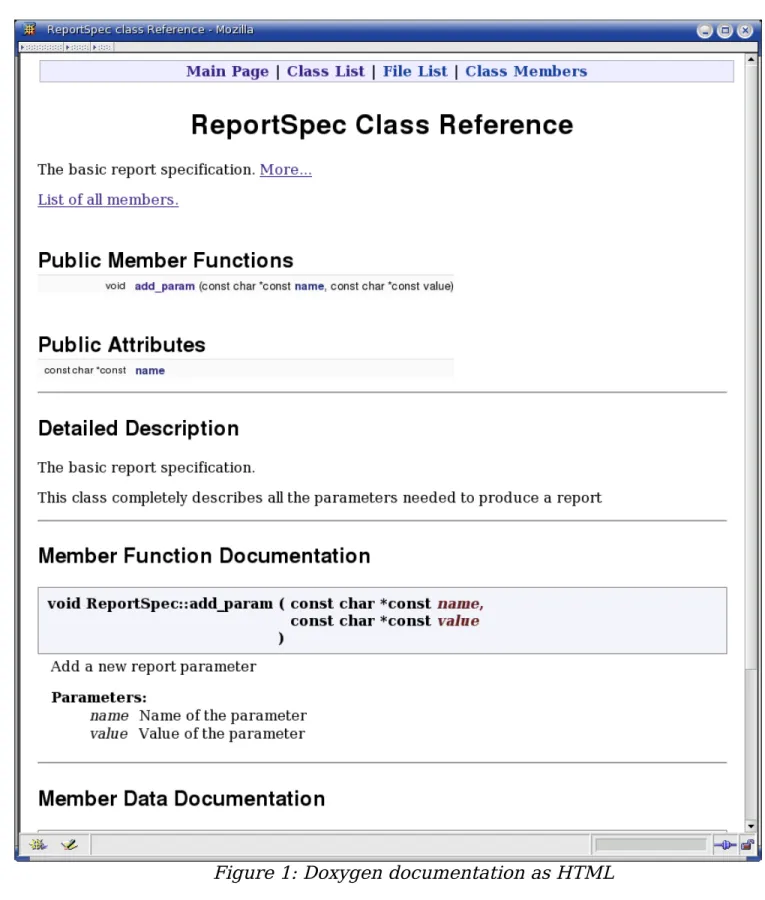
The list functions are well documented. The header files contains extensive comments using the Doxygen documentation convention (See Hack 65).
There's there's a mechanism in place to help persuade people to use this implementation and to avoid writing their own. If you submit a kernel patch containing a new linked list implementation you will be “politely”5 told to use the
standard implementation. Also your code won't get in the kernel until you do. Lesson 4: Enforcement of standard policy. Mostly through peer pressure. So by looking at this implementation of a simple linked list we can learn something. Which leaves us with our final lesson:
Lesson 5: A good hacker learns by reading code written by someone who knows more about this type of programming that you do.
Chapter 2: Safety Hacks
Some programmers code first and think about safety later. These are the people who spend the first six months of the career writing code and the next five years creating security patches.
Let's suppose you are standing at the top of a very tall cliff. You need to get to the bottom. Would you
1. Start moving immediately and jump off the cliff because that's the fastest way to get to the bottom. (You'll worry about safety after you start your jump.)
2. Analyze the terrain to discover the best method of getting you to the bottom in one piece.
If you answered #1, then you code like most of the programming drudges out there out there. It's the fastest answer you can give if you have absolutely no regard for safety at all.6
A true hacker's answer is “I'd think for moment and figure out the fastest safe route. Then I'd mark it as I went down to help those who follow me.”
C was never designed for safety. C++ builds on this foundation to create a more complex and unsafe language. Yet there are hacks which can use to make your programs safer. In other words your program will crash less, and even if they do crash, the problem will be easier to find.
Hack 12: Eliminate Side Effects
The Problem: C++ let's you use operators like ++ and -- to make your code very compact. It also can be used to create code that generates ambiguous results, as well as being unreadable.
The Hack: Write statements that perform one operation only. Don't use ++ and -- except as standalone statements.
For example, is the result of the following code:
i = 0;
// Bad code array[i++] = i;
There are two sub-expressions involving
i
. These are: 1.i++
2.
i
The compiler is free to execute them in any order it wants to. So what compiler you are using and even what compilation flags are used can affect the result.
There is no reason for trying to keep everything on one line. You computer has lots of storage and a few extra lines won't hurt things. A simple, working program is always better than a short, compact, and broken one.
So avoid side effects and put
++
and--
on lines by themselves. If we rewrite the previous example as:i++;
array[i] = i;
The order of the operations is clear not only to the compiler but to anyone reading the code.
Hack 13: Don't Put Assignment Statements Inside Any Other
Statements
The Problem: It's a classic mistake: using = instead of ==. Code like:
if (i = getch()) { // Do something }
The Hack: Never include an assignment statement inside any other statement. (Actually never include any statement inside any other statement, but this one is so common it deserves its own hack.)
This hack flies in the face of some common design patterns. For example:
// Don't code like this
while ((ch = getch()) != EOF) { putchar(ch);
}
Following this safety rule, our code looks like:
// Code like this while (true) { ch = getch(); if (ch == EOF) break; putchar(ch); }
Now a lot of people will point out that the first version is a lot more compact. So what? Do you want compact code or safe code? Do you want compact code or understandable code? Do you want compact code or working code?
If we take off the requirement that the code works, I can make the code much more compact. Because most people value things like code that is safe and working, it is a good idea to use multiple simple statements instead of a single compact one.
This hack is designed to keep things simple and constant. As a hacker we know you are a clever programmer. But it takes a very clever programmer to know when not to be clever.
Hack 14: Use const Instead of #define When Possible
The Problem: The #define directive defines a literal replacement. The pre-processor is its own language and does not follow the normal C++ rules. That can lead to some surprises.
For example:
// Code has lots of problems (don't code like this) #define WIDTH 8 – 1 // Width of page – margin
void print_info() { // Width in points
int points = WIDTH * 72;
points << std::endl;
Question: What's
WIDTH
? If you answered 7 you got it wrong. The pre-processor is a very literal program. The value ofWIDTH
is literally8 – 1
.But everyone knows that 8 – 1 is 7 right? Not everyone. C++ does not. Especially when used in a expression. The line:
int points = WIDTH * 72;
is translated by the pre-processor into:
int points = 8 - 1 * 72;
As a result, the value of
points
is not what the programmer intended. The Hack: Use const instead of #define whenever possible. If we had defined width as:static const int WIDTH = 8 – 1; // Width of page – margin
then our calculations would be correct. That's because we are now defining
WIDTH
using C++ syntax, not pre-processor syntax.Using const has another benefit. If you make a mistake in the #define statement, the problem may not show up until you actually use the constant. The C++ compiler performs syntax checking on const statements. Any syntax
problems with these statements show up immediately and you don't have to guess where the problem occurred.
Hack 15: If You Must Use #define Put Parenthesis Around The
Value
The Problem: There are some times that you just can't use const. How do you avoid problems like the one shown in the previous hack?
You might ask why can't we just use const? The answer is that sometimes you need to create a header file that's shared with a program in another
language. For example the h2ph program that comes with Perl understands #define, but not const.
The Hack: Always enclose #define values in (). For example:
#define WIDTH (8 – 1) // Width of page – margin
int points = WIDTH * 72;
you get the correct value.
Hack 16: Use inline Functions Instead of Parameterized
Macros Whenever Possible
The Problem: Parameterized macros can cause unexpected things to happen.
Consider the following case:
#define SQUARE(x) ((x) * (x))
int i = 5;
int j = SQUARE(i++);
What's the value of
j
? The answer is that it's compiler dependent. And the value ofi
is definitely not 6. Why? Just look at the code after the macro is expanded:int j = ((i++) * (i++));
From this we can see that
i
is increment twice. Also since the order of the operations is not specified by the C++ standard, the actual value ofj
iscompiler dependent.
Note: We violated Hack 12 in this example. This is another example of why that hack is important.
The Hack: Use inline functions instead of #define whenever possible. Let's see how our code would look with an inline function:
static inline int square(int x) { return (x * x);
}
Now when this function is called two things happen:
j
gets the correct value andi
is incremented once. In other words, the code behaves just like it is written. And having something look and act the same way is a beautiful hack.Hack 17: If You Must Use Parameterized Macros Put
Parenthesis Around The arguments
The Problem: The way the pre-processor handles parameterized macros can sometimes lead to incorrect code. For example:
// Don't code like this #define SQUARE(x) (x * x)
So what's the value of
i
in the following statement:int i = square(1 + 2);
Should be 9. But the statement expands to:
int i = (1 + 2 * 1 + 2);
which gives us 5 not 9.
The Hack: Put parenthesis around every place you use a parameter in a parameterized macro. For example:
#define SQUARE(x) ((x) * (x))
Now our expanded assignment statement looks like:
int i = ((1 + 2) * (1 + 2));
and we'll get the right answer.
Note: This does not solve the increment problems shown in Hack 16. This hack should be only used if you absolutely must use parameterized macros and can't use inline functions. (See also Hack 12 for help avoiding the increment problem.)
Hack 18: Don't Write Ambiguous Code
The Problem: Consider the following code:
if (a) if (b)
do_something(); else // Indentation off do_something_else();
3. If you don't write code like this you don't have to worry about stupid questions.
The Hack: The hacker's answer is obvious the third one. Hackers know how to avoid trouble before it starts. So if we never get near nasty code we don't have to worry about how it works. (Unless we have to deal with legacy code written by non-hackers.)
Always include {} when there's any ambiguity in your code. The previous example should be written as:
if (a) { if (b) {
do_something(); } else {
do_something_else(); }
}
From this code it's clear which if the else belongs to.
Being obvious is an important part of coding safely. There's enough confusion and chaos in programming already without having someone add to it by exploiting obscure elements of the C++ syntax.
A good hacker knows how to keep things simple, obvious, and working.
Hack 19: Don't Be Clever With the Precedence Rules
The Problem: What's the value of the following expression?
i = 1 | 3 & 5 << 2;
Most people would answer “I don't know.” Hackers would answer “I don't know,” then write a short test program to find out the answer. (And I'm not going to spoil your fun by putting the answer in here.)
But the problem is unless you are really into the C++ standard and have memorized the 17 operator precedence rules you can't tell what this code is doing.
The Hack: Limit yourself to two precedence rules:
Consistency and simplicity are key to safe programming. The less you have to think and make decisions the less you can make the wrong decision. A good hacker will produce a set of rules and procedures so he can do things
consistently and right. Another way of saying this is a good hacker does a great deal of thinking about things so he doesn't have to do a great deal of thinking.
The simplified precedence rules are one example of this. Almost no one remembers the official 17, but remembering the simplified two is simple.
Applying our hack it's easy to figure out the result of the following expression:
i = (1 | 3) & (5 << 2);
(I know it's not the same result, but this is what the programmer intended in the first place.)
Hack 20: Include Your Own Header File
The Problem: It is possible for a function to be defined one way in a header file and the other in the code.
For example: square.h
extern long int square(int value);
square.cpp
int square(int value) { return (value * value); }
Note: C++ is only partially type safe. The parameters to a function are checked across modules, the return values are not.
So what happens when this function is called? The
square
function computes a number and returns the result, a 32 bit integer7. The caller knowsthat the function returns a 64 bit integer.
Since 32 bit return values and 64 bit return values are returned in different registers, the calling program gets garbage. What's worse the poor maintenance programmer is let wondering how a function like
square
which is to simple to fail, is actually failing.The Hack: Make sure each module includes it's own header file. If the square.cpp file began with:
#include “square.h”
the compiler would notice the problem and prevent you from compiling the code. And professional programmers know that it's 10,000 times easer to catch an obvious problem at compile time than it is to locate a random value error in a running program.
Hack 21: Synchronize Header and Code File Names
The Problem: The previous hack tells us that each module should include it's own header file. How can we make that as simple as possible.
The Hack: Always use the same name for both the header file and and the code file. So if the header is square.h the code file will be square.cpp. When you have a rule like this you don't have to think and avoiding extraneous decision making will help make your code more reliable.
But now let's suppose we have three files square.cpp, round.cpp, and triangle.cpp. These will be compiled and combined to form a library libshape.a. Ideally we would like to supply the user with a single header file so he doesn't have to know or understand our module structure. What do we do?
If we supply him with a shape.h file we fulfill our simplicity requirements, but we violate our naming rules.
The answer is that we can do both, provide a single interface file to the user and follow our naming rules. We start by creating three header files for our three modules: square.h, round.h, and triangle.h. Next we create an interface file for the user, shape.h which contains:
#include <shape-internal/square.h> #include <shape-internal/round.h> #include <shape-internal/triangle.h>
The nice thing about this system is that our header files mirror our object files. We assemble a bunch of object files into a library and our group header shape.h assembles a bunch of header files into a master header for the user.
Hack 22: Never Trust User Input
The Problem: Users type in bad things.
Most users type in bad things because they don't understand the software or understand it's limitation. They can look at a prompt like:
Enter a user name (5 characters only):
Do not type in more than 5 characters. It won't work. Five character is the limit no more.
Absolutely no more than 5 characters please. User name:
and see an open invitation to type in fifty-five characters.
Stupid users enter bad data. Smart users who think they know more than the computer enter bad data. Average users mistype things and enter bad data. I think we can set the pattern here.
What's worse is the malicious user who enter bad data in an effort to crash the system or bypass security. Two classic attack vectors are the stack smashing attack and the SQL injection technique.
In stack smashing attack the user attempts to overflow the input buffer. If he inputs enough data he can overwrite the return address in the stack and trick the computer in executing arbitrary code.
To protect against stack smashing attack always check the length of user input to make sure that the limit is obeyed. If you are using C style I/O this means using fgets instead of gets. (See Hack 23 below.)
SQL Injection attacks involve the user submitting badly formed data in hope that it's executed in an SQL query. For example, the following SQL code updates a user E-Mail address:
UPDATE user_info SET email = '[email protected]' WHERE user = 'Fred';
Things go just fine if the user tells you his name is “
Fred”
. But amalicious user can play games with the user name. For example, let's suppose he gives us a user name of “
F';SELECT user, password FROM
user_info;
” Now our SQL command is:UPDATE user_info SET email = '[email protected]'
WHERE user = 'F';SELECT user, password FROM user_info;
UPDATE user_info SET email = '[email protected]' WHERE user = 'F';
SELECT user, password FROM user_info;
The SELECT statement will return to the user all the user names and passwords in the database.
Good DB Security Practices
The database schema in this example illustrates a poor database design. You never should sort sensitive
information (password, social security number, credit card numbers) in any database accessible directly from the Internet.
Such information should be kept in a dedicated secure computer which allows very limited access from your own computers and no access from any else. It should be locked up tight. Also the data itself should be
encrypted with a key that must be entered on the console of the machine at boot time. Only under extremely limited circumstances should unencrypted data be transmitted.
The client / server connection should also be locked down as well. The client should never be able to ask the database for the password. The only thing it should be able to do is to ask “Is this password correct?” And that question should be transmitted over an encrypted link for added security.
Looking up this data this way is not foolproof, but it does keep out most of the bad guys.
And by the way storing sensitive data on a laptop or portable drive, especially credit card numbers and social security numbers is really, really stupid. Do not store sensitive information on portable devices and don't leave such devices in places like a hotel room where they are easy to steal.
Also any sensitive data on your laptop should be protected by a good encryption system.
// Bad code
bool validate_name(const char* const name) { for (int i = 0; name[0] != '\0'; ++i) { if (name[i] == '\'')
return (false); }
return (true); }
Why is this code bad? Because it only checks for a bad character. Actually in SQL there are more bad characters out there. You shouldn't check to make sure that the input does not contain bad character, you should make sure that everything is good.
// Good code
bool validate_name(const char* const name) { for (int i = 0; name[0] != '\0'; ++i) { if (! isalnum(name[i]))
return (false); }
return (true); }
It is much more secure to only good stuff than to exclude bad stuff. That's because if you make a mistake and make your “good stuff” definition too
restrictive you don't cause a security hole in the program. If you make a mistake in a “bad stuff” definition, bad things could get through.
Remember, just because you're paranoid, it doesn't mean they aren't out to get you.
Hack 23: Don't use gets
By now almost everyone knows the all the security and reliability problems that can occur with
gets
. But it's included here for historical reasons as well because it's a very good example of bad programming.Let's look at all the problems with the code:
// Really bad code char line[100]; gets(line);
But this code is also a security problem. A attacker can create a carefully constructed string which overwrites the stack and let's the bad guy execute any code he wants to.
The
gets
function is so bad that the GNU gcc linker issues a warning whenever it's used./tmp/ccI5WJ5m.o(.text+0x24): In function `main':
: warning: the `gets' function is dangerous and should not be used.
The Hack: Use
fgets
instead// Good code char line[100];
fgets(line, sizeof(line), stdin);
The
fgets
call will not get more data than the variable can hold. This prevents attackers from executing a stack smashing attack.Hack 24: Flush Debugging
The Problem: Buffering of output can lead to unexpected results For example:
std::cout << “Doing unrelated stuff” << std::endl; do_stuff();
std::cout << “Doing divide ... “; i = 1/0; // Divide by zero
std::cout << “complete\n”;
When runs this program prints (on some systems):
Doing unrelated stuff Floating point exception8
From this output we can see that the problem is “obviously” in the
do_stuff
function. What's going on?The problem is that output is being buffered. So the string
“Doing divide ...”
goes into the buffer, then the program crashes with a divide by zero error, and the output is never displayed. This is where theconfusion comes from.
The Hack: Make sure that when debugging that the buffer is flushed after every output.
There are several ways of doing this. The first is to explicitly flush every statement:
std::cout << “Doing divide ... “ << std::flush;
This works, but you have to remember to do the flush for every statement. The other way is to set the
unitbuf
flag which tells C++ to flush after every output operation. This only has to be done once at the top of your program.std::cout << std::unitbuf;
// From now on everything is automatically flushed
In C the same thing can be accomplished by setting the
_IONBV
flag using thesetvbuf
function:static char buf[512]; // Buffer for standard out setvbuf(stdout, buf, _IONBV, sizeof(buf));
Being aware of what's going inside the program is very useful to a hacker. Sometimes the compiler, library or the machine will do strange things to you. But knowing the internals is only half the battle. Knowing how to get around the internal limitations of the system is the mark of a good hacker.
Hack 25: Protect array accesses with assert
The Problem: C++ does not do bounds checking.
For example the following code with compile and execute just fine. It will also corrupt memory:
// Bad code int data[10]; // ...
int i = 11;
data[i] = 5; // Memory corruption
The Hack: Use
assert
to check all array accesses. For example:int data[10]; // ...
int i = 11;
assert((i >= 0) && (i < 10)); // Good example
// Rotten implementation data[i] = 5;
This works but there is a problem with. We've used the constant 10 in two places. (The declaration and the assert.) It would be easy for someone to
change one and not the other.
One solution to this is to use named constants.
// Better code #include <cassert>
const int DATA_SIZE = 10; int data[DATA_SIZE];
// ...
int i = 11;
assert((i >= 0) && (i < DATA_SIZE)); // Better, // but not best data[i] = 5;
Ideally we don't want to have to use even named constants if we can help it. It is possible to create a bounds checking
assert
using thedata
variable alone:assert((i >= 0) && (i < sizeof(data) / sizeof(data[0])));
So what is going on here? The expression
sizeof(data)
returns the number of bytes in the arraydata
. But we need the number of elements in the variable, not the number of bytes.The solution is to divide the number of bytes in the array by the number of bytes in the first element. The result is an expression which gives us the number of elements.
sizeof(data) / sizeof(data[0])
Now being true hackers, we don't want to have to write the same
expression over and over again, so let's create a macro to make our life easier.
/*
* assert_bounds(var, index) – Make sure an index is in * bounds.
*
*/
#define assert_bounds(var, index) \ assert((index >= 0) &&
(index < (sizeof(var) / sizeof(var[0]))));
Because we're such nice programmers we've documented our macro and even included a warning describing its limitations.
Array overflows are one of the most common programming errors and are extremely frustrating to try and locate. This code doesn't eliminate them, but it does cause buggy code to abort early in a way that makes the problem
tremendously easier to find.
Warning: The assert statement is not guaranteed to abort your program. For example, consider the statement:
assert(false);
This statement “obviously” will cause the program to abort because the assert is always false. If the program is compiled with
NDEBUG
defined, all the asserts are compiled out. In other words, ifNDEBUG
is defined the previous statement does nothing.A Real System Crash
You should only use
assert
in programs where aborting is an acceptable behavior. In most cases when aprogram crashes it is an annoyance for the user but not a disaster. That is not always the case.
In 1996 some people started running a program on an upgraded hardware platform. As a result of the
hardware upgrade the program ran longer than expected and one of the counters overflowed. Since this was ADA code, it triggered an exception.
The exception was not caught so the system executed the default exception handler and halted the processor. This was not a good thing to do.
Technically the rocket didn't crash. The launch director blew it up when it started to head for the ground.
The cost of that bug was estimated to be about $500,000,000 (US).
Hack 26: Use a Template to Create Safe Arrays
The Problem: You don't want to have to add asserts every time you access an array.
The Hack: Hide the code inside a template. Then the work is done for you automatically:
#include <cassert>
template<typename array_type,
unsigned int size> class array { private:
static const unsigned int ARRAY_SIZE = size; array_type data[ARRAY_SIZE];
public:
array(void) {};
array(const array& other_array) {
memcopy(data, other_array.data, sizeof(data)); };
~array() {};
array& operator = (const array& other_array) { memcopy(data, other_array.data, sizeof(data)); return (*this);
}; public:
array_type& operator[](int index) { assert(index >= 0);
assert(index < ARRAY_SIZE); return (&data[index]);
} };
This class has several nice features. The first is that the copy constructor and the assignment operator are implement in a way that allows for copying the array.
array_type& operator[](int index) { assert(index >= 0);
assert(index < ARRAY_SIZE); return (&data[index]);
}
Another feature of this template is that it doesn't provide a way of
converting an array into a pointer. It is up to you whether or not you consider this a feature or a bug.
Hack 27: When Doing Nothing, Be Obvious About It
The Problem: The following code is confusing.
// Very bad coding style int i;
for (i = 0; foo[i] != '\0'; ++i);
std::cout << “Result “ << i << std::endl;
At first glance it seems that someone failed to indent the program properly. The
std::cout
line should be indented as it is part of the for statements.But on close inspection you can see that the program is indented correctly. There a tiny semicolon at the end of the for loop:
for (i = 0; foo[i] != '\0'; ++i);
This semicolon is almost completely invisible. It would be nice to make it more visible.
The Hack: Do nothing quietly. Always put something in to say that you're doing nothing.
// Almost adequate coding style for (i = 0; foo[i] != '\0'; ++i) /* Do nothing */;
This is better, but we can improve on it. The continue keyword tells C++ to start the loop over again. It can be placed inside our empty loop to provide a more meaty statement for our eyes:
// Good coding style
Hack 28: End Every Case with break or /* Fall Through */
The Problem: In the following code did the programmer intend for the
STATE_ALPHA
case to fall through or did he make a mistake? In other words is that fact thatSTATE_ALPHA
callsdo_alpha
anddo_beta
intentional or an error?// Rotten code switch (state) {
case STATE_ALPHA: do_alpha(); case STATE_BETA: do_beta(); break; // ....
From this code it's impossible to tell what the programmer intended.
The Hack: Be obvious about what you do. If you intend for one case to fall through to another indicate it with a comment like
// Fall Through
.// Decent code switch (state) {
case STATE_ALPHA: do_alpha(); // Fall through case STATE_BETA: do_beta(); break; // ....
After all being a hacker means that you have to be clever, not that you have to be sneaky.
Hack 29: A Simple assert Statements For Impossible
Conditions
The Problem: What do you do when you detect an internal error. You could do an
assert(false);
but that doesn't give you much information when the program dies.The Hack: Put a message in your
assert
statements. For example:if (this_is_not_possible) {



![Figure 12: Tag jumping with CTRL-].](https://thumb-us.123doks.com/thumbv2/123dok_us/8182487.2169153/192.918.73.751.192.786/figure-tag-jumping-with-ctrl.webp)

