For Subversion 1.6
(Compiled from r5035)
Ben Collins-Sussman
Brian W. Fitzpatrick
Publication date (TBA)
Copyright © 2002, 2003, 2004, 2005, 2006, 2007, 2008, 2009, 2010, 2011 Ben Collins-Sussman, Brian W. Fitzpatrick, C. Michael Pilato
This work is licensed under the Creative Commons Attribution License. To view a copy of this license, visithttp://creativecommons.org/licenses/by/2.0/or send a letter to Creative Commons, 559 Nathan Abbott Way, Stanford, California 94305, USA.
Preface ... xiv
What Is Subversion? ... xiv
Is Subversion the Right Tool? ... xiv
Subversion's History ... xv
Subversion's Architecture ... xv
Subversion's Components ... xvii
What's New in Subversion ... xvii
Audience ... xviii
How to Read This Book ... xviii
Organization of This Book ... xix
This Book Is Free ... xx
Acknowledgments ... xx
1. Fundamental Concepts ... 1
Version Control Basics ... 1
The Repository ... 1
The Working Copy ... 2
Versioning Models ... 2
Version Control the Subversion Way ... 7
Subversion Repositories ... 7
Revisions ... 7
Addressing the Repository ... 8
Subversion Working Copies ... 9
Summary ... 14
2. Basic Usage ... 15
Help! ... 15
Getting Data into Your Repository ... 16
Importing Files and Directories ... 16
Recommended Repository Layout ... 17
What's In a Name? ... 17
Creating a Working Copy ... 18
Basic Work Cycle ... 19
Update Your Working Copy ... 20
Make Your Changes ... 20
Review Your Changes ... 22
Fix Your Mistakes ... 25
Resolve Any Conflicts ... 26
Commit Your Changes ... 33
Examining History ... 34
Examining the Details of Historical Changes ... 34
Generating a List of Historical Changes ... 36
Browsing the Repository ... 38
Fetching Older Repository Snapshots ... 39
Sometimes You Just Need to Clean Up ... 40
Disposing of a Working Copy ... 40
Recovering from an Interruption ... 40
Dealing with Structural Conflicts ... 41
An Example Tree Conflict ... 41
Summary ... 46
3. Advanced Topics ... 47
Revision Specifiers ... 47
Revision Keywords ... 47
Peg and Operative Revisions ... 49
Properties ... 53
Why Properties? ... 54
Manipulating Properties ... 55
Properties and the Subversion Workflow ... 58
Automatic Property Setting ... 60
File Portability ... 60
File Content Type ... 61
File Executability ... 62
End-of-Line Character Sequences ... 62
Ignoring Unversioned Items ... 63
Keyword Substitution ... 67
Sparse Directories ... 70
Locking ... 74
Creating Locks ... 75
Discovering Locks ... 78
Breaking and Stealing Locks ... 78
Lock Communication ... 80
Externals Definitions ... 81
Changelists ... 87
Creating and Modifying Changelists ... 87
Changelists As Operation Filters ... 89
Changelist Limitations ... 91
Network Model ... 91
Requests and Responses ... 91
Client Credentials ... 92
Summary ... 95
4. Branching and Merging ... 96
What's a Branch? ... 96
Using Branches ... 96
Creating a Branch ... 98
Working with Your Branch ... 99
The Key Concepts Behind Branching ... 102
Basic Merging ... 102
Changesets ... 102
Keeping a Branch in Sync ... 103
Reintegrating a Branch ... 105
Mergeinfo and Previews ... 107
Undoing Changes ... 108
Resurrecting Deleted Items ... 109
Advanced Merging ... 111
Cherrypicking ... 111
Merge Syntax: Full Disclosure ... 113
Merges Without Mergeinfo ... 114
More on Merge Conflicts ... 115
Blocking Changes ... 116
Keeping a Reintegrated Branch Alive ... 116
Merge-Sensitive Logs and Annotations ... 117
Noticing or Ignoring Ancestry ... 119
Merges and Moves ... 120
Blocking Merge-Unaware Clients ... 120
The Final Word on Merge Tracking ... 121
Traversing Branches ... 122
Tags ... 123
Creating a Simple Tag ... 124
Creating a Complex Tag ... 124
Branch Maintenance ... 125
Data Lifetimes ... 126
Common Branching Patterns ... 127
Release Branches ... 127
Feature Branches ... 127
Vendor Branches ... 128
General Vendor Branch Management Procedure ... 129
svn_load_dirs.pl ... 131
Summary ... 132
5. Repository Administration ... 134
The Subversion Repository, Defined ... 134
Strategies for Repository Deployment ... 135
Planning Your Repository Organization ... 135
Deciding Where and How to Host Your Repository ... 137
Choosing a Data Store ... 138
Creating and Configuring Your Repository ... 140
Creating the Repository ... 141
Implementing Repository Hooks ... 142
Berkeley DB Configuration ... 143
FSFS Configuration ... 143
Repository Maintenance ... 143
An Administrator's Toolkit ... 143
Commit Log Message Correction ... 147
Managing Disk Space ... 147
Berkeley DB Recovery ... 151
Migrating Repository Data Elsewhere ... 152
Filtering Repository History ... 156
Repository Replication ... 159
Repository Backup ... 164
Managing Repository UUIDs ... 166
Moving and Removing Repositories ... 167
Summary ... 167
6. Server Configuration ... 168
Overview ... 168
Choosing a Server Configuration ... 169
The svnserve Server ... 169
svnserve over SSH ... 169
The Apache HTTP Server ... 170
Recommendations ... 170
svnserve, a Custom Server ... 171
Invoking the Server ... 171
Built-in Authentication and Authorization ... 175
Using svnserve with SASL ... 177
Tunneling over SSH ... 179
SSH Configuration Tricks ... 181
httpd, the Apache HTTP Server ... 182
Prerequisites ... 183
Basic Apache Configuration ... 183
Authentication Options ... 185
Authorization Options ... 188
Protecting network traffic with SSL ... 191
Extra Goodies ... 193
Path-Based Authorization ... 200
High-level Logging ... 204
Supporting Multiple Repository Access Methods ... 206
7. Customizing Your Subversion Experience ... 209
Runtime Configuration Area ... 209
Configuration Area Layout ... 209
Configuration Options ... 211
Localization ... 216
Understanding Locales ... 216
Subversion's Use of Locales ... 217
Using External Editors ... 218
Using External Differencing and Merge Tools ... 218
External diff ... 219
External diff3 ... 220
External merge ... 222
Summary ... 223
8. Embedding Subversion ... 224
Layered Library Design ... 224
Repository Layer ... 225
Repository Access Layer ... 228
Client Layer ... 229
Inside the Working Copy Administration Area ... 230
The Entries File ... 230
Pristine Copies and Property Files ... 230
Using the APIs ... 231
The Apache Portable Runtime Library ... 231
Functions and Batons ... 232
URL and Path Requirements ... 232
Using Languages Other Than C and C++ ... 232
Code Samples ... 233
Summary ... 239
9. Subversion Complete Reference ... 240
svn—Subversion Command-Line Client ... 240
svn Options ... 240
svn Subcommands ... 245
svnadmin—Subversion Repository Administration ... 313
svnadmin Options ... 313
svnadmin Subcommands ... 315
svnlook—Subversion Repository Examination ... 337
svnlook Options ... 337
svnlook Subcommands ... 339
svnsync—Subversion Repository Mirroring ... 356
svnsync Options ... 356
svnsync Subcommands ... 357
svnserve—Custom Subversion Server ... 362
svnserve Options ... 363
svndumpfilter—Subversion History Filtering ... 364
svndumpfilter Options ... 364
svndumpfilter Subcommands ... 364
svnversion—Subversion Working Copy Version Info ... 367
mod_dav_svn—Subversion Apache HTTP Server Module ... 369
mod_authz_svn—Subversion Apache HTTP Authorization Module ... 371
Subversion Properties ... 372
Versioned Properties ... 372
Unversioned Properties ... 373
Repository Hooks ... 374
A. Subversion Quick-Start Guide ... 384
Installing Subversion ... 384
High-Speed Tutorial ... 385
B. Subversion for CVS Users ... 388
Revision Numbers Are Different Now ... 388
Directory Versions ... 388
More Disconnected Operations ... 389
Status ... 389
Update ... 390
Branches and Tags ... 390
Metadata Properties ... 391
Conflict Resolution ... 391
Binary Files and Translation ... 391
Versioned Modules ... 391
Authentication ... 392
Converting a Repository from CVS to Subversion ... 392
C. WebDAV and Autoversioning ... 393
What Is WebDAV? ... 393
Autoversioning ... 394
Client Interoperability ... 395
Standalone WebDAV Applications ... 396
File-Explorer WebDAV Extensions ... 397
WebDAV Filesystem Implementation ... 398
D. Copyright ... 400
1.1. A typical client/server system ... 1
1.2. The problem to avoid ... 2
1.3. The lock-modify-unlock solution ... 3
1.4. The copy-modify-merge solution ... 5
1.5. The copy-modify-merge solution (continued) ... 5
1.6. Tree changes over time ... 7
1.7. The repository's filesystem ... 11
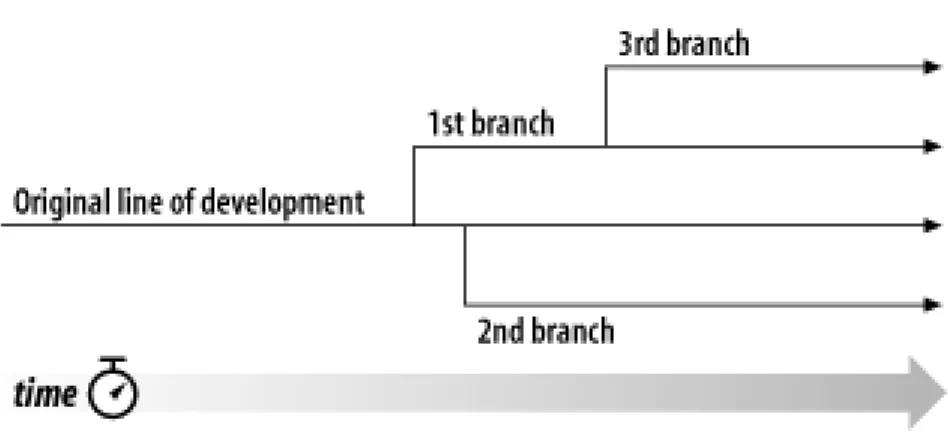
4.1. Branches of development ... 96
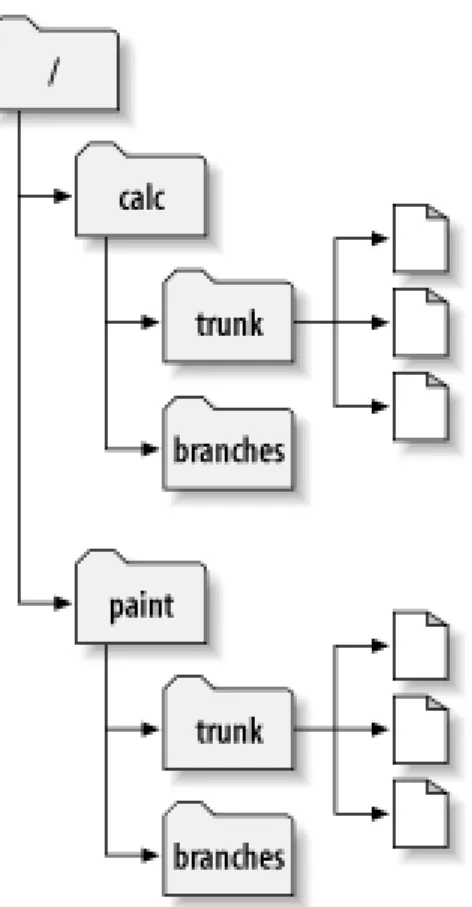
4.2. Starting repository layout ... 97
4.3. Repository with new copy ... 98
4.4. The branching of one file's history ... 100
8.1. Files and directories in two dimensions ... 226
2.1. Common log requests ... 36
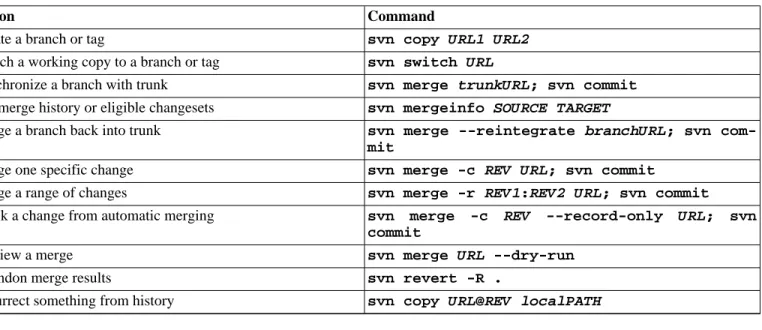
4.1. Branching and merging commands ... 132
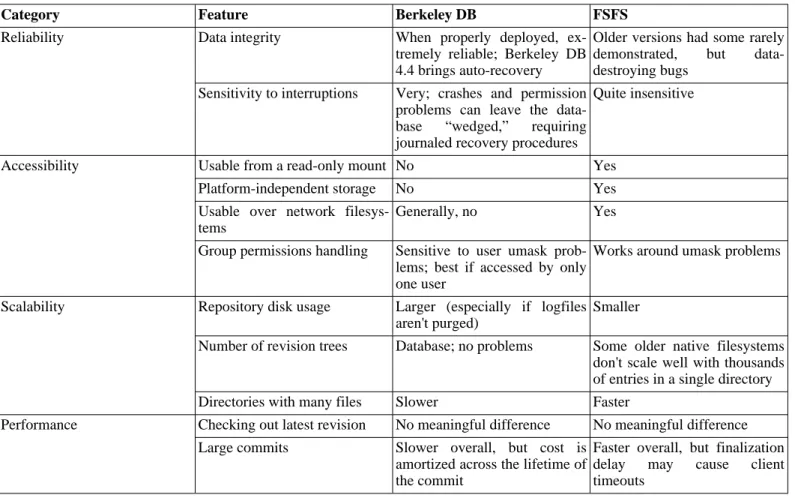
5.1. Repository data store comparison ... 138
6.1. Comparison of subversion server options ... 168
5.1. txn-info.sh (reporting outstanding transactions) ... 149
5.2. Mirror repository's pre-revprop-change hook script ... 160
5.3. Mirror repository's start-commit hook script ... 160
6.1. A sample svnserve launchd job definition ... 174
6.2. A sample configuration for anonymous access ... 189
6.3. A sample configuration for authenticated access ... 190
6.4. A sample configuration for mixed authenticated/anonymous access ... 190
6.5. Disabling path checks altogether ... 191
7.1. Sample registration entries (.reg) file ... 210
7.2. diffwrap.py ... 220
7.3. diffwrap.bat ... 220
7.4. diff3wrap.py ... 221
7.5. diff3wrap.bat ... 221
7.6. mergewrap.py ... 222
7.7. mergewrap.bat ... 222
8.1. Using the repository layer ... 233
8.2. Using the repository layer with Python ... 235
Chicago, March 14, 2004.
A bad Frequently Asked Questions (FAQ) sheet is one that is composed not of the questions people actually ask, but of the ques-tions the FAQ's author wishes people would ask. Perhaps you've seen the type before:
Q: How can I use Glorbosoft XYZ to maximize team productivity?
A: Many of our customers want to know how they can maximize productivity through our patented office group-ware innovations. The answer is simple. First, click on the File menu, scroll down to In-crease Productivity, then…
The problem with such FAQs is that they are not, in a literal sense, FAQs at all. No one ever called the tech support line and asked, “How can we maximize productivity?” Rather, people asked highly specific questions, such as “How can we change the calendar-ing system to send reminders two days in advance instead of one?” and so on. But it's a lot easier to make up imaginary Frequently Asked Questions than it is to discover the real ones. Compiling a true FAQ sheet requires a sustained, organized effort: over the lifetime of the software, incoming questions must be tracked, responses monitored, and all gathered into a coherent, searchable whole that reflects the collective experience of users in the wild. It calls for the patient, observant attitude of a field naturalist. No grand hypothesizing, no visionary pronouncements here—open eyes and accurate note-taking are what's needed most.
What I love about this book is that it grew out of just such a process, and shows it on every page. It is the direct result of the au-thors' encounters with users. It began with Ben Collins-Sussman's observation that people were asking the same basic questions over and over on the Subversion mailing lists: what are the standard workflows to use with Subversion? Do branches and tags work the same way as in other version control systems? How can I find out who made a particular change?
Frustrated at seeing the same questions day after day, Ben worked intensely over a month in the summer of 2002 to write The
Sub-version Handbook, a 60-page manual that covered all the basics of using SubSub-version. The manual made no pretense of being
com-plete, but it was distributed with Subversion and got users over that initial hump in the learning curve. When O'Reilly decided to publish a full-length Subversion book, the path of least resistance was obvious: just expand the Subversion handbook.
The three coauthors of the new book were thus presented with an unusual opportunity. Officially, their task was to write a book top-down, starting from a table of contents and an initial draft. But they also had access to a steady stream—indeed, an uncontrol-lable geyser—of bottom-up source material. Subversion was already in the hands of thousands of early adopters, and those users were giving tons of feedback, not only about Subversion, but also about its existing documentation.
During the entire time they wrote this book, Ben, Mike, and Brian haunted the Subversion mailing lists and chat rooms incessantly, carefully noting the problems users were having in real-life situations. Monitoring such feedback was part of their job descriptions at CollabNet anyway, and it gave them a huge advantage when they set out to document Subversion. The book they produced is grounded firmly in the bedrock of experience, not in the shifting sands of wishful thinking; it combines the best aspects of user manual and FAQ sheet. This duality might not be noticeable on a first reading. Taken in order, front to back, the book is simply a straightforward description of a piece of software. There's the overview, the obligatory guided tour, the chapter on administrative configuration, some advanced topics, and of course, a command reference and troubleshooting guide. Only when you come back to it later, seeking the solution to some specific problem, does its authenticity shine out: the telling details that can only result from encounters with the unexpected, the examples honed from genuine use cases, and most of all the sensitivity to the user's needs and the user's point of view.
Of course, no one can promise that this book will answer every question you have about Subversion. Sometimes the precision with which it anticipates your questions will seem eerily telepathic; yet occasionally, you will stumble into a hole in the community's knowledge and come away empty-handed. When this happens, the best thing you can do is email
<[email protected]>and present your problem. The authors are still there and still watching, and the authors include not just the three listed on the cover, but many others who contributed corrections and original material. From the com-munity's point of view, solving your problem is merely a pleasant side effect of a much larger project—namely, slowly adjusting this book, and ultimately Subversion itself, to more closely match the way people actually use it. They are eager to hear from you, not only because they can help you, but because you can help them. With Subversion, as with all active free software projects, you
are not alone.
1We'll refer to it simply as “Subversion” throughout this book. You'll thank us when you realize just how much space that saves!
“It is important not to let the perfect become the enemy of the good, even when you can agree on what perfect is. Doubly so when you can't. As unpleasant as it is to be trapped by past mistakes, you can't make any progress by being afraid of your own shadow during design.”
—Greg Hudson, Subversion developer
In the world of open source software, the Concurrent Versions System (CVS) was the tool of choice for version control for many years. And rightly so. CVS was open source software itself, and its nonrestrictive modus operandi and support for networked oper-ation allowed dozens of geographically dispersed programmers to share their work. It fit the collaborative nature of the open source world very well. CVS and its semi-chaotic development model have since become cornerstones of open source culture.
But CVS was not without its flaws, and simply fixing those flaws promised to be an enormous effort. Enter Subversion. Subversion was designed to be a successor to CVS, and its originators set out to win the hearts of CVS users in two ways—by creating an open source system with a design (and “look and feel”) similar to CVS, and by attempting to avoid most of CVS's noticeable flaws. While the result wasn't—and isn't—the next great evolution in version control design, Subversion is very powerful, very usable, and very flexible.
This book is written to document the 1.6 series of the Apache Subversion™1version control system. We have made every attempt to be thorough in our coverage. However, Subversion has a thriving and energetic development community, so already a number of features and improvements are planned for future versions that may change some of the commands and specific notes in this book.
What Is Subversion?
Subversion is a free/open source version control system (VCS). That is, Subversion manages files and directories, and the changes made to them, over time. This allows you to recover older versions of your data or examine the history of how your data changed. In this regard, many people think of a version control system as a sort of “time machine.”
Subversion can operate across networks, which allows it to be used by people on different computers. At some level, the ability for various people to modify and manage the same set of data from their respective locations fosters collaboration. Progress can occur more quickly without a single conduit through which all modifications must occur. And because the work is versioned, you need not fear that quality is the trade-off for losing that conduit—if some incorrect change is made to the data, just undo that change. Some version control systems are also software configuration management (SCM) systems. These systems are specifically tailored to manage trees of source code and have many features that are specific to software development—such as natively understanding programming languages, or supplying tools for building software. Subversion, however, is not one of these systems. It is a general system that can be used to manage any collection of files. For you, those files might be source code—for others, anything from grocery shopping lists to digital video mixdowns and beyond.
Is Subversion the Right Tool?
If you're a user or system administrator pondering the use of Subversion, the first question you should ask yourself is: "Is this the right tool for the job?" Subversion is a fantastic hammer, but be careful not to view every problem as a nail.
If you need to archive old versions of files and directories, possibly resurrect them, or examine logs of how they've changed over time, then Subversion is exactly the right tool for you. If you need to collaborate with people on documents (usually over a net-work) and keep track of who made which changes, then Subversion is also appropriate. This is why Subversion is so often used in software development environments—working on a development team is an inherently social activity, and Subversion makes it easy to collaborate with other programmers. Of course, there's a cost to using Subversion as well: administrative overhead. You'll need to manage a data repository to store the information and all its history, and be diligent about backing it up. When working
2
Or as a friend puts it, “swatting a fly with a Buick.”
3CollabNet Enterprise Edition has since been replaced by a new product line called CollabNet TeamForge.
with the data on a daily basis, you won't be able to copy, move, rename, or delete files the way you usually do. Instead, you'll have to do all of those things through Subversion.
Assuming you're fine with the extra workflow, you should still make sure you're not using Subversion to solve a problem that other tools solve better. For example, because Subversion replicates data to all the collaborators involved, a common misuse is to treat it as a generic distribution system. People will sometimes use Subversion to distribute huge collections of photos, digital music, or software packages. The problem is that this sort of data usually isn't changing at all. The collection itself grows over time, but the individual files within the collection aren't being changed. In this case, using Subversion is “overkill.”2There are simpler tools that efficiently replicate data without the overhead of tracking changes, such as rsync or unison.
Subversion's History
In early 2000, CollabNet, Inc. (http://www.collab.net) began seeking developers to write a replacement for CVS. CollabNet offered3a collaboration software suite called CollabNet Enterprise Edition (CEE), of which one component was version control.
Although CEE used CVS as its initial version control system, CVS's limitations were obvious from the beginning, and CollabNet knew it would eventually have to find something better. Unfortunately, CVS had become the de facto standard in the open source world largely because there wasn't anything better, at least not under a free license. So CollabNet determined to write a new ver-sion control system from scratch, retaining the basic ideas of CVS, but without the bugs and misfeatures.
In February 2000, they contacted Karl Fogel, the author of Open Source Development with CVS (Coriolis, 1999), and asked if he'd like to work on this new project. Coincidentally, at the time Karl was already discussing a design for a new version control system with his friend Jim Blandy. In 1995, the two had started Cyclic Software, a company providing CVS support contracts, and al-though they later sold the business, they still used CVS every day at their jobs. Their frustration with CVS had led Jim to think carefully about better ways to manage versioned data, and he'd already come up with not only the Subversion name, but also the basic design of the Subversion data store. When CollabNet called, Karl immediately agreed to work on the project, and Jim got his employer, Red Hat Software, to essentially donate him to the project for an indefinite period of time. CollabNet hired Karl and Ben Collins-Sussman, and detailed design work began in May 2000. With the help of some well-placed prods from Brian Behlendorf and Jason Robbins of CollabNet, and from Greg Stein (at the time an independent developer active in the WebDAV/DeltaV spe-cification process), Subversion quickly attracted a community of active developers. It turned out that many people had encountered the same frustrating experiences with CVS and welcomed the chance to finally do something about it.
The original design team settled on some simple goals. They didn't want to break new ground in version control methodology, they just wanted to fix CVS. They decided that Subversion would match CVS's features and preserve the same development model, but not duplicate CVS's most obvious flaws. And although it did not need to be a drop-in replacement for CVS, it should be similar enough that any CVS user could make the switch with little effort.
After 14 months of coding, Subversion became “self-hosting” on August 31, 2001. That is, Subversion developers stopped using CVS to manage Subversion's own source code and started using Subversion instead.
While CollabNet started the project, and still funds a large chunk of the work (it pays the salaries of a few full-time Subversion de-velopers), Subversion is run like most open source projects, governed by a loose, transparent set of rules that encourage merito-cracy. In 2009, CollabNet worked with the Subversion developers towards the goal of integrating the Subversion project into the Apache Software Foundation (ASF), one of the most well-known collectives of open source projects in the world. Subversion's technical roots, community priorities, and development practices were a perfect fit for the ASF, many of whose members were already active Subversion contributors. In early 2010, Subversion was fully adopted into the ASF's family of top-level projects, moved its project web presence tohttp://subversion.apache.org, and was rechristened “Apache Subversion”.
Subversion's Architecture
Figure 1, “Subversion's architecture”illustrates a “mile-high” view of Subversion's design.
On one end is a Subversion repository that holds all of your versioned data. On the other end is your Subversion client program, which manages local reflections of portions of that versioned data. Between these extremes are multiple routes through a Reposit-ory Access (RA) layer, some of which go across computer networks and through network servers which then access the repositReposit-ory,
others of which bypass the network altogether and access the repository directly.
Subversion's Components
Subversion, once installed, has a number of different pieces. The following is a quick overview of what you get. Don't be alarmed if the brief descriptions leave you scratching your head—plenty more pages in this book are devoted to alleviating that confusion. svn
The command-line client program svnversion
A program for reporting the state (in terms of revisions of the items present) of a working copy svnlook
A tool for directly inspecting a Subversion repository svnadmin
A tool for creating, tweaking, or repairing a Subversion repository mod_dav_svn
A plug-in module for the Apache HTTP Server, used to make your repository available to others over a network svnserve
A custom standalone server program, runnable as a daemon process or invokable by SSH; another way to make your reposit-ory available to others over a network
svndumpfilter
A program for filtering Subversion repository dump streams svnsync
A program for incrementally mirroring one repository to another over a network
What's New in Subversion
The first edition of this book was published by O'Reilly Media in 2004, shortly after Subversion had reached 1.0. Since that time, the Subversion project has continued to release new major releases of the software. Here's a quick summary of major new changes since Subversion 1.0. Note that this is not a complete list; for full details, please visit Subversion's web site at ht-tp://subversion.apache.org.
Subversion 1.1 (September 2004)
Release 1.1 introduced FSFS, a flat-file repository storage option for the repository. While the Berkeley DB backend is still widely used and supported, FSFS has since become the default choice for newly created repositories due to its low barrier to entry and minimal maintenance requirements. Also in this release came the ability to put symbolic links under version control, auto-escaping of URLs, and a localized user interface.
Subversion 1.2 (May 2005)
Release 1.2 introduced the ability to create server-side locks on files, thus serializing commit access to certain resources. While Subversion is still a fundamentally concurrent version control system, certain types of binary files (e.g. art assets) can-not be merged together. The locking feature fulfills the need to version and protect such resources. With locking also came a complete WebDAV auto-versioning implementation, allowing Subversion repositories to be mounted as network folders. Fi-nally, Subversion 1.2 began using a new, faster binary-differencing algorithm to compress and retrieve old versions of files. Subversion 1.3 (December 2005)
Release 1.3 brought path-based authorization controls to the svnserve server, matching a feature formerly found only in the Apache server. The Apache server, however, gained some new logging features of its own, and Subversion's API bindings to
other languages also made great leaps forward. Subversion 1.4 (September 2006)
Release 1.4 introduced a whole new tool—svnsync—for doing one-way repository replication over a network. Major parts of the working copy metadata were revamped to no longer use XML (resulting in client-side speed gains), while the Berkeley DB repository backend gained the ability to automatically recover itself after a server crash.
Subversion 1.5 (June 2008)
Release 1.5 took much longer to finish than prior releases, but the headliner feature was gigantic: semi-automated tracking of branching and merging. This was a huge boon for users, and pushed Subversion far beyond the abilities of CVS and into the ranks of commercial competitors such as Perforce and ClearCase. Subversion 1.5 also introduced a bevy of other user-focused features, such as interactive resolution of file conflicts, sparse checkouts, client-side management of changelists, powerful new syntax for externals definitions, and SASL authentication support for the svnserve server.
Subversion 1.6 (March 2009)
Release 1.6 continued to make branching and merging more robust by introducing tree conflicts, and offered improvements to several other existing features: more interactive conflict resolution options; de-telescoping and outright exclusion support for sparse checkouts; file-based externals definitions; and operational logging support for svnserve similar to what mod_dav_svn offered. Also, the command-line client introduced a new shortcut syntax for referring to Subversion repository URLs.
Audience
This book is written for computer-literate folk who want to use Subversion to manage their data. While Subversion runs on a num-ber of different operating systems, its primary user interface is command-line-based. That command-line tool (svn), and some ad-ditional auxiliary programs, are the focus of this book.
For consistency, the examples in this book assume that the reader is using a Unix-like operating system and is relatively comfort-able with Unix and command-line interfaces. That said, the svn program also runs on non-Unix platforms such as Microsoft Win-dows. With a few minor exceptions, such as the use of backward slashes (\) instead of forward slashes (/) for path separators, the input to and output from this tool when run on Windows are identical to that of its Unix counterpart.
Most readers are probably programmers or system administrators who need to track changes to source code. This is the most com-mon use for Subversion, and therefore it is the scenario underlying all of the book's examples. But Subversion can be used to man-age changes to any sort of information—imman-ages, music, databases, documentation, and so on. To Subversion, all data is just data. While this book is written with the assumption that the reader has never used a version control system, we've also tried to make it easy for users of CVS (and other systems) to make a painless leap into Subversion. Special sidebars may mention other version control systems from time to time, andAppendix B, Subversion for CVS Userssummarizes many of the differences between CVS and Subversion.
Note also that the source code examples used throughout the book are only examples. While they will compile with the proper compiler incantations, they are intended to illustrate a particular scenario and not necessarily to serve as examples of good pro-gramming style or practices.
How to Read This Book
Technical books always face a certain dilemma: whether to cater to top-down or to bottom-up learners. A top-down learner prefers to read or skim documentation, getting a large overview of how the system works; only then does she actually start using the soft-ware. A bottom-up learner is a “learn by doing” person—someone who just wants to dive into the software and figure it out as she goes, referring to book sections when necessary. Most books tend to be written for one type of person or the other, and this book is undoubtedly biased toward top-down learners. (And if you're actually reading this section, you're probably already a top-down learner yourself!) However, if you're a bottom-up person, don't despair. While the book may be laid out as a broad survey of Sub-version topics, the content of each section tends to be heavy with specific examples that you can try-by-doing. For the impatient folks who just want to get going, you can jump right toAppendix A, Subversion Quick-Start Guide.
pre-vious experience in version control to experienced system administrators. Depending on your own background, certain chapters may be more or less important to you. The following can be considered a “recommended reading list” for various types of readers: Experienced system administrators
The assumption here is that you've probably used version control before and are dying to get a Subversion server up and run-ning ASAP.Chapter 5, Repository AdministrationandChapter 6, Server Configurationwill show you how to create your first repository and make it available over the network. After that's done,Chapter 2, Basic UsageandAppendix B, Subversion for
CVS Usersare the fastest routes to learning the Subversion client. New users
Your administrator has probably set up Subversion already, and you need to learn how to use the client. If you've never used a version control system, then Chapter 1, Fundamental Conceptsis a vital introduction to the ideas behind version control. Chapter 2, Basic Usageis a guided tour of the Subversion client.
Advanced users
Whether you're a user or administrator, eventually your project will grow larger. You're going to want to learn how to do more advanced things with Subversion, such as how to use Subversion's property support (Chapter 3, Advanced Topics), how to use branches and perform merges (Chapter 4, Branching and Merging), how to configure runtime options (Chapter 7, Customizing
Your Subversion Experience), and other things. These chapters aren't critical at first, but be sure to read them once you're com-fortable with the basics.
Developers
Presumably, you're already familiar with Subversion, and now want to either extend it or build new software on top of its many APIs.Chapter 8, Embedding Subversionis just for you.
The book ends with reference material—Chapter 9, Subversion Complete Referenceis a reference guide for all Subversion com-mands, and the appendixes cover a number of useful topics. These are the chapters you're mostly likely to come back to after you've finished the book.
Organization of This Book
The chapters that follow and their contents are listed here: Chapter 1, Fundamental ConceptsExplains the basics of version control and different versioning models, along with Subversion's repository, working copies, and revisions.
Chapter 2, Basic Usage
Walks you through a day in the life of a Subversion user. It demonstrates how to use a Subversion client to obtain, modify, and commit data.
Chapter 3, Advanced Topics
Covers more complex features that regular users will eventually come into contact with, such as versioned metadata, file lock-ing, and peg revisions.
Chapter 4, Branching and Merging
Discusses branches, merges, and tagging, including best practices for branching and merging, common use cases, how to undo changes, and how to easily swing from one branch to the next.
Chapter 5, Repository Administration
Describes the basics of the Subversion repository, how to create, configure, and maintain a repository, and the tools you can use to do all of this.
Chapter 6, Server Configuration
pro-4Oh, and thanks, Karl, for being too overworked to write this book yourself.
tocol, and local disk access. It also covers the details of authentication, authorization and anonymous access. Chapter 7, Customizing Your Subversion Experience
Explores the Subversion client configuration files, the handling of internationalized text, and how to make external tools co-operate with Subversion.
Chapter 8, Embedding Subversion
Describes the internals of Subversion, the Subversion filesystem, and the working copy administrative areas from a program-mer's point of view. It also demonstrates how to use the public APIs to write a program that uses Subversion.
Chapter 9, Subversion Complete Reference
Explains in great detail every subcommand of svn, svnadmin, and svnlook with plenty of examples for the whole family! Appendix A, Subversion Quick-Start Guide
For the impatient, a whirlwind explanation of how to install Subversion and start using it immediately. You have been warned. Appendix B, Subversion for CVS Users
Covers the similarities and differences between Subversion and CVS, with numerous suggestions on how to break all the bad habits you picked up from years of using CVS. Included are descriptions of Subversion revision numbers, versioned director-ies, offline operations, update versus status, branches, tags, metadata, conflict resolution, and authentication.
Appendix C, WebDAV and Autoversioning
Describes the details of WebDAV and DeltaV and how you can configure your Subversion repository to be mounted read/ write as a DAV share.
Appendix D, Copyright
A copy of the Creative Commons Attribution License, under which this book is licensed.
This Book Is Free
This book started out as bits of documentation written by Subversion project developers, which were then coalesced into a single work and rewritten. As such, it has always been under a free license (seeAppendix D, Copyright). In fact, the book was written in the public eye, originally as part of the Subversion project itself. This means two things:
• You will always find the latest version of this book in the book's own Subversion repository.
• You can make changes to this book and redistribute it however you wish—it's under a free license. Your only obligation is to maintain proper attribution to the original authors. Of course, we'd much rather you send feedback and patches to the Subversion developer community, instead of distributing your private version of this book.
The online home of this book's development and most of the volunteer-driven translation efforts regarding it is ht-tp://svnbook.red-bean.com. There you can find links to the latest releases and tagged versions of the book in various formats, as well as instructions for accessing the book's Subversion repository (where its DocBook XML source code lives). Feedback is wel-comed—encouraged, even. Please submit all comments, complaints, and patches against the book sources to
Acknowledgments
This book would not be possible (nor very useful) if Subversion did not exist. For that, the authors would like to thank Brian Behlendorf and CollabNet for the vision to fund such a risky and ambitious new open source project; Jim Blandy for the original Subversion name and design—we love you, Jim; and Karl Fogel for being such a good friend and a great community leader, in that order.4
Thanks to O'Reilly and the team of professional editors who have helped us polish this text at various stages of its evolution: Chuck Toporek, Linda Mui, Tatiana Apandi, Mary Brady, and Mary Treseler. Your patience and support has been tremendous. Finally, we thank the countless people who contributed to this book with informal reviews, suggestions, and patches. An exhaust-ive listing of those folks' names would be impractical to print and maintain here, but may their names lexhaust-ive on forever in this book's version control history!
This chapter is a short, casual introduction to Subversion and its approach to version control. We begin with a discussion of general version control concepts, work our way into the specific ideas behind Subversion, and show some simple examples of Subversion in use.
Even though the examples in this chapter show people sharing collections of program source code, keep in mind that Subversion can manage any sort of file collection—it's not limited to helping computer programmers.
Version Control Basics
A version control system (or revision control system) is a system that tracks incremental versions (or revisions) of files and, in some cases, directories over time. Of course, merely tracking the various versions of a user's (or group of users') files and director-ies isn't very interesting in itself. What makes a version control system useful is the fact that it allows you to explore the changes which resulted in each of those versions and facilitates the arbitrary recall of the same.
In this section, we'll introduce some fairly high-level version control system components and concepts. We'll limit our discussion to modern version control systems—in today's interconnected world, there is very little point in acknowledging version control sys-tems which cannot operate across wide-area networks.
The Repository
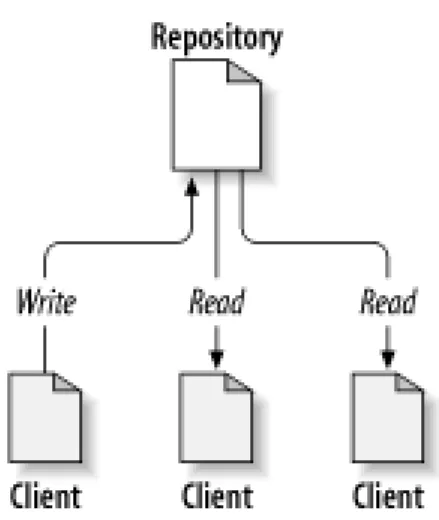
At the core of the version control system is a repository, which is the central store of that system's data. The repository usually stores information in the form of a filesystem tree—a hierarchy of files and directories. Any number of clients connect to the repos-itory, and then read or write to these files. By writing data, a client makes the information available to others; by reading data, the client receives information from others.Figure 1.1, “A typical client/server system”illustrates this.
Figure 1.1. A typical client/server system
Why is this interesting? So far, this sounds like the definition of a typical file server. And indeed, the repository is a kind of file server, but it's not your usual breed. What makes the repository special is that as the files in the repository are changed, the reposit-ory remembers each version of those files.
When a client reads data from the repository, it normally sees only the latest version of the filesystem tree. But what makes a ver-sion control client interesting is that it also has the ability to request previous states of the filesystem from the repository. A verver-sion control client can ask historical questions such as “What did this directory contain last Wednesday?” and “Who was the last person to change this file, and what changes did he make?” These are the sorts of questions that are at the heart of any version control
sys-1
The term “working copy” can be generally applied to any one file version's local instance. When most folks use the term, though, they are referring to a whole dir-ectory tree containing files and subdirectories managed by the version control system.
tem.
The Working Copy
A version control system's value comes from the fact that it tracks versions of files and directories, but the rest of the software uni-verse doesn't operate on “versions of files and directories”. Most software programs understand how to operate only on a single version of a specific type of file. So how does a version control user interact with an abstract—and, often, remote—repository full of multiple versions of various files in a concrete fashion? How does his or her word processing software, presentation software, source code editor, web design software, or some other program—all of which trade in the currency of simple data files—get ac-cess to such files? The answer is found in the version control construct known as a working copy.
A working copy is, quite literally, a local copy of a particular version of a user's VCS-managed data upon which that user is free to work. Working copies1appear to other software just as any other local directory full of files, so those programs don't have to be “version-control-aware” in order to read from and write to that data. The task of managing the working copy and communicating changes made to its contents to and from the repository falls squarely to the version control system's client software.
Versioning Models
If the primary mission of a version control system is to track the various versions of digital information over time, a very close sec-ondary mission in any modern version control system is to enable collaborative editing and sharing of that data. But different sys-tems use different strategies to achieve this. It's important to understand these different strategies, for a couple of reasons. First, it will help you compare and contrast existing version control systems, in case you encounter other systems similar to Subversion. Beyond that, it will also help you make more effective use of Subversion, since Subversion itself supports a couple of different ways of working.
The problem of file sharing
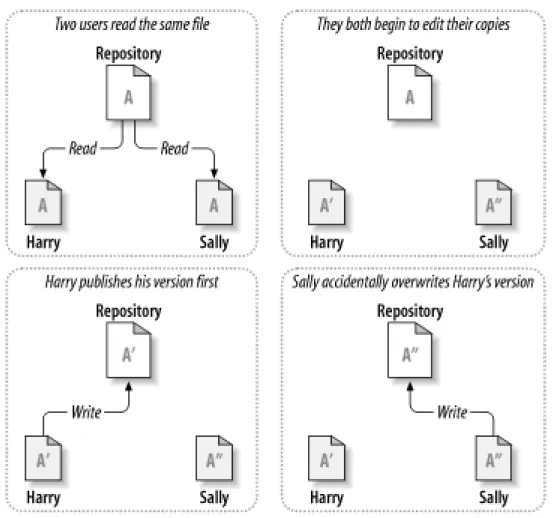
All version control systems have to solve the same fundamental problem: how will the system allow users to share information, but prevent them from accidentally stepping on each other's feet? It's all too easy for users to accidentally overwrite each other's changes in the repository.
Consider the scenario shown inFigure 1.2, “The problem to avoid”. Suppose we have two coworkers, Harry and Sally. They each decide to edit the same repository file at the same time. If Harry saves his changes to the repository first, it's possible that (a few moments later) Sally could accidentally overwrite them with her own new version of the file. While Harry's version of the file won't be lost forever (because the system remembers every change), any changes Harry made won't be present in Sally's newer ver-sion of the file, because she never saw Harry's changes to begin with. Harry's work is still effectively lost—or at least missing from the latest version of the file—and probably by accident. This is definitely a situation we want to avoid!
The lock-modify-unlock solution
Many version control systems use a lock-modify-unlock model to address the problem of many authors clobbering each other's work. In this model, the repository allows only one person to change a file at a time. This exclusivity policy is managed using locks. Harry must “lock” a file before he can begin making changes to it. If Harry has locked a file, Sally cannot also lock it, and therefore cannot make any changes to that file. All she can do is read the file and wait for Harry to finish his changes and release his lock. After Harry unlocks the file, Sally can take her turn by locking and editing the file.Figure 1.3, “The lock-modify-unlock solution”demonstrates this simple solution.
The problem with the lock-modify-unlock model is that it's a bit restrictive and often becomes a roadblock for users:
• Locking may cause administrative problems. Sometimes Harry will lock a file and then forget about it. Meanwhile, because Sally is still waiting to edit the file, her hands are tied. And then Harry goes on vacation. Now Sally has to get an administrator to release Harry's lock. The situation ends up causing a lot of unnecessary delay and wasted time.
• Locking may cause unnecessary serialization. What if Harry is editing the beginning of a text file, and Sally simply wants to edit the end of the same file? These changes don't overlap at all. They could easily edit the file simultaneously, and no great harm would come, assuming the changes were properly merged together. There's no need for them to take turns in this situation. • Locking may create a false sense of security. Suppose Harry locks and edits file A, while Sally simultaneously locks and edits
file B. But what if A and B depend on one another, and the changes made to each are semantically incompatible? Suddenly A and B don't work together anymore. The locking system was powerless to prevent the problem—yet it somehow provided a false sense of security. It's easy for Harry and Sally to imagine that by locking files, each is beginning a safe, insulated task, and thus they need not bother discussing their incompatible changes early on. Locking often becomes a substitute for real communication.
The copy-modify-merge solution
Subversion, CVS, and many other version control systems use a copy-modify-merge model as an alternative to locking. In this model, each user's client contacts the project repository and creates a personal working copy. Users then work simultaneously and
independently, modifying their private copies. Finally, the private copies are merged together into a new, final version. The version control system often assists with the merging, but ultimately, a human being is responsible for making it happen correctly.
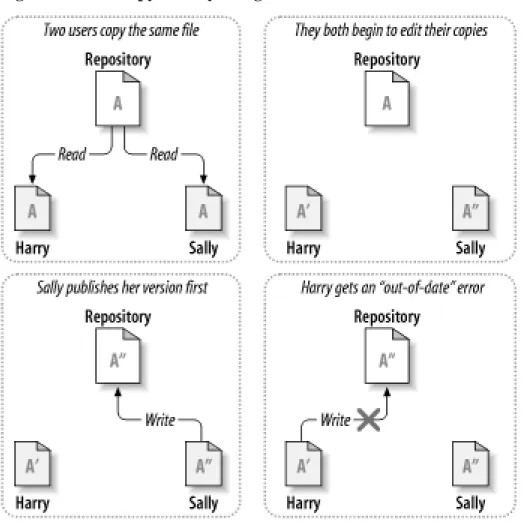
Here's an example. Say that Harry and Sally each create working copies of the same project, copied from the repository. They work concurrently and make changes to the same file A within their copies. Sally saves her changes to the repository first. When Harry attempts to save his changes later, the repository informs him that his file A is out of date. In other words, file A in the repository has somehow changed since he last copied it. So Harry asks his client to merge any new changes from the repository into his work-ing copy of file A. Chances are that Sally's changes don't overlap with his own; once he has both sets of changes integrated, he saves his working copy back to the repository.Figure 1.4, “The copy-modify-merge solution” andFigure 1.5, “The copy-modi-fy-merge solution (continued)”show this process.
Figure 1.4. The copy-modify-merge solution
But what if Sally's changes do overlap with Harry's changes? What then? This situation is called a conflict, and it's usually not much of a problem. When Harry asks his client to merge the latest repository changes into his working copy, his copy of file A is somehow flagged as being in a state of conflict: he'll be able to see both sets of conflicting changes and manually choose between them. Note that software can't automatically resolve conflicts; only humans are capable of understanding and making the necessary intelligent choices. Once Harry has manually resolved the overlapping changes—perhaps after a discussion with Sally—he can safely save the merged file back to the repository.
The copy-modify-merge model may sound a bit chaotic, but in practice, it runs extremely smoothly. Users can work in parallel, never waiting for one another. When they work on the same files, it turns out that most of their concurrent changes don't overlap at all; conflicts are infrequent. And the amount of time it takes to resolve conflicts is usually far less than the time lost by a locking system.
In the end, it all comes down to one critical factor: user communication. When users communicate poorly, both syntactic and se-mantic conflicts increase. No system can force users to communicate perfectly, and no system can detect sese-mantic conflicts. So there's no point in being lulled into a false sense of security that a locking system will somehow prevent conflicts; in practice, lock-ing seems to inhibit productivity more than anythlock-ing else.
When Locking Is Necessary
While the lock-modify-unlock model is considered generally harmful to collaboration, sometimes locking is appropriate. The copy-modify-merge model is based on the assumption that files are contextually mergeable—that is, that the majority of the files in the repository are line-based text files (such as program source code). But for files with binary formats, such as
artwork or sound, it's often impossible to merge conflicting changes. In these situations, it really is necessary for users to take strict turns when changing the file. Without serialized access, somebody ends up wasting time on changes that are ultimately discarded.
While Subversion is primarily a copy-modify-merge system, it still recognizes the need to lock an occasional file, and thus provides mechanisms for this. We discuss this feature inthe section called “Locking”.
Version Control the Subversion Way
We've mentioned already that Subversion is a modern, network-aware version control system. As we described in the section called “Version Control Basics”(our high-level version control overview), a repository serves as the core storage mechanism for Subversion's versioned data, and it's via working copies that users and their software programs interact with that data. In this sec-tion, we'll begin to introduce the specific ways in which Subversion implements version control.
Subversion Repositories
Subversion implements the concept of a version control repository much as any other modern version control system would. Un-like a working copy, a Subversion repository is an abstract entity, able to be operated upon almost exclusively by Subversion's own libraries and tools. As most of a user's Subversion interactions involve the use of the Subversion client and occur in the context of a working copy, we spend the majority of this book discussing the Subversion working copy and how to manipulate it. For the finer details of the repository, though, check outChapter 5, Repository Administration.
Revisions
A Subversion client commits (that is, communicates the changes made to) any number of files and directories as a single atomic transaction. By atomic transaction, we mean simply this: either all of the changes are accepted into the repository, or none of them is. Subversion tries to retain this atomicity in the face of program crashes, system crashes, network problems, and other users' ac-tions.
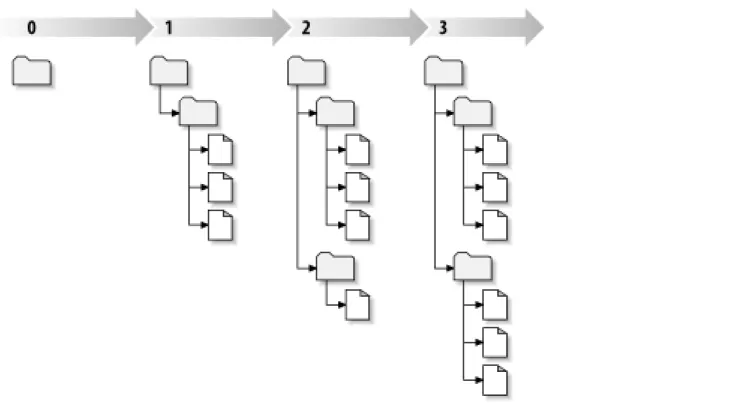
Each time the repository accepts a commit, this creates a new state of the filesystem tree, called a revision. Each revision is as-signed a unique natural number, one greater than the number asas-signed to the previous revision. The initial revision of a freshly cre-ated repository is numbered 0 and consists of nothing but an empty root directory.
Figure 1.6, “Tree changes over time”illustrates a nice way to visualize the repository. Imagine an array of revision numbers, start-ing at 0, stretchstart-ing from left to right. Each revision number has a filesystem tree hangstart-ing below it, and each tree is a “snapshot” of the way the repository looked after a commit.
Global Revision Numbers
Unlike most version control systems, Subversion's revision numbers apply to the entire repository tree, not individual files. Each revision number selects an entire tree, a particular state of the repository after some committed change. Another way to think about it is that revision N represents the state of the repository filesystem after the Nth commit. When Subversion users talk about “revision 5 offoo.c,” they really mean “foo.cas it appears in revision 5.” Notice that in general, revisions N and M of a file do not necessarily differ! Many other version control systems use per-file revision numbers, so this concept may seem unusual at first. (Former CVS users might want to seeAppendix B, Subversion for CVS Usersfor more details.)
Addressing the Repository
Subversion client programs use URLs to identify versioned files and directories in Subversion repositories. For the most part, these URLs use the standard syntax, allowing for server names and port numbers to be specified as part of the URL.
• http://svn.example.com/svn/project • http://svn.example.com:9834/repos
Subversion repository URLs aren't limited to only thehttp://variety. Because Subversion offers several different ways for its clients to communicate with its servers, the URLs used to address the repository differ subtly depending on which repository ac-cess mechanism is employed.Table 1.1, “Repository access URLs”describes how different URL schemes map to the available re-pository access methods. For more details about Subversion's server options, seeChapter 6, Server Configuration.
Table 1.1. Repository access URLs
Schema Access method
Schema Access method
http:// Access via WebDAV protocol to Subversion-aware Apache server
https:// Same ashttp://, but with SSL encryption
svn:// Access via custom protocol to ansvnserveserver
svn+ssh:// Same assvn://, but through an SSH tunnel
Subversion's handling of URLs has some notable nuances. For example, URLs containing thefile://access method (used for local repositories) must, in accordance with convention, have either a server name oflocalhostor no server name at all: • file:///var/svn/repos
• file://localhost/var/svn/repos
Also, users of thefile://scheme on Windows platforms will need to use an unofficially “standard” syntax for accessing repos-itories that are on the same machine, but on a different drive than the client's current working drive. Either of the two following URL path syntaxes will work, whereXis the drive on which the repository resides:
• file:///X:/var/svn/repos • file:///X|/var/svn/repos
Note that a URL uses forward slashes even though the native (non-URL) form of a path on Windows uses backslashes. Also note that when using thefile:///X|/form at the command line, you need to quote the URL (wrap it in quotation marks) so that the vertical bar character is not interpreted as a pipe.
You cannot use Subversion'sfile://URLs in a regular web browser the way typicalfile://URLs can. When you attempt to view afile://URL in a regular web browser, it reads and displays the contents of the file at that location by examining the filesystem directly. However, Subversion's resources exist in a virtual filesystem (seethe section called “Repository Layer”), and your browser will not understand how to interact with that filesystem. The Subversion client will automatically encode URLs as necessary, just like a web browser does. For example, the URL ht-tp://host/path with space/project/españa— which contains both spaces and upper-ASCII characters — will be
automatically interpreted by Subversion as if you'd provided
ht-tp://host/path%20with%20space/project/espa%C3%B1a. If the URL contains spaces, be sure to place it within quotation marks at the command line so that your shell treats the whole thing as a single argument to the program.
There is one notable exception to Subversion's handling of URLs which also applies to its handling of local paths in many contexts, too. If the final path component of your URL or local path contains an at sign (@), you need to use a special syntax—described in the section called “Peg and Operative Revisions”—in order to make Subversion properly address that resource.
In Subversion 1.6, a new caret (^) notation was introduced as a shorthand for “the URL of the repository's root directory”. For ex-ample, you can use the^/tags/bigsandwich/to refer to the URL of the/tags/bigsandwichdirectory in the root of the repository. Note that this URL syntax works only when your current working directory is a working copy—the command-line cli-ent knows the repository's root URL by looking at the working copy's metadata. Also note that when you wish to refer precisely to the root directory of the repository, you must do so using^/(with the trailing slash character), not merely^.
Subversion Working Copies
files however you wish, and if they're source code files, you can compile your program from them in the usual way. Your working copy is your own private work area: Subversion will never incorporate other people's changes, nor make your own changes avail-able to others, until you explicitly tell it to do so. You can even have multiple working copies of the same project.
After you've made some changes to the files in your working copy and verified that they work properly, Subversion provides you with commands to “publish” your changes to the other people working with you on your project (by writing to the repository). If other people publish their own changes, Subversion provides you with commands to merge those changes into your working copy (by reading from the repository).
A working copy also contains some extra files, created and maintained by Subversion, to help it carry out these commands. In par-ticular, each directory in your working copy contains a subdirectory named.svn, also known as the working copy's
administrat-ive directory. The files in each administratadministrat-ive directory help Subversion recognize which files contain unpublished changes, and
which files are out of date with respect to others' work.
While.svnis the de facto name of the Subversion administrative directory, Windows users may run into problems with the ASP.NET Web application framework disallowing access to directories whose names begin with a dot (.). As a special consideration to users in such situations, Subversion will instead use_svnas the administrative direct-ory name if it finds a variable namedSVN_ASP_DOT_NET_HACK in its operating environment. Throughout this book, any reference you find to.svnapplies also to_svnwhen this “ASP.NET hack” is in use.
How the working copy works
For each file in a working directory, Subversion records (among other things) two essential pieces of information: • What revision your working file is based on (this is called the file's working revision)
• A timestamp recording when the local copy was last updated by the repository
Given this information, by talking to the repository, Subversion can tell which of the following four states a working file is in:
Unchanged, and current
The file is unchanged in the working directory, and no changes to that file have been committed to the repository since its working revision. An svn commit of the file will do nothing, and an svn update of the file will do nothing.
Locally changed, and current
The file has been changed in the working directory, and no changes to that file have been committed to the repository since you last updated. There are local changes that have not been committed to the repository; thus an svn commit of the file will succeed in publishing your changes, and an svn update of the file will do nothing.
Unchanged, and out of date
The file has not been changed in the working directory, but it has been changed in the repository. The file should eventually be updated in order to make it current with the latest public revision. An svn commit of the file will do nothing, and an svn
up-date of the file will fold the latest changes into your working copy.
Locally changed, and out of date
The file has been changed both in the working directory and in the repository. An svn commit of the file will fail with an “out-of-date” error. The file should be updated first; an svn update command will attempt to merge the public changes with the local changes. If Subversion can't complete the merge in a plausible way automatically, it leaves it to the user to resolve the conflict.
A typical Subversion repository often holds the files (or source code) for several projects; usually, each project is a subdirectory in the repository's filesystem tree. In this arrangement, a user's working copy will usually correspond to a particular subtree of the re-pository.
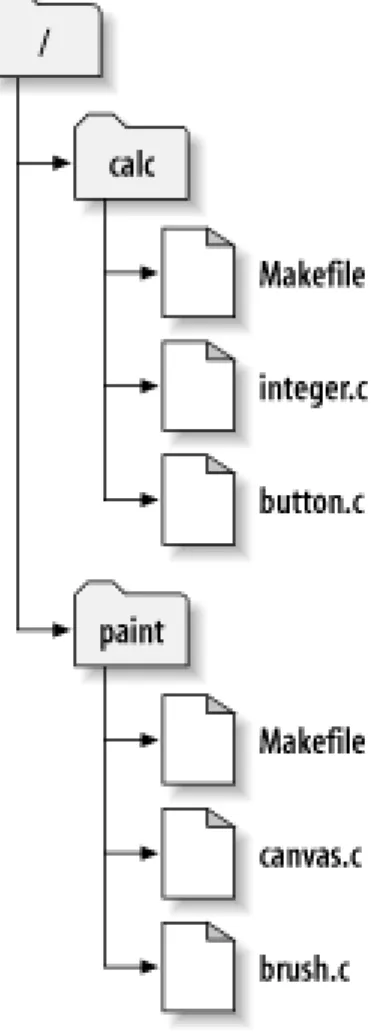
For example, suppose you have a repository that contains two software projects,paintandcalc. Each project lives in its own top-level subdirectory, as shown inFigure 1.7, “The repository's filesystem”.
Figure 1.7. The repository's filesystem
To get a working copy, you must check out some subtree of the repository. (The term check out may sound like it has something to do with locking or reserving resources, but it doesn't; it simply creates a working copy of the project for you.) For example, if you check out/calc, you will get a working copy like this:
$ svn checkout http://svn.example.com/repos/calc A calc/Makefile
A calc/integer.c A calc/button.c
Checked out revision 56. $ ls -A calc
Makefile button.c integer.c .svn/ $
The list of letterAs in the left margin indicates that Subversion is adding a number of items to your working copy. You now have a personal copy of the repository's/calcdirectory, with one additional entry—.svn—which holds the extra information needed by Subversion, as mentioned earlier.
Suppose you make changes tobutton.c. Since the.svndirectory remembers the file's original modification date and contents, Subversion can tell that you've changed the file. However, Subversion does not make your changes public until you explicitly tell it to. The act of publishing your changes is more commonly known as committing (or checking in) changes to the repository.
To publish your changes to others, you can use Subversion's svn commit command:
$ svn commit button.c -m "Fixed a typo in button.c." Sending button.c
Transmitting file data . Committed revision 57. $
Now your changes tobutton.chave been committed to the repository, with a note describing your change (namely, that you fixed a typo). If another user checks out a working copy of/calc, she will see your changes in the latest version of the file. Suppose you have a collaborator, Sally, who checked out a working copy of/calcat the same time you did. When you commit your change tobutton.c, Sally's working copy is left unchanged; Subversion modifies working copies only at the user's request. To bring her project up to date, Sally can ask Subversion to update her working copy, by using the svn update command. This will incorporate your changes into her working copy, as well as any others that have been committed since she checked it out.
$ pwd
/home/sally/calc $ ls -A
Makefile button.c integer.c .svn/ $ svn update
U button.c
Updated to revision 57. $
The output from the svn update command indicates that Subversion updated the contents ofbutton.c. Note that Sally didn't need to specify which files to update; Subversion uses the information in the.svndirectory as well as further information in the repository, to decide which files need to be brought up to date.
Mixed-revision working copies
As a general principle, Subversion tries to be as flexible as possible. One special kind of flexibility is the ability to have a working copy containing files and directories with a mix of different working revision numbers. Subversion working copies do not always correspond to any single revision in the repository; they may contain files from several different revisions. For example, suppose you check out a working copy from a repository whose most recent revision is 4:
calc/ Makefile:4 integer.c:4 button.c:4
At the moment, this working directory corresponds exactly to revision 4 in the repository. However, suppose you make a change to
button.c, and commit that change. Assuming no other commits have taken place, your commit will create revision 5 of the re-pository, and your working copy will now look like this:
calc/ Makefile:4 integer.c:4 button.c:5
Suppose that, at this point, Sally commits a change tointeger.c, creating revision 6. If you use svn update to bring your work-ing copy up to date, it will look like this:
calc/ Makefile:6 integer.c:6 button.c:6
Sally's change tointeger.cwill appear in your working copy, and your change will still be present inbutton.c. In this ex-ample, the text ofMakefileis identical in revisions 4, 5, and 6, but Subversion will mark your working copy ofMakefilewith revision 6 to indicate that it is still current. So, after you do a clean update at the top of your working copy, it will generally corres-pond to exactly one revision in the repository.
Updates and commits are separate
One of the fundamental rules of Subversion is that a “push” action does not cause a “pull” nor vice versa. Just because you're ready to submit new changes to the repository doesn't mean you're ready to receive changes from other people. And if you have new changes still in progress, svn update should gracefully merge repository changes into your own, rather than forcing you to publish them.
The main side effect of this rule is that it means a working copy has to do extra bookkeeping to track mixed revisions as well as be tolerant of the mixture. It's made more complicated by the fact that directories themselves are versioned.
For example, suppose you have a working copy entirely at revision 10. You edit the filefoo.htmland then perform an svn
com-mit, which creates revision 15 in the repository. After the commit succeeds, many new users would expect the working copy to be
entirely at revision 15, but that's not the case! Any number of changes might have happened in the repository between revisions 10 and 15. The client knows nothing of those changes in the repository, since you haven't yet run svn update, and svn commit doesn't pull down new changes. If, on the other hand, svn commit were to automatically download the newest changes, it would be pos-sible to set the entire working copy to revision 15—but then we'd be breaking the fundamental rule of “push” and “pull” remaining separate actions. Therefore, the only safe thing the Subversion client can do is mark the one file—foo.html—as being at revi-sion 15. The rest of the working copy remains at revirevi-sion 10. Only by running svn update can the latest changes be downloaded and the whole working copy be marked as revision 15.
Mixed revisions are normal
The fact is, every time you run svn commit your working copy ends up with some mixture of revisions. The things you just com-mitted are marked as having larger working revisions than everything else. After several commits (with no updates in between), your working copy will contain a whole mixture of revisions. Even if you're the only person using the repository, you will still see this phenomenon. To examine your mixture of working revisions, use the svn status command with the--verbose(-v) option (seethe section called “See an overview of your changes”for more information).