DATA SHEET
Product specification
Supersedes data of 1999 Aug 17
File under Integrated Circuits, IC18
2000 Jan 04
SJA1000
CONTENTS
1 FEATURES
2 GENERAL DESCRIPTION
3 ORDERING INFORMATION
4 BLOCK DIAGRAM
5 PINNING
6 FUNCTIONAL DESCRIPTION
6.1 Description of the CAN controller blocks 6.1.1 Interface Management Logic (IML) 6.1.2 Transmit Buffer (TXB)
6.1.3 Receive Buffer (RXB, RXFIFO) 6.1.4 Acceptance Filter (ACF) 6.1.5 Bit Stream Processor (BSP) 6.1.6 Bit Timing Logic (BTL)
6.1.7 Error Management Logic (EML)
6.2 Detailed description of the CAN controller 6.2.1 PCA82C200 compatibility
6.2.2 Differences between BasicCAN and PeliCAN mode
6.3 BasicCAN mode
6.3.1 BasicCAN address layout 6.3.2 Reset values
6.3.3 Control Register (CR) 6.3.4 Command Register (CMR) 6.3.5 Status Register (SR) 6.3.6 Interrupt Register (IR) 6.3.7 Transmit buffer layout 6.3.8 Receive buffer 6.3.9 Acceptance filter 6.4 PeliCAN mode
6.4.1 PeliCAN address layout 6.4.2 Reset values
6.4.3 Mode Register (MOD) 6.4.4 Command Register (CMR) 6.4.5 Status Register (SR) 6.4.6 Interrupt Register (IR)
6.4.7 Interrupt Enable Register (IER) 6.4.8 Arbitration Lost Capture register (ALC) 6.4.9 Error Code Capture register (ECC) 6.4.10 Error Warning Limit Register (EWLR) 6.4.11 RX Error Counter Register (RXERR) 6.4.12 TX Error Counter Register (TXERR) 6.4.13 Transmit buffer
6.4.14 Receive buffer 6.4.15 Acceptance filter
6.4.16 RX Message Counter (RMC)
6.4.17 RX Buffer Start Address register (RBSA) 6.5 Common registers
6.5.1 Bus Timing Register 0 (BTR0) 6.5.2 Bus Timing Register 1 (BTR1)
6.5.3 Output Control Register (OCR) 6.5.4 Clock Divider Register (CDR) 7 LIMITING VALUES
8 THERMAL CHARACTERISTICS
9 DC CHARACTERISTICS
10 AC CHARACTERISTICS 10.1 AC timing diagrams 10.2 Additional AC information 11 PACKAGE OUTLINES
12 SOLDERING
12.1 Introduction 12.2 DIP
12.2.1 Soldering by dipping or by wave 12.2.2 Repairing soldered joints
12.3 SO
12.3.1 Reflow soldering 12.3.2 Wave soldering
12.3.3 Repairing soldered joints 13 DEFINITIONS
1 FEATURES
• Pin compatibility to the PCA82C200 stand-alone CAN controller
• Electrical compatibility to the PCA82C200 stand-alone CAN controller
• PCA82C200 mode (BasicCAN mode is default)
• Extended receive buffer (64-byte FIFO)
• CAN 2.0B protocol compatibility (extended frame passive in PCA82C200 compatibility mode)
• Supports 11-bit identifier as well as 29-bit identifier
• Bit rates up to 1 Mbits/s
• PeliCAN mode extensions:
– Error counters with read/write access – Programmable error warning limit – Last error code register
– Error interrupt for each CAN-bus error
– Arbitration lost interrupt with detailed bit position – Single-shot transmission (no re-transmission) – Listen only mode (no acknowledge, no active error
flags)
– Hot plugging support (software driven bit rate detection)
– Acceptance filter extension (4-byte code, 4-byte mask)
– Reception of ‘own’ messages (self reception request)
• 24 MHz clock frequency
• Interfaces to a variety of microprocessors
• Programmable CAN output driver configuration
• Extended ambient temperature range (−40 to +125°C).
2 GENERAL DESCRIPTION
The SJA1000 is a stand-alone controller for the Controller Area Network (CAN) used within automotive and general industrial environments. It is the successor of the PCA82C200 CAN controller (BasicCAN) from Philips Semiconductors. Additionally, a new mode of operation is implemented (PeliCAN) which supports the CAN 2.0B protocol specification with several new features.
3 ORDERING INFORMATION
TYPE NUMBER PACKAGE
NAME DESCRIPTION VERSION
SJA1000 DIP28 plastic dual in-line package; 28 leads (600 mil) SOT117-1 SJA1000T SO28 plastic small outline package; 28 leads; body width 7.5 mm SOT136-1
4 BLOCK DIAGRAM
Fig.1 Block diagram.
handbook, full pagewidth
MGK623
INTERFACE MANAGEMENT LOGIC 7
8 address/data control
MESSAGE BUFFER
TRANSMIT BUFFER
RECEIVE BUFFER RECEIVE
FIFO
BIT STREAM PROCESSOR
ACCEPTANCE FILTER
BIT TIMING LOGIC
ERROR MANAGEMENT
LOGIC
RESET OSCILLATOR
XTAL1 9
XTAL2 10
TX0 TX1 RX0 RX1
17 18 21 20 19 14 13 15 12 8 22
internal bus
VDD3 VSS3 VDD1 VSS1
VSS2 VDD2 AD7 to AD0
2, 1, 28 to 23 3 to 7, 11, 16 ALE/AS, CS,
RD/E, WR, CLKOUT, MODE, INT
RST
5 PINNING
Note
1. XTAL1 and XTAL2 pins should be connected to VSS1 via 15 pF capacitors.
SYMBOL PIN DESCRIPTION
AD7 to AD0 2, 1, 28 to 23 multiplexed address/data bus
ALE/AS 3 ALE input signal (Intel mode), AS input signal (Motorola mode) CS 4 chip select input, LOW level allows access to the SJA1000
RD/E 5 RD signal (Intel mode) or E enable signal (Motorola mode) from the microcontroller WR 6 WR signal (Intel mode) or RD/WR signal (Motorola mode) from the microcontroller CLKOUT 7 clock output signal produced by the SJA1000 for the microcontroller; the clock
signal is derived from the built-in oscillator via the programmable divider; the clock off bit within the clock divider register allows this pin to disable
VSS1 8 ground for logic circuits
XTAL1 9 input to the oscillator amplifier; external oscillator signal is input via this pin; note 1 XTAL2 10 output from the oscillator amplifier; the output must be left open-circuit when an
external oscillator signal is used; note 1
MODE 11 mode select input
1 = selects Intel mode 0 = selects Motorola mode VDD3 12 5 V supply for output driver
TX0 13 output from the CAN output driver 0 to the physical bus line TX1 14 output from the CAN output driver 1 to the physical bus line VSS3 15 ground for output driver
INT 16 interrupt output, used to interrupt the microcontroller; INT is active LOW if any bit of the internal interrupt register is set; INT is an open-drain output and is designed to be a wired-OR with other INT outputs within the system; a LOW level on this pin will reactivate the IC from sleep mode
RST 17 reset input, used to reset the CAN interface (active LOW); automatic power-on reset can be obtained by connecting RST via a capacitor to VSS and a resistor to VDD (e.g. C = 1µF; R = 50 kΩ)
VDD2 18 5 V supply for input comparator
RX0, RX1 19, 20 input from the physical CAN-bus line to the input comparator of the SJA1000; a dominant level will wake up the SJA1000 if sleeping; a dominant level is read, if RX1 is higher than RX0 and vice versa for the recessive level; if the CBP bit (see Table 49) is set in the clock divider register, the CAN input comparator is bypassed to achieve lower internal delays if an external transceiver circuitry is connected to the SJA1000; in this case only RX0 is active; HIGH is interpreted as recessive level and LOW is interpreted as dominant level
VSS2 21 ground for input comparator VDD1 22 5 V supply for logic circuits
Fig.2 Pin configuration (DIP28). handbook, halfpage AD6 AD7 ALE/AS CLKOUT VSS1 XTAL1 XTAL2 MODE VDD3 TX0 TX1 AD5 AD4 AD3 AD2 AD0 VDD1 AD1 VSS2 RX1 RX0 VDD2 RST INT VSS3 1 2 3 4 5 6 7 8 9 10 11 12 13 28 27 26 25 24 23 22 21 20 19 18 17 16 15 14 SJA1000 MGK616 CS RD/E WR
Fig.3 Pin configuration (SO28).
handbook, halfpage AD6 AD7 ALE/AS CLKOUT VSS1 XTAL1 XTAL2 MODE VDD3 TX0 TX1 AD5 AD4 AD3 AD2 AD0 VDD1 AD1 VSS2 RX1 RX0 VDD2 RST INT VSS3 1 2 3 4 5 6 7 8 9 10 11 12 13 28 27 26 25 24 23 22 21 20 19 18 17 16 15 14 SJA1000T MGK617 CS RD/E WR
6 FUNCTIONAL DESCRIPTION
6.1 Description of the CAN controller blocks
6.1.1 INTERFACEMANAGEMENTLOGIC(IML)
The interface management logic interprets commands from the CPU, controls addressing of the CAN registers and provides interrupts and status information to the host microcontroller.
6.1.2 TRANSMITBUFFER(TXB)
The transmit buffer is an interface between the CPU and the Bit Stream Processor (BSP) that is able to store a complete message for transmission over the CAN network. The buffer is 13 bytes long, written to by the CPU and read out by the BSP.
6.1.3 RECEIVEBUFFER(RXB, RXFIFO)
The receive buffer is an interface between the acceptance filter and the CPU that stores the received and accepted messages from the CAN-bus line. The Receive Buffer (RXB) represents a CPU-accessible 13-byte window of the Receive FIFO (RXFIFO), which has a total length of 64 bytes.
With the help of this FIFO the CPU is able to process one message while other messages are being received. 6.1.4 ACCEPTANCEFILTER(ACF)
The acceptance filter compares the received identifier with the acceptance filter register contents and decides whether this message should be accepted or not. In the event of a positive acceptance test, the complete message is stored in the RXFIFO.
6.1.5 BITSTREAMPROCESSOR(BSP)
The bit stream processor is a sequencer which controls the data stream between the transmit buffer, RXFIFO and the CAN-bus. It also performs the error detection, arbitration, stuffing and error handling on the CAN-bus.
6.1.6 BITTIMINGLOGIC(BTL)
The bit timing logic monitors the serial CAN-bus line and handles the bus line-related bit timing. It is synchronized to the bit stream on the CAN-bus on a
‘recessive-to-dominant’ bus line transition at the beginning of a message (hard synchronization) and re-synchronized on further transitions during the reception of a message (soft synchronization). The BTL also provides
programmable time segments to compensate for the propagation delay times and phase shifts (e.g. due to
oscillator drifts) and to define the sample point and the number of samples to be taken within a bit time. 6.1.7 ERRORMANAGEMENTLOGIC(EML)
The EML is responsible for the error confinement of the transfer-layer modules. It receives error announcements from the BSP and then informs the BSP and IML about error statistics.
6.2 Detailed description of the CAN controller
The SJA1000 is designed to be software and pin-compatible to its predecessor, the PCA82C200 stand-alone CAN controller. Additionally, a lot of new functions are implemented. To achieve the software compatibility, two different modes of operation are implemented:
• BasicCAN mode; PCA82C200 compatible
• PeliCAN mode; extended features.
The mode of operation is selected with the CAN-mode bit located within the clock divider register. Default mode upon reset is the BasicCAN mode.
6.2.1 PCA82C200COMPATIBILITY
In BasicCAN mode the SJA1000 emulates all known registers from the PCA82C200 stand-alone CAN controller. The characteristics, as described in Sections 6.2.1.1 to 6.2.1.4 are different from the PCA82C200 design with respect to software compatibility. 6.2.1.1 Synchronization mode
The SYNC bit in the control register is removed (CR.6 in the PCA82C200). Synchronization is only possible by a recessive-to-dominant transition on the CAN-bus. Writing to this bit has no effect. To achieve compatibility to existing application software, a read access to this bit will reflect the previously written value (flip-flop without effect). 6.2.1.2 Clock divider register
The clock divider register is used to select the CAN mode of operation (BasicCAN/PeliCAN). Therefore one of the reserved bits within the PCA82C200 is used. Writing a value between 0 and 7, as allowed for the PCA82C200, will enter the BasicCAN mode. The default state is divide by 12 for Motorola mode and divide by 2 for Intel mode. An additional function is implemented within another of the reserved bits. Setting of bit CBP (see Table 49) enables the internal RX input comparator to be bypassed thereby reducing the internal delays if an external transceiver circuit is used.
6.2.1.3 Receive buffer
The dual receive buffer concept of the PCA82C200 is replaced by the receive FIFO from the PeliCAN controller. This has no effect to the application software except for the data overrun probability. Now more than two messages may be received (up to 64 bytes) until a data overrun occurs.
6.2.1.4 CAN 2.0B
The SJA1000 is designed to support the full CAN 2.0B protocol specification, which means that the extended oscillator tolerance is implemented as well as the processing of extended frame messages. In BasicCAN mode it is possible to transmit and receive standard frame messages only (11-bit identifier). If extended frame messages (29-bit identifier) are detected on the CAN-bus, they are tolerated and an acknowledge is given if the message was correct, but there is no receive interrupt generated.
6.2.2 DIFFERENCES BETWEENBASICCANANDPELICAN
MODE
In the PeliCAN mode the SJA1000 appears with a re-organized register mapping with a lot of new features. All known bits from the PCA82C200 design are available as well as several new ones. In the PeliCAN mode the complete CAN 2.0B functionality is supported (29-bit identifier).
Main new features of the SJA1000 are:
• Reception and transmission of standard and extended frame format messages
• Receive FIFO (64-byte)
• Single/dual acceptance filter with mask and code register for standard and extended frame
• Error counters with read/write access
• Programmable error warning limit
• Last error code register
• Error interrupt for each CAN-bus error
• Arbitration lost interrupt with detailed bit position
• Single-shot transmission (no re-transmission on error or arbitration lost)
• Listen only mode (monitoring of the CAN-bus, no acknowledge, no error flags)
• Hot plugging supported (disturbance-free software driven bit rate detection)
• Disable CLKOUT by hardware.
6.3 BasicCAN mode
6.3.1 BASICCANADDRESS LAYOUT
The SJA1000 appears to a microcontroller as a
memory-mapped I/O device. An independent operation of both devices is guaranteed by a RAM-like implementation of the on-chip registers.
The address area of the SJA1000 consists of the control segment and the message buffers. The control segment is programmed during an initialization download in order to configure communication parameters (e.g. bit timing). Communication over the CAN-bus is also controlled via this segment by the microcontroller. During initialization the CLKOUT signal may be programmed to a value determined by the microcontroller.
A message, which should be transmitted, has to be written to the transmit buffer. After a successful reception the microcontroller may read the received message from the receive buffer and then release it for further use.
The exchange of status, control and command signals between the microcontroller and the SJA1000 is performed in the control segment. The layout of this segment is shown in Table 3. After an initial download, the contents of the registers acceptance code, acceptance mask, bus timing registers 0 and 1 and output control should not be changed. Therefore these registers may only be accessed when the reset request bit in the control register is set HIGH.
For register access, two different modes have to be distinguished:
• Reset mode
• Operating mode.
The reset mode (see Table 3, control register, bit Reset Request) is entered automatically after a hardware reset or when the controller enters the bus-off state (see Table 5, status register, bit Bus Status). The operating mode is activated by resetting of the reset request bit in the control register.
Table 1 BasicCAN address allocation; note 1
Notes
1. It should be noted that the registers are repeated within higher CAN address areas (the most significant bits of the 8-bit CPU address are not decoded: CAN address 32 continues with CAN address 0 and so on).
2. Test register is used for production testing only. Using this register during normal operation may result in undesired behaviour of the device.
3. Some bits are writeable in reset mode only (CAN mode and CBP). CAN
ADDRESS SEGMENT
OPERATING MODE RESET MODE
READ WRITE READ WRITE
0 control control control control control
1 (FFH) command (FFH) command
2 status − status −
3 interrupt − interrupt −
4 (FFH) − acceptance code acceptance code
5 (FFH) − acceptance mask acceptance mask
6 (FFH) − bus timing 0 bus timing 0
7 (FFH) − bus timing 1 bus timing 1
8 (FFH) − output control output control
9 test test; note 2 test test; note 2
10 transmit
buffer
identifier (10 to 3) identifier (10 to 3) (FFH) −
11 identifier (2 to 0),
RTR and DLC
identifier (2 to 0), RTR and DLC
(FFH) −
12 data byte 1 data byte 1 (FFH) −
13 data byte 2 data byte 2 (FFH) −
14 data byte 3 data byte 3 (FFH) −
15 data byte 4 data byte 4 (FFH) −
16 data byte 5 data byte 5 (FFH) −
17 data byte 6 data byte 6 (FFH) −
18 data byte 7 data byte 7 (FFH) −
19 data byte 8 data byte 8 (FFH) −
20 receive
buffer
identifier (10 to 3) identifier (10 to 3) identifier (10 to 3) identifier (10 to 3)
21 identifier (2 to 0),
RTR and DLC
identifier (2 to 0), RTR and DLC
identifier (2 to 0), RTR and DLC
identifier (2 to 0), RTR and DLC
22 data byte 1 data byte 1 data byte 1 data byte 1
23 data byte 2 data byte 2 data byte 2 data byte 2
24 data byte 3 data byte 3 data byte 3 data byte 3
25 data byte 4 data byte 4 data byte 4 data byte 4
26 data byte 5 data byte 5 data byte 5 data byte 5
27 data byte 6 data byte 6 data byte 6 data byte 6
28 data byte 7 data byte 7 data byte 7 data byte 7
29 data byte 8 data byte 8 data byte 8 data byte 8
30 (FFH) − (FFH) −
6.3.2 RESET VALUES
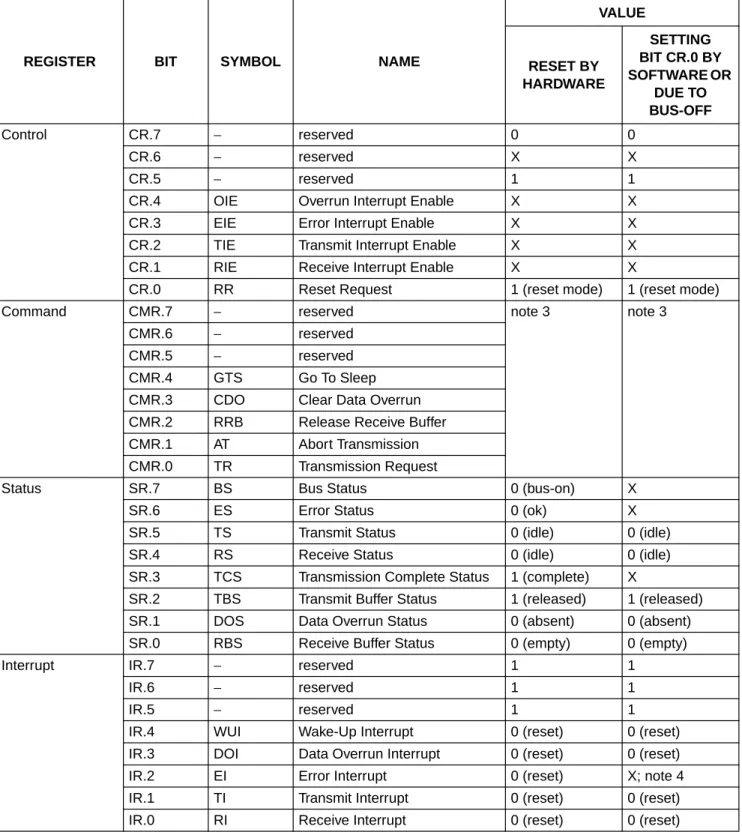
Detection of a ‘reset request’ results in aborting the current transmission/reception of a message and entering the reset mode. On the ‘1-to-0’ transition of the reset request bit, the CAN controller returns to the operating mode.
Table 2 Reset mode configuration; notes 1 and 2
REGISTER BIT SYMBOL NAME
VALUE
RESET BY HARDWARE
SETTING BIT CR.0 BY SOFTWARE OR
DUE TO BUS-OFF
Control CR.7 − reserved 0 0
CR.6 − reserved X X
CR.5 − reserved 1 1
CR.4 OIE Overrun Interrupt Enable X X
CR.3 EIE Error Interrupt Enable X X
CR.2 TIE Transmit Interrupt Enable X X
CR.1 RIE Receive Interrupt Enable X X
CR.0 RR Reset Request 1 (reset mode) 1 (reset mode)
Command CMR.7 − reserved note 3 note 3
CMR.6 − reserved
CMR.5 − reserved
CMR.4 GTS Go To Sleep
CMR.3 CDO Clear Data Overrun CMR.2 RRB Release Receive Buffer CMR.1 AT Abort Transmission CMR.0 TR Transmission Request
Status SR.7 BS Bus Status 0 (bus-on) X
SR.6 ES Error Status 0 (ok) X
SR.5 TS Transmit Status 0 (idle) 0 (idle)
SR.4 RS Receive Status 0 (idle) 0 (idle)
SR.3 TCS Transmission Complete Status 1 (complete) X
SR.2 TBS Transmit Buffer Status 1 (released) 1 (released)
SR.1 DOS Data Overrun Status 0 (absent) 0 (absent)
SR.0 RBS Receive Buffer Status 0 (empty) 0 (empty)
Interrupt IR.7 − reserved 1 1
IR.6 − reserved 1 1
IR.5 − reserved 1 1
IR.4 WUI Wake-Up Interrupt 0 (reset) 0 (reset)
IR.3 DOI Data Overrun Interrupt 0 (reset) 0 (reset)
IR.2 EI Error Interrupt 0 (reset) X; note 4
IR.1 TI Transmit Interrupt 0 (reset) 0 (reset)
Acceptance code AC.7 to 0 AC Acceptance Code X X
Acceptance mask AM.7 to 0 AM Acceptance Mask X X
Bus timing 0 BTR0.7 SJW.1 Synchronization Jump Width 1 X X
BTR0.6 SJW.0 Synchronization Jump Width 0 X X
BTR0.5 BRP.5 Baud Rate Prescaler 5 X X
BTR0.4 BRP.4 Baud Rate Prescaler 4 X X
BTR0.3 BRP.3 Baud Rate Prescaler 3 X X
BTR0.2 BRP.2 Baud Rate Prescaler 2 X X
BTR0.1 BRP.1 Baud Rate Prescaler 1 X X
BTR0.0 BRP.0 Baud Rate Prescaler 0 X X
Bus timing 1 BTR1.7 SAM Sampling X X
BTR1.6 TSEG2.2 Time Segment 2.2 X X
BTR1.5 TSEG2.1 Time Segment 2.1 X X
BTR1.4 TSEG2.0 Time Segment 2.0 X X
BTR1.3 TSEG1.3 Time Segment 1.3 X X
BTR1.2 TSEG1.2 Time Segment 1.2 X X
BTR1.1 TSEG1.1 Time Segment 1.1 X X
BTR1.0 TSEG1.0 Time Segment 1.0 X X
Output control OC.7 OCTP1 Output Control Transistor P1 X X
OC.6 OCTN1 Output Control Transistor N1 X X
OC.5 OCPOL1 Output Control Polarity 1 X X
OC.4 OCTP0 Output Control Transistor P0 X X
OC.3 OCTN0 Output Control Transistor N0 X X
OC.2 OCPOL0 Output Control Polarity 0 X X
OC.1 OCMODE1 Output Control Mode 1 X X
OC.0 OCMODE0 Output Control Mode 0 X X
Transmit buffer − TXB Transmit Buffer X X
Receive buffer − RXB Receive Buffer X; note 5 X; note 5
Clock divider − CDR Clock Divider Register 00000000
(Intel); 00000101 (Motorola)
X
REGISTER BIT SYMBOL NAME
VALUE
RESET BY HARDWARE
SETTING BIT CR.0 BY SOFTWARE OR
DUE TO BUS-OFF
Notes
1. X means that the value of these registers or bits is not influenced. 2. Remarks in brackets explain functional meaning.
3. Reading the command register will always reflect a binary ‘11111111’. 4. On bus-off the error interrupt is set, if enabled.
5. Internal read/write pointers of the RXFIFO are reset to their initial values. A subsequent read access to the RXB would show undefined data values (parts of old messages). If a message is transmitted, this message is written in parallel to the receive buffer but no receive interrupt is generated and the receive buffer area is not locked. So, even if the receive buffer is empty, the last transmitted message may be read from the receive buffer until it is overridden by the next received or transmitted message.
Upon a hardware reset, the RXFIFO pointers are reset to the physical RAM address ‘0’. Setting CR.0 by software or due to the bus-off event will reset the RXFIFO pointers to the currently valid FIFO start address which is different from the RAM address ‘0’ after the first release receive buffer command.
6.3.3 CONTROLREGISTER(CR)
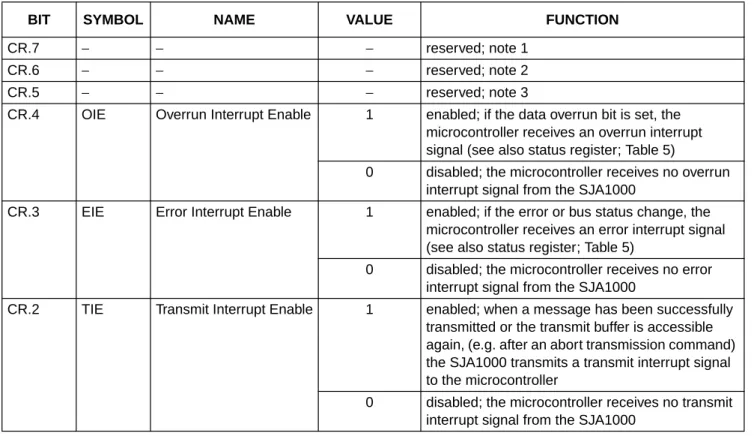
The contents of the control register are used to change the behaviour of the CAN controller. Bits may be set or reset by the attached microcontroller which uses the control register as a read/write memory.
Table 3 Bit interpretation of the control register (CR); CAN address 0
BIT SYMBOL NAME VALUE FUNCTION
CR.7 − − − reserved; note 1
CR.6 − − − reserved; note 2
CR.5 − − − reserved; note 3
CR.4 OIE Overrun Interrupt Enable 1 enabled; if the data overrun bit is set, the microcontroller receives an overrun interrupt signal (see also status register; Table 5)
0 disabled; the microcontroller receives no overrun interrupt signal from the SJA1000
CR.3 EIE Error Interrupt Enable 1 enabled; if the error or bus status change, the microcontroller receives an error interrupt signal (see also status register; Table 5)
0 disabled; the microcontroller receives no error interrupt signal from the SJA1000
CR.2 TIE Transmit Interrupt Enable 1 enabled; when a message has been successfully transmitted or the transmit buffer is accessible again, (e.g. after an abort transmission command) the SJA1000 transmits a transmit interrupt signal to the microcontroller
0 disabled; the microcontroller receives no transmit interrupt signal from the SJA1000
Notes
1. Any write access to the control register has to set this bit to logic 0 (reset value is logic 0).
2. In the PCA82C200 this bit was used to select the synchronization mode. Because this mode is not longer
implemented, setting this bit has no influence on the microcontroller. Due to software compatibility setting this bit is allowed. This bit will not change after hardware or software reset. In addition the value written by users software is reflected.
3. Reading this bit will always reflect a logic 1.
4. During a hardware reset or when the bus status bit is set to logic 1 (bus-off), the reset request bit is set to logic 1 (present). If this bit is accessed by software, a value change will become visible and takes effect first with the next positive edge of the internal clock which operates with1⁄
2of the external oscillator frequency. During an external reset the microcontroller cannot set the reset request bit to logic 0 (absent). Therefore, after having set the reset request bit to logic 0, the microcontroller must check this bit to ensure that the external reset pin is not being held LOW. Changes of the reset request bit are synchronized with the internal divided clock. Reading the reset request bit reflects the synchronized status.
After the reset request bit is set to logic 0 the SJA1000 will wait for:
a) One occurrence of bus-free signal (11 recessive bits), if the preceding reset request has been caused by a hardware reset or a CPU-initiated reset
b) 128 occurrences of bus-free, if the preceding reset request has been caused by a CAN controller initiated bus-off, before re-entering the bus-on mode; it should be noted that several registers are modified if the reset request bit was set (see also Table 2).
6.3.4 COMMANDREGISTER(CMR)
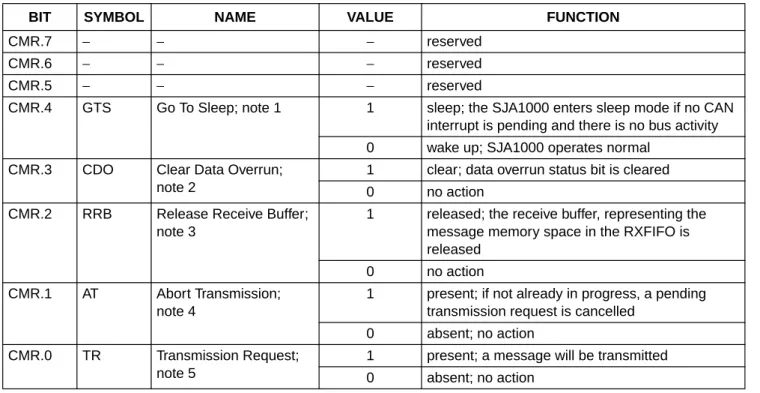
A command bit initiates an action within the transfer layer of the SJA1000. The command register appears to the microcontroller as a write only memory. If a read access is performed to this address the byte ‘11111111’ is returned. Between two commands at least one internal clock cycle is needed to process. The internal clock is divided by two from the external oscillator frequency.
CR.1 RIE Receive Interrupt Enable 1 enabled; when a message has been received without errors, the SJA1000 transmits a receive interrupt signal to the microcontroller
0 disabled; the microcontroller receives no transmit interrupt signal from the SJA1000
CR.0 RR Reset Request; note 4 1 present; detection of a reset request results in aborting the current transmission/reception of a message and entering the reset mode
0 absent; on the ‘1-to-0’ transition of the reset request bit, the SJA1000 returns to the operating mode
Table 4 Bit interpretation of the command register (CMR); CAN address 1
Notes
1. The SJA1000 will enter sleep mode if the sleep bit is set to logic 1 (sleep); there is no bus activity and no interrupt is pending. Setting of GTS with at least one of the previously mentioned exceptions valid will result in a wake-up interrupt. After sleep mode is set, the CLKOUT signal continues until at least 15 bit times have passed, to allow a host microcontroller clocked via this signal to enter its own standby mode before the CLKOUT goes LOW.
The SJA1000 will wake up when one of the three previously mentioned conditions is negated: after ‘Go To Sleep’ is set LOW (wake-up), there is bus activity or INT is driven LOW (active). On wake-up, the oscillator is started and a wake-up interrupt is generated. A sleeping SJA1000 which wakes up due to bus activity will not be able to receive this message until it detects 11 consecutive recessive bits (bus-free sequence). It should be noted that setting of GTS is not possible in reset mode. After clearing of reset request, setting of GTS is possible first, when bus-free is detected again.
2. This command bit is used to clear the data overrun condition indicated by the data overrun status bit. As long as the data overrun status bit is set no further data overrun interrupt is generated. It is allowed to give the clear data overrun command at the same time as a release receive buffer command.
3. After reading the contents of the receive buffer, the microcontroller can release this memory space of the RXFIFO by setting the release receive buffer bit to logic 1. This may result in another message becoming immediately available within the receive buffer. This event will force another receive interrupt, if enabled. If there is no other message available no further receive interrupt is generated and the receive buffer status bit is cleared.
4. The abort transmission bit is used when the CPU requires the suspension of the previously requested transmission, e.g. to transmit a more urgent message before. A transmission already in progress is not stopped. In order to see if the original message had been either transmitted successfully or aborted, the transmission complete status bit should be checked. This should be done after the transmit buffer status bit has been set to logic 1 (released) or a transmit interrupt has been generated.
5. If the transmission request was set to logic 1 in a previous command, it cannot be cancelled by setting the
transmission request bit to logic 0. The requested transmission may be cancelled by setting the abort transmission bit to logic 1.
BIT SYMBOL NAME VALUE FUNCTION
CMR.7 − − − reserved
CMR.6 − − − reserved
CMR.5 − − − reserved
CMR.4 GTS Go To Sleep; note 1 1 sleep; the SJA1000 enters sleep mode if no CAN interrupt is pending and there is no bus activity 0 wake up; SJA1000 operates normal
CMR.3 CDO Clear Data Overrun; note 2
1 clear; data overrun status bit is cleared 0 no action
CMR.2 RRB Release Receive Buffer; note 3
1 released; the receive buffer, representing the message memory space in the RXFIFO is released
0 no action CMR.1 AT Abort Transmission;
note 4
1 present; if not already in progress, a pending transmission request is cancelled
0 absent; no action CMR.0 TR Transmission Request;
note 5
1 present; a message will be transmitted 0 absent; no action
6.3.5 STATUSREGISTER(SR)
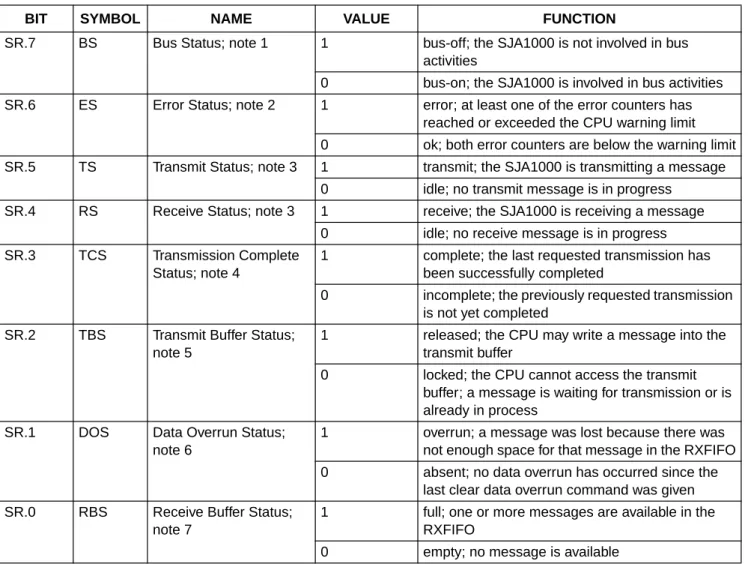
The content of the status register reflects the status of the SJA1000. The status register appears to the microcontroller as a read only memory.
Table 5 Bit interpretation of the status register (SR); CAN address 2
BIT SYMBOL NAME VALUE FUNCTION
SR.7 BS Bus Status; note 1 1 bus-off; the SJA1000 is not involved in bus activities
0 bus-on; the SJA1000 is involved in bus activities SR.6 ES Error Status; note 2 1 error; at least one of the error counters has
reached or exceeded the CPU warning limit 0 ok; both error counters are below the warning limit SR.5 TS Transmit Status; note 3 1 transmit; the SJA1000 is transmitting a message
0 idle; no transmit message is in progress SR.4 RS Receive Status; note 3 1 receive; the SJA1000 is receiving a message
0 idle; no receive message is in progress SR.3 TCS Transmission Complete
Status; note 4
1 complete; the last requested transmission has been successfully completed
0 incomplete; the previously requested transmission is not yet completed
SR.2 TBS Transmit Buffer Status; note 5
1 released; the CPU may write a message into the transmit buffer
0 locked; the CPU cannot access the transmit buffer; a message is waiting for transmission or is already in process
SR.1 DOS Data Overrun Status; note 6
1 overrun; a message was lost because there was not enough space for that message in the RXFIFO 0 absent; no data overrun has occurred since the
last clear data overrun command was given SR.0 RBS Receive Buffer Status;
note 7
1 full; one or more messages are available in the RXFIFO
Notes
1. When the transmit error counter exceeds the limit of 255 [the bus status bit is set to logic 1 (bus-off)] the
CAN controller will set the reset request bit to logic 1 (present) and an error interrupt is generated, if enabled. It will stay in this mode until the CPU clears the reset request bit. Once this is completed the CAN controller will wait the minimum protocol-defined time (128 occurrences of the bus-free signal). After that the bus status bit is cleared (bus-on), the error status bit is set to logic 0 (ok), the error counters are reset and an error interrupt is generated, if enabled.
2. Errors detected during reception or transmission will affect the error counters according to the CAN 2.0B protocol specification. The error status bit is set when at least one of the error counters has reached or exceeded the CPU warning limit of 96. An error interrupt is generated, if enabled.
3. If both the receive status and the transmit status bits are logic 0 (idle) the CAN-bus is idle.
4. The transmission complete status bit is set to logic 0 (incomplete) whenever the transmission request bit is set to logic 1. The transmission complete status bit will remain at logic 0 (incomplete) until a message is transmitted successfully.
5. If the CPU tries to write to the transmit buffer when the transmit buffer status bit is at logic 0 (locked), the written byte will not be accepted and will be lost without being indicated.
6. When a message that shall be received has passed the acceptance filter successfully (i.e. earliest after arbitration field), the CAN controller needs space in the RXFIFO to store the message descriptor. Accordingly there must be enough space for each data byte which has been received. If there is not enough space to store the message, that message will be dropped and the data overrun condition will be indicated to the CPU only, if this received message has no errors until the last but one bit of end of frame (message becomes valid).
7. After reading a message stored in the RXFIFO and releasing this memory space with the command release receive buffer, this bit is cleared. If there is another message available within the FIFO this bit is set again with the next bit quantum (tscl).
6.3.6 INTERRUPTREGISTER(IR)
The interrupt register allows the identification of an interrupt source. When one or more bits of this register are set, the INT pin is activated (LOW). After this register is read by the microcontroller, all bits are reset what results in a floating level at INT. The interrupt register appears to the microcontroller as a read only memory.
Table 6 Bit interpretation of the interrupt register (IR); CAN address 3
Notes
1. Reading this bit will always reflect a logic 1.
2. A wake-up interrupt is also generated if the CPU tries to set go to sleep while the CAN controller is involved in bus activities or a CAN interrupt is pending.
3. The overrun interrupt bit (if enabled) and the data overrun status bit are set at the same time. 4. The receive interrupt bit (if enabled) and the receive buffer status bit are set at the same time.
It should be noted that the receive interrupt bit is cleared upon a read access, even if there is another message available within the FIFO. The moment the release receive buffer command is given and there is another message valid within the receive buffer, the receive interrupt is set again (if enabled) with the next tscl.
BIT SYMBOL NAME VALUE FUNCTION
IR.7 − − − reserved; note 1
IR.6 − − − reserved; note 1
IR.5 − − − reserved; note 1
IR.4 WUI Wake-Up Interrupt; note 2
1 set; this bit is set when the sleep mode is left 0 reset; this bit is cleared by any read access of the
microcontroller IR.3 DOI Data Overrun Interrupt;
note 3
1 set; this bit is set on a ‘0-to-1’ transition of the data overrun status bit, when the data overrun interrupt enable is set to logic 1 (enabled)
0 reset; this bit is cleared by any read access of the microcontroller
IR.2 EI Error Interrupt 1 set; this bit is set on a change of either the error status or bus status bits if the error interrupt enable is set to logic 1 (enabled)
0 reset; this bit is cleared by any read access of the microcontroller
IR.1 TI Transmit Interrupt 1 set; this bit is set whenever the transmit buffer status changes from logic 0 to logic 1 (released) and transmit interrupt enable is set to logic 1 (enabled)
0 reset; this bit is cleared by any read access of the microcontroller
IR.0 RI Receive Interrupt; note 4 1 set; this bit is set while the receive FIFO is not empty and the receive interrupt enable bit is set to logic 1 (enabled)
0 reset; this bit is cleared by any read access of the microcontroller
6.3.7 TRANSMIT BUFFER LAYOUT
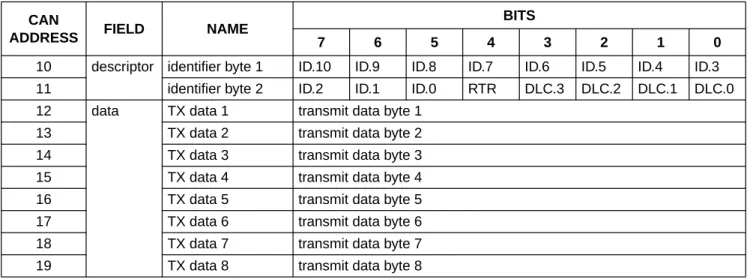
The global layout of the transmit buffer is shown in Table 7. The buffer serves to store a message from the microcontroller to be transmitted by the SJA1000. It is subdivided into a descriptor and data field. The transmit buffer can be written to and read out by the microcontroller in operating mode only. In reset mode a ‘FFH’ is reflected for all bytes.
Table 7 Layout of transmit buffer
CAN
ADDRESS FIELD NAME
BITS
7 6 5 4 3 2 1 0
10 descriptor identifier byte 1 ID.10 ID.9 ID.8 ID.7 ID.6 ID.5 ID.4 ID.3 11 identifier byte 2 ID.2 ID.1 ID.0 RTR DLC.3 DLC.2 DLC.1 DLC.0 12 data TX data 1 transmit data byte 1
13 TX data 2 transmit data byte 2
14 TX data 3 transmit data byte 3
15 TX data 4 transmit data byte 4
16 TX data 5 transmit data byte 5
17 TX data 6 transmit data byte 6
18 TX data 7 transmit data byte 7
19 TX data 8 transmit data byte 8
6.3.7.1 Identifier (ID)
The identifier consists of 11 bits (ID.10 to ID.0). ID.10 is the most significant bit, which is transmitted first on the bus during the arbitration process. The identifier acts as the message’s name. It is used in a receiver for acceptance filtering and also determining the bus access priority during the arbitration process. The lower the binary value of the identifier the higher the priority. This is due to a larger number of leading dominant bits during arbitration. 6.3.7.2 Remote Transmission Request (RTR)
If this bit is set, a remote frame will be transmitted via the bus. This means that no data bytes are included within this frame. Nevertheless, it is necessary to specify the correct data length code which depends on the corresponding data frame with the same identifier coding.
If the RTR bit is not set, a data frame will be sent including the number of data bytes as specified by the data length code.
6.3.7.3 Data Length Code (DLC)
The number of bytes in the data field of a message is coded by the data length code. At the start of a remote frame transmission the data length code is not considered due to the RTR bit being at logic 1 (remote). This forces the number of transmitted/received data bytes to be logic 0. Nevertheless, the data length code must be
specified correctly to avoid bus errors if two
CAN controllers start a remote frame transmission with the same identifier simultaneously.
The range of the data byte count is 0 to 8 bytes and is coded as follows:
DataByteCount = 8×DLC.3 + 4×DLC.2 + 2×DLC.1 + DLC.0
For reasons of compatibility no data length code >8 should be used. If a value >8 is selected, 8 bytes are transmitted in the data frame with the data length code specified in DLC.
6.3.7.4 Data field
The number of transferred data bytes is determined by the data length code. The first bit transmitted is the most significant bit of data byte 1 at address 12.
6.3.8 RECEIVE BUFFER
The global layout of the receive buffer is very similar to the transmit buffer described in Section 6.3.7. The receive buffer is the accessible part of the RXFIFO and is located in the range between CAN address 20 and 29.
Fig.4 Example of the message storage within the RXFIFO. Message 1 is now available in the receive buffer.
handbook, full pagewidth
MGK618
release receive buffer command
64-byte FIFO
incoming messages
message 3
message 2
message 1
29 28 27 26 25 24 23 22 21 20
receive buffer window
CAN address
Identifier, remote transmission request bit and data length code have the same meaning and location as described in the transmit buffer but within the address range 20 to 29. As illustrated in Fig.4 the RXFIFO has space for
64 message bytes in total. The number of messages that can be stored in the FIFO at any particular moment depends on the length of the individual messages. If there is not enough space for a new message within the RXFIFO, the CAN controller generates a data overrun condition. A message which is partly written into the RXFIFO, when the data overrun condition occurs, is deleted. This situation is indicated to the microcontroller via the status register and the data overrun interrupt, if enabled and the frame was received without any errors until the last but one bit of end of frame (RX message becomes valid).
6.3.9 ACCEPTANCE FILTER
With the help of the acceptance filter the CAN controller is able to allow passing of received messages to the RXFIFO only when the identifier bits of the received message are equal to the predefined ones within the acceptance filter registers. The acceptance filter is defined by the
acceptance code register (ACR; see Section 6.3.9.1) and the acceptance mask register (AMR; see Section 6.3.9.2).
6.3.9.1 Acceptance Code Register (ACR)
Table 8 ACR bit allocation; can address 4
BIT 7 BIT 6 BIT 5 BIT 4 BIT 3 BIT 2 BIT 1 BIT 0
AC.7 AC.6 AC.5 AC.4 AC.3 AC.2 AC.1 AC.0
This register can be accessed (read/write), if the reset request bit is set HIGH (present). When a message is received which passes the acceptance test and there is receive buffer space left, then the respective descriptor and data field are sequentially stored in the RXFIFO. When the complete message has been correctly received the following occurs:
• The receive status bit is set HIGH (full)
• If the receive interrupt enable bit is set HIGH (enabled), the receive interrupt is set HIGH (set).
The acceptance code bits (AC.7 to AC.0) and the eight most significant bits of the message’s identifier
(ID.10 to ID.3) must be equal to those bit positions which are marked relevant by the acceptance mask bits (AM.7 to AM.0). If the conditions as described in the following equation are fulfilled, acceptance is given: (ID.10 to ID.3)≡(AC.7 to AC.0)]∨(AM.7 to AM.0)
≡11111111
6.3.9.2 Acceptance Mask Register (AMR)
Table 9 AMR bit allocation; CAN address 5
BIT 7 BIT 6 BIT 5 BIT 4 BIT 3 BIT 2 BIT 1 BIT 0
AM.7 AM.6 AM.5 AM.4 AM.3 AM.2 AM.1 AM.0
This register can be accessed (read/write), if the reset request bit is set HIGH (present). The acceptance mask register qualifies which of the corresponding bits of the acceptance code are ‘relevant’ (AM.X = 0) or ‘don’t care’ (AM.X = 1) for acceptance filtering.
6.3.9.3 Other registers
The other registers are described in Section 6.5.
6.4 PeliCAN mode
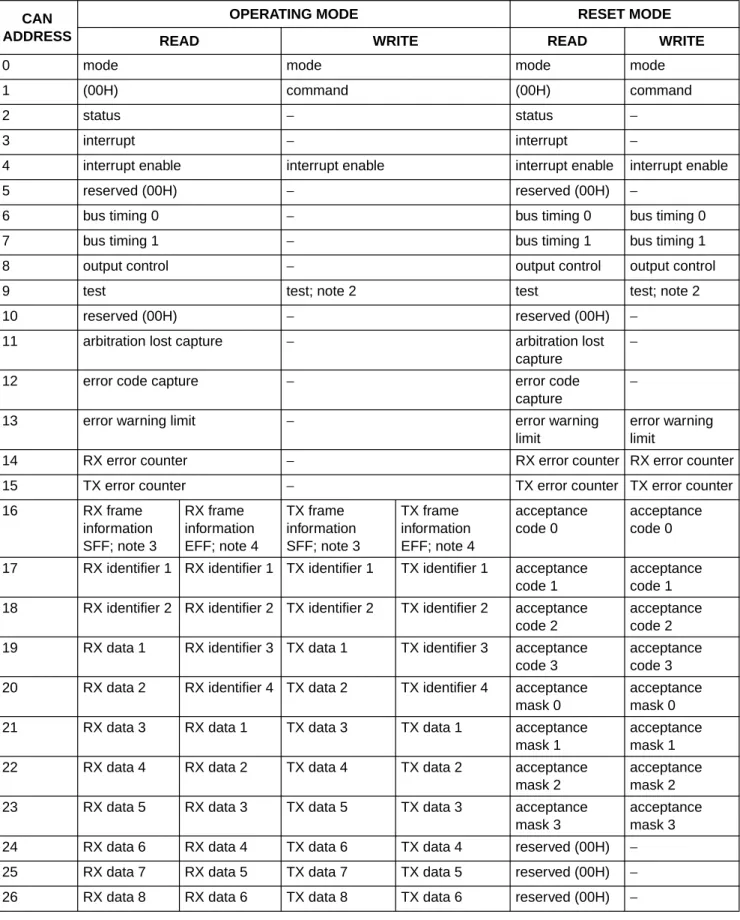
6.4.1 PELICANADDRESS LAYOUT
The CAN controller’s internal registers appear to the CPU as on-chip memory mapped peripheral registers. Because the CAN controller can operate in different modes (operating/reset; see also Section 6.4.3), one has to distinguish between different internal address definitions. Starting from CAN address 32 the complete internal RAM (80-byte) is mapped to the CPU interface.
Table 10 PeliCAN address allocation; note 1 CAN
ADDRESS
OPERATING MODE RESET MODE
READ WRITE READ WRITE
0 mode mode mode mode
1 (00H) command (00H) command
2 status − status −
3 interrupt − interrupt −
4 interrupt enable interrupt enable interrupt enable interrupt enable
5 reserved (00H) − reserved (00H) −
6 bus timing 0 − bus timing 0 bus timing 0
7 bus timing 1 − bus timing 1 bus timing 1
8 output control − output control output control
9 test test; note 2 test test; note 2
10 reserved (00H) − reserved (00H) −
11 arbitration lost capture − arbitration lost
capture
−
12 error code capture − error code
capture
−
13 error warning limit − error warning
limit
error warning limit
14 RX error counter − RX error counter RX error counter
15 TX error counter − TX error counter TX error counter
16 RX frame
information SFF; note 3
RX frame information EFF; note 4
TX frame information SFF; note 3
TX frame information EFF; note 4
acceptance code 0
acceptance code 0 17 RX identifier 1 RX identifier 1 TX identifier 1 TX identifier 1 acceptance
code 1
acceptance code 1 18 RX identifier 2 RX identifier 2 TX identifier 2 TX identifier 2 acceptance
code 2
acceptance code 2 19 RX data 1 RX identifier 3 TX data 1 TX identifier 3 acceptance
code 3
acceptance code 3 20 RX data 2 RX identifier 4 TX data 2 TX identifier 4 acceptance
mask 0
acceptance mask 0 21 RX data 3 RX data 1 TX data 3 TX data 1 acceptance
mask 1
acceptance mask 1 22 RX data 4 RX data 2 TX data 4 TX data 2 acceptance
mask 2
acceptance mask 2 23 RX data 5 RX data 3 TX data 5 TX data 3 acceptance
mask 3
acceptance mask 3 24 RX data 6 RX data 4 TX data 6 TX data 4 reserved (00H) − 25 RX data 7 RX data 5 TX data 7 TX data 5 reserved (00H) − 26 RX data 8 RX data 6 TX data 8 TX data 6 reserved (00H) −
Notes
1. It should be noted that the registers are repeated within higher CAN address areas (the most significant bit of the 8-bit CPU address is not decoded: CAN address 128 continues with CAN address 0 and so on).
2. Test register is used for production testing only. Using this register during normal operation may result in undesired behaviour of the device.
3. SFF = Standard Frame Format. 4. EFF = Extended Frame Format.
5. These address allocations reflect the FIFO RAM space behind the current message. The contents are random after power-up and contain the beginning of the next message which is received after the current one. If no further message is received, parts of old messages may occur here.
6. Some bits are writeable in reset mode only (CAN mode, CBP, RXINTEN and clock off).
27 (FIFO RAM);
note 5
RX data 7 − TX data 7 reserved (00H) −
28 (FIFO RAM);
note 5
RX data 8 − TX data 8 reserved (00H) −
29 RX message counter − RX message
counter
−
30 RX buffer start address − RX buffer start
address
RX buffer start address 31 clock divider clock divider; note 6 clock divider clock divider
32 internal RAM address 0 (FIFO) − internal RAM
address 0
internal RAM address 0
33 internal RAM address 1 (FIFO) − internal RAM
address 1
internal RAM address 1
↓ ↓ ↓ ↓ ↓
95 internal RAM address 63 (FIFO)
− internal RAM
address 63
internal RAM address 63 96 internal RAM address 64
(TX buffer)
− internal RAM
address 64
internal RAM address 64
↓ ↓ ↓ ↓ ↓
108 internal RAM address 76 (TX buffer)
− internal RAM
address 76
internal RAM address 76
109 internal RAM address 77 (free) − internal RAM
address 77
internal RAM address 77
110 internal RAM address 78 (free) − internal RAM
address 78
internal RAM address 78
111 internal RAM address 79 (free) − internal RAM
address 79
internal RAM address 79
112 (00H) − (00H) −
↓ ↓ ↓ ↓ ↓
127 (00H) − (00H) −
CAN ADDRESS
OPERATING MODE RESET MODE
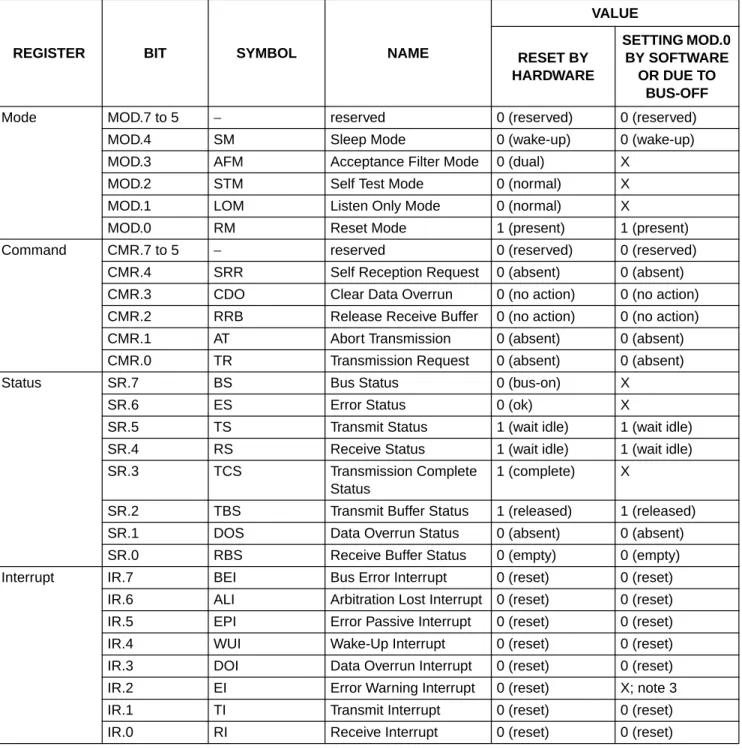
6.4.2 RESET VALUES
Detection of a set reset mode bit results in aborting the current transmission/reception of a message and entering the reset mode. On the ‘1-to-0’ transition of the reset mode bit, the CAN controller returns to the mode defined within the mode register.
Table 11 Reset mode configuration; notes 1 and 2
REGISTER BIT SYMBOL NAME
VALUE
RESET BY HARDWARE
SETTING MOD.0 BY SOFTWARE
OR DUE TO BUS-OFF
Mode MOD.7 to 5 − reserved 0 (reserved) 0 (reserved)
MOD.4 SM Sleep Mode 0 (wake-up) 0 (wake-up)
MOD.3 AFM Acceptance Filter Mode 0 (dual) X
MOD.2 STM Self Test Mode 0 (normal) X
MOD.1 LOM Listen Only Mode 0 (normal) X
MOD.0 RM Reset Mode 1 (present) 1 (present)
Command CMR.7 to 5 − reserved 0 (reserved) 0 (reserved)
CMR.4 SRR Self Reception Request 0 (absent) 0 (absent) CMR.3 CDO Clear Data Overrun 0 (no action) 0 (no action) CMR.2 RRB Release Receive Buffer 0 (no action) 0 (no action)
CMR.1 AT Abort Transmission 0 (absent) 0 (absent)
CMR.0 TR Transmission Request 0 (absent) 0 (absent)
Status SR.7 BS Bus Status 0 (bus-on) X
SR.6 ES Error Status 0 (ok) X
SR.5 TS Transmit Status 1 (wait idle) 1 (wait idle)
SR.4 RS Receive Status 1 (wait idle) 1 (wait idle)
SR.3 TCS Transmission Complete
Status
1 (complete) X
SR.2 TBS Transmit Buffer Status 1 (released) 1 (released)
SR.1 DOS Data Overrun Status 0 (absent) 0 (absent)
SR.0 RBS Receive Buffer Status 0 (empty) 0 (empty)
Interrupt IR.7 BEI Bus Error Interrupt 0 (reset) 0 (reset)
IR.6 ALI Arbitration Lost Interrupt 0 (reset) 0 (reset) IR.5 EPI Error Passive Interrupt 0 (reset) 0 (reset)
IR.4 WUI Wake-Up Interrupt 0 (reset) 0 (reset)
IR.3 DOI Data Overrun Interrupt 0 (reset) 0 (reset) IR.2 EI Error Warning Interrupt 0 (reset) X; note 3
IR.1 TI Transmit Interrupt 0 (reset) 0 (reset)
Interrupt enable
IER.7 BEIE Bus Error Interrupt Enable
X X
IER.6 ALIE Arbitration Lost Interrupt Enable
X X
IER.5 EPIE Error Passive Interrupt Enable
X X
IER.4 WUIE Wake-Up Interrupt
Enable
X X
IER.3 DOIE Data Overrun Interrupt Enable
X X
IER.2 EIE Error Warning Interrupt Enable
X X
IER.1 TIE Transmit Interrupt
Enable
X X
IER.0 RIE Receive Interrupt Enable X X
Bus timing 0 BTR0.7 SJW.1 Synchronization Jump Width 1
X X
BTR0.6 SJW.0 Synchronization Jump Width 0
X X
BTR0.5 BRP.5 Baud Rate Prescaler 5 X X
BTR0.4 BRP.4 Baud Rate Prescaler 4 X X
BTR0.3 BRP.3 Baud Rate Prescaler 3 X X
BTR0.2 BRP.2 Baud Rate Prescaler 2 X X
BTR0.1 BRP.1 Baud Rate Prescaler 1 X X
BTR0.0 BRP.0 Baud Rate Prescaler 0 X X
Bus timing 1 BTR1.7 SAM Sampling X X
BTR1.6 TSEG2.2 Time Segment 2.2 X X
BTR1.5 TSEG2.1 Time Segment 2.1 X X
BTR1.4 TSEG2.0 Time Segment 2.0 X X
BTR1.3 TSEG1.3 Time Segment 1.3 X X
BTR1.2 TSEG1.2 Time Segment 1.2 X X
BTR1.1 TSEG1.1 Time Segment 1.1 X X
BTR1.0 TSEG1.0 Time Segment 1.0 X X
REGISTER BIT SYMBOL NAME
VALUE
RESET BY HARDWARE
SETTING MOD.0 BY SOFTWARE
OR DUE TO BUS-OFF
Output control OCR.7 OCTP1 Output Control Transistor P1
X X
OCR.6 OCTN1 Output Control
Transistor N1
X X
OCR.5 OCPOL1 Output Control Polarity 1 X X
OCR.4 OCTP0 Output Control
Transistor P0
X X
OCR.3 OCTN0 Output Control
Transistor N0
X X
OCR.2 OCPOL0 Output Control Polarity 0 X X
OCR.1 OCMODE1 Output Control Mode 1 X X
OCR.0 OCMODE0 Output Control Mode 0 X X
Arbitration lost capture
− ALC Arbitration Lost Capture 0 X
Error code capture
− ECC Error Code Capture 0 X
Error warning limit
− EWLR Error Warning Limit
Register
96 X
RX error counter
− RXERR Receive Error Counter 0 (reset) X; note 4
TX error counter
− TXERR Transmit Error Counter 0 (reset) X; note 4
TX buffer − TXB Transmit Buffer X X
RX buffer − RXB Receive Buffer X; note 5 X; note 5
ACR 0 to 3 − ACR0 to ACR3 Acceptance Code Registers
X X
AMR 0 to 3 − AMR0 to AMR3 Acceptance Mask Registers
X X
RX message counter
− RMC RX Message Counter 0 0
RX buffer start address
− RBSA RX Buffer Start Address 00000000 X
Clock divider − CDR Clock Divider Register 00000000 Intel; 00000101 Motorola
X
REGISTER BIT SYMBOL NAME
VALUE
RESET BY HARDWARE
SETTING MOD.0 BY SOFTWARE
OR DUE TO BUS-OFF
Notes
1. X means that the value of these registers or bits is not influenced. 2. Remarks in brackets explain functional meaning.
3. On bus-off the error warning interrupt is set, if enabled.
4. If the reset mode was entered due to a bus-off condition, the receive error counter is cleared and the transmit error counter is initialized to 127 to count-down the CAN-defined bus-off recovery time consisting of 128 occurrences of 11 consecutive recessive bits.
5. Internal read/write pointers of the RXFIFO are reset to their initial values. A subsequent read access to the RXB would show undefined data values (parts of old messages).
If a message is transmitted, this message is written in parallel to the receive buffer. A receive interrupt is generated only if this transmission was forced by the self reception request. So, even if the receive buffer is empty, the last transmitted message may be read from the receive buffer until it is overwritten by the next received or transmitted message.
Upon a hardware reset, the RXFIFO pointers are reset to the physical RAM address ‘0’. Setting CR.0 by software or due to the bus-off event will reset the RXFIFO pointers to the currently valid FIFO start address (RBSA register) which is different from the RAM address ‘0’ after the first release receive buffer command.
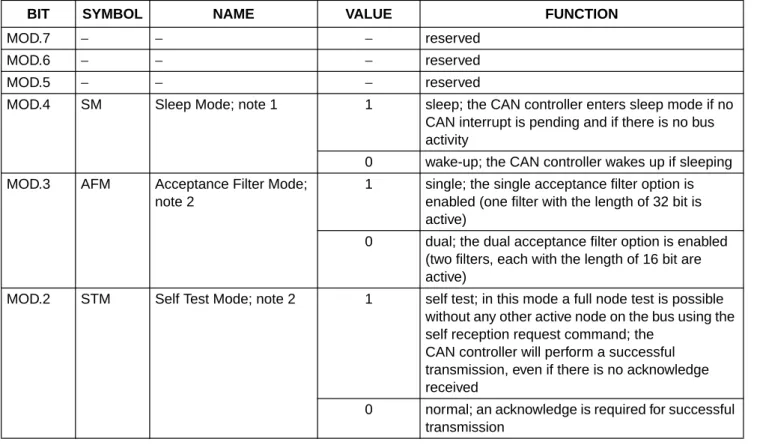
6.4.3 MODEREGISTER(MOD)
The contents of the mode register are used to change the behaviour of the CAN controller. Bits may be set or reset by the CPU which uses the control register as a read/write memory. Reserved bits are read as logic 0.
Table 12 Bit interpretation of the mode register (MOD); CAN address ‘0’
BIT SYMBOL NAME VALUE FUNCTION
MOD.7 − − − reserved
MOD.6 − − − reserved
MOD.5 − − − reserved
MOD.4 SM Sleep Mode; note 1 1 sleep; the CAN controller enters sleep mode if no CAN interrupt is pending and if there is no bus activity
0 wake-up; the CAN controller wakes up if sleeping MOD.3 AFM Acceptance Filter Mode;
note 2
1 single; the single acceptance filter option is enabled (one filter with the length of 32 bit is active)
0 dual; the dual acceptance filter option is enabled (two filters, each with the length of 16 bit are active)
MOD.2 STM Self Test Mode; note 2 1 self test; in this mode a full node test is possible without any other active node on the bus using the self reception request command; the
CAN controller will perform a successful transmission, even if there is no acknowledge received
0 normal; an acknowledge is required for successful transmission
Notes
1. The SJA1000 will enter sleep mode if the sleep mode bit is set to logic 1 (sleep); then there is no bus activity and no interrupt is pending. Setting of SM with at least one of the previously mentioned exceptions valid will result in a wake-up interrupt. After sleep mode is set, the CLKOUT signal continues until at least 15 bit times have passed, to allow a host microcontroller clocked via this signal to enter its own standby mode before the CLKOUT goes LOW. The SJA1000 will wake up when one of the three previously mentioned conditions is negated: after SM is set LOW (wake-up), there is bus activity or INT is driven LOW (active). On wake-up, the oscillator is started and a wake-up interrupt is generated. A sleeping SJA1000 which wakes up due to bus activity will not be able to receive this message until it detects 11 consecutive recessive bits (bus-free sequence). It should be noted that setting of SM is not possible in reset mode. After clearing of reset mode, setting of SM is possible first, when bus-free is detected again.
2. A write access to the bits MOD.1 to MOD.3 is only possible, if the reset mode is entered previously.
3. This mode of operation forces the CAN controller to be error passive. Message transmission is not possible. The listen only mode can be used e.g. for software driven bit rate detection and ‘hot plugging’. All other functions can be used like in normal mode.
4. During a hardware reset or when the bus status bit is set to logic 1 (bus-off), the reset mode bit is also set to logic 1 (present). If this bit is accessed by software, a value change will become visible and takes effect first with the next positive edge of the internal clock which operates at half of the external oscillator frequency. During an external reset the microcontroller cannot set the reset mode bit to logic 0 (absent). Therefore, after having set the reset mode bit to logic 1, the microcontroller must check this bit to ensure that the external reset pin is not being held HIGH. Changes of the reset request bit are synchronized with the internal divided clock. Reading the reset request bit reflects the synchronized status. After the reset mode bit is set to logic 0 the CAN controller will wait for:
a) One occurrence of bus-free signal (11 recessive bits), if the preceding reset has been caused by a hardware reset or a CPU-initiated reset.
b) 128 occurrences of bus-free, if the preceding reset has been caused by a CAN controller initiated bus-off, before re-entering the bus-on mode.
MOD.1 LOM Listen Only Mode; notes 2 and 3
1 listen only; in this mode the CAN controller would give no acknowledge to the CAN-bus, even if a message is received successfully; the error counters are stopped at the current value
0 normal
MOD.0 RM Reset Mode; note 4 1 reset; detection of a set reset mode bit results in aborting the current transmission/reception of a message and entering the reset mode
0 normal; on the ‘1-to-0’ transition of the reset mode bit, the CAN controller returns to the operating mode
6.4.4 COMMANDREGISTER(CMR)
A command bit initiates an action within the transfer layer of the CAN controller. This register is write only, all bits will return a logic 0 when being read. Between two commands at least one internal clock cycle is needed in order to proceed. The internal clock is half of the external oscillator frequency.
Table 13 Bit interpretation of the command register (CMR); CAN address 1
Notes
1. Upon self reception request a message is transmitted and simultaneously received if the acceptance filter is set to the corresponding identifier. A receive and a transmit interrupt will indicate correct self reception (see also self test mode in mode register).
2. Setting the command bits CMR.0 and CMR.1 simultaneously results in sending the transmit message once. No re-transmission will be performed in the event of an error or arbitration lost (single-shot transmission).
Setting the command bits CMR.4 and CMR.1 simultaneously results in sending the transmit message once using the self reception feature. No re-transmission will be performed in the event of an error or arbitration lost.
Setting the command bits CMR.0, CMR.1 and CMR.4 simultaneously results in sending the transmit message once as described for CMR.0 and CMR.1.
The moment the transmit status bit is set within the status register, the internal transmission request bit is cleared automatically.
Setting CMR.0 and CMR.4 simultaneously will ignore the set CMR.4 bit.
3. This command bit is used to clear the data overrun condition indicated by the data overrun status bit. As long as the data overrun status bit is set no further data overrun interrupt is generated.
4. After reading the contents of the receive buffer, the CPU can release this memory space in the RXFIFO by setting the release receive buffer bit to logic 1. This may result in another message becoming immediately available within the receive buffer. If there is no other message available, the receive interrupt bit is reset.
BIT SYMBOL NAME VALUE FUNCTION
CMR.7 − reserved − −
CMR.6 − reserved − −
CMR.5 − reserved − −
CMR.4 SRR Self Reception Request; notes 1 and 2
1 present; a message shall be transmitted and received simultaneously
0 − (absent) CMR.3 CDO Clear Data Overrun;
note 3
1 clear; the data overrun status bit is cleared 0 − (no action)
CMR.2 RRB Release Receive Buffer; note 4
1 released; the receive buffer, representing the message memory space in the RXFIFO is released
0 − (no action) CMR.1 AT Abort Transmission;
notes 5 and 2
1 present; if not already in progress, a pending transmission request is cancelled
0 − (absent) CMR.0 TR Transmission Request;
notes 6 and 2
1 present; a message shall be transmitted 0 − (absent)
5. The abort transmission bit is used when the CPU requires the suspension of the previously requested transmission, e.g. to transmit a more urgent message before. A transmission already in progress is not stopped. In order to see if the original message has been either transmitted successfully or aborted, the transmission complete status bit should be checked. This should be done after the transmit buffer status bit has been set to logic 1 or a transmit interrupt has been generated.
It should be noted that a transmit interrupt is generated even if the message was aborted because the transmit buffer status bit changes to ‘released’.
6. If the transmission request was set to logic 1 in a previous command, it cannot be cancelled by setting the
transmission request bit to logic 0. The requested transmission may be cancelled by setting the abort transmission bit to logic 1.
6.4.5 STATUSREGISTER(SR)
The content of the status register reflects the status of the CAN controller. The status register appears to the CPU as a read only memory.
Table 14 Bit interpretation of the status register (SR); CAN address 2
BIT SYMBOL NAME VALUE FUNCTION
SR.7 BS Bus Status; note 1 1 bus-off; the CAN controller is not involved in bus activities
0 bus-on; the CAN controller is involved in bus activities
SR.6 ES Error Status; note 2 1 error; at least one of the error counters has reached or exceeded the CPU warning limit defined by the Error Warning Limit Register (EWLR)
0 ok; both error counters are below the warning limit SR.5 TS Transmit Status; note 3 1 transmit; the CAN controller is transmitting a
message
0 idle
SR.4 RS Receive Status; note 3 1 receive; the CAN controller is receiving a message
0 idle
SR.3 TCS Transmission Complete Status; note 4
1 complete; last requested transmission has been successfully completed
0 incomplete; previously requested transmission is not yet completed
SR.2 TBS Transmit Buffer Status; note 5
1 released; the CPU may write a message into the transmit buffer
0 locked; the CPU cannot access the transmit buffer; a message is either waiting for transmission or is in the process of being transmitted
Notes
1. When the transmit error counter exceeds the limit of 255, the bus status bit is set to logic 1 (bus-off), the
CAN controller will set the reset mode bit to logic 1 (present) and an error warning interrupt is generated, if enabled. The transmit error counter is set to 127 and the receive error counter is cleared. It will stay in this mode until the CPU clears the reset mode bit. Once this is completed the CAN controller will wait the minimum protocol-defined time (128 occurrences of the bus-free signal) counting down the transmit error counter. After that the bus status bit is cleared (bus-on), the error status bit is set to logic 0 (ok), the error counters are reset and an error warning interrupt is generated, if enabled. Reading the TX error counter during this time gives information about the status of the bus-off recovery.
2. Errors detected during reception or transmission will effect the error counters according to the CAN 2.0B protocol specification. The error status bit is set when at least one of the error counters has reached or exceeded the CPU warning limit (EWLR). An error warning interrupt is generated, if enabled. The default value of EWLR after hardware reset is 96.
3. If both the receive status and the transmit status bits are logic 0 (idle) the CAN-bus is idle. If both bits are set the controller is waiting to become idle again. After a hardware reset 11 consecutive recessive bits have to be detected until the idle status is reached. After bus-off this will take 128 of 11 consecutive recessive bits.
4. The transmission complete status bit is set to logic 0 (incomplete) whenever the transmission request bit or the self reception request bit is set to logic 1. The transmission complete status bit will remain at logic 0 until a message is transmitted successfully.
5. If the CPU tries to write to the transmit buffer when the transmit buffer status bit is logic 0 (locked), the written byte will not be accepted and will be lost without this being indicated.
6. When a message that is to be received has passed the acceptance filter successfully, the CAN controller needs space in the RXFIFO to store the message descriptor and for each data byte which has been received. If there is not enough space to store the message, that message is dropped and the data overrun condition is indicated to the CPU at the moment this message becomes valid. If this message is not completed successfully (e.g. due to an error), no overrun condition is indicated.
7. After reading all messages within the RXFIFO and releasing their memory space with the command release receive buffer this bit is cleared.
SR.1 DOS Data Overrun Status; note 6
1 overrun; a message was lost because there was not enough space for that message in the RXFIFO 0 absent; no data overrun has occurred since the
last clear data overrun command was given SR.0 RBS Receive Buffer Status;
note 7
1 full; one or more complete messages are available in the RXFIFO
0 empty; no message is available
6.4.6 INTERRUPTREGISTER(IR)
The interrupt register allows the identification of an interrupt source. When one or more bits of this register are set, a CAN interrupt will be indicated to the CPU. After this register is read by the CPU all bits are reset except for the receive interrupt bit.
The interrupt register appears to the CPU as a read only memory. Table 15 Bit interpretation of the interrupt register (IR); CAN address 3
BIT SYMBOL NAME VALUE FUNCTION
IR.7 BEI Bus Error Interrupt 1 set; this bit is set when the CAN controller detects an error on the CAN-bus and the BEIE bit is set within the interrupt enable register
0 reset
IR.6 ALI Arbitration Lost Interrupt 1 set; this bit is set when the CAN controller lost the arbitration and becomes a receiver and the ALIE bit is set within the interrupt enable register
0 reset
IR.5 EPI Error Passive Interrupt 1 set; this bit is set whenever the CAN controller has reached the error passive status (at least one error counter exceeds the protocol-defined level of 127) or if the CAN controller is in the error passive status and enters the error active status again and the EPIE bit is set within the interrupt enable register
0 reset
IR.4 WUI Wake-Up Interrupt; note 1
1 set; this bit is set when the CAN controller is sleeping and bus activity is detected and the WUIE bit is set within the interrupt enable register
0 reset
IR.3 DOI Data Overrun Interrupt 1 set; this bit is set on a ‘0-to-1’ transition of the data overrun status bit and the DOIE bit is set within the interrupt enable register
0 reset
IR.2 EI Error Warning Interrupt 1 set; this bit is set on every change (set and clear) of either the error status or bus status bits and the EIE bit is set within the interrupt enable register
0 reset
IR.1 TI Transmit Interrupt 1 set; this bit is set whenever the transmit buffer status changes from ‘0-to-1’ (released) and the TIE bit is set within the interrupt enable register
0 reset
IR.0 RI Receive Interrupt; note 2 1 set; this bit is set while the receive FIFO is not empty and the RIE bit is set within the interrupt enable register
0 reset; no more message is available within the RXFIFO
Notes
1. A wake-up interrupt is also generated, if the CPU tries to set the sleep bit while the CAN controller is involved in bus activities or a CAN interrupt is pending.
2. The behaviour of this bit is equivalent to that of the receive buffer status bit with the exception, that RI depends on the corresponding interrupt enable bit (RIE). So the receive interrupt bit is not cleared upon a read access to the interrupt register. Giving the command ‘release receive buffer’ will clear RI temporarily. If there is another message available within the FIFO after the release command, RI is set again. Otherwise RI remains cleared.
6.4.7 INTERRUPTENABLEREGISTER(IER)
The register allows to enable different types of interrupt sources which are indicated to the CPU. The interrupt enable register appears to the CPU as a read/write memory.
Table 16 Bit interpretation of the interrupt enable register (IER); CAN address 4
BIT SYMBOL NAME VALUE FUNCTION
IER.7 BEIE Bus Error Interrupt Enable
1 enabled; if an bus error has been detected, the CAN controller requests the respective interrupt 0 disabled
IER.6 ALIE Arbitration Lost Interrupt Enable
1 enabled; if the CAN controller has lost arbitration, the respective interrupt is requested
0 disabled IER.5 EPIE Error Passive Interrupt
Enable
1 enabled; if the error status of the CAN controller changes from error active to error passive or vice versa, the respective interrupt is requested 0 disabled
IER.4 WUIE Wake-Up Interrupt Enable
1 enabled; if the sleeping CAN controller wakes up, the respective interrupt is requested
0 disabled IER.3 DOIE Data Overrun Interrupt
Enable
1 enabled; if the data overrun status bit is set (see status register; Table 14), the CAN controller requests the respective interrupt
0 disabled IER.2 EIE Error Warning Interrupt
Enable
1 enabled; if the error or bus status change (see status register; Table 14), the CAN controller requests the respective interrupt
0 disabled
IER.1 TIE Transmit Interrupt Enable 1 enabled; when a message has been successfully transmitted or the transmit buffer is accessible again (e.g. after an abort transmission command), the CAN controller requests the respective interrupt
0 disabled IER.0 RIE Receive Interrupt
Enable; note 1
1 enabled; when the receive buffer status is ‘full’ the CAN controller requests the respective interrupt 0 disabled