available from your local Rockwell Automation® sales office or online at http://www.ab.com/manuals/gi) describes some important differences between solid state equipment and hard-wired electromechanical devices. Because of this difference, and also because of the wide variety of uses for solid state equipment, all persons responsible for applying this equipment must satisfy themselves that each intended application of this equipment is acceptable.
In no event will Rockwell Automation, Inc. be responsible or liable for indirect or consequential damages resulting from the use or application of this equipment.
The examples and diagrams in this manual are included solely for illustrative purposes. Because of the many variables and requirements associated with any particular installation, Rockwell Automation, Inc. cannot assume responsibility or liability for actual use based on the examples and diagrams. No patent liability is assumed by Rockwell Automation, Inc. with respect to use of information, circuits, equipment, or software described in this manual. Reproduction of the contents of this manual, in whole or in part, without written permission of Rockwell Automation, Inc. is prohibited.
Throughout this manual we use notes to make you aware of safety considerations.
WARNING Identifies information about practices or circumstances that can cause an explosion in a hazardous environment, which may lead to personal injury or death, property damage, or economic loss.
IMPORTANT Identifies information that is critical for successful
application and understanding of the product.
ATTENTION Identifies information about practices or circumstances that can lead to personal injury or death, property damage, or economic loss. Attentions help you:
• identify a hazard • avoid a hazard
• recognize the consequence
SHOCK HAZARD Labels may be located on or inside the drive to alert people that dangerous voltage may be present.
BURN HAZARD Labels may be located on or inside the drive to alert people that surfaces may be dangerous temperatures.
The information below summarizes the changes to this manual since the last printing.
To help you find new and updated information in this release of the manual, we have included change bars as shown to the right of this paragraph.
For information on See
Removing Configuring Classic PLC-5 Processors with 1785-KE Modules chapter
NA Add in additional publications Preface
Designing communication for DF1 Radio Modem 1-17 through 1-19 Modbus RTU 3-46 through 3-57 Data Logging 3-58 through 3-69 Conditions that will erase the data retrieval file 3-69
DF1 Radio Modem 4-7 through 4-8 Configuring a Radio Modem station 4-27 through 4-32 Rockwell Automation modems 8-3 through 8-4 Configuring modems for PLC-5, SLC, and Logix processors 10-3
Configuring modems for MicroLogix 1100/1200/1500 controllers
10-4
Communicating over the telephone line 10-4 through 10-8 Remotely programming Allen-Bradley processors over a
telemetry network
Chapter 11
DF1 Radio Modem B-7
Preface
What SCADA Information Is Available?. . . 1-1
Audience . . . 1-1
Contents of this Manual. . . 1-2
Terms . . . 1-3
Address Conventions. . . 1-3
Addresses . . . 1-3
Related Publications . . . 1-4
Chapter 1
Designing Communication
Chapter Objectives . . . 1-1
Choosing a Polling Mode for DF1 Half-Duplex Master . . . . 1-2
Message-Based Polling Mode . . . 1-2
Standard Polling Mode . . . 1-3
About Polled Report-by-Exception . . . 1-4
About Slave-to-Slave Messaging . . . 1-5
Addressing Tips . . . 1-6
Communication Scheme Design Using Standard-Mode . . . . 1-8
Designing a Polling Scheme . . . 1-11
Planning for Timing Issues . . . 1-13
Design Considerations . . . 1-13
Communication Scheme Design Using
Message-Based Mode . . . 1-15
Designing Communication
for DF1 Full-Duplex Protocol. . . 1-16
Designing Communication for DF1 Radio Modem Protocol . 1-17
Determining When to Use DF1 Radio Modem Protocol . 1-17
What to Do Next? . . . 1-19
Chapter 2
Configuring Enhanced PLC-5
Processors
Chapter Objectives . . . 2-1
Overview . . . 2-1
Installing the Processor . . . 2-2
Configuring a DF1 Half-Duplex Standard Mode
Master Station . . . 2-3
Define the Communication Driver Characteristics . . . 2-5
Displaying System (Master) Channel Status . . . 2-7
Create Station Lists . . . 2-8
Monitor Active Stations . . . 2-10
Configuring a DF1 Half-Duplex Message-based
Mode Master Station . . . 2-11
Configuring the Processor as a Slave Station. . . 2-15
Displaying Slave System Channel Status . . . 2-18
Configuring the Processor as a Station on a
Point-to-Point Link . . . 2-20
Displaying Point-to-Point System Channel Status . . . 2-22
Messaging. . . 2-23
Master Station to Slave Station . . . 2-23
Polled Report-by-Exception . . . 2-23
Processor-to-Processor . . . 2-24
Considerations When Configuring MSG Control Blocks . 2-25
Example MSG Control Blocks . . . 2-26
Chapter 3
Configuring MicroLogix
1100/1200/1500 Controllers
Chapter Objectives . . . 3-1
Overview . . . 3-2
Installing the Controller . . . 3-2
MicroLogix 1200/1500 Channel 0 Cable Pinouts - User
Supplied Optical Isolator . . . 3-3
MicroLogix 1200/1500 Channel 0 Cable Pinouts -
Allen-Bradley Supplied Optical Isolator. . . 3-4
MicroLogix 1500 LRP Channel 1 Cable Pinouts . . . 3-5
Using Modems that Support DF1 Communication Protocols 3-6
Dial-up Phone Modems . . . 3-6
Leased-Line Modems . . . 3-7
Radio Modems. . . 3-7
Line Drivers . . . 3-7
Modem Control Line Operation . . . 3-8
DF1 Full-Duplex . . . 3-8
DF1 Half-Duplex Slave. . . 3-8
DF1 Half Duplex Master. . . 3-9
DF1 Radio Modem . . . 3-9
Configuring DF1 Half-Duplex Channel 0 Parameters. . . 3-11
RTS Send Delay and RTS Off Delay . . . 3-11
Configuring a Standard-Mode DF1 Half-Duplex
Master Station . . . 3-12
Minimum DF1 Half-Duplex Master Channel 0
ACK Timeout. . . 3-14
Determining Minimum Master ACK Timeout . . . 3-15
DF1 Half-Duplex Master Channel Status . . . 3-17
Monitor Active Stations. . . 3-18
Configuring a Message-based Mode DF1
Half-Duplex Master Station . . . 3-19
Configuring a Slave Station . . . 3-22
Configuring Poll Timeout . . . 3-25
DF1 Half-Duplex Slave Channel Status . . . 3-25
Configuring a Station on a Point-to-Point Link . . . 3-33
DF1 Full-Duplex Channel Status . . . 3-35
DF1 Messaging . . . 3-36
Master Station to Slave Station . . . 3-36
Polled Report-by-Exception . . . 3-36
Processor-to-Processor . . . 3-37
Considerations When Configuring MSG
Control Blocks . . . 3-37
Example MSG Control Blocks . . . 3-42
Modbus RTU Protocol . . . 3-46
Modbus RTU Master. . . 3-46
Modbus RTU Slave. . . 3-47
Modbus RTU Master Configuration . . . 3-48
Modbus RTU Master Configuration . . . 3-49
Modbus RTU Slave Configuration . . . 3-50
Modbus Slave Memory Map . . . 3-51
Modbus Commands . . . 3-53
Modbus Error Codes . . . 3-54
Configuring a Modbus Message . . . 3-56
Data Logging . . . 3-58
Queues and Records . . . 3-58
Example Queue 0 . . . 3-59
Example Queue 5 . . . 3-60
Configuring Data Log Queues . . . 3-62
DLG - Data Log Instruction. . . 3-64
Data Log Status File . . . 3-64
Retrieving (Reading) Records . . . 3-66
Accessing the Retrieval File . . . 3-67
Retrieval Tools. . . 3-67
Information for Creating Your Own Application . . . 3-68
Conditions that Will Erase the Data Retrieval File . . . 3-69
Chapter 4
Configuring SLC 5/03, 5/04, and
5/05 Processors
Chapter Objectives . . . 4-1
Overview . . . 4-2
Installing the Processor . . . 4-2
Using Modems that Support DF1 Communication Protocols 4-3
Dial-up Phone Modems . . . 4-3
Leased-Line Modems . . . 4-3
Radio Modems. . . 4-4
Line Drivers . . . 4-4
Modem Control Line Operation . . . 4-5
DF1 Full-Duplex . . . 4-5
Configuring DF1 Half-Duplex Channel 0 Parameters. . . 4-8
RTS Send Delay and RTS Off Delay . . . 4-8
Configuring a Standard-Mode DF1 Half-Duplex
Master Station . . . 4-10
Minimum DF1 Half-Duplex Master Channel 0
ACK Timeout. . . 4-13
Determining Minimum Master ACK Timeout . . . 4-14
DF1 Half-Duplex Master Channel Status . . . 4-16
Monitor Active Stations. . . 4-17
Configuring a Message-based Mode DF1 Half-Duplex
Master Station . . . 4-18
Configuring a Slave Station . . . 4-22
Configuring Channel 0 Poll Timeout . . . 4-25
DF1 Half-Duplex Slave Channel Status . . . 4-25
Configuring a Radio Modem Station . . . 4-27
DF1 Radio Modem Channel Status . . . 4-30
Configuring the Store & Forward Table. . . 4-31
Configuring a Station on a Point-to-Point Link . . . 4-33
DF1 Full-Duplex Channel Status . . . 4-35
Messaging. . . 4-37
Master Station to Slave Station . . . 4-37
Polled Report-by-Exception . . . 4-37
Processor-to-Processor . . . 4-38
Considerations When Configuring MSG
Control Blocks . . . 4-38
Example MSG Control Blocks . . . 4-43
Chapter 5
Configuring SLC 500 Processors
with 1747-KE Interface Modules
Chapter Objectives . . . 5-1
Overview . . . 5-1
Installing the Processor . . . 5-2
Installing the 1747-KE
Interface Module. . . 5-2
Configuring the Processor . . . 5-3
Configuring the 1747-KE
Interface Module. . . 5-4
Prepare to Configure the Driver . . . 5-4
Configure the DF1 Protocol Driver . . . 5-7
Save the Configuration . . . 5-10
Messaging . . . 5-11
Polled Report-by-Exception . . . 5-11
Processor-to-Processor . . . 5-12
Considerations When Configuring MSG Control Blocks . 5-12
Chapter 6
Configuring MicroLogix 1000
Controllers
Chapter Objectives . . . 6-1
Overview . . . 6-2
Installing the Controller . . . 6-3
Isolated Connections . . . 6-4
Automatic Protocol Switching . . . 6-4
Using Modems that Support DF1 Communication Protocols 6-5
Dial-up Phone Modems . . . 6-6
Leased-Line Modems . . . 6-6
Radio Modems. . . 6-6
Line Drivers . . . 6-7
Modem Control Line Operation . . . 6-7
DF1 Full-Duplex Operation . . . 6-7
DF1 Half-Duplex Slave Operation. . . 6-7
DF1 Slave on a Multi-drop Link . . . 6-8
Ownership Timeout . . . 6-9
Configuring a Slave Station . . . 6-10
Configuring RTS Send Delay and RTS Off Delay . . . 6-11
Configuring Poll Timeout . . . 6-12
Configuring a Point-to-Point Station . . . 6-13
Messaging. . . 6-14
Polled Report-by-Exception . . . 6-15
Processor-to-Processor . . . 6-15
Considerations When Configuring MSG Control Blocks . 6-16
Configuring MSG Block Message Timeout. . . 6-17
Example MSG Control Blocks . . . 6-18
Chapter 7
Configuring Logix Controllers
Chapter Objectives . . . 7-1
Overview . . . 7-2
Installing the Controller . . . 7-3
Using Modems that Support DF1 Communication Protocols 7-3
Dial-up Phone Modems . . . 7-4
Leased-Line Modems . . . 7-4
Radio Modems. . . 7-4
Line Drivers . . . 7-5
Configuring the Controller to Use the Serial Port . . . 7-5
Modem Control Line Operation . . . 7-7
No Handshake Selected . . . 7-7
Full-Duplex Selected . . . 7-7
Half-Duplex Selected with Continuous Checked . . . 7-7
Half-Duplex Selected with Continuous Carrier
Configuring a Standard-Mode DF1 Half-Duplex
Master Station . . . 7-8
Configuring a Master Station for Standard Polling Mode . . . 7-9
Minimum DF1 Half-Duplex Master ACK Timeout . . . 7-11
Determining Minimum Master Serial Port ACK Timeout . 7-12
DF1 Half-Duplex Master Diagnostic Counter . . . 7-13
Create Polling List(s) . . . 7-15
Monitor Active Stations. . . 7-16
Configuring a Message-Based Mode DF1 Half-Duplex
Master Station . . . 7-16
Configuring a Master Station for Message-based
Polling Mode . . . 7-17
Configuring the Controller as a Slave Station . . . 7-19
Configuring Slave Poll Timeout . . . 7-20
DF1 Half-Duplex Slave Diagnostic Counters . . . 7-20
Configuring the Controller as a Station on a
Point-to-Point Link . . . 7-22
DF1 Point-to-Point Diagnostic Counters . . . 7-24
Accessing DF1 Diagnostic Counters . . . 7-25
Messaging . . . 7-28
Master Station to Slave Station . . . 7-28
Polled Report-by-Exception . . . 7-28
Controller-to-Controller . . . 7-29
Considerations When Configuring MSG Control Blocks . 7-30
Example MSG Control Blocks . . . 7-31
Logix Controller Error Codes for PLC and SLC Messages . . . 7-38
Chapter 8
Configuring Modems
Chapter Objectives . . . 8-1
Installing a Modem . . . 8-1
Configuration Tips . . . 8-2
Telephone Modem Configurations . . . 8-2
Rockwell Automation . . . 8-3
DATA-LINC Group . . . 8-5
DLM4300 . . . 8-5
LLM1000-2 and LLM1000-4 . . . 8-6
DLM4000 . . . 8-9
DLM4100-SLC and DLM4100-PLC . . . 8-10
Miille Applied Research Company, Inc. (MARC) . . . 8-11
MARC Model 166-101. . . 8-12
MARC Model 137-001. . . 8-14
MARC Model 148-001. . . 8-16
MARC Model 166-100. . . 8-18
DATA-LINC Group . . . 8-23
SRM6000/6100/6200E . . . 8-23
SRM6000/6100/6200E-SLC . . . 8-25
SRM6000/6100/6200E-PLC . . . 8-27
Electronic Systems
Technology (ESTeem) . . . 8-29
Microwave Data Systems (MDS). . . 8-35
MDS Model 2100 and 4100 Master Stations . . . 8-36
MDS Model 2310 and 4310 Remote Stations . . . 8-37
MDS Model 9810 Spread Spectrum . . . 8-38
Power Line Modem
Configurations . . . 8-39
DATA-LINC Group . . . 8-39
LCM100 Line Carrier Modem . . . 8-39
Chapter 9
Configuring RSLinx Classic
Software for DF1
Half-Duplex Communications
Chapter Objectives . . . 9-1
Configuring RSLinx Classic Version 2.x as a Master Station . 9-1
Configuring RSLinx Classic Version 2.x as a Slave Station . . 9-10
Chapter 10
Using Dial-up Telephone
Communication
Chapter Objectives . . . 10-1
Overview . . . 10-2
Setting up the System . . . 10-3
Configure the Processor . . . 10-3
Configure the Modems for the PLC-5, SLC, and Logix
Processors . . . 10-3
Configure the Modems for MicroLogix 1100/1200/1500
Controllers. . . 10-4
Communicating Over the Telephone Line . . . 10-4
Initiate Modem Dialing. . . 10-5
Verify Connection to the Remote Modem . . . 10-6
Transfer Data. . . 10-7
Disconnect the Telephone Link . . . 10-7
Peer-to-Peer Communication . . . 10-8
Report-by-Exception and/or
Master Station-Initiated Communication . . . 10-9
Chapter 11
Remotely Program Allen-Bradley
Processors Over a Telemetry
Network
Chapter Objectives . . . 11-1
Remote Programming via RSLinx® Gateway™ . . . 11-2
Remote Programming via SLC 5/05 Ethernet to
Appendix A
Modem Cable Reference
Appendix Objective . . . A-1
Enhanced PLC-5 . . . A-2
1747-KE Interface Module . . . A-3
ASCII Terminal to 1747-KE module . . . A-4
SLC 5/03, 5/04, or 5/05, Logix, and MicroLogix 1500
Channel 1 . . . A-5
1785-KE Module . . . A-6
MicroLogix . . . A-7
Appendix B
Basic DF1 Protocol
Troubleshooting
Appendix Objectives . . . B-1
General Tips . . . B-1
Communication Troubleshooting . . . B-1
DF1 Protocol . . . B-3
DF1 Half-Duplex Protocol . . . B-4
DF1 Full-Duplex Protocol . . . B-6
DF1 Radio Modem Protocol. . . B-7
Appendix C
Third-Party Supplier Contact
Information
Appendix Objectives . . . C-1
Contact List. . . C-1
Appendix D
Worksheets
Appendix Objective . . . D-1
When You’re Finished. . . D-2
How to Use the Worksheets . . . D-3
Worksheet 1.1 SCADA System Schematic . . . D-4
Worksheet 2.1 Enhanced PLC-5 DF1 Half-Duplex Master
Station Configuration Using Standard Communication. . . D-5
Worksheet 2.2 Enhanced PLC-5 DF1 Half-Duplex Master
Station Configuration Using Message-based Communication D-6
Worksheet 2.3 Enhanced PLC-5 DF1 Half-Duplex Slave
Station Configuration. . . D-7
Worksheet 2.4 Enhanced PLC-5 DF1 Full-Duplex
Point-to-Point Configuration . . . D-8
Worksheet 3.1 MicroLogix 1100/1200/1500 DF1 Half-Duplex
Master Station Configuration Using Standard
Communication. . . D-9
Worksheet 3.2 MicroLogix 1100/1200/1500 DF1 Half-Duplex
Master Station Configuration Using Message-based
Communication. . . D-10
Worksheet 3.3 MicroLogix 1100/1200/1500 DF1 Half-Duplex
Worksheet 3.4 MicroLogix 1100/1200/1500 DF1
Full-Duplex Point-to-Point Configuration . . . D-12
Worksheet 3.5 MicroLogix 1100/1200/1500 Radio Modem
Slave Station Configuration . . . D-13
Worksheet 4.1 SLC 5/03, 5/04, and 5/05 DF1 Half-Duplex
Master Station Configuration Using Standard
Communication. . . D-14
Worksheet 4.2 SLC 5/03, 5/04, and 5/05 DF1 Half-Duplex
Master Station Configuration Using Message-based
Communication. . . D-15
Worksheet 4.3 SLC 5/03, 5/04, and 5/05 DF1 Half-Duplex
Slave Station Configuration . . . D-16
Worksheet 4.4 SLC 5/03, 5/04, and 5/05 DF1 Full-Duplex
Point-to-Point Configuration . . . D-17
Worksheet 4.5 SLC 5/03, 5/04, and 5/05 DF1 Radio
Modem Station Configuration . . . D-18
Worksheet 5.1 SLC 500 Processor with 1747-KE Module
DF1 Half-Duplex Slave Station Configuration . . . D-19
Worksheet 5.2 SLC 500 Processor with 1747-KE Module
Point-to-Point Configuration . . . D-20
Worksheet 6.1 MicroLogix 1000 DF1 Half-Duplex Slave
Station Configuration. . . D-21
Worksheet 7.1 Logix DF1 Half-Duplex Master Station
Configuration Using Standard Communication . . . D-22
Worksheet 7.2 Logix DF1 Half-Duplex Master Station
Configuration Using Message-based Communication . . . . D-23
Worksheet 7.3 Logix DF1 Half-Duplex Slave Station
Configuration . . . D-24
Worksheet 7.4 Logix DF1 Full-Duplex Point-to-Point
Configuration . . . D-25
Appendix E
Sample Ladder Logic
Appendix Objective . . . E-1
SLC DF1 Half-Duplex Master Standard Mode,
Master-initiated MSG . . . E-2
SLC DF1 Half-Duplex Master Message-based Mode and DF1
Radio Modem initiated MSG . . . E-4
SLC DF1 Half-Duplex Slave and DF1 Radio Modem
Report-by-Exception MSG . . . E-6
PLC-5 and MicroLogix 1100/1200/1500 DF1 Half-Duplex
Master Standard Mode, Master-initiated MSG . . . E-8
PLC-5 and MicroLogix 1100/1200/1500 DF1 Half-Duplex
MicroLogix 1000 Analog DF1 Half-Duplex Slave
Report-by-Exception MSG . . . E-14
Logix DF1 Half-Duplex Master Standard Mode,
Master-Initiated MSG . . . E-16
Logix DF1 Half-Duplex Master Message-based Mode,
Master-Initiated MSG . . . E-19
Logix DF1 Half-Duplex Slave Report-By-Exception MSG . . E-21
Glossary
What SCADA Information
Is Available?
Two principle SCADA documents are available:
•SCADA System Application Guide Publication AG-UM008 (this manual)
–Describes how to configure Allen-Bradley® products and third-party modems
–Describes how to send messages
–Provides application samples
•SCADA System Selection Guide (Publication AG-SG001)
–Presents Allen-Bradley capabilities for SCADA applications
–Guides you through choosing SCADA system components
Audience
We designed this document for individuals who are configuring aSCADA system or are answering configuration questions. This document assumes you know how to:
•handle, install, and operate the products referenced in this document
•install, navigate through, and use the software products referenced in this document
Contents of this Manual
Refer to the following listing for the contents of this user manual.Chapter Title Contents
1 Designing Communication
Design and configuration choices for getting information to and from slave stations.
2 Configuring Enhanced PLC-5® Processors
Set up an enhanced PLC-5 processor as a master station, slave station, or a station on a point-to-point link.
3 Configuring MicroLogix™ 1100/1200/1500 Controllers
Set up a MicroLogix 1100/1200/1500 controller as a master station, slave station, or a station on a point-to-point link. 4 Configuring SLC™ 5/03,
5/04, and 5/05 Processors
Set up an SLC 5/03, 5/04, and 5/05 processor as a master station, slave station, or a station on a point-to-point link. 5 Configuring SLC™ 500
Processors with 1747-KE Interface Modules
Set up an SLC 500 fixed or modular processor (SLC 5/01 or 5/02) with a 1747-KE as a remote station, or a station on a point-to-point link.
6 Configuring MicroLogix 1000 Controllers
Set up a MicroLogix controller as a slave station, or a station on a point-to-point link. 7 Configuring Logix
Controllers
Set up Logix controllers as a master station, slave station, or a station on a
point-to-point link.
8 Configuring Modems Provides information on connecting modems to Allen-Bradley devices. 9 Configuring RSLinx®
Classic Software for DF1 Half-Duplex
Communications
Provides reference information needed while configuring RSLinx Classic communication server software as a DF1 half-duplex polling master station or as a DF1 half-duplex slave station.
10 Using Dial-up Telephone Communication
Provides information on how to set up and initiate dial-up communication.
11 Remotely Programming Allen-Bradley Processors Over a Telemetry Network
Provides information on how to set up and configure RSLogix programming terminals on Ethernet to program remote processors. A Modem Cable Reference Provides cable information.
B Basic DF1 Protocol Troubleshooting
Provides information on how to troubleshoot communication errors. C Third-Party Supplier
Contact Information
Provides 3rd party vendor contact information.
D Worksheets Provides worksheets to document your serial channel configurations.
E Sample Ladder Logic Provides information for developing your messaging logic.
Terms
We use these terms frequently in this book:See the Glossary for other definitions.
Address Conventions
Addresses
Term Definition
Logix processor A collective name used to refer to ControlLogix™, FlexLogix™, and CompactLogix™ processors. Enhanced PLC-5 processor A collective name used to refer to PLC-5/11, -5/20,
-5/30, -5/40, -5/60, and PLC-5/80 processors. Ethernet PLC-5 processor A collective name used to refer to PLC-5/20E,
-5/40E, and -5/80E processors.
master station A device (programmable controller with I/O modules or a workstation) that sends data to and collects data from devices connected on a
point-to-multipoint, half-duplex network.
slave station A device (programmable controller with I/O modules) that is located in a remote site away from the master station and that controls I/O points at the remote site. A slave station accepts commands from and can send data (if capable) to a master station via a telemetry network.
These values Are represented as
octal X8
Related Publications
The following documents contain additional information concerning Allen-Bradley programmable controller products. To obtain a copy, contact your local Allen-Bradley office or distributor:If you would like a manual, you can:
• download a free electronic version from the internet at
www.rockwellautomation.com/literature.
• purchase a printed manual by contacting your local
Allen-Bradley distributor or Rockwell Automation sales office.
Title Publication Number
Enhanced and Ethernet PLC-5 Programmable Controllers User Manual
1785-UM012 PLC-5 Instruction Set Reference Manual 1785-RM001 SLC 500 Instruction Set Reference Manual 1747-RM001 SLC 500 Modular Hardware Style Manual 1747-UM0011 DH-485/RS232C Interface Module User Manual 1747-UM005 MicroLogix 1000 Programmable Controllers Users Manual 1761-UM003 ControlLogix System User Manual 1756-UM001 Logix5000™ Controllers Common Procedures Programming
Manual
1756-PM001 Logix Controllers General Instruction Set Reference
Manual
1756-RM003 MicroLogix 1200 and 1500 Instruction Set Reference
Manual
1762-RM001 MicroLogix 1200 User Manual 1762-UM001 MicroLogix 1500 User Manual 1764-UM001 CompactLogix System User Manual 1769-UM011 FlexLogix System User Manual 1794-UM001 DF1 Protocol and Command Set Reference Manual 1770-RM516 2004-2005 Americas Edition/Encompass Program Product
Directory
Designing Communication
Chapter Objectives
Use this chapter along with the configuration chapters of the devicesin your SCADA system to help you make design and configuration choices for getting information to and from slave stations.
While designing your communication scheme, consider these application requirements:
•responsiveness
•determinism
•cost
•efficiency
The factors that affect communication are a result of the protocol you are use, either half-duplex or full-duplex.
For information about See page
choosing a polling mode for the DF1 Half-Duplex protocol 1-2 designing a communication scheme using
standard-communication mode
1-8 designing a communication scheme using message-based
communication mode
1-15 designing communication for DF1 Full-Duplex protocol 1-16 designing communication for DF1 Radio Modem protocol 1-17
Choosing a Polling Mode
for DF1 Half-Duplex Master
A master station can be configured to communicate with slave stations in either Message-based polling mode or Standard polling mode. The pros and cons of each polling mode are described below.
Message-Based Polling Mode
Message-based polling mode is best used in networks when
communication with the slave stations is not time critical and where the user needs to be able to limit when and how often the master station communicates with each slave station. It is NOT recommended for systems that require time continuous communication between the master and all the slave stations have MSG instructions in their programs.
With Message-Based polling mode, the only time a master station communicates with a slave station is when a message (MSG)
instruction in ladder logic is triggered to that particular slave station’s address. This polling mode gives the user complete control (through ladder logic) over when and how often to communicate with each slave station.
If multiple MSG instructions are triggered simultaneously, they will be executed in order, one at a time, to completion (i.e., the first MSG queued up will be transmitted and completed to done or error before the next queued up MSG is transmitted. Refer to appendix E for sample application programs). Any time a message is triggered to a slave station that can’t respond (for instance, if its modem fails), the message will go through retries and timeouts that will slow down the execution of all the other queued up messages. The minimum time to message to every responding slave station increases linearly with the number of slave stations that can’t respond.
If the Message-based selection is ‘don’t allow slaves to initiate
messages,’ then even if a slave station triggers and queues up a MSG instruction in its ladder logic, the master station will not process it. This mode is similar to how a master/slave network based on Modbus protocol would work, since Modbus slave stations cannot ever initiate a message.
If the Message-based selection is ‘allow slaves to initiate messages,’ when a slave station initiates a message to the master station (polled report by exception messaging) or to another slave station
(slave-to-slave messaging), the MSG command packet will remain in that slave station’s transmit queue until the master station triggers its own MSG command packet to it (which could be seconds, minutes or
Standard Polling Mode
Standard polling mode is strongly recommended for larger systems that require time critical communication between the master and all the slave stations, or for any system where slave station-initiated messages are going to be used (this includes slave programming over the network, since this uses the same mechanism that slave-to-slave messaging uses). The Active Node Table automatically keeps track of which slaves are (and are not) communicating. Standard polling mode should NOT be used in cases where the user needs to be able to limit when and how often the master station communicates with each slave station.
Standard polling mode causes the master station to continuously send one or more 4-byte poll packets to each slave station address
configured by the user in the poll list(s) in round robin fashion. As soon as the end of the polling list is reached, the master station immediately goes back and starts polling slave stations from the top of the polling list over again. This is independent and asynchronous to any MSG instructions that might be triggered in the master station ladder logic. In fact, this polling continues even while the master station is in program mode. Refer to chapter 3 of the DF1 Protocol and Command Set Reference Manual, publication 1770-RM516, for
additional information.
When a MSG instruction is triggered while the master station is in run mode, the master station will transmit the message packet just after it finishes polling the current slave station in the poll list and before it starts polling the next slave station in the poll list (no matter where in the poll list it is currently at). If multiple MSG instructions have been triggered simultaneously, at least four message packets may be sent out between two slave station polls. Each of these messages will have an opportunity to complete when the master polls the slave station that was addressed in the message packet as it comes to it in the poll list. If each of the transmitted message packets is addressed to a different slave station, the order of completion will be based upon which slave station address comes up next in the poll list, not the order that the MSG instructions were executed and transmitted in.
When a slave station receives a poll packet from the master station, if it has one or more message packets queued up to transmit (either replies to a command received earlier or MSG commands triggered locally in ladder logic), the slave station will transmit the first message packet in the transmit queue.
master station will continue to poll this slave station until its transmit queue is empty.
The master station knows the slave station has no message packets queued up to transmit when the slave station responds to the master poll packet with a 2-byte poll response.
Every time a slave station responds or doesn’t respond to its poll packet, the master station automatically updates its active node list (again, even if it’s in program mode). In this list, one bit is assigned to each possible slave station address (0 to 254). If a slave station doesn’t respond when it is polled, its active node list bit is cleared. If it does respond when it is polled, its active node bit is set. Besides being an excellent online troubleshooting tool, two common uses of the active node list are to report good/bad communication status for all slave stations to an operator interface connected to the master station for monitoring, alarming and logging purposes, and to precondition MSG instructions to each particular slave.
This second use is based on the supposition that if a slave station didn’t respond the last time it was polled (which was just a few seconds ago, if that long), then chances are it won’t be able to receive and respond to a MSG instruction now, and so it would most likely just end up going through the maximum number of retries and timeouts before completing in error (which slows down both the poll scan and any other messaging going on). Using this technique, the minimum time to message to every responding slave station actually decreases as the number of slave stations that can’t respond increases.
About Polled Report-by-Exception
Polled report-by-exception lets a slave station initiate data transfer to its master station, freeing the master station from having to constantly read blocks of data from each slave station to determine if any slave input or data changes have occurred. Instead, through user
programming, the slave station monitors its own inputs for a change
IMPORTANT In order to remotely monitor and program the slave
stations over the half-duplex network while the master station is configured for Standard polling mode, the programming computer DF1 slave driver (Rockwell Software RSLinx) station address must be included in the master station poll list.
If your SCADA application is time-critical and any two or more of the following apply, then you can benefit from polled report-by-exception messaging:
•communication channel is slow (2400 bps or less)
•average number of words of data to monitor in each slave station is greater than five
•number of slave stations is greater than ten
About Slave-to-Slave Messaging
Most SCADA half-duplex protocols do not allow one slave station to talk to another slave station, except through special
application-specific code, which requires processing overhead in the master station. However, Allen-Bradley’s DF1 half-duplex protocol implements slave-to-slave communications as a feature of the protocol within the master station, without any additional application code or extra processing overhead. Refer to chapter 3 of the DF1 Protocol and Command Set Reference Manual, publication 1770-RM516, for
additional information.
If one slave station has a message to send to another, it simply includes the destination slave station’s address in the message instruction’s destination field in place of the master station’s address when responding to a poll. The master station checks the destination station address in every packet header it receives from any slave station. If the address does not match its own station address, the entire message is forwarded back onto the telemetry network to the appropriate slave station, without any further processing.
IMPORTANT Slave stations using 1747-KE interfaces can respond
to slave-to-slave messages but cannot initiate slave-to-slave messages.
Addressing Tips
Each station on the network including the master station must have a unique address. The address range is 0 to 25410 (3768), so you can have a maximum of 254stations on a single telemetry network. Station address 25510 (3778) is the broadcast address, which you cannot select as a station’s individual address.
A remote programming terminal station address should be reserved, even if remote programming is not considered a requirement initially. This address will need to be periodically polled, even though it will remain on the inactive poll list unless a remote programming terminal is online.
SLC 500 and MicroLogix 1000 Processor Addressing Considerations
When an SLC 5/02 or MicroLogix 1000 slave station issues a PLC®-2-type message to a PLC-5 master station, the message’s destination in the PLC-5 processor’s data table is an integer file with the file number equal to the SLC 500 or MicroLogix 1000 processor station address.
An address lower than 9 may interfere with a PLC-5 processor master station since files 0-8 are usually left in their default configuration; file 9 is often used by programmers for the I/O list. Station address 25510 is the broadcast address. So, assign addresses between 1010-25410.
When using an SLC 5/03, 5/04, or 5/05 processor, or a MicroLogix 1100, 1200 or 1500 controller, as a master station, the poll list
configuration consists of a contiguous block of addresses. Therefore, assign slave station addresses in a contiguous block in order to avoid polling for nonexistent slave stations.
TIP For all other master station types, the SLC 5/02
or MicroLogix 1000 slave station can initiate a 500 CPU-type message.
SLC 500 Processors with a 1747-KE Module Addressing Considerations
Since you can have up to 254 devices on a half-duplex network and 32 devices on a DH-485 network, to allow 255 DH-485 nodes requires using a group number. This parameter defines the address group of the SLC 500 half-duplex address. Each address group can consist of 32 addresses.
The slave address of the SLC 500 processor is determined with the following formula: (32*G)+ Α, where G is the group number (0 to 7) and A is the DH-485 node address of the SLC 500 processor.
One station address within each group of size 32 must be reserved for any 1747-KE modules configured with that group number. A second address within each group should also be reserved for local DH-485 programming terminals. These 16 addresses (two per group) should never have to be polled by the master station.
ATTENTION Do not use slave addresses contained within a KE group. When nodes are added to respective DH-485 networks, there is a possibility of duplicate nodes.
Communication Scheme
Design Using
Standard-Mode
Standard-communication mode for an Allen-Bradley master station uses centralized polling to gather data from slave stations. A master station using this communication technique asks (polls) individual slave stations if they have any information to send. All stations on the link ‘hear’ the master station’s requests, but only the slave station to which a request is addressed replies. PLC-5, Logix and RSLinx master stations poll slave stations based on an ordered list (polling list) configured by the system designer. SLC 500 and MicroLogix master stations poll slave stations sequentially in a range of addresses configured by the system designer. Figure 1.1 shows how a slave station gets polled and how it responds.
A master station polls the slave stations in the order the slave stations appear on the list. Slave stations send either a data packet or a packet indicating that the station has no data to send.
Figure 1.1 Slave Station Polling and Response
41180 Polling List Polling List Master Station Master Station slave station 1 slave station 2 slave station 3 slave station 1 slave station 2 slave station 3 Modem Stn 1 Stn 2 Stn 3
1.Master station polls a slave station for data.
2.If the slave station has data to send, then it sends a data packet. If there is no data to send then it sends an end of transmission packet (DLE EOT).
1.Master station polls the next slave station for data.
2.If the slave station has data to send, then it sends a data packet. If there is no data to send then it sends an end of transmission packet (DLE EOT).
3.Master station continues to poll each slave station in the polling list. When the end of the list is reached, the master station then moves back to the beginning of the list and starts the polling sequence over again.
Stn 1 Stn 2 Stn 3
Poll to slave Poll to slave
Modem Modem Modem
Modem Modem
Modem Modem
Return Data Packet or DLE EOT to Master Return Data
Packet or DLE EOT to Master
When the master station is configured for standard-communication mode, you do not need to program any master-station message instructions to communicate with slave stations. Communication with slave stations occurs by the master station sending polling packets to slave stations. You only need message instructions when you want the master station to write data to or read data from a location within a slave station’s data table.
Figure 1.2 Standard Communication Mode To help you understand See
standard-communication mode Figure 1.2 how a master station requests data Figure 1.3
41181 • Check for and send
outgoing MSG
• Select next station to poll
timeout received and station inactive
timeout received and station active and tries > ‘DF1 message retries’ make station inactive
EOT received indicating no MSG to send make station active (if inactive)
MSG received and single poll mode forward data to or return data from data table
• Send poll
• Start ACK timeout
• Wait for EOT or MSG (or timeout) MSG received and
multiple mode
forward data to or return data from data table
timeout received and station active and tries < or = ‘DF1 message retries’
Figure 1.3 How a Master Station Requests Data
To design a communication scheme using standard-communication mode, you must do the following:
• design a polling scheme
• plan for timing issues
41182
• Ladder logic triggers MSG
• Master driver formats command packet
Master data table
ACK timeout received and tries > ‘DF1 message retries’ return error
indication • Send command
packet
• Start ACK timer
• Wait for ACK (or timeout)
• Start reply timer
• Resume polling
• Wait for reply (or timeout) reply packet
received return data
reply timeout received
return error indication
ACK received
ACK timeout received and station active and tries < or = ‘DF1 message retries’
Designing a Polling Scheme
Each master station in a SCADA application must have a polling scheme configured. To design a polling scheme, do the following:
•choose the type of scheme best suited for your application
•optimize your polling scheme to obtain the best efficiency The master station you are using determines the type of polling choices you have; however, Allen-Bradley master stations offer similar choices, such as:
•normal and priority polling lists
•ability to poll a slave station:
–once per occurrence in the poll list (single)
–until it has no more messages to send (multiple)
Choosing Normal or Priority Polling Lists
Slave stations listed in a priority poll list are polled more frequently than those listed in the normal poll list. Place the slave stations that you need information from more frequently in a priority poll list. Within each poll list, slave stations are assigned a status, which is either active or inactive. A slave station becomes inactive when it does not respond to a master station’s poll packet after the configured number of retries.
If your master station is a Logix controller or PLC-5, you can use application logic to reorder the polling lists and priority while the application logic is executing.
Figure 1.4 and Figure 1.5 show how normal and priority lists relate to one another.
Figure 1.4 The master station scans slave stations in a set sequence.
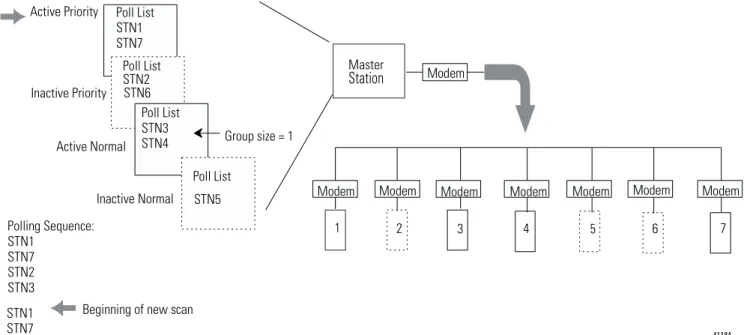
Figure 1.5 Here is how the polling sequence applies to an application. 41183 1.Scans all stations in the active priority
poll file.
2.Scans one station in the inactive priority poll file.
3.Scans stations in the active normal poll file based on the normal poll group size, which you specify during configuration. For example, if the group size were 3, then three stations would be polled in the normal file before the master continues to the next step in the sequence.
4.Scans one station in the inactive normal poll file after all stations in the active normal list have been polled. Active Priority Poll List Inactive Priority Poll List Active Normal Poll List aa bb cc dd Inactive Normal Poll List 41184 Active Priority Inactive Priority Active Normal Inactive Normal Master Station Modem
Modem Modem Modem Modem Modem Modem Modem Group size = 1
Poll List STN1 STN7 Poll List STN2 STN6 Poll List STN3 STN4 Poll List STN5
1 2 3 4 5 6 7
Polling Sequence: STN1 STN7 STN2 STN3 STN1 STN7 STN6 STN4 STN5
Choosing Single or Multiple Message Transfer
Depending on your application’s requirement, you can choose the number of messages you want to receive from a slave station during its turn.
Planning for Timing Issues
Two types of timing categories exist.
•Protocol timers, which specify how long a master station will wait to ‘hear’ from a slave station.
•Request to send (RTS) timers, which you can use to make sure the modem is ready to accept data or has passed on the data (does not apply when control line is configured for No Handshaking).
Set and adjust these timing values as necessary for your application. Set your RTS times based on the communication media and modem you are using.
Design Considerations
•Define a polling list type to use (normal or priority).
•Define a station list.
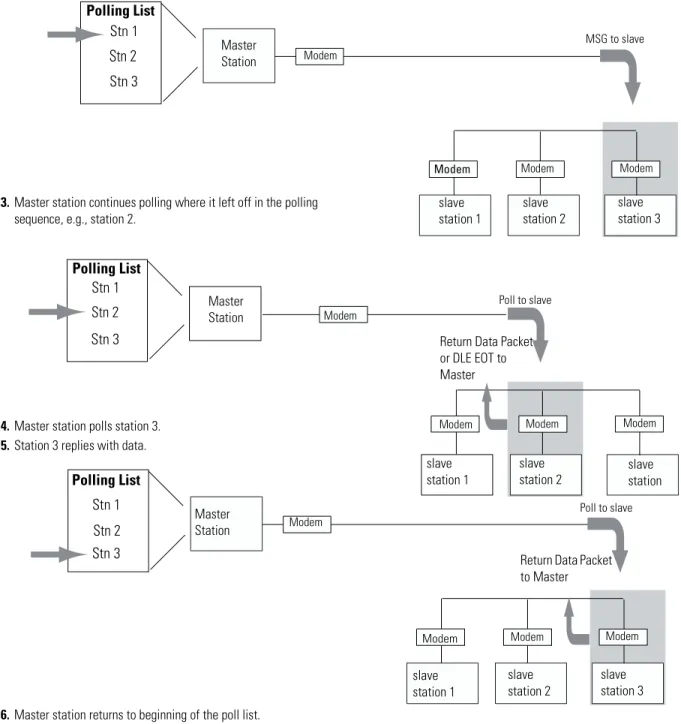
•Use Figure 1.6 to help understand how the MSGs are handled using standard communication.
If you want to receive Choose
only one message from a slave station per poll per a station’s turn.
single transfer Choose this method only if it is critical to keep the
poll list scan time to a minimum.
as many messages from the slave station as it has in its queue.
Figure 1.6 Effect of MSGs on Logix, PLC-5, SLC 500, and MicroLogix Polling
41185
1.Polled station 1; ready to poll station 2.
2.MSG sent to station 3 (MSG was waiting in queue).
Polling List Polling List Master Station Master Station slave station 1 slave station 2 slave station 3 slave station 1 slave station 2 slave station Modem Modem Stn 1 Stn 2
Stn 3 Return Data Packet
or DLE EOT to Master
Poll to slave
MSG to slave
Modem Modem Modem
Modem Modem Modem Polling List Master Station slave station 1 slave station 2 slave station 3 Modem Stn 1 Stn 2
Stn 3 Return Data Packet
to Master
Poll to slave
Modem Modem
Modem
4.Master station polls station 3.
5.Station 3 replies with data.
3.Master station continues polling where it left off in the polling sequence, e.g., station 2.
6.Master station returns to beginning of the poll list.
Stn 1
Stn 2
Communication Scheme
Design Using
Message-Based Mode
In message-based communication mode, the master station sends solicited messages (messages programmed via ladder logic) to a specific slave station when the master requires information. In this mode, the communication link is inactive until the master station has a message to send to a slave station. Figure 1.7 explains the
communication sequence that occurs.
Figure 1.7
Message-Based Communication
41186
Master
Station Modem Slave
Station 1
Slave Station 2
Modem Modem
1.Message (via MSG instruction) sent to a specific slave station
(eg., slave station 1).
2.Slave station receives message and sends an acknowledgment back (ACK).
3.Master station waits a user-defined time ‘Reply Message Wait’ parameter before polling the station for a reply.
4.Slave station forms a reply message to the master station’s enquiry.
5.Master station polls slave station for its reply.
6.Slave station sends its reply message.
7.Master station receives reply and sends an acknowledgement back (ACK).
Designing Communication
for DF1 Full-Duplex
Protocol
When designing communication using DF1 full-duplex protocol, you must configure timeout values and retry counts that control the communication between a transmitting station and a receiving station. Consider the type of link media you are using to help you determine the best values for the timer and counters. For example, you can expect a message being sent over a satellite link to take longer than one being sent over a telephone leased-line link. Figure 1.8 shows the communication sequence for DF1 full-duplex protocol.
Figure 1.8 Read or Write Requests via DF1 Full-Duplex
41187 • Ladder logic
triggers MSG
• DF1 driver formats command packet
• Send command packet
• Start ACK timer
• Wait for ACK (or timeout)
• Start reply timer
• Wait for reply (or timeout)
NAK received and retries > ‘NAK retries’
or
ACK timeout received and tries > ‘ENQ retries’ return error indication
NAK received and retries < or = ‘NAK retries’ or
ACK timeout received and tries < or = ‘ENQ retries’
send enquiry
reply timeout received
return error indication
reply packet received
return data
ACK received Data table
Designing Communication
for DF1 Radio Modem
Protocol
When designing communication using DF1 Radio Modem protocol, you must consider the capabilities of both the controllers and radio modems. The DF1 Radio Modem protocol can only be used with contollers that support and are configured for this protocol.
Determining When to Use DF1 Radio Modem Protocol
If your radio modem can handle full-duplex data port buffering and radio transmission collision avoidance, you can use peer-to-peer message initiation capability in every node (i.e., the ladder logic in any node can trigger a MSG instruction to any other node at any time). For messaging between nodes that are outside of radio transmission/reception range of each other, you may use either the Store and Forward capability of the protocol or the repeater capability of the radios.
If your radio modem cannot handle full-duplex data port buffering and radio transmission collision avoidance, you can still use DF1 Radio Modem protocol in a Master/Slave configuration, with message initiation limited to a single master node. If you still require slave node message initiation, then you must use the DF1 Half-Duplex protocol.
The primary advantage of using DF1 Radio Modem protocol for radio modem networks is in the transmission efficiency. Each read/write transaction (command and reply) requires only one transmission by the initiator (to send the command) and one transmission by the responder (to return the reply) as illustrated in Figure 1.9. The number of transmissions is minimized, radio power is minimized, and
throughput is maximized. In contrast, DF1 Half-Duplex protocol requires five transmissions for the DF1 Master to complete a read/write transaction with a DF1 Slave as illustrated in Figure 1.7. Figure 1.10 illustrates the DF1 Radio Modem protocol.
An efficiency trade-off exists in that the DF1 Radio Modem protocol does not provide immediate feedback (ACK) to the initiator to indicate that the responder successfully received the communications packet without error.
The Store and Forward capability of the DF1 Radio Modem protocol allows messages between nodes that are outside of radio
transmission/reception range of each other to be routed through intermediary nodes that are within range. Each of the intermediary nodes needs a Store and Forward table. The configuration needs to indicate, based on the source and destination addresses in the
Figure 1.9
DF1 Radio Communication
Figure 1.10
Read or Write Requests via DF1 Radio Modem
Modem
Modem Station 2
Station 1
2.Station 1 sends its reply message.
1.Message (via MSG instruction) sent to a specific station (eg., station 1).
• Send command packet
• Start reply timer
• Wait for reply (or timeout)
• Ladder logic triggers MSG
• DF1 driver formats command packet
Data table
reply timeout received
return error indication
Figure 1.11
Applying Store and Forward in DF1 Radio Modem Protocol
What to Do Next?
Make sure you:•choose the communication method best suited for your application.
•make initial configuration choices for the communication method you have chosen.
•use this chapter as a reference as you configure the devices in your SCADA system.
Node 4 No Bits Node 1
No Bits
Node 2 1, 3, 4
Node 3 1, 2, 4 CMD 1
REPLY 1 (DST=4, SRC=1)
(DST=1, SRC=4) (2nd rebroadcast)
REPLY 1 (1st rebroadcast) REPLY 1
(2nd rebroadcast) CMD 1 (1st rebroadcast)
Configuring Enhanced PLC-5 Processors
Chapter Objectives
This chapter helps you set up an Enhanced PLC-5 processor as amaster station, as a slave station, or as a station on a point-to-point link.
Overview
To configure an Enhanced PLC-5 processor, perform these tasks:1. Install the processor; connect the serial cable to channel 0.
2. Define the processor’s communication characteristics using your PLC-5 programming software.
3. Install and configure the modem for communication with the processor. Connect the modem to the processor’s serial channel.
For information about See page
an overview of the tasks required to configure a PLC-5 processor 2-1 installing the processor 2-2 configuring the processor as a DF1 half-duplex master station using
standard-communication mode
2-3 configuring the processor as a DF1 half-duplex master station using
message-based communication mode
2-11
configuring the processor as a slave station 2-15 configuring the processor as a station on a point-to-point link 2-20 the types of messages you can send from a PLC-5 processor to
another processor, how to configure the MSG instruction, and some configuration characteristics
Figure 2.1 Configuring and Enhanced PLC-5
Installing the Processor
Before installing the processor, set the processor switch assemblies.For details about installing the processor, see the Enhanced PLC-5 Programmable Controllers Quick Start, publication 1785-QS012. For cable pinouts, see Figure 2.2 or Appendix A-2.
Figure 2.2 Enhanced PLC-5 Serial Port Pin Assignments and S2 Settings. 41188
Modem
PLC-5 programming software
Define By setting switch assembly
DH+ and DF1 point-to-point station address S1 RS-232 as the electrical interface for the serial
port
S2
25-pin male 25-pin 9-pin
C. GND 1 1 NC
TXD.OUT 2 2 3
RXD.IN 3 3 2
RTS.OUT 4 4 7
CTS.IN 5 5 8
DSR.IN 6 6 6
SIG.GND 7 7 5
DCD.IN 8 8 1
The DF1 Point-to-Point Station Address of the processor is the same as the DH+ address defined by S1.
Configuring a DF1
Half-Duplex Standard
Mode Master Station
Choose standard-communication mode if you want to query slave stations for information based upon user-configured polling lists. This mode is used most often in point-to-multipoint configurations because it allows polled report-by-exception (page 1-4), slave-to-slave
messaging (page 1-5) and slave programming over the telemetry network to be implemented. In addition, in this mode the master station maintains an active node table which allows an HMI or programming terminal to immediately identify which slave nodes can currently communicate and which nodes cannot.
T
Set Switches:
To Specify: 1 2 3 4 5 6 7 8 9 10 RS-232C
ON ON ON OFF OFF ON ON OFF ON OFF Toggle pushed ON Toggle pushed OFF toward BOTTOM toward TOP
ATTENTION Connect only the pins shown in figure 2.2. Do not use a ribbon cable or one that connects to every 25-pin.
To configure the processor for a master station using standard communication, place the processor into program mode and follow the steps below using your RSLogix™ 5 software:
1.Double-click on the Channel Configuration file to bring up the Edit Channel Properties interface.
2.On the Channel 0 tab, choose System (Master) for your Communication Mode.
3.Configure the Serial Port, Options, and Polling parameters according to Table 2.1.
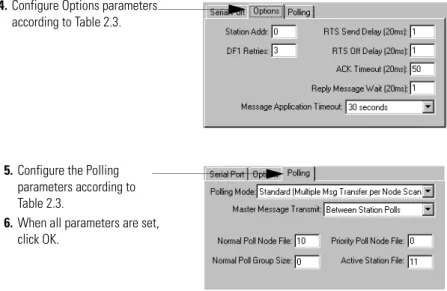
4.Configure Options parameters according to Table 2.1.
5.Configure the Polling parameters according to Table 2.1.
6.When all parameters are set, click OK.
Define the Communication Driver Characteristics
Use Table 2.1 to help you understand the communication parameters you need to specify on the Channel Configuration screen for
standard-communication mode.
Use Worksheet 2.1 (page D-5) for an example configuration and to record your station’s configuration.
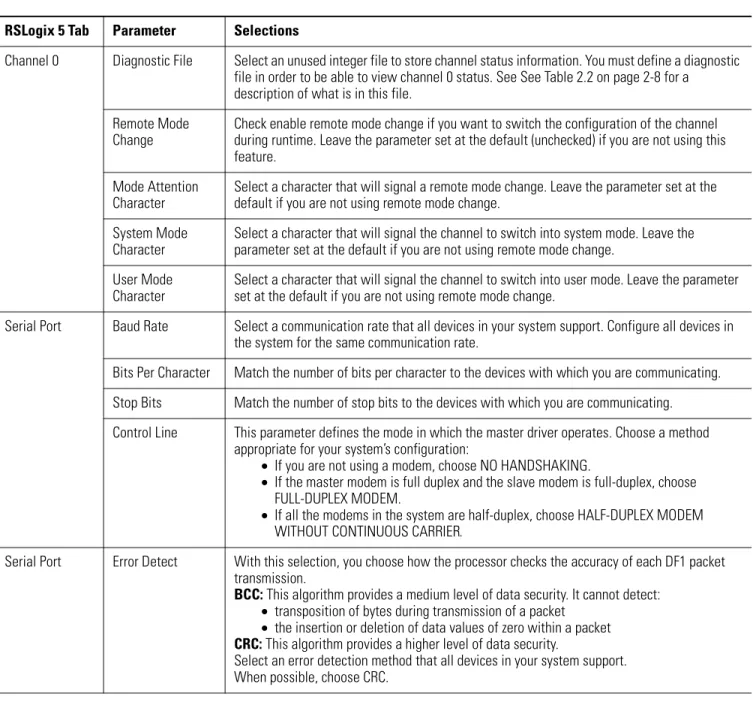
Table 2.1 Communication Parameters for a PLC-5 Master Station Using Standard-Communication Mode
RSLogix 5 Tab Parameter Selections
Channel 0 Diagnostic File Select an unused integer file to store channel status information. You must define a diagnostic file in order to be able to view channel 0 status. See See Table 2.2 on page 2-8 for a
description of what is in this file. Remote Mode
Change
Check enable remote mode change if you want to switch the configuration of the channel during runtime. Leave the parameter set at the default (unchecked) if you are not using this feature.
Mode Attention Character
Select a character that will signal a remote mode change. Leave the parameter set at the default if you are not using remote mode change.
System Mode Character
Select a character that will signal the channel to switch into system mode. Leave the parameter set at the default if you are not using remote mode change.
User Mode Character
Select a character that will signal the channel to switch into user mode. Leave the parameter set at the default if you are not using remote mode change.
Serial Port Baud Rate Select a communication rate that all devices in your system support. Configure all devices in the system for the same communication rate.
Bits Per Character Match the number of bits per character to the devices with which you are communicating. Stop Bits Match the number of stop bits to the devices with which you are communicating. Control Line This parameter defines the mode in which the master driver operates. Choose a method
appropriate for your system’s configuration:
• If you are not using a modem, choose NO HANDSHAKING.
• If the master modem is full duplex and the slave modem is full-duplex, choose FULL-DUPLEX MODEM.
• If all the modems in the system are half-duplex, choose HALF-DUPLEX MODEM WITHOUT CONTINUOUS CARRIER.
Serial Port Error Detect With this selection, you choose how the processor checks the accuracy of each DF1 packet transmission.
BCC: This algorithm provides a medium level of data security. It cannot detect:
• transposition of bytes during transmission of a packet
• the insertion or deletion of data values of zero within a packet
CRC: This algorithm provides a higher level of data security.
Select an error detection method that all devices in your system support. When possible, choose CRC.
Options Station Address Define the octal address of the processor on the DF1 half-duplex link. Each station on a link must have a unique address. Choose an address between 0 and 3768.
Station address 3778 is the broadcast address, which you cannot select as a station’s individual address.
DF1 Retries Defines the number of times a master station retries either a message before the master station declares the message undeliverable, or poll packet to an active station before the master station declares that station to now be inactive.
RTS Send Delay RTS send delay is the amount of time, in 20 millisecond increments, that elapses between the assertion of the RTS signal and the beginning of the message transmission. This time allows the modem to prepare to transmit the message.
The Clear to Send (CTS) signal must be high for transmission to occur.
RTS Off Delay RTS off delay is the amount of time, in 20 millisecond increments, that elapses between the end of the message transmission and the de-assertion of the RTS signal. This time delay is a buffer to make sure that the modem has transmitted the message but should normally be left at zero.
ACK Timeout Define the amount of time, in 20 millisecond increments, that you want the processor to wait for an acknowledgment from a slave station to its transmitted message before the processor retries the message or the message errors out.
Reply Message Wait
Define the amount of time, in 20 millisecond increments, that the master station will wait after receiving an ACK (to a master-initiated message) before polling the slave station for a reply.
Choose a time that is, at minimum, equal to the longest time that a slave station needs to format a reply packet. This is typically the maximum scan time of the slave station.
Note: This field is only valid if the polling mode field is configured to be MESSAGE BASED. MSG Application
Timeout
Define the number of 30 second increments within which the reply message must be received before the error bit is set on the message. The timer starts when the ACK is received. Polling Polling Mode If you want to receive:
• only one message from a slave station per its turn, choose STANDARD (SINGLE MESSAGE TRANSFER PER NODE SCAN).
Choose this method only if it is critical to keep the poll list scan time to a minimum.
• as many messages from a slave station as it has, choose STANDARD (MULTIPLE MESSAGE TRANSFER PER NODE SCAN).
Master Message Transmit
If you want the master station to:
• send all of the master station-initiated MSG instructions to the slave stations before polling the next slave station in the poll list, choose Between Station Polls.
This method makes certain that master station-initiated messages are sent in a timely and regular manner (after every slave station poll).
• only send master station-initiated MSG instructions when the master’s station number appears in the polling sequence, choose In Poll Sequence.
With this method, sending master station-initiated messages are dependent upon where and how often the master station appears in the poll list. To achieve the same goal as the Between Station Polls method, the master-station’s address would have to appear after every slave-station’s address.
Displaying System (Master) Channel Status
Polling Normal Poll Node File
Enter an unused integer file that will store the addresses of the slave stations you want in the normal poll list.
Normal Poll Group Size
Enter the quantity of active stations located in the normal poll list that you want polled during a scan through the normal poll list before returning to the priority poll list.
Priority Poll Node File
Enter an unused integer file that will store the addresses of the slave stations you want in the priority poll list.
Active Station File Enter an unused binary file that will store the status of all the stations in your network configuration. The file stores one station address per bit.
0 = inactive; 1 = active.
RSLogix 5 Tab Parameter Selections
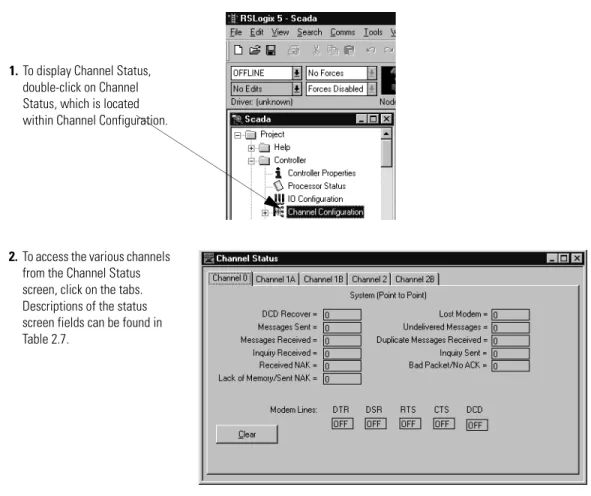
1.To display Channel Status, double-click on Channel Status, which is located within Channel Configuration.
2.To access the various channels from the Channel Status screen, click on the tabs. Descriptions of the status screen fields can be found in Table 2.2.
Table 2.2 Descriptions of System Mode DF1 Master Channel Status Fields
Create Station Lists
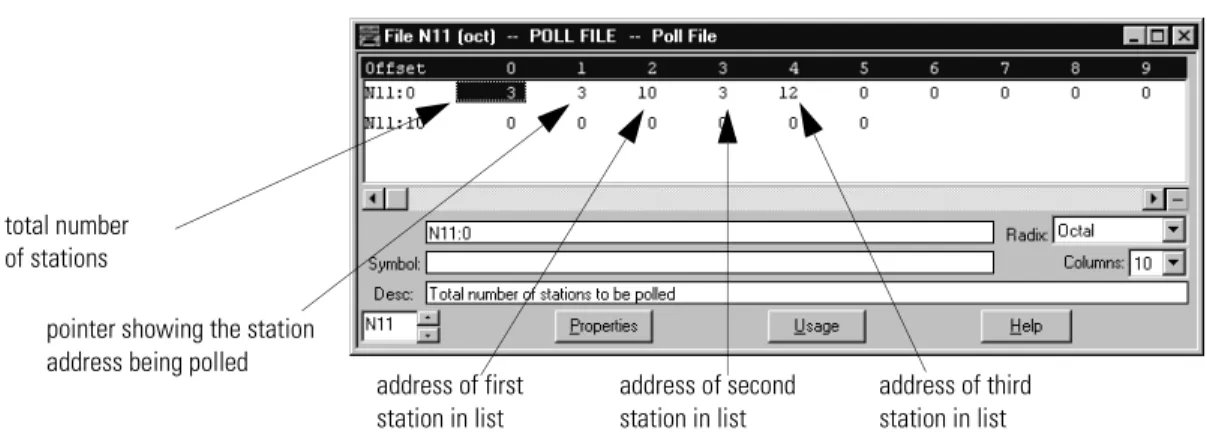
After defining your polling files and group size, create station lists by entering the station address of each slave station into either the normal poll file or priority poll file of the PLC-5 data table. Place each station address in an individual word in a poll file (normal and priority) starting at word 2.
Status Field Location Description
Clear Clear counters for all channels by clicking on Clear button.
DCD Recover word 11 Displays the number of times the processor detects the DCD handshaking line has gone low to high.
Lost Modem word 12 Displays the number of times that the modem lost bit (S:17/5) has gone low to high. Messages Sent word 1 Displays the number of messages sent by the processor (including message retry). Messages Received word 2 Displays the number of messages the processor received with no error.
Undeliverable Messages word 3 Displays the number of messages that were sent by the processor but not received by the destination device.
Messages Retry word 4 Displays the number of messages resent.
Duplicate Messages Received word 9 Displays the number of times the processor received a message packet identical to the previous message packet.
EOT Received on First Poll word 8 Displays the number of times the Master received an EOT in response to the first poll of a station.
Bad Packet / No ACK word 7 Displays the number of incorrect data packets that the processor has received. Last Normal Poll List Scan (100 ms) word 5 The time it took to complete the previous scan of the normal station poll list. Max Normal Poll List Scan (100 ms) word 6 The maximum time taken to complete a scan of the normal station poll list. Last Priority Poll List Scan (100 ms) word 10 The time it took to complete the previous scan of the priority station poll list. Max Priority Poll List Scan (100 ms) word 13 The maximum time taken to complete a scan of the priority station poll list. DTR (Data Terminal Read) word 0; bit 4 Displays the status of the DTR handshaking line (asserted by the processor). DCD (Data Carrier Detect) word 0; bit 3 Displays the status of the DCD handshaking line (received by the processor). DSR (Data Set Ready) word 0; bit 2 Displays the status of the DSR handshaking line (received by the processor). RTS (Request to Send) word 0; bit 1 Displays the status of the RTS handshaking line (asserted by the processor). CTS (Clear to Send) word 0; bit 0 Displays the status of the CTS handshaking line (received by the processor).