DOCUMENT ID: DC01205-01-0200-03 LAST REVISED: August 2011
Copyright © 2011 by Sybase, Inc. All rights reserved.
This publication pertains to Sybase software and to any subsequent release until otherwise indicated in new editions or technical notes. Information in this document is subject to change without notice. The software described herein is furnished under a license agreement, and it may be used or copied only in accordance with the terms of that agreement.
To order additional documents, U.S. and Canadian customers should call Customer Fulfillment at (800) 685-8225, fax (617) 229-9845.
Customers in other countries with a U.S. license agreement may contact Customer Fulfillment via the above fax number. All other international customers should contact their Sybase subsidiary or local distributor. Upgrades are provided only at regularly scheduled software release dates. No part of this publication may be reproduced, transmitted, or translated in any form or by any means, electronic, mechanical, manual, optical, or otherwise, without the prior written permission of Sybase, Inc.
Sybase trademarks can be viewed at the Sybase trademarks page at http://www.sybase.com/detail?id=1011207. Sybase and the marks listed are trademarks of Sybase, Inc. ® indicates registration in the United States of America.
SAP and other SAP products and services mentioned herein as well as their respective logos are trademarks or registered trademarks of SAP AG in Germany and in several other countries all over the world.
Java and all Java-based marks are trademarks or registered trademarks of Sun Microsystems, Inc. in the U.S. and other countries.
Unicode and the Unicode Logo are registered trademarks of Unicode, Inc.
All other company and product names mentioned may be trademarks of the respective companies with which they are associated.
Use, duplication, or disclosure by the government is subject to the restrictions set forth in subparagraph (c)(1)(ii) of DFARS 52.227-7013 for the DOD and as set forth in FAR 52.227-19(a)-(d) for civilian agencies.
CHAPTER 1: Documentation Roadmap for Unwired
Platform ...1
CHAPTER 2: Administration of the Unwired Platform
...5
CHAPTER 3: Deployment Architecture Planning ...7
Environment Options ...7
Clusters ...8
Nodes and Cluster Size ...8
Cluster Types ...9
Load Balancing ...10
Failover ...11
Shared Development Environments ...11
Fault-Tolerant Production Environments ...12
Redundant Cluster Architectures ...13
Implementing an N+2-node Cluster for Optimal
Redundancy ...14
Setting Up the Microsoft Cluster ...15
Setting Up Data Tier Nodes ...16
Adding a Generic Service to the Data Cluster ...16
Setting Up Unwired Server Nodes ...17
Installing Third-party Software ...18
Validating the Cluster ...18
Single-Node Environment ...19
Multitenant Environments ...19
CHAPTER 4: Component Deployment ...23
Data Tier ...25
Deploying the CDB ...25
Initializing a New Consolidated Database ...25
Changing the Consolidated Database Server
Thread Count and Pool Size ...26
Using a Different Database and Log Path ...27
Deploying the Monitoring Database ...28
Setting Up an Existing Database for Monitoring
...29
Isolating the Monitoring Database ...29
Changing the Default Monitoring Port ...30
EIS Connections ...30
Preparing Unwired Server to Connect to JDBC
Databases ...31
Preparing Unwired Server to Connect to SAP using
Java Connectors ...31
SAP External Libraries Overview ...32
Installing the SAPCAR Utility ...33
Installing the SAP Java Connector (JCo) and
Latest RFC Libraries on Unwired Server ...33
Installing the SAP Cryptographic Libraries on
Unwired Platform ...34
Installing DOE-C on Unwired Server ...36
Changing Connections to Production Data Sources ....36
Device User Credentials and EIS Connections . . .37
Synchronization Model Performance Tuning ...37
Performance Considerations for RBS Synchronization
...37
Overview of RBS Tuning Recommendations ...39
Tuning RBS Synchronization ...43
Testing CPU Loads for RBS ...44
Performance Considerations for MBS
Synchronization ...45
Overview of MBS Tuning Recommendations ... 47
Tuning MBS Synchronization ...50
CHAPTER 5: Relay Server Clusters ...53
Relay Server Documentation ...54
Creating a New Relay Server Cluster ...54
Installing Relay Server to Multiple Web Server Host
Nodes ...55
Deploying Relay Server on IIS 7.x Web Servers
...55
Deploying Relay Server on IIS 6.x Web Servers
...59
Deploying Relay Server on Apache Web
Servers ...62
Configuring a Multinode Relay Server Cluster with
Sybase Control Center ...67
Setting and Distributing Properties for Multiple
Relay Servers ...68
Setting Up RSOEs for Server Farm Nodes ...69
Enabling Application Request Routing for IIS Relay
Server Hosts ...69
Installing Required Microsoft Components ...70
Configuring the Relay Server IIS Host for Load
Balancing ...71
Connecting Relay Server to the Application
Request Routing Server ...73
Connecting Device Clients to the Application
Request Routing Server ...73
Scaling an Existing Relay Server Cluster ...73
Adding or Removing a Relay Server with Sybase
Control Center ...74
Adding or Removing an RSOE with Sybase Control
Center ...74
Upgrading an Existing Relay Server Cluster ...75
Updating Relay Server Binaries for IIS on Windows ...75
Updating Relay Server for Apache on Linux ...76
Removing RSOE and Migrating Configuration Files
With Scripts ...77
Subscribing and Connecting to Sybase Hosted Relay
Service ...78
CHAPTER 6: Security Administration ...81
Security Layers ...81
Transport Security Setup ...82
Protocol and Component Reference ...83
Security Profiles and Listeners ...84
Security Key and Certificate Basics ...85
Encrypting Unwired Server Administration
Connections ...85
Encrypting Relay Server Connections ...89
Encrypting Replication-Based Synchronization
Connections ...95
Encrypting Messaging-Based Synchronization
Connections ...98
Encrypting DCN Connections ...98
Configuring a Mutually Authenticated SSL
Security Configuration ...99
Encrypting Afaria Server Connections for
Devices ...100
User Security Setup ...101
Authentication ...102
Authorization ...103
Attribution ...103
Audit ...104
Security Configurations ...104
Built-in Security Providers ...107
Roles and Mappings ... 112
Security for Administration Users ... 115
Security for Device Users ... 122
Single Sign-on for SAP ... 123
Data Security Setup ...136
Protecting System Data Access ... 136
Data Encryption Implementation ... 139
CHAPTER 7: Server Environment Administration . . .141
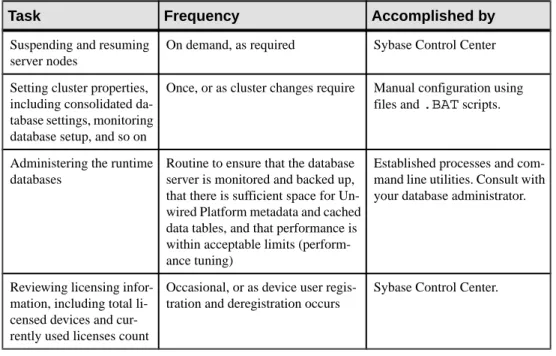
Cluster Administration Overview ...141
Server Administration Overview ...142
Configuring the IIOP Socket Listener ... 143
Viewing Consolidated Database Properties ... 144
Configuring a Synchronization Listener for
Replication-Based Synchronization ...146
Configuring Messaging-Based Synchronization
Properties ...148
Configuring Unwired Server Performance Properties
... 149
Applying Performance Tuning Changes if
Unwired Server is a Service ... 150
Messaging Content Sizes ... 151
SNMP Notifications ...151
Setting Up SNMP Notifications ... 151
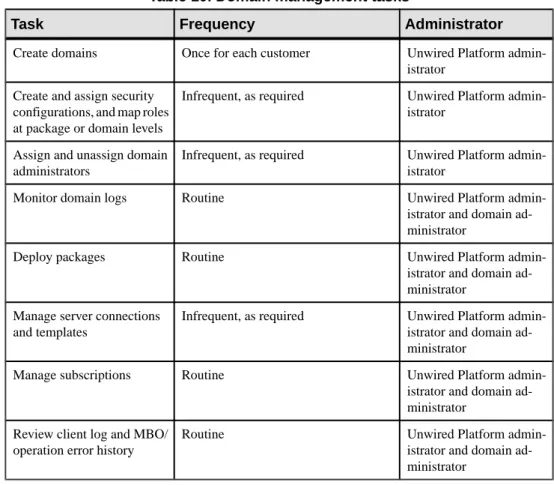
Domain Administration Overview ...154
Enabling a Multitenancy Environment with Domains .. 156
Determining a Tenancy Strategy ...156
Creating and Enabling a New Domain ...157
Creating a Security Configuration for a Domain
... 158
Activating a Domain Administrator ...158
Assigning Domain Administrators to a Domain . 159
Managing and Maintaining Domains ... 159
Creating Data Source Connections ... 160
Enabling and Configuring Domain Logging ...160
Mapping Roles for a Domain ...161
Deploying an MBO Package to a Domain ...162
Deploying a Mobile Workflow Package to a
Domain ...162
EIS Connection Management Overview ...162
Data Source Connections ...163
Connection Templates ...164
CHAPTER 8: Device Provisioning ...165
Runtimes and Clients ...166
Afaria Provisioning and Mobile Device Management ...166
Launching Afaria from Sybase Control Center ...167
Setting Up the Afaria Environment ...168
Setting Up the OTA Deployment Center and the
SMS Gateway ...168
Configuring Afaria Server ...169
Creating Addresses, Groups, and Profiles ...169
Create and Deploy Afaria Clients and Unwired
Platform Runtimes ...170
Apple Provisioning for iOS ...171
Configuring Apple Push Notification Service ...171
BES and BIS Provisioning for BlackBerry ...174
Provisioning Prerequisites for BlackBerry ...174
Configuring Push Notifications for the
BlackBerry Enterprise Server ...175
Provisioning Options for BlackBerry Devices ...176
Setting up Push Synchronization for Replication
Synchronization Devices ...177
CHAPTER 9: Package Administration ...179
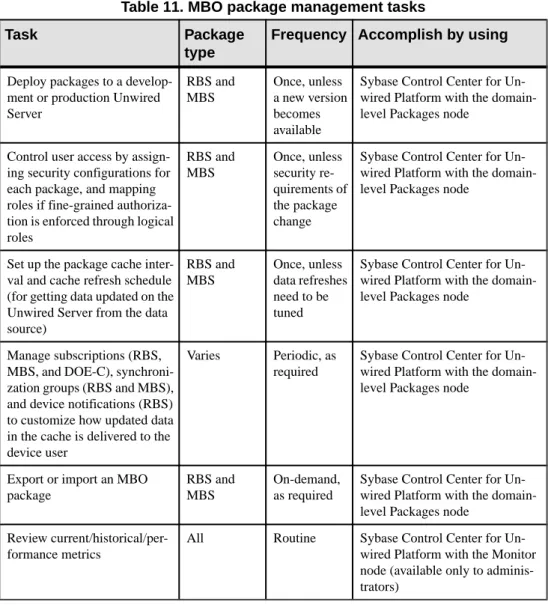
Deployment ...180
MBO Package Management Overview ...180
Deploying and Managing MBO Packages ...182
Deploying an MBO Package to a Domain ...182
Selecting a Security Configuration for a Package
...182
Mapping Roles for a Package ...183
Enabling Package Logging ...183
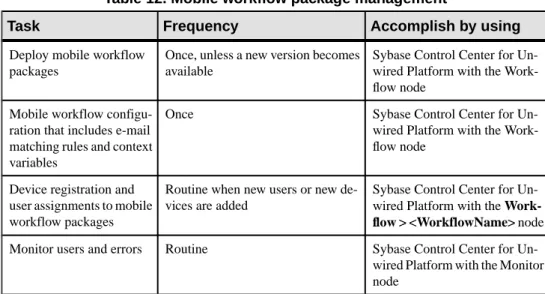
Mobile Workflow Package Administration Overview ...184
Enabling and Configuring the Notification Mailbox ...184
Deploying and Managing Mobile Workflow Packages
...185
Configuring Mobile Workflow Package
Properties ...186
Assigning and Unassigning Device Users ...186
Deploying a Mobile Workflow Package to a
Domain ...187
Managing Deployed Package Subscriptions ...187
Data Management Overview ...189
Data Mobility Configuration Dependencies ...190
Message Data Flow and Dependencies ...191
Replication Data Flow and Dependencies ...192
Push Synchronization for Replication Packages ...193
Enabling Push and Pull Notifications ...194
Setting Up Lightweight Polling for a Single Client
...194
Cache Data Management ...195
Data Change Notifications ...195
Cache Refreshes ...196
Example Data Update Models ...199
CHAPTER 10: Device User Management ...203
Device and User Management Overview ...203
Users ...204
Messaging Devices ...204
MBS Device Maintenance ...205
Replication Devices ...206
RBS Device Maintenance ...207
Subscriptions ...207
CHAPTER 11: Runtime Monitoring ...209
System Monitoring Overview ...209
Status and Performance Monitoring ...210
Monitoring Unwired Platform ...211
Monitoring Profiles ...212
Planning for System Monitoring ...212
Creating and Enabling a Monitoring Profile ...213
Setting a Custom Monitoring Schedule ...214
Configuring Monitoring Performance Properties
...214
Monitoring Usage ...216
Reviewing System Monitoring Data ...216
Current and Historical Data ...217
Performance Data: KPIs ...217
Performance Statistics ...218
Exporting Monitoring Data ...236
System Diagnostics ...237
Collecting Data ...238
Device Application Performance or Issue
Analysis ...239
Access Denied Analysis ...243
Data Update Failure Analysis ...244
System Logs ...246
Log File Locations ...247
Message Syntax ...248
Severity Levels and Descriptions ...249
Enabling and Configuring Logging ...249
Configuring Server Log Settings ...249
Enabling and Configuring Domain Logging ...252
Configuring Sybase Control Center Logging for
Performance Diagnostics ...253
Configuring Messaging and Mobile Workflow
Runtime Logging ...255
Configuring Messaging Device Logging ...256
Configuring RSOE Logging ...258
Configuring and Enabling Relay Server Logging
...258
Enabling Custom Log4j Logging ...259
CHAPTER 12: Operation Maintenance ...261
Runtime Maintenance Cleanup ...261
Scheduling Domain-Level Cleanup ...261
Purging Unused Devices ...262
Purging Unused Device Users ...263
Maintaining Platform Databases ...263
Control Transaction Log Size ...264
Backup and Recovery ...264
Sample Backup and Recovery Plan ...265
Failure and Recovery Scenarios ...266
Backing Up the File System ...267
Backing Up System Data ...268
Backing Up SQL Anywhere Databases ...269
Backing Up Messaging Data ...271
Restoration of the Installation File System ...272
Restoration of the Runtime Database ...272
Restoration of the Messaging Data ...273
Sybase Unwired Platform Licenses ...274
Cluster License Coordination ...274
License Validation ...275
Device User License Limits ...276
Checking System Licensing Information ...277
Updating and Upgrading Unwired Platform
Licenses ...278
Upgrading Afaria Licenses ...281
CHAPTER 13: Customization with the Client API ....283
Javadocs ...284
CHAPTER 14: System Reference ...285
Installation Directories ...285
Port Number Reference ...287
Unwired Server Ports ...288
Data Tier Ports ...288
Sybase Control Center Ports ... 289
Relay Server Ports ...289
Reserved Ports ... 289
Other Ports ... 290
Unwired Platform Windows Services ...291
Processes Reference ...293
Security Provider Configuration Properties ...293
LDAP Configuration Properties ...294
controlFlag Attribute Values ...301
NTProxy Configuration Properties ... 302
Certificate Authentication Properties ... 303
SAP SSO Token Authentication Properties ... 306
EIS Data Source Connection Properties Reference ...308
JDBC Properties ...308
SAP Java Connector Properties ... 321
SAP DOE-C Properties ... 325
Web Services Properties ... 328
Command Line Utilities ...329
Relay Server Utilities ... 329
Relay Server Host (rshost) Utility ...329
Register Relay Server (regRelayServer) Utility ..330
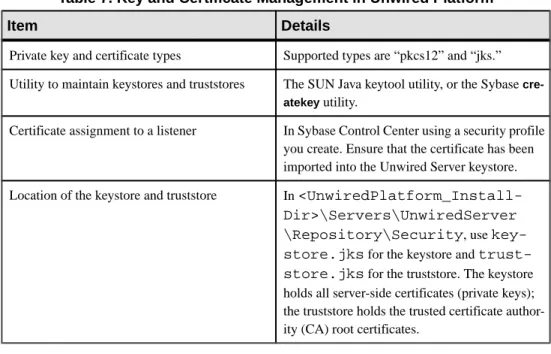
Certificate and Key Management Utilities ...334
Certificate Creation (createcert) Utility ... 334
Key Creation (createkey) Utility ...337
Key Tool (keytool) Utility ...338
Unwired Server Runtime Utilities ...341
Unwired Server Service (sup-server-service)
Utility ...341
Runtime Configuration (configure-mms) Utility
...342
Runtime Reconfiguration (reconfigure-mms)
Utility ...342
License Upgrade (license) Utility ...344
Synchronization Monitor (mlmon) Utility ...345
Package Administration Utilities ...346
Start and Stop sampledb Server (sampledb)
Utility ...350
Advantage Database Server Backup
(adsbackup) Utility ...350
Unwired Server Database File Recovery
(MORecover) Utility ...352
Update Properties (updateprops.bat) Utility ...354
Configuration Files ...355
Unwired Server Configuration Files ...355
Global Unwired Server Properties
(sup.properties) Configuration File Reference
...355
Runtime Message Tracing (TraceConfig.xml)
Configuration File ...361
Sybase Control Center Configuration Files ...362
Sybase Control Center Logging
(log4j.properties) Configuration File ...362
Role Mapping (roles-map.xml) Configuration
File ...363
Relay Server Configuration Files ...363
Relay Server Outbound Enabler
(rsoeconfig.xml) Configuration File ...370
Monitoring Database Schema ...372
mms_rbs_request Table ...373
mms_rbs_request_summary Table ...374
mms_rbs_mbo_sync_info Table ...375
mms_rbs_operation_replay Table ...376
mms_mbs_message Table ...377
mms_security_access Table ...379
mms_rbs_outbound_notification Table ...379
mms_data_change_notification Table ...380
mms_concurrent_user_info Table ...381
mms_queue_info Table ...381
mms_sampling_time Table ...382
cache_history Table ...382
cache_history Stored Procedures ...383
cache_statistic Table ...383
cache_statistics Stored Procedures ...383
CHAPTER 15: Glossary: Sybase Unwired Platform
...385
Index
...397
Unwired Platform
Learn more about Sybase® Unwired Platform documentation.
Table 1. Sybase Unwired Platform Documentation
Document Description
Sybase Unwired Platform Installation Guide Describes how to install or upgrade Sybase Un-wired Platform. Check the Sybase UnUn-wired Plat-form Release Bulletin for additional inPlat-formation and corrections.
Audience: IT installation team, training team, system administrators involved in planning, and any user installing the system.
Use: during the planning and installation phase. Sybase Unwired Platform Release Bulletin Provides information about known issues, and
updates. The document is updated periodically. Audience: IT installation team, training team, system administrators involved in planning, and any user who needs up-to-date information. Use: during the planning and installation phase, and throughout the product life cycle.
New Features Describes new or updated features. Audience: all users.
Use: any time to learn what is available. Fundamentals Describes basic mobility concepts and how
Syb-ase Unwired Platform enables you to design mo-bility solutions.
Audience: all users.
Use: during the planning and installation phase, or any time for reference.
Document Description
System Administration Describes how to plan, configure, manage, and monitor Sybase Unwired Platform. Use with the Sybase Control Center for Sybase Unwired Plat-form online documentation.
Audience: installation team, test team, system administrators responsible for managing and monitoring Sybase Unwired Platform, and for provisioning device clients.
Use: during the installation phase, implementa-tion phase, and for ongoing operaimplementa-tion, mainte-nance, and administration of Sybase Unwired Platform.
Sybase Control Center for Sybase Unwired Plat-form
Describes how to use the Sybase Control Center administration console to configure, manage and monitor Sybase Unwired Platform. The online documentation is available when you launch the console (Start > Programs > Sybase > Sybase Control Center, and select the question mark symbol in the top right quadrant of the screen). Audience: system administrators responsible for managing and monitoring Sybase Unwired Plat-form, and system administrators responsible for provisioning device clients.
Use: for ongoing operation, administration, and maintenance of the system.
Troubleshooting Provides information for troubleshooting, solv-ing, or reporting problems.
Audience: IT staff responsible for keeping Syb-ase Unwired Platform running, developers, and system administrators.
Use: during installation and implementation, de-velopment and deployment, and ongoing main-tenance.
Document Description
Tutorials Tutorials for trying out basic development func-tionality.
Audience: new developers, or any interested user. Use: after installation.
• Learn mobile business object (MBO) basics, and create a mobile device application: • Tutorial: Mobile Business Object
Devel-opment
• Create native mobile device applications: • Tutorial: BlackBerry Application
Devel-opment
• Tutorial: iOS Application Development • Create a mobile workflow package:
• Tutorial: Mobile Workflow Package De-velopment
Sybase Unwired WorkSpace – Mobile Business Object Development
Online help for developing MBOs. Audience: new and experienced developers. Use: after system installation.
Sybase Unwired WorkSpace – Mobile Workflow Package Development
Online help for developing mobile workflow ap-plications.
Audience: new and experienced developers. Use: after system installation.
Developer guides for device application custom-ization
Information for client-side custom coding using the Client Object API.
Audience: experienced developers.
Use: to custom code client-side applications. • Developer Guide for BlackBerry • Developer Guide for iOS
• Developer Guide for Mobile Workflow Pack-ages
• Developer Guide for Windows and Windows Mobile
Document Description
Developer guide for Unwired Server side cus-tomization – Developer Guide for Unwired Serv-er
Information for custom coding using the Server API.
Audience: experienced developers.
Use: to customize and automate server-side im-plementations for device applications, and ad-ministration, such as data handling.
Dependencies: Use with Fundamentals and Syb-ase Unwired WorkSpace – Mobile Business Ob-ject Development.
Developer guide for system administration cus-tomization – Developer Guide for Unwired Serv-er Management API
Information for custom coding using administra-tion APIs.
Audience: experienced developers.
Use: to customize and automate administration at a coding level.
Dependencies: Use with Fundamentals and Sys-tem Administration.
Platform
At its heart, Unwired Platform is a mobility-enablement platform. It has the tools, the client APIs, the server components and the administration console that offer a complete, end-to-end system for creating enterprise-level mobile solutions.
Administrators interact with Unwired Platform primarily to configure platform components and ensure the production environment works efficiently as a result of that configuration. Unwired Platform delegates security checks, by passing login and password information to the security provider. In general, all administrative and application users and their passwords are managed in the security repository. Sybase Control Center limits feature visibility depending on the role an administrator logs in with. Unwired Platform administrators can be one of two types, each with distinct logins:
• Unwired Platform administrator (also known as the platform administrator) – has cluster-wide administration access to the Unwired Platform. supAdmin is the default login for cluster-side administration and is assigned the "SUP Administrator" role in OpenDS (the default Unwired Platform repository for development environments). In a deployment edition, you must map the SUP Administrator logical role to a role in your existing repository.
• Domain administrator – has access confined to the specific domains that the platform administrator assigns. supDomainAdmin is the default login for domain administration and is assigned the "SUP Domain Administrator" role in OpenDS. In a deployment edition, you must also map SUP Domain Administrator role to a role in your existing repository.
Both types of administrators are authenticated and authorized based on the 'admin' security configuration and its domain-level role mapping for administrative roles.
There are three main aspects to this platform that platform and domain administrators conjointly administer:
• Mobile application creation is supported by integrated development tools, APIs, samples and tutorials. For the developer, this aspect of the Unwired Platform allows the creation of integration logic and device applications that allow registered device users to seamlessly interact securely with your existing back-end infrastructure.
Before you begin, know: the devices you need to support, the back-ends you need to integrate with, and the synchronization model you will use.
• Mobile application administration requires both the development and deployment of applications. The Unwired Platform perspective in Sybase Control Center is integral to configuring and managing applications as they are developed and integrated into your
system landscape. Further, all aspects of a production environment can be monitored for troubleshooting or performance tuning purposes.
Before you begin, decide: the system design/topology you environment requires and what type of security providers you need to delegate application security to.
• Mobile user, device, and application management simplifies how the end user is registered and provisioned in the Unwired Platform environment. When Afaria® is used in conjunction with Unwired Platform, an administrator has a powerful cross-platform mobile management framework:
• Sybase Control Center performs the package deployment to the Unwired Server as well as manages user accounts and data service subscriptions.
Before you begin, understand what package types you need to support, and how the package type affects how users are registered and subscriptions are created, and how your devices might be provisioned (cable or over-the-air).
Planning
Plan your deployment by mapping the logical architecture of Unwired Platform components to a physical computing environment (new or existing computing nodes).
Most customers' needs are met by using one of these environment types: single node environments (sometimes known as trial environments), shared development and test environments, simple redundancy environment, full-scale (or optimal) redundancy environments, and even multitenant environments (for hostability).
However, there are common characteristics to all of them. These characteristics most often include:
• A discrete network architecture that separates production, test, and development environments.
• The isolation of Internet-facing systems from internal systems.
• The configuration of a new or an existing authentication and identity management solution for internal and remote proof-of-identity and access control.
• An effective and efficient redundancy plan — except in the case of single node installations.
Environment Options
Different Unwired Platform environments are designed to support different life cycle stages and whether you are hosting that environment specifically for your enterprise or to host multiple tenants.
This table summarizes the options you can design:
Environment Purpose Supports multi-node clusters?
Supports multi-ple tenants?
Single-node To install a trial version of Unwired Platform To install all components on a single machine as part of a personal devel-opment license.
No, only a single-node in-stallation.
Environment Purpose Supports multi-node clusters?
Supports multi-ple tenants?
Shared development To support multiple de-velopers with multiple developing tooling instal-lations on individual computers but share run-time component on the network (that is, servers and runtime databases).
Yes, though typically not needed
Yes, though typical-ly not needed
Fault-tolerant pro-duction or pre-pro-duction (test) sys-tems
To create a system based on real requirements of an organization and its users.
Yes Yes
Clusters
As an organization grows, Unwired Platform administrators need to create a scalable IT infrastructure using clusters. Clustering creates redundant Unwired Platform components on your network to provide a highly scalable and available system architecture.
Organizations can seamlessly achieve high availability and scalability by adding more or redundant instances of core components. Redundant instances of critical components provide transparent failover.
In a production environment, the Unwired Platform deployment typically uses at least one relay server. The connections to relay servers can be configured within a cluster instance from Sybase Control Center.
Nodes and Cluster Size
A node is a host upon which one or more components have been installed. A cluster consists of Unwired Platform components running on one or more nodes that work together as a single, continuously available, system in order to provide seamless application management, device management, and data access to users.
Each node on a cluster is a fully functional part of the unwired system. In a clustered environment, the nodes work together to provide increased availability and performance. Hosts in a cluster should have similar processing, memory, and I/O capability to enable load balancing without significant performance degradation. Hosts in a data tier cluster should be more powerful than hosts in an Unwired Server cluster.
There are different node strategies you can employ, depending on the environment you are designing:
• Single-node installations for personal development or trial installations – A nonredundant architecture consisting of an Unwired Server and data tier installed on a single host.
• 2-node installations for enterprise development and testing – A primitive architecture without load balancing that may optionally use a relay server. The data tier (which includes the CDB, the messaging database, and the monitoring database) is on one host and the server tier (which includes Unwired Server and Sybase Control Center) is on another. • 3-node Unwired Server cluster for entry level production environments – A simple
redundant architecture with two server tier nodes, and a separate data tier host. For an example of this cluster, see Redundant Architecture Options.
• N+2-node Unwired Server clusters and data tier clusters for full-scale production environments – An optimally redundant architecture with any number of server tier nodes, supported by a relay server and a data tier cluster. For an example of this cluster, see Redundant Architecture Options.
Cluster Types
Clusters are groups of similar components that work together to service client requests. A cluster is a parallel or distributed computing system made up of many discrete hosts that form a single, unified computing resource. Through clustering, you can partition the system load across redundant Unwired Platform components to design a highly-available system. There are two tiers you can install in a cluster: the server tier (Unwired Server) and the data tier (runtime databases). The server tier may further be supported by a relay server and a load balancer, depending on the scale of your rollout.
Each tier uses a different type of cluster model:
• Load-balancing server tier clusters – improve the system performance by sharing workloads and requests, and improving the efficiency of Unwired Server services (like synchronization and deployment). Requests initiated from the client are managed by a load balancer (or application request routing services in the case of some IIS deployments) for two or more relay servers. This load balancer distributes requests to these relay servers (or some other mechanism) among all the Unwired Server cluster nodes. Each node in the Unwired Server cluster scales independently and automatically when another Unwired Server node joins or leaves the cluster.
• Failover data tier clusters – improve the availability of runtime database services to Unwired Servers. Failover clusters have a redundant node, which provides data tier services when the primary node fails. The most common size for a failover consolidated database cluster is two nodes, which is the minimum requirement to provide redundancy and thereby eliminate single points of failure.
Note: The data tier does not need a relay server, since it will not be accessed directly from outside the firewall.
• The primary node contains the master copy of the configuration repository for all nodes in the cluster. The primary node distributes its configuration to the other nodes. When a primary node fails, a new primary is elected from the remaining nodes.
• Each secondary node gets its configuration from the primary node. Nodes must have unique names, but are identified as members of the same cluster as the primary node. Each Unwired Server in a cluster runs on a separate host. It can connect to the data tier independently, as well as have its own copy of the system files required for execution. Sybase recommends that each cluster node run from its own installation directory.
Load Balancing
Load balancing is a high-availability strategy that prevents any one host from getting overloaded with work, thereby adversely affecting overall system performance.
Load balancing supports the server tier. Achieve improved performance by balancing loads. Do this by:
• Creating and configuring two or more Unwired Servers in a cluster.
• Using some form of a centralized task distribution mechanism (for example, a relay server).
• Optionally using a third-party load balancer, with multiple relay servers. If you use a load balancer, Sybase recommends that you use either an intelligent layer 4 switch balancer (with dead server detection enabled), Microsoft Network Load Balancing cluster, or Microsoft IIS Application Request Routing (recommended). For either type, ensure that the same wildcard certificate is installed on all Unwired Server nodes, so the device client needs the load balancers hostname configured. For information on wildcard certificate setup, see your load balancer's documentation. For information on how to configure your relay server environment to use one of the supported Windows load balancers, see Enabling Application Request Routing for IIS Relay Server Hosts.
See also
• Enabling Application Request Routing for IIS Relay Server Hosts on page 69
Unwired Server Clusters
An Unwired Server cluster provides highly available services to remote-device clients, typically requiring one or more relay servers and an optional load balancer.
When you install Sybase Unwired Platform, a cluster is created automatically, and Unwired Server is added to it.
By default, the cluster name is the name of the first host on which you install Unwired Server. Each server can be a member of only one cluster. Cluster configuration properties are saved in the cluster database, which is managed by the data tier.
For high availability, at least two servers must be defined for a cluster. However, to create a load-balanced system, many clients then also use a relay server. Without a relay server, clients require custom logic to determine which Unwired Server will directly receive requests.
However, a relay-server free environment is not a highly available environment, nor can requests be distributed equally across multiple servers. Consequently, Sybase recommends that you always use a relay server.
See also
• Chapter 5, Relay Server Clusters on page 53
• Implementing an N+2-node Cluster for Optimal Redundancy on page 14
Failover
Failover is another high-availability strategy that allows a secondary node to take over in the event of a fault or failure in the first node, thus allowing normal use to continue. Automatic failover is a default behaviour of the cluster; it does not require manual intervention. Failover supports the Unwired Platform data tier, which includes the consolidated database, cluster database, messaging database, and monitoring database.
Fault-tolerance of the data tier through failover uses a passive/active node configuration where only one node is active at any given moment (that is, if one node fails, another standby node becomes active). Consequently, administrators must ensure that their data storage is protected via a redundant array of independent disks (RAID) cluster.
Data Tier Clusters
The data tier can be clustered to make system data used by the server tier more fail-safe. When creating a cluster for the data tier, administrators must use Microsoft Cluster Service (or Failover Cluster) to ensure data fails over and thereby enhances data reliability by ensuring that does not have a single point of failure. Microsoft Cluster Service (or Failover Cluster) allows Unwired Platform to fail over the data tier when the current server fails. Both servers (active/failed and passive/takeover) must have a connection to the storage subsystem. The consolidated database data, along with the Advantage messaging database data, should be stored on a redundant array of independent disks (RAID) cluster. You can use any number of disks in a redundant array. However, the more disks you have in the array, the more fail-safe it is; performance degrades with the more disks you introduce. Sybase recommends that you use a RAID 1 disk array for deployments that require a high degree of fault tolerance and performance from their Unwired Platform data tier.
See also
• Data Management Overview on page 189 • Backup and Recovery on page 264
Shared Development Environments
Mobility projects in medium-to-large organizations usually span multiple development teams, environments, and geographies. In a shared development environment, organizations
typically opt for a single-node environment, but may also choose to use domains to partition the environment.
To allow distributed teams to collaborate successfully, you must take an active role in planning the configuration and management of the environment used to develop mobile applications. Your efforts have a direct bearing on the developer's ability to produce quality applications in a timely manner.
To support collaboration, Sybase recommends that developers:
• Share an Unwired Server, so packages can be deployed to a common server. Encourage application developers to develop deployment packages that allow interface designers and business process designers to download the latest versions of the components.
• Place the Unwired Server and data tier on the same node.
• Use a common system data tier for development and testing so that data is centrally managed.
• Optionally divide developers or groups of developers into "tenants", and use domains to partition the server environment. Make each developer (or a representative developer from development groups) a domain administrator so he or she can deploy packages to the shared Unwired Server.
• Ensure that the development environment is similar to, but separate from, the production environment.
Even if developers create and test their projects locally, they should still test interactions between system components in an environment that mirrors the production environment. Early testing that simulates the production environment, leads to earlier discovery and correction of security and data-tier-related issues.
• Open LDAP, is, by default, installed with Development Edition licenses. The LDAP directory is already populated with required system roles, which allows you to get basic application security running with minimal investment and effort. However, you may want to re-create the application security environment, so development environments and production environments are similar.
See also
• Chapter 4, Component Deployment on page 23 • Multitenant Environments on page 19
Fault-Tolerant Production Environments
You can design for fault-tolerance by introducing component redundancy in your environment.
For Unwired Platform installations, Sybase recommends a redundant node and cluster strategy for most production environments. A fault-tolerant system supports:
• Load balancing – uses identical Unwired Platform components on a network to balance the number of requests or tasks among these redundant components in parallel.
• Failover – uses identical Unwired Platform components on a network in order to switch to any of the remaining instances in the event of a component failure.
In an Unwired Platform production environment, system design tends to favor load balancing over failover because of the better efficiency it also yields in rather than just ensuring that the system is more reliable.
Redundant Cluster Architectures
Use a redundant architecture to back up Unwired Platform production deployments with multiple secondary resources to create a fault-tolerant environment using clusters on a server or data tier.
• A simple 3-node cluster is an entry-level redundant architecture used by production deployments.
• An optimal N+2 cluster is the Sybase-recommended production architecture. • Virtualization allows you to manage system infrastructure on virtual machines.
Virtualization allows platform components to run in isolation, but side-by-side on the same physical machine (typically a 64-bit processor with virtual symmetric
multiprocessing). Virtualization, while supported in Unwired Platform deployments, is beyond scope of this document.
Simple Redundant Cluster
The simple 3-node cluster requires minmal hardware investment. Consequently, the simple cluster is an attractive alternative for smaller environments.
A simple cluster includes:
• An Unwired Server cluster on the corporate LAN that typically includes two Unwired Servers: a primary server and a secondary server. Each node is installed on its own host node, and would also include a Unified Agent (for remote management via Sybase Control Center)and a relay server outbound enabler (RSOE) (for relay server connections). In Sybase Control Center, you would therefore have a single entry in the Clusters folder and two entries in the Servers folder.
• The Unwired Platform data tier installed to another host on the corporate LAN. The data tier includes all runtime databases: a conoslidated database, a messaging database, and a cluster database, each having their own purpose in supporting the runtime environment. • A relay server installed to its own host on the DMZ that directs device client connections to
one of the two servers in the Unwired Server cluster.
Optimally Redundant Cluster
The optimally redundant cluster is more reliable, multi-node deployment and requires a larger hardware investment because of the number of nodes involved. An optimally redundant cluster is the Sybase-recommended solution for larger user environments.
An optimally redundant cluster includes at least two clusters of different types (server versus data):
• An Unwired Server cluster on the corporate LAN that typically includes two Unwired Servers: a primary server and a secondary server. Each node is installed on its own host node, and would also include a Unified Agent (for remote management via Sybase Control Center)and a relay server outbound enabler (RSOE) (for relay server connections). In Sybase Control Center, you would therefore have a single entry in the Clusters folder and two entries in the Servers folder.
• An data tier cluster on the corporate LAN that typically includes two nodes: a primary node and a failover node. Typically, this is cluster is implemented with Microsoft Disk cluster or a RAID array. The data tier includes all runtime databases: a conolidated database, a messaging database, and a cluster database, each having their own purpose in supporting the runtime environment.
• At least two relay servers installed to distinct hosts on the DMZ. These relay servers can be configured as a relay server cluster if used in conjunction with an optional load balancer or other load balancing technologies.
Implementing an N+2-node Cluster for Optimal Redundancy
An N+2 cluster is the recommended cluster for achieving an optimal level of redundancy in your Unwired Platform architecture.
Prerequisites
Sybase recommends that you have Windows Server 2008 installed on all participating nodes in the cluster, irrespective of whether the node is a runtime server tier node or a data tier node. Windows Server 2003 is supported on non-cluster installations only.
Task
Once you have set up the environment and deployed components, perform end-to-end tests that validate the cluster before you make it publically available.
1. Setting Up the Microsoft Cluster
Set up the Failover Cluster before you install the Unwired Platform data tier. 2. Setting Up Data Tier Nodes
Set up a data tier node using the Unwired Platform installer. The data tier node includes the consolidated database (CDB), cluster database, monitoring database, and messaging database.
3. Adding a Generic Service to the Data Cluster
Before you install Unwired Server, you must add a generic server resource for the data tier cluster.
4. Setting Up Unwired Server Nodes
After you confirm that the generic service is available for the data tier cluster, install and configure the Unwired Server components.
If you are using third-party software with Sybase Unwired Platform, copy the third-party software components (DLLs, JARs, and libraries) to each server in a cluster.
6. Validating the Cluster
Once the runtime and data tiers are installed, ensure that these components have been set up correctly.
See also
• Unwired Server Clusters on page 10 • Chapter 5, Relay Server Clusters on page 53
Setting Up the Microsoft Cluster
Set up the Failover Cluster before you install the Unwired Platform data tier.
Setting up the Failover Cluster may require the assistance of your IT department, especially if you lack the required permissions to complete these tasks.
Note: Perform these steps on all nodes participating in the Failover Cluster unless otherwise indicated.
1. Ensure Failover Clustering is added to the Windows Server 2008 Enterprise Edition. Failover Clustering is required on all hosts on which Unwired Platform data tier components will be installed. Failover Clustering is installed by default on Windows Server 2008 Enterprise Edition.
a) Open the Server Manager console.
b) Click Features in the navigation pane to display the Feature Summary. c) Below Remote Server Administration Tools, look for Failover Clustering Tools. d) If Failover Clustering Tools is not listed, click Add Features in the right corner of the
Feature Summary pane and enable the Failover Clustering feature. 2. Create the Failover Cluster:
a) Click Start > Programs > Administrative Tools > Failover Cluster Management. b) Expand Management and start the Create Cluster wizard.
c) On the Access Point for Administering the Cluster page, assign the Unwired Platform cluster name, for example, SUPdataNode1.
Remember this name and use it with the Unwired Platform installer. d) Finish creating the cluster and exit the wizard
Next
Install the Unwired Platform data tier components before returning to the console to create a generic service for each node.
Setting Up Data Tier Nodes
Set up a data tier node using the Unwired Platform installer. The data tier node includes the consolidated database (CDB), cluster database, monitoring database, and messaging database.
Note: Perform these steps on all nodes in the Failover Cluster unless otherwise indicated. 1. Run the Sybase Unwired Platform installer.
Use the installer to set up your enterprise deployment license, installation folder, and so on. See Sybase Unwired Platform Installation Guide.
2. When prompted to choose the installation type, choose Cluster Setup and click Next. 3. When prompted to choose the platform features to install, select Install data tier for your
Unwired Platform cluster, and click Next.
Continue running the installer as documented in Sybase Unwired Platform Installation Guide, Installing the Data Tier.
4. Review the summary and click Install.
The installer creates all required data tier services. For a complete list of services including those names of data services, see Unwired Platform windows Services.
Note: The consolidated database server name must be identical on all data tier hosts in the cluster.
See also
• Unwired Platform Windows Services on page 291
Adding a Generic Service to the Data Cluster
Before you install Unwired Server, you must add a generic server resource for the data tier cluster.
1. Open the Failover Cluster Management console.
2. Expand <ClusterName>.sybase.com in the navigation pane, then right-click Services and Applications > Configure a Service or Application to start the High Availability wizard. 3. Click Next until you reach the Select Service or Application page.
4. Select data tier service, and click Next.
• For the consolidated database and cluster database, choose SybaseUnwiredPlatformConsolidatedDatabase.
• For the messaging database, choose Advantage Database Server. 5. Name the resource.
6. Click Next on all other screens to accept the defaults used by the wizard. 7. Click Finish.
8. Use the Failover Cluster Management console to verify that you started the resource. Contact your IT department if this event message is recorded:
Event ID 1194: Cluster network name resource <Name>GenSvc failed to create its associated computer object in domain "sybase.com" for the following reason: Unable to create computer account.
Setting Up Unwired Server Nodes
After you confirm that the generic service is available for the data tier cluster, install and configure the Unwired Server components.
Note: Perform these steps on all Unwired Server nodes, unless otherwise indicated. 1. Run the Sybase Unwired Platform installer.
Use the installer to set up your enterprise deployment license, installation folder, and so on. See Sybase Unwired Platform Installation Guide.
2. Choose the node to install.
The first node of the Unwired Server cluster determines the cluster name by adopting the host name. For subsequent nodes, you need not provide a node name. Each Unwired Server that joins the cluster assumes the cluster name, with an incremented number. For example, the first server is named SybaseUnwiredPlatformMYHOSTServer1, the second SybaseUnwiredPlatformMYHOSTServer2, and so on.
Note: If the cluster is to be associated with a hosted Relay Server, use only alphanumeric names. Relay Server does not allow any non-alphanumeric character in a server name. 3. When prompted to choose the installation type, choose Cluster Setup and click Next. 4. When prompted to choose setup type, select either Install the first server node and
connect it to the data tier or Install an additional server node and connect it to the data tier. Provide the Microsoft cluster name (that is, the MS Cluster Access point as the host name of the data tier).
Continue running the installer as documented in Sybase Unwired Platform Installation Guide, Installing the Unwired Server.
Next
In a production environment, you may need to register the server with Sybase Control Center and tune performance properties for the server. See System Administration > Environment Setup > Server Performance Tuning.
See also
• Cluster Administration Overview on page 141 • Server Administration Overview on page 142
Installing Third-party Software
If you are using third-party software with Sybase Unwired Platform, copy the third-party software components (DLLs, JARs, and libraries) to each server in a cluster.
Third-party files is kept separated from Unwired Platform files. There are two reasons for this requirement:
• To isolate third-party from core Unwired Platform files. This can make an upgrade process smoother, since third-party software typically remains untouched.
• To more easily identify the files that need to be applied to a new installation on a new component host machine.
1. Stop Unwired Server.
2. Copy third-party JARs files to <UnwiredPlatform_InstallDir>\Servers
\UnwiredServer\lib\3rdparty.
3. Copy third-party DLLs to <UnwiredPlatform_InstallDir>\Servers \UnwiredServer\lib.
4. Restart Unwired Server.
5. If you are running a cluster, repeat these steps on all server tier nodes.
Validating the Cluster
Once the runtime and data tiers are installed, ensure that these components have been set up correctly.
Prerequisites
Install sampledb on the first node, and ensure the service has started. sampldb is not installed with a deployment edition license. To install sample db, run:
<UnwiredPlatform_InstallDir>\Servers\UnwiredServer\Bin \sampledb.bat install auto
Task
End-to-end validation requires that you create a simple MBO and deploy it to Unwired Server. You can use an Unwired Platform tutorial to help you create this package and mobile client. 1. In Unwired Workspace, use a Getting Started tutorial to create a sample MBO and device
application that uses data in sampledb. 2. Run the sample application from the emulator.
3. If the synchronization appears to be successful, open the Cluster Management console on your first data tier node, and move the generic service resource you created to the second data tier node.
Synchronization should work no matter which data tier is used to consolidate platform data from sampledb.
Next
Continue your environment setup and system configuration.
Single-Node Environment
A single-node installation does not make use of node or cluster redundancy. In trial or personal development scenarios, you may want to operate Unwired Platform on a single host. Unwired Platform treats a single-node cluster, or standalone installation, as a cluster of one member.
This type of environment allows for some degree of administrative convenience in a production environment. Typically, however, you use this model to provide a platform for personal development or IT evaluation of Unwired Platform functionality. Considerations for each are summarized by environment type:
• For personal or enerprise development, a single-node installation uses OpenDS by default to authenticate user access for Unwired Platform. It takes, little or no configuration to make this system functional.
• For production deployments, a noAuth provider is enabled by default, which passes all authentication requests. Administrators must configure a provider immediately after installation to ensure that Unwired Server and Sybase Control Center are secured.
See also
• Chapter 4, Component Deployment on page 23
Multitenant Environments
Multitenancy allows platform administrators to deploy a single production environment to service multiple client organizations (known as tenants). Multitenancy uses domains, which allow a tenant's administrators to manage Unwired Platform entities within the cluster partition, provided that administration users possess the proper domain administration privileges.
The platform administrator has a complete view of the enterprise and its clusters, including all domains that are created to support the tenancy strategy. However, domain administrators see only the domains to which they have been assigned. Security configurations can be designed and assigned for a particular domain according to the tenant's security requirements. Likewise, domain-specific packages created by the tenant can be deployed to the domain created for him or her.
Do not confuse domains in Unwired Platform with the traditional concept of network domains. In Unwired Platform, a domain is only a namespace used in production environments.
See also
• Domain Administration Overview on page 154
Domains
Domains provide a logical partitioning of a hosting organization's environment that achieves increased flexibility and granularity of control in multitenant environments. By default, the installer creates a single domain named "default."
Administrators use different domains within the same Unwired Platform installation. Domains enable the management of application metadata within a partition, including server connections, packages, role mappings, domain logs, and security, so that changes are visible only in the specific domain.
Considerations when implementing domains in a multitenant environment include: • Create and manage domains using Sybase Control Center from the Unwired Platform
administration perspective of Sybase Control Center.
• You can support multiple customers inside the same Unwired Platform cluster. • You can configure security specifically for individual domains by creating one or more
security configurations in the cluster, and then assigning those security configurations to a domain. You can then map the security configurations to one or more packages. A user accessing the package from a device application is authenticated and authorized by the security provider associated with the package.
• Customers may require their own administrative view on their portion of the Unwired Platform-enabled mobility system. By granting domain administration access to your customers, you can allow customers to customize their deployed applications packages and perform self-administration tasks as needed.
The "default" domain
The "default" domain is a special domain where critical runtime configuration artifacts exist. These artifacts include:
• An "admin" security configuration – this security configuration is mapped to the "default" domain and is used to authenticate and authorize administrative users. For this reason, administrators are not allowed to unassign the "admin" security configuration from the "default" domain.
• Consolidated database (CDB) data source connections – for the "default" CDB data source, users can configure the Pool Size property in the "default" domain according to their requirements. This setting allows the maximum number of open connections to the SQL Anywhere® database server hosting the CDB.
• Monitor database data source connections – the customer can modify the existing monitoring datasource properties according to their configuration requirements, or create a new monitoring datasource in the "default" domain.
Since these critical runtime-related artifacts are located in the "default" domain, administrators are not allowed to delete this domain. Sybase recommends creating new domains to facilitate tenants according to their application requirements.
How you deploy and set up platform components depends on factors you decided during your deployment planning: what type of environment, how many clusters, how the data tier supports the runtime, how many backends, and so on.
Task Required by
Distribute components to different hosts on
the network using the installer in iterations. • Single-node –not applicable.
• Shared development – Required. See Sybase Un-wired Platform Install Guide > Installing Devel-oper Editions.
• Multinode production – Required. See Sybase Unwired Platform Install Guide > Installing the Deployment (Production) Edition.
Enabling administrative logins for Sybase
Control Center. • Single-node – Optional.
• Shared development – Suggested. • Multinode production – Required. See Security Administration. Configure and enable security
configura-tions to authenticate device users. • Single-node – Suggested. • Shared development – Required. • Multinode production – Required. See Security Administration.
Configure Unwired Server. • Single-node – Optional. Defaults should be ac-ceptable.
• Shared development – Optional. Only if your en-vironment requires something other than the de-faults.
• Required for the primary server. Configuration is then distributed to secondary servers.
Task Required by
Set up relay servers and install relay server
outbound enablers (RSOEs) as required. • Single-node – Optional. In a development envi-ronment, you can set up relay server environments to test applications with physical devices. Sybase recommends that you use Sybase Hosted Relay Service with the required number of RSOEs for this purpose.
• Shared development – Optional. • Multinode production – Required. See Relay Server Setup.
Create and assign security configurations for application security (authentication, author-ization, and so on).
• Single-node – Optional.
• Shared development – Recommended, to test se-curity features.
• Multinode production – Required. See Security Configurations.
Create data source connections. • Single-node – Required. • Shared development – Required. • Multinode production – Required. See EIS Connections.
Install third-party software required by some MBO packages to allow them to connect to EIS sources.
• Single-node – Optional. • Shared development – Optional. • Multinode production – Optional. See Installing Third-Party Software . Add Afaria to the Unwired Platform
provi-sioning environment. • Single-node – Optional. • Shared development – Optional.
• Multinode production – Recommended. Afaria automates many provisioning tasks and enhances the security of data stored on the device. Afaria is no longer included with Unwired Platform. You must purchase Afaria licenses seperately and in-stall Afaria components to different computing nodes.
Data Tier
Setting up a database is only required when you are not installing a new consolidated database (CDB) or monitoring database in your production environment.
There are three scenarios that Unwired Platform supports:
• Use only what is installed with the Unwired Platform installer – This is the simplest and recommended scenario; no additional setup is required. You can begin using the databases immediately.
• Use an existing SQL Anywhere installation, but create new database files based on Sybase specifications – This requires that you use a combination of dbinit to initialize the new CDB correctly, and batch scripts that setup the schema for the monitoring database. • Use an existing SQL Anywhere installation, but use existing database instance – Can be
the most risky implementation and of the three is the least recommended option. You must still use the batch scripts to setup the monitoring database schemas; for the CDB, you must use RTRIM to avoid getting incorrectly formatted data on the device. See the SQL Anywhere documentation about using the RTRIM function.
1. Deploying the CDB
Take care when deploying the consolidated database (CDB) in a production environment. The CDB must be installed and configured in such a way as to avoid any adverse impacts on performance. Depending on whether you are using the installed CDB, using an existing one, or initializing a new database file separate from the installer, perform the
corresponding task accordingly. 2. Deploying the Monitoring Database
You can use the installed database or an existing database as the monitoring database. Irrespective of which type of database you deploy, you want to set it up in a way that avoids unduly impacting runtime performance of the system.
Deploying the CDB
Take care when deploying the consolidated database (CDB) in a production environment. The CDB must be installed and configured in such a way as to avoid any adverse impacts on performance. Depending on whether you are using the installed CDB, using an existing one, or initializing a new database file separate from the installer, perform the corresponding task accordingly.
See also
• Deploying the Monitoring Database on page 28
Initializing a New Consolidated Database
If you are experiencing incorrect string comparisons, you may need to initialize a new database to ensure that comparisons occur correctly. Incorrect string comparisons only occur
when you either use a SQL Anywhere database that has not been installed and set up with the Unwired Platform installer.
Initialize a database using the dbinit utility. This utility is located in
<UnwiredPlatform_InstallDir>\Servers\SQLAnywhere11\BIN32. By default, SQL Anywhere creates a database treating a trailing blank as any other character in comparisons during collation. To avoid treating trailing blanks as significant characters, a CDB should be created with the "-b" option that directs SQL Anywhere to ignore trailing blanks in any comparison.
Run dbinit using this syntax: dbinit -z UTF8 -zn UTF8 -b Where:
• -z UTF8 sets the collation sequence data as UTF8.
• -zn UTF8 sets the collation sequence for sorting and comparing to UTF8. • - b sets up blank padding.
See also
• Changing the Consolidated Database Server Thread Count and Pool Size on page 26 • Using a Different Database and Log Path on page 27
Changing the Consolidated Database Server Thread Count and Pool Size
You can change the consolidated database (CDB) server thread count and maximum pool size as required. The procedure for this varies depending on the type of environment the CDB server is deployed to.
Sybase has identified two scenarios: one for clustered environments and one for single node installations.
See also
• Update Properties (updateprops.bat) Utility on page 354 • Synchronization Model Performance Tuning on page 37 • Initializing a New Consolidated Database on page 25 • Using a Different Database and Log Path on page 27
When data-tier is on remote host in a cluster environment
1. On the data-tier node, remove the service by running:
<UnwiredPlatform_InstallDir>\Servers\UnwiredServer\bin \install-sup-sqlany11.bat remove
2. To change the thread count, edit the <UnwiredPlatform_InstallDir>
\Servers\UnwiredServer\bin\install-sup-sqlany11.bat to modify
Choose an appropriate server threadcount according to your cluster performance requirements.
For example, this command sets the server thread count to 200: set CDB_THREADCOUNT=200
3. To change the maximum pool size, edit the <UnwiredPlatform_InstallDir> \Servers\UnwiredServer\Repository\Instance\com\sybase\djc \sql\DataSource\default.properties to modify the maxPoolSize property.
4. Recreate the service again with the correct thread count by running:
<UnwiredPlatform_InstallDir>\Servers\UnwiredServer\bin \install-sup-sqlany11.bat install [auto|manual]
cdb_servername cdb_serverhost cdb_serverport
[shared_data_path service_username service_password]
When data-tier is on the same host as Unwired Server in a personal or evaluation install
1. On the Unwired server node with data-tier installed, update properties by running: <UnwiredPlatform_InstallDir>\Servers\UnwiredServer\bin \updateProps.bat -nv "cdb.threadcount=200"
Choose an appropriate server threadcount according to your cluster performance requirements.
2. To change the maximum pool size, edit the <UnwiredPlatform_InstallDir> \Servers\UnwiredServer\Repository\Instance\com\ybase\djc \sql\DataSource\default.properties to modify the maxPoolSize property.
3. Stop Unwired Server services.
4. Reconfigure Unwired Platform services by running:
<UnwiredPlatform_InstallDir>\Servers\UnwiredServer\bin \configure-mms.bat <clusterName>
Using a Different Database and Log Path
Sybase recommends that you always use the default database and log path location for Unwired Platform databases. However, if you must move these files, you must ensure the servers know where to locate the system data. Otherwise, services cannot start.
By default, when you create a database in SQL Anywhere, the database and log are created in the home directory. If you change this directory, you must supply the correct information every time you restart a data service. To avoid having to supply this information repeatedly, you can use the dblog utility to set the correct filename and path.