Enable Fast and Consistent Process Execution
with Centralized Automation Software
e c
omp
an
y.
All right
s r
es
er
3 Quick Facts
4 Streamline Critical Enterprise Processes and Deliver Business Value
7 Harness Real-Time, Event-Driven Process Automation
10 Centralize Enterprise Process Execution
12 Stay in Control of Your Business-Critical Processes
14 Automate for the Future
Quick Facts
Summary
The SAP® Business Process Automation applica
-tion by Redwood connects people, applica-tions, and software systems to help you manage process execution effectively. Business stakeholders gain more visibility and control of processes, increas
-ing efficiency, enhanc-ing reliability, and reduc-ing costs. Meanwhile, integration with applications running on the SAP HANA® platform helps you adapt quickly to changing business requirements. Objectives
•Support business strategy with optimal process execution
•Provide a central point of control for all business processes
•Lower costs with improved efficiency and
balanced resource utilization
•Enable a dynamic response to real-time business challenges
Solution
•Centralized approach across business unit, application, and infrastructure boundaries •Event-driven and parallel process execution and
contextual process monitoring
•Software support for service-enabled architecture environments and Web services
•Integration with both SAP and third-party software
Benefits
•Achieve predictable and timely business outcomes with process continuity and consistency
•Reduce custom-development requirements for business processes
•Accelerate time to value as a result of fewer errors and less rework
•Lower risk of business compliance liability Learn more
To find out more, call your SAP representative today or visit us at
www.sap.com/business-process-automation.
EXECUTE AT THE SPEED OF COMMERCE
In business today, speed is everything. Being able to detect new challenges quickly and respond rap
-idly to capitalize on changing circumstances can determine either commercial success or failure. But to react rapidly to real-world events, you need efficient, streamlined business processes. These processes are the machinery that enables your operations to function – and if they run efficiently, so do you.
However, the reality for many organizations is a wide range of multitiered business processes based on numerous custom and packaged appli
-cations and a variety of software systems and plat
-forms. Reliance on disparate, poorly integrated software leads to a host of execution and perfor
-mance issues. Meanwhile, the need for manual intervention in some processes can result in costly, time-consuming delays.
To stay ahead of the competition, and drive operational efficiency improvements, you need
to streamline, consolidate, and automate your process execution infrastructure. You need visibility and control over all your enterprise processes. And you need to ensure that you can react fast to make the most of new opportunities.
MANAGE A COMPLEX PROCESS LANDSCAPE Business processes usually evolve and grow organically in the same way that organizations do. When you merge with or acquire another busi
-ness, you also adopt its processes. And each time you enter a new sector or offer a new product, there are new requirements for process execution that can make your process landscape cluttered and complex.
SAP Business Process Automation is a real-time, event-driven enterprise process automation solu
-tion that helps you automate, manage, and monitor process execution for multiple applications. You can integrate process management across your enter
-prise, helping to ensure consistency and reducing the risk of errors.
Streamline Critical Enterprise Processes and
Deliver Business Value
Winning companies react quickly to keep pace with dynamic environments. The
SAP® Business Process Automation application by Redwood enables you to centralize
and standardize process execution across the entire enterprise. You can eliminate
delays caused by manual processing and improve consistency across different
parts of the business. You can also dramatically increase operational efficiency –
accelerating the speed at which your organization can act.
GAIN REAL-TIME INSIGHTS
SAP Business Process Automation helps you eliminate time-consuming manual processes and improve the process execution of applications that run on the SAP HANA® platform. This means that data is delivered faster to optimize the performance of SAP HANA.
As a result, you can make the most of the advanced processing power provided by SAP HANA to con
-duct in-depth analysis almost instantaneously. Armed with real-time business intelligence, you can respond to dynamic market conditions in an agile manner. And you can make informed, insightful decisions that are right for your business. RUN SIMPLE AND DELIVER BUSINESS VALUE
SAP Business Process Automation readily enables
the most complex process executions, reducing costly custom development requirements. And by connecting applications to the business processes
they support, SAP Business Process Automation helps you improve process quality, continuity, and consistency.
Intuitive, visual tools provide even nontechnical users with the insight and control they need to build and manage complete business processes with the greatest speed, efficiency, and reliability. A wide range of user-friendly reporting and track
-ing tools helps you ensure that everyth-ing runs smoothly – and, where necessary, make changes to critical processes. In addition, reports based on management by exception free up staff to focus on higher-value activities.
Automation helps you reduce errors and improve accuracy and process consistency, reducing costs and accelerating time to value. Meanwhile, com
-plete process transparency and auditability help you lower the risk of business compliance liability.
Streamline, consolidate, and automate
your process execution infrastructure
to stay ahead of the competition and
HARNESS THE POWER OF INTELLIGENT AUTOMATION
SAP Business Process Automation provides you with centralized control over any single or multi
-step tasks that underpin your critical business processes. The solution resolves complex depen
-dencies between disparate applications and sys
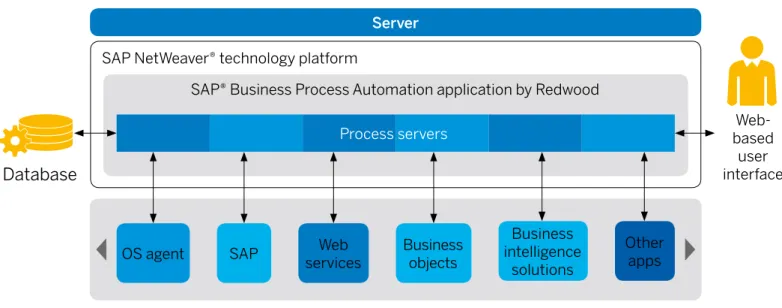
-tems using intelligent, event-driven automation. A Web-based interface (see Figure 1) provides detailed information about the status of all process
-es and interdependenci-es. In addition, it enabl-es you to conduct administrative and operational management tasks remotely from any location.
SAP Business Process Automation offers automat
-ic error detection, recovery, and notif-ication han
-dling. And to help ensure the end-to-end health of the environment that your business processes rely on, you can establish a proactive, landscapewide monitoring infrastructure.
To maximize operational efficiency, SAP Business Process Automation constantly manages, monitors, and optimizes the software systems that underlie business-critical processes implemented in your enterprise resource planning (ERP) and other appli
-cation environments. In addition, dynamic load balancing improves performance and increases resource utilization.
Figure 1: Architecture of SAP Business Process Automation
SAP® Business Process Automation application by Redwood
Web-based user interface
OS agent SAP servicesWeb Business objects
Business
intelligence
solutions
Other apps SAP NetWeaver® technology platform
Database
Server
Harness Real-Time, Event-Driven
Process Automation
ENABLE APPLICATIONS RUNNING ON SAP HANA In-memory computing technology such as SAP HANA has transformed the way in which organi
-zations can process information and turn it into meaningful intelligence. You can now take millions of data records and process them in seconds to conduct in-depth analysis in a wide range of areas. These include everything from customer behav
-ior and product demand through to productivity tracking and reporting on macroeconomic trends. However, you can’t do real-time business with yesterday’s data. In-memory technology can only work as fast as the business processes that pro
-vide it with raw data.
If there are disconnects and delays in data inputs, applications running on SAP HANA will not be able to take advantage of the advanced process
-ing power that the platform provides. Accurate process automation and execution is, therefore, key to helping you utilize these high-performance environments to their full potential.
SCHEDULE PROCESSES FOR A HIGH-SPEED ENVIRONMENT
For applications running on SAP HANA, effective scheduling is more critical than ever to enable you to make the most of the technology. All the same processes still need to take place, both within the in-memory computing environment and within the wider IT landscape. But all this now needs to happen faster and more efficiently than before. Manual steps and disconnects between software systems can cause delays in data reaching SAP HANA. And that prevents you from harnessing the full potential offered by in-memory computing: near instantaneous processing of vast amounts of data, resulting in real-time business intelligence that gives you a competitive edge.
AUTOMATE FOR SUCCESS
Every day you depend on multiple, interconnected process steps to run as an accurate and intercon
-nected whole. Process execution needs to be con
-sistent and reliable across your entire enterprise.
You can now take millions of data records and
process them in seconds to conduct in-depth
analysis in a wide range of areas.
Automation is key to helping ensure that business processes run efficiently and that data is deliv
-ered as quickly as possible to in-memory comput
-ing environments. To achieve this, you need a fast, flexible, and dynamic automation solution.
SAP Business Process Automation enables you
to map out and manage the execution of complete business processes. It helps you manage a myriad of simultaneous user activities, background tasks, internal and external data, file transfers, reporting, approvals, and more.
The solution can be deployed within SAP HANA, or it can integrate with other applications that are running on the platform. In fact, SAP Business Process Automation supports the SAP HANA Enterprise Cloud service and can be deployed directly into it as well. This enables you to harness real-time intelligence and accelerate process execution.
ELIMINATE PROCESS BOTTLENECKS
SAP Business Process Automation enables you
to coordinate all your processes based on differ
-ent ev-ents that occur across the -enterprise. This event-driven functionality lets you initiate processes based on real-time activities.
Event-driven functionality detects when valid data is available at any point and triggers the next step in the process, or even initiates a parallel process
as appropriate. You can also set up the solution to trigger corrective actions if the business process stalls for any reason and, thus, avoid bottlenecks. MANAGE ROUTINE AND AD HOC REQUIREMENTS With SAP Business Process Automation, you can manage routine and scheduled process execu
-tion as well as ad hoc tasks and unpredictable events. You can also set up if-then scenarios and multithreaded process dependencies.
This enables the solution to dynamically determine the right time, place, and circumstances to exe
-cute complex business processes. You can even manage the ad hoc tasks that can be generated at any time by applications such as e-commerce, business-to-business transfers, and do-it-yourself end-user interfaces.
Eliminate complexity and bring all
processes under a single umbrella
of control.
TAILOR PROCESS EXECUTION TO IMMEDIATE BUSINESS SITUATIONS
SAP Business Process Automation provides a fully dynamic process-scheduling environment. In operational terms, this means that any changes (such as changes in input parameters and last-minute changes to requirements) can be accom
-modated at any point up to execution. This way, your IT organization can be completely flexible in meeting business process needs.
By detecting and responding to real-world busi
-ness events, SAP Busi-ness Process Automation lets you take a flexible approach to workload pro
-cess automation. And because it responds imme
-diately to events, it gives you the business agility, throughput, and efficiency you need to optimize the use of available time and resources.
Unlock the Power of Your Data with SAP HANA® What is In-Memory Computing?
If you use a traditional data warehouse, you’re familiar with how it aggregates information as it comes in. That way, the warehouse is ready if, or when, a particular query is run.
With in-memory computing, there’s no need for a data warehouse to build the aggregates in advance of a query. You simply perform calculations or build a query in real time against the underlying high-speed database.
But to work at optimum speeds, tasks must be scheduled and orchestrated. Automation solutions can, therefore, significantly enhance the performance of in-memory computing environments.
Real-Time Operational Analytics
SAP HANA® software provides visibility into in-the-moment business situations. Whether the data comes from your SAP® ERP application, third-party solution, or custom application, the platform equips people across your enterprise to make decisions.
Agility to Meet Changing Business Demands
In-memory computing technology such as SAP HANA is transforming the speed at which organizations can process data and turn it into meaningful information. This helps them react faster and address dynamic markets in a more agile way.
Centralize Enterprise Process Execution
SIMPLIFY YOUR PROCESS MANAGEMENT Most business processes evolve organically to meet the changing needs of the business. Growth, acquisition, and technology evolution can leave you with a complex – and sometimes disconnected – process landscape, spanning a multitude of different applications and platforms.
SAP Business Process Automation provides a central point of control for executing processes across your organization, eliminating the need to manage multiple scheduling tools separately. This greatly simplifies process execution man
-agement, reduces administrative overhead, and increases productivity.
The solution takes the complexity out of manag
-ing processes that require interaction with numer
-ous, disparate business applications and brings all processes under a single umbrella of control. In addition, management using a single console reduces the need for skills and expertise in differ
-ent application-specific tools.
INTEGRATE WITH SAP AND THIRD-PARTY SOLUTIONS
SAP Business Process Automation integrates with third-party applications as well as SAP solu
-tions to provide comprehensive software support for your business processes. Integration with the SAP Solution Manager application management solution and the broader software management environment helps ensure that SAP Business Process Automation fits in easily with your exist
-ing corporate IT management framework.
The solution enables you to take data inputs directly from SAP applications, and it can also retrieve data from Microsoft Excel spreadsheets. Meanwhile, SAP Business Process Automation works together with reporting tools such as SAP Crystal Reports® software to provide fast, straightforward access to information as and when you need it.
Integration with the SAP Financial Closing cockpit allows you to monitor and control process automa
-tion beyond the financial close itself. The solu-tion also complements SAP Business Process Manage
-ment software and SAP Process Integration tech
-nology, providing the actual execution functionality for the business processes and delivering full end-to-end automation.
Comprehensive management tools offer
optimal visibility and control over your
business processes.
SUPPORT END-TO-END PROCESSES
SAP Business Process Automation enables you
to support process execution across different application environments and operating systems. Dynamic load balancing functionality, event-driven automation, and complex dependency resolution enable business-critical processes to run smoothly, without delays or disruptions.
Because SAP Business Process Automation
responds to events originating in both SAP and third-party software, it provides the basis for end-to-end, cross-enterprise process automation. You can manage complex processes and you can streamline and accelerate the automation of pro
-cess execution across all business areas. STREAMLINE GLOBAL OPERATIONS
SAP Business Process Automation supports 32 different languages and enables you to manage operations across multiple time zones. This means that your staff can submit tasks using local time at multiple locations, and the software will manage any dependencies correctly. The software also auto
-matically resolves any complications that occur when different countries make the switch to and from daylight saving time.
The solution provides multiple calendars that define major public and religious holiday dates for many countries around the world. And you can also define your own company or implementation-specific calendars. These calendars are perpetual and do not need to be redefined every year. In addition, large organizations with multiple
instances of SAP Business Process Automation
can deploy optional global monitoring functionality. This enables you to monitor all activities in all your environments from a single console.
You can define and maintain specific
user roles and authorities in line with
your organization’s security standards.
Stay in Control of Your Business-Critical
Processes
INCREASE VISIBILITY WITH USER-FRIENDLY MANAGEMENT TOOLS
SAP Business Process Automation provides com
-prehensive management tools to offer optimal visibility and control over your business processes. These include:
•Graphical user interface
SAP Business Process Automation provides a convenient Web-based graphical user interface that requires no client software, only a supported Web browser. The user interface allows you to configure, manage, and monitor processes from anywhere that has access to the Internet. You can set up tasks and send messages, manage work
-load, implement custom code, define events, and establish automated alerting requirements. •Intuitive visual process editor
Designed to simplify how business process exe
-cution logic is mapped onto underlying application tasks, SAP Business Process Automation offers a powerful process editor. This intuitive tool allows you to edit process execution using a clear visual interface. The process editor greatly reduces time to deployment for any execution changes, increas
-ing your business agility and decreas-ing response time across your enterprise.
•Historical process views and playback
Built-in playback and critical-path analysis features give you detailed insights into past processes and trends so that you can effectively identify bottle
-necks and quickly improve process flows throughout your business. At a glance, you can see historical pro
-cess runs to determine which steps take the longest to complete and which processes can or should run simultaneously.
•Real-time status visibility
SAP Business Process Automation provides an automated, visual status update on the real-time progress of all of your business processes. It gives you intuitive mouse-over access to monitor impor
-tant updates, such as report output data or mes
-sages requiring a response. It also includes live monitoring of process output so that all key mile
-stones are completely visible as they occur. •Multiple simultaneous business process views With SAP Business Process Automation, a single user can easily monitor the progress of multiple pro
-cesses at the same time with an easy-to-use tabs feature. This significantly reduces the complexity inherent in managing many different but intercon
-nected processes with diverse dependencies. By providing multilevel transparency, you can prevent any delays or errors from potential cross-process issues before they ever happen.
SAFEGUARD WITH ADVANCED SECURITY FEATURES
SAP Business Process Automation is designed to fit into your existing corporate security frame
-work. All interfaces (Web, mobile, and application programming interfaces) require a username and password before you can establish a connection. You can define and maintain specific user roles and authorities in line with your organization’s security standards. The solution also integrates tightly with user management functionality in the SAP ERP application. If you require stand-alone security settings, SAP Business Process Automa
-tion also provides its own interface for defining roles and users.
Permissions are established by user or user type with different types of access granted according to whether a user is classed as an administrator, devel
-oper, or operator. Through the user interface, you will see appropriate menu options and visibility of workload according to your own authorization level. SUPPORT DECISION MAKING WITH
DETAILED REPORTING
SAP Business Process Automation has built-in reporting functionalities that provide a wizard for extracting historical data from underlying tables. Reports can be created in an ad hoc manner or can be scheduled for creation as part of regular pro
-cessing, for example, to create a monthly report of tasks that have ended in error.
Report output can be generated in HTML, XML, or CSV format, and as part of the definition pro
-cess, users can see report previews to help ensure that the correct data has been selected and that all the necessary information will be reported. Once generated, reports can be displayed within
SAP Business Process Automation and
down-loaded for export to a separate report manage
-ment tool, such as Microsoft Excel. They may also be e-mailed or printed.
STAY UPDATED ON THE GO WITH MOBILE ACCESS You can integrate SAP Business Process Automation with a free mobile app from Redwood. This con
-nects IT administration and operations staff to SAP Business Process Automation using an iPhone or iPad with access to a 3G or Wi-Fi network. This enables you to monitor and manage business-critical processes on the go.
Available functionality includes:
•A dashboard view of overall workload and number of executing or queued processes
•A list of all current tasks with clear indication of errors or problems
•Interactive management of processes •Viewing and response to operator messages •Viewing, stopping, and starting process queues •Viewing, stopping, and starting processing
locations
•Submission of tasks and task lists for authorized users
Automate for the Future
KEEP PACE WITH RAPIDLY EVOLVING PROCESSES Just as businesses grow and evolve, so do the business processes that you rely on to keep your operations up and running. However, developing and maintaining application-specific connectors to support each new process is nearly impossible. It is, therefore, critical that you establish an IT infrastructure that gives you the flexibility to sup
-port and enable these changes. You need to adapt existing processes and add new ones without run
-ning into performance issues or costly develop
-ment require-ments.
ESTABLISH A SERVICE-ORIENTED ARCHITECTURE (SOA)
To address this, SAP Business Process Automation supports a service-oriented approach to automa
-tion. By providing a common set of reusable, imme
-diately available services for process automation,
you can create a central infrastructure for managing and integrating workloads for legacy, existing, and future applications.
EMBRACE NEW APPLICATION ENVIRONMENTS AS THEY DEVELOP
SAP Business Process Automation uses open standards such as XML, distributed systems standards such as Microsoft .NET, and enhanced Java integration. This makes it easy to integrate into any existing infrastructure, removing reliance on proprietary protocols for communication between components and reducing installation size and complexity.
Based on industry-standard technology, SAP
Business Process Automation enables you to
con-nect your infrastructure to the widest possible range of process technologies. So you can benefit from the latest IT innovations as and when they are developed.
What is a Service-Oriented Architecture?
SAP® software enables businesses to adopt service-oriented architecture (SOA) as part of their implementation of SAP solutions. At the heart of our open-standards approach to SOA is the concept of enterprise services – highly integrated Web services, complete with business logic and harmonized semantics that can be accessed and used repeatedly to enable end-to-end business processes.
Find Out More
To learn more about how SAP Business Process Automation can help your organization, call your SAP representative today or visit us on the Web
at www.sap.com/business-process-automation.
Establish an IT infrastructure that gives you the flexibility
express permission of SAP SE or an SAP affi liate company.
SAP and other SAP products and services mentioned herein as well as their respective logos are trademarks or registered trademarks of SAP SE (or an SAP affi liate company) in Germany and other countries. Please see http://www.sap.com/corporate-en/legal/copyright/index.epx#trademark for
additional trademark information and notices. Some software products marketed by SAP SE and its distributors contain proprietary software components of other software vendors.
National product specifi cations may vary.
These materials are provided by SAP SE or an SAP affi liate company for informational purposes only, without representation or warranty of any kind, and SAP SE or its affi liated companies shall not be liable for errors or omissions with respect to the materials. The only warranties for SAP SE or SAP affi liate company products and services are those that are set forth in the express warranty statements accompanying such products and services, if any. Nothing herein should be construed as constituting an additional warranty. In particular, SAP SE or its affi liated companies have no obligation to pursue any course of business
outlined in this document or any related presentation, or to develop or release any functionality mentioned therein. This document, or any related presentation, and SAP SE’s or its affi liated companies’ strategy and possible future developments, products, and/or platform directions and functionality are all subject to change and may be changed by SAP SE or its affi liated companies at any time for any reason without notice. The information in this document is not a commitment, promise, or legal obligation to deliver any material, code, or functionality. All forward-looking statements are subject to various risks and
uncertainties that could cause actual results to diff er materially from expectations. Readers are cautioned not to place undue reliance on these forward-looking statements, which speak only as of their dates, and they should not be relied upon in making purchasing decisions.