Associate Study Guide,
5th Edition (640-801)
Todd Lammle
Chapter 3: IP Subnetting and Variable Length Subnet
Masks (VLSMs)
Copyright © 2005 SYBEX Inc., 1151 Marina Village Parkway, Alameda, CA 94501. World rights reserved. No part of this publication may be stored in a retrieval system, transmitted, or reproduced in any way, including but not limited to photocopy, photograph, magnetic or other record, without the prior agreement and written permission of the publisher.
ISBN: 0-7821-4391-1
SYBEX and the SYBEX logo are either registered trademarks or trademarks of SYBEX Inc. in the USA and other countries. TRADEMARKS: Sybex has attempted throughout this book to distinguish proprietary trademarks from descriptive terms by following the capitalization style used by the manufacturer. Copyrights and trademarks of all products and services listed or described herein are property of their respective owners and companies. All rules and laws pertaining to said copyrights and trademarks are inferred. This document may contain images, text, trademarks, logos, and/or other material owned by third parties. All rights reserved. Such material may not be copied, distributed, transmitted, or stored without the express, prior, written consent of the owner.
The author and publisher have made their best efforts to prepare this book, and the content is based upon final release software whenever possible. Portions of the manuscript may be based upon pre-release versions supplied by s oftware manufacturers. The author and the publisher make no representation or warranties of any kind with regard to the completeness or accuracy of the contents herein and accept no liability of any kind including but not limited to performance, merchantability, fitness for any particular purpose, or any losses or damages of any kind caused or alleged to be caused directly or indirectly from this book.
Sybex Inc.
1151 Marina Village Parkway Alameda, CA 94501 U.S.A.
Phone: 510-523-8233 www.sybex.com
Chapter
3
IP Subnetting and
Variable Length Subnet
Masks (VLSMs)
THE CCNA EXAM TOPICS COVERED IN THIS
CHAPTER INCLUDE THE FOLLOWING:
PLANNING & DESIGNING
Design a simple LAN using Cisco Technology Design an IP addressing scheme to meet design
requirements
Design a simple internetwork using Cisco technology
TECHNOLOGY
Evaluate TCP/IP communication process and its
associated protocols
TROUBLESHOOTING
Perform LAN and VLAN troubleshooting
Troubleshoot IP addressing and host configuration Troubleshoot a device as part of a working network 4391.book Page 105 Sunday, December 12, 2004 3:02 PM
This chapter will pick up right where we left off in the last chapter. We will continue our discussion of IP addressing.
We’ll start with subnetting an IP network. You’re going to have to really apply yourself, because subnetting takes time and practice in order to nail it, so be patient. Do whatever it takes to get this stuff dialed in. This chapter truly is very important— possibly the most important chapter in this book for you to understand.
I’ll thoroughly cover IP subnetting from the very beginning. I know this might sound weird to you, but I think you’ll be much better off if you can try to forget everything you’ve learned about subnetting before reading this chapter—especially if you’ve been to a Microsoft class!
In this chapter we’ll dive into a new subject in the CCNA area called ip subnet-zero. This is not a new command—Cisco has supported it for many years. But the older CCNA material (pre-2005) only discussed subnetting where you couldn’t use the first and last subnet. Since this is no longer the case, we’ll be discussing the command ip subnet-zero in this chapter, and we’ll also be using it throughout the rest of this book.
After our discussion of IP subnetting, I’m going to tell you all about Variable Length Subnet Masks (VLSMs), as well as show you how to design and implement a network using VLSM networks.
Once you have mastered VLSM design and implementation, I’ll show you how to summarize classful boundaries. We’ll go into this further in Chapter 6, “Enhanced IGRP (EIGRP) and Open Shortest Path First (OSPF),” where I’ll demonstrate summarizing using EIGRP and OSPF routing protocols. I’ll also discuss summarization, as with ip subnet-zero, which I think you’ll find is very useful to know.
I’ll wrap up the chapter by going over IP address troubleshooting and take you through the steps Cisco recommends when troubleshooting an IP network.
So get psyched—you’re about to go for quite a ride! This chapter will truly help you under-stand IP addressing and networking, so don’t get discouraged or give up. If you stick with it, I promise—one day you’ll look back on this and you’ll be really glad you decided to hang on. It’s one of those things that after you understand it, you’ll wonder why you once thought it was so hard. Ready? Let’s go!
Subnetting Basics
In Chapter 2, you learned how to define and find the valid host ranges used in a Class A, Class B, and Class C network address by turning the host bits all off and then all on. This is very good, but
Subnetting Basics 107
network address and create six networks from it? You would have to do something called sub-netting, because that’s what allows you to take one larger network and break it into a bunch of smaller networks.
There are loads of reasons in favor of subnetting. Some of the benefits include:
Reduced network traffic We all appreciate less traffic of any kind. Networks are no different.
Without trusty routers, packet traffic could grind the entire network down to a near standstill. With routers, most traffic will stay on the local network; only packets destined for other net-works will pass through the router. Routers create broadcast domains. The more broadcast domains you create, the smaller the broadcast domains and the less network traffic on each net-work segment.
Optimized network performance This is a result of reduced network traffic.
Simplified management It’s easier to identify and isolate network problems in a group of
smaller connected networks than within one gigantic network.
Facilitated spanning of large geographical distances Because WAN links are considerably
slower and more expensive than LAN links, a single large network that spans long distances can create problems in every area listed above. Connecting multiple smaller networks makes the sys-tem more efficient.
In the following sections, I am going to move to subnetting a network address. This is the good part—ready?
IP Subnet-Zero
As I mentioned in the introduction, IP subnet-zero is not a new command, but in the pre-2005 CCNA objectives, Cisco didn’t cover it. This command allows you to use the first and last sub-net in your sub-network design. For example, the Class C mask of 192 provides subsub-nets 64 and 128 (discussed thoroughly later in this chapter), but with the ip subnet-zero command, you now get to use subnets 64, 128, plus 0 and 192.
Even though we don’t discuss the command line interface (CLI) until the next chapter, “Introduction to the Cisco IOS,” it’s important for you to be familiar with this command:
P1R1#sh running-config
Building configuration...
Current configuration : 827 bytes !
hostname Pod1R1 !
ip subnet-zero !
The router output above shows that the command ip subnet-zero is enabled on the router. Cisco has turned this command on by default starting with Cisco IOS version 12.x.
108 Chapter 3 IP Subnetting and Variable Length Subnet Masks (VLSMs)
How to Create Subnets
To create subnetworks, you take bits from the host portion of the IP address and reserve them to define the subnet address. This means fewer bits for hosts, so the more subnets, the fewer bits available for defining hosts.
Later in this chapter, you’ll learn how to create subnets, starting with Class C addresses. But before you actually implement subnetting, you need to determine your current requirements as well as plan for future conditions.
Before we move on to designing and creating a subnet mask, you need to understand that in this first section we will be discussing classful routing, which means that all hosts (all nodes) in the network use the exact same subnet mask. When we move on to Variable Length Subnet Masks (VLSMs) I’ll discuss classless routing, which means that each network segment can use a different subnet mask.
Follow these steps:
1. Determine the number of required network IDs: One for each subnet
One for each wide area network connection
2. Determine the number of required host IDs per subnet: One for each TCP/IP host
One for each router interface
3. Based on the above requirements, create the following: One subnet mask for your entire network
A unique subnet ID for each physical segment A range of host IDs for each subnet
Understanding the Powers of 2
Powers of 2 are important to understand and memorize for use with IP subnetting. To review powers of 2, remember that when you see a number with another number to its upper right (called an exponent), this means you should multiply the number by itself as many times as the upper number specifies. For example, 23 is 2 × 2 × 2, which equals 8. Here’s a list of powers of 2 that you should commit to memory:
21 = 2 22 = 4
Subnetting Basics 109
Subnet Masks
For the subnet address scheme to work, every machine on the network must know which part of the host address will be used as the subnet address. This is accomplished by assigning a subnet mask to each machine. A subnet mask is a 32-bit value that allows the recipient of IP packets to distinguish the network ID portion of the IP address from the host ID portion of the IP address.
The network administrator creates a 32-bit subnet mask composed of 1s and 0s. The 1s in the subnet mask represent the positions that refer to the network or subnet addresses.
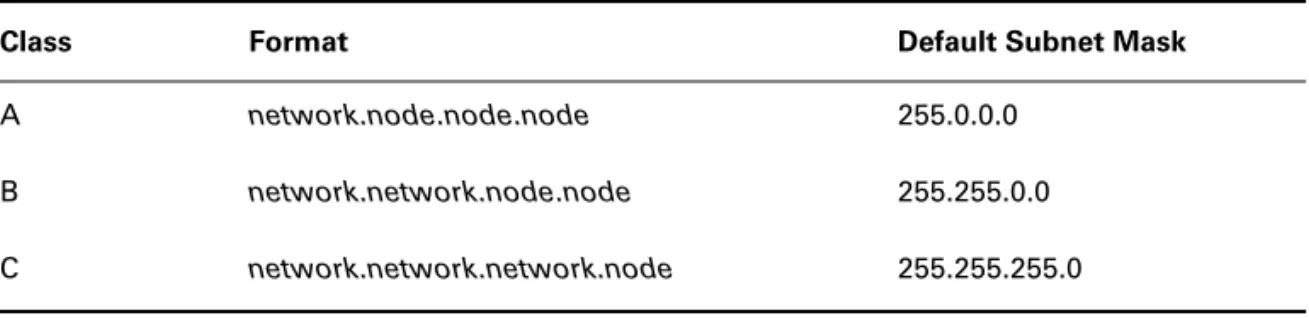
Not all networks need subnets, meaning they use the default subnet mask. This is basically the same as saying that a network doesn’t have a subnet address. Table 3.1 shows the default subnet masks for Classes A, B, and C. These default masks cannot change. In other words, you can’t make a Class B subnet mask read 255.0.0.0. If you try, the host will read that address as invalid and usually won’t even let you type it in. For a Class A network, you can’t change the first byte in a subnet mask; it must read 255.0.0.0 at a minimum. Similarly, you cannot assign 255.255.255.255, as this is all 1s—a broadcast address. A Class B address must start with 255.255.0.0, and a Class C has to start with 255.255.255.0.
24 = 16 25 = 32 26 = 64 27 = 128 28 = 256 29 = 512 210 = 1,024 211 = 2,048 212 = 4,096 213 = 8,192 214 = 16,384
Before you get stressed out about knowing all these exponents, remember that it’s helpful to know them, but it’s not absolutely necessary. Here’s a little trick since you’re working with 2s: each successive power of 2 is double the previous one. For example, all you have to do to remember the value of 29 is to first know that 28 = 256. Why? Because when you double 2 to the eighth power (256), you get 29 (or 512). To determine the value of 210, simply start at 28 = 256, and then double it twice.
You can go the other way as well. If you needed to know what 26 is, you just cut 256 in half two times: once to reach 27 and then one more time to reach 26.
110 Chapter 3 IP Subnetting and Variable Length Subnet Masks (VLSMs)
Classless Inter-Domain Routing (CIDR)
Another term you need to familiarize yourself with is Classless Inter-Domain Routing (CIDR). It’s basically the method that ISPs (Internet Service Providers) use to allocate an amount of addresses to a company, a home—a customer. They provide addresses in a certain block size, something I’ll be going into in greater detail later in this chapter.
When you receive a block of addresses from an ISP, what you get will look something like this: 192.168.10.32/28. This is telling you what your subnet mask is. The slash notation (/) means how many bits are turned on (1s). Obviously, the maximum could only be /32 because a byte is 8 bits and there are four bytes in an IP address: (4 × 8 = 32). But keep in mind that the largest subnet mask available (regardless of the class of address) can only be a /30 because you’ve got to keep at least 2 bits for host bits.
Take for example a Class A default subnet mask, which is 255.0.0.0. This means that the first byte of the subnet mask is all ones (1s), or 11111111. When referring to a slash notation, you need to count all the 1s bits to figure out your mask. The 255.0.0.0 is considered a /8 because it has 8 bits that are 1s—that is, 8 bits that are turned on.
A Class B default mask would be 255.255.0.0, which is a /16 because 16 bits are ones (1s): 11111111.11111111.00000000.00000000.
Table 3.2 has a listing of every available subnet mask and its equivalent CIDR slash notation. T A B L E 3 . 1 Default Subnet Mask
Class Format Default Subnet Mask
A network.node.node.node 255.0.0.0
B network.network.node.node 255.255.0.0
C network.network.network.node 255.255.255.0
T A B L E 3 . 2 CIDR Values
Subnet Mask CIDR Value
255.0.0.0 /8
255.128.0.0 /9
255.192.0.0 /10
255.224.0.0 /11
Subnetting Basics 111
No, you cannot configure a Cisco router using this slash format. But wouldn’t that be nice? Nevertheless, it’s really important for you to know subnet masks in the slash notation (CIDR).
255.248.0.0 /13
255.252.0.0 /14
255.254.0.0 /15
255.255.0.0 /16
255.255.128.0 /17
255.255.192.0 /18
255.255.224.0 /19
255.255.240.0 /20
255.255.248.0 /21
255.255.252.0 /22
255.255.254.0 /23
255.255.255.0 /24
255.255.255.128 /25
255.255.255.192 /26
255.255.255.224 /27
255.255.255.240 /28
255.255.255.248 /29
255.255.255.252 /30
T A B L E 3 . 2 CIDR Values (continued)
112 Chapter 3 IP Subnetting and Variable Length Subnet Masks (VLSMs)
Subnetting Class C Addresses
There are many different ways to subnet a network. The right way is the way that works best for you. First I’ll show you how to use the binary method, and then we’ll look at an easier way to do the same thing.
In a Class C address, only 8 bits are available for defining the hosts. Remember that subnet bits start at the left and go to the right, without skipping bits. This means that the only Class C subnet masks can be the following:
Binary Decimal CIDR
---10000000 = 128 /25
11000000 = 192 /26 11100000 = 224 /27 11110000 = 240 /28 11111000 = 248 /29 11111100 = 252 /30
We can’t use a /31 or /32 because we have to have at least 2 host bits for assigning IP addresses to hosts. In the past, I never discussed the /25 in a Class C network. Cisco always had been concerned with having at least 2 subnet bits, but now, because of the ip subnet-zero
command, we can use just 1 subnet bit.
In the following sections we are going to look at the binary way of subnetting, then move into the new, improved, easy to understand and implement, subnetting method.
The Binary Method: Subnetting a Class C Address
In this section, I’m going to teach you how to subnet a Class C address using the binary method. I’ll start by using the second subnet mask available with a Class C address, which borrows 2 bits for subnetting. For this example, I’ll be using 255.255.255.192.
192 = 11000000
The 1s represent the subnet bits, and the 0s represent the host bits available in each subnet. 192 provides 2 bits for subnetting and 6 bits for defining the hosts in each subnet.
What are the subnets? Since we now use ip subnet-zero, we can get four subnets, instead of the two that were available without the ip subnet-zero command.
00000000 = 0 (all host bits off)
01000000 = 64 (all host bits off)
10000000 = 128 (all host bits off)
The valid hosts would be defined as the numbers between the subnets, minus the all-host-bits-off and all-host-bits-on numbers.
To find the hosts, first find your subnet: turn all the host bits off, then turn all the host bits on to find your broadcast address for the subnet. The valid hosts must be between those two numbers. Table 3.3 shows the 0 subnet, valid host range, and broadcast address. Table 3.4 shows the 64 subnet, valid host range, and broadcast address. Table 3.5 shows the 128 subnet, and Table 3.6 shows the 192 subnet (the subnet and host bits combine to form one byte). T A B L E 3 . 3 Subnet 0
Subnet Host Meaning
00 000000 = 0 The network (do this first)
00 000001 = 1 The first valid host
00 111110 = 62 The last valid host
00 111111 = 63 The broadcast address (do this second)
T A B L E 3 . 4 Subnet 64
Subnet Host Meaning
01 000000 = 64 The network
01 000001 = 65 The first valid host
01 111110 = 126 The last valid host
01 111111 = 127 The broadcast address
T A B L E 3 . 5 Subnet 128
Subnet Host Meaning
10 000000 = 128 The subnet address
10 000001 = 129 The first valid host
10 111110 = 190 The last valid host
Hopefully, you understood what I was trying to show you. The example I presented only used 2 subnet bits, so what if you had to subnet using 9, 10, or even 20 subnet bits? Try that with the binary method and see how long it takes you.
In the following section, I’m going to teach you an alternate method of subnetting that makes it easier to subnet larger numbers in no time.
Since the CCNA exam gives you just over a minute for each question, it’s really important to know how much time you’ll spend on a subnetting question. That’s why committing as much as possible to memory, as I suggested earlier in the chapter, is vital. Using the binary method can take you way too long and you could fail the exam even if you know the material!
The Fast Way: Subnetting a Class C Address
When you’ve chosen a possible subnet mask for your network and need to determine the num-ber of subnets, valid hosts, and broadcast addresses of a subnet that the mask provides, all you need to do is answer five simple questions:
How many subnets does the chosen subnet mask produce? How many valid hosts per subnet are available?
What are the valid subnets?
What’s the broadcast address of each subnet? What are the valid hosts in each subnet?
At this point it’s important that you both understand and have memorized your powers of 2. Please refer to the sidebar earlier in this chapter if you need some help. Here’s how you get the answers to those five big questions:
How many subnets? 2x = number of subnets. x is the number of masked bits, or the 1s. For
example, in 11000000, the number of ones gives us 22 subnets. In this example, there are
T A B L E 3 . 6 Subnet 192
Subnet Host Meaning
11 000000 = 192 The subnet address
11 000001 = 193 The first valid host
11 111110 = 254 The last valid host
How many hosts per subnet? 2y– 2 = number of hosts per subnet. y is the number of
unmasked bits, or the 0s. For example, in 11000000, the number of zeros gives us 26 – 2
hosts. In this example, there are 62 hosts per subnet. You need to subtract two for the sub-net address and the broadcast address, which are not valid hosts.
What are the valid subnets? 256 – subnet mask = block size, or increment number. An example would be 256 – 192 = 64. The block size of a 192 mask is always 64. Start count-ing at zero in blocks of 64 until you reach the subnet mask value and these are your subnets. 0, 64, 128, 192. Easy, huh? Yes—that is, if you can count in the needed block size! What’s the broadcast address for each subnet? Now here’s the really easy part… Since we
counted our subnets in the last section as 0, 64, 128, and 192, the broadcast address is always the number right before the next subnet. For example, the 0 subnet has a broadcast address of 63 because the next subnet is 64. The 64 subnet has a broadcast address of 127 because the next subnet is 128, etc. And remember, the broadcast of the last subnet (the subnet with the same interesting octets as the mask) is always 255 for Class C.
What are the valid hosts? Valid hosts are the numbers between the subnets, omitting all the 0s and all 1s. For example, if 64 is the subnet number and 127 is the broadcast address, then 65–126 is the valid host range—it’s always the numbers between the subnet address and the broadcast address.
I know this can truly seem confusing. But it really isn’t as hard as it seems to be at first—just hang in there! Why not try a few and see for yourself?
Subnetting Practice Examples: Class C Addresses
Here’s your opportunity to practice subnetting Class C addresses using the method I just described. Exciting, isn’t it! We’re going to start with the first Class C subnet mask and work through every subnet that we can using a Class C address. When we’re done, I’ll show you how easy this is with Class A and B networks too!
Practice Example #1C: 255.255.255.192 (/26)
Let’s use the Class C subnet mask from the preceding example, 255.255.255.192, to see how much simpler this method is than writing out the binary numbers. We’re going to subnet the net-work address 192.168.10.0 and subnet mask 255.255.255.192.
192.168.10.0 = Network address 255.255.255.192 = Subnet mask Now, let’s answer the big five:
How many subnets? Since 192 is 2 bits on (11000000), the answer would be 22.
How many hosts per subnet? We have 6 host bits off (11000000), so the equation would be 26 – 2 = 62 hosts.
What are the valid subnets? 256 – 192 = 64. Remember, we start at zero and count in our block size, so our subnets are 0, 64, 128, and 192.
What’s the broadcast address for each subnet? The number right before the value of the next subnet is all host bits turned on and equals the broadcast address.
What are the valid hosts? These are the numbers between the subnet and broadcast address. The easiest way to find the hosts is to write out the subnet address and the broadcast address. This way, the valid hosts are obvious. The following table shows the 0, 64, 128, and 192 subnets, the valid host ranges of each, and the broadcast address of each subnet:
See? We really did come up with the same answers as when we did it the binary way, and this way is so much easier because you never have to do any binary-to-decimal conversions! About now, you might be thinking that it’s not easier than the first method I showed you. And I’ll admit, for the first subnet with only 2 subnet bits—you’re right, it isn’t that much easier. But remember, we’re going after the gold: being able to subnet in your head. And to do that, you need one thing: practice!
Practice Example #2C: 255.255.255.224 (/27)
This time, we’ll subnet the network address 192.168.10.0 and subnet mask 255.255.255.224. 192.168.10.0 = Network address
255.255.255.224 = Subnet mask
How many subnets? 224 is 11100000, so our equation would be 23 = 8.
How many hosts? 25 – 2 = 30.
What are the valid subnets? 256 – 224 = 32. We just start at zero and count to the subnet mask value in blocks (increments) of 32: 0, 32, 64, 96, 128, 160, 192, 224.
What’s the broadcast address for each subnet (always the number right before the
next subnet)?
What are the valid hosts (the numbers between the subnet number and the broadcast address)? To answer questions 4 and 5, first just write out the subnets, then write out the broadcast addresses—the number right before the next subnet. Lastly, fill in the host addresses. The fol-lowing table gives you all the subnets for the 255.255.255.224 Class C subnet mask:
The subnets (do this first) 0 64 128 192
Our first host (perform host addressing last) 1 65 129 193
Our last host 62 126 190 254
The broadcast address (do this second) 63 127 191 255
The subnet address 0 32 64 96 128 160 192 224
The first valid host 1 33 65 97 129 161 193 225
The last valid host 30 62 94 126 158 190 222 254
Practice Example #3C: 255.255.255.240 (/28) Let’s practice on another one:
192.168.10.0 = Network address 255.255.255.240 = Subnet mask
Subnets? 240 is 11110000 in binary. 24 = 16.
Hosts? 4 host bits, or 24 – 2 = 14.
Valid subnets? 256 – 240 = 16. Start at 0. 0 + 16 = 16. 16 + 16 = 32. 32 + 16 = 48. 48 + 16 = 64. 64 + 16 = 80. 80 + 16 = 96. 96 + 16 = 112. 112 + 16 = 128. 128 + 16 = 144. 144 + 16 = 160. 160 + 16 = 176. 176 + 16 = 192. 192 + 16 = 208. 208 + 16 = 224. 224 + 16 = 240. Broadcast address for each subnet?
Valid hosts?
To answer questions 4 and 5, check out the following table. It gives you the subnets, valid hosts, and broadcast addresses for each subnet. First, find the address of each subnet using the block size (increment). Second, find the broadcast address of each subnet increment (it’s always the number right before the next valid subnet), then just fill in the host addresses. The following table shows the available subnets, hosts, and broadcast addresses provided from a Class C 255.255.255.240 mask.
Cisco has figured out the most people cannot count in sixteens and therefore have a hard time finding valid subnets, hosts, and broadcast addresses with the Class C 255.255.255.240 mask. You’d be wise to study this mask.
Practice Example #4C: 255.255.255.248 (/29) Let’s keep practicing:
192.168.10.0 = Network address 255.255.255.248 = Subnet mask
Subnets? 248 in binary = 11111000. 25 = 32.
Hosts? 23 – 2 = 6.
Valid subnets? 256 – 248 = 0, 8, 16, 24, 32, 40, 48, 56, 64, 72, 80, 88, 96, 104, 112, 120, 128, 136, 144, 152, 160, 168, 176, 184, 192, 200, 208, 216, 224, 232, 240, and 248. Broadcast address for each subnet?
Valid hosts?
Subnet 0 16 32 48 64 80 96 112 128 144 160 176 192 208 224 240
First host 1 17 33 49 65 81 97 113 129 145 161 177 193 209 225 241
Last host 14 30 46 62 78 94 110 126 142 158 174 190 206 222 238 254
Take a look at the following table. It shows some of the subnets (first four and last four only), valid hosts, and broadcast addresses for the Class C 255.255.255.248 mask:
Practice Example #5C: 255.255.255.252 (/30) Just a couple more:
192.168.10.0 = Network address 255.255.255.252 = Subnet mask Subnets? 64.
Hosts? 2.
Valid subnets? 0, 4, 8, 12, etc., all the way to 252.
Broadcast address for each subnet? (always the number right before the next subnet) Valid hosts? (the numbers between the subnet number and the broadcast address)
Subnet 0 8 16 24 … 224 232 240 248
First host 1 9 17 25 … 225 233 241 249
Last host 6 14 22 30 … 230 238 246 254
Broadcast 7 15 23 31 … 231 239 247 255
Should we really use this mask that provides only two hosts?
You are the network administrator for Acme Corporation in San Francisco, with dozens of WAN links connecting to your corporate office. Right now your network is a classful network, which means that all hosts and router interfaces have the same subnet mask on each inter-face. You’ve read about classless routing where you can have different size masks, but don’t know what to use on your point-to-point WAN links. Is the 255.255.255.252 (/30) a helpful mask in this situation?
Yes, this is a very helpful mask in wide area networks.
If you use the 255.255.255.0 mask, then each network would have 254 hosts, but you only use two addresses with a WAN link! That is a waste of 252 hosts per subnet. If you use the 255.255.255.252 mask, then each subnet has only two hosts and you don’t waste precious addresses.
This is a really important subject, one that we’ll address in a lot more detail in the VLSM net-work design section later in this chapter.
The following table shows you the subnet, valid host, and broadcast address of the first four and last four subnets in the 255.255.255.252 Class C subnet:
Practice Example #6C: 255.255.255.128 (/25)
This mask can be used when you need two subnets, each with 126 hosts. But our trusty big five questions won’t work with this one—it’s special—so I’ll just explain it to you. First, use the global configuration command ip subnet-zero to tell your router to break the rules and allow the use of the first and last subnets, which have subnet bits of all 0s and all 1s (this is a default command on all routers running the 12.x Cisco IOS). The ability to support a 1 subnet-bit mask is an added benefit of this command.
Since 128 is 10000000 in binary, there is only 1 bit for subnetting. Since this bit can be either off or on, the two available subnets are 0 and 128. You can determine the subnet value by looking at the decimal value of the fourth octet. If the value of the fourth octet is below 128, then the host is in the 0 subnet. If the fourth octet value is above 128, then the host is in the 128 subnet.
The following table shows you the two subnets, valid host ranges, and broadcast addresses for the Class C 255.255.255.128 (/25) mask:
So, if you have an IP address of 192.168.10.5 using the 255.255.255.128 subnet mask, you know it’s in the range of the 0 subnet and bit number 128 must be off. If you have an IP address of 192.168.10.189, then 128 must be on, and the host is considered to be in the 128 subnet. You’ll see this again in a minute.
Subnetting in Your Head: Class C Addresses
It really is possible to subnet in your head. Even if you don’t believe me, I’ll show you how. And it’s not all that hard either—take the following example:
192.168.10.33 = Node address 255.255.255.224 = Subnet mask
First, determine the subnet and broadcast address of the above IP address. You can do this by answering question 3 of the big five questions: 256 – 224 = 32. 0, 32 + 32 = 64. The address of 33 falls between the two subnets of 32 and 64 and must be part of the 192.168.10.32 subnet.
Subnet 0 4 8 12 … 240 244 248 252
First host 1 5 9 13 … 241 245 249 253
Last host 2 6 10 14 … 242 246 250 254
Broadcast 3 7 11 15 … 243 247 251 255
Subnet 0 128
First host 1 129
Last host 126 254
The next subnet is 64, so the broadcast address is 63. (Remember that the broadcast address of a subnet is always the number right before the next subnet.) The valid host range is 33–62. This is too easy! No, it’s not?
Okay, then let’s try another one. We’ll subnet another Class C address: 192.168.10.33 = Node address
255.255.255.240 = Subnet mask
What subnet and broadcast address is the above IP address a member of? 256 – 240 = 16. 0, 16 + 16 = 32. 32 + 16 = 48. And bingo—the host address is between the 32 and 48 subnets. The subnet is 192.168.10.32, and the broadcast address is 47. The valid host range is 33–46.
Okay, we need to do more, just to make sure you have this down.
You have a node address of 192.168.10.174 with a mask of 255.255.255.240. What is the valid host range?
The mask is 240, so we’d do a 256 – 240 = 16. This is our block size. Just keep adding 16 until we pass the host address of 174: 0, 16, 32, 48, 64, 80, 96, 112, 128, 144, 160, 176. The host address of 174 is between 160 and 176, so the subnet is 160. The broadcast address is 175, so the valid host range is 161–174. That was a tough one.
One more—just for fun. This is the easiest one of all Class C subnetting: 192.168.10.17 = Node address
255.255.255.252 = Subnet mask
What subnet and broadcast address is the above IP address a member of? 256 – 252 = 0, 4, 8, 12, 16, 20, etc. You’ve got it! The host address is between the 16 and 20 subnets. The subnet is 192.168.10.16, and the broadcast address is 19. The valid host range is 17–18.
Now that you’re all over Class C subnetting, let’s move on to Class B subnetting. But before we do, let’s have a quick review.
What Do We Know?
Okay—here’s where you can really apply what you’ve learned so far, and begin committing it all to memory. This is a very cool section that I’ve been using in my classes for years. It will really help you nail down subnetting!
When you see a subnet mask of slash notation (CIDR), you should know the following: /26
What do we know about a /26? 192 mask
2 bits on and 6 bits off (11000000) Block size of 64
/27
What do we know about a /27? 224 mask
3 bits on and 5 bits off (11100000) Block size of 32
8 subnets, each with 30 hosts /28
What do we know about a /28? 240 mask
4 bits on and 4 bits off Block size of 16
16 subnets, each with 14 hosts /29
What do we know about a /29? 248 mask
5 bits on and 3 bits off Block size of 8
32 subnets, each with 6 hosts /30
What do we know about a /30? 252 mask
6 bits on and 2 bits off Block size of 4
64 subnets, each with 2 hosts
Regardless whether you have a Class A, Class B, or Class C address, the /30 mask will only provide you with two hosts, ever. This mask is suited almost exclusively—as well as suggested by Cisco—for use on point-to-point links.
If you can memorize this section, you’ll be much better off in your day-to-day job and in your studies. Try saying it out loud, which helps you memorize things—yes, your significant other and/or coworkers will think you’ve lost it, but they probably already do if you are in the net-working field. And if you’re not yet in the netnet-working field but are studying all this to break into it, you might as well have people start thinking you’re an odd bird now, since they will eventu-ally anyway.
It’s also helpful to write these on some type of flash card and have people test your skill. You’d be amazed at how fast you can get subnetting down if you memorize block sizes, as well as this “What Do We Know?” section.
Subnetting Class B Addresses
Before we dive into this, let’s look at all the possible Class B subnet masks first. Notice that we have a lot more possible subnet masks than we do with a Class C network address:
255.255.128.0 (/17) 255.255.255.0 (/24) 255.255.192.0 (/18) 255.255.255.128 (/25) 255.255.224.0 (/19) 255.255.255.192 (/26) 255.255.240.0 (/20) 255.255.255.224 (/27) 255.255.248.0 (/21) 255.255.255.240 (/28) 255.255.252.0 (/22) 255.255.255.248 (/29) 255.255.254.0 (/23) 255.255.255.252 (/30)
We know the Class B network address has 16 bits available for host addressing. This means we can use up to 14 bits for subnetting (because we have to leave at least 2 bits for host addressing).
By the way, do you notice anything interesting about that list of subnet val-ues—a pattern, maybe? Ah ha! That’s exactly why I had you memorize the binary-to-decimal numbers at the beginning of this section. Since subnet mask bits start on the left, move to the right, and can’t skip bits, the numbers are always the same regardless of the class of address. Memorize this pattern. The process of subnetting a Class B network is pretty much the same as it is for a Class C, except that you just have more host bits. Use the same subnet numbers for the third octet with Class B that you used for the fourth octet with Class C, but add a zero to the network portion and a 255 to the broadcast section in the fourth octet. The following table shows you an example host range of two subnets used in a Class B subnet:
Just add the valid hosts between the numbers, and you’re set!
This above example is only true until you get up to /24. After that, it’s numeri-cally exactly like Class C.
Subnetting Practice Examples: Class B Addresses
This section will give you an opportunity to practice subnetting Class B addresses. Practice Example #1B: 255.255.192.0 (/18)
First subnet 16.0 32.0
Subnets? 22 = 4.
Hosts? 214 – 2 = 16,382 (6 bits in the third octet, and 8 in the fourth).
Valid subnets? 256 – 192 = 64. 0, 64, 128, 192. Remember the subnetting is performed in the third octet, so the subnet numbers are really 0.0, 64.0, 128.0, and 192.0, as shown in the next table.
Broadcast address for each subnet? Valid hosts?
The following table shows the four subnets available, the valid host range, and the broadcast address of each:
Notice that we just added the fourth octet’s lowest and highest values and came up with the answers. Again, it’s pretty much the same as it is for a Class C subnet—we just added 0 and 255 in the fourth octet.
Practice Example #2B: 255.255.240.0 (/20) 172.16.0.0 = Network address
255.255.240.0 = Subnet mask Subnets? 24 = 16.
Hosts? 212 – 2 = 4094.
Valid subnets? 256 – 240 = 0, 16, 32, 48, etc., up to 240. Notice that these are the same numbers as a Class C 240 mask.
Broadcast address for each subnet? Valid hosts?
The following table shows the first four subnets, valid hosts, and broadcast addresses in a Class B 255.255.240.0 mask:
Subnet 0.0 64.0 128.0 192.0
First host 0.1 64.1 128.1 192.1
Last host 63.254 127.254 191.254 255.254
Broadcast 63.255 127.255 191.255 255.255
Subnet 0.0 16.0 32.0 48.0
First host 0.1 16.1 32.1 48.1
Last host 15.254 31.254 47.254 63.254
Practice Example #3B: 255.255.254.0 (/23) 172.16.0.0 = Network address
255.255.254.0 = Subnet mask Subnets? 27 = 128.
Hosts? 29 – 2 = 510.
Valid subnets? 256 – 254 = 0, 2, 4, 6, 8, etc., up to 254. Broadcast address for each subnet?
Valid hosts?
The following table shows the first five subnets, valid hosts, and broadcast addresses in a Class B 255.255.254.0 mask:
In your studies, remember that it’s very important for you to know your Class B /23 mask, and how many subnets and hosts it provides!
Practice Example #4B: 255.255.255.0 (/24)
Contrary to popular belief, 255.255.255.0 used with a Class B network address is not called a Class B network with a Class C subnet mask. It’s amazing how many people see this mask used in a Class B network and think it’s a Class C subnet mask. This is a Class B subnet mask with 8 bits of subnetting—it’s considerably different from a Class C mask. Subnetting this address is fairly simple:
172.16.0.0 = Network address 255.255.255.0 = Subnet mask Subnets? 28 = 256.
Hosts? 28 – 2 = 254.
Valid subnets? 256 – 255 = 1. 0, 1, 2, 3, etc. all the way to 255. Broadcast address for each subnet?
Valid hosts?
Subnet 0.0 2.0 4.0 6.0 8.0
First host 0.1 2.1 4.1 6.1 8.1
Last host 1.254 3.254 5.254 7.254 9.254
The following table shows the first four subnets and the last two, valid hosts, and broadcast addresses in a Class B 255.255.255.0 mask:
Practice Example #5B: 255.255.255.128 (/25)
This is one of the hardest subnet masks you can play with, though. And worse, it actually is a really good subnet to use in production because it creates over 500 subnets with 126 hosts for each subnet—a nice mixture. So, don’t skip over it!
172.16.0.0 = Network address 255.255.255.128 = Subnet mask Subnets? 29 = 512.
Hosts? 27 – 2 = 126.
Valid subnets? Okay, now for the tricky part. 256 – 255 = 1. 0, 1, 2, 3, etc., for the third octet. But you can’t forget the one subnet bit used in the fourth octet. Remember when I showed you how to figure one subnet bit with a Class C mask? You figure this the same way. (Now you know why I showed you the 1-bit subnet mask in the Class C section—to make this part easier.) You actually get two subnets for each third octet value, hence the 512 subnets. For example, if the third octet is showing subnet 3, the two subnets would actually be 3.0 and 3.128.
Broadcast address for each subnet? Valid hosts?
The following table shows how you can create subnets, valid hosts, and broadcast addresses using the Class B 255.255.255.128 subnet mask (the first eight subnets are shown, and then the last two subnets):
Subnet 0.0 1.0 2.0 3.0 ... 254.0 255.0
First host 0.1 1.1 2.1 3.1 ... 254.1 255.1
Last host 0.254 1.254 2.254 3.254 ... 254.254 255.254
Broadcast 0.255 1.255 2.255 3.255 ... 254.255 255.255
Subnet 0.0 0.128 1.0 1.128 2.0 2.128 3.0 3.128 ... 255.0 255.128
First host
0.1 0.129 1.1 1.129 2.1 2.129 3.1 3.129 ... 255.1 255.129
Last host
0.126 0.254 1.126 1.254 2.126 2.254 3.126 3.254 ... 255.126 255.254
Broad-cast
As with the /23 mask, it’s also really important for you to know your Class B / 25 mask and how many subnets and hosts it provides!
Practice Example #6B: 255.255.255.192 (/26)
Now, this is where Class B subnetting gets easy. Since the third octet has a 255 in the mask sec-tion, whatever number is listed in the third octet is a subnet number. However, now that we have a subnet number in the fourth octet, we can subnet this octet just like we did with Class C subnetting. Let’s try it out:
172.16.0.0 = Network address 255.255.255.192 = Subnet mask Subnets? 210 = 1024.
Hosts? 26 – 2 = 62.
Valid subnets? 256 – 192 = 64. The subnets are shown in the following table. Do these numbers look familiar?
Broadcast address for each subnet? Valid hosts?
The following table shows the first eight subnet ranges, valid hosts, and broadcast addresses:
Notice that for each subnet value in the third octet, you get subnets 0, 64, 128, and 192 in the fourth octet.
Practice Example #7B: 255.255.255.224 (/27)
This is done the same way as the preceding subnet mask, except that we just have more subnets and fewer hosts per subnet available.
172.16.0.0 = Network address 255.255.255.224 = Subnet mask Subnets? 211 = 2048.
Hosts? 25 – 2 = 30.
Valid subnets? 256 – 224 = 32. 0, 32, 64, 96, 128, 160, 192, 224. Broadcast address for each subnet?
Subnet 0.0 0.64 0.128 0.192 1.0 1.64 1.128 1.192
First host 0.1 0.65 0.129 0.193 1.1 1.65 1.129 1.193
Last host 0.62 0.126 0.190 0.254 1.62 1.126 1.190 1.254
The following table shows the first eight subnets:
This next table shows the last eight subnets:
Subnetting in Your Head: Class B Addresses
Are you nuts? Subnet Class B addresses in our heads? If you think easier equals crazy, then, yes, I’m a few sails short, but it’s actually easier than writing it out—I’m not kidding! Let me show you how:
Question: What subnet and broadcast address is the IP address 172.16.10.33 255.255.255.224 a member of?
Answer: 256 – 224 = 32. 32 + 32 = 64. Bingo: 33 is between 32 and 64. However, remember that the third octet is considered part of the subnet, so the answer would be the 10.32 sub-net. The broadcast is 10.63, since 10.64 is the next subsub-net.
Question: What subnet and broadcast address is the IP address 172.16.90.66 255.255.255.192 a member of?
Answer: 256 – 192 = 64. 64 + 64 = 128. The subnet is 172.16.90.64. The broadcast must be 172.16.90.127, since 90.128 is the next subnet.
Question: What subnet and broadcast address is the IP address 172.16.50.97 255.255.255.224 a member of?
Answer: 256 – 224 = 32, 64, 96, 128. The subnet is 172.16.50.96, and the broadcast must be 172.16.50.127 since 50.128 is the next subnet.
Question: What subnet and broadcast address is the IP address 172.16.10.10 255.255.255.192 a member of?
Answer: 256 – 192 = 64. This address must be in the 172.16.10.0 subnet, and the broadcast must be 172.16.10.63.
Question: What subnet and broadcast address is the IP address 172.16.10.10 255.255.255.252 a member of?
Subnet 0.0 0.32 0.64 0.96 0.128 0.160 0.192 0.224
First host 0.1 0.33 0.65 0.97 0.129 0.161 0.193 0.225
Last host 0.30 0.62 0.94 0.126 0.158 0.190 0.222 0.254
Broadcast 0.31 0.63 0.95 0.127 0.159 0.191 0.223 0.255
Subnet 255.0 255.32 255.64 255.96 255.128 255.160 255.192 255.224
First host 255.1 255.33 255.65 255.97 255.129 255.161 255.193 255.225
Last host 255.30 255.62 255.94 255.126 255.158 255.190 255.222 255.254
Answer: 256 – 252 = 4. The subnet is 172.16.10.8, with a broadcast of 172.16.10.11.
Question: What is the subnet and broadcast address of the host 172.16.88.255/20?
Answer: What is a /20? If you can’t answer this, you can’t answer this question, can you? A /20 is 255.255.240.0, which gives us a block size of 16 in the third octet, and since no subnet bits are on in the fourth octet, the answer is always 0 and 255 in the fourth octet. 0, 16, 32, 48, 64, 80, 96…bingo. 88 is between 80 and 96, so the subnet is 80.0 and the broadcast address is 95.255.
Subnetting Class A Addresses
Class A subnetting is not performed any differently from Classes B and C, but there are 24 bits to play with instead of the 16 in a Class B address and the 8 in a Class C address.
Let’s start by listing all the Class A subnets:
255.128.0.0 (/9) 255.255.240.0 (/20) 255.192.0.0 (/10) 255.255.248.0 (/21) 255.224.0.0 (/11) 255.255.252.0 (/22) 255.240.0.0 (/12) 255.255.254.0 (/23) 255.248.0.0 (/13) 255.255.255.0 (/24) 255.252.0.0 (/14) 255.255.255.128 (/25) 255.254.0.0 (/15) 255.255.255.192 (/26) 255.255.0.0 (/16) 255.255.255.224 (/27) 255.255.128.0 (/17) 255.255.255.240 (/28) 255.255.192.0 (/18) 255.255.255.248 (/29) 255.255.224.0 (/19) 255.255.255.252 (/30)
That’s it. You must leave at least 2 bits for defining hosts. And I hope you can see the pattern by now. Remember, we’re going to do this the same way as a Class B or C subnet. It’s just that, again, we simply have more host bits.
Subnetting Practice Examples: Class A Addresses
When you look at an IP address and a subnet mask, you must be able to distinguish the bits used for subnets from the bits used for determining hosts. This is imperative. If you’re still struggling with this concept, please reread the preceding “IP Addressing” section. It shows you how to determine the difference between the subnet and host bits, and should help clear things up. Practice Example #1A: 255.255.0.0 (/16)
Class A addresses use a default mask of 255.0.0.0, which leaves 22 bits for subnetting since you must leave 2 bits for host addressing. The 255.255.0.0 mask with a Class A address is using 8 subnet bits.
Valid subnets? 256 – 255 = 1. 0, 1, 2, 3, etc. (all in the second octet). The subnets would be 10.0.0.0, 10.1.0.0, 10.2.0.0, 10.3.0.0, etc., up to 10.255.0.0.
Broadcast address for each subnet? Valid hosts?
The following table shows the first two and last two subnets, valid host range, and broadcast addresses for the private Class A 10.0.0.0 network:
Practice Example #2A: 255.255.240.0 (/20)
255.255.240.0 gives us 12 bits of subnetting and leaves us 12 bits for host addressing. Subnets? 212 = 4096.
Hosts? 212 – 2 = 4094.
Valid subnets? 256 – 240 = 16. The subnets in the second octet are a block size of 1 and the subnets in the third octet are 0, 16, 32, etc.
Broadcast address for each subnet? Valid hosts?
The following table shows some examples of the host ranges—the first three and the last subnets:
Practice Example #3A: 255.255.255.192 (/26)
Let’s do one more example using the second, third, and fourth octets for subnetting. Subnets? 218 = 262,144.
Hosts? 26 – 2 = 62.
Valid subnets? In the second and third octet, the block size is 1 and in the fourth octet the block size is 64.
Broadcast address for each subnet? Valid hosts?
Subnet 10.0.0.0 10.1.0.0 … 10.254.0.0 10.255.0.0
First host 10.0.0.1 10.1.0.1 … 10.254.0.1 10.255.0.1
Last host 10.0.255.254 10.1.255.254 … 10.254.255.254 10.255.255.254
Broadcast 10.0.255.255 10.1.255.255 … 10.254.255.255 10.255.255.255
Subnet 10.0.0.0 10.0.16.0 10.0.32.0 … 10.0.240.0
First host 10.0.0.1 10.0.16.1 10.0.32.1 … 10.0.240.1
Last host 10.0.15.254 10.0.31.254 10.0.47.254 … 10.0.255.254
The following table shows the first four subnets and their valid hosts and broadcast addresses in the Class A 255.255.255.192 mask:
The following table shows the last four subnets and their valid hosts and broadcast addresses:
Subnetting in Your Head: Class A Addresses
This sounds hard, but as with Class C and Class B, the numbers are the same; we just start in the second octet. What makes this easy? You only need to worry about the octet that has the largest block size (typically called the interesting octet; one that is something other than 0 or 255)—for example, 255.255.240.0 (/20) with a Class A network. The second octet has a block size of 1, so any number listed in that octet is a subnet. The third octet is a 240 mask, which means we have a block size of 16 in the third octet. If your host ID is 10.20.80.30, what is your subnet, broadcast address, and valid host range?
The subnet in the second octet is 20, but the third octet is in block sizes of 16, so we’ll just count them out: 0, 16, 32, 48, 64, 80, 96... bingo! (By the way, you can count by sixteens by now, right?) This makes our subnet 10.20.80.0, with a broadcast of 10.20.95.255 because the next subnet is 10.20.96.0. The valid host range is 10.20.80.1 through 10.20.95.254. Yes, you can do this in your head if you just know your block sizes!
Variable Length Subnet Masks (VLSMs)
You could easily devote an entire chapter to Variable Length Subnet Masks (VLSMs), but instead I’m going to show you a simple way to take one network and create many networks using subnet masks of different lengths on different types of network designs. This is called VLSM networking, and does bring up another subject I mentioned at the beginning of this chap-ter: classful and classless networking.Subnet 10.0.0.0 10.0.0.64 10.0.0.128 10.0.0.192
First host 10.0.0.1 10.0.0.65 10.0.0.129 10.0.0.193
Last host 10.0.0.62 10.0.0.126 10.0.0.190 10.0.0.254
Broadcast 10.0.0.63 10.0.0.127 10.0.0.191 10.0.0.255
Subnet 10.255.255.0 10.255.255.64 10.255.255.128 10.255.255.192
First host 10.255.255.1 10.255.255.65 10.255.255.129 10.255.255.193
Last host 10.255.255.62 10.255.255.126 10.255.255.190 10.255.255.254
Neither RIPv1 nor IGRP routing protocols has a field for subnet information, so the subnet information gets dropped. What this means is that if a router running RIP has a subnet mask of a certain value, it assumes that all interfaces within the classful address space have the same subnet mask. This is called classful routing, and RIP and IGRP are both considered classful routing pro-tocols. (I’ll be talking more about RIP and IGRP in Chapter 5, “IP Routing.”) If you mix and match subnet mask lengths in a network running RIP or IGRP, that network just won’t work!
Classless routing protocols, however, do support the advertisement of subnet information. Therefore, you can use VLSM with routing protocols such as RIPv2, EIGRP, or OSPF. (EIGRP and OSPF will be discussed in detail in Chapter 6.) The benefit of this type of network is that you save a bunch of IP address space with it.
As the name suggests, with VLSMs we can have different subnet masks for different subnets. Look at Figure 3.1 to see an example of why VLSM networks are so beneficial.
F I G U R E 3 . 1 Typical Classful Network
In this figure, you’ll notice that we have two routers each with a LAN, and connected together with a WAN serial link. In a typical classful network design (RIP or IGRP routing protocols), we could subnet a network as follows:
192.168.10.0 = Network 255.255.255.224 = Mask
Our subnets would be (you know this part, right?) 0, 32, 64, 96, 128, 160, 192, and 224. We can then assign three subnets to our three networks. But how many hosts are available on each network? Well, as you should be well aware of by now, each subnet provides 30 hosts. This means that each LAN has 30 valid hosts, but the point-to-point WAN link also has 30 valid hosts. All hosts and router interfaces have the same subnet mask—again, this is called classful routing.
The only problem here is that the link between the two routers will never use more than two valid hosts! That wastes valuable IP address space, and it’s the very reason we’re going to talk about VLSM network design. Following our discussion of VLSM design, we will look at how to implement VLSM networks.
1900
Lab_A F0/27
F0/26 F0/0
S0/0 .65
S0/0 .66
Subnet 32 Subnet 96
Subnet 64
.33 .98 .97
.35
2950
Lab_B F0/3 F0/2
F0/1 F0/0 .99
VLSM Design
It’s time to jump into how to design and implement VLSM networks. First, let’s take a look at a classful network, and then redesign the IP address scheme to work with VLSM. Check out Figure 3.2. It has a network with 14 subnets running only classful addressing.
F I G U R E 3 . 2 Fourteen subnets with no VLSM applied
To figure out how many networks you have, you need to count the router interfaces in Figure 3.2. It’s OK if you don’t understand the difference between the F0/0, F0/1, S0/0, etc., in the figure, because you’ll learn about those in the next chapter. For now, just understand that the F0/0 is a FastEthernet LAN interface and the S0/0 is a WAN connection. Each interface is its own subnet or network. The WAN links between two routers are one subnet, and each router must have a valid host address on that configured subnet for the two routers to be able to com-municate with each other.
The only IP subnet option for the network design in Figure 3.2 is to use the 255.255.255.240 mask, because this will give us 16 subnets, each with 14 hosts. In Figure 3.2, the circled numbers are the subnets assigned to the network that’s connected to the router interface.
But the WAN links are point-to-point, and use only two IP addresses. So we’re basically wasting 12 valid host addresses per WAN link! Let’s take a look at Figure 3.3.
Remember, we can use different size masks on each interface. If we do that, we get 2 hosts per WAN interface and 14 hosts per LAN interface—nice! It makes a huge difference—not only can we get more hosts on a LAN, we still have room to add more WANs and LANs on the same network. In Figure 3.3, each LAN has a /28 or 255.255.255.240 mask, which provides each LAN with 14 hosts, but each WAN used the /30 or 255.255.255.252 mask. Are you wondering why the
sub-The mask of 255.255.255.240 (/28) provides 14 subnets, each with 14 hosts. All hosts and router interfaces use the same subnet mask.
Lab_D
Lab_A F0/0
F0/0 F0/1 16
48
64
80 160
32
S0/1
S0/1
S0/1 Lab_E
Lab_B F0/0
F0/0 F0/1 128
112
96
144
S0/1
S0/0 S0/0
Lab_F
Lab_C F0/0
F0/0 F0/1 208
192
176 224
S0/1
F I G U R E 3 . 3 Fourteen subnets with VLSM applied
Why bother with VLSM design?
You have just been hired to a new company and need to add onto the existing network. There is no problem with starting over with a new IP address scheme. Should you use a VLSM class-less network or a classful network?
Let’s just say you happen to have plenty of address space because you are using the Class A 10.0.0.0 private network address in your corporate environment and can’t even come close to imagining that you’d ever run out of IP addresses. Why would you want to bother with the VLSM design process?
Good question. There’s a good answer too!
Because by creating contiguous blocks of addresses to specific areas of your network, you can then easily summarize your network and keep route updates with a routing protocol to a min-imum. Why would anyone want to advertise hundreds of networks between buildings, when you can just send one summary route between buildings and achieve the same result?
By using a VSLM design, we save address space!
Lab_D
Lab_A F0/0
F0/0 F0/1 192.168.1.32/28
192.168.1.4/30
192.168.1.128/28
192.168.1.16/30 192.168.1.20/30 192.168.1.48/28
S0/1
S0/0
S0/1 Lab_E
Lab_B F0/0
F0/0 F0/1
192.168.1.64/28 192.168.1.80/28
192.168.1.8/30
192.168.1.144/28 S0/1
S0/0 S0/0
Lab_F
Lab_C F0/0
F0/0 F0/1 192.168.1.96/28
192.168.1.12/30
192.168.1.160/28 192.168.1.112/28
S0/1
Implementing VLSM Networks
To create VLSMs quickly and efficiently, you need to understand how block sizes and charts work together to create the VLSM masks. Table 3.5 shows you the block sizes used when cre-ating VLSMs with Class C networks. For example, if you need 25 hosts, then you’ll need a block size of 32. If you need 11 hosts, you’ll use a block size of 16. Need 40 hosts? Then you’ll need a block of 64. You cannot just make up block sizes—they’ve got to be the block sizes shown in Table 3.7. So memorize the block sizes in this table—it’s easy. They’re the same numbers we used with subnetting!
The next step is to create a VLSM table. Figure 3.4 shows you the table used in creating a VLSM network. The reason we use this table is so we don’t accidentally overlap networks. If you’re confused about what summary routes are, let me explain. Summarization, also called supernetting, provides route updates in the most efficient way possible by adverting many routes in one advertisement instead of individually. This saves a ton of bandwidth and mini-mizes router processing. As always, you use blocks of addresses (remember that block sizes are used in all sorts of networks) to configure your summary routes and watch your network’s performance hum.
But know that summarization only works if you design your network carefully. If you carelessly hand out IP subnets to any location on the network, you’ll notice straight up that you no longer have any summary boundaries. And you won’t get very far with creating summary routes with-out those, so watch your step!
T A B L E 3 . 7 Block Sizes
Prefix Mask Hosts Block Size
/25 128 126 128
/26 192 62 64
/27 224 30 32
/28 240 14 16
/29 248 6 8
F I G U R E 3 . 4 The VLSM table
Variable Length Subnet Masks Worksheet
Subnet Mask Subnets Hosts Block
/26 /27 /28 /29 /30 192 224 240 248 252 2 6 14 30 62 62 30 14 6 2 64 32 16 8 4 0 4 8 12 16 20 24 28 32 36 40 44 48 52 56 60 64 68 72 76 80 84 88 92 96 100 104 108 112 116 120 124 128 132 136 140 144 148 152 156 160 154 158 172 176 180 184 188 192 196 200 204 208 212 216 220 224 228 232 236 240 244 248 252 256
Class C Network 192.168.10.0
Network Hosts Block Subnet Mask
A B C D E F G H I J K L M
You’ll find the sheet shown in Figure 3.4 very valuable, because it lists every block size you can use for a network address. Notice that the block sizes are listed starting from a block size of 4, all the way to a block size of 128. If you have two networks with block sizes of 128, you’ll quickly see that you only can have two networks. With a block size of 64, you can only have four networks, and so on, all the way to having 64 networks if you only use block sizes of four. Remember that this takes into account that you are using the command ip subnet-zero in your network design.
Now, just fill in the chart in the lower-left corner, and then add the subnets to the worksheet and you’re good to go.
So let’s take what we’ve learned so far about our block sizes and VLSM table and create a VLSM using a Class C network address 192.168.10.0 for the network in Figure 3.5. Then fill out the VLSM table, as shown in Figure 3.6.
F I G U R E 3 . 5 A VLSM network, example one
We still have plenty of room for growth with this VLSM network design. We never could accomplish that with one subnet mask.
In Figure 3.5, we have four WAN links and four LANs connected together. We need to create a VLSM network that will allow us to save address space. Looks like we have two block sizes of 32, a block size of 16, and a block size of 8, and our WANs each have a block size of 4. Take a look and see how I filled out our VLSM chart in Figure 3.6.
192.168.10.112/30 2 hosts Network H Lab_D
Lab_A F0/0
F0/0
192.168.10.8/29
Lab_E
Lab_B F0/0
F0/0 192.168.10.32/27
192.168.10.104/30 2 hosts Network F
192.168.10.16/28 192.168.10.64/27 30 hosts
Network B
20 hosts Network C
6 hosts Network D
14 hosts Network A 192.168.10.100/30 2 hosts
Network E
2 hosts Network G
F I G U R E 3 . 6 A VLSM table, example one
Variable Length Subnet Masks Worksheet
Subnet Mask Subnets Hosts Block
/26 /27 /28 /29 /30 192 224 240 248 252 2 6 14 30 62 62 30 14 6 2 64 32 16 8 4 0 4 8 12 16 20 24 28 32 36 40 44 48 52 56 60 64 68 72 76 80 84 88 92 96 100 104 108 112 116 120 124 128 132 136 140 144 148 152 156 160 154 158 172 176 180 184 188 192 196 200 204 208 212 216 220 224 228 232 236 240 244 248 252 256
Class C Network 192.16.10.0
Network Hosts Block Subnet Mask
A B C D E F G H 12 20 25 4 2 2 2 2 16 32 32 8 4 4 4 4 /28 /27 /27 /29 /30 /30 /30 /30 240 224 224 248 252 252 252 252
E - 192.16.10.96/30 F - 192.16.10.100/30 G - 192.16.10.104/30 H - 192.16.10.108/30
D - 192.16.10.8/29 A - 192.16.10.16/28
B - 192.16.10.32/27
F I G U R E 3 . 7 VLSM network, example two
Let’s do another one. Figure 3.7 shows a network with 11 networks, two block sizes of 64, one of 32, five of 16, and three of 4.
First, create your VLSM table and use your block size chart to fill in the table with the sub-nets you need. Figure 3.8 shows a possible solution.
Notice that we filled in this entire chart and only have room for one more block size of 4! Only with a VLSM network can you provide this type of address space savings.
Keep in mind that it doesn’t matter where you start your block sizes as long as you always count from zero. For example, if you had a block size of 16, you must start at 0 and count from there—0, 16, 32, 48, etc. You can’t start a block size of 16 from, say, 40 or anything other than increments of 16.
Here’s another example. If you had block sizes of 32, you must start at zero like this: 0, 32, 64, 96, etc. Just remember that you don’t get to start wherever you want, you must always start counting from zero. In the example in Figure 3.8, I started at 64 and 128, with my two block sizes of 64. I didn’t have a lot of choice, because my options are 0, 64, 128, and 192. However, I added the block size of 32, 16, 8, and 4 wherever I wanted just as long as they were in the cor-rect increments of that block size.
One last example on VLSM design before we move onto summarization. Okay—you have three locations you need to address, and the IP network you have received is 192.168.55.0 to use as the addressing for the entire network. You’ll use ip subnet-zero and RIPv2 as the routing protocol (RIPv2 supports VLSM networks, RIPv1 does not—both of them will be discussed in Chapter 5). Figure 3.9 shows the network diagram and the IP address of the RouterA S0/0 interface.
Corp
SF Fa0/1 Fa0/0
Fa0/0 Fa0/1 Fa0/0 Fa0/1
Fa0/3 Fa0/0
Bldg1
NY Fa0/2
Fa0/0 Net = B
10 hosts Net = C 12 hosts
2 hosts Net = D
12 hosts Net = G 2 hostsNet = E
2 hosts Net = F
30 hosts Net = A
60 hosts Net = H
14 hosts Net = I
60 hosts Net = J
8 hosts Net = K A: /27 B: /28 C: /28 D: /30 E: /30 F: /30 G: /28 H: /26 I: /28 J: /26 K: /28
F I G U R E 3 . 8 VLSM table, example two
Variable Length Subnet Masks Worksheet
Subnet Mask Subnets Hosts Block
/26 /27 /28 /29 /30 192 224 240 248 252 2 6 14 30 62 62 30 14 6 2 64 32 16 8 4 0 4 8 12 16 20 24 28 32 36 40 44 48 52 56 60 64 68 72 76 80 84 88 92 96 100 104 108 112 116 120 124 128 132 136 140 144 148 152 156 160 154 158 172 176 180 184 188 192 196 200 204 208 212 216 220 224 228 232 236 240 244 248 252 256
Class C Network 192.168.10.0
Network Hosts Block Subnet Mask
A B C D E F G H I J K L M 30 10 12 2 2 2 12 60 14 60 8 32 16 16 4 4 4 16 64 16 64 16 32 0 16 244 248 252 208 64 192 128 224 224 240 240 252 252 252 240 192 240 192 240
B - 192.16.10.0/28
C - 192.16.10.16/28
A - 192.16.10.32/27
H - 192.16.10.64/26
J - 192.16.10.128/26
I - 192.16.10.192/28
G - 192.16.10.208/28
K - 192.16.10.224/28
D - 192.16.10.244/30 E - 192.16.10.248/30 F - 192.16.10.252/30
F I G U R E 3 . 9 VLSM design example
From the list of IP addresses on the left of the figure, which IP address will be placed in each router’s FastEthernet 0/0 interface and serial 0/1 of RouterB?
To answer this question, first look for clues in Figure 3.9. The first clue is that interface S0/0 on RouterA has IP address 192.168.55.2/30 assigned, which makes for an easy answer. A /30, as you know, is 255.255.255.252, which gives you a block size of 4. Your subnets are 0, 4, 8, etc. Since the known host has an IP address of 2, the only other valid host in the zero subnet is 1, so the third answer down is what you want for the s0/1 interface of RouterB.
The next clues are the listed number of hosts for each of the LANs. RouterA needs 7 hosts, a block size of 16 (/28); RouterB needs 90 hosts, a block size of 128 (/25); and RouterC needs 23 hosts, a block size of 32 (/27).
Figure 3.10 shows the answers to this question. F I G U R E 3 . 1 0 Solution to VLSM design example
RouterA
7 hosts
RouterB
90 hosts
192.168.55.57/27 192.168.55.29/28 192.168.55.1/30 192.168.55.132/25 192.168.55.0/30 192.168.55.127/26
S0/0
RouterC
23 hosts F0/0:
S0/1:
F0/0: F0/0:
192.168.55.2/30
RouterA RouterB
S0/0
RouterC
F0/0:
192.168.55.29/28
F0/0:
192.168.55.132/25
F0/0:
192.168.55.57/27
S0/1: 192.168.55.1/30