XML-based Electronic Service
Delivery Systems: A Case Study
Ghassan Z. Qadah and Wasseim A. Al-Zouabi
Department of Computer Engineering, American University of Sharjah, Sharjah, UAE
This paper investigates software issues, protocols, and technologies involved in the design and implementation of modern electronic service delivery systems. This in-vestigation is carried out through a case study, namely, the implementation of a system capable of delivering student grades within a university setting through different types of connecting devices, including Personal/Laptop com-puters, WAP-enabled devices(Personal Digital Assistant (PDA), smart phone,::: etc.) and regular SMS-based phones. The implemented system utilizes the Extensible Markup Language (XML) to represent the web data content, whereas the Extensible Style Language Trans-formation (XSLT) style sheets are used to customize the presentation of such content on different connected devices. Several lessons have been learned from this case study, including the easiness with which different access devices can be accommodated by the Web/WAP/XML implementation and the steep learning curve which new programmers must go through to be ready for this type of implementation.
Keywords: database systems, mobile devices, SMS mes-sages, WAP protocol, Web-based application, wireless networks, XML, XSLT.
1. Introduction
Rapid advancements in database, web and wire-less technologies have given rise to new breed of information systems capable of delivering elec-tronic services anywhere, any time and through any electronic device. Anywhere implies a ser-vice delivery at any geographic location across the globe. Anytime implies the delivery of services 24x7 and any-device implies the livery of services to any fixed and mobile de-vice including PCs with web browsers, WAP-enabled 1], 2]devices(Personal Digital Assis-tant(PDA), smart mobile phone,::: etc.) and regular Short Message Service(SMS)based 3],
4]mobile phones.
Two modes of service delivery exist, namely, Pull, and Push. In the Pull mode, the user ini-tiates the request for delivering a particular ser-vice. This initiation is carried out by sending the service delivery system an SMS message or by clicking an icon on the service web interface. In the Push mode, on the other hand, the deliv-ery of service is initiated by the service delivdeliv-ery system itself. In this case, the user pre-registers with the service delivery system for a particu-lar service using an SMS message or the Web or WAP interface. Once that service becomes available, the service delivery system delivers such a service to the pre-registered user(s) us-ing an SMS or email message(s).
This paper investigates software issues, proto-cols, and technologies involved in the design and implementation of modern electronic ser-vice delivery systems. The investigation is car-ried out through a case study, namely, the im-plementation of a system capable of delivering student grades within a university setting using different types of connecting devices, including fixed and mobile ones. The implemented sys-tem separates the data content from its presen-tation form, using the Extensible Markup Lan-guage(XML) 5]to represent the data content, and the Extensible Style Language Transforma-tion (XSLT) 6] style sheets to customize the presentation of such content on different types of connecting devices.
generic platform in support of student-grade de-livery service. Finally, Section 4 discusses this case study and the different lessons learned.
2. Technology Review
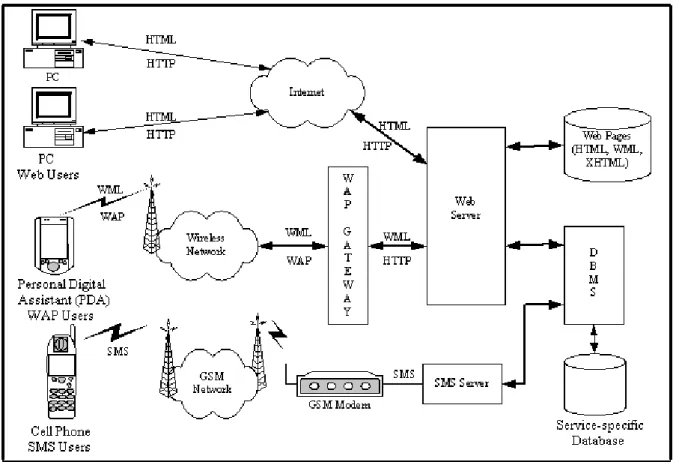
A modern electronic service delivery platform is organized, as shown in Figure 1, into a num-ber of components; each of these components and their underlining technologies are reviewed next.
2.1. The Database and Database Management System
The database, as shown in Figure 1, stores the data elements that describe the different entities and relationships involved in a given electronic service. For a grade-delivery service, for ex-ample, the database stores information about students, courses, sections, grades and teach-ers as well as the schema that describes these
data elements and the associated integrity con-straints. These constraints implement some of the application-specific rules such as the fact that a grade can only be one of A, B, C, D or F and a student grade-point-average (gpa)can only be a real number between 0.0 and 4.0, in-clusively. The database is managed by a modern database management system(DBMS) 7]such as Oracle 8], Sybase 9]or MS-SQL 10].
2.2. The Web Server and Associated Web Pages
The web sever connects, as shown in Figure 1, the service delivery system with the web and WAP 1], 2]users. In addition, it stores the dif-ferent web pages and the code/intelligence re-quired to interact with the users and the database system. Through these pages, the user can ac-cess a service or register to receive one through an SMS and/or email message.
The web pages are of two types, static and dynamic. The data content of a static web page does not change throughout its existence,
whereas, the content of a dynamic page changes based on the client input. To create dynamic web pages, a number of technologies can be used: Common Gateway Interface(CGI) script-ing 11], Personal Home Page Tools(PHP) 12], Active Server Pages (ASP) 13], Java Server Pages(JSP) 14]and Java Servlets 15].
2.3. The SMS Server
The SMS server, as shown in Figure 1, inter-faces with the users that employ their regu-lar mobile telephone sets and the SMS (Short Message Service) 3], 4] messaging service to interact with the service delivery system. At the lowest level, the SMS server connects to a number/bank of GSM (Global System for Mobile Communications) 16] – 18] modems that receive users’ SMS messages through an SMS service provider(GSM operator). Once an SMS message is received by a modem, the SMS server grabs this message, performs the re-quired checks on its content and then responds to the user by either delivering the requested ser-vice such as the user grade in the case of a grade delivery system, or the occurrence of an error (e.g. invalid user name and/or password or the unavailability of the requested service). This mode of service delivery is of the Pull type. The SMS server may also use the Push technique in delivering a service to a set of users provided they register for such a service. The pre-registration could take place through the Web, WAP or the SMS interface.
2.4. Access Devices
Different type of devices, as shown in Table 1 and Figure 1, may be used to access a service delivery system, namely, regular PCs and/or
laptops, WAP-enabled hand-held devices ( Per-sonal Digital Assistants(PDAs), smart phones) and/or regular cell phones. The interface tech-nologies and protocols available for each type of these devices are outlined next.
2.4.1. Personal/Laptop Computers
The personal/laptop computers connect to the service delivery system through the wired Inter-net/Intranet. These devices are characterized by huge memory resources, processing power, wide communication channels, large display area and high-resolution display. PC/Laptop computers run full-fledged Web browsers such as the Internet Explorer or Navigator. These browsers are capable of displaying a variety of data types, including text, voice, pictures and video. This display is specified by pow-erful GUI(Graphical User Interface)languages such as HyperText Markup Language(HTML 4.0) 19], 20]and its successor, the Extensible HyperText Markup Language (XHTML) 21]. These languages are also enhanced by client scripting languages such as JavaScript 22]and VBScript 23]. To exchange information over the wired Internet/Intranet, the web browser and the web server make use of the standard In-ternet communication Protocol, i.e. HyperText Transport Protocol(HTTP) 24].
2.4.2. WAP-enabled Handheld Devices
These devices, as shown in Figure 1, connect to the service delivery system through a wire-less network. Because of the network’s lim-ited bandwidth, these devices use the Wireless Application Protocol(WAP) 1], 2]framework and, as shown in Figure 1, a gateway to connect to the Web server. The role of the gateway is to
Access
Type AccessDevice PresentationEngine CommunicationProtocol User InterfaceSpecification
Web LaptopsPCs, browserWeb HTTP XHTMLHTML,
WAP PDAs, SmartPhones browserMicro WAP WML
SMS cell phonesRegular editorText SMS none
translate WAP into the standard Internet com-munication protocol HTTP 25]and vice versa. In addition, WAP-enabled devices are charac-terized by smaller memory size and limited pro-cessing power and therefore they run a limited version of the standard Internet browser, re-ferred to as WAP micro-browser. This browser utilizes the Wireless Markup Language(WML) 26] as a specification for the user interface. Version 1.0 of WML is based on the Extensi-ble Markup Language(XML) 5]and therefore has no resemblance to the classical HTML lan-guage. However, Version 2 of WML is based on the Extensible HTML (XHTML) 21]markup language. As a matter of fact, it is a small subset of XHTML that requires less processing power and therefore it is more suitable for the hand-held devices. WML 2.0 can support tables and simple scripting through WMLScript 26].
2.4.3. Regular Cell Phones
Regular cell phones, as shown in Table 1 and Figure 1, utilize Short Message Service(SMS) 3], 4]technology to connect users to the service delivery system. SMS is very popular among users because of its low cost and ease to use. The low cost stems from two factors: the low cost of sending and/or receiving a message and the low cost of the mobile phone supporting this service since all that is needed is a simple textual editor for message composition and display. One dis-advantage of SMS is its difficulty to construct
a highly interactive dialog between the mobile device and the service delivery system.
3. Grade Delivery Service Implementation
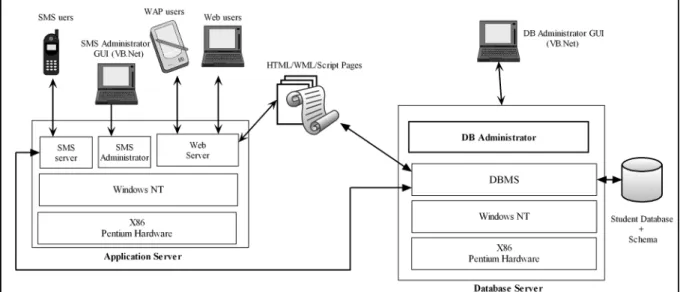
Following the architecture of section 2, a pro-totype for a grade delivery system has been im-plemented. The developed prototype, as shown in Figure 2, uses two hardware servers, the database and the application ones. The func-tionality and software components supported by these servers are presented next.
3.1. The Database Server
The database server runs Oracle/9i Database Management System(DBMS) 8]. In addition, it supports a number of software components, the implementation of which is presented next.
3.1.1. Implementation of the Student Database
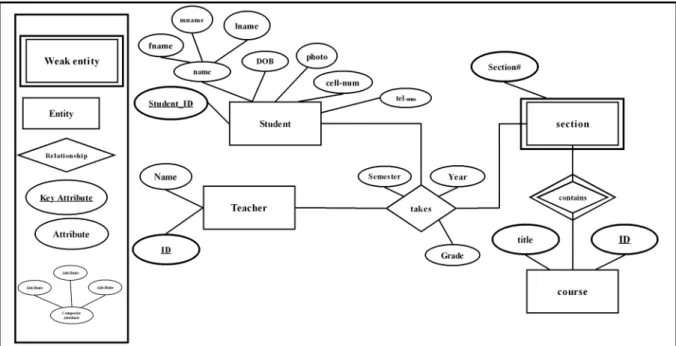
Design of the student database starts with an-alyzing the student grade posting and deliv-ery process and its data requirements and, as a result, constructing the corresponding Entity-Relationship Diagram(ERD) 7]. A simplified ERD for the students’ grades is presented in Figure 3. In this diagram, the data describing the student-grade application are organized as
Fig. 3.The Entity-Relationship Diagram for a simple student database.
a set of entities(Student, Section, Course and Teacher) interlinked by a number of relation-ships. The Student entity and its attributes, for example, capture the data associated with stu-dents(their Student IDs, Names, Date of Birth (DOB),::: etc.), whereas the Course entity cap-tures the data associated with courses (Course ID, Title,:::etc.). A relationship, on the other hand, aggregates two or more entities together and associates a meaning to that aggregation. For example, the relationship “takes” associates a student with a specific section offered by a par-ticular teacher. In Figure 3, the Section entity is modeled as a weak one owned by the Course entity. The design process proceeds by trans-forming the ERD into a relational schema and then into a database schema expressed by us-ing the Structured Query Language(SQL). The database is then created by the DBMS according to this schema. Once created, the database will be ready to receive the student-course-grade data.
3.1.2. Implementation of the Database Administrator
The Database Adminstrator tool, as shown in Figure 2, assists the system Administrator in creating and managing the student database. The Administrator tool is a GUI-based tool im-plemented by using Visual Basic(VB.Net) 27]
framework and connected to the database by us-ing Microsoft ActiveX Data Object(ADO.NET)
28]technology. ADO provides a uniform way for VB programs to connect to a variety of database management systems without having to use DBMS-specific features. The Adminis-trator Tool consists of several components in-cluding:
The database creator: this tool creates the student-grade database according to the as-sociated schema. In addition, the tool is used to clear the database tables and/or to drop the database.
The database loader: this tool helps the system administrator to load the data de-scribing students and grades from the aca-demic institution database into the grade de-livery system.
3.2. Application Server
3.3. Student Interface and Associated Web Pages
Implementation of the student interface utilizes the Extensible Markup Language(XML) 5]to represent the web data content, whereas the Ex-tensible Style Language Transformation(XSLT) style sheets are used to customize the presenta-tion of such content on the different types of
Fig. 4.Part of the client-side view of the Student Interface.
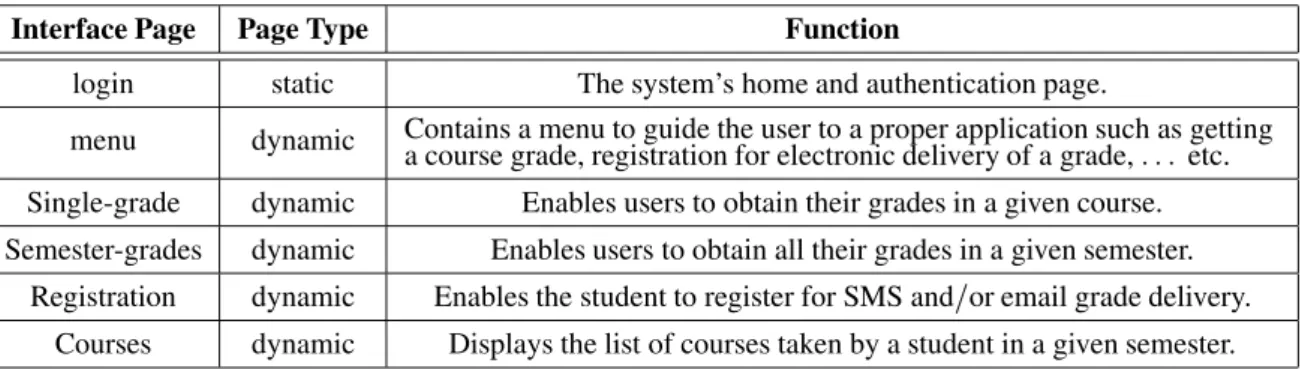
connected devices. In presenting the student in-terface, we distinguish between the client-side view, defined as the sequence of web pages rendered by an Internet browser (web users) or micro-browser(WAP users), and the server-side view defined as the set of web pages that generate the client-side ones. Figure 4 presents part of the client-side view of the grade delivery system. The web pages within such a view are written in XHTML 21] and JavaScript (web clients) 22] and WML 2] and WMLScript (WAP clients) 25]. Some of these pages, such as “login page,” are stored as is in the Web server, whereas some others, such as “menu page,” are generated by using server-side script documents. The server page that is rendered by the client is referred to as static, whereas, the page that is modified/generated by a server-side script before it is rendered by the client is referred to as dynamic. Table 2 presents the definition, functionality, and content of some of the pages within the client-side view.
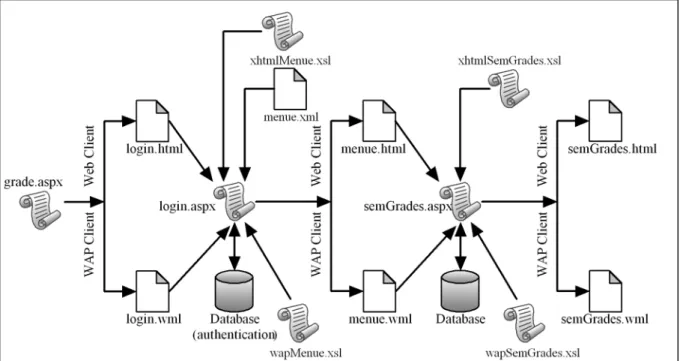
Figure 5, on the other hand, presents part of the server-side Web map/pages, whereas the defini-tion, functionality and content of some of these pages are presented in Table 3. At the root of this map is the Active Server Pages(ASP) 13] docu-ment grade.aspx with Visual Basic Script( VB-Script) 23] as the scripting language. When referenced, as shown in Figure 5, grade.aspx
Interface Page Page Type Function
login static The system’s home and authentication page.
menu dynamic Contains a menu to guide the user to a proper application such as gettinga course grade, registration for electronic delivery of a grade, ::: etc. Single-grade dynamic Enables users to obtain their grades in a given course. Semester-grades dynamic Enables users to obtain all their grades in a given semester.
Registration dynamic Enables the student to register for SMS and/or email grade delivery. Courses dynamic Displays the list of courses taken by a student in a given semester.
Table 2.Definition of the client-side view of the Grade Delivery Interface.
Page Function
grade.aspx The starting page of the grade-delivery application. It is a VBScript-based ActiveServer Pages(ASP)document that sends the client login.html or login.wml, depending on the connecting client type.
login.html/
login.wml An XHTML/WML page that collects, from a Web/WAP device, the user’s name and password for authentication.
menu.aspx A VBScript-based ASP document that receives user name and password andcommunicates with the student database for authentication.
menu.xml The generic Extensible Markup Language(XML)representation of the menu page/document.
xhtmlMenu.xsl/
wapMenu.xsl An XSLT document that transforms the menu XML document into an XHTML /WML one suitable for display by a web/WAP browser.
menu.html/
menu.wml Dynamically generated XHTML/WML page that displays, on a Web/WAP browser, different menu items available for a student.
semGrades.aspx An ASP page that generates the list of courses, and the associated grades, taken bya student for a given semester.
xhtmlSemGrades.xsl/
wapSemGrades.xsl An XSLT document that transforms the generic XML representation of the course--grade list into an XHTML/WAP one suitable for display by a web/WAP browser. semGrades.html/
semGrades.wml Dynamically generated XHTML/WML page that displays, on a web/WAP browser, the list of courses and grades for a given semester.
Table 3.Server-side Grade Delivery pages/documents.
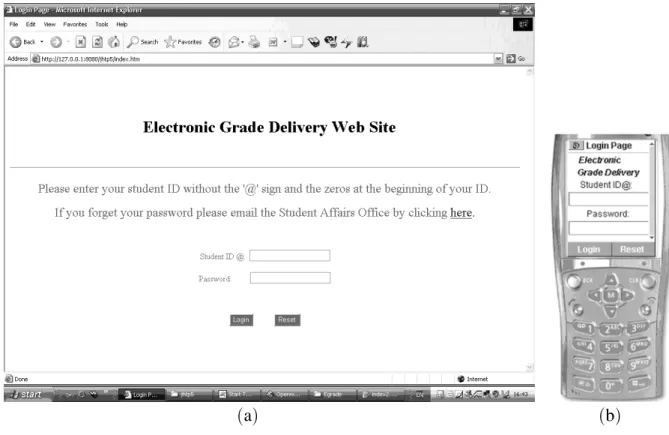
identifies the type of connecting client and redi-rects the reference to the appropriate login page. If the client type is a web-browser, Internet Ex-plorer or Internet Navigator, for example, the client is redirected to login.html which gets ren-dered as shown in Figure 6-a, whereas if the client type is a WAP-based micro-browser, the client is redirected to login.wml which gets ren-dered as shown in Figure 6-b.
The VBScript, presented below, shows a seg-ment of grade.aspx. When a client connects to a web server, the former stores an iden-tifying string of characters into the server’s HTTP USER AGENT environment variable. The VBScript segment, presented below, then searches
this string for the keyword that identifies the type of the connecting client. The appropriate login page is then identified, based on the search outcome, and sent to the client for display.
<% @language=“VBScript %>
<%
Option Explicit Dim client
‘get user agent string
client=Request.ServerVariables
(“HTTP USER AGENT”)
if(InStr(client, “SonyEricsson”)< > 0)
then
Call Response.Redirect(“login.wml”)
(a) (b)
Fig. 6.Rendered login page using(a)an Internet browser and(b)a WAP micro-browser.
then
Call Response.Redirect(“login.html”)
end IF %>
The rendered version of login.html or login.wml, as shown in Figure 6, contains two input fields, the student ID and password. Once the user types his/her data into these fields and presses the login button, the client directs the entered data to the server ASP document menu.aspx. As a result, menu.aspx creates and sets up an ActiveX Data Object(ADODB) and connects to the Student database. Through this object, menu.aspx retrieves the data needed to authen-ticate users. If the authentication is success-ful, menu.aspx loads a generic XML represen-tation of the menu page, a fragment of which is shown below, and applies the appropriate XSLT sheet(xhtmlMenu.xsl or wmlMenu.xsl, depending on the type of the connecting client), to generate menu.html, an XHTML document, or menu.wml, a WML document. The resulting document is then sent to the connecting client for display. Figure 7 presents menu.html and menu.wml as rendered by the Web and WAP browsers, respectively.
<menuitems>
<mitem ID=“1”>
<icon img=“SingleGradeIcon.jpg” />
<title link=“singleGrade.aspx” > Get a
Grade </title>
<description>
Click here to get a single-course grade </description>
</mitem>
<mitem ID=“2”>
<icon img=“semesterGradeIcon.jpg”/>
<title link=“SemesterGrades.aspx” >
Get the Semester Grades </
ti-tle>
<description> Click her to know about Past and Current Candidates </description>
</mitem>
... <! - - Definition of other Menu items - - > </menuitems>
process-(a) (b)
Fig. 7.Rendered menu page using(a)an Internet browser and(b)a WAP micro-browser.
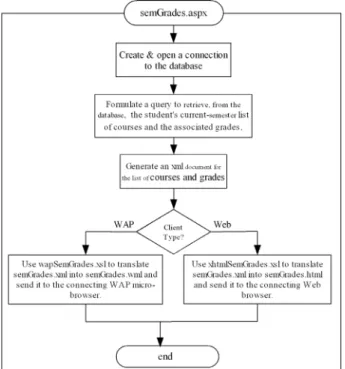
ing continues by retrieving the list of courses taken by the student during the current semester and generating an XML document that repre-sents the retrieved list and the associated grades. semGrades.aspx continues by applying the ap-propriate XSLT sheet(xhtmlSemGrades.xsl or wapSemGrades.xsl, depending on the type of the connecting client), to generate semGrades. html, an XHTML document, or semGrade.wml, a WML document. The resulting document is then sent to the connecting client for display.
3.4. SMS Server Implementation
The SMS server, as shown in Fig. 3, is a software subsystem running on the application server. It monitors the GSM modems, processes the re-ceived SMS messages, and interacts with the database server accordingly. Different message types are processed by the SMS server, namely, registration for receiving grades electronically, getting a course grade, getting the courses and grades of an entire semester,::: etc.
Fig. 8.The sequence of tasks performed by semGrades.aspx.
excep-tion of those that request general informaexcep-tion, is accompanied by the student’s user name and password. For the grade delivery system, the SMS message is transmitted as a clear text. For low-security systems, such as the grade delivery one, this solution is deemed satisfactory. How-ever, for services that require higher levels of privacy and security, such as SMS-based finan-cial transactions, the clear-text message trans-mission is unacceptable because of the easiness with which this message could be intercepted and its information stolen. To remedy this sit-uation, off-the-shelf or custom-built encryption and decryption software modules granting secu-rity and privacy of the transmitted data must be used to augment the SMS messaging system. Other protection mechanisms, including those that mitigate/eliminate identity-theft, must also be implemented.
The SMS server is implemented as a set of co-operating processes which utilizes Visual Basic as a programming language. It also utilizes ADO.Net technology to connect to the student database. The SMS Sever is administered by a GUI-based tool. This tool is used to config-ure, run and stop the SMS Server as well as the initialization of the GSM modem bank.
4. Conclusion & Lessons Learned
Different features and underlining technologies of modern electronic service delivery systems have been presented. As a case study, this paper has also presented the implementation of a pro-totype for a system capable of delivering student grades within a university setting. The system can be accessed any time, anywhere and using different types of devices including PCs con-nected to wired Internet/Intranet, WAP-enabled mobile devices such as Personal Digital Assis-tants(PDAs)and smart phones, and SMS-based regular phones.
Several lessons have been learned from the pre-sented case study, namely:
Uniformity of the XML-based Solution:
the XML-based implementation proved to be effective in uniformly handling the Web and WAP types of connecting devices. To avoid web content replication for each type of the connecting clients, the implemented system separates the data content from its
presentation form. This separation is achie-ved by using the Extensible Markup Lan-guage(XML)to represent the data content, and the Extensible Style Language Trans-formation(XSLT)style sheets to customize the presentation of such data on the Web and WAP type of devices. This solution can eas-ily be extended to device-specific customiza-tion of data display. This customizacustomiza-tion is achieved by writing a separate XSLT sheet specific for each of the mobile devices. The XSLT sheet, in this case, customizes the data display on that device exploiting its specific characteristics including the size of its dis-play area, thus, achieving true “author once, publish to any device” design and implemen-tation.
Extensibility of the XML-based Solution:
extensibility, in the context of this paper, im-plies the ability of the presented prototype to support additional mobile devices with rel-ative easiness and little programming effort. The XML-based solution presented here is definitely extensible since the support of a new device requires the addition of another XSLT style sheet to customize the data dis-play for the new connecting device.
Steep learning curve: uniformity and ex-tensibility of the XML-based solution, as presented in this paper, comes with a heavy price, namely, the need of the development team to master a wide variety of sophisti-cated tools, technologies and programming environments needed to implement this type of systems. Besides mastering client-side technologies such as XHTML, WML and VBscript, the team has to learn the Server-side ones such as Active Server Pages(ASPs), XML and XSLT style sheets. In addition, the team needs to learn and master the database-side technologies such as database modeling and design and SQL programming. System programming is also required as a tool to de-velop various processes within the system.
Acknowledgment
This work was supported in part by an American University of Sharjah(AUS)Grant. The author would like to thank AUS for their support.
References
1] GSM World: What is WAP? Online:
http://www.gsmworld.com/technology/wap/ intro.shtml.
2] WAP Specification Releases. Online:
http://www.wapforum.org/what/technical. htm.
3] GSM World: What is SMS? Online:
http://www.gsmworld.com/technology/sms/ intro.shtml.
4] SMS Forum. Online: http://www.smsforum.
net.
5] Extensible Markup Language(XML)1.0. Online:
http://www.w3.org/TR/REC-xml.
6] XSL Transformations(XSLT)Version 1.0. Online:
http://www.w3.org/TR/xslt.
7] R. ELMASRI ANDS.B. NAVATHE, Fundamentals of
Database Systems, 4th ed., Pearson/Addison Wes-ley Publisher.
8] J. MORRISON ANDM. MORRISON,Guide to Oracle
9i, Thomson Course technology, 2003.
9] D. MCGOVERAN ANDC.J. DATE,A Guide to Sybase
and SQL Server, Addison-Wesley Publisher.
10] S. BJELETICH ANDG. MABLE,Microsoft SQL Server
7.0 Unleashed, Sams Publisher.
11] S. GUNDAVARAM, G BIRZNIEKS AND S. GUELICH,
CGI Programming with Perl, 2nd ed., Oreilly & Associates, 2000.
12] H.M. DEITEL, P.J. DEITEL, T.R. NIETO AND K. STEINBUHLER, Internet, World Wide Web How to
Program, 2nd ed., Prentice Hall, 2002, pp. 1008– 1055.
13] H.M. DEITEL, P.J. DEITEL, T.R. NIETO AND K. STEINBUHLER, Internet, World Wide Web How to Program, 2nd ed., Prentice Hall, 2002, pp. 831–907.
14] H. BERGSTEN,JavaServer Pages, 3rd ed., Oreilly & Associates, 2003.
15] J. HUNTER ANDW. CRAWFORD, Java Servlet
Pro-gramming, 1st ed., Oreilly & Associates, 1998.
16] GSM World: http://www.gsmworld.com/
technology/gsm.shtml
17] M. MOULY ANDM. PAUTET,The GSM System for
Mobile Communications. Online:
http://www.telecompublishing.com/ gsm-system-for-mobile.shtml
18] J. SCOURIAS, “Overview of the Global System for Mobile Communications.” Online:
http://www.shoshin.uwaterloo.ca/ jscouria/GSM/gsmreport.html.
19] HyperText Markup Language Home Page: Online:
http://www.w3.org/MarkUp/
20] HTML 4.01 Specifications. Online:
http://www.w3c.org/TR/html401.
21] XHTML 1.0: The Extensible HyperText Markup Language. Online: http://www.w3.org/TR/ xhtml1.
22] H.M. DEITEL, P.J. DEITEL, T.R. NIETO AND K. STEINBUHLER, Internet, World Wide Web How to
Program, 2nd ed., Prentice Hall, 2002, pp. 194–434.
23] H.M. DEITEL, P.J. DEITEL, T.R. NIETO AND K. STEINBUHLER, Internet, World Wide Web How to
Program, 2nd ed., Prentice Hall, 2002, pp. 784–830.
24] FIELDING, et. al., “HyperText Transport Protocol – HTTP/1.1” RFC 2616, June 1999. Online:
http://www.ietf.org/rfc/rfc2616.txt.
25] H.M. DEITEL, P.J. DEITEL, T.R. NIETO AND K. STEINBUHLER, Wireless Internet, & Mobile
Busi-ness – How To Program, Prentice Hall, 2002, pp. 446–489.
26] H.M. DEITEL, P.J. DEITEL, T.R. NIETO AND K. STEINBUHLER, Wireless Internet,& Mobile Busi-ness – How To Program, Prentice Hall, 2002, pp. 492–660.
27] R. STEVEN, R. PETRUSHA ANDP. LOMAX,VB.NET
Language in a Nutshell, 2nd ed., O’RELLY.
28] B. HAMILTON, ADO.NET Cookbook, O’RELLY, 2003.
Received: June, 2005
Revised: January, 2006
Accepted: February, 2006
Contact address:
Ghassan Z. Qadah Computer Engineering Department American University of Sharjah P.O. Box 26666, Sharjah United Arab Emirates e-mail:[email protected]
GHASSANZ. QADAHobtained his BSc from the Electrical Engineering Department of Ain-shames University, Cairo, Egypt, and MSc. and PhD. from the Electrical and Computer Engineering Department of the University of Michigan-Ann Arbor. Currently, he is an Associate Pro-fessor at the Computer Engineering Department, American University of Sharjah, P.O. Box 26666, Sharjah, United Arab Emirates. His re-search interest includes serial and parallel query processing algorithms, traditional and non-traditional database systems, wireless networks and mobile computing.